

Software-ul pentru gestionarea campaniilor de marketing este un instrument valoros pentru orice companie. Cu software-ul potrivit, echipele pot îmbunătăți eficiența campaniilor și colaborarea. Totuși, găsirea software-ului potrivit pentru gestionarea campaniilor de marketing poate fi dificilă, mai ales atunci când există numeroase opțiuni.
Folosindu-mi experiența cu software-urile de marketing, am testat și comparat mai multe dintre cele mai bune software-uri disponibile pentru gestionarea campaniilor de marketing. Apoi, mi-am compilat rezultatele în recenzii detaliate pentru a te ajuta să găsești cel mai bun software pentru nevoile tale.
Why Trust Our Software Recommendations
6,700+
Reviews
20
Industry experts
16+
Evaluation factors
14
Years
Our team has been testing and reviewing software since 2012. As marketing leaders ourselves, we know how difficult—and important—it is to choose the right software.
For this guide, we evaluated tools using hands-on testing and independent research, scoring tools using our selection criteria.
Our reviews reflect our human editorial judgment, not a sales pitch.
Expert reviewers:
 Gui DrusinaCreative Director
- Shriya GhateSenior Marketing Lead
 Amanda JacquesMarketing Ops Leader

Tabel comparativ: software pentru gestionarea campaniilor de marketing
Acest tabel comparativ rezumă detaliile privind prețurile pentru selecțiile mele de top de software-uri pentru gestionarea campaniilor de marketing.
Sorted by: Default
| Tool | Starting Price | Website | |
|---|---|---|---|
Best with advanced call tracking analytics | 5.0 out of 5 | Pricing upon request Free demo available | Website |
Best for behavioral-based messaging | 4.2 out of 5 | $100/month Free plan + 14-day trial + demo available | Website |
Best for flexible project management | 4.6 out of 5 | $20/user/month Free plan available | Website |
Best for team collaboration features | 4.4 out of 5 | $10.99/user/month Free plan + free trial + free demo available | Website |
Best for centralized marketing data | 4.5 out of 5 | Pricing upon request Free demo available | Website |
Best for email marketing automation | 4.4 out of 5 | Pricing upon request 14-day free trial + free demo available | Book Demo |
Best for cross-channel campaign management | 4.4 out of 5 | Pricing upon request Free demo available | Website |
Best for customizable email designs | 4.2 out of 5 | Pricing upon request Free plan + 30-day free trial available | Website |
Best for small business email tools | 4.2 out of 5 | $12/month Free trial available | Website |
Best for enterprise solutions | 4.4 out of 5 | $25/user/month Free plan + 30-day free trial available | Website |


Recenzii ale celor mai bune software-uri pentru gestionarea campaniilor de marketing
Mai jos sunt rezumatele mele detaliate ale celor mai bune software-uri pentru gestionarea campaniilor de marketing din lista mea scurtă. Recenziile mele oferă o analiză detaliată a principalelor funcții, avantaje și dezavantaje, integrări și cazuri ideale de utilizare pentru fiecare instrument, pentru a te ajuta să îl găsești pe cel mai bun.
 Best with advanced call tracking analytics
- Free demo available
- Pricing upon request
Visit WebsiteCustomer Rating:5/5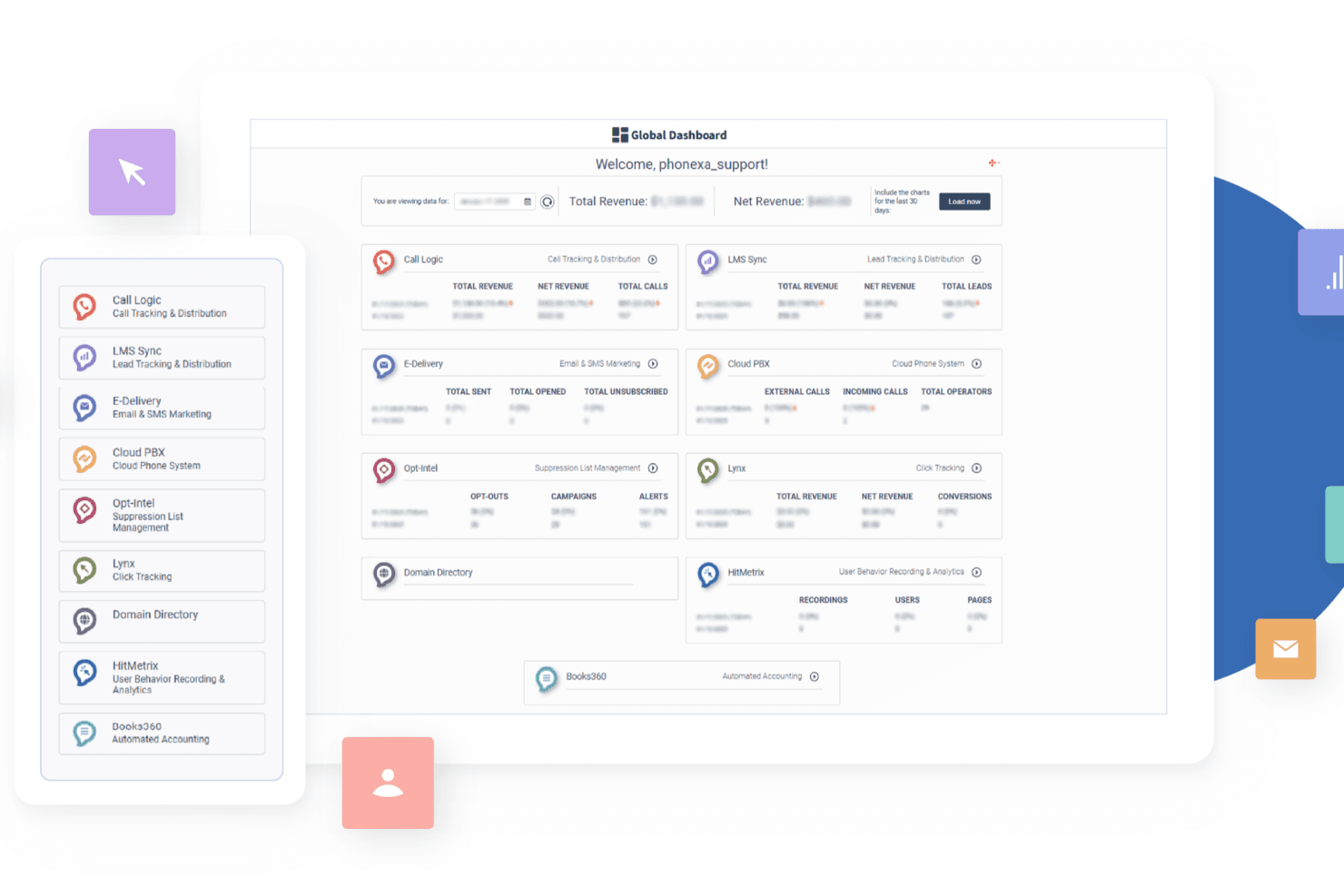
Phonexa’s global dashboard centralizes call tracking, lead distribution, email and SMS marketing, analytics, and revenue reporting so you can manage and optimize campaigns from a single interface. Phonexa is a lead and call tracking, analytics, and distribution platform that brings together email marketing, SMS marketing, accounting, and reporting into one ecosystem for managing traffic and lead flows.
Who Is Phonexa Best For?
Phonexa is a good fit for large-scale marketing teams at lead generation agencies and businesses that rely on inbound calls and multi-channel campaigns.
Why I Picked Phonexa
I picked Phonexa as one of the best because its advanced call tracking analytics let me see exactly which campaigns drive inbound calls and conversions. I use dynamic number insertion and multi-touch attribution to connect calls to specific marketing sources. The reporting dashboard gives my team granular insights into call behavior and campaign ROI.
Phonexa Key Features
- Lead management system: Centralizes, scores, and routes leads from multiple sources in one dashboard.
- Email and SMS marketing: Lets you create, schedule, and track email and SMS campaigns within the platform.
- Built-in fraud prevention: Detects and blocks suspicious leads and traffic using customizable rules.
- API and webhook support: Connects Phonexa with your CRM, analytics, and other marketing tools for data sync.
Phonexa Integrations
Phonexa offers 100+ native integrations across popular marketing technology platforms, including native integrations with HubSpot and Salesforce. An API is available for custom integrations.
Pros and Cons
Pros:
- Reusable templates support recurring call campaigns
- Drop-off reporting pinpoints IVR caller exits
- Call-source attribution clarifies inbound campaign ROI
Cons:
- Complex setup can slow campaign configuration
- No budget tracking or cross-channel campaign calendar
Learn more about Phonexa: Best for behavioral-based messaging
- Free plan + 14-day trial + demo available
- From $100/month
Visit WebsiteCustomer Rating:4.2/5
Customer.io offers a campaigns dashboard where users can monitor personalized email campaigns with metrics like delivered, opened, clicked, and converted rates. Customer.io is a customer engagement platform that combines multi-channel campaign orchestration, automated journey building, and transactional messaging into a single data-driven system.
Who Is Customer.io Best For?
Customer.io is a strong fit for product-led SaaS teams and growth marketers who need granular control over how and when messages reach users based on in-app behavior and event data.
Why I Picked Customer.io
I picked Customer.io as one of the best for behavioral-based messaging because of how deeply behavior is wired into its segmentation engine. You can build audience segments using unlimited behavioral conditions—pages viewed, in-app actions, event history—and those segments update in real time. I also love that you can trigger campaigns directly off those segments, so a user who hits a specific action in your product can enter a journey instantly, without any manual intervention.
Customer.io Key Features
- Visual workflow builder: Design multi-step campaign journeys using a drag-and-drop canvas with branching logic and time delays.
- A/B and multivariate testing: Run split tests on messages or journey paths directly within a campaign to compare performance.
- Multi-channel messaging: Send campaigns across email, SMS, push notifications, in-app messages, and WhatsApp from one platform.
- Conversion goal tracking: Set campaign-level conversion goals and track whether recipients complete a target action after receiving a message.
Customer.io Integrations
Customer.io offers a large integration directory spanning data-in and data-out connections, including Salesforce, HubSpot, Segment, Snowflake, Amplitude, Mixpanel, Slack, Twilio, Google Analytics 4, and Google Ads. It also connects with Zapier and provides REST APIs, webhooks, and SDKs for custom integrations.
Pros and Cons
Pros:
- Deep segmentation using custom user attributes
- Event-driven triggers based on product activity
- Multichannel workflows across email, SMS, and push
Cons:
- Workflow sections can't be saved and reused
- No native landing page or form builder
Learn more about Customer.io: Best for flexible project management
- Free plan available
- From $20/user/month (billed annually)
Visit WebsiteCustomer Rating:4.6/5
Airtable is a customizable project management tool for various business functions. Airtable is a flexible project management tool designed for teams needing a customizable workflow. It supports a range of business functions, from organizing marketing campaigns to managing product development tasks.
Why I picked Airtable: Its flexibility in project management is ideal for teams with diverse needs. You can customize workflows with ease, adapting to various project requirements. Features like grid view, kanban boards, and calendar view allow your team to visualize projects in different formats. Airtable's versatility makes it suitable for marketing teams that require tailored solutions.
Standout features & integrations:
Features include a grid view for data organization, kanban boards for task management, and a calendar view to track project timelines. Your team can switch between views to find the layout that works best for them. Airtable also offers forms to collect data seamlessly within your projects.
Integrations include Slack, Google Workspace, Dropbox, Zapier, Salesforce, Asana, Trello, Jira, Mailchimp, and GitHub.
Pros and Cons
Pros:
- Quick data entry forms
- Flexible view options
- Highly customizable workflows
Cons:
- Lengthy initial setup
- Limited advanced features
Learn more about Airtable: Best for team collaboration features
- Free plan + free trial + free demo available
- From $10.99/user/month (billed annually)
Visit WebsiteCustomer Rating:4.4/5
Asana enhances team collaboration with task management and project tracking. Asana is a project management tool designed for teams looking to enhance collaboration. It supports task management, project tracking, and team communication, and supports a variety of visual planning options and workflow automations.
Why I picked Asana: It's designed to improve team collaboration, making it easy for your team to stay on track. Features like task assignments and deadlines help keep everyone accountable. The timeline view allows you to map out project plans visually. Asana's focus on collaboration tools makes it a great choice for various marketing channels working together on simultaneous project tasks or for approval workflow processes.
Standout features & integrations:
Features include task assignments, project timelines, and deadline tracking. Your team can see what needs to be done and when, reducing the chance of missed tasks. Asana also provides a calendar view to help you manage your team's schedule effectively.
Integrations include Slack, Microsoft Teams, Google Workspace, Dropbox, Jira, Salesforce, Trello, Zoom, GitHub, and Adobe Creative Cloud.
Pros and Cons
Pros:
- Effective deadline tracking
- Clear task assignments
- Visual project timelines
Cons:
- Limited advanced reporting
- Can be complex initially
 Best for centralized marketing data
- Free demo available
- Pricing upon request
Visit WebsiteCustomer Rating:4.5/5
Adverity centralizes marketing campaign data for cross-channel analysis and reporting. For marketing teams that need a centralized view of campaign data, Adverity provides a practical solution for managing and analyzing performance across channels. By consolidating data from hundreds of marketing platforms, it supports agencies and enterprise teams that rely on consistent, reliable campaign reporting. This centralized data approach helps teams evaluate campaign results, identify gaps, and make informed adjustments based on complete and accurate insights.
Why I Picked Adverity
I picked Adverity because it excels in centralizing and automating marketing data, which is crucial for effective campaign management. The platform's extensive data connectors and transformation capabilities allow your team to harmonize data from various sources, ensuring consistency across campaigns. Additionally, Adverity's AI-driven insights provide actionable intelligence, enabling you to make data-driven decisions that enhance your marketing outcomes.
Adverity Key Features
In addition to centralized marketing data, Adverity offers:
- Data Collection and Monitoring: This feature automates the gathering of marketing data from diverse sources, allowing your team to focus on analysis rather than data entry.
- Enterprise-Grade Security: Adverity complies with standards like ISO 27001 and GDPR, providing peace of mind that your data is secure.
- Cross-Channel Reporting: Enables teams to compare performance across platforms like search, social, and display in a single view.
- Custom Dashboards and Reports: Allows users to build tailored reports that match specific campaign goals and stakeholder needs.
Adverity Integrations
Integrations include Google Campaign Manager, Meta, TikTok, HubSpot, Salesforce, Snowflake, Amazon Redshift, Microsoft Azure, Tableau, and Looker Studio.
Pros and Cons
Pros:
- Reduces manual reporting by automating data collection and normalization
- Scales well for agencies and enterprise marketing teams managing complex campaigns
- Supports both ETL and ELT workflows for flexible data management
Cons:
- Not ideal for smaller businesses seeking simpler BI solutions
- More focused on data management and analytics than campaign execution
Learn more about Adverity: Best for email marketing automation
- 14-day free trial + free demo available
- Pricing upon request
Visit WebsiteCustomer Rating:4.4/5
ActiveCampaign automates email workflows and tracks customer interactions. ActiveCampaign is a marketing automation tool aimed at businesses focusing on email marketing. It helps manage email campaigns, automate workflows, and track customer interactions effectively.
Why I picked ActiveCampaign: It's tailored for email marketing automation, providing features that simplify campaign management. The automation builder allows your team to create complex workflows easily. With its segmentation options, you can target specific audiences for personalized campaigns. The reporting tools give you insights into campaign performance, helping refine strategies for better results.
Standout features & integrations:
Features include an automation builder that lets you craft detailed workflows. Segmentation options help target specific audience segments with tailored messages. Reporting tools provide insights into campaign performance, aiding in strategy adjustments.
Integrations include Shopify, Salesforce, WordPress, Facebook, Zapier, Slack, Adobe Commerce, PayPal, Wix, and Stripe.
Pros and Cons
Pros:
- Insightful reporting tools
- Strong segmentation options
- Advanced automation features
Cons:
- Limited template designs
- Initial setup complexity
Learn more about ActiveCampaign: Best for cross-channel campaign management
- Free demo available
- Pricing upon request
Visit WebsiteCustomer Rating:4.4/5
Iterable helps businesses create, execute, and analyze multi-channel strategies. Iterable is a marketing automation platform designed for businesses aiming to manage campaigns across multiple channels. It empowers teams to create, execute, and analyze marketing strategies effectively.
Why I picked Iterable: It excels in cross-channel campaign management, allowing your team to engage customers across email, SMS, and social media. The workflow automation feature streamlines campaign execution. With its audience segmentation, you can target specific customer groups with precision. Iterable's analytics provide insights that help refine your marketing strategies.
Standout features & integrations:
Features include workflow automation that simplifies campaign execution, allowing you to manage campaigns across different channels efficiently. Audience segmentation lets you target specific customer groups with tailored messages. Analytics provide insights into campaign performance, aiding in strategy refinement.
Integrations include Salesforce, Slack, Shopify, Marketo, Facebook, Google Analytics, Segment, Twilio, SendGrid, and Zendesk.
Pros and Cons
Pros:
- Scalable for growing businesses
- Flexible workflow automation
- Detailed analytics reports
Cons:
- Requires technical expertise
- High initial cost
Learn more about Iterable Nova Agent: Best for customizable email designs
- Free plan + 30-day free trial available
- Pricing upon request
Visit WebsiteCustomer Rating:4.2/5
Campaign Monitor helps businesses create, send, and optimize email campaigns. Campaign Monitor is an email marketing platform designed for businesses that need customizable email solutions. It aids in creating, sending, and optimizing email campaigns to engage audiences effectively.
Why I picked Campaign Monitor: Its focus on customizable email designs allows your team to create visually appealing campaigns. The drag-and-drop editor simplifies the design process, making it easy to tailor emails to your brand. With customizable templates, you can ensure every email aligns with your marketing goals. Campaign Monitor's emphasis on design flexibility sets it apart from other options.
Standout features & integrations:
Features include a drag-and-drop editor that makes email design straightforward. Customizable templates let you align emails with your brand. Advanced analytics provide insights into campaign performance, helping you refine your strategies.
Integrations include Shopify, Salesforce, WordPress, WooCommerce, Facebook, Google Analytics, Adobe Commerce, Zapier, Stripe, and Eventbrite.
Pros and Cons
Pros:
- Intuitive email editor
- Flexible design options
- Highly customizable templates
Cons:
- Less suitable for complex workflows
- Limited automation features
Learn more about Campaign Monitor: Best for small business email tools
- Free trial available
- From $12/month
Visit WebsiteCustomer Rating:4.2/5
Constant Contact helps small businesses create, automate, and track emails. Constant Contact is an email marketing platform designed for small businesses that need easy-to-use tools for managing email campaigns. It facilitates the creation, automation, and tracking of email communications to help engage with customers effectively.
Why I picked Constant Contact: It's particularly suited for small business email tools, providing features that simplify the marketing process. The drag-and-drop editor allows your team to design emails quickly. With automation tools, you can set up welcome emails and drip campaigns effortlessly. Constant Contact's tracking features offer insights into email performance, helping refine your marketing efforts.
Standout features & integrations:
Features include a drag-and-drop editor for easy email design. Automation tools help you set up welcome emails and drip campaigns. Tracking features provide insights into how your emails perform, enabling you to make data-driven decisions.
Integrations include Shopify, WooCommerce, QuickBooks, WordPress, Eventbrite, Salesforce, Zapier, Google Analytics, Facebook, and Instagram.
Pros and Cons
Pros:
- Provides performance insights
- Effective automation options
- Easy email design tools
Cons:
- Not ideal for large campaigns
- Limited advanced features
Learn more about Constant Contact: Best for enterprise solutions
- Free plan + 30-day free trial available
- From $25/user/month
Visit WebsiteCustomer Rating:4.4/5
Salesforce is a CRM platform for sales, customer service, and automation. Salesforce is a CRM platform designed for large enterprises to manage customer relationships and marketing campaigns. It facilitates sales tracking, customer service, and marketing automation, providing a holistic approach to business management.
Why I picked Salesforce: It's tailored for enterprise solutions, offering a wide array of features that cater to large organizations. The customizable dashboards allow your team to track key metrics efficiently. With advanced CRM functionalities, you can manage customer interactions at scale. Salesforce's detailed reporting tools provide deep insights into business performance, aligning with enterprise needs.
Standout features & integrations:
Features include customizable dashboards that let you track metrics important to your business. Advanced CRM functionalities help manage customer interactions and sales at scale. Robust reporting tools provide insights into business performance, aiding strategic decision-making.
Integrations include Slack, Microsoft Teams, Google Workspace, Mailchimp, QuickBooks, Dropbox, Docusign, Zapier, LinkedIn, and HubSpot.
Pros and Cons
Pros:
- Supports complex workflows
- Scalable for large organizations
- Extensive customization options
Cons:
- Limited for small businesses
- Requires technical expertise
Learn more about Salesforce :
Alte software-uri pentru gestionarea campaniilor de marketing
Iată câteva opțiuni suplimentare de software pentru gestionarea campaniilor de marketing care nu au ajuns pe lista mea scurtă, dar merită totuși verificate:
- 11MailchimpBest beginner-friendly interface
- 12WhatConvertsBest for lead tracking analytics
- 13SmartsheetBest for scalable project tracking
- 14PipedriveBest for sales-focused campaigns
- 15BrazeBest for mobile engagement
- 16SAS Customer Intelligence 360Best for data-driven marketing
- 17Zoho CampaignsBest for small business outreach
- 18Zoho Marketing PlusBest for unified marketing efforts
- 19BrevoBest for transactional email services
- 20monday.comBest for team project management
- 21CamphouseBest for media planning
How I Evaluate Marketing Campaign Management Software
I evaluate tools in two layers: the baseline a tool must hit—multi-channel execution, automation, analytics—and the differentiators, like AI personalization and CRM depth, that set the best tools apart.
Core Functionality (Table Stakes For This List)
When I'm selecting tools for my list, I rank each one on a scale from 0 (does not offer the functionality) to 5 (excels in this area) for each core functionality listed below. Then, I calculate the tool's total score into a percentage. Each tool needs to achieve a minimum total score of 75% to be considered for inclusion.
- Multi-Channel Campaign Orchestration: I look at how many channels a tool natively supports and whether you can coordinate a product launch across email, social, paid, and SMS from one workspace.
- Campaign Workflow & Planning: Each tool gets evaluated on its ability to map out campaign stages, assign tasks, and route approvals—like getting creative sign-off before a webinar goes live.
- Audience Segmentation & Targeting: I check whether you can build dynamic segments based on behavior, demographics, or engagement history and apply them directly to campaign sends.
- Campaign Performance Analytics: Reporting should tie results back to specific campaigns, channels, and assets so you can compare, say, a nurture sequence's conversion rate against a paid retargeting effort.
- Marketing Automation & Triggers: The tool should let you build multi-step workflows triggered by audience actions—like enrolling a lead into a drip sequence after a form submission or webinar attendance.
- Asset & Content Management: I evaluate whether the platform provides a centralized library for templates, images, and copy blocks that teams can pull from when assembling campaign deliverables.
Once I have a list of tools that meet the criteria, I consider what sets each platform apart.
Differentiating Factors (What Sets Vendors Apart)
Here's how I compare and contrast different vendors:
Standout Features
I pay close attention to built-in A/B and multivariate testing because it lets you experiment with subject lines, creative, or audience splits without leaving the platform. Predictive optimization takes this further—tools that recommend send times or channel allocation based on historical data save real time during high-volume periods like seasonal campaigns. I also evaluate budget and spend tracking, especially whether you can tie actual spend back to campaign-level ROI instead of pulling numbers from spreadsheets.
Beyond Features
Integration depth matters—I check whether a tool connects natively to your CRM and ad platforms so campaign data flows into pipeline reporting without manual exports. Scalability is another factor I weigh, particularly whether the platform supports role-based permissions and multi-brand structures for teams running campaigns across regions or business units. Compliance capabilities like built-in consent management and audit logs also come into play, especially for teams sending campaigns subject to GDPR or CCPA requirements.
Cum să alegi software-ul pentru gestionarea campaniilor de marketing
Este ușor să te pierzi în liste lungi de funcții și structuri complexe de prețuri. Pentru a te ajuta să rămâi concentrat în timp ce parcurgi procesul tău unic de selectare a software-ului, iată o listă de verificare cu factorii de care trebuie să ții cont:
| Factor | Aspecte de luat în considerare |
| Scalabilitate | Se va dezvolta software-ul odată cu echipa și campaniile tale? |
| Integrări | Se conectează la instrumentele și platformele existente? |
| Posibilitate de personalizare | Îl poți adapta pentru a răspunde nevoilor specifice ale echipei tale? |
| Ușurință în utilizare | Este interfața intuitivă pentru navigarea echipei tale? |
| Buget | Se încadrează software-ul în limitele tale financiare? |
| Măsuri de securitate | Există măsuri de securitate solide pentru protejarea datelor tale? |
| Asistență | Ce nivel de asistență pentru clienți este disponibil pentru echipa ta? |
| Analiză | Oferă informații utile pentru a măsura eficient succesul campaniilor? |
Folosește această listă de verificare pentru a-ți menține organizat și clar procesul de selectare a software-ului.
Tendințe în software-ul pentru gestionarea campaniilor de marketing
În cercetarea mea, am colectat nenumărate actualizări de produse, comunicate de presă și jurnale de lansare de la diferiți furnizori de software pentru gestionarea campaniilor de marketing. Iată câteva dintre tendințele emergente pe care le urmăresc:
- Personalizare bazată pe inteligență artificială: Inteligența artificială este utilizată pentru a crea mesaje de marketing personalizate. Prin analizarea datelor despre clienți, inteligența artificială poate sugera cel mai bun conținut și cel mai potrivit moment pentru campanii.
- Optimizarea căutării vocale și vizuale: Pe măsură ce căutările vocale și vizuale se extind, optimizarea campaniilor pentru aceste medii devine esențială. Această tendință îi ajută pe utilizatori să ajungă la publicuri care folosesc boxe inteligente și instrumente de căutare vizuală.
- Experiențe de realitate augmentată (AR): Realitatea augmentată este integrată în campanii pentru a spori implicarea utilizatorilor. Aceasta le permite clienților să interacționeze virtual cu produsele, oferind o experiență unică.
- Mesaje despre sustenabilitate și etică: Consumatorii sunt din ce în ce mai interesați de practicile sustenabile și etice. Instrumentele oferă funcții pentru a evidenția angajamentul unui brand față de aceste valori, adresându-se consumatorilor preocupați. Această tendință este importantă pentru companiile axate pe responsabilitatea corporativă.
- Analize și informații avansate: Instrumentele oferă analize mai detaliate pentru a-i ajuta pe specialiștii în marketing să înțeleagă performanța campaniilor. Aceste informații sunt esențiale pentru luarea deciziilor bazate pe date și îmbunătățirea strategiilor.
Ce este software-ul pentru gestionarea campaniilor de marketing?
Software-ul de gestionare a campaniilor de marketing este un instrument care ajută companiile să planifice, să execute și să analizeze campanii de marketing pe diverse canale. Profesioniștii în marketing, inclusiv specialiștii în marketing digital și managerii de campanii, folosesc de obicei aceste instrumente pentru a-și îmbunătăți strategiile și pentru a monitoriza performanța. Funcții precum automatizarea, analiza și personalizarea ajută la vizarea publicului, măsurarea succesului și optimizarea eforturilor. În general, aceste instrumente oferă companiilor posibilitatea de a gestiona campaniile mai eficient și de a obține rezultate mai bune.
Caracteristicile software-ului de gestionare a campaniilor de marketing
Atunci când selectați un software de gestionare a campaniilor de marketing, acordați atenție următoarelor caracteristici esențiale:
- Instrumente de automatizare: Automatizați sarcinile de marketing repetitive și consumatoare de timp pentru a economisi timp și a îmbunătăți eficiența. Instrumentele de automatizare permit acum echipelor să programeze postări, să lanseze campanii pe rețelele sociale, să efectueze teste A/B și să gestioneze alte activități de marketing de conținut.
- Analiză și informații: Oferă date detaliate despre performanța campaniilor pentru a contribui la îmbunătățirea strategiilor de planificare a campaniilor și la măsurarea succesului.
- Segmentarea publicului: Permite vizarea unor grupuri specifice de clienți și a unor categorii demografice prin mesaje adaptate, pentru o implicare mai bună, de exemplu în campaniile publicitare.
- Capacități pentru mai multe canale: Gestionează campanii pe mai multe platforme, precum e-mail, SMS și rețele sociale, pentru a ajunge la un public mai larg.
- Opțiuni de personalizare: Personalizează mesajele și conținutul pentru a îmbunătăți experiența clienților și a crește ratele de conversie.
- Editor cu funcție de glisare și plasare: Simplifică procesul de creare a conținutului prin design, permițând utilizatorilor să creeze campanii ușor de utilizat și atractive din punct de vedere vizual.
- Instrumente de raportare: Generează rapoarte care oferă informații despre eforturile de marketing și parcursul clientului și sprijină luarea deciziilor pe baza datelor.
- Capacități de integrare: Se conectează la alte instrumente și platforme pentru a extinde funcționalitatea și a îmbunătăți fluxul de lucru.
- Analiză în timp real: Primește notificări și oferă feedback imediat cu privire la indicatorii de performanță ai campaniilor, permițând ajustări și optimizări rapide.
- Tablouri de bord personalizabile: Oferă o vizualizare personalizată a indicatorilor și datelor esențiale, ajutând utilizatorii să se concentreze asupra celor mai importante aspecte.
Beneficiile software-ului de gestionare a campaniilor de marketing
Implementarea unui software de gestionare a campaniilor de marketing oferă mai multe beneficii echipei și companiei dumneavoastră. Iată câteva dintre acestea:
- Eficiență sporită: Instrumentele de automatizare gestionează sarcinile repetitive, eliberând timp pentru ca echipa dumneavoastră să se concentreze asupra strategiei.
- Direcționare mai bună: Segmentarea publicului vă permite să adaptați mesajele pentru grupuri specifice, îmbunătățind implicarea și conversia.
- Luarea unor decizii mai bune: Analiza și informațiile oferă date pentru îmbunătățirea strategiilor și îi ajută pe membrii echipei și pe părțile interesate să ia decizii informate.
- Identitate de marcă consecventă: Capacitățile pentru mai multe canale asigură păstrarea unui mesaj unitar pe diferite platforme.
- Personalizare îmbunătățită: Opțiunile de personalizare contribuie la crearea unor experiențe adaptate pentru clienți, sporind satisfacția acestora.
- Ajustări în timp real: Analiza în timp real permite modificarea rapidă a campaniilor, optimizând performanța pe măsură ce acestea se desfășoară.
- Raportare simplificată: Instrumentele de raportare oferă informații clare despre rezultatele activităților de marketing, sprijinind planificarea pe baza datelor.
Costurile și prețurile software-ului de gestionare a campaniilor de marketing
Selectarea instrumentelor potrivite de gestionare a campaniilor de marketing necesită înțelegerea diferitelor modele de tarifare și a planurilor disponibile. Costurile variază în funcție de caracteristici, dimensiunea echipei, extensii suplimentare și alți factori. Tabelul de mai jos rezumă planurile comune, prețurile medii ale acestora și caracteristicile incluse de obicei în soluțiile software de gestionare a campaniilor de marketing:
Tabel comparativ al planurilor pentru software-ul de gestionare a campaniilor de marketing
| Tipul planului | Preț mediu | Caracteristici comune |
| Plan gratuit | $0 | Instrumente de bază pentru e-mail, automatizare limitată și analiză fundamentală. |
| Plan personal | $5-$25/utilizator/lună | Șabloane avansate, segmentare de bază și analiză îmbunătățită. |
| Plan pentru companii | $30-$75/utilizator/lună | Gestionarea mai multor canale, raportare detaliată și funcții avansate de automatizare. |
| Plan pentru întreprinderi | $100+/utilizator/lună | Integrări personalizate, asistență cuprinzătoare și opțiuni extinse de personalizare. |
Folosiți aceste valori de referință pentru prețuri ca punct de plecare în cererea de ofertă pentru software-ul de gestionare a campaniilor. Clarificarea de la început a așteptărilor privind bugetul le va oferi furnizorilor un semnal clar despre bugetul și așteptările dumneavoastră.
Întrebări frecvente despre software-ul de gestionare a campaniilor de marketing
Iată câteva răspunsuri la întrebările frecvente despre software-ul de gestionare a campaniilor de marketing:
Cum poate software-ul de gestionare a campaniilor de marketing să îmbunătățească rentabilitatea investiției?
Software-ul de gestionare a campaniilor de marketing vă ajută să urmăriți și să optimizați campaniile, ceea ce duce la o rentabilitate mai bună a investiției. Cu ajutorul analizelor detaliate, puteți vedea ce funcționează și puteți face ajustări informate. Prin automatizarea sarcinilor, economisiți timp și reduceți erorile. Software-ul permite, de asemenea, o direcționare precisă, asigurându-se că mesajul ajunge la publicul potrivit.
Se poate integra software-ul de gestionare a campaniilor de marketing cu sistemele CRM?
Da, majoritatea soluțiilor software pentru gestionarea campaniilor de marketing se pot integra cu sistemele CRM. Această integrare permite un schimb mai bun de date și eficientizarea proceselor. Puteți urmări interacțiunile cu clienții pe diferite platforme și puteți obține o imagine mai unitară asupra eforturilor de marketing. Asigurați-vă că software-ul acceptă sistemul CRM specific pe care îl utilizați.
Cum funcționează automatizarea în software-ul de gestionare a campaniilor de marketing?
Automatizarea din aceste instrumente ajută la gestionarea sarcinilor repetitive, cum ar fi trimiterea de e-mailuri și publicarea pe rețelele sociale. Puteți configura fluxuri de lucru care declanșează acțiuni pe baza comportamentului clienților sau a unor reguli predefinite. Acest lucru nu doar economisește timp, ci asigură și consecvența campaniilor. Automatizarea permite echipei să se concentreze asupra strategiei, nu asupra sarcinilor manuale.
Este posibil să măsor succesul unei campanii de marketing cu ajutorul acestor instrumente?
Da, puteți măsura succesul campaniilor folosind funcțiile încorporate de analiză și raportare. Aceste instrumente urmăresc indicatori-cheie de performanță (KPI), precum ratele de deschidere, ratele de clic și ratele de conversie. Analizând aceste date, puteți înțelege ce este eficient și ce necesită îmbunătățiri. Aceste informații vă ajută să perfecționați strategiile de marketing viitoare.
La ce nivel de asistență pentru clienți mă pot aștepta din partea furnizorilor acestor soluții software?
Nivelul asistenței pentru clienți variază în funcție de furnizor, însă majoritatea oferă mai multe canale de asistență. Căutați furnizori care oferă asistență non-stop, chat live și o bază de cunoștințe cuprinzătoare. Unii pot oferi, de asemenea, asistență pentru integrare și resurse de instruire. Evaluarea recenziilor clienților vă poate oferi o idee despre calitatea asistenței la care vă puteți aștepta.