

O software de nutrição de leads ajuda a sua equipa a criar relações com potenciais clientes através de contactos automatizados e personalizados por e-mail, redes sociais, chamadas e muito mais. Se está à procura do melhor software de nutrição de leads, é provável que esteja a lidar com acompanhamentos inconsistentes, mensagens dispersas ou potenciais clientes que não avançam até à conversão. A plataforma certa pode dar-lhe um único local para acompanhar, envolver e fazer avançar os leads, permitindo-lhe concentrar o seu tempo nas contas mais promissoras. Neste guia, encontrará opções de destaque para diferentes necessidades empresariais, ajudando-o a escolher a ferramenta que melhor se adapta à forma como a sua equipa trabalha na realidade.
Why Trust Our Software Recommendations
6,700+
Reviews
20
Industry experts
16+
Evaluation factors
14
Years
Our team has been testing and reviewing software since 2012. As marketing leaders ourselves, we know how difficult—and important—it is to choose the right software.
For this guide, we evaluated tools using hands-on testing and independent research, scoring tools using our selection criteria.
Our reviews reflect our human editorial judgment, not a sales pitch.
Expert reviewers:
 Gui DrusinaCreative Director
- Shriya GhateSenior Marketing Lead
 Amanda JacquesMarketing Ops Leader

Tabela comparativa de software de nutrição de leads
Esta tabela comparativa apresenta os detalhes de preços das minhas principais escolhas de software de nutrição de leads.
| Tool | Best For | Trial Info | Price | ||
|---|---|---|---|---|---|
| 1 | Best with real-time verified B2B lead data | Free plan + 14-day free trial + free demo available | From $49/user/month (billed annually) | Website | |
| 2 | Best for unified marketing and CRM tools | Free plan available | From $45/user/month (billed annually) | Website | |
| 3 | Best for automated sales cadences | Not available | Pricing upon request | Website | |
| 4 | Best for e-commerce customer journeys | 14-day free trial + free demo available | From $39/month | Website | |
| 5 | Best for AI-suggested audience segments | 14-day free trial + free demo available | From $15/month (billed annually) | Website | |
| 6 | Best for AI-driven multi-channel prospecting | Free demo available | Pricing upon request | Website | |
| 7 | Best for behavior-based automations | Free plan + 14-day trial + demo available | From $19/month | Website | |
| 8 | Best for enterprise omnichannel workflows | Free demo available | Pricing upon request | Website | |
| 9 | Best for personalized video follow-ups | Free trial + free demo available | From $39/month (billed annually) | Website | |
| 10 | Best for small business contact tracking | Free demo + free trial available | From $85/month (billed annually) | Website |


Avaliações do melhor software de nutrição de leads
Abaixo encontrará os meus resumos detalhados do melhor software automatizado de nutrição de leads que entrou na minha seleção. As minhas avaliações apresentam uma análise detalhada das funcionalidades, dos melhores casos de utilização e das integrações de cada plataforma, para o ajudar a encontrar a melhor opção para si.
 Best with real-time verified B2B lead data
- Free plan + 14-day free trial + free demo available
- From $49/user/month (billed annually)
Visit WebsiteCustomer Rating:4.5/5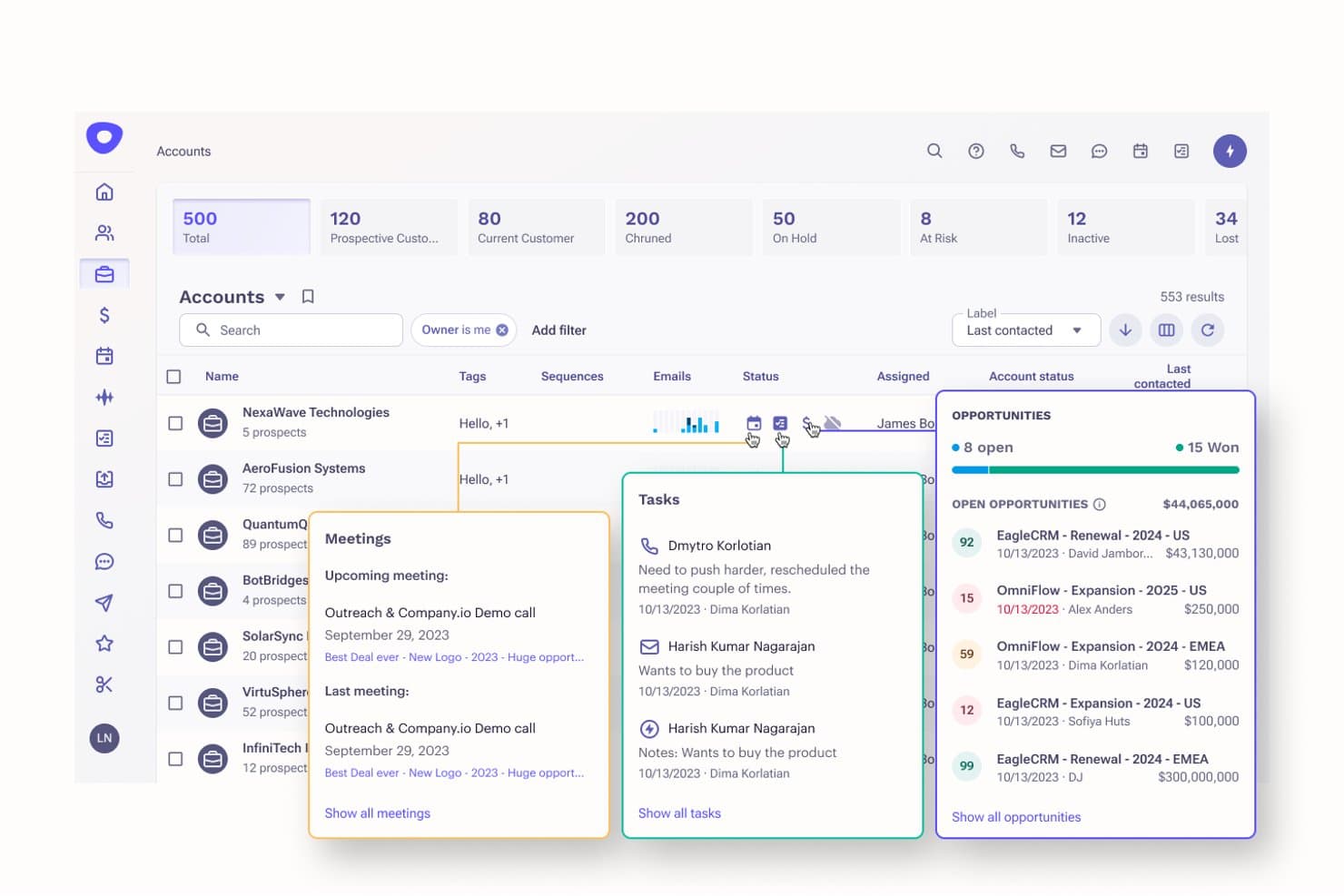
Apollo.io offers an AI-powered accounts dashboard with lead tracking, opportunity management, meeting scheduling, and task assignment for simplified lead generation. Apollo.io is a sales intelligence and engagement platform that pairs a verified B2B contact database with outbound sequencing, lead scoring, workflow automation, and multi-channel outreach.
Who Is Apollo.io Best For?
Apollo.io is a strong fit for outbound-focused B2B sales teams—particularly SDRs and revenue operations professionals at startups and mid-market companies running high-volume prospecting.
Why I Picked Apollo.io
Apollo.io earns its spot on my shortlist because the quality of lead data sitting under every nurture sequence is genuinely different. The platform's real-time contact verification across 270 million B2B profiles means I'm not sending nurture emails to stale addresses, and the scheduled auto-enrichment keeps records current without manual cleanup. I also rely on the website visitor tracking to trigger sequences the moment a lead shows buying intent.
Apollo.io Key Features
- Sales engagement sequences: Build automated multi-step email, call, and LinkedIn touch campaigns to nurture prospects.
- Dynamic lead segmentation: Filter and group leads using demographic, firmographic, and behavioral criteria that update in real time.
- CRM and tool integrations: Sync with Salesforce, HubSpot CRM, Pipedrive, and more to streamline lead management and activity tracking.
- Workflow automation plays: Trigger alerts, assign tasks, or push leads into campaigns based on specific actions or field changes.
Apollo.io Integrations
Apollo.io offers native integrations with Salesforce, HubSpot, Outreach, Airtable, Amplitude, Asana, and Gmail, and provides an API for custom integrations.
Pros and Cons
Pros:
- Sequence builder supports multi-channel outbound nurture
- Intent signals trigger outreach at the right moment
- Real-time contact verification reduces nurture bounce rates
Cons:
- Nurture workflows lack advanced conditional branching
- Reporting depth lags behind dedicated nurture platforms
Learn more about Apollo.io: Best for unified marketing and CRM tools
- Free plan available
- From $45/user/month (billed annually)
Visit WebsiteCustomer Rating:4.4/5
HubSpot offers company activity notes for tracking lead engagement and follow-ups. HubSpot is a marketing and CRM platform that combines email marketing, lead tracking, marketing automation, and contact management for modern lead generation in a single connected system.
Who Is HubSpot Best For?
HubSpot is a strong fit for small to mid-sized marketing teams that want their CRM and marketing tools in one place without juggling multiple platforms.
Why I Picked HubSpot
HubSpot earns its spot on my shortlist because the CRM and marketing tools aren't bolted together; they're built as one. I love that I can trigger nurture workflows based on live CRM properties, like deal stage or contact lifecycle, without any syncing required. HubSpot's lead scoring also pulls directly from the same contact record, so I can prioritize outreach the moment a lead hits a set threshold.
HubSpot Key Features
- Email automation: Build and send personalized emails and automated email sequences triggered by contact behavior, form submissions, or list membership.
- List segmentation: Organize contacts into dynamic or static lists based on any combination of CRM properties.
- Campaign reporting: Track multi-channel campaign performance across email, ads, and content from a single dashboard.
HubSpot Integrations
HubSpot offers over 1,700 marketplace integrations, including Salesforce, Google Ads, LinkedIn Ads, Slack, Mailchimp, WordPress, Zoom, Microsoft 365, Shopify, and SurveyMonkey. It also provides a bi-directional Salesforce sync and an API for custom integrations.
Pros and Cons
Pros:
- Multi-channel campaign tracking in one place
- Workflow automation supports live editing and iteration
- CRM and marketing tools are natively connected
Cons:
- Advanced nurturing features locked to higher tiers
- Email template design options feel inflexible
 Best for automated sales cadences
- Not available
- Pricing upon request
Visit WebsiteCustomer Rating:4.5/5
Salesloft offers cadence automation with tasks, calls, emails, and follow-ups. Salesloft is a revenue workflow platform that brings together cadence automation, pipeline management, forecasting, and conversation intelligence into a single system for sales teams.
Who Is Salesloft Best For?
Salesloft is a strong fit for B2B sales teams at mid-market and enterprise companies that need structured, repeatable outreach across long or complex sales cycles.
Why I Picked Salesloft
I've included Salesloft in my top picks because of how its cadence automation handles the full sequence lifecycle. I like that I can set branching logic so prospects who don't open an email automatically get a follow-up call step, while those who engage get a different message path. The Cadence Player also queues up my team's daily tasks in priority order, so reps always know exactly what to act on next.
Salesloft Key Features
- Conversation intelligence: Record and transcribe sales calls, then surface keyword-tagged moments for rep coaching and deal review.
- Buyer engagement alerts: Get real-time notifications when a prospect opens an email, clicks a link, or revisits your content.
- Deal intelligence: Track deal health scores, stakeholder engagement, and pipeline gaps across every active opportunity.
Salesloft Integrations
Salesloft offers 180+ partners through its marketplace, with native CRM integrations for Salesforce, Microsoft Dynamics 365, HubSpot, and Zoho, plus connections with LinkedIn Sales Navigator, Slack, Gong, Drift, and Cognism. It also connects with Zapier and provides an API for custom integrations.
Pros and Cons
Pros:
- Handles high-volume sending for large rep teams
- Lead scoring automation surfaces new opportunities
- Multi-channel cadences across email, calls, and tasks
Cons:
- Reporting lacks depth for advanced sales insights
- No auto-dialer or domain rotation options
Learn more about Salesloft: 4Best for e-commerce customer journeys
Drip
- 14-day free trial + free demo available
- From $39/month
Visit WebsiteCustomer Rating:4.4/5
Drip offers an abandoned cart workflow with order triggers and wait steps. Drip is an e-commerce-focused email and SMS marketing automation platform that combines behavioral segmentation, customer journey automation, and revenue-attributed reporting built around online store data.
Who Is Drip Best For?
Drip is a strong fit for direct-to-consumer e-commerce brands that run their store on Shopify, WooCommerce, or BigCommerce.
Why I Picked Drip
I've included Drip in my top picks because it's one of the few lead nurturing tools built specifically around e-commerce customer journeys rather than adapted for them. Its visual workflow builder uses behavior-based triggers, like browse abandonment and post-purchase actions, pulled directly from your store's order management data. I also like that pre-built workflow templates for welcome series, win-back, and abandoned cart flows are ready to customize out of the box, so you're not building from scratch.
Drip Key Features
- RFM segmentation: Segment contacts by purchase recency, frequency, and monetary value to target high-intent shoppers.
- Email split testing: A/B test subject lines, content, and send times within automated email workflows.
- SMS automation: Send SMS messages as part of multi-step nurture sequences alongside email campaigns.
Drip Integrations
Drip offers 100+ integrations through its integrations directory, including Shopify, BigCommerce, WooCommerce, Stripe, Facebook Custom Audiences, Facebook Lead Ads, Typeform, Gravity Forms, Segment, and LoyaltyLion. It also connects with Zapier and provides an API for custom integrations.
Pros and Cons
Pros:
- 50+ pre-built e-commerce automation workflows included
- Built-in lead scoring ranks high-potential prospects
- Revenue attribution tied to specific email campaigns
Cons:
- Reporting lacks customizable visualization options
- Basic landing page builder optimized mostly for simple lead capture
Learn more about Drip: Best for AI-suggested audience segments
- 14-day free trial + free demo available
- From $15/month (billed annually)
Visit WebsiteCustomer Rating:4.4/5
ActiveCampaign offers AI-suggested segments for welcoming, winning back, and nurturing customers. ActiveCampaign is a marketing automation platform that combines email marketing, automated workflows, contact scoring, and CRM tools for managing the full lifecycle of potential customers.
Who Is ActiveCampaign Best For?
ActiveCampaign is a strong fit for small to mid-sized B2C and B2B businesses that run high-volume email campaigns and need automated segmentation to stay relevant with large contact lists.
Why I Picked ActiveCampaign
I picked ActiveCampaign as one of the best because its AI-Suggested Segments feature actively monitors contact behavior and surfaces high-value audiences you'd likely never identify manually. I find it especially useful when managing large lists, because ActiveCampaign's Active Intelligence layer continuously analyzes engagement signals and recommends segments without waiting for me to go digging. On top of that, predictive sending optimization adjusts email delivery timing per contact, so the segmentation work actually translates into better open rates.
ActiveCampaign Key Features
- Split and conditional actions: Route contacts into different journey paths based on their behavior, preferences, or engagement history.
- Site and event tracking: Monitor how contacts interact with your website and trigger automations based on their activity.
- Behavioral triggers: Fire automations in response to specific contact actions, like link clicks, page visits, or purchases.
ActiveCampaign Integrations
ActiveCampaign offers 1,000+ integrations, including native connections with Salesforce, Shopify, WooCommerce, WordPress, Facebook, Google Ads, LinkedIn Ads, Slack, Calendly, and Zendesk Sell. It also connects with Zapier and provides an API for custom integrations.
Pros and Cons
Pros:
- Predictive sending adapts to each contact
- Lead scoring assigns MQL and SQL stages
- Split-test entire automation paths at once
Cons:
- Deep feature set can overwhelm beginners
- Cost scales up quickly as the contact list grows
Learn more about ActiveCampaign: Best for AI-driven multi-channel prospecting
- Free demo available
- Pricing upon request
Visit WebsiteCustomer Rating:4.3/5
Outreach offers an AI accounts dashboard for pipeline and opportunity insights. Built for sales teams, Outreach is a sales engagement platform that combines AI-powered sequencing, multi-channel outreach, pipeline management, and conversation intelligence to manage prospects from first touch through close.
Who Is Outreach Best For?
Outreach is a strong fit for mid-market and enterprise sales teams running high-volume, multi-channel prospecting across email, phone, and LinkedIn.
Why I Picked Outreach
Outreach earns its spot on my shortlist because of how well its AI drives multi-channel prospecting at scale. I particularly like the AI-powered sequences that automatically pause when a prospect is out of office and re-engage them when they return. Machine-learning-driven A/B testing across email, LinkedIn, SMS, and calls also tells my team with statistical confidence which messages and engagement steps actually convert, then scales those winning plays across the full team.
Outreach Key Features
- Conversation intelligence: Record, transcribe, and analyze sales calls to surface deal risks and coaching moments.
- Meeting scheduling: Book meetings directly from sequences with embedded calendar links tied to each rep's availability.
- Buyer sentiment tracking: Flag changes in prospect engagement signals to help reps prioritize the right follow-ups.
Outreach Integrations
Outreach offers more than 100 native integrations through its marketplace, including Salesforce, HubSpot, LinkedIn Sales Navigator, 6sense, ZoomInfo, Vidyard, Sendoso, Intercom, and Drift. It also connects with Zapier and provides an API for custom integrations.
Pros and Cons
Pros:
- Built to scale across hundreds of concurrent campaigns
- Granular A/B testing on subject lines and steps
- AI-driven sentiment analysis on prospect responses
Cons:
- No built-in prospect finder for new contacts
- LinkedIn steps are manual task reminders only
Learn more about Outreach: Best for behavior-based automations
- Free plan + 14-day trial + demo available
- From $19/month
Visit WebsiteCustomer Rating:4.2/5
GetResponse offers automation workflows with triggers, conditions, and actions. GetResponse is a multichannel marketing platform that combines email marketing, automation workflows, SMS, web push notifications, and live chat into a single lead nurturing and customer engagement system.
Who Is GetResponse Best For?
GetResponse is a strong fit for small to mid-sized businesses and digital marketers who run email-driven campaigns and want to layer in automation without a dedicated ops team.
Why I Picked GetResponse
GetResponse earns its spot on my shortlist because of how its automation builder handles behavior-based triggers. I can build workflows that react to specific actions like website visits, link clicks, or purchase history, then route contacts down different paths based on what they actually do. The built-in lead scoring also adjusts scores in real time as contacts hit those triggers, so my hottest leads always rise to the top.
GetResponse Key Features
- Email segmentation: Filter and group contacts by tags, custom fields, engagement history, or purchase behavior to target specific audiences.
- Web push notifications: Send browser-based push alerts to re-engage contacts after they leave your site.
- A/B testing: Test subject lines, email content, and send times across campaigns to identify what drives the most opens and clicks.
GetResponse Integrations
GetResponse offers 170+ integrations through its integrations directory, including tools like Shopify, WooCommerce, WordPress, Salesforce, PayPal, Google Analytics, Facebook, and Teachable. It also connects with Zapier and provides an API for custom integrations.
Pros and Cons
Pros:
- Webinar hosting included on higher plans
- Visual workflow builder with 50+ templates
- Built-in conversion funnels for lead capture
Cons:
- No built-in CRM with deal tracking
- Advanced automations locked to pricier plans
Learn more about GetResponse: Best for enterprise omnichannel workflows
- Free demo available
- Pricing upon request
Visit WebsiteCustomer Rating:4.1/5
Adobe Marketo offers an email editor for customizing nurture campaign content. Adobe Marketo Engage is a B2B marketing automation platform that combines lead management, email marketing, multi-channel campaign execution, account-based marketing, and revenue attribution across the full demand generation funnel.
Who Is Adobe Marketo Engage Best For?
Adobe Marketo Engage is built for enterprise marketing teams that run high-volume, multi-channel programs across large prospect and customer databases.
Why I Picked Adobe Marketo Engage
Adobe Marketo Engage is one of my top picks because no other tool handles omnichannel orchestration at true enterprise scale the way it does. Smart Campaigns let me trigger coordinated actions across email, web, mobile push, and paid ads from a single workflow, all based on real-time behavioral signals. I also use Engagement Maps to visualize and manage complex, multi-stream nurture programs that would be nearly impossible to audit in a simpler tool.
Adobe Marketo Engage Key Features
- Lead scoring: Assign and update scores based on prospect behavior and demographic data across every tracked channel.
- Sales Insight: A native panel inside Salesforce CRM that surfaces a prospect's recent activity directly to sales reps.
- Predictive content: AI-recommended content blocks that auto-populate in emails based on individual prospect behavior and profile data.
Adobe Marketo Engage Integrations
Adobe Marketo Engage offers native, bi-directional CRM integrations with Salesforce, Microsoft Dynamics, and Veeva. It also integrates across the Adobe Experience Cloud ecosystem, including Adobe Analytics, Adobe Target, Adobe Real-Time CDP, Adobe Experience Manager, and Adobe Workfront. A REST API and webhooks are available for custom integrations.
Pros and Cons
Pros:
- Multi-touch attribution tied to pipeline revenue
- Dynamic Chat uses generative AI for engagement
- Advanced audience segmentation using firmographic filters
Cons:
- Interface feels dated, and menus are overwhelming
- Requires a dedicated ops person to manage
Learn more about Adobe Marketo Engage: Best for personalized video follow-ups
- Free trial + free demo available
- From $39/month (billed annually)

Sendspark offers personalized video follow-ups with custom text and CTAs. Sendspark is a video messaging platform built for sales teams, letting you record, personalize, and send AI-generated video follow-ups across email, LinkedIn, and CRM platforms at every stage of the deal cycle.
Who Is Sendspark Best For?
Sendspark is a natural fit for B2B sales reps and account executives who rely on high-touch outreach to move deals forward.
Why I Picked Sendspark
I've included Sendspark in my top picks because of how well it handles personalized video follow-ups at scale without adding extra work for reps. I use the AI dynamic video feature to generate individualized videos for each prospect using a single recorded template, so every follow-up feels personal, even when sending in bulk. On top of that, the per-viewer analytics show me exactly who watched, how long they watched, and when to follow up, which takes the guesswork out of timing my next touch.
Sendspark Key Features
- Screen and camera recorder: Record your screen, webcam, or both simultaneously to create 1:1 follow-up videos directly inside Sendspark.
- Meeting follow-up videos: Record post-meeting recap videos that let prospects revisit key highlights without rewatching a full meeting recording.
- CRM sync: Connect to Salesforce, HubSpot, and Zoho to log video engagement data and build pipeline reports alongside your existing deal data.
Sendspark Integrations
Sendspark offers integrations across sales engagement, CRM, email, and automation categories, including HubSpot, Salesforce, Outreach, SalesLoft, Apollo, Clay, Expandi, Instantly, Close, and Lemlist. It also connects with Zapier and provides an API for custom integrations.
Pros and Cons
Pros:
- Embeds directly into email sequences
- Viewer-level watch analytics per video
- AI generates personalized videos from one recording
Cons:
- Landing page templates lack customization options
- Video editor limited to trimming only
Learn more about Sendspark: 10Best for small business contact tracking
Thryv
- Free demo + free trial available
- From $85/month (billed annually)
Visit WebsiteCustomer Rating:5/5
Thryv offers account profiles with client names, emails, and phone numbers. Thryv is a small business-focused lead management platform that combines CRM contact tracking, lead scoring, sales pipeline management, appointment scheduling, and automated follow-ups in one place.
Who Is Thryv Best For?
Thryv is a strong fit for small, service-based businesses like contractors, salons, and agencies that need lead tracking without the complexity of enterprise CRM tools.
Why I Picked Thryv
I've included Thryv in my top picks because it handles the full contact tracking lifecycle that small businesses actually need, without overbuilding for enterprise teams. I particularly like how its CRM keeps every contact record updated in real time, capturing where each lead stands across multiple sales pipelines at a glance. The combination of tagging, lead scoring, and automated follow-up messages means my team can prioritize the warmest leads without manually sifting through a contact list each morning.
Thryv Key Features
- Landing pages and lead capture forms: Build landing pages and embedded forms to collect leads directly into your contact database.
- Email marketing templates: Send nurture campaigns to contact lists using pre-built, customizable email templates.
- Marketing automation: Set up automated follow-up sequences, reminders, and campaign triggers without manual intervention.
Thryv Integrations
Thryv offers integrations through its marketplace, including QuickBooks Online, Mailchimp, Constant Contact, HubSpot, Google Sheets, Shopify, Stripe, PayPal, Typeform, and Jotform. It also connects with Zapier and provides an API for custom integrations.
Pros and Cons
Pros:
- Includes invoicing and estimates alongside CRM
- Automated SMS reminders and follow-up messages
- Client communication and follow-ups in one place
Cons:
- Pricing tiers limit total contacts and monthly messages
- Marketing automation feels basic versus dedicated tools
Learn more about Thryv:
Outro software de nutrição de leads
Eis algumas opções adicionais de software de nutrição de leads que não entraram na minha seleção, mas que ainda vale a pena consultar:
- 11Salesforce Marketing Cloud Account Engagement (Pardot) Best for complex B2B buyer journeys
- 12Mailchimp Best for extensive software integrations
- 13Customer.ioBest for granular journey customizatio
- 14SenderBest for budget-friendly automations
- 15Zoho CRMBest for built-in webinar marketing
- 16monday CRMBest for custom AI-powered workflows
- 17KlaviyoBest for pre-built cross-channel templates
- 18Pipedrive Best for visual pipeline management
How I Evaluate Lead Nurturing Software
I split my evaluation into two layers: core table stakes—automated drip sequences, behavioural scoring, dynamic segmentation—and the differentiators that make one platform the right fit over another.
Core Functionality (Table Stakes For This List)
When I'm selecting tools for my list, I rank each one on a scale from 0 (does not offer the functionality) to 5 (excels in this area) for each core functionality listed below. Then, I calculate the tool's total score into a percentage. Each tool needs to achieve a minimum total score of 65% to be considered for inclusion.
- Automated Nurture Workflows: I evaluate whether the platform offers a visual workflow builder with behavioural triggers, branching logic, and time delays—not just a basic linear autoresponder.
- Lead Segmentation & Targeting: Dynamic segments that update in real time matter here, like filtering leads who visited a pricing page twice but haven't booked a demo.
- Lead Scoring: I check for rule-based or predictive scoring models that combine engagement signals (email clicks, page visits) with profile fit to flag sales-ready leads.
- Multi-Channel Messaging: Beyond email, I look for at least one additional channel—SMS, push, or in-app—orchestrated within the same nurture journey rather than siloed.
- Personalization & Dynamic Content: Platforms should support conditional content blocks and merge fields so a single nurture email can show different CTAs based on industry or funnel stage.
- Campaign Analytics & Reporting: I look for reporting that goes past open rates to track conversion events, funnel progression, and which workflow steps drive the most engagement.
Once I have a list of tools that meet the criteria, I consider what sets each platform apart.
Differentiating Factors (What Sets Vendors Apart)
Here's how I compare and contrast different vendors:
Standout Features
Sales-marketing handoff capabilities are a big differentiator—I look for platforms that auto-route leads to reps with real-time alerts the moment a scoring threshold is met. Account-based nurturing is another feature I evaluate closely, especially for B2B teams running campaigns aimed at buying committees rather than individual contacts. I also check whether a platform offers AI-driven content generation, which helps demand gen teams draft and iterate on nurture copy faster.
Beyond Features
CRM integration depth matters a lot here—I check whether a platform offers bidirectional sync so lead scores and lifecycle stages stay current on both sides. Pricing structure is another factor I weigh, since contact-based models can get expensive fast as your database grows. I also evaluate deliverability tools like dedicated IP options, SPF/DKIM support, and inbox placement monitoring, because even the best nurture sequence fails if it lands in spam.
Como escolher software de nutrição de leads
É fácil perder-se em listas longas de funcionalidades e estruturas de preços complexas. Para o ajudar a manter-se concentrado enquanto conduz o seu processo específico de seleção de software, eis uma lista de verificação dos fatores a ter em conta:
| Fator | O que considerar |
|---|---|
| FatorEscalabilidade | O que considerarA ferramenta consegue lidar com o volume crescente de leads e campanhas? Verifique os limites de utilizadores ou contactos, os limites dos fluxos de trabalho e as opções de atualização do plano. |
| FatorIntegrações | O que considerarO software liga-se diretamente ao seu CRM, e-mail e fontes de dados? Avalie a disponibilidade e a profundidade das integrações nativas para evitar soluções manuais. |
| FatorPersonalização | O que considerarPode adaptar os percursos dos leads, os campos de dados e a lógica ao seu processo de vendas específico? Esteja atento a modelos de campanhas rígidos ou regras codificadas. |
| FatorFacilidade de utilização | O que considerarOs fluxos de trabalho diários são intuitivos para a sua equipa? Teste as interfaces para avaliar a clareza da navegação e minimizar as necessidades contínuas de formação. |
| FatorImplementação e integração inicial | O que considerarCom que rapidez pode a sua equipa implementar a solução, colocá-la em funcionamento e migrar os leads existentes? Procure recursos estruturados de integração inicial e prazos realistas. |
| FatorCusto | O que considerarOs custos contínuos são previsíveis à medida que adiciona utilizadores e contactos? Analise cuidadosamente os níveis dos planos, os complementos necessários e as periodicidades de faturação para evitar surpresas. |
| FatorMedidas de segurança | O que considerarA ferramenta oferece encriptação de dados, controlos de acesso dos utilizadores e registos de auditoria? Certifique-se de que está alinhada com os seus padrões de segurança e requisitos regulamentares. |
| FatorDisponibilidade do suporte | O que considerarQuando surgem problemas, com que rapidez pode obter ajuda? Verifique o horário de suporte documentado e os canais disponíveis para garantir que correspondem às necessidades da sua equipa. |
O que é o software de nutrição de leads?
O software de nutrição de leads é uma categoria de ferramentas completa, concebida para automatizar, personalizar e acompanhar as comunicações contínuas com potenciais clientes ao longo do funil de vendas. Estas plataformas ajudam as equipas de marketing e vendas a interagir com leads através de conteúdos oportunos e direcionados em canais como o e-mail, as redes sociais e o vídeo, monitorizando simultaneamente as interações e fazendo avançar os potenciais clientes rumo às decisões de compra.
Funcionalidades do software de nutrição de leads
Ao selecionar um software de nutrição de leads, tenha em atenção as seguintes funcionalidades essenciais:
- Fluxos de trabalho automatizados: Crie e agende campanhas com várias etapas que enviam automaticamente mensagens aos leads com base no tempo, no comportamento ou na fase do funil.
- Segmentação de leads: Agrupe os leads de acordo com dados demográficos, comportamentos ou nível de interação, para poder adaptar as mensagens a cada segmento de público.
- Contacto através de vários canais: Comunique com os leads através de canais como e-mail, SMS e redes sociais a partir de uma única plataforma unificada.
- Mensagens personalizadas: Personalize o conteúdo, as saudações e os horários de envio para cada lead, de modo a aumentar a relevância e a interação.
- Acompanhamento da interação: Monitorize aberturas, cliques, respostas e outras interações para avaliar o interesse e identificar potenciais clientes com elevado interesse.
- Qualificação de leads: Atribua valores numéricos aos leads com base nas suas ações e na adequação do seu perfil, para dar prioridade aos esforços de acompanhamento.
- Integração com CRM: Sincronize automaticamente os dados dos leads com o seu CRM de vendas ou marketing, garantindo registos precisos e transferências de informação otimizadas.
- Relatórios e análise: Aceda a painéis e relatórios que mostram o desempenho das campanhas, as taxas de resposta e a evolução do funil de vendas.
- Criador de campanhas por arrastar e largar: Crie e edite visualmente sequências de nutrição, sem conhecimentos técnicos, utilizando uma interface intuitiva.
Funcionalidades comuns de IA dos softwares de nutrição de leads
Para além das funcionalidades padrão dos softwares de nutrição de leads apresentadas acima, muitas destas soluções estão a incorporar IA com funcionalidades como:
- Qualificação preditiva de leads: Utiliza algoritmos de IA para analisar interações e comportamentos anteriores, atribuindo pontuações mais elevadas aos leads com maior probabilidade de conversão, com base em padrões identificados nos seus dados.
- Recomendações automatizadas de conteúdo: Sugere o conteúdo ideal ou as próximas mensagens a enviar a cada lead, recorrendo a dados de interação e a uma análise baseada em IA daquilo que teve melhor impacto em segmentos semelhantes.
- Otimização do horário de envio: Utiliza IA para determinar e agendar os contactos nos momentos em que cada lead tem maior probabilidade de abrir e interagir com as mensagens.
- Análise de respostas em linguagem natural: Utiliza IA para analisar as respostas e mensagens dos leads, classificando os níveis de interesse e destacando as conversas promissoras para a atenção da equipa de vendas.
- Deteção de intenção: Aplica IA para analisar sinais de interação e o comportamento digital, identificando os leads que demonstram uma forte intenção de compra, de modo a permitir um acompanhamento atempado e direcionado.
Benefícios do software de nutrição de leads
A implementação de um software de nutrição de leads proporciona vários benefícios à sua equipa e à sua empresa. Eis alguns dos benefícios que pode esperar:
- Contacto consistente: Os fluxos de trabalho automatizados garantem que todos os leads recebem comunicações atempadas, permitindo fechar negócios sem esforço manual ou acompanhamentos esquecidos.
- Personalização em grande escala: O conteúdo dinâmico, as campanhas de envio gradual e as ferramentas de segmentação permitem adaptar as mensagens a milhares de contactos de forma altamente relevante.
- Visibilidade do funil: O acompanhamento da interação e as ferramentas de análise proporcionam informações claras sobre a posição dos leads no funil de vendas e sobre quais as campanhas que os fazem avançar.
- Acompanhamento prioritário: A qualificação de leads e a análise por IA ajudam a sua equipa a concentrar os recursos nos potenciais clientes com maior probabilidade de conversão.
- Integração melhorada: As integrações com o CRM e com outras plataformas mantêm os dados sincronizados, reduzem as atualizações manuais e melhoram as transferências de informação entre as equipas de marketing e vendas.
- Decisões baseadas em dados: As ferramentas de relatórios e os painéis de desempenho permitem otimizar as campanhas de nutrição de leads com base em dados reais de interação e conversão.
- Melhor experiência do cliente: As comunicações multicanal, atempadas e relevantes criam uma jornada mais envolvente e menos intrusiva para os seus potenciais clientes.
Custos e preços do software de nutrição de leads
A seleção de um software de nutrição de leads exige uma compreensão dos vários modelos de preços e planos disponíveis. Os custos variam consoante as funcionalidades, a dimensão da equipa, os complementos e outros fatores. A tabela abaixo resume os planos comuns, os respetivos preços médios e as funcionalidades normalmente incluídas nas soluções de software de nutrição de leads:
Tabela de comparação de planos de software de nutrição de leads
| Tipo de plano | Preço médio | Funcionalidades comuns |
|---|---|---|
| Tipo de planoPlano gratuito | Preço médio$0 | Funcionalidades comunsAutomatização básica de fluxos de trabalho, armazenamento limitado de contactos, contacto por email e relatórios simples. |
| Tipo de planoPlano pessoal | Preço médio$10-$30/utilizador/mês | Funcionalidades comunsSegmentação de potenciais clientes, contacto multicanal, limites de contactos alargados e integrações básicas. |
| Tipo de planoPlano empresarial | Preço médio$25-$75/utilizador/mês | Funcionalidades comunsAutomatização avançada, integração com CRM, classificação de potenciais clientes, análises detalhadas e suporte para vários utilizadores. |
| Tipo de planoPlano empresarial de grande dimensão | Preço médio$75-$200+/utilizador/mês | Funcionalidades comunsFluxos de trabalho personalizados para automatização de vendas, segurança avançada, suporte premium, integração inicial dedicada e gestão da conformidade. |
Perguntas frequentes sobre software de nutrição de potenciais clientes
Eis algumas respostas a perguntas frequentes sobre software de nutrição de potenciais clientes:
Como sei se a minha equipa está preparada para utilizar software de nutrição de potenciais clientes?
É provável que esteja preparada quando tiver mais potenciais clientes do que consegue acompanhar manualmente, um funil de vendas em crescimento ou quiser automatizar tarefas repetitivas de acompanhamento. Se a recolha de dados de interação e a execução de campanhas com várias etapas lhe parecerem apelativas, estas soluções podem trazer muita organização e eficiência.
Com que sistemas devo integrar o software de nutrição de potenciais clientes?
Deve integrá-lo com o seu CRM, a plataforma de automatização de marketing e as ferramentas de email, para que os dados dos potenciais clientes, a atividade de interação e as informações das campanhas permaneçam sincronizados. Adicionar ligações a plataformas de análise e de vendas ajuda a obter uma visão completa da evolução dos potenciais clientes.
É difícil migrar potenciais clientes existentes para uma nova plataforma?
Não, a maioria dos softwares de nutrição de potenciais clientes permite importar ficheiros CSV ou utilizar integrações diretas através de API com CRMs populares. Ainda assim, deverá confirmar como serão transferidos os campos personalizados, as etiquetas ou as notas e reservar tempo adicional para rever os registos após a migração.
Como é que as ferramentas de nutrição de potenciais clientes asseguram a conformidade e a privacidade dos dados?
Muitas disponibilizam gestão de funções de utilizador, acompanhamento do consentimento, armazenamento encriptado e registos de auditoria. Procure suporte claro para o RGPD, a CCPA ou a regulamentação local, de modo a garantir que a plataforma está em conformidade com os seus requisitos de tratamento de dados.
Estas plataformas funcionam apenas com potenciais clientes de entrada?
Não, pode utilizar software de nutrição de potenciais clientes tanto para contactos de entrada como de saída. Segmentar e adaptar as mensagens é igualmente valioso para potenciais clientes interessados que recolheu e para contactos de saída que está a tentar conquistar ativamente.
Quais são alguns erros comuns a evitar durante a configuração?
Evite definir regras de segmentação à pressa ou ignorar os guias de integração inicial. Dedique tempo a mapear os seus fluxos de trabalho, definir etapas claras e testar os modelos antes de lançar campanhas. Isto ajuda a detetar precocemente erros de lógica e falhas nas mensagens.