

monday.com er en populær programvare for markedsføringsstyring som er kjent for å kunne organisere og følge opp arbeidsprosjekter på en effektiv måte. Noen brukere kan imidlertid være på utkikk etter et alternativ til monday.com hvis de trenger flere tilpasningsmuligheter eller har budsjettbegrensninger.
Med utgangspunkt i min erfaring med programvare for markedsføring testet og sammenlignet jeg flere av de beste tilgjengelige alternativene til monday.com. Deretter samlet jeg resultatene i detaljerte vurderinger for å hjelpe deg med å finne den beste programvaren for dine unike behov.
Hva er monday.com?
monday.com er en programvare for markedsføringsstyring som hjelper team med å organisere og følge opp arbeidsprosjektene sine. Den brukes vanligvis av fagfolk innen markedsføring, prosjektledelse og drift som trenger å administrere oppgaver og samarbeide med teamene sine.
Tilpassbare tavler, automatisering og integrasjonsmuligheter bidrar til å organisere oppgaver, forbedre teamsamarbeidet og sørge for at alle har samme oversikt. Alt i alt gir monday.com en enkel måte å effektivisere arbeidsflyten i teamet ditt på.
Hvorfor du kan stole på våre programvareanbefalinger
6,700+
Reviews
20
Industry experts
16+
Evaluation factors
14
Years
Teamet vårt har testet og anmeldt programvare siden 2012. Vi er selv markedsføringsledere, så vi vet hvor vanskelig og hvor viktig det er å velge riktig programvare.
I denne guiden har vi vurdert verktøyene gjennom praktisk testing og uavhengig research og gitt dem poeng ut fra våre utvelgelseskriterier.
Anmeldelsene våre bygger på vår egen redaksjonelle vurdering. De er ikke et salgsargument.
Ekspertanmeldere:
 Gui DrusinaCreative Director
- Shriya GhateSenior Marketing Lead
 Amanda JacquesMarketing Ops Leader

Sammenligningstabell: Alternativer til monday.com
Denne sammenligningstabellen oppsummerer prisopplysningene for mine beste utvalgte alternativer til monday.com.
| Tool | Best For | Trial Info | Price | ||
|---|---|---|---|---|---|
| 1 | Best for enterprise marketing creative ops | Free demo available | Pricing upon request | Website | |
| 2 | Best for customizable workflows | Free plan + 14-day free trial + free demo available | From $10/user/month (billed annually) | Website | |
| 3 | Best for visual task management | Free plan + free trial available | From $5/user/month (billed annually) | Website | |
| 4 | Best for client work management | Free plan + 14-day free trial + free demo available | From $9.99/user/month (billed annually) | Website | |
| 5 | Best for agencies | Free 7-day trial available | From $9/user/month (billed annually) | Website | |
| 6 | Best for all-in-one team workspaces | Free plan + free trial available | From $10/user/month | Website | |
| 7 | Best for custom app building | Free plan available; 14-day free trial | From $20/user/month (billed annually) | Website | |
| 8 | Best for customizable project workflows | Free plan available | From $12/user/month | Website | |
| 9 | Best for team project coordination | Free plan available | From $10.99/user/month (billed annually) | Website | |
| 10 | Best for spreadsheet workflows | 30-day free trial + free demo available | From $12/user/month | Website |


Vurderinger av de beste alternativene til monday.com
Nedenfor finner du mine detaljerte oppsummeringer av de beste alternativene til monday.com som kom med på kortlisten. Vurderingene mine gir en grundig gjennomgang av hvert verktøys viktigste funksjoner, fordeler og ulemper, integrasjoner og ideelle bruksområder for å hjelpe deg med å finne det beste alternativet.
 Best for enterprise marketing creative ops
- Free demo available
- Pricing upon request
Visit WebsiteCustomer Rating:4.6/5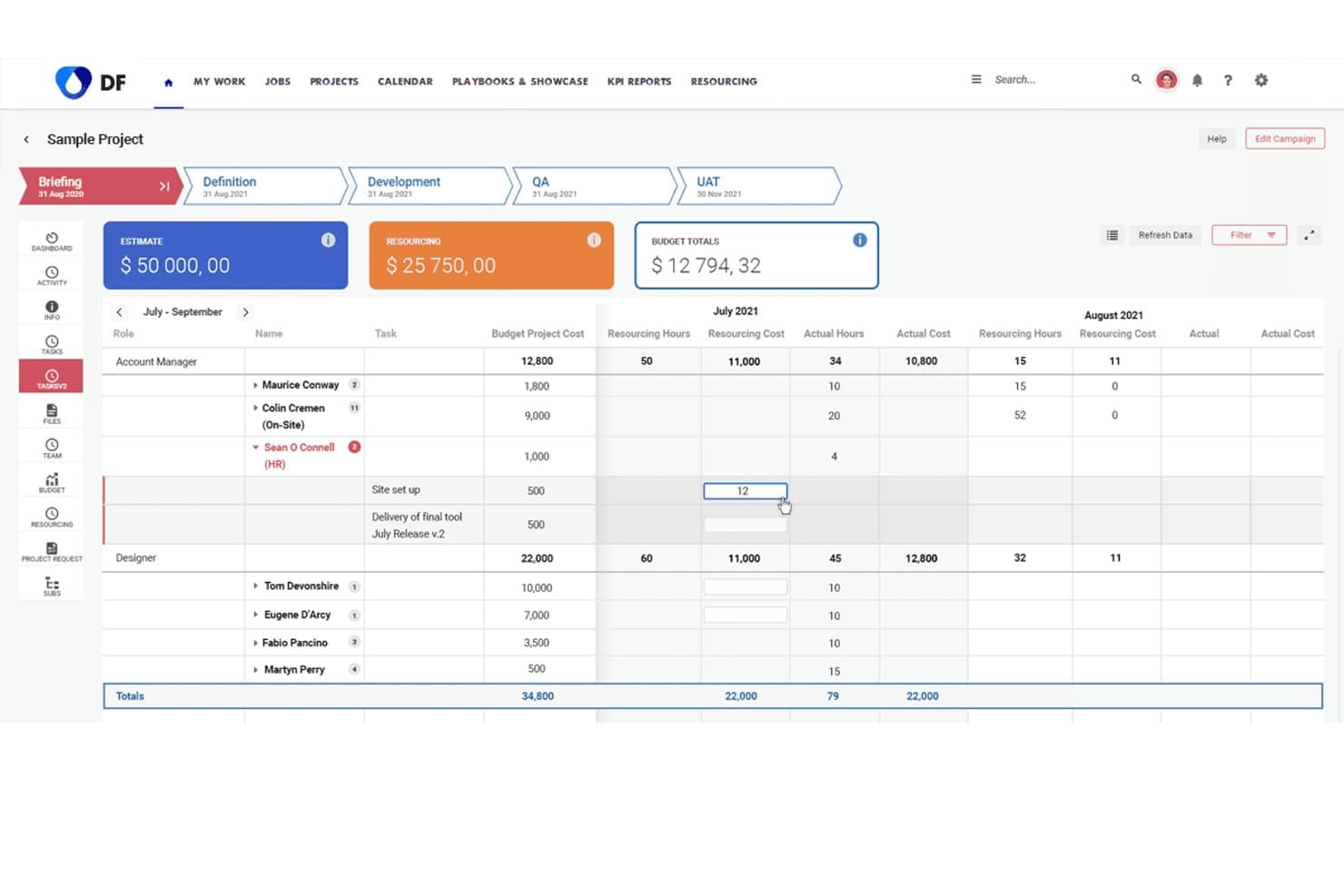
Screendragon lets users track resourcing costs and hours across project phases. Screendragon offers workflow automation and resource management designed for large marketing organizations and creative teams who need enterprise-level control, customizable processes, and visibility across complex campaigns and projects.
Who Is Screendragon Best For?
Screendragon is a solid choice for large marketing teams managing complex creative projects across multiple departments or regions.
Why Screendragon Is a Good Best monday.com Alternatives
I picked Screendragon as a top choice because it handles enterprise marketing creative ops with advanced workflow automation and resource management. My team gets precise control over complex processes and campaign visibility. I use its customizable workflows to coordinate projects across multiple departments and regions.
Screendragon Key Features
- Digital asset management: Organize, store, and share creative files from one centralized library.
- Budget tracking: Monitor campaign spend and allocate budgets by project, client, or region in real time.
- Time tracking: Log hours directly within the platform and generate automated timesheets for resource analysis.
- Approval workflows: Route projects and assets for multi-stage review and approval with custom routing rules.
Screendragon Integrations
Native integrations are not clearly documented. Screendragon supports integrations via API for custom connections.
Pros and Cons
Pros:
- Built-in campaign budget and time tracking
- Offers customizable approval and routing processes
- Handles complex creative workflows across departments
Cons:
- Documentation for integrations is limited
- Interface can feel overwhelming for new users
Learn more about Screendragon: Best for customizable workflows
- Free plan + 14-day free trial + free demo available
- From $10/user/month (billed annually)
Visit WebsiteCustomer Rating:4.3/5
Wrike provides an overview of tasks, timelines, and dependencies, essential for effective project planning. Wrike is a project management tool designed for teams and businesses looking to enhance collaboration and productivity. It offers features for task management, time tracking, and workload management, facilitating efficient project workflows.
Why Wrike is a good monday.com alternative: Wrike's customizable workflows allow you to tailor project stages to fit your team's specific processes. This flexibility ensures that your projects align with your unique operational needs, enhancing efficiency. Additionally, Wrike's real-time collaboration features, such as live editing and commenting, keep your team connected and informed, reducing the need for lengthy email threads.
Standout features & integrations:
Features include task prioritization, custom dashboards, request forms, approvals, file sharing, document versioning, calendar view, Kanban boards, workload management, and advanced reporting on project performance, resource allocation, and timelines.
Integrations include Adobe Creative Suite, Photoshop, Illustrator, InDesign, Facebook, Twitter, LinkedIn, Marketo, HubSpot, Salesforce, Microsoft Teams, and Slack.
Pros and Cons
Pros:
- Advanced reporting features
- Time tracking to monitor resource allocation
- Customizable workflows for tailored processes
Cons:
- Occasional performance issues with large projects
- Learning curve for new users
 Best for visual task management
- Free plan + free trial available
- From $5/user/month (billed annually)
Visit WebsiteCustomer Rating:4.5/5
Trello offers visual boards for tracking tasks across workflows. Trello gives teams a visual approach to managing projects using customizable boards, lists, and cards. I think marketers, operations teams, and creatives who want a flexible, drag-and-drop system for tracking work across stages will find Trello especially useful.
Who Is Trello Best For?
Project coordinators and small teams who need a visual, flexible system to organize workflows and keep tasks moving.
Why Trello Is a Good monday.com Alternative
I picked Trello because its Kanban board experience is genuinely the clearest in the market—moving a card from "In Progress" to "Done" feels immediate and satisfying in a way that heavier tools don't replicate. I like how Power-Ups let my team add functionality like calendar views, time tracking, or voting directly on the board without switching to a separate tool. Trello's built-in no-code automation also lets me set trigger-based rules—like automatically assigning a due date or notifying a teammate when a card moves to a specific list—without writing a single line of code. For teams that don't need complex reporting and just want tasks moving through a clear visual pipeline, Trello is hard to beat.
Trello Key Features
- Board templates: Launch new projects using pre-built templates for sprints, content calendars, and event planning.
- Multiple project views: Switch between board, timeline, table, calendar, and map views depending on how your team tracks work.
- Card checklists and attachments: Break tasks into subtasks and attach files, links, or images directly to any card.
- Team workspaces: Organize multiple boards under a shared workspace to keep related projects grouped and accessible.
Trello Integrations
Trello offers native integrations with Google Drive, Slack, Jira, Dropbox, GitHub, Microsoft Teams, Evernote, Salesforce, and more. It connects with Zapier and offers an API for custom integrations.
Pros and Cons
Pros:
- Power-Ups expand core functionality as needed
- Moving tasks between stages is fast and intuitive
- Kanban boards allow easy visual project management
Cons:
- Limited reporting and analytics for project performance
- No native time tracking in boards
Learn more about Trello: Best for client work management
- Free plan + 14-day free trial + free demo available
- From $9.99/user/month (billed annually)
Visit WebsiteCustomer Rating:4.4/5
Teamwork.com provides time tracking and billing for client-focused project management. Teamwork.com is a project management software for teams managing client work and collaboration. It’s mainly used by agencies and businesses that must keep track of client projects and improve team communication.
Why Teamwork.com is a good monday.com alternative: Teamwork.com offers features tailored for managing client-based projects, setting it apart from monday.com’s broad project management focus. Its time tracking and billing features help ensure you accurately capture billable hours. The project templates make it easy to standardize processes across different client projects. The task management tools also help you organize and prioritize work effectively, enhancing productivity for client-focused teams.
Standout features & integrations:
Features include time tracking, billing, and project templates. Time tracking ensures you accurately capture billable hours, essential for client work. Billing features streamline invoicing, making financial management more manageable for your team. Project templates help standardize processes, saving you time when managing similar projects.
Integrations include Slack, HubSpot, Google Drive, Dropbox, QuickBooks, Zapier, Microsoft Teams, Xero, Harvest, and OneDrive.
Pros and Cons
Pros:
- Customizable project templates
- Detailed time tracking
- Effective client management
Cons:
- Complex setup process
- Can be overwhelming
Learn more about Teamwork.com: Best for agencies
- Free 7-day trial available
- From $9/user/month (billed annually)
Visit WebsiteCustomer Rating:4.4/5
Bonsai offers contracts, invoicing, and project tools ideal for agency workflows. Bonsai Agency Software is a business management platform designed for agencies and freelancers to handle contracts, invoices, and project management. It serves professionals who need to streamline administrative tasks and project tracking.
Why Bonsai Agency Software is a good monday.com alternative: Bonsai Agency Software is tailored for agencies, providing specific tools that differ from monday.com’s general project management features. Its contract and proposal templates save you time in client communications. The invoicing feature simplifies billing, ensuring you get paid promptly. Its project management tools also help you track work progress and deadlines, making it a solid choice for agencies managing multiple projects.
Standout features & integrations:
Features include contract templates, invoicing, and project management tools. Contract templates help you quickly draft professional agreements. Invoicing features make billing easy and ensure timely payments. Project management tools let you track progress and deadlines, keeping projects on schedule.
Integrations include QuickBooks, Zapier, Stripe, Google Calendar, Slack, Trello, Asana, Xero, and Dropbox.
Pros and Cons
Pros:
- Time-saving templates
- Project tracking capabilities
- Contract management tools
Cons:
- Basic customization options
- Limited advanced features
Learn more about Bonsai Agency Software: Best for all-in-one team workspaces
- Free plan + free trial available
- From $10/user/month
Visit WebsiteCustomer Rating:4.6/5
Notion offers shared workspaces for docs, policies, and team knowledge. Notion gives teams a flexible workspace where you can manage projects, docs, and wikis all in one place. I think fast-moving startups and creative teams will appreciate how it adapts to shifting processes and unconventional workflows.
Who Is Notion Best For?
Project managers and cross-functional teams who need a flexible, customizable workspace to organize projects, documentation, and knowledge in one hub.
Why Notion Is a Good monday.com Alternative
What drew me to Notion is how it blurs the line between project management and documentation—your project brief, task board, and meeting notes all live in the same connected space. I like that you can build entirely custom database views, switching between table, board, calendar, and gallery layouts depending on how your team thinks. In practice, that means I can set up a content calendar that links directly to the briefs, drafts, and approval notes for each piece without leaving the tool. For teams tired of bouncing between a project tool and a separate wiki, Notion handles both without compromise.
Notion Key Features
- AI writing assistant: Generate, summarize, and edit content directly within your pages and documents.
- Templates: Start projects quickly using pre-built templates for roadmaps, sprint planning, and meeting notes.
- Task assignments and due dates: Assign tasks to team members and set deadlines directly within any database.
- Permissions and page sharing: Control access at the page or workspace level to share specific content with guests or external collaborators.
Notion Integrations
Notion offers native integrations with Slack, GitHub, Google Drive, Figma, Asana, Trello, Jira, Zoom, Dropbox, and Box. It also connects with Zapier and provides an API for custom integrations.
Pros and Cons
Pros:
- Customizable template gallery for project workflows
- Embedded AI for notes and document creation
- Flexible content databases with linked views
Cons:
- No advanced automation for recurring tasks
- Databases can slow down at large scale
Learn more about Notion: Best for custom app building
- Free plan available; 14-day free trial
- From $20/user/month (billed annually)
Visit WebsiteCustomer Rating:4.6/5
Airtable's custom apps, grid view, and Kanban make it ideal for flexible project management. Airtable is a flexible database and collaboration tool that allows users to create custom applications to manage data and workflows. It's used by teams across various industries who need a versatile platform to organize information and collaborate.
Why Airtable is a good monday.com alternative: Airtable offers custom app building capabilities, which set it apart from monday.com's project management focus. Its grid view allows you to organize data similarly to a spreadsheet, making it intuitive for those familiar with Excel. The form view lets you collect information quickly, and its Kanban board aids in visualizing workflows. These features suit teams needing customizable solutions to manage diverse projects.
Standout features & integrations:
Features include grid view, form view, and Kanban board. Grid view lets you organize information like a spreadsheet, making it familiar and easy to use. Form view helps you collect and manage data efficiently.
Integrations include Slack, Google Calendar, Dropbox, Trello, Asana, Jira, Mailchimp, GitHub, Zendesk, and Salesforce.
Pros and Cons
Pros:
- Visual workflow tools
- Flexible data management
- Customizable applications
Cons:
- Basic reporting features
- May need customization
Learn more about Airtable: Best for customizable project workflows
- Free plan available
- From $12/user/month
Visit WebsiteCustomer Rating:4.7/5
ClickUp offers customizable workflows with visual process mapping. ClickUp gives teams total control over how they manage tasks, projects, and goals, making it a go-to choice for fast-moving organizations and creative agencies. I think you’ll appreciate its flexibility if you need to bring all your workflows, docs, and project plans into one customizable hub.
Who Is ClickUp Best For?
ClickUp is a great fit for cross-functional teams at startups and growing businesses that need to coordinate complex projects in one place.
Why ClickUp Is a Good Monday.com Alternative
I picked ClickUp because of how far it goes with workspace customization—you can build out entirely different structures for different teams without any overlap or confusion. I like that it supports multiple project views, including Gantt charts, Kanban boards, list views, and timelines, so each team member can work in whichever format suits them. My team also uses ClickUp's custom task statuses and fields to mirror our exact workflows, which monday.com's more rigid structure doesn't always allow. In practice, that means we're not bending our process to fit the tool.
ClickUp Key Features
- ClickUp Brain: An AI assistant built directly into your workspace that answers questions about tasks, surfaces blockers, and pulls insights from docs and past projects.
- Whiteboards: A built-in visual collaboration tool for brainstorming, mind mapping, and connecting ideas directly to tasks.
- Dashboards: Customizable reporting views that pull live data from tasks and projects, so you can track progress without chasing status updates.
- Time tracking: Native time logging on tasks that lets team members record hours worked directly inside their projects.
ClickUp Integrations
ClickUp offers over 50 native integrations, including Slack, Google Drive, GitHub, Zoom, OneDrive, Dropbox, GitLab, Microsoft Teams, Outlook, and more. It also connects with Zapier and provides an API for custom integrations.
Pros and Cons
Pros:
- Advanced native whiteboard and mind mapping
- Multiple automation options within tasks
- Highly customizable work hierarchies and views
Cons:
- Occasional lag with large workspaces
- Notification system can be overwhelming
Learn more about ClickUp: Best for team project coordination
- Free plan available
- From $10.99/user/month (billed annually)
Visit WebsiteCustomer Rating:4.4/5
Asana helps teams organize projects, track tasks, and collaborate efficiently in one workspace. Asana is a project and task management platform well-suited to cross-functional teams who need detailed workflow automation, goal tracking, and project timelines all in a single workspace.
Who Is Asana Best For?
Asana is a strong fit for mid-sized to enterprise teams that manage multiple projects across departments and need clear ownership and accountability structures.
Why Asana Is a Good Monday.com Alternative
Asana is one of my top picks because I love how it covers work, projects, and tasks in one place without locking everyone into a single view. I can switch between list, board, timeline, and calendar views per project, which gives different team members the flexibility monday.com often restricts behind higher tiers. I also appreciate the Goals feature, which lets me tie individual tasks directly to company-level objectives and track progress in real time.
Asana Key Features
- Workflow automation: Build rule-based automations that trigger actions like task assignments, status updates, and due date changes without manual input.
- Portfolio management: Group related projects into portfolios to monitor status, priority, and progress across multiple workstreams from a single view.
- Workload management: View each team member's assigned tasks and capacity in real time to spot bottlenecks and rebalance work.
- Custom fields: Add project-specific data fields to tasks, such as priority, budget, or region, to capture the details your team actually needs to track.
Asana Integrations
Asana offers 300+ integrations through its app directory, including native integrations with Slack, Google Drive, Microsoft Teams, Salesforce, Jira, HubSpot, GitHub, Zoom, Figma, and Tableau. It also connects with Zapier and provides an API for custom integrations.
Pros and Cons
Pros:
- Task dependencies with timeline visualization
- Built-in goal and milestone tracking
- Multiple project views on all plans
Cons:
- Reporting limited to premium tiers
- No native time tracking feature
 Best for spreadsheet workflows
- 30-day free trial + free demo available
- From $12/user/month
Visit WebsiteCustomer Rating:4.4/5
Smartsheet lets teams manage workflows in a spreadsheet layout. Smartsheet brings a familiar spreadsheet-inspired interface to project and work management, making it easy for teams used to Excel or Google Sheets to transition. Mid-size businesses and enterprises rely on it to organize complex projects, automate collaborative workflows, and meet compliance needs at scale.
Who Is Smartsheet Best For?
Project managers and operations leaders at mid-size and large organizations in regulated industries benefit most from Smartsheet’s workflow and compliance controls.
Why Smartsheet Is a Good monday.com Alternative
I picked Smartsheet because its grid-based interface mirrors the logic of a spreadsheet, which makes adoption far easier for teams already working in Excel or Google Sheets. I like how you can start with familiar rows and columns and layer in task dependencies, automated alerts, and approval workflows without rebuilding how your team thinks about data. My team uses Smartsheet's cell linking and cross-sheet formulas to connect data across multiple project sheets in real time—something monday.com doesn't replicate as naturally. In practice, that means reporting across projects stays accurate without manual data entry.
Smartsheet Key Features
- Portfolio management: Track and report on multiple projects in one view, with tools to monitor budgets, resources, and risks across your entire portfolio.
- Resource management: Assign and balance team workloads across projects, with visibility into availability and capacity to avoid overbooking.
- Dynamic View: Share filtered, permission-controlled views of sheets with external stakeholders without exposing your full data.
- Document generation: Automatically generate customized PDFs directly from sheet data to reduce manual document prep.
Smartsheet Integrations
Smartsheet offers native integrations with Google Workspace, Microsoft Teams, Slack, Salesforce, Jira, DocuSign, Box, Dropbox, and more. It also provides an API for custom integrations.
Pros and Cons
Pros:
- Audit tracking for regulatory compliance management
- Extensive workflow automation and approval capabilities
- Spreadsheet-style interface for easy project setup
Cons:
- Custom dashboards have limited visualization flexibility
- Complex permission settings require careful configuration
Andre alternativer til monday.com
Her er noen flere alternativer til monday.com som ikke kom med på kortlisten, men som likevel er verdt å undersøke.
- 11ConfluenceBest for remote collaboration
- 12JiraBest for Agile software teams
- 13Resource GuruBest for resource scheduling
- 14ProductiveBest for agency resource planning
- 15ScoroBest for professional services
- 16Zoho ProjectsBest for task automation features
- 17Hub Planner by MilientBest for resource management
- 18SlackBest for team communication and collaboration
- 19Salesforce CRMBest for customer relationship management
- 20HiveBest for team collaboration tools
How I Evaluate monday.com Alternatives
I look at monday.com alternatives on two levels: the baseline for managing campaigns and creative reviews, and the differentiators that make a platform genuinely suited to marketing teams.
Core Functionality (Table Stakes For This List)
When I'm selecting tools for my list, I rank each one on a scale from 0 (does not offer the functionality) to 5 (excels in this area) for each core functionality listed below. Then, I calculate the tool's total score into a percentage. Each tool needs to achieve a minimum total score of 65% to be considered for inclusion.
- Visual Project Views: I check whether a tool offers Kanban, Gantt, calendar, and table views so marketing teams can switch between a campaign timeline and a daily task board without leaving the platform.
- Customizable Workflows: The ability to build custom statuses, fields, and no-code automations matters here—like auto-assigning a designer when a brief moves to "Ready for Creative."
- Creative Collaboration & Proofing: I evaluate how teams can annotate assets, leave feedback in context, and route approvals—especially for review cycles on ad creatives or landing page designs.
- Task & Campaign Management: Every tool should support task dependencies, subtasks, and milestones so a product launch checklist can map deliverables from copy drafts through final deployment.
- Marketing Stack Integrations: I look for native connections to tools marketing teams already use daily, like HubSpot, Slack, Google Workspace, Figma, and social or ad platforms.
- Reporting & Dashboards: Custom dashboards that track campaign progress, team workload, and deadlines across multiple projects give marketing leaders the visibility they need without pulling data manually.
Once I have a list of tools that meet this criteria, I consider what sets each platform apart.
Differentiating Factors (What Sets Vendors Apart)
Here's how I compare and contrast different vendors:
Standout Features
AI-powered features are a growing differentiator—I look for tools that help draft campaign briefs or summarize project updates rather than just offering generic AI chat. Resource and capacity planning also matter when a team juggles multiple launches at once, since workload views help managers spot overloaded teammates before deadlines slip. I also evaluate guest and client access, which is key for agencies or teams that loop in freelancers and stakeholders for creative reviews without paying for full seats.
Beyond Features
Pricing structure is one of the first things I evaluate, especially how guest and viewer seats are handled—marketing teams that collaborate with agencies or executives can see costs balloon fast. I also consider scalability, since a three-person content team and a 50-person marketing org with multiple brands need very different permission models and workspace hierarchies. Time-to-value matters too. I look for platforms with marketing-specific templates and onboarding resources that help teams migrate from monday.com and start running campaigns in days, not months.
Hvorfor se etter et alternativ til monday.com?
Selv om monday.com er et godt valg av programvare for markedsføringsstyring, finnes det flere grunner til at noen brukere ser etter alternative løsninger. Det kan hende du ser etter et alternativ til monday.com av følgende grunner.
- Du trenger flere tilpasningsmuligheter
- Du har et begrenset budsjett for programvareverktøy
- Du foretrekker et enklere brukergrensesnitt
- Teamet ditt trenger flere integrasjoner
- Du ser etter bedre kundestøtte
Hvis noe av dette høres kjent ut, har du kommet til rett sted. Listen min inneholder flere alternativer innen programvare for markedsføringsstyring som passer bedre for team som står overfor disse utfordringene med monday.com og ser etter alternative løsninger.
Viktige funksjoner i alternativer til monday.com
Når du utforsker alternativer til monday.com, er det viktig å fokusere på sentrale funksjoner som dekker prosjektets spesifikke behov, samtidig som du fjerner duplikater og unødvendige elementer. Her er de viktigste funksjonene du bør se etter:
- Brukervennlig grensesnitt og brukervennlighet: En intuitiv plattform som er enkel å navigere i, og som minimerer læringskurven slik at teamet ditt raskt kan ta verktøyet i bruk.
- Oppgavelister og deloppgaver: Organiser arbeidet effektivt ved å opprette oppgavelister og dele oppgaver inn i håndterbare deloppgaver.
- Tildeling av oppgaver og avhengigheter: Tildel oppgaver til teammedlemmer og angi oppgaveavhengigheter for å effektivisere arbeidsflyter og overholde prosjektfrister på en effektiv måte.
- Egendefinerte felt: Tilpass prosjektene dine med egendefinerte felt for å registrere all den spesifikke informasjonen teamet ditt trenger.
- Forfallsdatoer og milepæler: Angi forfallsdatoer for oppgaver og følg opp milepæler for å holde prosjektet i rute.
- Varsler: Få varsler i sanntid om oppdateringer av oppgaver, frister og kommunikasjon i teamet.
- Godkjenningsarbeidsflyt: Implementer en godkjenningsprosess for å opprettholde kvalitetskontroll og sikre ansvarlighet i prosjektene dine.
- Fildeling: Del filer sømløst på plattformen for å legge til rette for samarbeid og holde alle prosjektressurser samlet på ett sted.
- Følg opp prosjekter og oppgaver: Følg med på fremdriften i prosjekter og individuelle oppgaver for å identifisere flaskehalser og sørge for at alt holder seg på rett spor.
- Mobilapp (iOS og Android): Få tilgang til prosjektene dine mens du er på farten med en mobilapp som er tilgjengelig for iOS- og Android-enheter.
- Ubegrenset antall brukere støtte: Støtte for et ubegrenset antall brukere, slik at teamet ditt kan vokse uten ekstra kostnader per bruker.
- Kontrollpaneler: Få en sanntidsoversikt over prosjektene dine med tilpassbare kontrollpaneler som visualiserer viktige datapunkter og hjelper deg med å ta informerte beslutninger.
- Automatiseringer: Spar tid på repetitive oppgaver med automatiseringer uten kode som holder arbeidsflytene effektive ved å automatisere rutineprosesser.
- Samarbeidsdokumenter: Skriv og del dokumenter sammen med teamet ditt ved hjelp av samarbeidsdokumenter med chatfunksjoner for lett tilgjengelig kommunikasjon.
- Tidsregistrering: Funksjoner for tidsregistrering gjør det enkelt å følge med på arbeidstimer, slik at du kan administrere produktiviteten og fordele ressurser effektivt.
- Ressursstyring og arbeidsbelastningsvisning: Administrer teamressurser ved å tildele oppgaver og overvåke arbeidsbelastninger for å sikre en balansert fordeling av arbeidet; visualiser ressursfordelingen med visninger av arbeidsbelastning.
- Integrasjoner: Koble til andre verktøy og plattformer for å opprette et sentralisert arbeidsområde, redusere kontekstbytte og øke produktiviteten.
- Skjemaer: Samle inn tilbakemeldinger uten problemer med tilpassbare skjemaer som automatisk fyller ut tabellene dine, effektiviserer informasjonsinnsamlingen og datainntastingen.
Ved å fokusere på disse viktige funksjonene og eliminere duplikater kan du effektivt sammenligne alternativer til Monday.com og velge et prosjektstyringsverktøy som samsvarer med teamets arbeidsflyt og forbedrer produktiviteten.