

Mantenere il tuo team organizzato ed efficiente nel frenetico mondo del marketing può sembrare una sfida ardua. Devi gestire contemporaneamente diverse campagne, amministrare i budget e cercare di ottenere il massimo dai tuoi dati. È qui che entra in gioco il software per le operazioni di marketing. È progettato per aiutare te e il tuo team a gestire facilmente queste sfide.
Ho trascorso anni a testare e recensire software di marketing per trovare le migliori soluzioni disponibili. Il mio obiettivo è offrirti una panoramica imparziale dei migliori strumenti che possono davvero fare la differenza. In questo articolo ti presenterò le mie scelte principali, concentrandomi su come possono rispondere alle tue esigenze specifiche e ai tuoi punti critici. Iniziamo a trovare la soluzione più adatta al tuo team.
Perché fidarsi dei nostri consigli sui software
6,700+
Reviews
20
Industry experts
16+
Evaluation factors
14
Years
Il nostro team testa e recensisce software dal 2012. In quanto leader del marketing noi stessi, sappiamo quanto sia difficile — e importante — scegliere il software giusto.
Per questa guida, abbiamo valutato gli strumenti attraverso test pratici e ricerche indipendenti, assegnando un punteggio agli strumenti in base ai nostri criteri di selezione.
Le nostre recensioni riflettono il nostro giudizio editoriale umano, non un discorso di vendita.
Revisori esperti:
 Gui DrusinaDirettore creativo
- Shriya GhateSenior Marketing Lead
 Amanda JacquesResponsabile Marketing Ops

Tabella comparativa dei software per le operazioni di marketing
Questa tabella comparativa riassume i dettagli dei prezzi dei miei migliori software per le operazioni di marketing.
| Tool | Best For | Trial Info | Price | ||
|---|---|---|---|---|---|
| 1 | Ideale per l'unificazione dei dati | Prova gratuita di 30 giorni disponibile | Da $25/utente/mese | Website | |
| 2 | Ideale per l'orchestrazione dei percorsi dei brand rivolti ai consumatori | Demo gratuita disponibile | Prezzi su richiesta | Website | |
| 3 | Ideale per il punteggio dei lead B2B aziendali su larga scala | Demo gratuita disponibile | Prezzi su richiesta | Website | |
| 4 | Ideale per i team operativi di marketing che utilizzano l'ecosistema tecnologico Microsoft | Prova gratuita di 30 giorni | Prezzo su richiesta | Website | |
| 5 | Ideale per l'orchestrazione dei percorsi omnicanale B2C | Demo gratuita disponibile | Prezzi su richiesta | Website | |
| 6 | Ideale per l'orchestrazione GTM basata sugli account | Demo gratuita disponibile | Prezzi su richiesta | Website | |
| 7 | Ideale per l'inbound marketing | Prova gratuita di 14 giorni e piano gratuito disponibili | A partire da $9/postazione/mese (con fatturazione annuale) | Website | |
| 8 | Ideale per l'orchestrazione di campagne basate sull'ABM | Piano gratuito disponibile | Prezzi su richiesta | Website | |
| 9 | Ideale per i team di operations del marketing B2B aziendale | Demo gratuita disponibile | Prezzi su richiesta | Website | |
| 10 | Ideale per l'automazione basata sull'IA | Prova gratuita di 14 giorni | A partire da $55/utente/mese (fatturato annualmente) | Website |





Recensioni dei migliori software per le operazioni di marketing
Di seguito trovi i miei riepiloghi dettagliati dei migliori software per le operazioni di marketing inclusi nel mio elenco. Le mie recensioni offrono un’analisi approfondita delle funzionalità principali, dei vantaggi & svantaggi, delle integrazioni e dei casi d’uso ideali di ogni strumento, per aiutarti a trovare quello più adatto a te.
 Ideale per l'unificazione dei dati
- Prova gratuita di 30 giorni disponibile
- Da $25/utente/mese
Visit WebsiteCustomer Rating:4.2/5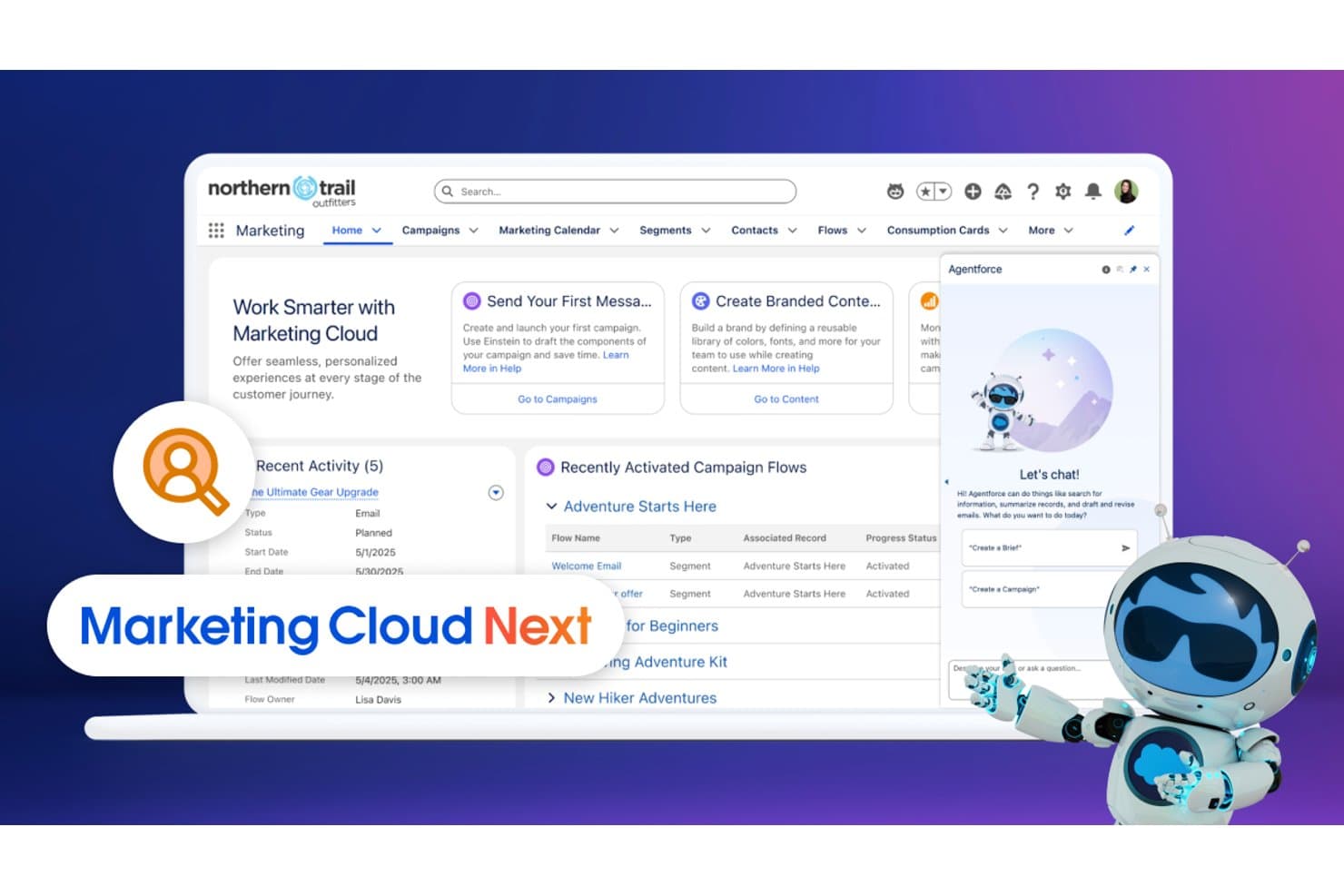
Salesforce CRM unifica i flussi delle campagne e la chat IA in un unico hub di marketing. Salesforce CRM è una piattaforma CRM aziendale e per le operazioni di marketing che comprende l'orchestrazione delle campagne, l'automazione basata sull'IA, il punteggio dei lead, la segmentazione del pubblico e l'unificazione nativa dei dati tra email, SMS, media a pagamento e altro.
A chi è più adatto Salesforce CRM?
Salesforce CRM è progettato per i team di marketing aziendali che devono unificare i dati dei clienti provenienti da più fonti, canali e unità aziendali in un unico luogo.
Perché ho scelto Salesforce CRM
Salesforce CRM si è guadagnato un posto nella mia lista ristretta perché l'architettura a copia zero di Data 360 non ha eguali tra le soluzioni che ho visto per unificare i dati dei clienti su larga scala. Federa i dati in tempo reale direttamente da Snowflake, Databricks, BigQuery e Redshift senza duplicarli, quindi utilizza la risoluzione delle identità per creare profili unificati dei clienti in ogni punto di contatto. Mi affido inoltre alla piattaforma per l'attivazione del pubblico in tempo reale, inviando questi segmenti unificati direttamente a Marketing Cloud, Meta e Google Ads nel momento stesso in cui un profilo viene aggiornato.
Funzionalità principali di Salesforce CRM
- Generatore di percorsi: Un'area di lavoro visiva con funzionalità di trascinamento per creare percorsi cliente multistep e omnicanale con logica condizionale e sperimentazione dei percorsi.
- Punteggio dei lead Einstein: Punteggio basato sull'IA che classifica lead e account in base alla probabilità di conversione, utilizzando segnali comportamentali e predittivi.
- Studio di automazione: Motore di automazione batch e attivata da eventi per pianificare, inviare e gestire flussi di lavoro di marketing multistep su più canali.
- Supporto per più unità aziendali: Partizionamento organizzativo che consente ai team aziendali di gestire marchi, regioni o reparti separati all'interno di una singola istanza Salesforce.
Integrazioni di Salesforce CRM
Salesforce CRM offre integrazioni native con Google Ads, Meta, Eventbrite, Olark, Bitly e Slack, oltre a migliaia di integrazioni del marketplace tramite AgentExchange. L'accesso a MuleSoft e all'API REST supporta connessioni personalizzate, inclusi collegamenti a copia zero con Snowflake, Databricks, BigQuery e Amazon Redshift.
Pros and Cons
Pros:
- Attivazione del pubblico in tempo reale su tutti i canali
- Integrazione unica con i data warehouse tramite copia zero
- Controlli di governance e sicurezza di livello aziendale
Cons:
- La reportistica avanzata è vincolata ad appositi componenti aggiuntivi costosi
- Le interfacce multiple richiedono competenze tecniche di marketing
Learn more about Salesforce CRM: Ideale per l'orchestrazione dei percorsi dei brand rivolti ai consumatori
- Demo gratuita disponibile
- Prezzi su richiesta
Visit WebsiteCustomer Rating:4.6/5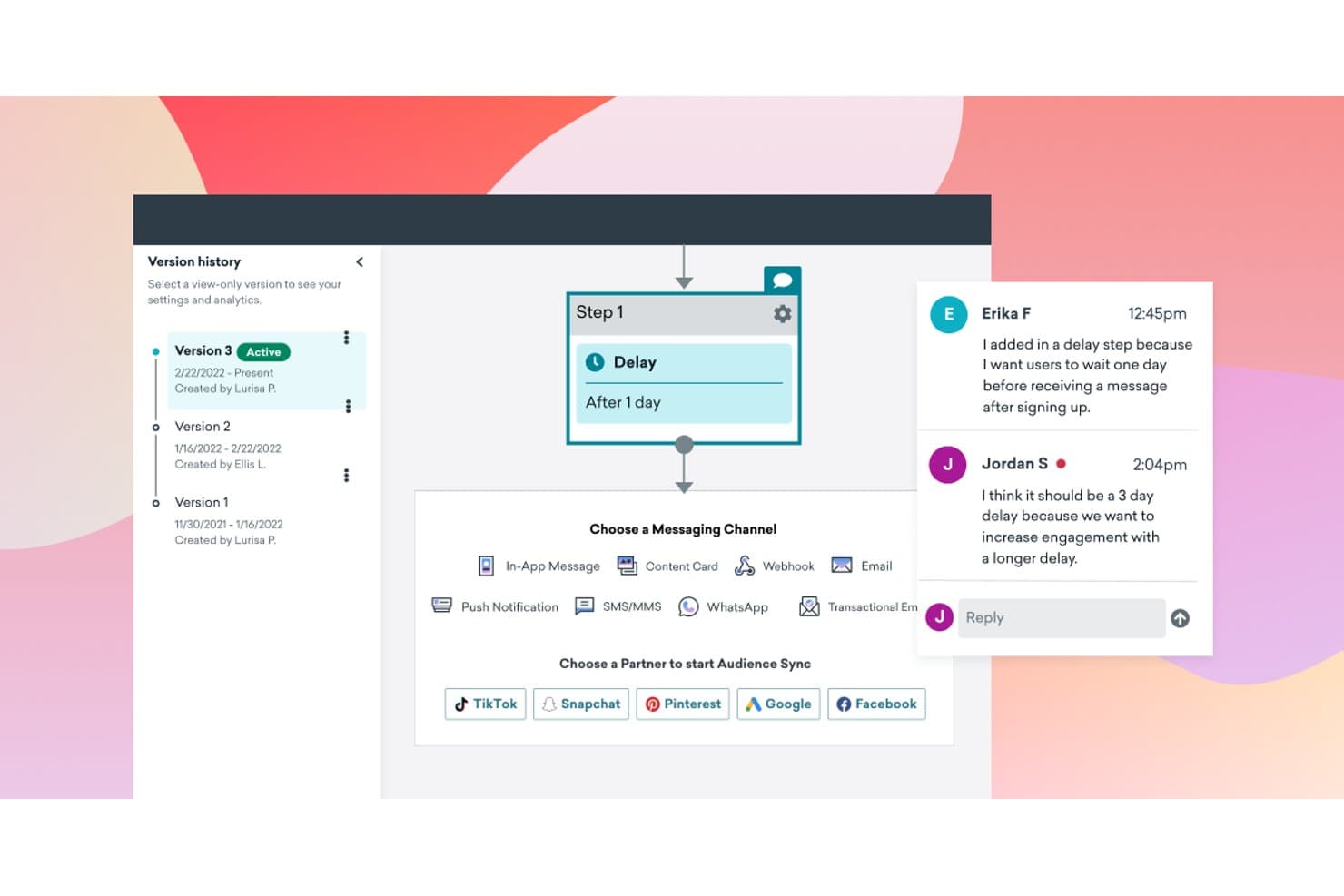
Braze consente ai team di collaborare sulle versioni dei flussi di lavoro con commenti integrati. Braze è una piattaforma di engagement dei clienti pensata per i brand rivolti ai consumatori, che combina l'orchestrazione di campagne omnicanale, l'automazione dei percorsi basata sull'intelligenza artificiale, la segmentazione in tempo reale e l'attivazione dei dati nativa del data warehouse su email, SMS, notifiche push, WhatsApp e altro.
Per chi è più adatto Braze?
Braze è particolarmente adatto ai brand rivolti ai consumatori nei settori della vendita al dettaglio, dei media, dei videogiochi e dei servizi finanziari che hanno bisogno di orchestrare l'engagement dei clienti su più canali e ad alto volume su larga scala.
Perché ho scelto Braze
Braze si è guadagnato un posto nella mia lista ristretta perché Canvas Flow, il suo strumento visivo per la creazione di percorsi, consente ai team di marketing rivolti ai consumatori di orchestrare sequenze realmente complesse su più canali, tra cui email, SMS, notifiche push, WhatsApp e altro, senza scrivere una riga di codice. Sono particolarmente colpito da BrazeAI Decisioning, che utilizza l'apprendimento per rinforzo per indirizzare automaticamente ogni singolo utente verso la variante del messaggio, il canale e il momento di invio con il tasso di conversione più elevato. In combinazione con la segmentazione dinamica in tempo reale, che si aggiorna istantaneamente al variare del comportamento degli utenti, Braze è la scelta più chiara che abbia trovato per i brand rivolti ai consumatori che necessitano di un'orchestrazione dei percorsi su larga scala.
Funzionalità principali di Braze
- Modellazione predittiva dell'abbandono: Braze identifica gli utenti a rischio di disimpegno, così puoi attivare campagne di fidelizzazione proattive prima che si allontanino.
- Attivazione dei dati dal data warehouse senza copia: Collegati direttamente a Snowflake, BigQuery o Redshift per creare segmenti e attivare percorsi senza duplicare i dati in Braze.
- Braze Currents: Trasmette in streaming i dati sugli eventi di engagement in tempo reale al tuo data warehouse, CDP o strumento di analisi per la reportistica e l'attivazione successive.
- Supporto per workspace multi-brand: Suddividi il tuo ambiente Braze in workspace separati per brand, regioni o linee di prodotto diversi, con controlli di governance centralizzati.
Integrazioni di Braze
Braze offre oltre 170 integrazioni pronte all'uso con i partner tramite Braze Alloys, tra cui Snowflake, BigQuery, Redshift, Databricks, Salesforce, HubSpot, Segment, Amplitude, Meta e Shopify. La sua API REST, i webhook, gli SDK e il supporto per Zapier consentono di creare connettività personalizzata.
Pros and Cons
Pros:
- Orchestrazione dei percorsi basata sull'intelligenza artificiale per campagne B2C
- La segmentazione in tempo reale si aggiorna al variare dei comportamenti
- Lo strumento visivo per la creazione dei percorsi consente automazioni complesse
Cons:
- Nessun punteggio nativo dei lead basato sulle fasi della pipeline
- Richiede una configurazione tecnica per le implementazioni aziendali
Learn more about Braze: Ideale per il punteggio dei lead B2B aziendali su larga scala
- Demo gratuita disponibile
- Prezzi su richiesta
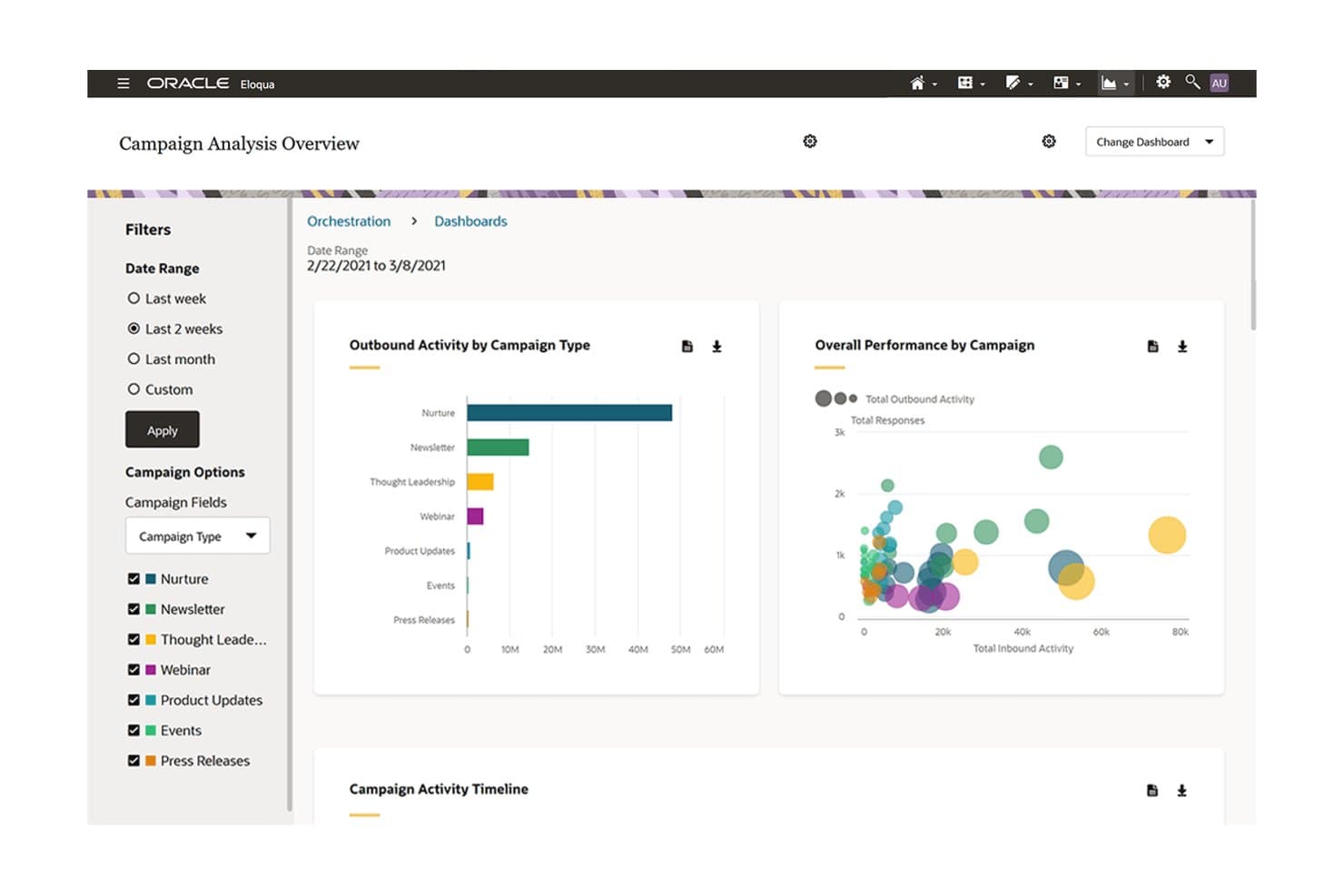
Oracle Eloqua monitora le prestazioni delle campagne per tipologia tramite dashboard visive. Oracle Eloqua è una piattaforma di automazione del marketing B2B aziendale che combina l'orchestrazione di campagne multicanale, il punteggio dei lead in tempo reale, l'automazione dei flussi di lavoro di Program Canvas e l'integrazione con il CRM in un unico sistema progettato per operazioni di marketing complesse.
Per chi è più adatto Oracle Eloqua?
Oracle Eloqua è adatto alle organizzazioni B2B aziendali con database di contatti di grandi dimensioni, cicli di acquisto complessi e un team dedicato alle operazioni di marketing per gestire la piattaforma.
Perché ho scelto Oracle Eloqua
Oracle Eloqua si è guadagnato un posto nella mia selezione ristretta per il modo in cui gestisce il punteggio dei lead su scala aziendale. Mi riferisco alla possibilità di eseguire contemporaneamente più modelli di punteggio, aggiornando i punteggi in tempo reale mentre i contatti avanzano attraverso cicli di acquisto complessi, senza alcun intervento del reparto IT. Il suo Program Canvas consente di attivare l'instradamento automatizzato e l'avanzamento nel ciclo di vita nel momento stesso in cui viene raggiunta una soglia di punteggio. È questa combinazione di punteggio dinamico e sincronizzazione istantanea con il CRM a renderlo progettato specificamente per le grandi operazioni B2B.
Caratteristiche principali di Oracle Eloqua
- Canvas delle campagne: Un generatore visivo con funzionalità di trascinamento per progettare campagne multicanale con diramazioni condizionali, fasi di attesa e test A/B su e-mail, display, ricerca e social.
- Pulizia dei contatti: Uno strumento automatizzato per l'igiene dei dati integrato nei flussi di lavoro di Program Canvas, che applica regole di pulizia ai record dei contatti mentre avanzano attraverso le fasi del ciclo di vita.
- Campagne guidate: Modelli predefiniti di flussi di lavoro ABM che consentono agli utenti del marketing e delle vendite di avviare campagne mirate basate sugli account senza doverle creare da zero.
- Reportistica delle entrate a ciclo chiuso: Una funzionalità di reportistica che collega direttamente l'attività delle campagne ai risultati relativi alla pipeline e alle entrate attraverso oltre 70 dashboard predefinite personalizzabili.
Integrazioni di Oracle Eloqua
Oracle Eloqua offre integrazioni native con Salesforce, Microsoft Dynamics e Oracle CX Sales. Il suo marketplace AppCloud mette a disposizione oltre 500 integrazioni di partner, mentre l'accesso all'API RESTful, i webhook e il supporto SFTP consentono flussi di dati personalizzati.
Pros and Cons
Pros:
- Esegue simultaneamente più modelli di punteggio dei lead
- Modelli avanzati di flussi di lavoro per il marketing basato sugli account
- La reportistica a ciclo chiuso collega le campagne alle entrate
Cons:
- L'interfaccia di segmentazione è complessa per gli utenti non tecnici
- Le funzionalità SMS e social richiedono componenti aggiuntivi
Learn more about Oracle Eloqua: Ideale per i team operativi di marketing che utilizzano l'ecosistema tecnologico Microsoft
- Prova gratuita di 30 giorni
- Prezzo su richiesta
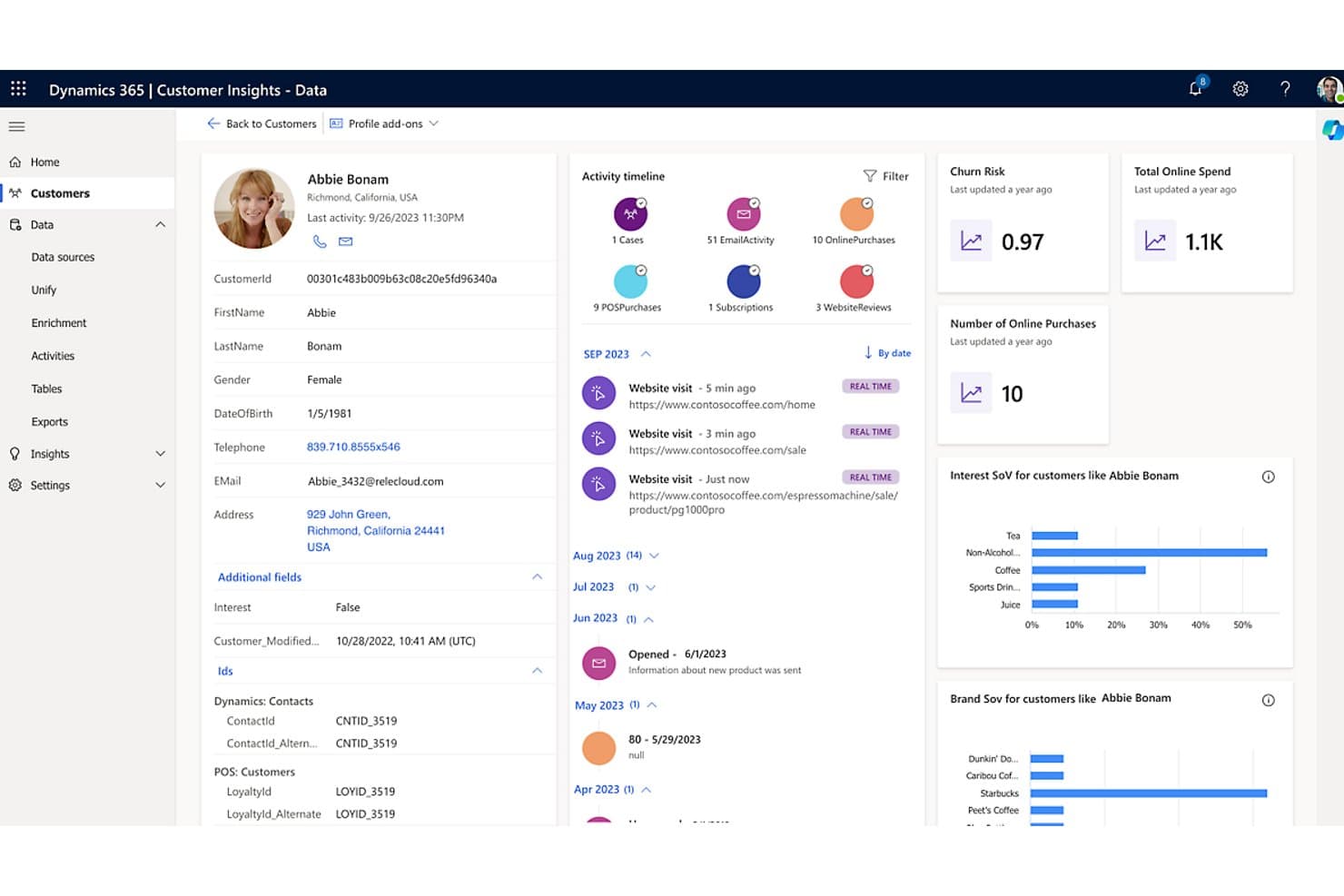
Microsoft Dynamics 365 Customer Insights unifica i profili dei clienti con attività in tempo reale e metriche predittive. Microsoft Dynamics 365 Customer Insights è una piattaforma combinata di CDP e automazione del marketing che unifica i dati dei clienti, l'orchestrazione dei percorsi, la segmentazione basata sull'intelligenza artificiale, il punteggio dei potenziali clienti e l'esecuzione di campagne multicanale tramite e-mail, SMS, notifiche push e canali personalizzati.
Per chi è più indicato Microsoft Dynamics 365 Customer Insights?
È una scelta naturale per i team di marketing aziendali che operano già nell'ecosistema Microsoft, tra Azure, Dynamics 365 Sales o Power Platform, e desiderano CDP e orchestrazione dei percorsi in un unico ambiente.
Perché ho scelto Microsoft Dynamics 365 Customer Insights
Ho scelto Microsoft Dynamics 365 Customer Insights perché è progettato specificamente per i team che utilizzano già l'ecosistema tecnologico Microsoft, dove la sincronizzazione nativa con Dataverse e i collegamenti ad Azure Data Lake rendono l'unificazione dei dati una realtà anziché un progetto. Apprezzo particolarmente l'Agente per la creazione dei percorsi basato su Copilot, che consente ai professionisti del marketing di creare percorsi completi e ramificati a partire da una descrizione in linguaggio naturale, senza toccare una singola riga di codice. Il generatore di modelli per il punteggio dei potenziali clienti si collega direttamente a Dynamics 365 Sales e avvisa automaticamente i rappresentanti non appena un potenziale cliente raggiunge la soglia di qualificazione.
Funzionalità principali di Microsoft Dynamics 365 Customer Insights
- Area di lavoro per percorsi omnicanale: Un generatore visivo con funzionalità di trascinamento per creare percorsi cliente in più fasi tramite e-mail, SMS, notifiche push e canali personalizzati, con logica di ramificazione e fasi di attesa.
- Generatore conversazionale di segmenti: Uno strumento basato su Copilot che consente di descrivere il pubblico di destinazione in linguaggio naturale e genera automaticamente un segmento dinamico e in tempo reale a partire dai dati unificati.
- Gestione del consenso per punto di contatto: Un quadro per il consenso specifico per canale che acquisisce, archivia e applica lo stato di adesione o rinuncia a livello del singolo punto di contatto, in conformità ai requisiti GDPR, CAN-SPAM, CASL e CCPA.
- Connettori dati Power Query: Una raccolta di oltre 40 connettori predefiniti per l'acquisizione di dati da origini di terze parti, tra cui Salesforce, SAP, Google Analytics e Amazon Redshift, direttamente nella piattaforma.
Integrazioni di Microsoft Dynamics 365 Customer Insights
Microsoft Dynamics 365 Customer Insights dispone di oltre 40 connettori Power Query, tra cui Salesforce, SAP, Google Analytics, Amazon Redshift, SharePoint e SQL Server, oltre a integrazioni native con Microsoft Dynamics 365, Power BI, Teams, Azure e Microsoft Fabric. La sua API REST supporta le integrazioni personalizzate.
Pros and Cons
Pros:
- Copilot crea percorsi complessi a partire dal linguaggio naturale
- Sincronizzazione nativa con Microsoft Dynamics 365 Sales
- La licenza basata sul tenant consente un numero illimitato di utenti
Cons:
- La configurazione del centro preferenze è eccessivamente complessa
- Gli aggiornamenti principali possono compromettere le personalizzazioni
Learn more about Microsoft Dynamics 365 Customer Insights: Ideale per l'orchestrazione dei percorsi omnicanale B2C
- Demo gratuita disponibile
- Prezzi su richiesta
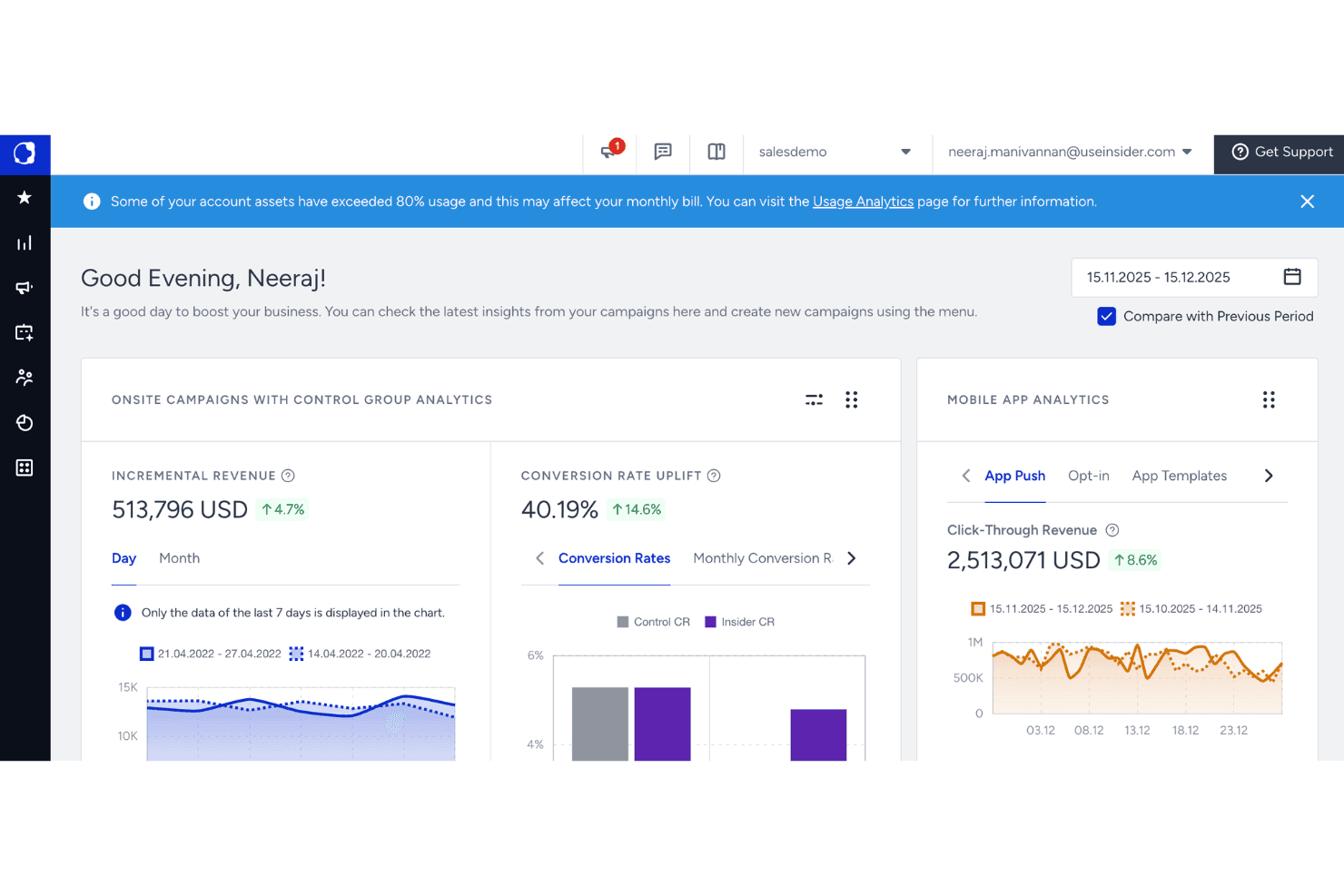
Felix AI di Quantum Metric monitora gli agenti in background e lo stato del sito. Insider è una piattaforma per le operazioni di marketing focalizzata sul B2C che combina una CDP nativa, la segmentazione del pubblico basata sull'intelligenza artificiale e l'orchestrazione dei percorsi omnicanale su oltre 12 canali, tra cui e-mail, SMS, WhatsApp, notifiche push web e social a pagamento.
Per chi è più indicato Insider?
Insider è particolarmente adatto ai team di marketing B2C di brand di medie e grandi dimensioni che devono orchestrare i percorsi dei clienti su un elevato numero di canali da un'unica piattaforma.
Perché ho scelto Insider
Insider è entrato nella mia rosa dei candidati perché il suo generatore di percorsi Architect consente ai team di marketing B2C di orchestrare i percorsi dei clienti su oltre 12 canali nativi da un'unica tela. Apprezzo particolarmente il modo in cui il routing Next Best Channel, riaddestrato quotidianamente tramite AutoML, sposta dinamicamente i clienti verso il punto di contatto con il maggior coinvolgimento senza interventi manuali. Anche Smart Segment Creator, basato sull'intelligenza artificiale, genera segmenti di pubblico predittivi a partire da richieste in linguaggio naturale, utilizzando oltre 120 attributi, tra cui il rischio di abbandono e il punteggio del valore del cliente nel tempo.
Funzionalità principali di Insider
- Generatore di percorsi Architect: Una tela con funzionalità di trascinamento per creare percorsi dei clienti in più fasi, con logica ramificata, controlli condizionali e trigger basati su eventi su oltre 12 canali nativi.
- Connettori CDP nativi del data warehouse: Sincronizzazione bidirezionale dei dati, quasi in tempo reale, con Snowflake, Google BigQuery, Amazon Redshift e Databricks per l'attivazione diretta dei dati senza duplicazioni.
- Agenti autonomi Agent One: Agenti di intelligenza artificiale, tra cui Shopping Agent e Insights Agent, che eseguono attività di marketing e rispondono in linguaggio naturale alle domande sulle prestazioni delle campagne.
- Gestione unificata del consenso: Un sistema integrato di gestione del consenso all'interno della CDP che monitora e applica le autorizzazioni dei clienti su tutti i canali, per supportare la conformità al GDPR e all'ePrivacy.
Integrazioni di Insider One
Insider One offre oltre 100 integrazioni, tra cui Salesforce, HubSpot, Microsoft Dynamics, Snowflake, Google BigQuery, Databricks, Shopify, Marketo Engage e Google Ads. Le API aperte e i webhook supportano connessioni personalizzate.
Pros and Cons
Pros:
- Orchestrazione dei percorsi omnicanale basata sull'intelligenza artificiale
- CDP unificata con sincronizzazione dei dati in tempo reale
- Oltre 100 modelli predefiniti per percorsi e personalizzazione
Cons:
- Non dispone di ABM nativo né di routing dei lead B2B
- Nessuna prova gratuita self-service né prezzi pubblici
Learn more about Insider: Ideale per l'orchestrazione GTM basata sugli account
- Demo gratuita disponibile
- Prezzi su richiesta
Visit WebsiteCustomer Rating:4.4/5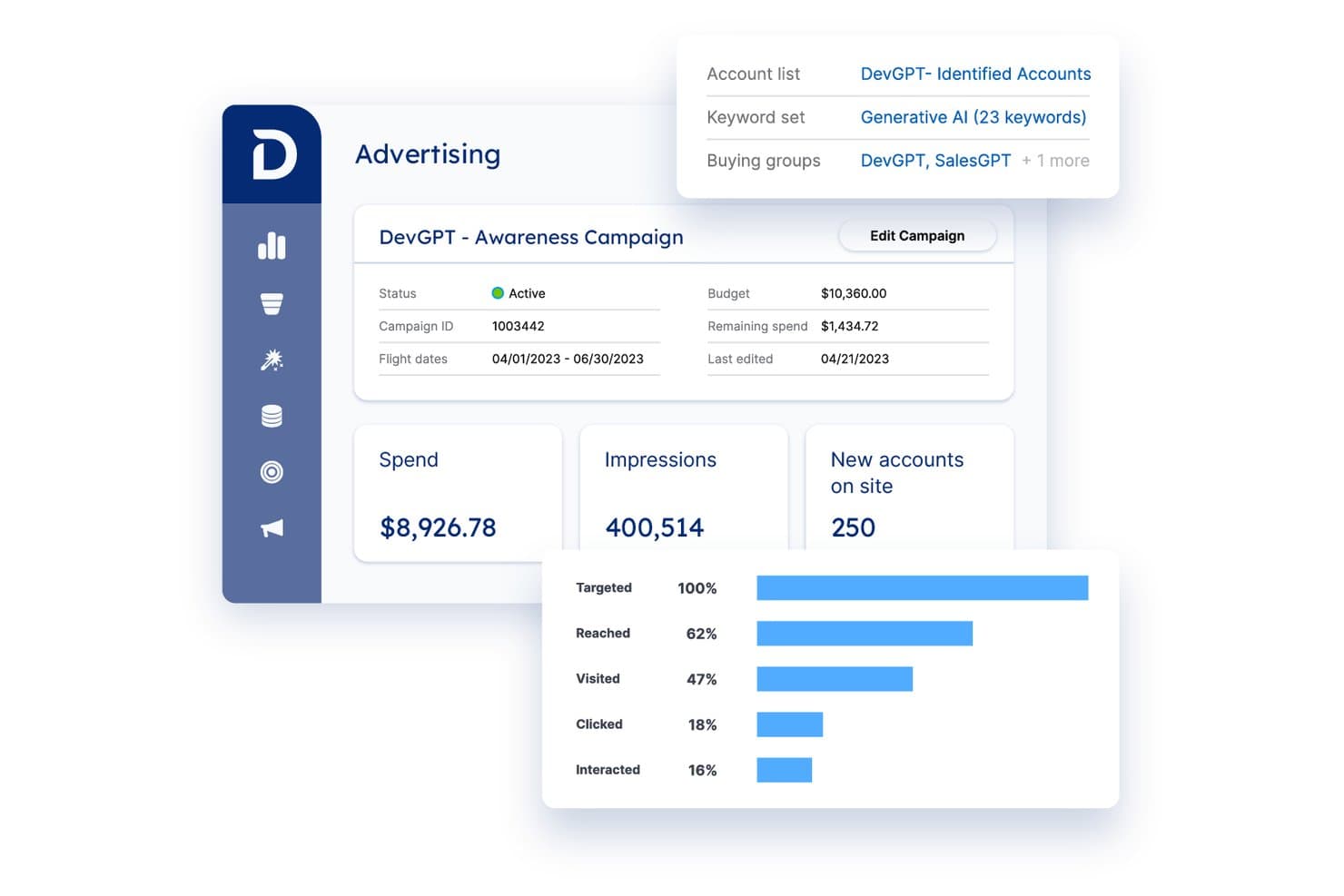
Demandbase monitora la spesa pubblicitaria, le impressioni e il coinvolgimento degli account in un'unica vista. Demandbase è una piattaforma GTM B2B che unifica l'intelligence sugli account, l'orchestrazione delle campagne multicanale, la pubblicità, la personalizzazione dei siti web e l'abilitazione delle vendite in un'unica struttura basata sugli account.
Per chi è più adatta Demandbase?
Demandbase è pensata per i team B2B del mercato medio e delle grandi aziende che necessitano di una risorsa dedicata alle operazioni di marketing per gestire programmi coordinati e basati sugli account tra vendite e marketing.
Perché ho scelto Demandbase
Ho scelto Demandbase come una delle migliori piattaforme perché la sua orchestrazione GTM basata sugli account è più approfondita di quella della maggior parte delle piattaforme che ho visto. JourneyIQ adatta dinamicamente le campagne pubblicitarie in tempo reale in base ai segnali dei gruppi d'acquisto, così la spesa per la pubblicità display, CTV e LinkedIn si sposta automaticamente man mano che gli account avanzano nelle diverse fasi. Apprezzo molto anche lo strumento Demandbase Selector, che consente di creare segmenti trasversali tra gli oggetti a partire da dati CRM, di intento e comportamentali e di attivarli istantaneamente su ogni canale con un'unica azione coordinata.
Funzionalità principali di Demandbase
- Punteggio degli account basato sull'IA: Demandbase utilizza l'IA predittiva per assegnare un punteggio ad account e contatti in base ai segnali di intento, alla corrispondenza firmografica, al comportamento sul sito web e ai dati CRM.
- Mappatura dei gruppi d'acquisto: Identifica e mappa automaticamente i singoli interlocutori all'interno degli account target in base al ruolo e alla persona, per attività di contatto più mirate.
- Personalizzazione del sito web: Personalizza pagine web, CTA, immagini e contenuti per specifici segmenti di account sulla base dei dati di identificazione e coinvolgimento a livello di account.
- Distribuzione al magazzino di dati: Esporta nativamente i dati sugli account e sul coinvolgimento in Snowflake, Google BigQuery, Amazon Redshift e altri importanti magazzini di dati per la creazione di report BI personalizzati.
Integrazioni di Demandbase
Demandbase offre integrazioni native con Salesforce, HubSpot, Microsoft Dynamics 365, Marketo, Eloqua, Outreach, Salesloft, Snowflake, Google BigQuery e LinkedIn Marketing Solutions, oltre a un'API REST aperta, Workato e webhook per connessioni personalizzate.
Pros and Cons
Pros:
- Orchestrazione avanzata di account e percorsi basata sull'IA
- DSP nativo per il B2B per la pubblicità programmatica mirata
- Funzionalità avanzate di allineamento tra ABM e vendite e marketing
Cons:
- Richiede una MAP separata per le campagne di posta elettronica
- I report di attribuzione spesso frustrano i team orientati alla risposta diretta
Learn more about Demandbase: Ideale per l'inbound marketing
- Prova gratuita di 14 giorni e piano gratuito disponibili
- A partire da $9/postazione/mese (con fatturazione annuale)
Visit WebsiteCustomer Rating:4.4/5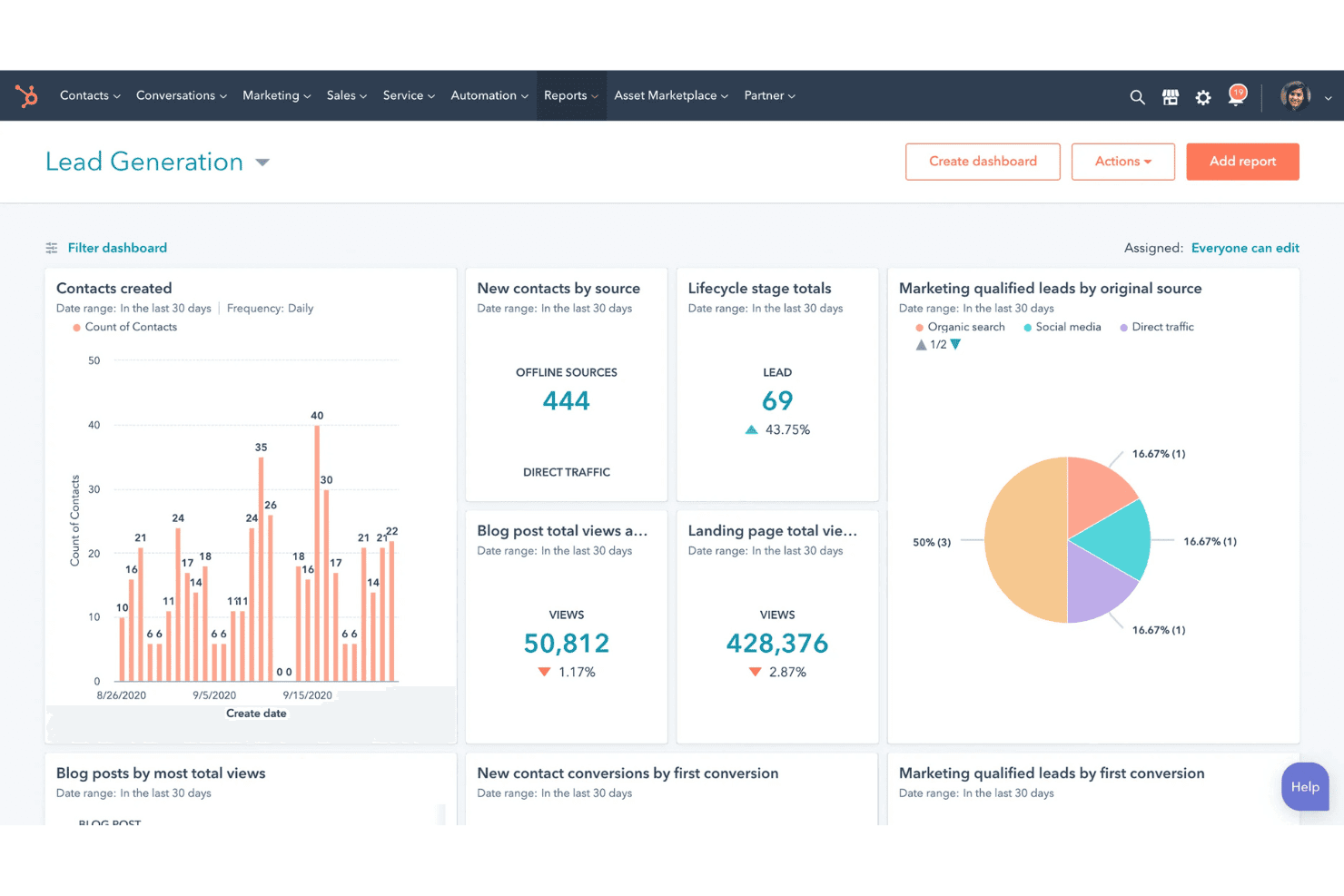
HubSpot Marketing Hub offre una dashboard per la generazione di lead che mostra i contatti creati, i nuovi contatti per fonte, i totali per fase del ciclo di vita, le visualizzazioni dei post del blog, le visualizzazioni delle pagine di destinazione e i lead qualificati dal marketing per fonte. HubSpot Marketing Hub è una piattaforma per le operazioni di marketing che riunisce marketing via e-mail, orchestrazione di campagne multicanale, automazione del marketing, assegnazione di punteggi ai lead, CRM e analisi in un unico sistema integrato.
Per chi è più adatto HubSpot Marketing Hub?
HubSpot Marketing Hub è una soluzione particolarmente adatta ai team B2B in fase di crescita e alle aziende del mercato medio che desiderano marketing, CRM e automazione in un unico luogo, senza dover assemblare uno stack frammentato.
Perché ho scelto HubSpot Marketing Hub
HubSpot Marketing Hub è entrato nella mia rosa di candidati perché è stato progettato fin dall'inizio intorno ai principi dell'inbound marketing, offrendo ai team strumenti che attraggono e convertono invece di interrompere. Apprezzo particolarmente il generatore visivo dei percorsi (lanciato nella primavera del 2025), che adatta i percorsi delle campagne automatizzate al comportamento degli acquirenti in tempo reale attraverso e-mail, annunci a pagamento e web. Se si aggiungono il punteggio predittivo dei lead basato sull'intelligenza artificiale di Breeze AI e gli elenchi di profili simili, è possibile individuare costantemente i potenziali clienti con un'elevata intenzione di acquisto senza creare manualmente gli elenchi.
Funzionalità principali di HubSpot Marketing Hub
- Attribuzione dei ricavi su più interazioni: Tiene traccia di ogni interazione con il cliente attraverso sette modelli di attribuzione, tra cui il primo contatto, quello a U e il percorso completo, per collegare direttamente l'attività di marketing ai ricavi derivanti dalle vendite concluse.
- Strumenti ABM nativi: Crea e monitora elenchi di account target con punteggio delle aziende, dati sul coinvolgimento a livello di account e integrazione con LinkedIn Sales Navigator per l'esecuzione di campagne basate sugli account.
- Sincronizzazione con il data warehouse cloud: Invia e riceve dati tra HubSpot e Snowflake, Google BigQuery o AWS S3 tramite connettori bidirezionali disponibili con Data Hub Enterprise.
- Segmentazione dei team basata sui ruoli: Separa risorse, contenuti e pubblicazione sui domini in base al team, offrendo alle organizzazioni multi-brand o multi-regione un controllo granulare su chi può accedere e pubblicare i diversi elementi.
Integrazioni di HubSpot Marketing Hub
HubSpot Marketing Hub offre oltre 2.000 integrazioni del Marketplace, tra cui Salesforce, LinkedIn Sales Navigator, Google Ads, Meta Ads, LinkedIn Ads, TikTok Ads, Slack, Zoom e WhatsApp. Supporta inoltre la sincronizzazione bidirezionale nativa con Salesforce, un'API aperta e Zapier.
Pros and Cons
Pros:
- L'orchestrazione dei percorsi basata sull'intelligenza artificiale si adatta in tempo reale
- La sincronizzazione bidirezionale dei dati supporta i flussi di lavoro del data warehouse
- L'attribuzione su più interazioni collega le interazioni ai ricavi
Cons:
- Il prezzo aumenta rapidamente con la crescita del database
- Le funzionalità chiave di automazione sono disponibili solo nei piani superiori
Learn more about HubSpot Marketing Hub: Ideale per l'orchestrazione di campagne basate sull'ABM
- Piano gratuito disponibile
- Prezzi su richiesta
Visit WebsiteCustomer Rating:4.3/5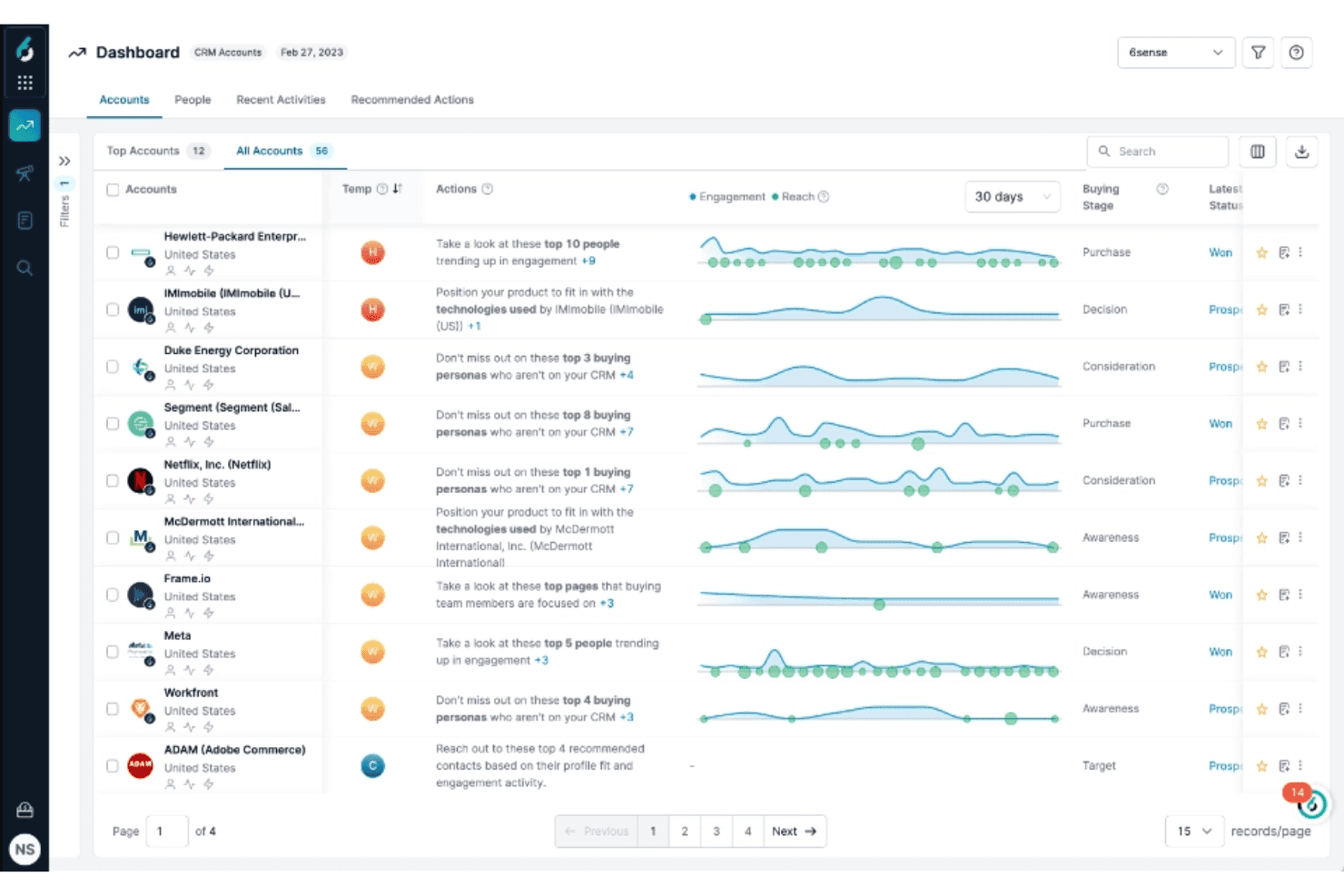
6sense offre un pannello degli account CRM che mostra la temperatura degli account, la fase d'acquisto, le tendenze del coinvolgimento e le azioni di vendita consigliate per gli account principali. 6sense è una piattaforma di marketing orientata ai ricavi che combina la segmentazione del pubblico basata sull'IA, i dati sull'intento, il punteggio predittivo, l'orchestrazione delle campagne multicanale e l'automazione dell'interazione con le vendite.
Per chi è più adatto 6sense?
6sense è particolarmente adatto ai team di marketing B2B di aziende del mercato medio e di grandi imprese che adottano strategie basate sugli account e necessitano di dati sull'intento, punteggio predittivo e orchestrazione multicanale in un unico strumento.
Perché ho scelto 6sense
Ho incluso 6sense tra le mie scelte principali perché il suo prodotto Flussi di lavoro intelligenti è realmente progettato per l'orchestrazione di campagne basate sull'ABM, in un modo che la maggior parte delle piattaforme non offre. In un'area di lavoro con funzionalità di trascinamento, posso coordinare annunci display, LinkedIn e sequenze e-mail basate sull'IA, in modo che si adattino in tempo reale ai segnali degli acquirenti, invece di seguire una pianificazione statica. Inoltre, la segmentazione a livello di gruppo d'acquisto tramite Signalverse™ consente alle campagne di rivolgersi all'intero comitato d'acquisto, non soltanto a un contatto di un account.
Funzionalità principali di 6sense
- Query in linguaggio naturale con RevvyAI: poni domande sulla pipeline e sui dati GTM in linguaggio naturale e ottieni informazioni dettagliate su richiesta senza creare report personalizzati.
- Punteggio predittivo basato sull'IA: i modelli di IA, addestrati su oltre un decennio di dati sugli acquisti B2B, assegnano un punteggio agli account in base alla fase d'acquisto e mostrano previsioni spiegabili direttamente nel tuo CRM.
- Flussi di lavoro dei dati: automatizza la creazione degli account nel CRM, l'assegnazione dei lead, l'arricchimento dei contatti e la pulizia dei dati sulla base dei segnali in tempo reale provenienti da Signalverse™.
- Identificazione dei visitatori del sito: rende identificabili i visitatori anonimi del sito e li associa agli account conosciuti per il nuovo targeting e la nuova segmentazione.
Integrazioni di 6sense
6sense offre integrazioni native con Salesforce, HubSpot, Microsoft Dynamics, Marketo, Oracle Eloqua, Salesloft, Outreach, Gong, LinkedIn Advertising e Google Ads. Supporta inoltre un'API aperta e un server MCP per connessioni personalizzate.
Pros and Cons
Pros:
- Signalverse™ identifica tempestivamente gli account interessati
- I flussi di lavoro intelligenti adattano le campagne ai segnali degli acquirenti
- La segmentazione dei gruppi d'acquisto mappa i comitati completi
Cons:
- La precisione dei dati sui contatti può essere incostante
- Sono disponibili solo segnali di intento a livello di account
Learn more about 6sense: Ideale per i team di operations del marketing B2B aziendale
- Demo gratuita disponibile
- Prezzi su richiesta
Visit WebsiteCustomer Rating:4.1/5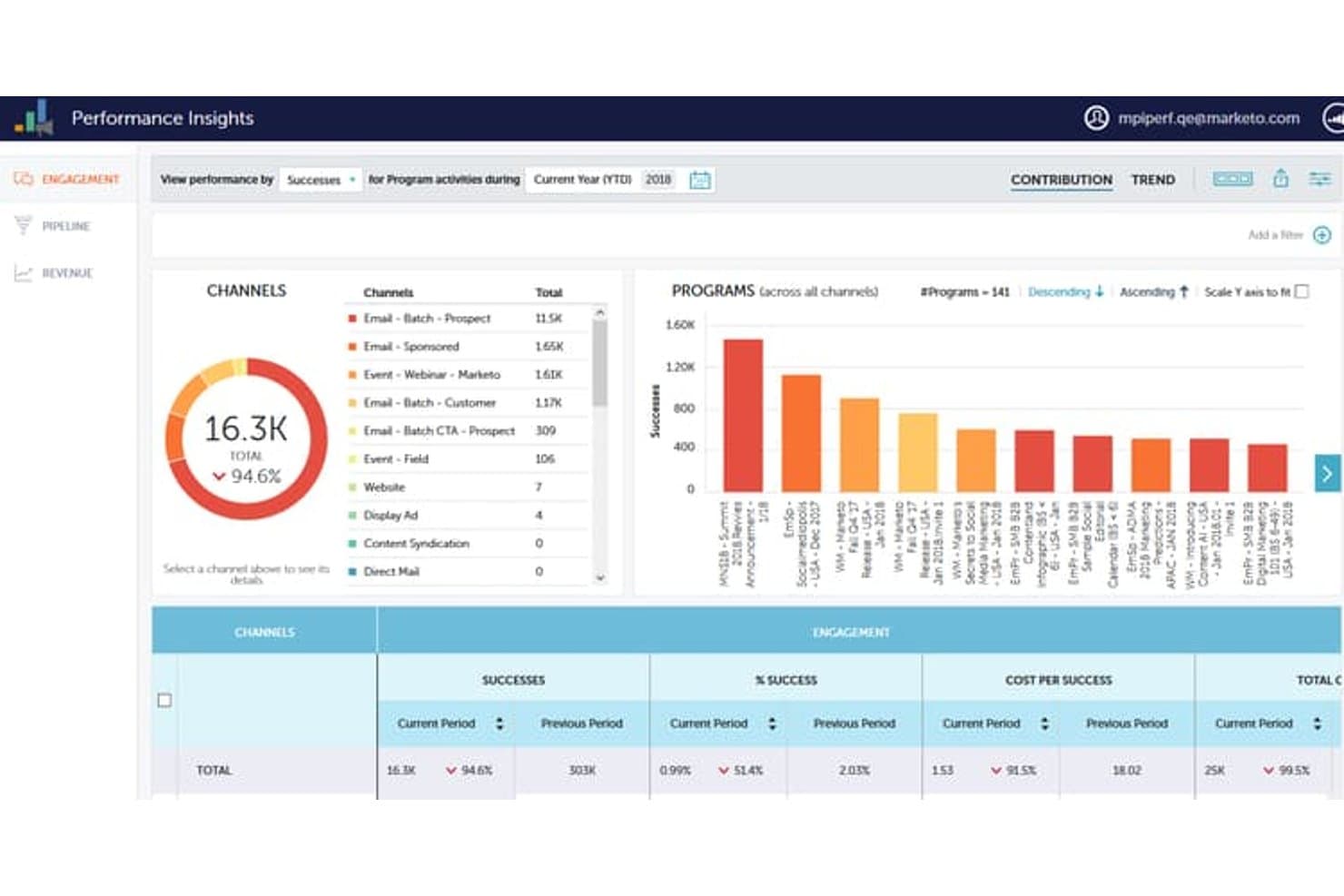
Adobe Marketo Engage monitora le metriche di engagement tra canali e programmi. Adobe Marketo Engage è una piattaforma di automazione del marketing B2B incentrata su Smart Campaigns, lead scoring, programmi di nurturing multicanale, integrazione CRM e attribuzione dei ricavi.
Per chi è più indicato Adobe Marketo Engage?
Marketo Engage è progettato per organizzazioni B2B aziendali con una funzione dedicata alle operations di marketing e le risorse tecniche necessarie per gestire una piattaforma complessa.
Perché ho scelto Adobe Marketo Engage
Adobe Marketo Engage si è guadagnato un posto nella mia rosa ristretta perché nessun'altra piattaforma è progettata in modo altrettanto specifico per le operations di marketing B2B aziendali. Smart Campaigns consente al mio team di gestire flussi di lavoro complessi basati su trigger, con oltre 150 filtri per il pubblico, logica di diramazione e scoring comportamentale con decadimento integrato. Mi affido anche a Workspaces e Partitions per mantenere separati in modo ordinato più unità aziendali, marchi o aree geografiche all'interno di una singola istanza: una possibilità che non è realmente replicabile con strumenti più essenziali.
Funzionalità principali di Adobe Marketo Engage
- Attribuzione dei ricavi multi-touch: Marketo Measure collega ogni punto di contatto di marketing e vendita alla pipeline e ai ricavi chiusi utilizzando modelli di attribuzione first touch, a U, a W, full-path e personalizzati.
- Programmi di engagement: I programmi di nurturing sempre attivi, con controllo della cadenza per contatto, logica di esaurimento dei contenuti e scoring dell'engagement, consentono di eseguire fino a 100 programmi attivi contemporaneamente.
- Sales Insight: Una dashboard integrata nel CRM che mostra l'attività di engagement dei lead — email aperte, pagine visitate, moduli compilati — direttamente all'interno di Salesforce e Microsoft Dynamics per i team di vendita.
- Dynamic Chat: Un chatbot di marketing conversazionale basato sull'intelligenza artificiale, con pianificazione degli incontri, instradamento dei lead e risposte generate dall'intelligenza artificiale, integrato nativamente nella piattaforma.
Integrazioni di Adobe Marketo Engage
Adobe Marketo Engage offre integrazioni native con Salesforce Sales Cloud, Microsoft Dynamics 365, Veeva CRM e Adobe Experience Cloud. Il suo marketplace LaunchPoint include centinaia di integrazioni partner, oltre ad API REST e SOAP e webhook per la connettività personalizzata.
Pros and Cons
Pros:
- Smart Campaigns gestisce flussi di lavoro complessi e articolati in più fasi
- Modelli nativi di marketing e attribuzione basati sugli account
- Il partizionamento supporta team multi-marchio o multi-area geografica
Cons:
- L'interfaccia utente appare datata e macchinosa
- La personalizzazione dei report di attribuzione è limitata senza un componente aggiuntivo
Learn more about Adobe Marketo Engage: Ideale per l'automazione basata sull'IA
- Prova gratuita di 14 giorni
- A partire da $55/utente/mese (fatturato annualmente)
Visit WebsiteCustomer Rating:4.7/5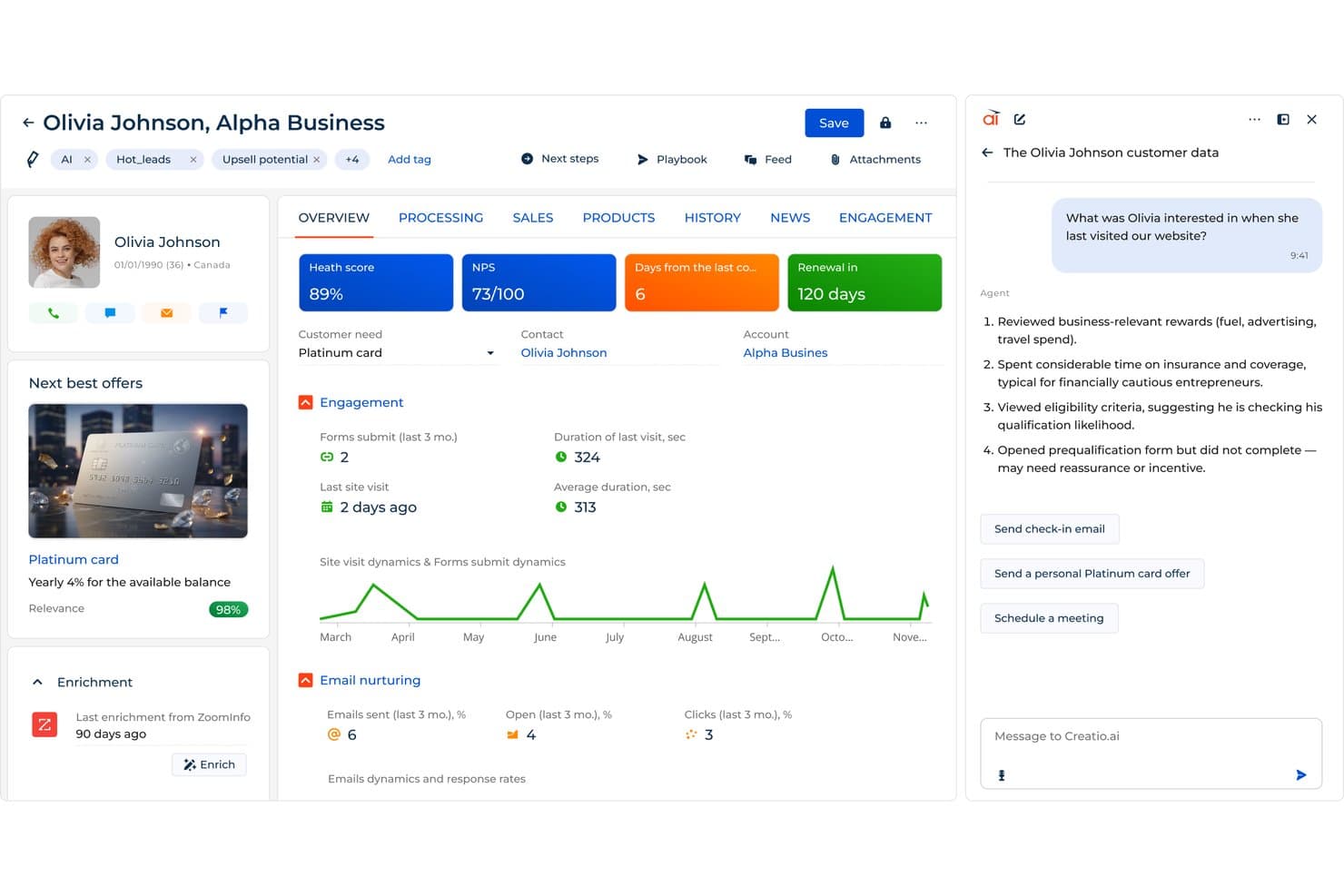
Creatio CRM mette in evidenza informazioni sui clienti basate sull'IA per guidare le attività di contatto del marketing. Creatio CRM è una piattaforma unificata senza codice per il CRM e le operazioni di marketing, che combina l'orchestrazione di campagne omnicanale, il punteggio dei lead basato sull'IA, la segmentazione dinamica del pubblico e l'automazione dei flussi di lavoro per marketing, vendite e assistenza su un unico modello di dati.
Per chi è più adatto Creatio CRM?
Creatio CRM è particolarmente adatto ai team di marketing e operazioni di aziende del mercato medio e grandi imprese che desiderano automazione basata sull'IA, orchestrazione di campagne omnicanale e allineamento del CRM su un'unica piattaforma senza codice.
Perché ho scelto Creatio CRM
Creatio CRM si è guadagnato un posto nella mia lista ristretta perché la sua automazione basata sull'IA non è solo superficiale. Sono particolarmente colpito dal suo agente per la generazione di campagne con IA, che crea flussi di lavoro completi per campagne multicanale a partire da un briefing in linguaggio naturale, e dal suo modello di punteggio dei lead basato sull'apprendimento automatico, che assegna punteggi predittivi di propensione (1–100) ai contatti, consentendo al mio team di dare priorità alle attività di contatto senza un'analisi manuale preliminare. Entrambe le funzionalità operano nativamente su un modello unificato di dati CRM condiviso tra marketing, vendite e assistenza.
Funzionalità principali di Creatio CRM
- Progettista di processi senza codice: Un generatore di flussi di lavoro con funzionalità di trascinamento che consente di creare e modificare processi automatizzati in più fasi senza scrivere codice.
- Progettista visivo di campagne: Uno strumento basato su una tela per creare percorsi cliente omnicanale attraverso e-mail, SMS, social media, notifiche push ed eventi, con logica a diramazioni e fasi di attesa.
- Segmentazione dinamica del pubblico: Un motore di segmentazione che crea e aggiorna gli elenchi del pubblico in tempo reale utilizzando una logica a condizioni multiple basata su dati demografici, comportamentali e aziendali.
- Connettore per il magazzino dati Snowflake: Un'integrazione nativa che sincronizza i dati di marketing direttamente con Snowflake per analisi e reportistica avanzate.
Integrazioni di Creatio CRM
Creatio CRM offre integrazioni native con Microsoft 365, Google Workspace, Facebook, LinkedIn, Google Analytics e Matomo, oltre a più di 700 integrazioni del Marketplace, tra cui Snowflake, Apollo.io e ZoomInfo. Supporta le API REST, SOAP e OData, Make, Workato e Zapier.
Pros and Cons
Pros:
- L'IA crea campagne a partire dal linguaggio naturale
- Percorsi omnicanale con diramazioni su una tela condivisa
- Punteggio predittivo dei lead nativo per stabilire le priorità
Cons:
- Nessuna reportistica nativa sull'attribuzione multi-touch
- Sono disponibili meno modelli di campagne pronti all'uso
Learn more about Creatio CRM:
Altri software per le operazioni di marketing
Ecco alcune ulteriori opzioni di software per le operazioni di marketing che non sono state incluse nel mio elenco, ma che vale comunque la pena prendere in considerazione:
- 11KlaviyoIdeale per le operazioni di marketing nel commercio elettronico
- 12OrttoIdeale per percorsi omnicanale con CDP integrata
- 13CleverTapIdeale per l'orchestrazione del ciclo di vita con approccio mobile-first
- 14BloomreachIdeale per le operazioni di campagne e-commerce native del data warehouse
- 15ActiveCampaignIdeale per l'automazione multicanale delle aziende del mercato medio
- 16Iterable Ideale per le operazioni di marketing del ciclo di vita basate nativamente sul data warehouse
- 17Salesforce Marketing CloudIdeale per l'orchestrazione di campagne multicanale
Come valuto i software di rilevamento delle emozioni
Divido la mia valutazione in due livelli: le funzionalità di base che uno strumento deve possedere per essere incluso nell'elenco e gli elementi distintivi che separano i fornitori che vale la pena raccomandare da tutti gli altri.
Funzionalità principali (Requisiti fondamentali per questo elenco)
Quando seleziono gli strumenti per il mio elenco, assegno a ciascuno un punteggio su una scala da 0 (non offre la funzionalità) a 5 (eccelle in quest'area) per ogni funzionalità principale indicata di seguito. Calcolo quindi il punteggio totale dello strumento in percentuale, utilizzando il 65% come parametro di riferimento per valutarne l'idoneità complessiva all'inclusione nell'elenco.
- Orchestrazione delle campagne: valuto se lo strumento consente di pianificare, eseguire e coordinare senza soluzione di continuità campagne multicanale attraverso e-mail, web, social media e media a pagamento da un'unica interfaccia.
- Automazione del marketing & flussi di lavoro: verifico se fornisce flussi di lavoro automatizzati per la fidelizzazione dei lead, l'assegnazione dei punteggi, l'instradamento e la gestione delle fasi del ciclo di vita sulla base dei comportamenti e dei trigger dei clienti.
- Integrazione dei dati & del CRM: valuto le integrazioni native e la sincronizzazione bidirezionale dei dati con i CRM e gli stack martech, per unificare i dati dei clienti e delle campagne.
- Analisi & attribuzione: cerco dashboard di reporting solide, analisi del funnel e attribuzione multi-touch per misurare con precisione l'efficacia delle campagne e il ROI.
- Segmentazione & gestione del pubblico: determino se gli esperti di marketing possono creare, gestire e raggiungere segmenti dinamici di pubblico utilizzando dati demografici, firmografici e comportamentali.
- Controlli di governance & conformità: verifico la presenza di autorizzazioni per gli utenti, impostazioni per la privacy dei dati e funzionalità di conformità (ad es. GDPR, CAN-SPAM, CCPA) per garantire una gestione responsabile dei dati di marketing.
Una volta ottenuto un elenco di strumenti che soddisfano i criteri, considero ciò che distingue ciascuna piattaforma.
Fattori distintivi (Ciò che distingue i fornitori)
Ecco come confronto e metto a confronto i diversi fornitori:
Funzionalità di spicco
Presto particolare attenzione alla capacità di uno strumento di mappare i cambiamenti delle emozioni lungo l'intero percorso del cliente, non solo durante una singola chiamata o chat. Anche la modellazione multilingue e robusta rispetto agli accenti è altrettanto importante: cerco un rilevamento nativo delle emozioni in più lingue, non ricerche di parole chiave tradotte. Valuto inoltre se uno strumento collega le emozioni rilevate a risultati come il tasso di abbandono o il CSAT, perché sapere perché i clienti si sentono frustrati è più utile ai fini dell'azione che sapere semplicemente che si sentono frustrati.
Oltre le funzionalità
Per me, la preparazione alla conformità è imprescindibile. Verifico se i fornitori sono conformi a normative come GDPR, CCPA e la legge sull'IA dell'UE, che limita il riconoscimento delle emozioni in determinati contesti, e se offrono l'acquisizione configurabile del consenso e la redazione dei dati personali identificabili (PII). Analizzo inoltre con attenzione la flessibilità di implementazione. Un team del settore sanitario o dei servizi finanziari con requisiti rigorosi di residenza dei dati ha bisogno di qualcosa di più di un'opzione cloud a tenant singolo. Infine, considero quanto prevedibilmente aumentino i costi al crescere dei volumi di interazione, poiché un modello audio con tariffazione al minuto può sembrare conveniente durante la fase pilota e diventare rapidamente costoso.
Come scegliere il software per le operazioni di marketing
È facile perdersi in lunghi elenchi di funzionalità e strutture di prezzo complesse. Per aiutarti a rimanere concentrato mentre affronti il tuo processo di selezione del software, unico per le tue esigenze, ecco un elenco dei fattori da tenere a mente:
| Fattore | Cosa considerare |
| Scalabilità | Assicurati che il software possa crescere insieme alla tua azienda. Considera se è in grado di gestire una quantità maggiore di dati e utenti con l'espansione del tuo team. |
| Integrazioni | Verifica se il software si integra con gli strumenti esistenti, come i sistemi CRM o le piattaforme di analisi, per evitare silos di dati e migliorare l'efficienza del flusso di lavoro. |
| Personalizzazione | Cerca opzioni che consentano di adattare il software ai processi del tuo team. Possono includere dashboard personalizzate o report su misura. |
| Facilità d'uso | Valuta l'interfaccia utente e i requisiti di formazione. Un sistema intuitivo riduce al minimo la curva di apprendimento e favorisce l'adozione da parte del team. |
| Budget | Confronta i piani tariffari per trovare quello più adatto ai tuoi vincoli finanziari. Considera i costi nascosti, come quelli relativi a utenti aggiuntivi o funzionalità premium, che possono incidere sul prezzo. |
| Misure di sicurezza | Dai priorità ai software che offrono solide funzionalità di sicurezza per proteggere i tuoi dati. Verifica la conformità alle normative pertinenti, come il GDPR. |
| Supporto | Valuta la disponibilità e la qualità dell'assistenza clienti. Un supporto affidabile può essere fondamentale per risolvere rapidamente i problemi e garantire operazioni fluide. |
| Analisi | Considera le funzionalità di analisi per assicurarti di poter monitorare e misurare efficacemente le prestazioni. Cerca report personalizzabili e strumenti di visualizzazione dei dati. |
Tendenze nei software per le operazioni di marketing
Durante la mia ricerca, ho raccolto innumerevoli aggiornamenti di prodotto, comunicati stampa e registri delle versioni di diversi fornitori di software per le operazioni di marketing. Ecco alcune delle tendenze emergenti che sto tenendo d'occhio:
- Analisi basate sull'IA: Le aziende utilizzano l'IA per analizzare i dati in modo più efficiente. Questa tendenza aiuta gli utenti a ottenere rapidamente informazioni utili, migliorando i processi decisionali.
- Personalizzazione su larga scala: Oggi i software consentono interazioni più personalizzate con i clienti. Questa tendenza consiste nel fornire contenuti su misura a un pubblico ampio, migliorando i tassi di coinvolgimento.
- Conformità alla privacy dei dati: Con l'evoluzione delle normative, i software si adattano per garantire la conformità. Questa tendenza è importante per mantenere la fiducia dei clienti ed evitare problemi legali.
- Integrazione multipiattaforma: È sempre più necessario che i software si connettano a diverse piattaforme. Questa tendenza mira a unificare dati e processi, offrendo una visione completa delle attività di marketing.
- Strumenti di collaborazione visiva: Un numero crescente di software include strumenti per la collaborazione visiva, a supporto dei team che lavorano da remoto. Questa tendenza favorisce i processi creativi e la gestione dei progetti, consentendo ai team di lavorare insieme in modo asincrono.
Che cos'è un software per le operazioni di marketing?
I software per le operazioni di marketing sono progettati per aiutare le aziende a gestire e ottimizzare i processi e le campagne di marketing. Questi strumenti sono generalmente utilizzati da responsabili marketing, coordinatori e analisti per migliorare l'efficienza e il processo decisionale basato sui dati.
Funzionalità chiave come la gestione delle campagne, l'analisi e il monitoraggio del budget aiutano i team a organizzare le attività e misurare i risultati. Nel complesso, questi strumenti forniscono informazioni preziose e funzionalità di automazione che migliorano l'efficacia del marketing e il ROI.
Funzionalità dei software per le operazioni di marketing
Quando selezioni un software per le operazioni di marketing, presta attenzione alle seguenti funzionalità chiave:
- Gestione delle campagne: Aiuta a pianificare, eseguire e monitorare efficacemente le campagne di marketing per raggiungere gli obiettivi prefissati.
- Analisi e report: Fornisce informazioni sulle metriche delle prestazioni, consentendo di prendere decisioni basate sui dati e apportare modifiche alla strategia.
- Monitoraggio del budget: Monitora la spesa per garantire che le risorse siano allocate in modo efficiente e che i limiti di budget vengano rispettati.
- Gestione dei lead: Gestisce e coltiva i lead lungo il percorso di vendita per migliorare i tassi di conversione.
- Gestione delle attività: Organizza attività e scadenze per migliorare la produttività e la collaborazione del team.
- Segmentazione del pubblico: Consente di rivolgersi a gruppi specifici di clienti per attività di marketing più personalizzate.
- Test A/B: Verifica diverse varianti dei contenuti per determinare l'approccio più efficace al coinvolgimento del pubblico.
- Strumenti di collaborazione visiva: Supporta i processi creativi consentendo ai team di lavorare insieme sui materiali di marketing.
- Conformità alla privacy dei dati: Garantisce il rispetto delle normative e protegge l'integrità dei dati dei clienti.
- Integrazione multipiattaforma: Si connette ad altre piattaforme per unificare i dati e semplificare i processi tra i diversi canali.
Vantaggi dei software per le operazioni di marketing
L'implementazione di un software per le operazioni di marketing offre diversi vantaggi al tuo team e alla tua azienda. Eccone alcuni che puoi aspettarti:
- Maggiore efficienza: automatizza le attività ripetitive, liberando tempo per consentire al tuo team di concentrarsi sulle attività strategiche.
- Migliore processo decisionale: fornisce dati e informazioni in tempo reale, aiutandoti a prendere decisioni consapevoli.
- Gestione del budget più efficace: monitora le spese e garantisce un uso oculato delle risorse per evitare sforamenti del budget.
- Maggiore collaborazione: facilita il lavoro di squadra organizzando le attività e consentendo l'utilizzo di strumenti di comunicazione visiva.
- Attività di marketing mirate: utilizza funzioni di segmentazione del pubblico e personalizzazione per raggiungere il pubblico giusto.
- Supporto alla conformità: garantisce che le tue pratiche di marketing siano conformi alle normative sulla privacy dei dati, proteggendo la tua azienda.
- Prestazioni delle campagne ottimizzate: utilizza analisi e test A/B per perfezionare le strategie e migliorare i risultati.
Costi e prezzi dei software per le operazioni di marketing
La scelta di un software per le operazioni di marketing richiede la comprensione dei diversi modelli e piani tariffari disponibili. I costi variano in base alle funzionalità, alle dimensioni del team, agli elementi aggiuntivi e ad altro ancora. La tabella seguente riassume i piani più comuni, i relativi prezzi medi e le funzionalità tipicamente incluse nelle soluzioni software per le operazioni di marketing:
Tabella comparativa dei piani dei software per le operazioni di marketing
| Tipo di piano | Prezzo medio | Funzionalità comuni |
| Piano gratuito | $0 | Analisi di base, integrazioni limitate e assistenza essenziale. |
| Piano personale | $5-$25/user/month | Marketing via e-mail, automazione di base e gestione delle attività. |
| Piano aziendale | $30-$75/user/month | Report avanzati, strumenti di collaborazione del team e assistenza clienti migliorata. |
| Piano aziendale | $100-$300/user/month | Integrazioni personalizzate, analisi complete e gestione dedicata dell'account. |
Domande frequenti sui software per le operazioni di marketing
Ecco alcune risposte alle domande più comuni sui software per le operazioni di marketing:
Come si gestiscono le operazioni di marketing?
Le operazioni di marketing si gestiscono creando una strategia in linea con gli obiettivi del team. Si inizia identificando i principali stakeholder e definendo obiettivi chiari. Implementa la strategia selezionando gli strumenti e i processi giusti a supporto delle tue operazioni. Misura e comunica regolarmente le metriche delle prestazioni per garantire un miglioramento continuo.
Cosa rientra nelle operazioni di marketing?
Le operazioni di marketing comprendono una serie di responsabilità, tra cui la gestione dello stack tecnologico di marketing. Ciò include la supervisione dei CRM, delle piattaforme di automazione del marketing, del \u003ca href=\u0022https://thecmo.com/tools/best-mrm-software/\u0022\u003esoftware di gestione delle risorse di marketing\u003c/a\u003e e degli strumenti di analisi. Comprendono inoltre la garanzia che questi sistemi collaborino per supportare efficacemente le tue strategie di marketing.
Come collaborano marketing e operazioni?
Marketing e operazioni collaborano per ottimizzare i processi e migliorare l’efficienza. Il marketing fornisce informazioni basate sui dati dei clienti, mentre le operazioni garantiscono che i prodotti soddisfino gli standard di qualità e produzione. Insieme, creano strategie in linea con gli obiettivi aziendali e le esigenze dei clienti.
In che modo le operazioni di marketing supportano la strategia?
Le operazioni di marketing supportano la strategia fornendo l’infrastruttura e gli strumenti necessari per l’esecuzione. Garantiscono che le campagne vengano realizzate nei tempi e nei limiti di budget previsti, utilizzando i dati per orientare le decisioni. Allineando le operazioni alla strategia, migliori l’efficacia delle iniziative di marketing.
Quali sono le sfide delle operazioni di marketing?
Le sfide delle operazioni di marketing includono la gestione di stack tecnologici complessi e l’integrazione dei dati. Anche garantire la conformità alle normative sui dati e mantenere l’allineamento tra i team può essere difficile. Per superare queste sfide sono necessarie una strategia chiara e gli strumenti giusti a supporto delle operazioni.