

La gestione dei dati degli account può essere una vera seccatura, soprattutto quando si devono coordinare più sistemi. Hai bisogno di dati accurati per prendere decisioni consapevoli, ma i processi manuali e gli strumenti obsoleti spesso portano a errori e perdita di tempo. È qui che entra in gioco il software per la gestione dei dati degli account. Ti aiuta a tenere tutto organizzato e accessibile, permettendo al tuo team di concentrarsi su ciò che conta davvero.
Per mia esperienza, scegliere lo strumento giusto può trasformare il modo in cui gestisci i dati. Ho testato e recensito varie opzioni per offrirti una lista imparziale delle migliori soluzioni sul mercato. Troverai approfondimenti su funzionalità, facilità d'uso e su come ogni strumento può risolvere le tue sfide specifiche. Esploriamo insieme le opzioni che potrebbero rendere la gestione dei dati un gioco da ragazzi.
Perché fidarsi dei nostri consigli sui software
6,700+
Reviews
20
Industry experts
16+
Evaluation factors
14
Years
Il nostro team testa e recensisce software dal 2012. In quanto leader del marketing noi stessi, sappiamo quanto sia difficile — e importante — scegliere il software giusto.
Per questa guida, abbiamo valutato gli strumenti attraverso test pratici e ricerche indipendenti, assegnando un punteggio agli strumenti in base ai nostri criteri di selezione.
Le nostre recensioni riflettono il nostro giudizio editoriale umano, non un discorso di vendita.
Revisori esperti:
 Gui DrusinaDirettore creativo
- Shriya GhateSenior Marketing Lead
 Amanda JacquesResponsabile Marketing Ops

Sintesi dei migliori software per la gestione dei dati degli account
Questa tabella di confronto riassume i dettagli sui prezzi delle mie migliori selezioni di software per la gestione dei dati degli account per aiutarti a trovare la soluzione più adatta al tuo budget e alle esigenze della tua azienda.
| Tool | Best For | Trial Info | Price | ||
|---|---|---|---|---|---|
| 1 | Ideale per l'arricchimento e il punteggio degli account B2B | Piano gratuito disponibile | A partire da $49/utente/mese (fatturato annualmente) | Website | |
| 2 | Ideale per creare database personalizzabili | Piano gratuito per sempre | Da $10/utente/mese (fatturato annualmente) | Website | |
| 3 | Ideale per team di marketing, vendita e supporto | Prezzo su richiesta | Website | ||
| 4 | Ideale per contatti B2B accurati | Piano gratuito disponibile | I prezzi partono da $1200/mese | Website | |
| 5 | Il miglior software di gestione dei dati degli account per le aziende | A partire da 65 $/utente/mese | Website | ||
| 6 | Ideale per la gestione visuale delle pipeline di contatti | Prova gratuita di 14 giorni | Da $11,90/utente/mese | Website | |
| 7 | Il miglior software per la gestione dei dati account per l'arricchimento dei dati | Demo gratuita disponibile | Da $57/mese | Website | |
| 8 | Il miglior software per la gestione dei dati degli account per le piccole imprese | Piano gratuito senza scadenza | A partire da $49/5 utenti/mese | Website | |
| 9 | Il miglior software per la gestione dei dati degli account per facilità d'uso | Prova gratuita di 14 giorni | Da $28/utente/mese | Website | |
| 10 | Il miglior software per la gestione dei dati dei clienti con un'interfaccia facile da usare | Prova gratuita di 14 giorni | Da $34/mese | Website |


Migliori software per la gestione dei dati degli account
Qui sotto trovi una descrizione dettagliata di ciascun software per la gestione dei dati degli account. Ho trattato i punti di forza dello strumento, le funzionalità chiave, screenshot del prodotto, dettagli sulle integrazioni, informazioni sui prezzi, vantaggi e svantaggi.
 Ideale per l'arricchimento e il punteggio degli account B2B
- Piano gratuito disponibile
- A partire da $49/utente/mese (fatturato annualmente)
Visit WebsiteCustomer Rating:4.5/5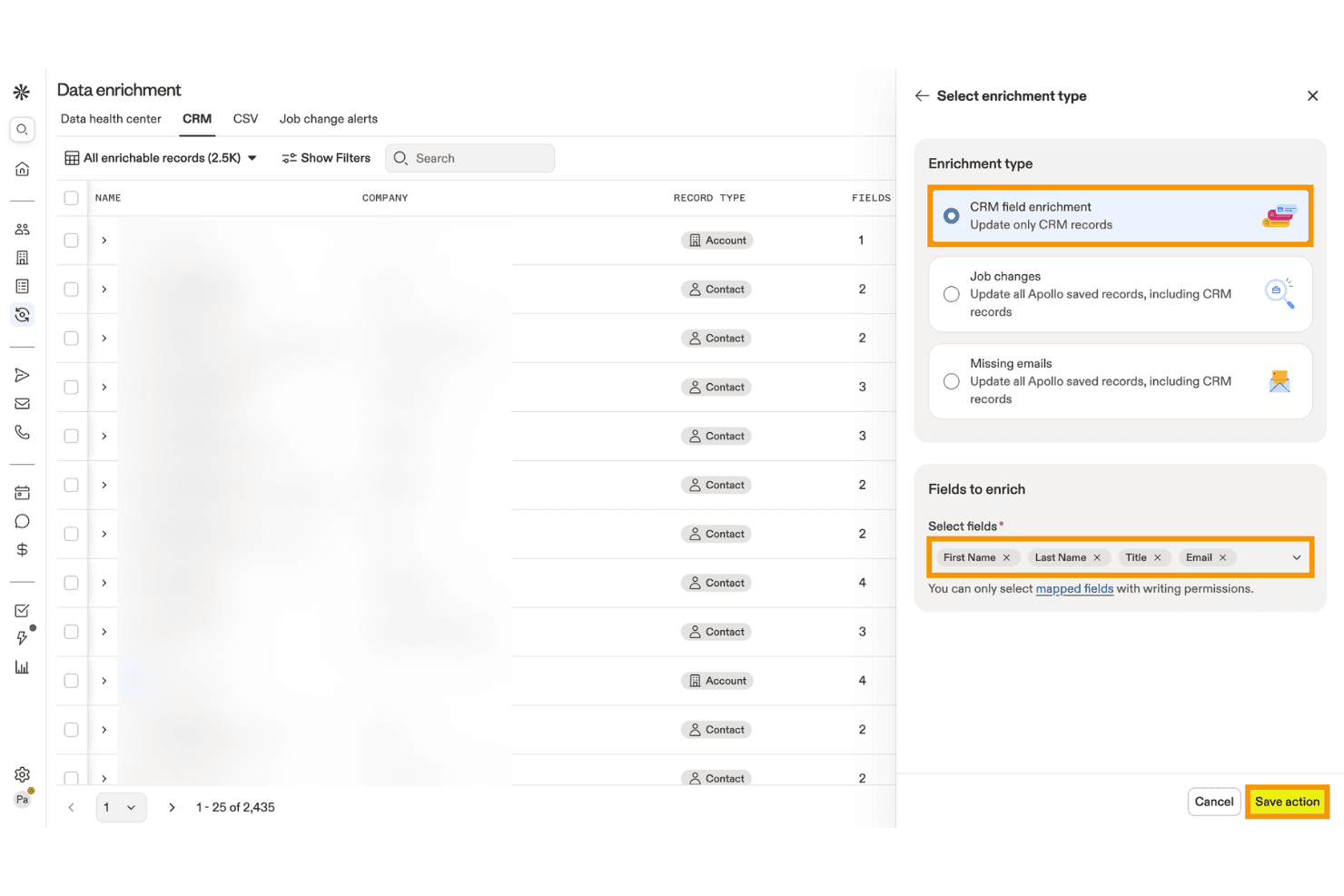
Apollo.io consente agli utenti di arricchire i record del CRM con i campi di contatto selezionati. Apollo.io è una piattaforma B2B di intelligence commerciale e gestione dei dati degli account che combina l'arricchimento dei contatti e delle aziende, la deduplicazione, il punteggio basato sull'AI, i dati sulle intenzioni e l'integrazione con il CRM, grazie a un database di oltre 275 milioni di contatti e oltre 73 milioni di aziende.
Per chi è più adatto Apollo.io?
Apollo.io è particolarmente adatto ai team di generazione della domanda e di gestione delle attività di marketing del mercato medio che necessitano di un arricchimento degli account B2B ad alto volume e a prezzi accessibili, oltre a un punteggio basato sull'AI, senza la complessità tipica delle soluzioni aziendali.
Perché ho scelto Apollo.io
Apollo.io è presente nella mia rosa di candidati perché le sue funzionalità di arricchimento degli account B2B e di punteggio basato sull'AI sono davvero difficili da replicare a questo prezzo. Apprezzo particolarmente il fatto che i modelli di punteggio dell'AI vengano addestrati direttamente sulla cronologia delle vittorie e delle sconfitte del tuo CRM e integrino i segnali di intenzione di Bombora relativi a oltre 15.000 argomenti, consentendoti di dare priorità agli account che mostrano un reale comportamento d'acquisto invece di procedere per supposizioni. Anche il Centro di integrità dei dati svolge un ottimo lavoro nell'individuare automaticamente i record duplicati e i campi obsoleti nei CRM collegati.
Funzionalità principali di Apollo.io
- Attività di arricchimento del CRM: Attività pianificate o su richiesta che aggiornano automaticamente i campi mancanti o obsoleti nel CRM collegato utilizzando il database aggiornato di Apollo.
- Arricchimento CSV: Carica un file CSV, esamina i dati arricchiti e ricevi un rapporto di completamento prima di importare i record in qualsiasi sistema esterno.
- Oltre 65 filtri di segmentazione: Cerca e filtra gli account in base ad attributi firmografici, tecnografici e comportamentali per creare elenchi precisi di account target.
- Profili di autorizzazione basati sui ruoli: Gli amministratori del piano Organization possono controllare l'accesso a livello di funzionalità per la ricerca di potenziali clienti, l'arricchimento, la visibilità delle e-mail e il coinvolgimento di ogni membro del team.
Integrazioni di Apollo.io
Apollo.io offre integrazioni bidirezionali native con Salesforce, HubSpot, Zoho CRM, Pipedrive, Microsoft Dynamics, Adobe Marketo Engage e Snowflake. Fornisce inoltre un'API REST aperta e integrazioni tramite marketplace, tra cui Zapier.
Pros and Cons
Pros:
- Ampia copertura globale di contatti e account B2B
- Dashboard per l'arricchimento in tempo reale e il rilevamento dei duplicati
- Segnali di intenzione basati sull'AI integrati nel punteggio
Cons:
- Dati sulle intenzioni provenienti interamente da Bombora
- Nessuna risoluzione avanzata dell'identità tra sistemi
Learn more about Apollo.io: Ideale per creare database personalizzabili
- Piano gratuito per sempre
- Da $10/utente/mese (fatturato annualmente)
Visit WebsiteCustomer Rating:4.6/5
I modelli Airtable sono database pre-progettati che consentono una gestione e organizzazione dei dati efficiente. Airtable è uno strumento di gestione dei progetti e collaborazione che combina le funzionalità di un foglio di calcolo con quelle di un database. Offre agli utenti un'interfaccia flessibile e visivamente piacevole per organizzare e gestire vari tipi di dati. Airtable consente di creare e personalizzare tabelle, chiamate 'basi', per archiviare e manipolare le informazioni.
Perché ho scelto Airtable: Airtable è più indicato per la gestione dei progetti. Tuttavia, se fai parte di un piccolo team, puoi usarlo anche per la gestione dei dati dei clienti. Il punto di forza dello strumento è che permette agli utenti di creare campi personalizzati con tipi di dati specifici, come testo, numero, data e menu a discesa. Questo garantisce l'accuratezza dei dati, applicando formattazioni coerenti e impedendo inserimenti errati. Definendo regole di validazione dei campi, puoi aumentare ulteriormente la precisione dei dati e mantenere la coerenza.
Airtable offre potenti opzioni di filtraggio e ordinamento che consentono un recupero semplice dei dati. Puoi applicare filtri in base a criteri specifici e visualizzare istantaneamente un sottoinsieme di record che soddisfano le condizioni definite. Le opzioni di ordinamento ti permettono di disporre i dati in ordine crescente o decrescente in base a qualsiasi campo, rendendo semplice trovare le informazioni necessarie.
Funzionalità e integrazioni principali di Airtable:
Le funzionalità principali includono uno spazio di lavoro collaborativo dove i membri del team possono lavorare insieme sull'inserimento, la validazione e l'aggiornamento dei dati. Questo aiuta a mantenere accuratezza e coerenza grazie al coinvolgimento di più persone nella gestione dei dati.
Le integrazioni includono Asana, Basecamp, Dropbox, Box, Eventbrite, Evernote, Facebook, GitHub, Google Calendar, Instagram, Jira, Miro e LinkedIn. Sono inoltre disponibili integrazioni aggiuntive tramite Zapier e API.
Airtable parte da $10/utente/mese (fatturato annualmente) e offre un piano gratuito per sempre.
Pros and Cons
Pros:
- Organizzazione dei dati personalizzabile
- Interfaccia intuitiva e visivamente gradevole
- Potenti funzionalità di database relazionali
Cons:
- Capacità di analisi dati avanzata limitata
- Funzionalità di reportistica limitate
Learn more about Airtable: Ideale per team di marketing, vendita e supporto
- Prezzo su richiesta
Visit WebsiteCustomer Rating:4.2/5
NetSuite integra i dati dei vari reparti e consente il monitoraggio e la reportistica in tempo reale degli indicatori chiave di prestazione (KPI). NetSuite è una piattaforma software di gestione aziendale basata sul cloud che aiuta le aziende a gestire diversi aspetti del loro business, tra cui finanza, gestione delle relazioni con i clienti (CRM), gestione dell'inventario, e-commerce e molto altro.
Perché ho scelto NetSuite CRM: NetSuite CRM offre una soluzione completa per la gestione delle relazioni con i clienti durante tutto il ciclo di vita del cliente. Permette ai team di marketing, vendita e supporto di avere una visione unificata dei dati, delle interazioni e delle preferenze dei clienti, facilitando un coinvolgimento personalizzato e mirato.
NetSuite CRM si integra inoltre con i dati finanziari e operativi all'interno della piattaforma NetSuite. Questa integrazione consente ai team di marketing, vendita e supporto di accedere in tempo reale a informazioni vitali sull'account, come la cronologia di fatturazione, lo stato degli ordini e i ticket di assistenza. Avendo questi dati consolidati si migliora la collaborazione e si consente ai team di fornire un servizio clienti e un supporto migliori.
Caratteristiche distintive e integrazioni di NetSuite CRM:
Caratteristiche distintive includono solide capacità di reportistica e business intelligence. Offre report e dashboard predefiniti e personalizzabili, consentendo ai team di marketing, vendita e supporto di monitorare indicatori chiave di prestazione, misurare il successo delle campagne e tracciare la soddisfazione dei clienti. Questo approccio basato sui dati aiuta i team a prendere decisioni informate.
Integrazioni includono Shopify, BigCommerce, Adobe Commerce, WooCommerce, Amazon, eBay, Walmart, Shopify POS, Amazon Supply Chain e ShipStation.
Pros and Cons
Pros:
- Solide funzionalità di sicurezza
- Piattaforma basata sul cloud
- Funzionalità di reporting avanzate
Cons:
- La configurazione iniziale può essere complessa
- Ripida curva di apprendimento
Learn more about NetSuite CRM : Ideale per contatti B2B accurati
- Piano gratuito disponibile
- I prezzi partono da $1200/mese
Visit WebsiteCustomer Rating:3.9/5
La funzionalità di validazione in tempo reale della piattaforma e l'ampia copertura di oltre 140 milioni di record aziendali contribuiscono alla sua proposta di vendita unica. CIENCE GO Data è uno strumento completo che fornisce informazioni di contatto B2B accurate, includendo oltre 100 milioni di contatti verificati e 10 miliardi di segnali mensili su acquirenti in fase di acquisto. Il punto di forza della piattaforma è la validazione in tempo reale e l'uso di dati reali, che garantisce l'accuratezza dei dati di vendita.
Perché ho scelto CIENCE GO Data: Ho scelto CIENCE GO Data perché offre un vasto database di oltre 100 milioni di contatti B2B verificati, fondamentale per qualsiasi azienda che desideri avviare o espandere la propria rete di vendite. Nel valutare il miglior strumento per questo scopo, ho confrontato diverse opzioni e ho riscontrato che l’accento posto da CIENCE GO Data sulla validazione reale dei dati di vendita lo rende unico. Questo approccio garantisce che le informazioni di contatto siano non solo estese, ma anche precise e aggiornate.
CIENCE GO Data Caratteristiche distintive & Integrazioni
Caratteristiche distintive includono l’engagement nelle vendite outbound con automazione, modelli IA addestrati per la creazione di contenuti specifici per settore e potenti strumenti di analisi web. Inoltre, CIENCE offre servizi come team SDR outbound come servizio e SDR inbound, oltre a modelli IA per campagne outbound multicanale e conversazioni di prospecting con voce artificiale. L’azienda mette inoltre a disposizione risorse quali guide alla prioritizzazione dei lead, informazioni sui prezzi e contenuti di settore tramite il proprio blog e podcast.
Integrazioni includono HubSpot CRM, CIENCE GO Digital, CIENCE GO Show e HubSpot Sales Hub.
Pros and Cons
Pros:
- Pacchetti dati e servizi personalizzati secondo le esigenze aziendali.
- Supporto CRM per la gestione di lead e rapporti con i clienti.
- Capacità di pubblicità mirata per raggiungere audience specifiche.
Cons:
- Potenzialmente più costoso rispetto ad altri servizi di generazione lead.
- Potrebbe essere necessaria una formazione aggiuntiva per utilizzare al meglio la piattaforma.
Learn more about CIENCE GO Data: Il miglior software di gestione dei dati degli account per le aziende
- A partire da 65 $/utente/mese

L'app mobile Oracle CX Sales offre agli utenti l'accesso in mobilità a informazioni di vendita essenziali, dati dei clienti e strumenti di collaborazione per una gestione efficiente delle vendite. Oracle CX Sales, noto anche come Oracle Customer Experience Sales, è un software completo per l'automazione delle vendite e la gestione delle relazioni con i clienti (CRM) offerto da Oracle Corporation. Fa parte della suite Oracle CX Cloud, che comprende diverse applicazioni progettate per migliorare l'esperienza del cliente nei vari punti di contatto. È una buona scelta per la gestione dei dati degli account a livello aziendale grazie alla sua vasta gamma di funzionalità e alla capacità di gestire grandi volumi di dati.
Perché ho scelto Oracle CX Sales: Per mantenere l'accuratezza e l'integrità dei dati, Oracle CX Sales fornisce strumenti per la pulizia e la deduplicazione dei dati. Queste funzionalità aiutano a identificare e unire i record dei clienti duplicati o incoerenti, garantendo un database dei clienti pulito e affidabile.
Il software consente alle aziende di segmentare i dati dei clienti sulla base di diversi criteri, quali dati demografici, comportamento, cronologia degli acquisti o attributi definiti su misura. Questa funzionalità di segmentazione permette di indirizzare le comunicazioni in modo più preciso e personalizzato verso i diversi segmenti di clientela.
Funzionalità distintive e integrazioni di Oracle CX Sales:
Le funzionalità distintive includono funzionalità automatizzate di arricchimento dei dati che migliorano i dati dei clienti con ulteriori informazioni. Il software può aggiornare e arricchire automaticamente i record dei clienti con profili dei social media, informazioni sul settore, dati aziendali e altre fonti di dati pertinenti.
Le integrazioni includono ServiceNow, DbVisualizer, Oracle Sales, Crowdin, 4MDG, Oracle Service e CipherTrust Cloud Key Manager.
Pros and Cons
Pros:
- Integrazione nativa con altri prodotti Oracle
- Buone funzionalità di reportistica e analisi
- App mobile nativa
Cons:
- Curva di apprendimento ripida
- Configurazione e impostazione complesse
Learn more about Oracle CX Sales: Ideale per la gestione visuale delle pipeline di contatti
- Prova gratuita di 14 giorni
- Da $11,90/utente/mese

La funzione di gestione della pipeline di Pipedrive permette agli utenti di monitorare e gestire visualmente le opportunità di vendita attraverso le diverse fasi del processo di vendita. Pipedrive è una piattaforma di gestione delle relazioni con i clienti (CRM) e di gestione dei dati degli account, scelta da oltre 100.000 team di vendita.
Perché ho scelto Pipedrive: La funzionalità che ho apprezzato di più è la gestione della pipeline. Offre una panoramica intuitiva del processo di vendita e delle interazioni con i clienti. La pipeline mostra le diverse fasi del ciclo di vendita, permettendo di monitorare i progressi di ogni account per individuare colli di bottiglia o opportunità. Questa rappresentazione visiva aiuta i team di vendita a restare organizzati e concentrati sull’avanzamento delle trattative.
All’interno di ogni fase della pipeline, Pipedrive consente di tracciare e registrare le attività relative a ciascun account. È possibile annotare chiamate, email, riunioni e altre interazioni direttamente sulla piattaforma. Questa funzione assicura che tutte le informazioni e le attività relative agli account vengano raccolte e siano accessibili in un’unica posizione centralizzata, facilitando una migliore gestione dei dati degli account.
Funzionalità distintive e integrazioni di Pipedrive:
Le funzionalità distintive includono capacità di automazione del flusso di lavoro per automatizzare compiti ripetitivi e migliorare l’efficienza. Gli utenti possono automatizzare azioni come l’invio di email di follow-up, l’assegnazione di compiti, l’aggiornamento di campi dati e l’attivazione di notifiche. Inoltre, Pipedrive implementa solide misure di sicurezza per proteggere i dati dei clienti, impiegando protocolli di crittografia allo standard industriale, audit di sicurezza regolari e valutazioni delle vulnerabilità.
Le integrazioni sono disponibili con oltre 350 connettori, tra cui Zapier, Google Meet, Zoom Meetings, Facebook Messenger, LinkPort, DocuSign, Lemlist, JustCall, Asana e HubSpot. Sono inoltre disponibili ulteriori integrazioni tramite Pipedrive API e Zapier.
Pros and Cons
Pros:
- Interfaccia moderna e intuitiva
- Ideale per piccole e medie imprese
- Disponibile l’app mobile
Cons:
- Curva di apprendimento per i nuovi utenti
- Capacità di reportistica limitate
Learn more about Pipedrive : Il miglior software per la gestione dei dati account per l'arricchimento dei dati
- Demo gratuita disponibile
- Da $57/mese

La funzione di gestione dei lead di SAP Sales Cloud consente agli utenti di acquisire, qualificare e coltivare lead per una maggiore conversione delle vendite e crescita dei ricavi. SAP Sales Cloud è una soluzione di gestione delle relazioni con i clienti (CRM) che aiuta le aziende a gestire i processi di vendita e le relazioni con i clienti, favorendo la crescita dei ricavi. Fornisce strumenti per la gestione di lead, contatti, account, opportunità e pipeline di vendita. La piattaforma consente agli utenti di monitorare le interazioni con i clienti, registrare attività e raccogliere informazioni importanti per garantire una visione completa e aggiornata di ciascun cliente.
Perché ho scelto SAP Sales Cloud: arricchisce i dati dei clienti importando automaticamente informazioni aggiuntive da fonti esterne. Questo include dettagli aziendali, profili social, aggiornamenti di notizie e altro ancora. Grazie all’arricchimento dei dati, gli utenti possono avere una visione più completa e attuale dei propri clienti, migliorando la segmentazione della clientela e la precisione del targeting.
SAP Sales Cloud si integra con diverse fonti e sistemi di dati, come CRM, sistemi di automazione del marketing ed ERP. Questa integrazione garantisce la coerenza dei dati su tutte le piattaforme, eliminando i silos informativi e fornendo una fonte centrale di informazioni affidabili e accurate.
Caratteristiche distintive e integrazioni di SAP Sales Cloud:
Le caratteristiche distintive includono potenti funzionalità di segmentazione, che consentono agli utenti di definire e creare segmenti di clienti dinamici secondo criteri specifici. Gli utenti possono segmentare i clienti in base a dati demografici, comportamenti, storico degli acquisti e altri dati rilevanti. Questo consente un targeting personalizzato e campagne di marketing su misura, favorendo una comunicazione più efficace e pertinente con i clienti.
Le integrazioni includono Microsoft Outlook, Screendragon, Inxmail, Mediafly, Simplifier, EVALANCHE, In Mind Cloud e Prosafety.
Pros and Cons
Pros:
- Capacità robuste di gestione dei dati
- Coinvolgimento del cliente personalizzato
- Reportistica e analisi avanzata
Cons:
- L'impostazione iniziale e la personalizzazione possono richiedere competenze tecniche
- Curva di apprendimento per chi è nuovo ai sistemi SAP
Learn more about SAP Sales Cloud: Il miglior software per la gestione dei dati degli account per le piccole imprese
- Piano gratuito senza scadenza
- A partire da $49/5 utenti/mese

La funzionalità di gestione delle trattative di Bitrix24 aiuta gli utenti a monitorare e organizzare le opportunità di vendita, dal contatto iniziale alla chiusura finale. Bitrix24 è una soluzione per la gestione aziendale e il CRM che offre diverse funzionalità, tra cui CRM (Gestione delle relazioni con i clienti), gestione dei progetti, gestione dei documenti, comunicazione tra i team e altro ancora. Bitrix24 è particolarmente apprezzato dalle piccole e medie imprese grazie alla sua convenienza, all'interfaccia intuitiva e alle ampie funzionalità.
Perché ho scelto Bitrix24: Bitrix24 consente alle aziende di creare campi e moduli personalizzati all'interno del CRM. Questa funzione permette alle aziende di acquisire dati specifici rilevanti per le loro attività e le interazioni con i clienti. I campi personalizzati garantiscono che i dati raccolti siano adattati alle esigenze dell'azienda.
Bitrix24 offre solide funzionalità di ricerca e filtraggio all'interno del CRM. Ciò consente agli utenti di recuperare facilmente dati specifici in base a vari criteri, come gli attributi dei clienti, la cronologia delle transazioni o parole chiave specifiche. La funzionalità di ricerca avanzata semplifica il recupero dei dati, risparmiando tempo e fatica.
Funzionalità distintive e integrazioni di Bitrix24:
Le funzionalità distintive includono strumenti di segmentazione che consentono alle aziende di categorizzare e raggruppare i propri contatti in base a criteri o caratteristiche specifici. Le aziende possono rivolgersi a segmenti specifici di clienti segmentando i contatti con campagne di marketing mirate o comunicazioni personalizzate. Questa funzione di segmentazione migliora l'organizzazione e l'accuratezza dei dati e consente di inviare messaggi mirati.
Le integrazioni includono Gmail, Google Calendar, Google Drive, MS Office, Dropbox, Box, Xero, Mailchimp, Docusign e Recurly.
Pros and Cons
Pros:
- Gestione efficiente delle trattative
- Integrazioni estese
- Ampia gamma di funzionalità
Cons:
- Opzioni di personalizzazione limitate
- Curva di apprendimento ripida per i nuovi utenti
Learn more about Bitrix24 : Il miglior software per la gestione dei dati degli account per facilità d'uso
- Prova gratuita di 14 giorni
- Da $28/utente/mese

La funzione di gestione progetti di Scoro consente alle aziende di pianificare, organizzare e monitorare efficacemente compiti, risorse e traguardi per garantire l'esecuzione di progetti di successo. Scoro è una soluzione per la gestione aziendale e di progetti che offre un'interfaccia drag-and-drop per la gestione dei dati degli account. Inoltre, offre funzionalità per il monitoraggio del tempo, la collaborazione, il CRM, la fatturazione e la reportistica.
Perché ho scelto Scoro: Sebbene Scoro sia principalmente un software di gestione aziendale, offre anche alcune funzionalità di gestione dei dati degli account. Aiuta gli utenti a conservare e gestire i dati dei clienti in un luogo centralizzato. Questi dati possono includere dettagli di contatto, cronologia delle comunicazioni, transazioni, progetti, fatture, ecc. Consente una visione a 360 gradi di ogni cliente e contatto, così da poter tenere traccia delle opportunità di vendita.
Inoltre, Scoro offre anche funzionalità per monitorare gli obiettivi e le prestazioni delle vendite. Ad esempio, è possibile creare dashboard personalizzabili che tracciano gli obiettivi di vendita dei singoli commerciali e dell'intero team.
Caratteristiche distintive e integrazioni di Scoro:
Caratteristiche distintive includono funzionalità per la gestione di progetti e attività che aiutano gli utenti a tracciare e gestire le attività legate agli account dei clienti. Questo può essere utile per organizzare e coordinare attività e compiti relativi agli account.
Integrazioni includono Slack, Asana, Jira Software, Evernote, Trello, Harvest, Basecamp, GitHub, Zapier e Gmail. È inoltre possibile usufruire di ulteriori integrazioni tramite Zapier.
Pros and Cons
Pros:
- Si integra con popolari tool di terze parti
- Campi e flussi di lavoro personalizzabili
- Consente la collaborazione tra team
Cons:
- Focus limitato sulla gestione specializzata dei dati account
- Non altamente personalizzabile
Learn more about Scoro : Il miglior software per la gestione dei dati dei clienti con un'interfaccia facile da usare
- Prova gratuita di 14 giorni
- Da $34/mese

AllClients fornisce una panoramica dettagliata di ogni cliente, incluse le loro preferenze, la cronologia e le interazioni con l'azienda. AllClients è una piattaforma software per la gestione delle relazioni con i clienti (CRM) che aiuta le aziende a gestire e organizzare le informazioni dei clienti, tracciare le interazioni e gestire la comunicazione. Offre anche funzionalità come la gestione dei contatti, l'email marketing, la gestione delle attività e flussi di lavoro automatizzati per migliorare le relazioni con i clienti.
Perché ho scelto AllClients: AllClients offre agli utenti opzioni di filtraggio intuitive che consentono di ordinare e segmentare rapidamente e facilmente i dati dei clienti. Sia che si tratti di filtrare i contatti in base a criteri specifici o di creare liste mirate per campagne di marketing, la funzione di filtraggio semplifica il processo. Permette agli utenti di accedere alle informazioni necessarie con pochi clic.
La piattaforma è progettata per essere intuitiva e accessibile, rendendo semplice per gli utenti navigare e utilizzare le sue varie funzionalità. Il layout pulito e la navigazione lineare assicurano che gli utenti possano trovare rapidamente ciò di cui hanno bisogno ed eseguire le attività in modo efficiente.
Funzionalità e integrazioni principali di AllClients:
Le funzionalità principali includono una funzione di inserimento dati che consente agli utenti di immettere e aggiornare le informazioni dei clienti all'interno del sistema. Con questa funzione gli utenti possono facilmente inserire dettagli rilevanti sui propri clienti, come nomi, dati di contatto, dati demografici e altri campi personalizzati specifici per le esigenze aziendali.
Le integrazioni includono Mailchimp, HubSpot CRM, Constant Contact, Campaign Monitor, Robly, ActiveDEMAND e Akita.
Pros and Cons
Pros:
- Interfaccia intuitiva
- Filtraggio dei contatti facile
- Campi personalizzabili per i dati dei clienti
Cons:
- Curva di apprendimento ripida
- Opzioni di personalizzazione limitate
Learn more about AllClients :
Altri software per la gestione dei dati degli account
Durante la mia ricerca ho trovato anche altri strumenti che non sono entrati nella classifica dei migliori, ma che meritano comunque una valutazione:
- 11OCLIdeale per la gestione dei dati dei clienti e la collaborazione
- 12CapsuleIdeale per l'ordinamento e la segmentazione dei dati
- 13Salesforce CRMLa migliore soluzione tutto-in-uno per la gestione dei dati degli account
- 14Freshdesk La migliore piattaforma unificata per gestione del supporto e dei dati dei clienti
Come Valuto i Software di Gestione dei Dati Account
Valuto su due livelli: la base che uno strumento deve avere—come il collegamento lead-account e la sincronizzazione di arricchimento dati CRM—e gli elementi distintivi che separano le migliori opzioni dal resto.
Funzionalità di Base (Requisiti Fondamentali per Questa Lista)
Quando seleziono gli strumenti per la mia lista, valuto ciascuno di essi su una scala da 0 (la funzionalità non è presente) a 5 (eccelle in quest'area) per ogni funzionalità chiave elencata qui sotto. Poi calcolo il punteggio totale dello strumento in percentuale. Ogni strumento deve raggiungere un punteggio minimo totale del 65% per essere preso in considerazione.
- Arricchimento dei Dati Account: Verifico se uno strumento può aggiungere automaticamente campi firmografici e tecnografici alle schede cliente—come numero di dipendenti, settore, stack tecnologico e fascia di fatturato.
- Deduplicazione e Pulizia: I dati CRM disordinati sono la norma, quindi cerco il rilevamento automatico dei duplicati e logiche di unione che possano gestire combinazioni incerte tra nomi di aziende errati e varianti di dominio.
- Integrazione CRM & MAP: Ogni strumento deve offrire una sincronizzazione bidirezionale con piattaforme come Salesforce o HubSpot, in modo che i record arricchiti tornino nei sistemi già utilizzati dai team marketing e vendite.
- Segmentazione Account e Creazione Liste: Valuto quanto sia efficace uno strumento nel permettere di filtrare e creare liste di account target usando attributi come settore, numero di dipendenti o tecnologie utilizzate per il targeting delle campagne ABM.
- Unificazione e Collegamento Dati: Il collegamento lead-account efficace è fondamentale qui—osservo quanto bene una piattaforma riesca a risolvere lead, contatti e account dispersi in viste account pulite e unificate.
- Punteggio e Prioritizzazione Account: Valuto se puoi attribuire un punteggio e classificare gli account in base a segnali di idoneità e coinvolgimento, così il tuo team si concentra sugli account con maggiore probabilità di conversione.
Una volta che ho una lista di strumenti che soddisfano i criteri, considero cosa differenzia ogni piattaforma.
Fattori Distintivi (Cosa Distingue i Fornitori)
Ecco come confronto i diversi fornitori:
Caratteristiche Distintive
I dati di intent sono un elemento di grande differenziazione—cerco strumenti che evidenziano account "in-market" in base a segnali d'acquisto in tempo reale, così il tuo team ABM può agire sulla domanda prima della concorrenza. La modellazione predittiva tramite AI porta questo processo oltre, attribuendo punteggi agli account in base alla propensione all'acquisto, e non solo all'idoneità firmografica statica. Anche la mappatura delle gerarchie di account è importante quando si punta a organizzazioni enterprise con strutture complesse di controllate e serve coordinare il marketing tra le diverse sussidiarie.
Oltre le Funzionalità
Qualità e copertura dei dati variano molto tra i fornitori, quindi valuto quanto sia aggiornata e globale la banca dati sottostante di ciascun provider—record obsoleti portano a sprechi di budget pubblicitario e email respinte. Anche la conformità normativa è cruciale, specialmente se nelle tue liste account ci sono contatti di regioni con leggi sulla privacy differenti come GDPR o CCPA. Considero inoltre la compatibilità con lo stack tecnologico oltre al CRM, verificando la presenza di connettori nativi verso data warehouse come Snowflake o piattaforme ABM dove i tuoi dati account arricchiti dovranno essere caricati.
Come scegliere un software per la gestione dei dati degli account
È facile perdersi fra lunghe liste di funzionalità e strutture di prezzo complesse. Per aiutarti a mantenere la concentrazione durante il tuo percorso di selezione del software, ecco una checklist di fattori da considerare:
| Fattore | Cosa considerare |
|---|---|
| FattoreScalabilità | Cosa considerareIl software crescerà con la tua azienda? Verifica se può gestire un aumento di utenti o di volume dei dati senza problemi. Cerca opzioni con prezzi e capacità scalabili. |
| FattoreIntegrazioni | Cosa considerareFunziona con gli strumenti già utilizzati dal tuo team? Controlla la compatibilità con i sistemi esistenti per evitare silos di dati e lavoro manuale aggiuntivo. |
| FattorePersonalizzazione | Cosa considerarePuoi adattarlo alle tue esigenze? Scegli strumenti con campi e flussi di lavoro personalizzabili per adeguare il software ai tuoi processi specifici. |
| FattoreFacilità d'uso | Cosa considerareIl tuo team lo troverà intuitivo? Valuta interfaccia e navigazione; un apprendimento difficile può rallentare l’adozione e la produttività. |
| FattoreImplementazione e onboarding | Cosa considerareQuanto velocemente puoi partire? Considera tempi e risorse richieste per la configurazione. Controlla se sono disponibili tutorial, guide e supporto all'onboarding. |
| FattoreCosto | Cosa considerareRientra nel tuo budget? Confronta i piani di prezzo rispetto ai tuoi vincoli finanziari. Attenzione a costi nascosti e verifica se ci sono sconti per abbonamenti annuali. |
| FattoreTutele di sicurezza | Cosa considerareQuanto sono sicuri i tuoi dati? Il software deve offrire crittografia, backup e controlli di accesso per proteggere le informazioni sensibili. |
| FattoreRequisiti di conformità | Cosa considerareRispetta le normative di settore? Se operi in un settore regolamentato, assicurati che il software sia conforme agli standard rilevanti, come GDPR o HIPAA. |
Che cos'è un software di gestione dei dati degli account?
Il software di gestione dei dati degli account è uno strumento che aiuta le aziende a organizzare, archiviare e gestire in modo efficiente le informazioni relative agli account. Responsabili marketing, contabili e analisti dei dati utilizzano generalmente questi strumenti per garantire l'accuratezza e l'accessibilità dei dati. La sicurezza dei dati, le capacità di integrazione e il controllo degli accessi degli utenti aiutano a proteggere le informazioni, collegare sistemi e gestire le autorizzazioni. In generale, questi strumenti semplificano la gestione dei dati e migliorano i processi decisionali.
Funzionalità
Quando scegli un software di gestione dei dati degli account, fai attenzione alle seguenti funzionalità chiave:
- Sicurezza dei dati: Protegge le informazioni sensibili tramite crittografia e controlli di accesso, assicurando che solo gli utenti autorizzati possano accedere ai dati.
- Capacità di integrazione: Si collega ad altri strumenti e sistemi software per creare un flusso di lavoro senza interruzioni e ridurre l'inserimento manuale dei dati.
- Controllo degli accessi degli utenti: Ti consente di gestire permessi e ruoli, garantendo che gli utenti accedano solo ai dati di cui hanno bisogno.
- Dashboard personalizzabili: Forniscono una visualizzazione personalizzata dei tuoi dati, aiutandoti a concentrarti sulle metriche più rilevanti per la tua azienda.
- Reportistica e analisi: Generano approfondimenti e visualizzazioni a partire dai tuoi dati, facilitando decisioni informate.
- Sincronizzazione dei dati in tempo reale: Mantiene aggiornati i tuoi dati su tutte le piattaforme, garantendo precisione e coerenza.
- Scalabilità: Cresce insieme alla tua azienda, gestendo un aumento di volume di dati e utenti senza problemi di prestazioni.
- Strumenti di conformità: Garantisce il rispetto di normative di settore come GDPR o HIPAA, riducendo i rischi legali.
- Interfaccia intuitiva: Propone un design facile da navigare che riduce al minimo la curva di apprendimento e favorisce l’adozione da parte degli utenti.
- Supporto all’onboarding: Fornisce risorse come tutorial e guide che aiutano i nuovi utenti a familiarizzare rapidamente con il software.
Vantaggi
L’implementazione di un software di gestione dei dati degli account offre numerosi vantaggi al tuo team e alla tua azienda. Eccone alcuni a cui puoi guardare con interesse:
- Maggiore precisione dei dati: Riduce gli errori sincronizzando i dati in tempo reale su tutte le piattaforme, assicurando che tutti abbiano accesso alle informazioni più aggiornate.
- Miglioramento dei processi decisionali: Fornisce preziosi approfondimenti tramite reportistica e analisi, aiutandoti a prendere decisioni informate basate su dati accurati.
- Aumento dell’efficienza: Automatizza le attività ripetitive e si integra con altri sistemi, facendo risparmiare tempo al tuo team e riducendo il lavoro manuale.
- Migliore sicurezza: Protegge le informazioni sensibili con crittografia e controlli di accesso, mantenendo i tuoi dati al sicuro da accessi non autorizzati.
- Scalabilità: Si adatta alle esigenze crescenti della tua azienda, gestendo più dati e utenti senza compromessi sulle prestazioni.
- Conformità normativa: Ti aiuta a rispettare le normative di settore grazie a strumenti di conformità integrati, riducendo il rischio di problemi legali.
- Esperienza utente semplificata: Offre un’interfaccia intuitiva che riduce la curva di apprendimento, facilitando l’adozione e l’utilizzo da parte del team.
Costi e prezzi
La scelta del software di gestione dei dati degli account richiede la comprensione dei diversi modelli e piani di prezzo disponibili. I costi variano in base alle funzionalità, alla dimensione del team, agli extra e molto altro. La tabella seguente riassume i piani più comuni, i prezzi medi e le funzionalità tipiche incluse nelle soluzioni di software di gestione dei dati degli account:
Tabella comparativa dei piani per software di gestione dei dati degli account
| Tipo di piano | Prezzo medio | Funzionalità comuni |
|---|---|---|
| Tipo di pianoPiano gratuito | Prezzo medio$0 | Funzionalità comuniArchiviazione dati di base, integrazioni limitate e reportistica basilare. |
| Tipo di pianoPiano personale | Prezzo medio$5-$25/user/month | Funzionalità comuniArchiviazione dati, controllo degli accessi, integrazioni di base e assistenza standard. |
| Tipo di pianoPiano business | Prezzo medio$50-$100/user/month | Funzionalità comuniIntegrazioni avanzate, sicurezza migliorata, dashboard personalizzabili e analisi dei dati. |
| Tipo di pianoPiano enterprise | Prezzo medio$150-$300/user/month | Funzionalità comuniArchiviazione dati illimitata, assistenza premium, strumenti di conformità e personalizzazione totale. |
Domande Frequenti
Ecco le risposte ad alcune delle domande più frequenti che potresti avere sul software di gestione dei dati degli account:
Il software di gestione dei dati degli account può integrarsi con altri strumenti?
Sì, il software di gestione dei dati degli account può integrarsi con altri strumenti come sistemi CRM, piattaforme di marketing e software finanziari. Queste integrazioni permettono un flusso di dati senza interruzioni tra i sistemi, riducendo l’inserimento manuale dei dati e gli errori. Prima dell’acquisto, verifica se il software supporta gli strumenti specifici utilizzati dal tuo team per garantire la compatibilità.
È necessario un training per utilizzare il software di gestione dei dati degli account?
Sì, spesso è necessario un training per sfruttare al meglio il software di gestione dei dati degli account. Molti fornitori offrono risorse come tutorial online, webinar e guide per aiutare il tuo team a imparare il sistema. Approfittare di queste risorse può velocizzare il processo di onboarding e garantire un uso efficace del software da parte della tua squadra.
Come posso garantire la sicurezza dei dati con il software di gestione dei dati degli account?
Per garantire la sicurezza dei dati, scegli un software che offra crittografia, controlli d’accesso e backup regolari. Verifica che il fornitore segua le pratiche di sicurezza standard del settore e sia conforme alle normative vigenti. Rivedi regolarmente le impostazioni di sicurezza e forma il tuo team sulle buone pratiche per proteggere le informazioni sensibili.
Cosa fare dopo:
Se stai valutando un software di gestione dei dati degli account, contatta gratuitamente un consulente SoftwareSelect per consigli personalizzati.
Compila un modulo e fai una breve chiacchierata in cui verrai guidato sui dettagli delle tue esigenze. Riceverai poi una lista selezionata di software da valutare. Ti assisteranno anche durante tutto il processo d'acquisto, incluse eventuali trattative sui prezzi.