

Il software di marketing via email per piccole imprese è una risorsa preziosa per le aziende nuove e in crescita. Con il software giusto, i team possono migliorare il coinvolgimento dei clienti e aumentare le vendite. Tuttavia, trovare il software di marketing via email adatto alle piccole imprese può essere difficile, soprattutto considerando il gran numero di opzioni disponibili.
Grazie alla mia esperienza con i software di marketing, ho testato e confrontato alcuni dei migliori software di marketing via email per piccole imprese. Ho quindi raccolto i risultati in recensioni dettagliate per aiutarti a trovare il software più adatto alle tue esigenze.
Perché fidarsi dei nostri consigli sui software
6,700+
Reviews
20
Industry experts
16+
Evaluation factors
14
Years
Il nostro team testa e recensisce software dal 2012. In quanto leader del marketing noi stessi, sappiamo quanto sia difficile — e importante — scegliere il software giusto.
Per questa guida, abbiamo valutato gli strumenti attraverso test pratici e ricerche indipendenti, assegnando un punteggio agli strumenti in base ai nostri criteri di selezione.
Le nostre recensioni riflettono il nostro giudizio editoriale umano, non un discorso di vendita.
Revisori esperti:
 Gui DrusinaDirettore creativo
- Shriya GhateSenior Marketing Lead
 Amanda JacquesResponsabile Marketing Ops

Tabella comparativa dei software di marketing via email per piccole imprese
Confronta i dettagli dei prezzi dei migliori software di marketing via email per piccole imprese nella tabella qui sotto.
| Tool | Best For | Trial Info | Price | ||
|---|---|---|---|---|---|
| 1 | Ideale per targeting email basato su intelligenza artificiale | Prova gratuita di 30 giorni + piano gratuito + demo gratuita disponibile | A partire da $13/mese | Website | |
| 2 | Ideale per i proprietari di siti ospitati su Hostinger | Piano gratuito disponibile | A partire da $5.99/mese | Website | |
| 3 | Ideale per automazione email senza complicazioni | Piano gratuito disponibile | A partire da $9/mese (fatturato annualmente) | Website | |
| 4 | Ideale per l'attivazione dei dati in tempo reale | Demo gratuita + piano gratuito disponibile | A partire da $45/mese | Website | |
| 5 | Ideale per modelli email brandizzati | Piano gratuito + prova gratuita disponibile | Da $19/utente/mese (fatturazione annuale) | Website | |
| 6 | Ideale per flussi di automazione illimitati | Piano gratuito + demo gratuita disponibile | Da $7/mese (fatturazione annuale) | Website | |
| 7 | Ideale per l'accessibilità economica | Piano gratuito disponibile | Da $12/mese | Website | |
| 8 | Ideale per processi ecommerce | Prova gratuita di 14 giorni disponibile | A partire da $33/mese (fatturato annualmente) | Website | |
| 9 | Ideale per marketer ecommerce | Prova gratuita di 14 giorni + demo gratuita disponibile | Da $39/mese | Website | |
| 10 | Ideale per chi è alle prime armi con l’email marketing | Prova gratuita disponibile | Da $12,50/mese (fatturazione annuale) | Website |


Recensioni dei migliori software di marketing via email per piccole imprese
Di seguito trovi i miei riepiloghi dettagliati dei migliori software di marketing via email per piccole imprese inclusi nel mio elenco. Le mie recensioni analizzano le funzionalità principali, i vantaggi e gli svantaggi, le integrazioni e i casi d’uso ideali di ogni strumento, per aiutarti a trovare quello più adatto.
 Ideale per targeting email basato su intelligenza artificiale
- Prova gratuita di 30 giorni + piano gratuito + demo gratuita disponibile
- A partire da $13/mese
Visit WebsiteCustomer Rating:4.5/5
Mailchimp mostra le analisi delle campagne con l’attività degli iscritti, i tassi di apertura e di clic e le tendenze complessive delle performance email. Mailchimp aiuta la tua piccola impresa a creare e inviare campagne email mirate con strumenti che ti permettono di progettare messaggi, automatizzare i percorsi del pubblico e monitorare le prestazioni da un'unica piattaforma — il tutto senza necessità di competenze tecniche. È pensato per imprenditori, marketer e proprietari di piccoli team che vogliono sviluppare relazioni con i clienti tramite newsletter, follow-up automatici e approfondimenti sul coinvolgimento dei clienti, integrando questi sforzi con siti web, moduli e annunci.
Perché ho scelto Mailchimp
Ho scelto Mailchimp per la sua capacità unica di integrare strumenti basati sull'intelligenza artificiale con l'email marketing, rendendolo una scelta eccellente per le piccole imprese. La sua funzione di segmentazione predittiva consente di individuare e coinvolgere in modo più efficace i principali gruppi di clienti, migliorando le tue strategie di marketing. Inoltre, le funzionalità di automazione del marketing della piattaforma permettono di impostare flussi di lavoro automatizzati, risparmiando tempo e garantendo una comunicazione costante con il tuo pubblico. Queste caratteristiche rispondono perfettamente alle esigenze delle piccole imprese che desiderano ottimizzare le proprie strategie di marketing senza sovraccaricare le risorse disponibili.
Caratteristiche principali di Mailchimp
Oltre agli strumenti basati sull’intelligenza artificiale e all’automazione, ho trovato diversi altri aspetti vantaggiosi per le piccole aziende:
- Strumenti di creazione contenuti: Progetta facilmente campagne email coinvolgenti grazie a modelli personalizzabili e a un editor intuitivo drag-and-drop.
- Analisi e reportistica: Ottieni informazioni sulle performance delle campagne con analisi dettagliate che ti aiutano a capire cosa interessa davvero al tuo pubblico.
- SMS marketing: Amplia la tua portata con strumenti di SMS marketing che completano le campagne email e coinvolgono i clienti su più piattaforme.
- Form builder: Permette di raccogliere contatti e far crescere le tue liste attraverso moduli personalizzati e pagine ospitate.
Integrazioni di Mailchimp
Le integrazioni includono Shopify, WooCommerce, Salesforce, QuickBooks, Squarespace, Google Analytics, Eventbrite, Slack, Stripe e Zapier.
Pros and Cons
Pros:
- Raccomandazioni basate su AI aiutano le piccole aziende a perfezionare il targeting del pubblico.
- Interfaccia intuitiva con editor drag-and-drop.
- Offre strumenti dettagliati per analisi e reportistica.
Cons:
- Le funzioni di automazione avanzate richiedono piani a pagamento di livello superiore.
- Le funzionalità SMS non sono disponibili in tutte le regioni o piani.
Learn more about Mailchimp : Ideale per i proprietari di siti ospitati su Hostinger
- Piano gratuito disponibile
- A partire da $5.99/mese
Visit WebsiteCustomer Rating:4.4/5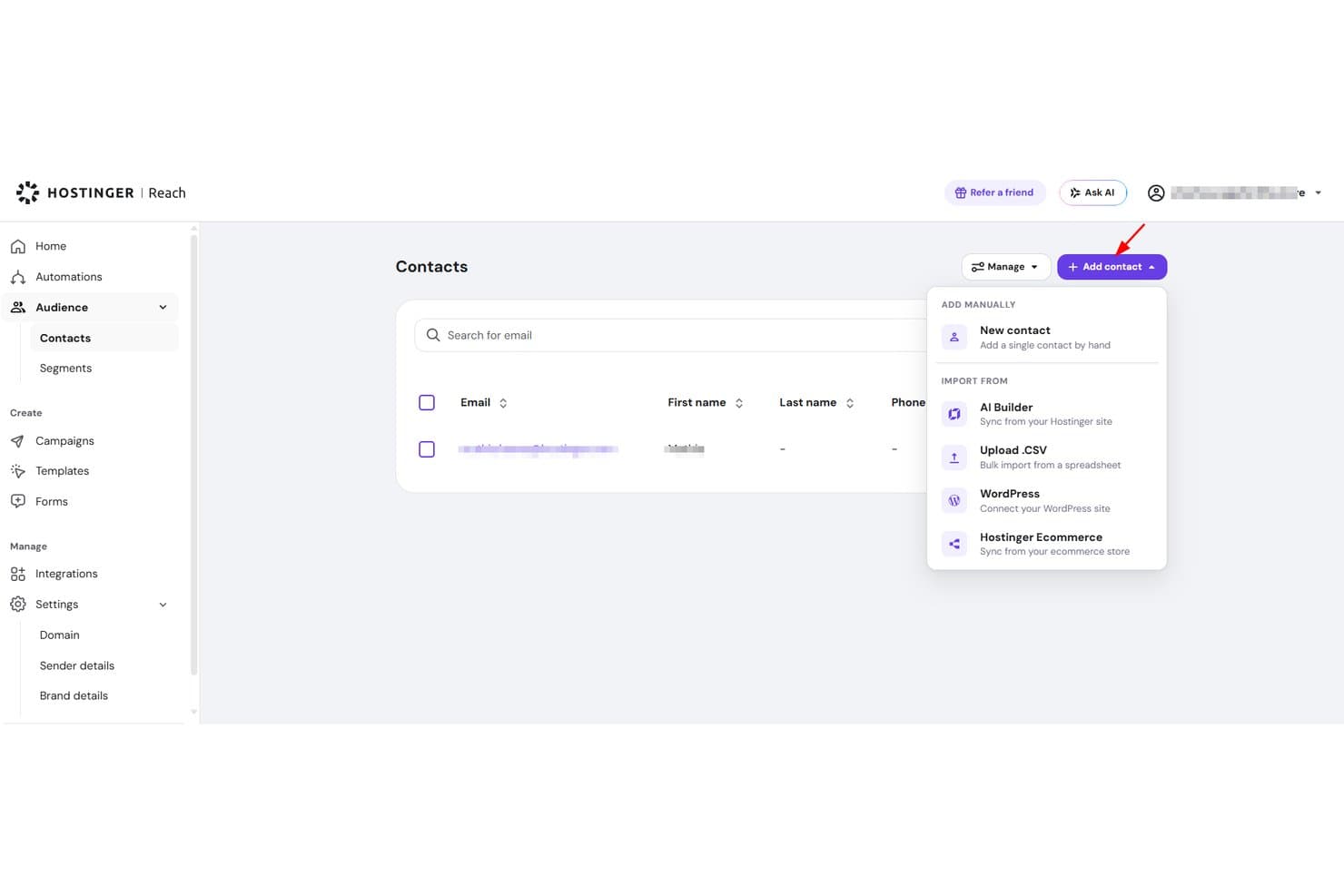
Hostinger Reach consente agli utenti di importare i contatti tramite CSV, WordPress o manualmente. Hostinger Reach è uno strumento di email marketing basato sull'intelligenza artificiale integrato nell'ecosistema Hostinger, che offre la creazione di campagne, la gestione dei contatti, sequenze di automazione e analisi di base delle prestazioni.
Per chi è più adatto Hostinger Reach?
Hostinger Reach è una scelta naturale per i proprietari di piccole imprese e i marketer autonomi che ospitano già il proprio sito con Hostinger e desiderano fare email marketing senza gestire uno strumento separato.
Perché ho scelto Hostinger Reach
Hostinger Reach si è guadagnato un posto nella mia rosa di strumenti preferiti perché è progettato appositamente per i proprietari di siti che si trovano già nell'ecosistema Hostinger. Apprezzo particolarmente il fatto che sincronizzi automaticamente i contatti dal tuo sito WordPress o da Hostinger Website Builder, evitando di dover importare manualmente le liste. Il generatore di campagne basato sull'intelligenza artificiale trasforma una singola richiesta in un'email completamente formattata e coerente con il tuo marchio, mentre l'autenticazione SPF, DKIM e DMARC viene configurata automaticamente.
Funzionalità principali di Hostinger Reach
- Generatore di oggetti basato sull'intelligenza artificiale: produce un numero illimitato di opzioni per l'oggetto di qualsiasi campagna, così puoi scegliere quella più efficace prima dell'invio.
- Ottimizzazione dell'orario di invio: identifica automaticamente il momento migliore per inviare ogni campagna in base ai dati sul coinvolgimento dei destinatari.
- Creatore di moduli di iscrizione personalizzati: ti consente di progettare e incorporare moduli di iscrizione personalizzati in qualsiasi punto del sito senza scrivere codice.
- Modelli di automazione predefiniti: include sequenze pronte all'uso per email di benvenuto, creazione della fiducia e recupero dei carrelli abbandonati.
Integrazioni di Hostinger Reach
Hostinger Reach si collega all'hosting Hostinger, a Hostinger Website Builder e a WordPress.
Pros and Cons
Pros:
- Campagne generate dall'intelligenza artificiale a partire da una singola richiesta
- Configurazione automatica dell'autenticazione del mittente
- Archiviazione illimitata dei contatti
Cons:
- L'editor può alterare le email salvate
- La reportistica di base sul coinvolgimento limita l'ottimizzazione
Learn more about Hostinger Reach: Ideale per automazione email senza complicazioni
- Piano gratuito disponibile
- A partire da $9/mese (fatturato annualmente)
Visit WebsiteCustomer Rating:4.8/5
L'editor di campagne di EmailOctopus consente agli utenti di personalizzare visivamente i modelli di email. EmailOctopus è una piattaforma di email marketing pensata per le piccole imprese che hanno bisogno di un modo semplice per creare, inviare e monitorare campagne senza la complessità di una suite di marketing completa. Offre un editor di email drag-and-drop, gestione delle liste, segmentazione e flussi di lavoro automatizzati per aiutare i team in crescita a gestire newsletter e coinvolgimento degli iscritti in modo più efficiente.
Per Chi è EmailOctopus?
EmailOctopus è adatto a proprietari di piccole imprese e startup nelle prime fasi che desiderano uno strumento di email marketing conveniente e senza complicazioni, senza una curva di apprendimento ripida.
Perché ho scelto EmailOctopus
Ho scelto EmailOctopus perché offre alle piccole imprese un modo diretto per automatizzare i follow-up via email senza aggiungere complessità inutile. Puoi creare sequenze automatizzate per accogliere nuovi iscritti, coltivare contatti o riattivare i contatti in base a come interagiscono con le tue campagne. Mi piace anche che gli strumenti di segmentazione consentono di raggruppare i contatti per campi personalizzati, attività delle campagne e dati dei moduli di iscrizione, permettendo al tuo team di inviare email più pertinenti. Questo rende EmailOctopus una buona soluzione per i piccoli team che desiderano automazione email semplice, gestione delle liste e monitoraggio delle campagne tutto in un unico posto.
Funzionalità Principali di EmailOctopus
Altre funzionalità di EmailOctopus aiutano le piccole imprese a creare, pubblicare e monitorare le campagne email più facilmente:
- Editor drag-and-drop: Crea email personalizzate visivamente usando modelli e blocchi di contenuto modificabili.
- Moduli di iscrizione e landing page: Crea moduli incorporabili, pop-up e landing page ospitate per raccogliere nuovi iscritti.
- Pianificazione delle campagne: Pianifica l'invio delle email in una data e orario specifici.
- Dashboard di reportistica: Monitora le prestazioni delle campagne con metriche come aperture, clic e cancellazioni dall'iscrizione.
Integrazioni di EmailOctopus
Le integrazioni includono Zapier, WordPress, Little Stack, Leadpages, WooCommerce, Google Ads, Shopify, Memberful, Ticket Tailor e Wix.
Pros and Cons
Pros:
- Automazioni semplici per email di benvenuto, nurturing e compleanno
- La segmentazione consente di raggiungere gli iscritti per dati, tag e comportamenti
- Report integrati per monitorare le prestazioni di campagne e automazioni email
Cons:
- La modifica dei modelli può risultare restrittiva per layout personalizzati
- Le opzioni di automazione avanzata sono limitate per flussi di lavoro complessi
Learn more about EmailOctopus: Ideale per l'attivazione dei dati in tempo reale
- Demo gratuita + piano gratuito disponibile
- A partire da $45/mese
Visit WebsiteCustomer Rating:4.6/5
Klaviyo personalizza i moduli di iscrizione e i flussi utilizzando dati in tempo reale. Klaviyo offre una soluzione di email marketing su misura per le piccole imprese, puntando a migliorare il coinvolgimento dei clienti e favorire la crescita. Progettata per aziende di piccole e medie dimensioni, integra automazione di marketing avanzata, insight guidati dall'IA e analisi dettagliate per affrontare le sfide uniche della gestione delle relazioni con i clienti e dell'ottimizzazione delle strategie di marketing. Grazie a una connettività dei dati senza interruzioni tramite numerose integrazioni, Klaviyo consente alle aziende di personalizzare i propri sforzi di marketing e ottenere risultati misurabili.
Perché ho scelto Klaviyo
Ho scelto Klaviyo per la sua capacità unica di unificare i dati dei clienti e attivarli in tempo reale, rendendolo una scelta eccezionale per le piccole imprese. La funzionalità di automazione del marketing della piattaforma permette di creare flussi di lavoro personalizzati che raggiungono i clienti in base alle loro interazioni con il tuo marchio. Inoltre, gli insight guidati dall'IA di Klaviyo offrono raccomandazioni operative per perfezionare le tue campagne di marketing. Queste funzionalità assicurano che la tua azienda possa offrire esperienze su misura che risuonano con il pubblico e aumentano il coinvolgimento.
Caratteristiche principali di Klaviyo
Oltre all'attivazione dei dati in tempo reale, Klaviyo offre:
- Analisi avanzate: Fornisce strumenti di reportistica approfonditi per monitorare le prestazioni delle campagne e il comportamento dei clienti, aiutandoti a prendere decisioni basate sui dati.
- Marketing omnicanale: Supporta la comunicazione su più piattaforme come email, SMS e social media, garantendo messaggi coerenti.
- Segmentazione: Ti permette di classificare il tuo pubblico in base a criteri specifici, consentendo campagne di marketing mirate e personalizzate.
- Template personalizzabili: Offre una vasta gamma di template ottimizzati per dispositivi mobili per creare email visivamente accattivanti in linea con il tuo marchio.
Integrazioni di Klaviyo
Le integrazioni includono Shopify, BigCommerce, WooCommerce, Magento, Salesforce Commerce Cloud, Stripe, Facebook, Instagram, Google Ads e Zendesk.
Pros and Cons
Pros:
- Integrazione con numerose piattaforme ecommerce
- Le capacità omnicanale supportano vari canali di comunicazione con i clienti
- L'attivazione dei dati in tempo reale aumenta il coinvolgimento dei clienti
Cons:
- Il prezzo potrebbe essere elevato per le aziende in crescita
- La gestione avanzata dei tag e dell'organizzazione è meno robusta rispetto ad alcuni concorrenti
Learn more about Klaviyo: Ideale per modelli email brandizzati
- Piano gratuito + prova gratuita disponibile
- Da $19/utente/mese (fatturazione annuale)
Visit WebsiteCustomer Rating:4.7/5
Flodesk aiuta a creare campagne email coerenti con il brand grazie a template visivi e curati. Flodesk è una soluzione di email marketing pensata per le piccole imprese che desiderano email coerenti con il proprio marchio, senza complessità. Si distingue per i suoi modelli email raffinati e brandizzati, che rendono il design professionale accessibile sia ai designer che ai non designer. Con automazioni integrate e segmentazione degli iscritti, Flodesk aiuta i piccoli team a gestire le campagne email in modo efficiente, mantenendo una forte identità visiva.
Perché ho scelto Flodesk
Ho scelto Flodesk per la sua forza nei modelli email brandizzati, che rende facile per le piccole imprese mantenere una coerenza visiva. Il suo approccio orientato al design, unito all'integrazione con Canva, permette di creare email curate e in linea con il brand anche senza competenze di design. Flodesk supporta anche automazioni semplici che gestiscono in modo efficiente i percorsi degli iscritti, aiutandoti a risparmiare tempo mantenendo alto l’engagement.
Caratteristiche principali di Flodesk
Oltre ai modelli email brandizzati, Flodesk offre:
- Font personalizzati: Consente di utilizzare font unici che riflettono l'estetica del tuo marchio, aumentando la personalizzazione delle email.
- Timer per il conto alla rovescia: Aggiungi urgenza alle tue campagne inserendo timer con conto alla rovescia nelle email, incentivando un'azione più rapida da parte dei clienti.
- Sondaggi incorporati: Coinvolgi il tuo pubblico inserendo sondaggi interattivi direttamente nelle email, ottenendo preziosi feedback dai clienti.
- Analisi dettagliate: Fornisce informazioni sulle prestazioni delle email, aiutandoti a prendere decisioni informate per ottimizzare le campagne future.
Integrazioni di Flodesk
Le integrazioni includono HoneyBook, BookFunnel, Canva, Shopify, Squarespace, ThriveCart, Wix e Manychat.
Pros and Cons
Pros:
- Configurazione rapida per campagne piccole o stagionali
- Editor pulito e senza distrazioni (meno disordine, più attenzione al design)
- Branding coerente nelle campagne email grazie a blocchi di template riutilizzabili
Cons:
- Minore controllo sulla personalizzazione del codice delle email
- Funzionalità CRM o gestione contatti integrate limitate
Learn more about Flodesk: Ideale per flussi di automazione illimitati
- Piano gratuito + demo gratuita disponibile
- Da $7/mese (fatturazione annuale)
Visit WebsiteCustomer Rating:4.6/5
La dashboard di automazione di Sender permette agli utenti di creare e lanciare flussi di lavoro e-mail utilizzando modelli già pronti e un editor visuale. Sender è una piattaforma di email marketing versatile pensata per le piccole imprese che desiderano migliorare le proprie strategie di marketing senza spendere troppo. Offre un'esperienza utente intuitiva grazie al suo editor drag-and-drop e a una libreria di modelli personalizzabili, rendendola ideale per proprietari di piccole imprese in settori come eCommerce, B2B e organizzazioni non profit che hanno bisogno di connettersi efficacemente con il proprio pubblico. Fornendo funzionalità come automazione, segmentazione e SMS marketing, Sender affronta la sfida di raggiungere i clienti attraverso molteplici canali, mantenendo allo stesso tempo alti tassi di recapitabilità.
Perché ho scelto Sender
Ho scelto Sender per la sua straordinaria capacità di soddisfare le esigenze delle piccole imprese offrendo flussi di lavoro di automazione illimitati, che possono incrementare notevolmente le tue attività di marketing senza richiedere competenze tecniche. La robusta funzione di segmentazione della piattaforma ti consente di raggiungere gruppi di clienti specifici con contenuti personalizzati, garantendo che i tuoi messaggi siano efficaci per il pubblico giusto. Inoltre, la funzionalità di SMS marketing di Sender offre un canale aggiuntivo per raggiungere i clienti, rendendolo uno strumento completo per le aziende che vogliono ampliare la propria portata e coinvolgimento.
Funzionalità principali di Sender
Oltre ai vantaggi principali, Sender offre altre funzionalità preziose per le piccole imprese:
- Analisi in tempo reale: Fornisce informazioni dettagliate sulle prestazioni delle campagne, aiutandoti a capire cosa funziona meglio per il tuo pubblico.
- Test A/B: Ti permette di testare diverse varianti di email per ottimizzare i tassi di apertura e le conversioni.
- Auto-styling del brand: Adatta automaticamente il design delle tue email allo stile del tuo brand, garantendo coerenza in tutte le comunicazioni.
- Conformità al GDPR: Assicura che le tue attività di email marketing rispettino le normative sulla protezione dei dati, mantenendo la fiducia dei clienti.
Integrazioni di Sender
Le integrazioni includono WordPress, WooCommerce, Zapier, PrestaShop, Magento, OpenCart, Shopify, API per integrazioni personalizzate e altro.
Pros and Cons
Pros:
- Flussi di lavoro di automazione illimitati inclusi
- Supporto integrato per SMS marketing
- Editor drag-and-drop facile da usare
Cons:
- Limiti agli iscritti nei piani inferiori
- Nessun editor di landing page integrato
Learn more about Sender: Ideale per l'accessibilità economica
- Piano gratuito disponibile
- Da $12/mese
Visit WebsiteCustomer Rating:4.7/5
MailerLite offre una gestione economica delle campagne email per team con risorse limitate. MailerLite è una piattaforma di email marketing pensata per le piccole imprese che cercano soluzioni economiche per le loro esigenze di marketing. È l'ideale per i team che desiderano gestire campagne di mailing list senza risorse estese.
Perché ho scelto MailerLite: MailerLite è la scelta perfetta per le aziende che puntano sull'accessibilità economica senza rinunciare alle funzionalità essenziali di email marketing. Offre un editor drag-and-drop intuitivo che semplifica la creazione delle email. La piattaforma fornisce anche strumenti di automazione per ottimizzare le attività di marketing digitale, tutto a un costo inferiore alla media. In definitiva, la semplicità di MailerLite consente ai piccoli team di realizzare in modo efficiente i migliori servizi di email marketing mantenendo sotto controllo il budget.
Funzionalità principali e integrazioni:
Funzionalità comprendono un editor drag-and-drop intuitivo che permette di creare email rapidamente, strumenti di automazione per aiutare a gestire le sequenze di email e numerosi modelli per dare alle email un aspetto professionale.
Integrazioni includono Shopify, WordPress, WooCommerce, Zapier, Stripe, Mailchimp, Squarespace, Facebook e Slack.
Pros and Cons
Pros:
- Editor email semplice
- Adatto a piccoli team
- Ampia gamma di modelli
Cons:
- Funzionalità avanzate limitate
- Strumenti di reportistica di base
 8Ideale per processi ecommerce
Kit
- Prova gratuita di 14 giorni disponibile
- A partire da $33/mese (fatturato annualmente)
Visit WebsiteCustomer Rating:4.5/5
Kit offre strumenti semplici per creare e gestire campagne email orientate alla crescita del brand. Kit è uno strumento di email marketing pensato per le piccole imprese. Offre soluzioni intuitive per creare e gestire campagne email.
Perché ho scelto Kit: Kit offre semplicità senza sacrificare la funzionalità. Puoi creare e inviare email visivamente accattivanti utilizzando modelli predefiniti che non richiedono competenze di design, rendendo facile iniziare rapidamente. Le funzionalità automatiche del software, come i promemoria per i follow-up, ti aiutano anche a rimanere in contatto con il tuo pubblico nei momenti giusti. Inoltre, dispone di un monitoraggio delle prestazioni integrato, fornendo informazioni sull'efficacia delle tue email senza analisi complicate.
Funzionalità e integrazioni principali:
Funzionalità includono modelli di email facili da usare che ti permettono di creare campagne rapidamente senza competenze di design, follow-up automatici per mantenere il pubblico coinvolto e un monitoraggio dettagliato delle prestazioni che ti aiuta a capire come stanno andando le tue email.
Integrazioni includono Shopify, WooCommerce, BigCommerce, Mailchimp, Squarespace, Stripe, Facebook, Instagram, Google Analytics e Klaviyo.
Pros and Cons
Pros:
- Suggerimenti di contenuto integrati per la crescita
- Permette la modifica diretta dell'HTML delle email
- Scalabile per aziende in crescita
Cons:
- Personalizzazione limitata dei modelli email
- Funzionalità di A/B testing di base
Learn more about Kit: 9Ideale per marketer ecommerce
Drip
- Prova gratuita di 14 giorni + demo gratuita disponibile
- Da $39/mese
Visit WebsiteCustomer Rating:4.4/5
Drip automatizza email personalizzate per aumentare il coinvolgimento dei clienti ecommerce. Drip è una piattaforma di automazione del marketing per aziende ecommerce che aiuta a migliorare il coinvolgimento dei clienti e le strategie di vendita. I marketer ecommerce la utilizzano per creare campagne email personalizzate e automatizzare le interazioni con i clienti.
Perché ho scelto Drip: L'approccio di Drip focalizzato sull’ecommerce lo rende ideale per le aziende che desiderano connettersi con i clienti attraverso esperienze personalizzate. Offre strumenti avanzati di segmentazione che ti permettono di indirizzare specifici comportamenti e preferenze dei clienti. I flussi di lavoro automatizzati della piattaforma consentono inoltre di creare sequenze complesse su misura per le diverse fasi di acquisto. Inoltre, Drip offre approfondimenti sui percorsi dei clienti, aiutandoti a ottimizzare le tue attività di marketing e i tassi di recapitabilità delle email.
Funzionalità e integrazioni principali:
Funzionalità includono strumenti avanzati di segmentazione che aiutano a indirizzare i clienti in base al loro comportamento, flussi di lavoro automatizzati per creare percorsi cliente dettagliati e analisi dei dati sulle interazioni dei clienti, permettendoti di affinare le strategie di marketing.
Integrazioni includono Shopify, WooCommerce, Magento, BigCommerce, Facebook, Instagram, Zapier, Privy, Justuno e Sumo.
Pros and Cons
Pros:
- Approfondimenti dettagliati sui percorsi cliente
- Supporta flussi di lavoro complessi
- Interazioni personalizzate con i clienti
Cons:
- Complessità per piccoli team
- Flessibilità di design limitata
Learn more about Drip: 10Ideale per chi è alle prime armi con l’email marketing
AWeber
- Prova gratuita disponibile
- Da $12,50/mese (fatturazione annuale)
Visit WebsiteCustomer Rating:4.3/5
AWeber aiuta imprenditori e aziende a gestire e inviare rapidamente newsletter via email. AWeber è un software di email marketing pensato per piccole imprese e imprenditori che desiderano gestire facilmente le proprie campagne email. È particolarmente utile per chi è alle prime armi con l’email marketing, offrendo strumenti per creare e inviare newsletter in modo efficiente.
Perché ho scelto AWeber: AWeber è l’ideale per i principianti grazie alla configurazione semplice e all’interfaccia intuitiva. Offre modelli facili da usare e un editor drag-and-drop che semplifica la progettazione, mentre la funzione di autoresponder ti permette di automatizzare facilmente le email di follow-up. Inoltre, AWeber mette a disposizione risorse formative che aiutano il tuo team a ottenere il massimo dalla piattaforma.
Funzionalità e integrazioni principali:
Funzionalità comprendono un builder di email drag-and-drop facile da usare che ti aiuta a progettare email rapidamente, autoresponder per automatizzare le sequenze di email e una gamma di modelli che rendono le tue email professionali con il minimo sforzo.
Integrazioni includono WordPress, Shopify, PayPal, Facebook, Etsy, WooCommerce, Zapier, Salesforce, Leadpages e OptinMonster.
Pros and Cons
Pros:
- Procedura di configurazione rapida
- Risorse formative utili
- Automazione delle email semplice
Cons:
- Funzionalità avanzate limitate
- Strumenti di reportistica basilari
Altri software di marketing via email per piccole imprese
Ecco alcuni software aggiuntivi di marketing via email per piccole imprese che non sono entrati nel mio elenco, ma che vale comunque la pena considerare:
- 11ActiveCampaignIdeale per l'automazione delle email
- 12Benchmark EmailIdeale per la portata globale
- 13Campaign MonitorIdeale per la personalizzazione del design
- 14Elastic EmailIdeale per il design di email potenziato dall'IA
- 15Constant ContactIdeale per la promozione di eventi
- 16GetResponseIdeale per i webinar
- 17MailchimpIdeale per piccoli team
- 18BrevoIdeale per email transazionali
- 19HubSpot Email MarketingIdeale per l'integrazione CRM
Come valuto il software di email marketing per piccole imprese
Valuto su due livelli: se uno strumento supera una base minima—editor drag-and-drop, segmentazione delle liste, automazione—e poi cosa lo rende adatto nello specifico a una piccola impresa.
Funzionalità di base (requisiti fondamentali per questa lista)
Quando seleziono gli strumenti per la mia lista, assegno a ciascuno un punteggio da 0 (non offre la funzionalità) a 5 (eccelle in quest'area) per ogni funzionalità di base elencata di seguito. Poi, trasformo il punteggio totale dello strumento in una percentuale. Ogni strumento deve raggiungere un punteggio totale minimo del 65% per essere considerato per l'inclusione.
- Costruttore di campagne email: Valuto se l'editor permette di trascinare blocchi di prodotto, regolare i layout per dispositivi mobili e ottenere un'anteprima prima dell'invio—senza dover toccare l'HTML.
- Gestione lista contatti: Qui è importante la profondità della segmentazione. Cerco la possibilità di taggare i contatti in base al comportamento di acquisto, al livello di coinvolgimento o alla fonte di iscrizione.
- Automazione di marketing: Controllo che supporti workflow multi-step—ad esempio, un drip post-acquisto che si ramifica in base all'apertura della prima email da parte del cliente.
- Analisi delle prestazioni: Oltre ai tassi di apertura e di click, cerco attribuzione dei ricavi e confronti tra campagne che permettano di collegare un invio specifico alle vendite effettive.
- Deliverability & conformità: Qui valuto autenticazione SPF/DKIM, opzioni di double opt-in e gestione del consenso integrata per GDPR e CAN-SPAM.
- Prezzi e scalabilità per PMI: Controllo se i livelli di ingresso corrispondono a dimensioni di liste realistiche per piccole imprese e se la tariffazione scala in modo prevedibile con la crescita dei contatti.
Una volta che ho una lista di strumenti che soddisfano i criteri, considero cosa distingue ogni piattaforma.
Fattori di differenziazione (cosa distingue i fornitori)
Ecco come confronto e metto a confronto i diversi fornitori:
Funzionalità distintive
I modelli di automazione preimpostati sono un grande elemento distintivo. Un marketer singolo che può lanciare una serie di recupero carrello abbandonato o di re-engagement in pochi minuti—anziché crearla da zero—ottiene valore reale rapidamente. Valuto anche le integrazioni ecommerce native con piattaforme come Shopify o WooCommerce, dove la sincronizzazione dei prodotti e il monitoraggio dei ricavi per campagna possono rendere gli invii più intelligenti. Anche landing page e moduli di iscrizione integrati sono importanti, poiché ti permettono di far crescere la tua lista senza dover pagare per uno strumento separato.
Oltre le funzionalità
La trasparenza dei prezzi è molto importante per le piccole imprese. Controllo se i livelli di una piattaforma crescono in modo prevedibile con l'espansione della lista o se ci sono costi extra a sorpresa dopo una grande campagna. La compatibilità con lo stack tecnologico è un altro fattore chiave—se il tuo negozio utilizza WooCommerce e il tuo CRM è HubSpot, valuto quanto bene ogni piattaforma si collega senza dover fare affidamento esclusivo su Zapier. Anche la reputazione in termini di deliverability è fondamentale. Una grande campagna non vale nulla se finisce tra lo spam, quindi analizzo strumenti per la reputazione del mittente e dati storici sulla consegna nelle caselle di posta.
Come scegliere il software di marketing via email per piccole imprese
È facile perdersi tra lunghi elenchi di funzionalità e strutture tariffarie complesse. Per aiutarti a rimanere concentrato mentre affronti il tuo personale processo di scelta del software, ecco una lista di fattori da tenere a mente:
| Fattore | Cosa considerare |
| Scalabilità | Il software crescerà insieme alla tua attività? |
| Integrazioni | Si collega agli strumenti che già utilizzi? |
| Personalizzazione | Puoi adattarlo alle esigenze del tuo marchio? |
| Facilità d'uso | È semplice da usare per il tuo team? |
| Budget | Rientra nei tuoi vincoli finanziari? |
| Misure di sicurezza | Offre protezione per i tuoi dati e le tue comunicazioni? |
| Analisi | Fornisce informazioni utili per prendere decisioni consapevoli? |
| Assistenza clienti | È disponibile un'assistenza affidabile quando ne hai bisogno? |
Tendenze nel software di marketing via email per piccole imprese
Durante la mia ricerca, ho raccolto innumerevoli aggiornamenti dei prodotti, comunicati stampa e registri delle versioni pubblicati da diversi fornitori di software di marketing via email per piccole imprese. Ecco alcune delle tendenze emergenti che sto tenendo d'occhio:
- Personalizzazione basata sull'IA: l'IA viene utilizzata per creare esperienze e-mail più personalizzate. Analizza il comportamento degli utenti per suggerire contenuti e orari di invio, rendendo le e-mail più pertinenti. Fornitori come Mailchimp utilizzano l'IA per offrire consigli personalizzati sui prodotti.
- Contenuti e-mail interattivi: le e-mail diventano sempre più interattive grazie a elementi come sondaggi, questionari e caroselli. Queste funzionalità mantengono coinvolti i destinatari e forniscono informazioni preziose. Moosend, ad esempio, consente agli utenti di incorporare questionari direttamente nelle e-mail.
- Analisi e reportistica avanzate: le aziende desiderano informazioni più approfondite sulle prestazioni delle e-mail e gli strumenti di analisi avanzata forniscono report dettagliati sul coinvolgimento degli utenti. Piattaforme come GetResponse offrono funzionalità che monitorano le interazioni degli iscritti e prevedono i comportamenti futuri.
- Privacy e protezione dei dati: con l'aumento delle normative sui dati, gli strumenti di e-mail marketing si concentrano sulle funzionalità di privacy. Di conseguenza, la conformità al GDPR e la crittografia dei dati stanno diventando standard.
- Interazioni e-mail attivate dalla voce: con la diffusione degli altoparlanti intelligenti e degli assistenti vocali, stanno emergendo interazioni e-mail attivate dalla voce. Questa tendenza consente agli utenti di gestire le e-mail tramite comandi vocali, migliorando l'accessibilità. Sebbene sia ancora nelle fasi iniziali, i fornitori stanno esplorando integrazioni con dispositivi come Amazon Alexa.
Che cos'è il software di e-mail marketing per le piccole imprese?
Il software di e-mail marketing per le piccole imprese aiuta le aziende in crescita a creare, inviare e monitorare le campagne e-mail in modo efficiente. I professionisti del marketing e i titolari di piccole imprese utilizzano questi strumenti per raggiungere il proprio pubblico e migliorare il coinvolgimento dei clienti.
Funzionalità come modelli e-mail, automazione e analisi supportano campagne mirate e migliorano le informazioni sul coinvolgimento. Questi strumenti offrono alle piccole imprese un modo conveniente per entrare in contatto con i clienti e ampliare la propria portata.
Funzionalità del software di e-mail marketing per le piccole imprese
Quando scegli un software di e-mail marketing per piccole imprese, presta attenzione alle seguenti funzionalità chiave:
- Modelli e-mail: layout predefiniti che semplificano la creazione rapida di e-mail dall'aspetto professionale.
- Strumenti di automazione: configura sequenze di marketing a goccia, e-mail per newsletter e messaggi di ricontatto senza intervento manuale, risparmiando tempo e fatica.
- Analisi e reportistica: monitora e analizza le prestazioni delle e-mail per comprendere il coinvolgimento e migliorare le campagne future.
- Opzioni di segmentazione: rivolgiti a gruppi specifici del tuo pubblico per inviare contenuti personalizzati e pertinenti.
- Funzionalità di personalizzazione: personalizza le e-mail con dettagli specifici del destinatario per aumentare il coinvolgimento.
- Supporto multilingue: raggiungi un pubblico globale creando e-mail in più lingue.
- Monitoraggio della geolocalizzazione: adatta i contenuti a regioni specifiche, migliorando la pertinenza e il legame con il pubblico.
- Test A/B: sperimenta diversi elementi delle e-mail per determinare quali risuonano maggiormente con il tuo pubblico.
- Integrazione con il CRM: gestisci le relazioni con i clienti insieme alle campagne e-mail per unificare le attività di marketing e vendita.
Vantaggi del software di e-mail marketing per le piccole imprese
L'implementazione di un software di e-mail marketing per le piccole imprese offre vantaggi al tuo team e alla tua azienda. Ecco alcuni dei vantaggi che puoi aspettarti:
- Maggiore coinvolgimento: le funzionalità di personalizzazione e le opzioni di segmentazione aiutano a fornire contenuti pertinenti al tuo pubblico, aumentando le interazioni.
- Risparmio di tempo: gli strumenti di automazione gestiscono attività ripetitive come i messaggi di ricontatto e le sequenze, lasciando al tuo team più tempo per altre priorità.
- Informazioni migliori: le funzionalità di analisi e reportistica offrono informazioni approfondite sulle prestazioni delle campagne, aiutandoti a perfezionare le strategie.
- Portata globale: il supporto multilingue e il monitoraggio della geolocalizzazione consentono di entrare in contatto con un pubblico di tutto il mondo e di adattare i contenuti alla lingua e alla posizione geografica.
- Marketing conveniente: l'e-mail marketing offre un modo economico per raggiungere un pubblico numeroso rispetto ad altri canali.
- Targeting ottimizzato: i test A/B consentono di perfezionare gli elementi delle e-mail, assicurando che i messaggi risultino pertinenti per il tuo pubblico.
- Gestione integrata dei clienti: l'integrazione con il CRM consente di gestire senza difficoltà le relazioni con i clienti, allineando le attività di marketing agli obiettivi di vendita.
Costi e prezzi del software di e-mail marketing per le piccole imprese
La selezione di un software di email marketing per piccole imprese richiede la comprensione dei vari modelli di prezzo e dei piani a pagamento disponibili. Valuta la possibilità di esplorare alternative open source, che possono ridurre significativamente i costi offrendo al contempo funzionalità avanzate. I costi variano in base alle funzionalità, alle dimensioni del team, ai componenti aggiuntivi e ad altro ancora. La tabella seguente riassume i piani standard, i relativi prezzi medi e le funzionalità tipicamente incluse nelle soluzioni software di email marketing per piccole imprese:
Tabella comparativa dei piani per software di email marketing per piccole imprese
| Tipo di piano | Prezzo medio | Funzionalità comuni |
| Piano gratuito | $0 | Modelli di email gratuiti di base, automazione limitata e reportistica di base. |
| Piano personale | $10-$25/utente/mese | Modelli personalizzabili, automazione di base e analisi standard. |
| Piano aziendale | $30-$75/utente/mese | Automazione avanzata, test A/B e analisi potenziate. |
| Piano aziendale | $100-$200/utente/mese | Funzionalità personalizzate, assistenza dedicata e integrazione CRM completa. |
Domande frequenti sui software di email marketing per piccole imprese
Ecco alcune risposte alle domande comuni sui software di email marketing per piccole imprese:
L'email marketing funziona per le piccole imprese?
Sì, i servizi di posta elettronica sono efficaci per le piccole imprese. Ti aiutano a vendere ai potenziali clienti, aumentare le segnalazioni e coinvolgere nuovamente i clienti che non hanno effettuato acquisti. La creazione di contenuti email pertinenti e mirati aumenta le probabilità che il lettore intraprenda un’azione, rendendo l’email marketing una strategia conveniente per far crescere la tua attività. Strumenti come software di video email marketing possono potenziare ulteriormente queste attività, sia che tu stia inviando email di benvenuto, aggiornamenti transazionali o promemoria per carrelli abbandonati, aggiungendo un livello visivo e coinvolgente ai tuoi messaggi.
Quanto sono efficaci le campagne di email marketing?
Le campagne di email marketing sono molto efficaci, soprattutto quando gli elenchi dei contatti sono segmentati. Le email segmentate possono generare un numero significativamente maggiore di aperture e clic rispetto a quelle non segmentate. L’invio regolare di email nell’ambito di una campagna a goccia e la personalizzazione dei contenuti aiutano a mantenere alto il coinvolgimento. La maggior parte dei professionisti del marketing segnala un aumento del coinvolgimento nell’ultimo anno.
Come configuro l'email marketing per la mia piccola impresa?
Inizia scegliendo una soluzione di email marketing adatta alle tue esigenze. Configura campagne automatizzate per risparmiare tempo e fatica. Comprendi i tuoi iscritti e segmentali per inviare messaggi mirati. Utilizza un software di test delle email per verificare il tuo elenco di contatti. Monitora le analisi per tener traccia delle prestazioni delle email ed esegui test A/B per ottimizzare l’oggetto e il contenuto.
Come misuro il successo delle mie campagne di email marketing?
Monitora metriche chiave come tassi di apertura, percentuali di clic, tassi di conversione e disiscrizioni. Utilizza gli strumenti di analisi forniti dalla tua azienda di email marketing per monitorare queste metriche. Esamina e modifica regolarmente la tua strategia sulla base degli approfondimenti raccolti, per garantire un successo continuo.