

Gestionar los datos de las cuentas puede ser una verdadera molestia, especialmente cuando tienes que manejar varios sistemas. Necesitas datos precisos para tomar decisiones informadas, pero los procesos manuales y las herramientas obsoletas suelen provocar errores y pérdida de tiempo. Ahí es donde entra en juego el software de gestión de datos de cuentas. Te ayuda a mantener todo organizado y accesible, permitiendo que tu equipo se concentre en lo que realmente importa.
En mi experiencia, elegir la herramienta adecuada puede transformar la forma en que gestionas los datos. He probado y revisado varias opciones para traerte una lista imparcial de las mejores soluciones del mercado. Encontrarás información sobre características, facilidad de uso y cómo cada herramienta puede aliviar tus desafíos específicos. Vamos a descubrir las opciones que pueden hacer que la gestión de tus datos sea mucho más sencilla.
Por qué confiar en nuestras recomendaciones de software
6,700+
Reviews
20
Industry experts
16+
Evaluation factors
14
Years
Nuestro equipo lleva probando y evaluando software desde 2012. Como líderes de marketing, sabemos lo difícil —y lo importante— que es elegir el software adecuado.
Para esta guía, evaluamos las herramientas mediante pruebas prácticas e investigación independiente, puntuando las herramientas según nuestros criterios de selección.
Nuestras reseñas reflejan nuestro criterio editorial humano, no un discurso de ventas.
Revisores expertos:
 Gui DrusinaDirector creativo
- Shriya GhateSenior Marketing Lead
 Amanda JacquesLíder de Marketing Ops

Resumen del mejor software de gestión de datos de cuentas
Esta tabla comparativa resume los detalles de precios de mis selecciones principales de software para la gestión de datos de cuentas, para ayudarte a encontrar el que mejor se adapte a tu presupuesto y las necesidades de tu negocio.
| Tool | Best For | Trial Info | Price | ||
|---|---|---|---|---|---|
| 1 | Ideal para el enriquecimiento y la puntuación de cuentas B2B | Plan gratuito disponible | Desde $49/usuario/mes (facturado anualmente) | Website | |
| 2 | Ideal para crear bases de datos personalizables | Plan gratuito para siempre | Desde $10/usuario/mes (facturado anualmente) | Website | |
| 3 | Ideal para equipos de marketing, ventas y soporte | Precios bajo solicitud | Website | ||
| 4 | La mejor opción para contactos B2B precisos | Plan gratuito disponible | El precio comienza en $1200/mes | Website | |
| 5 | El mejor software de gestión de datos de cuentas para empresas | Desde $65/usuario/mes | Website | ||
| 6 | Ideal para la gestión visual de contactos en pipeline | Prueba gratuita de 14 días | Desde $11.90/usuario/mes | Website | |
| 7 | Mejor software de gestión de datos de cuentas para el enriquecimiento de datos | Demostración gratuita disponible | Desde $57/mes | Website | |
| 8 | El mejor software de gestión de datos de cuentas para pequeñas empresas | Plan gratuito para siempre | Desde $49/5 usuarios/mes | Website | |
| 9 | El mejor software de gestión de datos de cuentas por su facilidad de uso | Prueba gratuita de 14 días | Desde $28/usuario/mes | Website | |
| 10 | El mejor software de gestión de datos de cuentas con una interfaz fácil de usar | Prueba gratuita de 14 días | Desde $34/mes | Website |


Mejor software de gestión de datos de cuentas
A continuación te ofrezco una descripción detallada de cada software para la gestión de datos de cuentas. He cubierto para qué sirve mejor cada herramienta, sus funciones destacadas, capturas de pantalla de los productos, detalles de integración, precios y sus ventajas y desventajas.
 Ideal para el enriquecimiento y la puntuación de cuentas B2B
- Plan gratuito disponible
- Desde $49/usuario/mes (facturado anualmente)
Visit WebsiteCustomer Rating:4.5/5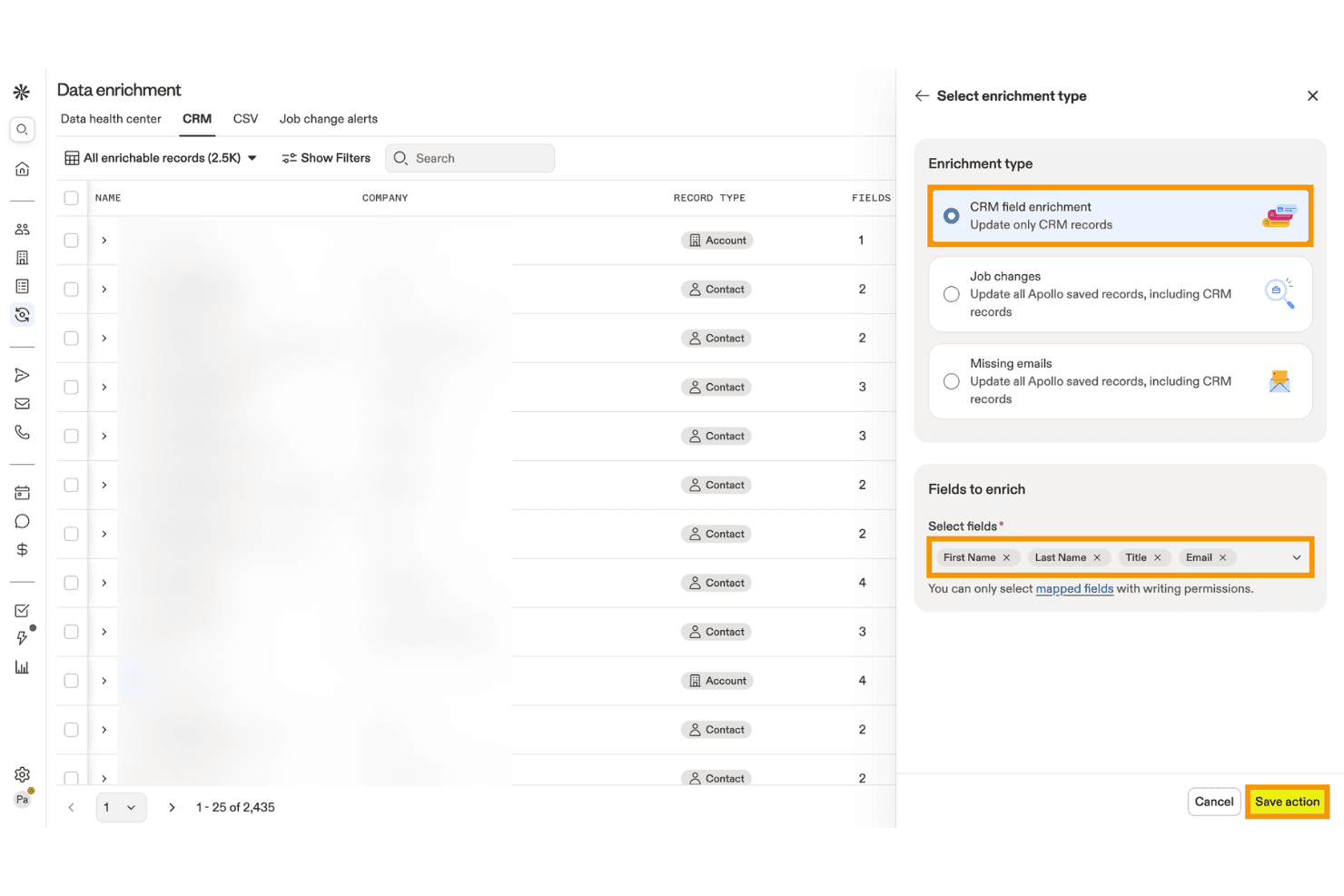
Apollo.io permite a los usuarios enriquecer los registros del CRM con campos de contacto seleccionados. Apollo.io es una plataforma de inteligencia de ventas B2B y gestión de datos de cuentas que combina el enriquecimiento de contactos y empresas, la eliminación de duplicados, la puntuación basada en IA, los datos de intención y la integración con CRM en una base de datos de más de 275M de contactos y más de 73M de empresas.
¿Para quién es más adecuado Apollo.io?
Apollo.io es una opción ideal para los equipos de generación de demanda y operaciones de marketing del mercado medio que necesitan un enriquecimiento de cuentas B2B asequible y de gran volumen, así como puntuación basada en IA, sin la complejidad del nivel empresarial.
Por qué elegí Apollo.io
Apollo.io está en mi lista final porque sus capacidades de enriquecimiento de cuentas B2B y puntuación basada en IA son realmente difíciles de replicar a este precio. Me encanta cómo los modelos de puntuación basados en IA se entrenan directamente con el historial de conversiones y pérdidas de tu CRM y añaden señales de intención de Bombora sobre más de 15.000 temas, para que priorices las cuentas que muestran un comportamiento de compra real en lugar de hacer suposiciones. El Centro de estado de los datos también hace un buen trabajo al detectar automáticamente registros duplicados y campos obsoletos en los CRM conectados.
Características principales de Apollo.io
- Trabajos de enriquecimiento de CRM: Trabajos programados o bajo demanda que actualizan automáticamente los campos que faltan o están obsoletos en tu CRM conectado mediante la base de datos activa de Apollo.
- Enriquecimiento de CSV: Carga un archivo CSV, revisa los datos enriquecidos y recibe un informe de finalización antes de importar los registros a cualquier sistema externo.
- Más de 65 filtros de segmentación: Busca y filtra cuentas por atributos firmográficos, tecnográficos y de comportamiento para crear listas precisas de cuentas objetivo.
- Perfiles de permisos basados en roles: Los administradores del plan Organización pueden controlar el acceso a nivel de función en las áreas de prospección, enriquecimiento, visibilidad del correo electrónico y participación para cada miembro del equipo.
Integraciones de Apollo.io
Apollo.io ofrece integraciones bidireccionales nativas con Salesforce, HubSpot, Zoho CRM, Pipedrive, Microsoft Dynamics, Adobe Marketo Engage y Snowflake. También proporciona una API REST abierta e integraciones de mercados de aplicaciones, incluido Zapier.
Pros and Cons
Pros:
- Amplia cobertura mundial de contactos y cuentas B2B
- Panel de control de enriquecimiento en tiempo real y detección de duplicados
- Señales de intención basadas en IA incorporadas a la puntuación
Cons:
- Datos de intención procedentes exclusivamente de Bombora
- Sin resolución avanzada de identidades entre sistemas
Learn more about Apollo.io: Ideal para crear bases de datos personalizables
- Plan gratuito para siempre
- Desde $10/usuario/mes (facturado anualmente)
Visit WebsiteCustomer Rating:4.6/5
Las plantillas de Airtable son bases de datos prediseñadas que permiten una gestión y organización eficiente de los datos. Airtable es una herramienta de gestión de proyectos y colaboración que combina las capacidades de una hoja de cálculo y una base de datos. Ofrece a los usuarios una interfaz flexible y visualmente atractiva para organizar y gestionar diversos tipos de datos. Airtable permite crear y personalizar tablas, o 'bases', para almacenar y manipular información.
Por qué elegí Airtable: Airtable es más adecuado para la gestión de proyectos. Sin embargo, si eres un equipo pequeño, también puedes usarlo para la gestión de datos de cuentas. Lo mejor de la herramienta es que permite a los usuarios crear campos personalizados con tipos de datos específicos, como texto, número, fecha y listas desplegables. Esto garantiza la precisión de los datos al aplicar un formato consistente y evitar entradas incorrectas. Al definir reglas de validación de campos, puedes mejorar aún más la exactitud de los datos y mantener la coherencia.
Airtable ofrece opciones de filtrado y ordenado potentes que permiten una recuperación sencilla de los datos. Puedes aplicar filtros según criterios específicos y ver instantáneamente un subconjunto de registros que cumplan con las condiciones definidas. Las opciones de ordenación te permiten organizar los datos en orden ascendente o descendente según cualquier campo, facilitando la búsqueda de la información deseada.
Características destacadas e integraciones de Airtable:
Las características destacadas incluyen un espacio de trabajo colaborativo donde los miembros del equipo pueden colaborar en la entrada, validación y actualización de datos. Esto ayuda a mantener la precisión y coherencia de los datos al involucrar a múltiples partes interesadas en la gestión de la información.
Las integraciones incluyen Asana, Basecamp, Dropbox, Box, Eventbrite, Evernote, Facebook, GitHub, Google Calendar, Instagram, Jira, Miro y LinkedIn. También puedes acceder a integraciones adicionales a través de Zapier y la API.
El precio de Airtable comienza desde $10/usuario/mes (facturado anualmente) y dispone de un plan gratuito para siempre.
Pros and Cons
Pros:
- Organización de datos personalizable
- Interfaz intuitiva y visualmente atractiva
- Potentes capacidades de base de datos relacional
Cons:
- Capacidades limitadas de análisis avanzado de datos
- Funciones de informes limitadas
Learn more about Airtable: Ideal para equipos de marketing, ventas y soporte
- Precios bajo solicitud
Visit WebsiteCustomer Rating:4.2/5
NetSuite integra datos de diversos departamentos y permite la supervisión en tiempo real y la elaboración de informes sobre los KPIs. NetSuite es una plataforma de software de gestión empresarial basada en la nube que ayuda a las empresas a gestionar diversos aspectos de su negocio, incluidos finanzas, gestión de relaciones con clientes (CRM), gestión de inventarios, comercio electrónico y más.
Por qué elegí NetSuite CRM: NetSuite CRM ofrece una solución completa para gestionar las relaciones con los clientes a lo largo de todo el ciclo de vida del cliente. Permite que los equipos de marketing, ventas y soporte tengan una visión unificada de los datos de los clientes, sus interacciones y preferencias, facilitando así un compromiso personalizado y dirigido.
NetSuite CRM también se integra con los datos financieros y operativos dentro de la plataforma NetSuite. Esta integración permite a los equipos de marketing, ventas y soporte acceder en tiempo real a información vital de las cuentas, como el historial de facturación, estado de pedidos y tickets de soporte. Tener estos datos consolidados mejora la colaboración y permite a los equipos brindar un mejor servicio y soporte al cliente.
Funciones destacadas e integraciones de NetSuite CRM:
Funciones destacadas incluyen sólidas capacidades de informes e inteligencia de negocios. Ofrece informes y paneles preconstruidos y personalizables, lo que permite a los equipos de marketing, ventas y soporte supervisar indicadores clave de rendimiento, medir el éxito de campañas y rastrear la satisfacción del cliente. Este enfoque basado en datos ayuda a los equipos a tomar decisiones informadas.
Las integraciones incluyen Shopify, BigCommerce, Adobe Commerce, WooCommerce, Amazon, eBay, Walmart, Shopify POS, Amazon Supply Chain y ShipStation.
Pros and Cons
Pros:
- Características de seguridad robustas
- Plataforma basada en la nube
- Funciones de informes sólidas
Cons:
- La configuración inicial puede ser compleja
- Curva de aprendizaje pronunciada
Learn more about NetSuite CRM : La mejor opción para contactos B2B precisos
- Plan gratuito disponible
- El precio comienza en $1200/mes
Visit WebsiteCustomer Rating:3.9/5
La función de validación en tiempo real de la plataforma y el alcance de más de 140 millones de registros comerciales contribuyen a su propuesta de valor única. CIENCE GO Data es una herramienta integral que proporciona información de contacto B2B precisa, incluyendo más de 100 millones de contactos verificados y 10 mil millones de señales mensuales de compradores en proceso de compra. El punto diferencial de la plataforma es su validación en tiempo real y el uso de datos del mundo real, lo que garantiza la precisión de los datos de ventas.
Por qué elegí CIENCE GO Data: Elegí CIENCE GO Data porque ofrece una vasta base de datos de más de 100 millones de contactos B2B verificados, lo cual es esencial para cualquier empresa que busque establecer o expandir su alcance de ventas. Al evaluar la mejor herramienta para este propósito, comparé varias opciones y descubrí que el enfoque de CIENCE GO Data en la validación con datos del mundo real la hace destacar. Este enfoque asegura que la información de contacto no solo sea extensa, sino también precisa y actualizada.
CIENCE GO Data Características e integraciones destacadas
Las características destacadas incluyen compromiso de ventas outbound con automatización, modelos de IA entrenados para la creación de contenido específico de la industria y análisis web avanzados. Además, CIENCE ofrece servicios como equipos SDR outbound como servicio y SDR inbound, así como modelos de IA para campañas outbound multicanal y conversaciones de prospección con voz artificial. La empresa también proporciona recursos como guías de priorización de leads, información de precios y contenido relacionado con la industria en su blog y pódcast.
Las integraciones incluyen HubSpot CRM, CIENCE GO Digital, CIENCE GO Show y HubSpot Sales Hub.
Pros and Cons
Pros:
- Paquetes y servicios de datos personalizados adaptados a las necesidades de la empresa.
- Soporte CRM para gestionar leads y relaciones con clientes.
- Capacidades de publicidad dirigida para llegar a audiencias específicas.
Cons:
- Potencialmente más costoso en comparación con otros servicios de generación de leads.
- Puede requerir formación adicional para que los clientes aprovechen completamente la plataforma.
Learn more about CIENCE GO Data: El mejor software de gestión de datos de cuentas para empresas
- Desde $65/usuario/mes

La aplicación móvil Oracle CX Sales proporciona a los usuarios acceso desde cualquier lugar a información de ventas esencial, datos de clientes y herramientas de colaboración para una gestión eficiente de las ventas. Oracle CX Sales, también conocido como Oracle Customer Experience Sales, es un completo software de automatización de ventas y gestión de relaciones con los clientes (CRM) ofrecido por Oracle Corporation. Forma parte del conjunto Oracle CX Cloud, que incluye diversas aplicaciones diseñadas para mejorar la experiencia del cliente en diferentes puntos de contacto. Es una buena opción para la gestión de datos de cuentas a nivel empresarial debido a su amplia variedad de funciones y su capacidad para manejar grandes volúmenes de datos.
Por qué elegí Oracle CX Sales: Para mantener la precisión y la integridad de los datos, Oracle CX Sales proporciona herramientas para la limpieza y la eliminación de duplicados de datos. Estas funciones ayudan a identificar y combinar registros de clientes duplicados o incoherentes, garantizando una base de datos de clientes limpia y fiable.
El software permite a las empresas segmentar los datos de los clientes según diversos criterios, como datos demográficos, comportamiento, historial de compras o atributos definidos de forma personalizada. Esta capacidad de segmentación permite realizar una orientación más precisa y una comunicación personalizada con los distintos segmentos de clientes.
Funciones destacadas e integraciones de Oracle CX Sales:
Las funciones destacadas incluyen capacidades automatizadas de enriquecimiento de datos que mejoran los datos de los clientes con información adicional. Puede actualizar y enriquecer automáticamente los registros de clientes con perfiles de redes sociales, información del sector, datos firmográficos y otras fuentes de datos relevantes.
Las integraciones incluyen ServiceNow, DbVisualizer, Oracle Sales, Crowdin, 4MDG, Oracle Service y CipherTrust Cloud Key Manager.
Pros and Cons
Pros:
- Integración nativa con otros productos de Oracle
- Buenas funciones de informes y análisis
- Aplicación móvil nativa
Cons:
- Curva de aprendizaje pronunciada
- Configuración y puesta en marcha complejas
Learn more about Oracle CX Sales: Ideal para la gestión visual de contactos en pipeline
- Prueba gratuita de 14 días
- Desde $11.90/usuario/mes

La función de gestión del pipeline de Pipedrive permite a los usuarios seguir y gestionar visualmente las oportunidades de ventas a lo largo de las distintas etapas del proceso de ventas. Pipedrive es una plataforma de gestión de relaciones con clientes (CRM) y gestión de datos de cuentas utilizada por más de 100,000 equipos de ventas.
Por qué elegí Pipedrive: La característica que más me gustó es la gestión de pipeline. Ofrece una visión intuitiva de tu proceso de ventas y de las interacciones con los clientes. El pipeline muestra las distintas etapas de tu ciclo de ventas, permitiéndote ver el progreso de cada cuenta para identificar cuellos de botella u oportunidades. Esta representación visual ayuda a los equipos de ventas a mantenerse organizados y centrados en avanzar los acuerdos.
Dentro de cada etapa del pipeline, Pipedrive te permite rastrear y registrar actividades relacionadas con cada cuenta. Puedes registrar llamadas, correos electrónicos, reuniones y otras interacciones directamente en la plataforma. Esta función garantiza que toda la información relevante y las actividades relacionadas con la cuenta se capturen y estén accesibles en una ubicación centralizada, facilitando una mejor gestión de los datos de las cuentas.
Funciones y Integraciones Destacadas de Pipedrive:
Funciones destacadas incluyen capacidades de automatización de flujos de trabajo para automatizar tareas repetitivas y mejorar la eficiencia. Los usuarios pueden automatizar acciones como enviar correos electrónicos de seguimiento, asignar tareas, actualizar campos de datos y activar notificaciones. Además, Pipedrive implementa sólidas medidas de seguridad para proteger los datos de los clientes. Utiliza protocolos de encriptación estándar del sector, así como auditorías de seguridad regulares y evaluaciones de vulnerabilidades.
Integraciones disponibles con más de 350 conectores, incluidos Zapier, Google Meet, Zoom Meetings, Facebook Messenger, LinkPort, DocuSign, Lemlist, JustCall, Asana y HubSpot. También puedes acceder a integraciones adicionales a través de la API de Pipedrive y Zapier.
Pros and Cons
Pros:
- Interfaz moderna e intuitiva
- Ideal para pequeñas y medianas empresas
- App móvil disponible
Cons:
- Curva de aprendizaje para nuevos usuarios
- Capacidades de informes limitadas
Learn more about Pipedrive : Mejor software de gestión de datos de cuentas para el enriquecimiento de datos
- Demostración gratuita disponible
- Desde $57/mes

La función de gestión de oportunidades de SAP Sales Cloud permite a los usuarios captar, calificar y nutrir oportunidades para mejorar la conversión de ventas y el crecimiento de los ingresos. SAP Sales Cloud es una solución de gestión de relaciones con clientes (CRM) que ayuda a las empresas a gestionar sus procesos de ventas, relaciones con los clientes y a impulsar el crecimiento de los ingresos. Ofrece herramientas para administrar oportunidades, contactos, cuentas, oportunidades de venta y embudos de ventas. La plataforma permite a los usuarios rastrear interacciones con los clientes, registrar actividades y capturar información importante para asegurar una visión completa y actualizada de cada cliente.
Por qué elegí SAP Sales Cloud: Enriquece los datos de los clientes extrayendo automáticamente información adicional de fuentes externas. Esto incluye datos de la empresa, perfiles sociales, actualizaciones de noticias y más. Al enriquecer los datos, los usuarios pueden tener una visión más completa y actualizada de sus clientes, mejorando la segmentación de clientes y la precisión en la orientación.
SAP Sales Cloud se integra con varias fuentes de datos y sistemas, como CRM, automatización de marketing y sistemas ERP. Esta integración asegura que los datos se mantengan consistentes en todas las plataformas. Elimina los silos de información y proporciona una fuente centralizada y confiable de datos precisos.
Características destacadas e integraciones de SAP Sales Cloud:
Entre las características destacadas se incluye la segmentación robusta, que permite a los usuarios definir y crear segmentos de clientes dinámicos basados en criterios específicos. Los usuarios pueden segmentar a los clientes según demografía, comportamiento, historial de compras y otros puntos de datos relevantes. Esto hace posible una orientación personalizada y esfuerzos de marketing personalizados, logrando una comunicación más efectiva y relevante con los clientes.
Las integraciones incluyen Microsoft Outlook, Screendragon, Inxmail, Mediafly, Simplifier, EVALANCHE, In Mind Cloud y Prosafety.
Pros and Cons
Pros:
- Sólidas capacidades de gestión de datos
- Interacción personalizada con el cliente
- Informes y análisis avanzados
Cons:
- La configuración inicial y la personalización pueden requerir experiencia técnica
- Curva de aprendizaje para usuarios nuevos en los sistemas SAP
Learn more about SAP Sales Cloud: El mejor software de gestión de datos de cuentas para pequeñas empresas
- Plan gratuito para siempre
- Desde $49/5 usuarios/mes

La función de gestión de acuerdos de Bitrix24 ayuda a los usuarios a realizar un seguimiento y organizar las oportunidades de ventas, desde el contacto inicial hasta el cierre final. Bitrix24 es una solución de gestión empresarial y CRM que ofrece diversas capacidades, como CRM (Gestión de relaciones con los clientes), gestión de proyectos, gestión de documentos, comunicación de equipos y mucho más. Bitrix24 es especialmente popular entre las pequeñas y medianas empresas debido a su asequibilidad, interfaz fácil de usar y amplia funcionalidad.
Por qué elegí Bitrix24: Bitrix24 permite a las empresas crear campos y formularios personalizados dentro del CRM. Esta función permite a las empresas capturar puntos de datos específicos relevantes para sus operaciones e interacciones con los clientes. Los campos personalizados garantizan que los datos recopilados se adapten a las necesidades de la empresa.
Bitrix24 ofrece sólidas capacidades de búsqueda y filtrado dentro de su CRM. Esto permite a los usuarios recuperar fácilmente datos específicos según diversos criterios, como atributos de los clientes, historial de transacciones o palabras clave concretas. La funcionalidad de búsqueda avanzada simplifica la recuperación de datos y ahorra tiempo y esfuerzo.
Características destacadas e integraciones de Bitrix24:
Las características destacadas incluyen herramientas de segmentación que permiten a las empresas categorizar y agrupar sus contactos según criterios o características específicos. Las empresas pueden dirigirse a segmentos concretos de clientes mediante campañas de marketing adaptadas o comunicaciones personalizadas. Esta función de segmentación mejora la organización y precisión de los datos, y permite enviar mensajes dirigidos.
Las integraciones incluyen Gmail, Google Calendar, Google Drive, MS Office, Dropbox, Box, Xero, Mailchimp, Docusign y Recurly.
Pros and Cons
Pros:
- Gestión eficiente de acuerdos
- Amplias integraciones
- Amplia variedad de funciones
Cons:
- Opciones de personalización limitadas
- Curva de aprendizaje pronunciada para los nuevos usuarios
Learn more about Bitrix24 : El mejor software de gestión de datos de cuentas por su facilidad de uso
- Prueba gratuita de 14 días
- Desde $28/usuario/mes

La función de gestión de proyectos de Scoro permite a las empresas planificar, organizar y seguir tareas, recursos y hitos de manera eficiente para garantizar la ejecución exitosa de los proyectos. Scoro es una solución de gestión empresarial y de proyectos que ofrece una interfaz de arrastrar y soltar para la gestión de datos de cuentas. Además, también proporciona funciones para el seguimiento del tiempo, colaboración, CRM, facturación e informes.
Por qué elegí Scoro: Aunque Scoro es principalmente un software de gestión empresarial, también proporciona algunas funciones para la gestión de datos de cuentas. Ayuda a los usuarios a almacenar y gestionar los datos de cuentas de clientes en una ubicación centralizada. Estos datos pueden incluir detalles de contacto, historial de comunicaciones, transacciones, proyectos, facturas, etc. Permite una visión de 360 grados de cada cliente y contacto para que puedas realizar un seguimiento de las oportunidades de ventas.
Además, Scoro también ofrece funciones para seguir los objetivos y el desempeño de ventas. Por ejemplo, puedes crear paneles de control personalizables que sigan los objetivos de ventas de cada representante y del equipo completo.
Funciones destacadas e integraciones de Scoro:
Funciones destacadas incluyen herramientas de gestión de proyectos y tareas que ayudan a los usuarios a seguir y gestionar las actividades relacionadas con las cuentas de clientes. Esto puede ser útil para organizar y coordinar tareas y actividades vinculadas a las cuentas.
Las integraciones incluyen Slack, Asana, Jira Software, Evernote, Trello, Harvest, Basecamp, GitHub, Zapier y Gmail. También puedes aprovechar integraciones adicionales mediante Zapier.
Pros and Cons
Pros:
- Se integra con herramientas de terceros populares
- Campos y flujos de trabajo personalizables
- Permite la colaboración en equipo
Cons:
- Enfoque limitado en gestión especializada de datos de cuentas
- No es altamente personalizable
Learn more about Scoro : El mejor software de gestión de datos de cuentas con una interfaz fácil de usar
- Prueba gratuita de 14 días
- Desde $34/mes

AllClients proporciona una visión detallada de cada cliente, incluyendo sus preferencias, historial e interacciones con la empresa. AllClients es una plataforma de software de gestión de relaciones con clientes (CRM) que ayuda a las empresas a gestionar y organizar la información de los clientes, rastrear interacciones y gestionar la comunicación. También ofrece funciones como gestión de contactos, marketing por correo electrónico, gestión de tareas y flujos de trabajo automatizados para mejorar las relaciones con los clientes.
Por qué elegí AllClients: AllClients proporciona a los usuarios opciones de filtrado intuitivas que les permiten clasificar y segmentar sus datos de clientes de manera rápida y sencilla. Ya sea filtrando contactos según criterios específicos o creando listas dirigidas para campañas de marketing, la función de filtrado fácil simplifica el proceso. Permite a los usuarios acceder a la información necesaria con solo unos clics.
La plataforma está diseñada para ser intuitiva y accesible, lo que facilita a los usuarios la navegación y el uso de sus diversas funcionalidades. El diseño limpio y la navegación sencilla garantizan que los usuarios puedan encontrar rápidamente lo que necesitan y realizar tareas de manera eficiente.
Características destacadas e integraciones de AllClients:
Las características destacadas incluyen una función de entrada de datos que permite a los usuarios ingresar y actualizar la información de los clientes dentro del sistema. Con esta función, los usuarios pueden ingresar fácilmente los detalles relevantes sobre sus clientes, como nombres, información de contacto, datos demográficos y otros campos personalizados según las necesidades de su negocio.
Las integraciones incluyen Mailchimp, HubSpot CRM, Constant Contact, Campaign Monitor, Robly, ActiveDEMAND y Akita.
Pros and Cons
Pros:
- Interfaz fácil de usar
- Filtrado de contactos sencillo
- Campos personalizables para los datos de los clientes
Cons:
- Curva de aprendizaje pronunciada
- Opciones de personalización limitadas
Learn more about AllClients :
Otros software de gestión de datos de cuentas
Durante mi investigación, encontré algunas herramientas más que no entraron en la lista principal de herramientas para la gestión de datos de cuentas, pero que vale la pena revisar:
- 11OCLIdeal para la gestión de datos de cuentas y colaboración
- 12CapsuleIdeal para la clasificación y segmentación de datos
- 13Salesforce CRMLa mejor solución todo en uno para la gestión de datos de cuentas
- 14Freshdesk La mejor plataforma unificada para soporte y gestión de datos de cuentas
Cómo Evalúo las Herramientas de Estrategia de IA
Solo incluyo herramientas que aportan un verdadero valor de IA—como la previsión de riesgos de rotación o la generación de estrategias de fuerza laboral accionables, y no simplemente transforman reportes básicos. Divido mi evaluación en la funcionalidad básica que toda herramienta debe tener y los factores diferenciadores que distinguen a un proveedor de otro.
Funcionalidad Básica (Requisitos Indispensables Para Esta Lista)
Al seleccionar las herramientas para mi lista, califico cada una en una escala del 0 (no ofrece la funcionalidad) al 5 (destaca en esta área) por cada funcionalidad básica que detallo a continuación. Luego, calculo la puntuación total de la herramienta como un porcentaje. Cada herramienta debe alcanzar una puntuación total mínima del 65% para ser considerada para inclusión.
- Generación de Estrategia de IA: Busco herramientas que vayan más allá de los paneles de control para generar recomendaciones estratégicas reales—por ejemplo, planes de retención redactados por IA o rutas de contratación adaptadas a los datos de tu organización.
- Análisis Predictivo de la Fuerza Laboral: Cada herramienta debe usar aprendizaje automático para prever riesgos reales en la fuerza laboral como picos de rotación, falta de competencias o cambios en la demanda de contratación por departamentos.
- Modelado de Escenarios y Simulación: Evalúo si la plataforma permite a líderes de RRHH ejecutar análisis de escenarios hipotéticos, como modelar el costo y el impacto en el talento de una reestructuración antes de tomar una decisión.
- Integración de Datos de RRHH: Las mejores herramientas extraen información de tu HRIS, ATS, nómina y sistemas de desempeño. Verifico la existencia de conectores nativos con plataformas como Workday, SAP SuccessFactors y BambooHR.
- Comparativa Estratégica de KPIs: Analizo cómo la herramienta compara métricas como tiempo de cobertura de vacantes o puntajes de compromiso frente a referentes del sector y objetivos internos mediante análisis impulsado por IA.
- Alineación de Objetivos e Iniciativas: La plataforma debe vincular los resultados de la estrategia de RRHH con los OKRs de la empresa—por ejemplo, conectar una iniciativa de DEI con resultados medibles, incluyendo seguimiento asistido por IA.
Una vez que tengo una lista de herramientas que cumplen con los criterios, considero qué diferencia a cada plataforma.
Factores Diferenciadores (Lo Que Distingue a Los Proveedores)
Así es como comparo y contrasto distintos proveedores:
Características Destacadas
Un motor de inteligencia de habilidades es un gran diferenciador—permite a los líderes de RRHH mapear las capacidades actuales de la fuerza laboral y detectar brechas antes de que se conviertan en urgencias de contratación. También observo si una herramienta ofrece salidas de IA explicables, mostrando el razonamiento y los niveles de confianza detrás de sus recomendaciones. Esa transparencia es importante al presentar una estrategia de fuerza laboral ante la alta dirección. La IA de sentimiento y compromiso añade otra capa, extrayendo insights de encuestas y señales de feedback para identificar riesgos de cultura o retención a tiempo.
Más Allá de Las Características
La gobernanza de IA es una consideración clave—verifico si el proveedor ofrece auditoría de sesgos, documentación de modelos y controles humano-en-el-bucle para anular recomendaciones. La seguridad de los datos es igual de importante, especialmente la certificación SOC 2 Type II y el acceso basado en roles para datos sensibles de compensación y desempeño. Además, evalúo muy de cerca el soporte en la implementación. Estas herramientas requieren un mapeo cuidado de datos y calibración de modelos, así que los proveedores que combinan la integración con asesoría estratégica específica de RRHH suelen lograr una adopción más rápida entre los equipos directivos.
Cómo elegir un software de gestión de datos de cuentas
Es fácil perderse entre largas listas de funciones y estructuras de precios complejas. Para ayudarte a mantenerte enfocado mientras avanzas en tu proceso único de selección de software, aquí tienes una lista de factores a tener en cuenta:
| Factor | En qué fijarse |
|---|---|
| FactorEscalabilidad | En qué fijarse¿El software crecerá con tu empresa? Considera si puede gestionar un aumento de usuarios o de volumen de datos sin inconvenientes. Busca precios y capacidades escalables. |
| FactorIntegraciones | En qué fijarse¿Funciona con las herramientas que ya usa tu equipo? Comprueba la compatibilidad con los sistemas existentes para evitar silos de datos y trabajo manual extra. |
| FactorPersonalización | En qué fijarse¿Se puede adaptar a tus necesidades? Busca campos y flujos de trabajo personalizables para adecuar el software a tus procesos específicos. |
| FactorFacilidad de uso | En qué fijarse¿Tu equipo lo encontrará intuitivo? Evalúa la interfaz y la navegación. Una curva de aprendizaje pronunciada puede ralentizar la adopción y la productividad. |
| FactorImplementación y onboarding | En qué fijarse¿Qué tan rápido puedes empezar a usarlo? Evalúa el tiempo y los recursos necesarios para ponerlo en marcha. Considera la disponibilidad de tutoriales, guías y soporte para la incorporación. |
| FactorCosto | En qué fijarse¿Está dentro de tu presupuesto? Compara los planes de precios con tus limitaciones financieras. Ten cuidado con los costes ocultos y busca descuentos por suscripciones anuales. |
| FactorMedidas de seguridad | En qué fijarse¿Qué tan seguros están tus datos? Asegúrate de que el software ofrezca cifrado, copias de seguridad y controles de acceso para proteger la información sensible. |
| FactorRequisitos de cumplimiento | En qué fijarse¿Cumple con las normativas del sector? Si trabajas en un sector regulado, asegúrate de que el software cumpla con los estándares pertinentes, como el RGPD o la HIPAA. |
¿Qué es el software de gestión de datos de cuentas?
El software de gestión de datos de cuentas es una herramienta que ayuda a las empresas a organizar, almacenar y administrar la información relacionada con sus cuentas de manera eficiente. Normalmente, estos programas son utilizados por responsables de marketing, contadores y analistas de datos para garantizar la precisión y accesibilidad de los datos. La seguridad de la información, las capacidades de integración y el control de acceso de usuarios ayudan a proteger los datos, conectar sistemas y gestionar permisos. En general, estas herramientas simplifican la gestión de datos y mejoran los procesos de toma de decisiones.
Características
Al seleccionar un software de gestión de datos de cuentas, presta atención a las siguientes características clave:
- Seguridad de datos: Protege la información sensible mediante el cifrado y controles de acceso, asegurando que solo los usuarios autorizados puedan acceder a los datos.
- Capacidades de integración: Se conecta con otras herramientas y sistemas de software para crear un flujo de trabajo sin interrupciones y reducir la entrada manual de datos.
- Control de acceso de usuarios: Permite administrar permisos y roles, garantizando que los usuarios solo puedan acceder a la información que necesitan.
- Paneles personalizables: Ofrece una vista personalizada de tus datos, ayudándote a concentrarte en las métricas que más importan para tu negocio.
- Informes y análisis: Genera informes y visualizaciones a partir de tus datos, ayudando a tomar decisiones fundamentadas.
- Sincronización de datos en tiempo real: Mantiene tus datos actualizados en todas las plataformas, garantizando precisión y consistencia.
- Escalabilidad: Crece junto con tu empresa, permitiendo aumentar el volumen de datos y usuarios sin problemas de rendimiento.
- Herramientas de cumplimiento normativo: Garantiza el cumplimiento de normativas como GDPR o HIPAA, reduciendo riesgos legales.
- Interfaz intuitiva: Ofrece un diseño fácil de navegar que minimiza la curva de aprendizaje y aumenta la adopción de los usuarios.
- Soporte para la incorporación: Proporciona recursos como tutoriales y guías para que los nuevos usuarios aprendan rápidamente a utilizar el software.
Beneficios
Implementar un software de gestión de datos de cuentas ofrece diversos beneficios tanto para tu equipo como para tu empresa. Aquí tienes algunos de los que puedes esperar:
- Mejora en la precisión de los datos: Reduce errores al sincronizar datos en tiempo real en todas las plataformas, asegurando que todos tengan acceso a la información más actualizada.
- Mejora en la toma de decisiones: Ofrece información valiosa a través de reportes y análisis, ayudando a tomar decisiones fundamentadas basadas en datos precisos.
- Aumento de la eficiencia: Automatiza tareas repetitivas e integra con otros sistemas, ahorrando tiempo a tu equipo y reduciendo el trabajo manual.
- Mayor seguridad: Protege la información sensible mediante cifrado y controles de acceso, manteniendo tus datos a salvo de accesos no autorizados.
- Escalabilidad: Se adapta al crecimiento de tu empresa, gestionando más datos y usuarios sin comprometer el rendimiento.
- Cumplimiento normativo: Te ayuda a cumplir con las normativas del sector mediante herramientas integradas de cumplimiento, reduciendo riesgos legales.
- Experiencia fácil para el usuario: Proporciona una interfaz intuitiva que minimiza la curva de aprendizaje, facilitando la adopción y el uso por parte de tu equipo.
Costos y precios
Seleccionar un software de gestión de datos de cuentas requiere comprender los distintos modelos y planes de precios disponibles. Los costos varían según las funciones, el tamaño del equipo, complementos y otros factores. La siguiente tabla resume los planes más habituales, sus precios promedio y las características típicas incluidas en las soluciones de software de gestión de datos de cuentas:
Tabla comparativa de planes para software de gestión de datos de cuentas
| Tipo de plan | Precio promedio | Características comunes |
|---|---|---|
| Tipo de planPlan gratuito | Precio promedio$0 | Características comunesAlmacenamiento básico de datos, integraciones limitadas e informes básicos. |
| Tipo de planPlan personal | Precio promedio$5-$25/user/month | Características comunesAlmacenamiento de datos, control de acceso de usuarios, integraciones básicas y soporte estándar. |
| Tipo de planPlan empresarial | Precio promedio$50-$100/user/month | Características comunesIntegraciones avanzadas, mayor seguridad, paneles personalizados y análisis. |
| Tipo de planPlan corporativo | Precio promedio$150-$300/user/month | Características comunesAlmacenamiento ilimitado de datos, soporte premium, herramientas de cumplimiento y personalización completa. |
La gente también pregunta
Aquí tienes las respuestas a algunas preguntas frecuentes que puedes tener sobre el software de gestión de datos de cuentas:
¿Puede el software de gestión de datos de cuentas integrarse con otras herramientas?
Sí, el software de gestión de datos de cuentas puede integrarse con otras herramientas como sistemas CRM, plataformas de marketing y software financiero. Estas integraciones permiten un flujo de datos sin interrupciones entre los sistemas, reduciendo la introducción manual de datos y los errores. Antes de comprar, verifica si el software es compatible con las herramientas específicas que utiliza tu equipo para garantizar la compatibilidad.
¿Se necesita capacitación para usar el software de gestión de datos de cuentas?
Sí, a menudo se requiere capacitación para aprovechar al máximo el software de gestión de datos de cuentas. Muchos proveedores ofrecen recursos como tutoriales en línea, seminarios web y guías para ayudar a tu equipo a aprender a usar el sistema. Aprovechar estos recursos puede acelerar el proceso de integración y asegurar que tu equipo utilice el software de forma efectiva.
¿Cómo puedo garantizar la seguridad de los datos con el software de gestión de datos de cuentas?
Para garantizar la seguridad de los datos, elige un software que ofrezca cifrado, controles de acceso y copias de seguridad periódicas. Verifica que el proveedor siga prácticas de seguridad estándar de la industria y cumpla con las regulaciones pertinentes. Revisa periódicamente la configuración de seguridad y forma a tu equipo en las mejores prácticas para proteger la información sensible.
¿Qué sigue?
Si estás investigando software de gestión de datos de cuentas, conéctate con un asesor de SoftwareSelect para recibir recomendaciones gratuitas.
Solo rellenas un formulario y tienes una breve charla donde analizarán en detalle tus necesidades. Después recibirás una lista corta de software para revisar. Incluso te acompañarán durante todo el proceso de compra, incluidas las negociaciones de precio.