

El software gratuito de email marketing puede ser una forma inteligente de lanzar campañas, hacer crecer tu lista y mantenerte en contacto con tus clientes sin sobrepasar tu presupuesto. Tanto si estás creando tu programa desde cero como si quieres probar nuevas herramientas antes de comprometerte, existen planes gratuitos sólidos que siguen ofreciendo las funciones esenciales.
He probado y analizado varias opciones para ayudarte a encontrar plataformas que equilibren facilidad de uso, funciones y valor a largo plazo. En esta guía encontrarás mis mejores recomendaciones y lo que hace mejor cada una, para que puedas elegir la opción más adecuada para tu equipo.
Por qué confiar en nuestras recomendaciones de software
6,700+
Reviews
20
Industry experts
16+
Evaluation factors
14
Years
Nuestro equipo lleva probando y evaluando software desde 2012. Como líderes de marketing, sabemos lo difícil —y lo importante— que es elegir el software adecuado.
Para esta guía, evaluamos las herramientas mediante pruebas prácticas e investigación independiente, puntuando las herramientas según nuestros criterios de selección.
Nuestras reseñas reflejan nuestro criterio editorial humano, no un discurso de ventas.
Revisores expertos:
 Gui DrusinaDirector creativo
- Shriya GhateSenior Marketing Lead
 Amanda JacquesLíder de Marketing Ops

Tabla comparativa de programas gratuitos de email marketing
Esta tabla comparativa resume los detalles de precios de mis principales selecciones de programas gratuitos de email marketing:
| Tool | Best For | Trial Info | Price | ||
|---|---|---|---|---|---|
| 1 | La mejor opción para la prospección de contactos B2B en frío | Prueba gratuita de 14 días y plan gratuito disponibles | Desde $49/usuario/mes (facturado anualmente) | Website | |
| 2 | Mejor para principiantes | Prueba gratuita de 30 días + plan gratuito + demo gratis disponible | Desde $13/mes | Website | |
| 3 | Ideal para opciones de integración robustas | Plan gratuito + demostración gratuita disponible | Desde $7/mes (facturado anualmente) | Website | |
| 4 | Mejor para correos electrónicos con urgencia basada en tiempo | Plan gratuito + prueba gratis disponible | Desde $19/usuario/mes (facturación anual) | Website | |
| 5 | La mejor para probar correos electrónicos | Una versión gratuita específicamente para una sola bandeja de entrada y hasta 500 pruebas de correos electrónicos al mes. | Desde $14.99/mes para 1 usuario y hasta 5 bandejas de entrada | Website | |
| 6 | La mejor por su interfaz fácil de usar | Plan gratuito disponible | Desde $12/mes | Website | |
| 7 | Ideal para usuarios de comercio electrónico | Plan gratuito + demo gratuita disponible | Desde $20/mes | Website | |
| 8 | Ideal para pequeños equipos | Prueba gratuita de 14 días disponible | Desde $33/mes (facturado anualmente) | Website | |
| 9 | La mejor opción para plantillas de correo electrónico simples | Plan gratuito disponible | Desde $37/mes | Website | |
| 10 | Mejor para empresas canadienses | Plan gratuito disponible | Desde CAD $22.04/mes | Website |


Análisis de los mejores programas gratuitos de email marketing
A continuación encontrarás mis resúmenes detallados de los mejores programas gratuitos de email marketing que han entrado en mi selección. Mis análisis ofrecen una visión detallada de las funciones principales, ventajas & desventajas, integraciones y casos de uso ideales de cada herramienta para ayudarte a encontrar la mejor opción para ti. Aunque algunas de estas herramientas ofrecen una versión completamente gratuita, otras ofrecen un periodo de prueba gratuito. He añadido una nota sobre qué incluye la opción gratuita en cada uno de mis análisis.
 La mejor opción para la prospección de contactos B2B en frío
- Prueba gratuita de 14 días y plan gratuito disponibles
- Desde $49/usuario/mes (facturado anualmente)
Visit WebsiteCustomer Rating:4.5/5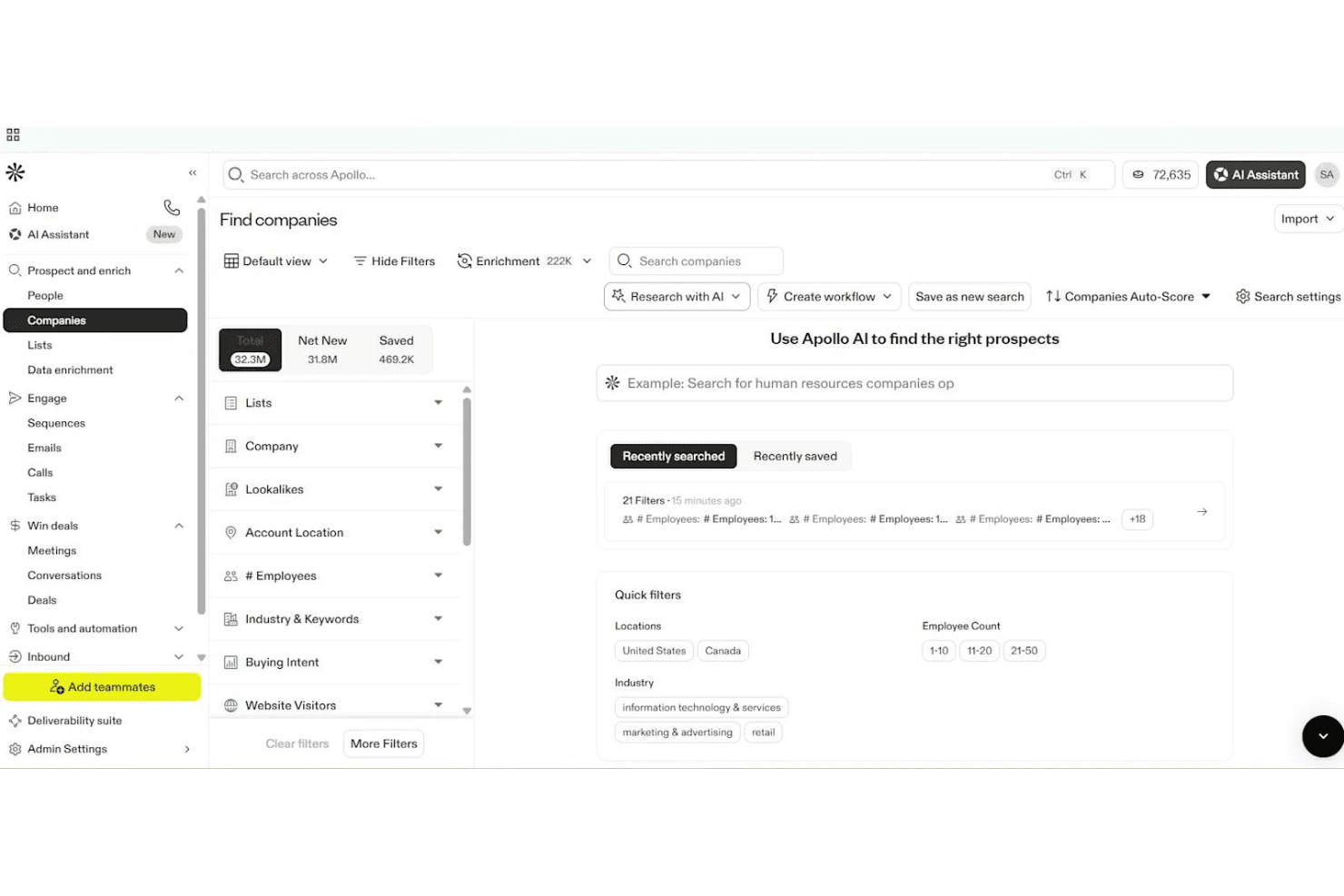
Apollo.io permite a los usuarios filtrar y encontrar empresas mediante una búsqueda impulsada por IA. Apollo.io es una plataforma de interacción de ventas impulsada por IA que ofrece secuencias de correo electrónico de varios pasos, gestión de contactos, captura mediante formularios y análisis, diseñada principalmente para la prospección B2B saliente en lugar del marketing tradicional por correo electrónico.
¿Para quién es más adecuado Apollo.io?
Apollo.io es una opción inteligente para equipos de ventas B2B y especialistas en prospección saliente que buscan automatizar campañas de contacto en frío de varios pasos.
Por qué elegí Apollo.io
Elegí Apollo.io como una de las mejores opciones porque está diseñado para automatizar el contacto en frío de gran volumen con enormes bases de datos de contactos B2B. Me gusta que mi equipo pueda lanzar secuencias de varios pasos dirigidas a nuevos prospectos y personalizar los correos electrónicos con variables impulsadas por IA. Su creador de formularios nos permite dirigir los prospectos entrantes directamente a los flujos de trabajo de contacto.
Características principales de Apollo.io
- Creador de formularios: Crea formularios web integrables para captar prospectos entrantes y dirigirlos directamente a los flujos de trabajo de contacto.
- Redactor de correos electrónicos con IA: Genera automáticamente correos electrónicos de contacto personalizados mediante IA, basándose en los datos de los contactos y las señales de interacción.
- Pruebas A/B de secuencias: Prueba varias versiones de correos electrónicos dentro de las secuencias salientes para optimizar las tasas de respuesta y los mensajes.
- Herramientas de entregabilidad: Accede al calentamiento de buzones, la puntuación de entregabilidad y orientación integrada para configurar SPF, DKIM y DMARC.
Integraciones de Apollo.io
Apollo.io ofrece más de 50 integraciones, incluidas conexiones nativas con Salesforce, HubSpot, Zoho CRM, Gmail, Microsoft 365, LinkedIn mediante la extensión de Chrome, Outreach, SalesLoft, Marketo, Pipedrive, Asana, ClickUp y Zapier. El acceso a la API está disponible en los planes empresariales.
¿Qué incluye el plan gratuito?
Apollo.io ofrece un plan gratuito permanente que proporciona acceso básico a su base de datos de contactos B2B y a las funciones principales de contacto. El plan gratuito tiene límites importantes: incluye 60 créditos de correo electrónico al mes, filtros de búsqueda básicos y acceso restringido a algunas integraciones y herramientas de automatización.
Pros and Cons
Pros:
- Enorme base de datos de contactos B2B integrada
- La IA redacta y personaliza los correos electrónicos de contacto
- Secuencias de ventas de varios pasos con pruebas A/B
Cons:
- No incluye un creador de boletines de arrastrar y soltar
- El plan gratuito está limitado al uso para contactos en frío
Learn more about Apollo.io: Mejor para principiantes
- Prueba gratuita de 30 días + plan gratuito + demo gratis disponible
- Desde $13/mes
Visit WebsiteCustomer Rating:4.5/5
Mailchimp ayuda a pequeños equipos a enviar y analizar campañas de correo electrónico. Mailchimp es una plataforma versátil de marketing por correo electrónico dirigida a pequeñas empresas y startups. Proporciona herramientas para crear, enviar y analizar campañas de correo electrónico, ayudando a los equipos a interactuar eficazmente con su audiencia.
Por qué elegí Mailchimp: El plan gratuito de Mailchimp incluye acceso a herramientas básicas de marketing por correo electrónico, lo que lo convierte en una excelente opción para principiantes. Puedes crear y enviar correos electrónicos con un editor de arrastrar y soltar muy fácil de usar. La plataforma ofrece segmentación de audiencia y funciones básicas de informes, que son ideales para quienes recién empiezan en el marketing por correo electrónico. Su interfaz intuitiva ayuda a los equipos a comenzar sin necesidad de una capacitación extensa.
Características y integraciones destacadas:
Características incluyen un editor de correo electrónico de arrastrar y soltar que simplifica el proceso de creación. Las herramientas de segmentación de audiencia te ayudan a dirigirte de manera efectiva a grupos específicos. Mailchimp también proporciona informes básicos para monitorear el éxito de tus campañas y tomar decisiones informadas.
Integraciones incluyen Shopify, WooCommerce, WordPress, Zapier, Salesforce, Eventbrite, Slack, Stripe, QuickBooks y Facebook.
¿Qué es gratis? Mailchimp ofrece un plan gratuito para siempre, con limitaciones en la cantidad de contactos y correos electrónicos que puedes enviar mensualmente.
Pros and Cons
Pros:
- Adecuado para pequeñas empresas
- Incluye informes básicos
- No se requiere tarjeta de crédito
Cons:
- Solo funciones básicas en la versión gratuita
- Soporte al cliente limitado en el plan gratuito
Learn more about Mailchimp : Ideal para opciones de integración robustas
- Plan gratuito + demostración gratuita disponible
- Desde $7/mes (facturado anualmente)
Visit WebsiteCustomer Rating:4.6/5
El panel de automatización de Sender permite a los usuarios crear y lanzar flujos de trabajo de correo electrónico usando plantillas prediseñadas y un editor visual. Diseñado para empresas que buscan soluciones de marketing por correo electrónico rentables, Sender ofrece una plataforma robusta para crear, automatizar y gestionar campañas de correo electrónico sin la complejidad ni el costo que suelen asociarse a estas herramientas. Resulta especialmente atractivo para pequeñas empresas y startups que desean potenciar sus esfuerzos de marketing mediante una interfaz fácil de usar y un generoso plan gratuito. Al cubrir la necesidad de comunicarse eficientemente con hasta 2.500 suscriptores y ofrecer hasta 15.000 correos electrónicos al mes sin costes, Sender resuelve eficazmente el desafío de gestionar la interacción con los clientes manteniéndose dentro del presupuesto.
Por qué elegí Sender
Elegí Sender por su enfoque único al ofrecer un plan 'Gratis para siempre' que está pensado para pequeñas empresas y startups que necesiten gestionar hasta 2.500 suscriptores. Este plan permite enviar 15.000 correos electrónicos al mes, brindando una excelente oportunidad de interactuar con tu audiencia sin limitaciones financieras. Además, el enfoque de Sender en la alta entregabilidad gracias al monitoreo de la reputación de IP garantiza que tus mensajes lleguen a los destinatarios, lo que es crucial para mantener la relación con el cliente. La inclusión de contenido dinámico y pruebas A/B también te permite personalizar y optimizar tus campañas, aumentando la efectividad de tus acciones de marketing.
Características clave de Sender
Además de su destacado plan gratuito, también he encontrado varias funciones que aumentan su atractivo:
- Automatización de correos: Crea y gestiona secuencias de emails automatizados para optimizar tus esfuerzos de marketing.
- Biblioteca de plantillas: Accede a más de 1.600 plantillas personalizables para diseñar correos profesionales adaptados a tu marca.
- Panel de analíticas: Supervisa el rendimiento de las campañas con información y reportes detallados para tomar decisiones informadas.
- Opciones de integración: Integra fácilmente con plataformas como WordPress y WooCommerce para ampliar tu alcance de marketing.
Integraciones de Sender
Las integraciones incluyen WordPress, WooCommerce, Magento, PrestaShop, OpenCart, Joomla, Zapier, API para integraciones personalizadas y Shopify.
Pros and Cons
Pros:
- Incluye flujos de automatización ilimitados
- Soporte integrado para marketing por SMS
- Constructor intuitivo de arrastrar y soltar
Cons:
- Límites de suscriptores en los planes inferiores
- No cuenta con un generador de landing pages incorporado
Learn more about Sender: Mejor para correos electrónicos con urgencia basada en tiempo
- Plan gratuito + prueba gratis disponible
- Desde $19/usuario/mes (facturación anual)
Visit WebsiteCustomer Rating:4.7/5
Flodesk ayuda a crear urgencia con diseños de correos electrónicos limpios y temporizados. Flodesk es una plataforma gratuita de email marketing diseñada para usuarios que desean crear correos electrónicos simples y visualmente atractivos sin complicaciones técnicas. Conocida por sus herramientas de diseño limpias, es especialmente útil para pequeñas empresas y creativos que buscan enviar campañas pulidas de manera sencilla. Gracias a sus funciones de correos electrónicos con urgencia basada en el tiempo, Flodesk facilita la creación de mensajes atractivos y la automatización de flujos de trabajo, ayudándote a mantener una comunicación constante con tu audiencia.
Por qué elegí Flodesk
Elegí Flodesk por su fortaleza en la creación de correos electrónicos con urgencia basada en el tiempo, que fomentan la acción mediante temporizadores y campañas centradas en fechas límite. Esto facilita motivar a los suscriptores a actuar rápidamente sin complicar la configuración. Combinado con plantillas personalizables y automatizaciones sencillas, Flodesk permite campañas atractivas manteniendo la creación de correos electrónicos fácil.
Características clave de Flodesk
Además de correos electrónicos con urgencia basada en el tiempo, Flodesk ofrece:
- Plantillas personalizables: Permite crear correos electrónicos que reflejan el estilo único de tu marca fácilmente.
- Gestión de suscriptores: Ofrece herramientas para administrar tu lista de correos de manera efectiva, incluyendo segmentación y personalización.
- Analíticas de rendimiento: Brinda información sobre el rendimiento de los correos, ayudándote a tomar decisiones basadas en datos.
Integraciones de Flodesk
Las integraciones incluyen Shopify, Instagram, Canva, Zapier y WordPress.
¿Qué es gratis?
Flodesk tiene un plan gratuito que te permite usar formularios, páginas de aterrizaje y herramientas para construir listas — pero no permite el envío de correos electrónicos bajo el nivel “gratuito”. Sin embargo, ofrece una prueba gratuita de 14 días con acceso completo a sus funciones de email marketing.
Pros and Cons
Pros:
- Interfaz unificada que simplifica la creación y gestión de campañas
- Funcionalidades de automatización para recorridos de suscriptores (series de bienvenida, disparadores, etc.)
- Las herramientas de segmentación mejoran las campañas de email marketing dirigidas
Cons:
- No es ideal para necesidades de correo masivas o muy complejas
- Integraciones limitadas en comparación con plataformas de email marketing más grandes
Learn more about Flodesk: La mejor para probar correos electrónicos
- Una versión gratuita específicamente para una sola bandeja de entrada y hasta 500 pruebas de correos electrónicos al mes.
- Desde $14.99/mes para 1 usuario y hasta 5 bandejas de entrada
Visit WebsiteCustomer Rating:4.8/5
Mailtrap permite a los desarrolladores probar y depurar la entregabilidad del correo electrónico de manera segura. Mailtrap es una herramienta diseñada para desarrolladores y equipos de control de calidad (QA) que permite probar el envío y la entregabilidad de correos electrónicos. Permite capturar, inspeccionar y depurar emails en un entorno seguro, evitando que los destinatarios reales reciban correos de prueba.
Por qué elegí Mailtrap: El plan gratuito de Mailtrap proporciona un entorno seguro de pruebas de emails, ideal para desarrolladores que necesitan asegurarse de que sus correos estén correctamente formateados y entregados. Puedes inspeccionar y depurar los correos sin que lleguen a bandejas de entrada reales. La plataforma soporta pruebas de emails con compatibilidad HTML y comprobaciones de puntaje de spam. Estas funciones la convierten en una opción ideal para equipos centrados en pruebas de correos electrónicos.
Características e integraciones destacadas:
Características incluyen herramientas de inspección de emails que permiten depurar y analizar los correos a detalle. El verificador de puntaje de spam te ayuda a mejorar la entregabilidad identificando posibles problemas. Mailtrap también ofrece una interfaz fácil de usar para gestionar tu entorno de pruebas de emails.
Integraciones incluyen GitHub, GitLab, Bitbucket, Heroku, Jenkins, Travis CI, CircleCI, Zapier, Slack y PagerDuty.
¿Qué es gratis? Mailtrap ofrece un plan gratuito para siempre con limitaciones en la cantidad de correos electrónicos que puedes probar mensualmente y el número de bandejas de entrada disponibles.
Pros and Cons
Pros:
- Incluye verificador de puntaje de spam
- Compatibilidad HTML para correos electrónicos
- Ideal para desarrolladores y equipos de QA
Cons:
- Bandejas de entrada limitadas en el plan gratuito
- Las funciones avanzadas requieren actualización
Learn more about Mailtrap: La mejor por su interfaz fácil de usar
- Plan gratuito disponible
- Desde $12/mes
Visit WebsiteCustomer Rating:4.7/5
MailerLite hace que el marketing por correo electrónico sea sencillo para pequeños equipos y autónomos. MailerLite es una plataforma de marketing por correo electrónico dirigida a pequeñas empresas y autónomos. Ofrece herramientas para crear, gestionar y analizar campañas de email, centrándose en la simplicidad y facilidad de uso para mejorar la experiencia del usuario.
Por qué elegí MailerLite: El plan gratuito de MailerLite proporciona una interfaz sencilla, lo que lo hace perfecto para quienes priorizan la facilidad de navegación. Puedes enviar hasta 12,000 correos electrónicos al mes a un máximo de 1,000 suscriptores. La plataforma incluye editores simples de arrastrar y soltar y funciones básicas de automatización. Esto lo convierte en una gran opción para equipos que desean gestionar el marketing por correo electrónico sin complicaciones.
Características y integraciones destacadas:
Características incluyen un editor de arrastrar y soltar que te permite diseñar correos electrónicos fácilmente. MailerLite ofrece herramientas de automatización para agilizar el envío de correos electrónicos según las acciones de los usuarios. También puedes acceder a herramientas de creación de páginas de aterrizaje para apoyar tus campañas de marketing.
Integraciones incluyen Shopify, WooCommerce, WordPress, Zapier, Stripe, Facebook, Squarespace, Mailchimp, Google Sheets y PayPal.
¿Qué es gratis? MailerLite ofrece un plan gratuito para siempre con limitaciones en la cantidad de suscriptores y correos electrónicos que puedes enviar cada mes.
Pros and Cons
Pros:
- Herramientas para crear páginas de aterrizaje
- Admite hasta 1,000 suscriptores
- No se requiere tarjeta de crédito
Cons:
- Solo herramientas básicas de informes
- Sin soporte telefónico en el plan gratuito
 Ideal para usuarios de comercio electrónico
- Plan gratuito + demo gratuita disponible
- Desde $20/mes
Visit WebsiteCustomer Rating:4.6/5
Klaviyo potencia campañas de email y SMS para ecommerce con automatización. Klaviyo es una plataforma de marketing diseñada para negocios de comercio electrónico, que ofrece soluciones de marketing por correo electrónico y SMS combinadas con funciones de CRM B2C. Ayuda a las empresas a automatizar tareas de marketing, segmentar su audiencia y crear campañas atractivas para aumentar la participación de los clientes.
Por qué elegí Klaviyo: El plan gratuito de Klaviyo ofrece funciones de automatización y segmentación, lo que lo hace ideal para usuarios de comercio electrónico que necesitan personalizar sus esfuerzos de marketing. Puedes crear y enviar campañas dirigidas sin costos iniciales. La plataforma soporta análisis sólidos para ayudarte a comprender el comportamiento del cliente. Sus capacidades de integración se alinean con las necesidades de las empresas de comercio electrónico.
Características e integraciones destacadas:
Las características incluyen segmentación detallada de clientes para dirigirse a audiencias específicas. Las herramientas de creación de campañas son intuitivas, lo que te permite diseñar campañas efectivas de correo electrónico y SMS. Klaviyo también proporciona análisis profundos para rastrear el éxito de tus esfuerzos de marketing.
Las integraciones incluyen Shopify, Salesforce, WooCommerce, Magento, BigCommerce, Stripe, Facebook, Google Ads, Instagram y Zendesk.
¿Qué es gratis? Klaviyo ofrece un plan gratuito que incluye automatización, segmentación y capacidades para crear campañas, con algunas limitaciones en la cantidad de contactos y correos electrónicos enviados por mes.
Pros and Cons
Pros:
- Enfoque fuerte en ecommerce
- Segmentación detallada de clientes
- Soporta marketing por correo electrónico y SMS
Cons:
- Contactos limitados en el plan gratuito
- Envíos de correos electrónicos restringidos mensualmente
 8Ideal para pequeños equipos
Kit
- Prueba gratuita de 14 días disponible
- Desde $33/mes (facturado anualmente)
Visit WebsiteCustomer Rating:4.5/5
Kit ayuda a creadores a hacer crecer su audiencia con emails, automatizaciones y análisis. Kit es una plataforma de correo electrónico centrada en creadores que ayuda a los usuarios a hacer crecer y conectar con sus audiencias a través de boletines, páginas de destino y mensajería automatizada. Está diseñada para individuos y pequeños equipos que desean gestionar correo electrónico, automatizaciones, monetización e información de la audiencia, todo en un solo lugar.
Por qué elegí Kit: Kit te permite enviar correos ilimitados, crear páginas de destino y construir formularios de suscripción en su plan gratuito. Incluye automatización visual básica, etiquetado, pruebas A/B y encuestas dentro del correo. Estas funciones ayudan a los pequeños equipos a lanzar campañas, segmentar audiencias y probar contenido sin necesidad de actualizar el plan.
Funciones e integraciones destacadas:
Funciones incluyen plantillas de correo personalizables, contenido condicional y campañas de reenvío a no abiertos para mejorar tu mensaje. También tienes acceso a flujos de automatización visual que van más allá de las secuencias simples. Además, hay un motor de recomendaciones de la red de creadores para ayudarte a crecer.
Integraciones incluyen Canva, GIPHY, Circle, Broadcast Boost, TeachKit, Sponsy, SavvyCal y Senja.
¿Qué es gratis? El plan gratuito para siempre admite hasta 10,000 suscriptores, 1 usuario, 1 flujo de automatización visual y 1 secuencia de correos.
Pros and Cons
Pros:
- Hasta 10 k suscriptores gratis
- Permite etiquetar y segmentar suscriptores
- Permite pruebas A/B en emails
Cons:
- El plan gratuito permite sólo 1 usuario
- El plan gratuito muestra la marca Kit
Learn more about Kit: La mejor opción para plantillas de correo electrónico simples
- Plan gratuito disponible
- Desde $37/mes
Visit WebsiteCustomer Rating:4.3/5
Benchmark Email ayuda a las pymes a crear y automatizar campañas de correo electrónico fácilmente. Benchmark Email es una plataforma de marketing por correo electrónico dirigida a pequeñas y medianas empresas. Proporciona herramientas para crear y gestionar campañas de correo electrónico, con un enfoque en un diseño fácil de usar y automatización.
Por qué elegí Benchmark Email: El plan gratuito de Benchmark Email incluye un constructor de correos electrónicos y plantillas personalizables, que son perfectos para crear campañas simples y efectivas. Puedes acceder a funciones de automatización y herramientas de informes sin necesidad de tarjeta de crédito. Es ideal para equipos que quieren plantillas de correo electrónico sencillas sin complicaciones. La versión gratuita también permite la creación de listas y la optimización de campañas, en línea con su propuesta de plantillas de correo simples.
Características destacadas e integraciones:
Las características incluyen un constructor de correos fácil de usar, plantillas personalizables y herramientas de automatización. También puedes acceder a páginas de aterrizaje y funciones de informes para hacer seguimiento a tus campañas. Estos elementos facilitan que tu equipo administre y optimice los esfuerzos de marketing por correo electrónico.
Las integraciones incluyen Shopify, Zapier, WordPress, Google Analytics, PayPal, Salesforce, HubSpot, Facebook, Twitter y LinkedIn.
¿Qué es gratis? Benchmark Email ofrece un plan gratuito para siempre con limitaciones en la cantidad de correos electrónicos que puedes enviar al mes y el acceso a ciertas funciones.
Pros and Cons
Pros:
- No se requiere tarjeta de crédito para el plan gratuito
- Plantillas de correo electrónico personalizables
- Adecuado para pequeñas empresas
Cons:
- Límite mensual de envíos de correos
- Funciones de informes básicas
Learn more about Benchmark Email: Mejor para empresas canadienses
- Plan gratuito disponible
- Desde CAD $22.04/mes
Visit WebsiteCustomer Rating:4.5/5
Cyberimpact ayuda a las pymes canadienses a automatizar y analizar campañas de correo electrónico. Cyberimpact es una plataforma de marketing por correo electrónico diseñada para pequeñas y medianas empresas y organizaciones sin fines de lucro en Canadá. Se centra en la automatización del marketing, la creación de páginas de destino y el análisis de rendimiento para mejorar el compromiso del cliente.
Por qué elegí Cyberimpact: El plan gratuito de Cyberimpact ofrece acceso a plantillas de correo electrónico personalizables y escenarios de correos electrónicos automatizados. Esto lo hace ideal para negocios que buscan soluciones sencillas para gestionar su marketing por correo electrónico. La plataforma proporciona páginas de destino de alta conversión y seguimiento del rendimiento en tiempo real, lo que se alinea con su propuesta de valor de ser la mejor opción para empresas canadienses. Su soporte bilingüe y cumplimiento con la Ley antipropaganda de Canadá son diferenciadores clave.
Características e integraciones destacadas:
Características incluyen automatización de marketing que te ayuda a programar y enviar correos electrónicos automáticamente. El editor de correos electrónicos es intuitivo, permitiéndote diseñar mensajes sin complicaciones. Las herramientas de análisis de rendimiento permiten monitorear y mejorar los resultados de tus campañas fácilmente.
Integraciones incluyen Shopify, Google Analytics, Facebook, PayPal, WordPress, Salesforce, LinkedIn, Twitter, Zapier y HubSpot.
¿Qué es gratis? Cyberimpact ofrece un plan gratuito para siempre con limitaciones en la cantidad de correos electrónicos que puedes enviar mensualmente y el acceso a ciertas funciones avanzadas.
Pros and Cons
Pros:
- Soporte bilingüe disponible
- Cumplimiento con la normativa CASL
- Seguimiento del rendimiento en tiempo real
Cons:
- Sin soporte al cliente 24/7
- Opciones de integración restringidas en el plan gratuito
Learn more about Cyberimpact:
Otros programas gratuitos de email marketing
Estas son algunas opciones adicionales de software de email marketing que también ofrecen planes o pruebas gratuitas. Aunque estas herramientas no han entrado en mi selección, merece la pena echarles un vistazo:
- 11BrevoMejor opción para correos electrónicos transaccionales
- 12VidyardIdeal para correos electrónicos con video
- 13VitaMailIdeal para herramientas combinadas de contenido y entregabilidad
- 14EmailOctopusMejor para alta entregabilidad
- 15OmnisendIdeal para funciones de automatización
Cómo evalúo los ATS gratuitos
Primero, defino qué considero gratuito. Para las plataformas ATS, eso significa un plan gratuito para siempre—no uno de prueba—ya que gestionar un proceso de selección activo es una necesidad continua, no un proyecto puntual. A partir de ahí, evalúo las herramientas en dos niveles: la funcionalidad básica que todo ATS debe ofrecer para estar en la lista y los diferenciadores que separan una opción de otra.
Funcionalidad básica (requisitos mínimos para esta lista)
Además de mis requisitos sobre la oferta gratuita, también uso un sistema de puntuación para seleccionar herramientas para mi lista. Así es como funciona:
Califico cada una en una escala del 0 (no ofrece la funcionalidad) al 5 (destaca en esta área) para cada funcionalidad básica indicada abajo. Después, calculo la puntuación total de la herramienta como un porcentaje. Cada herramienta debe alcanzar una puntuación mínima total del 65% para ser considerada para su inclusión.
- Publicación y distribución de ofertas: Reviso si el plan gratuito permite publicar puestos en portales de empleo externos o en una página de empleos propia, ya que el posteo manual consume horas cada semana.
- Base de datos y búsqueda de candidatos: Es importante contar con una base de datos de candidatos con opción de búsqueda; busco la posibilidad de almacenar perfiles, etiquetar postulantes y revisar candidatos anteriores cuando surge un puesto similar.
- Gestión del proceso de selección: Evalúo cómo cada herramienta estructura las etapas del proceso, desde la postulación hasta la oferta, y si es posible personalizar esas etapas según el flujo real de trabajo.
- Análisis y filtrado de CV: Leer manualmente cada currículum ralentiza la selección, por lo que busco herramientas que extraigan automáticamente los datos del candidato y permitan filtrar por criterios clave.
- Colaboración multiusuario: Verifico si los planes gratuitos admiten varios miembros de equipo con notas, hojas de puntuación o retroalimentación compartida, para que los responsables de contratación estén al tanto sin necesitar correos paralelos.
- Herramientas de comunicación con candidatos: Plantillas de correo integradas, registro de conversaciones o enlaces para agendar entrevistas ayudan a mantener organizada la comunicación con los candidatos; analizo qué está disponible sin tener que actualizar el plan.
Una vez que tengo una lista de herramientas que cumplen los criterios, considero qué distingue a cada plataforma.
Factores diferenciadores (qué distingue a los proveedores)
Así es como comparo y distingo a diferentes proveedores:
Funciones destacadas
La programación de entrevistas realmente ahorra tiempo; busco herramientas que ofrezcan enlaces de reserva autogestionables para que los candidatos elijan su propio horario en lugar de generar una cadena de cinco correos. Los formularios de postulación personalizados también son clave, especialmente los que incluyen preguntas filtro que descartan a los no cualificados antes de que lleguen a tu proceso. Una página de empleos con marca completa el panorama, al dar a pequeños equipos una vitrina profesional para sus vacantes sin necesidad de un desarrollador.
Más allá de las funciones
Pongo mucha atención en las integraciones, en particular si el plan gratuito conecta con Gmail u Outlook y sincroniza con calendarios de Google o Microsoft, ya que ahí ocurre la mayoría de la programación y comunicación. El cumplimiento normativo también es importante; reviso si se registra el consentimiento conforme al GDPR y el control de retención de datos, porque mal manejar los datos de candidatos supone un riesgo real, incluso con volúmenes bajos de contratación. La transparencia de la actualización es otro aspecto que valoro. Quiero documentación clara sobre los límites del plan gratuito, para que los equipos sepan con certeza cuándo necesitarán pasar a un plan de pago.
Cómo elegir un programa gratuito de email marketing
Las listas de funciones complejas y las estructuras de precios pueden dificultar saber qué estás obteniendo realmente de un programa gratuito de email marketing. Para ayudarte a mantener la atención mientras avanzas en el proceso de selección del software, estos son algunos factores que debes tener en cuenta:
| Factor | Qué considerar |
| Alcance de la oferta gratuita | Comprueba qué incluye el plan gratuito. Busca límites en los correos electrónicos enviados, los contactos y las funciones disponibles sin actualizar el plan. |
| Escalabilidad | Considera si el software puede crecer al ritmo de tus necesidades. Busca opciones para actualizar el plan a medida que aumenten tu lista de correo y la complejidad de tus campañas. |
| Integraciones | Asegúrate de que el software se conecte con las herramientas que tu equipo ya utiliza, como sistemas CRM, plataformas de comercio electrónico y herramientas de análisis. |
| Facilidad de uso | Evalúa la interfaz y el proceso de configuración. Elige un software que tu equipo pueda utilizar fácilmente sin una formación extensa ni una curva de aprendizaje pronunciada. |
| Atención al cliente | Busca canales de asistencia disponibles, como el chat en directo o un centro de ayuda, para recibir asistencia cuando surjan problemas. |
| Análisis | Examina el nivel de detalle de las funciones de informes. Necesitarás información sobre las tasas de apertura, las tasas de clics y otras métricas para medir tus resultados. |
| Automatización | Determina la complejidad de las funciones de automatización. Asegúrate de poder configurar flujos de trabajo para enviar correos electrónicos automatizados, ahorrar tiempo y mejorar la interacción. |
| Personalización | Comprueba hasta qué punto puedes personalizar las plantillas y campañas de correo electrónico. Necesitarás mantener la coherencia de la marca sin tener amplios conocimientos de diseño. |
Si quieres profundizar más, consulta nuestra guía completa sobre cómo elegir la plataforma de marketing por correo electrónico adecuada.
¿Qué es el software gratuito de marketing por correo electrónico?
El software de marketing por correo electrónico es una herramienta que ayuda a las empresas a enviar correos electrónicos de marketing, gestionar listas de contactos y analizar el rendimiento de las campañas. Estas herramientas suelen ofrecer planes gratuitos con funciones o uso limitados, como un tope en el número de correos electrónicos enviados o de contactos gestionados.
Los profesionales del marketing, los propietarios de pequeñas empresas y las empresas emergentes suelen utilizar estas herramientas para interactuar con su audiencia sin incurrir en costes elevados. Funciones como la automatización, el análisis y las plantillas personalizables ayudan a los usuarios a gestionar campañas de forma eficiente, comprender la interacción de la audiencia y mantener la coherencia de la marca.
Funciones del software gratuito de marketing por correo electrónico
Repasemos las funciones habituales del software de marketing por correo electrónico y cuáles suelen estar incluidas en los planes gratuitos y de pago.
Funciones habituales del software gratuito de marketing por correo electrónico
- Plantillas de correo electrónico: Los diseños prediseñados permiten crear rápidamente correos electrónicos de aspecto profesional, lo que ahorra tiempo y esfuerzo.
- Análisis básicos: Proporcionan información sobre las tasas de apertura y de clics, lo que te ayuda a medir el éxito de las campañas.
- Gestión de contactos: Permite organizar y segmentar las listas de correo electrónico para enviar mensajes específicos.
- Automatización: Permite configurar flujos de trabajo sencillos para enviar correos electrónicos automáticamente en función de determinados activadores.
- Editor de arrastrar y soltar: Simplifica el proceso de creación de correos electrónicos y facilita su diseño sin conocimientos de programación.
- Límites diarios de envío: Establece un límite en el número de correos electrónicos que puedes enviar al día, lo que ayuda a gestionar los recursos de los planes gratuitos.
- Formularios de registro: Permiten recopilar información de los suscriptores directamente desde tu sitio web y hacer crecer tu lista de correo electrónico.
- Segmentación básica: Permite dividir a tu audiencia en grupos para lograr una comunicación más personalizada.
Funciones habituales del software de pago de marketing por correo electrónico
- Segmentación avanzada: Ofrece una segmentación detallada de la audiencia, lo que permite crear campañas más personalizadas y eficaces.
- Pruebas A/B: Permiten probar distintas versiones de los correos electrónicos para optimizar el contenido y mejorar las tasas de interacción.
- Análisis avanzados: Proporcionan información más detallada sobre el comportamiento de los clientes y el rendimiento de las campañas para tomar mejores decisiones.
- Páginas de destino personalizables: Permiten crear páginas únicas que se ajusten a tus campañas de correo electrónico e impulsen las conversiones.
- Marketing multicanal: Integra el correo electrónico con SMS, redes sociales y otros canales para crear una estrategia de marketing coherente.
- Envíos ilimitados: Elimina las restricciones sobre el número de correos electrónicos que puedes enviar y permite realizar campañas más grandes.
- Asistencia prioritaria: Ofrece tiempos de respuesta más rápidos y asistencia especializada para garantizar una resolución eficiente de los problemas.
- Automatización avanzada: Las herramientas de marketing por correo electrónico basadas en IA admiten flujos de trabajo y activadores complejos, lo que mejora la eficiencia de tus esfuerzos de marketing.
Ventajas del software gratuito de marketing por correo electrónico
Implementar un software gratuito de marketing por correo electrónico ofrece varias ventajas para tu equipo y tu empresa. Estas son algunas de las que puedes esperar:
- Solución rentable: Los planes gratuitos te permiten gestionar el marketing por correo electrónico sin afectar a tu presupuesto, lo que los hace ideales para empresas emergentes y pequeñas empresas.
- Facilidad de uso: Las interfaces intuitivas y los editores de arrastrar y soltar facilitan que cualquier miembro de tu equipo pueda crear y enviar correos electrónicos.
- Automatización básica: Automatizar tareas sencillas ahorra tiempo y garantiza una comunicación coherente con tu audiencia.
- Crecimiento de la audiencia: Los formularios de registro y la gestión de contactos te ayudan a crear y organizar tu lista de correo electrónico de forma eficiente.
- Información sobre el rendimiento: Los análisis básicos proporcionan datos valiosos sobre la interacción con los correos electrónicos y te ayudan a entender qué funciona.
- Personalización: Las plantillas de correo electrónico te permiten mantener la coherencia de la marca sin necesidad de conocimientos de diseño.
- Escalabilidad: Los planes gratuitos ofrecen una base para empezar y te permiten actualizar el plan a medida que crecen tu empresa y tus necesidades de correo electrónico.
Costes y precios del software gratuito de marketing por correo electrónico
Entiendo que has llegado a este artículo buscando las mejores opciones de software de marketing por correo electrónico disponibles de forma gratuita. Sin embargo, como los planes gratuitos solo ofrecen funciones limitadas, es muy probable que necesites ampliar tu plan en el futuro.
La siguiente tabla resume los planes habituales, sus precios medios y las funciones que suelen incluir las soluciones de software de marketing por correo electrónico:
Tabla comparativa de planes de software de marketing por correo electrónico
| Tipo de plan | Precio medio | Funciones habituales |
| Plan gratuito | $0 | Plantillas de correo electrónico básicas, gestión de contactos, análisis básicos, límites de envío diarios y automatización sencilla. |
| Plan personal | $5-$25/ usuario/mes | Plantillas avanzadas, límites de envío ampliados, pruebas A/B y atención al cliente. |
| Plan empresarial | $30-$100/ usuario/mes | Automatización avanzada, análisis detallados, creación de páginas de destino y marketing multicanal. |
| Plan para empresas | $100+/ usuario/mes | Integraciones personalizadas, asistencia prioritaria, envíos ilimitados y segmentación avanzada. |
Preguntas frecuentes sobre el software gratuito de marketing por correo electrónico
Estas son algunas respuestas a preguntas frecuentes sobre el software gratuito de marketing por correo electrónico:
¿Se puede hacer marketing por correo electrónico de forma gratuita?
Sí, muchas herramientas ofrecen planes gratuitos que cubren funciones esenciales como el envío de correos electrónicos, la gestión de contactos y los análisis básicos. Estas versiones gratuitas son ideales para pequeñas empresas o empresas emergentes que buscan interactuar con su audiencia sin incurrir en costes.
¿Cuáles son las limitaciones del software gratuito de marketing por correo electrónico?
El software gratuito de marketing por correo electrónico suele incluir límites en el número de correos electrónicos que se pueden enviar al mes y en el número de contactos que se pueden gestionar. Las funciones avanzadas, como las pruebas A/B o los análisis detallados, también pueden estar restringidas a los planes de pago, así que considera tus necesidades detenidamente.
¿Hay costes ocultos en el software gratuito de marketing por correo electrónico?
Aunque el software en sí puede ser gratuito, presta atención a los costes relacionados con superar los límites de correos electrónicos o contactos. Algunos proveedores pueden cobrar por funciones adicionales o asistencia prémium. Revisa siempre las condiciones del plan gratuito para evitar gastos inesperados. Si quieres profundizar más, consulta nuestra guía completa sobre cómo elegir la plataforma de marketing por correo electrónico adecuada.