A content management system (CMS) is the software you use to create, organize, edit, and publish digital content. You’ll also see people call it content management software, and in most cases, they mean the same thing.
This guide covers how these platforms work, what features actually matter, how to evaluate options for your team's specific needs, and what separates a good implementation from a frustrating one, so you can make a confident, informed decision before committing to a platform.
What Is Content Management Software?
Content management software is the difference between a marketing team that moves fast and one that's constantly stuck waiting on developers. In my experience, the wrong setup costs you campaign velocity, brand consistency, and editorial control you didn't realize you'd lost.
How Does CMS Work?
A CMS gives your team a central place to create and manage content, then publish it to your website or other digital channels.
You can draft and edit pages, review changes, schedule updates, and manage media or permissions without needing to work directly with code. Once content is ready, the CMS handles the publishing process and displays it through the site’s design and structure.
Content Management Software Examples
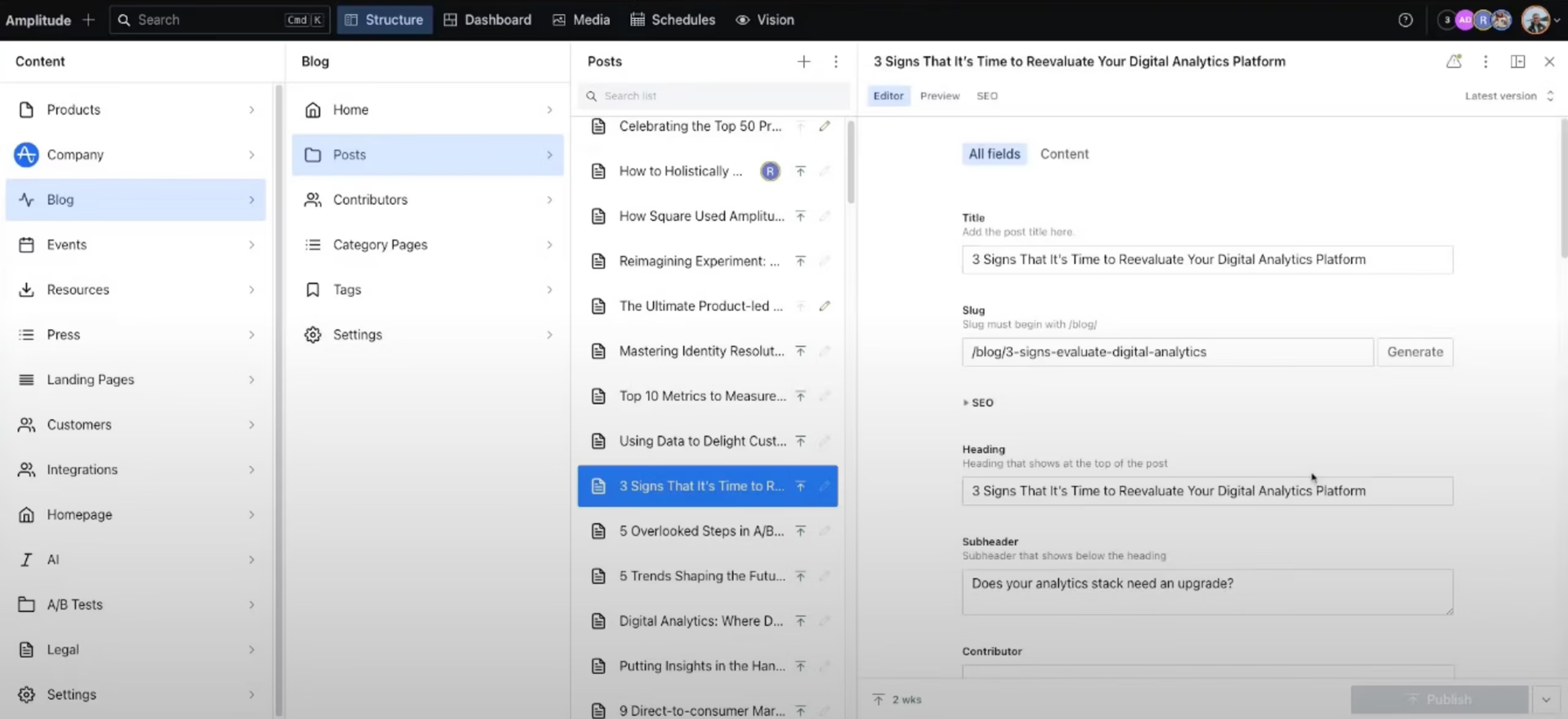
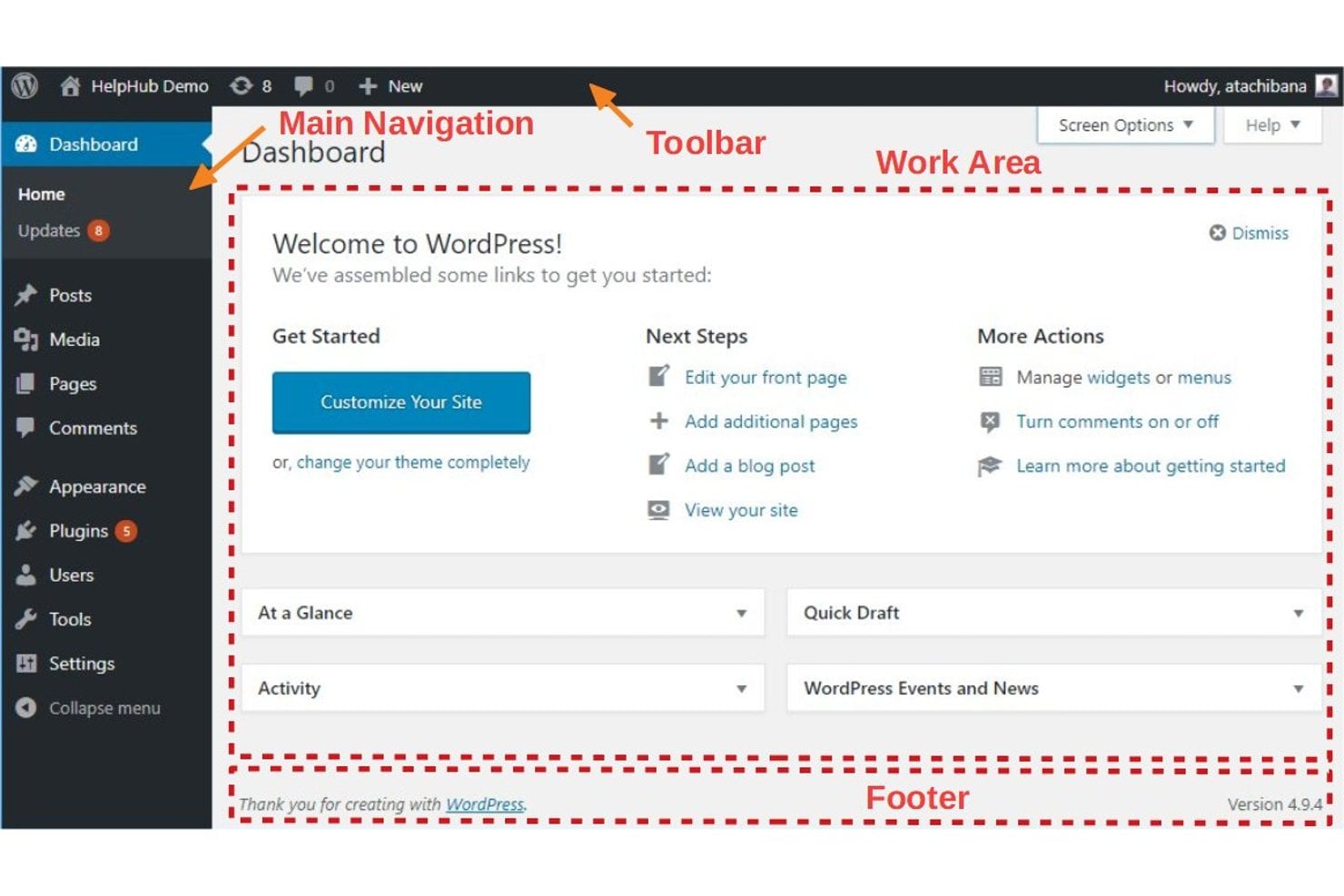
Here are a few visual examples of content management software interfaces to give you a sense of what these tools look like in practice:
Have an account? Log In
Sanity Studio
WordPress
Top Content Management Software to Consider
Here's my shortlist of the best content management software solutions:
Who Uses Content Management Software?
Here are the kinds of teams and organizations I see using content management software most often:
- Marketing teams: Manage website content, landing pages, and campaign assets without needing help from IT.
- Ecommerce businesses: Publish product listings, promotions, and seasonal content with control over site layout and messaging.
- Media and publishing companies: Coordinate editorial calendars, manage contributor permissions, and publish articles or multimedia at scale.
- Higher education institutions: Maintain department pages, faculty profiles, and event calendars across large, multi-site web environments.
- Nonprofit organizations: Share program updates, publish impact stories, and collect donations while keeping content current and on-brand.
Key Content Management Software Benefits & Potential Business Impacts
Content management software helps your business move faster, reduce errors, and protect brand consistency while lowering compliance risks and supporting revenue growth. These platforms can add up in cost and carry risks like implementation challenges, data migration hurdles, or limited flexibility if you outgrow the tool.
Use this overview to understand the key benefits and risks marketing managers should weigh before choosing content management software:
| Benefits | Risks |
|---|---|
| BenefitsFaster campaign launches | RisksImplementation delays |
| BenefitsMore control over website updates | RisksData migration challenges |
| BenefitsSupports brand consistency | RisksLimited customization in some platforms |
| BenefitsReduces manual errors and duplicate work | RisksIntegration gaps with existing tools |
| BenefitsEasier team collaboration and content reviews | RisksTraining and adoption resistance |
| BenefitsSimplifies version control and rollbacks | RisksRecurring platform costs |
| BenefitsImproves compliance and audit tracking | RisksVendor lock-in limiting future flexibility |
Content Management Software Case Studies
See how real teams transformed their work by switching to content management software—these case studies highlight what changed, what worked, and what they learned along the way. Each story shows the impact on speed, collaboration, and website control in practical terms.
Case Study: ADWEEK's Implementation of WordPress VIP
ADWEEK migrated to WordPress VIP in May 2024 after its legacy CMS failed during Super Bowl coverage, putting its reputation as a real-time source for 6+ million marketing professionals at risk.
The platform handled the migration without disrupting the editorial team, and load testing and optimization support from WordPress VIP prepared the site for the resource-heavy ad tracker pages that spike during peak events.
Here are the results of ADWEEK's implementation of content management software:
- 100% uptime: The site experienced zero downtime and zero internal server errors during the entire 2025 Super Bowl event.
- 202% increase in content output: Content creation volume increased by 202% year-over-year during the Super Bowl coverage window.
- 55% more visitors: Total site visitors grew 55% year-over-year, with pageviews up 82% and time spent on site up 24%.
- 548% growth in video views: Video views surged 548% year-over-year, driven in part by enhanced video performance on the platform.
- Editorial focus on content, not tech: The platform freed the editorial team to focus entirely on content production without technical disruptions during peak coverage.
Case Study: Elastic's Implementation of Contentstack
Elastic needed to overhaul its WordPress CMS and merge two domains within just three months, choosing Contentstack for its ease of use, scalability, and fast time to market.
The migration brought content management entirely in house, eliminating Elastic's dependency on a third-party web agency that had previously handled even simple content updates.
Here are the results of Elastic's implementation of content management software:
- 78% cost reduction: By removing the need for an external agency to manage content, Elastic reduced its overall content management costs by 78%.
- 87% drop in monthly server costs: Server costs fell from $7,000 per month under WordPress to just $890 per month with Contentstack.
- 500%+ faster development: The new platform enabled a development process more than five times faster than the previous WordPress setup.
- Updates in days, not weeks: Simple content changes that previously took weeks through the agency were completed in days after switching platforms.
- Three major redesigns in 18 months: With the publishing bottleneck removed, Elastic completed three major site redesigns within a year and a half.
- Zero onboarding hours required: The platform's intuitive interface allowed 100+ content managers to start publishing with no formal training needed.
Core Features & Capabilities of Content Management Software
Review these essential features you should expect from any content management software platform:
- Visual Content Editor: Lets your team update pages, posts, and assets using a drag-and-drop or What You See Is What You Get (WYSIWYG) interface, so you don’t need to know code.
- Content Scheduling and Publishing: Enables you to plan, schedule, and automate when content goes live, so campaigns and launches happen on your timeline.
- User Roles and Permissions: Lets you assign roles like editor, contributor, or admin to protect brand standards while enabling teamwork.
- Version Control: Tracks changes, allows content rollbacks, and maintains an audit trail so you can check past edits and restore earlier versions when needed.
- Asset Management: Centralizes images, videos, documents, and digital assets so your team can easily reuse, update, or replace content across the site.
- Multi-Channel Publishing: Supports publishing content to web, mobile, email, or other channels, so you can repurpose assets across the full marketing mix.
- Integration Capabilities: Connects the CMS with customer relationship management (CRM), analytics, marketing automation, or ecommerce platforms so data and workflows stay connected.
- SEO Management Tools: Provides built-in tools or plugins to manage metadata, sitemaps, and structured data, which helps you optimize search visibility without extra manual work.
More Articles
Content Management Software Use Cases: Typical Processes & Workflows
Content management software gives your team a single place to plan, create, review, publish, and update website content or digital assets.
You can launch new campaigns, manage editorial calendars, collaborate on content drafts, and handle site updates without waiting for IT. In my experience, this control cuts down on bottlenecks and keeps your brand and messaging current everywhere you operate.
Use this table to see the key marketing processes content management software can help with and how it supports each one:
| Process | Description | How Software Helps |
|---|---|---|
| ProcessCampaign Launch Planning | DescriptionDefine, organize, and schedule new marketing campaigns across web channels. | How Software HelpsLets you create a unified content calendar, schedule publishing dates, and set workflow deadlines. |
| ProcessContent Creation & Review | DescriptionWrite, edit, and collaborate on landing pages, blogs, and product updates. | How Software HelpsProvides a visual editor, draft workflows, and version tracking so teams can review and approve faster. |
| ProcessWebsite Updates & Maintenance | DescriptionKeep webpages, banners, and promoted offers current without IT support. | How Software HelpsEnables direct site edits, asset swaps, and quick go-lives using a drag-and-drop or WYSIWYG editor. |
| ProcessAsset Management | DescriptionStore, organize, and reuse marketing images, videos, and downloadable files. | How Software HelpsCentralizes digital assets with tagging, search, and sharing features to avoid duplication and confusion. |
| ProcessMulti-Channel Publishing | DescriptionAdapt and repurpose campaigns for web, email, or other digital channels. | How Software HelpsSupports publishing to multiple platforms from a single dashboard, keeping branding and messaging aligned. |
Types of Content Management Software & Similar Tools
Content management software covers a broad category, and several specialized tools overlap with it in ways that can make comparisons tricky:
| Type | Differentiator |
|---|---|
| TypeHeadless CMS | DifferentiatorDelivers content via API to any front end, decoupling content from presentation |
| TypeDigital Asset Management (DAM) | DifferentiatorFocuses on storing, organizing, and distributing media files rather than publishing web pages |
| TypeEnterprise Content Management (ECM) | DifferentiatorManages documents and records across their full lifecycle, with a strong emphasis on compliance and archiving |
| TypeDigital Experience Platform (DXP) | DifferentiatorExtends CMS functionality with built-in personalization, analytics, and cross-channel experience orchestration |
| TypeComponent Content Management System (CCMS) | DifferentiatorManages content at the reusable component level, commonly used for technical documentation and structured authoring |
Find the Right CMS for Your Team
If your team has outgrown a basic CMS and needs enterprise-grade control over content, workflows, and compliance, browsing the best enterprise content management systems available right now is a smart next step for narrowing down your options.