

An enterprise content management system (ECMS) is software that helps your business organize, store, and control access to digital documents and content at scale. If you’re searching for the best enterprise content management system, you’re likely facing challenges with scattered files, compliance requirements, or collaboration across teams and departments. Choosing the right ECM software can help you centralize information, automate workflows, and keep sensitive data secure. In this guide, you’ll find expert-vetted options for 2026, with clear details on what each system does best—so you can confidently match ECM solutions to your business needs.
Why Trust Our Software Recommendations
6,700+
Reviews
20
Industry experts
16+
Evaluation factors
14
Years
Our team has been testing and reviewing software since 2012. As marketing leaders ourselves, we know how difficult—and important—it is to choose the right software.
For this guide, we evaluated tools using hands-on testing and independent research, scoring tools using our selection criteria.
Our reviews reflect our human editorial judgment, not a sales pitch.
Expert reviewers:
 Gui DrusinaCreative Director
- Shriya GhateSenior Marketing Lead
 Amanda JacquesMarketing Ops Leader

Enterprise Content Management Systems Comparison Table
This comparison table summarizes pricing details for my top enterprise content management software selections:
| Tool | Best For | Trial Info | Price | ||
|---|---|---|---|---|---|
| 1 | Best for SAP-integrated records compliance | Free demo available | Pricing upon request | Website | |
| 2 | Best for process automation in organizations | Free demo available | From $73/user/month (billed annually) | Website | |
| 3 | Best for automated document workflows | Free demo available | Pricing upon request | Website | |
| 4 | Best for digital asset management integration | Free demo available | Pricing upon request | Website | |
| 5 | Best with advanced file sharing controls | 14-day free trial | From CAD$21/user/month (billed annually) | Website | |
| 6 | Best for team collaboration on documentation | Free plan + 7-day trial available | From $5.78/user/month | Website | |
| 7 | Best for metadata-driven document organization | Free demo available | From $65/user/month | Website | |
| 8 | Best for large-scale compliance management | Free demo available | Pricing upon request | Website | |
| 9 | Best for case management solutions | Free demo available | Pricing upon request | Website | |
| 10 | Best for structured content across channels | Free plan + free demo available | From $15/user/month | Website |


Enterprise Content Management System Reviews
Below are my detailed summaries of the enterprise content management systems that made it onto my shortlist. My reviews offer a detailed look at the features, best use cases, and integrations of each system to help you find the best one for your business.
 Best for SAP-integrated records compliance
- Free demo available
- Pricing upon request
Visit WebsiteCustomer Rating:4.8/5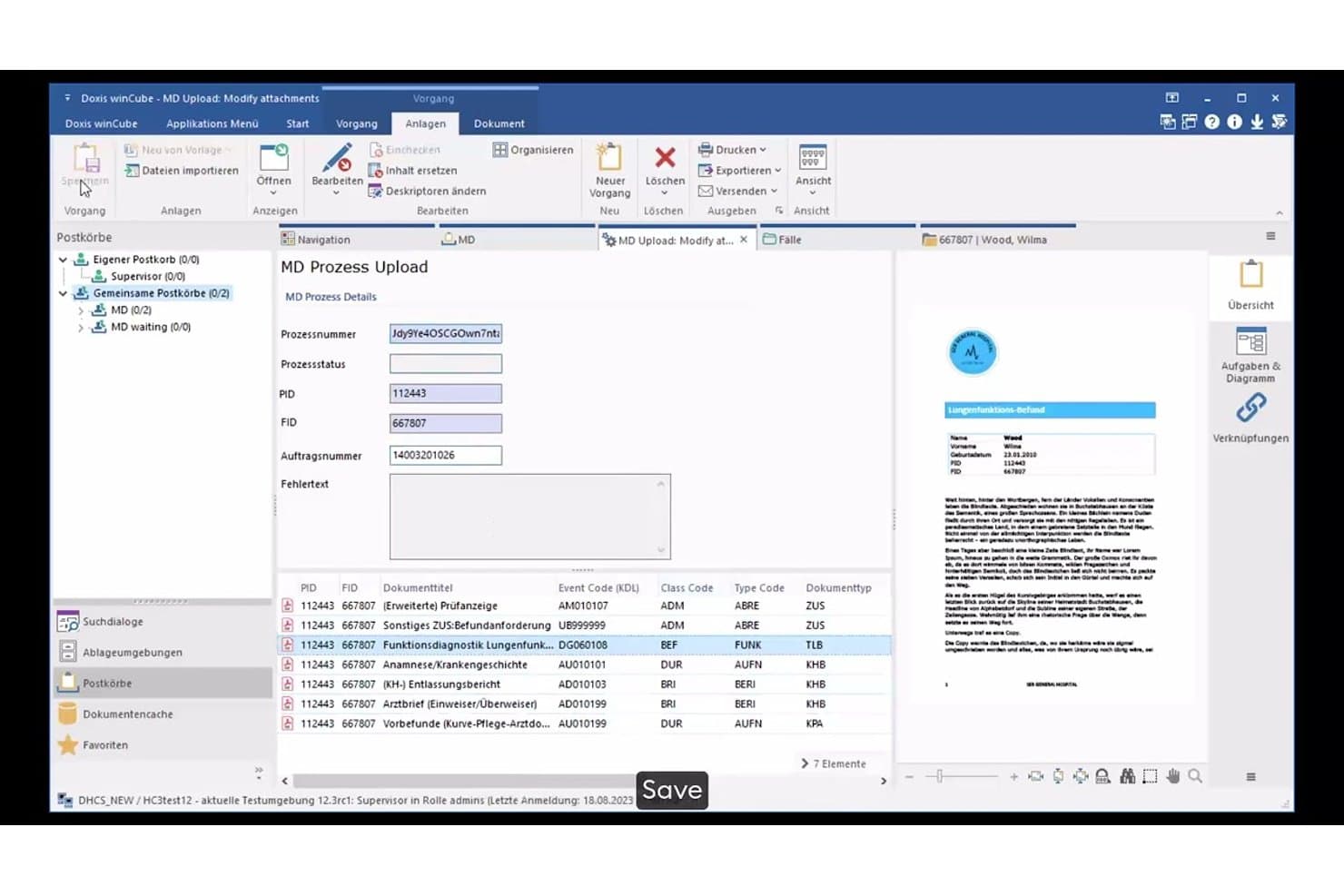
Doxis manages document uploads with metadata and process tracking. Doxis is an intelligent content automation platform that combines document management, workflow automation, intelligent document processing, records compliance, and archiving in a single repository.
Who Is Doxis Best For?
Doxis is a strong fit for large enterprises in compliance-heavy industries—banking, insurance, manufacturing, and the public sector—that run SAP and need tight records management alongside document-driven process automation.
Why I Picked Doxis
I picked Doxis as one of the best because its SAP integration goes well beyond a basic connector. It's SAP-certified, covers S/4HANA, Ariba, and SuccessFactors, and automates full purchase-to-pay and order-to-cash cycles with documents filed directly into compliance-ready eFiles. On top of that, I love how retention schedules, WORM locking, and legal holds are built into the same repository, so records compliance isn't a separate system you have to reconcile with your SAP data.
Doxis Key Features
- AI.dp intelligent document processing: Automatically classifies 50+ document types and extracts 150+ data fields using OCR, machine learning, and LLMs in seconds.
- BPMN 2.0 workflow engine: Models document-driven processes with rules-based routing, deputy handling, escalation paths, and event-triggered workflow starts.
- Doxis iRoom external sharing: Provides a secure portal for sharing documents with external stakeholders outside your organization.
- Migration consolidation service: Transfers metadata first so users keep working while content migrates in the background from sources like OpenText, IBM FileNet, and Alfresco.
Doxis Integrations
Doxis claims 200+ integrations, including SAP S/4HANA, Salesforce, Workday, ServiceNow, and Microsoft 365, SharePoint, Outlook, Teams, and Dynamics 365. REST, CMIS, webhooks, and database connections support custom integrations, with SAP-certified connectors for enterprise workflows.
Pros and Cons
Pros:
- Applies retention schedules, legal holds, and WORM controls
- Automates approvals with audit trails and deputy routing
- Scales from small archives to billions of documents
Cons:
- Some users report large-file and external-sharing problems
- Reviewers report inconsistent support and outage follow-up
Learn more about Doxis: Best for process automation in organizations
- Free demo available
- From $73/user/month (billed annually)
Visit WebsiteCustomer Rating:4.6/5
Laserfiche updates content while automating repetitive tasks. Laserfiche stands out for organizations that want to automate complex business processes alongside managing documents. It’s a strong fit for teams in government, education, and financial services that need to digitize workflows, enforce compliance, and reduce manual paperwork. With its process automation tools, Laserfiche helps you design, monitor, and optimize content-driven operations at scale.
Why I Picked Laserfiche
For organizations that need more than just document storage, Laserfiche offers process automation tools that set it apart in the enterprise content management system space. The platform lets you build custom workflows using a visual designer, so you can automate document routing, approvals, and notifications without coding. I appreciate how Laserfiche includes built-in analytics to help you monitor process performance and identify bottlenecks. These features make it a strong choice for teams looking to digitize and optimize their business processes alongside managing content.
Laserfiche Key Features
In addition to its process automation capabilities, Laserfiche offers several other features that support enterprise content management:
- Document Capture and Scanning: Import paper documents and digital files directly into the system for centralized management.
- Records Management: Apply retention schedules and automate compliance with regulatory requirements.
- Granular Permission Controls: Set detailed access rights for users, groups, and roles across repositories.
- Mobile App Access: View, upload, and manage documents from iOS and Android devices.
Laserfiche Integrations
Integrations include Microsoft Dynamics CRM, Salesforce, Laserfiche API, DocuSign, and Workday.
Pros and Cons
Pros:
- Highly scalable platform
- Strong user community
- Easy audit compliance
Cons:
- Initial setup takes time
- Add-ons get expensive
Learn more about Laserfiche: Best for automated document workflows
- Free demo available
- Pricing upon request
Visit WebsiteCustomer Rating:4.5/5
DocuWare digitizes business documents. DocuWare is a document management system that is designed for organizations that need to automate document-driven processes and reduce manual paperwork. It’s a strong fit for finance, HR, and operations teams that handle high volumes of forms, invoices, or approvals. DocuWare helps you digitize, route, and secure documents, so your workflows move faster and compliance is easier to manage.
Why I Picked DocuWare
Automating document workflows is a top priority for many enterprise content management system buyers, which is why DocuWare caught my attention. The platform’s workflow designer lets you build custom, rule-based automations for routing, reviewing, and approving documents. I like that DocuWare includes intelligent indexing, so documents are automatically categorized and searchable as soon as they’re uploaded. Its electronic forms feature also helps teams capture and process information digitally, reducing manual data entry and speeding up approvals.
DocuWare Key Features
Some other features in DocuWare that are valuable for enterprise content management include:
- Document Version Control: Track changes and maintain a full history of document edits and updates.
- Role-Based Access Control: Assign permissions to the right people based on user roles to protect sensitive information.
- Mobile App: Capture, access, and approve documents from smartphones or tablets.
- Audit Trail: Monitor all document activity with detailed logs for compliance and security.
DocuWare Integrations
Integrations include Microsoft Outlook, SAP, Oracle, Sage, QuickBooks, and OneDrive.
Pros and Cons
Pros:
- Built-in compliance
- Intuitive interface
- Strong security controls
Cons:
- High cost for small teams
- Mobile app is basic
Learn more about DocuWare: Best for digital asset management integration
- Free demo available
- Pricing upon request
Visit WebsiteCustomer Rating:4.5/5
Adobe Experience Manager streamlines the creation of digital content. If your team manages a high volume of digital assets across multiple channels, Adobe Experience Manager brings content and asset management together in one platform. It’s especially useful for marketing teams and creative departments that need to deliver consistent, on-brand experiences at scale. With Adobe Experience Manager, you can build a centralized repository of digital assets, automate content workflows, and connect creative tools directly to your content library.
Why I Picked Adobe Experience Manager
For organizations that need to tightly connect digital asset management with enterprise content workflows, Adobe Experience Manager stands out. The platform’s native digital asset management lets you store, organize, and reuse creative files directly within your content management environment. I like that you can automate asset tagging and versioning, which helps teams keep content up to date and on brand. Its integration with Adobe Creative Cloud also means designers and marketers can work with assets in real time, reducing bottlenecks between creative and publishing teams.
Adobe Experience Manager Key Features
Some other features in Adobe Experience Manager that are valuable for enterprise content management include:
- Headless Content Delivery: Deliver content to any channel or device using APIs.
- Personalization Engine: Tailor content experiences based on user profiles and behaviors.
- Multi-Site Management: Manage and localize content across multiple websites from a single interface.
- Content Fragment Authoring: Create and reuse structured content blocks for consistent messaging.
Adobe Experience Manager Integrations
Integrations include Adobe Creative Cloud, Adobe Target, Adobe Analytics, Salesforce, Marketo, and Sitecore.
Pros and Cons
Pros:
- Deep analytics tools
- Great marketing sync
- World-class DAM
Cons:
- Heavy resource drain
- Needs AEM developers
Learn more about Adobe Experience Manager: 5Best with advanced file sharing controls
Box
- 14-day free trial
- From CAD$21/user/month (billed annually)
Visit WebsiteCustomer Rating:4.3/5
Box stores files and data for businesses. Box is an enterprise content management solution that stands out for organizations that need strict control over file sharing and document access. It’s especially useful for legal, finance, and IT teams that manage sensitive content and require detailed permission settings. With Box, you can set granular sharing policies and monitor document activity to help meet compliance and security requirements.
Why I Picked Box
Advanced file sharing controls are a must for many enterprise content management system buyers, and Box delivers on this front. The platform lets you set detailed permissions at the file, folder, and user level, so you can control exactly who can view, edit, or share certain types of content. I appreciate that Box includes features like expiring links and watermarking, which help protect sensitive documents even after they’re shared. Its activity tracking also gives you a clear audit trail of who accessed or changed files, which is important for compliance-focused teams.
Box Key Features
Some other features in Box that are valuable for enterprise content management include:
- Document Collaboration Tools: Multiple users can comment, annotate, and edit documents in real time.
- Automated Workflow Management: Set up custom workflows to automate document review and approval processes.
- Full-Text Search: Search across all stored documents using keywords, phrases, or metadata.
- Mobile Access: Access, upload, and manage files securely from iOS and Android devices.
Box Integrations
Integrations includeSalesforce, Google Workspace, Microsoft Office 365, Slack, Adobe Sign, and ServiceNow.
Pros and Cons
Pros:
- Massive app integration
- Enterprise-grade security
- Superb external sharing
Cons:
- Basic workflow tools
- Gets pricey at scale
Learn more about Box: Best for team collaboration on documentation
- Free plan + 7-day trial available
- From $5.78/user/month
Visit WebsiteCustomer Rating:4.3/5
Confluence organizes team content efficiently. Confluence offers a centralized workspace for teams that need to collaborate on documentation, knowledge bases, and project materials. It’s especially useful for organizations with distributed teams or those managing complex projects that require clear, accessible documentation. Confluence helps you organize, share, and update content in real time, making it easier to keep everyone aligned and informed.
Why I Picked Confluence
When I look for a solution that supports team collaboration on documentation, Confluence stands out for its structured approach to content creation and sharing. The platform’s page hierarchy and space organization features make it easy for large teams to manage and locate documentation across departments or projects. I appreciate how Confluence supports real-time editing and commenting, which helps teams work together on documents without confusion or version conflicts. Its built-in templates also help standardize documentation, so your organization can maintain consistency as content grows.
Confluence Key Features
Some other features in Confluence that are valuable for enterprise content management include:
- Advanced Search: Quickly locate pages, attachments, or keywords across all spaces using powerful search filters.
- Permissions Management: Control access to spaces and pages with detailed user and group permissions.
- Page Analytics: Track page views and engagement metrics to monitor content usage and relevance.
- Macros Library: Enhance pages with dynamic content like task lists, calendars, and embedded media using built-in macros.
Confluence Integrations
Integrations include Jira, Slack, Trello, Google Drive, and Microsoft Teams.
Pros and Cons
Pros:
- Excellent text search
- Strong version control
- Very user-friendly
Cons:
- Lacks advanced workflows
- Formatting can break
Learn more about Confluence: Best for metadata-driven document organization
- Free demo available
- From $65/user/month
Visit WebsiteCustomer Rating:4.4/5
M-Files compiles files and metadata for streamlined access. M-Files takes a unique approach to enterprise content management by organizing documents based on metadata rather than traditional folder structures. This system is especially useful for organizations with complex information management needs, such as legal, engineering, or professional services firms. If your team struggles to find, classify, or control documents across multiple repositories, M-Files offers a way to make content instantly searchable and context-aware.
Why I Picked M-Files
Unlike traditional enterprise content management systems that rely on folders, M-Files organizes documents using metadata, which makes it much easier to locate and manage information across your organization. This metadata-driven approach means you can search for documents by project, client, document type, or any custom tag you define. I appreciate how M-Files automatically applies metadata and version control, reducing manual work and the risk of misfiling. For teams that need to manage large volumes of documents with complex relationships, this system offers a more dynamic and scalable way to keep content organized and accessible.
M-Files Key Features
Some other features that make M-Files valuable for enterprise content management include:
- Automated Workflow Engine: Design and manage document approval and review processes with customizable workflows.
- Offline Access: Work with documents and metadata even when you’re not connected to the internet.
- Audit Trail: Track every action taken on a document for compliance and security purposes.
- Microsoft 365 Integration: Access, edit, and manage documents directly from familiar Microsoft 365 applications.
M-files Integrations
Integrations include Microsoft SharePoint, Salesforce, Google Drive, HubSpot, Microsoft Network Folders, and Autodesk.
Pros and Cons
Pros:
- Integrates with Windows
- Good offline access
- Strong version control
Cons:
- Setup is labor-intensive
- Slows on huge queries
Learn more about M-Files: Best for large-scale compliance management
- Free demo available
- Pricing upon request
Visit WebsiteCustomer Rating:4.2/5
OpenText automates document workflows to improve business efficiency. OpenText is designed for enterprises that need to manage complex compliance requirements across large volumes of content. It’s a strong fit for regulated industries like healthcare, energy, and financial services, where strict governance and audit trails are essential. With OpenText, you can centralize records, automate retention policies, and support detailed regulatory reporting.
Why I Picked OpenText
When large-scale compliance management is a top priority, OpenText offers capabilities that are hard to match. The platform supports advanced records management, letting you automate retention schedules and enforce legal holds across millions of documents. I appreciate that OpenText includes detailed audit trails and reporting tools, which help organizations demonstrate compliance with industry regulations. Its policy-driven content classification also makes it easier to manage sensitive information according to strict governance standards.
OpenText Key Features
Some other features in OpenText that are valuable for enterprise content management include:
- Document Capture and Imaging: Digitize paper documents and automatically extract metadata for easier indexing.
- Collaboration Workspaces: Create secure, project-based spaces for teams to share and manage content.
- Advanced Search and Discovery: Use metadata, full-text, and faceted search to quickly locate documents.
- Mobile Content Management: Access, review, and approve documents securely from mobile devices.
OpenText Integrations
Integrations include SAP, Oracle, Salesforce, Salesforce, and Microsoft SharePoint.
Pros and Cons
Pros:
- Advanced AI capabilities
- Deep SAP integrations
- Robust security features
Cons:
- Needs heavy IT support
- Lengthy implementation
Learn more about OpenText: Best for case management solutions
- Free demo available
- Pricing upon request
Visit WebsiteCustomer Rating:4.4/5
Hyland OnBase catalogs enterprise files for easier retrieval. When your organization needs to manage complex, document-heavy processes, Hyland OnBase offers a unified ECM platform built for case management. It’s a strong fit for industries like government, healthcare, and financial services that require secure, auditable workflows and detailed records tracking. OnBase helps teams centralize documents, automate case routing, and maintain compliance across every stage of a case lifecycle.
Why I Picked Hyland OnBase
What sets Hyland OnBase apart for enterprise content management is its focus on case management solutions. The platform lets you build custom case workflows, so you can automate document routing, approvals, and escalations based on your organization’s rules. I appreciate how OnBase links related documents, emails, and notes to each case, giving teams a complete view of every process. Its audit trails and granular permissions also help organizations meet strict compliance and security requirements, which is essential for regulated industries.
Hyland OnBase Key Features
Some other features in Hyland OnBase that are valuable for enterprise content management include:
- Document Capture and Imaging: Convert paper documents into digital files for secure storage and retrieval.
- Records Management: Apply retention policies and automate document lifecycle management.
- Integration with Core Business Systems: Connect OnBase with ERP, CRM, and other enterprise platforms.
- Mobile Access: View and manage content from smartphones and tablets using dedicated mobile apps.
Hyland Onbase Integrations
Integrations include Epic, Cerner, Microsoft Outlook, SAP, and Lawson.
Pros and Cons
Pros:
- Robust custom workflows
- Strong healthcare focus
- Flexible module licensing
Cons:
- Upgrades take too long
- Expensive add-on modules
Learn more about Hyland OnBase: 10Best for structured content across channels
Sanity
- Free plan + free demo available
- From $15/user/month

Sanity synchronizes multi-channel content. Sanity is a content management platform designed for teams that need to manage structured content across multiple digital channels. It’s a strong fit for organizations with complex content models, such as media companies, ecommerce brands, or enterprises with omnichannel publishing needs. Sanity helps you centralize, structure, and deliver content consistently, even as your channels and requirements evolve.
Why I Picked Sanity
Sanity stands out for its ability to handle structured content across a wide range of digital channels, which is a core challenge for many enterprise content management system users. I picked Sanity because its content modeling tools let you define custom schemas and formats, so your team can manage everything from product data to editorial content in a single platform. The real-time collaboration features help distributed teams work together on content updates without versioning headaches. Sanity’s API-first approach also makes it easy to deliver content to websites, apps, and other endpoints, keeping everything consistent as your channels grow.
Sanity Key Features
Some other features in Sanity that are useful for enterprise content management include:
- Content Versioning: Track changes and revert to previous versions of any content item as needed.
- Role-Based Access Control: Assign granular permissions to users and teams to manage who can view or edit specific content.
- Custom Workflows: Set up approval processes and publishing workflows tailored to your organization’s needs.
- Asset Management: Organize, store, and retrieve images, videos, and other media files within the same platform.
Sanity Integrations
Integrations include Mux, Vercel, Netlify, Algolia, and Shopify.
Pros and Cons
Pros:
- Structured content focus
- Highly customizable
- Real-time collaboration
Cons:
- Confusing for non-techs
- Setup can be complex
Learn more about Sanity:
Other Enterprise Content Management System
Here are some additional enterprise content management system options that didn’t make it onto my shortlist, but are still worth checking out:
- 11IBM FileNet Content ManagerBest with AI-powered content classification
- 12DokmeeBest for multi-language content support
- 13WrikeBest for project-based document collaboration
- 14dotCMSBest with hybrid headless architecture
- 15ContentfulBest for API-first content delivery
- 16Square 9Best with intelligent data capture tools
- 17StoryblokBest for visual content editing workflows
- 18Builder.ioBest for no-code content customization
How I Evaluate Enterprise Content Management Systems
When a global marketing team needs one place to govern, version, and distribute campaign content, I split evaluation into baseline requirements and the differentiators that separate good from great.
Core Functionality (Table Stakes For This List)
When I'm selecting tools for my list, I rank each one on a scale from 0 (does not offer the functionality) to 5 (excels in this area) for each core functionality listed below. Then, I calculate the tool's total score into a percentage. Each tool needs to achieve a minimum total score of 65% to be considered for inclusion.
- Centralized Content Repository: I evaluate whether the platform can store and organize high volumes of diverse assets—PDFs, videos, images, HTML—at enterprise scale without performance issues.
- Metadata & Taxonomy Management: Custom tagging, hierarchical taxonomies, and faceted search matter here, especially when marketing teams manage thousands of campaign assets across regions.
- Workflow & Lifecycle Automation: I look for configurable review, approval, and versioning workflows that mirror real marketing processes like multi-stakeholder campaign sign-offs and scheduled content archival.
- Access Control & Permissions: Granular role-based permissions, SSO/SAML support, and audit trails are what I check, since marketing teams often share assets with agencies and external partners.
- Omnichannel Content Delivery: The platform should publish or deliver content to websites, apps, and marketing channels via APIs or native connectors rather than manual export alone.
- Integrations & Extensibility: I check for native connections to tools marketing teams already use—CRM, marketing automation, creative suites—plus open APIs for custom martech stacks.
Once I have a list of tools that meet this criteria, I consider what sets each platform apart.
Differentiating Factors (What Sets Vendors Apart)
Here's how I compare and contrast different vendors:
Standout Features
AI-powered tagging and search save hours when marketing teams manage thousands of campaign assets, so I evaluate how well each platform handles auto-classification and semantic discovery. Brand governance tools matter just as much—template locking and brand portals let distributed teams stay on-brand without bottlenecking through a central creative group. I also look at content performance analytics, especially dashboards that show which assets drive engagement across channels so marketers can invest in what's actually working.
Beyond Features
Compliance certifications like SOC 2 and ISO 27001 matter when your marketing team handles regulated content or manages asset licensing with expiration tracking. I also evaluate implementation and time-to-value—some vendors offer pre-configured marketing templates and migration support that get teams productive in weeks, while others require heavy IT involvement. Pricing transparency is another factor I check, particularly how storage overages and per-user costs scale as marketing teams grow and content libraries expand.
How to Choose an Enterprise Content Management System
It’s easy to get bogged down in long feature lists and complex pricing structures. To help you stay focused as you work through your unique software selection process, here’s a checklist of factors to keep in mind:
| Factor | What to Consider |
|---|---|
| FactorScalability | What to ConsiderWill the system handle your document volume as your business grows? Ask about storage limits, user caps, and upgrade paths. |
| FactorIntegrations | What to ConsiderDoes the platform connect natively with your existing tools (CRM, ERP, email, file storage)? Check for direct integrations, not just API access. |
| FactorCustomizability | What to ConsiderCan you tailor workflows, metadata, and permissions to your team’s needs? Consider if you’ll need to adapt the system for different departments. |
| FactorEase of use | What to ConsiderWill your team adopt the system quickly? Look for intuitive navigation, clear labeling, and minimal training requirements. Test with a demo if possible. |
| FactorImplementation and onboarding | What to ConsiderHow long will it take to get up and running? Ask about migration support, onboarding resources, and whether you’ll need IT involvement. |
| FactorCost | What to ConsiderWhat’s included in the pricing? Watch for extra charges for storage, users, or advanced modules. Compare total cost of ownership over 1-3 years. |
| FactorSecurity safeguards | What to ConsiderDoes the system meet your data protection standards? Look for encryption, access controls, audit logs, and compliance certifications relevant to your industry. |
| FactorCompliance requirements | What to ConsiderWill the system help you meet regulatory obligations (GDPR, HIPAA, SOX)? Check for built-in compliance features and audit support. |
What Is an Enterprise Content Management System?
An enterprise content management system is a software platform that helps organizations store, organize, manage, and secure large volumes of digital documents and content. These systems support document versioning, access controls, workflow automation, and compliance with regulatory requirements. Enterprise content management systems are designed to centralize information, making it easier for teams to collaborate, retrieve files, and maintain control over sensitive business content across departments.
Features
When selecting enterprise content management system, keep an eye out for the following key features:
- Document storage: Centralizes digital files in a secure, searchable repository, making it easy to organize and retrieve documents as needed.
- Version control: Tracks changes to documents over time, allowing users to view, restore, or compare previous versions and maintain a clear audit trail.
- Access permissions: Lets administrators set user roles and control who can view, edit, or delete specific documents, supporting data security and compliance.
- Workflow automation: Automates document routing, approvals, and notifications, helping teams manage processes like contract reviews or invoice approvals efficiently.
- Metadata management: Allows users to tag documents with custom fields and categories, improving searchability and supporting advanced filtering.
- Audit trails: Records all user actions and document changes, providing transparency and supporting regulatory compliance and internal audits.
- Document retention policies: Enables organizations to set rules for archiving or deleting documents based on legal or business requirements.
- Electronic signature support: Facilitates the collection and management of legally binding digital signatures directly within the system.
- Integration capabilities: Connects with other business tools such as email, CRM, or file storage platforms to streamline workflows and reduce manual work.
Benefits
Implementing an enterprise content management system provides several benefits for your team and your business. Here are a few you can look forward to:
- Centralized information access: Teams can quickly find and retrieve documents from a single, organized repository, reducing time spent searching for files.
- Improved security and compliance: Access controls, audit trails, and retention policies help protect sensitive data and support regulatory requirements.
- Streamlined workflows: Automated routing and approval processes reduce manual tasks and keep projects moving efficiently across departments.
- Enhanced collaboration: Version control and permission settings enable multiple users to work on documents without confusion or data loss.
- Reduced risk of data loss: Document storage and backup features safeguard business-critical information against accidental deletion or hardware failure.
- Faster onboarding and training: Intuitive interfaces and onboarding resources help new users become productive with minimal ramp-up time.
- Scalability for growth: The system can handle increasing document volumes and user counts as your organization expands.
Costs & Pricing
Selecting an enterprise content management system requires an understanding of the various pricing models and plans available. Costs vary based on features, team size, add-ons, and more. The table below summarizes common plans, their average prices, and typical features included in enterprise content management system solutions:
Plan Comparison Table for Enterprise Content Management System
| Plan Type | Average Price | Common Features |
|---|---|---|
| Plan TypeFree Plan | Average Price$0 | Common FeaturesBasic document storage, limited users, simple search, and basic access controls. |
| Plan TypePersonal Plan | Average Price$5–$40/user/month | Common FeaturesIndividual document management, version control, basic workflow automation, and limited integrations. |
| Plan TypeBusiness Plan | Average Price$15–$100/user/month | Common FeaturesTeam collaboration, advanced permissions, workflow automation, audit trails, and integration options. |
| Plan TypeEnterprise Plan | Average Price$1500+/month | Common FeaturesCustom workflows, compliance tools, advanced security, API access, dedicated support, and scalability. |
Enterprise Content Management System FAQs
Here are some answers to common questions about enterprise content management system:
How does an enterprise content management system differ from basic document storage?
An enterprise content management system goes beyond simple file storage by offering version control, workflow automation, access permissions, and compliance tools. These features help organizations manage, track, and secure documents at scale, supporting collaboration and regulatory requirements.
Can enterprise content management systems integrate with existing business tools?
Yes, most enterprise content management systems offer integrations with tools like CRM, ERP, email, and file storage platforms. This allows teams to connect document workflows with other business processes and reduce manual data entry or duplication.
What security measures should I look for in an enterprise content management system?
Look for encryption, granular access controls, audit trails, and compliance certifications such as ISO 27001 or SOC 2. These safeguards help protect sensitive information and support your organization’s data protection policies.
How long does it take to implement an enterprise content management system?
Implementation timelines vary based on system complexity and data migration needs. Small teams may be up and running in a few days, while large organizations with complex workflows and legacy data may need several weeks or months.
Do enterprise content management systems support regulatory compliance?
Yes, many systems include features for document retention, audit logging, and access controls to help organizations meet requirements like GDPR, HIPAA, or SOX. Always confirm that the system aligns with your specific industry regulations.