

If you're looking for the best WordPress alternatives for your team, you're in the right place. These platforms offer faster performance, simpler workflows, and more reliable scalability for teams frustrated by clunky plugin stacks, rigid templates, or developer bottlenecks. If you're struggling with limited design flexibility, ongoing security patches, or managing multi-site content across regions or brands, switching platforms can unlock major efficiencies.
I’ve spent over 1,200 hours testing CMS tools and advising on content infrastructure over the past 10 years. In this guide, I’ll share the top alternatives I recommend based on hands-on experience so you can pick a platform that actually fits how your team works and grows.
What Is WordPress?
WordPress is a content management software used for building and maintaining websites. It's popular among bloggers, small business owners, and developers due to its flexibility and wide range of plugins. Custom themes, extensive plugin options, and user-friendly interface help you create and manage your website effectively. Overall, WordPress provides a versatile platform for creating anything from personal blogs to complex business sites.
Why Trust Our Software Recommendations
6,700+
Reviews
20
Industry experts
16+
Evaluation factors
14
Years
Our team has been testing and reviewing software since 2012. As marketing leaders ourselves, we know how difficult—and important—it is to choose the right software.
For this guide, we evaluated tools using hands-on testing and independent research, scoring tools using our selection criteria.
Our reviews reflect our human editorial judgment, not a sales pitch.
Expert reviewers:
 Gui DrusinaCreative Director
- Shriya GhateSenior Marketing Lead
 Amanda JacquesMarketing Ops Leader

WordPress Alternatives Comparison Table
This comparison table summarizes pricing details for my top WordPress alternative selections:
| Tool | Best For | Trial Info | Price | ||
|---|---|---|---|---|---|
| 1 | Best for collaborative interface design | Free plan available | From $16/user/month | Website | |
| 2 | Best for agency-focused features | 14-day free trial + free demo available | From $25/month | Website | |
| 3 | Best for enterprise ecommerce growth | 15-day free trial + free demo available | From $29/month (billed annually) | Website | |
| 4 | Best for digital content management | Free plan available | From $300/month | Website | |
| 5 | Best for multi-channel content delivery | Free plan available | From $699/month | Website | |
| 6 | Best for scalable ecommerce websites | 3-day free trial | From $29/month (billed annually) | Website | |
| 7 | Best for design-focused sites | 14-day free trial | From $19/month (billed annually) | Website | |
| 8 | Best for visual design capabilities | Free plan available | From $15/month (billed annually) | Website | |
| 9 | Best for user-friendly site building | Free plan available | From $17/month (billed annually) | Website | |
| 10 | Best for open-source headless CMS | Free plan available | From $45/month | Website |


Best WordPress Alternatives Reviews
Below are my detailed summaries of the best WordPress alternatives that made it onto my shortlist. My reviews offer a detailed look at the key features, pros & cons, integrations, and ideal use cases of each tool to help you find the best one for you.
 Best for collaborative interface design
- Free plan available
- From $16/user/month
Visit WebsiteCustomer Rating:4.7/5
Figma helps teams design, collaborate, and build websites in real time. Figma is a browser-based design platform built for teams who need real-time collaboration on interface and website projects. It appeals to designers and product teams looking to modernize their workflow and move beyond traditional CMS limitations when building visually-driven sites.
Who Is Figma Best For?
Designers and product teams who need real-time collaboration on web and interface projects.
Why Figma Is a Good WordPress Alternative
I picked Figma because its real-time multiplayer editing means my whole team works in the same file simultaneously—no version conflicts, no emailing design files back and forth. I rely on Figma's component libraries to build reusable UI elements that stay consistent across pages, which is something WordPress themes can't replicate without significant custom development. The interactive prototyping tools let my team simulate full user flows and present clickable mockups to stakeholders before a single line of code is written. For design-led teams who want visual control without CMS constraints, that workflow is hard to beat.
Figma Key Features
- Dev mode: Lets developers inspect designs, copy CSS, and export assets directly from Figma files.
- FigJam whiteboard: A built-in online whiteboard for brainstorming, diagramming, and team workshops.
- Auto layout: Automatically adjusts frames and components as content changes, keeping designs responsive.
- Version history: Tracks every saved state of a file so you can review or restore previous design versions.
Figma Integrations
Figma offers native integrations with Slack, Jira, Microsoft Teams, Zeplin, and Dropbox. It also provides an API for custom integrations.
Pros and Cons
Pros:
- Interactive prototyping built into the design workflow
- Browser-based platform without software installation
- Real-time design collaboration for multiple users
Cons:
- Requires design skills for effective use
- No built-in hosting or page publishing
Learn more about Figma: 2Best for agency-focused features
Duda
- 14-day free trial + free demo available
- From $25/month
Visit WebsiteCustomer Rating:4.6/5
Duda powers agencies with client portals, team tools, and responsive design. Duda is a website builder tailored for web design agencies and freelancers, providing tools for creating responsive websites quickly and efficiently. It offers features like client management and team collaboration to streamline the design process.
Why Duda is a good WordPress alternative: Duda provides agency-focused features that make it ideal for teams managing multiple client projects. Its team collaboration tools enable you to work with others in real-time, improving efficiency. Unlike WordPress, Duda offers client management features that let you create personalized client portals. The platform's responsive design tools ensure your sites look great on any device, saving you time on mobile optimization.
Standout features & integrations:
Features include a white-label option to rebrand the platform under your own name, a built-in e-commerce solution for selling products online, and site personalization tools to create tailored user experiences. The platform also provides analytics to monitor performance. These features make it easy to customize, sell, and track your site’s growth.
Integrations include Google Analytics, PayPal, Stripe, YouTube, Vimeo, OpenTable, Facebook, Instagram, Twitter, and Disqus.
Pros and Cons
Pros:
- White-label option available
- Client management features
- Ideal for agencies
Cons:
- Basic SEO features
- Higher learning curve for beginners
Learn more about Duda: Best for enterprise ecommerce growth
- 15-day free trial + free demo available
- From $29/month (billed annually)
Visit WebsiteCustomer Rating:4.3/5
BigCommerce helps brands run scalable online stores with advanced commerce tools. BigCommerce delivers a robust ecommerce platform for companies needing more flexibility than traditional content-focused site builders like WordPress. It’s a go-to choice for brands ready to expand online stores with advanced commerce features and scalability.
Who Is BigCommerce Best For?
Mid-sized and large retailers who need advanced ecommerce capabilities beyond basic site management.
Why BigCommerce Is a Good WordPress Alternative
I picked BigCommerce because its open SaaS model gives my team full backend flexibility without the plugin maintenance and security patching that WordPress demands. The headless commerce capability lets us build and manage our storefront frontend independently, connecting it via API to BigCommerce's commerce engine. I also rely on the built-in multi-storefront management, which lets us run multiple branded stores from one account—something that requires significant plugin stacking in WordPress. For ecommerce-first teams, that native infrastructure makes a real difference.
BigCommerce Key Features
- Makeswift visual page builder: Drag-and-drop editor for building and editing site pages without writing code.
- Faceted search: Elasticsearch-powered search with custom field support for filtering large product catalogs.
- Customer groups: Segment shoppers for custom pricing, product access, and promotions from one account.
- Reporting and analytics: Real-time dashboard tracking orders, customer data, and marketing performance metrics.
BigCommerce Integrations
BigCommerce offers native integrations with QuickBooks Online, Mailchimp, ShipStation, and more. An API is available for custom integrations.
Pros and Cons
Pros:
- Native support for large product catalogs
- Built-in PCI compliance for ecommerce security
- Multi-storefront management from one dashboard
Cons:
- Requires developer skills for advanced customization
- Fewer content management features than WordPress
Learn more about BigCommerce:

Contentful helps teams manage and deliver content across channels. Contentful is a headless CMS built for digital teams who want to deliver content across multiple channels from a single hub. I think it’s a great pick if you want granular editorial controls and need to distribute structured content far beyond traditional websites.
Who Is Contentful Best For?
Contentful fits marketing and product teams at enterprise or fast-growing digital businesses needing centralized, multi-channel content delivery.
Why Contentful Is a Good WordPress Alternative
I picked Contentful because its API-first architecture lets my team publish content once and deliver it anywhere—a website, a mobile app, a digital kiosk—without rebuilding page structures for each channel. The content modeling feature is what makes this practical. I can define custom content types with specific fields, then have developers pull exactly that structure through the API however the frontend needs it. That separation of content from presentation means my team isn't locked into templates or themes, which is the core limitation WordPress introduces.
Contentful Key Features
- Live preview: See content changes rendered in your actual frontend environment in real time, before publishing.
- Timeline scheduling: Plan, preview, and schedule content publishing across your team from a single editorial calendar view.
- Taxonomy and tagging: Organize and filter content at scale using flexible metadata, tags, and structured taxonomy.
- Role-based access controls: Assign custom user roles and permissions to govern who can edit, approve, or publish content.
Contentful Integrations
Contentful offers native integrations with AB Tasty, Amplitude, Alolia, BigCommerce, Bitbucket, Braze, and more. It also connects with Zapier and provides an API for custom integrations.
Pros and Cons
Pros:
- Works well with modern frontend frameworks
- Omnichannel publishing from a single content hub
- Granular control over structured content models
Cons:
- Requires developer support for initial setup
- No built-in visual page editor
Learn more about Contentful: Best for multi-channel content delivery
- Free plan available
- From $699/month
Visit WebsiteCustomer Rating:4.4/5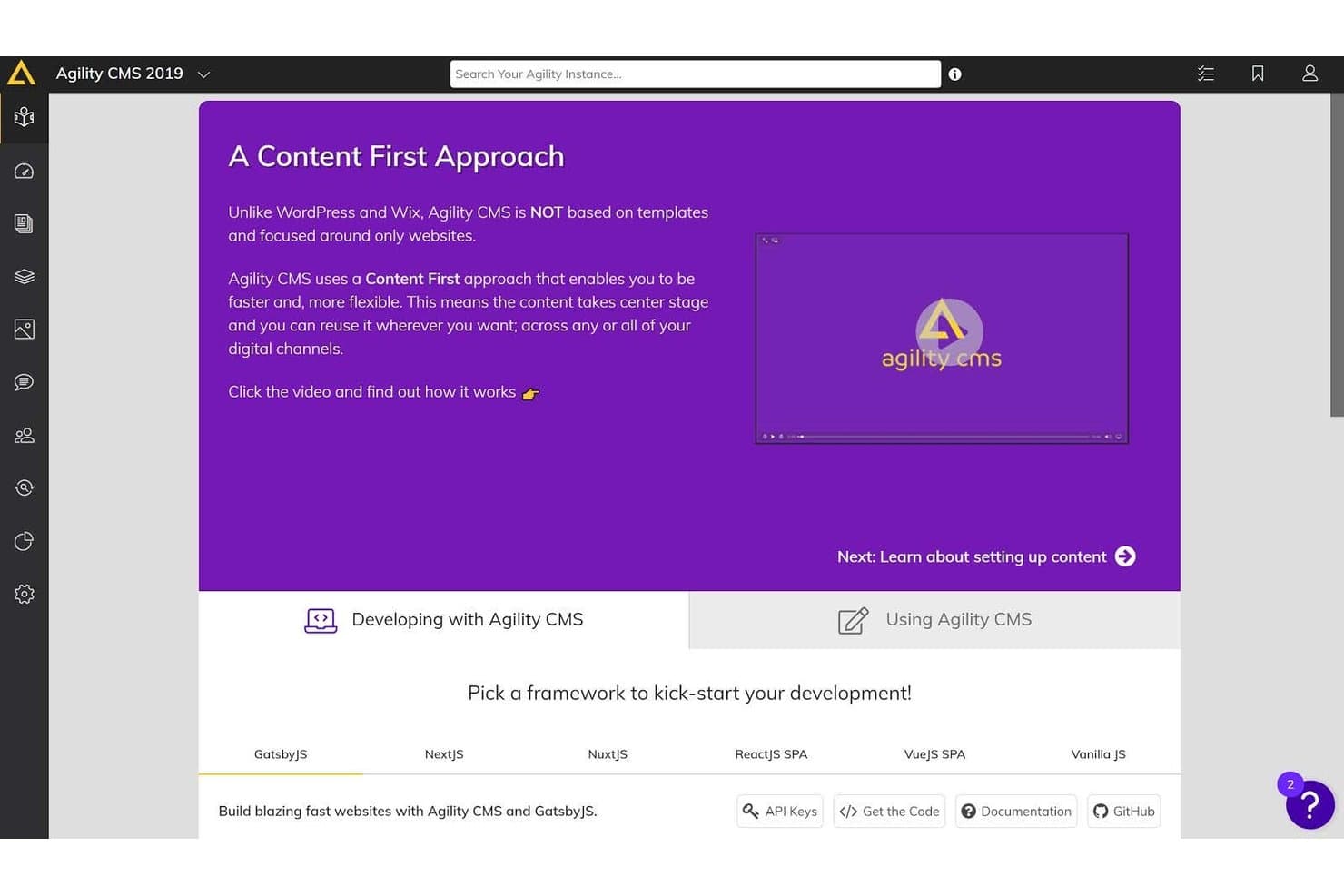
Agility CMS offers a Content First approach dashboard with framework options like GatsbyJS, NextJS, and NuxtJS to kick-start development. Agility CMS is a hybrid headless CMS built for enterprise and mid-market teams that need to manage structured content once and publish it across websites, mobile apps, and digital channels without rebuilding or duplicating work.
Who Is Agility CMS Best For?
Agility CMS suits mid-market and enterprise marketing teams that need developer-friendly architecture alongside marketer-accessible content tools.
Why Agility CMS Is a Good Best WordPress Alternatives Reviewed
I picked Agility CMS as one of the best because its hybrid headless architecture lets you store content once and deliver it simultaneously to websites, mobile apps, and digital signage via REST and GraphQL APIs. In practice, my team can update a campaign asset in one content model and watch it propagate across every channel instantly. Agility's built-in Fastly CDN and multi-region datacenters across the USA, Canada, Europe, and Australia handle the delivery side without any additional configuration.
Agility CMS Key Features
- Content versioning and rollback: Restore previous versions or undo changes with built-in content version history.
- Approval workflows: Route content through custom review and approval steps before publishing.
- Multilingual and localized publishing: Manage and release content in multiple languages, tailored for regional audiences.
- 24/7 critical support: Access live expert help any time through chat, email, or Slack channels.
Agility CMS Integrations
Agility CMS offers native integrations with HubSpot CRM, Salesforce, Algolia, BigCommerce, Shopify, Cloudinary, Bynder, Google Analytics 360, Formstack Forms, and Vercel, and connects with Zapier. An API is available for custom integrations.
Pros and Cons
Pros:
- Supports multilingual and localized publishing
- Robust content versioning and approval workflows
- Built-in multi-site management for enterprises
Cons:
- No marketplace for plug-and-play themes
- Lacks native A/B testing functionality
Learn more about Agility CMS: Best for scalable ecommerce websites
- 3-day free trial
- From $29/month (billed annually)
Visit WebsiteCustomer Rating:4.5/5
Shopify helps users launch stores, sell online, and manage payments. Shopify gives retailers, creators, and entrepreneurs a no-fuss way to launch and manage online stores without coding. If you want built-in ecommerce tools and payment integrations instead of WordPress plugins, Shopify puts everything in one place for selling online.
Who Is Shopify Best For?
Shopify suits online retailers and small businesses that want to quickly set up and run an ecommerce store without technical overhead.
Why Shopify Is a Good WordPress Alternative
I picked Shopify because it bundles everything an ecommerce store needs into a single platform—no plugin juggling required. I especially appreciate the built-in checkout, payment processing, and inventory management, which means I'm not patching together third-party tools the way I would with WordPress. When I set up a product page, I can manage shipping, taxes, and discounts right from the same dashboard. For teams focused on selling online, that kind of out-of-the-box ecommerce functionality is hard to match.
Shopify Key Features
- Drag-and-drop store editor: Build and rearrange pages, sections, and navigation without writing any code.
- Built-in blogging: Publish and manage blog content directly within your Shopify admin.
- Integrated SEO controls: Automatically generate title tags, meta descriptions, and sitemaps for your storefront.
- AI-powered content generation: Use Sidekick to write product descriptions, headlines, and customer communications from within the platform.
Shopify Integrations
Shopify offers hundreds of native integrations through its built-in app store, including PayPal, Stripe, Facebook, Instagram, Google Analytics, QuickBooks Online, Mailchimp, Xero, and Amazon. An API is available for custom integrations.
Pros and Cons
Pros:
- Built-in tools for inventory and order management
- Reliable ecommerce checkout with multiple payment gateways
- Fully hosted with managed security and backups
Cons:
- Theme design customization restricted by platform structure
- Limited control over underlying code and server
Learn more about Shopify: Best for design-focused sites
- 14-day free trial
- From $19/month (billed annually)
Visit WebsiteCustomer Rating:4.6/5
Squarespace offers stylish templates, e-commerce, and built-in marketing tools. Squarespace is a website builder designed for small businesses and entrepreneurs, offering tools for building visually appealing websites and online stores. It provides design templates, e-commerce capabilities, and marketing tools to help users establish their online presence.
Why Squarespace is a good WordPress alternative: Squarespace offers a wide range of professionally designed templates, making it ideal for those who prioritize aesthetics in their websites. Its all-in-one platform includes e-commerce features, allowing you to manage products and payments easily. Unlike WordPress, Squarespace has built-in marketing tools to help you grow your audience and track performance. The platform's mobile optimization ensures your site looks great on any device.
Standout features & integrations:
Features include blogging tools to share content with your audience, analytics to track performance, and SEO tools to boost search visibility. Squarespace also provides a logo maker to help establish your brand identity. Together, these tools support both content creation and brand growth.
Integrations include Google Workspace, PayPal, Stripe, Mailchimp, Instagram, Pinterest, OpenTable, Zocdoc, Acuity Scheduling, and Amazon.
Pros and Cons
Pros:
- Mobile optimization included
- Built-in marketing tools
- Visually appealing templates
Cons:
- Limited third-party app support
- Basic blogging features
Learn more about Squarespace: Best for visual design capabilities
- Free plan available
- From $15/month (billed annually)
Visit WebsiteCustomer Rating:4.4/5
Webflow lets designers build custom, responsive sites with CMS and hosting. Webflow is a web design tool and hosting platform aimed at designers, developers, and businesses who want to build responsive websites without writing code. It combines visual design tools with the power of a CMS to manage content efficiently.
Why Webflow is a good WordPress alternative: Webflow offers a visual design interface that allows you to create custom websites without coding, making it ideal for designers who want full creative control. Unlike WordPress, Webflow provides a built-in CMS that integrates seamlessly with the design process, allowing you to manage content directly. Its responsive design tools ensure your site looks great on any device. Webflow's hosting platform offers fast and reliable performance, reducing the need for third-party hosting services.
Standout features & integrations:
Features a visual interface for website design, a built-in CMS for managing content, and responsive design tools to ensure compatibility across devices. Webflow also provides hosting services for easier site management. Performance optimization tools are included to keep your site running smoothly.
Integrations include Google Analytics, Mailchimp, Zapier, Slack, Lottie, Shopify, HubSpot, Facebook Pixel, Instagram, and Intercom.
Pros and Cons
Pros:
- Reliable hosting platform
- Integrated CMS with design tools
- Custom design without coding
Cons:
- Not suitable for complex sites
- Requires design knowledge
Learn more about Webflow: 9Best for user-friendly site building
Wix
- Free plan available
- From $17/month (billed annually)
Visit WebsiteCustomer Rating:4.4/5
Wix makes site building easy with templates, SEO tools, and built-in hosting. Wix is a website builder designed for small businesses and startups offering tools to create professional websites without coding. It features a drag-and-drop interface and a variety of design templates to help users build their online presence.
Why Wix is a good WordPress alternative: Wix offers a user-friendly drag-and-drop editor, making it easy for anyone to build a website without needing technical skills. Unlike WordPress, Wix provides a wide range of design templates that cater to different industries and styles. Its built-in SEO tools help you improve your site's visibility on search engines. Wix's all-in-one platform includes hosting, so you don't need to manage separate hosting services.
Standout features & integrations:
Features include a logo maker to build your brand identity, an app market to add extra functionality, and analytics tools to monitor site performance. The platform also provides e-commerce features for selling products online. These tools combine to support both growth and customization of your website.
Integrations include Google Analytics, Facebook Pixel, Instagram, PayPal, Stripe, Amazon, Mailchimp, Eventbrite, QuickBooks, and Vimeo.
Pros and Cons
Pros:
- Hosting included
- Built-in SEO tools
- Wide range of templates
Cons:
- Basic analytics features
- Not suitable for large-scale sites
Learn more about Wix:

Strapi helps teams manage API-first content with flexible structures. Strapi gives developers and digital teams a way to manage dynamic content for web, mobile, or apps without WordPress’s plugin model. If you want API-first content delivery and total control over data structures, Strapi brings flexibility that’s hard to get from monolithic platforms.
Who Is Strapi Best For?
Strapi is ideal for product, engineering, or digital teams who need customizable content management across web, mobile, or multi-channel projects.
Why Strapi Is a Good WordPress Alternative
I picked Strapi because it separates content management from content presentation entirely—something WordPress never quite does cleanly. With Strapi's content-type builder, I can define custom data structures for any project without being locked into page templates or theme hierarchies. I also appreciate that content gets delivered via REST or GraphQL APIs, which means the same content repository can feed a website, a mobile app, and a third-party platform simultaneously. For teams managing content across multiple front-ends, that kind of architecture removes a lot of duplication.
Strapi Key Features
- Internationalization (i18n): Manage and publish content across multiple locales from a single content repository.
- Live preview: Review content changes in real time before publishing to any connected front-end.
- Role-based access control (RBAC): Set granular permissions for editors, developers, and admins within the CMS.
- Content history: Track and restore previous versions of content to recover from accidental edits or changes.
Strapi Integrations
Strapi offers native integrations with MailerLite, Drip, GetResponse, Remix, Qwik, BigCommerce, Klaviyo, and more, and provides an API for custom integrations.
Pros and Cons
Pros:
- Customizable API for unique content needs
- Headless architecture for omnichannel publishing
- Open-source and self-hosted flexibility
Cons:
- Requires developer setup and ongoing updates
- No built-in WYSIWYG page builder
Learn more about Strapi:
Other WordPress Alternatives
Here are some additional WordPress alternatives that didn’t make it onto my shortlist, but are still worth checking out:
- 11FramerBest for AI-powered website design
- 12WeeblyBest for e-commerce integration
- 13JoomlaBest for multilingual site capabilities
- 14SimvolyBest for websites and sales funnels
- 15GoDaddyBest for domain registration and hosting
- 16Hostinger ReachBest for affordable hosting
- 17Wix StudioBest for agency website creation
- 18ElementorBest for WordPress visual design
- 19WebnodeBest for fast website setup
- 20SuncelBest for real-time content editing
How I Evaluate WordPress Alternatives
My evaluation has two layers: core capabilities every platform must have to qualify, and differentiators—like native A/B testing, martech integrations, and migration tools—that set the best apart.
Core Functionality (Table Stakes For This List)
When I'm selecting tools for my list, I rank each one on a scale from 0 (does not offer the functionality) to 5 (excels in this area) for each core functionality listed below. Then, I calculate the tool's total score into a percentage. Each tool needs to achieve a minimum total score of 75% to be considered for inclusion.
- Content management system: I evaluate how each platform handles page and post creation, media libraries, content types, and multi-user workflows—things like scheduling a blog series across contributors with role-based permissions.
- Visual page building: Each tool should let marketers design and update pages without writing code. I look at component variety, responsive controls, and whether you can build a campaign landing page in minutes.
- Templates and theming: A strong template library saves weeks of design time. I check for industry-relevant templates, brand customization depth, and global style controls that keep assets consistent across pages.
- SEO and marketing tools: Beyond basic meta fields, I look for built-in redirects, schema markup, form builders, and landing page tools—the kind of features that reduce your dependency on third-party plugins.
- Hosting and publishing: Managed hosting is a big reason marketers move away from WordPress. I evaluate SSL, CDN coverage, uptime reliability, and whether staging environments are available before going live.
- Integrations and extensibility: Marketing teams run on connected tools. I check for native integrations with platforms like HubSpot, Salesforce, and Google Analytics, plus open APIs and webhook support for custom workflows.
Once I have a list of tools that meet this criteria, I consider what sets each platform apart.
Differentiating Factors (What Sets Vendors Apart)
Here's how I compare and contrast different vendors:
Standout Features
Native A/B testing is a big differentiator—I look for platforms that let you test headlines, CTAs, or full page variants without adding a third-party tool. AI content assistance also matters when your team needs to draft landing page copy or generate image assets at scale. For teams running multiple brand sites or regional campaign microsites, I evaluate whether the platform offers centralized multi-site controls rather than forcing separate accounts.
Beyond Features
Migration support is one of the first things I check. Moving from WordPress means transferring years of content, URL structures, and SEO equity—platforms that offer import tools or guided migration services make that transition far less risky. I also evaluate total cost of ownership, since WordPress's real expense often hides in plugin fees, hosting, and developer time. Performance matters too; I look at Core Web Vitals benchmarks and CDN coverage, because slow pages directly hurt campaign ROI and search rankings.
Why Look For A WordPress Alternative?
While WordPress is a good choice of content management software, there are a number of reasons why some users seek out alternative solutions. You might be looking for a WordPress alternative because…
- You need more customization options
- Your team wants better security features
- You require support for multilingual sites
- You need an easier-to-use interface
- Your site has outgrown WordPress's scalability
- You want integrated e-commerce capabilities
If any of these sound like you, you’ve come to the right place. My list contains several content management software options that are better suited for teams facing these challenges with WordPress and looking for alternative solutions.
WordPress Key Features
Here are some of the key features of WordPress, to help you contrast and compare what alternative solutions offer:
- Simplicity: Lets you quickly set up and publish your site with an easy interface.
- Flexibility: Supports various website types with customizable themes and plugins.
- Ease of Publishing: Provides intuitive tools for content creation, scheduling, and revisions.
- User Management: Offers different access levels, enabling collaborative content creation.
- Media Management: Allows simple media uploads with drag-and-drop and basic editing tools.
- SEO Optimization: Includes built-in SEO features and additional plugins for advanced control.
- Multilingual Support: Available in over 70 languages for global accessibility.
- Theme System: Offers a vast directory for theme customization and easy uploads.
- Plugin Extensibility: Thousands of plugins to enhance functionality, making it adaptable.
- Community Support: Backed by a vibrant community for learning and collaboration.