

monday.com, iş projelerini verimli bir şekilde düzenleme ve takip etme becerisiyle tanınan popüler bir pazarlama yönetimi yazılımıdır. Ancak bazı kullanıcılar daha fazla özelleştirme seçeneğine ihtiyaç duyduklarında veya bütçe kısıtlamalarıyla karşılaştıklarında monday.com'a alternatif arayabilir.
Pazarlama yazılımları konusundaki deneyimimi kullanarak mevcut en iyi monday.com alternatiflerinden birkaçını test edip karşılaştırdım. Ardından sonuçlarımı, benzersiz ihtiyaçlarınıza en uygun yazılımı bulmanıza yardımcı olmak için ayrıntılı incelemeler hâlinde derledim.
monday.com Nedir?
monday.com, ekiplerin iş projelerini düzenlemesine ve takip etmesine yardımcı olan bir pazarlama yönetimi yazılımıdır. Genellikle görevleri yönetmesi ve ekipleriyle iş birliği yapması gereken pazarlama, proje yönetimi ve operasyon profesyonelleri tarafından kullanılır.
Özelleştirilebilir panolar, otomasyon ve entegrasyon özellikleri; görevleri düzenlemeye, ekip iş birliğini geliştirmeye ve herkesin aynı bilgiye sahip olmasını sağlamaya yardımcı olur. Genel olarak monday.com, ekibinizin iş akışını kolaylaştırmak için basit bir yol sunar.
Why Trust Our Software Recommendations
6,700+
Reviews
20
Industry experts
16+
Evaluation factors
14
Years
Our team has been testing and reviewing software since 2012. As marketing leaders ourselves, we know how difficult—and important—it is to choose the right software.
For this guide, we evaluated tools using hands-on testing and independent research, scoring tools using our selection criteria.
Our reviews reflect our human editorial judgment, not a sales pitch.
Expert reviewers:
 Gui DrusinaCreative Director
- Shriya GhateSenior Marketing Lead
 Amanda JacquesMarketing Ops Leader

Karşılaştırma Tablosu: monday.com Alternatifleri
Bu karşılaştırma tablosu, en iyi monday.com alternatifleri seçimlerimin fiyatlandırma ayrıntılarını özetlemektedir.
Sorted by: Default
| Tool | Starting Price | Website | |
|---|---|---|---|
Best for tying project delivery to billing | Not rated | $12/user/month Free plan + 14-day free trial | Website |
Best for enterprise marketing creative ops | 4.6 out of 5 | Pricing upon request Not available | Book Demo |
Best for task automation features | 4.3 out of 5 | Pricing upon request Free plan + 15-day trial + demo available | Website |
Best for customizable workflows | 4.3 out of 5 | $10/user/month Free plan + 14-day trial + demo available | Book Demo |
Best for visual task management | 4.5 out of 5 | $5/user/month Free plan + free trial available | Website |
Best for all-in-one team workspaces | 4.6 out of 5 | $10/user/month Free plan + free trial + free demo available | Website |
Best for custom app building | 4.6 out of 5 | $20/user/month Free plan + free demo available | Website |
Best for customizable project workflows | 4.7 out of 5 | $12/user/month Free plan + free trial + free demo available | Website |
Best for team project coordination | 4.4 out of 5 | $10.99/user/month Free plan + trial + demo available | Website |
Best for spreadsheet workflows | 4.4 out of 5 | $9/user/month 30-day free trial + demo available | Book Demo |


En İyi monday.com Alternatifleri İncelemeleri
Aşağıda, kısa listeme giren en iyi monday.com alternatiflerinin ayrıntılı özetlerini bulabilirsiniz. İncelemelerim, sizin için en iyi seçeneği bulmanıza yardımcı olmak üzere her aracın temel özelliklerine, artılarına ve eksilerine, entegrasyonlarına ve ideal kullanım alanlarına kapsamlı bir bakış sunmaktadır.
 Best for tying project delivery to billing
- Free plan + 14-day free trial
- From $12/user/month (billed annually)
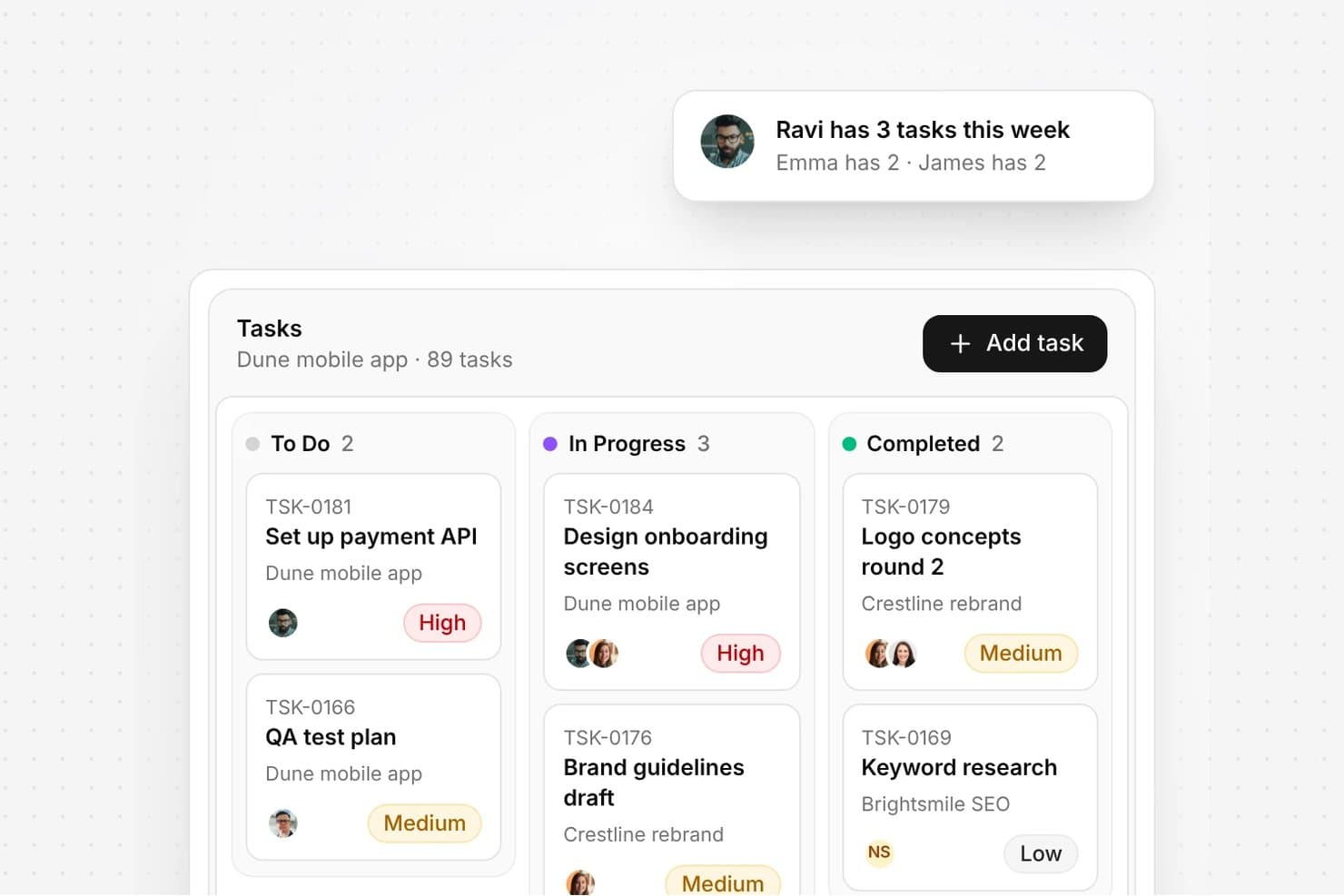
Olqan organizes tasks by status with priority labels and assignees. Olqan is an agency management platform for marketing teams that brings client work, project planning, team coordination, and financial tracking together to reduce scattered workflows and administrative overhead.
Who Is Olqan Best For?
Olqan suits marketing agencies that want to tie client project delivery directly to billing.
Why I Picked Olqan
I picked Olqan as a monday.com alternative for its fit with “Best for tying project delivery to billing.” I like that teams can plan client work with task management and time tracking, then manage invoices and payments alongside project finances. That gives marketing teams a clearer route from campaign delivery to billing.
Olqan Key Features
- Lead tracking: Manage opportunities, pitch follow-ups, and proposal statuses.
- Client records: Store communication logs, brand guidelines, and account health details.
- Creative asset library: Organize project files and track creative versions.
- Client portal: Share project information and files, and collect feedback and approvals.
Olqan Integrations
Olqan documents integrations with Google Calendar, Google Drive, and QuickBooks, and lists Google Meet, Slack, WhatsApp, Microsoft Teams, Microsoft, Square, PayPal, and Stripe. It also supports webhook integrations.
Pros and Cons
Pros:
- Tracks client feedback and creative versions
- Keeps leads, proposals, and delivery together
- Connects tracked project hours to billing
Cons:
- Some features may need further refinement
- No mobile app for managing work on-the-go
Learn more about Olqan: Best for enterprise marketing creative ops
- Not available
- Pricing upon request
Visit WebsiteCustomer Rating:4.6/5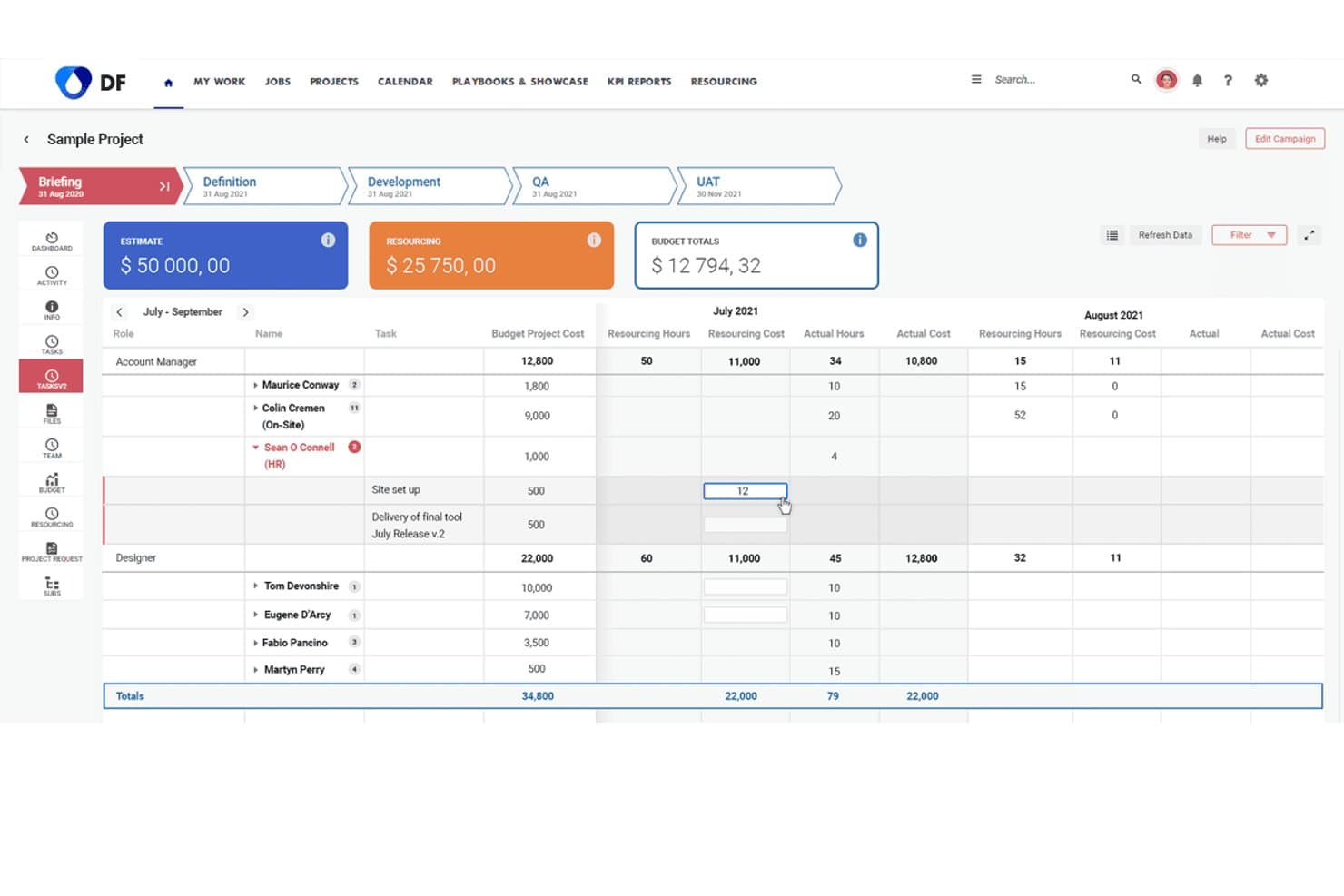
Screendragon lets users track resourcing costs and hours across project phases. Screendragon offers workflow automation and resource management designed for large marketing organizations and creative teams who need enterprise-level control, customizable processes, and visibility across complex campaigns and projects.
Who Is Screendragon Best For?
Screendragon is a solid choice for large marketing teams managing complex creative projects across multiple departments or regions.
Why Screendragon Is a Good Best monday.com Alternatives
I picked Screendragon as a top choice because it handles enterprise marketing creative ops with advanced workflow automation and resource management. My team gets precise control over complex processes and campaign visibility. I use its customizable workflows to coordinate projects across multiple departments and regions.
Screendragon Key Features
- Digital asset management: Organize, store, and share creative files from one centralized library.
- Budget tracking: Monitor campaign spend and allocate budgets by project, client, or region in real time.
- Time tracking: Log hours directly within the platform and generate automated timesheets for resource analysis.
- Approval workflows: Route projects and assets for multi-stage review and approval with custom routing rules.
Screendragon Integrations
Native integrations are not clearly documented. Screendragon supports integrations via API for custom connections.
Pros and Cons
Pros:
- Built-in campaign budget and time tracking
- Offers customizable approval and routing processes
- Handles complex creative workflows across departments
Cons:
- Documentation for integrations is limited
- Interface can feel overwhelming for new users
Learn more about Screendragon: Best for task automation features
- Free plan + 15-day trial + demo available
- Pricing upon request
Visit WebsiteCustomer Rating:4.3/5
Zoho Projects displays tasks in a Kanban-style board, helping you track progress and manage workflows across complex projects. For teams seeking a monday.com alternatives solution that balances functionality with user privacy, Zoho Projects presents a compelling option. It's designed to appeal to a wide range of industries, from IT to construction, by offering task management and collaborative tools without monetizing user data. Zoho Projects tackles challenges such as task automation and integration with other tools, ensuring your team can focus on what truly matters, getting projects done efficiently.
Why I Picked Zoho Projects
I picked Zoho Projects as a strong monday.com alternatives solution due to its user-friendly interface and customizable templates that cater to diverse project management needs. You can leverage its task automation feature, which allows for streamlined workflows through a simple drag-and-drop interface, saving you time on repetitive tasks. Additionally, Zoho Projects offers Zia intelligence, an AI-driven tool that provides insights to enhance decision-making. These features make it a great fit for teams looking to optimize their project management processes.
Zoho Projects Key Features
In addition to its automation and AI capabilities, Zoho Projects offers several other features that enhance its appeal.
- Task Management: Provides tools like Gantt charts, task dependencies, and recurring tasks to keep your projects on track.
- Time Tracking: Allows you to monitor time spent on tasks and projects, ensuring accurate billing and productivity assessment.
- Issue Tracking: Helps your team identify, report, and resolve project-related issues efficiently.
- Team Collaboration: Includes in-app chat, forums, and document management for seamless communication and collaboration.
Zoho Projects Integrations
Integrations include Google Calendar, Microsoft Office 365, Slack, Dropbox, GitHub, Zapier, Zoho CRM, Zoho Books, Zoho Invoice, and Zoho Analytics.
Pros and Cons
Pros:
- Competitive pricing with rich features
- Strong automation and workflow tools
- Robust task and dependency management
Cons:
- Limited dashboard customization options
- Interface feels complex initially
Learn more about Zoho Projects: Best for customizable workflows
- Free plan + 14-day trial + demo available
- From $10/user/month (billed annually)
Visit WebsiteCustomer Rating:4.3/5
Wrike provides an overview of tasks, timelines, and dependencies, essential for effective project planning. Wrike is a project management tool designed for teams and businesses looking to enhance collaboration and productivity. It offers features for task management, time tracking, and workload management, facilitating efficient project workflows.
Why Wrike is a good monday.com alternative: Wrike's customizable workflows allow you to tailor project stages to fit your team's specific processes. This flexibility ensures that your projects align with your unique operational needs, enhancing efficiency. Additionally, Wrike's real-time collaboration features, such as live editing and commenting, keep your team connected and informed, reducing the need for lengthy email threads.
Standout features & integrations:
Features include task prioritization, custom dashboards, request forms, approvals, file sharing, document versioning, calendar view, Kanban boards, workload management, and advanced reporting on project performance, resource allocation, and timelines.
Integrations include Adobe Creative Suite, Photoshop, Illustrator, InDesign, Facebook, Twitter, LinkedIn, Marketo, HubSpot, Salesforce, Microsoft Teams, and Slack.
Pros and Cons
Pros:
- Advanced reporting features
- Time tracking to monitor resource allocation
- Customizable workflows for tailored processes
Cons:
- Occasional performance issues with large projects
- Learning curve for new users
 Best for visual task management
- Free plan + free trial available
- From $5/user/month (billed annually)
Visit WebsiteCustomer Rating:4.5/5
Trello offers visual boards for tracking tasks across workflows. Trello gives teams a visual approach to managing projects using customizable boards, lists, and cards. I think marketers, operations teams, and creatives who want a flexible, drag-and-drop system for tracking work across stages will find Trello especially useful.
Who Is Trello Best For?
Project coordinators and small teams who need a visual, flexible system to organize workflows and keep tasks moving.
Why Trello Is a Good monday.com Alternative
I picked Trello because its Kanban board experience is genuinely the clearest in the market—moving a card from "In Progress" to "Done" feels immediate and satisfying in a way that heavier tools don't replicate. I like how Power-Ups let my team add functionality like calendar views, time tracking, or voting directly on the board without switching to a separate tool. Trello's built-in no-code automation also lets me set trigger-based rules—like automatically assigning a due date or notifying a teammate when a card moves to a specific list—without writing a single line of code. For teams that don't need complex reporting and just want tasks moving through a clear visual pipeline, Trello is hard to beat.
Trello Key Features
- Board templates: Launch new projects using pre-built templates for sprints, content calendars, and event planning.
- Multiple project views: Switch between board, timeline, table, calendar, and map views depending on how your team tracks work.
- Card checklists and attachments: Break tasks into subtasks and attach files, links, or images directly to any card.
- Team workspaces: Organize multiple boards under a shared workspace to keep related projects grouped and accessible.
Trello Integrations
Trello offers native integrations with Google Drive, Slack, Jira, Dropbox, GitHub, Microsoft Teams, Evernote, Salesforce, and more. It connects with Zapier and offers an API for custom integrations.
Pros and Cons
Pros:
- Power-Ups expand core functionality as needed
- Moving tasks between stages is fast and intuitive
- Kanban boards allow easy visual project management
Cons:
- Limited reporting and analytics for project performance
- No native time tracking in boards
Learn more about Trello: Best for all-in-one team workspaces
- Free plan + free trial + free demo available
- From $10/user/month
Visit WebsiteCustomer Rating:4.6/5
Notion offers shared workspaces for docs, policies, and team knowledge. Notion gives teams a flexible workspace where you can manage projects, docs, and wikis all in one place. I think fast-moving startups and creative teams will appreciate how it adapts to shifting processes and unconventional workflows.
Who Is Notion Best For?
Project managers and cross-functional teams who need a flexible, customizable workspace to organize projects, documentation, and knowledge in one hub.
Why Notion Is a Good monday.com Alternative
What drew me to Notion is how it blurs the line between project management and documentation—your project brief, task board, and meeting notes all live in the same connected space. I like that you can build entirely custom database views, switching between table, board, calendar, and gallery layouts depending on how your team thinks. In practice, that means I can set up a content calendar that links directly to the briefs, drafts, and approval notes for each piece without leaving the tool. For teams tired of bouncing between a project tool and a separate wiki, Notion handles both without compromise.
Notion Key Features
- AI writing assistant: Generate, summarize, and edit content directly within your pages and documents.
- Templates: Start projects quickly using pre-built templates for roadmaps, sprint planning, and meeting notes.
- Task assignments and due dates: Assign tasks to team members and set deadlines directly within any database.
- Permissions and page sharing: Control access at the page or workspace level to share specific content with guests or external collaborators.
Notion Integrations
Notion offers native integrations with Slack, GitHub, Google Drive, Figma, Asana, Trello, Jira, Zoom, Dropbox, and Box. It also connects with Zapier and provides an API for custom integrations.
Pros and Cons
Pros:
- Customizable template gallery for project workflows
- Embedded AI for notes and document creation
- Flexible content databases with linked views
Cons:
- No advanced automation for recurring tasks
- Databases can slow down at large scale
Learn more about Notion: Best for custom app building
- Free plan + free demo available
- From $20/user/month (billed annually)
Visit WebsiteCustomer Rating:4.6/5
Airtable's custom apps, grid view, and Kanban make it ideal for flexible project management. Airtable is a flexible database and collaboration tool that allows users to create custom applications to manage data and workflows. It's used by teams across various industries who need a versatile platform to organize information and collaborate.
Why Airtable is a good monday.com alternative: Airtable offers custom app building capabilities, which set it apart from monday.com's project management focus. Its grid view allows you to organize data similarly to a spreadsheet, making it intuitive for those familiar with Excel. The form view lets you collect information quickly, and its Kanban board aids in visualizing workflows. These features suit teams needing customizable solutions to manage diverse projects.
Standout features & integrations:
Features include grid view, form view, and Kanban board. Grid view lets you organize information like a spreadsheet, making it familiar and easy to use. Form view helps you collect and manage data efficiently.
Integrations include Slack, Google Calendar, Dropbox, Trello, Asana, Jira, Mailchimp, GitHub, Zendesk, and Salesforce.
Pros and Cons
Pros:
- Visual workflow tools
- Flexible data management
- Customizable applications
Cons:
- Basic reporting features
- May need customization
Learn more about Airtable: Best for customizable project workflows
- Free plan + free trial + free demo available
- From $12/user/month
Visit WebsiteCustomer Rating:4.7/5
ClickUp offers customizable workflows with visual process mapping. ClickUp gives teams total control over how they manage tasks, projects, and goals, making it a go-to choice for fast-moving organizations and creative agencies. I think you’ll appreciate its flexibility if you need to bring all your workflows, docs, and project plans into one customizable hub.
Who Is ClickUp Best For?
ClickUp is a great fit for cross-functional teams at startups and growing businesses that need to coordinate complex projects in one place.
Why ClickUp Is a Good Monday.com Alternative
I picked ClickUp because of how far it goes with workspace customization—you can build out entirely different structures for different teams without any overlap or confusion. I like that it supports multiple project views, including Gantt charts, Kanban boards, list views, and timelines, so each team member can work in whichever format suits them. My team also uses ClickUp's custom task statuses and fields to mirror our exact workflows, which monday.com's more rigid structure doesn't always allow. In practice, that means we're not bending our process to fit the tool.
ClickUp Key Features
- ClickUp Brain: An AI assistant built directly into your workspace that answers questions about tasks, surfaces blockers, and pulls insights from docs and past projects.
- Whiteboards: A built-in visual collaboration tool for brainstorming, mind mapping, and connecting ideas directly to tasks.
- Dashboards: Customizable reporting views that pull live data from tasks and projects, so you can track progress without chasing status updates.
- Time tracking: Native time logging on tasks that lets team members record hours worked directly inside their projects.
ClickUp Integrations
ClickUp offers over 50 native integrations, including Slack, Google Drive, GitHub, Zoom, OneDrive, Dropbox, GitLab, Microsoft Teams, Outlook, and more. It also connects with Zapier and provides an API for custom integrations.
Pros and Cons
Pros:
- Advanced native whiteboard and mind mapping
- Multiple automation options within tasks
- Highly customizable work hierarchies and views
Cons:
- Occasional lag with large workspaces
- Notification system can be overwhelming
Learn more about ClickUp: Best for team project coordination
- Free plan + trial + demo available
- From $10.99/user/month (billed annually)
Visit WebsiteCustomer Rating:4.4/5
Asana helps teams organize projects, track tasks, and collaborate efficiently in one workspace. Asana is a project and task management platform well-suited to cross-functional teams who need detailed workflow automation, goal tracking, and project timelines all in a single workspace.
Who Is Asana Best For?
Asana is a strong fit for mid-sized to enterprise teams that manage multiple projects across departments and need clear ownership and accountability structures.
Why Asana Is a Good Monday.com Alternative
Asana is one of my top picks because I love how it covers work, projects, and tasks in one place without locking everyone into a single view. I can switch between list, board, timeline, and calendar views per project, which gives different team members the flexibility monday.com often restricts behind higher tiers. I also appreciate the Goals feature, which lets me tie individual tasks directly to company-level objectives and track progress in real time.
Asana Key Features
- Workflow automation: Build rule-based automations that trigger actions like task assignments, status updates, and due date changes without manual input.
- Portfolio management: Group related projects into portfolios to monitor status, priority, and progress across multiple workstreams from a single view.
- Workload management: View each team member's assigned tasks and capacity in real time to spot bottlenecks and rebalance work.
- Custom fields: Add project-specific data fields to tasks, such as priority, budget, or region, to capture the details your team actually needs to track.
Asana Integrations
Asana offers 300+ integrations through its app directory, including native integrations with Slack, Google Drive, Microsoft Teams, Salesforce, Jira, HubSpot, GitHub, Zoom, Figma, and Tableau. It also connects with Zapier and provides an API for custom integrations.
Pros and Cons
Pros:
- Task dependencies with timeline visualization
- Built-in goal and milestone tracking
- Multiple project views on all plans
Cons:
- Reporting limited to premium tiers
- No native time tracking feature
 Best for spreadsheet workflows
- 30-day free trial + demo available
- From $9/user/month (billed annually)
Visit WebsiteCustomer Rating:4.4/5
Smartsheet lets teams manage workflows in a spreadsheet layout. Smartsheet brings a familiar spreadsheet-inspired interface to project and work management, making it easy for teams used to Excel or Google Sheets to transition. Mid-size businesses and enterprises rely on it to organize complex projects, automate collaborative workflows, and meet compliance needs at scale.
Who Is Smartsheet Best For?
Project managers and operations leaders at mid-size and large organizations in regulated industries benefit most from Smartsheet’s workflow and compliance controls.
Why Smartsheet Is a Good monday.com Alternative
I picked Smartsheet because its grid-based interface mirrors the logic of a spreadsheet, which makes adoption far easier for teams already working in Excel or Google Sheets. I like how you can start with familiar rows and columns and layer in task dependencies, automated alerts, and approval workflows without rebuilding how your team thinks about data. My team uses Smartsheet's cell linking and cross-sheet formulas to connect data across multiple project sheets in real time—something monday.com doesn't replicate as naturally. In practice, that means reporting across projects stays accurate without manual data entry.
Smartsheet Key Features
- Portfolio management: Track and report on multiple projects in one view, with tools to monitor budgets, resources, and risks across your entire portfolio.
- Resource management: Assign and balance team workloads across projects, with visibility into availability and capacity to avoid overbooking.
- Dynamic View: Share filtered, permission-controlled views of sheets with external stakeholders without exposing your full data.
- Document generation: Automatically generate customized PDFs directly from sheet data to reduce manual document prep.
Smartsheet Integrations
Smartsheet offers native integrations with Google Workspace, Microsoft Teams, Slack, Salesforce, Jira, DocuSign, Box, Dropbox, and more. It also provides an API for custom integrations.
Pros and Cons
Pros:
- Audit tracking for regulatory compliance management
- Extensive workflow automation and approval capabilities
- Spreadsheet-style interface for easy project setup
Cons:
- Custom dashboards have limited visualization flexibility
- Complex permission settings require careful configuration
Diğer monday.com Alternatifleri
Kısa listeme giremeyen ancak yine de göz atmaya değer bazı ek monday.com alternatiflerini burada bulabilirsiniz.
- 11Teamwork.comBest for client work management
- 12Bonsai Agency SoftwareBest for agencies
- 13ConfluenceBest for remote collaboration
- 14JiraBest for Agile software teams
- 15Resource GuruBest for resource scheduling
- 16ProductiveBest for agency resource planning
- 17ScoroBest for professional services
- 18Hub Planner by MilientBest for resource management
- 19SlackBest for team communication and collaboration
- 20Salesforce CRMBest for customer relationship management
How I Evaluate monday.com Alternatives
I look at monday.com alternatives on two levels: the baseline for managing campaigns and creative reviews, and the differentiators that make a platform genuinely suited to marketing teams.
Core Functionality (Table Stakes For This List)
When I'm selecting tools for my list, I rank each one on a scale from 0 (does not offer the functionality) to 5 (excels in this area) for each core functionality listed below. Then, I calculate the tool's total score into a percentage. Each tool needs to achieve a minimum total score of 65% to be considered for inclusion.
- Visual Project Views: I check whether a tool offers Kanban, Gantt, calendar, and table views so marketing teams can switch between a campaign timeline and a daily task board without leaving the platform.
- Customizable Workflows: The ability to build custom statuses, fields, and no-code automations matters here—like auto-assigning a designer when a brief moves to "Ready for Creative."
- Creative Collaboration & Proofing: I evaluate how teams can annotate assets, leave feedback in context, and route approvals—especially for review cycles on ad creatives or landing page designs.
- Task & Campaign Management: Every tool should support task dependencies, subtasks, and milestones so a product launch checklist can map deliverables from copy drafts through final deployment.
- Marketing Stack Integrations: I look for native connections to tools marketing teams already use daily, like HubSpot, Slack, Google Workspace, Figma, and social or ad platforms.
- Reporting & Dashboards: Custom dashboards that track campaign progress, team workload, and deadlines across multiple projects give marketing leaders the visibility they need without pulling data manually.
Once I have a list of tools that meet this criteria, I consider what sets each platform apart.
Differentiating Factors (What Sets Vendors Apart)
Here's how I compare and contrast different vendors:
Standout Features
AI-powered features are a growing differentiator—I look for tools that help draft campaign briefs or summarize project updates rather than just offering generic AI chat. Resource and capacity planning also matter when a team juggles multiple launches at once, since workload views help managers spot overloaded teammates before deadlines slip. I also evaluate guest and client access, which is key for agencies or teams that loop in freelancers and stakeholders for creative reviews without paying for full seats.
Beyond Features
Pricing structure is one of the first things I evaluate, especially how guest and viewer seats are handled—marketing teams that collaborate with agencies or executives can see costs balloon fast. I also consider scalability, since a three-person content team and a 50-person marketing org with multiple brands need very different permission models and workspace hierarchies. Time-to-value matters too. I look for platforms with marketing-specific templates and onboarding resources that help teams migrate from monday.com and start running campaigns in days, not months.
Neden monday.com Alternatifi Aramalısınız?
monday.com iyi bir pazarlama yönetimi yazılımı seçeneği olsa da bazı kullanıcıların alternatif çözümler aramasının çeşitli nedenleri vardır. Aşağıdaki nedenlerden dolayı bir monday.com alternatifi arıyor olabilirsiniz.
- Daha fazla özelleştirme seçeneğine ihtiyacınız vardır
- Yazılım araçları için bütçeniz sınırlıdır
- Daha anlaşılır bir kullanıcı arayüzünü tercih edersiniz
- Ekibiniz daha fazla entegrasyona ihtiyaç duyar
- Daha iyi müşteri desteği arıyorsunuz
Bunlardan herhangi biri size uyuyorsa doğru yere geldiniz. Listemde, monday.com ile ilgili bu zorluklarla karşılaşan ve alternatif çözümler arayan ekipler için daha uygun olan çeşitli pazarlama yönetimi yazılımı seçenekleri yer alıyor.
monday.com Alternatiflerinin Temel Özellikleri
monday.com alternatiflerini incelerken, yinelenen ve gereksiz unsurları ortadan kaldırırken projenizin özel ihtiyaçlarını karşılayan temel özelliklere odaklanmanız önemlidir. Aramanız gereken özelliklerin düzenlenmiş hâli aşağıdadır:
- Kullanıcı Dostu Arayüz ve Kullanım Kolaylığı: Öğrenme süresini en aza indiren, sezgisel ve kolay gezinilebilir bir platform sayesinde ekibiniz aracı hızlıca benimseyebilir.
- Görev Listeleri ve Alt Görevler: Görev listeleri oluşturarak ve görevleri yönetilebilir alt görevlere bölerek çalışmaları verimli bir şekilde düzenleyin.
- Görev Atamaları ve Bağımlılıklar: İş akışlarını kolaylaştırmak ve proje teslim tarihlerini etkili bir şekilde karşılamak için görevleri ekip üyelerine atayın ve görev bağımlılıklarını belirleyin.
- Özel Alanlar: Ekibinizin ihtiyaç duyduğu tüm özel bilgileri yakalamak için projelerinizi özel alanlarla özelleştirin.
- Son Tarihler ve Kilometre Taşları: Projenizin plana uygun ilerlemesini sağlamak için görevler için son tarihler belirleyin ve kilometre taşlarını takip edin.
- Bildirimler: Görev güncellemeleri, son tarihler ve ekip iletişimleri hakkında gerçek zamanlı bildirimler alın.
- Onaylar İş Akışı: Kalite kontrolünü sürdürmek ve projelerinizde hesap verebilirliği sağlamak için bir onay süreci uygulayın.
- Dosya Paylaşımı: İş birliğini kolaylaştırmak ve tüm proje kaynaklarını tek bir yerde tutmak için dosyaları platform içinde sorunsuz bir şekilde paylaşın.
- Projeleri ve Görevleri Takip Etme: Darboğazları belirlemek ve her şeyin plana uygun ilerlemesini sağlamak için projelerin ve bireysel görevlerin ilerlemesini izleyin.
- Mobil Uygulama (iOS ve Android): iOS ve Android cihazlarda kullanılabilen mobil uygulamayla projelerinize hareket hâlindeyken erişin.
- Sınırsız Kullanıcı Desteği: Kullanıcı başına ek maliyet olmadan ekibinizin büyümesine olanak tanıyan sınırsız kullanıcı desteği.
- Gösterge Tabloları: Temel veri noktalarını görselleştiren ve bilinçli kararlar almanıza yardımcı olan özelleştirilebilir gösterge tablolarıyla projelerinize gerçek zamanlı bir genel bakış elde edin.
- Otomasyonlar: Rutin süreçleri otomatikleştirerek iş akışlarınızı verimli tutan kodsuz otomasyonlarla tekrarlayan görevlerde zaman kazanın.
- İş Birliğine Dayalı Belgeler: Erişilebilir iletişim için sohbet özelliklerine sahip iş birliğine dayalı belgeleri kullanarak ekibinizle birlikte belge yazın ve belgeleri paylaşın.
- Zaman Takibi: Zaman takibi özellikleri çalışma saatlerini kolayca izlemenizi sağlayarak üretkenliği yönetmenize ve kaynakları etkili bir şekilde tahsis etmenize yardımcı olur.
- Kaynak Yönetimi ve İş Yükü Görünümü: Dengeli bir iş dağılımı sağlamak için görevler atayarak ve iş yüklerini izleyerek ekip kaynaklarını yönetin; iş yükü görünümleriyle kaynak tahsisini görselleştirin.
- Entegrasyonlar: Merkezi bir çalışma alanı oluşturmak, bağlam değiştirmeyi azaltmak ve üretkenliği artırmak için diğer araçlara ve platformlara bağlanın.
- Formlar: Tablolarınızı otomatik olarak dolduran özelleştirilebilir formlarla geri bildirimleri zahmetsizce toplayarak bilgi toplama ve veri girişini kolaylaştırın.
Bu temel özelliklere odaklanıp tekrarları ortadan kaldırarak Monday.com alternatiflerini etkili bir şekilde karşılaştırabilir ve ekibinizin iş akışıyla uyumlu olan ve üretkenliği artıran bir proje yönetimi aracı seçebilirsiniz.