

Why Trust Our Software Recommendations
6,700+
Reviews
20
Industry experts
16+
Evaluation factors
14
Years
Our team has been testing and reviewing software since 2012. As marketing leaders ourselves, we know how difficult—and important—it is to choose the right software.
For this guide, we evaluated tools using hands-on testing and independent research, scoring tools using our selection criteria.
Our reviews reflect our human editorial judgment, not a sales pitch.
Expert reviewers:
 Gui DrusinaCreative Director
- Shriya GhateSenior Marketing Lead
 Amanda JacquesMarketing Ops Leader

SEO Tools for Agencies Comparison Table
| Tool | Best For | Trial Info | Price | ||
|---|---|---|---|---|---|
| 1 | Best integrations for workflow automation | 14-day free trial + free demo available | From $103.20/month (billed annually) | Website | |
| 2 | Best support for managing local SEO at scale | 14-day free trial + free demo | From $31/month (billed annually) | Website | |
| 3 | Best SEO and AI visibility data coverage | Free plan available | From $29/month | Website | |
| 4 | Best all-in-one competitor and keyword analysis | 7-day free trial + free demo | From $50/month (billed annually) | Website | |
| 5 | Best actionable insights with AI-powered tools | 7-day free trial + free demo available | From $79/month (billed annually) | Website | |
| 6 | Best white-label widgets to capture new leads | 14-day free trial | From $99/month (billed annually) | Website | |
| 7 | Best automated client reporting for large teams | Free demo + 14-day free trial | From $20/client/month (billed annually) | Website | |
| 8 | Best competitive digital visibility data | 14-day free trial | From $139/month | Website | |
| 9 | Best customizable SEO marketing reports | 7-day free trial | From $39/month (billed annually) | Website | |
| 10 | Best unified search and AI platform tracking | 14-day free trial | From $96/month (billed annually) | Website |



Best SEO Tools for Agencies Reviews
Below are my detailed summaries of the best SEO tools for agencies that made it onto my shortlist. My reviews offer a detailed look at the features, integrations, and pricing of each platform to help you find the best one for you.
 Best integrations for workflow automation
- 14-day free trial + free demo available
- From $103.20/month (billed annually)
Visit WebsiteCustomer Rating:4.8/5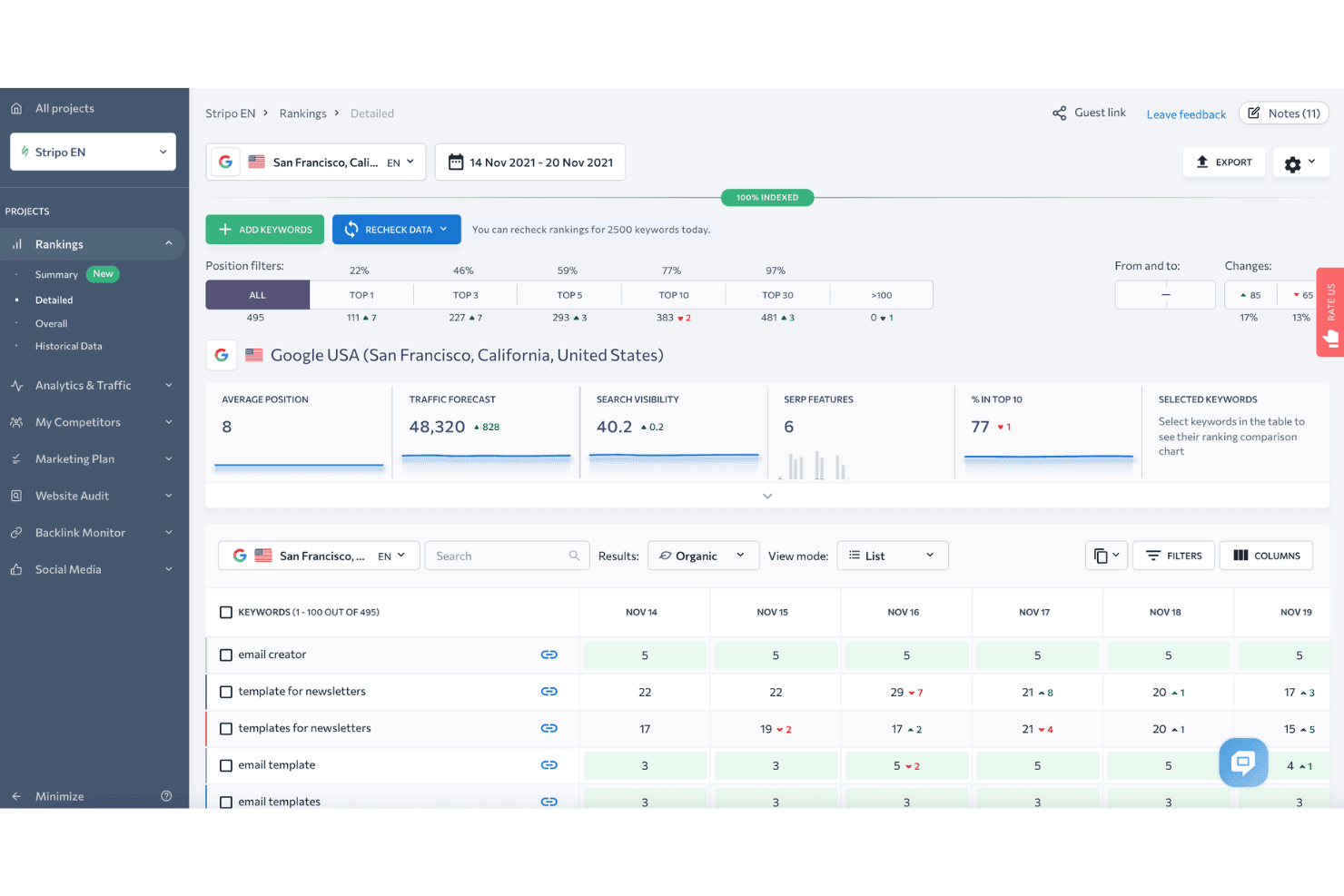
SE Ranking displays a detailed keyword rankings dashboard with position filters, traffic forecast, and daily ranking changes for tracked keywords. SE Ranking is a cloud-based SEO platform covering rank tracking, site auditing, keyword research, backlink analysis, competitor research, white-label reporting, and AI search visibility monitoring across multiple client projects.
Who Is SE Ranking Best For?
SE Ranking is a strong fit for small to mid-sized agencies that need a full SEO toolkit across multiple client accounts without paying enterprise-tier prices.
Why I Picked SE Ranking
SE Ranking earns its spot on my shortlist because of how well its automation ecosystem connects to real agency workflows. I use its verified n8n node and Make.com connector to trigger rank tracking alerts and push data directly into client dashboards without manual exports. The MCP server takes this further, feeding live SE Ranking data into Claude or ChatGPT so I can generate analysis without switching tools.
SE Ranking Key Features
- White-label reporting: Create customizable, branded reports clients can access via a dedicated portal.
- Keyword grouper: Automatically cluster large lists of keywords by topic and intent for scaled research.
- Local rank tracker: Monitor rankings within specific cities or regions and manage Google Business Profile data.
- Backlink monitoring: Track new and lost backlinks across domains with historical data and authority metrics.
SE Ranking Integrations
SE Ranking offers native integrations with Google Analytics 4, Google Search Console, Google Ads, Matomo Analytics, Looker Studio, Whatagraph, AgencyAnalytics, and Reportz. It connects with Zapier, Make.com, n8n, and provides an API for custom integrations.
Pros and Cons
Pros:
- Agency Pack with manager and client seats
- White-label client portals and guest access
- Reliable daily rank tracking across regions
Cons:
- Limited JavaScript-rendered site auditing
- Backlink database smaller than competitors
Learn more about SE Ranking: Best support for managing local SEO at scale
- 14-day free trial + free demo
- From $31/month (billed annually)
Visit WebsiteCustomer Rating:4.7/5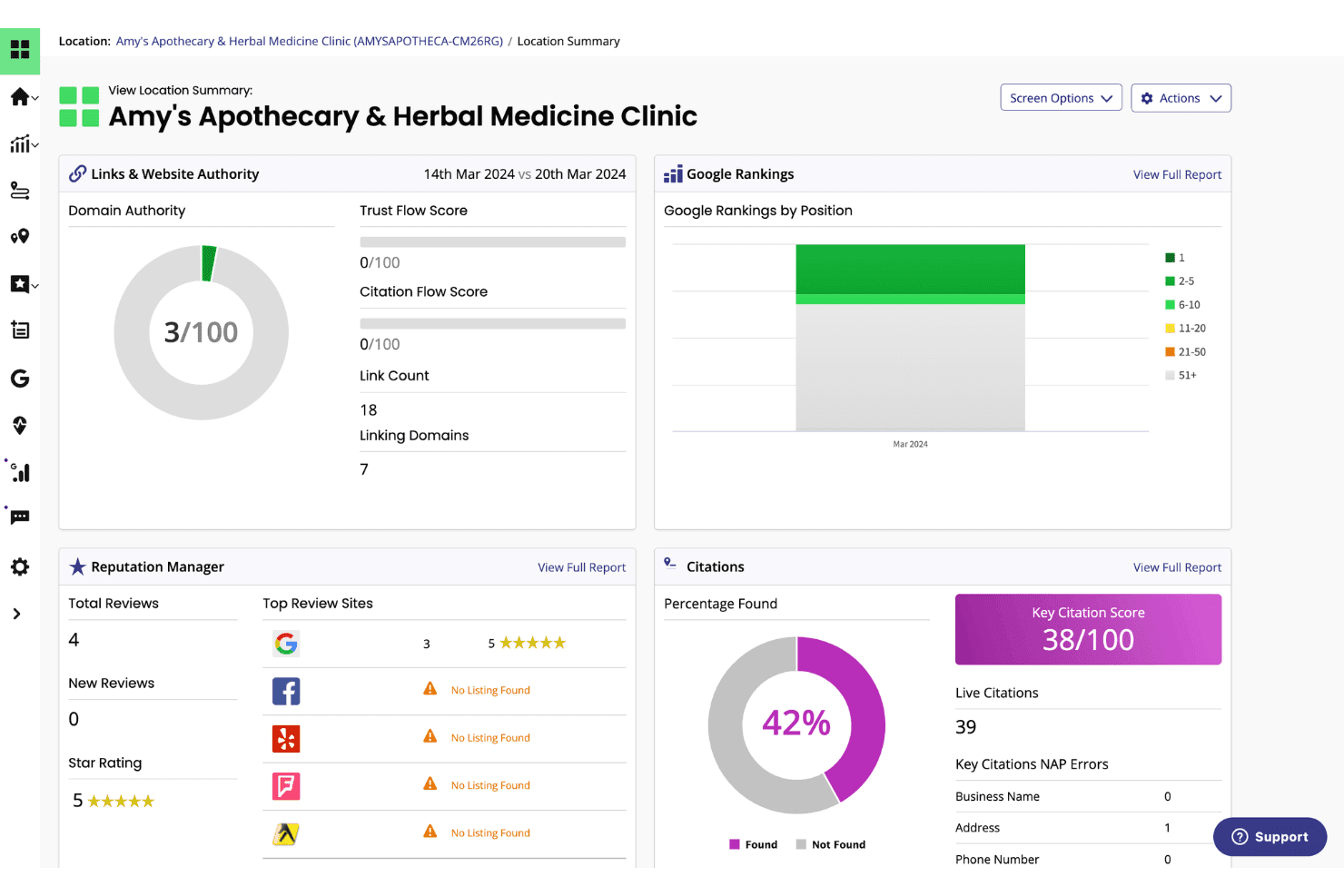
BrightLocal displays a location summary dashboard with Google rankings, citation scores, domain authority, and reputation metrics for a local business. BrightLocal is a local SEO platform built for agencies and multi-location businesses, combining local rank tracking, citation management, Google Business Profile auditing, and review monitoring in one dashboard.
Who Is BrightLocal Best For?
Agencies and white-label SEO providers managing local search campaigns for brick-and-mortar or service-area business clients will get the most from BrightLocal.
Why I Picked BrightLocal
BrightLocal earns its spot on my shortlist because of how well it handles local rank tracking across an entire client portfolio. I love the Local Search Grid, which maps Google rankings across a geographic area on a visual geo-grid, so I can instantly see where a client is dominant and where coverage falls off. Each client also gets their own white-labeled external dashboard login, which means I can set up automated reporting once and let clients check in on their own performance.
BrightLocal Key Features
- Citation Tracker: Audits and monitors business listings for accuracy and identifies new citation opportunities across top directories.
- GBP Audit: Benchmarks a client's Google Business Profile against local competitors with actionable insights for optimization.
- Active Sync: Automatically keeps business information consistent across major local data sources and listings.
- Showcase reviews widget: Lets you publish customer reviews directly to your website to support social proof and trust signals.
BrightLocal Integrations
BrightLocal offers native integrations with Google Business Profile, Google Analytics 4, Facebook, and Zapier. An API is available for custom integrations.
Pros and Cons
Pros:
- Automated citation management and monitoring
- White-labeled dashboards for unlimited clients
- Local rank tracking with geo-grid visualization
Cons:
- Limited technical site auditing features
- No backlink analysis or toxic link audit
Learn more about BrightLocal: Best SEO and AI visibility data coverage
- Free plan available
- From $29/month
Visit WebsiteCustomer Rating:4.6/5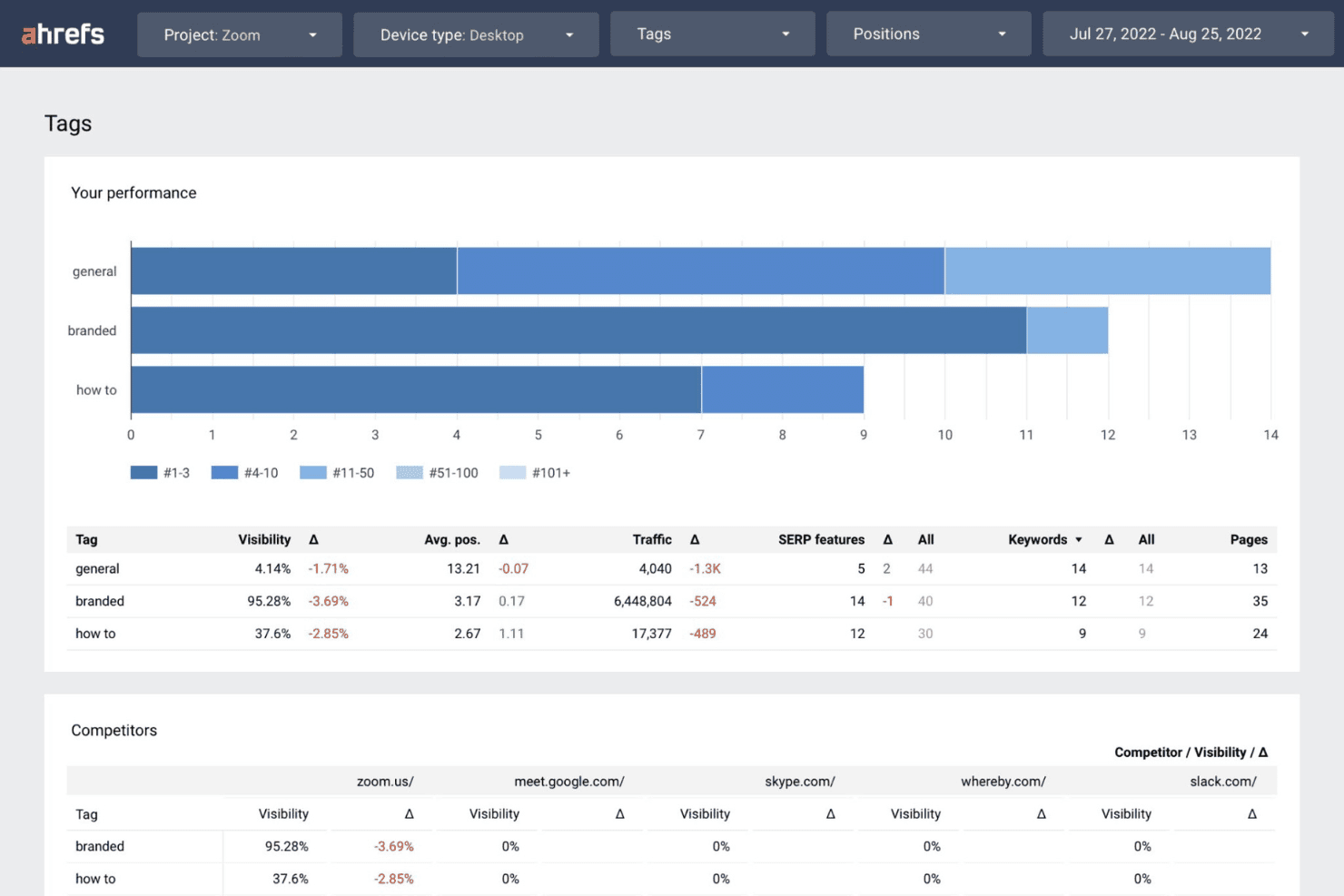
Ahrefs displays a Tags performance dashboard showing visibility, traffic, and keyword data segmented by branded, general, and how-to categories alongside competitor comparisons. Ahrefs is a full-suite SEO platform built around one of the largest backlink indexes in the industry, offering keyword research, rank tracking, site auditing, and competitive intelligence across multiple client accounts.
Who Is Ahrefs Best For?
Ahrefs is a strong fit for agency SEO directors and account managers who prioritize data depth for competitive research, link building, and multi-client keyword tracking.
Why I Picked Ahrefs
I picked Ahrefs as one of the best because its coverage spans both traditional and AI search visibility in a way no competitor currently matches. Brand Radar tracks client brand mentions and citations across LLMs like ChatGPT, Claude, and Gemini, and Custom Prompts lets me monitor exactly which AI answers a client appears in. I also lean on Keywords Explorer's click data to filter out high-volume keywords that generate zero actual traffic, which keeps client content strategies grounded in real search behaviour.
Ahrefs Key Features
- Site Explorer: Analyze competitor backlink profiles, organic traffic, and paid keywords in detail.
- Site Audit: Run scalable technical SEO crawls to surface on-page errors and site health issues.
- Rank Tracker: Monitor keyword rankings across devices, locations, and multiple search engines.
- Report Builder: Create custom dashboards and automated, client-ready SEO performance reports.
Ahrefs Integrations
Ahrefs offers native integrations with Google Search Console and Looker Studio, supports MCP Server for AI assistants like ChatGPT and Claude, and provides an API for custom integrations.
Pros and Cons
Pros:
- Advanced competitor and SERP analysis tools
- AI visibility tracking for search engines
- Largest and freshest backlink index available
Cons:
- White-label reporting options are limited
- No native client login or portal
 Best all-in-one competitor and keyword analysis
- 7-day free trial + free demo
- From $50/month (billed annually)
Visit WebsiteCustomer Rating:4.6/5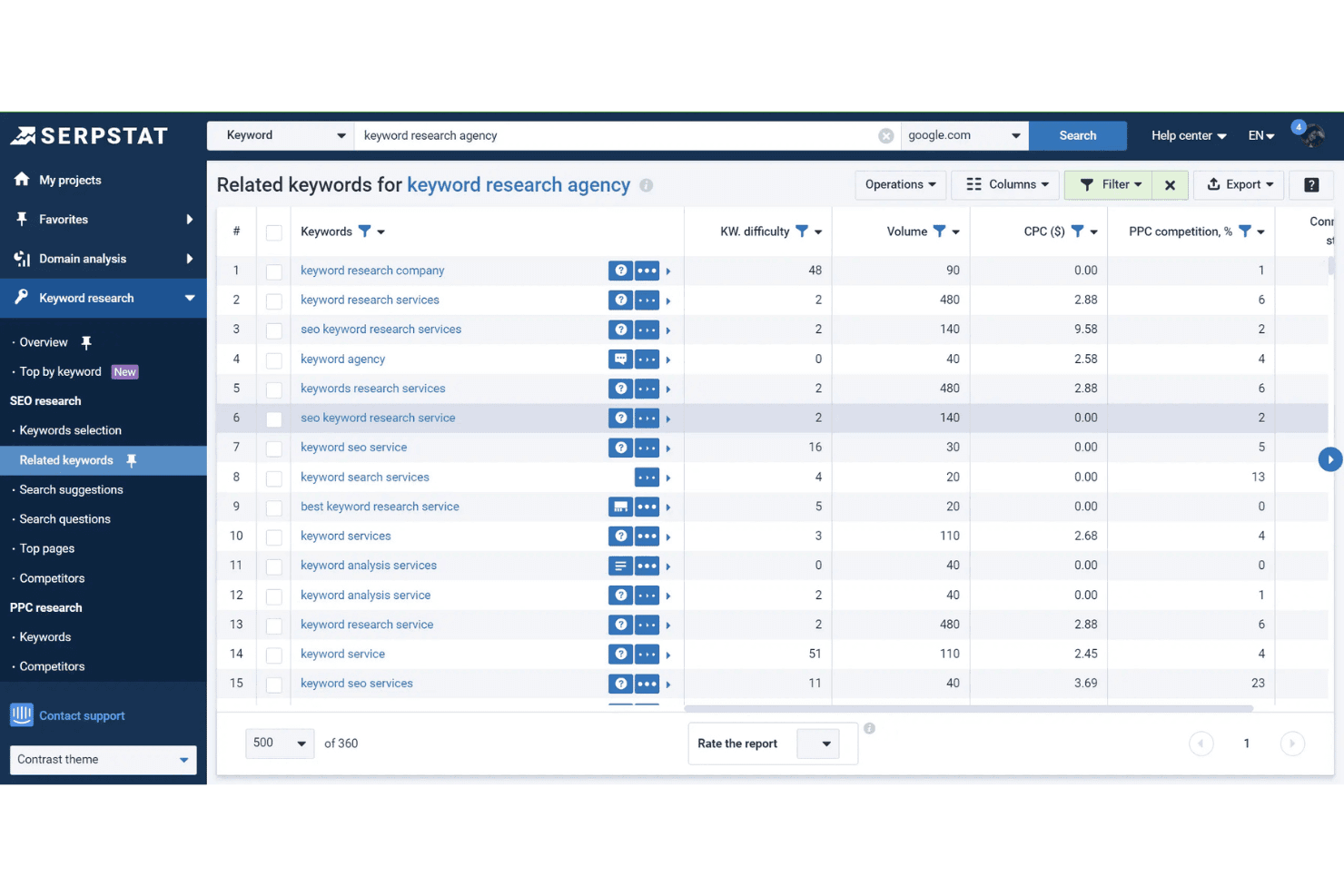
Serpstat's Related Keywords tool displays keyword difficulty, search volume, CPC, and PPC competition data for 'keyword research agency'. Serpstat is a search marketing platform that brings keyword research, competitor analysis, rank tracking, site auditing, and backlink analysis together across 230 countries and multiple client projects.
Who Is Serpstat Best For?
Serpstat is a strong fit for small-to-mid-sized digital marketing agencies that need an affordable all-in-one SEO platform to manage multiple client accounts.
Why I Picked Serpstat
Serpstat earns its spot on my shortlist because of how deeply its competitor analysis module works for agency use cases. I can pull a competitor's top-performing pages, their full keyword set, and traffic share all from one view, making client gap analysis quick before a strategy call. The keyword clustering tool is also genuinely useful: I can group thousands of raw keywords automatically, which speeds up content planning for clients with complex or large-scale site structures.
Serpstat Key Features
- Rank tracker: Monitor keyword positions across 230 countries for both desktop and mobile.
- Site audit: Scan sites for technical SEO issues with customizable audit scheduling.
- API access: Pull search analytics and audit data directly into custom workflows.
- Batch analysis: Analyze up to 100,000 domains or keywords at once for bulk review.
Serpstat Integrations
Serpstat offers native integrations with Google Sheets, Google Search Console, Reportz, Stackby, Oviond, Datorama, SEOtools for Excel, and Looker Studio. It also provides browser extensions for Chrome, Firefox, Edge, and Opera, with API access available for custom integrations.
Pros and Cons
Pros:
- Automated keyword clustering for large datasets
- Groups large lists of keywords
- Competitor analysis across global and local markets
Cons:
- White-label reporting requires top-tier plan
- Backlink data is less extensive than Ahrefs
 Best actionable insights with AI-powered tools
- 7-day free trial + free demo available
- From $79/month (billed annually)
Visit WebsiteCustomer Rating:4.5/5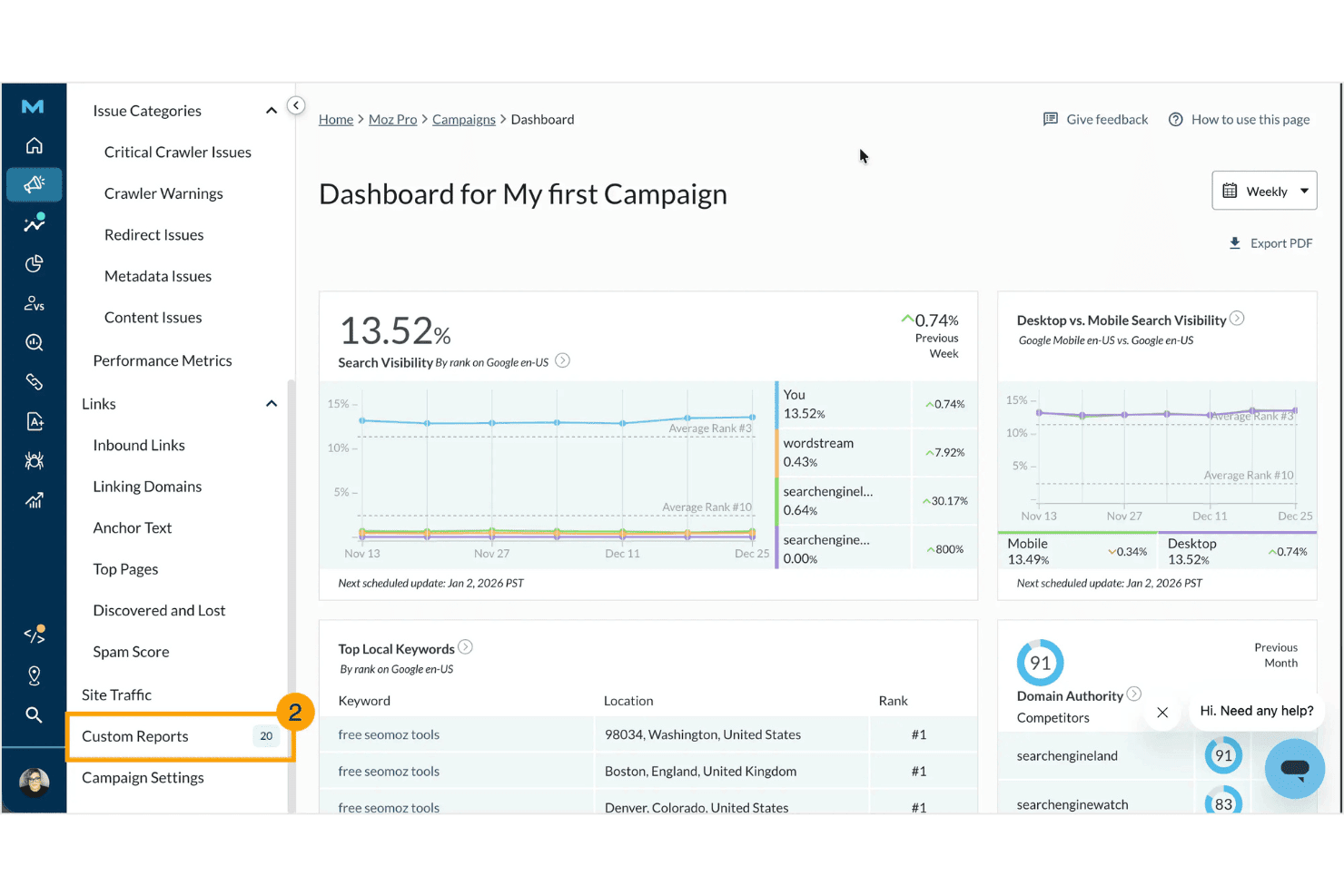
Moz Pro displays a campaign dashboard with search visibility metrics, top local keywords, domain authority scores, and competitor comparisons. Moz Pro is an SEO platform built around keyword research, rank tracking, site auditing, backlink analysis, and white-labeled reporting, with added AI-powered tools for tracking brand visibility across generative search engines.
Who Is Moz Pro Best For?
Moz Pro is a strong fit for small-to-mid-sized digital marketing agencies that need reliable client reporting, trusted authority metrics, and an accessible interface for their SEO teams.
Why I Picked Moz Pro
Moz Pro earns its spot on my shortlist because of how it pairs its long-established authority metrics with genuinely useful AI tools. I particularly like the AI Prompt Tracking feature, which shows how often a client's brand appears across ChatGPT, Gemini, and Google AI Mode responses. The AI Content Briefs add another layer by turning keyword data into structured content guidance that's immediately actionable for whoever's writing the copy.
Moz Pro Key Features
- Custom branded reports: Generate white-labeled, agency-ready SEO reports with drag-and-drop customization.
- Campaign-based client management: Organize multiple client sites and projects within separate campaigns on one dashboard.
- Comprehensive site crawl: Audit entire websites to identify technical SEO issues and optimization opportunities.
- Backlink profile analysis: Access detailed link data for clients and competitors, including new and lost backlinks.
Moz Pro Integrations
Moz Pro offers native integrations with Google Analytics, Google Search Console, HubSpot, and Looker Studio. An API is available for custom integrations.
Pros and Cons
Pros:
- White-labeled SEO and client audit reports
- Trusted Domain Authority and spam score metrics
- AI prompt tracking for generative search
Cons:
- No direct client portal access
- Backlink data lags larger competitors
Learn more about Moz Pro: Best white-label widgets to capture new leads
- 14-day free trial
- From $99/month (billed annually)
Visit WebsiteCustomer Rating:4.8/5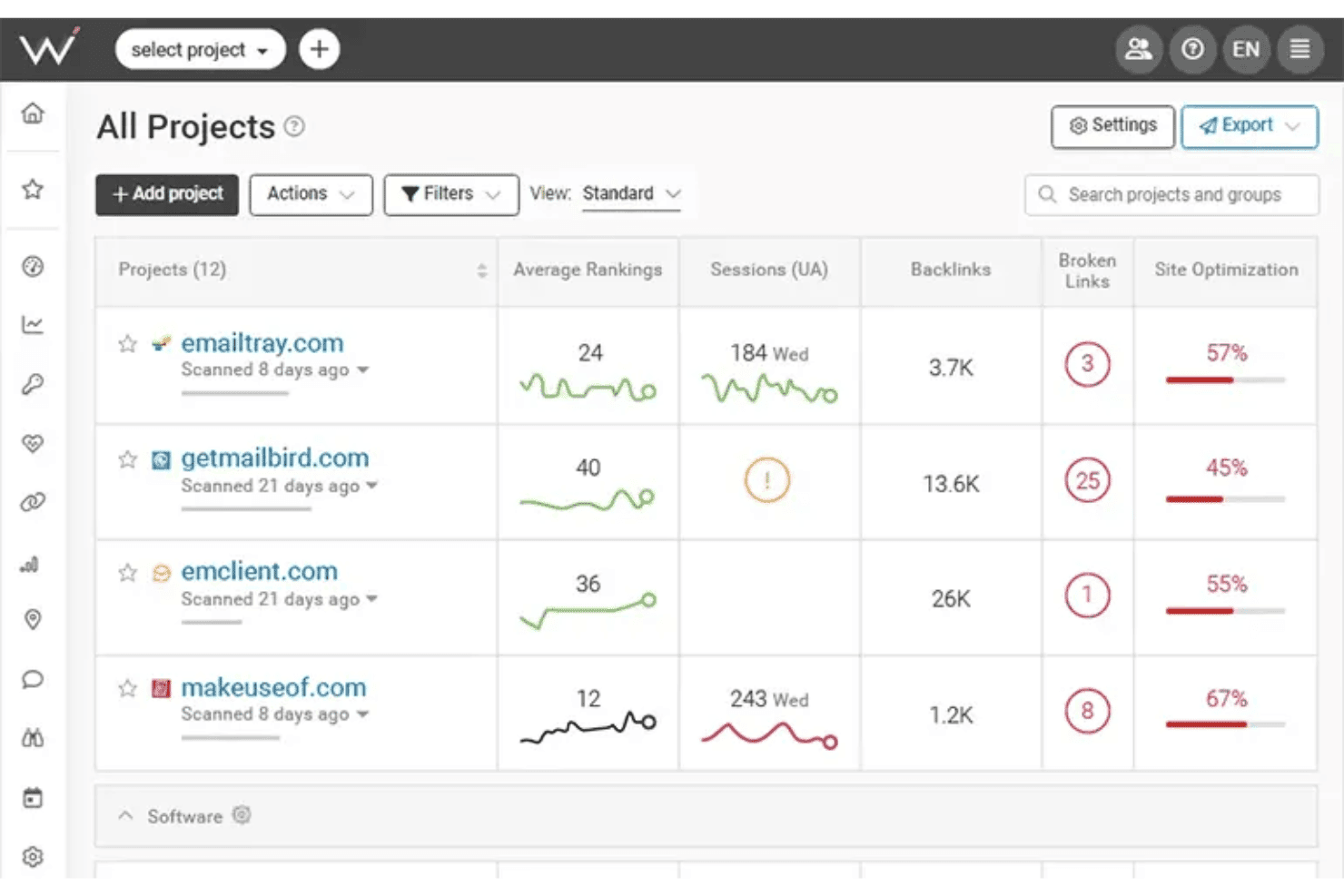
WebCEO displays an All Projects dashboard where users can monitor average rankings, sessions, backlinks, broken links, and site optimization scores across multiple websites. WebCEO is a cloud-based SEO platform built for agencies, covering rank tracking, site auditing, backlink analysis, keyword research, competitor intelligence, and white-label reporting across unlimited client projects from a single dashboard.
Who Is WebCEO Best For?
WebCEO is a strong fit for digital marketing agencies that manage multiple client accounts and want to offer branded SEO services under their own domain.
Why I Picked WebCEO
WebCEO earns its spot on my shortlist because the white-label lead-gen widget is genuinely rare in the SEO tools market. I embed a customizable audit button on a client-facing page, and when a prospect runs a scan, I get a branded SEO report delivered under my agency's domain. On top of that, the full white-label hub lets me run WebCEO tools on my own custom domain, with role-based client logins and automated, scheduled report delivery.
WebCEO Key Features
- Comprehensive rank tracking: Monitor keyword rankings daily across multiple search engines, locations, and devices.
- Team collaboration tools: Assign tasks, manage user roles, and track team progress within a unified dashboard.
- Competitor SEO analysis: Analyze competitor backlinks, content strategies, and keywords for actionable insights.
- Automated technical site audits: Crawl entire websites to detect on-page errors, mobile issues, and Core Web Vitals data.
WebCEO Integrations
WebCEO offers native integrations with Google Analytics, Google Ads, Google Search Console, Facebook, and LinkedIn. An API is available for custom integrations.
Pros and Cons
Pros:
- Scheduled automated branded SEO report delivery
- Identifies mobile performance issues
- White-label SEO lead capture widget available
Cons:
- No desktop software version is available
- Charges extra fees per scan on agency plans
Learn more about WebCEO: Best automated client reporting for large teams
- Free demo + 14-day free trial
- From $20/client/month (billed annually)
Visit WebsiteCustomer Rating:4.7/5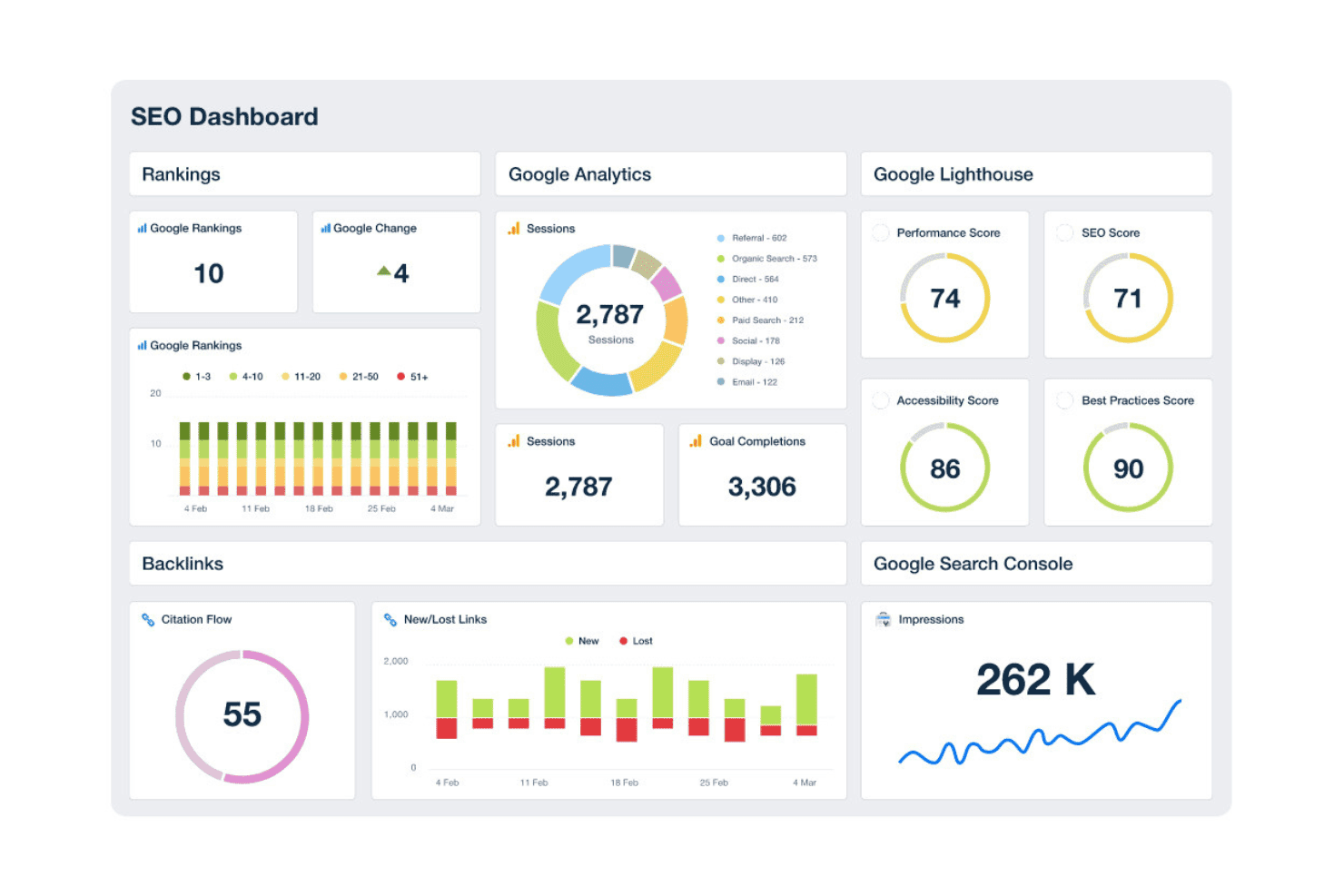
AgencyAnalytics offers a comprehensive SEO dashboard displaying rankings, Google Analytics sessions, Lighthouse scores, backlinks, and search console impressions in one unified view. AgencyAnalytics is a white-label reporting and SEO monitoring platform built for digital marketing agencies, combining automated client dashboards, rank tracking, site auditing, and backlink monitoring across multiple client accounts.
Who Is AgencyAnalytics Best For?
AgencyAnalytics is a natural fit for small-to-mid-sized digital marketing agencies managing multiple client accounts who need white-label reporting without building custom dashboards.
Why I Picked AgencyAnalytics
I've included AgencyAnalytics in my top picks because no other tool in this space matches its automated report scheduling at scale. I can build a branded report template once, apply it across 20+ client accounts, and schedule delivery without touching it again each month. The white-label client portal, custom domain setup, and drag-and-drop report builder mean clients receive polished, agency-branded dashboards at a URL I control, not a generic third-party subdomain.
AgencyAnalytics Key Features
- AI insights and anomaly detection: Uses machine learning to highlight trends, anomalies, and emerging opportunities in performance data.
- Backlink monitoring: Tracks new and lost backlinks across integrated sources for each client account.
- Integration library: Connects with over 80 marketing, SEO, and paid media platforms for centralized reporting.
- Site audit tool: Automatically crawls client sites to surface technical SEO issues and on-page recommendations.
AgencyAnalytics Integrations
AgencyAnalytics offers 85+ native integrations, including Google Analytics, Google Search Console, Ahrefs, Semrush, Moz, Facebook Ads, Google Ads, Shopify, HubSpot, Mailchimp, and CallRail. An API is available for custom integrations.
Pros and Cons
Pros:
- Permissions for individual client portal access
- Offers customized dashboard layouts
- Automated white-label reporting across clients
Cons:
- Site audits have limited technical depth
- Keyword research features require third-party tools
Learn more about AgencyAnalytics: Best competitive digital visibility data
- 14-day free trial
- From $139/month
Visit WebsiteCustomer Rating:4.5/5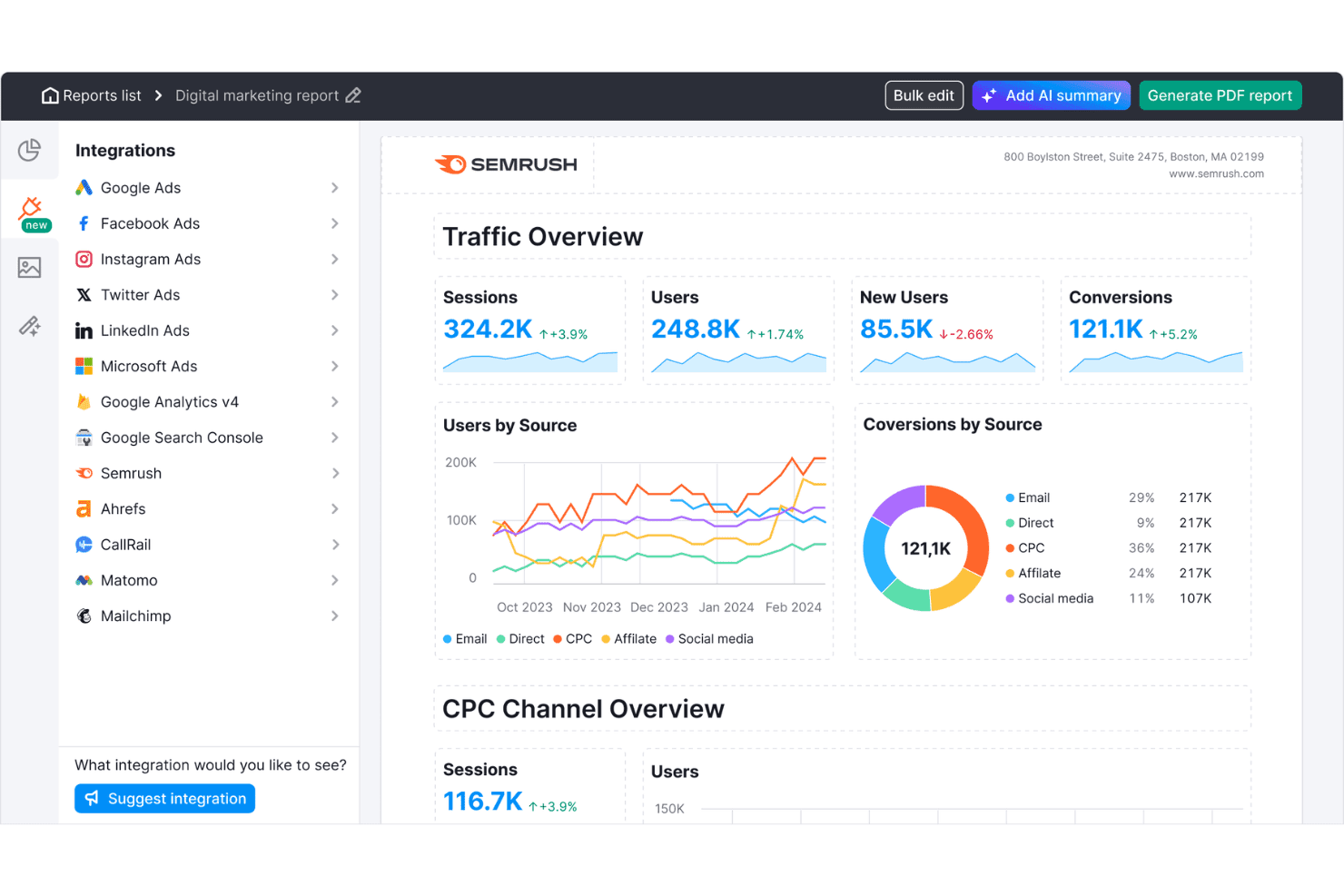
Semrush offers a digital marketing report dashboard with traffic overview, users by source, conversions by source, and CPC channel metrics. Semrush is an online visibility platform that gives agencies keyword research, rank tracking, site auditing, backlink analysis, competitor intelligence, and white-label reporting across dozens of client accounts from a single dashboard.
Who Is Semrush Best For?
Semrush is a strong fit for mid-size to large digital agencies managing SEO campaigns across a high volume of client accounts simultaneously.
Why I Picked Semrush
I picked Semrush as one of the best because its competitive intelligence data is unmatched at agency scale. The Keyword Gap tool lets me stack up to five competitor domains side-by-side to surface keywords they rank for that my clients don't, and the Backlink Gap tool does the same for link-building opportunities. With a 28B keyword database spanning 142 geo databases, I can run this analysis across any client vertical without hitting coverage gaps.
Semrush Key Features
- Site Audit tool: Scans client websites for technical SEO issues, duplicate content, broken links, and crawlability problems.
- Position Tracking: Monitors keyword rankings daily across multiple search engines, locations, and devices for each client project.
- Client Manager dashboard: Organizes all client accounts, projects, and campaign deliverables in one unified workspace with role-based permissions.
- White-label reporting: Generates branded SEO and marketing reports on a scheduled basis for easy client delivery and presentation.
Semrush Integrations
Semrush offers native integrations with Google Analytics, Google Search Console, Google Sheets, Looker Studio, Facebook, Pinterest, LinkedIn, Instagram, YouTube, All in One SEO, monday.com, and Zoho Analytics. An API is available for custom integrations.
Pros and Cons
Pros:
- Site audit with core web vitals checks
- Large geospecific keyword and link databases
- Competitive keyword and backlink gap analysis
Cons:
- Limits on tracked keywords and domains
- White-label reporting requires paid add-on
 Best customizable SEO marketing reports
- 7-day free trial
- From $39/month (billed annually)
Visit WebsiteCustomer Rating:4.4/5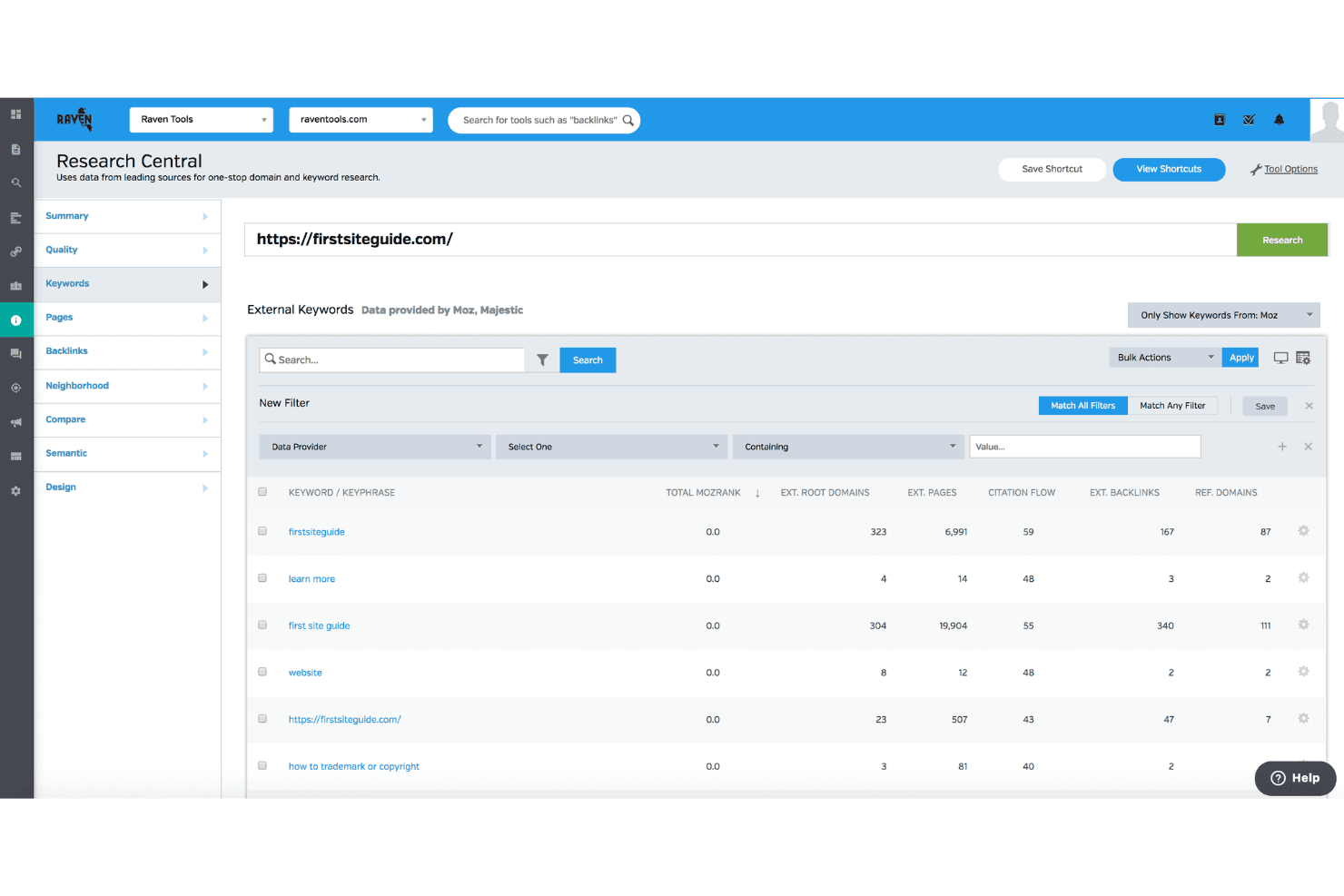
Raven Tools offers a Research Central feature that displays external keyword data including MozRank, citation flow, and backlink metrics for any domain. Raven Tools is an agency-focused SEO platform built around white-label client reporting, with rank tracking across multiple search engines, site auditing, backlink analysis powered by Majestic and Moz, and keyword research.
Who Is Raven Tools Best For?
Raven Tools is a strong fit for small-to-mid-sized digital marketing agencies that manage multiple client accounts and prioritize branded, automated reporting.
Why I Picked Raven Tools
Raven Tools earns its spot on my shortlist because of how far the report builder actually goes. I can pull from 20+ data sources and 30+ prebuilt modules to build a single branded deliverable that includes rank tracking, backlink growth, and Google Analytics data side by side. The custom domain hosting and custom-sender email scheduling mean clients receive reports from my agency's address, not Raven's, which matters when you're managing relationships across a dozen accounts.
Raven Tools Key Features
- Site Auditor: Scans websites for technical SEO issues and generates a site health score with prioritized fixes.
- Multi-engine rank tracking: Tracks keyword positions across Google, Bing, Yahoo, Yandex, and Baidu with support for location targeting.
- Backlink Explorer: Provides access to backlink data through Majestic and Moz integrations without requiring separate subscriptions.
- Task Manager: Lets your team assign, manage, and track SEO-related tasks directly within each client campaign.
Raven Tools Integrations
Raven Tools offers native integrations with Google Analytics, Google Search Console, Google Ads, Bing Webmaster Tools, Facebook Ads, Majestic, Moz, YouTube, LinkedIn, Twitter, MailChimp, Constant Contact, and CallRail. An API is available for custom integrations.
Pros and Cons
Pros:
- Built-in backlink data from Majestic and Moz
- Unlimited automated reports for multiple clients
- Custom white-label reporting with email scheduling
Cons:
- No keyword difficulty scoring in research tools
- Lacks historical keyword difficulty tracking
Learn more about Raven Tools: Best unified search and AI platform tracking
- 14-day free trial
- From $96/month (billed annually)
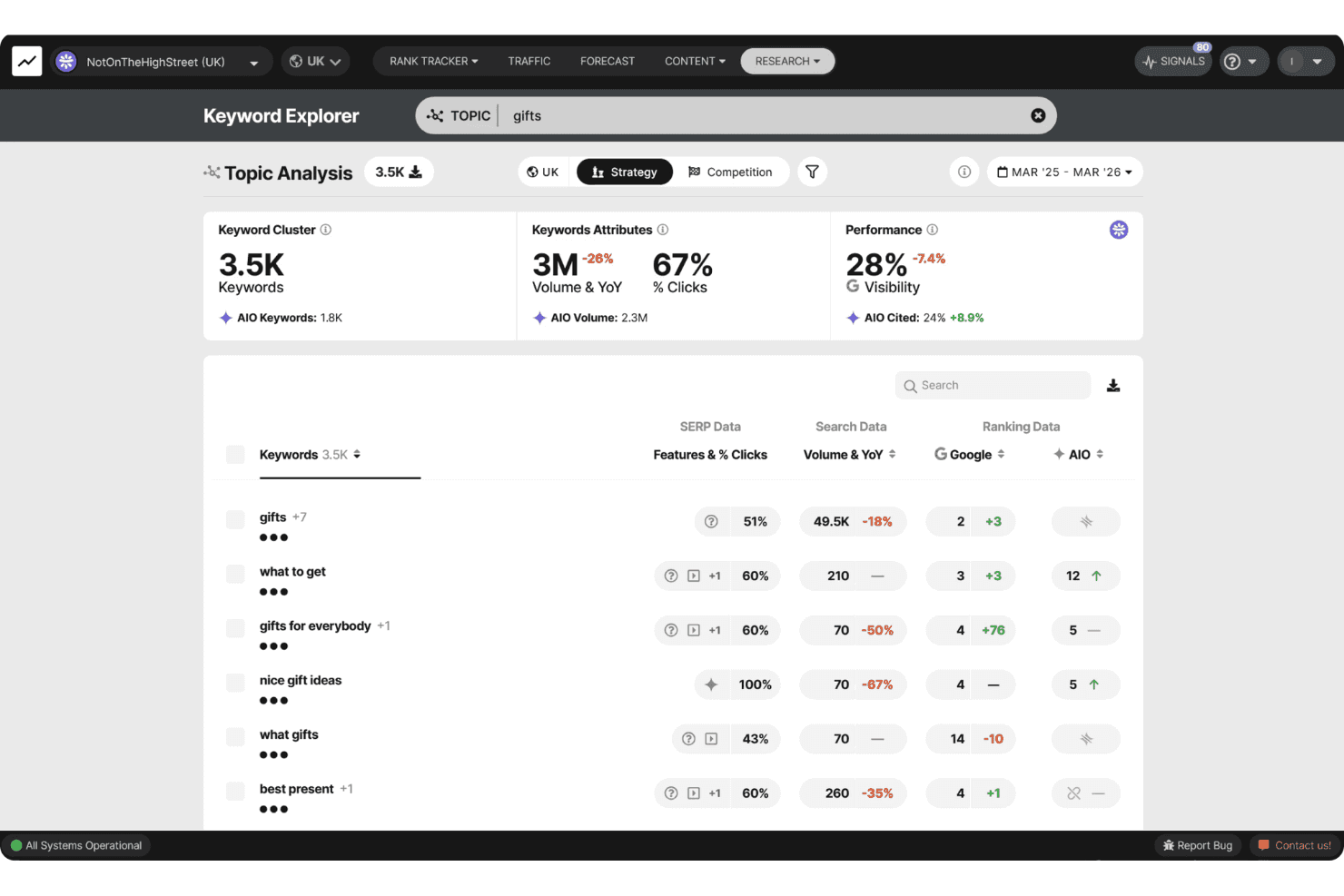
SEOmonitor offers a Keyword Explorer with Topic Analysis, showing keyword clusters, search volume, visibility metrics, and AIO data for the topic 'gifts'. SEOmonitor is an agency-focused SEO platform that combines keyword rank tracking across Google and AI search engines (ChatGPT, Gemini, Perplexity), keyword research, SEO forecasting, and AI content writing in a single workspace.
Who Is SEOmonitor Best For?
SEOmonitor is a strong fit for SEO agencies managing multiple client campaigns who need unified visibility across both traditional Google rankings and AI search platforms.
Why I Picked SEOmonitor
SEOmonitor earns its spot on my shortlist because it's the only platform I've used that tracks Google rankings and AI search visibility (ChatGPT, Gemini, Perplexity) within the same keyword strategy. I rely on the Draft Campaigns feature to build pitch-ready SEO forecasts for prospective clients before paying for a single tracked keyword. The blended Google and AI Overviews CTR model also shows how AI search is shifting click-through rates on the specific keywords my clients care about most.
SEOmonitor Key Features
- Agency dashboard: Monitor portfolio performance and client health tracking from a single unified view.
- AI content writer: Automate content research, planning, briefs, and article creation for client campaigns.
- Keyword vault: Store unlimited keywords with continuous monthly search volume updates for ongoing opportunities.
- Native Looker Studio connector: Create visual, client-ready SEO reports with live data feeds.
SEOmonitor Integrations
SEOmonitor offers native integrations with Google Analytics, Google Search Console, Google Sheets, and Looker Studio. An API is available for custom integrations.
Pros and Cons
Pros:
- Detailed forecasting for multi-client campaigns
- Daily ranking updates for all tracked keywords
- Tracks both Google and AI search rankings
Cons:
- Requires external tools for link tracking
- Focuses mainly on organic search analytics
Learn more about SEOmonitor :
Other SEO Tools for Agencies
Here are some additional SEO tools for agencies options that didn’t make it onto my shortlist, but are still worth checking out:
- 11Screaming FrogBest in-depth site crawling for technical audits
- 12SitebulbBest visual data layouts for technical audits
- 13AccuRankerBest real-time LLM performance tracking
- 14WhatagraphBest scalable cross-channel data foundation
- 15DashThisBest dashboards for multi-channel reporting
- 16SeobilityBest for intuitive optimization guidance
- 17MorningscoreBest gamified task checklists for growth tracking
- 18NightwatchBest AI and search attribution reporting
- 19SEOptimerBest embeddable website audit for lead capture
- 20SEO PowerSuiteBest unlimited keyword and backlink tracking
How I Evaluate SEO Tools for Agencies
I split my evaluation into core functionality every agency platform must cover—like white-label reporting and multi-client workspaces—and the differentiators that separate good from great.
Core Functionality (Table Stakes For This List)
When I'm selecting tools for my list, I rank each one on a scale from 0 (does not offer the functionality) to 5 (excels in this area) for each core functionality listed below. Then, I calculate the tool's total score as a percentage. Each tool needs to achieve a minimum total score of 65% to be considered for inclusion.
- Multi-Client Management: I check whether the platform lets you run separate client workspaces with role-based permissions so account managers only see what they need.
- Rank Tracking: Daily tracking across engines, locations, and devices matters—especially for agencies managing local campaigns in dozens of markets at once.
- Site Auditing: I evaluate crawl depth and issue detection, looking for scheduled recrawls that flag new technical problems before your next client check-in.
- Backlink Analysis: The backlink index needs to surface new and lost links, referring domains, and authority metrics for both client sites and their competitors.
- Keyword Research: I look for search volume, difficulty scores, and SERP data broad enough to support keyword discovery across different client verticals.
- White-Label Reporting: Agencies need branded, automated reports with their own logo, colours, and ideally a custom domain portal clients can log into directly.
Once I have a list of tools that meet the criteria, I consider what sets each platform apart.
Differentiating Factors (What Sets Vendors Apart)
Here's how I compare and contrast different vendors:
Standout Features
Local SEO tracking stands out for agencies with multi-location clients—I look for geo-specific rank monitoring alongside Google Business Profile management. AI content optimization matters when you're producing content across multiple client verticals. Built-in content briefs and SERP analyzers save your team from switching between separate tools. Bulk analysis rounds things out, letting you run batch keyword research or mass crawls across your full client roster.
Beyond Features
Pricing model is the first thing I evaluate—per-project pricing that grows predictably as you add clients beats paying for multiple individual seats. Integration coverage matters just as much. Native connections to Google Search Console, GA4, and Looker Studio are table stakes, but I also check for CRM links to tools like HubSpot or Asana. Data accuracy rounds out the picture; a large backlink index and reliable daily rank updates separate tools you can trust for client deliverables from those you can't.
How to Choose SEO Tools for Agencies
It’s easy to get bogged down in long feature lists and complex pricing structures. To help you stay focused as you work through your unique software selection process, here’s a checklist of factors to keep in mind:
| Factor | What to Consider |
|---|---|
| FactorScalability | What to ConsiderWill the tool accommodate client growth or changes in your agency structure without extra manual effort or billing surprises? |
| FactorIntegrations | What to ConsiderDoes it connect with the analytics, reporting, and workflow platforms your team and clients already use? |
| FactorCustomizability | What to ConsiderCan dashboards, reports, and user roles be fully tailored for each client’s needs, or are you working around vendor-imposed templates? |
| FactorEase of use | What to ConsiderWill both your team and clients quickly get up to speed, or will steep learning curves create friction and extra onboarding work? |
| FactorImplementation and onboarding | What to ConsiderHow long will setup take? Does the vendor offer documentation, live support, or data migration assistance to help you launch cleanly? |
| FactorCost | What to ConsiderBeyond headline pricing, are there add-on fees for client seats, data exports, branded reporting, or higher data limits? |
| FactorSecurity safeguards | What to ConsiderCan you trust the platform with client performance data and sensitive assets? Does it offer access controls, data backups, and clear security standards? |
| FactorSupport availability | What to ConsiderIs live or priority support offered when you’re working on client deliverables under a tight deadline, or do you risk going it alone if an issue crops up? |
What Are SEO Tools for Agencies?
SEO tools for agencies are specialized platforms that let you manage multiple client campaigns, automate rank tracking, and deliver white-label reports at scale. These tools are built for agency workflows, offering multi-client dashboards, user permission controls, and advanced auditing features to help you meet the demands of managing complex SEO programs across diverse industries and client portfolios.
Features
When selecting SEO tools for agencies, keep an eye out for the following key features:
- Multi-client management: Manage separate client projects, control user permissions, and prevent data from mixing between accounts for efficient agency operations.
- White-label reporting: Generate branded, customizable reports and dashboards that reinforce your agency’s identity when presenting results to clients.
- Comprehensive site auditing: Automatically scan client websites for technical SEO errors, on-page issues, and optimization opportunities with detailed, actionable recommendations.
- Keyword research and tracking: Discover high-value keyword opportunities, track rankings across multiple search engines, locations, and devices, and analyze SERP changes.
- Backlink analysis: Monitor backlink profiles, identify new and lost links, evaluate referring domains, and assess competitor linking strategies for comprehensive off-page SEO insights.
- Local SEO tools: Track geo-specific rankings, monitor local listings, and manage Google Business Profiles across multiple client locations for businesses focused on local search visibility.
- Bulk analysis tools: Run batch keyword checks, backlink audits, and site crawls to efficiently handle large volumes of data for multiple clients in a single workflow.
- Role-based access controls: Define roles and permissions for team members and clients, ensuring everyone sees only the data and tools relevant to their responsibilities.
- Report scheduling and automation: Set up automated delivery of recurring performance reports and dashboards to clients, saving time and reducing manual reporting tasks.
- Integrations with marketing platforms: Connect with analytics, advertising, and CRM tools to unify SEO reporting within your agency’s broader marketing operations.
Benefits
Implementing SEO tools for agencies provides several benefits for your team and your business. Here are a few you can look forward to:
- Simplified client management: Dedicated workspaces and user permissions let you easily organize, monitor, and service multiple clients without data overlap or confusion.
- Stronger client retention: Automated, white-label reporting and branded dashboards help you demonstrate ongoing value and strengthen your agency’s professional image.
- Scaled SEO operations: Bulk analysis and workflow automation empower your team to handle large volumes of audits, rank tracking, and research across diverse client portfolios.
- Improved campaign performance: Comprehensive site audits, keyword tracking, and backlink analysis provide actionable insights to optimize each client’s strategies and deliver measurable results.
- Faster reporting cycles: Automated report scheduling eliminates manual data pulls and delivers frequent, accurate updates to clients with minimal effort.
- Greater collaboration and transparency: Role-based access controls and shareable dashboards promote trust, allow for clear communication, and keep everyone aligned on campaign progress.
- Better tech stack alignment: Integrations with analytics, CRM, and marketing platforms unify your agency’s SEO work within broader client reporting and workflows.
Costs & Pricing
Selecting SEO tools for agencies requires an understanding of the various pricing models and plans available. Costs vary based on features, team size, add-ons, and more. The table below summarizes common plans, their average prices, and typical features included in SEO tools for agencies solutions:
Plan Comparison Table for SEO Tools for Agencies
| Plan Type | Average Price | Common Features |
|---|---|---|
| Plan TypeFree Plan | Average Price$0 | Common FeaturesLimited keyword tracking, basic audits, minimal reporting, and single-user access. |
| Plan TypePersonal Plan | Average Price$25-$75/user/month | Common FeaturesExpanded rank tracking, keyword research, standard site audits, report exports, and email support. |
| Plan TypeBusiness Plan | Average Price$100-$300/month | Common FeaturesMulti-client workspaces, white-label reporting, bulk analysis, API access, integrations, and team controls. |
| Plan TypeEnterprise Plan | Average Price$500+/month | Common FeaturesUnlimited client management, advanced automation, custom SLAs, dedicated onboarding, and premium support. |
SEO Tools for Agencies FAQs
Here are some answers to common questions about SEO tools for agencies:
How do SEO tools for agencies help manage multiple clients?
They let you create separate workspaces, set role-based permissions, and organize campaigns so you can manage dozens of client accounts securely and efficiently from a single platform. Built-in SEO features make it easier for SEO professionals to balance daily SEO tasks—from tracking a sitemap to executing on-page SEO—without losing track of individual account goals or long-term SEO strategy benchmarks.
Can SEO tools for agencies automate client reporting?
Yes, most offer automated, white-label reporting that schedules updates to clients, includes your agency branding, and reduces manual data pulls each month. This helps prove the value of your SEO efforts, showing clients exactly how AI-driven insights and strategic content creation contribute to earning top-ranking positions on search engines. You can even build an interactive dashboard for clear SEO reporting.
What integrations should I look for with agency-focused SEO tools?
Look for direct connections to analytics platforms like Google Analytics 4 and Google Search Console (GSC), as well as integrations with project management and CRM tools used in your agency’s workflow. If you handle comprehensive content marketing or run paid campaigns, look for tools that connect with your ppc dashboards, social media trackers, and outreach software to keep all your data in one place.
Are there security risks with sharing sensitive client data in these platforms?
No, reputable vendors offer access controls, data segregation, and encryption to keep sensitive information safe. Whether your clients are small businesses or enterprise brands, these protections allow both beginners and advanced technical teams to safely collaborate on backend configurations like schema markup without exposing sensitive corporate data or risking the integrity of their live SEO software setups.
How should agencies compare pricing across SEO platforms?
Compare total costs based on the number of clients, tracked keywords, crawl credits, and user seats—don’t just look at base plan pricing, as overage charges and add-ons can add up quickly. Make sure the subscription includes the specific tools you need for high-quality SEO content production so you aren’t forced to buy separate software later.