

An AI writing assistant is a software tool that uses artificial intelligence to help you overcome writer’s block, draft, edit, and optimize written content faster. If you’re searching for the best AI writing assistant, you’re probably looking to produce higher-quality copy, save time on repetitive tasks, and keep your messaging sharp—whether you’re writing blog articles, emails, or campaign copy.
In this list, I’ll help you zero in on the right tools for your workflow in 2026, unpack what sets each one apart, and share why experienced marketers trust these assistants to get better results.
Why Trust Our Software Recommendations
6,700+
Reviews
20
Industry experts
16+
Evaluation factors
14
Years
Our team has been testing and reviewing software since 2012. As marketing leaders ourselves, we know how difficult—and important—it is to choose the right software.
For this guide, we evaluated tools using hands-on testing and independent research, scoring tools using our selection criteria.
Our reviews reflect our human editorial judgment, not a sales pitch.
Expert reviewers:
 Gui DrusinaCreative Director
- Shriya GhateSenior Marketing Lead
 Amanda JacquesMarketing Ops Leader

AI Writing Assistant Comparison Table
This comparison table summarizes pricing details for my top AI writing assistant selections:
| Tool | Best For | Trial Info | Price | ||
|---|---|---|---|---|---|
| 1 | Best for end-to-end content workflows | Free trial + free demo available | From $59/month (billed annually) | Website | |
| 2 | Best for flexible prompting versatility | Free plan available | From $8/month | Website | |
| 3 | Best for long-form content reasoning | Free plan available | From $20/month | Website | |
| 4 | Best for enterprise-grade compliance controls | Free trial + free demo available | Pricing upon request | Website | |
| 5 | Best for optimizing content with SERP analysis | Free trial + free demo available | From $49/month (billed annually) | Website | |
| 6 | Best for SEO-driven content creation | Free trial + free demo available | From $79/month (billed annually) | Website | |
| 7 | Best for predictive copy performance insights | Free trial + free demo available | From $39/month (billed annually) | Website | |
| 8 | Best for maintaining consistent brand voice | 7-day free trial available | From $59/month (billed annually) | Website | |
| 9 | Best for campaign ideation workflows | Free trial available | From $29/month | Website | |
| 10 | Best for fast short-form copy drafts | Free plan available | From $7.50/month | Website |


Best AI Writing Assistant Reviews
Below are my detailed summaries of the best AI writing assistants that made it onto my shortlist. My reviews offer a detailed look at the features, capabilities, and best use cases of each platform to help you find the best one for you.
 Best for end-to-end content workflows
- Free trial + free demo available
- From $59/month (billed annually)
Visit WebsiteCustomer Rating:4.8/5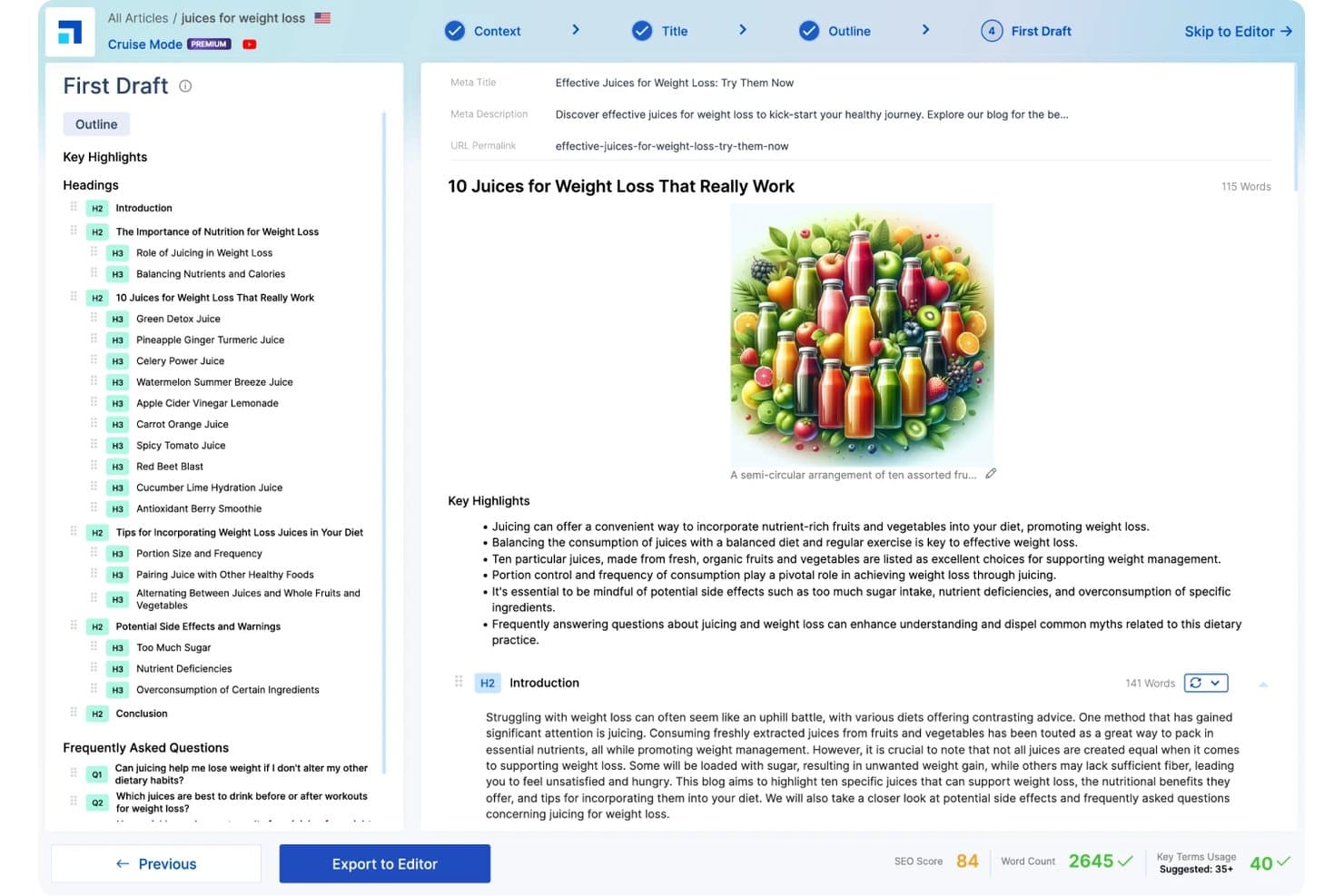
Scalenut generates AI-powered first drafts with SEO scoring, structured outlines, and automated content writing. Scalenut is an AI writing assistant that combines long-form content generation, keyword clustering, SERP analysis, and SEO optimization into a single content workflow platform.
Who Is Scalenut Best For?
Scalenut is a strong fit for SEO content strategists and content marketing managers at small businesses who publish blog-driven content regularly.
Why I Picked Scalenut
Scalenut earns its spot because it genuinely covers the whole content workflow in one place. I use Cruise Mode to go from a target keyword to a structured, SERP-informed draft in minutes, with NLP keyword terms already mapped into the outline. From there, the GEO-Content Optimizer scores the piece against competing pages and flags specific on-page gaps to resolve before publishing.
Scalenut Key Features
- Brand tone customization: Adjustable brand voice and style controls to match your company's writing guidelines.
- SERP analyzer: Analyze top-ranking pages for any keyword to guide topic selection and content structure.
- Content optimizer: Real-time SEO scoring and NLP keyword integration while drafting or revising.
- Internal linking automation: Identify and suggest internal links to improve site structure and topic authority.
Scalenut Integrations
Scalenut offers native integrations with Semrush, Copyscape, Shopify, and WordPress, and provides an API for custom integrations.
Pros and Cons
Pros:
- SERP-based content scoring before publishing
- Built-in NLP keyword suggestions during writing
- Cruise Mode drafts SEO briefs quickly
Cons:
- Weak short-form copy template variety
- AI drafts often need significant human editing
Learn more about Scalenut: Best for flexible prompting versatility
- Free plan available
- From $8/month
Visit WebsiteCustomer Rating:4.4/5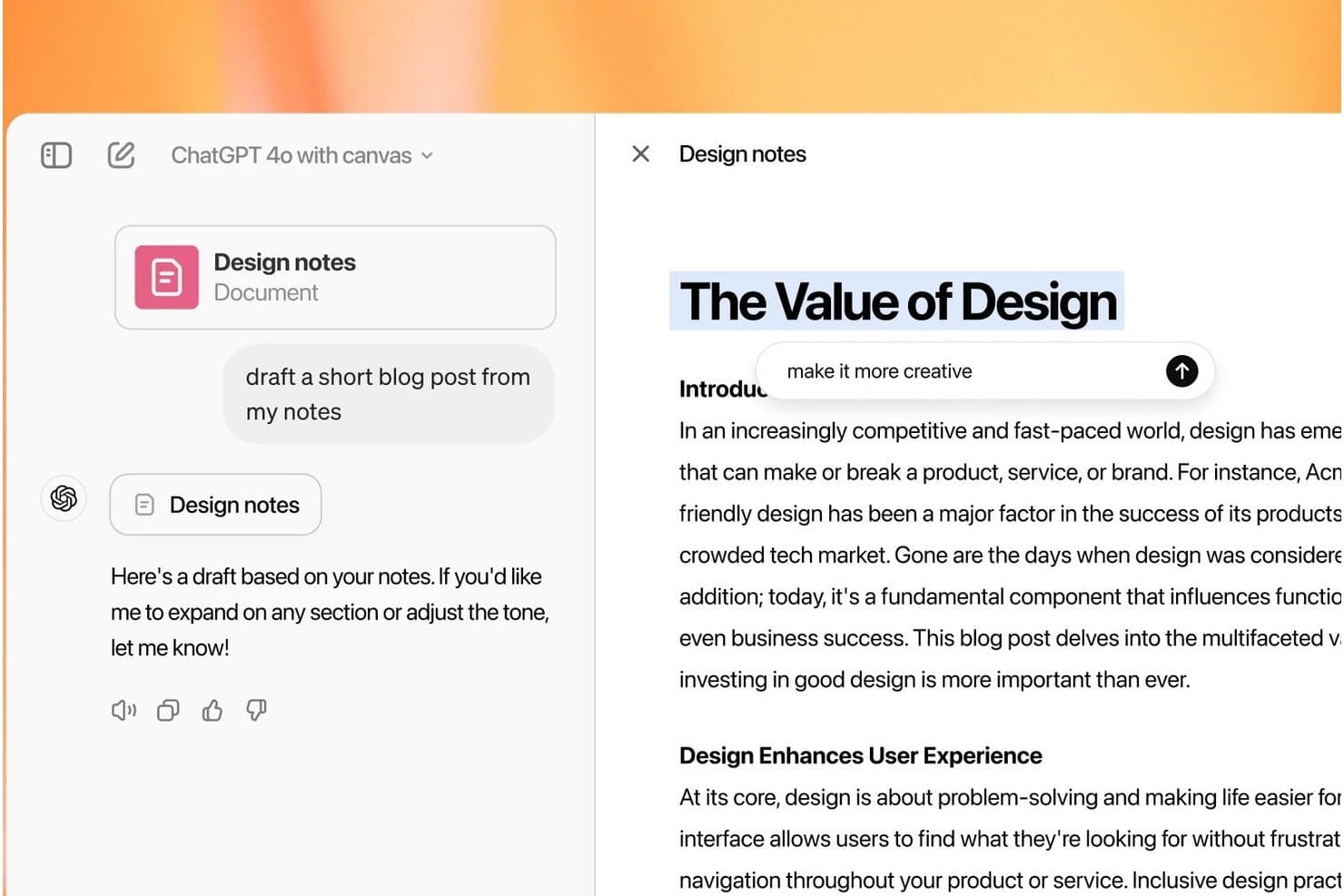
ChatGPT offers a canvas editing interface that lets users draft and refine blog posts directly from uploaded notes with inline editing prompts. ChatGPT is a conversational AI writing assistant from OpenAI that generates, edits, rewrites, and repurposes content across formats using a prompt-based interface backed by multiple large language models.
Who Is ChatGPT Best For?
ChatGPT is a strong fit for content marketers and copywriters who work across multiple formats and channels and prefer open-ended, prompt-driven workflows over rigid templates.
Why I Picked ChatGPT
I picked ChatGPT as one of the best because no other tool lets me shift writing modes as freely mid-session. I can draft a punchy product ad, then immediately ask it to expand the same idea into a 1,500-word blog post without starting a new conversation. Custom GPTs let me encode brand voice rules once and apply them automatically, cutting out the need to re-explain context every time I start a new task.
ChatGPT Key Features
- Multi-model access: Switch between GPT-5.5, GPT-5.6, and other variants in one interface for different writing needs.
- Custom GPTs: Build specialized GPTs tailored to your specific brand, tone, or workflow requirements.
- Document ingestion: Upload files and ChatGPT will extract, analyze, or rewrite content directly from the original documents.
- Projects workspace: Organize drafts, sources, and writing assets into centralized project folders for easy collaboration and retrieval.
ChatGPT Integrations
ChatGPT offers native integrations with Clay, Slack, Figma, Airtable, Salesforce, Atlassian Rovo, and more. An API is available for custom integrations.
Pros and Cons
Pros:
- Real-time web search grounds content in facts
- Adapts tone and style across any format
- Handles long-form and short-form equally well
Cons:
- Outputs require heavy editing for brand consistency
- No built-in SEO scoring or keyword tools
Learn more about ChatGPT: Best for long-form content reasoning
- Free plan available
- From $20/month
Visit WebsiteCustomer Rating:4.4/5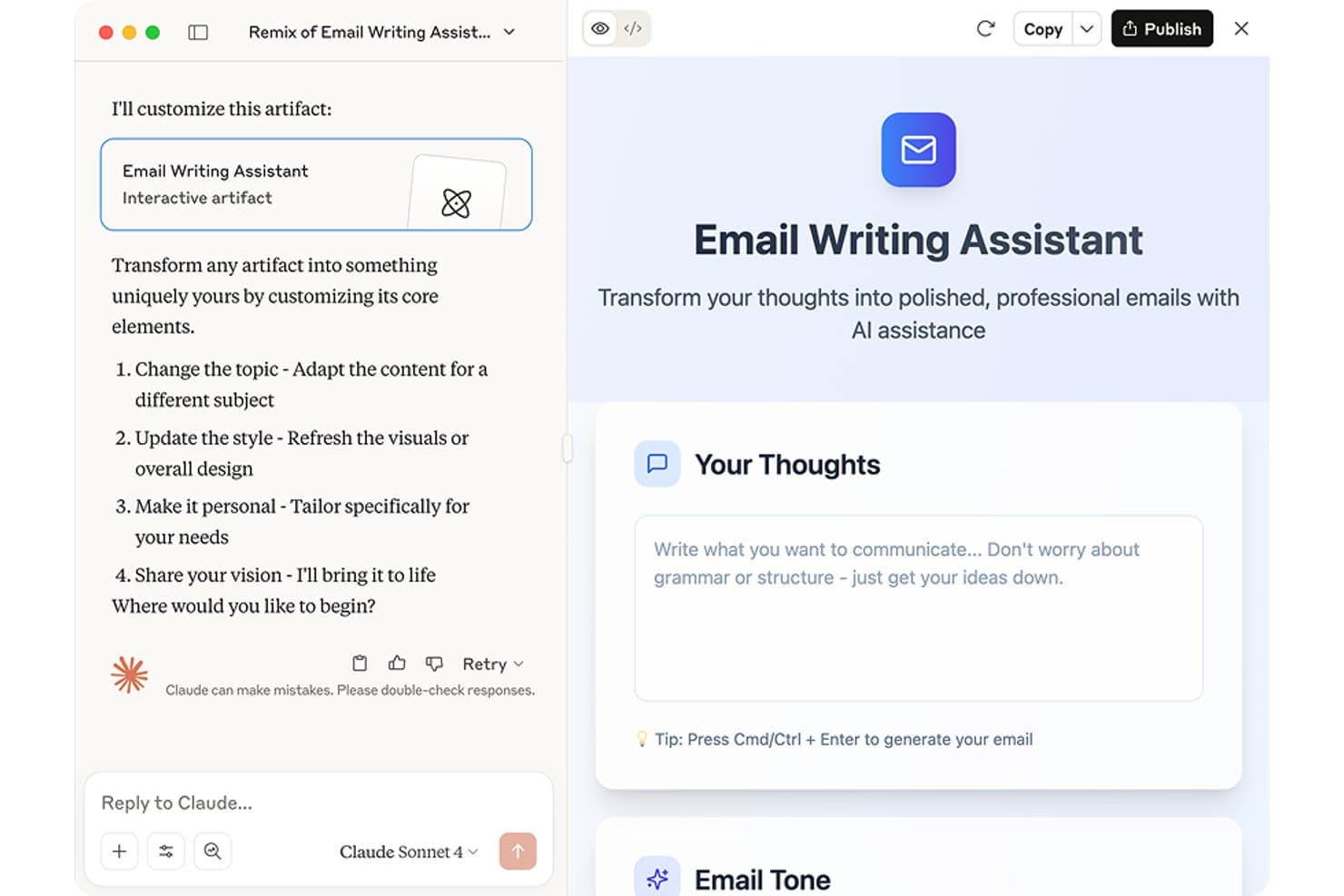
Claude offers an Email Writing Assistant artifact that transforms rough thoughts into polished, professional emails with AI assistance. Claude is an AI assistant built by Anthropic that generates, edits, rewrites, and summarizes written content across long-form documents, research tasks, and conversational formats using advanced large language models.
Who Is Claude Best For?
Claude is a strong fit for content marketers and writers who regularly work with long documents, research-heavy briefs, or complex multi-step writing tasks.
Why I Picked Claude
Claude earns its spot on my shortlist because of how well it handles long, complex writing tasks without losing coherence. Its 200,000-token context window means I can feed it an entire research report and get a structured, on-point draft in return. I also use its extended thinking mode when a piece needs multi-step reasoning worked through before a single word of copy appears.
Claude Key Features
- Claude Cowork mode: Lets you assign complex, multi-step writing tasks and have them completed autonomously in a separate workspace.
- File upload for document grounding: Allows direct upload of source files so AI can reference and summarize entire documents during writing.
- Memory across conversations: Retains key details from previous chats, letting you build on past work for ongoing projects without re-explaining context.
- Desktop and mobile app support: Offers full-featured writing assistance on web, desktop, and mobile for flexible use across devices.
Claude Integrations
Native integrations are not publicly listed. An API is available for custom integrations.
Pros and Cons
Pros:
- Holds context across very long documents
- Follows nuanced tone instructions with high accuracy
- Exceptional reasoning through multi-step writing tasks
Cons:
- Responses can be verbose without tight prompting
- No dedicated marketing templates or prompt library
Learn more about Claude: Best for enterprise-grade compliance controls
- Free trial + free demo available
- Pricing upon request
Visit WebsiteCustomer Rating:4.4/5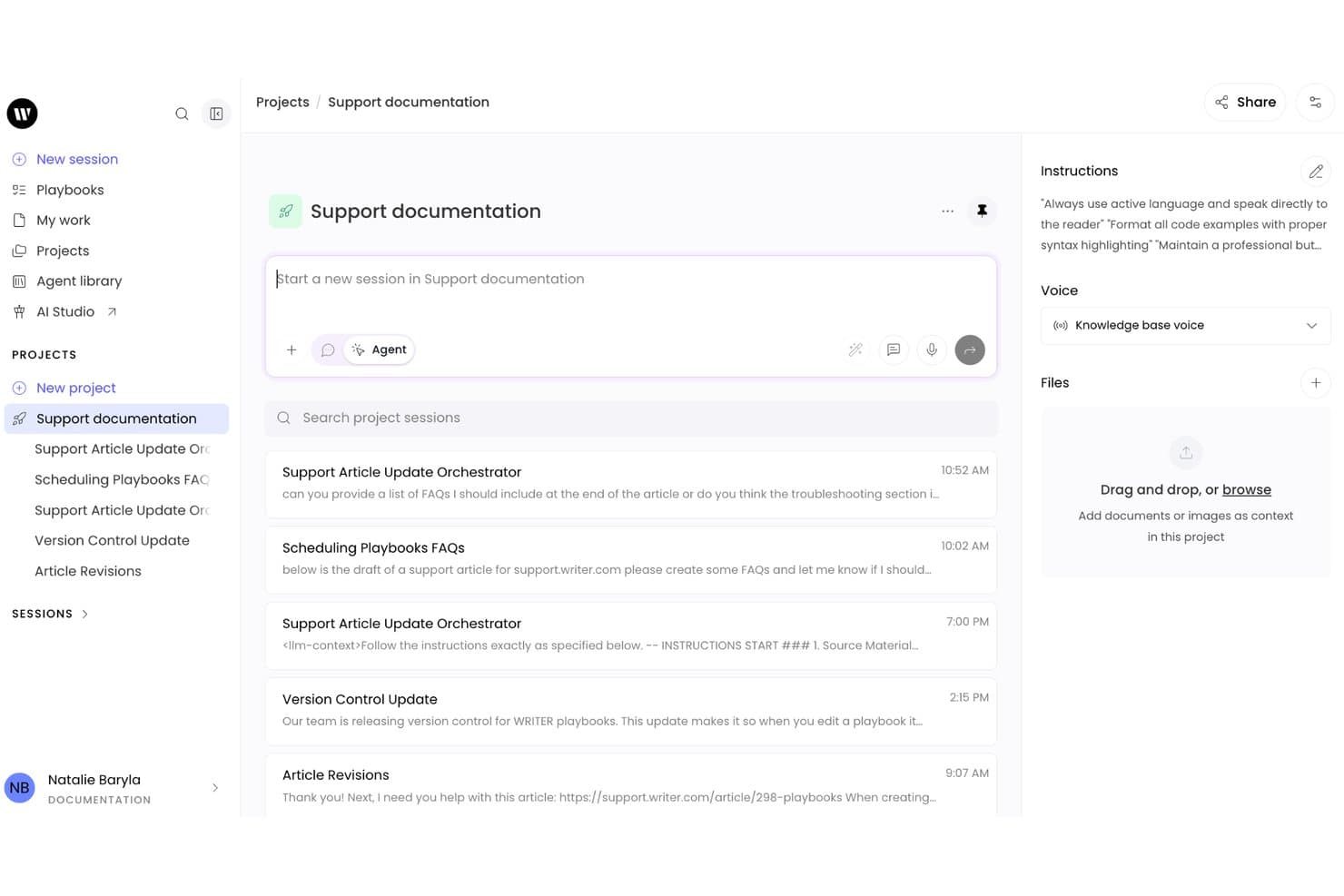
Writer combines a project-based workspace with AI writing sessions, custom instructions, and support documentation workflows for collaborative content creation. Writer is an enterprise AI writing platform built on proprietary Palmyra LLMs that combines generative content creation, brand voice enforcement, compliance controls, and autonomous agent workflows for large organizations.
Who Is Writer Best For?
Writer is a strong fit for content marketing managers and marketing operations teams at large enterprises in regulated industries like finance, healthcare, and legal.
Why I Picked Writer
Writer earns its spot as one of the best on my shortlist because no other AI writing tool gives you this level of governance over generated content. I particularly like that guardrails are set centrally and enforced across every output, so individual users can't bypass compliance rules even accidentally. The proprietary Palmyra LLMs also mean your prompts and content stay off third-party APIs entirely, which matters when you're operating under HIPAA or GDPR requirements.
Writer Key Features
- Playbooks: Build repeatable, team-wide workflows for content creation and approval.
- Skills: Apply specialized tasks like SEC filing parsing or compliance checking as reusable modules.
- Knowledge Graph: Integrate and ground AI outputs in company-specific data sources for accurate content.
- Presentations: Generate fully branded, on-brand slide decks directly from your prompts and data.
Writer Integrations
Writer offers native connectors with Asana, Atlassian, Gong, HubSpot, Semrush, Snowflake, Webflow, Databricks, and more. An API is available for custom integrations.
Pros and Cons
Pros:
- Keeps prompts off third-party model APIs
- Trains AI on your own brand content
- Centrally enforced brand voice across all outputs
Cons:
- Agent workflows require significant technical configuration
- Not designed for solo content creators
Learn more about Writer: Best for optimizing content with SERP analysis
- Free trial + free demo available
- From $49/month (billed annually)
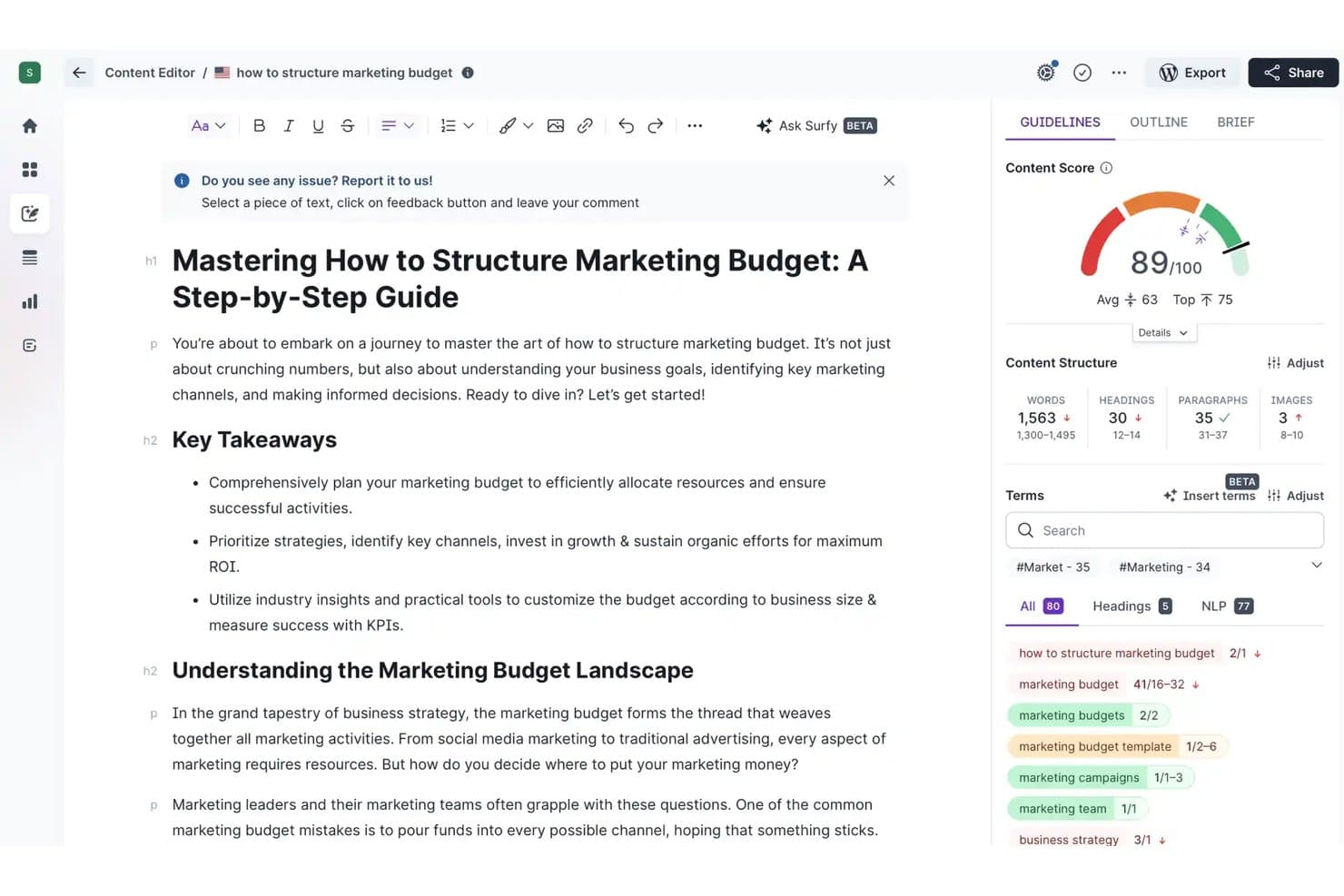
Surfer SEO includes a Content Editor with an AI-powered writing assistant, real-time content scoring, and SEO term recommendations. Surfer SEO is an AI-powered content optimization platform that combines a real-time content editor, SERP-based SEO scoring, an AI writing assistant (Surfy), and automated internal linking to help you create and refine long-form content.
Who Is Surfer SEO Best For?
Surfer SEO suits SEO content strategists and content marketing teams who publish long-form articles and need data-driven guidance to rank in organic search.
Why I Picked Surfer SEO
Surfer SEO earns its spot on my shortlist because no other AI writing tool ties content generation this directly to live SERP data. I use the Content Score, which analyzes 500+ ranking factors in real time, to see exactly where a draft falls short before publishing. The Auto-Optimize feature then fills those gaps by inserting relevant terms and missing sections without breaking the article's tone. That feedback loop, from writing to scoring to fixing, is what I keep coming back to.
Surfer SEO Key Features
- Surfy in-editor AI assistant: Offers real-time editing, rephrasing, and content refinement inside the content editor with simple slash commands.
- Humanizer module: Detects and removes AI-generated text patterns for more natural language output in finished drafts.
- Outline builder: Creates article structures and compiles key questions and headings based on competitor content.
- Auto internal linking: Scans your site and inserts relevant internal links in drafts based on optimal anchor opportunities.
Surfer SEO Integrations
Surfer SEO offers native integrations with Jasper, Contentful, ChatGPT, WordPress, Google Docs, and Zapier. An API is available for custom integrations.
Pros and Cons
Pros:
- Humanizer reduces AI detection risk
- Surfy AI writes directly inside the editor
- Real-time SERP-based content scoring
Cons:
- Credit limits restrict high-volume content output
- AI writing quality trails dedicated tools
Learn more about Surfer SEO: Best for SEO-driven content creation
- Free trial + free demo available
- From $79/month (billed annually)
Visit WebsiteCustomer Rating:4.8/5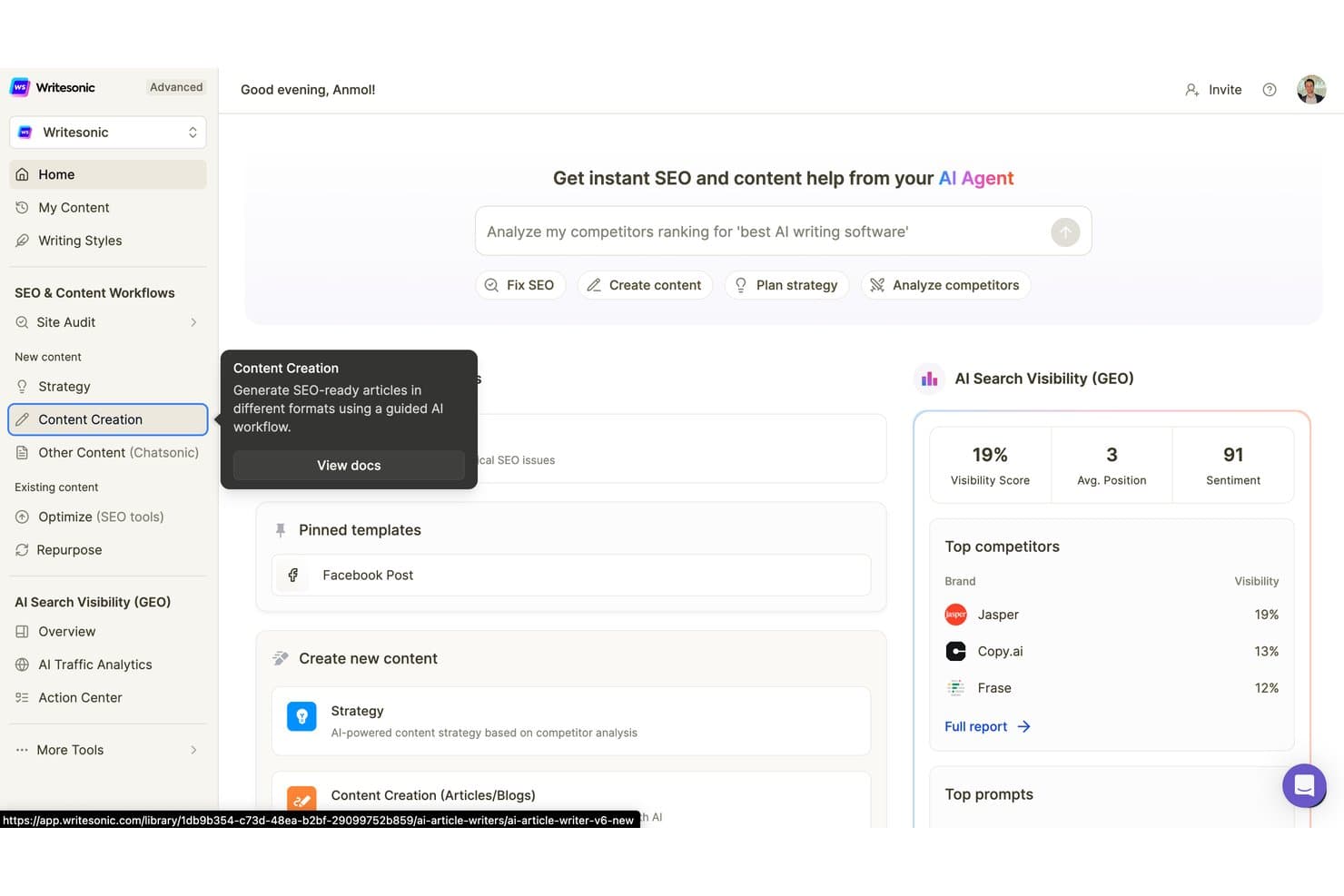
Writesonic supports AI-powered SEO and content creation through tools for site audits, content strategy, competitor analysis, and AI search visibility scoring. Writesonic is an AI writing platform built around an agentic content pipeline that lets you generate content, access multiple models (GPT-4, Claude, Gemini), and utilize brand voice controls and native SEO and GEO optimization tools.
Who Is Writesonic Best For?
Writesonic is a strong fit for SEO content strategists and content marketing teams at agencies or growing businesses publishing at scale.
Why I Picked Writesonic
Writesonic earns its spot on my shortlist because of how deeply SEO is baked into the article generation pipeline itself. Ahrefs data, Google Keyword Planner, and live SERP analysis all feed directly into the article outline and structure, so I'm not toggling between separate tools. What I find genuinely useful is the dual-rank optimization: the pipeline targets both Google's E-E-A-T signals and AI search engines like ChatGPT and Perplexity simultaneously.
Writesonic Key Features
- Template library: Over 80 prebuilt templates for blogs, ads, emails, landing pages, and social posts.
- Multi-language support: Generate and translate content across 25+ languages with localization controls.
- Brand voice profiles: Store and apply custom tone and writing style guides to maintain consistency in every draft.
- API access: Open API for integrating Writesonic’s writing and SEO tools into your existing CMS or content workflow.
Writesonic Integrations
Writesonic offers native integrations with WordPress, Contentful, Fastly, Codex, Ahrefs, Akamai, Drupal, Cloudflare, and more. An API is available for custom integrations.
Pros and Cons
Pros:
- Multi-model access within a single subscription
- 80+ templates across major marketing formats
- Built-in GEO optimization for AI search
Cons:
- Credit limits restrict high-volume content teams
- Long-form outputs often need editorial revision
Learn more about Writesonic: Best for predictive copy performance insights
- Free trial + free demo available
- From $39/month (billed annually)
Visit WebsiteCustomer Rating:4.8/5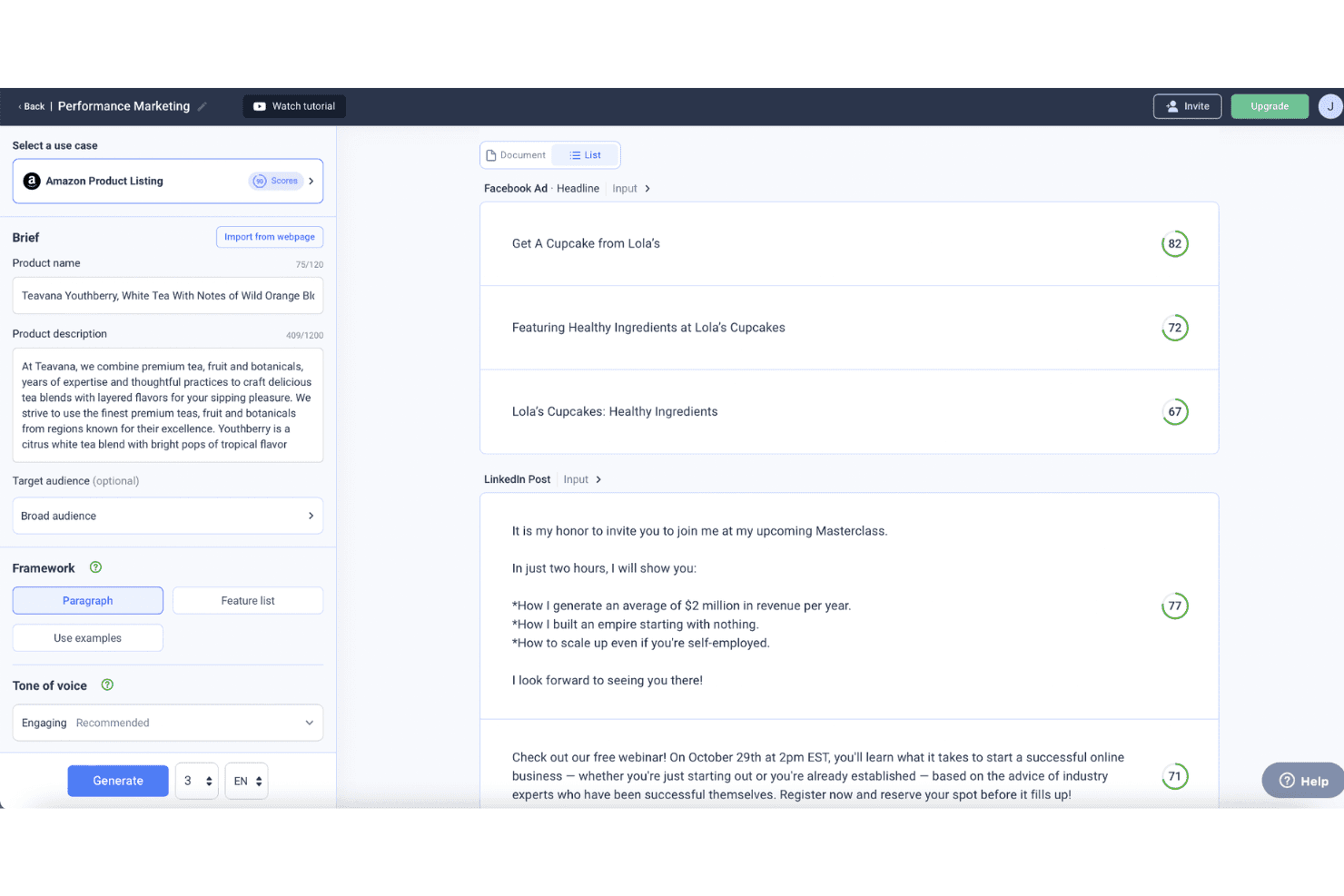
Anyword lets users compare generated ad copy for Facebook Ads and LinkedIn Posts with predictive performance scores and a brief input panel. Anyword is a Gen-AI content platform for marketing teams that combines short and long-form copy generation, brand voice controls, and predictive performance scoring across ads, emails, social posts, and landing pages.
Who Is Anyword Best For?
Anyword is a strong fit for mid-market and enterprise marketing teams that run paid campaigns and need data-backed copy decisions across multiple channels.
Why I Picked Anyword
Anyword earns its spot on my shortlist because no other AI writing tool I've used forecasts copy performance before you publish it. The Predictive Performance Score benchmarks your drafts against a dataset of tens of thousands of real-world A/B-tested ads, so I can pick the highest-scoring variation with actual data behind it, not gut feel. I also use the Content Intelligence feature to audit existing pages and surface specific copy changes that are likely to lift conversion.
Anyword Key Features
- Short form editor: Create on-brand ads, emails, and social posts using AI-powered suggestions and templates.
- Long form editor: Generate and optimize blog posts and landing page drafts with built-in content improvement tools.
- Brand voice compliance: Centralize messaging guidelines, tones, audiences, and approved copy for consistent output.
- Chrome extension: Access AI writing and performance scoring directly in your browser across ad and content platforms.
Anyword Integrations
Anyword offers native integrations with Sprinklr, Salesforce, Wrike, Gong, Oktopost, Drupal, HubSpot, Outreach, and more, and provides an API for custom integrations.
Pros and Cons
Pros:
- Data-backed copy decisions before publishing
- Brand voice applied consistently across channels
- Predictive performance scoring across copy variants
Cons:
- Template variety lags behind rival tools
- Long-form content quality trails some competitors
Learn more about Anyword: Best for maintaining consistent brand voice
- 7-day free trial available
- From $59/month (billed annually)
Visit WebsiteCustomer Rating:4.7/5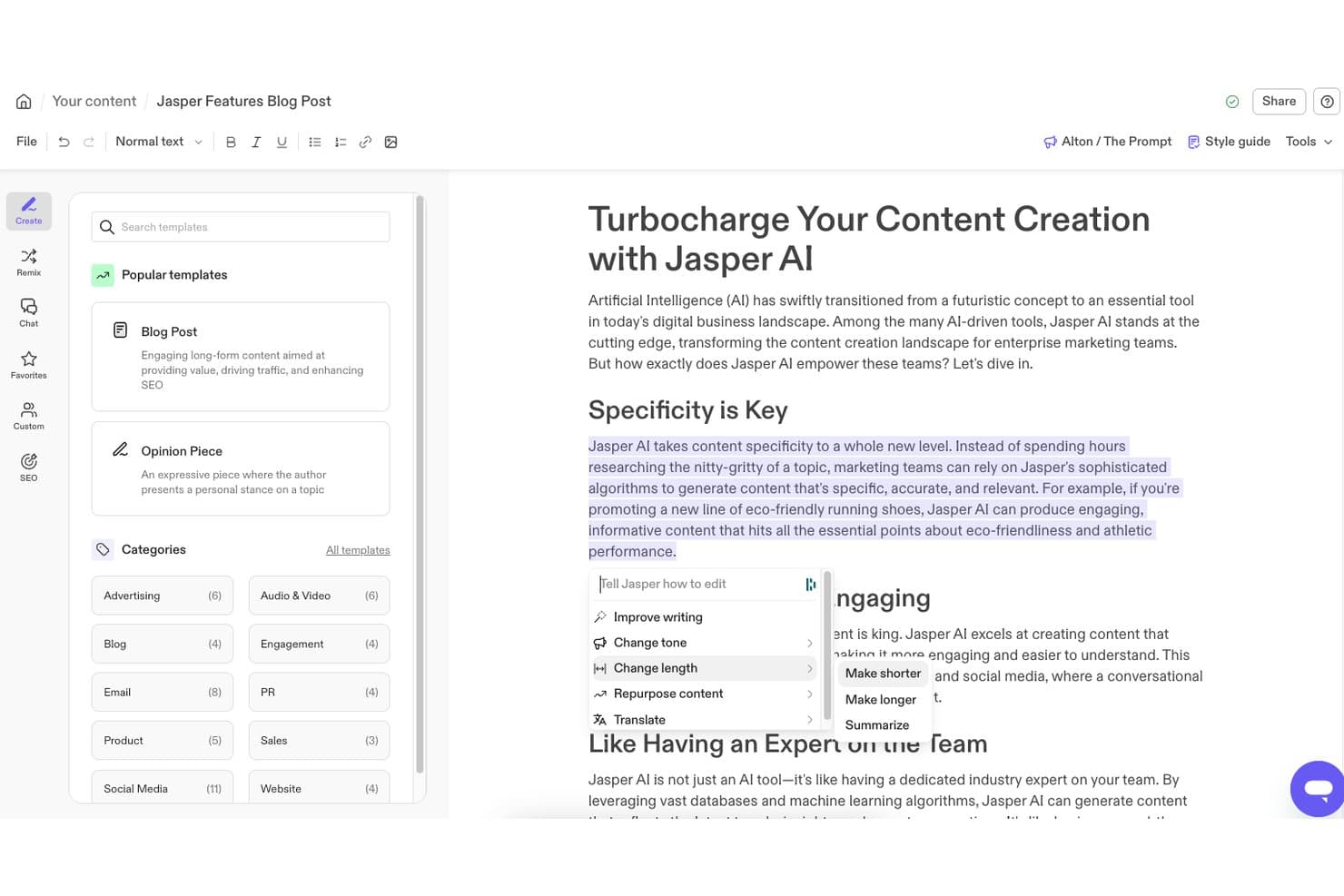
Jasper lets users access an inline AI editing toolbar with options like Improve Writing, Change Tone, Change Length, and Translate directly within the document editor. Jasper is an AI writing platform built for marketing teams, offering content generation, brand voice configuration, campaign templates, multi-channel copy tools, and an agentic layer for automating end-to-end content workflows.
Who Is Jasper Best For?
Jasper is a strong fit for mid-market and enterprise marketing teams that produce high volumes of content across multiple brands, channels, or regions.
Why I Picked Jasper
Jasper earns its spot as one of the best on my shortlist because of Brand IQ, its dedicated brand compliance layer. I love that I can train multiple saved brand voices from real content samples, then have them applied automatically across every output. The Style Guide enforcement is especially useful: Jasper flags brand violations mid-draft and suggests on-brand replacements, so my team isn't manually auditing every asset for consistency.
Jasper Key Features
- Grid for high-volume content creation: Generate and manage large batches of marketing copy or creative writing assets for campaigns or multi-channel publishing.
- Canvas collaborative editor: Work with team members in real time to draft, edit, and organize marketing content.
- Jasper Agents: Use AI-powered agents for tasks like optimization, translation, or research directly inside your workspace.
- Native integration ecosystem: Connect Jasper to tools like Google Docs, WordPress, Semrush, Slack, and Salesforce for seamless content workflows.
Jasper Integrations
Jasper offers native integrations with Asana, WordPress, Semrush, HubSpot, Salesforce, Adobe Express, Make, Slack, and more. It also connects with Zapier, and an API is available for custom integrations.
Pros and Cons
Pros:
- Access to multiple LLMs within one interface
- 50+ templates for major marketing formats
- Brand IQ enforces voice across team outputs
Cons:
- Long-form drafts can drift off-topic
- Outputs frequently need fact-checking before publishing
Learn more about Jasper: Best for campaign ideation workflows
- Free trial available
- From $29/month
Visit WebsiteCustomer Rating:4.4/5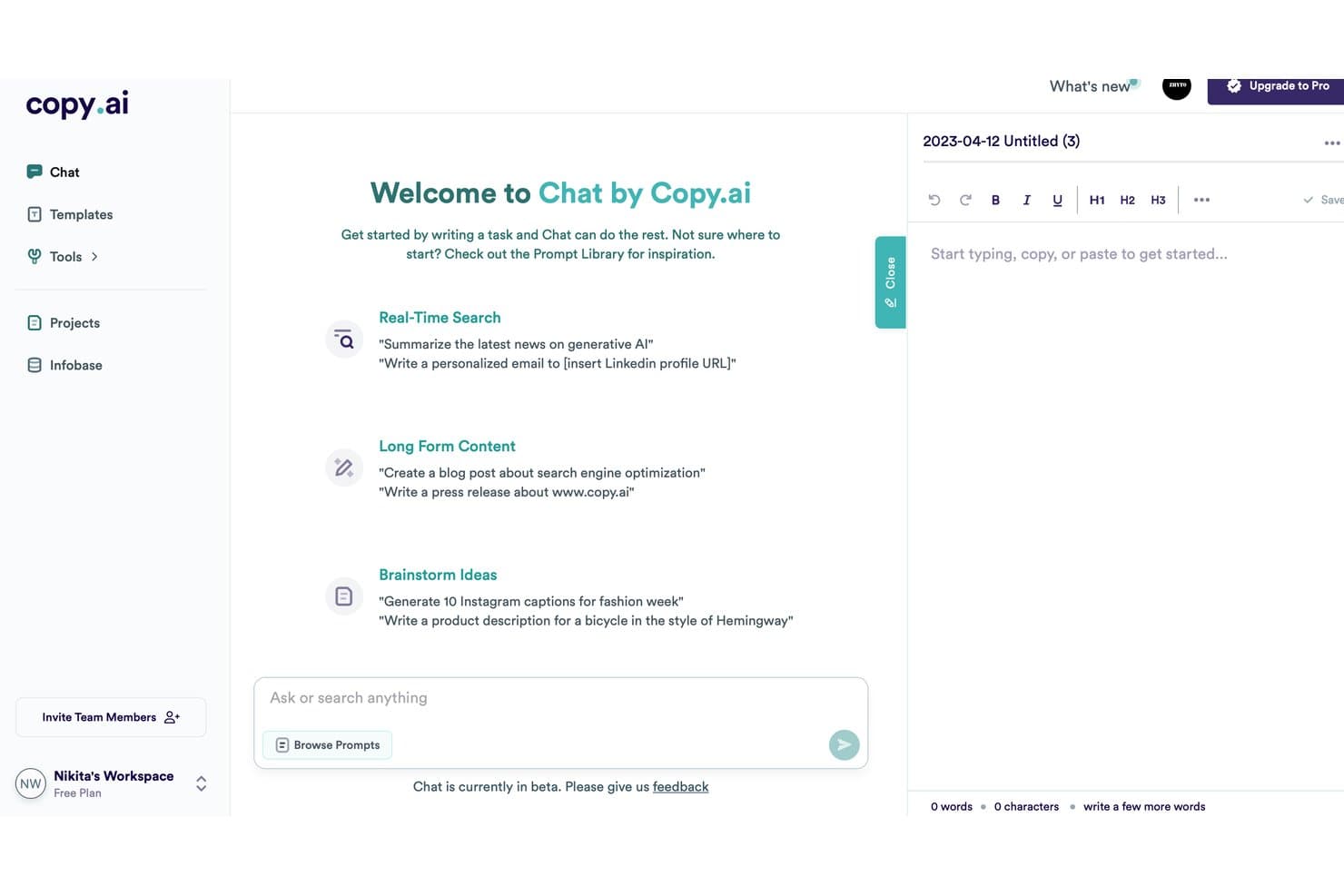
Copy.ai uses a chat-based interface for real-time search, long-form content creation, and brainstorming ideas. Copy.ai is an AI writing platform built around brand voice training, multi-model generation (GPT-4, Claude, Gemini), and automated workflows that produce campaign copy across email, social, ads, and blog formats at scale.
Who Is Copy.ai Best For?
Copy.ai is a strong fit for B2B marketing teams that manage high-volume content production across multiple channels and need brand voice consistency at scale.
Why I Picked Copy.ai
I picked Copy.ai as one of the best because its Workflow Builder genuinely changes how I approach campaign planning. I can chain together brand voice settings, research steps, and multi-format drafts in a single automated run, so one campaign brief can produce ad copy, email sequences, and social captions simultaneously. The Brand Voice feature, trained directly on my existing content, keeps every output consistent without manual editing between formats.
Copy.ai Key Features
- Multi-model generation: Switch between GPT-4, Claude, and Gemini for each writing task without leaving the platform.
- Infobase contextual grounding: Centralize company details, product specs, and competitor insights for AI to use in outputs.
- Prebuilt copy templates: Access over 90 templates for blog posts, social captions, ad copy, product descriptions, and more.
- Zapier and CRM integration: Connect with Salesforce, HubSpot, and 2,000+ other platforms to automate content workflows.
Copy.ai Integrations
Copy.ai offers native integrations with Notion, Google Docs, and Coda. It also connects with Zapier and provides an API for custom integrations.
Pros and Cons
Pros:
- 90+ templates span major marketing formats
- Infobase grounds outputs in company-specific context
- Workflow builder chains multi-step campaigns automatically
Cons:
- Workflow setup requires significant upfront configuration
- Long-form content quality can feel generic

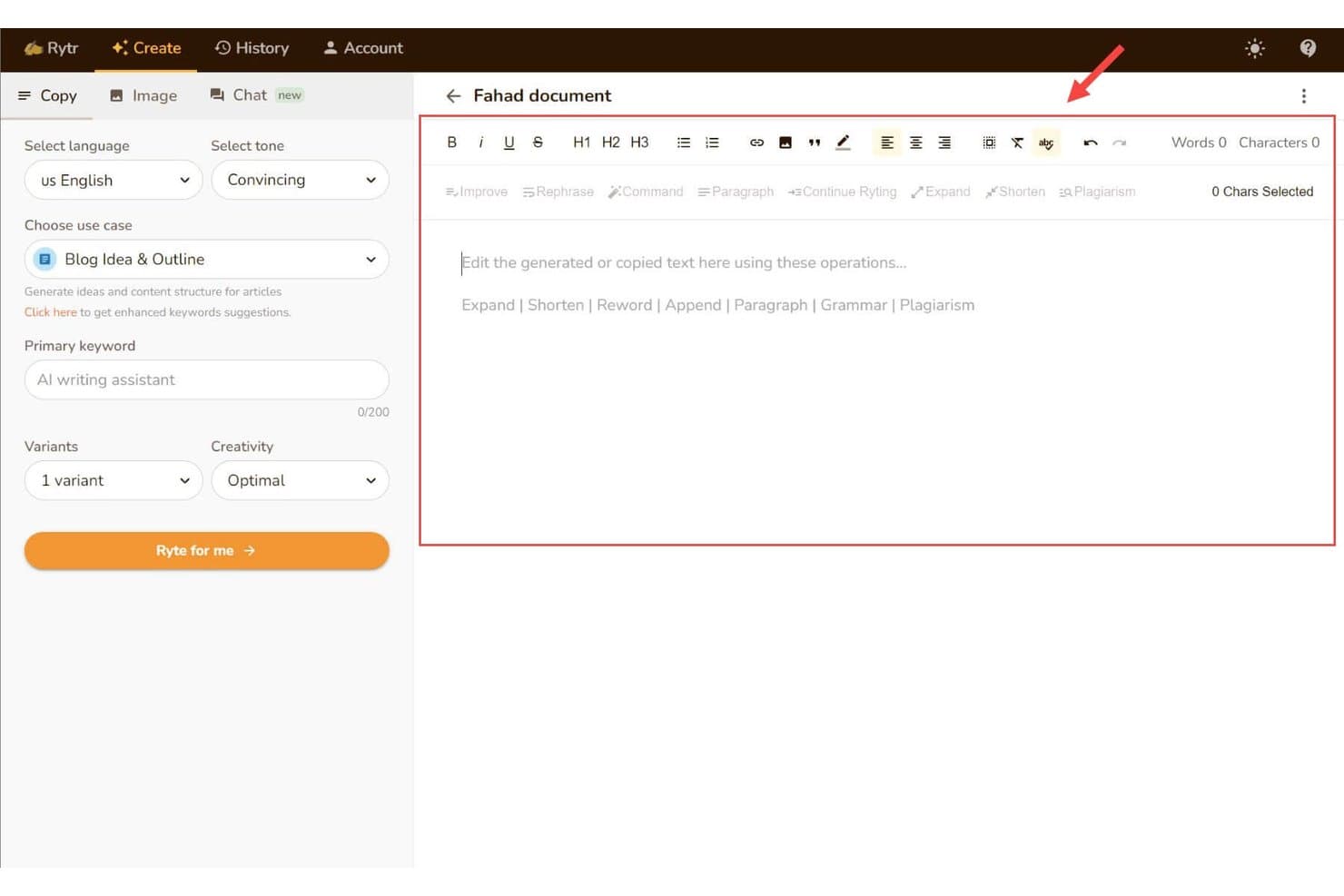
Rytr lets users draft and edit content in a rich text editor with AI writing tools such as Expand, Shorten, Rephrase, and a Blog Idea & Outline setup panel. Rytr is an AI writing assistant that generates short-form copy across 40+ use cases, including emails, social posts, blog intros, and ad copy, with built-in tone controls, rewriting tools, and a custom voice-matching feature.
Who Is Rytr Best For?
Rytr is a good fit for freelancers and small marketing teams who need a budget-friendly way to produce short-form copy quickly without a steep learning curve.
Why I Picked Rytr
Rytr earns its spot on my shortlist because it genuinely nails the short-form use case. I use the 40+ use-case templates to spin up social captions, email subject lines, and ad CTAs in under a minute. The Magic Command feature handles freeform requests when no template fits, and the My Voice tool analyzes a writing sample to mirror tone, which cuts the editing time I'd otherwise spend cleaning up generic-sounding output.
Rytr Key Features
- Multi-language support: Generate and translate content in over 35 languages.
- Plagiarism checker: Scan drafts for originality without leaving the workflow.
- SEO meta content generator: Create titles, descriptions, and keyword-rich snippets for pages and posts.
- Chrome extension: Write and edit directly inside web forms, CMS, and supported apps.
Rytr Integrations
Native integrations are not publicly listed. Rytr offers an API for custom integrations.
Pros and Cons
Pros:
- Generates copy in 35+ languages natively
- Built-in plagiarism checker within the editor
- Templates cover 40+ short-form copy formats
Cons:
- Generated content can feel generic or repetitive
- Long-form output quality drops noticeably
Learn more about Rytr:
Other AI Writing Assistant
Here are some additional AI writing assistant options that didn’t make it onto my shortlist, but are still worth checking out:
- 11FraseBest for research-backed content briefs
- 12GrammarlyBest for real-time grammar refinement
- 13Hypotenuse AIBest for large-scale product description creation
- 14HubSpot CMSBest for integrated content and CRM workflows
- 15QuillBotBest for academic-style rewriting and paraphrasing
- 16WordtuneBest for real-time sentence rephrasing suggestions
- 17SimplifiedBest for collaborative design-to-copy workflows
- 18NEURONwriterBest for semantic content optimization
- 19PeppertypeAIBest for quick multi-format copy generation
- 20Semrush Content HubBest for keyword-driven topic ideation
How I Evaluate AI Writing Assistants
To earn a spot on this list, an AI writing assistant needs to do more than autocomplete sentences—it should help you produce publish-ready marketing copy that holds up across channels. I split my evaluation into two layers: the core functionality every tool must deliver and the differentiating factors that separate good options from great ones.
Core Functionality (Table Stakes For This List)
When I'm selecting tools for my list, I rank each one on a scale from 0 (does not offer the functionality) to 5 (excels in this area) for each core functionality listed below. Then, I calculate the tool's total score into a percentage. Each tool needs to achieve a minimum total score of 75% to be considered for inclusion.
- Generative text output: I evaluate how well a tool handles both short-form copy like ad headlines and long-form pieces like blog posts or landing pages.
- Marketing copy templates: A strong template library covers formats marketers actually use daily, from email subject lines and social captions to PAS frameworks.
- Tone and brand voice control: I look for tools that let you save custom brand voice profiles and apply them across outputs, not just pick from generic presets.
- Content editing and rewriting: Beyond grammar fixes, I check whether the tool can rephrase, expand, or summarize existing drafts while preserving your intended meaning.
- SEO optimization support: Good tools help you weave in target keywords, generate meta descriptions, and score content against search intent before you publish.
- Multi-language generation: I consider how many languages each tool supports and whether output quality stays consistent for global campaign needs.
Once I have a list of tools that meet the criteria, I consider what sets each platform apart.
Differentiating Factors (What Sets Vendors Apart)
Here's how I compare and contrast different vendors:
Standout Features
Brand voice training matters a lot here. I look for tools that learn from your existing content so a five-person team sounds like one consistent writer. Multi-model access is another differentiator—platforms that let you switch between LLMs make it easy to match the right model to each task. Contextual research grounding also stands out, where a tool pulls from live web sources or uploaded documents to reduce hallucinations in data-heavy pieces.
Beyond Features
Integration ecosystem is one of the first things I check. A tool that connects natively to WordPress, Google Docs, or HubSpot fits into your content stack without extra steps. Pricing model also plays a big role—some tools charge per seat while others use word or credit limits, which can get expensive fast when you're scaling output across a team. I also evaluate data privacy policies, especially whether your inputs are used to train the vendor's models.
How to Choose an AI Writing Assistant
It’s easy to get bogged down in long feature lists and complex pricing structures. To help you stay focused as you work through your unique software selection process, here’s a checklist of factors to keep in mind:
| Factor | What to Consider |
|---|---|
| FactorScalability | What to ConsiderCan the tool handle your team’s workload if you scale from individual users to dozens? Look for word limit policies and options to add users as your needs grow. |
| FactorIntegrations | What to ConsiderDoes it connect directly with your existing content stack—like Google Docs, WordPress, or your CRM? Consider API and plugin ecosystem fit for current workflows. |
| FactorCustomizability | What to ConsiderCan you adjust tone, formatting rules, or workflow steps to match your brand? Evaluate how deeply you can tailor the output process for your team. |
| FactorEase of use | What to ConsiderWill users pick it up quickly, or will they need training? Choose solutions that offer intuitive navigation and in-app guidance for faster adoption. |
| FactorImplementation and onboarding | What to ConsiderHow long will it take to get up and running? Assess learning curve, training resources, and migration needs—especially if rolling out to multiple teams. |
| FactorCost | What to ConsiderCompare both per-seat and usage-based pricing. Factor in any setup, overage, or support fees so you can forecast total spend as usage ramps up. |
| FactorSecurity safeguards | What to ConsiderAre data privacy and protection measures clear and robust? Review controls over model training, access permissions, and whether your content stays confidential. |
| FactorSupport availability | What to ConsiderWhat support channels are offered? Quick live chat or in-depth help center resources can reduce downtime if you run into issues or need guidance. |
What are AI Writing Assistants?
AI writing assistants are software tools that use artificial intelligence to help you create, edit, and refine written content for various marketing needs. These platforms generate new copy, rewrite drafts, and optimize tone or structure based on your input. Marketers use them to speed up content production, maintain consistency, and adapt messaging across campaigns and channels.
Features
When selecting an AI writing assistant, keep an eye out for the following key features:
- Generative text output: Uses advanced AI models to draft original content based on your prompts, briefs, or existing materials for blog posts, ads, emails, and more.
- Marketing copy templates: Offers built-in frameworks for common formats like social copy, landing pages, or product descriptions, saving time on structured writing.
- Tone and brand voice customization: Lets you define or select brand voice and tone guidelines so content aligns with your organization’s style and messaging.
- Content rewriting and expansion: Supports paraphrasing, expanding, or summarizing drafts to repurpose and refine existing material for different channels.
- SEO optimization tools: Includes keyword suggestions, meta content generation, and performance scoring to help your content rank higher in search engines.
- Multi-language support: Enables content generation and translation across multiple languages for reaching international audiences.
- Collaboration capabilities: Allows team members to co-edit, review, and comment on drafts directly in the platform for smooth group workflows.
- Plagiarism detection: Automatically scans outputs to ensure content originality and flag duplicated text before publishing.
- Workflow automation: Provides customizable templates, prompt libraries, and automation options to speed up repetitive writing or editing tasks.
- Integration options: Connects with popular platforms and content tools, allowing you to import, export, or sync drafts with your existing systems.
Benefits
Implementing an AI writing assistant provides several benefits for your team and your business. Here are a few you can look forward to:
- Faster content production: AI-generated drafts, templates, and workflow automation help you move from idea to published content much more quickly.
- Consistent brand voice: Brand voice customization ensures that all team members create messaging aligned with your company’s tone and style.
- Scalable content creation: Multi-language support and bulk generation features make it easy to meet growing content demands across campaigns and geographies.
- Enhanced collaboration: Built-in real-time editing and commenting functions keep teams aligned and streamline the review process.
- Improved SEO performance: Built-in optimization tools and keyword guidance help every piece of content get found in search.
- Reduced manual workload: Automation and rewriting features free your team from repetitive drafting and editing, letting them focus on high-value work.
- Risk mitigation: Plagiarism detection and security safeguards help protect your brand’s reputation and keep sensitive information secure.
Costs and Pricing
Selecting an AI writing assistant requires an understanding of the various pricing models and plans available. Costs vary based on features, team size, add-ons, and more, with free AI writing software available for more basic needs. The table below summarizes common plans, their average prices, and typical features included in AI writing assistant solutions:
Plan Comparison Table for AI Writing Assistant
| Plan Type | Average Price | Common Features |
|---|---|---|
| Plan TypeFree Plan | Average Price$0 | Common FeaturesBasic generative text, limited templates, essential rewriting tools, and capped usage per month. |
| Plan TypePersonal Plan | Average Price$5-$25/user/month | Common FeaturesExpanded template library, brand voice presets, multi-language support, enhanced SEO tools, and priority support. |
| Plan TypeBusiness Plan | Average Price$25-$70/user/month | Common FeaturesCollaboration features, workflow automation, advanced integrations, multi-user management, and higher usage limits. |
| Plan TypeEnterprise Plan | Average Price$70+/user/month | Common FeaturesCustom onboarding, dedicated account support, enhanced security, API access, compliance options, and SLA guarantees. |
AI Writing Assistants FAQs
Here are some answers to common questions about AI writing assistants:
How accurate is AI-generated content for marketing use?
AI-generated content is usually accurate for general topics but should be reviewed for brand-specific messaging and complex claims. It’s best to check references and add human edits for nuance and compliance.
Can AI writing assistants help with multilingual campaigns?
Yes, most tools offer multi-language support for drafting and translating content across major languages. Always review localizations to ensure your message fits cultural context and intent.
How do I keep my brand voice consistent across content?
Look for platforms that support custom brand voice settings or allow you to upload style guides. These tools can help ensure every draft maintains your team’s tone and preferred language.
Will my data be used to train the AI?
Some vendors use your inputs to improve their models, while others offer private modes or data retention controls. Always review the vendor’s privacy policy and contract terms before onboarding.
How do AI writing assistants integrate with my existing workflows?
Selecting an AI writing assistant requires an understanding of the various pricing models and plans available, including free AI writing software for teams with more basic needs. Costs vary based on features, team size, add-ons, and more.Most solutions integrate with popular content management systems, word processors, and collaboration tools, so you can import, export, or draft content within your usual software stack.