

O monday.com é um software popular de gestão de marketing, conhecido pela sua capacidade de organizar e acompanhar projetos de trabalho de forma eficiente. No entanto, alguns utilizadores poderão procurar uma alternativa ao monday.com se necessitarem de mais opções de personalização ou tiverem restrições orçamentais.
Com base na minha experiência com software de marketing, testei e comparei várias das principais alternativas ao monday.com disponíveis. Depois, compilei os meus resultados em análises detalhadas para ajudar a encontrar o melhor software para as suas necessidades específicas.
O que é o monday.com?
O monday.com é um software de gestão de marketing que ajuda as equipas a organizar e acompanhar os seus projetos de trabalho. É geralmente utilizado por profissionais de marketing, gestão de projetos e operações que precisam de gerir tarefas e colaborar com as suas equipas.
Os quadros personalizáveis, a automatização e as capacidades de integração ajudam a organizar tarefas, melhorar a colaboração da equipa e manter todos alinhados. No geral, o monday.com proporciona uma forma simples de otimizar o fluxo de trabalho da sua equipa.
Porque pode confiar nas nossas recomendações de software
6,700+
Reviews
20
Industry experts
16+
Evaluation factors
14
Years reviewing software
A nossa equipa testa e analisa software desde 2012. Como líderes de marketing, sabemos o quão difícil — e importante — é escolher o software certo.
Para este guia, avaliámos as ferramentas através de testes práticos e pesquisa independente, pontuando-as de acordo com os nossos critérios de seleção.
As nossas análises refletem o juízo da nossa equipa editorial, e não um discurso de vendas.
Revisores especialistas:
 Gui DrusinaCreative Director
- Shriya GhateSenior Marketing Lead
 Amanda JacquesMarketing Ops Leader

Tabela comparativa: alternativas ao monday.com
Esta tabela comparativa resume os detalhes de preços das minhas principais escolhas de alternativas ao monday.com.
Score legend (out of 5)
- Excellent4.5–5
- Good4–4.4
- Average3–3.9
- Below average2–2.9
- Poor1–1.9
Sorted by: Default
| Tool | Starting Price | Website | |||||||
|---|---|---|---|---|---|---|---|---|---|
Best for tying project delivery to billing | 3.2 out of 5 | 2 | 4 | 4 | 4 | 2 | 3 | $12/user/month Free plan + 14-day trial + demo available | Website |
Best for enterprise marketing creative ops | 4.3 out of 5 | 4 | 4 | 4 | 4 | 5 | 5 | Pricing upon request Free demo available | Book Demo |
Best for task automation features | 3.7 out of 5 | 4 | 3 | 4 | 3 | 4 | 4 | $4/user/month Free plan + 15-day free trial + free demo available | Website |
Best for customizable workflows | 4.5 out of 5 | 4 | 4 | 5 | 4 | 5 | 5 | $10/user/month Free plan + 14-day free trial + free demo available | Book Demo |
Best for visual task management | 3.2 out of 5 | 3 | 2 | 4 | 3 | 4 | 3 | $5/user/month Free plan + free trial available | Website |
Best for all-in-one team workspaces | 3.7 out of 5 | 3 | 3 | 4 | 4 | 4 | 4 | $10/user/month Free plan + free trial available | Website |
Best for custom app building | 4.3 out of 5 | 4 | 4 | 5 | 4 | 4 | 5 | $20/user/month Free plan available | Website |
Best for customizable project workflows | 4.5 out of 5 | 4 | 4 | 5 | 4 | 5 | 5 | $9/user/month Free plan + free demo available | Website |
Best for team project coordination | 4.3 out of 5 | 4 | 4 | 5 | 4 | 5 | 4 | $10.99/user/month Free plan + free demo available | Website |
Best for spreadsheet workflows | 4.0 out of 5 | 4 | 4 | 4 | 4 | 4 | 4 | $9/member/month Free trial + free demo available | Website |


Análises das melhores alternativas ao monday.com
Apresentamos abaixo os meus resumos detalhados das melhores alternativas ao monday.com que entraram na minha lista. As minhas análises oferecem uma visão aprofundada das principais funcionalidades, vantagens e desvantagens, integrações e casos de utilização ideais de cada ferramenta, para ajudar a encontrar a melhor opção.
 Best for tying project delivery to billing
- Free plan + 14-day trial + demo available
- From $12/user/month (billed annually)
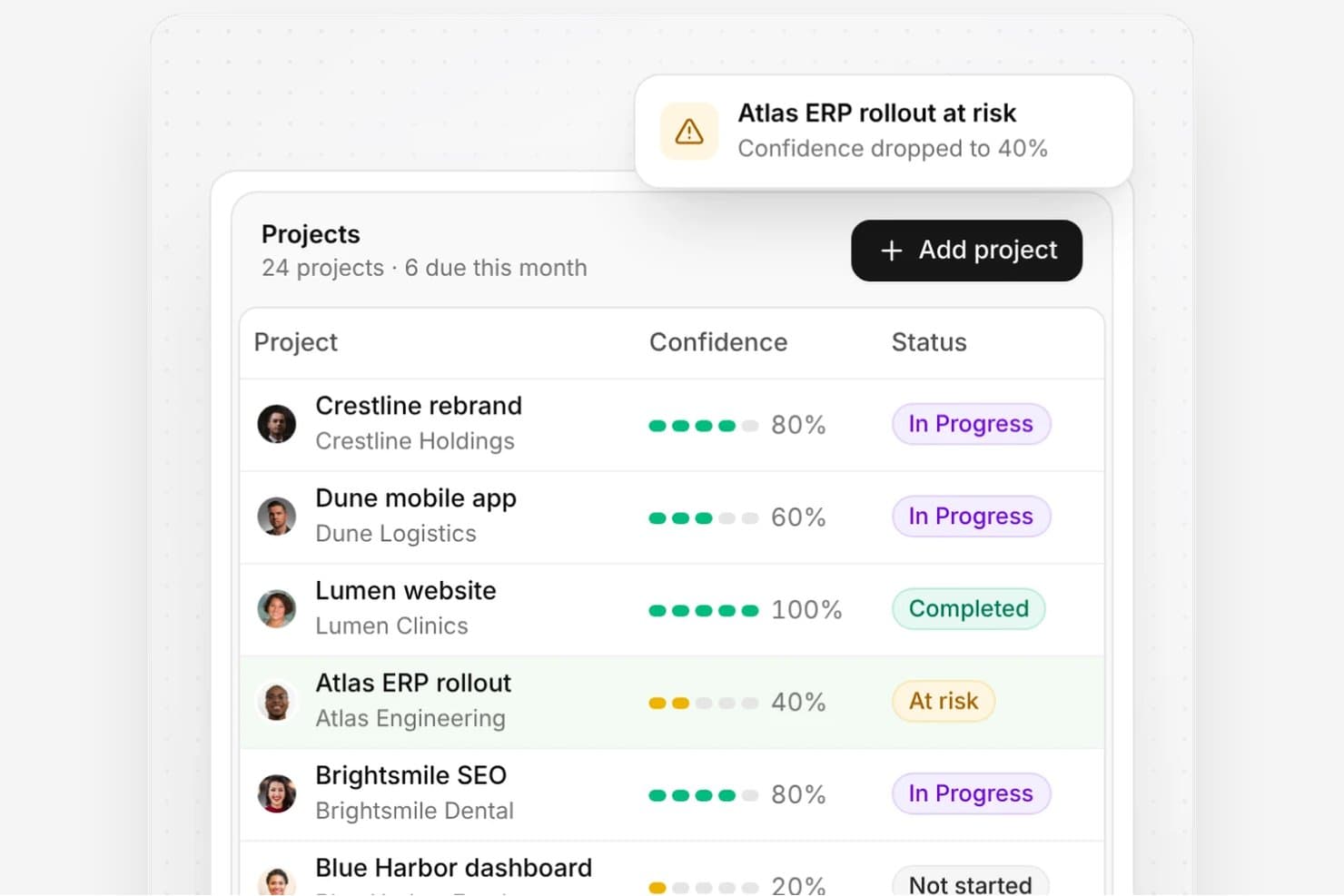
Olqan tracks project confidence levels and flags at-risk projects automatically. Olqan is a business operating system for small and growing teams that connects sales, project delivery, finance, HR, and customer support in one platform—making it a strong fit for teams tired of juggling separate tools for each function.
Who Is Olqan Best For?
Olqan is a strong fit for small and growing teams that need to connect project delivery with invoicing and billing in one place.
Why I Picked Olqan
I picked Olqan as one of the best monday.com alternatives because it's the only tool on this list that directly connects project delivery to invoicing. When a project wraps up, I can convert logged time and budgets into an invoice without re-entering a single line of data. The Finance Console ties client billing to project records, so I always know what's been delivered, what's been billed, and what's outstanding in one view.
Olqan Key Features
- Multi-view project workspace: Switch between Kanban, Gantt, Calendar, and List views without losing any project data.
- Client portal: Give clients controlled access to project files, task updates, and communication through a dedicated portal.
- Advanced Dashboard: Review project, client, HR, ticket, and finance data across six filterable dashboard tabs in one place.
- Role-based permissions: Assign custom access levels per module using None, View, Add, Update, or Delete controls for every team role.
Olqan Integrations
Olqan has documented native integrations with Google Calendar and QuickBooks. It also lists Stripe, PayPal, Square, Slack, Microsoft Teams, and Google Meet, but connection details and API availability aren’t documented.
Pros and Cons
Pros:
- Reviewers praise hands-on setup support
- Kanban, Gantt, calendar, and list views
- Project time and budgets become invoices
Cons:
- Reviewers report no dedicated phone app
- Automation centers on reminders and approvals
Learn more about Olqan: Best for enterprise marketing creative ops
- Free demo available
- Pricing upon request
Customer Rating:4.6/5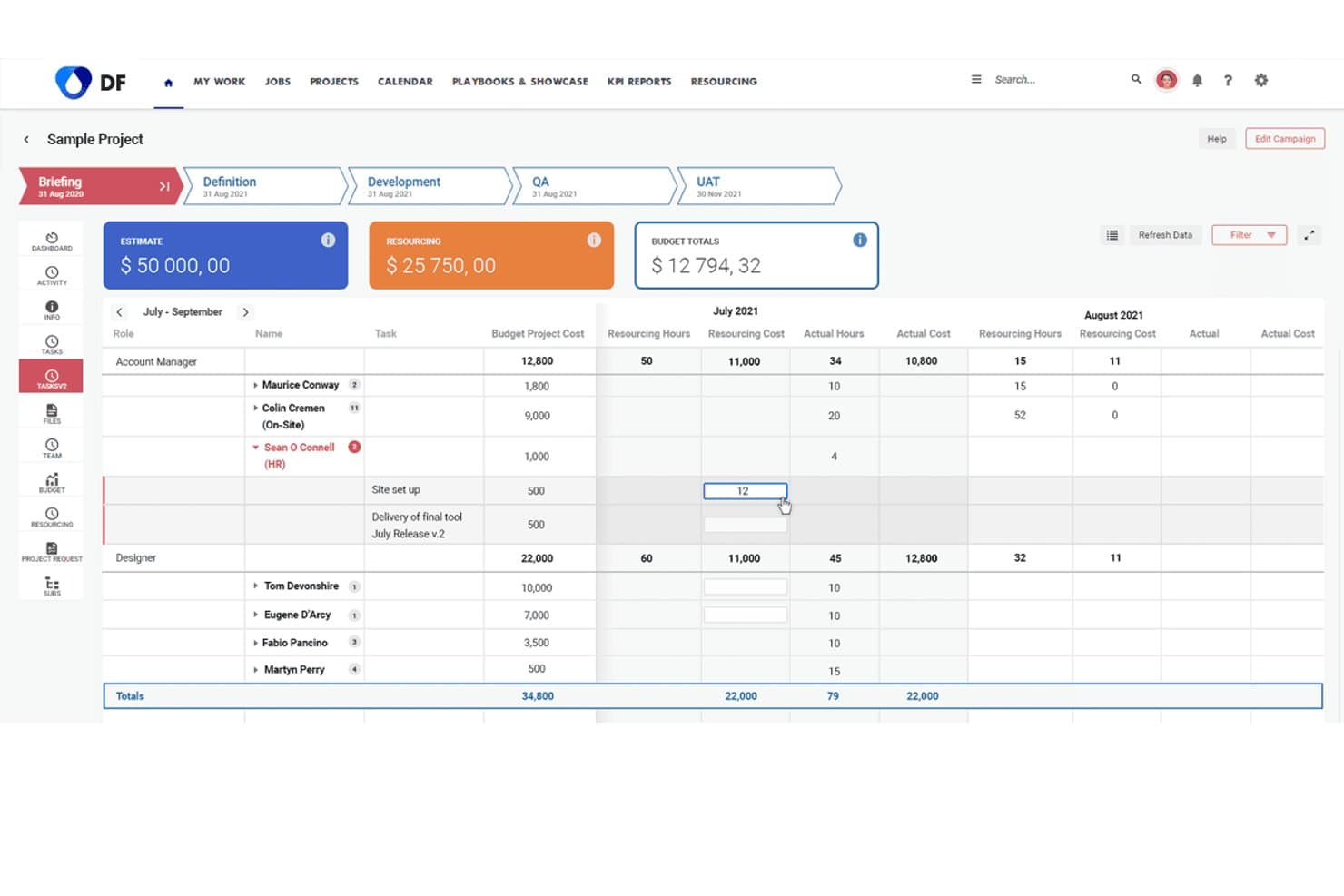
Screendragon lets users track resourcing costs and hours across project phases. Screendragon is a marketing work management platform built for enterprise creative and marketing operations teams that need to manage campaigns, resources, workflows, and approvals in one governed system.
Who Is Screendragon Best For?
Screendragon is a strong fit for enterprise marketing and creative operations teams managing high volumes of campaigns, approvals, and cross-functional workflows.
Why I Picked Screendragon
I picked Screendragon as one of the best because it's purpose-built for enterprise marketing creative ops in a way monday.com simply isn't. I love how its dynamic briefs adapt fields and routing logic by team, market, or campaign type, so a global brand campaign and a regional print request don't get jammed into the same rigid intake form. Pair that with built-in creative proofing, where my team can mark up artwork, compare versions side by side, and log approvals, all without leaving the platform, and you've got a genuinely specialized alternative.
Screendragon Key Features
- AI resourcing agent: Matches people to work based on skills, roles, prior experience, and real-time availability across your team.
- Native digital asset management: Manages metadata, versions, rights, territories, and asset lifecycle controls within the same platform as your workflows.
- Dynamic campaign dashboards: Tracks live status, milestones, budgets, and KPIs across campaigns with one-click export of client-ready updates.
- No-code workflow builder: Lets teams configure workflow steps, conditional routing, and approval stages without involving IT.
Screendragon Integrations
Screendragon lists 1,000+ integrations, including native integrations with HubSpot, Microsoft Power BI, Aprimo, Sitecore, Amazon S3, Google Cloud Platform Storage, Ziflow, Brandfolder, Workato, and Smartsheet. It offers a REST API with OAuth 2.0 and webhooks, plus Zapier access.
Pros and Cons
Pros:
- Capacity planning connects workloads, budgets, and staffing
- Creative proofing centralizes annotations and approvals
- Configurable briefs route work by campaign type
Cons:
- Large projects can experience slowdowns
- Complex workflow setup takes time
Learn more about Screendragon: Best for task automation features
- Free plan + 15-day free trial + free demo available
- From $4/user/month
Visit WebsiteCustomer Rating:4.3/5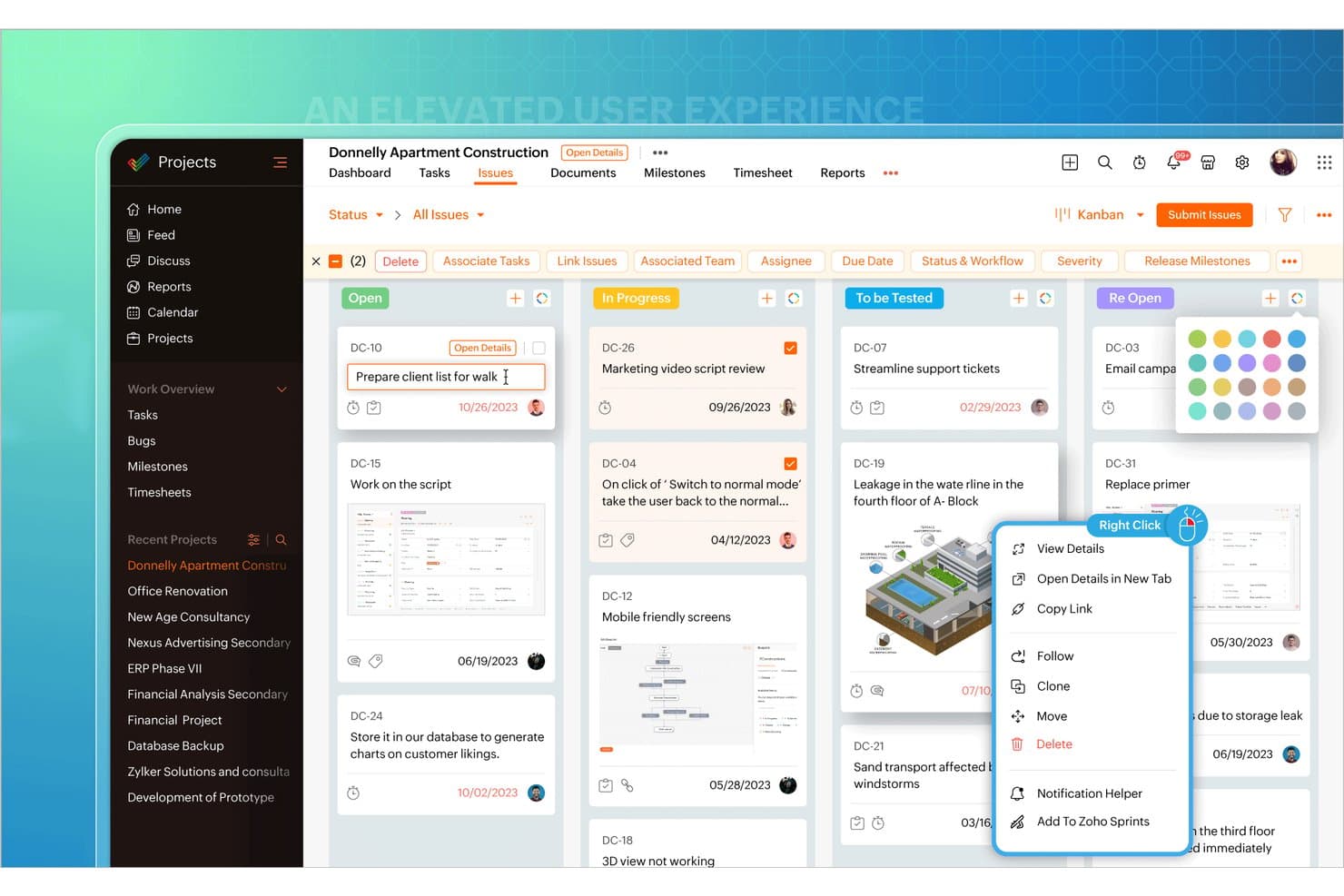
Zoho Projects Kanban board for tracking issues across Open, In Progress, To be Tested and Re Open stages. Zoho Projects is a project management platform built for teams that need structured task planning, approval-based automation, and cross-project visibility—making it a strong fit for marketing teams managing campaigns, deadlines, and cross-functional deliverables.
Who Is Zoho Projects Best For?
Zoho Projects is a strong fit for marketing teams and project managers who need structured approval workflows and automation without building everything from scratch.
Why I Picked Zoho Projects
I picked Zoho Projects as one of the best because its Blueprint automation is genuinely impressive for teams managing campaign approvals. I can define exactly who owns each task stage, who's allowed to advance it, and what has to happen before it moves forward, like a mandatory approval step before a deliverable goes live. Workflow rules then handle the repetitive stuff automatically, so my team isn't manually updating statuses or chasing sign-offs across email threads.
Zoho Projects Key Features
- Gantt chart: Visualize task schedules, define dependencies, track progress, and reschedule tasks directly from the chart view.
- Portfolio dashboard: View task, project, and issue progress across your entire portal, including budget health and project ownership.
- Resource workload report: See how work is distributed across your team and reassign tasks to balance workloads from within the report.
- Blueprint task stages: Define who owns each stage of a task process, who can move it forward, and what fields must be completed before a transition.
Zoho Projects Integrations
Zoho Projects lists 50+ marketplace integrations, including Slack, Microsoft Teams, Google Drive, Zoho CRM, Zoho Analytics, Microsoft Project, and Jira imports. It also offers a REST API and Zapier.
Pros and Cons
Pros:
- Task dependencies reveal downstream schedule risks
- Reusable templates cut repetitive setup work
- Approval workflows enforce campaign sign-offs
Cons:
- Crowded menus complicate initial setup
- Cross-project reports offer limited flexibility
Learn more about Zoho Projects: Best for customizable workflows
- Free plan + 14-day free trial + free demo available
- From $10/user/month
Customer Rating:4.3/5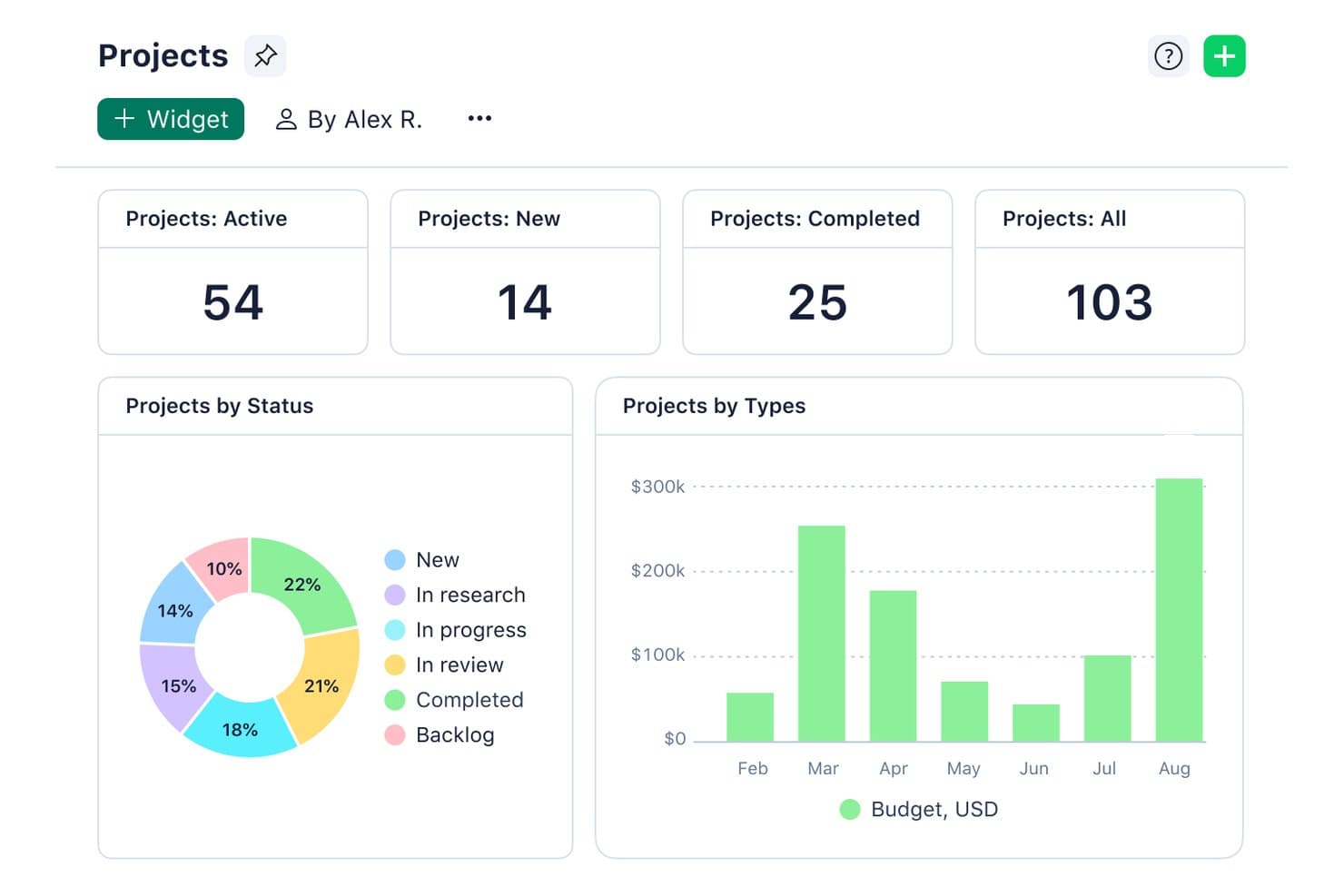
Wrike's Projects dashboard summarizes project counts, status breakdown and monthly budgets in one view. Wrike is a work management platform built for teams that need to coordinate campaigns, approvals, and cross-functional projects in one place—making it a strong fit for marketing teams managing high volumes of requests, assets, and stakeholders across multiple workflows.
Who Is Wrike Best For?
Wrike is a strong fit for marketing and cross-functional teams managing high volumes of requests, approvals, and deliverables across multiple projects simultaneously.
Why I Picked Wrike
I picked Wrike as one of the best monday.com alternatives because it gives marketing teams genuine control over how work actually moves through the system. Where monday.com offers boards, Wrike lets you build custom workflows per team, defining status order, triggering approvals on status changes, and auto-assigning work as tasks progress. I also rely on its dynamic request forms, which intake campaign briefs or asset requests and automatically spin up tasks and workflows, keeping intake clean without manual sorting.
Wrike Key Features
- Proofing: Add visual comments directly on attached images, PDFs, and videos, and compare file versions side by side within a task.
- Resource bookings: Reserve specific team members or job roles against projects and estimate hours against available capacity.
- AI Agents: Deploy no-code agents that monitor work and take actions like updating fields, triggering approvals, and sending notifications across Slack, email, or Microsoft Teams.
- Wrike MCP Server: Connect external AI assistants—including ChatGPT, Claude, and Microsoft Copilot—to your live Wrike data, with access governed by each user's existing permissions and available on every plan including Free.
Wrike Integrations
Wrike offers 400+ pre-built native integrations, including Slack, Microsoft Teams, Google Sheets, Jira, Salesforce, HubSpot, and QuickBooks. It also provides an open REST API, Wrike Integrate for custom connections, and an MCP Server connecting permitted Wrike data to external AI assistants on every plan, including Free.
Pros and Cons
Pros:
- Workload charts expose overloaded teams
- Custom workflows route approvals automatically
- Proofing keeps creative feedback beside assets
Cons:
- Notifications can bury important updates
- Dense navigation slows routine updates
 Best for visual task management
- Free plan + free trial available
- From $5/user/month (billed annually)
Visit WebsiteCustomer Rating:4.5/5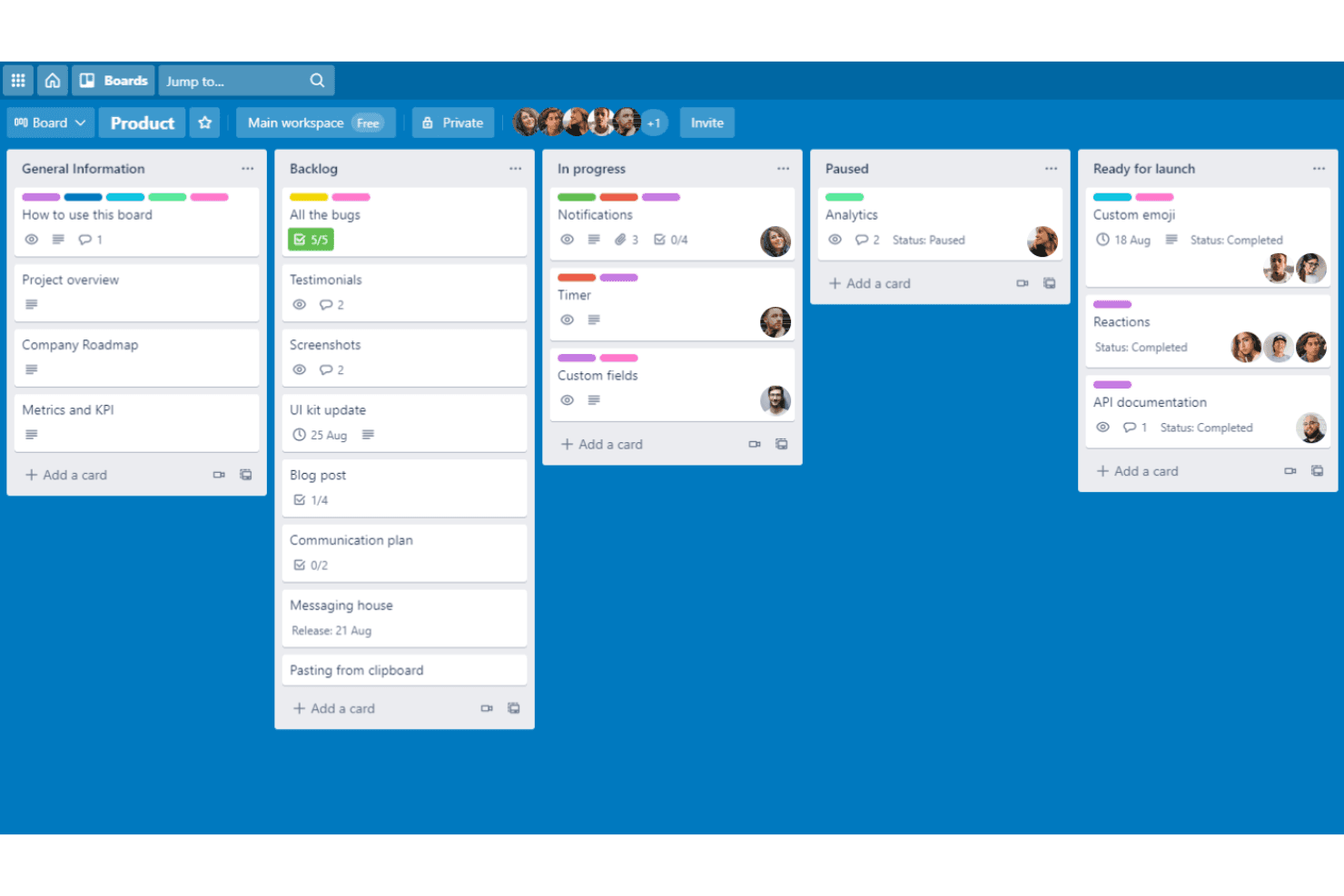
A Trello board organizing product work into lists from backlog through to ready for launch. Trello is a visual project management tool from Atlassian that lets marketing teams organize campaigns, content workflows, and cross-functional tasks on intuitive boards—making it a strong fit for smaller teams that want a simpler, lower-cost alternative to monday.com.
Who Is Trello Best For?
Trello is a strong fit for small marketing teams and project managers who want a visual, low-overhead way to track tasks and campaigns without a steep learning curve.
Why I Picked Trello
I picked Trello as one of the best because its board-and-card structure makes visual task management feel genuinely effortless to scan at a glance. I love how I can drag a campaign card from "In Progress" to "Ready to Launch" and my whole team sees it update in real time, no status meeting required. The Workspace Calendar view pulls due dates across multiple boards into one place, so I can track a content calendar, a product launch, and a partner campaign side by side.
Trello Key Features
- No-code automation builder: Create rules, scheduled triggers, and card or board buttons that automatically update cards, assign members, set due dates, and post messages to connected tools like Slack.
- Custom Fields: Add structured data fields—checkbox, date, dropdown, number, or text—to cards across an entire board to match your team's workflow.
- Power-Ups and integrations: Connect Trello to 238+ external tools, including Jira Cloud, Miro, Microsoft Teams, and Gmail, directly from your board.
- Butler cross-app automation: Trigger actions in external tools—like creating Jira tickets or sending emails—automatically from within a Trello board.
Trello Integrations
Trello offers 238 marketplace integrations, including Slack, Jira Cloud, Miro, Microsoft Teams, and Gmail. It also provides a REST API and webhooks for custom integrations.
Pros and Cons
Pros:
- No-code rules handle recurring task updates
- Templates speed up campaign and content planning
- Drag-and-drop boards surface campaign status
Cons:
- Boards become harder to scan at scale
- Cross-project reporting stays relatively basic
Learn more about Trello: Best for all-in-one team workspaces
- Free plan + free trial available
- From $10/user/month
Visit WebsiteCustomer Rating:4.6/5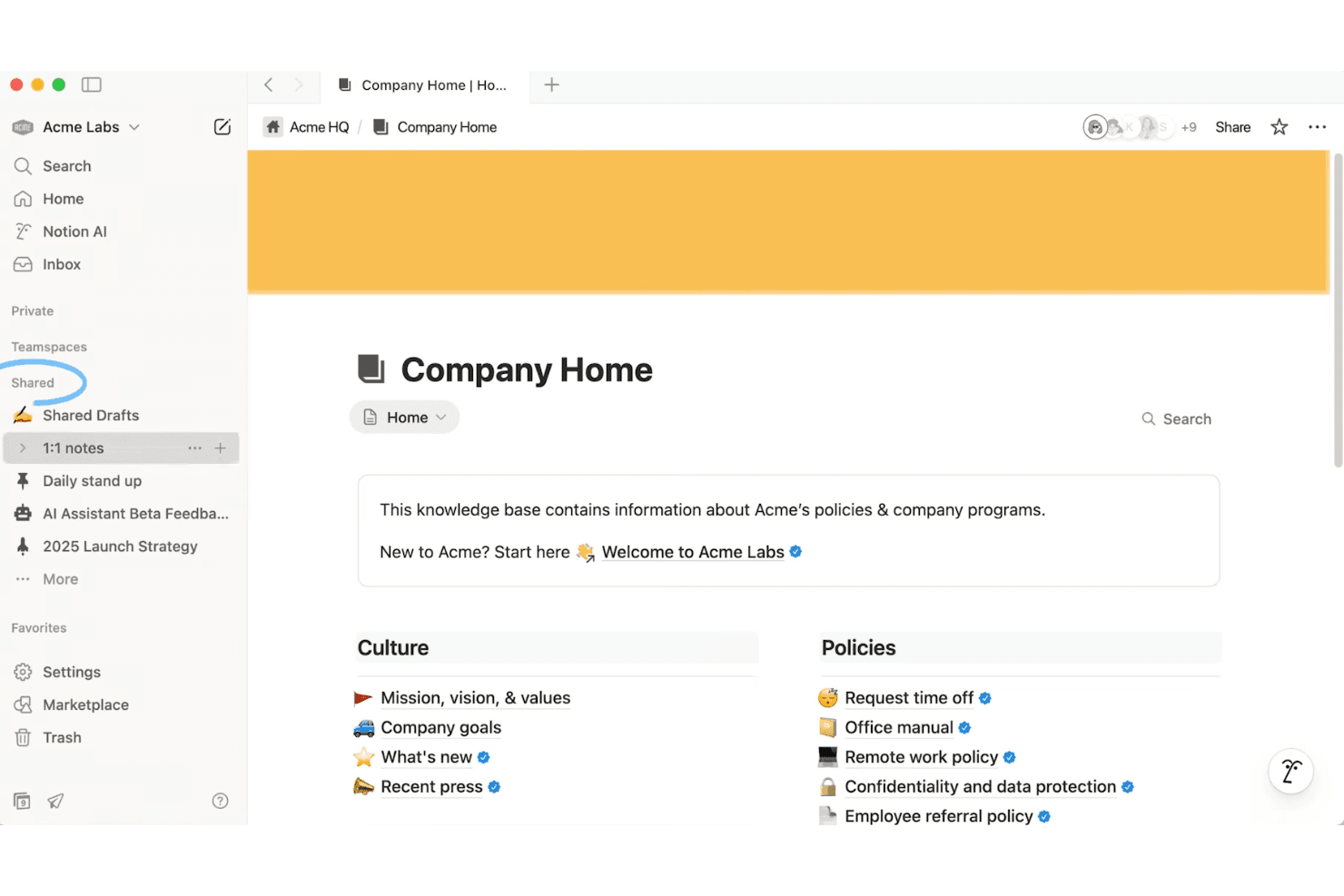
Notion's Company Home page organizes policies, culture resources, and shared teamspaces in one workspace. Notion is an AI-connected workspace that blends docs, databases, and project tracking in one place, making it a natural fit for marketing teams who want to manage campaigns, content calendars, and cross-functional projects without juggling multiple tools.
Who Is Notion Best For?
Notion works well for teams that want to manage projects, documentation, and knowledge in a single workspace rather than juggling separate tools.
Why I Picked Notion
I picked Notion as one of the best monday.com alternatives because it genuinely pulls docs, databases, and project tracking into a single workspace in a way few tools do. I love that my team can run a full campaign out of one place: a content calendar database with board and timeline views, a linked task database with sprint workflows, and a wiki for brand guidelines, all connected. Notion's AI Meeting Notes and Custom Agents add real automation depth on top of that foundation.
Notion Key Features
- Database automations: Set trigger-based rules to edit properties, add pages, send Slack or Gmail notifications, or fire webhooks when database entries change.
- Notion Calendar: View project deadlines and database items alongside personal and work calendars, with drag-and-drop editing directly from the calendar.
- Enterprise Search: Search across Notion and connected apps—including Slack, Google Drive, and GitHub—from a single search interface.
- Forms: Collect responses from anyone, including non-Notion users, and feed submissions directly into a connected database for analysis.
Notion Integrations
Notion offers native integrations with Salesforce, Google Calendar, Outlook Calendar, and Apple iCloud Calendar, plus marketplace integrations with Slack, Google Drive, GitHub, Jira, Linear, Asana, and Zapier. Its public API, webhooks, and database syncs support custom connections.
Pros and Cons
Pros:
- AI meeting notes turn discussions into follow-ups
- Views link campaign calendars with project timelines
- Keeps project notes, tasks, and docs together
Cons:
- Complex projects need more setup than boards
- No native capacity model or over-allocation alerts
Learn more about Notion: Best for custom app building
- Free plan available
- From $20/user/month (billed annually)
Visit WebsiteCustomer Rating:4.6/5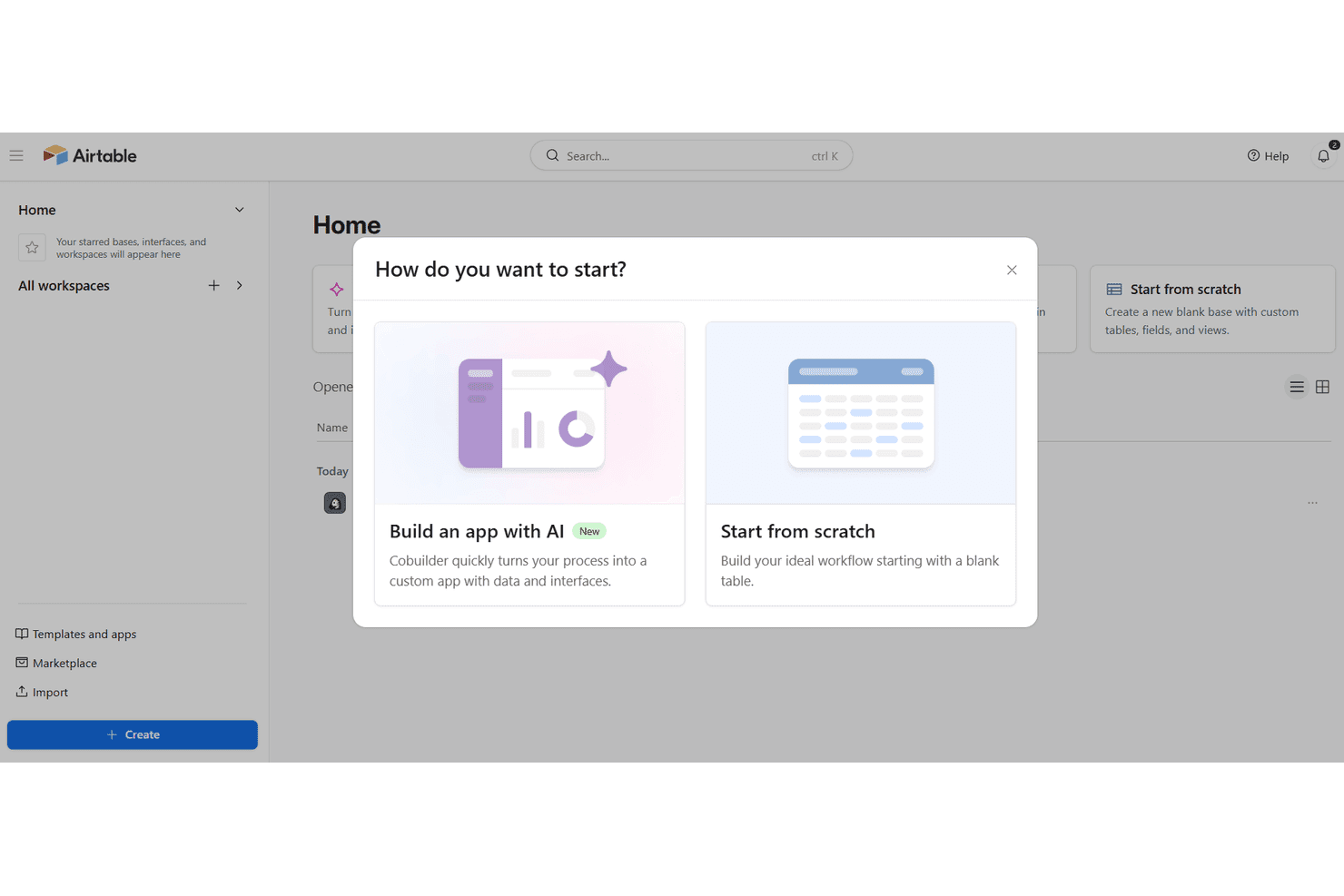
Airtable's start dialog offers building an app with AI or starting from a blank table. Airtable is a database-driven work platform that lets marketing teams, operations managers, and project leads build fully custom workflows, apps, and dashboards around their own data—without needing a developer to set it up.
Who Is Airtable Best For?
Airtable is a strong fit for teams that need to build custom workflows around their own data structures rather than conform to a fixed project management template.
Why I Picked Airtable
I picked Airtable as one of the best monday.com alternatives because it lets you build workflows around your data instead of forcing your data into a fixed template. Where monday.com gives you a ready-made structure, Airtable gives you a relational database you can shape from scratch: linking campaign records to resource tables, building intake forms that auto-populate project trackers, and creating role-specific interfaces so each team sees exactly what they need.
Airtable Key Features
- Trigger-and-action automation builder: Create multi-step automated workflows using triggers like record creation, form submissions, schedules, and button clicks, with conditional logic and integration actions built in.
- Airtable Proofing: Review and annotate file attachments with version numbering, side-by-side comparison, and automatic text-change detection for PDFs, directly within a record.
- Field Agents: Configure AI agents to analyze documents, research the web, classify records, or generate content, then run those tasks automatically across your data.
- Airtable Portals: Build branded, external-facing portals for clients, vendors, or partners with configurable view-only or edit access and no coding required.
Airtable Integrations
Airtable connects with Slack, Salesforce, Jira, Google Drive, Box, Zendesk, Snowflake, and Databricks, plus ChatGPT and Claude. Its REST Web API and MCP server support custom integrations and connected AI tools.
Pros and Cons
Pros:
- Automations and dashboards reduce status chasing
- Custom views adapt to team workflows
- Linked records connect campaign and project data
Cons:
- Large, complex bases can run slowly
- Project tracking needs more initial setup
Learn more about Airtable: Best for customizable project workflows
- Free plan + free demo available
- From $9/user/month (billed annually)
Visit WebsiteCustomer Rating:4.7/5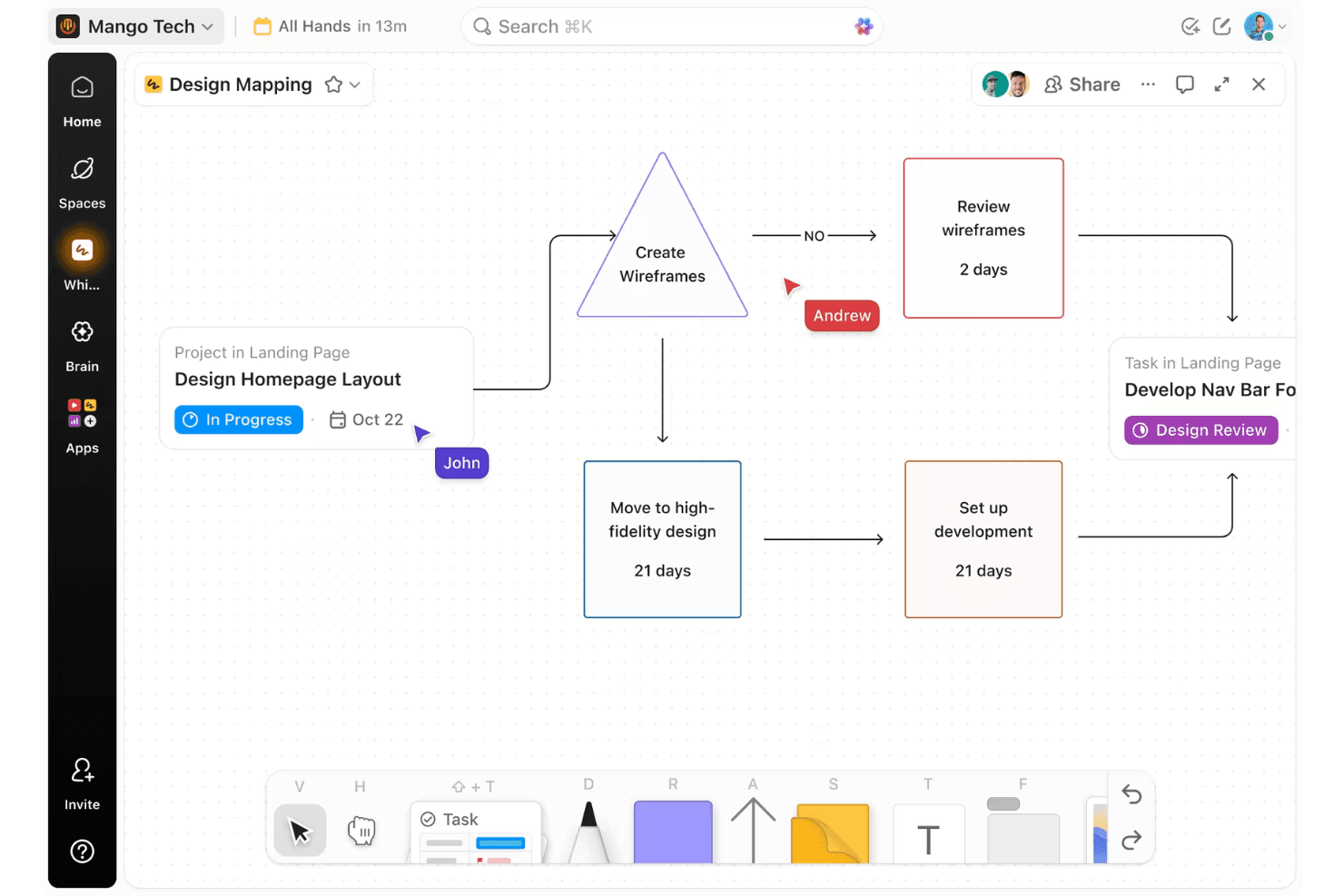
ClickUp Whiteboards mapping a design workflow, with linked tasks, timelines and live collaborator cursors. ClickUp is a highly configurable work management platform that brings tasks, Docs, Chat, and automation into one workspace—making it a strong fit for marketing teams and project managers who need to coordinate campaigns, approvals, and cross-functional work without juggling multiple tools.
Who Is ClickUp Best For?
ClickUp is a strong fit for project managers and marketing teams who need to tailor their workspace structure, views, and workflows to match the way their team actually operates.
Why I Picked ClickUp
I picked ClickUp as one of the best monday.com alternatives because of how far it lets you push your workspace structure. Where monday.com locks you into a relatively fixed board-based layout, ClickUp lets you build custom task types, statuses, and fields from scratch, then view that same work as a Gantt chart, Kanban board, or Workload view depending on what your team needs that day. I especially like how Automations can move tasks through approval stages based on status changes, which is something my team uses to keep content and campaign workflows moving without manual nudging.
ClickUp Key Features
- ClickUp Brain: An AI assistant built into your workspace that answers questions about tasks, Docs, and Chat, and can take action on your behalf.
- Workload view: A visual capacity planning view that displays each team member's assigned work over a selected time period so you can spot overloads before they happen.
- Forms with conditional logic: Customizable intake forms that convert submissions directly into tasks, with logic that adapts fields based on a respondent's previous answers.
- Dashboards: Configurable reporting boards built from cards that pull live data on tasks, time tracking, workload, and sprint progress across your entire workspace.
ClickUp Integrations
ClickUp offers 50+ native integrations, including Slack, Google Drive, Outlook, Google Calendar, Microsoft Teams, Figma, HubSpot, GitHub, and Zoom. It also supports a public REST API, webhooks, OAuth, MCP Server, and Zapier.
Pros and Cons
Pros:
- Track team capacity alongside project deliverables
- Keep tasks, Docs, and updates together
- Tailor statuses and views to campaign workflows
Cons:
- Automation setup feels less intuitive than monday.com
- Workspace setup can overwhelm new teams
Learn more about ClickUp: Best for team project coordination
- Free plan + free demo available
- From $10.99/user/month
Visit WebsiteCustomer Rating:4.4/5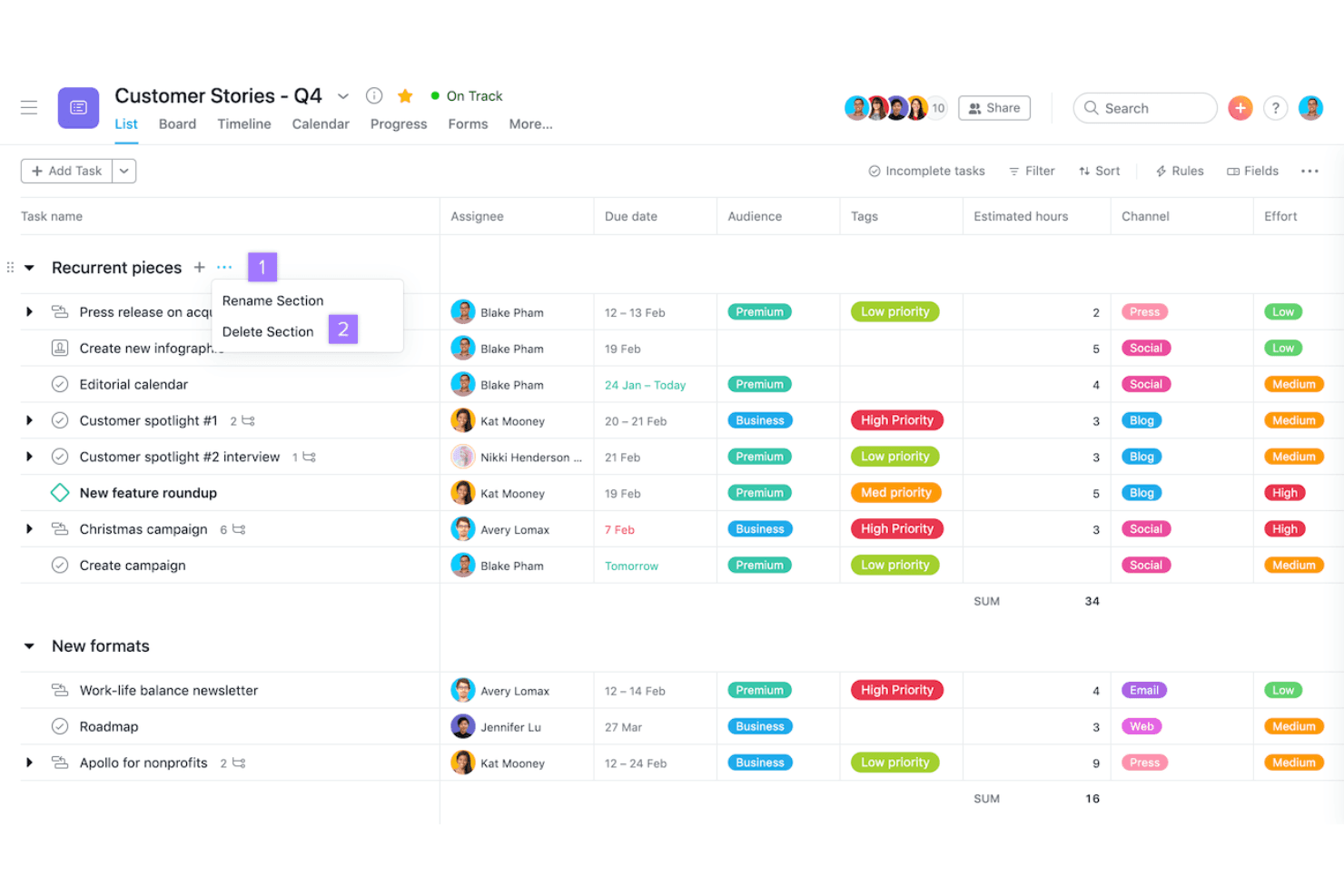
Asana's list view organizes a Q4 content project into sections with assignees, due dates and custom fields. Asana is a work management platform that connects tasks, campaigns, and cross-functional projects in one place, making it a strong fit for marketing teams that need to coordinate creative production, approvals, and reporting across multiple workstreams.
Who Is Asana Best For?
Asana is a strong fit for marketing teams that juggle multiple campaigns and need to connect tasks, approvals, and cross-functional projects in one place.
Why I Picked Asana
I picked Asana as one of the best monday.com alternatives because it's genuinely built for coordinating work across teams, not just tracking tasks in isolation. What I appreciate most is the Work Graph, which connects tasks, goals, dependencies, and people across projects so nothing falls through the cracks when campaigns span multiple teams. I also rely on AI Teammates to handle intake triage and status updates, which keeps cross-functional projects moving without constant manual check-ins.
Asana Key Features
- Portfolio dashboards: Roll up status, health, and progress across multiple projects into a single portfolio view.
- Custom intake forms: Capture requests via customizable forms that automatically create and route tasks within designated projects.
- Proofing and approvals: Annotate creative assets directly in Asana and route them through structured approval workflows.
- Goals tracking: Link individual tasks and projects to team or company-level objectives and monitor progress in real time.
Asana Integrations
Asana lists 400+ integrations, including native Salesforce, Tableau, and Power BI connections, plus marketplace integrations for Slack, Microsoft Teams, Google Drive, Google Sheets, Jira Cloud, GitHub, and HubSpot. It also offers a REST API, webhooks, SDKs, and an MCP server.
Pros and Cons
Pros:
- Rules automate recurring status updates
- Campaign templates connect creative approvals
- Cross-project progress rolls into goals
Cons:
- Built-in reports miss detailed executive analytics
- Complex setups can feel overwhelming
 Best for spreadsheet workflows
- Free trial + free demo available
- From $9/member/month
Customer Rating:4.4/5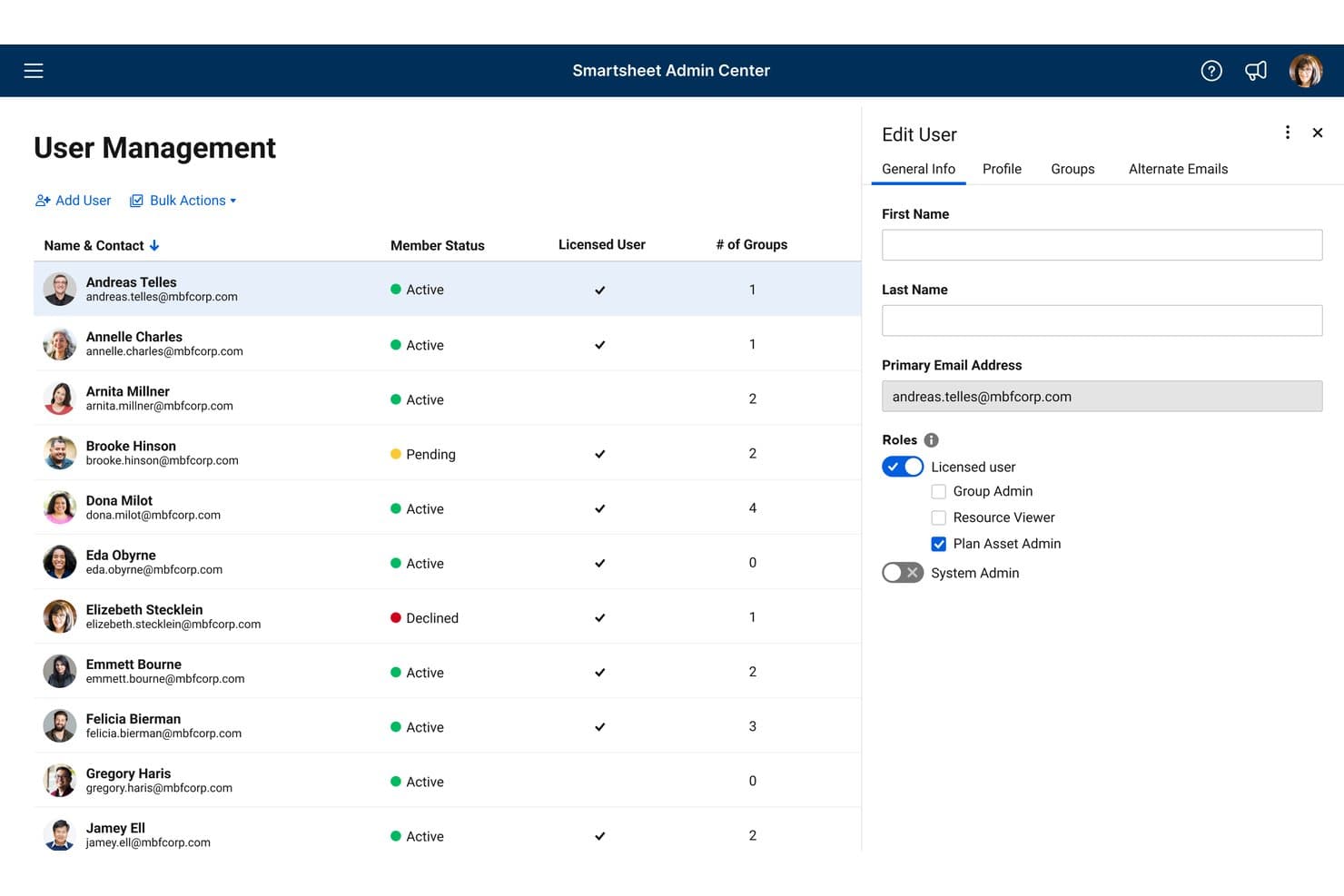
Smartsheet Admin Center lets admins assign licensed user and plan asset admin roles per user. Smartsheet is a spreadsheet-style work management platform that suits project managers, operations teams, and marketing leads who need flexible project tracking, no-code automation, and cross-team reporting in a single workspace.
Who Is Smartsheet Best For?
Smartsheet is a strong fit for project managers and operations teams who already think in spreadsheets and need that familiar structure to scale across multiple projects.
Why I Picked Smartsheet
I picked Smartsheet as one of the best because it's built around a spreadsheet-style grid that lets your team track campaigns, tasks, and deliverables without abandoning the row-and-column logic most people already know. I love that you can pull live data from dozens of sheets into a single report, so cross-team status is always current. The no-code automation builder handles approval workflows and recurring update requests without IT involvement, which I find genuinely useful when managing campaign intake across multiple stakeholders.
Smartsheet Key Features
- Resource Management: Match team members to projects, track time and expenses, forecast demand, and monitor workload balance across your whole organization.
- Brandfolder digital asset management: Store, organize, and share branded assets in a centralized library that connects directly to your project workflows.
- Scenario Planning: Compare multiple project timeline and resource scenarios side by side, then apply your chosen plan directly to live sheets.
- Smart Assist AI: Query project data, surface risks, and take actions like updating rows or generating dashboards using plain-language prompts.
Smartsheet Integrations
Smartsheet offers 175+ integrations, including HubSpot, Jira Software, Salesforce, Microsoft Teams, Slack, Power BI, and Tableau. It also supports REST APIs, webhooks, SDKs, and Zapier for custom connectivity.
Pros and Cons
Pros:
- Approval automations reduce manual follow-up
- Live reports clarify cross-team status
- Spreadsheet-style tracking fits familiar workflows
Cons:
- License differences complicate team collaboration
- Complex formulas take extra setup
Outras alternativas ao monday.com
Estas são algumas alternativas adicionais ao monday.com que não entraram na minha lista, mas que continuam a merecer consideração.
- 11Teamwork.comBest for client work management
- 12Bonsai Agency SoftwareBest for agencies
- 13ConfluenceBest for remote collaboration
- 14JiraBest for Agile software teams
- 15Resource GuruBest for resource scheduling
- 16ProductiveBest for agency resource planning
- 17ScoroBest for professional services
- 18Hub Planner by MilientBest for resource management
- 19SlackBest for team communication and collaboration
- 20Salesforce CRMBest for customer relationship management
How I Evaluate monday.com Alternatives
I look at monday.com alternatives on two levels: the baseline for managing campaigns and creative reviews, and the differentiators that make a platform genuinely suited to marketing teams.
Core Functionality (Table Stakes For This List)
When I'm selecting tools for my list, I rank each one on a scale from 0 (does not offer the functionality) to 5 (excels in this area) for each core functionality listed below. Then, I calculate the tool's total score into a percentage. Each tool needs to achieve a minimum total score of 65% to be considered for inclusion.
- Visual Project Views: I check whether a tool offers Kanban, Gantt, calendar, and table views so marketing teams can switch between a campaign timeline and a daily task board without leaving the platform.
- Customizable Workflows: The ability to build custom statuses, fields, and no-code automations matters here—like auto-assigning a designer when a brief moves to "Ready for Creative."
- Creative Collaboration & Proofing: I evaluate how teams can annotate assets, leave feedback in context, and route approvals—especially for review cycles on ad creatives or landing page designs.
- Task & Campaign Management: Every tool should support task dependencies, subtasks, and milestones so a product launch checklist can map deliverables from copy drafts through final deployment.
- Marketing Stack Integrations: I look for native connections to tools marketing teams already use daily, like HubSpot, Slack, Google Workspace, Figma, and social or ad platforms.
- Reporting & Dashboards: Custom dashboards that track campaign progress, team workload, and deadlines across multiple projects give marketing leaders the visibility they need without pulling data manually.
Once I have a list of tools that meet this criteria, I consider what sets each platform apart.
Differentiating Factors (What Sets Vendors Apart)
Here's how I compare and contrast different vendors:
Standout Features
AI-powered features are a growing differentiator—I look for tools that help draft campaign briefs or summarize project updates rather than just offering generic AI chat. Resource and capacity planning also matter when a team juggles multiple launches at once, since workload views help managers spot overloaded teammates before deadlines slip. I also evaluate guest and client access, which is key for agencies or teams that loop in freelancers and stakeholders for creative reviews without paying for full seats.
Beyond Features
Pricing structure is one of the first things I evaluate, especially how guest and viewer seats are handled—marketing teams that collaborate with agencies or executives can see costs balloon fast. I also consider scalability, since a three-person content team and a 50-person marketing org with multiple brands need very different permission models and workspace hierarchies. Time-to-value matters too. I look for platforms with marketing-specific templates and onboarding resources that help teams migrate from monday.com and start running campaigns in days, not months.
Por que procurar uma alternativa ao monday.com?
Embora o monday.com seja uma boa escolha de software de gestão de marketing, existem várias razões pelas quais alguns utilizadores procuram soluções alternativas. Poderá estar à procura de uma alternativa ao monday.com pelas seguintes razões.
- Precisa de mais opções de personalização
- O seu orçamento para ferramentas de software é limitado
- Prefere uma interface de utilizador mais simples
- A sua equipa necessita de mais integrações
- Procura um melhor apoio ao cliente
Se alguma destas situações lhe é familiar, veio ao sítio certo. A minha lista inclui várias opções de software de gestão de marketing mais adequadas para equipas que enfrentam estes desafios com o monday.com e procuram soluções alternativas.
Principais funcionalidades das alternativas ao monday.com
Ao explorar alternativas ao Monday.com, é essencial concentrar-se nas principais funcionalidades que respondem às necessidades específicas do seu projeto, eliminando simultaneamente duplicados e elementos desnecessários. Eis as funcionalidades aperfeiçoadas que deve procurar:
- Interface intuitiva e fácil de utilizar: Uma plataforma intuitiva e fácil de navegar que minimiza a curva de aprendizagem, permitindo que a sua equipa adote rapidamente a ferramenta.
- Listas de tarefas e subtarefas: Organize o trabalho de forma eficiente, criando listas de tarefas e dividindo-as em subtarefas fáceis de gerir.
- Atribuição de tarefas e dependências: Atribua tarefas aos membros da equipa e defina dependências entre tarefas para simplificar os fluxos de trabalho e cumprir eficazmente os prazos dos projetos.
- Campos personalizados: Personalize os seus projetos com campos personalizados para recolher todas as informações específicas de que a sua equipa necessita.
- Prazos e marcos: Defina prazos para as tarefas e acompanhe os marcos para manter o seu projeto dentro do calendário previsto.
- Notificações: Receba notificações em tempo real sobre atualizações de tarefas, prazos e comunicações da equipa.
- Fluxo de aprovações: Implemente um processo de aprovações para manter o controlo de qualidade e garantir a responsabilização nos seus projetos.
- Partilha de ficheiros: Partilhe ficheiros facilmente na plataforma para facilitar a colaboração e manter todos os recursos do projeto num só lugar.
- Acompanhamento de projetos e tarefas: Monitorize o progresso dos projetos e das tarefas individuais para identificar estrangulamentos e garantir que tudo se mantém dentro do planeado.
- Aplicação móvel (iOS e Android): Aceda aos seus projetos em qualquer lugar com uma aplicação móvel disponível para dispositivos iOS e Android.
- Suporte para utilizadores ilimitados: Suporte para um número ilimitado de utilizadores, permitindo que a sua equipa cresça sem custos adicionais por utilizador.
- Painéis: Obtenha uma visão geral em tempo real dos seus projetos com painéis personalizáveis que apresentam visualmente os principais dados e ajudam a tomar decisões informadas.
- Automações: Poupe tempo em tarefas repetitivas com automações sem código que mantêm os seus fluxos de trabalho eficientes, automatizando processos de rotina.
- Documentos colaborativos: Crie documentos em colaboração e partilhe-os com a sua equipa através de documentos colaborativos com funcionalidades de conversação para uma comunicação acessível.
- Registo de tempo: As funcionalidades de registo de tempo facilitam o acompanhamento das horas de trabalho, ajudando a gerir a produtividade e a alocar recursos de forma eficaz.
- Gestão de recursos e vista da carga de trabalho: Gira os recursos da equipa atribuindo tarefas e monitorizando as cargas de trabalho para garantir uma distribuição equilibrada do trabalho; visualize a alocação de recursos através das vistas da carga de trabalho.
- Integrações: Ligue-se a outras ferramentas e plataformas para criar um espaço de trabalho centralizado, reduzindo a alternância entre contextos e aumentando a produtividade.
- Formulários: Recolha comentários sem esforço com formulários personalizáveis que preenchem automaticamente as suas tabelas, simplificando a recolha de informações e a introdução de dados.
Ao concentrar-se nestas funcionalidades essenciais e eliminar duplicados, pode comparar eficazmente as alternativas ao Monday.com e selecionar uma ferramenta de gestão de projetos que se alinhe com o fluxo de trabalho da sua equipa e melhore a produtividade.