

I dagens hektiske marked møter markedsføringsledere som deg stadig nye utfordringer. Det kan være overveldende å håndtere flere kampanjer, holde tritt med trender og engasjere målgruppen. Det er her markedsføringsprogramvare for små bedrifter kommer inn for å hjelpe.
Jeg har brukt tid på å teste og gjennomgå disse verktøyene på en uavhengig måte. Jeg kjenner markedsføringsbransjen fra innsiden, og jeg er her for å dele objektiv innsikt. Etter min erfaring kan riktig programvare utgjøre en stor forskjell for teamet ditt.
I denne artikkelen går jeg gjennom mine beste anbefalinger for markedsføringsprogramvare for små bedrifter. Du finner løsninger som dekker dine unike behov, slik at du kan håndtere markedsføringsutfordringer med selvtillit.
Why Trust Our Software Recommendations
6,700+
Reviews
20
Industry experts
16+
Evaluation factors
14
Years
Our team has been testing and reviewing software since 2012. As marketing leaders ourselves, we know how difficult—and important—it is to choose the right software.
For this guide, we evaluated tools using hands-on testing and independent research, scoring tools using our selection criteria.
Our reviews reflect our human editorial judgment, not a sales pitch.
Expert reviewers:
 Gui DrusinaCreative Director
- Shriya GhateSenior Marketing Lead
 Amanda JacquesMarketing Ops Leader

Sammenligningstabell for markedsføringsprogramvare for små bedrifter
| Tool | Best For | Trial Info | Price | ||
|---|---|---|---|---|---|
| 1 | Best with detailed B2B contact data enrichment | Free plan + 14-day free trial + free demo available | From $49/user/month (billed annually) | Website | |
| 2 | Best email marketing automation tool | Free plan available | From $13/month | Website | |
| 3 | Best for fully branded webinar experiences | 14-day free trial + free demo available | From $85/presenter/month (billed annually) | Website | |
| 4 | Best for end-to-end marketing execution | 14-day free trial | From $29/month | Website | |
| 5 | Best for local business review management | Free demo available | Pricing upon request | Website | |
| 6 | Best for high-deliverability email campaigns | Free plan available | From $9/month | Website | |
| 7 | Best for segmentation and personalization | Free plan available | From $20/month | Website | |
| 8 | Best for cross-channel marketing work | 15-day free trial available | From $25/month (billed annually) | Website | |
| 9 | Best for designing graphics | Free trial + free plan available | From $144/user/year (billed annually) | Website | |
| 10 | Best for AI-powered customer support | Free plan available; 7-day free trial | From $24.17/month (billed annually) | Website |


Oversikt over de 10 beste markedsføringsprogrammene for små bedrifter
Du kan bruke de enkle oversiktene over hvert verktøy nedenfor for å forstå hvordan hvert verktøy skiller seg ut fra annen markedsføringsprogramvare for små bedrifter.
 Best with detailed B2B contact data enrichment
- Free plan + 14-day free trial + free demo available
- From $49/user/month (billed annually)
Visit WebsiteCustomer Rating:4.5/5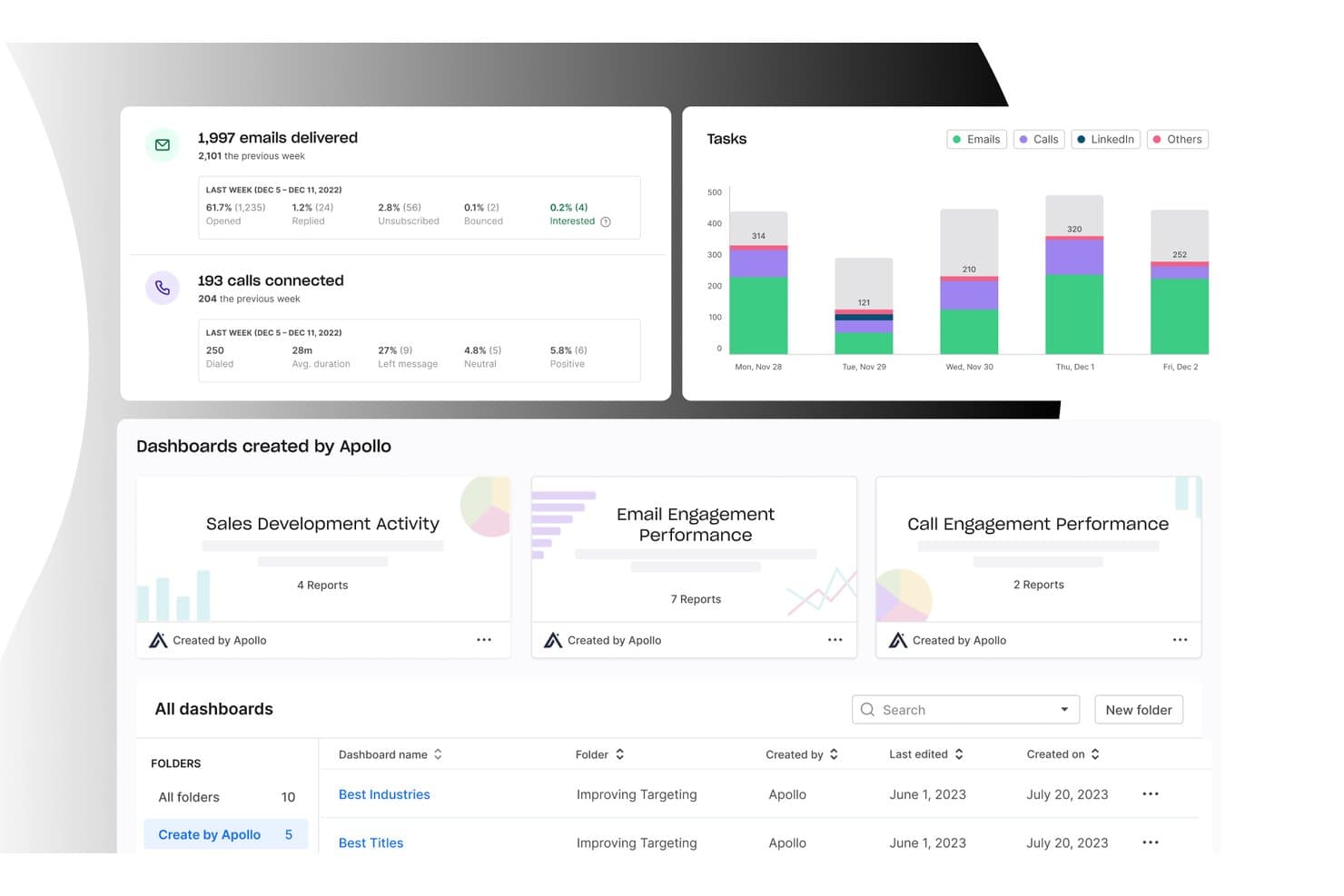
Apollo.io offers a comprehensive analytics dashboard displaying email delivery stats, call connection rates, task breakdowns by channel, and pre-built sales dashboards for tracking engagement performance. Apollo.io is a B2B sales intelligence and outbound engagement platform that combines a 240M+ contact database with email sequencing, multi-channel outreach, and AI-powered prospecting tools.
Who Is Apollo.io Best For?
Apollo.io is a strong fit for sales-led teams and founders who need to find, enrich, and reach B2B contacts without juggling multiple prospecting tools.
Why I Picked Apollo.io
Apollo.io earns its spot on my shortlist because its 240M+ contact database with 65+ filters makes finding the right B2B prospects faster than anything else I've used. I especially like the Apollo Profile feature, which pulls together intent signals, job change alerts, and company news into a single unified view so I can prioritize outreach without digging through multiple tools. The AI Assistant then turns that data into targeted email sequences in a fraction of the time.
Apollo.io Key Features
- Parallel dialer: Call multiple prospects efficiently from one workspace.
- Email deliverability tools: Warm domains, rotate inboxes, and monitor sender reputation.
- Smart form builder: Capture and enrich inbound leads through customizable forms.
- Lead routing: Assign new leads automatically to the right sales representative.
Apollo.io Integrations
Apollo.io offers 200+ integrations through Apollo Anywhere, including native integrations with Salesforce, HubSpot, Outreach, Salesloft, SendGrid, LinkedIn, Gmail, ChatGPT, and Claude. It also provides a REST API and MCP support for custom workflows and AI tool connections.
Pros and Cons
Pros:
- Unifies contact intent signals in one profile
- AI writes targeted outreach sequences automatically
- Massive verified B2B contact database built in
Cons:
- Marketing nurture campaigns not yet available
- No social media publishing or SMS tools
Learn more about Apollo.io: Best email marketing automation tool
- Free plan available
- From $13/month
Visit WebsiteCustomer Rating:4.5/5
Create new signup forms to start collecting email addresses. Mailchimp helps businesses create automated email campaigns to build brand awareness.
Why I picked Mailchimp: The platform is one of the most popular email marketing tools for small businesses. When using Mailchimp, you can build effective email templates and send messages according to your subscribers’ behavior. You can send automated weekly newsletters, product or service updates, or cart abandonment emails to ensure your brand stays on top of your customers’ minds while you focus on other crucial functions that require your attention.
Mailchimp is a cloud-based system that works for small businesses in any industry. You can use the software to promote your business using multiple methods, such as email, landing pages, social media, postcards, and other effective ways. Mailchimp also provides a CRM that helps you collect customer data and use those insights towards your next campaign.
Mailchimp Standout Features and Integrations
Features include email templates, a drag-and-drop editor, email segmentation, email automations, analytics and artificial intelligence, A/B testing, campaign management, automated customer journeys, and optimization recommendations.
Integrations include Shopify, Stripe, Quickbooks, Zendesk, WordPress, Typeform, SurveyMonkey, Salesforce, Copper CRM, Pipedrive, monday.com, Zoho CRM, Canva, and Zapier.
Pros and Cons
Pros:
- Works well with small email lists
- Effectively manages email campaigns
- Easy to set up
Cons:
- Data needs more details
- Some customization restrictions
Learn more about Mailchimp : Best for fully branded webinar experiences
- 14-day free trial + free demo available
- From $85/presenter/month (billed annually)
Visit WebsiteCustomer Rating:4.5/5
WebinarGeek interface showing a live webinar session with multiple presenters and participant controls accessible across devices WebinarGeek gives small businesses a way to host interactive webinars without technical barriers or complicated setup. The platform is designed for marketers and business owners who want to engage audiences, collect leads, and analyze attendee behavior. If you need a marketing tool that combines live video, audience interaction, and data-driven insights, WebinarGeek is built for you.
Who Is WebinarGeek Best For?
WebinarGeek is a strong choice for small businesses and marketing teams that need an accessible, browser-based platform to run interactive webinars and capture audience insights.
Why I Picked WebinarGeek
I picked WebinarGeek for its ability to deliver fully branded webinar experiences, which is a priority for small businesses that want to stand out and reinforce their identity. The platform lets you customize every aspect of your webinar environment, from registration pages and emails to the live webinar room itself. I appreciate how you can add your own logo, brand colors, and custom visuals, ensuring a consistent look and feel throughout the attendee journey. This level of branding control helps small businesses create a professional impression and build trust with their audience.
WebinarGeek Key Features
Some other features that make WebinarGeek useful for small business marketing teams include:
- Automated webinars: Schedule and run pre-recorded webinars that simulate live events, allowing you to reach audiences without being present in real time.
- Interactive polls and quizzes: Engage attendees during webinars with live polls and quizzes to gather feedback and keep sessions dynamic.
- Email marketing automation: Set up automated email reminders, confirmations, and follow-ups to nurture leads before and after your webinars.
- Detailed attendee analytics: Access real-time and post-event analytics on attendee behavior, engagement, and viewing duration to inform your marketing strategy.
WebinarGeek Integrations
Integrations include HubSpot, Salesforce, Pipedrive, Mailchimp, ActiveCampaign, ConvertKit, MailBlue, Enormail, Stripe, and Mollie. WebinarGeek also offers a REST API for custom integrations.
Pros and Cons
Pros:
- Native integrations with major CRM and email tools
- Built-in polls, quizzes, and interactive features
- Supports live, automated, and on-demand webinars
Cons:
- No built-in breakout room functionality
- Advanced analytics features require higher-tier plans
Learn more about WebinarGeek: 4Best for end-to-end marketing execution
Enji
- 14-day free trial
- From $29/month
Visit WebsiteCustomer Rating:4.9/5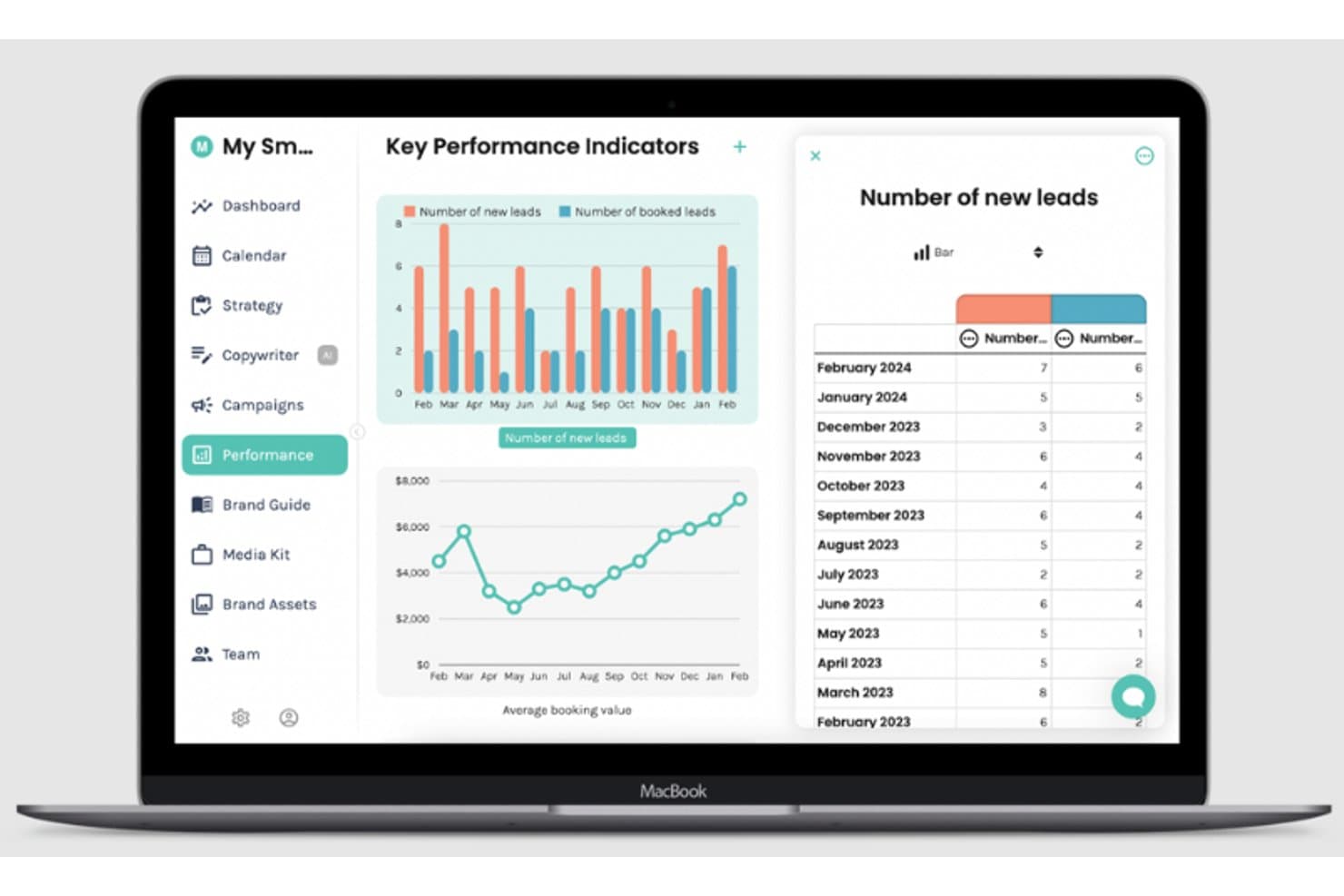
KPI Dashboard Enji is a marketing planning and execution platform for solopreneurs and small businesses that combines AI-driven strategy building, a marketing calendar, social media scheduling, an AI copywriter, and a KPI dashboard in one tool.
Who Is Enji Best For?
Enji is built for solopreneurs and small business owners who handle all their own marketing and want one tool to plan, schedule, and track it.
Why I Picked Enji
I picked Enji as one of the best because it's the only tool I've seen that takes you from a raw strategy to scheduled social content and tracked KPIs without ever leaving the platform. I love that the AI builds your marketing plan from a short questionnaire, then maps tasks directly onto a calendar across channels like email, social, and ads. The built-in AI copywriter drafts captions and blog posts in your brand voice, and the KPI dashboard pulls live data from Google Analytics 4, Meta, LinkedIn, and more automatically.
Enji Key Features
- Brand voice generator: Scans your website to build a saved brand voice profile, which the AI copywriter uses when drafting captions, blog posts, and newsletters.
- Campaign templates: Includes 16+ plug-and-play two-week campaign templates for common goals like promotions, launches, and list building, with tasks and metrics pre-mapped.
- Multi-platform social scheduler: Auto-publishes to Facebook, Instagram, LinkedIn, Pinterest, TikTok, YouTube Shorts, and Threads, with support for hashtag groups, location tags, and a grid preview.
- Group coaching with the founder: Every paid plan includes live group coaching sessions with Enji's founder, a marketing consultant, to help you apply the tool to your business.
Enji Integrations
Enji has 10+ documented native integrations, including Facebook, Instagram, LinkedIn, Pinterest, TikTok, YouTube Shorts, Threads, Google Analytics 4, Canva, and Google Calendar. It also connects with iCal for calendar syncing.
Pros and Cons
Pros:
- Founder coaching supports hands-on execution
- Brand voice guides useful content drafts
- Turns strategy into scheduled tasks
Cons:
- Email campaigns remain planning-only
- No CRM or contact segmentation
Learn more about Enji: Best for local business review management
- Free demo available
- Pricing upon request
Visit WebsiteCustomer Rating:4.8/5
Small businesses can track customer reviews across over 150 review sites and compare customer ratings against local competitors Birdeye is a reputation management platform that’s suitable for businesses of various sizes, industries, and contexts. It’s particularly useful for local businesses seeking to manage their online presence and monitor customer reviews.
Why I Picked Birdeye: I decided to add this platform to my list because of its focus on local business reputation management. Your small business can keep track of online customer reviews on over 150 different review sites, and use this information to fuel your marketing, customer service, and product and service offerings.
You can also collect customer feedback through the platform and benchmark your reviews and ratings against local competitors. Factors like NPS and specific areas of customer satisfaction can be compared. For local businesses that rely on word-of-mouth referrals, these tools are invaluable.
Birdeye Standout Features & Integrations
One feature that stands out about this platform is its topic tracking tool. You can monitor topics that are relevant to your product or service offerings, and spot opportunities to contribute to conversations or respond to customer or lead inquiries. This helps you create an active and engaged brand presence online. I find this super helpful for small businesses that might not have a big marketing team to conduct social listening or engagement activities.
Integrations include QuickBooks, Square, Zoho CRM, Zoho Books, Zoho Invoice, Pipedrive, Thryv, Keap, HubSpot, Lightspeed, and hundreds of other SaaS tools.
Pros and Cons
Pros:
- Automates customer surveys and reviews
- Tons of integrations available
- Customer feedback management tools included
Cons:
- Limited customer support
- No free plan or trial
Learn more about Birdeye: Best for high-deliverability email campaigns
- Free plan available
- From $9/month
Visit WebsiteCustomer Rating:4.6/5
Sender’s workflow automation and A/B testing support high-deliverability email campaigns. Sender is a small business marketing software designed to support high-deliverability email campaigns. It helps businesses create and manage email outreach with tools for automation, list management, and performance tracking. Built for growing teams, the platform simplifies campaign setup while helping ensure messages reach subscribers’ inboxes consistently.
Why I Picked Sender
I picked Sender for its strength in high-deliverability email campaigns. It is built to help small businesses send emails that consistently reach subscribers’ inboxes. The platform includes automation workflows for welcome emails and abandoned cart reminders, along with audience segmentation based on behavior and demographics. These tools help business owners manage campaigns efficiently while maintaining reliable email performance.
Sender Key Features
In addition to high-deliverability email campaigns, Sender offers:
- Drag-and-Drop Email Builder: This feature lets you create visually appealing emails without coding, making it accessible to all team members.
- SMS Marketing: You can enhance your marketing reach by sending SMS campaigns alongside your email promotions.
- Subscription Forms and Popups: Customize forms and popups to grow your email list and engage users effectively.
- Real-Time Analytics: Track your campaign performance with metrics like open rates and click-throughs, and utilize the newsletter heatmap to visualize engagement.
Sender Integrations
Integrations include WordPress, WooCommerce, Shopify, PrestaShop, Magento, Zapier, and an API for custom integrations.
Pros and Cons
Pros:
- Simple campaign builder suited for small teams
- Reliable automation workflows for ongoing email sequences
- Easy-to-use interface with quick campaign setup
Cons:
- Limited template library compared to larger platforms
- Branding flexibility within templates may require workarounds
Learn more about Sender: Best for segmentation and personalization
- Free plan available
- From $20/month
Visit WebsiteCustomer Rating:4.6/5
Klaviyo lets you tap into customer data to develop segmentation strategies and personalized automations. Klaviyo offers a unique blend of marketing automation tools that cater specifically to small businesses looking to enhance their customer engagement strategies. With its ability to unify data from various sources, it appeals to businesses across industries that need to streamline their marketing efforts. Whether you're in retail, e-commerce, or a service-based industry, Klaviyo helps solve the challenge of creating personalized, data-driven campaigns that resonate with your audience.
Why I Picked Klaviyo
I picked Klaviyo because it excels in providing small businesses with powerful segmentation and personalization. The platform's advanced analytics allow you to leverage customer data for precise targeting, ensuring that your marketing messages hit the mark. Additionally, Klaviyo's integration with multiple channels, including social media, email and SMS, empowers your team to reach customers where they are most active. These features make it an invaluable tool for businesses aiming to nurture customer relationships and drive growth.
Klaviyo Key Features
In addition to its robust segmentation and personalization, I also found the following features particularly beneficial for small business marketing:
- AI-Driven Insights: This feature uses machine learning to provide predictive analytics, helping you anticipate customer behavior and optimize your campaigns.
- Behavior-Triggered Flows: Use actions like product views or purchases to automatically send personalized messages.
- Comprehensive Customer Profiles: Gain a complete view of your customers with detailed profiles that consolidate data from all touchpoints.
- Data Security and Compliance: Rest assured with Klaviyo’s ISO 27001 certification and SOC 2 Type 2 audit, ensuring data protection and privacy compliance.
Klaviyo Integrations
Integrations include Shopify, WooCommerce, BigCommerce, Magento, Salesforce, Stripe, Facebook, Instagram, Google Analytics, and Zendesk.
Pros and Cons
Pros:
- Supports omnichannel marketing, including email, SMS, and social media.
- Provides AI-driven insights for personalized marketing strategies.
- Offers comprehensive data integration for unified customer profiles.
Cons:
- Pricing can escalate quickly as contact lists grow.
- Some users desire more customization options.
Learn more about Klaviyo: Best for cross-channel marketing work
- 15-day free trial available
- From $25/month (billed annually)
Visit WebsiteCustomer Rating:4.2/5
Zoho Marketing Plus enables detailed campaign management to enhance marketing efforts. Zoho Marketing Plus gives small businesses one place to plan and manage campaigns across channels, keeping everything aligned. Designed specifically for marketing teams needing a centralized hub, it provides tools for omnichannel engagement, marketing automation, and brand asset management while ensuring data privacy. This platform is ideal for businesses looking to enhance team collaboration, manage budgets effectively, and track marketing performance.
Why I Picked Zoho Marketing Plus
I picked Zoho Marketing Plus for its unique ability to unify marketing efforts across multiple channels, a crucial aspect for small businesses striving to maintain a consistent brand presence. Its marketing automation feature allows you to tailor content based on customer behavior, reducing manual efforts. Additionally, the brand asset management tool helps keep all your marketing resources organized, making it easier to maintain brand consistency across campaigns. Together, these features give small businesses a simple way to tackle key marketing challenges.
Zoho Marketing Plus Key Features
In addition to cross-channel marketing work, Zoho Marketing Plus offers:
- Unified Marketing Analytics: Gain insights into the performance of your campaigns with analytics that help measure effectiveness and ROI.
- Budget Management Tools: Keep track of your marketing expenses and ensure your campaigns are cost-effective and within budget.
- Team Collaboration: Enhance collaboration within your marketing team by providing seamless access to marketing assets and campaign data.
Zoho Marketing Plus Integrations
Integrations include Zoho CRM, Zoho Campaigns, Zoho Social, Zoho Desk, Google Analytics, Google Ads, Facebook Ads, X, LinkedIn, and SurveyMonkey.
Pros and Cons
Pros:
- Comprehensive features for omnichannel and automated marketing
- Integrated suite works seamlessly with other Zoho products
- Privacy focused, ensuring user data confidentiality
Cons:
- Customization limitations restrict flexibility for some users
- Users report issues connecting with third-party tools
Learn more about Zoho Marketing Plus: Best for designing graphics
- Free trial + free plan available
- From $144/user/year (billed annually)
Visit WebsiteCustomer Rating:4.7/5
Create custom graphic assets, such as presentations, from the Canva dashboard. Canva helps businesses create stunning graphics to get them noticed.
Why I picked Canva: This tool will help you stand out and get noticed with stunning graphics that you can design, even if you’re just a beginner. If you don’t have any graphic editing skills, you can still use the software to quickly create amazing looking design within minutes. Canva offers many graphic design features to help you create the perfect asset for your content, emails, or website.
Canva helps small businesses design anything they need for their content by providing a simple drag-and-drop tool and professional templates. The platform provides over 100 million stock photos, videos, and audio for your unique designs. Canva also provides a logo-maker tool if you’re still in the startup phase and don’t have a logo yet.
Canva Standout Features and Integrations
Features include text animations, design templates, an image editor, content management, visual discovery, filtered views, cloud storage, multiple file formats, edit and change tracking, and user tagging.
Integrations include WordPress, Asana, Microsoft OneDrive, Sendible, HubSpot CMS Hub, Brandfolder, Oktopost, Pexels, PageProof, OptiSigns, and Desktop.com.
Pros and Cons
Pros:
- An enormous template and graphics collection.
- A mobile application is available.
- Easy to get started.
Cons:
- Some performance issues.
- More useful features are in paid plans.
Learn more about Canva: 10Best for AI-powered customer support
Tidio
- Free plan available; 7-day free trial
- From $24.17/month (billed annually)
Visit WebsiteCustomer Rating:4.7/5
Tidio’s dashboard centralizes live chat, chatbot management, and customer support metrics. Tidio is a small business marketing software designed to enhance customer engagement and support. It combines live chat, AI chatbots, email marketing, and help desk tools into one easy-to-use platform. With its automation and multichannel communication capabilities, Tidio helps small businesses provide 24/7 customer assistance and stay connected with their audience across all major channels.
Why I Picked Tidio: I picked Tidio because it gives small businesses an affordable way to provide round-the-clock customer support without requiring a full-time team. Its Lyro AI Agent can handle routine customer inquiries automatically, while the live chat tool ensures that complex issues still get a personal touch. I also like how the performance analytics help you track response times and customer satisfaction, so you can continually refine your service. If you’re looking for a way to keep your customers engaged and supported, Tidio fits the bill.
Tidio Standout Features & Integrations
Features include the Lyro AI Agent for automated chat responses, multichannel communication across social platforms, a help desk system to manage tickets efficiently, and performance analytics to monitor team and chatbot effectiveness.
Integrations include Google, HubSpot, Typeform, YouTube, Twitter, TikTok, Shopify, WordPress, WhatsApp, Instagram, Messenger, and Mailchimp.
Pros and Cons
Pros:
- Strong multichannel communication
- Affordable for small businesses
- Easy-to-use live chat tools
Cons:
- Some integrations need setup help
- Advanced features cost extra
Learn more about Tidio:
Annen markedsføringsprogramvare for små bedrifter
Her er noen flere alternativer som ikke kom med på listen over den beste markedsføringsprogramvaren for små bedrifter:
- 11Google AnalyticsBest for website insights
- 12SemrushBest for keyword research
- 13BufferBest for scheduling social media content
- 14DripBest for ecommerce marketing automation
- 15ActiveCampaignBest for customer experience automation
- 16Elastic EmailBest with granular team access control
- 17Yoast SEOBest for search engine optimization
- 18BDOW!Best for growing an email marketing lis
- 19monday AI WorkspaceBest for managing marketing campaigns
- 20Sprout SocialSocial media management tool that helps small businesses publish and schedule content, engage with followers, and analyze social media performance.
- 21AhrefsComprehensive SEO tool that helps small businesses track website rankings, analyze backlinks, and research keywords.
- 22Constant ContactEmail marketing software that helps small businesses create and send email newsletters, manage contacts, and more.
- 23ClickFunnelsSales funnel builder that helps small businesses create and optimize their sales funnels for lead generation and conversion
- 24LeadpagesLanding page builder that helps small businesses create high-converting landing pages, pop-ups, and alert bars.
- 25WistiaVideo hosting platform that helps small businesses create, host, and analyze video content on their website and social media channels.
- 26Moz ProSuite of SEO tools that helps small businesses improve their search engine rankings, track website traffic, and analyze their competition.
- 27OptinMonsterLead generation tool that helps small businesses convert website visitors into subscribers, customers, and sales.
- 28Salesforce Marketing CloudMarketing automation software that helps small businesses create and manage personalized customer journeys across email, mobile, social, and web channels.
- 29Google My BusinessFree tool that helps small businesses manage their online presence on Google, including their business information, reviews, and search results.
How I Evaluate Small Business Marketing Software
When a solo marketer needs email, landing pages, and automations without an agency budget, I evaluate baseline requirements first, then the differentiators that set top tools apart.
Core Functionality (Table Stakes For This List)
When I'm selecting tools for my list, I rank each one on a scale from 0 (does not offer the functionality) to 5 (excels in this area) for each core functionality listed below. Then, I calculate the tool's total score into a percentage. Each tool needs to achieve a minimum total score of 65% to be considered for inclusion.
- Multi-Channel Campaign Management: I look for platforms where you can build and send campaigns across email, SMS, social, and web from one workspace instead of juggling separate tools.
- Marketing Automation Workflows: Each tool should offer visual workflow builders where you can set triggers like "abandoned cart" or "downloaded a guide" and build branching follow-up sequences.
- Contact & Audience Management: I evaluate how each platform handles segmentation, tagging, and list hygiene so a small team can target repeat buyers differently from new leads.
- Landing Pages & Forms: I check whether you can build lead capture pages and embed forms without needing a developer or a third-party tool like Unbounce or Instapage.
- Analytics & Campaign Reporting: Dashboards should surface open rates, click-throughs, and conversions per channel so you can quickly see what's driving results and shift budget accordingly.
- SMB-Friendly Pricing & Scalability: I evaluate whether the vendor offers a free plan or affordable entry tier, and whether pricing scales predictably as your contact list grows.
Once I have a list of tools that meet this criteria, I consider what sets each platform apart.
Differentiating Factors (What Sets Vendors Apart)
Here's how I compare and contrast different vendors:
Standout Features
AI content generation is a real differentiator. Tools like Mailchimp and HubSpot offer subject line and body copy suggestions that help solo marketers produce campaigns faster. I also evaluate whether a platform includes a built-in CRM, because small teams benefit when contact records and campaign history live in one place instead of syncing between separate systems. Social media scheduling rounds things out—planning posts and managing replies without a separate tool keeps the daily workflow tight.
Beyond Features
Pricing transparency matters for small businesses. I check whether costs scale predictably as your contact list grows, since some platforms tier by subscriber count while others charge by send volume. Integration depth is another key factor—a tool that connects natively with Shopify, WordPress, and Zapier saves hours of manual data entry each week. I also evaluate email deliverability, including whether the platform supports SPF, DKIM, and DMARC authentication to keep your campaigns landing in inboxes instead of spam folders.
Slik velger du markedsføringsprogramvare for små bedrifter
Det er lett å gå seg vill i lange funksjonslister og komplekse prismodeller. For å hjelpe deg med å holde fokus mens du går gjennom den unike prosessen med å velge programvare, får du her en sjekkliste over faktorer du bør ha i mente:
| Faktor | Hva du bør vurdere |
|---|---|
| FaktorSkalerbarhet | Hva du bør vurdereVil programvaren vokse sammen med virksomheten din? Ta hensyn til fremtidige behov og brukerbegrensninger. Se etter verktøy som kan håndtere større datamengder og flere brukere uten ekstra kostnader. |
| FaktorIntegrasjoner | Hva du bør vurdereKan den kobles til verktøyene du allerede bruker? Sørg for at den støtter viktige plattformer som CRM, sosiale medier og e-postsystemer for å unngå avbrudd i arbeidsflyten. |
| FaktorTilpasningsmuligheter | Hva du bør vurdereKan du tilpasse den til arbeidsprosessene dine? Se etter verktøy som lar deg endre dashbord, rapporter og brukerroller slik at de passer teamets behov. |
| FaktorBrukervennlighet | Hva du bør vurdereEr den brukervennlig for teamet ditt? Et enkelt grensesnitt reduserer opplæringstiden. Vurder verktøy som tilbyr demonstrasjoner eller gratis prøveperioder, slik at du kan teste brukervennligheten. |
| FaktorImplementering og oppstart | Hva du bør vurdereHvor lang tid tar det å komme i gang? Se etter omfattende støtte, som veiledninger, guider og kundeservice, for å sikre en smidig overgang. |
| FaktorKostnad | Hva du bør vurderePasser den inn i budsjettet ditt? Sammenlign prisplaner, skjulte kostnader og kontraktsvilkår. Se etter gratis prøveperioder eller trinnvise priser for å finne et kostnadseffektivt alternativ. |
| FaktorSikkerhetstiltak | Hva du bør vurdereEr dataene og kundeinformasjonen din beskyttet? Sørg for at programvaren overholder standarder for databeskyttelse og tilbyr funksjoner som kryptering og flerfaktorautentisering. |
Hva er markedsføringsprogramvare for små bedrifter?
Programvare for markedsføring i små bedrifter er et sett med verktøy utviklet for å hjelpe små bedrifter med å administrere og gjennomføre markedsføringsaktiviteter. Markedsføringsledere, småbedriftseiere og markedsførere bruker generelt disse verktøyene til å forbedre kundeengasjementet og øke salget. Funksjoner for e-postmarkedsføring, administrasjon av sosiale medier og analyse bidrar til å organisere kampanjer, følge med på resultater og forstå kundeatferd. Samlet sett gir disse verktøyene verdifull støtte for effektiv administrasjon av markedsføringsarbeidet.
Funksjoner
Når du velger programvare for markedsføring i små bedrifter, bør du se etter følgende viktige funksjoner:
- E-postmarkedsføring: Automatiserer utsending av målrettede e-postkampanjer for å engasjere kunder og pleie potensielle kunder.
- Administrasjon av sosiale medier: Administrerer og planlegger innlegg på tvers av flere plattformer for å opprettholde en konsekvent merkevaretilstedeværelse.
- Analyse og rapportering: Gir innsikt i kampanjeresultater og hjelper deg med å ta datadrevne beslutninger.
- Kampanjeautomatisering: Effektiviserer repetitive oppgaver, slik at du kan fokusere på strategi og kreativt arbeid.
- CRM-integrasjon: Kobler seg til verktøy for kunderelasjonshåndtering for å sentralisere kundeinteraksjoner og data.
- Tilpassbare maler: Tilbyr ferdige design som kan tilpasses merkevaren og budskapet ditt.
- AI-drevet innsikt: Analyserer data for å gi konkrete anbefalinger som kan forbedre markedsføringsstrategiene.
- Markedsføring i flere kanaler: Støtter kommunikasjon på tvers av ulike kanaler og sikrer en helhetlig markedsføringstilnærming.
- Mobiltilgang: Gjør det mulig å administrere markedsføringsaktiviteter på farten via mobile enheter.
- Sikkerhetstiltak: Beskytter kundedata med funksjoner som kryptering og flerfaktorautentisering.
Fordeler
Implementering av programvare for markedsføring i små bedrifter gir flere fordeler for teamet og virksomheten din. Her er noen av fordelene du kan se frem til:
- Bedre effektivitet: Automatisering av oppgaver som e-postkampanjer og administrasjon av sosiale medier sparer tid og lar teamet fokusere på strategi.
- Bedre kundeinnsikt: Funksjoner for analyse og rapportering hjelper deg med å forstå kundeatferd og preferanser, slik at du kan ta informerte beslutninger.
- Økt engasjement: Markedsføring i flere kanaler sikrer konsekvent kommunikasjon på tvers av plattformer, slik at målgruppen forblir engasjert og informert.
- Bedre samarbeid: CRM-integrasjon og tilpassbare maler legger til rette for teamarbeid ved å sentralisere data og tilby delte ressurser.
- Kostnadsbesparelser: Ved å samle flere markedsføringsfunksjoner i ett verktøy reduserer du behovet for flere abonnementer og tjenester.
- Skalerbarhet: Etter hvert som virksomheten vokser, kan programvaren tilpasses økte datamengder og brukerbehov uten betydelige ekstra kostnader.
- Datasikkerhet: Sikkerhetstiltak beskytter sensitiv kundeinformasjon, hjelper deg med å opprettholde tillit og sikrer samsvar med standarder for databeskyttelse.
Kostnader og priser
Valg av programvare for markedsføring i små bedrifter krever en forståelse av de ulike prismodellene og tilgjengelige abonnementene. Kostnadene varierer basert på funksjoner, teamstørrelse, tillegg og mer. Tabellen nedenfor oppsummerer vanlige abonnementer, gjennomsnittsprisene deres og typiske funksjoner som er inkludert i programvareløsninger for markedsføring i små bedrifter:
Sammenligningstabell for programvare for markedsføring i små bedrifter
| Abonnementstype | Gjennomsnittspris | Vanlige funksjoner |
|---|---|---|
| AbonnementstypeGratisabonnement | Gjennomsnittspris$0 | Vanlige funksjonerGrunnleggende e-postmarkedsføring, begrenset administrasjon av sosiale medier og grunnleggende analyse. |
| AbonnementstypePersonlig abonnement | Gjennomsnittspris$5-$25/bruker/måned | Vanlige funksjonerE-postmarkedsføring, planlegging av innlegg i sosiale medier, grunnleggende CRM-integrasjon og rapporteringsverktøy. |
| AbonnementstypeBedriftsabonnement | Gjennomsnittspris$30-$75/bruker/måned | Vanlige funksjonerAvanserte e-postkampanjer, markedsføring i flere kanaler, detaljert analyse og tilpassede maler. |
| AbonnementstypeVirksomhetsabonnement | Gjennomsnittspris$100+/bruker/måned | Vanlige funksjonerOmfattende CRM-integrasjon, AI-drevet innsikt, dedikert brukerstøtte og forbedrede sikkerhetsfunksjoner. |
Andre spør også
Her er noen populære spørsmål besvart for enkelhets skyld!
Kan markedsføringsprogramvare for små bedrifter integreres med verktøyene jeg allerede bruker?
Ja, det meste av markedsføringsprogramvaren for små bedrifter kan integreres med populære verktøy som CRM-systemer, sosiale medieplattformer og e-posttjenester. Sjekk programvarens integrasjonsmuligheter på nettstedet deres, eller kontakt kundestøtten for å få bekreftet dette. Sømløs integrasjon bidrar til å opprettholde kontinuitet i arbeidsflyten og unngå datasiloer.
Kreves det teknisk kompetanse for å bruke markedsføringsprogramvare?
Nei, det meste av markedsføringsprogramvaren for små bedrifter er utviklet for brukere med ulik teknisk kompetanse. Se etter verktøy med brukervennlige grensesnitt, veiledninger og støtteressurser. Mange plattformer tilbyr hjelp med oppstart og kundestøtte som veileder deg gjennom oppsett og bruk, slik at løsningen også er tilgjengelig for brukere uten teknisk bakgrunn.
Hvordan kan jeg sikre datasikkerheten med markedsføringsprogramvare?
Velg programvare som overholder standarder for databeskyttelse og tilbyr sikkerhetsfunksjoner som kryptering og flerfaktorautentisering. Sjekk personvernerklæringen og rutinene deres for håndtering av data. Oppdater passordene regelmessig, og lær opp teamet ditt i beste praksis for sikkerhet for å beskytte sensitiv informasjon.