

E-postmarkedsføringsprogramvare for små bedrifter er en verdifull ressurs for nye og voksende selskaper. Med riktig programvare kan team forbedre kundeengasjementet og øke salget. Det kan imidlertid være utfordrende å finne riktig e-postmarkedsføringsprogramvare for små bedrifter, særlig med så mange alternativer.
Med utgangspunkt i min erfaring med markedsføringsprogramvare testet og sammenlignet jeg flere av de beste løsningene for e-postmarkedsføring for små bedrifter. Deretter samlet jeg resultatene i detaljerte anmeldelser for å hjelpe deg med å finne den beste programvaren for dine behov.
Why Trust Our Software Recommendations
6,700+
Reviews
20
Industry experts
16+
Evaluation factors
14
Years
Our team has been testing and reviewing software since 2012. As marketing leaders ourselves, we know how difficult—and important—it is to choose the right software.
For this guide, we evaluated tools using hands-on testing and independent research, scoring tools using our selection criteria.
Our reviews reflect our human editorial judgment, not a sales pitch.
Expert reviewers:
 Gui DrusinaCreative Director
- Shriya GhateSenior Marketing Lead
 Amanda JacquesMarketing Ops Leader

Sammenligningstabell for e-postmarkedsføringsprogramvare for små bedrifter
Sammenlign prisdetaljer for min beste e-postmarkedsføringsprogramvare for små bedrifter i tabellen nedenfor.
| Tool | Best For | Trial Info | Price | ||
|---|---|---|---|---|---|
| 1 | Best for AI-driven email targeting | Free plan available | From $13/month | Website | |
| 2 | Best for Hostinger-hosted site owners | Free plan available | From $5.99/month | Website | |
| 3 | Best for straightforward email automation | Free plan available | From $9/month (billed annually) | Website | |
| 4 | Best for real-time data activation | Free plan available | From $20/month | Website | |
| 5 | Best for branded email templates | Free plan + free trial available | From $19/user/month (billed annually) | Website | |
| 6 | Best for unlimited automation workflows | Free plan available | From $9/month | Website | |
| 7 | Best for overall affordability | 14-day free trial + free demo available | From $10.80/month | Website | |
| 8 | Best for ecommerce processes | 14-day free trial available | From $33/month (billed annually) | Website | |
| 9 | Best for ecommerce marketers | 14-day free trial | From $39/month | Website | |
| 10 | Best for new email marketers | Free trial available | From $12.50/month (billed annually) | Website |


Anmeldelser av den beste e-postmarkedsføringsprogramvaren for små bedrifter
Nedenfor finner du mine detaljerte sammendrag av den beste e-postmarkedsføringsprogramvaren for små bedrifter som kom med på kortlisten. I anmeldelsene ser jeg på de viktigste funksjonene, fordeler & ulemper, integrasjoner og ideelle bruksområder for hvert verktøy, slik at du kan finne det beste alternativet.
 Best for AI-driven email targeting
- Free plan available
- From $13/month
Visit WebsiteCustomer Rating:4.5/5
Mailchimp displays campaign analytics that show subscriber activity, open and click rates, and overall email performance trends. Mailchimp helps your small business build and send targeted email campaigns with tools that let you design messages, automate audience journeys, and track performance from a single platform — all without needing technical expertise. It’s built for entrepreneurs, marketers, and small-team owners who want to grow customer relationships through newsletters, automated follow-ups, and customer engagement insights while tying those efforts into websites, forms, and ads.
Why I Picked Mailchimp
I picked Mailchimp for its unique ability to integrate AI-driven tools with email marketing, making it a great choice for small businesses. Its predictive segmentation feature allows you to target key customer groups more effectively, enhancing your marketing efforts. Additionally, the platform's marketing automation capabilities enable you to set up automated workflows that save time and ensure consistent communication with your audience. These features align with the needs of small businesses looking to optimize their marketing strategies without overextending their resources.
Mailchimp Key Features
In addition to its AI-driven tools and automation, I also found several other features beneficial for small businesses:
- Content Creation Tools: Easily design engaging email campaigns with customizable templates and a user-friendly drag-and-drop editor.
- Analytics and Reporting: Gain insights into your campaign's performance with detailed analytics that help you understand what resonates with your audience.
- SMS Marketing: Expand your reach with SMS marketing tools that complement your email campaigns and engage customers on multiple platforms.
- Form builder: Enables you to capture leads and grow your contact lists through custom forms and hosted pages.
Mailchimp Integrations
Integrations include Shopify, WooCommerce, Salesforce, QuickBooks, Squarespace, Google Analytics, Eventbrite, Slack, Stripe, and Zapier.
Pros and Cons
Pros:
- Provides detailed analytics and reporting tools.
- User-friendly interface with a drag-and-drop builder.
- AI-powered recommendations help small businesses refine audience targeting.
Cons:
- SMS features are not available in all regions or plans.
- Advanced automation features require higher-tier paid plans.
Learn more about Mailchimp : Best for Hostinger-hosted site owners
- Free plan available
- From $5.99/month
Visit WebsiteCustomer Rating:4.4/5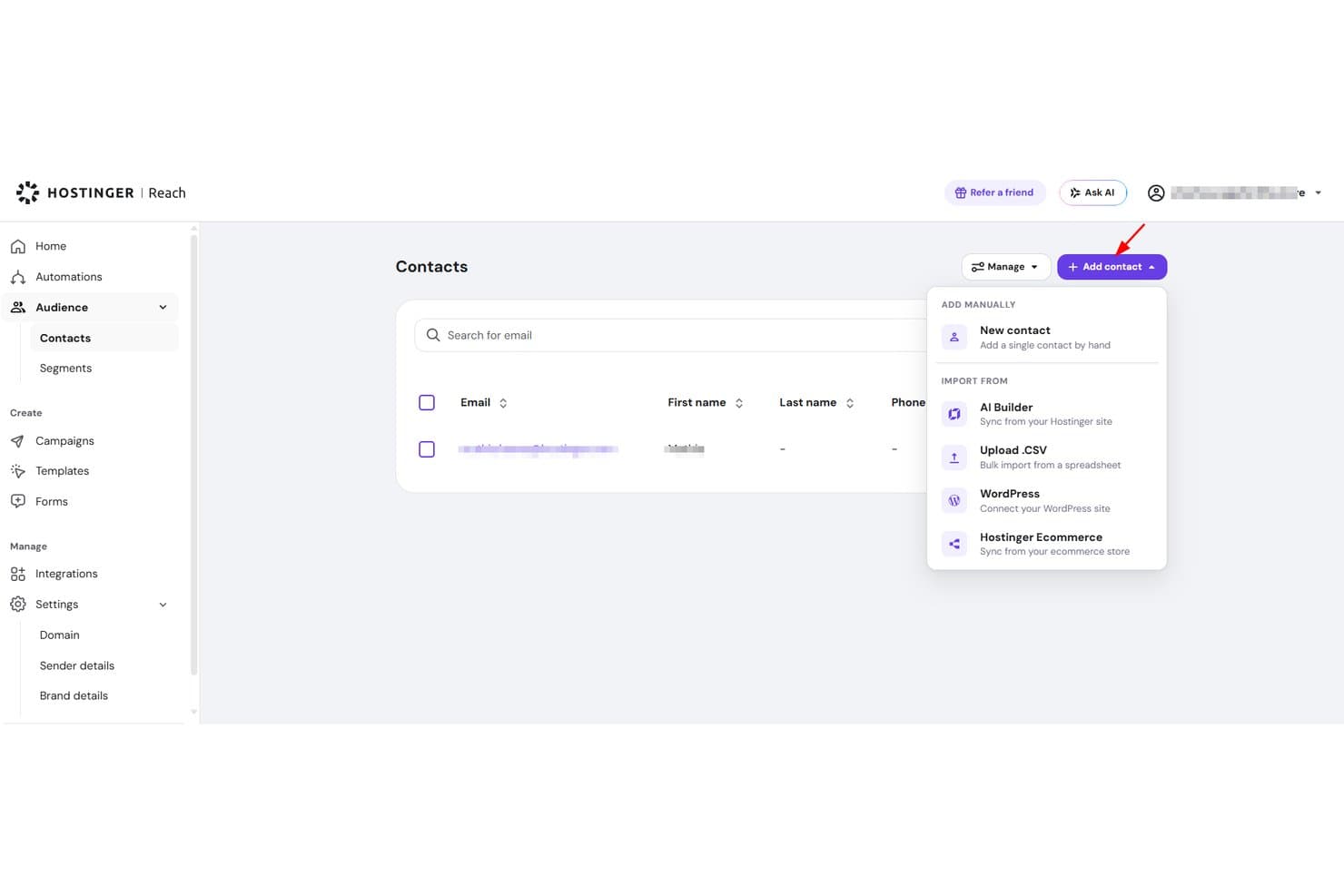
Hostinger Reach lets users import contacts via CSV, WordPress, or manually. Hostinger Reach is an AI-driven email marketing tool built into the Hostinger ecosystem, offering campaign creation, contact management, automation sequences, and basic performance analytics.
Who Is Hostinger Reach Best For?
Hostinger Reach is a natural fit for small business owners and solo marketers who already host their site with Hostinger and want email marketing without managing a separate tool.
Why I Picked Hostinger Reach
Hostinger Reach earns its spot on my shortlist because it's purpose-built for site owners already inside the Hostinger ecosystem. I love that it auto-syncs contacts from your WordPress site or Hostinger Website Builder, so you're not manually importing lists. The AI campaign builder turns a single prompt into a fully styled, on-brand email, and SPF, DKIM, and DMARC authentication are configured for you automatically.
Hostinger Reach Key Features
- AI subject line generator: Produces unlimited subject line options for any campaign so you can choose the strongest one before sending.
- Send-time optimization: Automatically identifies the best time to send each campaign based on recipient engagement data.
- Branded signup form builder: Lets you design and embed custom subscribe forms anywhere on your site without coding.
- Pre-built automation templates: Includes ready-to-use sequences for welcome emails, trust-building, and abandoned cart recovery.
Hostinger Reach Integrations
Hostinger Reach connects with Hostinger hosting, Hostinger Website Builder, and WordPress.
Pros and Cons
Pros:
- Unlimited contact storage
- Automatic sender authentication setup
- AI-generated campaigns from one prompt
Cons:
- Basic engagement reporting limits optimization
- Editor can scramble saved emails
Learn more about Hostinger Reach: Best for straightforward email automation
- Free plan available
- From $9/month (billed annually)
Visit WebsiteCustomer Rating:4.8/5
EmailOctopus’ campaign editor lets users customize email templates visually. EmailOctopus is an email marketing platform for small businesses that need a simple way to create, send, and track campaigns without extra marketing-suite complexity. It offers a drag-and-drop email builder, list management, segmentation, and automation workflows to help growing teams manage newsletters and subscriber engagement more efficiently.
Who Is EmailOctopus Best For?
EmailOctopus is a good fit for small business owners and early-stage startups who want an affordable, no-fuss email marketing tool without a steep learning curve.
Why I Picked EmailOctopus
I picked EmailOctopus because it gives small businesses a straightforward way to automate email follow-ups without adding unnecessary complexity. You can build automated sequences to welcome new subscribers, nurture leads, or re-engage contacts based on how they interact with your campaigns. I also like that its segmentation tools let you group contacts by custom fields, campaign activity, and signup form data, so your team can send more relevant emails. This makes EmailOctopus a good fit for small teams that want simple email automation, list management, and campaign tracking in one place.
EmailOctopus Key Features
Some other features in EmailOctopus help small businesses create, publish, and monitor email campaigns more easily:
- Drag-and-drop email editor: Build branded emails visually using customizable templates and content blocks.
- Signup forms and landing pages: Create embeddable forms, pop-ups, and hosted landing pages to capture new subscribers.
- Campaign scheduling: Schedule emails to send at a specific date and time.
- Reporting dashboard: Track campaign performance through metrics like opens, clicks, and unsubscribes.
EmailOctopus Integrations
Integrations include Zapier, WordPress, Little Stack, Leadpages, WooCommerce, Google Ads, Shopify, Memberful, Ticket Tailor, and Wix.
Pros and Cons
Pros:
- Built-in reports track campaign and automation email performance
- Segmentation targets subscribers by data, tags, and behavior
- Simple automation supports welcome, nurture, and birthday emails
Cons:
- Advanced automation options are limited for complex campaign workflows
- Template editing can feel restrictive for custom layouts
Learn more about EmailOctopus: Best for real-time data activation
- Free plan available
- From $20/month
Visit WebsiteCustomer Rating:4.6/5
Klaviyo customizes signup forms and flows using real-time data. Klaviyo offers a tailored email marketing solution for small businesses, focusing on enhancing customer engagement and driving growth. Designed for small to medium-sized enterprises, it integrates advanced marketing automation, AI-driven insights, and analytics to address the unique challenges of managing customer relationships and optimizing marketing strategies. By providing seamless data connectivity through numerous integrations, Klaviyo empowers businesses to personalize their marketing efforts and achieve measurable results.
Why I Picked Klaviyo
I picked Klaviyo for its unique ability to unify customer data and activate it in real-time, making it a standout choice for small businesses. The platform's marketing automation feature allows you to create personalized workflows that target customers based on their interactions with your brand. Additionally, Klaviyo's AI-driven insights provide actionable recommendations to refine your marketing campaigns. These features together ensure that your business can deliver tailored experiences that resonate with your audience and drive engagement.
Klaviyo Key Features
In addition to real-time data activation, Klaviyo offers:
- Advanced Analytics: Provides in-depth reporting tools to track campaign performance and customer behavior, helping you make data-driven decisions.
- Omnichannel Marketing: Supports communication across platforms such as email, SMS, and social media, ensuring consistent messaging.
- Segmentation: Allows you to categorize your audience based on specific criteria, enabling targeted and personalized marketing campaigns.
- Customizable Templates: Offers a wide range of mobile-optimized templates to create visually appealing emails aligned with your brand.
Klaviyo Integrations
Integrations include Shopify, BigCommerce, WooCommerce, Magento, Salesforce Commerce Cloud, Stripe, Facebook, Instagram, Google Ads, and Zendesk.
Pros and Cons
Pros:
- Real-time data activation enhances customer engagement
- Omnichannel capabilities support varied customer outreach
- Integration with numerous ecommerce platforms
Cons:
- Advanced tagging and organization less robust than some competitors
- Pricing may be high for growing businesses
Learn more about Klaviyo: Best for branded email templates
- Free plan + free trial available
- From $19/user/month (billed annually)
Visit WebsiteCustomer Rating:4.7/5
Flodesk helps create on-brand email campaigns with polished, visual templates. Flodesk is an email marketing solution built for small businesses that want consistent, on-brand emails without complexity. It stands out for its polished, branded email templates that make professional design accessible to both designers and non-designers. With built-in automation and subscriber segmentation, Flodesk helps small teams manage email campaigns efficiently while maintaining a strong visual identity.
Why I Picked Flodesk
I picked Flodesk for its strength in branded email templates, making it easy for small businesses to maintain a consistent visual identity. Its design-first approach, paired with Canva integration, lets you create polished, on-brand emails without design expertise. Flodesk also supports simple automations that handle subscriber journeys efficiently, helping you save time while keeping engagement high.
Flodesk Key Features
In addition to ibranded email templates, Flodesk offers:
- Custom Fonts: Allows you to use unique fonts that align with your brand's aesthetic, enhancing the personalization of your emails.
- Countdown Timers: Add urgency to your campaigns by embedding countdown timers in your emails, encouraging quicker customer action.
- Embedded Polls: Engage your audience by including interactive polls directly within your emails, gathering valuable customer feedback.
- Detailed Analytics: Provides insights into your email performance, helping you make informed decisions to optimize future campaigns.
Flodesk Integrations
Integrations include HoneyBook, BookFunnel, Canva, Shopify, Squarespace, ThriveCart, Wix, and Manychat.
Pros and Cons
Pros:
- Consistent branding across email campaigns with reusable template blocks
- Clean, distraction-free editor (less clutter, more focus on design)
- Fast setup for small or seasonal campaigns
Cons:
- Limited built-in CRM or contact-management functions
- Less control over code-level email customization
Learn more about Flodesk: Best for unlimited automation workflows
- Free plan available
- From $9/month
Visit WebsiteCustomer Rating:4.6/5
Sender’s automation dashboard lets users build and launch email workflows using ready-made templates and a visual editor. Sender is a versatile email marketing platform tailored for small businesses looking to enhance their marketing efforts without breaking the bank. It offers a user-friendly experience with its drag-and-drop email builder and a library of customizable templates, making it ideal for small business owners across industries like eCommerce, B2B, and nonprofits who need to connect with their audience effectively. By providing features like automation, segmentation, and SMS marketing, Sender addresses the challenge of reaching customers through multiple channels while maintaining high deliverability rates.
Why I Picked Sender
I picked Sender for its exceptional ability to cater to small business needs by offering unlimited automation workflows, which can significantly enhance your marketing efforts without requiring technical expertise. The platform's robust segmentation feature allows you to target specific customer groups with personalized content, ensuring your messages resonate with the right audience. Additionally, Sender's SMS marketing capability provides an extra channel to reach customers, making it a comprehensive tool for businesses looking to expand their reach and engagement.
Sender Key Features
In addition to its standout benefits, Sender offers other valuable features for small businesses:
- Real-Time Analytics: Offers detailed insights into campaign performance, helping you understand what works best for your audience.
- A/B Testing: Enables you to test different email variations to optimize open rates and conversions.
- Brand Auto-Styling: Automatically matches your email designs with your brand's style, ensuring consistency across all communications.
- GDPR Compliance: Ensures that your email marketing efforts adhere to data protection regulations, maintaining customer trust.
Sender Integrations
Integrations include WordPress, WooCommerce, Zapier, PrestaShop, Magento, OpenCart, Shopify, API for custom integrations, and more.
Pros and Cons
Pros:
- User-friendly drag-and-drop builder
- Built-in SMS marketing support
- Unlimited automation workflows included
Cons:
- No built-in landing page builder
- Subscriber limits on lower tiers
Learn more about Sender: Best for overall affordability
- 14-day free trial + free demo available
- From $10.80/month
Visit WebsiteCustomer Rating:4.7/5
MailerLite offers cost-effective email campaign management for resource-limited teams. MailerLite is an email marketing platform designed for small businesses seeking cost-effective solutions for their marketing needs. It's ideal for teams looking to manage email list campaigns without extensive resources.
Why I picked MailerLite: MailerLite is the go-to choice for businesses that prioritize affordability without compromising on essential email marketing features. It offers an intuitive drag-and-drop editor that simplifies email creation. The platform also provides automation tools to streamline digital marketing efforts all at a lower than average cost. Ultimately, the simplicity of MailerLite enables small teams to execute the best email marketing services efficiently while remaining budget conscious.
Standout features & integrations:
Features include an intuitive drag-and-drop editor that allows you to create emails quickly, automation tools to help manage your email sequences, and many templates to make your emails look professional.
Integrations include Shopify, WordPress, WooCommerce, Zapier, Stripe, Mailchimp, Squarespace, Facebook, and Slack.
Pros and Cons
Pros:
- Wide range of templates
- Suitable for small teams
- Simple email editor
Cons:
- Basic reporting tools
- Limited advanced features
 8Best for ecommerce processes
Kit
- 14-day free trial available
- From $33/month (billed annually)
Visit WebsiteCustomer Rating:4.5/5
Kit offers simple tools to create and manage email campaigns for brand growth. Kit is an email marketing tool designed for small businesses. It offers intuitive solutions for creating and managing email campaigns.
Why I picked Kit: Kit offers simplicity without sacrificing functionality. You can create and send visually appealing emails using pre-built templates that don’t require design skills, making it easy to get started quickly. The software’s automated features, like follow-up reminders, also ensure you stay connected with your audience at the right moments. Plus, it includes built-in performance tracking, giving insights into your emails' performance without complicated analytics.
Standout features & integrations:
Features include easy-to-use email templates that let you quickly build campaigns without design skills, automated follow-ups to keep your audience engaged, and detailed performance tracking that helps you understand how your emails are doing.
Integrations include Shopify, WooCommerce, BigCommerce, Mailchimp, Squarespace, Stripe, Facebook, Instagram, Google Analytics, and Klaviyo.
Pros and Cons
Pros:
- Scalable for growing businesses
- Allows direct HTML email editing
- Built-in content recommendations for growth
Cons:
- Basic A/B testing functionality
- Limited email template customization
Learn more about Kit:

Drip automates personalized emails to boost ecommerce customer engagement. Drip is a marketing automation platform for ecommerce businesses to enhance customer engagement and sales strategies. Ecommerce marketers use it to create personalized email campaigns and automate customer interactions.
Why I picked Drip: Drip’s focus on ecommerce makes it ideal for businesses aiming to connect with customers through personalized experiences. It offers advanced segmentation tools that enable you to target specific customer behaviors and preferences. The platform’s automation workflows also allow you to create complex sequences tailored to different purchase stages. Additionally, Drip provides insights into customer journeys, helping you optimize your marketing efforts and email deliverability rates.
Standout features & integrations:
Features include advanced segmentation tools that help you target customers based on their behavior, automation workflows for creating detailed customer journeys, and data insights into customer interactions, enabling you to refine your marketing strategies.
Integrations include Shopify, WooCommerce, Magento, BigCommerce, Facebook, Instagram, Zapier, Privy, Justuno, and Sumo.
Pros and Cons
Pros:
- Personalized customer interactions
- Supports complex workflows
- Detailed customer journey insights
Cons:
- Limited design flexibility
- Complexity for small teams
Learn more about Drip: 10Best for new email marketers
AWeber
- Free trial available
- From $12.50/month (billed annually)
Visit WebsiteCustomer Rating:4.3/5
AWeber helps entrepreneurs quickly manage and send email newsletters. AWeber is email marketing software for small businesses and entrepreneurs who want to manage their email campaigns easily. It's particularly beneficial for those new to email marketing, providing tools to create and send newsletters efficiently.
Why I picked AWeber: AWeber’s ideal for beginners thanks to its straightforward setup and intuitive interface. It offers easy-to-use templates and a drag-and-drop editor that simplifies the design process, while the autoresponder feature allows you to automate follow-up emails without hassle. Additionally, AWeber provides educational resources to help your team get the most out of the platform.
Standout features & integrations:
Features include an easy-to-use drag-and-drop email builder that helps you design emails quickly, autoresponders to automate your email sequences, and a range of templates to make your emails look professional with minimal effort.
Integrations include WordPress, Shopify, PayPal, Facebook, Etsy, WooCommerce, Zapier, Salesforce, Leadpages, and OptinMonster.
Pros and Cons
Pros:
- Straightforward email automation
- Helpful educational resources
- Simple setup process
Cons:
- Basic reporting tools
- Limited advanced features
Annen e-postmarkedsføringsprogramvare for små bedrifter
Her er noen flere løsninger for e-postmarkedsføring for små bedrifter som ikke kom med på kortlisten min, men som likevel er verdt å ta en titt på:
- 11ActiveCampaignBest for email automation
- 12Benchmark EmailBest for global reach
- 13Campaign MonitorBest for design customization
- 14Elastic EmailBest for AI-powered email design
- 15Constant ContactBest for event promotion
- 16GetResponseBest for webinars
- 17MailchimpBest for small teams
- 18BrevoBest for transactional emails
- 19HubSpot Email MarketingBest for CRM integration
- 20SendGridBest for high-volume sending
How I Evaluate Email Marketing Software for Small Business
I look at two layers: whether a tool clears a baseline—drag-and-drop builders, list segmentation, automation—then what makes it the right fit for a small business specifically.
Core Functionality (Table Stakes For This List)
When I'm selecting tools for my list, I rank each one on a scale from 0 (does not offer the functionality) to 5 (excels in this area) for each core functionality listed below. Then, I calculate the tool's total score into a percentage. Each tool needs to achieve a minimum total score of 65% to be considered for inclusion.
- Email Campaign Builder: I evaluate whether the editor lets you drag in product blocks, adjust layouts for mobile, and preview before sending—without touching HTML.
- Contact List Management: Segmentation depth matters here. I look for the ability to tag contacts by purchase behavior, engagement level, or signup source.
- Marketing Automation: I check for multi-step workflow support—things like a post-purchase drip that branches based on whether a customer opened the first email.
- Performance Analytics: Beyond open and click rates, I look for revenue attribution and campaign comparisons that help you tie a specific send to actual sales.
- Deliverability & Compliance: SPF/DKIM authentication, double opt-in options, and built-in consent management for GDPR and CAN-SPAM are what I evaluate here.
- SMB-Friendly Pricing & Scale: I check whether entry-level tiers match realistic small business list sizes and whether pricing scales predictably as contacts grow.
Once I have a list of tools that meet the criteria, I consider what sets each platform apart.
Differentiating Factors (What Sets Vendors Apart)
Here's how I compare and contrast different vendors:
Standout Features
Prebuilt automation templates are a major differentiator. A solo marketer who can launch an abandoned cart or re-engagement series in minutes—rather than mapping it from scratch—gets real value fast. I also evaluate native ecommerce integrations with platforms like Shopify or WooCommerce, where product syncing and per-campaign revenue tracking can shape smarter sends. Built-in landing pages and signup forms matter too, since they let you grow your list without paying for a separate tool.
Beyond Features
Pricing transparency matters a lot for small businesses. I check whether a platform's tiers scale predictably with list growth or surprise you with overage fees after a big campaign. Tech stack compatibility is another key factor—if your store runs on WooCommerce and your CRM is HubSpot, I evaluate how well each platform connects without relying entirely on Zapier. Deliverability reputation rounds things out. A great campaign means nothing if it lands in spam, so I look at sender reputation tools and inbox placement track records.
Slik velger du e-postmarkedsføringsprogramvare for små bedrifter
Det er lett å gå seg vill i lange funksjonslister og komplekse prismodeller. For å hjelpe deg med å holde fokus når du går gjennom den unike prosessen med å velge programvare, får du her en sjekkliste over faktorer du bør ha i bakhodet:
| Faktor | Hva du bør vurdere |
| Skalerbarhet | Vil programvaren vokse sammen med virksomheten din? |
| Integrasjoner | Kan den kobles til verktøyene du allerede bruker? |
| Tilpasningsmuligheter | Kan du tilpasse den til behovene til merkevaren din? |
| Brukervennlighet | Er den enkel for teamet ditt å bruke? |
| Budsjett | Holder den seg innenfor de økonomiske rammene dine? |
| Sikkerhetstiltak | Gir den beskyttelse for dataene og kommunikasjonen din? |
| Analyse | Gir den innsikt som hjelper deg med å ta informerte beslutninger? |
| Kundestøtte | Er det pålitelig støtte tilgjengelig når du trenger det? |
Trender innen e-postmarkedsføringsprogramvare for små bedrifter
I researchen min hentet jeg inn utallige produktoppdateringer, pressemeldinger og lanseringslogger fra ulike leverandører av e-postmarkedsføringsprogramvare for små bedrifter. Her er noen av trendene som er i ferd med å vokse frem, og som jeg følger med på:
- AI-drevet personalisering: AI brukes til å skape mer personlige e-postopplevelser. Den analyserer brukeratferd for å foreslå innhold og utsendelsestidspunkter, slik at e-postene blir mer relevante. Leverandører som Mailchimp bruker AI til å tilby tilpassede produktanbefalinger.
- Interaktivt e-postinnhold: E-poster blir mer interaktive med elementer som avstemninger, spørreundersøkelser og karuseller. Disse funksjonene holder mottakerne engasjert og gir verdifull innsikt. Moosend lar for eksempel brukere bygge inn spørreundersøkelser direkte i e-poster.
- Avansert analyse og rapportering: Bedrifter ønsker dypere innsikt i e-postytelsen, og avanserte analyseverktøy gir detaljerte rapporter om brukerengasjement. Plattformer som GetResponse tilbyr funksjoner som sporer abonnentinteraksjoner og forutsier fremtidig atferd.
- Personvern og databeskyttelse: Med stadig flere personvernregler fokuserer verktøy for e-postmarkedsføring på personvernfunksjoner. Derfor blir overholdelse av GDPR og datakryptering stadig mer standard.
- Stemmestyrte e-postinteraksjoner: Etter hvert som smarthøyttalere og taleassistenter blir mer utbredt, oppstår stemmestyrte e-postinteraksjoner. Denne trenden lar brukere håndtere e-poster ved hjelp av talekommandoer, noe som forbedrer tilgjengeligheten. Selv om dette fortsatt er i en tidlig fase, undersøker leverandører integrasjoner med enheter som Amazon Alexa.
Hva er programvare for e-postmarkedsføring for små bedrifter?
Programvare for e-postmarkedsføring for små bedrifter hjelper selskaper i vekst med å opprette, sende og spore e-postkampanjer på en effektiv måte. Markedsførere og eiere av små bedrifter bruker disse verktøyene til å nå målgruppen sin og styrke kundeengasjementet.
Funksjoner som e-postmaler, automatisering og analyse støtter målrettede kampanjer og gir bedre innsikt i engasjementet. Disse verktøyene gir små bedrifter en rimelig måte å komme i kontakt med kunder og utvide rekkevidden sin på.
Funksjoner i programvare for e-postmarkedsføring for små bedrifter
Når du velger programvare for e-postmarkedsføring for små bedrifter, bør du se etter følgende viktige funksjoner:
- E-postmaler: Forhåndsutformede oppsett som gjør det enkelt å lage profesjonelle e-poster raskt.
- Automatiseringsverktøy: Sett opp sekvenser for dryppmarkedsføring, nyhetsbrev på e-post og oppfølginger uten manuell innsats, slik at du sparer tid og arbeid.
- Analyse og rapportering: Spor og analyser e-postytelsen for å forstå engasjementet og forbedre fremtidige kampanjer.
- Segmenteringsalternativer: Målrett bestemte grupper i målgruppen din for å sende personlig og relevant innhold.
- Muligheter for personalisering: Tilpass e-poster med mottakerspesifikke detaljer for å øke engasjementet.
- Flerspråklig støtte: Nå et globalt publikum ved å opprette e-poster på flere språk.
- Geolokaliseringssporing: Tilpass innholdet til bestemte regioner for å gjøre det mer relevant og styrke forbindelsen med målgruppene.
- A/B-testing: Eksperimenter med ulike elementer i e-postene for å finne ut hva som treffer målgruppen best.
- CRM-integrasjon: Administrer kunderelasjoner sammen med e-postkampanjer for å samordne markedsførings- og salgsarbeidet.
Fordeler med programvare for e-postmarkedsføring for små bedrifter
Implementering av programvare for e-postmarkedsføring for små bedrifter gir fordeler for både teamet og virksomheten din. Her er noen av fordelene du kan se frem til:
- Bedre engasjement: Muligheter for personalisering og segmenteringsalternativer bidrar til å levere relevant innhold til målgruppen din, noe som øker interaksjonen.
- Tidsbesparelser: Automatiseringsverktøy håndterer repetitive oppgaver som oppfølginger og sekvenser, slik at teamet ditt får mer tid til andre prioriteringer.
- Bedre innsikt: Funksjoner for analyse og rapportering gir detaljert informasjon om kampanjeresultater, slik at du kan forbedre strategiene dine.
- Global rekkevidde: Flerspråklig støtte og geolokaliseringssporing gjør det mulig å komme i kontakt med målgrupper over hele verden og tilpasse innholdet til språket og plasseringen deres.
- Kostnadseffektiv markedsføring: E-postmarkedsføring gir en rimelig måte å nå et stort publikum på sammenlignet med andre kanaler.
- Forbedret målretting: A/B-testing lar deg finjustere elementer i e-postene, slik at du sikrer at budskapene treffer målgruppen din.
- Integrert kundeadministrasjon: CRM-integrasjon gjør det mulig å administrere kunderelasjoner sømløst og samordne markedsføringsarbeidet med salgsmålene.
Kostnader og priser for programvare for e-postmarkedsføring for små bedrifter
Å velge programvare for e-postmarkedsføring for små bedrifter krever en forståelse av de ulike prismodellene og betalte abonnementene som er tilgjengelige. Vurder å utforske alternativer med åpen kildekode, som kan redusere kostnadene betydelig samtidig som de tilbyr omfattende funksjonalitet. Kostnadene varierer basert på funksjoner, teamstørrelse, tillegg og mer. Tabellen nedenfor oppsummerer standardabonnementer, gjennomsnittsprisene deres og typiske funksjoner som er inkludert i programvareløsninger for e-postmarkedsføring for små bedrifter:
Sammenligningstabell for abonnementer for programvare for e-postmarkedsføring for små bedrifter
| Abonnementstype | Gjennomsnittspris | Vanlige funksjoner |
| Gratisabonnement | $0 | Grunnleggende gratis e-postmaler, begrenset automatisering og grunnleggende rapportering. |
| Personlig abonnement | $10-$25/bruker/måned | Tilpassbare maler, grunnleggende automatisering og standardanalyse. |
| Bedriftsabonnement | $30-$75/bruker/måned | Avansert automatisering, A/B-testing og forbedret analyse. |
| Virksomhetsabonnement | $100-$200/bruker/måned | Tilpassede funksjoner, dedikert brukerstøtte og full CRM-integrasjon. |
Vanlige spørsmål om programvare for e-postmarkedsføring for små bedrifter
Her er noen svar på vanlige spørsmål om programvare for e-postmarkedsføring for små bedrifter:
Fungerer e-postmarkedsføring for små bedrifter?
Ja, e-posttjenester er effektive for små bedrifter. De hjelper deg med å selge til potensielle kunder, øke antallet henvisninger og engasjere kunder på nytt når de ikke har foretatt et kjøp. Ved å lage relevant og målrettet e-postinnhold øker du sannsynligheten for at leseren utfører en handling, noe som gjør e-postmarkedsføring til en kostnadseffektiv strategi for å utvikle virksomheten. Verktøy som programvare for videomarkedsføring på e-post kan forbedre denne innsatsen ytterligere, enten du sender velkomst-e-poster, transaksjonsoppdateringer eller påminnelser om forlatte handlekurver, ved å tilføre budskapet ditt et visuelt og engasjerende lag.
Hvor effektive er e-postmarkedsføringskampanjer?
E-postmarkedsføringskampanjer er svært effektive, særlig når kontaktlister er segmentert. Segmenterte e-poster kan føre til betydelig flere åpninger og klikk enn usegmenterte e-poster. Ved å sende e-poster regelmessig som en del av en dryppkampanje og tilpasse innholdet holder du engasjementet høyt. De fleste markedsførere rapporterer om økt engasjement det siste året.
Hvordan setter jeg opp e-postmarkedsføring for småbedriften min?
Begynn med å velge en løsning for e-postmarkedsføring som passer behovene dine. Sett opp automatiserte kampanjer for å spare tid og arbeid. Bli kjent med abonnentene dine og segmenter dem for målrettede budskap. Bruk programvare for testing av e-post for å kontrollere kontaktlisten din. Følg med på analysene for å spor e-postresultater og gjennomfør A/B-testing for å optimalisere emnelinjen og innholdet.
Hvordan måler jeg suksessen til e-postmarkedsføringskampanjene mine?
Følg med på viktige måltall som åpningsfrekvens, klikkfrekvens, konverteringsfrekvens og avmeldinger. Bruk analyseverktøyene fra selskapet for e-postmarkedsføring til å overvåke disse måltallene. Gå regelmessig gjennom og juster strategien basert på innsikten du samler inn, slik at du sikrer kontinuerlig suksess.