

Scegliere la piattaforma giusta per l'esperienza dei contenuti può essere difficile, considerando le numerose opzioni disponibili. Vuoi creare, gestire e ottimizzare i contenuti in modo efficace, ma devi capire quale strumento sia più adatto alle tue esigenze. Ti aiuto io! In questo articolo, sfrutto la mia vasta esperienza con diversi sistemi e piattaforme di gestione dei contenuti per presentarti la mia selezione delle migliori piattaforme per l'esperienza dei contenuti.
Questi strumenti ti aiutano a fornire contenuti personalizzati e coinvolgenti su più canali. Risolvono problemi importanti come la frammentazione dei contenuti, le esperienze utente incoerenti e i flussi di lavoro inefficienti. Lascia che ti guidi verso le migliori opzioni, semplificando il tuo processo decisionale.
Perché fidarsi dei nostri consigli sui software
6,700+
Reviews
20
Industry experts
16+
Evaluation factors
14
Years
Il nostro team testa e recensisce software dal 2012. In quanto leader del marketing noi stessi, sappiamo quanto sia difficile — e importante — scegliere il software giusto.
Per questa guida, abbiamo valutato gli strumenti attraverso test pratici e ricerche indipendenti, assegnando un punteggio agli strumenti in base ai nostri criteri di selezione.
Le nostre recensioni riflettono il nostro giudizio editoriale umano, non un discorso di vendita.
Revisori esperti:
 Gui DrusinaDirettore creativo
- Shriya GhateSenior Marketing Lead
 Amanda JacquesResponsabile Marketing Ops

Tabella comparativa delle piattaforme per l'esperienza dei contenuti
Questa tabella comparativa riassume i dettagli dei prezzi della mia selezione delle migliori piattaforme per l’esperienza dei contenuti:
| Tool | Best For | Trial Info | Price | ||
|---|---|---|---|---|---|
| 1 | Ideale per contenuti interattivi e stanze per le trattative senza codice | Prova gratuita di 15 giorni | A partire da $30/utente/mese | Website | |
| 2 | Ideale per la personalizzazione dei contenuti guidata dalla sperimentazione | Demo gratuita disponibile | Prezzi su richiesta | Website | |
| 3 | Ideale per esperienze di hub di contenuti basate sugli account | Demo gratuita disponibile | Prezzi su richiesta | Website | |
| 4 | Ideale per la gestione flessibile dei contenuti multi-sito | Demo gratuita disponibile | Prezzi su richiesta | Website | |
| 5 | Ideale per le operazioni sui contenuti nell'ecosistema Adobe | Non disponibile | Prezzi su richiesta | Website | |
| 6 | Ideale per la personalizzazione multisito basata sui dati su larga scala | Demo gratuita disponibile | Prezzi disponibili su richiesta | Website | |
| 7 | Ideale per esperienze dei contenuti per gli acquirenti guidate dai venditori | Demo gratuita disponibile | Prezzi su richiesta | Website | |
| 8 | Ideale per contenuti basati sulla vendita del valore e dimostrazione dei ricavi | Demo gratuita disponibile | A partire da $30/utente/mese | Website | |
| 9 | Ideale per esperienze di fruizione consecutiva dei contenuti guidate dall'AI | Demo gratuita disponibile | A partire da 30.000 $/anno (fatturazione annuale) | Website | |
| 10 | Ideale per trasformare documenti statici in centri interattivi | Demo gratuita disponibile | $750/mese (fatturato annualmente) | Website |


Recensioni delle migliori piattaforme per l'esperienza dei contenuti
Questa sezione offre un’analisi approfondita e una panoramica di ogni piattaforma per l’esperienza dei contenuti. Esamineremo i vantaggi e gli svantaggi di ogni strumento, le sue funzionalità e i casi d’uso più adatti.
 Ideale per contenuti interattivi e stanze per le trattative senza codice
- Prova gratuita di 15 giorni
- A partire da $30/utente/mese
Visit WebsiteCustomer Rating:4.8/5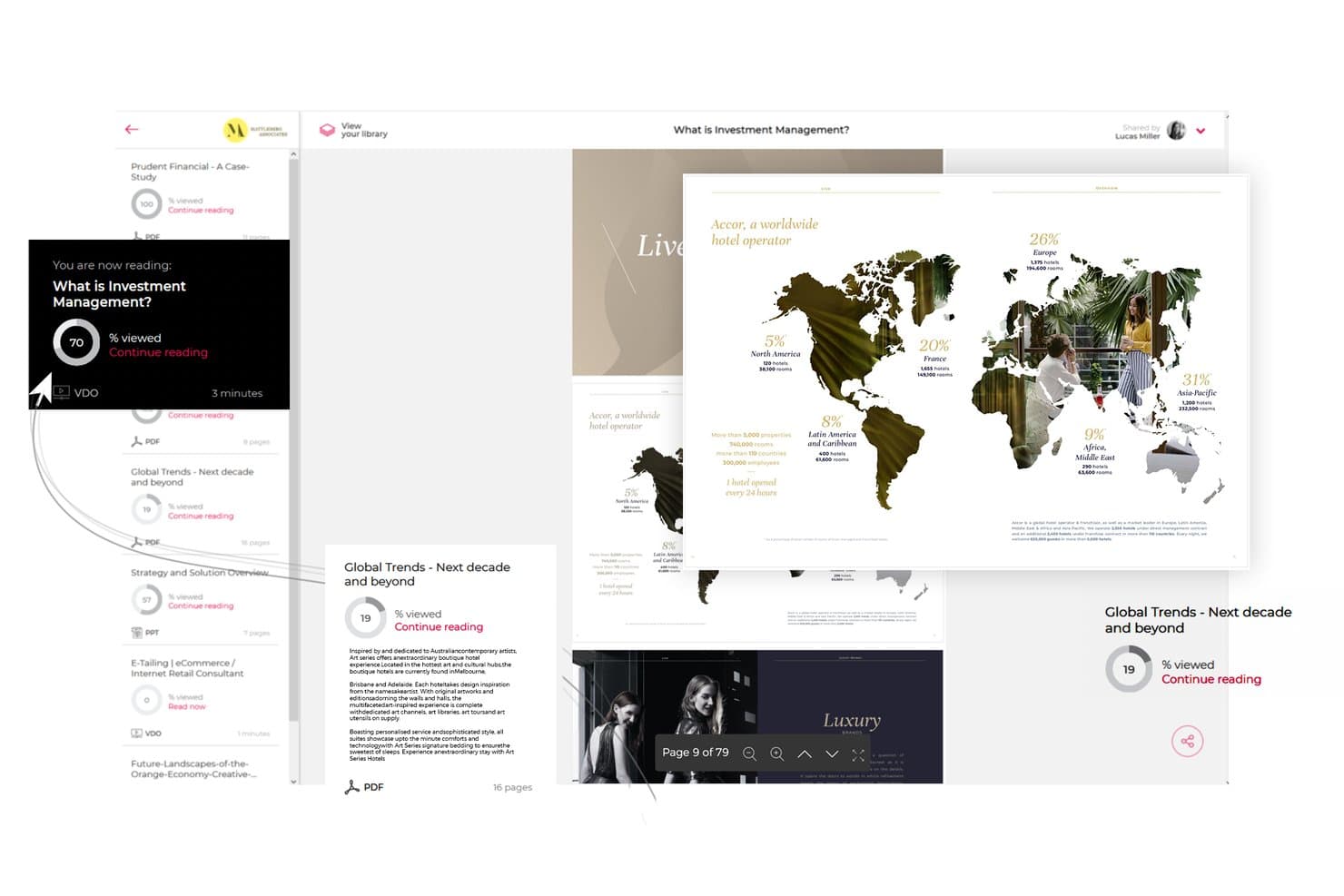
Paperflite consente agli utenti di monitorare l'avanzamento del coinvolgimento nei contenuti tra i documenti condivisi. Paperflite è una piattaforma per esperienze di contenuto che centralizza le risorse di marketing e vendita in hub brandizzati, micrositi personalizzati ed esperienze interattive, con ricerca basata sull'IA, analisi del coinvolgimento e stanze digitali per le trattative integrate.
Per chi è più adatto Paperflite?
Paperflite è ideale per i team di marketing e vendita B2B che devono creare esperienze di contenuto interattive e stanze per le trattative rivolte agli acquirenti senza dover ricorrere a designer o sviluppatori.
Perché ho scelto Paperflite
Paperflite è entrato nella mia lista dei preferiti grazie a Cleverstory, il suo generatore di contenuti interattivi senza codice che consente ai professionisti del marketing di creare quiz, calcolatori e infografiche interattive senza scrivere una riga di codice. Apprezzo molto anche le stanze digitali per le trattative, che offrono ad acquirenti e venditori uno spazio di lavoro condiviso e monitorabile, in cui viene registrato il coinvolgimento di ogni stakeholder fin dal primo clic. In combinazione con SEEK, un livello di ricerca basato sull'IA e addestrato sulla libreria dei contenuti, trovare e condividere la risorsa giusta nella fase corretta della trattativa diventa molto più rapido.
Funzionalità principali di Paperflite
- Flussi dell'hub dei contenuti: Organizza e distribuisci le risorse di marketing e vendita in flussi curati e controllati tramite autorizzazioni, a cui i team possono iscriversi con un solo clic.
- Avvisi sul coinvolgimento in tempo reale: Ricevi notifiche istantanee quando un potenziale cliente apre i contenuti condivisi, compresi i dati a livello di sezione sul tempo trascorso e sulla profondità di scorrimento.
- Integrazioni con CRM ed e-mail: Sincronizza i dati sul coinvolgimento direttamente con Salesforce, HubSpot, Pipedrive, Freshsales e Microsoft Dynamics, oltre che con Gmail e Outlook.
- Micrositi personalizzati: Crea portali brandizzati con più risorse per singoli account o potenziali clienti utilizzando FliteView, condivisibili tramite un unico link monitorabile.
Integrazioni di Paperflite
Paperflite offre integrazioni native con Salesforce, HubSpot, Microsoft Dynamics, Pipedrive, Freshsales, Oracle Eloqua, Gmail e Outlook. Si collega inoltre a SharePoint, Google Drive, Dropbox, Box e OneDrive, mentre i piani aziendali supportano l'accesso personalizzato tramite API.
Pros and Cons
Pros:
- Esperienze interattive create senza codice
- Avvisi in tempo reale sul coinvolgimento nei contenuti per i rappresentanti
- Stanze per le trattative brandizzate per la collaborazione con gli acquirenti
Cons:
- La personalizzazione avanzata richiede un piano di livello superiore
- Le funzionalità interattive complete richiedono un abbonamento separato
Learn more about Paperflite: Ideale per la personalizzazione dei contenuti guidata dalla sperimentazione
- Demo gratuita disponibile
- Prezzi su richiesta
Visit WebsiteCustomer Rating:4.2/5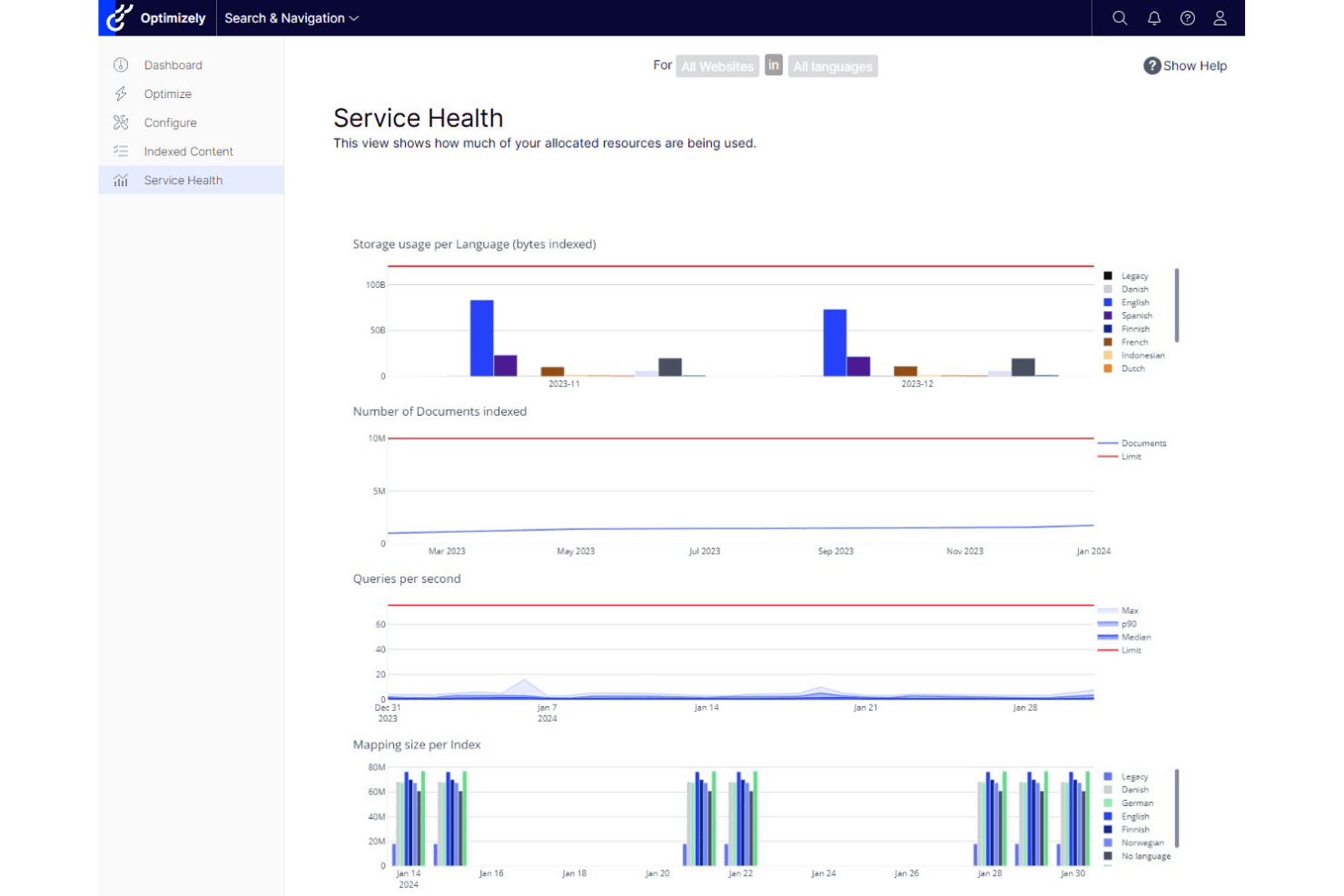
Optimizely si distingue per la sua solida sperimentazione web e la distribuzione personalizzata dei contenuti. Optimizely è una piattaforma per le esperienze digitali che combina un CMS agentico, un DAM, strumenti di marketing dei contenuti, personalizzazione basata sull'AI e sperimentazione integrata in un'unica suite.
Per chi è più adatto Optimizely?
Optimizely è una soluzione ideale per i team di marketing aziendali che desiderano eseguire esperimenti sui contenuti e attività di personalizzazione dalla stessa piattaforma, senza dover integrare strumenti separati.
Perché ho scelto Optimizely
Optimizely si guadagna un posto nella mia rosa di candidati perché nessun'altra piattaforma combina la personalizzazione dei contenuti con la sperimentazione integrata in modo altrettanto stretto. Apprezzo in particolare Stats Engine, che porta rigore statistico nei test A/B e multivariati eseguiti direttamente sulle varianti dei contenuti. A questo si aggiunge il prodotto Raccomandazioni sui contenuti, basato sull'NLP, che crea profili degli interessi dei visitatori in tempo reale e sostituisce i contenuti in base a questi, creando un ciclo di riscontro in cui gli esperimenti alimentano la personalizzazione e viceversa.
Funzionalità principali di Optimizely
- CMS agentico: Un editor visivo senza codice con pubblicazione su più siti, modelli riutilizzabili e distribuzione edge lato front-end per gestire i contenuti su più canali da un unico luogo.
- DAM integrato: Un sistema integrato di gestione delle risorse digitali con assegnazione automatica dei tag basata sull'AI e ricerca semantica per organizzare e recuperare rapidamente le risorse del marchio.
- Analisi nativa del magazzino dati: I collegamenti diretti a Snowflake, BigQuery e Redshift consentono di analizzare le prestazioni dei contenuti senza duplicare i dati o scrivere codice SQL.
- Optimizely Forms con flussi di lavoro per contenuti con accesso riservato: Un generatore di moduli nativo che acquisisce i contatti potenziali, attiva email di conferma ed esporta automaticamente gli invii in Salesforce e nei MAP collegati.
Integrazioni di Optimizely
Optimizely offre integrazioni native con Salesforce, Salesforce Marketing Cloud, Pardot, HubSpot, Marketo, Oracle Eloqua, Delivra, Google Analytics, Figma, Jira e Bynder. La sua architettura API-first e i webhook supportano integrazioni personalizzate e pipeline di dati basate sugli eventi.
Pros and Cons
Pros:
- Combina CMS, personalizzazione e sperimentazione
- Sistema avanzato di raccomandazione dei contenuti basato sull'AI
- Personalizzazione 1:1 su larga scala attivata da Salesforce
Cons:
- Richiede un contatto con il team commerciale per conoscere i prezzi
- Le risorse interattive richiedono sviluppi di terze parti o personalizzati
 Ideale per esperienze di hub di contenuti basate sugli account
- Demo gratuita disponibile
- Prezzi su richiesta
Visit WebsiteCustomer Rating:4.3/5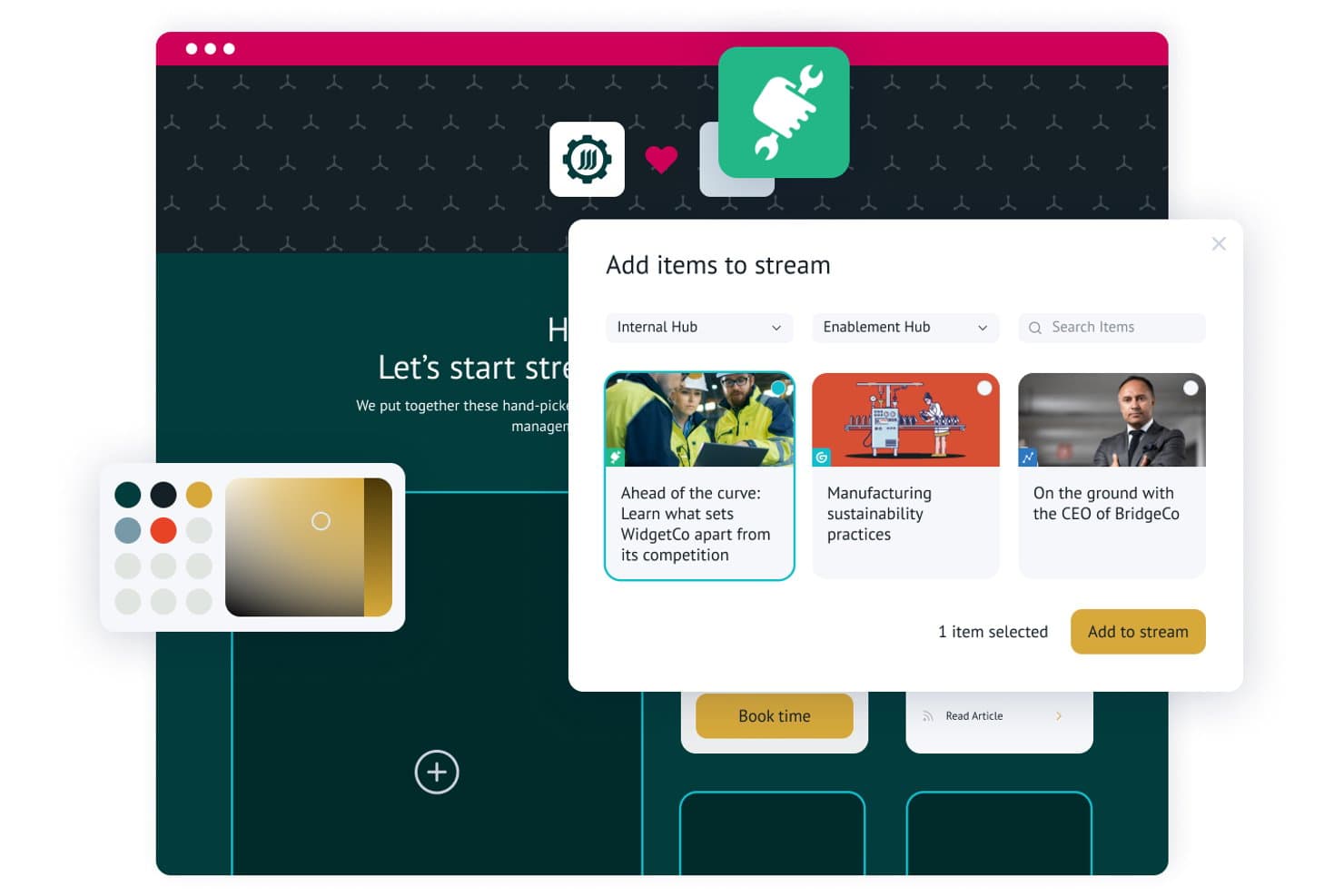
Uberflip consente agli utenti di aggiungere e curare elementi di contenuto in flussi personalizzati. Uberflip è una piattaforma per l'esperienza dei contenuti che consente ai team di marketing di creare hub di contenuti centralizzati, organizzare le risorse in flussi curati, personalizzare le esperienze per gli account target e acquisire lead tramite integrazioni native dei moduli con i sistemi MAP e CRM.
Per chi è più adatto Uberflip?
Uberflip è particolarmente adatto ai team di marketing B2B che gestiscono programmi basati sugli account e hanno bisogno di creare destinazioni di contenuti personalizzate per account specifici su larga scala.
Perché ho scelto Uberflip
Uberflip si è guadagnato un posto nella mia lista ristretta perché è realmente costruito attorno a esperienze di hub di contenuti basate sugli account, in un modo che la maggior parte delle piattaforme non offre. Mi piace molto il fatto che sia possibile creare rapidamente una destinazione di contenuti completamente personalizzata per un account specifico, completa del logo dell'account e di un flusso curato di risorse pertinenti, senza scrivere una riga di codice. I tag intelligenti basati sull'IA organizzano automaticamente la libreria su larga scala, mentre il widget Site Engager mostra consigli nelle pagine web esistenti per mantenere più a lungo gli acquirenti all'interno del proprio ecosistema di contenuti.
Funzionalità principali di Uberflip
- Inviti all'azione con modulo protetto: incorpora moduli nativi per l'acquisizione dei lead direttamente nei flussi di contenuti, sostituendo le pagine di destinazione autonome con contenuti protetti.
- Conversione in pubblicazioni sfogliabili: trasforma automaticamente i PDF caricati in pubblicazioni interattive HTML5 sfogliabili, con monitoraggio del coinvolgimento a livello di pagina.
- Stanze di vendita digitali: consente ai rappresentanti di vendita di creare destinazioni di contenuti personalizzate e approvate dal marketing per singoli potenziali clienti, senza il supporto degli sviluppatori.
- Esplora la reportistica personalizzata: uno strumento di reportistica integrato che consente di confrontare i KPI dei contenuti e creare visualizzazioni personalizzate delle prestazioni tra hub e flussi.
Integrazioni di Uberflip
Uberflip offre integrazioni native con Marketo, HubSpot, Salesforce Pardot, Oracle Eloqua, Salesforce, Demandbase e Bombora. Si connette inoltre a 6sense, Clearbit, RollWorks, Google Analytics, YouTube, Vidyard, Wistia, Vimeo e Brightcove, con documentazione API disponibile per le integrazioni personalizzate.
Pros and Cons
Pros:
- Le funzionalità ABM consentono una personalizzazione approfondita degli account
- Consigli sui contenuti basati sull'IA per i visitatori del sito web
- Stanze di vendita digitali per la collaborazione nelle vendite
Cons:
- Roadmap del prodotto incerta dopo l'acquisizione
- Le analisi avanzate richiedono l'integrazione con un sistema MAP o CRM
Learn more about Uberflip: Ideale per la gestione flessibile dei contenuti multi-sito
- Demo gratuita disponibile
- Prezzi su richiesta
Visit WebsiteCustomer Rating:4.5/5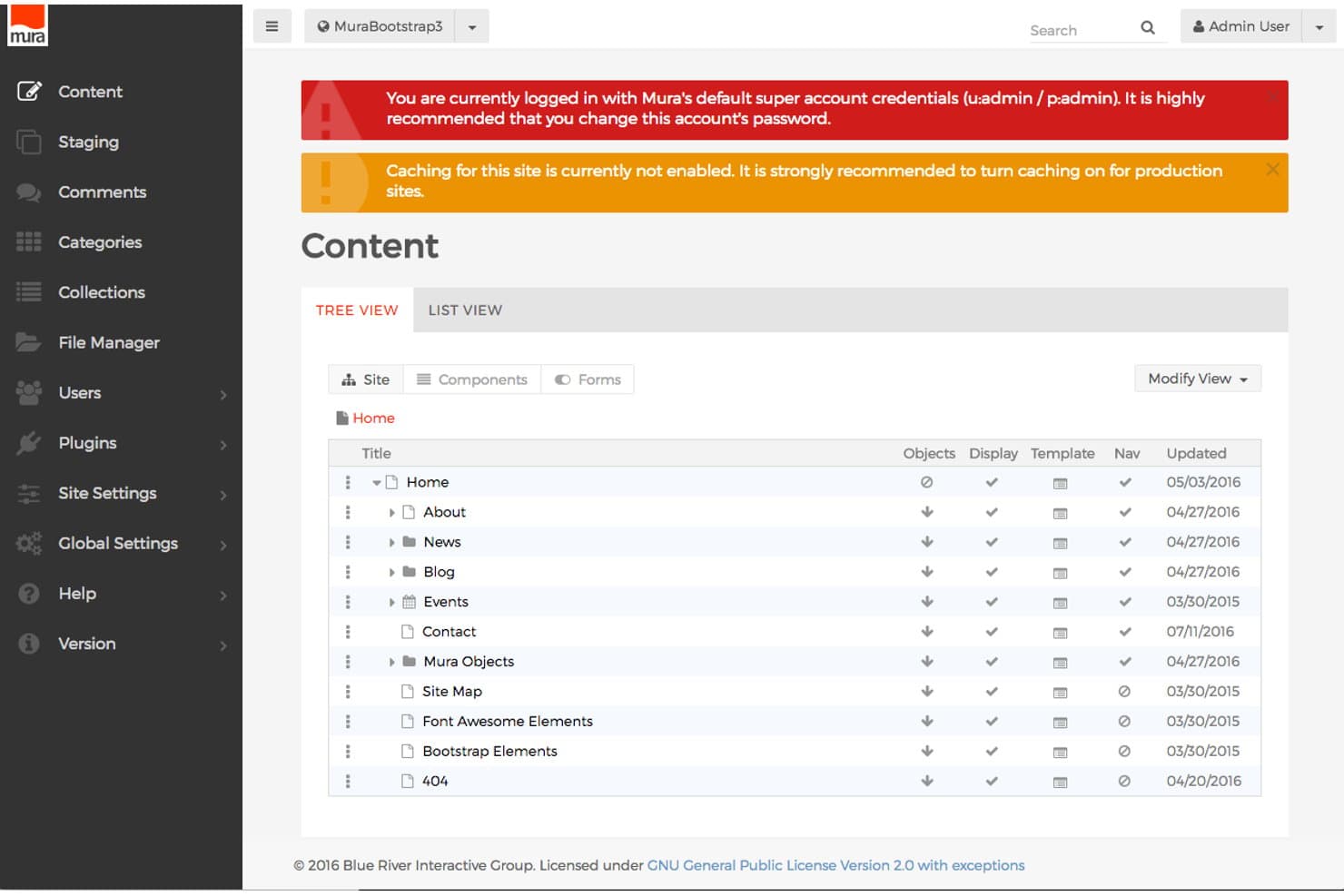
Mura CMS organizza i contenuti del sito in una chiara gerarchia ad albero. Mura CMS è una piattaforma per le esperienze digitali che combina la gestione dei contenuti multi-sito, la personalizzazione basata sulle personas, il punteggio dei contenuti e l'integrazione con MAP/CRM per offrire esperienze web mirate attraverso più canali proprietari.
Per chi è più adatto Mura CMS?
Mura CMS è particolarmente adatto ai team di marketing aziendali che gestiscono più siti con marchi distinti o micrositi regionali da un'unica piattaforma.
Perché ho scelto Mura CMS
Ho scelto Mura CMS come una delle soluzioni migliori perché la sua architettura multi-sito consente di gestire un numero illimitato di siti con marchi distinti e micrositi da un'unica installazione, una caratteristica davvero rara a questo livello. Mi piace molto il modo in cui il livello DXP associa i contenuti a personas specifiche e alle fasi del percorso d'acquisto, per poi utilizzare i Set di modifiche per sostituire dinamicamente i componenti della pagina in base alle esperienze attivate. Il punteggio dei contenuti tiene traccia del coinvolgimento cumulativo di ogni visitatore e attiva automaticamente quelle esperienze personalizzate, senza intervento manuale.
Caratteristiche principali di Mura CMS
- Punteggio dei contenuti: assegna valori ponderati in punti alle singole risorse di contenuto per persona, quindi attiva automaticamente esperienze personalizzate quando un visitatore supera una soglia di coinvolgimento definita.
- Strumento Matrice delle esperienze: un pannello di controllo che mostra il numero di visitatori per ogni combinazione di persona e fase del percorso d'acquisto, con i relativi dati sul ROI, incluse opportunità, vittorie e tempo di chiusura.
- Moduli di profilazione progressiva: moduli basati sulle personas che raccolgono gradualmente i dati dei visitatori attraverso più interazioni anziché in un'unica registrazione.
- Gestione delle campagne di contenuti: raggruppa risorse di contenuto correlate in campagne monitorabili e confronta le prestazioni tra versioni aggiornate dei contenuti per misurare l'impatto sull'acquisizione.
Integrazioni di Mura CMS
Mura CMS dispone di integrazioni documentate con Marketo, HubSpot, Eloqua, Pardot, Salesforce, Microsoft Dynamics, DemandBase, Google Analytics 360 e Adobe Analytics. La sua API REST aperta supporta integrazioni personalizzate.
Pros and Cons
Pros:
- Gestisce un numero illimitato di siti con marchi distinti e micrositi
- Personalizzazione dei contenuti basata sulle personas nelle diverse fasi del percorso d'acquisto
- Tiene traccia dell'influenza dei contenuti sulla pipeline e sui ricavi
Cons:
- Nessun costruttore nativo di contenuti interattivi
- Una comunità di sviluppatori più piccola limita le opzioni delle estensioni
Learn more about Mura CMS: Ideale per le operazioni sui contenuti nell'ecosistema Adobe
- Non disponibile
- Prezzi su richiesta
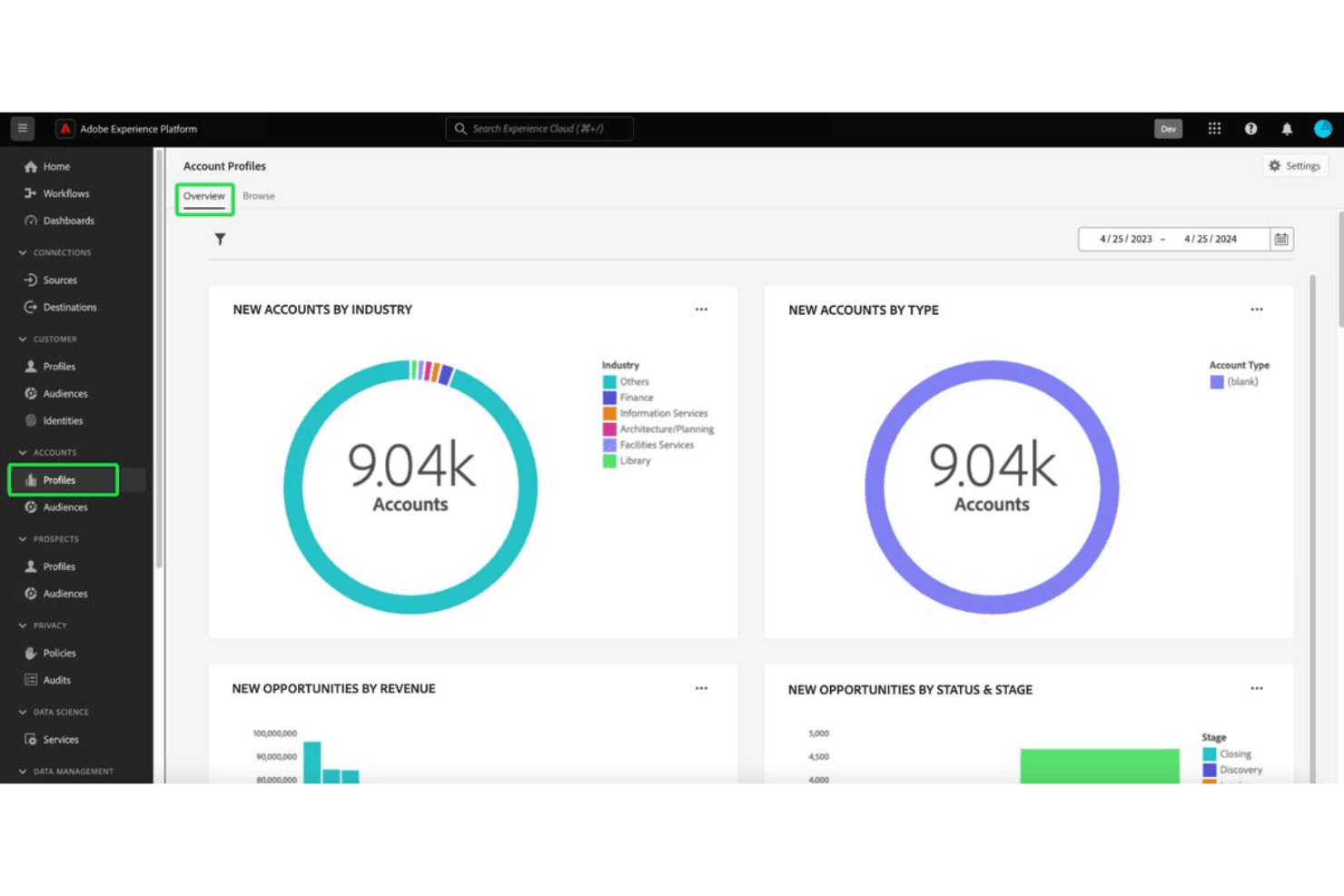
Adobe Experience Manager eccelle nella gestione dei contenuti digitali a livello aziendale e nella gestione completa del marketing. Adobe Experience Manager è una piattaforma aziendale di CMS e gestione delle risorse digitali che combina la creazione di contenuti per più siti, l'archiviazione e la distribuzione delle risorse, i moduli adattivi e le funzionalità di personalizzazione, grazie alle integrazioni nell'intero Adobe Experience Cloud.
A chi è più adatto Adobe Experience Manager?
AEM è progettato per grandi aziende che gestiscono operazioni complesse di contenuti per più marchi e che hanno già investito nell'ecosistema Adobe Experience Cloud.
Perché ho scelto Adobe Experience Manager
Ho incluso Adobe Experience Manager tra le mie scelte principali perché è l'opzione più valida di questo elenco per i team che utilizzano già Adobe Experience Cloud. Apprezzo particolarmente il modo in cui AEM Assets Content Hub crea un portale per le risorse personalizzato e con il marchio dell'azienda, in cui i team interni e i partner esterni possono trovare, filtrare e condividere risorse approvate senza dover cercare ogni volta un designer. Anche il gestore multisito con Live Copy è davvero impressionante per gestire contenuti di decine di marchi o aree geografiche da un unico punto, mantenendo la coerenza su larga scala.
Funzionalità principali di Adobe Experience Manager
- Creazione di moduli adattivi: AEM Forms consente di creare moduli reattivi e condizionali con creazione tramite trascinamento, logica dinamica e supporto per la firma elettronica, per la protezione dei contenuti e l'acquisizione dei contatti potenziali.
- Distribuzione dei contenuti senza interfaccia: AEM Sites distribuisce i contenuti tramite API GraphQL, consentendo di pubblicare contenuti strutturati su canali web, mobili e applicativi da un unico repository.
- IA generativa Adobe Firefly: Gli utenti non creativi possono generare e rielaborare direttamente in Content Hub varianti delle risorse conformi al marchio, senza uscire dalla piattaforma.
- Selezione del pubblico basata su regole: AEM Sites include la selezione integrata basata sul contesto del client, che consente di definire segmenti di pubblico e distribuire varianti dinamiche dei contenuti in base ai dati degli utenti.
Integrazioni di Adobe Experience Manager
Adobe Experience Manager dispone di integrazioni native documentate nell'ecosistema Adobe, tra cui Adobe Analytics, Adobe Target, Marketo Engage, Real-Time CDP, Journey Optimizer, Commerce, Creative Cloud e Adobe Sign. Supporta GraphQL, eventi, webhook e Adobe Developer App Builder per le integrazioni personalizzate.
Pros and Cons
Pros:
- Funzionalità di hub dei contenuti con marchio tra le migliori della categoria
- Integrazione approfondita nell'ecosistema Adobe per le operazioni sui contenuti
- Sicurezza aziendale e certificazioni di conformità
Cons:
- Nessun generatore nativo di contenuti interattivi
- Non progettato specificamente per l'abilitazione alle vendite
Learn more about Adobe Experience Manager: Ideale per la personalizzazione multisito basata sui dati su larga scala
- Demo gratuita disponibile
- Prezzi disponibili su richiesta
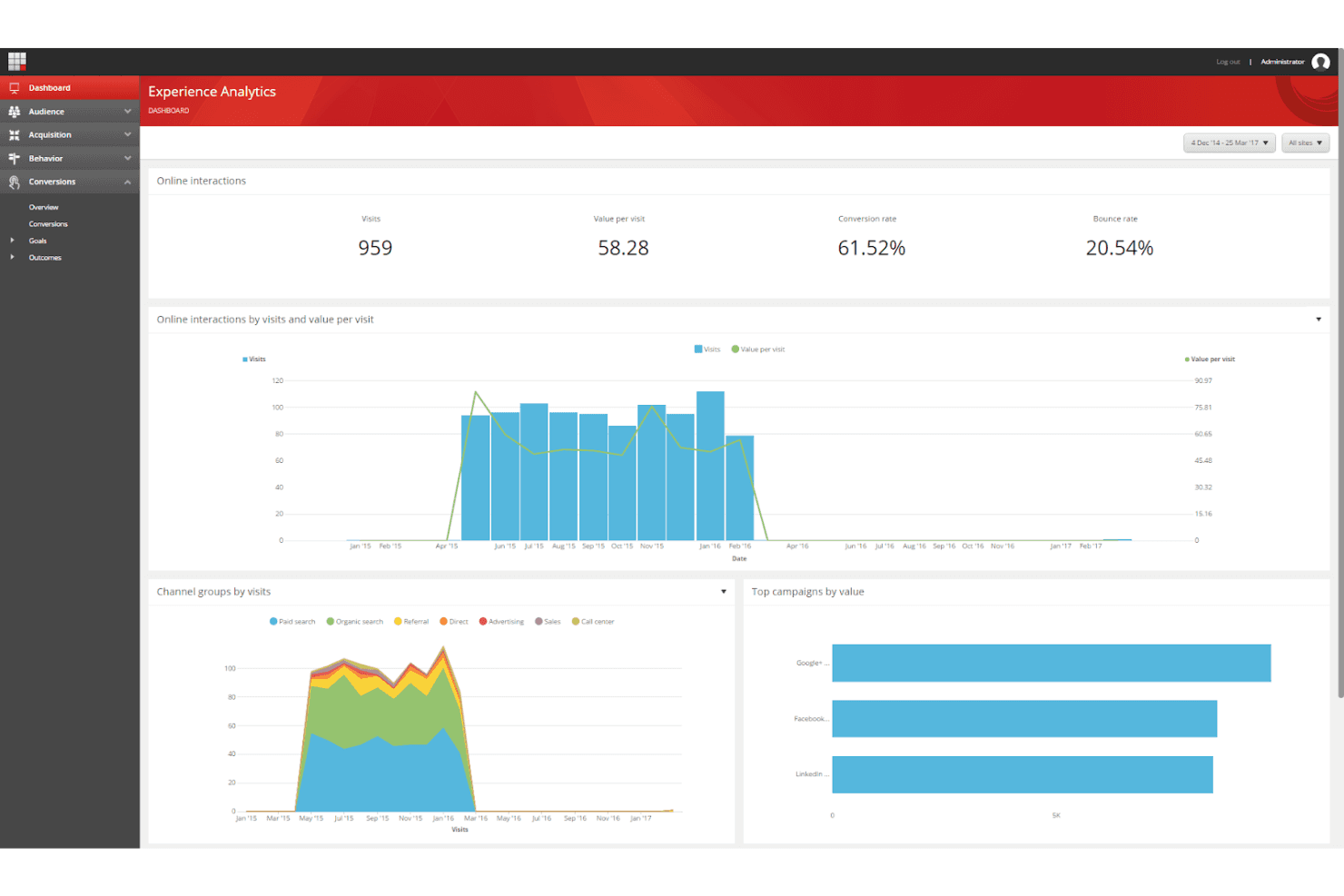
Sitecore Experience Platform offre strumenti avanzati per creare percorsi cliente personalizzati e basati sui dati. Sitecore Experience Platform è una piattaforma di esperienza digitale aziendale (DXP) che combina la gestione dei contenuti multisito, un livello di gestione delle risorse digitali (DAM), la personalizzazione basata su CDP, i test A/B e le integrazioni per l'automazione del marketing.
Per chi è più adatta Sitecore Experience Platform?
Sitecore Experience Platform è particolarmente adatta ai team di marketing aziendali che gestiscono più marchi, aree geografiche o siti e hanno bisogno di una personalizzazione basata su CDP su larga scala.
Perché ho scelto Sitecore Experience Platform
Ho scelto Sitecore Experience Platform perché nessun altro strumento di questo elenco raggiunge lo stesso livello di profondità nella personalizzazione basata su CDP su più siti e marchi contemporaneamente. La funzionalità Raccolte di siti consente di creare e gestire un numero illimitato di siti con marchi diversi da un'unica interfaccia, mentre la CDP integrata crea profili dei visitatori in tempo reale che alimentano la sostituzione dinamica dei contenuti a livello di segmento, account e comportamento. Mi colpisce inoltre il modo in cui SitecoreAI Stream automatizza i test A/B e pubblica le varianti vincenti senza intervento manuale.
Funzionalità principali di Sitecore Experience Platform
- Integrazioni Sitecore Connect: Un livello iPaaS integrato con oltre 1.000 connettori preconfigurati collega Sitecore XP a strumenti come Marketo, HubSpot, Salesforce e Microsoft Dynamics per la sincronizzazione bidirezionale dei dati.
- Attribuzione di punteggi al valore dell'engagement: La piattaforma assegna punteggi numerici alle interazioni dei visitatori, fornendo una misura in tempo reale del livello di coinvolgimento significativo di ciascun utente con i contenuti.
- Content Hub DAM: Un livello centralizzato di gestione delle risorse digitali gestisce l'intero ciclo di vita dei contenuti—pianificazione, produzione, applicazione dei metadati e pubblicazione omnicanale—da un'unica interfaccia.
- Agentic Studio: Un generatore visuale senza codice consente di creare agenti di IA generativa personalizzati che applicano i vincoli del marchio ai flussi di lavoro di creazione e distribuzione dei contenuti.
Integrazioni di Sitecore Experience Platform
Sitecore Connect offre oltre 1.000 connettori preconfigurati, tra cui Salesforce, Microsoft Dynamics, Marketo, HubSpot ed Eloqua. Supporta inoltre API REST, webhook e pipeline di dati personalizzate.
Pros and Cons
Pros:
- Supporta un numero illimitato di hub di contenuti e micrositi con marchi diversi
- Personalizzazione dei contenuti in tempo reale basata sull'IA
- Analisi avanzate dell'engagement con monitoraggio degli obiettivi
Cons:
- Richiede il supporto di uno sviluppatore per le modifiche al sito
- L'Editor dell'esperienza può essere lento per i professionisti del marketing
Learn more about Sitecore Experience Platform: Ideale per esperienze dei contenuti per gli acquirenti guidate dai venditori
- Demo gratuita disponibile
- Prezzi su richiesta
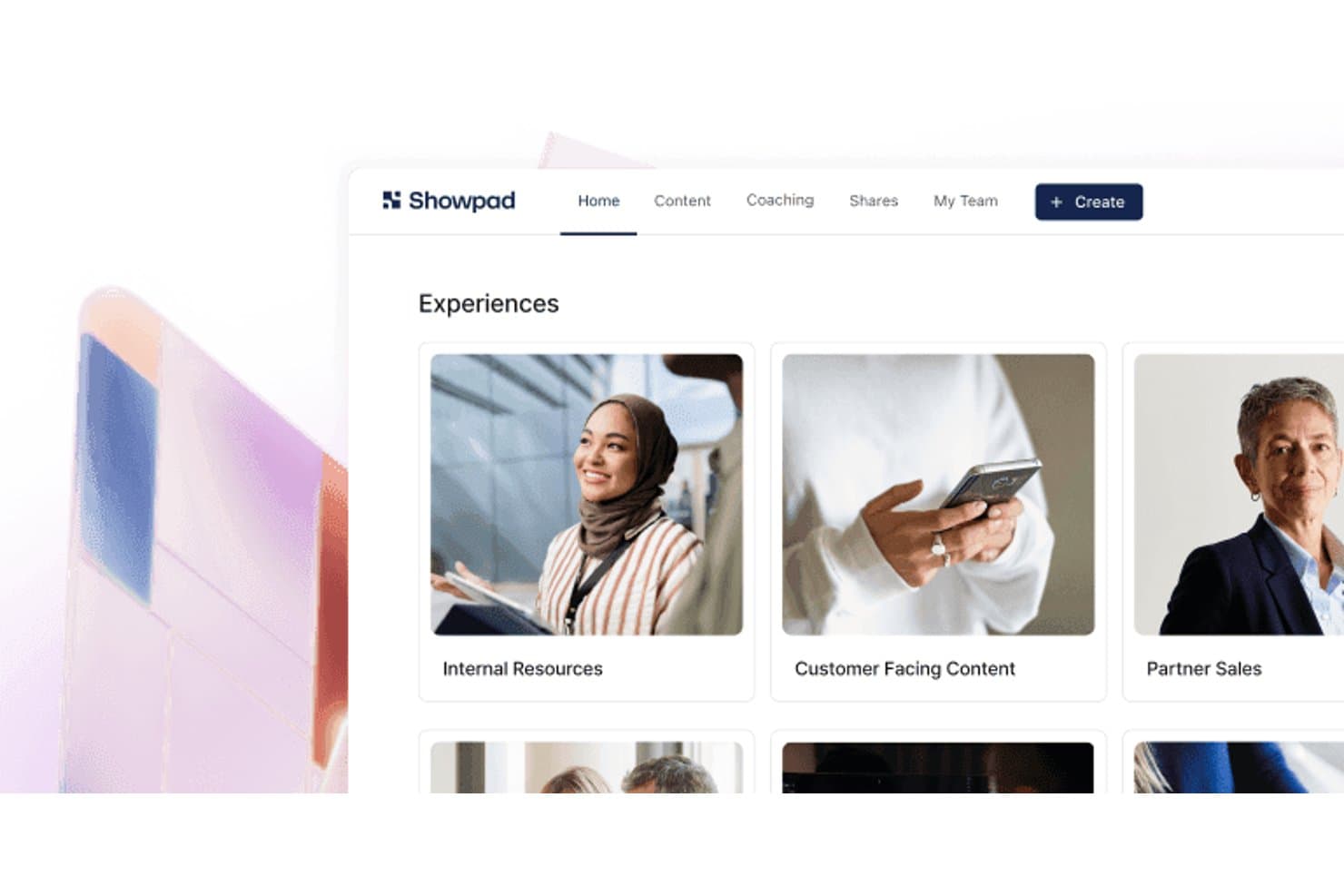
Showpad organizza i contenuti di vendita in raccolte di esperienze consultabili. Showpad è una piattaforma di abilitazione alle vendite e di esperienza dei contenuti che combina una libreria centralizzata di contenuti, spazi interattivi per le trattative rivolti agli acquirenti, raccomandazioni di contenuti basate sull'IA e analisi approfondite del coinvolgimento.
Per chi è più adatto Showpad?
Showpad è particolarmente adatto ai team aziendali di vendita e marketing che necessitano di esperienze dei contenuti guidate dai venditori, monitoraggio del coinvolgimento degli acquirenti e attribuzione dei ricavi in trattative complesse con più parti interessate.
Perché ho scelto Showpad
Ho scelto Showpad come una delle soluzioni migliori perché è progettato specificamente per creare esperienze dei contenuti per gli acquirenti guidate dai venditori, un approccio distinto che le piattaforme dedicate esclusivamente all'esperienza dei contenuti non gestiscono altrettanto bene. Gli spazi condivisi consentono ai venditori di creare destinazioni personalizzate e specifiche per ogni trattativa, in cui i comitati d'acquisto possono visualizzare contenuti selezionati, monitorare i piani d'azione condivisi e indicare il proprio coinvolgimento. Apprezzo particolarmente il fatto che ogni interazione all'interno di uno spazio condiviso confluisca direttamente nei record del CRM, consentendo di collegare contenuti specifici all'avanzamento della pipeline e ai ricavi delle trattative vinte senza alcun lavoro manuale di attribuzione.
Funzionalità principali di Showpad
- Raccomandazioni di contenuti basate sull'IA: Showpad Genie propone suggerimenti di risorse specifici per la trattativa direttamente nei flussi di lavoro del CRM, in base alla fase della trattativa e ai dati dell'account.
- Supporto per risorse in più formati: La piattaforma ospita PDF, video, modelli 3D, showroom a 360°, risorse AR e applicazioni interattive all'interno di un'unica libreria di contenuti.
- Reportistica sull'attribuzione dei ricavi: I dati sul coinvolgimento nei contenuti vengono sincronizzati con i record del CRM per collegare risorse specifiche all'avanzamento della pipeline e ai ricavi delle trattative vinte.
- Integrazione con Marketo: Showpad trasferisce i segnali di coinvolgimento degli acquirenti in Marketo per arricchire il punteggio dei lead e attivare campagne di marketing automatizzate.
Integrazioni di Showpad
Showpad offre oltre 75 integrazioni preconfigurate, tra cui Marketo, Salesforce, HubSpot, Microsoft Dynamics, SharePoint, Google Drive, Box, Dropbox, Salesloft e Outreach. La sua API REST, i webhook, la Reporting API e l'SDK supportano integrazioni personalizzate e pipeline di BI.
Pros and Cons
Pros:
- Analisi del coinvolgimento degli acquirenti tra le migliori del settore
- Gli spazi condivisi creano spazi per trattative guidati dai venditori
- Ampio supporto per contenuti 3D e AR
Cons:
- Nessun contenuto con accesso tramite modulo o acquisizione nativa dei lead
- Mancano funzionalità di personalizzazione per i visitatori anonimi
Learn more about Showpad: Ideale per contenuti basati sulla vendita del valore e dimostrazione dei ricavi
- Demo gratuita disponibile
- A partire da $30/utente/mese
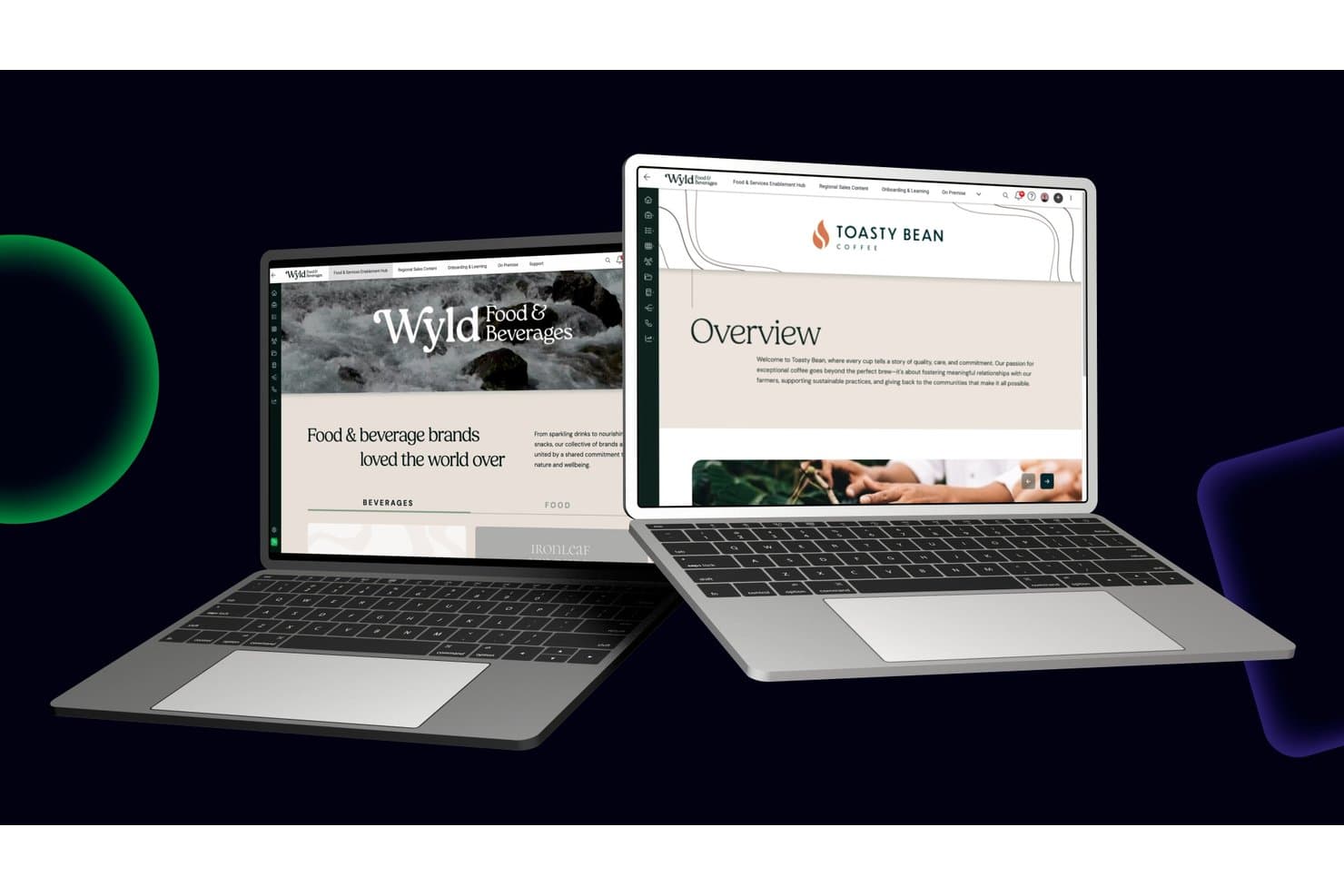
Mediafly organizza i contenuti del brand in portali di vendita strutturati e facilmente consultabili. Mediafly è una piattaforma di abilitazione dei ricavi che combina spazi di lavoro con contenuti brandizzati, sale di vendita digitali, creazione di contenuti interattivi, consigli sui contenuti basati sull'IA e strumenti per la vendita basata sul valore, come calcolatori del ROI e valutazioni del valore aziendale.
Per chi è più adatto Mediafly?
Mediafly è particolarmente adatto ai team aziendali di vendita e marketing che devono dimostrare l'impatto sui ricavi dei propri contenuti attraverso strumenti per il ROI, valutazioni del valore e attribuzione delle trattative concluse.
Perché ho scelto Mediafly
Mediafly è entrato nella mia rosa dei preferiti perché nessun'altra piattaforma di esperienza dei contenuti collega i contenuti direttamente alla dimostrazione dei ricavi come fa questa soluzione. La Value Suite consente di creare calcolatori del ROI e valutazioni del valore aziendale senza il supporto degli sviluppatori, permettendo al team di quantificare l'impatto sulle trattative in ogni fase del ciclo di vita del cliente. In combinazione con il modulo Advanced Insights e la sua attribuzione delle trattative concluse, posso vedere esattamente quali risorse di contenuto hanno influenzato la pipeline e generato ricavi acquisiti all'interno di Salesforce.
Funzionalità principali di Mediafly
- Sale di vendita digitali: Crea micrositi personalizzati e brandizzati per singoli account, che raccolgono più risorse di contenuto in un unico spazio condiviso.
- Classificazione dei contenuti tramite IA: Applica automaticamente metadati, riepiloghi dei contenuti e tag alle risorse per migliorarne la reperibilità all'interno della libreria dei contenuti.
- StoryGuide: Uno strumento basato sull'IA che guida i venditori nella creazione di presentazioni coerenti con il brand, consigliando slide e risorse pertinenti in base allo scenario di vendita.
- Accesso offline: Consente ai venditori di scaricare e presentare i contenuti senza una connessione Internet, supportando le vendite sul campo e gli incontri di persona.
Integrazioni di Mediafly
Mediafly offre integrazioni documentate con Salesforce, SAP Sales Cloud, Microsoft Dynamics 365, HubSpot, Marketo, Pardot, SharePoint, Bynder e Adobe Experience Manager. I connettori OAuth e API supportano le integrazioni personalizzate.
Pros and Cons
Pros:
- Strumenti di vendita basata sul valore per dimostrare i ricavi
- Funzionalità di personalizzazione dei contenuti a livello di account incluse
- L'attribuzione dei ricavi collega i contenuti alla pipeline
Cons:
- Mancano controlli SEO nativi per gli hub di contenuti
- Il prezzo basato su preventivo aumenta le difficoltà iniziali
Learn more about Mediafly: Ideale per esperienze di fruizione consecutiva dei contenuti guidate dall'AI
- Demo gratuita disponibile
- A partire da 30.000 $/anno (fatturazione annuale)
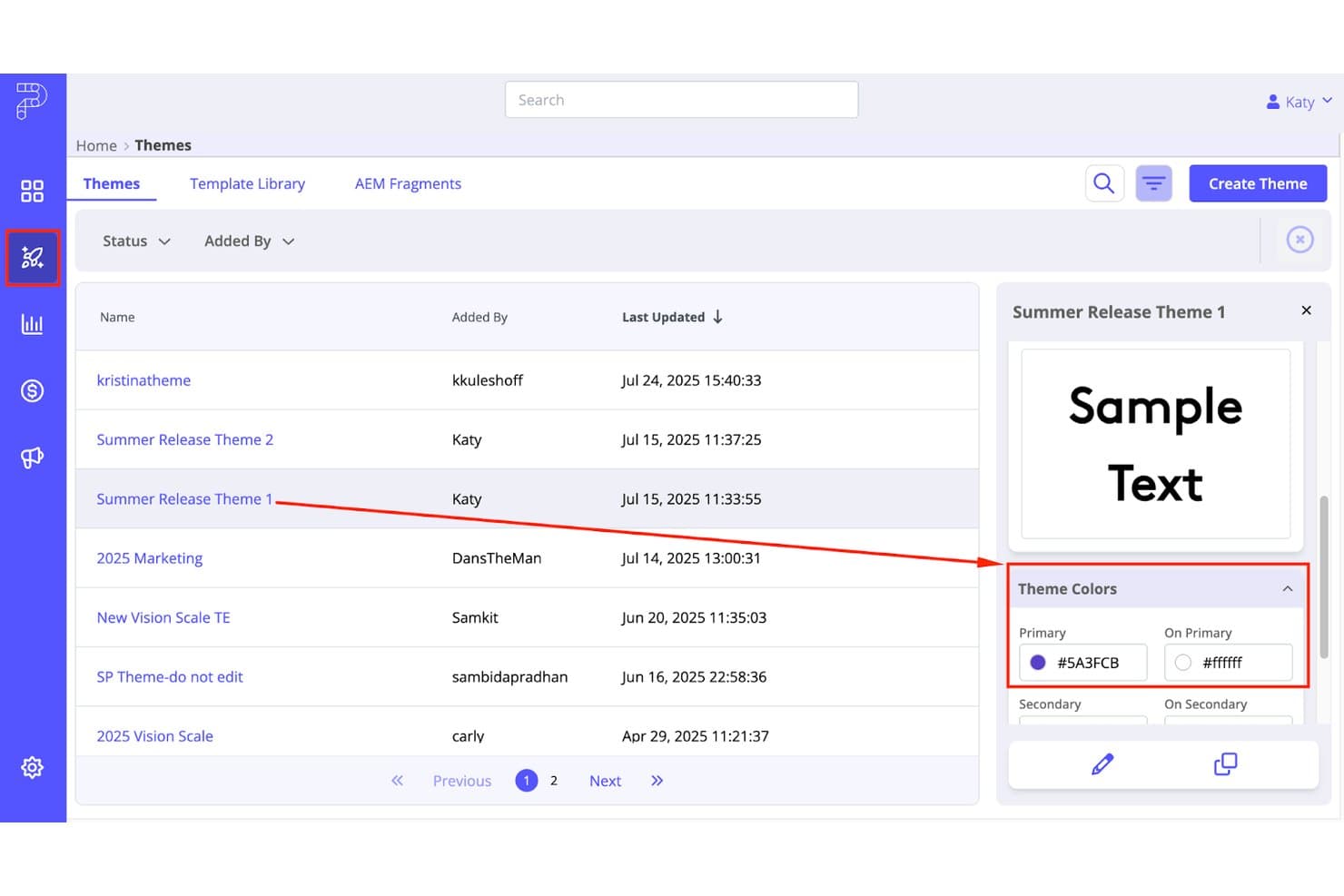
PathFactory consente agli utenti di visualizzare in anteprima e gestire temi di contenuto personalizzati. PathFactory è una piattaforma per l'esperienza dei contenuti che consente di creare centri di contenuti guidati dall'AI, destinazioni personalizzate basate sulle aziende e raccolte di contenuti in stile maratona, con integrazioni approfondite con dati MAP, CRM e sull'intenzione d'acquisto.
Per chi è più adatto PathFactory?
PathFactory è una soluzione particolarmente adatta alle squadre di marketing di aziende di medie e grandi dimensioni che gestiscono programmi ABM o di generazione della domanda e hanno bisogno di collegare direttamente il coinvolgimento sui contenuti al flusso delle opportunità.
Perché ho scelto PathFactory
PathFactory è entrato nella mia selezione ristretta perché il suo motore di raccomandazione basato sull'AI è progettato appositamente per trasformare le visite a un singolo contenuto in sessioni di fruizione consecutiva di più contenuti. Apprezzo molto il modo in cui le raccolte di contenuti organizzano PDF, video, casi di studio e webinar in un percorso guidato che si adatta in tempo reale al comportamento di ogni visitatore. Il Centro di analisi dei contenuti analizza quindi l'intera libreria di risorse per mettere in evidenza ciò che sta realmente generando coinvolgimento, così non devo mai cercare di indovinare quali contenuti organizzare successivamente.
Funzionalità principali di PathFactory
- Accesso intelligente: Mostra automaticamente i moduli ai visitatori sconosciuti, offrendo al contempo alle aziende identificate un accesso immediato ai contenuti senza dover compilare un modulo.
- Agente d'acquisto AI ChatFactory: Un agente conversazionale basato sull'AI generativa che risponde alle domande degli acquirenti, consiglia risorse e genera micrositi personalizzati a partire da ogni interazione.
- PathFactory per l'analisi dei ricavi (PFRI): Un pannello di attribuzione dei ricavi che collega i dati sul coinvolgimento dei contenuti direttamente al flusso delle opportunità e alle opportunità aperte in Salesforce.
- Etichettatura dei contenuti tramite AI: Analizza e assegna automaticamente etichette all'intera libreria di risorse in base all'argomento, confronta i contenuti con la strategia e segnala le lacune nella copertura dei contenuti.
Integrazioni di PathFactory
PathFactory offre 17 integrazioni native, tra cui Salesforce, Marketo, HubSpot, Eloqua, Pardot, 6sense, Demandbase, ZoomInfo, Adobe Experience Manager e Snowflake. La sua API pubblica e i webhook supportano pipeline di dati personalizzate e flussi di lavoro CRM in tempo reale.
Pros and Cons
Pros:
- Collega direttamente il coinvolgimento sui contenuti al flusso delle opportunità
- Le raccolte basate sull'AI favoriscono un consumo maggiore dei contenuti
- Personalizzazione dinamica per ABM e segmenti di settore
Cons:
- Nessun creatore di contenuti interattivi come i quiz
- Il chatbot non supporta il passaggio ad agenti in diretta
Learn more about PathFactory: 10Ideale per trasformare documenti statici in centri interattivi
RELAYTO
- Demo gratuita disponibile
- $750/mese (fatturato annualmente)
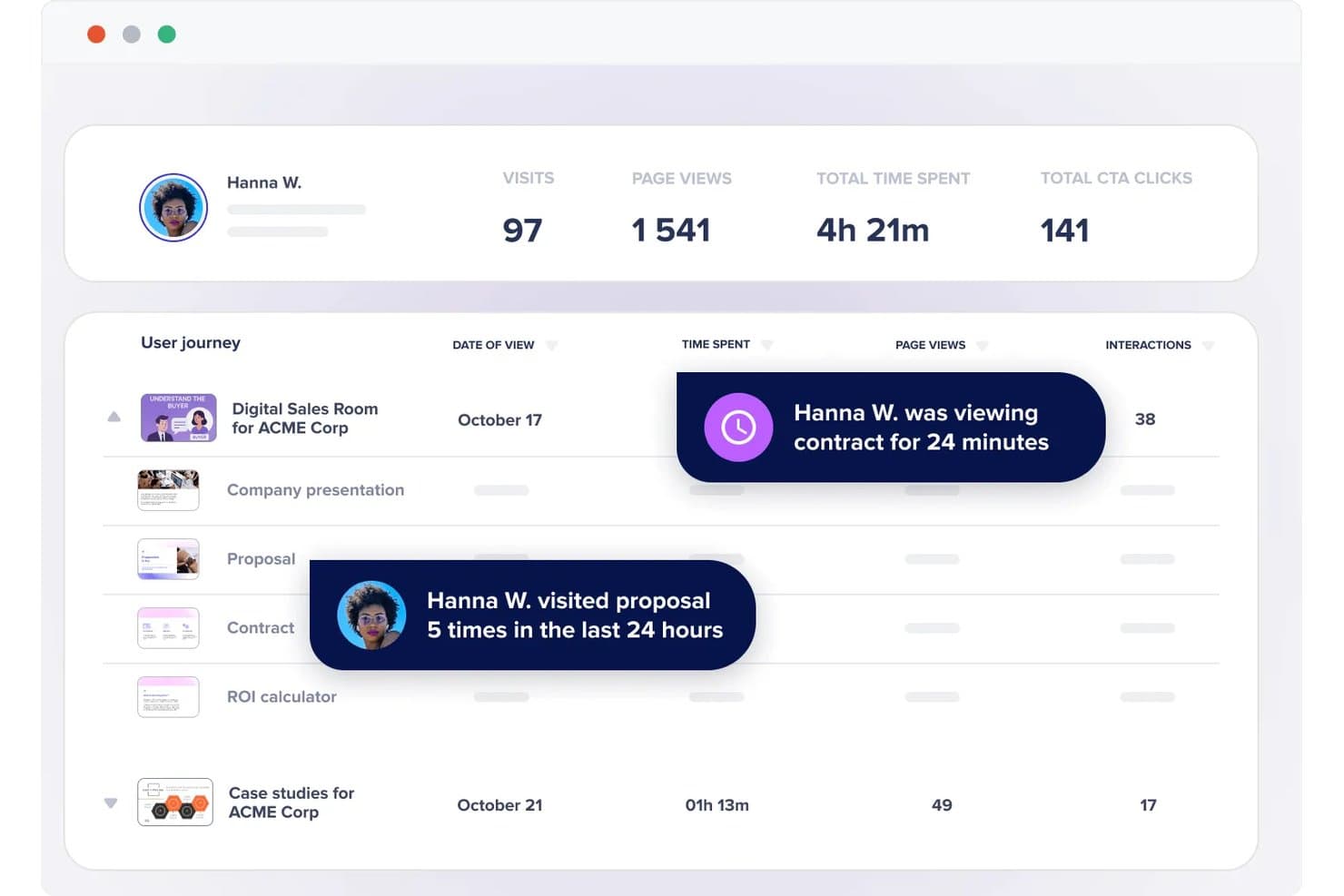
RELAYTO tiene traccia dei segnali dell'intenzione di acquisto, come il tempo trascorso e la frequenza delle visite. RELAYTO è una piattaforma per esperienze di contenuto che consente di trasformare documenti statici—PDF, presentazioni e altro ancora—in micrositi interattivi, centri di contenuti e sale di vendita digitali utilizzando un editor senza codice e strumenti basati sull'intelligenza artificiale.
Per chi è più adatto RELAYTO?
RELAYTO è particolarmente adatto ai team di contenuti e di generazione della domanda che lavorano regolarmente con PDF e presentazioni e desiderano trasformare queste risorse in esperienze tracciabili e personalizzate senza dipendere dagli sviluppatori.
Perché ho scelto RELAYTO
Ho scelto RELAYTO come una delle migliori soluzioni perché il suo Generatore di esperienze con IA può trasformare un PDF o un PowerPoint statico in un microsito completamente interattivo in pochi minuti, completo di punti interattivi, narrazione video ed elementi animati. Apprezzo anche la Chat dei contenuti con IA, che consente ai visitatori di effettuare ricerche in un intero centro di contenuti usando il linguaggio naturale, così anche le grandi raccolte di risorse rimangono facili da navigare. Lo Studio dell'interattività senza codice consente al mio team di aggiungere moduli con contenuti protetti, inviti all'azione cliccabili e strumenti di terze parti integrati senza toccare una sola riga di codice.
Funzionalità principali di RELAYTO
- Analisi del coinvolgimento: Tiene traccia dei percorsi dei visitatori, degli eventi a livello di interazione come i clic sui punti interattivi e sugli inviti all'azione, delle fonti di riferimento e dei tipi di dispositivo nelle esperienze di contenuto.
- Moduli per la raccolta dei contatti: Supporta moduli nativi e moduli Marketo integrati per proteggere i contenuti e raccogliere contatti direttamente all'interno di un'esperienza.
- Controlli di accesso del pubblico: Limita o concede l'accesso ai contenuti tramite autorizzazione, blocco dei domini email e regole per le email aziendali, per rivolgersi a segmenti specifici di account.
- Sale di vendita digitali per l'abilitazione alle vendite: Consente ai team di vendita di creare micrositi personalizzati e protetti da password per singoli potenziali clienti, con notifiche sul coinvolgimento in tempo reale.
Integrazioni di RELAYTO
RELAYTO offre integrazioni native con Salesforce, HubSpot, Marketo, Google Analytics e Google Tag Manager. Si connette inoltre a Google Drive, OneDrive e Box, mentre i piani Business ed Enterprise supportano integrazioni personalizzate tramite la sua API.
Pros and Cons
Pros:
- L'IA trasforma i PDF in micrositi interattivi
- I centri di contenuti organizzano raccolte di risorse in più formati
- I percorsi dei visitatori rivelano il coinvolgimento con punti interattivi e inviti all'azione
Cons:
- L'interattività avanzata richiede pratica per essere padroneggiata
- Le raccomandazioni basate sul comportamento rimangono limitate
Learn more about RELAYTO:
Altre piattaforme per l'esperienza dei contenuti
Di seguito trovi un elenco di ulteriori piattaforme per l’esperienza dei contenuti che abbiamo selezionato, ma che non sono rientrate nella lista principale. Anche se non sono entrate nella top 10, rimangono valide e meritano ulteriori approfondimenti.
- 11FollozeNajlepsze rozwiązanie do wglądu w koszty pracy podczas planowania
- 12HushlyIdeale per la creazione di micrositi per account basata sull'IA
- 13AcquiaIdeale per esperienze digitali ottimizzate per Drupal
- 14ON24Ideale per il riutilizzo dei contenuti dei webinar negli hub
- 15HighspotIdeale per il monitoraggio del coinvolgimento nei contenuti tra vendite e acquirenti
- 16WordPress VIPIdeale per hub di contenuti aziendali
- 17FoleonIdeale per la creazione di contenuti interattivi gestita dal brand
- 18TurtlIdeale per la personalizzazione dei contenuti su larga scala basata sull'ABM
- 19IonIdeale per esperienze interattive di acquisizione di lead basate su regole
Come valuto le piattaforme per l'esperienza dei contenuti
Divido la mia valutazione in tre parti. La funzionalità principale—riunire contenuti eterogenei in un hub unificato e personalizzarlo per ogni visitatore—ha il peso maggiore, seguita da funzionalità distintive come i suggerimenti di contenuti basati sull'IA. Infine, considero il supporto all'onboarding e la compatibilità con l'ecosistema delle tecnologie di marketing.
Funzionalità principali (requisiti fondamentali per questo elenco)
Quando seleziono gli strumenti da inserire nel mio elenco, assegno a ciascuno un punteggio su una scala da 0 (non offre la funzionalità) a 5 (eccelle in quest'area) per ogni funzionalità principale elencata di seguito. Converto quindi il totale in una percentuale per contribuire a valutare l'idoneità complessiva di ogni strumento, attribuendo un peso aggiuntivo alle funzionalità che ho ritenuto essenziali.
- Aggregazione dei contenuti (essenziale): verifico se la piattaforma è in grado di riunire blog, video, PDF e risorse di terze parti in un unico hub, con sistemi flessibili di tagging e organizzazione.
- Personalizzazione per il pubblico (essenziale): valuto ogni strumento in base alla sua capacità di adattare i contenuti ad attributi del visitatore come settore, profilo, comportamento o segnali di intenzione.
- Analisi del coinvolgimento: cerco metriche a livello di contenuto—tempo trascorso, profondità di scorrimento, completamento delle risorse—che vadano oltre le visualizzazioni di pagina di base e siano collegate ai singoli account.
- Creazione di esperienze: qui l'editor con funzionalità di trascinamento è importante. Valuto la rapidità con cui è possibile creare micrositi brandizzati o hub di risorse senza coinvolgere uno sviluppatore.
- Acquisizione dei lead & integrazione con il CRM: verifico la sincronizzazione dei dati di coinvolgimento con piattaforme come HubSpot o Salesforce, compresa la possibilità che la connessione sia bidirezionale e quasi in tempo reale.
- Orchestrazione del percorso: valuto come lo strumento sequenzia i contenuti—se è in grado di suggerire la risorsa successiva in base a ciò che il visitatore ha già consultato o alla fase dell'imbuto di conversione in cui si trova.
Una volta ottenuto un elenco di strumenti che soddisfano i criteri, considero ciò che distingue ogni piattaforma.
Fattori distintivi (ciò che distingue i fornitori)
Ecco come confronto e metto in contrapposizione i diversi fornitori:
Funzionalità distintive
Inizio dalla valutazione e dall'attribuzione dei contenuti. Cerco piattaforme che assegnino punteggi di coinvolgimento ponderati alle singole risorse, così da poter risalire a quale documento tecnico o video abbia effettivamente influenzato una trattativa, invece di procedere per supposizioni. Anche le raccolte condivisibili con il team commerciale sono importanti. Quando i rappresentanti possono creare micro-hub personalizzati per un potenziale cliente direttamente dal proprio flusso di lavoro, i contenuti vengono utilizzati invece di rimanere sepolti. Valuto anche i suggerimenti di contenuti basati sull'IA, verificando se il motore si adatta in tempo reale per proporre la risorsa migliore successiva in base al comportamento e non solo a regole statiche.
Oltre le funzionalità
Valuto la rapidità con cui un responsabile marketing non tecnico può passare da zero a un hub di contenuti attivo. I fornitori che offrono modelli predefiniti e supporto alla migrazione delle librerie esistenti riducono di settimane i tempi di lancio. Verifico anche la compatibilità con l'ecosistema delle tecnologie di marketing, in particolare se le integrazioni con CRM e MAP sono bidirezionali e quasi in tempo reale, poiché le sincronizzazioni a senso unico costringono i team commerciali a lavorare con dati di coinvolgimento obsoleti. Per gli acquirenti aziendali, verifico la conformità alla privacy e le certificazioni di sicurezza come SOC 2, soprattutto quando i contenuti con accesso vincolato raccolgono dati dei visitatori in più regioni.
Come scegliere una piattaforma per l'esperienza dei contenuti
È facile perdersi in lunghi elenchi di funzionalità e strutture tariffarie complesse. Per aiutarti a rimanere concentrato mentre affronti il tuo processo di selezione del software, unico per le tue esigenze, ecco una lista di fattori da tenere a mente:
| Fattore | Cosa considerare |
|---|---|
| FattoreScalabilità | Cosa considerareLa piattaforma può crescere insieme alla tua attività? Considera le esigenze future e se lo strumento è in grado di gestire una maggiore quantità di contenuti e richieste degli utenti durante l'espansione. |
| FattoreIntegrazioni | Cosa considerareFunziona con gli strumenti che già utilizzi? Verifica se si collega al tuo CRM, agli strumenti di automazione del marketing e alle piattaforme di analisi per semplificare i flussi di lavoro. |
| FattorePersonalizzazione | Cosa considerarePuoi adattarla alle tue esigenze? Cerca opzioni per modificare layout, identità del marchio e percorsi degli utenti, così da adeguarli ai tuoi processi unici e all'identità del tuo marchio. |
| FattoreFacilità d'uso | Cosa considerareÈ facile da usare per il tuo team? Cerca interfacce intuitive e una navigazione semplice per ridurre al minimo le esigenze di formazione e assistenza. |
| FattoreImplementazione e onboarding | Cosa considerareCon quale rapidità puoi iniziare? Valuta il tempo e le risorse necessari per la configurazione e se il fornitore offre assistenza durante l'onboarding. |
| FattoreCosto | Cosa considerareRientra nel tuo budget? Confronta i modelli di prezzo, i costi nascosti e il valore offerto a ogni livello, per assicurarti che siano in linea con i tuoi piani finanziari. |
| FattoreMisure di sicurezza | Cosa considerareI tuoi dati sono protetti? Valuta la crittografia, l'archiviazione dei dati e la conformità agli standard del settore per mantenere sicure le tue informazioni. |
| FattoreDisponibilità dell'assistenza | Cosa considerarePuoi ricevere aiuto quando ne hai bisogno? Considera la disponibilità dell'assistenza clienti, inclusi i tempi di risposta e l'accesso ai canali di supporto in tempo reale. |
Tendenze per le piattaforme di esperienza dei contenuti
Le piattaforme di esperienza dei contenuti si stanno evolvendo rapidamente. Ecco le principali tendenze che stanno plasmando il settore quest'anno.
- Personalizzazione basata sull'IA: la personalizzazione basata sull'IA sta diventando sempre più diffusa e consente di creare esperienze dei contenuti altamente personalizzate. Questa tecnologia utilizza i dati per prevedere e fornire contenuti in grado di coinvolgere i singoli utenti. È importante perché migliora significativamente il coinvolgimento e la soddisfazione degli utenti.
- Adozione dei CMS headless: l'adozione dei CMS headless è in aumento e offre maggiore flessibilità agli sviluppatori. Questa tendenza consente di gestire e distribuire i contenuti su più canali senza vincolarli a una specifica interfaccia front-end. È fondamentale per creare un'esperienza utente coerente su tutti i dispositivi.
- Analisi e reportistica avanzate: gli strumenti di analisi e reportistica avanzati forniscono informazioni più approfondite sulle prestazioni dei contenuti. Questi strumenti aiutano le organizzazioni a prendere decisioni basate sui dati per ottimizzare le proprie strategie di contenuto. Questa tendenza è fondamentale per massimizzare il ROI e comprendere il comportamento del pubblico.
- Integrazione con l'automazione del marketing: l'integrazione con gli strumenti di automazione del marketing sta diventando uno standard. Ciò consente di realizzare strategie di marketing dei contenuti efficienti. È importante perché semplifica le operazioni e aumenta l'efficacia delle campagne di marketing.
- Focus sull'esperienza utente (UX): l'attenzione al miglioramento dell'esperienza utente attraverso una progettazione dell'interfaccia più efficace e funzionalità intuitive è in aumento. Le piattaforme investono nella progettazione intuitiva per ridurre la curva di apprendimento e aumentare la produttività. Questa tendenza è significativa perché influisce direttamente sulla soddisfazione degli utenti e sull'adozione della piattaforma.
Con l'evoluzione delle piattaforme di esperienza dei contenuti, la combinazione di personalizzazione basata sull'IA, CMS headless, analisi avanzate e automazione del marketing non rappresenta solo un aggiornamento tecnologico, ma un cambiamento strategico verso ambienti più adattivi e incentrati sull'utente. Questa evoluzione mette in evidenza un futuro in cui i contenuti sono anticipatori e altamente personalizzati, in grado di soddisfare le esigenze degli utenti in tempo reale.
Che cos'è una piattaforma di esperienza dei contenuti?
Una piattaforma di esperienza dei contenuti è uno strumento che consente alle aziende di creare, gestire e ottimizzare i contenuti digitali su diversi canali. Tra gli utenti più comuni vi sono i team di marketing, i creatori di contenuti e gli strateghi digitali, che devono fornire al proprio pubblico contenuti personalizzati e coinvolgenti.
Lo scopo principale di una piattaforma di esperienza dei contenuti è migliorare il percorso del cliente offrendo esperienze dei contenuti pertinenti e coerenti. Aiuta gli utenti a semplificare i flussi di lavoro dei contenuti, misurarne le prestazioni e migliorare il coinvolgimento attraverso funzionalità avanzate di analisi e personalizzazione.
Funzionalità
Quando valuto le piattaforme di esperienza dei contenuti, cerco funzionalità chiave che migliorino la creazione, la gestione e la distribuzione dei contenuti. Queste funzionalità contribuiscono a garantire che la piattaforma soddisfi le esigenze dei team di marketing e dei creatori di contenuti, offrendo un'esperienza utente efficiente.
- Strumenti per la creazione di contenuti: consentono agli utenti di creare e modificare facilmente contenuti digitali.
- Gestione delle risorse digitali: consente di organizzare e recuperare le risorse digitali.
- Personalizzazione: offre contenuti adattati ai diversi segmenti di pubblico.
- Distribuzione multicanale: distribuisce i contenuti attraverso diversi canali e piattaforme.
- Analisi e reportistica: fornisce informazioni sulle prestazioni dei contenuti e sul coinvolgimento degli utenti.
- Strumenti SEO: aiutano a ottimizzare i contenuti per i motori di ricerca e migliorarne la visibilità.
- Funzionalità di integrazione: si connettono ad altri strumenti di marketing e CRM per semplificare i flussi di lavoro.
- Funzionalità di collaborazione: facilitano la collaborazione del team sui progetti di contenuto.
- Automazione dei flussi di lavoro: automatizza le attività ripetitive per risparmiare tempo e migliorare l'efficienza.
- Aggiornamenti in tempo reale: garantisce che i contenuti siano aggiornati in tempo reale su tutte le piattaforme.
Queste funzionalità sono essenziali per creare una strategia dei contenuti completa ed efficace, assicurando che i contenuti siano coinvolgenti, personalizzati e facilmente gestibili.
Vantaggi
Le piattaforme per l'esperienza dei contenuti offrono numerosi vantaggi alle aziende che desiderano migliorare la propria presenza digitale e il coinvolgimento degli utenti. Ecco cinque vantaggi principali che queste piattaforme offrono agli utenti e alle organizzazioni.
- Personalizzazione migliorata dei contenuti: offrire contenuti adattati a specifici segmenti di pubblico aumenta i tassi di coinvolgimento e conversione.
- Maggiore efficienza: semplificare i processi di creazione e gestione dei contenuti consente di risparmiare tempo e ridurre i costi operativi.
- Informazioni migliori sui dati: gli strumenti avanzati di analisi e reportistica forniscono informazioni preziose sulle prestazioni dei contenuti e sul comportamento degli utenti.
- Facile distribuzione multicanale: distribuire i contenuti attraverso più canali garantisce un'esperienza utente coerente.
- Maggiore collaborazione: le funzionalità di collaborazione consentono ai team di lavorare insieme in modo più efficace, migliorando la produttività e la qualità dei risultati.
Questi vantaggi rendono le piattaforme per l'esperienza dei contenuti uno strumento essenziale per le aziende che desiderano ottimizzare la propria strategia dei contenuti digitali e ottenere risultati migliori. L'adozione di queste piattaforme può portare ad attività di marketing più efficaci e a una connessione più solida con il pubblico di riferimento.
Costi e prezzi
Comprendere i costi e i prezzi delle piattaforme per l'esperienza dei contenuti è fondamentale per consentire alle aziende di prendere una decisione informata. Queste piattaforme offrono generalmente una gamma di piani adattati a esigenze e budget diversi. Di seguito ho illustrato i tipi di piano più comuni, i relativi prezzi medi e le funzionalità, per aiutare gli acquirenti di software a valutare le opzioni disponibili.
Tabella di confronto dei piani per le piattaforme di esperienza dei contenuti
| Tipo di piano | Prezzo medio | Funzionalità comuni |
|---|---|---|
| Tipo di pianoGratuito | Prezzo medio$0 | Funzionalità comuniStrumenti di base per la creazione di contenuti, spazio di archiviazione limitato, analisi di base |
| Tipo di pianoBase | Prezzo medio$25/utente/mese | Funzionalità comuniCreazione e modifica dei contenuti, personalizzazione di base, assistenza standard |
| Tipo di pianoProfessionale | Prezzo medio$75/utente/mese | Funzionalità comuniPersonalizzazione avanzata, distribuzione multicanale, analisi avanzate |
| Tipo di pianoAziendale | Prezzo medioPrezzo su richiesta | Funzionalità comuniIntegrazioni personalizzate, informazioni basate sull'intelligenza artificiale, account manager dedicato, assistenza 24/7 |
Domande frequenti sulla piattaforma per l'esperienza dei contenuti
In che modo una piattaforma per l'esperienza dei contenuti differisce da un sistema di gestione dei contenuti?
Sebbene un sistema di gestione dei contenuti (CMS) si concentri sulla creazione e sulla gestione dei contenuti digitali, una piattaforma per l’esperienza dei contenuti fa un passo avanti personalizzando e ottimizzando la distribuzione di tali contenuti. Una CXP offre strumenti per la personalizzazione dei contenuti, l’analisi e la distribuzione multicanale, garantendo agli utenti un’esperienza più coinvolgente e pertinente.
Una piattaforma per l'esperienza dei contenuti può integrarsi con altri strumenti di marketing?
Sì, la maggior parte delle piattaforme per l’esperienza dei contenuti è progettata per integrarsi facilmente con altri strumenti di marketing, come i sistemi di gestione delle relazioni con i clienti (CRM), i software per l’email marketing e gli strumenti di gestione dei social media. Questa integrazione consente di adottare una strategia di marketing più coesa ed efficiente.
In che modo una piattaforma per l'esperienza dei contenuti migliora il coinvolgimento dei clienti?
Una piattaforma per l’esperienza dei contenuti migliora il coinvolgimento dei clienti offrendo agli utenti contenuti personalizzati e pertinenti in base alle loro preferenze e ai loro comportamenti. Offrendo un’esperienza dei contenuti su misura, le aziende possono catturare l’attenzione del proprio pubblico, aumentare l’interazione e costruire relazioni più solide.
Una piattaforma per l'esperienza dei contenuti è adatta a tutti i tipi di aziende?
Sì, una piattaforma per l’esperienza dei contenuti può essere utile per aziende di tutte le dimensioni e di tutti i settori. Che si tratti di una piccola impresa che desidera migliorare la propria strategia di contenuti o di una grande azienda che mira a offrire esperienze personalizzate su larga scala, una CXP può aiutare a raggiungere i propri obiettivi.
Come scelgo la migliore piattaforma per l'esperienza dei contenuti per la mia azienda?
Per scegliere la migliore piattaforma per l’esperienza dei contenuti per la propria azienda, è necessario innanzitutto individuare esigenze e obiettivi specifici. Esamina le diverse piattaforme, confrontane le funzionalità e leggi le recensioni degli utenti. Considera fattori come la facilità d’uso, le capacità di integrazione, l’assistenza clienti e i prezzi. Una valutazione approfondita aiuterà a selezionare una piattaforma in linea con gli obiettivi aziendali.