

Potansiyel müşteri besleme yazılımları, ekibinizin e-posta, sosyal medya, aramalar ve daha fazlası üzerinden otomatikleştirilmiş, kişiselleştirilmiş iletişimlerle potansiyel müşterilerle ilişkiler kurmasına yardımcı olur. En iyi potansiyel müşteri besleme yazılımını arıyorsanız muhtemelen tutarsız takip süreçleriyle, dağınık mesajlarla veya satın alma gerçekleşmeden önce ilerlemesi duran potansiyel müşterilerle uğraşıyorsunuzdur. Doğru platform; potansiyel müşterileri izlemek, onlarla etkileşim kurmak ve ilerletmek için size tek bir merkez sunarak zamanınızı en umut vadeden hesaplara odaklamanızı sağlayabilir. Bu rehberde, farklı işletme ihtiyaçlarına yönelik öne çıkan seçenekleri bulacak ve ekibinizin gerçekte nasıl çalıştığına uygun aracı seçebileceksiniz.
Why Trust Our Software Recommendations
6,700+
Reviews
20
Industry experts
16+
Evaluation factors
14
Years
Our team has been testing and reviewing software since 2012. As marketing leaders ourselves, we know how difficult—and important—it is to choose the right software.
For this guide, we evaluated tools using hands-on testing and independent research, scoring tools using our selection criteria.
Our reviews reflect our human editorial judgment, not a sales pitch.
Expert reviewers:
 Gui DrusinaCreative Director
- Shriya GhateSenior Marketing Lead
 Amanda JacquesMarketing Ops Leader

Potansiyel Müşteri Besleme Yazılımları Karşılaştırma Tablosu
Bu karşılaştırma tablosu, en iyi potansiyel müşteri besleme yazılımı seçimlerimin fiyatlandırma ayrıntılarını öne çıkarır.
Sorted by: Default
| Tool | Starting Price | Website | |
|---|---|---|---|
Best with real-time verified B2B lead data | 4.5 out of 5 | $49/user/month Free plan + 14-day trial + demo available | Book Demo |
Best for unified marketing and CRM tools | 4.4 out of 5 | $20/user/month Free plan available | Website |
Best for automated sales cadences | 4.5 out of 5 | Pricing upon request Not available | Website |
Best for e-commerce customer journeys | 4.4 out of 5 | $39/month 14-day free trial + free demo available | Website |
Best for AI-suggested audience segments | 4.4 out of 5 | $15/month 14-day free trial + free demo available | Website |
Best for AI-driven multi-channel prospecting | 4.3 out of 5 | Pricing upon request Free demo available | Website |
Best for behavior-based automations | 4.2 out of 5 | $19/month Free plan + 14-day trial + demo available | Website |
Best for enterprise omnichannel workflows | 4.1 out of 5 | Pricing upon request Free demo available | Website |
Best for personalized video follow-ups | Not rated | $39/month Free trial + free demo available | Website |
Best for small business contact tracking | 5.0 out of 5 | $85/month Free demo + free trial available | Website |


En İyi Potansiyel Müşteri Besleme Yazılımları İncelemeleri
Aşağıda, kısa listeme giren en iyi otomatik potansiyel müşteri besleme yazılımlarına ilişkin ayrıntılı özetlerimi bulabilirsiniz. İncelemelerim, sizin için en iyi seçeneği bulmanıza yardımcı olmak amacıyla her platformun özelliklerine, en uygun kullanım alanlarına ve entegrasyonlarına ayrıntılı bir bakış sunuyor.
 Best with real-time verified B2B lead data
- Free plan + 14-day trial + demo available
- From $49/user/month (billed annually)
Visit WebsiteCustomer Rating:4.5/5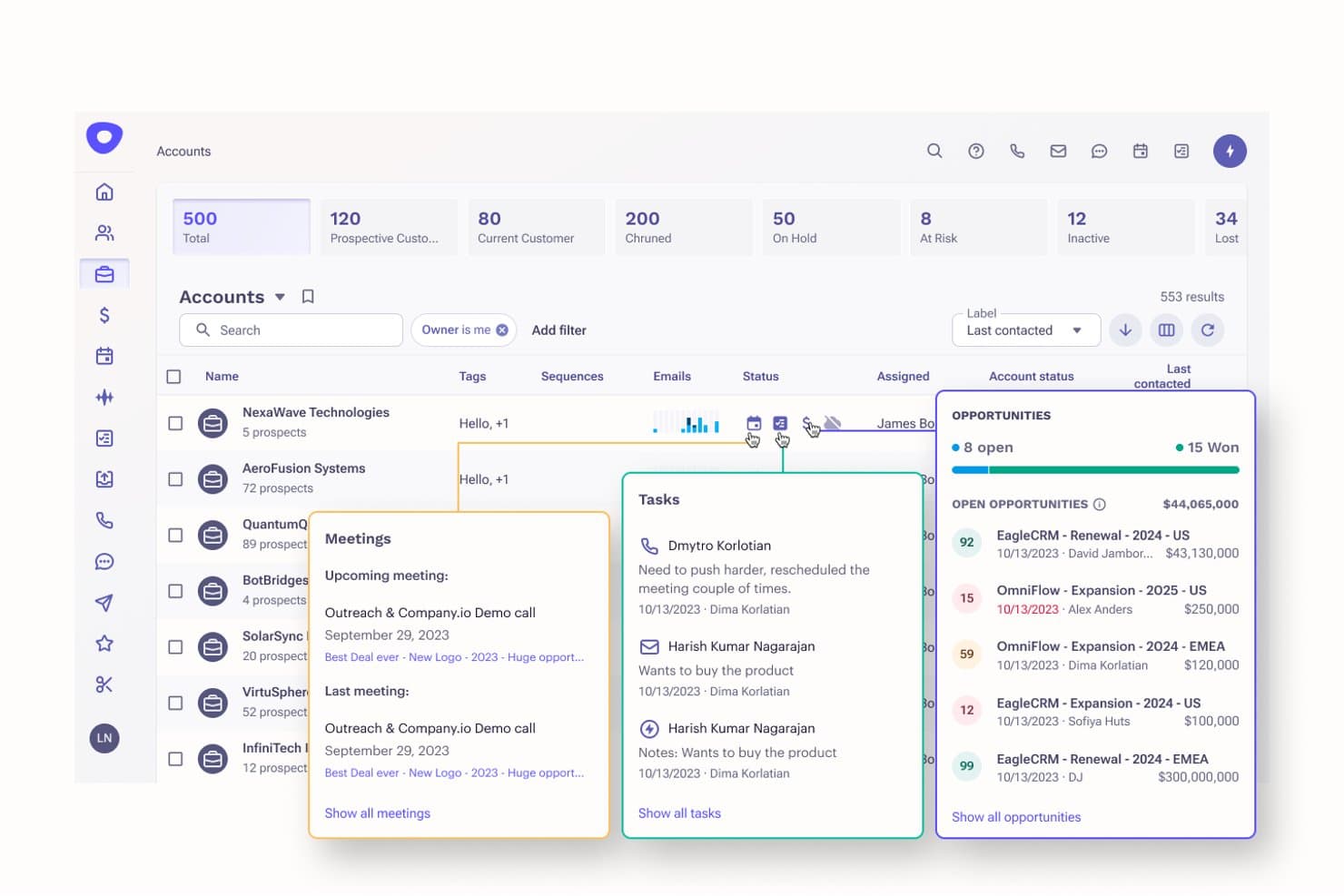
Apollo.io offers an AI-powered accounts dashboard with lead tracking, opportunity management, meeting scheduling, and task assignment for simplified lead generation. Apollo.io is a sales intelligence and engagement platform that pairs a verified B2B contact database with outbound sequencing, lead scoring, workflow automation, and multi-channel outreach.
Who Is Apollo.io Best For?
Apollo.io is a strong fit for outbound-focused B2B sales teams—particularly SDRs and revenue operations professionals at startups and mid-market companies running high-volume prospecting.
Why I Picked Apollo.io
Apollo.io earns its spot on my shortlist because the quality of lead data sitting under every nurture sequence is genuinely different. The platform's real-time contact verification across 270 million B2B profiles means I'm not sending nurture emails to stale addresses, and the scheduled auto-enrichment keeps records current without manual cleanup. I also rely on the website visitor tracking to trigger sequences the moment a lead shows buying intent.
Apollo.io Key Features
- Sales engagement sequences: Build automated multi-step email, call, and LinkedIn touch campaigns to nurture prospects.
- Dynamic lead segmentation: Filter and group leads using demographic, firmographic, and behavioral criteria that update in real time.
- CRM and tool integrations: Sync with Salesforce, HubSpot CRM, Pipedrive, and more to streamline lead management and activity tracking.
- Workflow automation plays: Trigger alerts, assign tasks, or push leads into campaigns based on specific actions or field changes.
Apollo.io Integrations
Apollo.io offers native integrations with Salesforce, HubSpot, Outreach, Airtable, Amplitude, Asana, and Gmail, and provides an API for custom integrations.
Pros and Cons
Pros:
- Sequence builder supports multi-channel outbound nurture
- Intent signals trigger outreach at the right moment
- Real-time contact verification reduces nurture bounce rates
Cons:
- Nurture workflows lack advanced conditional branching
- Reporting depth lags behind dedicated nurture platforms
Learn more about Apollo.io: Best for unified marketing and CRM tools
- Free plan available
- From $20/user/month
Visit WebsiteCustomer Rating:4.4/5
HubSpot offers company activity notes for tracking lead engagement and follow-ups. HubSpot is a marketing and CRM platform that combines email marketing, lead tracking, marketing automation, and contact management for modern lead generation in a single connected system.
Who Is HubSpot Best For?
HubSpot is a strong fit for small to mid-sized marketing teams that want their CRM and marketing tools in one place without juggling multiple platforms.
Why I Picked HubSpot
HubSpot earns its spot on my shortlist because the CRM and marketing tools aren't bolted together; they're built as one. I love that I can trigger nurture workflows based on live CRM properties, like deal stage or contact lifecycle, without any syncing required. HubSpot's lead scoring also pulls directly from the same contact record, so I can prioritize outreach the moment a lead hits a set threshold.
HubSpot Key Features
- Email automation: Build and send personalized emails and automated email sequences triggered by contact behavior, form submissions, or list membership.
- List segmentation: Organize contacts into dynamic or static lists based on any combination of CRM properties.
- Campaign reporting: Track multi-channel campaign performance across email, ads, and content from a single dashboard.
HubSpot Integrations
HubSpot offers over 1,700 marketplace integrations, including Salesforce, Google Ads, LinkedIn Ads, Slack, Mailchimp, WordPress, Zoom, Microsoft 365, Shopify, and SurveyMonkey. It also provides a bi-directional Salesforce sync and an API for custom integrations.
Pros and Cons
Pros:
- Multi-channel campaign tracking in one place
- Workflow automation supports live editing and iteration
- CRM and marketing tools are natively connected
Cons:
- Advanced nurturing features locked to higher tiers
- Email template design options feel inflexible
 Best for automated sales cadences
- Not available
- Pricing upon request
Visit WebsiteCustomer Rating:4.5/5
Salesloft offers cadence automation with tasks, calls, emails, and follow-ups. Salesloft is a revenue workflow platform that brings together cadence automation, pipeline management, forecasting, and conversation intelligence into a single system for sales teams.
Who Is Salesloft Best For?
Salesloft is a strong fit for B2B sales teams at mid-market and enterprise companies that need structured, repeatable outreach across long or complex sales cycles.
Why I Picked Salesloft
I've included Salesloft in my top picks because of how its cadence automation handles the full sequence lifecycle. I like that I can set branching logic so prospects who don't open an email automatically get a follow-up call step, while those who engage get a different message path. The Cadence Player also queues up my team's daily tasks in priority order, so reps always know exactly what to act on next.
Salesloft Key Features
- Conversation intelligence: Record and transcribe sales calls, then surface keyword-tagged moments for rep coaching and deal review.
- Buyer engagement alerts: Get real-time notifications when a prospect opens an email, clicks a link, or revisits your content.
- Deal intelligence: Track deal health scores, stakeholder engagement, and pipeline gaps across every active opportunity.
Salesloft Integrations
Salesloft offers 180+ partners through its marketplace, with native CRM integrations for Salesforce, Microsoft Dynamics 365, HubSpot, and Zoho, plus connections with LinkedIn Sales Navigator, Slack, Gong, Drift, and Cognism. It also connects with Zapier and provides an API for custom integrations.
Pros and Cons
Pros:
- Handles high-volume sending for large rep teams
- Lead scoring automation surfaces new opportunities
- Multi-channel cadences across email, calls, and tasks
Cons:
- Reporting lacks depth for advanced sales insights
- No auto-dialer or domain rotation options
Learn more about Salesloft: 4Best for e-commerce customer journeys
Drip
- 14-day free trial + free demo available
- From $39/month
Visit WebsiteCustomer Rating:4.4/5
Drip offers an abandoned cart workflow with order triggers and wait steps. Drip is an e-commerce-focused email and SMS marketing automation platform that combines behavioral segmentation, customer journey automation, and revenue-attributed reporting built around online store data.
Who Is Drip Best For?
Drip is a strong fit for direct-to-consumer e-commerce brands that run their store on Shopify, WooCommerce, or BigCommerce.
Why I Picked Drip
I've included Drip in my top picks because it's one of the few lead nurturing tools built specifically around e-commerce customer journeys rather than adapted for them. Its visual workflow builder uses behavior-based triggers, like browse abandonment and post-purchase actions, pulled directly from your store's order management data. I also like that pre-built workflow templates for welcome series, win-back, and abandoned cart flows are ready to customize out of the box, so you're not building from scratch.
Drip Key Features
- RFM segmentation: Segment contacts by purchase recency, frequency, and monetary value to target high-intent shoppers.
- Email split testing: A/B test subject lines, content, and send times within automated email workflows.
- SMS automation: Send SMS messages as part of multi-step nurture sequences alongside email campaigns.
Drip Integrations
Drip offers 100+ integrations through its integrations directory, including Shopify, BigCommerce, WooCommerce, Stripe, Facebook Custom Audiences, Facebook Lead Ads, Typeform, Gravity Forms, Segment, and LoyaltyLion. It also connects with Zapier and provides an API for custom integrations.
Pros and Cons
Pros:
- 50+ pre-built e-commerce automation workflows included
- Built-in lead scoring ranks high-potential prospects
- Revenue attribution tied to specific email campaigns
Cons:
- Reporting lacks customizable visualization options
- Basic landing page builder optimized mostly for simple lead capture
Learn more about Drip: Best for AI-suggested audience segments
- 14-day free trial + free demo available
- From $15/month (billed annually)
Visit WebsiteCustomer Rating:4.4/5
ActiveCampaign offers AI-suggested segments for welcoming, winning back, and nurturing customers. ActiveCampaign is a marketing automation platform that combines email marketing, automated workflows, contact scoring, and CRM tools for managing the full lifecycle of potential customers.
Who Is ActiveCampaign Best For?
ActiveCampaign is a strong fit for small to mid-sized B2C and B2B businesses that run high-volume email campaigns and need automated segmentation to stay relevant with large contact lists.
Why I Picked ActiveCampaign
I picked ActiveCampaign as one of the best because its AI-Suggested Segments feature actively monitors contact behavior and surfaces high-value audiences you'd likely never identify manually. I find it especially useful when managing large lists, because ActiveCampaign's Active Intelligence layer continuously analyzes engagement signals and recommends segments without waiting for me to go digging. On top of that, predictive sending optimization adjusts email delivery timing per contact, so the segmentation work actually translates into better open rates.
ActiveCampaign Key Features
- Split and conditional actions: Route contacts into different journey paths based on their behavior, preferences, or engagement history.
- Site and event tracking: Monitor how contacts interact with your website and trigger automations based on their activity.
- Behavioral triggers: Fire automations in response to specific contact actions, like link clicks, page visits, or purchases.
ActiveCampaign Integrations
ActiveCampaign offers 1,000+ integrations, including native connections with Salesforce, Shopify, WooCommerce, WordPress, Facebook, Google Ads, LinkedIn Ads, Slack, Calendly, and Zendesk Sell. It also connects with Zapier and provides an API for custom integrations.
Pros and Cons
Pros:
- Predictive sending adapts to each contact
- Lead scoring assigns MQL and SQL stages
- Split-test entire automation paths at once
Cons:
- Deep feature set can overwhelm beginners
- Cost scales up quickly as the contact list grows
Learn more about ActiveCampaign: Best for AI-driven multi-channel prospecting
- Free demo available
- Pricing upon request
Visit WebsiteCustomer Rating:4.3/5
Outreach offers an AI accounts dashboard for pipeline and opportunity insights. Built for sales teams, Outreach is a sales engagement platform that combines AI-powered sequencing, multi-channel outreach, pipeline management, and conversation intelligence to manage prospects from first touch through close.
Who Is Outreach Best For?
Outreach is a strong fit for mid-market and enterprise sales teams running high-volume, multi-channel prospecting across email, phone, and LinkedIn.
Why I Picked Outreach
Outreach earns its spot on my shortlist because of how well its AI drives multi-channel prospecting at scale. I particularly like the AI-powered sequences that automatically pause when a prospect is out of office and re-engage them when they return. Machine-learning-driven A/B testing across email, LinkedIn, SMS, and calls also tells my team with statistical confidence which messages and engagement steps actually convert, then scales those winning plays across the full team.
Outreach Key Features
- Conversation intelligence: Record, transcribe, and analyze sales calls to surface deal risks and coaching moments.
- Meeting scheduling: Book meetings directly from sequences with embedded calendar links tied to each rep's availability.
- Buyer sentiment tracking: Flag changes in prospect engagement signals to help reps prioritize the right follow-ups.
Outreach Integrations
Outreach offers more than 100 native integrations through its marketplace, including Salesforce, HubSpot, LinkedIn Sales Navigator, 6sense, ZoomInfo, Vidyard, Sendoso, Intercom, and Drift. It also connects with Zapier and provides an API for custom integrations.
Pros and Cons
Pros:
- Built to scale across hundreds of concurrent campaigns
- Granular A/B testing on subject lines and steps
- AI-driven sentiment analysis on prospect responses
Cons:
- No built-in prospect finder for new contacts
- LinkedIn steps are manual task reminders only
Learn more about Outreach: Best for behavior-based automations
- Free plan + 14-day trial + demo available
- From $19/month
Visit WebsiteCustomer Rating:4.2/5
GetResponse offers automation workflows with triggers, conditions, and actions. GetResponse is a multichannel marketing platform that combines email marketing, automation workflows, SMS, web push notifications, and live chat into a single lead nurturing and customer engagement system.
Who Is GetResponse Best For?
GetResponse is a strong fit for small to mid-sized businesses and digital marketers who run email-driven campaigns and want to layer in automation without a dedicated ops team.
Why I Picked GetResponse
GetResponse earns its spot on my shortlist because of how its automation builder handles behavior-based triggers. I can build workflows that react to specific actions like website visits, link clicks, or purchase history, then route contacts down different paths based on what they actually do. The built-in lead scoring also adjusts scores in real time as contacts hit those triggers, so my hottest leads always rise to the top.
GetResponse Key Features
- Email segmentation: Filter and group contacts by tags, custom fields, engagement history, or purchase behavior to target specific audiences.
- Web push notifications: Send browser-based push alerts to re-engage contacts after they leave your site.
- A/B testing: Test subject lines, email content, and send times across campaigns to identify what drives the most opens and clicks.
GetResponse Integrations
GetResponse offers 170+ integrations through its integrations directory, including tools like Shopify, WooCommerce, WordPress, Salesforce, PayPal, Google Analytics, Facebook, and Teachable. It also connects with Zapier and provides an API for custom integrations.
Pros and Cons
Pros:
- Webinar hosting included on higher plans
- Visual workflow builder with 50+ templates
- Built-in conversion funnels for lead capture
Cons:
- No built-in CRM with deal tracking
- Advanced automations locked to pricier plans
Learn more about GetResponse: Best for enterprise omnichannel workflows
- Free demo available
- Pricing upon request
Visit WebsiteCustomer Rating:4.1/5
Adobe Marketo offers an email editor for customizing nurture campaign content. Adobe Marketo Engage is a B2B marketing automation platform that combines lead management, email marketing, multi-channel campaign execution, account-based marketing, and revenue attribution across the full demand generation funnel.
Who Is Adobe Marketo Engage Best For?
Adobe Marketo Engage is built for enterprise marketing teams that run high-volume, multi-channel programs across large prospect and customer databases.
Why I Picked Adobe Marketo Engage
Adobe Marketo Engage is one of my top picks because no other tool handles omnichannel orchestration at true enterprise scale the way it does. Smart Campaigns let me trigger coordinated actions across email, web, mobile push, and paid ads from a single workflow, all based on real-time behavioral signals. I also use Engagement Maps to visualize and manage complex, multi-stream nurture programs that would be nearly impossible to audit in a simpler tool.
Adobe Marketo Engage Key Features
- Lead scoring: Assign and update scores based on prospect behavior and demographic data across every tracked channel.
- Sales Insight: A native panel inside Salesforce CRM that surfaces a prospect's recent activity directly to sales reps.
- Predictive content: AI-recommended content blocks that auto-populate in emails based on individual prospect behavior and profile data.
Adobe Marketo Engage Integrations
Adobe Marketo Engage offers native, bi-directional CRM integrations with Salesforce, Microsoft Dynamics, and Veeva. It also integrates across the Adobe Experience Cloud ecosystem, including Adobe Analytics, Adobe Target, Adobe Real-Time CDP, Adobe Experience Manager, and Adobe Workfront. A REST API and webhooks are available for custom integrations.
Pros and Cons
Pros:
- Multi-touch attribution tied to pipeline revenue
- Dynamic Chat uses generative AI for engagement
- Advanced audience segmentation using firmographic filters
Cons:
- Interface feels dated, and menus are overwhelming
- Requires a dedicated ops person to manage
Learn more about Adobe Marketo Engage: Best for personalized video follow-ups
- Free trial + free demo available
- From $39/month (billed annually)

Sendspark offers personalized video follow-ups with custom text and CTAs. Sendspark is a video messaging platform built for sales teams, letting you record, personalize, and send AI-generated video follow-ups across email, LinkedIn, and CRM platforms at every stage of the deal cycle.
Who Is Sendspark Best For?
Sendspark is a natural fit for B2B sales reps and account executives who rely on high-touch outreach to move deals forward.
Why I Picked Sendspark
I've included Sendspark in my top picks because of how well it handles personalized video follow-ups at scale without adding extra work for reps. I use the AI dynamic video feature to generate individualized videos for each prospect using a single recorded template, so every follow-up feels personal, even when sending in bulk. On top of that, the per-viewer analytics show me exactly who watched, how long they watched, and when to follow up, which takes the guesswork out of timing my next touch.
Sendspark Key Features
- Screen and camera recorder: Record your screen, webcam, or both simultaneously to create 1:1 follow-up videos directly inside Sendspark.
- Meeting follow-up videos: Record post-meeting recap videos that let prospects revisit key highlights without rewatching a full meeting recording.
- CRM sync: Connect to Salesforce, HubSpot, and Zoho to log video engagement data and build pipeline reports alongside your existing deal data.
Sendspark Integrations
Sendspark offers integrations across sales engagement, CRM, email, and automation categories, including HubSpot, Salesforce, Outreach, SalesLoft, Apollo, Clay, Expandi, Instantly, Close, and Lemlist. It also connects with Zapier and provides an API for custom integrations.
Pros and Cons
Pros:
- Embeds directly into email sequences
- Viewer-level watch analytics per video
- AI generates personalized videos from one recording
Cons:
- Landing page templates lack customization options
- Video editor limited to trimming only
Learn more about Sendspark: 10Best for small business contact tracking
Thryv
- Free demo + free trial available
- From $85/month (billed annually)
Visit WebsiteCustomer Rating:5/5
Thryv offers account profiles with client names, emails, and phone numbers. Thryv is a small business-focused lead management platform that combines CRM contact tracking, lead scoring, sales pipeline management, appointment scheduling, and automated follow-ups in one place.
Who Is Thryv Best For?
Thryv is a strong fit for small, service-based businesses like contractors, salons, and agencies that need lead tracking without the complexity of enterprise CRM tools.
Why I Picked Thryv
I've included Thryv in my top picks because it handles the full contact tracking lifecycle that small businesses actually need, without overbuilding for enterprise teams. I particularly like how its CRM keeps every contact record updated in real time, capturing where each lead stands across multiple sales pipelines at a glance. The combination of tagging, lead scoring, and automated follow-up messages means my team can prioritize the warmest leads without manually sifting through a contact list each morning.
Thryv Key Features
- Landing pages and lead capture forms: Build landing pages and embedded forms to collect leads directly into your contact database.
- Email marketing templates: Send nurture campaigns to contact lists using pre-built, customizable email templates.
- Marketing automation: Set up automated follow-up sequences, reminders, and campaign triggers without manual intervention.
Thryv Integrations
Thryv offers integrations through its marketplace, including QuickBooks Online, Mailchimp, Constant Contact, HubSpot, Google Sheets, Shopify, Stripe, PayPal, Typeform, and Jotform. It also connects with Zapier and provides an API for custom integrations.
Pros and Cons
Pros:
- Includes invoicing and estimates alongside CRM
- Automated SMS reminders and follow-up messages
- Client communication and follow-ups in one place
Cons:
- Pricing tiers limit total contacts and monthly messages
- Marketing automation feels basic versus dedicated tools
Learn more about Thryv:
Diğer Potansiyel Müşteri Besleme Yazılımları
Kısa listeme giremeyen ancak yine de göz atmaya değer bazı ek potansiyel müşteri besleme yazılımı seçenekleri şunlardır:
- 11Salesforce Marketing Cloud Account Engagement (Pardot) Best for complex B2B buyer journeys
- 12Mailchimp Best for extensive software integrations
- 13Customer.ioBest for granular journey customizatio
- 14SenderBest for budget-friendly automations
- 15Zoho CRMBest for built-in webinar marketing
- 16monday CRMBest for custom AI-powered workflows
- 17KlaviyoBest for pre-built cross-channel templates
- 18Pipedrive Best for visual pipeline management
How I Evaluate Lead Nurturing Software
I split my evaluation into two layers: core table stakes—automated drip sequences, behavioural scoring, dynamic segmentation—and the differentiators that make one platform the right fit over another.
Core Functionality (Table Stakes For This List)
When I'm selecting tools for my list, I rank each one on a scale from 0 (does not offer the functionality) to 5 (excels in this area) for each core functionality listed below. Then, I calculate the tool's total score into a percentage. Each tool needs to achieve a minimum total score of 65% to be considered for inclusion.
- Automated Nurture Workflows: I evaluate whether the platform offers a visual workflow builder with behavioural triggers, branching logic, and time delays—not just a basic linear autoresponder.
- Lead Segmentation & Targeting: Dynamic segments that update in real time matter here, like filtering leads who visited a pricing page twice but haven't booked a demo.
- Lead Scoring: I check for rule-based or predictive scoring models that combine engagement signals (email clicks, page visits) with profile fit to flag sales-ready leads.
- Multi-Channel Messaging: Beyond email, I look for at least one additional channel—SMS, push, or in-app—orchestrated within the same nurture journey rather than siloed.
- Personalization & Dynamic Content: Platforms should support conditional content blocks and merge fields so a single nurture email can show different CTAs based on industry or funnel stage.
- Campaign Analytics & Reporting: I look for reporting that goes past open rates to track conversion events, funnel progression, and which workflow steps drive the most engagement.
Once I have a list of tools that meet the criteria, I consider what sets each platform apart.
Differentiating Factors (What Sets Vendors Apart)
Here's how I compare and contrast different vendors:
Standout Features
Sales-marketing handoff capabilities are a big differentiator—I look for platforms that auto-route leads to reps with real-time alerts the moment a scoring threshold is met. Account-based nurturing is another feature I evaluate closely, especially for B2B teams running campaigns aimed at buying committees rather than individual contacts. I also check whether a platform offers AI-driven content generation, which helps demand gen teams draft and iterate on nurture copy faster.
Beyond Features
CRM integration depth matters a lot here—I check whether a platform offers bidirectional sync so lead scores and lifecycle stages stay current on both sides. Pricing structure is another factor I weigh, since contact-based models can get expensive fast as your database grows. I also evaluate deliverability tools like dedicated IP options, SPF/DKIM support, and inbox placement monitoring, because even the best nurture sequence fails if it lands in spam.
Potansiyel Müşteri Besleme Yazılımı Nasıl Seçilir?
Uzun özellik listeleri ve karmaşık fiyatlandırma yapıları içinde kaybolmak kolaydır. Kendinize özgü yazılım seçim sürecinizde ilerlerken odağınızı korumanıza yardımcı olmak için göz önünde bulundurmanız gereken faktörleri içeren bir kontrol listesi hazırladık:
| Faktör | Nelere Dikkat Edilmeli? |
|---|---|
| FaktörÖlçeklenebilirlik | Nelere Dikkat Edilmeli?Araç, artan potansiyel müşteri ve kampanya hacminizi kaldırabilir mi? Kullanıcı veya kişi sınırlarını, iş akışı kotalarını ve plan yükseltme seçeneklerini kontrol edin. |
| FaktörEntegrasyonlar | Nelere Dikkat Edilmeli?Yazılım, CRM sisteminize, e-postanıza ve veri kaynaklarınıza doğrudan bağlanabilir mi? Manuel geçici çözümlerden kaçınmak için yerel entegrasyonların bulunabilirliğini ve kapsamını değerlendirin. |
| FaktörÖzelleştirilebilirlik | Nelere Dikkat Edilmeli?Potansiyel müşteri yolculuklarını, veri alanlarını ve mantığı kendinize özgü satış sürecinize göre uyarlayabilir misiniz? Katı kampanya şablonlarına veya sabit kodlanmış kurallara dikkat edin. |
| FaktörKullanım kolaylığı | Nelere Dikkat Edilmeli?Günlük iş akışları ekibiniz için sezgisel mi? Gezinme netliğini değerlendirmek ve sürekli eğitim ihtiyacını en aza indirmek için arayüzleri tanıtım amacıyla inceleyin. |
| FaktörUygulama ve işe alıştırma | Nelere Dikkat Edilmeli?Ekibiniz ne kadar hızlı dağıtım yapabilir, yayına geçebilir ve mevcut potansiyel müşterileri taşıyabilir? Yapılandırılmış işe alıştırma kaynakları ve gerçekçi zaman çizelgeleri arayın. |
| FaktörMaliyet | Nelere Dikkat Edilmeli?Kullanıcı ve kişi ekledikçe devam eden maliyetler öngörülebilir mi? Beklenmedik maliyetlerden kaçınmak için plan katmanlarını, gerekli ek özellikleri ve faturalandırma sıklıklarını dikkatle inceleyin. |
| FaktörGüvenlik önlemleri | Nelere Dikkat Edilmeli?Araç veri şifreleme, kullanıcı erişim denetimleri ve denetim günlükleri sunuyor mu? Güvenlik standartlarınızla ve mevzuat gereksinimlerinizle uyumlu olduğundan emin olun. |
| FaktörDestek bulunabilirliği | Nelere Dikkat Edilmeli?Sorunlar ortaya çıktığında yardıma ne kadar hızlı erişebilirsiniz? Ekibinizin gereksinimlerine uygun olması için belgelenmiş destek saatlerini ve mevcut kanalları kontrol edin. |
Potansiyel Müşteri Besleme Yazılımı Nedir?
Potansiyel müşteri besleme yazılımı, satış hunisi boyunca potansiyel müşterilerle devam eden iletişimleri otomatikleştirmek, kişiselleştirmek ve izlemek için tasarlanmış hepsi bir arada araç kategorisidir. Bu platformlar, pazarlama ve satış ekiplerinin e-posta, sosyal medya ve video gibi kanallar üzerinden zamanında ve hedefe yönelik içeriklerle potansiyel müşterilerle etkileşim kurmasına yardımcı olurken etkileşimleri izler ve potansiyel müşterileri satın alma kararlarına doğru ilerletir.
Potansiyel Müşteri Besleme Yazılımının Özellikleri
Potansiyel müşteri besleme yazılımı seçerken aşağıdaki temel özelliklere dikkat edin:
- Otomatik iş akışları: Zamanlamaya, davranışa veya satış hunisindeki aşamaya göre potansiyel müşterilere otomatik olarak mesaj gönderen çok adımlı kampanyalar oluşturun ve planlayın.
- Potansiyel müşteri segmentasyonu: Mesajlarınızı her kitle segmentine göre uyarlayabilmek için potansiyel müşterileri demografik özelliklerine, davranışlarına veya etkileşim düzeylerine göre gruplandırın.
- Çok kanallı erişim: E-posta, SMS ve sosyal medya gibi kanallar üzerinden tek bir birleşik platformdan potansiyel müşterilerle iletişim kurun.
- Kişiselleştirilmiş mesajlaşma: Uygunluğu ve etkileşimi artırmak için içeriği, selamlamaları ve gönderim zamanlarını her potansiyel müşteriye göre özelleştirin.
- Etkileşim takibi: İlgiyi ölçmek ve sıcak potansiyel müşterileri belirlemek için açılma, tıklama, yanıt ve diğer etkileşimleri izleyin.
- Potansiyel müşteri puanlama: Takip çalışmalarına öncelik vermek için potansiyel müşterilere gerçekleştirdikleri eylemlere ve profil uygunluklarına göre sayısal değerler atayın.
- CRM entegrasyonu: Doğru kayıtlar oluşturmak ve devir süreçlerini optimize etmek için potansiyel müşteri verilerini satış veya pazarlama CRM'inizle otomatik olarak senkronize edin.
- Raporlama ve analiz: Kampanya performansını, yanıt oranlarını ve satış hattındaki ilerlemeyi ortaya koyan panolara ve raporlara erişin.
- Sürükle ve bırak kampanya oluşturucu: Sezgisel bir arayüz kullanarak teknik becerilere ihtiyaç duymadan besleme dizilerini görsel olarak oluşturun ve düzenleyin.
Yaygın Potansiyel Müşteri Besleme Yazılımı AI Özellikleri
Yukarıda listelenen standart potansiyel müşteri besleme yazılımı özelliklerinin ötesinde, bu çözümlerin çoğu aşağıdaki gibi özelliklerle AI kullanmaya başlıyor:
- Tahmine dayalı potansiyel müşteri puanlama: Geçmiş etkileşimleri ve davranışları analiz etmek için AI algoritmalarını kullanır; verilerinizden öğrenilen kalıplara göre dönüşüm gerçekleştirme olasılığı en yüksek potansiyel müşterilere daha yüksek puanlar atar.
- Otomatik içerik önerileri: Etkileşim verilerinden ve benzer segmentlerde hangi içeriklerin yankı uyandırdığına ilişkin AI destekli analizlerden yararlanarak her potansiyel müşteri için en uygun içeriği veya sonraki temas mesajlarını önerir.
- Gönderim zamanı optimizasyonu: Her potansiyel müşterinin mesajları açma ve bunlarla etkileşim kurma olasılığının en yüksek olduğu anları belirlemek ve erişimi bu zamanlara planlamak için AI'dan yararlanır.
- Doğal dil yanıtı analizi: Potansiyel müşterilerden gelen yanıtları ve mesajları taramak, ilgi düzeylerini kategorilere ayırmak ve satış ekibinin ilgilenmesi gereken umut vadeden görüşmeleri öne çıkarmak için AI kullanır.
- Niyet algılama: Etkileşim sinyallerini ve dijital beden dilini incelemek için AI uygular; zamanında ve hedefli takip için hangi potansiyel müşterilerin güçlü satın alma niyeti gösterdiğini belirler.
Potansiyel Müşteri Besleme Yazılımının Faydaları
Potansiyel müşteri besleme yazılımını uygulamak ekibiniz ve işletmeniz için çeşitli faydalar sağlar. Yararlanabileceğiniz birkaç fayda şunlardır:
- Tutarlı erişim: Otomatik iş akışları, her potansiyel müşterinin zamanında iletişim almasını sağlayarak manuel çaba veya kaçırılan takipler olmadan anlaşmaları sonuçlandırmanıza yardımcı olur.
- Ölçekli kişiselleştirme: Dinamik içerik, damla kampanyaları ve segmentasyon araçları, mesajları binlerce kişiye son derece alakalı olacak şekilde uyarlamanıza olanak tanır.
- Satış hattı görünürlüğü: Etkileşim takibi ve analizler, potansiyel müşterilerin satış huninizin neresinde olduğu ve hangi kampanyaların onları ilerlettiği hakkında net bilgiler sağlar.
- Önceliklendirilmiş takip: Potansiyel müşteri puanlama ve AI analizi, ekibinizin kaynaklarını dönüşüm gerçekleştirme olasılığı en yüksek potansiyel müşterilere odaklamasına yardımcı olur.
- Geliştirilmiş entegrasyon: CRM ve platform entegrasyonları verileri senkronize tutar; manuel güncellemeleri azaltır ve pazarlama ile satış arasındaki devir süreçlerini iyileştirir.
- Veriye dayalı kararlar: Raporlama araçları ve performans panoları, potansiyel müşteri besleme kampanyalarınızı gerçek etkileşim ve dönüşüm verilerine göre optimize etmenizi sağlar.
- Geliştirilmiş müşteri deneyimi: Çok kanallı, zamanında ve alakalı iletişimler, potansiyel müşterileriniz için daha ilgi çekici ve daha az müdahaleci bir yolculuk oluşturur.
Potansiyel Müşteri Besleme Yazılımının Maliyetleri ve Fiyatlandırması
Potansiyel müşteri besleme yazılımı seçmek, mevcut çeşitli fiyatlandırma modellerini ve planları anlamayı gerektirir. Maliyetler özelliklere, ekip büyüklüğüne, eklentilere ve daha fazlasına göre değişir. Aşağıdaki tablo, potansiyel müşteri besleme yazılımı çözümlerinde yaygın olan planları, ortalama fiyatlarını ve genellikle dahil edilen özellikleri özetlemektedir:
Potansiyel Müşteri Besleme Yazılımı İçin Plan Karşılaştırma Tablosu
| Plan Türü | Ortalama Fiyat | Yaygın Özellikler |
|---|---|---|
| Plan TürüÜcretsiz Plan | Ortalama Fiyat$0 | Yaygın ÖzelliklerTemel iş akışı otomasyonu, sınırlı kişi depolama alanı, e-posta erişimi ve basit raporlama. |
| Plan TürüKişisel Plan | Ortalama Fiyat$10-$30/kullanıcı/ay | Yaygın ÖzelliklerMüşteri adayı segmentasyonu, çok kanallı erişim, genişletilmiş kişi limitleri ve temel entegrasyonlar. |
| Plan Türüİşletme Planı | Ortalama Fiyat$25-$75/kullanıcı/ay | Yaygın ÖzelliklerGelişmiş otomasyon, CRM entegrasyonu, müşteri adayı puanlama, ayrıntılı analizler ve çok kullanıcılı destek. |
| Plan TürüKurumsal Plan | Ortalama Fiyat$75-$200+/kullanıcı/ay | Yaygın ÖzelliklerÖzel satış otomasyonu iş akışları, gelişmiş güvenlik, premium destek, özel başlangıç desteği ve uyumluluk yönetimi. |
Müşteri Adayı Besleme Yazılımı SSS
Müşteri adayı besleme yazılımıyla ilgili sık sorulan bazı soruların yanıtları:
Ekibimin müşteri adayı besleme yazılımı kullanmaya hazır olup olmadığını nasıl anlarım?
Elle takip edebileceğinizden daha fazla müşteri adayınız varsa, satış hattınız büyüyorsa veya tekrarlayan takip görevlerini otomatikleştirmek istiyorsanız büyük olasılıkla hazırsınız. Etkileşim verilerini toplamak ve çok adımlı kampanyalar yürütmek ilginizi çekiyorsa bu çözümler büyük ölçüde yapı ve verimlilik sağlayabilir.
Müşteri adayı besleme yazılımını nelerle entegre etmeliyim?
Müşteri adayı verilerinin, etkileşim etkinliklerinin ve kampanya içgörülerinin senkronize kalması için yazılımı CRM’niz, pazarlama otomasyonu platformunuz ve e-posta araçlarınızla entegre etmelisiniz. Analiz ve satış platformlarıyla bağlantılar eklemek, müşteri adaylarının ilerleyişine dair eksiksiz bir görünüm sunmaya yardımcı olur.
Mevcut müşteri adaylarını yeni bir platforma taşımak zor mudur?
Hayır, çoğu müşteri adayı besleme yazılımı popüler CRM’lerden CSV içe aktarma veya doğrudan API entegrasyonları sunar. Yine de özel alanların, etiketlerin veya notların nasıl aktarılacağını kontrol etmeli ve taşıma sonrasında kayıtları incelemek için ek zaman ayırmalısınız.
Müşteri adayı besleme araçları uyumluluğu ve veri gizliliğini nasıl destekler?
Birçoğu kullanıcı rolü yönetimi, izin takibi, şifrelenmiş depolama ve denetim günlüğü kaydı sunar. Platformun veri işleme gereksinimlerinizle uyumlu olduğundan emin olmak için GDPR, CCPA veya yerel düzenlemelerle ilgili net destek arayın.
Bu platformlar yalnızca gelen müşteri adaylarıyla mı çalışır?
Hayır, müşteri adayı besleme yazılımını hem gelen hem de giden müşteri adayları için kullanabilirsiniz. Mesajları segmentlere ayırmak ve kişiselleştirmek, aktif olarak ulaşmaya çalıştığınız giden kişiler kadar topladığınız sıcak potansiyel müşteriler için de değerlidir.
Kurulum sırasında kaçınılması gereken yaygın hatalar nelerdir?
Segmentasyon kurallarını aceleyle oluşturmaktan veya başlangıç kılavuzlarını atlamaktan kaçının. İş akışlarınızı planlamak, net aşamalar belirlemek ve kampanyaları başlatmadan önce şablonları test etmek için zaman ayırın. Bu, mantık hatalarını ve mesajlaşma yanlışlarını erkenden fark etmenize yardımcı olur.