

Podcast analytics tools measure who listens, how audiences engage, and whether podcast campaigns contribute to marketing results. Options range from hosting platforms with episode statistics to network reporting and ad attribution tools, so the right fit depends on what your team needs to measure. This guide compares tools by their audience, retention, cross-show, and campaign reporting features to help you choose.
Why Trust Our Software Recommendations
6,700+
Reviews
20
Industry experts
16+
Evaluation factors
14
Years
Our team has been testing and reviewing software since 2012. As marketing leaders ourselves, we know how difficult—and important—it is to choose the right software.
For this guide, we evaluated tools using hands-on testing and independent research, scoring tools using our selection criteria.
Our reviews reflect our human editorial judgment, not a sales pitch.
Expert reviewers:
 Gui DrusinaCreative Director
- Shriya GhateSenior Marketing Lead
 Amanda JacquesMarketing Ops Leader

Comparison Table: Podcast Analytics Tools
Compare pricing and specs, side by side, for the podcast analytics tools that made it onto my shortlist.
| Tool | Best For | Trial Info | Price | ||
|---|---|---|---|---|---|
| 1 | Best for tracking podcast ad conversions | Free plan available | From $25/month | Website | |
| 2 | Best for tracking public and private shows | Free plan + 14-day free trial available | From $17/month | Website | |
| 3 | Best for comparing audiences across shows | 14-day free trial | From $13.50/month (billed annually) | Website | |
| 4 | Best for producer workflows with built-in analytics | 30-day free trial | From $17/month (billed annually) | Website | |
| 5 | Best for cross-show network reporting | 30-day free trial | From $12/month | Website | |
| 6 | Best for network teams querying show data | 14-day free trial | From $19/month | Website | |
| 7 | Best for sponsor-ready audience proof | Free plan + 30-day free trial available | From $5/month | Website | |
| 8 | Best for attributing sales and verifying ads | Free demo available | From $250/month | Website | |
| 9 | Best for creators who want stats with hosting | Free plan available | From $20/month | Website | |
| 10 | Best for tying audience data to ad revenue | Not available | Pricing upon request | Website |


Best Podcast Analytics Tools Reviews
Below are my summaries of the best podcast analytics tools that made it onto my shortlist. My reviews cover the features and reporting capabilities of each tool to help you find the right fit.
 Best for tracking podcast ad conversions
- Free plan available
- From $25/month
Visit WebsiteCustomer Rating:3.9/5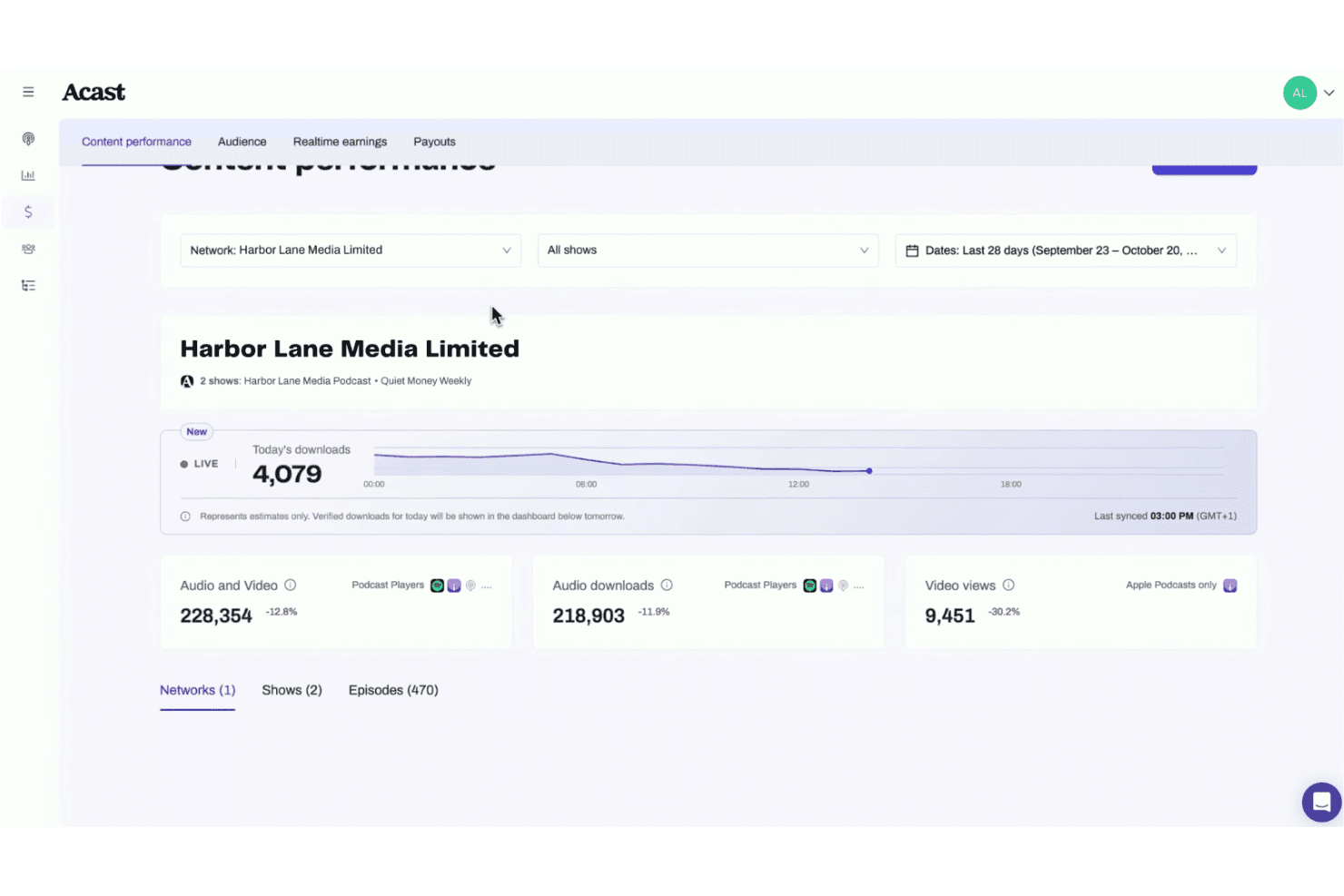
Acast features live download estimates, audio downloads, and video views. Acast is a podcast hosting and analytics platform that offers download tracking, audience reporting, monetization tools, and advertising campaign measurement. Its analytics include IAB 2.2-certified metrics, while third-party attribution solutions support tracking website visits and conversions associated with podcast advertising.
Who Is Acast Best For?
Acast is best for podcast creators, podcast network managers, and advertising teams that need download analytics, audience demographics, episode performance reporting, and advertising campaign measurement.
Why I Picked Acast
I picked Acast because it combines IAB 2.2-certified podcast measurement with detailed audience and episode analytics. Its reporting covers downloads, unique listeners, audience demographics, and episode performance across shows. I also like its audience surveys, which collect anonymous listener feedback to provide additional demographic insights for podcast creators and networks.
Acast Key Features
- IAB 2.2-certified download tracking: Filters known bot traffic and duplicate requests using industry measurement standards.
- Audience location and device reporting: Shows listener geography, podcast apps, websites, and device information.
- Unique listener reporting: Tracks unique audience reach and changes in listener counts over time.
- Audience Surveys: Collects anonymous listener responses and provides aggregated audience reports for podcast creators.
Acast Integrations
Acast integrates with Apple Podcasts, Spotify, Amazon Music, Headliner, and Supercast. It also supports a Publishing API, webhooks, and Zapier for custom connections.
Pros and Cons
Pros:
- Podscribe attribution for advertising conversions
- Cross-network and episode performance comparisons
- Reports Apple Podcasts video consumption data
Cons:
- Marketplace earnings exclude independently sold campaigns
- Custom audience survey questions unavailable
Learn more about Acast: Best for tracking public and private shows
- Free plan + 14-day free trial available
- From $17/month
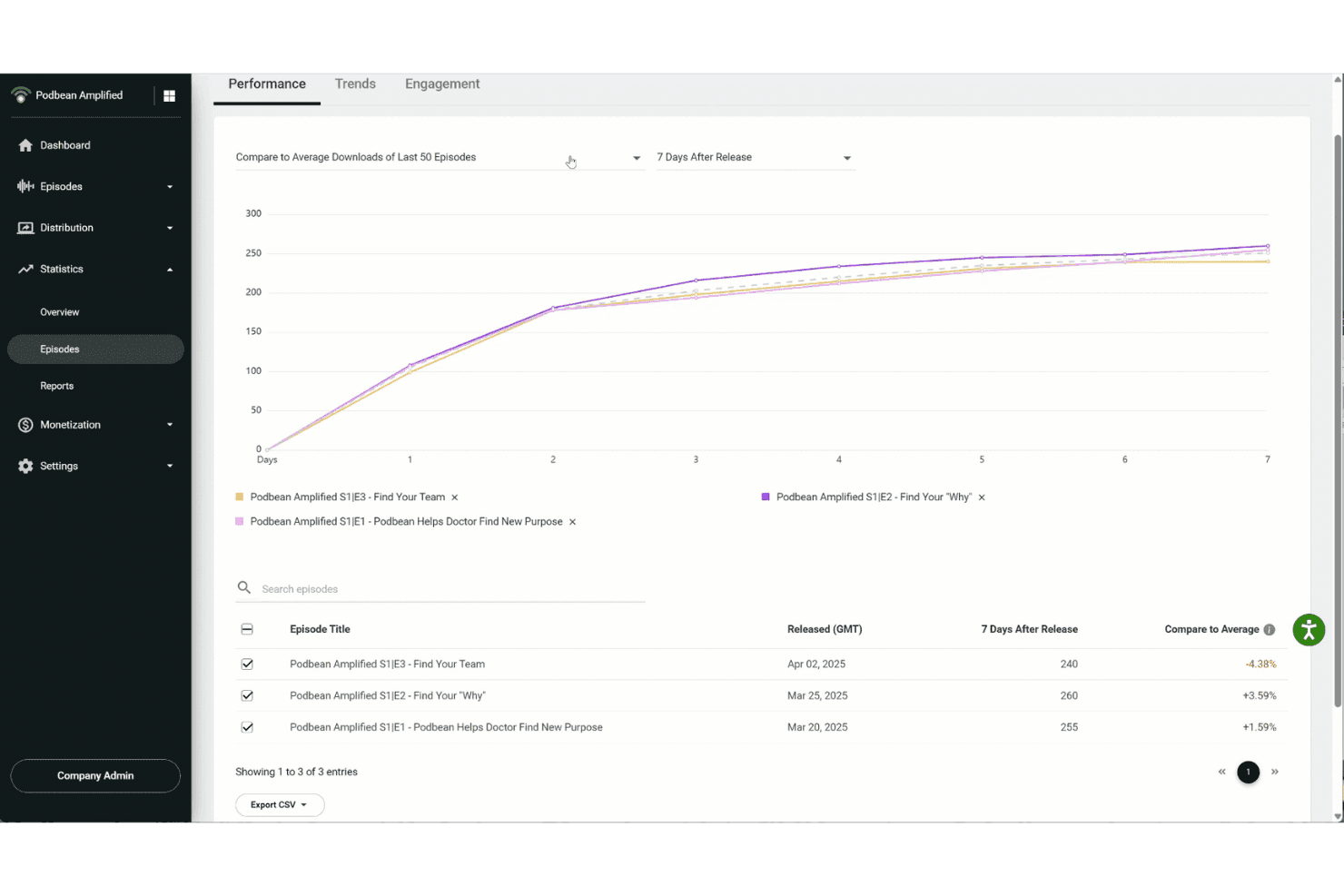
Podbean lets users compare episode download performance over time. Podbean is a podcast hosting and analytics platform offering IAB-certified statistics, episode performance comparisons, listener engagement reporting, and geographic and device breakdowns. It also provides network-level analytics for organizations managing multiple podcast channels.
Who Is Podbean Best For?
Podbean is best for podcast networks, enterprise organizations, and businesses producing podcasts for internal communications, employee training, and brand marketing.
Why I Picked Podbean
I picked Podbean for its network-level podcast analytics and detailed listener engagement reporting. Its organizational statistics include downloads, daily listeners, geographic data, platform sources, and the 10 most downloaded podcasts and episodes across channels. Its Listener Engagement Intel also reports playback behaviour, including pauses, skips, relistens, and episode consumption rates for supported Podbean listening channels.
Podbean Key Features
- IAB-certified statistics: Provides IAB Tech Lab-certified measurement covering podcast downloads, listeners, and ad delivery.
- Geographic and device analytics: Reports listener locations by country and state or province, alongside device and download source information. Geographic statistics support CSV exports.
- Episode Performance comparisons: Compares episode downloads against the average of the last 10, 50, or all episodes (up to 500), with day-by-day comparisons for up to 10 selected episodes.
- Conversion pixel tracking: Tracks visits to designated landing pages following podcast ad exposure, using a 90-day attribution window.
Podbean Integrations
Podbean offers plugins for Mailchimp, Google Analytics, Dataddo, and Dropbox, along with a documented Descript publishing integration. It also provides an API for custom integrations.
Pros and Cons
Pros:
- Reports most active listening hours
- Episode reports track pauses, skips, and relistens
- Unified analytics cover public and private shows
Cons:
- External app engagement isn't captured
- Cross-platform totals aren't fully reconciled
Learn more about Podbean: Best for comparing audiences across shows
- 14-day free trial
- From $13.50/month (billed annually)
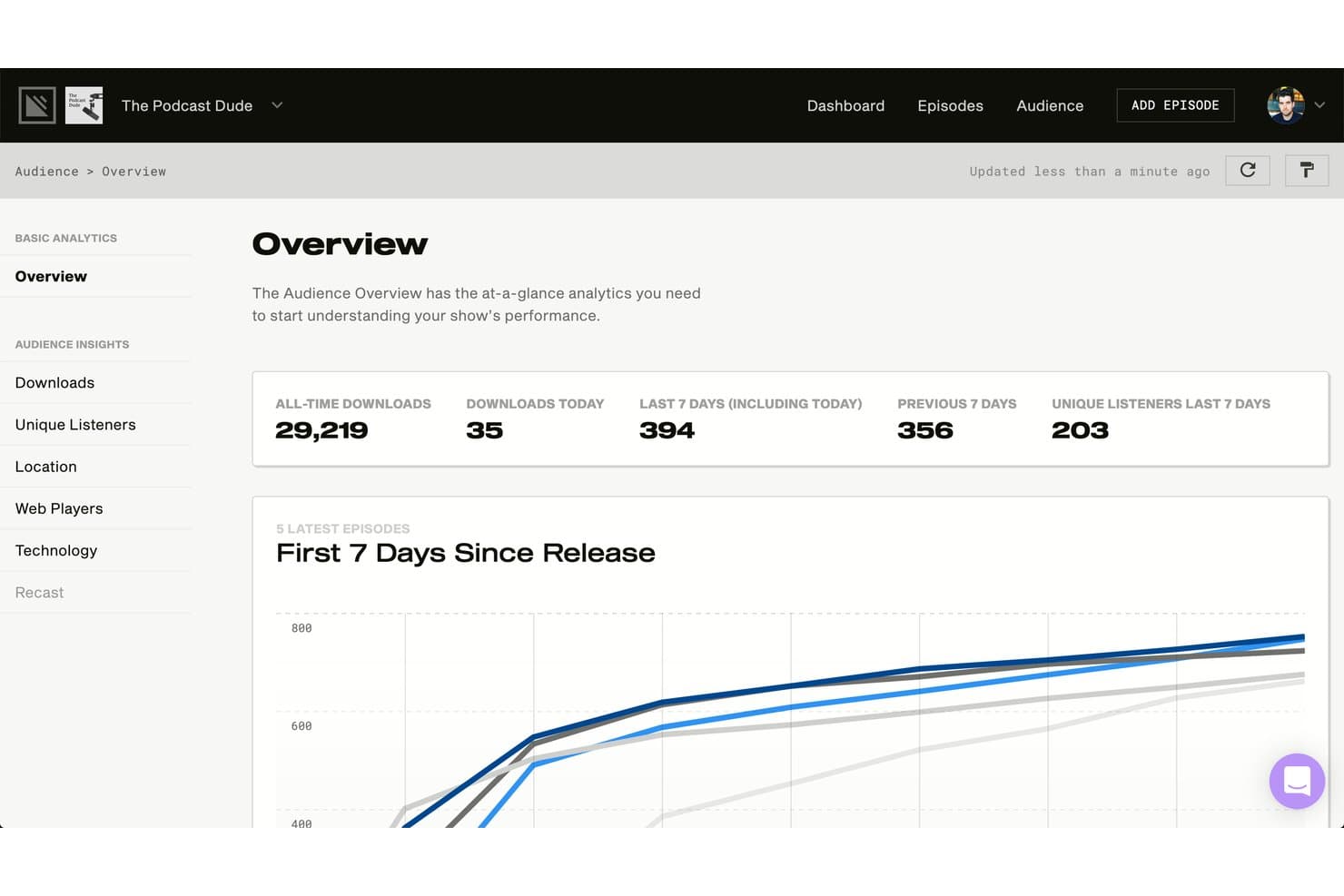
Simplecast tracks all-time downloads, unique listeners, and episode performance. Simplecast is a podcast hosting and analytics platform that supports podcast publishing, distribution, IAB-certified audience measurement, episode-level performance tracking, and customizable content reports across shows.
Who Is Simplecast Best For?
Simplecast is best for podcast networks, production teams, and publishers managing multiple shows that need cross-show audience reporting, episode performance comparisons, and organization-level access controls.
Why I Picked Simplecast
I've included Simplecast in my top picks because its Content Reports support audience analysis across shows, episodes, and networks. I particularly like its customizable reporting dimensions, which allow publishers to compare downloads and unique listeners across their podcast catalogues. Simplecast also offers audience overlap reporting for multi-show networks as an Enterprise add-on.
Simplecast Key Features
- IAB-certified download metrics: Filters bot traffic, preloads, and duplicate downloads using a rolling 24-hour measurement window.
- City-level audience analytics: Provides listener location breakdowns by country, region, sub-region, and city.
- Web player retention charts: Tracks average listening time, episode completion ratios, and listener drop-off across episode segments.
- Scheduled report delivery: Supports automated email reports with daily, weekly, monthly, quarterly, and custom multiweek delivery schedules.
Simplecast Integrations
Simplecast connects with AdsWizz Podcast Marketplace for podcast monetization and supports distribution to Apple Podcasts, Spotify, and Overcast through podcast feeds. It also supports YouTube publishing and analytics, while Enterprise API capabilities cover publishing and campaign management.
Pros and Cons
Pros:
- Supports editing existing scheduled report configurations
- Enterprise reports support cross-show audience overlap
- Supports cross-show episode imports
Cons:
- Some downloads lack location and device data
- On-screen reports limited to four dimension splits
Learn more about Simplecast: Best for producer workflows with built-in analytics
- 30-day free trial
- From $17/month (billed annually)
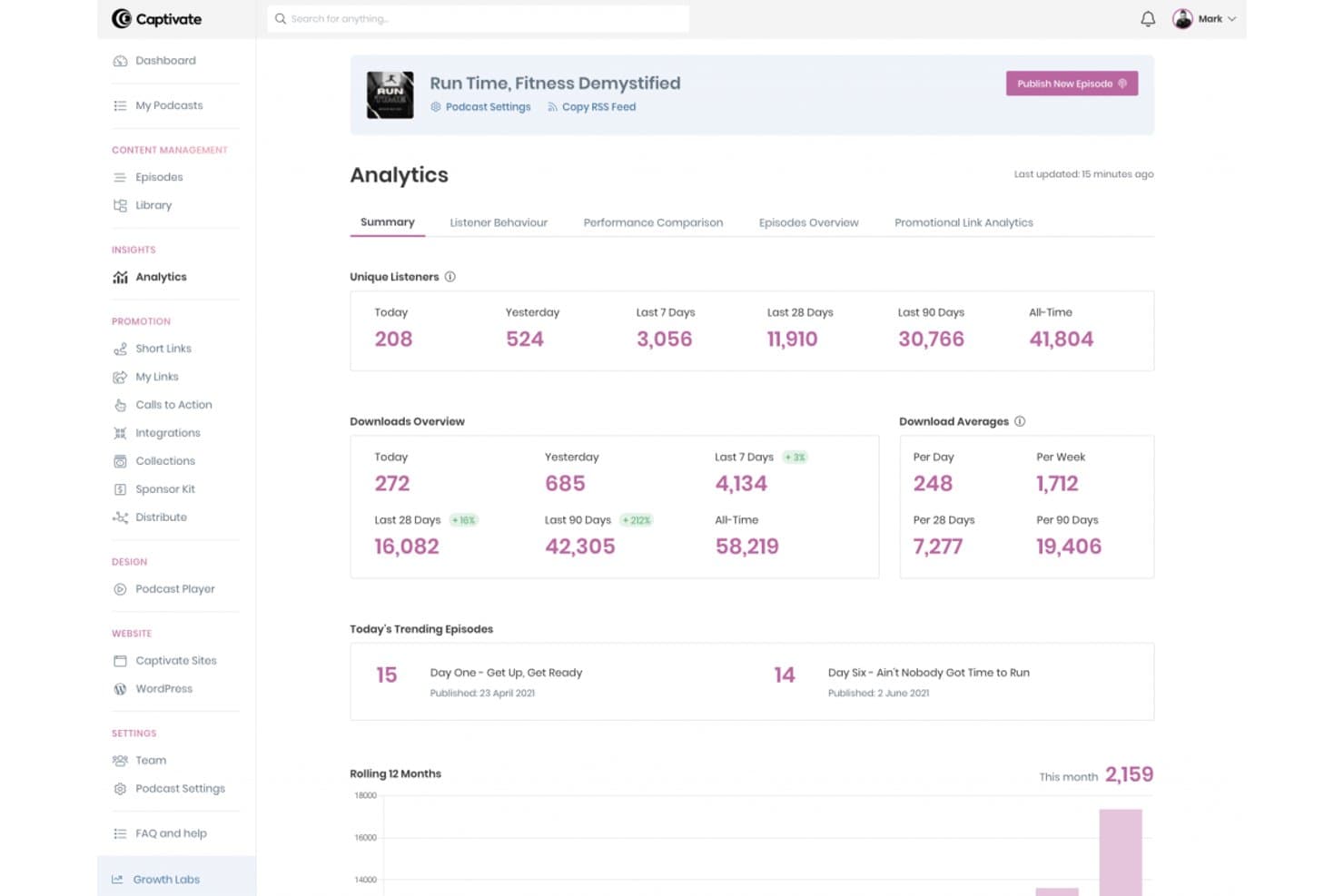
Captivate tracks downloads, unique listeners, and trending episodes. Captivate is a podcast hosting platform offering IAB-certified analytics, episode planning, guest booking, dynamic ad insertion, and sponsorship reporting tools.
Who Is Captivate Best For?
Captivate is best for podcast producers, independent podcasters, and podcast network managers who need episode planning, guest booking, and podcast audience analytics.
Why I Picked Captivate
I've included Captivate in my top picks because it combines podcast production planning with episode-level analytics and sponsorship tools. Its episode planning feature supports research links, production notes, and guest information, while its booking system connects with SquadCast for remote recording scheduling. Captivate also provides Web Player Listener Coverage for reviewing audience engagement and shareable sponsor kits containing podcast performance statistics and an IAB Tech Lab verified seal.
Captivate Key Features
- IAB-certified analytics: Measures podcast downloads using IAB Tech Lab Podcast Measurement 2.3 standards, with filtering and validation for qualifying download requests.
- Web Player Listener Coverage: Tracks minutes played, minutes replayed, and listener drop-off points for episodes played through Captivate's embedded web player.
- Attribution link tracking: Provides promotional links with analytics for monitoring visits generated by podcast marketing campaigns.
- Network analytics: Reports downloads, average downloads, and listener activity across podcasts within a network.
Captivate Integrations
Captivate integrates with SquadCast for guest booking and recording scheduling, WordPress through Captivate Sync, and Zapier for automated workflows. It also supports Alitu through its API.
Pros and Cons
Pros:
- Sponsor kits display IAB verification
- Episode planning with research links
- Supports reusable dynamic show notes
Cons:
- Guest bookings limited to six months ahead
- Listener retention requires Captivate's web player
Learn more about Captivate:
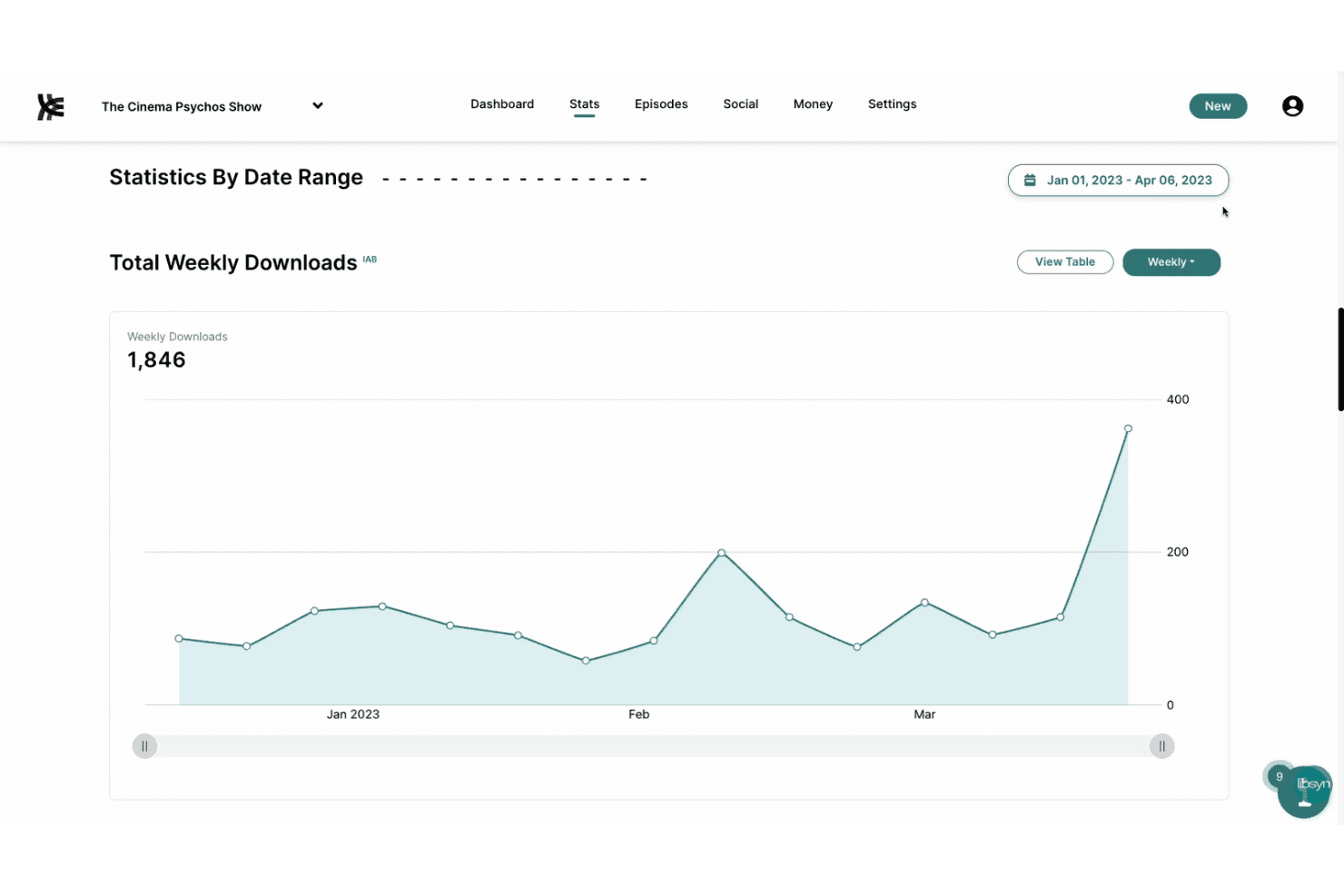
Libsyn provides weekly podcast download statistics with a trend chart. Libsyn is a podcast hosting and analytics platform offering episode publishing, distribution to major listening platforms, IAB-verified download statistics, and geographic audience reporting. Its enterprise offering also supports network-level analytics across multiple shows.
Who Is Libsyn Best For?
Libsyn is best for podcast networks, media organizations, and businesses managing multiple shows that need network-level download reporting and comparisons across podcasts.
Why I Picked Libsyn
I picked Libsyn because its enterprise analytics support reporting at both the individual show and podcast network levels. I particularly like that network administrators can review episode performance, geographic audience data, and download trends across multiple shows. Libsyn also offers exportable reports and a Stats API, providing additional options for analyzing podcast performance.
Libsyn Key Features
- IAB-certified download statistics: Tracks podcast downloads using IAB-certified measurement standards that filter invalid traffic and duplicate requests.
- User-agent reporting: Shows which podcast apps and listening clients request episodes.
- Geographic audience reporting: Provides location-based download statistics for reviewing audience distribution.
- Analytics report exports: Supports exporting podcast performance data for further analysis outside Libsyn.
Libsyn Integrations
Libsyn supports podcast distribution to Apple Podcasts, Spotify, Amazon Music, and other listening platforms. It also offers publishing integrations with YouTube and Spotify, including video distribution, and supports Apple Podcasts Subscriptions for paid content. Its Stats API provides additional options for custom analytics integrations.
Pros and Cons
Pros:
- Stats API supports custom analytics reporting
- IAB-certified metrics filter invalid downloads
- Network-level reporting compares multiple shows
Cons:
- Episode retention data requires listening-platform analytics
- Network reporting requires enterprise offering
Learn more about Libsyn:
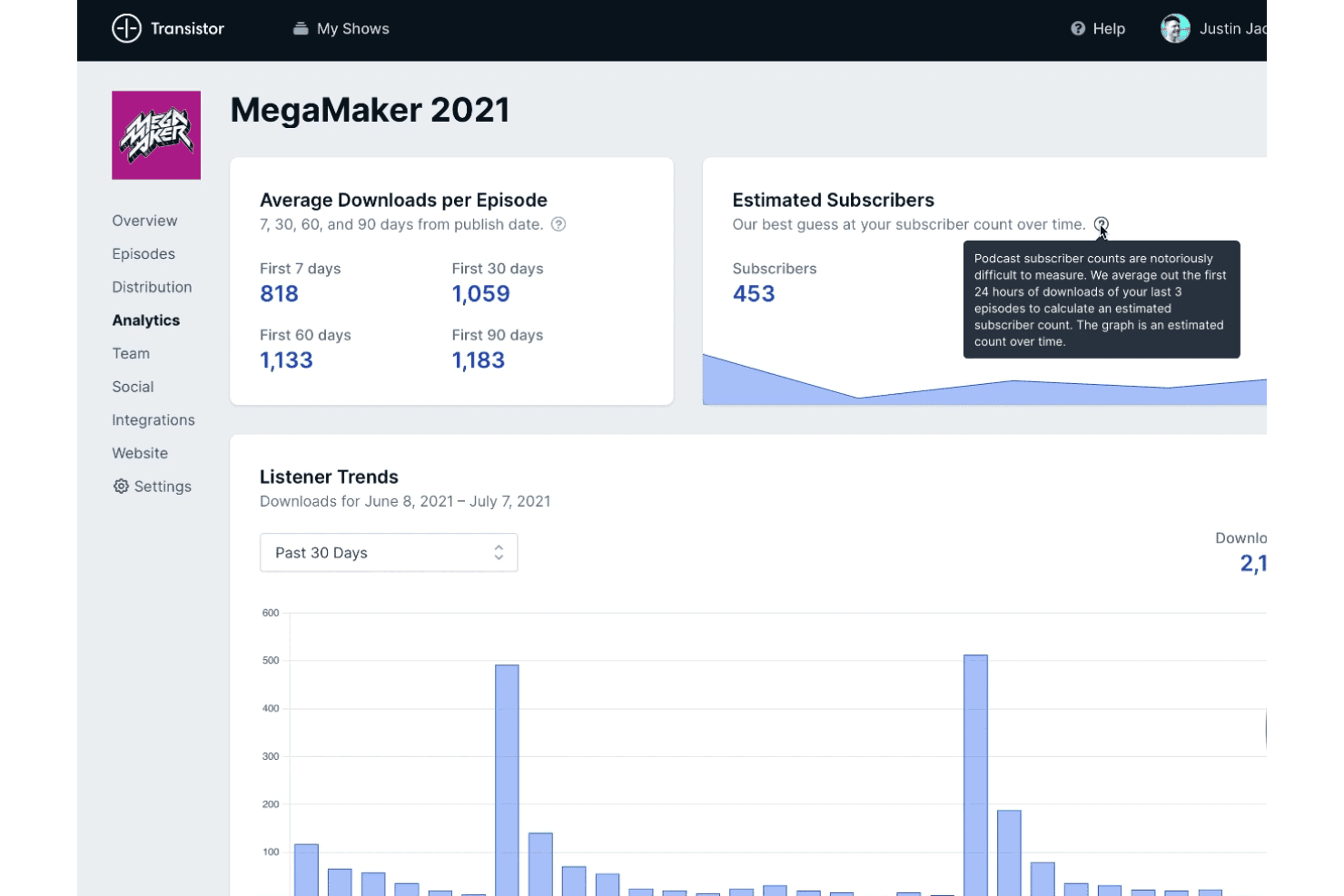
Transistor tracks podcast downloads and estimated subscribers over time. Transistor is a podcast hosting and analytics platform that tracks episode downloads, listener geography, devices, and podcast app usage across unlimited shows. It also provides API and MCP access for programmatic analytics queries.
Who Is Transistor Best For?
Transistor is best for podcast network operators and podcast producers managing multiple shows who need episode-level analytics and download comparisons.
Why I Picked Transistor
I picked Transistor because it provides episode-level analytics and download comparisons for podcasts managed under the same account. Its analytics include daily download counts, listener geography, device breakdowns, and podcast app usage. It also supports custom date ranges and comparisons across multiple shows, making it relevant to podcast networks tracking performance across their catalogues.
Transistor Key Features
- Listener geography breakdown: View podcast downloads by country, with additional state and province-level data where available.
- Episode comparison: Compare daily downloads across episodes during their first 30 days after publication.
- Dynamic ad campaigns: Insert uploaded pre-roll, mid-roll, and post-roll audio clips into episodes, with campaign scheduling options.
- CSV analytics exports: Export listener trends, episode breakdowns, podcast player statistics, and geographic data as separate CSV reports.
Transistor Integrations
Transistor integrates with Ghost, Drip, Mailchimp, HubSpot, Kit, Klaviyo, MailerLite, ActiveCampaign, Zapier, Make, Descript, Riverside.fm, Bluesky, and YouTube. It also provides a REST API with webhook support and an MCP server for programmatic access.
Pros and Cons
Pros:
- CSV exports include daily download data
- Episode comparisons cover the first 30 days
- Tracks individual private subscriber listening
Cons:
- Analytics exports require separate reports
- Subscriber counts are estimates, not exact
Learn more about Transistor: Best for sponsor-ready audience proof
- Free plan + 30-day free trial available
- From $5/month
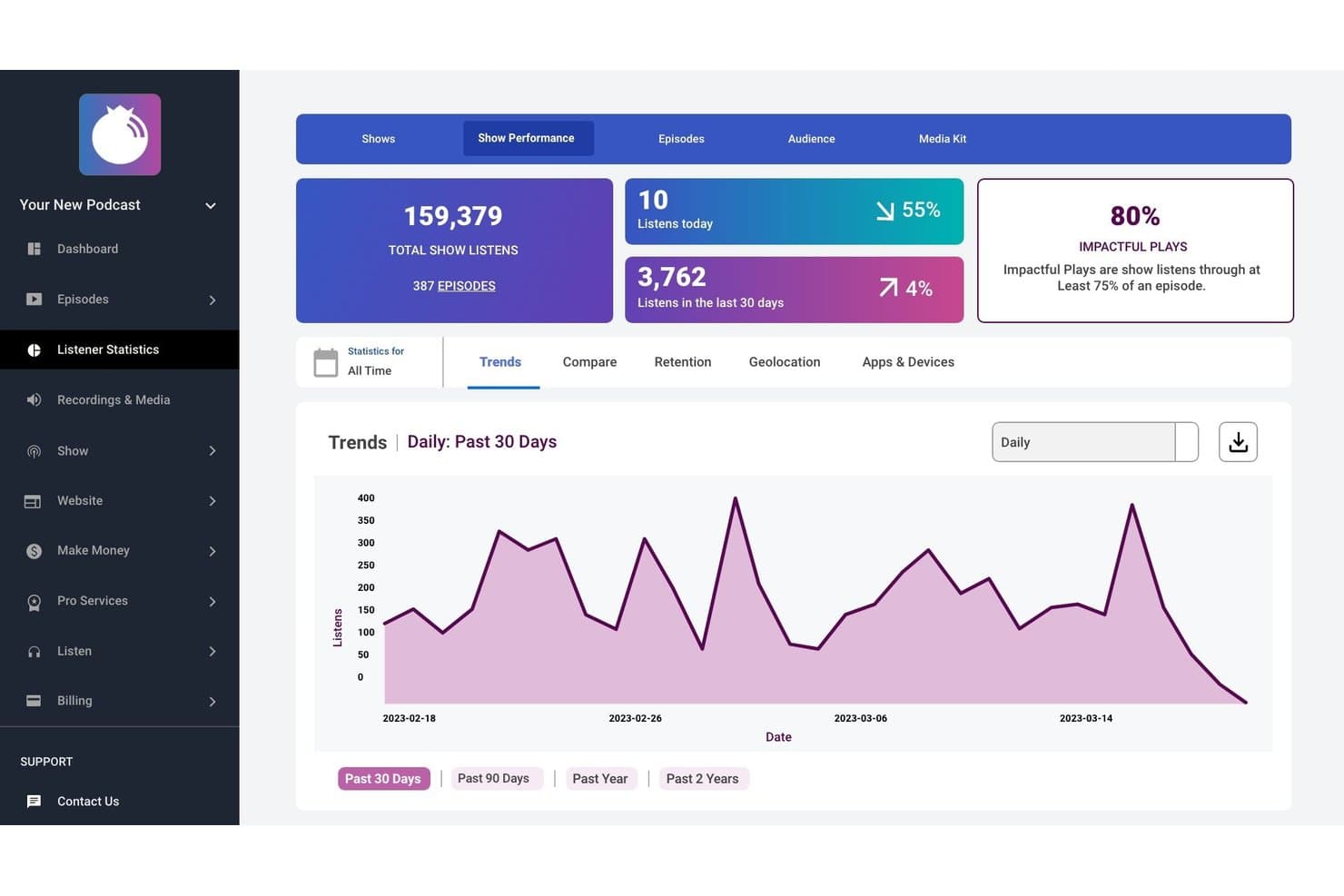
Blubrry includes podcast listening statistics, trends, and play metrics. Blubrry is a podcast analytics platform that tracks downloads, audience locations, listening apps and devices, and episode performance. Its statistics plans include basic audience tracking, episode comparisons, listening trends, and advanced reporting features such as IAB-certified statistics, listener retention, and podcast media kits.
Who Is Blubrry Best For?
Blubrry is best for independent podcasters, podcast producers, and network managers who need audience analytics, episode performance reporting, and podcast statistics for advertising and sponsorship reporting.
Why I Picked Blubrry
I picked Blubrry because it offers podcast audience analytics alongside reporting features for advertisers and sponsors. Its podcast media kit includes podcast statistics and audience survey results, while its certified statistics offering provides additional audience and delivery reporting for show producers and media buyers. These features make Blubrry relevant to podcasters who need audience data for sponsorship discussions.
Blubrry Key Features
- Listener retention graph: Displays completed and partial episode plays, including data on listening duration.
- Episode comparison: Compares the performance of recent episodes, with the number of episodes varying by plan.
- Listening trends: Displays download and listening trends across selected reporting periods, including monthly comparisons.
- Tracking prefix: Measures podcast downloads through a statistics prefix configured in a compatible podcast feed or publishing setup.
Blubrry Integrations
Blubrry integrates with PowerPress for WordPress-based podcast publishing and statistics tracking. It also provides a REST API with OAuth 2 authentication, including Podcast Statistics API endpoints for custom integrations.
Pros and Cons
Pros:
- Statistics tracking without hosting migration
- Nielsen market data for geographic reporting
- Provides podcast audience survey results
Cons:
- Retention metrics require advanced hosting
- Free statistics exclude episode comparisons
Learn more about Blubrry: Best for attributing sales and verifying ads
- Free demo available
- From $250/month
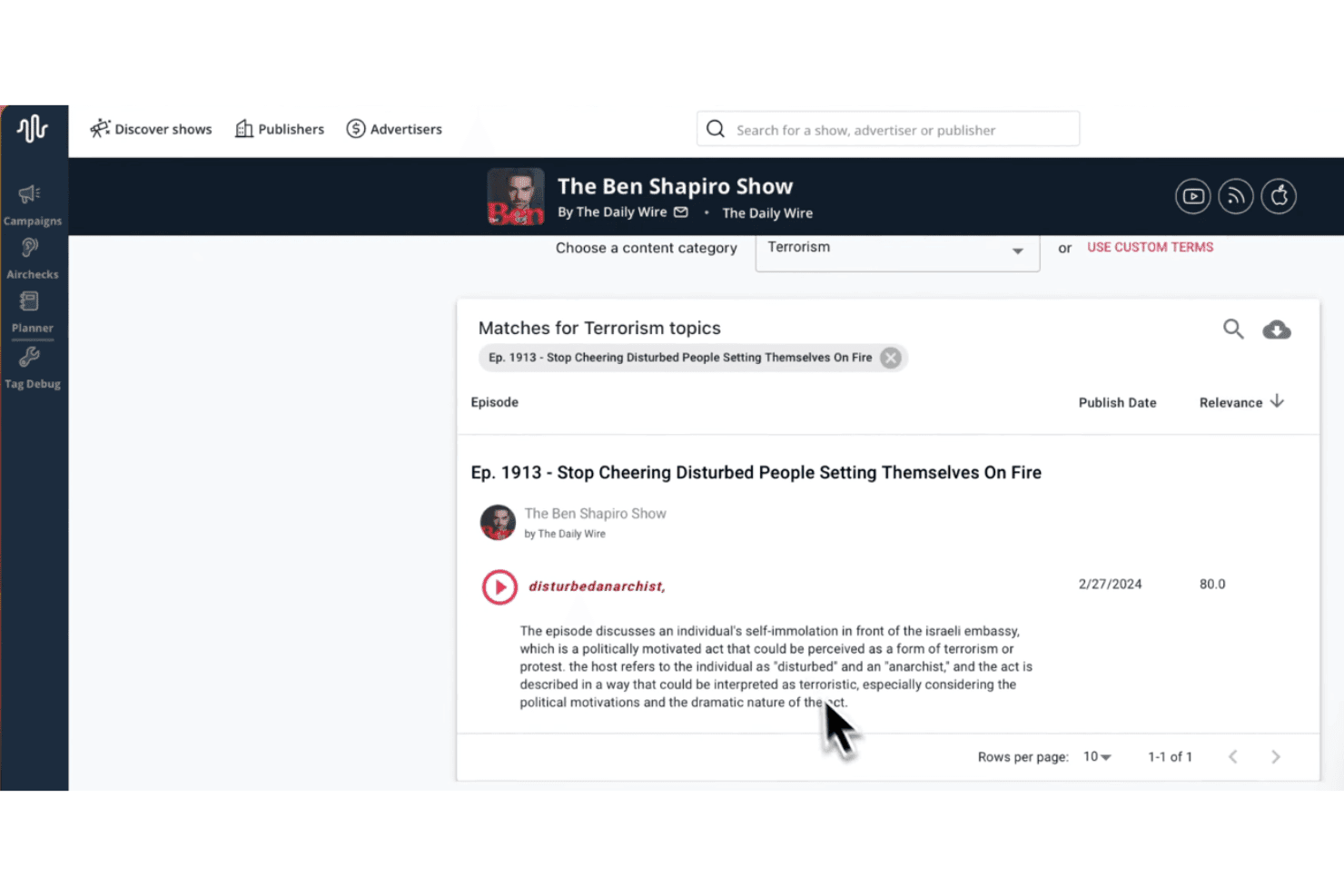
Podscribe flags terrorism-related content matches in podcast episodes. Podscribe is an IAB-certified podcast and audio advertising measurement platform offering pixel-based attribution, ad verification, incrementality testing, competitive intelligence, and cross-channel campaign reporting. It supports measurement across podcasts, streaming audio, and connected TV (CTV).
Who Is Podscribe Best For?
Podscribe is best for advertisers and media agencies managing podcast and cross-channel audio campaigns that need independent attribution reporting, ad verification, and campaign performance measurement.
Why I Picked Podscribe
I picked Podscribe because it combines podcast ad attribution with placement verification and incrementality measurement. Its pixel-based attribution reports conversions associated with ad exposure, including purchases and signups, while its ad verification capabilities support campaign placement monitoring. I also included it for its incrementality measurement tools, which estimate conversions attributable to advertising beyond expected baseline activity.
Podscribe Key Features
- Podscribe Ranker: Provides podcast rankings using audio downloads, YouTube views, Spotify plays, and audience growth trends.
- Competitive intelligence: Provides advertiser spending estimates, podcast ad placement information, and historical advertising trends across supported shows.
- Campaign Planner: Estimates campaign reach, audience overlap, net-new listeners, and projected conversions across selected podcasts.
- SmartServe ad server: Supports audio ad delivery through VAST tags, with audience targeting, frequency capping, and creative management.
Podscribe Integrations
Podscribe supports automated campaign synchronization with Google Sheets and campaign-data ingestion from supported ad servers, including ART19, Megaphone, and AdsWizz. It also offers an API for custom reporting integrations.
Pros and Cons
Pros:
- Competitor spending and placement intelligence
- Pixel attribution reports purchase conversions
- Supports configurable attribution conversion windows
Cons:
- First-party analytics require publisher authorization
- Unconnected YouTube views require estimation
Learn more about Podscribe: Best for creators who want stats with hosting
- Free plan available
- From $20/month
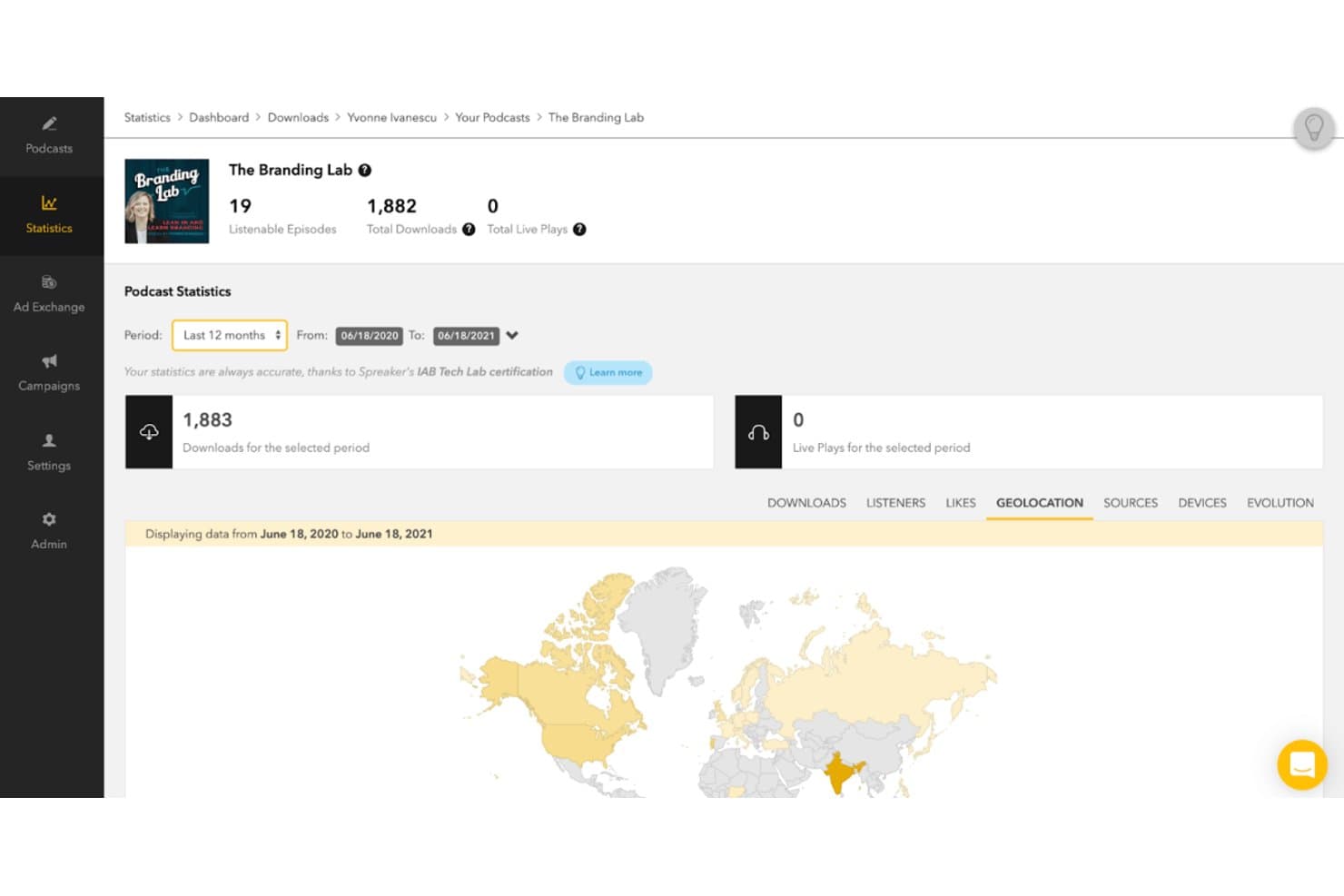
Spreaker tracks podcast downloads and listener geolocation data. Spreaker is a podcast hosting and analytics platform offering episode creation, podcast distribution, monetization tools, and IAB-certified download statistics.
Who Is Spreaker Best For?
Spreaker is best for independent podcasters and podcast publishers who need episode hosting, distribution, and audience analytics.
Why I Picked Spreaker
I picked Spreaker because it combines IAB-certified podcast download statistics with episode-level performance reporting. Its analytics include geographic breakdowns by country, region, and city, along with listening sources such as Apple Podcasts, Spotify, and iHeartRadio. Spreaker also offers Episode Evolution reporting, which tracks cumulative episode downloads from the publication date and supports comparisons across episodes.
Spreaker Key Features
- IAB-certified download metrics: Applies IAB measurement rules to exclude short listens and limit repeated requests from the same device and IP address.
- Geographic reporting: Breaks down podcast downloads by country, region, and city across listening platforms.
- CSV data exports: Provides downloadable reports covering downloads, daily listeners, listening sources, and device information.
- Listening source reporting: Identifies listening activity from Apple Podcasts, Spotify, iHeartRadio, and embedded players at the organization, podcast, or episode level.
Spreaker Integrations
Spreaker supports podcast distribution to Apple Podcasts, Spotify, and iHeartRadio, along with WordPress-compatible embedded players. Its API v2 supports custom integrations and access to podcast statistics.
Pros and Cons
Pros:
- Supports podcast-level collaboration permissions
- City-level listener geographic reporting
- Tracks Spreaker follower growth patterns
Cons:
- Episode Evolution limited to select plans
- No cross-platform listening completion metrics
Learn more about Spreaker:
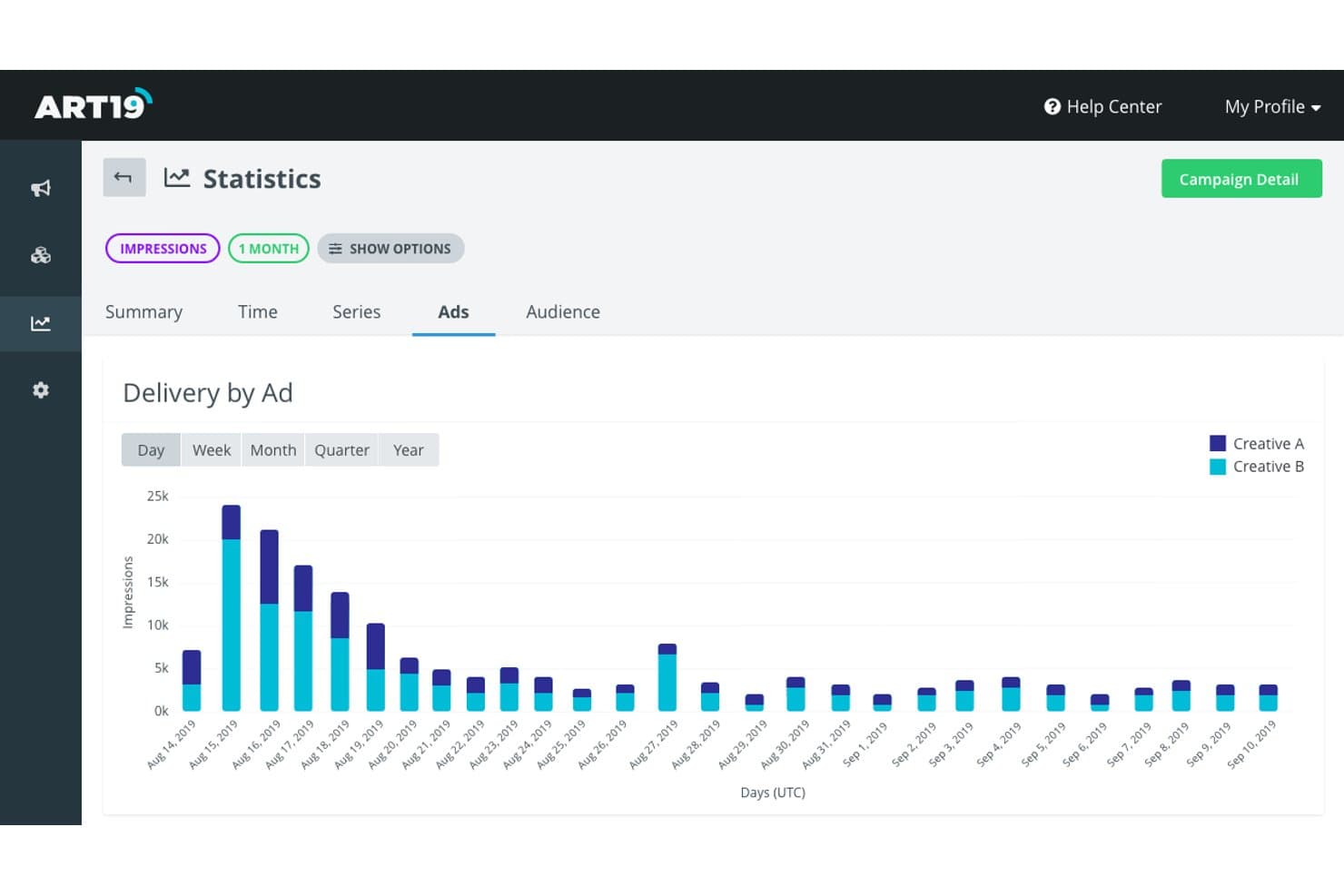
Art19 tracks ad impressions by creative across a date range. ART19 is a podcast hosting, analytics, and advertising platform for podcast publishers and networks. Its capabilities include audience reporting, download measurement, dynamic ad insertion, and advertising campaign management.
Who Is ART19 Best For?
ART19 is best for podcast publishers, podcast networks, and advertising operations teams managing podcast distribution, audience analytics, and advertising campaigns.
Why I Picked ART19
I picked ART19 for its combination of podcast audience analytics and advertising management capabilities. The platform supports download reporting, geographic audience analysis, and dynamic ad insertion for podcast episodes. Its advertising tools also support campaign management and performance reporting, making it relevant to publishers and networks managing both podcast content and advertising operations.
ART19 Key Features
- IAB-certified download measurement: Measures downloads and unique listeners using IABv2.2 methodology, including bot, proxy, and duplicate-request filtering.
- Episode-level analytics: Reports episode downloads and unique listeners over selected reporting periods.
- Geographic audience reporting: Provides listener location data by country, region, city, and designated market area (DMA).
- Role-based user access: Offers Owner, Admin, Stats Only (All), and Stats Only (Listening) permissions for managing series and network access.
ART19 Integrations
ART19 provides APIs for managing podcast content, feeds, ad markers, and embedded players. API credentials are available through ART19 Support. No specific native third-party integrations were confirmed in its public documentation.
Pros and Cons
Pros:
- Ad Ops connects reach, CPM, and revenue
- Users praise episode comparisons and certified analytics
- IAB-certified download and impression measurement
Cons:
- Custom reports limited to 1,000 rows
- No episode completion or listen-through metrics
Learn more about Art19:
Other Podcast Analytics Tools
Here are a few additional options that didn’t make my shortlist but are still worth checking out:
- 11MegaphoneBest for sponsorship playback reporting
- 12Omny StudioBest for broadcast networks tracking retention
- 13CastosBest for WordPress publishing with analytics
- 14Spotify for CreatorsBest for free hosting with built-in analytics
- 15BuzzsproutBest for publishing with IAB-certified stats
- 16RSS.comBest for hosting and IAB-certified metrics
- 17PodtracBest for ad delivery and outcome attribution
- 18Podchaser ProBest for podcast sponsorship prospecting
- 19PodigeeBest for asking AI assistants about show trends
- 20Apple Podcasts ConnectBest for Apple listener engagement insights
How I Evaluate Podcast Analytics Tools
I split my evaluation into three parts, with core functionality carrying the most weight: report IAB-standard downloads and show episode-level retention trends. Next, I consider standout features such as ad attribution. Finally, I weigh factors beyond features, including onboarding, support, and pricing value for creators, producers, and networks.
Core Functionality (Table Stakes For This List)
When I'm selecting tools for my list, I score each one on a scale from 0 (does not offer the functionality) to 5 (excels in this area) for each core functionality listed below. I then convert the total into a percentage to help assess each tool's overall fit, with extra weight on any functionalities I’ve deemed essential.
- IAB Download Metrics (Essential): I look for IAB-certified counts with clear filtering methods, so teams can compare reported downloads across shows and support sponsor claims.
- Episode Performance (Essential): I check whether episode reports show consumption trends and completion or drop-off, helping teams connect listener behaviour to specific content.
- Audience Demographics: I assess whether reports break listeners down by location, device, and listening app to help teams understand who they’re reaching.
- Growth Trends: I look for historical charts and date-range controls that help teams track audience growth, retention, and changes in listening over time.
- Cross-Platform Tracking: I evaluate how clearly a tool brings listening data from platforms such as Spotify and Apple Podcasts into a shared view.
- Exportable Reports: I check whether teams can export clear, usable performance data to share with sponsors, advertising partners, or internal stakeholders.
Once I have a list of tools that meet the criteria, I consider what sets each platform apart.
Differentiating Factors (What Sets Vendors Apart)
Here's how I compare and contrast different vendors:
Standout Features
Ad attribution and pixel tracking are where I spend the most time. I check whether a tool can tie a podcast ad exposure to a website visit, app install, or purchase—Podscribe and Acast handle this differently, and the gap matters when a sponsor asks for conversion proof. I also evaluate API and data access, since teams piping metrics into a BI dashboard or CRM need raw exports, not just in-app charts. Competitor benchmarking helps contextualize download numbers against category peers, which is useful when pitching sponsors or setting growth targets.
Beyond Features
I check whether a tool's analytics require hosting on that same platform, since migrating to unlock reporting can mean losing historical data. Integration depth matters too—tools like Megaphone and Acast connect to ad marketplaces and dynamic insertion, but I look at whether metrics can also flow into a CRM or BI tool like HubSpot or Google Analytics. Finally, I evaluate support quality, because data discrepancies right before a sponsorship deadline need fast, knowledgeable responses, not just a help doc.
How to Choose Podcast Analytics Tools
Choose podcast analytics tools by testing whether their reports answer the decisions your team needs to make, from validating sponsor claims to assessing campaign impact.
| If your priority is… | Look for… |
|---|---|
| If your priority is…Supporting sponsor claims | Look for…A sample IAB-certified download report with filtering methods documented |
| If your priority is…Reviewing episode engagement | Look for…A sample episode report with retention or completion data and a clear reporting window |
| If your priority is…Comparing shows | Look for…A cross-show report with consistent date ranges and metric definitions |
| If your priority is…Measuring campaign impact | Look for…An attribution report that defines exposure, conversion, and the measurement window |
How to Vet Your Shortlist
- Validate download counts: Request an IAB certification document and sample report, then confirm how filtering affects the reported totals.
- Test episode reporting: Use a trial to review one episode’s retention or completion data, and save the report with its date range.
- Check cross-show comparisons: Ask for a sample network report covering at least two shows, and verify that each uses the same metric definitions and dates.
- Probe attribution: Request a sample campaign report that identifies the exposure and conversion events, attribution window, and any limits on the results.
- Set the decision filter: Choose hosting-native analytics if publishing and audience reporting should share a workflow; choose a separate measurement approach if independent campaign attribution matters more than keeping reporting within the host.
What are Podcast Analytics Tools?
Podcast analytics tools are software that collect and report data about podcast downloads, listeners, episode engagement, and, in some cases, campaign outcomes. Marketing teams use these reports to compare audience trends and assess whether ads contribute to visits or conversions. Metrics vary by platform, so check how reports define downloads and attribution events.
Features
Here are the main features I look for in podcast analytics tools:
- Download metrics: Tracks show-level and episode-level downloads, with some providers applying IAB measurement guidelines to filter duplicate and invalid requests.
- Episode performance: Provides episode-level metrics such as plays, listening duration, and completion rates where supported by the listening platform.
- Audience insights: Provides available geographic, demographic, device, and listening-app breakdowns, depending on the data shared by each platform.
- Growth trends: Provides historical charts and date-range filters for comparing audience metrics across reporting periods.
- Cross-platform tracking: Reports available listening activity across supported podcast platforms, with data coverage and metric definitions varying by provider.
- Exportable reports: Supports downloading analytics in formats such as CSV, with available metrics, filters, and reporting periods varying by provider.
- Ad attribution: Tracks or estimates website visits, purchases, and other conversions associated with podcast ad exposure, using supported attribution methods and measurement windows.
Benefits
Here are a few common benefits you can expect from podcast analytics tools:
- Defined sponsor reporting: Download metrics based on IAB measurement guidelines provide standardized figures for reporting podcast performance to sponsors.
- Informed episode planning: Completion and listening-duration metrics help you identify engagement differences across episodes and inform future content planning.
- Audience insights: Available location, device, and listening-app data provide information about your podcast's geographic reach and how audiences access episodes.
- Audience growth comparisons: Historical performance data and date-range controls allow your team to compare audience activity across reporting periods and identify changes over time.
- Multi-platform performance comparisons: Available data from different podcast listening platforms helps your team compare audience activity across distribution channels, subject to each platform's reporting limitations.
- Campaign performance measurement: Supported attribution tools associate podcast ad exposure with actions such as website visits or purchases, based on the tracking method and attribution window.
Pricing
Pricing varies by features, team size, and reporting needs. Here are typical monthly price ranges for podcast analytics tools.
Plan Comparison Table for Podcast Analytics Tools
| Plan Type | Average Price | Common Features |
|---|---|---|
| Plan TypeFree Plan | Average Price$0 | Common FeaturesBasic download counts, limited episode reports and short-term data history. |
| Plan TypePersonal Plan | Average Price$5-$25/month | Common FeaturesIAB-filtered download metrics, episode performance reports and audience demographics. |
| Plan TypeBusiness Plan | Average Price$25-$100/month | Common FeaturesCross-show reporting, exportable reports and expanded audience insights. |
| Plan TypeEnterprise Plan | Average Price$100-$500+/month | Common FeaturesCustom reporting, API or data access and dedicated support. |
FAQs
Here are answers to a few common questions about podcast analytics tools:
How do I compare podcast downloads across platforms?
Use consistent metric definitions and reporting periods when comparing podcast downloads across platforms. Some tools report downloads, while others track streams or plays using different measurement methods. Check whether reports follow IAB measurement guidelines, how invalid downloads are filtered, and whether the same episodes and dates are included. For sponsor reporting, identify the data source and metric used. Avoid combining figures from different platforms unless their measurement methods are compatible and any potential overlap is understood.
Does IAB certification mean every download represents a full listen?
No. IAB certification indicates that a measurement provider’s assessed methods comply with specified technical guidelines. It does not mean every counted download represents a full listen or a unique person. A valid download may include only part of an episode, provided it meets the applicable measurement requirements. To assess listening behaviour, review separate engagement metrics, such as completion rates and listening duration. Check the measurement methodology and reporting period before comparing results.
Do podcast analytics tools need to host my show?
No. Some podcast analytics tools are included with hosting platforms, while third-party measurement tools may track downloads or advertising performance without hosting your show. Before choosing a tool, check its compatibility with your podcast host, RSS feed, and distribution platforms. Confirm whether historical reports remain accessible after changing providers and whether analytics data is exportable. Measurement methods may also differ between tools, affecting reported results.
Can podcast ad attribution prove that an ad caused a purchase?
No. Podcast ad attribution tools associate ad exposure with tracked actions, such as website visits or purchases, but attribution alone does not establish causation. Results depend on the tracking method, attribution window, and available conversion data. When comparing tools, check how each provider defines ad exposure, matches conversions, and handles incomplete tracking data. Controlled tests or other supporting evidence may help assess whether advertising contributed to purchases.