

Choosing the right marketing account intelligence software can be tricky. With so many tools available, it’s hard to tell which one truly meets your team’s needs. You want something that helps identify the right accounts, boost conversions, and simplify your workflow—not complicate it.
From my experience, the right software can make a real difference in how effectively your team works. I’ve tested and reviewed several leading platforms to help you find the ones that actually deliver results. In this article, I’ll share an unbiased look at my top picks, outlining what each tool does best and how it can strengthen your marketing strategy.
Why Trust Our Software Recommendations
6,700+
Reviews
20
Industry experts
16+
Evaluation factors
14
Years
Our team has been testing and reviewing software since 2012. As marketing leaders ourselves, we know how difficult—and important—it is to choose the right software.
For this guide, we evaluated tools using hands-on testing and independent research, scoring tools using our selection criteria.
Our reviews reflect our human editorial judgment, not a sales pitch.
Expert reviewers:
 Gui DrusinaCreative Director
- Shriya GhateSenior Marketing Lead
 Amanda JacquesMarketing Ops Leader

Marketing Account Intelligence Software Comparison Table
| Tool | Best For | Trial Info | Price | ||
|---|---|---|---|---|---|
| 1 | Best with filters for precise account targeting | Free plan + 14-day free trial + free demo available | From $49/user/month (billed annually) | Website | |
| 2 | Best for verified data | Free trial available | Pricing upon request | Website | |
| 3 | Best for ensuring action on every lead | Free demo available | Pricing upon request | Website | |
| 4 | Best for audience creation | Free demo available | Pricing upon request | Website | |
| 5 | Best for prioritizing target accounts | Free demo available | Pricing upon request | Website | |
| 6 | Best for personalizing outreach | Free plan available | Pricing upon request | Website | |
| 7 | Best for third-party data | Free plan available | From $37.45/month (billed annually) | Website | |
| 8 | Best for connecting with the most engaged accounts | Free demo available | Pricing upon request | Website | |
| 9 | Best for identifying the next best customer | Not available | Pricing upon request | Website | |
| 10 | Best for machine learning algorithms | Not available | Pricing upon request | Website |


Best Marketing Account Intelligence Software Reviews
The following overviews will detail what makes them relevant to this list by providing more context of each tool, including their features, integrations, pros and cons, and a screenshot to show you how each system looks when using it.
 Best with filters for precise account targeting
- Free plan + 14-day free trial + free demo available
- From $49/user/month (billed annually)
Visit WebsiteCustomer Rating:4.5/5This rating combines scores from multiple user review sites to reflect overall customer sentiment about the product.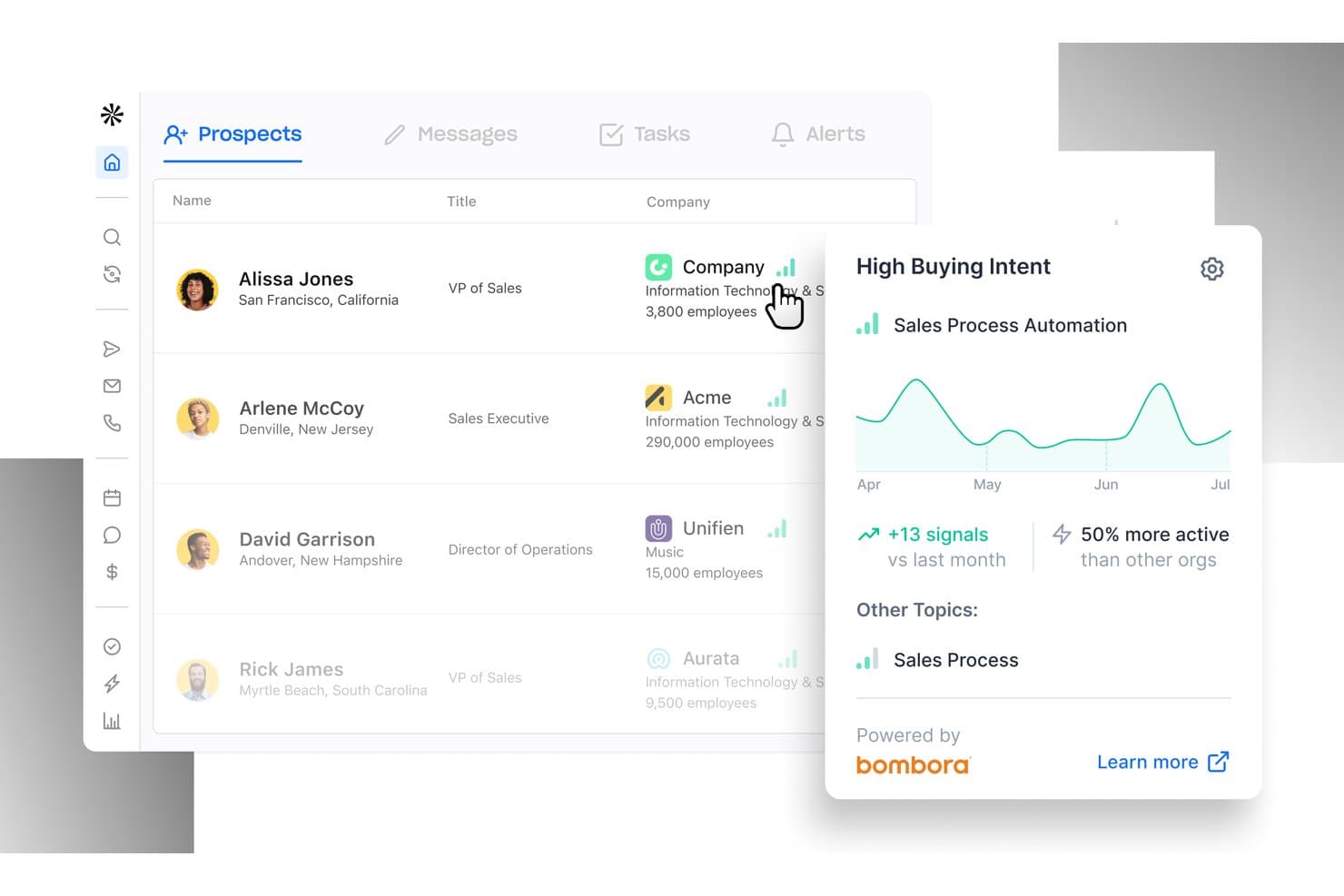
Apollo.io offers a Prospects dashboard with buying intent signals, showing lead activity trends and topic engagement for sales targeting. Apollo.io is an AI-powered B2B intelligence and go-to-market platform that combines contact and account database search, intent data, enrichment, and sequencing in a single tool.
Who Is Apollo.io Best For?
Apollo.io suits SMB and mid-market B2B teams that need an affordable, all-in-one platform for account targeting and outbound without investing in multiple separate tools.
Why I Picked Apollo.io
Apollo.io earns its spot on my shortlist because its 65+ search filters let me build account lists that genuinely reflect my ICP, not just rough approximations. I can layer firmographics, technographics, job seniority, and buying intent signals from Bombora and LeadSift in a single search to surface accounts actively researching relevant topics. Saved personas mean I can recreate that exact targeting in one click for every new campaign.
Apollo.io Key Features
- Website visitor identification: Instantly reveals which companies visit your website and matches them to contacts.
- Contact-level enrichment: Updates account and contact records with real-time firmographic, technographic, and hierarchy data.
- Automated CRM sync: Bi-directional integration keeps Salesforce and HubSpot records aligned with new account intelligence.
- Buying intent integration: Surfaces prospect accounts showing research signals from Bombora and LeadSift directly in the platform.
Apollo.io Integrations
Apollo.io offers native integrations with Salesforce, HubSpot, Outreach, Airtable, Amplitude, Asana, and Gmail, and provides an API for custom integrations.
Pros and Cons
Pros:
- Bombora intent data built into the platform
- Massive B2B contact database with 275M+ records
- 65+ filters for granular account list building
Cons:
- Weaker engagement tracking than pure ABM tools
- Data accuracy issues flagged in user reviews
Learn more about Apollo.io: Best for verified data
- Free trial available
- Pricing upon request
Visit WebsiteCustomer Rating:4.6/5This rating combines scores from multiple user review sites to reflect overall customer sentiment about the product.
Use the advanced search to find hyper-targeted lists. DiscoverOrg provides marketing teams with extensive human-verified data to guarantee updated and genuine information.
Why I picked DiscoverOrg: When working with intelligence of any kind, using accurate data is paramount. DiscoverOrg uses an in-house team to verify all the data every 90 days while researchers communicate with companies in its database daily. This means it eliminates incomplete, embellished, or outdated data and guarantees correct information.
DiscoverOrg Standout Features and Integrations
Features include significant data accuracy thanks to DiscoerOrg’s team refreshing their data; they also verify the contact information available through rigorous testing and validation procedures. When working in a B2B setting, DiscoverOrg offers organizational charts displaying actual reporting structures to ensure you only speak with decision-makers.
Integrations include native links with various tools, such as customer relationship management applications, to automate and append lead records. This includes connections with platforms such as Bullhorn, Eloqua, HubSpot, Marketo, Microsoft Dynamics, NetSuite, Outreach, Salesforce, Salesloft, Zoho, and other software options.
Pros and Cons
Pros:
- Social media links for quick prospect research
- Up-to-date information
- Simple integration with Salesforce
Cons:
- Updates can slow the system down
- Some account limitations
Learn more about DiscoverOrg: Best for ensuring action on every lead
- Free demo available
- Pricing upon request
Visit WebsiteCustomer Rating:4.6/5This rating combines scores from multiple user review sites to reflect overall customer sentiment about the product.
Route accounts to proper reps after the target engages with marketing campaigns. LeanData can help marketing teams develop robust pipelines faster by ensuring every potential account receives the most suitable action.
Why I picked LeanData: The platform can help your marketing team transform intent signals and turn them into proper actions for every lead. With LeanData, you can move potential accounts along your customer journey faster and increase conversions. You can also use this intelligence to fix broken processes that are preventing you from delivering qualified accounts to your pipeline.
LeanData Standout Features and Integrations
Features include tools to help your team recognize and respond to intent signals across the buyer journey and engage with high-intent buyers. LeanData also helps marketing and sales teams work together to handle selling complexity and accelerate sales cycles.
Integrations include native connections with tools to help you eliminate rigid processes. These include links with systems such as 6sense, Clearbit, Cloudingo, Cognism, Crossbeam, Kronologic, Microsoft Teams, Outreach, Salesforce, Slack, and other software options.
Pros and Cons
Pros:
- Top-notch certification class
- Effective visual interface
- Excellent customer support
Cons:
- Platform doesn’t auto-save work
- Steep learning curve
Learn more about LeanData: Best for audience creation
- Free demo available
- Pricing upon request
Visit WebsiteCustomer Rating:4.4/5This rating combines scores from multiple user review sites to reflect overall customer sentiment about the product.
Dynamically create audiences for account-based marketing campaigns with robust filters to create in-depth segments. Demandbase enables marketing teams to create and manage ideal customer profiles and target account lists based on several parameters to create new audiences.
Why I picked Demandbase: When creating account-based marketing strategies, it’s beneficial to create ideal customer profiles to help you develop relevant audiences to target. I wanted to add Demandbase to this article because it provides account intelligence capabilities you can use to find new accounts when they’re looking for products or services like yours. Your sales team can also use this information to enhance and personalize interactions with these targets.
Demandbase Standout Features and Integrations
Features include measuring account engagement across the buyer journey to ensure that go-to-market programs provide leads when needed. Demandbase can help you find new upsell and cross-sell opportunities quicker and get ahead of competitive activity.
Integrations include applications such as Adobe Analytics, DataGrail, Drift, Google Analytics, HubSpot, Marketo, Optimizely, PathFactory, Salesforce, Slack, and other software options. Demandbase also provides an API that allows you to create custom integrations with your current toolset.
Pros and Cons
Pros:
- Excellent customer support
- Aligns sales and marketing departments
- Highlights all customer intentions
Cons:
- No instant alerts
- User interface needs work
Learn more about Demandbase: Best for prioritizing target accounts
- Free demo available
- Pricing upon request
Visit WebsiteCustomer Rating:4.4/5This rating combines scores from multiple user review sites to reflect overall customer sentiment about the product.
Quickly execute account-based marketing strategies by incorporating in-depth data to reach target accounts across multiple channels. Bombora is an intent data platform that empowers marketing teams to identify and engage with potential customers.
Why I picked Bombora: I added Bombora to this list because it can help your marketing team focus on the best target accounts after analyzing behaviors. You can use Bombora’s information to get insights into which accounts are actively researching specific topics. Also, Bombora uses natural language processing to organize intent data making it easier to locate relevant accounts to focus on.
Bombora Standout Features and Integrations
Features include tools to help you know which messages will connect with your target accounts by specifying their research content, allowing you to customize your content to match their interests. Bombora also provides features to help you reduce customer churn by picking up on when accounts research other solutions and alerting you before they leave.
Integrations include connections with the tools you’re likely using to help make them better and more effective. Tools such as 6sense, Cognism, Demandbase, HubSpot, Marketo, Outreach, RollWorks, Salesforce, SalesIntel, Terminus, and other software options integrate well with Bombora.
Pros and Cons
Pros:
- User-friendly interface
- Easy to use
- Provide target account scores
Cons:
- Reports can be complex
- Doesn’t support importing contact information
Learn more about Bombora: Best for personalizing outreach
- Free plan available
- Pricing upon request
Visit WebsiteCustomer Rating:4.3/5This rating combines scores from multiple user review sites to reflect overall customer sentiment about the product.
Gain complete visibility into a range of intelligence segments to understand marketing performance. 6sense can help marketing teams collect helpful insights into buyer behavior to help personalize outreach efforts.
Why I picked 6sense: The platform provides in-depth intent-based data and robust insights to help you develop personalized outreach campaigns. 6sense offers tools to help highlight buyer research, allowing you to understand what prospects want and engage them most effectively. With 6sense, you can deliver consistent marketing experiences that scale and evolve as prospects move through sales funnels.
6sense Standout Features and Integrations
Features include tools to help you orchestrate entire account-based marketing campaigns, such as account identification, data enrichment, and audience-building capabilities. 6sense also allows you to use predictive analytics tools to predict where buyers are in their journeys, so your team can focus on those likely to buy.
Integrations include native connections with the technology you’re most likely using to operate your business. These include Bombora, Bound, Clari, Eloqua, Folloze, Hubspot CRM, LeanData, Marketo, Salesforce, Salesloft, and other software options.
Pros and Cons
Pros:
- Excellent support team
- Efficient onboarding process
- Significant amount of data
Cons:
- Needs more customization options
- Steep learning curve
Learn more about 6sense: Best for third-party data
- Free plan available
- From $37.45/month (billed annually)
Visit WebsiteCustomer Rating:4.2/5This rating combines scores from multiple user review sites to reflect overall customer sentiment about the product.
Filter the platform’s contact database to find relevant potential leads and use the list to target other similar accounts. Lusha helps B2B marketers establish authentic connections with leads, contacts, and candidates with third-party data to enrich and verify business profiles.
Why I picked Lusha: Third-party data is a significant factor in marketing account intelligence; it consists of using data from another source to help you find specific information regarding relevant potential accounts and leads. For this reason, I chose to add Lusha to this list because the platform is a data enrichment tool that will help you find accurate contact information for your business targets. Lusha’s database includes information such as email addresses, company details, and phone numbers which you can use to build ideal customer profiles.
Lusha Standout Features and Integrations
Features include tools to help you discover which companies are looking for the solutions you provide and allow you to connect with the best decision-makers. Lusha also provides B2B prospecting tools that offer a library of the best decision-makers.
Integrations include the ability to connect Lusha with your current toolset to save your teams from switching systems and work in a centralized area, such as Bullhorn, Gmail, HubSpot, Microsoft Dynamics, Outlook, Outreach, Pipedrive, Salesforce, Salesloft, and Zoho. You can also use Lusha’s API or a paid Zapier account to create custom integrations with your current tools.
Pros and Cons
Pros:
- Convenient Google Chrome extension
- Accurate, updated contact information
- Intuitive user interface
Cons:
- Pricing can add up depending on usage
- Doesn’t provide many credits each month
Learn more about Lusha: Best for connecting with the most engaged accounts
- Free demo available
- Pricing upon request

Rank prospects according to their purchase intent and engagement level. TechTarget Priority Engine helps marketers rank accounts based on purchase intent, engagement, and alignment with their solutions to help improve account-based marketing performance.
Why I picked TechTarget Priority Engine: The platform helps your marketing team improve performance by allowing you to connect with the most engaged accounts. TechTarget Priority Engine provides valuable insights about your most active accounts and offers official contact information as well as opt-in or opt-out status. The software also helps you understand the topics your key accounts are searching online, their engagement patterns, and content consumption.
TechTarget Priority Engine Standout Features and Integrations
Features include the ability to measure the success of account-based marketing campaigns and communicate them to key stakeholders. TechTarget Priority engine also simplifies the process of finding the best contacts for B2B accounts by connecting you with known buying team members.
Integrations include connections with popular CRMs and marketing tools to enhance performance across your marketing department. These include native connections with tools like Eloqua, HubSpot CRM, HubSpot Marketing Hub, Marketo, Pardot, and Salesforce.
Pros and Cons
Pros:
- Simple user interface
- Provides visibility into current prospects’ research
- Quickly highlights account engagement
Cons:
- Exporting data is complex
- Needs more intent data
Learn more about TechTarget Priority Engine:

Connect to CRM and marketing automation data to develop attribution and campaign-level reports. Terminus uses innovative features to help marketing teams find and engage their next best customer.
Why I picked Terminus: One significant reason for using marketing account intelligence is to find your next best customer, so I started this list with Terminus to help you achieve this goal. Terminus provides comprehensive capabilities to help you identify, target, and engage with your next best accounts. It allows you to leverage the tool’s web personalization feature to create web experiences based on account data and intent signals.
Terminus Standout Features and Integrations
Features include the ability to show customers’ in-market buying signals you can use to get control of crucial conversations and milestones via campaign mapping. Terminus also helps you build brand awareness to get potential accounts familiar with your brand.
Integrations include connections with critical tech stack components to leverage your data from these systems. These connections include tools such as Crossbeam, Eloqua, HubSpot, Marketo, Microsoft Dynamics 365, Outreach, PathFactory, Salesforce, Salesloft, Slack, and other software options.
Pros and Cons
Pros:
- Quickly targets genuine business targets
- Tracks visitors’ actions
- Segments as much data as necessary
Cons:
- Steep learning curve
- Reporting is complex
Learn more about Terminus:

Use trading account data to understand accounts that demonstrate intent and engagement. RollWorks uses machine learning algorithms to provide predictive analytics that helps marketing teams score target account lists according to which are likely to close.
Why I picked RollWorks: What I believe makes RollWorks a relevant addition to this list is its proprietary data source and machine learning algorithms that will help you identify relevant target accounts. The platform uses account scoring to quickly help you discover high-value accounts based on intent signals and fit. RollWorks also uses machine learning capabilities to help you locate new accounts matching your ideal customer profile.
RollWorks Standout Features and Integrations
Features include capabilities that allow you to engage high-fitting accounts via cross-channel account-based marketing campaigns. RollWorks also offers tools that help you measure your account-based marketing campaigns’ performance, allowing you to see what’s working.
Integrations include connections with standard tools used by many marketing teams, such as Bombora, Crossbeam, HubSpot Marketing Hub, Marketo, Opensense, Salesforce, and Wufoo. With a paid Zapier account, you can create custom integrations between RollWorks and your current systems.
Pros and Cons
Pros:
- Robust measurement and reporting
- Easy to use
- Targets high-value accounts
Cons:
- Not many integration options
- Complex for smaller businesses
Learn more about RollWorks:
Other Marketing Account Intelligence Software
Here are other marketing account intelligence tools that didn’t make the main list but are worth some consideration.
- 11TriblioBest for intent signals
- 12Full Circle InsightsBest for monitoring trend data
- 13KwanzooBest for account engagement
- 14TofuBest for scalable ABM strategies
- 15AnaplanBest for contextualizing data
- 16Twilio SegmentBest customer data platform
- 17LeadspaceBest for validating huge volumes of data
- 18InferBest for developing predictive models
How I Evaluate Marketing Account Intelligence Software
I split my evaluation into baseline criteria—like intent data coverage and ICP modeling—and differentiators that separate platforms built for serious ABM from those just adjacent to it.
Core Functionality (Table Stakes For This List)
When I'm selecting tools for my list, I rank each one on a scale from 0 (does not offer the functionality) to 5 (excels in this area) for each core functionality listed below. Then, I calculate the tool's total score into a percentage. Each tool needs to achieve a minimum total score of 65% to be considered for inclusion.
- Target Account Identification & Scoring: I evaluate how each platform builds and scores account lists—whether it supports dynamic ICP modeling or just static CSV uploads with basic filters.
- Intent Data & Buying Signals: Real intent coverage matters, so I check whether a tool aggregates first- and third-party signals and lets you customize tracked topics.
- Account-Level Data Enrichment: I look at whether a platform layers firmographic, technographic, and contact data onto accounts and how often that data refreshes.
- Cross-Channel Engagement Tracking: Each tool should tie website visits, ad clicks, and campaign touches back to specific accounts in a unified timeline view.
- CRM & MAP Integration Depth: I check for bi-directional syncs with platforms like Salesforce, HubSpot, and Marketo—not just one-way data pushes.
- Account Analytics & Reporting: Dashboards should go beyond vanity metrics and show account journey stages, engagement trends, and pipeline influence.
Once I have a list of tools that meet this criteria, I consider what sets each platform apart.
Differentiating Factors (What Sets Vendors Apart)
Here's how I compare and contrast different vendors:
Standout Features
Buying group intelligence is a big differentiator—I look for platforms that map full committees within an account, not just individual contacts, so you can see which decision-makers are engaged and where gaps remain. AI-powered recommendations also matter here, especially tools that surface next-best accounts or suggest plays based on intent patterns. Sales activation alerts round things out; I check whether surge notifications push directly into Slack or CRM so reps can act while intent is fresh.
Beyond Features
Data quality is the first thing I evaluate—a platform's ICP scoring and intent signals are only as useful as the underlying database, so I check how frequently records refresh and how deep coverage runs across industries and company sizes. Pricing transparency also weighs heavily; some vendors bundle data credits and ad spend into opaque contracts that make it hard to forecast costs as your ABM program scales. I also consider time-to-value, specifically how quickly a team can go from signing a contract to activating its first target account list with enriched data.
How to Choose Marketing Account Intelligence Software
It’s easy to get bogged down in long feature lists and complex pricing structures. To help you stay focused as you work through your unique software selection process, here’s a checklist of factors to keep in mind:
| Factor | What to Consider |
|---|---|
| FactorScalability | What to ConsiderCan the software grow with your business? Consider future needs and if the tool can handle increased data volume or user load without performance issues. |
| FactorIntegrations | What to ConsiderDoes it connect with your existing systems like CRM or analytics tools? Check for seamless data flow and reduced manual entry tasks. |
| FactorCustomizability | What to ConsiderCan you tailor the software to fit your specific workflows? Look for flexible options to adjust dashboards, reports, and notifications. |
| FactorEase of use | What to ConsiderIs the software intuitive for your team? Look for a user-friendly interface that minimizes training time and maximizes productivity. |
| FactorImplementation and onboarding | What to ConsiderHow long does it take to get up and running? Assess the vendor's support during setup and the availability of training resources like tutorials and guides. |
| FactorCost | What to ConsiderDoes the pricing align with your budget? Evaluate if the features justify the cost and consider any hidden fees or long-term contracts. |
| FactorSecurity safeguards | What to ConsiderDoes the software protect your data? Ensure it complies with industry standards and offers encryption, access controls, and regular security updates. |
What Is Marketing Account Intelligence Software?
Marketing account intelligence software is a tool that helps businesses identify and analyze key accounts to improve targeting and engagement. Marketing professionals, sales teams, and account managers generally use these tools to enhance targeting precision and increase conversion rates.
Features like data enrichment, lead scoring, and analytics support better decision-making and campaign effectiveness. Overall, these tools provide invaluable insights that drive successful marketing strategies.
Features
When selecting marketing account intelligence software, keep an eye out for the following key features:
- Account targeting: Identifies and prioritizes high-value accounts to focus marketing efforts effectively.
- Data enrichment: Enhances existing data with additional information to provide a more complete customer profile.
- Lead scoring: Evaluates and ranks leads based on their potential to convert, helping prioritize sales efforts.
- Analytics and reporting: Provides insights into campaign performance and account engagement to guide decision-making.
- AI-driven insights: Uses artificial intelligence to uncover patterns and trends for more informed marketing strategies.
- Real-time alerts: Notifies users of important account activities or changes to enable timely responses.
- Customizable dashboards: Allows users to tailor views and reports to match specific needs and preferences.
- Integration with CRM systems: Ensures seamless data flow and communication between marketing and sales teams.
- Predictive analytics: Anticipates future account behaviors to help shape proactive marketing plans.
- Security safeguards: Protects sensitive customer data with encryption and access controls to maintain trust.
Benefits
Implementing marketing account intelligence software provides several benefits for your team and your business. Here are a few you can look forward to:
- Improved targeting: Helps your team focus on the most promising accounts, boosting marketing efficiency.
- Enhanced decision-making: Offers insights through analytics and AI-driven data, guiding smarter strategies.
- Increased conversion rates: Uses lead scoring to prioritize efforts on high-potential leads, driving more sales.
- Proactive engagement: Provides real-time alerts to keep your team informed and responsive to account changes.
- Personalized marketing: Allows for data enrichment, creating detailed customer profiles for tailored campaigns.
- Seamless collaboration: Integrates with CRM systems, ensuring a smooth flow of information between teams.
- Data security: Offers security safeguards that protect customer information and maintain trust with clients.
Costs & Pricing
Selecting marketing account intelligence software requires an understanding of the various pricing models and plans available. Costs vary based on features, team size, add-ons, and more. The table below summarizes common plans, their average prices, and typical features included in marketing account intelligence software solutions:
Plan Comparison Table for Marketing Account Intelligence Software
| Plan Type | Average Price | Common Features |
|---|---|---|
| Plan TypeFree Plan | Average Price$0 | Common FeaturesBasic account targeting, limited data enrichment, and basic analytics. |
| Plan TypePersonal Plan | Average Price$10-$30/user/month | Common FeaturesEnhanced lead scoring, standard analytics, and CRM integration. |
| Plan TypeBusiness Plan | Average Price$50-$100/user/month | Common FeaturesAdvanced reporting, real-time alerts, and customizable dashboards. |
| Plan TypeEnterprise Plan | Average Price$150-$300/user/month | Common FeaturesComprehensive AI-driven insights, full customization options, and priority support. |
Marketing Account Intelligence Software FAQs
Here are some answers to common questions about marketing account intelligence software:
What kind of user roles or permissions are usually supported?
Access is typically managed through user roles tied to system-defined permissions. Admins can view and edit all data, while other users may have restricted access. Roles vary based on system architecture and team structure.
What types of data sources do these tools typically rely on?
Most platforms pull from a mix of first-party CRM data, third-party firmographics, intent signals, and digital behavior tracking. The specific data partnerships and integrations vary across vendors. Some tools offer API access to customize and expand data inputs.
Can these tools integrate directly with CRMs and MAPs?
Yes, most are built to integrate with CRMs like Salesforce and marketing automation platforms (MAPs) like Marketo or HubSpot. Some provide native connectors, while others may require API setup. Integration depth impacts how smoothly data syncs across systems.
Do these platforms support international account data?
Support for global data depends heavily on the tool’s data partnerships and compliance practices. Some platforms are U.S.-centric, while others include EMEA, APAC, or LATAM coverage. International capabilities should be validated during onboarding or trials.
How do these platforms handle duplicate account records?
They often include deduplication logic based on matching rules and data fields. Some resolve conflicts automatically; others allow manual review. The approach depends on the platform’s internal data management setup.