

Managing brand assets can be a headache for marketing managers. You're juggling logos, images, and documents, all while trying to maintain consistency. Brand asset management software (BAM software) can help by organizing everything in one central location, making your job easier and saving you time.
I've tested and reviewed these tools, focusing on what really matters to you and your team. My goal is to give you an unbiased look at the best options out there. In this article, you'll find my top picks, each evaluated for their unique strengths.
Why Trust Our Software Recommendations
6,700+
Reviews
20
Industry experts
16+
Evaluation factors
14
Years
Our team has been testing and reviewing software since 2012. As marketing leaders ourselves, we know how difficult—and important—it is to choose the right software.
For this guide, we evaluated tools using hands-on testing and independent research, scoring tools using our selection criteria.
Our reviews reflect our human editorial judgment, not a sales pitch.
Expert reviewers:
 Gui DrusinaCreative Director
- Shriya GhateSenior Marketing Lead
 Amanda JacquesMarketing Ops Leader

Best Brand Asset Management Software Summary
This comparison chart summarizes pricing details for my top brand asset management software selections to help you find the best one for your budget and business needs.
| Tool | Best For | Trial Info | Price | ||
|---|---|---|---|---|---|
| 1 | Best for AI-driven metadata tagging | Free demo available | Pricing upon request | Website | |
| 2 | Best for cloud storage | Free demo available | Pricing upon request | Website | |
| 3 | Best for maintaining brand consistency | 7-day free trial + free plan available | From $10/user/month (billed annually) | Website | |
| 4 | Best for end-to-end project collaboration | Free demo available | Pricing upon request | Website | |
| 5 | Best with unlimited users on every plan | Free plan available | From $99/month | Website | |
| 6 | Best for AI-powered asset discovery | Free plan available | From $10/month (billed annually) | Website | |
| 7 | Best for brand assets with built-in rules | Free trial available | From $80/month (billed annually) | Website | |
| 8 | Best for creative approvals | Free plan available | From $39/user/month | Website | |
| 9 | Best for design teams | Free demo available | Pricing upon request | Website | |
| 10 | Best for integration capabilities | Free trial available | Pricing upon request | Website |


Best Brand Asset Management Software Reviews
Below are my detailed summaries of the best brand asset management software that made it onto my shortlist. My reviews offer a detailed look at the key features, pros & cons, integrations, and ideal use cases of each tool to help you find the best one for you.
 Best for AI-driven metadata tagging
- Free demo available
- Pricing upon request
Visit WebsiteCustomer Rating:4.4/5
Papirfly brand portal centralizes brand guidelines, assets, and campaign creation in one interface. For those looking for a brand asset management solution that prioritizes brand consistency and compliance, Papirfly is a strong option. The platform is built for organizations that need to manage and distribute brand materials efficiently, from logos to marketing templates, while making sure every asset aligns with their brand identity. Its focus on brand-critical assets, along with AI-driven tools and compliance management, helps address the challenge of maintaining brand integrity across global teams.
Why I Picked Papirfly
I chose Papirfly for its ability to centralize brand management with features like AI-driven metadata tagging and customizable brand portals. These tools let your team categorize assets based on specific needs and deliver brand guidelines in a structured, accessible way. Its compliance management is another key feature, ensuring that assets meet regulatory standards and reducing the risk of non-compliance. Together, these capabilities make Papirfly a solid choice for teams that need a focused brand asset management platform.
Papirfly Key Features
In addition to its core functionalities, I also found the following helpful:
- Campaign Management: Enables you to plan, execute, and monitor marketing campaigns while maintaining brand consistency.
- Approval Workflows: Streamlines the review process with customizable workflows to ensure all assets meet brand standards before release.
- Digital Asset Library: Provides a secure, centralized repository for storing and managing brand assets.
- User Permission Controls: Allows you to set role-specific access to ensure that only authorized users can modify or distribute brand materials.
Papirfly Integrations
Native integrations are not currently listed by Papirfly.
Pros and Cons
Pros:
- Centralized campaign performance analytics
- Built-in enterprise design templates
- AI-powered asset search functionality
Cons:
- May require onboarding for templates
- Limited publicly listed integrations
Learn more about Papirfly:

MediaValet offers secure, scalable cloud storage for brand assets. MediaValet is a digital asset management platform designed for teams that require extensive cloud storage capabilities for their brand assets. It offers secure and scalable storage solutions tailored for businesses with large volumes of digital content.
Why I picked MediaValet: MediaValet provides extensive cloud storage, ideal for teams managing large amounts of digital assets. It offers high-level security features to protect your valuable content. The platform's scalability ensures it can grow with your business needs. Additionally, it provides easy access and sharing capabilities, making collaboration straightforward for your team.
Standout features & integrations:
Features include advanced security measures to keep your assets safe. Scalable storage options accommodate growing digital content needs, ensuring you always have space. Easy access and sharing capabilities make collaboration simple and efficient for your team.
Integrations include Adobe Creative Cloud, Microsoft Office 365, Slack, Salesforce, WordPress, Google Workspace, Dropbox, Hootsuite, SharePoint, and Canva.
Pros and Cons
Pros:
- Supports large file uploads
- Simple access and sharing
- Scalable with business growth
- High-level security features
- Extensive cloud storage
Cons:
- Customization options are basic
- Requires a stable internet connection
- Limited offline access
- May require training for new users
- Initial setup can be complex
Learn more about MediaValet: 3Best for maintaining brand consistency
Marq
- 7-day free trial + free plan available
- From $10/user/month (billed annually)
Visit WebsiteCustomer Rating:4.5/5
marq showcases brand asset management tools. marq is a brand enablement software that helps teams create, customize, and share branded content. It offers tools to maintain brand consistency and manage content efficiently across various industries.
Why I Picked marq: I picked marq for its robust template creation that lets you lock elements like logos and fonts, ensuring brand consistency across all assets. Its smart fields automate data population, saving time on updates. Plus, marq’s centralized content management simplifies access to templates and assets, while its content distribution tools make publishing across multiple platforms seamless.
Standout features & integrations:
Features include a self-service model that empowers your team to manage their own content requests, reducing backlog and wait times. marq also offers real-time approval processes, enabling quick reviews and approvals of designs, which is crucial for timely content deployment. Additionally, marq provides analytics that offer insights into how your branded content is performing, allowing you to make data-driven decisions.
Integrations include Bynder, PhotoShelter, Flowcode, CANTO, Brandfolder, Acquia, HubSpot, Asana, Google Sheets, and Slack.
Pros and Cons
Pros:
- Offers custom page sizes and easy template creation
- Centralized storage of brand assets
- Intuitive drag-and-drop editor
Cons:
- May come with additional setup costs
- No mobile app
Learn more about Marq: Best for end-to-end project collaboration
- Free demo available
- Pricing upon request
Visit WebsiteCustomer Rating:4.6/5
Screendragon marketing dashboard summarizing budget allocation, brand spend performance, capacity vs. demand, cycle time, and project health. Screendragon is a no-code workflow management platform built for enterprise marketing and agency teams that combines project management, digital approvals, resource planning, brand asset libraries, and budget tracking in a single system.
Who Is Screendragon Best For?
Screendragon is well-suited for enterprise marketing teams, in-house agencies, and large creative departments that manage high volumes of complex, multi-stakeholder projects.
Why I Picked Screendragon
I picked Screendragon as one of the best because it covers the full arc of brand asset work, from brief intake to final approval, without handing off to a separate tool. What I find genuinely useful is the AI-powered briefing and intake system: adaptive forms capture brand requests with built-in business rules, so projects start with the right context before a single asset is created. From there, automated approval workflows route content through legal, regulatory, and brand checkpoints, with Compliance and Proofing AI Agents reducing the manual review load at each stage.
Screendragon Key Features
- Brand asset library: Store, tag, and organize brand assets with custom metadata, filters, and controlled access permissions including expiry dates tied to usage rights.
- Version control: Track every iteration of a brand asset with a full audit trail, so teams always know which version is current and who made changes.
- Localization toolkit management: Package and distribute brand templates and assets to regional teams with built-in rules that preserve global brand standards.
- Configurable project dashboards: Build custom views across active brand campaigns, displaying task status, deadlines, and workload data in a single snapshot.
Screendragon Integrations
Screendragon offers pre-built integrations that connect with tools teams already use, including Aprimo, HubSpot, Microsoft Power BI, Amazon S3, Sitecore, Ziflow, Brandfolder, Smartsheet, and Workato, plus connectors for Jira, Salesforce, Adobe, Google Drive, Box, OneDrive, SAP, and Microsoft 365. An In-house Connection Manager provides centralized control for monitoring and troubleshooting integrations, and a REST-based open API with OAuth 2.0 authentication is available for custom integrations.
Pros and Cons
Pros:
- Granular role-based asset access controls
- Built-in rate cards for agency billing
- Dynamic forms automate creative brief intake
Cons:
- Initial platform setup is time-intensive
- No dedicated mobile app available
Learn more about Screendragon: Best with unlimited users on every plan
- Free plan available
- From $99/month
Visit WebsiteCustomer Rating:4.9/5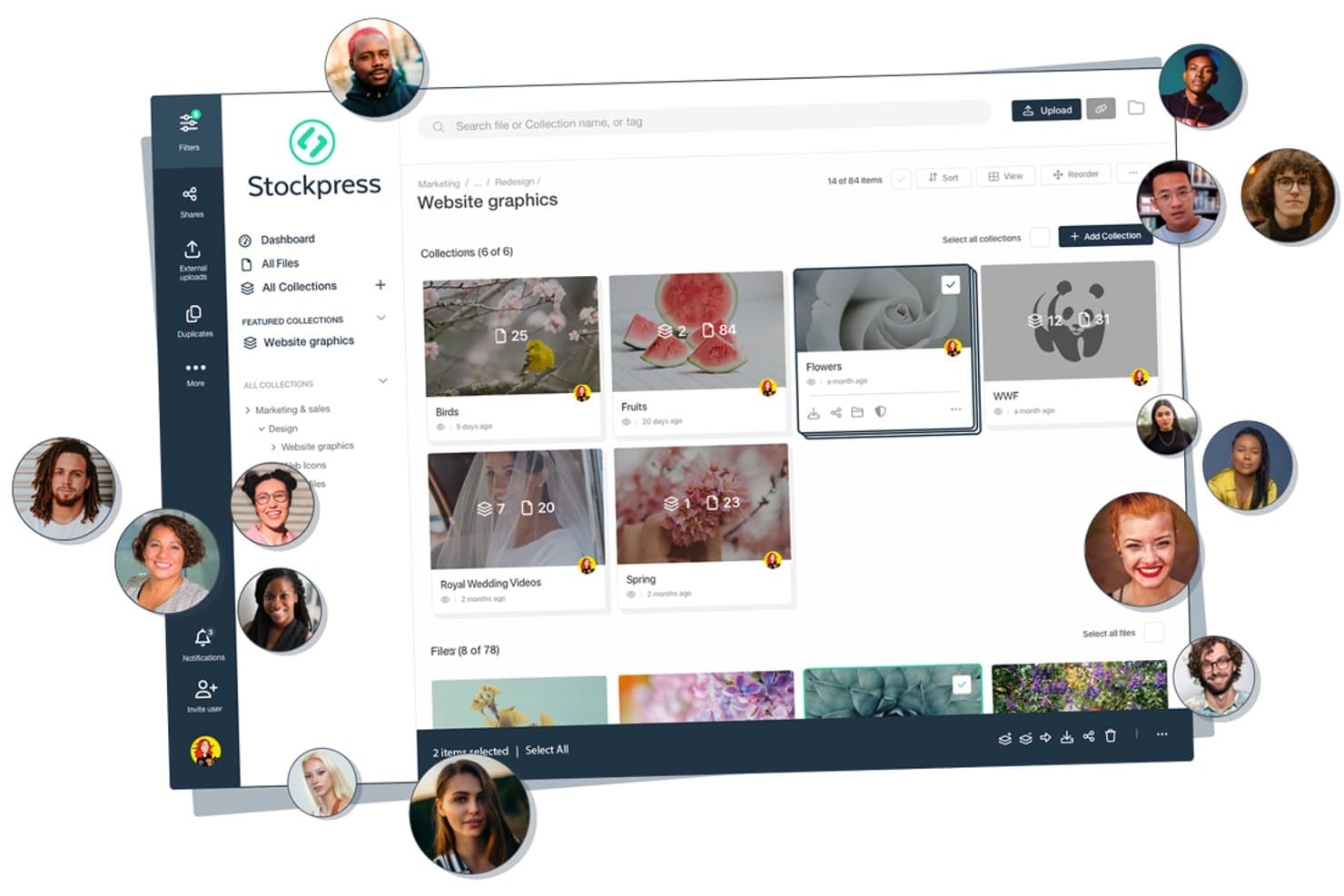
Stockpress offers a visual asset management dashboard where teams can organize files into named collections, collaborate with multiple users, and manage brand assets in a structured folder hierarchy. Stockpress is a cloud-based digital asset management platform that centralizes brand assets—logos, images, video, fonts, and documents—with AI-powered search, metadata tagging, version control, and customizable sharing and permissions.
Who Is Stockpress Best For?
Stockpress suits marketing and creative teams at growing companies that regularly collaborate with external agencies, partners, or resellers.
Why I Picked Stockpress
Stockpress earns its spot on my shortlist because the unlimited users model genuinely changes how brand teams operate. I can add every agency, reseller, and freelancer to the workspace without watching costs multiply. Features like custom user roles, guest upload pages, and password-protected share links with view tracking mean I can give each external partner exactly the right level of access, whether that's uploading raw files or downloading approved brand assets.
Stockpress Key Features
- AI-powered search and tagging: Quickly locate assets using AI-generated tags, facial recognition, and visual search technology.
- Smart collections and sub-collections: Organize assets by project, campaign, or brand with dynamic collections and unlimited nesting.
- Integrated image editing tools: Crop, resize, remove backgrounds, and apply other edits directly within the platform.
- Detailed activity tracking: Monitor file uploads, downloads, and sharing history with comprehensive asset-level reporting.
Stockpress Integrations
Stockpress offers native integrations with Adobe Creative Cloud, Figma, Canva, Box, Dropbox, Google Drive, Slack, Klaviyo, Mailchimp, WordPress, and Webflow. An API is available for custom integrations.
Pros and Cons
Pros:
- Supports all file types without limits
- AI tagging plus facial recognition search
- Unlimited users on every plan
Cons:
- Lacks automated rights enforcement workflows
- No dedicated brand guidelines microsite
Learn more about Stockpress: 6Best for AI-powered asset discovery
Air
- Free plan available
- From $10/month (billed annually)
Visit WebsiteCustomer Rating:4.6/5
Air’s visual workspace helps creative teams preview and organize brand assets with AI-powered search and tagging. Air is a platform designed to help you manage and scale your creative assets. It centralizes workflows, allowing your team to collaborate, approve, and share content smoothly.
Why I picked Air: I picked Air for its visual-first approach to managing creative assets. The scrubbable previews let you see inside design files, videos, and documents instantly, which helps your team locate what they need faster. Its AI-powered search goes beyond filenames to recognize objects, faces, and even spoken words, making asset retrieval intuitive. I also like that you can manage approvals, feedback, and file versions in one place, reducing communication gaps and maintaining a clear creative trail.
Standout features & integrations:
Features include AI smart tags that automatically generate searchable keywords and summaries for your content, helping you and your team stay organized. Version stacking keeps track of every file iteration while preserving original assets, so nothing gets lost. Air also offers video and audio transcription to make media files instantly searchable, plus in-context commenting for smoother approvals.
Integrations include Adobe Creative Cloud, Google Calendar, Slack, Google Drive, Photoshop, Figma, WooCommerce, Shopify, Salesforce, Microsoft Office tools, Microsoft Excel, and Adobe Experience Manager.
Pros and Cons
Pros:
- Built-in feedback and approval tools
- AI-powered search and tagging
- Visual previews for fast browsing
Cons:
- Learning curve for new users
- Limited offline functionality
Learn more about Air: Best for brand assets with built-in rules
- Free trial available
- From $80/month (billed annually)
Visit WebsiteCustomer Rating:4.6/5
Lingo organizes brand assets into a searchable library with detailed tags, formats, and version history. Lingo is a cloud-based brand asset management software that helps your team store, organize, and distribute assets like logos, images, templates, videos and guidelines in one central place. It ties each asset to your brand guidelines so you and your team always know how and when to use the right version.
Why I picked Lingo: I picked Lingo because it manages brand assets with built-in brand rules and self-serve kits. You can build asset kits that combine files with usage context (guidelines, notes, instructions) so non-designers can access what they need without calling the creative team. Lingo also offers automatic file conversion and export control, so whenever someone needs a variant (e.g., PNG instead of SVG or a particular size), you don’t have to manually produce it.
Standout features & integrations:
Features include real-time usage insights to see what assets your team is using most (or not using at all), which helps you prune, optimize or invest in the right brand collateral. It also includes direct links, meaning when you update an asset in Lingo, every place that uses that link updates automatically — helping avoid outdated or off-brand materials.
Integrations include Figma, Dropbox, and Google Drive. You can also use the Lingo API to build your own connections.
Pros and Cons
Pros:
- Automatic file conversions save production time
- AI search removes need for manual tagging
- Unlimited kits support flexible asset grouping
Cons:
- Fewer enterprise-scale integrations available
- Lacks complex approval workflow tools
Learn more about Lingo:

Artwork Flow streamlines asset approvals for compliance and efficiency. Artwork Flow is a brand asset management tool tailored for creative teams seeking to streamline the approval process. It caters to industries like pharma, food and beverages, and cosmetics, focusing on compliance and efficiency in managing digital assets.
Why I picked Artwork Flow: Artwork Flow excels in creative approvals with its AI-powered online proofing tools that simplify the review process. Workflow automation reduces manual tasks, allowing your team to focus on creativity. Compliance automation ensures you meet industry standards without hassle. The platform's version control and smart search capabilities make managing and finding assets straightforward.
Standout features & integrations:
Features include AI-powered proofing, which enhances the review process by catching design errors early. The software's compliance automation helps you maintain industry standards effortlessly. Additionally, its version control and smart tagging make asset management efficient.
Integrations include Adobe Creative Cloud, Slack, Trello, Asana, Microsoft Teams, Google Drive, Dropbox, Box, Jira, and Monday.com.
Pros and Cons
Pros:
- Fast go-to-market speed
- User-friendly interface
- Efficient workflow automation
- Comprehensive compliance checks
- AI-powered proofing tool
Cons:
- Initial setup complexity
- Limited customization options
- Requires internet for full functionality
- Learning curve for new users
- Direct pricing not transparent
Learn more about Artwork Flow:

Frontify helps design teams manage and share brand guidelines efficiently. Frontify is a digital asset management platform designed for design teams that need to manage and collaborate on brand assets. It provides tools for creating, organizing, and sharing brand guidelines to ensure consistency across all materials.
Why I picked Frontify: Frontify caters to design teams with its intuitive interface and collaborative features. It offers customizable brand guidelines that help maintain consistency across all channels. The platform's collaborative workspace allows your team to work together efficiently, regardless of location. Its version control ensures everyone is working with the most up-to-date assets, which is vital for maintaining brand integrity.
Standout features & integrations:
Features include customizable templates that allow you to maintain brand consistency across all visual elements. The collaborative workspace supports teamwork, enabling your team to work together effectively. Version control ensures everyone is using the most current assets, which helps maintain brand integrity.
Integrations include Adobe Creative Cloud, Sketch, Slack, Microsoft Teams, Google Workspace, Dropbox, Trello, Asana, Jira, and InVision.
Pros and Cons
Pros:
- Supports remote collaboration
- Strong version control
- Collaborative workspace
- Customizable brand guidelines
- Ideal for design teams
Cons:
- Direct support may be limited
- Customization options can be complex
- Requires stable internet connection
- Limited offline functionality
- May need initial training
Learn more about Frontify:

Acquia DAM centralizes and secures brand assets for marketing teams. Acquia DAM is a digital asset management platform aimed at businesses looking to centralize and manage their brand assets efficiently. It serves marketing teams by providing tools to organize, share, and protect digital content.
Why I picked Acquia DAM: Acquia DAM excels in integration capabilities, making it ideal for teams that need to connect various systems. It supports smooth data flow across platforms, enhancing productivity. With its automated workflows, your team can streamline content management processes. Its scalable storage options accommodate growing digital content needs, ensuring you always have space.
Standout features & integrations:
Features include automated workflows that help streamline content management processes. Scalable storage options ensure you have space for all your digital content. The platform's security features protect your valuable assets, giving you peace of mind.
Integrations include Adobe Creative Cloud, Drupal, Salesforce, Microsoft Teams, Google Workspace, Slack, SharePoint, Dropbox, Box, and Marketo.
Pros and Cons
Pros:
- Efficient content management
- High-level security features
- Scalable storage options
- Automated workflows
- Strong integration capabilities
Cons:
- Customization options are basic
- Requires stable internet connection
- Limited offline functionality
- Initial setup can be time-consuming
- May require technical expertise
Learn more about Acquia DAM:
Other Brand Asset Management Software
Here are some additional brand asset management software options that didn’t make it onto my shortlist, but are still worth checking out:
- 11BrandyBest for brand guidelines
- 12EthosBest for small businesses
- 13ioMoVoBest for AI-driven insights
- 14SparkfiveBest for compliance needs
- 15FilecampBest for unlimited users
- 16Acquia DAM (Widen)Best for branded portals for asset sharing
- 17BrandfolderBest for user-friendly interface
- 18BynderBest for scalability
- 194ALLPORTALBest for custom workflows
- 20RocketiumBest for marketing automation
How I Evaluate Brand Asset Management Software
I evaluate these tools in two layers: the baseline a platform must hit—like hosting live brand guidelines, not just storing PDFs—and the differentiators that set tools apart.
Core Functionality (Table Stakes For This List)
When I'm selecting tools for my list, I rank each one on a scale from 0 (does not offer the functionality) to 5 (excels in this area) for each core functionality listed below. Then, I calculate the tool's total score into a percentage. Each tool needs to achieve a minimum total score of 65% to be considered for inclusion.
- Centralized Asset Library: I look for a single, cloud-based hub where teams store logos, videos, fonts, and templates—organized into collections rather than buried in generic folder trees.
- Brand Guidelines Hosting: The platform should let you publish interactive, living guidelines—not just static PDFs—so updates to colour codes or logo usage rules go live instantly.
- Metadata & Search Capabilities: I evaluate how quickly you can find a specific asset variant, like a white-on-transparent logo in SVG format, using tags, filters, and AI-assisted search.
- Access Controls & Permissions: Role-based sharing matters here. I check whether you can grant an external agency download-only access to a campaign folder without exposing internal assets.
- Rights & Version Tracking: Expired licenses and outdated files create real risk. I look for automated expiration alerts, version history, and the ability to flag assets with usage restrictions.
- Creative Tool Integrations: Teams pull assets into Adobe Creative Cloud, Figma, Canva, or their CMS daily. I evaluate native plugin support and whether the connector keeps assets synced in real time.
Once I have a list of tools that meet the criteria, I consider what sets each platform apart.
Differentiating Factors (What Sets Vendors Apart)
Here's how I compare and contrast different vendors:
Standout Features
Brand templates are a major differentiator. I look for platforms that let non-designers customize locked-down layouts—swapping images or copy without touching logo placement or fonts. Approval workflows also matter, especially when regional teams need sign-off before publishing co-branded materials. I check whether the tool routes assets through reviewers with inline annotations. Usage analytics round things out by showing which assets get downloaded and which collect dust, helping brand managers retire underperforming content and focus on what resonates.
Beyond Features
Scalability matters a lot here. A five-person creative team and a global enterprise managing dozens of sub-brands need very different structures, so I evaluate whether a platform supports multi-brand hierarchies and scales without performance hits. Security and compliance also weigh heavily—I check for SOC 2 Type II certification and audit logging, especially when external partners access assets. Pricing transparency rounds out my review. I look at whether costs are tied to users, storage, or asset volume, and whether features like branded portals come bundled or carry add-on fees.
How to Choose Brand Asset Management Software
It’s easy to get bogged down in long feature lists and complex pricing structures. To help you stay focused as you work through your unique software selection process, here’s a checklist of factors to keep in mind:
| Factor | What to Consider |
| Scalability | Ensure the software can grow with your business. Look for solutions that can handle increased data and user loads as your team expands. |
| Integrations | Check if the software integrates with tools you already use, like Adobe Creative Cloud or Slack, to enhance workflow efficiency. |
| Customizability | Choose software that lets you tailor workflows and interfaces to fit your team's specific needs, making it easier to match your brand's requirements. |
| Ease of Use | Opt for a user-friendly interface that minimizes the learning curve, ensuring your team can quickly adopt the software without extensive training. |
| Budget | Consider the total cost, including any add-ons or future upgrades, to ensure it fits within your financial plans. |
| Security Safeguards | Prioritize solutions that offer strong data protection features like encryption and access controls to keep your brand assets secure. |
| Support | Evaluate the level of customer support available, including channels like live chat or phone, to ensure timely assistance when needed. |
| Performance | Look for software with high reliability and uptime to ensure your team can access assets without disruption. |
Trends in Brand Asset Management Software
In my research, I sourced countless product updates, press releases, and release logs from different brand asset management software vendors. Here are some of the emerging trends I’m keeping an eye on:
- AI-Powered Tagging: AI helps automatically tag and categorize assets, saving time and reducing manual errors. This feature is becoming more common as vendors like Bynder and MediaValet incorporate AI to enhance asset searchability and organization.
- Advanced Analytics: More tools now offer analytics to track asset performance and usage. This data helps teams make informed decisions on content strategy. Vendors like Brandfolder provide insights into how and where assets are used.
- Brand Consistency Tools: Ensuring consistent branding across all materials is crucial. Tools like Frontify offer brand guidelines and templates to keep everyone aligned, which is becoming increasingly important for maintaining brand integrity.
- User Permission Management: Enhanced user permissions allow for better control over who can access and edit assets. This is vital for maintaining security and is being improved in platforms like 4ALLPORTAL.
- Cloud-Based Collaboration: Real-time collaboration features are on the rise, allowing teams to work together seamlessly from anywhere. Solutions like Acquia DAM are enhancing collaboration capabilities, making it easier for remote teams to stay connected.
What Is Brand Asset Management Software?
Brand asset management software is a tool that helps businesses organize, store, and manage their digital brand assets, like logos, images, and videos. Marketing professionals, brand managers, and creative teams typically use these tools to maintain brand consistency and improve collaboration. Features like AI-powered tagging, advanced analytics, and cloud-based collaboration support efficient asset management and enhance team productivity. Overall, these tools offer a centralized platform that streamlines the handling of brand assets, ensuring they are easily accessible and consistently used across the organization.
Features of Brand Asset Management Software
When selecting brand asset management software, keep an eye out for the following key features:
- AI-powered tagging: Automatically tags and categorizes assets, saving time and improving searchability.
- Advanced analytics: Provides insights into asset usage and performance, helping teams make informed content decisions.
- Brand consistency tools: Ensures all materials adhere to brand guidelines, maintaining uniformity across platforms.
- User permission management: Controls access to assets, enhancing security, protecting sensitive IP and information.
- Cloud-based collaboration: Allows teams to work together in real-time from anywhere, improving communication and productivity.
- Customizable workflows: Lets you tailor processes to fit your team's specific needs, enhancing operational efficiency.
- Scalable storage: Accommodates growing amounts of digital content, ensuring you have the space you need.
- Secure file sharing: Protects your content while making it accessible to authorized users, ensuring data safety.
Benefits of Brand Asset Management Software
Implementing brand asset management software provides several benefits for your team and your business. Here are a few you can look forward to:
- Improved brand consistency: Ensures all team members use the same brand guidelines, maintaining a uniform brand image across all materials.
- Enhanced collaboration: Cloud-based tools enable real-time teamwork, making it easy for teams to collaborate from anywhere.
- Time savings: AI-powered tagging and automated workflows reduce manual tasks, freeing up time for more strategic work.
- Increased security: User permission management and secure file sharing protect sensitive assets from unauthorized access.
- Better decision-making: Advanced analytics provide insights into asset performance, helping teams make informed content choices.
- Scalability: Scalable storage solutions grow with your business, ensuring you always have the space needed for your assets.
Costs and Pricing of Brand Asset Management Software
Selecting brand asset management software requires an understanding of the various pricing models and plans available. Costs vary based on features, team size, add-ons, and more. The table below summarizes common plans, their average prices, and typical features included in brand asset management software solutions:
Plan Comparison Table for Brand Asset Management Software
| Plan Type | Average Price | Common Features |
| Free Plan | $0 | Basic storage, limited users, and basic search functionality. |
| Personal Plan | $5-$25/ user/month | Enhanced storage, individual user access, and basic sharing capabilities. |
| Business Plan | $30-$75/ user/month | Advanced analytics, team collaboration tools, and customizable workflows. |
| Enterprise Plan | $100-$200/user/month | Scalable storage, advanced security features, and comprehensive integration options. |
Brand Asset Management Software FAQs
Here are some answers to common questions about brand asset management software:
How does asset management software work?
Asset management software provides a centralized database to track and monitor all your assets. You can easily access information like asset location, status, and maintenance history. This visibility helps you manage assets efficiently and make informed decisions about usage and maintenance.
What's the major challenge in the asset management industry?
One major challenge is ensuring data management and security. As businesses handle increasing volumes of digital assets, keeping them safe and organized becomes crucial. Solutions that offer robust security features and efficient data management tools can help mitigate these challenges.
What are the 3 principles of asset management?
The core principles include lifecycle management, risk management, and performance optimization. Lifecycle management ensures assets are used effectively throughout their life. Risk management helps protect assets from potential threats, and performance optimization focuses on maximizing asset efficiency.
Why is brand asset management important?
Brand asset management is important because it ensures consistency across all marketing materials. It helps maintain a unified brand image, which is crucial for brand recognition and trust. By organizing and controlling brand assets, teams can avoid errors and save time.
How can brand asset management software improve collaboration?
These tools enhance collaboration by allowing teams to access and work on assets in real-time, regardless of location. Features like cloud-based storage and user permission settings enable multiple users to collaborate efficiently while maintaining control over asset access.
What should I consider when choosing brand asset management software?
Consider the software’s scalability, integration capabilities, and ease of use. Ensure it aligns with your team’s needs and can grow with your business. Look for solutions offering strong security safeguards and customizable workflows to match your workflow requirements.
What's Next?
Ready to grow? Subscribe to The CMO newsletter to stay on top of trends and get the latest tips, resources, and guides from our community of seasoned marketing leaders straight to your inbox.