

O software de gestão de leads ajuda a captar, organizar e acompanhar leads, para nunca perder uma oportunidade de venda nem deixar escapar potenciais clientes valiosos. Se procura as melhores ferramentas para aumentar o foco da equipa, melhorar o acompanhamento e transformar mais leads em negócios, não está sozinho — os orçamentos apertados e os mercados concorrenciais fazem da gestão correta de leads uma prioridade de alto risco.
Neste guia, encontrará uma comparação clara dos sistemas de gestão de leads mais eficazes em 2026, com foco nas funcionalidades e nas vantagens práticas mais importantes para equipas de marketing e vendas de alto desempenho.
Porque pode confiar nas nossas recomendações de software
6,700+
Reviews
20
Industry experts
16+
Evaluation factors
14
Years reviewing software
A nossa equipa testa e analisa software desde 2012. Como líderes de marketing, sabemos o quão difícil — e importante — é escolher o software certo.
Para este guia, avaliámos as ferramentas através de testes práticos e pesquisa independente, pontuando-as de acordo com os nossos critérios de seleção.
As nossas análises refletem o juízo da nossa equipa editorial, e não um discurso de vendas.
Revisores especialistas:
 Gui DrusinaCreative Director
- Shriya GhateSenior Marketing Lead
 Amanda JacquesMarketing Ops Leader

Tabela de comparação de software de gestão de leads
Esta tabela de comparação resume os detalhes de preços das minhas principais escolhas de software de gestão de leads:
Sorted by: Default
| Tool | Starting Price | Website | |
|---|---|---|---|
Best for B2B intent data and lead enrichment | 4.5 out of 5 | $49/user/month Free plan + 14-day trial + demo available | Book Demo |
Best for drag-and-drop interface configuration | 4.7 out of 5 | $40/user/month Not available | Website |
Best for shared marketing and sales timelines | 4.4 out of 5 | $7/user/month Free plan + 14-day free trial + free demo available | Website |
Best for journey-based audience segmentation | 4.5 out of 5 | Pricing upon request Free plan available | Website |
Best for automated lead routing and matching | 4.6 out of 5 | Pricing upon request Free demo available | Website |
Best for high-velocity lead capture workflows | 4.4 out of 5 | Pricing upon request Free demo available | Website |
Best for predictive analytics and account insights | 4.3 out of 5 | Pricing upon request Free demo available | Website |
Best for automated customer milestone tracking | 4.4 out of 5 | $15/month 14-day free trial + free demo available | Website |
Best for native sales intelligence dashboards | 4.4 out of 5 | Pricing upon request Not available | Website |
Best for enterprise-grade campaign orchestration | Not rated | $2,000/month Free demo available | Website |


Análises do melhor software de gestão de leads
Abaixo encontrará os meus resumos detalhados dos melhores softwares de gestão de leads da minha seleção. As minhas análises apresentam uma visão detalhada das funcionalidades, dos melhores casos de utilização e das integrações de cada plataforma, para o ajudar a encontrar a mais adequada para si.
 Best for B2B intent data and lead enrichment
- Free plan + 14-day trial + demo available
- From $49/user/month (billed annually)
Customer Rating:4.5/5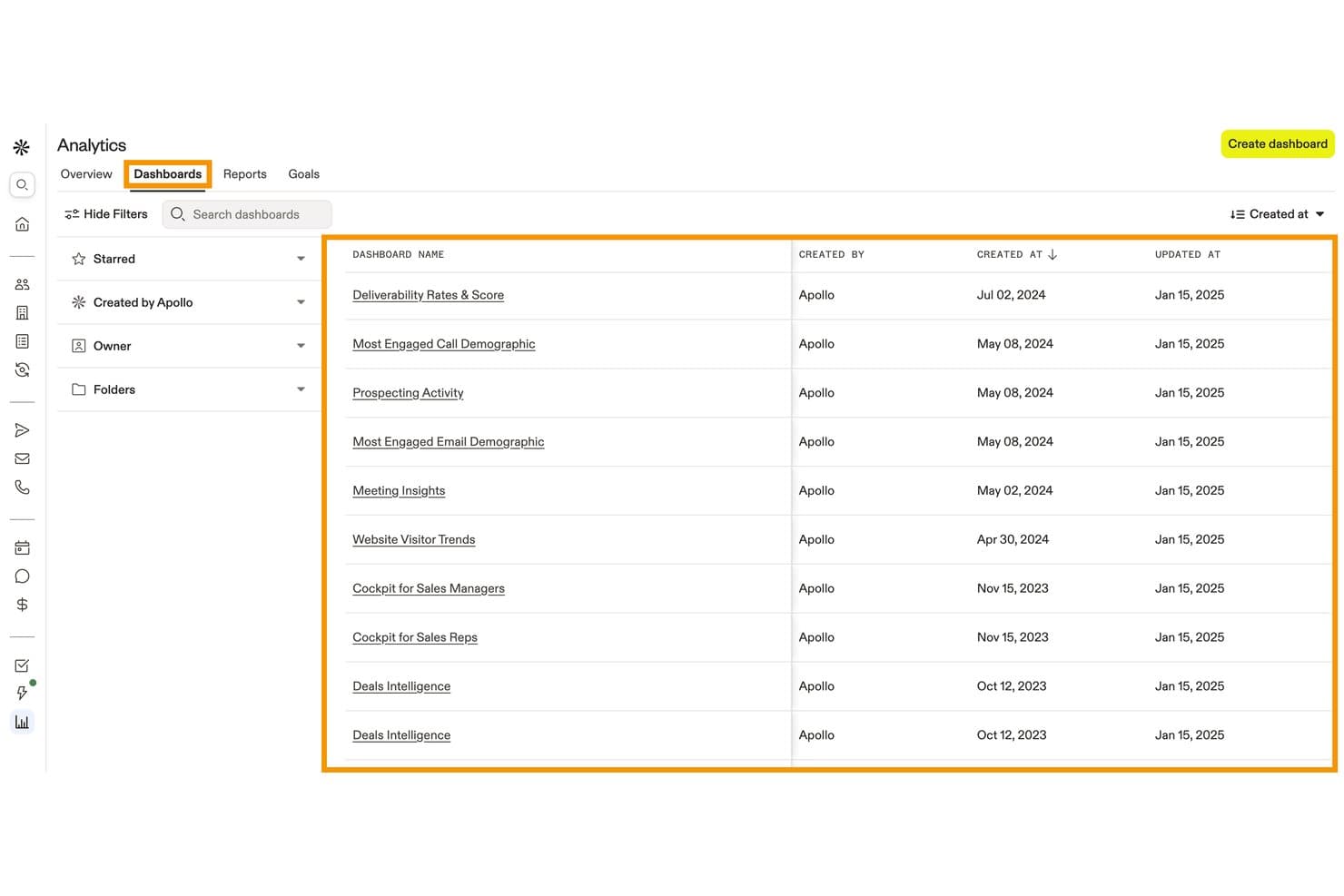
Apollo.io centralizes pre-built analytics dashboards for tracking sales activity. Apollo.io (Apollo) is a B2B sales and lead management platform that combines a 240M+ contact database, form enrichment, website visitor identification, lead scoring, inbound routing, and workflow automation.
Who Is Apollo.io Best For?
Apollo.io is a strong fit for B2B sales and marketing teams that need to enrich, score, and route inbound leads using a large contact database without stitching together multiple data tools.
Why I Picked Apollo.io
Apollo.io earns its spot on my shortlist because its B2B intent data, powered by Bombora, surfaces accounts actively researching your category across 15,000+ topics before they ever hit a form. I love how form enrichment pairs with that signal: a prospect submits just their email, and Apollo auto-fills company size, industry, and phone number from its 240M-contact database, so your routing rules fire on complete data from the start. That combination of intent scoring and enriched inbound capture is where Apollo pulls ahead for B2B lead qualification.
Apollo.io Key Features
- Inbound router: Routes incoming leads to the right rep or meeting type based on intake form answers, ICP fit, or existing account ownership, including round-robin distribution.
- Waterfall enrichment: Pulls missing contact data from multiple providers in sequence, filling gaps in email, phone, and firmographic fields across your saved records.
- Website visitor identification: Surfaces the companies and contacts browsing your site—including the specific pages they viewed—before they ever submit a form.
- Custom scoring models: Lets you build separate scoring models for people and companies using 65+ filters, with tiered outputs and a score breakdown view for each prospect.
Apollo.io Integrations
Apollo.io offers native integrations with Salesforce, HubSpot, Zoho, Microsoft Dynamics, Pipedrive, Marketo, Klaviyo, Mailchimp, Snowflake, and Slack. It also supports a public API for custom integrations and Zapier.
Pros and Cons
Pros:
- Granular inbound routing improves sales handoff
- Form enrichment reduces form friction
- B2B intent signals identify active research
Cons:
- Attribution lacks multi-touch revenue reporting
- Marketing nurture remains incomplete
Learn more about Apollo.io: Best for drag-and-drop interface configuration
- Not available
- From $40/user/month
Visit WebsiteCustomer Rating:4.7/5
Creatio offers a management dashboard with campaign analytics and AI insights. Creatio is a no-code marketing automation and CRM platform that covers lead capture, scoring, nurturing, and pipeline management across the full lead lifecycle.
Who Is Creatio Best For?
Creatio is a strong fit for mid-market and enterprise marketing teams that want to configure their own workflows without relying on developers.
Why I Picked Creatio
I've included Creatio in my top picks because its drag-and-drop interface configuration goes well beyond email templates. The visual Campaign Designer lets you build multi-step, multi-channel lead nurturing flows with branching logic, all without writing a line of code. The drag-and-drop Landing Page Designer is another standout, letting you build and connect lead capture pages directly in the platform so new leads flow straight into your pipeline.
Creatio Key Features
- Lead predictive scoring: An AI model that rates each lead from 1 to 100 based on customer needs, engagement data, and service history.
- Campaign Designer: A visual, no-code tool for building multi-channel campaign flows with branching logic based on customer behaviour.
- Landing Page Designer: A drag-and-drop builder that creates landing pages integrated directly with Creatio, automatically registering new leads when a form is submitted.
- Web analytics tracking: Imports Google Analytics or Matomo data into contact profiles, showing lead source, channel, and full session-level website activity.
Creatio Integrations
Creatio offers native integrations with Microsoft Exchange, Microsoft 365, Google Calendar, Google Ads, and Facebook Ads, along with a marketplace that includes connectors for SharePoint, DocuSign, Salesforce, Jotform, and Microsoft Teams Phone. It also connects with Zapier and supports OData 3/4 protocols plus a REST API for custom integrations.
Pros and Cons
Pros:
- Built-in lead scoring and sales forecasting
- Supports no-code layout configuration
- Captures leads from multiple channel sources
Cons:
- Modular pricing structure is hard to estimate
- Steep learning for advanced builds
Learn more about Creatio: Best for shared marketing and sales timelines
- Free plan + 14-day free trial + free demo available
- From $7/user/month (billed annually)
Visit WebsiteCustomer Rating:4.4/5
HubSpot offers a dashboard with contact activity and prospect tracking. HubSpot is a CRM platform with built-in lead management tools that combine contact tracking, lead capture, pipeline management, and marketing-to-sales handoff workflows in one system.
Who Is HubSpot Best For?
I'd recommend HubSpot for small to mid-size marketing and sales teams that manage leads across both functions and need a single shared system.
Why I Picked HubSpot
I've included HubSpot in my top picks because of how well its contact timeline unifies marketing and sales activity in one view. When a lead opens an email, visits a pricing page, or fills out a form, that activity sits right alongside call notes and meeting logs from sales. That shared context means sales reps know exactly what marketing content a lead engaged with before the first outreach, which cuts down on redundant follow-up.
HubSpot Key Features
- Lead scoring: Assigns point values to leads based on demographic data and engagement activity to help prioritize outreach.
- Pipeline management: Organizes leads into deal stages with drag-and-drop controls so reps can track progress at a glance.
- Meeting scheduling: Let leads book time directly on a rep's calendar through a shareable link.
- Smart lists: Automatically segments leads based on criteria like lifecycle stage, industry, or behaviour.
HubSpot Integrations
HubSpot has 1,500+ apps in its App Marketplace, including Salesforce, Slack, Google Workspace, Mailchimp, Shopify, LinkedIn Sales Navigator, Microsoft Teams, Zoom, Stripe, and WordPress. It's available on Zapier and has an API for custom integrations.
Pros and Cons
Pros:
- Automated lead nurturing email sequences included
- Shared contact timeline across all teams
- Built-in forms capture leads automatically
Cons:
- Custom lead routing rules can be complex
- Advanced reporting is restricted to enterprise
 Best for journey-based audience segmentation
- Free plan available
- Pricing upon request
Visit WebsiteCustomer Rating:4.5/5
Ortto offers a dashboard with customer insights and audience segmentation. Ortto is a marketing automation platform that combines a built-in customer data platform with journey-based campaign tools, lead scoring, multi-channel messaging, and audience segmentation.
Who Is Ortto Best For?
Ortto works well for marketing teams that own both campaign execution and audience data, without depending on a separate data or engineering team.
Why I Picked Ortto
Ortto earns its spot on my shortlist because of how its journey builder connects audience segmentation directly to campaign triggers. I use Ortto's built-in CDP to build segments based on behavioural data, like page visits or product actions, and those segments feed directly into automated journeys. What I like is the ability to split journeys by audience attributes mid-flow, so leads receive different messaging based on where they are in the funnel.
Ortto Key Features
- Custom lead scoring: Build scores from demographic, firmographic, and behavioural data, with automatic score degradation over time for accuracy
- Funnel analysis reports: Monitor multi-step conversion rates across the full lead lifecycle using built-in funnel report templates
- Popup and form builder: Capture leads directly with embeddable forms, popups, and surveys tied to your CDP contact data
- Round-robin lead assignment: Automatically assign leads to sales reps via journey-triggered round-robin rules when score thresholds are met
Ortto Integrations
Ortto offers 25+ native integrations, including Salesforce, HubSpot, Pipedrive, Shopify, Stripe, Chargebee, Recurly, Zendesk, Intercom, and Google Ads. It also connects with Zapier and provides an API for custom integrations.
Pros and Cons
Pros:
- Multi-channel lead nurturing across email and SMS
- Visual journey builder supports team collaboration
- Built-in CDP unifies lead data automatically
Cons:
- Contact-based pricing scales up quickly
- No built-in CRM for pipeline management
Learn more about Ortto: Best for automated lead routing and matching
- Free demo available
- Pricing upon request
Visit WebsiteCustomer Rating:4.6/5
LeanData offers a lead routing builder with matching, assignment, and workflows. LeanData is a Salesforce-native lead management platform built around automated lead-to-account matching, territory-based routing, and buying group orchestration for B2B revenue teams.
Who Is LeanData Best For?
LeanData is a strong fit for enterprise B2B revenue operations teams managing high lead volumes across complex, multi-territory Salesforce environments.
Why I Picked LeanData
I picked LeanData as one of the best because its lead-to-account matching goes well beyond email matching. It uses six fields plus custom tiebreakers, so leads actually land on the right account record in Salesforce. I also like how its visual routing flowchart lets my team build territory-based assignment rules without writing code. On top of that, BookIt scheduling lets reps book meetings directly inside Salesforce the moment a lead qualifies.
LeanData Key Features
- Audit trails: Logs every routing decision so your team can trace exactly why a lead was assigned a certain way and fix errors fast.
- Buying group orchestration: Groups related contacts from the same account into a coordinated opportunity, so sales aren't working the same deal in silos.
- Round-robin lead distribution: Automatically cycles lead assignments across reps to balance workload and prevent leads from piling up with one person.
- SLA tracking: Monitors lead response time against set thresholds so ops teams can flag and escalate leads that go too long without a follow-up.
LeanData Integrations
LeanData is a Salesforce-native platform with 17+ integrations, including Salesforce Sales Engagement, 6sense, Clearbit, Cognism, Cloudingo, Crossbeam, Outreach, Salesloft, Gong, and Slack. It also connects with Microsoft Teams, Kronologic, Sendoso, UserGems, Qualified, G2, and Groove. An API is available for custom integrations.
Pros and Cons
Pros:
- Duplicate detection prevents CRM data decay
- Manages complex global territory assignments
- Visual drag-and-drop routing flow builder
Cons:
- No standalone mobile app
- Contact routing sold separately from leads
Learn more about LeanData: Best for high-velocity lead capture workflows
- Free demo available
- Pricing upon request
Visit WebsiteCustomer Rating:4.4/5
LeadSquared offers a lead management dashboard with scoring and assignments. LeadSquared is a sales execution and lead management platform built for high-volume sales teams, combining lead capture, automated distribution, pipeline tracking, and field sales management in one system.
Who Is LeadSquared Best For?
LeadSquared is a strong fit for inside sales and field sales teams in industries like education, financial services, and healthcare that manage large volumes of inbound leads daily.
Why I Picked LeadSquared
I picked LeadSquared as one of the best because its lead capture engine pulls in leads from more entry points than almost any other platform I've seen. It captures across Google Ads, Facebook, Instagram, IVR phone calls, chat tools, and third-party marketplaces simultaneously, all without manual imports. What I really like is the lead distribution automation: rules fire the moment a lead enters the system and route it to the right rep by territory, product, or load-balanced quota. For teams processing thousands of inbound leads daily, that instant routing prevents the drop-off that kills conversion rates.
LeadSquared Key Features
- AI-powered conversion predictor: Uses machine learning to assign each lead a conversion probability score based on historical data and lead attributes.
- Field force automation: Let field sales reps plan beat routes, log calls, upload documents, and update lead records directly from the mobile app.
- Lead scoring and engagement scoring: Scores leads automatically based on activity, profile data, and behaviour to help reps prioritize follow-up.
- Sales performance management: Tracks rep-level and team-level quota attainment, territory assignments, and pipeline progress in one dashboard.
LeadSquared Integrations
LeadSquared offers native connectors for lead capture and communication tools, including Google Ads, Google Forms, Facebook Lead Ads, WhatsApp, Zoom, Zendesk Chat, and Salesforce. The LeadSquared Zapier integration allows you to connect with 500+ third-party web services, and a REST API is available for custom integrations.
Pros and Cons
Pros:
- Mobile app supports full field sales tracking
- Aggregates multi-source inbound lead data
- Automated lead distribution by territory and quota
Cons:
- Limited native reporting dashboard customization
- Portal slows down under heavy workflow loads
Learn more about LeadSquared: Best for predictive analytics and account insights
- Free demo available
- Pricing upon request
Visit WebsiteCustomer Rating:4.3/5
6sense offers a lead dashboard with analytics, lead scoring, and insights. 6sense is an AI-driven account engagement platform that surfaces anonymous buyer intent data, predicts which accounts are in-market, and helps sales and marketing teams prioritize outreach based on buying signals.
Who Is 6sense Best For?
6sense suits enterprise B2B revenue operations teams that run account-based marketing programs and need data to align sales and marketing around the same target accounts.
Why I Picked 6sense
I picked 6sense as one of the best because of how it handles the dark funnel. Most lead management tools wait for a prospect to fill out a form. 6sense goes further by combining anonymous behavioural signals, technographic data, and firmographic intelligence to deliver a complete view of the buyer journey, even before a lead self-identifies. I particularly like the predictive scoring model: it uses machine learning to weigh dozens of signals, including firmographic fit, technographic profile, behavioural patterns, and intent data, based on what has actually correlated with conversion in historical data. All of that data is then analyzed against historic conversion patterns by 6sense's AI predictive model to predict each account's buying stage, and the platform provides a 360-degree profile view of each account.
6sense Key Features
- Dynamic audience segments: Build and update account segments automatically based on intent signals, firmographics, and technographics without manual list management.
- Sales intelligence alerts: Notify sales reps in real time when a target account spikes in research activity or changes buying stage.
- Conversational email: Send AI-generated, personalized email sequences to prospects based on their account profile and buying stage.
- Contact data enrichment: Surface-verified contact details, including direct dials and emails, for key decision-makers within target accounts.
6sense Integrations
6sense offers native integrations across CRM, marketing automation, sales engagement, advertising, and intent data categories, including Salesforce, Microsoft Dynamics, HubSpot, Marketo, Eloqua, Outreach, Salesloft, Gong, LinkedIn Advertising, and Google Ads. It also integrates with Slack for messaging and supports data warehouse and AWS S3 connections. An API is available for custom integrations, and Zapier support is not clearly documented.
Pros and Cons
Pros:
- Tracks keyword-level intent across the web
- AI predicts the account buying stage timing
- Detects anonymous buyer intent signals
Cons:
- Requires a dedicated admin to maintain properly
- Limited long-term reporting
Learn more about 6sense: Best for automated customer milestone tracking
- 14-day free trial + free demo available
- From $15/month (billed annually)
Visit WebsiteCustomer Rating:4.4/5
ActiveCampaign offers a dashboard with lead details and activity tracking. ActiveCampaign is a marketing automation and CRM platform that combines email marketing, contact scoring, pipeline management, and behaviour-based automation across the full customer lifecycle.
Who Is ActiveCampaign Best For?
ActiveCampaign is a strong fit for small to mid-sized B2C and B2B businesses that run high-volume email and automation campaigns across long or multi-touch customer journeys.
Why I Picked ActiveCampaign
I picked ActiveCampaign as one of the best because its goal-based automation is genuinely built around tracking where a contact is in their lifecycle. I like that you can set milestone goals directly inside automation workflows, and contacts automatically skip ahead or branch when they hit that goal. Pair that with date-based triggers and contact scoring thresholds, and your team can react to real lead behaviour, not just scheduled follow-ups.
ActiveCampaign Key Features
- Deal pipeline management: Track leads through a visual CRM pipeline with drag-and-drop stage updates and automated task creation.
- Site and event tracking: Logs contact activity on your website and fires automation triggers based on pages visited or actions taken.
- Dynamic segmentation: Builds contact lists automatically using tags, custom fields, and behavioural data that update in real time.
- Lead capture forms: Embeddable forms that push submissions directly into contact records and trigger automation workflows instantly.
ActiveCampaign Integrations
ActiveCampaign offers 1,000+ apps and integrations, including native integrations with Salesforce, Shopify, WooCommerce, WordPress, Facebook, Google Ads, Calendly, Slack, Zendesk, and Microsoft Dynamics 365. It also connects with Zapier and provides an API for custom integrations.
Pros and Cons
Pros:
- Dynamic content tailors email delivery
- Built-in lead scoring updates automatically
- Granular automation branching for lead workflows
Cons:
- Lacks advanced pipeline visualization tools
- CRM features locked behind higher tiers
Learn more about ActiveCampaign: Best for native sales intelligence dashboards
- Not available
- Pricing upon request
Visit WebsiteCustomer Rating:4.4/5
Adobe Marketo Engage offers a dashboard with event workflows and automation. Adobe Marketo Engage is a B2B marketing automation platform with lead scoring, audience segmentation, multi-channel nurturing, and native sales intelligence tools built for enterprise marketing and sales teams.
Who Is Adobe Marketo Engage Best For?
Adobe Marketo Engage is a strong fit for enterprise B2B marketing teams that run complex, multi-touch campaigns and need deep alignment with sales.
Why I Picked Adobe Marketo Engage
Adobe Marketo Engage earns its spot on my shortlist because of Sales Insight, a native dashboard that surfaces lead score, engagement history, and "interesting moments" directly inside Salesforce or Microsoft Dynamics. My team uses it to see exactly which leads are spiking in activity so reps can prioritize outreach without switching tools. I also like the Revenue Attribution dashboard, which maps which campaigns influenced closed deals at each pipeline stage.
Adobe Marketo Engage Key Features
- Engagement programs: Builds multi-step nurture tracks that automatically advance leads based on their responses and engagement cadence.
- Progressive profiling: Replaces already-known form fields with new questions each time a lead converts, building richer profiles over time.
- Smart campaigns: Triggers automated actions like emails or lead score changes based on specific lead behaviours or data changes.
- Anonymous lead tracking: Tracks web activity from unknown visitors and retroactively links it to a lead record once they fill out a form.
Adobe Marketo Engage Integrations
Integrations include Salesforce, Microsoft Dynamics, Veeva, Clearbit, ZoomInfo, Google, Facebook, LinkedIn, Zoom, and ON24.
Pros and Cons
Pros:
- Deep Salesforce sync for lead lifecycle tracking
- Tracks multi-touch revenue attribution
- Custom behaviour-based lead scoring
Cons:
- Requires dedicated ops resource to manage
- Lacks modern drag-and-drop design tools
Learn more about Adobe Marketo Engage: Best for enterprise-grade campaign orchestration
- Free demo available
- From $2,000/month

Oracle Eloqua offers a workflow builder with drag-and-drop lead nurturing. Oracle Eloqua is an enterprise B2B marketing automation platform built for managing multi-channel lead nurturing, advanced lead scoring, and campaign orchestration across complex buyer journeys.
Who Is Oracle Eloqua Best For?
Oracle Eloqua is a natural fit for large B2B enterprises with dedicated marketing operations teams running complex, multi-touch demand generation programs.
Why I Picked Oracle Eloqua
Oracle Eloqua earns its spot on my shortlist because its Campaign Canvas gives marketing operations teams precise control over multi-step, multi-channel campaigns at a scale that most tools can't match. I particularly like the Program Canvas for automating lead management workflows, where event listeners fire in real time based on lead score changes or new contact creation. Pair that with concurrent lead scoring models across multiple business units, and Eloqua handles the complexity that smaller platforms simply weren't built for.
Oracle Eloqua Key Features
- Dynamic content blocks: Swap email or landing page content automatically based on a contact's profile data or segment membership.
- Website visitor tracking: Identifies known contacts visiting your site and logs page-level activity directly to their contact record.
- Insight reporting: Pre-built and custom reports that surface campaign performance, email engagement, and lead funnel metrics.
- Contact washing machine: Automates data normalization and field standardization as contacts enter or move through your database.
Oracle Eloqua Integrations
Oracle Eloqua offers 500+ prebuilt integrations through its Marketing AppCloud marketplace, including CRM integrations with Salesforce, Oracle CX Sales, and Microsoft Dynamics, along with apps for tools like LinkedIn, 6sense, Webex, and Cvent. Eloqua is also natively integrated with the broader Oracle CX suite, and an API is available for custom integrations.
Pros and Cons
Pros:
- Unifies online and offline data
- Behavioural lead scoring across business units
- Visual canvas simplifies campaign orchestration
Cons:
- No native SMS or WhatsApp channels
- Built-in analytics require manual report building
Learn more about Oracle Eloqua:
Outro software de gestão de leads
Eis algumas opções adicionais de software de gestão de leads que não entraram na minha seleção, mas que ainda assim vale a pena conhecer:
- 11Salesforce Sales CloudBest for forecasting revenue trends
- 12Mailchimp Best for built-in email campaign launches
- 13SalesflareBest for automated meeting logging
- 14Zoho CRMBest for customizable workflow automations
- 15Capsule Best for small business client management
- 16FreshsalesBest for integrated email and calling tools
- 17CognismBest for AI-powered B2B prospecting and lead enrichment
- 18Pipedrive Best for visual sales pipeline tracking
- 19Sugar MarketBest for campaign ROI tracking
- 20monday CRMBest for team collaboration on deals
How I Evaluate Lead Management Software
I evaluate tools in two layers: the baseline—lead capture, scoring, and sales routing—and the differentiators, like ABM support or attribution depth, that actually set platforms apart.
Core Functionality (Table Stakes For This List)
When I'm selecting tools for my list, I rank each one on a scale from 0 (does not offer the functionality) to 5 (excels in this area) for each core functionality listed below. Then, I calculate the tool's total score into a percentage. Each tool needs to achieve a minimum total score of 65% to be considered for inclusion.
- Lead Capture Across Channels: I check whether the platform pulls in leads from forms, landing pages, chat widgets, and ad platforms rather than relying on manual entry or a single source.
- Lead Scoring & Qualification: Each tool should let you build scoring models that weigh both profile fit and behavioral signals, like page visits or email engagement, to surface sales-ready leads.
- Segmentation & Database Management: I look for dynamic list-building, custom fields, and deduplication—things that matter when you're running campaigns across multiple audiences simultaneously.
- Lead Nurturing Automation: The platform should support multi-step, trigger-based workflows that go beyond basic email drips, such as branching paths based on a lead's content engagement or form submissions.
- Lead Routing & Distribution: I evaluate whether the tool offers rules-based assignment by criteria like territory, lead source, or deal size so reps get the right leads without manual intervention.
- Tracking & Attribution Reporting: Dashboards should connect lead sources and touchpoints to pipeline outcomes, giving marketing teams a clear view of which channels and campaigns drive conversions.
Once I have a list of tools that meet this criteria, I consider what sets each platform apart.
Differentiating Factors (What Sets Vendors Apart)
Here's how I compare and contrast different vendors:
Standout Features
AI-powered lead insights are a major differentiator—I look for platforms that surface buying signals and recommend next-best actions rather than just assign a static score. Intent data and enrichment capabilities also matter, especially when your team needs firmographic or technographic context to prioritize outreach. I evaluate how well a platform bridges marketing and sales through shared workflows, lead handoff notifications, and SLA tracking that keep both teams aligned on pipeline goals.
Beyond Features
CRM integration depth is one of the first things I check—a lead management tool that doesn't sync bi-directionally with your CRM creates data gaps that erode trust between marketing and sales. Pricing structure also matters here, particularly how vendors scale costs as your contact database grows. I look for transparent tier breakdowns tied to volume or seats. Compliance is another area I evaluate closely, especially consent management and audit trail features that help teams stay aligned with GDPR and CCPA requirements across regions.
Como escolher um software de gestão de leads
É fácil perder-se em listas extensas de funcionalidades e estruturas de preços complexas. Para o ajudar a manter o foco enquanto analisa o seu processo específico de seleção de software, eis uma lista de verificação dos fatores a ter em conta:
| Fator | O que considerar |
|---|---|
| FatorEscalabilidade | O que considerarO sistema conseguirá lidar com o crescimento do número de leads, utilizadores e dados à medida que a sua empresa se expande? Procure planos e uma arquitetura flexíveis que suportem pipelines ou utilizadores adicionais. |
| FatorIntegrações | O que considerarEstabelece ligação nativa às ferramentas de CRM, email, automação de marketing ou análise que já utiliza? Confirme que as integrações essenciais estão verificadas e não dependem apenas de terceiros. |
| FatorPossibilidade de personalização | O que considerarPode ajustar pipelines, campos e fluxos de trabalho para se adaptarem ao seu processo de vendas ou às regras específicas da sua empresa? Evite abordagens rígidas e universais que limitem a flexibilidade. |
| FatorFacilidade de utilização | O que considerarA interface e a configuração são intuitivas para colaboradores sem conhecimentos técnicos? Teste-as com alguns utilizadores que tenham um nível de competências semelhante ao da sua equipa antes de tomar uma decisão. |
| FatorImplementação e integração inicial | O que considerarO que é necessário para migrar dados, configurar pipelines e formar a equipa? Avalie quanto tempo a sua equipa pode realisticamente investir e se o fornecedor oferece apoio à migração ou serviços de integração inicial. |
| FatorCusto | O que considerarDe que forma o preço mensal total se enquadra no seu orçamento, incluindo os utilizadores, contactos e suplementos necessários? Tenha cuidado com custos ocultos relativos a formulários adicionais, integrações ou relatórios avançados. |
| FatorMedidas de segurança | O que considerarA encriptação, os controlos de acesso e a conformidade com regulamentos como o GDPR estão implementados? Confirme se precisa de início de sessão único, registos de auditoria ou opções de residência dos dados. |
| FatorDisponibilidade do apoio | O que considerarExiste apoio em direto durante o seu horário de trabalho ou no seu idioma? Verifique se existem opções como chat, telefone ou equipas de apoio regionais para evitar atrasos caso surjam problemas. |
O que é um software de gestão de leads?
O software de gestão de leads é uma ferramenta digital que ajuda as empresas a captar, acompanhar, organizar e qualificar leads ao longo do processo de vendas. Estas plataformas centralizam os dados de contacto, automatizam os acompanhamentos e apoiam a colaboração entre equipas, facilitando a gestão dos leads desde o interesse inicial até à transferência ou conversão.
Funcionalidades do software de gestão de leads
Ao selecionar um software de gestão de leads, procure as seguintes funcionalidades essenciais:
- Formulários de captação de leads: Recolha novos leads diretamente do seu site, páginas de destino ou campanhas nas redes sociais e adicione-os automaticamente à sua base de dados.
- Gestão do funil: Visualize, organize e mova os leads através de etapas personalizáveis, para que as equipas saibam sempre o estado atual e os próximos passos de cada contacto.
- Acompanhamentos automatizados: Configure emails, mensagens de texto ou tarefas programados ou baseados em acionadores para nutrir os leads e garantir que ninguém fica esquecido.
- Base de dados de contactos: Armazene e gira perfis detalhados de contactos e históricos de interações, para que a sua equipa tenha uma visão de 360 graus de cada lead.
- Classificação de leads: Atribua valores com base em dados demográficos, comportamento ou interação para ajudar a dar prioridade aos leads mais preparados para a compra.
- Atribuição de tarefas: Delegue acompanhamentos, chamadas ou próximas ações aos membros da equipa diretamente na plataforma, para melhorar a responsabilização.
- Relatórios e análise: Acompanhe as origens dos leads, o desempenho do funil e as taxas de conversão através de painéis personalizáveis e relatórios exportáveis.
- Registo da atividade de vendas: Registe automaticamente chamadas, emails e notas de reuniões para manter uma cronologia fiável das interações da equipa com cada lead.
- Controlo de acesso baseado em funções: Defina permissões para controlar quem pode consultar ou editar informações sensíveis sobre leads e o funil, com base nas funções profissionais.
- Integração com o calendário: Sincronize reuniões e lembretes de acompanhamento com os calendários dos utilizadores, para manter todos dentro do prazo e evitar contactos perdidos.
Funcionalidades comuns de IA no software de gestão de leads
Para além das funcionalidades padrão do software de gestão de leads apresentadas acima, muitas destas soluções estão a incorporar IA com funcionalidades como:
- Classificação preditiva de leads: Utiliza algoritmos de IA para analisar dados históricos e prever quais os leads com maior probabilidade de conversão, permitindo às equipas concentrarem-se em potenciais clientes de elevado valor com maior precisão.
- Enriquecimento automatizado de dados: A IA preenche automaticamente informações em falta sobre os leads, consultando fontes públicas e bases de dados, mantendo os registos de contactos atualizados com o mínimo de introdução manual.
- Encaminhamento inteligente de leads: Analisa os atributos dos leads e os pontos fortes da equipa de vendas para encaminhar novos leads para o representante mais adequado, melhorando as taxas de conversão e acelerando os tempos de resposta.
- Análise de sentimento baseada em IA: Avalia conversas, emails e notas relativamente à intenção e ao sentimento dos clientes, para destacar leads urgentes ou com elevado potencial que necessitam de ação imediata.
- Sugestões inteligentes de acompanhamento: Fornece aos representantes recomendações automatizadas e personalizadas para as melhores ações seguintes, com base nos comportamentos anteriores e nos padrões de interação de cada lead.
Vantagens do software de gestão de leads
A implementação de um software de gestão de leads proporciona várias vantagens à sua equipa e à sua empresa. Eis algumas das que pode esperar:
- Organização centralizada dos leads: Mantenha todas as informações, interações e atualizações de estado dos leads num só lugar, reduzindo o acompanhamento manual e as oportunidades perdidas.
- Tempos de resposta mais rápidos: A atribuição automatizada de leads, os alertas e os acompanhamentos garantem que a sua equipa age rapidamente perante novos pedidos.
- Maior visibilidade do funil: Os painéis, as etapas e os registos de atividade personalizáveis ajudam os responsáveis a acompanhar com precisão o fluxo de negócios e a prever as vendas.
- Maior conversão de leads: As funcionalidades de classificação, nutrição e encaminhamento inteligente de leads ajudam as equipas a concentrarem-se nos negócios mais promissores e a concretizá-los.
- Tomada de decisões baseada em dados: As funcionalidades de relatórios e análise fornecem informações sobre a atividade dos representantes, as origens dos leads e o desempenho das campanhas.
- Melhor colaboração entre equipas: As atribuições de tarefas e as ferramentas de comunicação mantêm todos alinhados quanto aos próximos passos e às funções ao longo do processo de vendas.
- Integração melhorada: As ferramentas de formação integradas, a configuração orientada e o design intuitivo ajudam os novos colaboradores a familiarizarem-se eficientemente com as suas funções.
Custos e preços do software de gestão de leads
Ao selecionar software de gestão de leads, é necessário compreender os vários modelos de preços e planos disponíveis. Os custos variam consoante as funcionalidades, o tamanho da equipa, os complementos e outros fatores. A tabela abaixo resume os planos comuns, os respetivos preços médios e as funcionalidades normalmente incluídas nas soluções de software de gestão de leads:
Tabela de comparação de planos de software de gestão de leads
| Tipo de plano | Preço médio | Funcionalidades comuns |
|---|---|---|
| Tipo de planoPlano gratuito | Preço médio$0-$20/utilizador/mês | Funcionalidades comunsCaptura e armazenamento básicos de leads, um único pipeline, número limitado de utilizadores e funcionalidades essenciais de elaboração de relatórios. |
| Tipo de planoPlano pessoal | Preço médio$15-$35/utilizador/mês | Funcionalidades comunsGestão de contactos expandida, automatizações limitadas, integrações de e-mail e suporte padrão. |
| Tipo de planoPlano empresarial | Preço médio$40-$80/utilizador/mês | Funcionalidades comunsSuporte para vários pipelines, automatização de fluxos de trabalho, elaboração avançada de relatórios, ferramentas de colaboração em equipa e integrações de API. |
| Tipo de planoPlano empresarial de grande dimensão | Preço médio$90-$150/utilizador/mês | Funcionalidades comunsFunções e permissões personalizadas, pipelines ilimitados, segurança avançada, assistência na integração e suporte prioritário. |
Perguntas frequentes sobre software de gestão de leads
Eis algumas respostas a perguntas comuns sobre software de gestão de leads:
Como sei se a minha empresa precisa de software de gestão de leads?
Se a sua equipa tiver dificuldades em acompanhar os leads, não fizer acompanhamentos ou tiver de gerir folhas de cálculo, é um bom sinal de que um software de gestão de leads dedicado poderá ajudar. Estas ferramentas são especialmente úteis à medida que aumentam os leads de vendas e os potenciais clientes, ou quando o seu funil de vendas se torna mais complexo, ajudando as equipas a otimizar o processo de gestão de leads.
O software de gestão de leads pode integrar-se com o meu CRM atual?
Sim, a maioria dos softwares de gestão de leads pode integrar-se com os principais softwares de CRM, ferramentas de e-mail e de marketing. Muitos também se ligam a plataformas de gestão de relações com clientes para apoiar campanhas de marketing e manter as informações de contacto atualizadas. Verifique sempre as listas de integrações e teste a compatibilidade com o seu conjunto de ferramentas atual antes de efetuar uma compra.
Em que difere o software de gestão de leads de um CRM completo?
O software de gestão de leads centra-se na captura, qualificação e acompanhamento de leads durante as primeiras fases do processo de vendas, enquanto um CRM abrange todas as interações com os clientes após a venda e a gestão contínua dos clientes. Um CRM de vendas foi frequentemente concebido para ajudar os profissionais de vendas a gerir potenciais clientes e a apoiar atividades de geração de leads ao longo do ciclo de vida do cliente.
O que devo procurar no apoio à integração?
Procure plataformas com configuração orientada, assistência na migração, recursos de formação e suporte ágil. Interfaces fáceis de utilizar, documentação clara e integração adaptada a empresas emergentes e equipas em crescimento podem acelerar a adoção pela sua equipa e ajudá-la a começar a obter valor mais rapidamente.
Existem riscos de segurança associados ao software de gestão de leads baseado na nuvem?
As ferramentas baseadas na nuvem devem incluir encriptação, permissões de utilizador, certificações de conformidade e definições de notificação para a atividade da conta. Verifique sempre as salvaguardas de segurança, especialmente se tratar dados sensíveis de clientes ou operar em setores regulamentados.
Posso personalizar fluxos de trabalho e pipelines no software de gestão de leads?
Sim, quase todas as plataformas de gestão de leads oferecem opções de personalização para pipelines, campos e etapas, permitindo adaptar o processo às necessidades da sua empresa. Algumas são mais flexíveis do que outras, por isso analise estas opções atentamente.