

O software de assinaturas de e-mail é uma ferramenta essencial para qualquer equipa. Com a solução certa, pode garantir uma imagem de marca consistente e profissional em todas as comunicações, poupando simultaneamente tempo nas atualizações e na gestão. No entanto, escolher o software de assinaturas de e-mail adequado pode ser um desafio, especialmente com tantas opções a considerar.
Com base na minha experiência com ferramentas de marketing, testei e comparei várias soluções líderes de assinaturas de e-mail. Com base nas minhas conclusões, compilei análises detalhadas para o ajudar a identificar o melhor software para as necessidades específicas da sua equipa.
Why Trust Our Software Recommendations
6,700+
Reviews
20
Industry experts
16+
Evaluation factors
14
Years
Our team has been testing and reviewing software since 2012. As marketing leaders ourselves, we know how difficult—and important—it is to choose the right software.
For this guide, we evaluated tools using hands-on testing and independent research, scoring tools using our selection criteria.
Our reviews reflect our human editorial judgment, not a sales pitch.
Expert reviewers:
 Gui DrusinaCreative Director
- Shriya GhateSenior Marketing Lead
 Amanda JacquesMarketing Ops Leader

Tabela comparativa de software de assinaturas de e-mail
Esta tabela comparativa resume os detalhes dos preços das minhas principais escolhas de software de assinaturas de e-mail:
| Tool | Best For | Trial Info | Price | ||
|---|---|---|---|---|---|
| 1 | Best for template-based signatures | Free plan available | From $10.70/month (billed annually) | Website | |
| 2 | Best for automated team-wide updates | Free trial available | From $0.88/user/month (billed annually) | Website | |
| 3 | Best for sending email through AI agents & automations | Free plan available | From $9/month | Website | |
| 4 | Best for quick setup | 14-day free trial | From $8/month | Website | |
| 5 | Best for custom design options | Free demo available | From $54/month (billed annually) | Website | |
| 6 | Best for real-time analytics | 14-day free trial | Pricing upon request | Website | |
| 7 | Best for marketing teams | Free demo available | From $75/month | Website | |
| 8 | Best for freelancers and small teams | Free demo available | From $6/user/month (billed annually) | Website | |
| 9 | Best for large-scale deployments | 14-day free trial | From $0.82/user/month (billed annually) | Website | |
| 10 | Best for enterprise-level compliance | 14-day free trial | From $123/user/month | Website |


Análises do melhor software de assinaturas de e-mail
Apresentamos abaixo os meus resumos detalhados do melhor software de assinaturas de e-mail que integrou a minha lista restrita. As minhas análises apresentam uma visão detalhada das principais funcionalidades, vantagens & desvantagens, integrações e casos de utilização ideais de cada ferramenta, para o ajudar a encontrar a melhor opção para si.
 Best for template-based signatures
- Free plan available
- From $10.70/month (billed annually)
Visit WebsiteCustomer Rating:4.5/5
You can customize padding and layout settings while building an email template with a signature block. Mailchimp is an email marketing platform that lets you design, customize, and manage branded email templates and campaigns using a drag-and-drop editor and built-in content tools.
Who Is Mailchimp Best For?
Mailchimp is a good fit for small to mid-sized marketing teams that already use it for email campaigns and want consistent, on-brand signatures without adopting a separate tool.
Why I Picked Mailchimp
I picked Mailchimp as one of the best because its template library gives marketing teams a real head start on building branded email signatures without starting from scratch. With over 130 pre-built templates and a drag-and-drop email builder, I can customize layouts, swap in brand colors, add a logo block, and set a consistent footer across campaigns. The Content Studio also lets my team store and reuse brand assets directly within the platform, so signature elements stay consistent across every send. I like that the legacy builder even supports custom HTML, which means I can fine-tune a signature's code when the visual editor isn't enough.
Mailchimp Key Features
- Dynamic content blocks: Swap out email content automatically based on audience segments, so different subscriber groups see tailored signature or footer variations in the same send.
- Generative AI copy tools: Use Mailchimp's built-in AI to draft and refine text within email layouts, including taglines or contact details in signature areas.
- A/B testing: Test different signature layouts, CTAs, or footer designs across audience splits to see which version drives better engagement.
- Send time optimization: Automatically schedule emails to go out when individual contacts are most likely to open them, based on past engagement data.
Mailchimp Integrations
Mailchimp offers 300+ native integrations, including Shopify, WooCommerce, Canva, Square, Wix, Squarespace, Stripe, Salesforce, LinkedIn, Wordpress, Facebook, and connects with Zapier. An API is available for custom integrations.
Pros and Cons
Pros:
- Automation features help standardize recurring emails.
- Segmentation lets you tailor messages to different audiences.
- Supports branded email signatures within campaign templates.
Cons:
- Signature design relies on template footer blocks.
- Advanced automation features require higher-tier paid plans.
Learn more about Mailchimp : Best for automated team-wide updates
- Free trial available
- From $0.88/user/month (billed annually)
Visit WebsiteCustomer Rating:4.7/5
BulkSignature offers centralized email signature management. BulkSignature is an email signature management platform designed for teams that need centralized control, automated updates, and bulk deployment of branded signatures across major email providers.
Who Is BulkSignature Best For?
BulkSignature is a good fit for IT administrators and marketing teams at small to mid-sized businesses managing email signatures across large groups of users.
Why I Picked BulkSignature
BulkSignature earns its spot on my shortlist because of how well it handles automated, team-wide signature updates through direct directory sync with Google Workspace and Microsoft 365. When someone joins the company or changes roles, BulkSignature pulls their updated details automatically—no manual edits, no chasing down individual users. I also like the department-level deployment, which lets you push different signature templates to different teams in a single click. On top of that, the scheduled banner feature means my team can plan marketing campaigns in advance and have the right banner rotate into signatures automatically on the right date.
Here are the key features:
BulkSignature Key Features
- Role-based permissions: Assign different access levels so marketing manages campaign banners while IT controls signature deployment and configuration.
- CTR tracking: Monitor click-through rates on signature banners to measure the performance of email signature marketing campaigns in real time.
- Drag-and-drop signature builder: Design branded email footers using customizable templates, colors, fonts, logos, and social media icons without writing any code.
- GDPR and SOC 2 Type II compliance: Manage signatures within a security framework that meets data protection and access control standards.
BulkSignature Integrations
BulkSignature offers native integrations with Google Workspace and Microsoft 365 for automated signature management. An API is available for custom integrations.
Pros and Cons
Pros:
- Compliance support
- Marketing banners built-in
- Fully automated signature personalization
Cons:
- May require initial setup support
- Limited to Google Workspace and Microsoft 365
Learn more about BulkSignature: Best for sending email through AI agents & automations
- Free plan available
- From $9/month
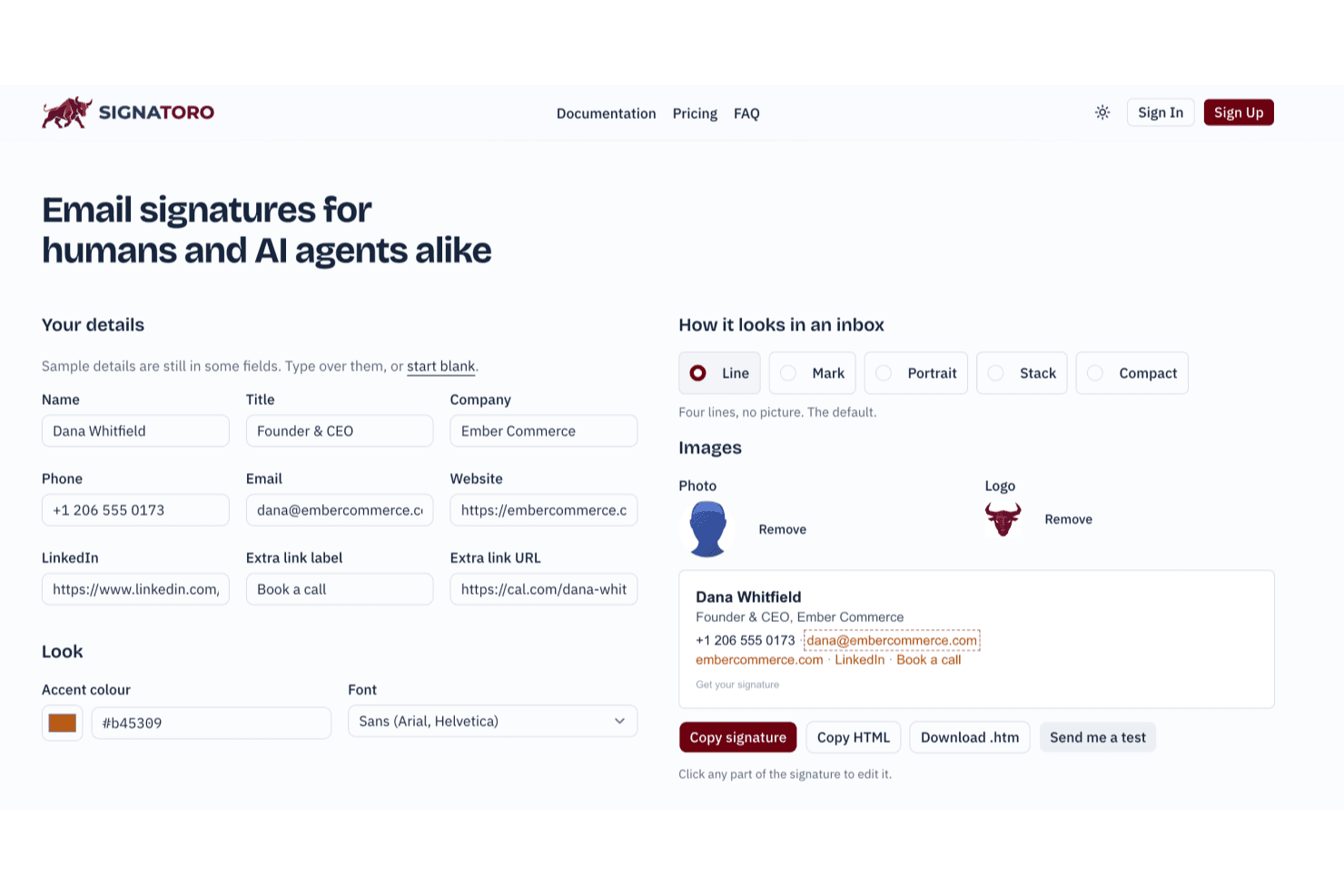
Signatoro lets users build and preview email signatures in real time. Signatoro is an email signature platform that lets individuals and small teams build, save, and deploy branded signatures across major mail apps, with native support for AI agents and automations fetching signatures via MCP and API.
Who Is Signatoro Best For?
Signatoro is a strong fit for small teams of 2–50 people who need branded signatures that AI agents and automations can fetch and use at send time.
Why I Picked Signatoro
I picked Signatoro as one of the best because it's the only tool in this category built with AI agents as a first-class use case. Via its MCP server, tools like Claude or ChatGPT can fetch a saved signature at send time as HTML or plain text, so every outbound message your agent sends carries the right branded signature automatically. Company owners also get dedicated AI agent slots (up to 25 on the largest plan), each with a configurable AI disclosure line baked in.
Signatoro Key Features
- Five signature layouts: Choose from Line, Mark, Portrait, Stack, and Compact layouts, each with font and accent color options.
- Review badge and booking button: Add a static Trustpilot, Google Reviews, or G2 badge alongside a Calendly or Cal.com booking button directly in your signature.
- Shared company branding controls: Company owners set the logo, layout, color, font, and review badge once, while each member keeps their own name, title, and photo.
- Compliance footnote with history: Add a legal or confidentiality footnote to all member signatures, with footnote-change history available on the largest team plan.
Signatoro Integrations
Signatoro offers a native Zoho Mail integration and supports MCP and API connections for AI assistants, including Claude and ChatGPT. Zapier is also listed among supported automation tools.
Pros and Cons
Pros:
- AI agents fetch signatures for outbound messages
- Consistent branding across teammates and devices
- Clean, polished signature layouts
Cons:
- Team updates require members to repaste signatures
- Limited layouts and styling choices
Learn more about Signatoro:

Bybrand offers quick, easy email signature management for small to medium businesses. Bybrand is an email signature management platform that lets you create, edit, and deploy professional signatures across your organization with centralized controls, template options, and integrations for popular email services.
Who Is Bybrand Best For?
Bybrand is a good fit for marketing and IT teams at small to mid-sized businesses that need to roll out consistent, branded email signatures across their organization.
Why I Picked Bybrand
Bybrand earns its spot on my shortlist because getting signatures deployed across a team genuinely takes minutes, not days. I like that you can start from one of 40+ pre-tested templates, fill in your details, and push the signature out to your whole team in a single session. The placeholder automation is what makes this fast at scale—you build one signature, add placeholders for names, titles, and contact details, then upload your employee list via CSV or a connected integration, and Bybrand populates everything at once. The bulk-send feature means I'm not manually updating each person's signature when something changes.
Bybrand Key Features
- Disclaimer editor: Add legally compliant disclaimer text to email signatures directly within the editor, keeping every outgoing message on the right side of compliance.
- Version history: Preview and restore any previous version of a signature within a 30-day window, so accidental edits can be undone.
- HTML editing mode: Edit signature code directly in HTML for precise customization beyond what the visual editor offers.
- Image hosting and asset storage: Store logos, icons, and images within Bybrand so linked assets stay live and consistent across all deployed signatures.
Bybrand Integrations
Bybrand offers native integrations with Google Workspace, Microsoft Outlook, Asana, Freshdesk, Zoho CRM, Google Sheets, Bitly, and Zoho Desk. An API is available for custom integrations.
Pros and Cons
Pros:
- Analytics for tracking effectiveness
- Efficient management tools
- Variety of templates
Cons:
- Basic customization options
- Limited advanced features
Learn more about Bybrand: Best for custom design options
- Free demo available
- From $54/month (billed annually)
Visit WebsiteCustomer Rating:4.6/5
Newoldstamp offers customizable email signature designs for branding-focused businesses. Newoldstamp is an email signature management platform that lets you create, customize, and centrally manage branded signatures with design tools, analytics, and marketing campaign features.
Who Is Newoldstamp Best For?
Newoldstamp is a good fit for marketing and IT teams at small to mid-sized businesses that need centralized control over company-wide email signatures.
Why I Picked Newoldstamp
I included Newoldstamp for the design control it offers without requiring coding or design skills. I particularly like the advanced template customization options—you can adjust fonts, colors, social icons, field order, and even fine-tune uploaded images by cropping, reshaping, or resizing them directly in the editor. The live preview lets you see every change in real time before deploying anything. For teams that need department-level signature layouts, Newoldstamp lets you build and manage distinct designs for each division.
Newoldstamp Key Features
- Master signature template: Design one master template and automatically apply it company-wide.
- Signature auto-update: Push changes to signature design, logos, and banners across the entire organization without requiring employees to reinstall anything.
- Banner campaign scheduling: Add promotional banners to employee signatures and schedule them for different segments to run targeted marketing campaigns.
- Campaign analytics: Track banner impressions, link clicks, and CTA performance in real time across departments.
Newoldstamp Integrations
Newoldstamp offers native integrations with Google Workspace (Gmail), Microsoft 365 (Outlook), and Apple Mail. An API is available for custom integrations.
Pros and Cons
Pros:
- Enhances brand identity
- Drag-and-drop editor
- Wide range of templates
Cons:
- May require frequent updates
- Limited advanced analytics
Learn more about Newoldstamp: Best for real-time analytics
- 14-day free trial
- Pricing upon request
Visit WebsiteCustomer Rating:4.8/5
Signitic enhances email signatures with analytics for marketing teams. Signitic is an email signature management platform that lets you centrally create, deploy, and manage branded signatures, run banner campaigns, and access analytics across Google Workspace and Microsoft 365.
Who Is Signitic Best For?
Signitic is a good fit for marketing and IT teams at small to mid-sized companies that need centralized control over employee email signatures across Google Workspace or Microsoft 365.
Why I Picked Signitic
Signitic earns its spot on my shortlist because of how well its real-time analytics tie directly into campaign management. I can track impressions, clicks, and interactions on each signature banner as they happen, which means I'm not waiting until a campaign ends to know whether a webinar promotion or product launch is landing. I also like that Signitic's A/B testing lets me run multiple banner versions simultaneously, so I can act on live performance data rather than guessing after the fact. The combination of real-time stats and campaign scheduling in one dashboard makes it genuinely useful for marketing teams running time-sensitive campaigns through email.
Signitic Key Features
- Drag-and-drop signature editor: Build and customize signatures by adding logos, banners, social network links, and CTAs without any coding.
- Management by team or entity: Assign different signature templates to specific departments, subsidiaries, or employee groups and apply rules per entity.
- Personalized targeting: Distribute banner campaigns by team, job function, or domain name to control which employees carry which message.
- Digital business cards (vCards): Create dynamic, always-up-to-date digital business cards that employees can share via QR code.
Signitic Integrations
Signitic offers native integrations with Google Workspace and Microsoft 365. An API is available for custom integrations.
Pros and Cons
Pros:
- Customizable promotional banners
- Detailed analytics reports
- Real-time engagement tracking
Cons:
- Data-heavy analytics dashboard
- Integration setup can be tricky
Learn more about Signitic:

Rocketseed streamlines email signature management for marketing teams. Rocketseed is an email signature management platform that lets you centrally control branded signatures, add marketing banners, and track engagement across Microsoft 365 and Google Workspace.
Who Is Rocketseed Best For?
Rocketseed is a strong fit for mid-size to enterprise businesses that need IT or marketing teams to manage email signatures centrally across large employee groups.
Why I Picked Rocketseed
Rocketseed earns a spot on my shortlist because it offers marketing teams far more than a standard signature. I love that you can run multiple live banner campaigns in rotation directly within employee email signatures—so if my team is promoting a product launch and a webinar, both can run at the same time. The advanced segmentation and recipient targeting rules let me assign specific banners based on sender role or recipient domain, so a sales rep's emails can carry a different campaign message than those from customer support. Additionally, campaign retargeting re-serves banners to recipients based on their previous click behavior, which helps nurture warm leads without extra effort.
Rocketseed Key Features
- Tamper-proof signature templates: Employees can't edit or override centrally managed signature designs, keeping every email on-brand.
- Active Directory sender data sync: Rocketseed pulls employee details directly from Active Directory to auto-populate signature fields across your organization.
- Real-time click alerts: Set click-throughs on signature banners to trigger instant email notifications to senders or campaign managers for immediate follow-up.
- Personalized email disclaimers: Add dynamically personalized, auto-date-stamped legal disclaimers to every signature for compliance and audit purposes.
Rocketseed Integrations
Rocketseed offers native integrations with Microsoft 365 and Google Workspace. An API is available for custom integrations.
Pros and Cons
Pros:
- Centralized management
- Real-time analytics
- Dynamic banner campaigns
Cons:
- Dependent on email platforms
- Limited to marketing use
Learn more about Rocketseed: Best for freelancers and small teams
- Free demo available
- From $6/user/month (billed annually)
Visit WebsiteCustomer Rating:4.4/5
MySignature simplifies email signature management for freelancers and small teams. MySignature is an email signature software platform that lets you create, customize, and manage professional signatures with templates, branding tools, and analytics for use across major email clients.
Who Is MySignature Best For?
MySignature is a good fit for freelancers and small teams who need a straightforward way to create and manage professional email signatures without a steep learning curve.
Why I Picked MySignature
I picked MySignature as one of the best because it's genuinely built with freelancers and small teams in mind. For freelancers specifically, I like that you can add a portfolio link, appointment scheduler URL, and social profile links directly into your signature—so every email you send doubles as a lightweight personal brand touchpoint. The email tracking feature is also a practical touch: I've used it to confirm whether a client actually opened an invoice before following up. For small teams, the one-click signature deployment lets you push a unified design to everyone at once, so you're not chasing teammates to manually update their signatures.
MySignature Key Features
- AI-powered signature enhancement: Open the signature editor and click "Enhance with AI" to get optimized layout and color suggestions for your signature design.
- Clickable CTA buttons and banners: Add interactive call-to-action buttons and promotional banners directly to your signature to link to landing pages, events, or offers.
- Digital business card with QR code: Create a digital business card, store it on iOS or Android, and share your contact details via QR code for in-person or virtual networking.
- Signature analytics dashboard: Track daily and monthly click performance across all links, banners, images, and buttons in your signature from a central dashboard.
MySignature Integrations
MySignature integrates with Gmail, Outlook, Apple Mail, Office 365, and Thunderbird.
Pros and Cons
Pros:
- Customizable templates
- Centralized signature management
- Simple drag-and-drop designer
Cons:
- Basic design features
Learn more about MySignature: Best for large-scale deployments
- 14-day free trial
- From $0.82/user/month (billed annually)

Exclaimer centralizes email signature management for large organizations. Exclaimer is an email signature management platform that lets you centrally design, control, and deploy branded signatures across Microsoft 365 and Google Workspace environments.
Who Is Exclaimer Best For?
Exclaimer is a strong fit for IT and marketing teams at mid-size to enterprise organizations that need centralized control over email signatures across large user bases.
Why I Picked Exclaimer
I picked Exclaimer as one of the best because it's genuinely built to handle signature management at scale in a way most tools aren't. The feature I keep coming back to is directory synchronization—Exclaimer pulls user data directly from Azure Active Directory or Google Directory and populates it into signatures in real time. That means when someone changes their title or department, every future email reflects it automatically, with no manual updates. I also like the advanced signature rules, which let my team assign different templates by department, region, seniority level, or business unit. For a global org managing multiple sub-brands or going through a merger, that kind of precision targeting is hard to replicate.
Exclaimer Key Features
- Drag-and-drop designer: Build and customize signature templates visually without writing any HTML code.
- Campaign scheduling: Schedule targeted banner campaigns within signatures, with personalized messaging timed to specific audiences.
- Role-based access controls (RBAC): Assign granular admin permissions so marketing or HR teams can manage their own signature designs without IT involvement.
- Analytics dashboard: Track email signature performance, including click-through data, directly within the platform.
Exclaimer Integrations
Exclaimer offers native integrations with Microsoft 365, Google Workspace, and Azure Active Directory. An API is available for custom integrations.
Pros and Cons
Pros:
- Advanced policy rules
- Centralized deployment system
- Extensive customization options
Cons:
- Limited offline functionality
- Can be complex to set up
Learn more about Exclaimer:

CodeTwo ensures compliant email signature management for large organizations. CodeTwo is an email signature management platform for Microsoft 365 and Exchange that lets you centrally design, deploy, and automate signatures with advanced compliance and rule-based controls.
Who Is CodeTwo Best For?
CodeTwo is a strong fit for IT administrators and compliance teams at mid-size to enterprise organizations running Microsoft 365 or Exchange environments.
Why I Picked CodeTwo
CodeTwo earns its spot on my shortlist because it's the only email signature solution that's been certified directly by Microsoft—meaning its cloud infrastructure is periodically pen-tested by Microsoft's own security specialists. That's a level of third-party validation I haven't seen from any other signature vendor. CodeTwo is also certified to ISO/IEC 27001 and ISO/IEC 27018, which means it meets internationally recognized standards for information security and personal data protection in the cloud. I also like that it automates legally required disclaimers across every outgoing email, helping organizations stay compliant with regulations like GDPR, HIPAA, and CASL without relying on individual users to do it themselves.
CodeTwo Key Features
- Rule-based signature assignment: Automatically apply different signatures based on sender, recipient, department, job title, or keywords in the email subject or body.
- Microsoft Entra ID sync: Pull user contact details and photos directly from Entra ID (Azure Active Directory), with attributes refreshed every 20 minutes to keep signatures current.
- Sent Items update: Display cloud-added signatures in users' Sent Items folders across all devices, supporting data retention and audit requirements.
- Email marketing scheduler: Plan and automate time-based email signature campaigns, with URL tagging to track results in web analytics platforms like Google Analytics.
CodeTwo Integrations
CodeTwo has native integrations across the Microsoft ecosystem, including Microsoft 365, Exchange, and Azure. An API is available for custom integrations.
Pros and Cons
Pros:
- Advanced rule settings
- Versatile signature templates
- Compliance-focused features
Cons:
- Requires IT expertise
- Complex setup process
Learn more about CodeTwo:
Outro software de assinaturas de e-mail
Eis algumas opções adicionais de software de assinaturas de e-mail que não integraram a minha lista restrita, mas que ainda assim vale a pena conhecer:
- 11TemplafyBest for brand consistency
- 12LetsignitBest for easy user management
- 13XinkBest for small to medium businesses
- 14CrosswareBest for Exchange Server users
- 15SigsyncBest for Office 365 integration
- 16OpensenseBest for targeted email marketing
- 17HoneyBookBest for creative professionals and agencies
- 18WiseStampBest for enterprise organizations
How I Evaluate Email Signature Software
I split my evaluation into two layers: the baseline any tool must clear—like server-side deployment and email client support—and differentiators like campaign analytics and CRM sync.
Core Functionality (Table Stakes For This List)
When I'm selecting tools for my list, I rank each one on a scale from 0 (does not offer the functionality) to 5 (excels in this area) for each core functionality listed below. Then, I calculate the tool's total score into a percentage. Each tool needs to achieve a minimum total score of 65% to be considered for inclusion.
- Centralized Signature Management: I check whether admins can push signature updates to every user from a single console, so teams aren't chasing people to paste in new HTML.
- Email Client Integration: The tool should work across Microsoft 365, Google Workspace, and Exchange, since most organizations run at least two of these.
- Brand & Template Control: I look for locked templates with field mapping to directory attributes like name, title, and department to keep every signature on-brand.
- Marketing Banner Campaigns: Scheduling and rotating promotional banners within signatures matters here, whether you're promoting a webinar, a product launch, or a seasonal offer.
- Analytics & Click Tracking: Reporting on banner impressions and click-through rates tells you whether your signature campaigns actually drive engagement or just take up space.
- User Segmentation & Targeting: I evaluate how each tool assigns different signatures or campaigns to specific groups, such as giving your sales team one banner and your support team another.
Once I have a list of tools that meet the criteria, I consider what sets each platform apart.
Differentiating Factors (What Sets Vendors Apart)
Here's how I compare and contrast different vendors:
Standout Features
CRM and MAP sync is a big differentiator for me. I want to see signature-driven clicks flow into platforms like Salesforce or HubSpot so marketing can attribute pipeline to a specific banner campaign. ABM capabilities also matter—tools that let you serve tailored banners to target accounts rather than blasting the same promo to every recipient give demand gen teams a real edge. I also check for embedded scheduling links, which turn every outbound email into a booking opportunity with click data tied back to campaign reporting.
Beyond Features
Deployment model matters more than most buyers expect. Server-side injection ensures signatures render consistently across desktop, webmail, and mobile—client-side tools often break on phones. I also evaluate compliance posture, especially GDPR readiness and SOC 2 certification, since signature data touches every outbound email your organization sends. Implementation speed is another factor I weigh. Marketing teams rolling out a campaign for a product launch can't wait weeks for directory sync setup, so I look at how quickly Azure AD or Google Directory integrations go live.
Como escolher um software de assinaturas de e-mail
É fácil ficar atolado em listas extensas de funcionalidades e estruturas de preços complexas. Para o ajudar a manter o foco enquanto analisa o seu processo específico de seleção de software, apresentamos uma lista de fatores a ter em conta:
| Fator | O que considerar |
| Escalabilidade | Escolha um software que acompanhe perfeitamente o crescimento da sua equipa, suportando mais utilizadores sem comprometer o desempenho. |
| Integrações | Verifique se o software se integra com a sua plataforma de e-mail atual e com as outras ferramentas que utiliza diariamente. |
| Facilidade de utilização | Procure uma interface intuitiva que permita uma implementação rápida sem exigir formação extensa para a sua equipa. |
| Orçamento | Compare os planos de preços para encontrar um que esteja de acordo com as suas limitações financeiras. Isto inclui o custo total, taxas ocultas, etc. |
| Medidas de segurança | Dê prioridade a software que proteja informações sensíveis da empresa e cumpra os regulamentos relativos aos dados. |
| Suporte | Avalie as opções de apoio ao cliente disponibilizadas pelo software. Oferecem serviços 24 horas por dia, 7 dias por semana, ou são difíceis de contactar? |
| Análises | Considere ferramentas que forneçam informações sobre o desempenho das assinaturas, como as taxas de cliques, para medir a eficácia. |
Tendências no software de assinaturas de e-mail
Durante a minha pesquisa, consultei inúmeras atualizações de produtos, comunicados de imprensa e registos de versões de diferentes fornecedores de software de assinaturas de e-mail. Eis algumas das tendências emergentes que estou a acompanhar:
- Personalização de Conteúdo Dinâmico: Cada vez mais fornecedores oferecem conteúdo dinâmico que muda com base no perfil do destinatário. Esta tendência ajuda as empresas a proporcionar um toque mais personalizado nas suas comunicações. Por exemplo, as assinaturas podem agora incluir mensagens de marketing direcionadas, chamadas para ação ou ofertas especiais.
- Análise e Relatórios Melhorados: As ferramentas de assinaturas de e-mail disponibilizam cada vez mais análises detalhadas sobre o envolvimento e o desempenho. Esta tendência permite às empresas acompanhar quais os elementos da sua assinatura que geram mais interação.
- Integração com Sistemas CRM: Alguns fornecedores estão a apostar numa integração harmoniosa com sistemas CRM. Esta tendência é útil para alinhar os esforços de marketing com os dados de vendas, proporcionando às equipas uma visão abrangente das interações com os clientes.
- Funcionalidades de Segurança Avançadas: À medida que a privacidade dos dados se torna cada vez mais imperativa para as organizações, as ferramentas de assinaturas de e-mail estão a incorporar medidas de segurança avançadas. Estas funcionalidades garantem que as assinaturas cumprem regulamentos como o RGPD e protegem informações sensíveis.
- Design de Assinaturas com Inteligência Artificial: A inteligência artificial está a ser utilizada para sugerir designs de assinaturas com base nas diretrizes da marca e nas preferências dos utilizadores. Esta tendência está a ajudar os utilizadores a criar rapidamente assinaturas com um aspeto profissional.
O Que É o Software de Assinaturas de E-mail?
O software de assinaturas de e-mail é uma ferramenta que ajuda as empresas a criar e gerir assinaturas de e-mail profissionais em toda a organização. As equipas de marketing, os administradores de TI e os profissionais de vendas utilizam geralmente estas ferramentas para garantir uma marca e uma comunicação consistentes.
Funcionalidades essenciais, como a personalização de conteúdo dinâmico, a análise melhorada e a integração com sistemas CRM, ajudam na personalização, no acompanhamento do desempenho e no alinhamento dos esforços de marketing. De um modo geral, estas ferramentas permitem às empresas manter uma imagem de marca consistente e profissional em todas as mensagens de e-mail que enviam.
Funcionalidades do Software de Assinaturas de E-mail
Ao selecionar um software de assinaturas de e-mail, procure as seguintes funcionalidades essenciais:
- Personalização de Conteúdo Dinâmico: Permite alterar as assinaturas com base nos perfis dos destinatários, acrescentando um toque personalizado aos e-mails.
- Gestão Centralizada: Fornece uma plataforma única para atualizar e gerir todas as assinaturas de e-mail numa organização.
- Personalização de Modelos: Disponibiliza uma variedade de modelos de assinaturas de e-mail que podem ser adaptados para corresponder ao estilo único da marca.
- Análise e Relatórios: Acompanha métricas de envolvimento, como as taxas de cliques, para ajudar a medir a eficácia das assinaturas de e-mail.
- Integração com Sistemas CRM: Sincroniza-se com plataformas CRM para alinhar as comunicações por e-mail com os esforços de vendas e marketing.
- Funcionalidades de Segurança Avançadas: Garante a conformidade com os regulamentos relativos aos dados e protege informações sensíveis nas assinaturas de e-mail.
- Sugestões de Design com Inteligência Artificial: Utiliza inteligência artificial para recomendar designs de assinaturas alinhados com as diretrizes da marca e as preferências dos utilizadores.
- Atualizações em Tempo Real: Aplica instantaneamente as alterações a todas as assinaturas, garantindo a consistência em todas as comunicações.
- Assinaturas Baseadas em Regras: Permite utilizar assinaturas diferentes para vários departamentos ou funções dentro da organização.
- Ferramentas de Integração e Suporte: Inclui vídeos de formação, visitas guiadas ao produto e opções de suporte para facilitar a transição e a utilização do software.
Benefícios do Software de Assinaturas de E-mail
A implementação de um software de assinaturas de e-mail proporciona vários benefícios à sua equipa e à sua empresa. Eis alguns dos benefícios que pode esperar:
- Marca Consistente: Garante que todos os e-mails refletem a identidade da sua marca através de assinaturas de e-mail uniformes em toda a empresa.
- Maior Alcance de Marketing: Utiliza conteúdo dinâmico e assinaturas personalizadas para melhorar o envolvimento e alcançar mais pessoas de forma eficaz.
- Conformidade de Segurança Reforçada: Integra funcionalidades de segurança avançadas para proteger dados sensíveis e cumprir os regulamentos.
- Gestão com Poupança de Tempo: Centraliza o controlo, permitindo atualizar e implementar rapidamente as assinaturas sem intervenção manual.
- Maior Eficiência: Disponibiliza sugestões de design baseadas em inteligência artificial e modelos personalizáveis para acelerar o processo de criação de assinaturas.
- Informações Acionáveis: Fornece análises e relatórios para acompanhar o desempenho do gerador de assinaturas de e-mail e tomar decisões de marketing fundamentadas.
- Melhor Alinhamento com as Vendas: Integra-se com sistemas CRM para garantir que as comunicações por e-mail estão sincronizadas com as estratégias de vendas e marketing.
Custos e Preços do Software de Assinaturas de E-mail
Ao selecionar um software de assinatura de e-mail, é necessário compreender os vários modelos de preços e planos disponíveis. Os custos variam consoante as funcionalidades, o tamanho da equipa, os complementos e outros fatores. A tabela abaixo resume os planos mais comuns, os respetivos preços médios e as funcionalidades normalmente incluídas nas soluções de software de assinatura de e-mail:
Tabela de comparação de planos de software de assinatura de e-mail
| Tipo de plano | Preço médio | Funcionalidades comuns |
| Plano gratuito | $0 | Modelos básicos, personalização limitada e suporte básico. |
| Plano pessoal | $5-$15/utilizador/mês | Modelos personalizáveis, análises e integração com plataformas de e-mail. |
| Plano empresarial | $15-$30/utilizador/mês | Gestão centralizada, conteúdo dinâmico e funcionalidades de segurança avançadas. |
| Plano empresarial avançado | $30-$50/utilizador/mês | Análises avançadas, integração com CRM, assinaturas baseadas em regras e suporte prioritário. |
Perguntas frequentes sobre software de assinatura de e-mail
Eis algumas respostas a perguntas comuns sobre software de assinatura de e-mail:
Quais são as limitações das assinaturas de e-mail?
As limitações das assinaturas de e-mail estão frequentemente relacionadas com restrições de tamanho e conteúdo impostas pelos clientes de e-mail. Por exemplo, o Gmail permite um máximo de 10 000 caracteres e recomenda que as imagens tenham cerca de 80 píxeis de altura. Compreender estes limites ajuda a criar assinaturas que são apresentadas corretamente em diferentes plataformas.
O que é legalmente exigido numa assinatura de e-mail?
Os requisitos legais para assinaturas de e-mail personalizadas podem variar consoante a jurisdição, mas geralmente incluem o nome da empresa, o número de registo e a morada da sede social. A inclusão destes elementos garante a conformidade com os regulamentos empresariais e transmite uma imagem profissional aos destinatários.
O que não pode ser incluído numa assinatura de e-mail?
É preferível evitar a utilização de logótipos, ícones de redes sociais, banners de marketing ou elementos gráficos que possam não ser apresentados corretamente em todos os clientes de e-mail. Muitos clientes de e-mail armazenam estas imagens como anexos, o que pode tornar a comunicação desorganizada. Em vez disso, privilegie o texto e as hiperligações para manter a assinatura profissional simples e funcional. Utilize um software de testes de e-mail para garantir que os seus e-mails chegam à caixa de entrada da forma que imaginou.
O que deve ser evitado numa assinatura de e-mail?
Evite incluir informações de contacto desnecessárias, tipos de letra personalizados ou várias cores que possam fazer com que a assinatura pareça desorganizada. Sobrecarregar a assinatura com demasiada informação pode desviar a atenção da mensagem principal. Limite-se aos dados de contacto essenciais e mantenha um aspeto simples e profissional.
Como pode o software de assinatura de e-mail melhorar a imagem de marca?
O software de assinatura de e-mail ajuda a manter uma imagem de marca consistente em todas as comunicações por e-mail, normalizando o formato da assinatura. Quando associado a um software de marketing por e-mail de marca branca, permite incluir cores, tipos de letra e logótipos específicos da marca, garantindo que todos os e-mails empresariais estão alinhados com a imagem e a mensagem da sua empresa.
Como garantir que as assinaturas de e-mail são compatíveis com dispositivos móveis?
Para garantir que as assinaturas de e-mail são compatíveis com dispositivos móveis, mantenha o design simples e responsivo. Utilize imagens escaláveis e evite layouts largos que possam não ser apresentados corretamente em ecrãs mais pequenos. Testar a assinatura em vários dispositivos pode ajudar a garantir que tem um bom aspeto em qualquer situação.