

O software de envio de emails em massa ajuda as equipas de marketing a alcançar grandes públicos de forma eficiente, quer esteja a enviar newsletters, atualizações de produtos ou anúncios para clientes. Enquanto responsável de marketing, testei e analisei as principais plataformas para o ajudar a encontrar ferramentas que poupem tempo, promovam a capacidade de entrega e se integrem facilmente no seu fluxo de trabalho atual.
Neste guia, partilharei as minhas principais escolhas, com base nas funcionalidades, na facilidade de utilização e no valor global, para que possa escolher a solução certa para a sua equipa e os seus objetivos.
Porque pode confiar nas nossas recomendações de software
6,700+
Reviews
20
Industry experts
16+
Evaluation factors
14
Years reviewing software
A nossa equipa testa e analisa software desde 2012. Como líderes de marketing, sabemos o quão difícil — e importante — é escolher o software certo.
Para este guia, avaliámos as ferramentas através de testes práticos e pesquisa independente, pontuando-as de acordo com os nossos critérios de seleção.
As nossas análises refletem o juízo da nossa equipa editorial, e não um discurso de vendas.
Revisores especialistas:
 Gui DrusinaCreative Director
- Shriya GhateSenior Marketing Lead
 Amanda JacquesMarketing Ops Leader

Tabela comparativa de software de envio de emails em massa
Utilize a tabela abaixo para comparar os detalhes de preços das minhas principais escolhas de software de envio de emails em massa.
Sorted by: Default
| Tool | Starting Price | Website | |
|---|---|---|---|
Best for creative layout options | 4.5 out of 5 | $13/month Free plan + 14-day free trial + demo available | Website |
Best for B2B cold outreach at scale | 4.5 out of 5 | $49/user/month Free plan + 14-day trial + demo available | Book Demo |
Best for ecommerce email and SMS campaigns | 4.6 out of 5 | $11.20/month Free plan + free demo available | Website |
Best for visual storytelling in emails | 4.7 out of 5 | $38month Free plan + free trial available | Website |
Best for personalized email campaigns | 4.6 out of 5 | $25/month Free plan + 30-day free trial + free demo available | Website |
Best feature-rich free plan | 4.6 out of 5 | $9/month Free plan + 14-day trial + demo available | Website |
Best for automation and personalization | 4.2 out of 5 | $100/month Free plan + 14-day trial + demo available | Website |
Best for drag-and-drop editing | 4.7 out of 5 | $12/month Free plan + 14-day free trial available | Website |
Best for user privacy | 4.3 out of 5 | $4/month 14-day free trial + free plan + free demo available | Website |
Best for multilingual campaigns | 4.3 out of 5 | $12/month Free plan available | Website |


Análise do melhor software de envio de emails em massa
Apresentamos abaixo os meus resumos detalhados do melhor software de envio de emails em massa que integrou a minha seleção. As minhas análises oferecem uma visão detalhada das principais funcionalidades, vantagens e desvantagens, integrações e casos de utilização ideais de cada ferramenta, para o ajudar a encontrar a melhor opção para si.
 Best for creative layout options
- Free plan + 14-day free trial + demo available
- From $13/month
Customer Rating:4.5/5
Mailchimp helps teams automate, send, and track large email campaigns. Mailchimp is a mass email sender software designed to help businesses create, send, and optimize large-scale email campaigns. It enables teams to manage subscriber lists, automate email flows, and track campaign performance from one unified platform.
Why I picked Mailchimp: You get a flexible layout editor that gives your team control over the look and feel of each message. The drag-and-drop builder includes content blocks, layout presets, and style tools. It also supports dynamic content and product recommendations. You can customize designs for different customer groups without needing design skills.
Standout features & integrations:
Features include basic automation for sending welcome emails or re-engagement messages. You can also run A/B tests to compare email content. The platform tracks open rates, clicks, and other metrics so your team can improve each campaign.
Integrations include Shopify, Canva, Squarespace, Salesforce, Eventbrite, Stripe, QuickBooks, WooCommerce, WordPress, and Zendesk
Pros and Cons
Pros:
- Can preview emails across device types
- Can build landing pages in the editor
- Clean layout tools with custom blocks
Cons:
- Design features vary by plan level
- Takes time to learn email logic rules
Learn more about Mailchimp : Best for B2B cold outreach at scale
- Free plan + 14-day trial + demo available
- From $49/user/month (billed annually)
Customer Rating:4.5/5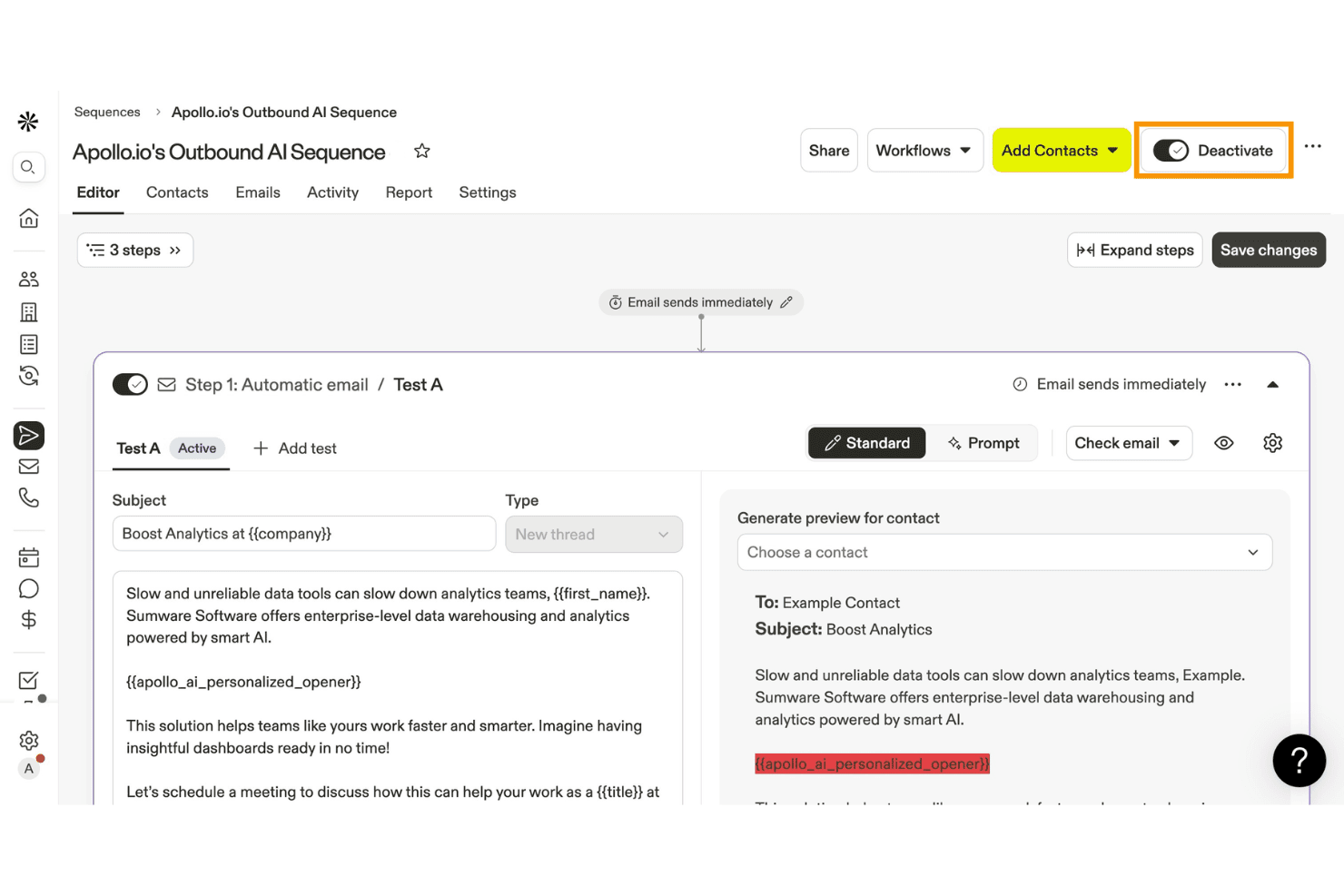
Apollo.io lets users build and automate outbound email sequences with AI. Apollo.io is a B2B sales engagement and intelligence platform that combines a 275M+ contact database with cold email sequencing, AI-powered personalization, and deliverability tooling.
Who Is Apollo.io Best For?
Apollo.io is built for B2B sales and demand generation teams that need to run cold outreach at scale, combining prospecting and sequencing in one platform.
Why I Picked Apollo.io
I picked Apollo.io as one of the best because it's purpose-built for B2B cold outreach at scale, combining a 275M+ contact database with AI Research that injects prospect-specific insights, like recent company news or LinkedIn activity, directly into email copy. I also love the conditional sequence logic, which lets me branch outreach paths based on whether a prospect opened, clicked, or ignored a previous step.
Apollo.io Key Features
- Contact database search: Access a 275M+ contact database with 65+ filter attributes to build and export targeted prospect lists directly within the platform.
- Bounce guard: A configurable monitoring feature that tracks bounce rates per sequence and automatically pauses sending when thresholds hit warning or critical levels.
- A/B testing on email steps: Test multiple email variants within a sequence step to identify which copy drives higher open and reply rates.
- CRM bi-directional sync: Native two-way sync with HubSpot, Salesforce, and Pipedrive keeps contact and sequence data aligned across your sales stack in real time.
Apollo.io Integrations
Apollo.io offers 50+ integrations, including HubSpot, Salesforce, Pipedrive, Gmail, Microsoft Outlook, SendGrid, and Mailgun. Organization plans include API access for custom integrations, and Apollo.io also supports Zapier.
Pros and Cons
Pros:
- Strong deliverability and sequence diagnostics tools
- AI-powered personalization for each recipient
- Huge B2B database for targeted outreach
Cons:
- No visual email builder or newsletter tools
- No true bulk send capability
Learn more about Apollo.io: Best for ecommerce email and SMS campaigns
- Free plan + free demo available
- From $11.20/month
Visit WebsiteCustomer Rating:4.6/5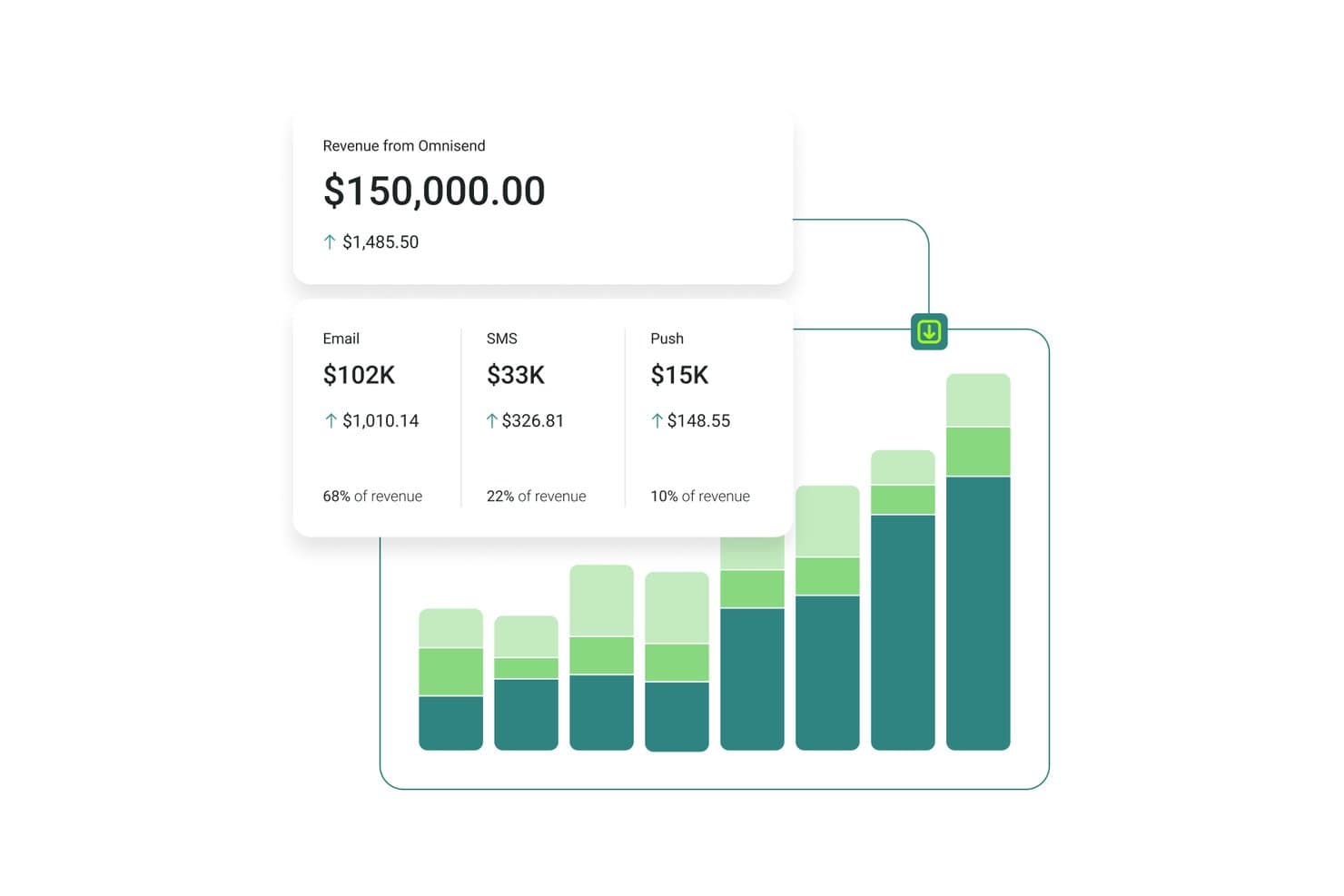
Omnisend tracks email, SMS, and push revenue in one dashboard. Omnisend is an email and SMS marketing platform built for ecommerce brands, combining bulk campaign sending, automation workflows, audience segmentation, and multichannel messaging across email, SMS, and web push.
Who Is Omnisend Best For?
Omnisend is a strong fit for ecommerce brands—especially Shopify, WooCommerce, and BigCommerce merchants—that want email, SMS, and push notifications managed in one place.
Why I Picked Omnisend
Omnisend earns its spot on my shortlist because it's the only platform here that syncs live product catalog data directly into emails, so I can drop real prices, images, and links into a campaign without ever leaving the builder. I also rely on its Customer Lifecycle Map to segment sends by stage, from first-time buyers to lapsed customers, without manually building filters every time. The Campaign Booster auto-resend to non-openers is a feature I use regularly to recover reach on big promotional sends.
Omnisend Key Features
- AI Segment Builder: Lets you describe a target audience in plain language and automatically generates the filters and segment for you.
- Campaign Booster: Automatically resends a campaign to contacts who didn't open the first send, with a new subject line.
- Conditional content blocks: Shows or hides specific email sections for individual recipients based on tags, purchase history, or signup source.
- A/B testing for automations: Tests subject lines, content, and send times within live automation workflows, not just one-off campaigns.
Omnisend Integrations
Omnisend offers 280+ tested integrations, including Shopify, WooCommerce, BigCommerce, Wix, Facebook Lead Ads, Google Ads, Canva, and Gorgias. It also supports API, webhooks, and Zapier connections for custom integrations.
Pros and Cons
Pros:
- Customer lifecycle mapping for dynamic segmentation
- Syncs live product data directly into emails
- Automates cart, browse, and post-purchase sequences
Cons:
- No native enterprise CRM integrations available
- Built primarily for ecommerce-focused businesses
Learn more about Omnisend: Best for visual storytelling in emails
- Free plan + free trial available
- From $38month (billed annually)
Visit WebsiteCustomer Rating:4.7/5
Flodesk enables visual storytelling with drag-and-drop email designs. Flodesk is a mass email sender software built for visual storytelling in emails. It caters to small businesses and creative entrepreneurs who value both aesthetics and functionality in their email marketing efforts. With its user-friendly design interface and unlimited email sending capabilities, Flodesk addresses the need for visually appealing communication without the complexity typically associated with email marketing tools.
Why I Picked Flodesk
I picked Flodesk for its unique ability to blend design flexibility with marketing functionality, particularly for those who prioritize visual storytelling in their email campaigns. The platform's drag-and-drop email builder allows users to create beautiful, responsive emails without any coding knowledge. Additionally, Flodesk's automation features enable users to set up workflows that nurture leads and engage subscribers based on their interactions, providing a seamless way to maintain customer relationships. With these features and unlimited emails, Flodesk helps businesses improve their email marketing.
Flodesk Key Features
In addition to its design and automation capabilities, Flodesk offers:
- Customizable Templates: Users can choose from a variety of templates and customize them to fit their brand's aesthetics.
- Form Building: Create and integrate forms directly into your website to capture leads seamlessly.
- Subscriber Management: Easily manage and segment your email list to target specific audiences effectively.
- Email Analytics: Gain insights into email performance with detailed analytics, helping you refine your strategy over time.
Flodesk Integrations
Integrations include HoneyBook, BookFunnel, Canva, Shopify, Squarespace, ThriveCart, Wix, and Manychat. These integrations enhance productivity and streamline marketing efforts, allowing users to connect Flodesk with various platforms for a comprehensive marketing approach.
Pros and Cons
Pros:
- Intuitive drag-and-drop editor simplifies email creation
- Customizable branding options with no coding required
- Strong support for small and creative business needs
Cons:
- Occasional slow loading times reported by users
- Few integration options beyond major platforms
Learn more about Flodesk: Best for personalized email campaigns
- Free plan + 30-day free trial + free demo available
- From $25/month
Visit WebsiteCustomer Rating:4.6/5
Klaviyo sends mass campaigns with personalized product content. Klaviyo supports businesses that want to send more relevant email campaigns using customer data. Built for companies of different sizes, it combines customer information with email marketing tools so you can create targeted campaigns based on real behavior. Whether your goal is to improve engagement or increase sales, Klaviyo helps unify and activate customer data in real time to guide your messaging decisions.
Why I Picked Klaviyo
I chose Klaviyo for its ability to use customer data to create personalized mass email campaigns. Its segmentation tools let you define specific customer groups based on behavior, purchase history, and engagement, so messages feel more relevant. The platform also supports automated flows and scheduled campaigns, making it easier to send timely emails without manual effort. Together, these features make Klaviyo a practical option for businesses that want more control over their mass email strategy.
Klaviyo Key Features
In addition to personalized email campaigns, Klaviyo offers:
- Omnichannel Marketing: Engage your audience across email, SMS, and social media for a cohesive customer experience.
- AI-Driven Insights: Utilize artificial intelligence to gain insights into customer behavior and optimize your email marketing strategies.
- Customizable Templates: Quickly create visually appealing emails with over 160 customizable templates and a drag-and-drop editor.
- Real-Time Data Integration: Seamlessly integrate with over 350 applications to unify and activate customer data across your marketing efforts.
Klaviyo Integrations
Integrations include Shopify, BigCommerce, WooCommerce, Magento, Salesforce Commerce Cloud, Stripe, Facebook, Instagram, Google Ads, and Zendesk.
Pros and Cons
Pros:
- Omnichannel marketing including SMS and social media
- Comprehensive automation features for personalized marketing
- Advanced segmentation for targeted email campaigns
Cons:
- Higher pricing structure may deter small businesses
- Higher pricing structure may deter small businesses
Learn more about Klaviyo: Best feature-rich free plan
- Free plan + 14-day trial + demo available
- From $9/month
Visit WebsiteCustomer Rating:4.6/5
Sender lets you build email templates to help with mass email sending. Sender helps your team send and automate large-scale email campaigns with tools for building newsletters, segmenting audiences, and managing SMS follow-ups that fit your outreach goals. You’ll find it useful if you’re running email efforts for a small business, ecommerce store, or growing audience and want control over automation and tracking without jumping between tools. engaging content while ensuring your messages reach their intended audience.
Why I Picked Sender
I picked Sender because its feature-rich free plan gives you real mass email sending tools for up to 2,500 subscribers and 15,000 emails/month. This includes automation, segmentation, and a drag-and-drop builder. You’ll find the automation workflows let you trigger sequences based on subscriber behavior and schedule follow-ups, helping you keep your audience engaged without juggling multiple tools. I also like that you can segment lists to tailor messages to different groups and mix in transactional emails as part of your campaigns. These capabilities make it a solid fit for teams focused on growing email outreach on a budget.
Sender Key Features
In addition to its main features, other notable features include:
- A/B Testing: This feature allows you to test different versions of your emails to see which performs better, helping you optimize your campaigns for better results.
- Analytics Dashboard: Track opens, clicks, and delivery metrics to measure engagement.
- Transactional Emails: Sender enables you to automate the sending of transactional emails, ensuring timely communication with your subscribers.
- Lead Capture Tools: The platform provides tools to capture leads directly from your website, helping you grow your email list effectively.
Sender Integrations
Integrations include WordPress, WooCommerce, and Zapier. An API is available for custom integrations.
Pros and Cons
Pros:
- Generous free plan supports up to 2,500 subscribers.
- User-friendly interface simplifies email campaign creation.
- Offers responsive templates for mobile-friendly emails.
Cons:
- Free plan includes Sender branding which may affect professionalism.
- Limited advanced features in comparison to competitors.
Learn more about Sender: Best for automation and personalization
- Free plan + 14-day trial + demo available
- From $100/month
Visit WebsiteCustomer Rating:4.2/5
Customer.io automates mass email workflows using event-based triggers and user data. When you want more control over your email marketing, Customer.io provides a platform built for sending targeted, automated messages based on customer behavior. It works well for teams that need to manage campaigns across growing user bases without relying on manual workflows. Using first-party data helps you send relevant messages to the right users at the right time.
Why I Picked Customer.io
I picked Customer.io because it makes it easier to run large email campaigns using automation and user-based targeting. The Visual Workflow Builder lets you set up email flows with drag-and-drop steps, so you can build multi-step campaigns without heavy technical setup. Event triggers enable teams to send messages based on real customer actions, helping them deliver timely, relevant emails that support ongoing customer communication.
Customer.io Key Features
In addition to its automation and personalization strengths, Customer.io offers:
- Omnichannel Support: Deliver a consistent customer experience across email, SMS, and in-app messaging.
- Design Studio: Collaboratively craft high-quality messages with a user-friendly editor.
- A/B Testing: Experiment with different content and messaging strategies to optimize engagement.
- Ad Audience Sync: Automatically update audience segments across major ad networks for cohesive marketing strategies.
Customer.io Integrations
Integrations include Salesforce, Google Analytics, Segment, Slack, Twilio, Stripe, Shopify, WordPress, Zendesk, and HubSpot.
Pros and Cons
Pros:
- Flexible visual workflow builder aids non-technical users
- Behavioral tracking provides insights into customer preferences
- Multichannel messaging supports email, SMS, and push notifications
Cons:
- Some users may find the platform's complexity overwhelming initially
- Reporting features are less comprehensive than competitors
Learn more about Customer.io: Best for drag-and-drop editing
- Free plan + 14-day free trial available
- From $12/month
Visit WebsiteCustomer Rating:4.7/5
MailerLite lets businesses design, automate, and track email campaigns. MailerLite is an email marketing tool built for businesses that want to create, send, and manage campaigns in one place. It supports teams by offering design tools, automation features, and performance tracking to help manage email communication and engagement.
Why I picked MailerLite: MailerLite gives your team a clean drag-and-drop editor that makes email creation simple, even if no one’s a designer. You can build campaigns from scratch or start with ready-made templates and tweak them to fit your brand. The editor includes blocks for images, buttons, videos, and countdowns, so your team can get creative without touching code. You can also reuse layouts across campaigns to keep things consistent.
Standout features & integrations:
Features include an automation builder that lets you set up custom workflows. You can run interest-based segmentation using click and open data. Surveys and quizzes can be added right inside your emails to collect feedback or qualify leads.
Integrations include Shopify, WordPress, Zapier, Stripe, WooCommerce, PayPal, Squarespace, Typeform, Facebook, and Google Sheets.
Pros and Cons
Pros:
- No-code email elements work well
- Allows reusable block layouts
- Fast setup for first-time users
Cons:
- Mobile previews lack full accuracy
- Automation editor can feel slow
 Best for user privacy
- 14-day free trial + free plan + free demo available
- From $4/month (billed annually)
Visit WebsiteCustomer Rating:4.3/5
Zoho Campaigns helps businesses run privacy-focused email campaigns. Zoho Campaigns is an email marketing tool designed for businesses looking to enhance their email outreach while prioritizing privacy. It's particularly useful for marketing teams aiming to manage campaigns effectively without relying on third-party tracking.
Why I picked Zoho Campaigns: Zoho Campaigns sets itself apart by focusing on user privacy, using its own tracking tools. Features include customizable email templates and automation workflows that help you create and manage campaigns efficiently. You can conduct A/B testing to optimize your emails and gain insights with detailed analytics. Its integration with e-commerce platforms like Shopify supports targeted marketing efforts.
Standout features & integrations:
Features include email send-time optimization, which ensures your messages are delivered at the best times, and domain authentication to improve deliverability. You can manage both email and SMS campaigns from a single interface, and use customizable templates to create engaging content.
Integrations include Zoho CRM, Shopify, WooCommerce, Eventbrite, SurveyMonkey, LinkedIn, Facebook, Twitter, Google Analytics, and Slack.
Pros and Cons
Pros:
- Effective A/B testing
- Comprehensive analytics
- Easy automation workflows
Cons:
- Occasional integration issues
- Basic design templates
Learn more about Zoho Campaigns:

Benchmark Email helps teams design, automate, and track branded emails. Benchmark Email is a marketing platform built to help teams create and send branded emails at scale. It supports businesses of all sizes looking to manage their email content and audience communications from one place. It offers tools for designing emails, automating follow-ups, and tracking engagement.
Why I picked Benchmark Email: Benchmark Email helps your team run campaigns in multiple languages without extra hassle. You can create emails in different languages using its editor, and choose templates that support special characters and right-to-left text. Language settings are easy to adjust in the account dashboard, and you can segment contacts by language. It also lets you preview emails in different languages before sending.
Standout features & integrations:
Features include email templates that you can drag and drop, making it fast to create branded campaigns. Your team can run A/B tests to compare subject lines or layouts. You also get real-time reports that show opens, clicks, and bounces.
Integrations include Shopify, Google Sheets, Zapier, WordPress, Facebook, Slack, Typeform, Eventbrite, PayPal, and Stripe.
Pros and Cons
Pros:
- Great for regional marketing teams
- Easy to toggle between language versions
- Translates templates with little setup
Cons:
- Fewer native CRM features
- Not ideal for transactional emails
Learn more about Benchmark Email:
Outro software de envio de emails em massa
Eis algumas opções adicionais de software de envio de emails em massa que não integraram a minha seleção, mas que vale a pena conhecer:
- 11SendGridBest for API-based email sending
- 12Elastic EmailBest for AI-powered email design
- 13Constant ContactBest for email and SMS combos
- 14CampaignerBest for advanced automation
- 15SMTP.comBest for high-volume enterprise deliverability
- 16BrevoBest for comprehensive engagement
- 17Vertical ResponseBest for small businesses
- 18Click DimensionsBest for Microsoft Dynamics integration
- 19GMassBest for Gmail integration
- 20EmailOctopusBest for email list growth
How I Evaluate Mass Email Sender Software
I look at two layers: the baseline table stakes—sending 100k contacts reliably, landing in inboxes, segmenting a list—and the differentiators that separate platforms worth recommending.
Core Functionality (Table Stakes For This List)
When I'm selecting tools for my list, I rank each one on a scale from 0 (does not offer the functionality) to 5 (excels in this area) for each core functionality listed below. Then, I calculate the tool's total score into a percentage. Each tool needs to achieve a minimum total score of 75% to be considered for inclusion.
- Bulk Email Sending: I check whether a platform can handle high-volume campaigns with send scheduling, time-zone delivery, and throttling to avoid provider blocks.
- Contact List Management: Importing a CSV of 50k subscribers should be painless. I look for custom fields, tagging, suppression lists, and dynamic list updates.
- Email Builder & Templates: I evaluate drag-and-drop editors for responsive design output, reusable content blocks, and template variety across industries.
- Deliverability Infrastructure: SPF, DKIM, and DMARC setup should be straightforward. Dedicated IP options and warm-up tools matter for teams sending at scale.
- Personalization & Segmentation: Merge tags are baseline. I look for conditional content blocks and behavioral segments like "opened last 3 campaigns."
- Campaign Analytics & Reporting: Every tool tracks opens and clicks. I evaluate whether dashboards surface bounce rates, deliverability trends, and A/B test results.
Once I have a list of tools that meet this criteria, I consider what sets each platform apart.
Differentiating Factors (What Sets Vendors Apart)
Here's how I compare and contrast different vendors:
Standout Features
Visual automation workflows separate basic senders from platforms that can run a full lifecycle program—welcome series, re-engagement flows, and post-purchase sequences triggered by real behavior. A/B testing is another factor I weigh. I look for tools that let you split-test subject lines, content, and send times within a single campaign. For e-commerce teams, revenue attribution tied to specific sends makes it much easier to prove ROI on every campaign.
Beyond Features
Pricing structure matters a lot here. Some platforms charge per subscriber while others bill by emails sent—a team with a large but low-frequency list pays very differently under each model. I also evaluate how well a tool connects to your existing stack, especially CRMs and e-commerce platforms where contact data lives. Compliance tooling is another differentiator I check. Built-in consent management, double opt-in flows, and unsubscribe handling should cover GDPR, CAN-SPAM, and CASL requirements without manual workarounds.
Como escolher software de envio de emails em massa
É fácil perder-se em listas extensas de funcionalidades e estruturas de preços complexas. Para o ajudar a manter o foco enquanto avalia o seu processo específico de seleção de software, apresentamos uma lista de verificação com os fatores a ter em conta:
| Fator | O que considerar |
| Escalabilidade | O software pode acompanhar o crescimento da sua empresa? Considere as necessidades futuras e se a ferramenta consegue lidar com volumes de emails superiores sem custos adicionais. |
| Integrações | Funciona com as suas ferramentas atuais? Verifique a compatibilidade com sistemas CRM, plataformas de análise e outras ferramentas de marketing que utiliza. |
| Personalização | Quão flexível é o software? Procure ferramentas que lhe permitam adaptar fluxos de trabalho e modelos à sua marca e estratégia de marketing. |
| Facilidade de utilização | A interface é intuitiva? Certifique-se de que a sua equipa consegue utilizá-la facilmente sem formação extensa nem uma curva de aprendizagem acentuada. |
| Implementação e integração inicial | Com que rapidez pode começar? Avalie a disponibilidade de tutoriais, apoio e recursos para ajudar a sua equipa a começar a utilizar o software de forma eficaz. |
| Custo | Os preços estão alinhados com o seu orçamento? Vá além do custo inicial e considere as despesas a longo prazo, incluindo atualizações e funcionalidades adicionais. |
| Medidas de segurança | Quão seguros estão os seus dados? Certifique-se de que o software cumpre os regulamentos e oferece encriptação e outras medidas de segurança para proteger as informações dos clientes. |
| Requisitos de conformidade | O software cumpre as normas do setor? Considere quaisquer necessidades específicas de conformidade, como o RGPD, e se a ferramenta consegue dar-lhes resposta. |
O que é o software de envio de emails em massa?
O software de envio de e-mails em massa é uma ferramenta que permite às empresas enviar grandes volumes de e-mails a clientes e potenciais clientes. Os profissionais de marketing e os proprietários de pequenas empresas utilizam normalmente estas ferramentas para interagir com os públicos e promover produtos ou serviços. As funcionalidades de automatização, segmentação e análise ajudam a definir o público-alvo, gerir campanhas e medir o sucesso. Estas ferramentas proporcionam valor ao melhorar a eficiência da comunicação e o envolvimento dos clientes.
Funcionalidades do software de envio de e-mails em massa
Ao selecionar um software de envio de e-mails em massa, tenha em atenção as seguintes funcionalidades essenciais:
- Automatização de e-mails: Automatiza o envio de mensagens em horários específicos, ajudando a manter uma comunicação consistente com o seu público.
- Segmentação: Permite dividir a sua lista de e-mails em grupos direcionados, melhorando o envolvimento através do envio de conteúdos relevantes.
- Análise e relatórios: Fornece informações sobre o desempenho dos e-mails, ajudando a acompanhar as taxas de abertura, os cliques e as conversões.
- Modelos personalizáveis: Disponibiliza modelos de e-mail pré-concebidos que pode adaptar à sua marca, poupando tempo no trabalho de design.
- Testes A/B: Permite testar diferentes versões de e-mails para verificar qual obtém melhores resultados, otimizando as suas campanhas.
- Gestão de listas: Ajuda a organizar e manter listas de subscritores, garantindo a exatidão dos dados e o cumprimento dos regulamentos.
- Capacidades de integração: Liga-se a outras ferramentas, como sistemas de CRM e plataformas de redes sociais, reforçando os seus esforços de marketing.
- Adaptação a dispositivos móveis: Garante que os e-mails são apresentados corretamente em todos os dispositivos, melhorando a experiência e o envolvimento dos utilizadores.
- Funcionalidades de segurança: Protege dados sensíveis através de encriptação e do cumprimento das normas do setor, salvaguardando as informações dos clientes.
- Atualizações em tempo real: Fornece acesso imediato aos dados das campanhas, permitindo tomar rapidamente decisões informadas.
Vantagens do software de envio de e-mails em massa
A implementação de um software de envio de e-mails em massa proporciona várias vantagens para a sua equipa e para a sua empresa. Eis algumas das vantagens que pode esperar:
- Maior envolvimento: Ao utilizar segmentação e personalização, envia conteúdos mais relevantes, o que resulta em taxas de abertura e de cliques mais elevadas.
- Eficiência de tempo: As funcionalidades de automatização permitem agendar e-mails e gerir campanhas sem intervenção manual, poupando tempo à sua equipa.
- Decisões baseadas em dados: As ferramentas de análise e de elaboração de relatórios oferecem informações sobre o desempenho das campanhas, ajudando-o a tomar decisões de marketing informadas.
- Imagem de marca consistente: Os modelos personalizáveis garantem que os seus e-mails correspondem à aparência e ao estilo da sua marca, mantendo a consistência em todas as comunicações.
- Maior alcance: A integração com plataformas de CRM e de redes sociais amplia os seus esforços de marketing, alcançando um público mais vasto.
- Poupança de custos: Ao direcionar e-mails eficazes para o público certo, maximiza o retorno do investimento do seu orçamento de marketing.
- Cumprimento regulamentar: As funcionalidades de gestão de listas e de segurança ajudam a manter a exatidão dos dados e a cumprir os regulamentos do setor.
Custos e preços do software de envio de e-mails em massa
A seleção de um software de envio de e-mails em massa exige uma compreensão dos vários modelos de preços e planos disponíveis. Os custos variam consoante as funcionalidades, a dimensão da equipa, os complementos e outros fatores. A tabela abaixo resume os planos comuns, os respetivos preços médios e as funcionalidades normalmente incluídas nas soluções de software de envio de e-mails em massa:
Tabela de comparação de planos de software de envio de e-mails em massa
| Tipo de plano | Preço médio | Funcionalidades comuns |
| Plano gratuito | $0 | Modelos de e-mail básicos, automatização limitada e análise básica. |
| Plano pessoal | $10-$30 /utilizador /mês | Modelos personalizáveis, segmentação básica e agendamento de e-mails. |
| Plano empresarial | $50-$100 /utilizador /mês | Automatização avançada, análise detalhada e capacidades de testes A/B. |
| Plano empresarial de grande dimensão | $150-$300 /utilizador /mês | Suporte dedicado, integrações avançadas e funcionalidades de segurança reforçadas. |
Perguntas frequentes sobre software para envio de e-mails em massa
Eis algumas respostas a perguntas comuns sobre software para envio de e-mails em massa:
Qual é a diferença entre e-mail em massa e e-mail enviado em grande escala?
E-mail em massa e e-mail enviado em grande escala são frequentemente utilizados como sinónimos, referindo-se ambos ao envio de uma única mensagem para muitos destinatários. O essencial é garantir que os seus e-mails são relevantes e personalizados para evitar que sejam marcados como spam. As ferramentas que disponibilizam funcionalidades de segmentação e personalização podem ajudar a melhorar a sua estratégia.
Quais são as novas regras da Google e do Yahoo para remetentes de e-mails em massa?
Desde fevereiro de 2024, a Google e o Yahoo aplicam diretrizes mais rigorosas aos remetentes de e-mails em massa, com foco na autenticação, nas taxas de spam e em opções simples de anulação da subscrição. Garanta a conformidade dos seus e-mails implementando uma autenticação adequada e disponibilizando um processo claro de anulação da subscrição. Isto ajuda a manter a capacidade de entrega e o envolvimento.
É legal enviar e-mails em massa?
Sim, o envio de e-mails em massa é legal, mas deve cumprir regulamentos como o CAN-SPAM nos EUA ou o RGPD na Europa. Estas leis exigem o consentimento claro dos destinatários, informações exatas sobre o remetente e opções simples para deixar de receber comunicações. Garantir a conformidade ajuda a proteger a reputação da sua marca e a evitar penalizações.
Como posso enviar e-mails em massa sem que vão parar à pasta de spam?
Para evitar as pastas de spam, concentre-se na higiene da lista, utilize processos de dupla confirmação e limpe regularmente a sua lista de e-mails. Personalize o seu conteúdo e evite linguagem associada a spam. Os protocolos de autenticação, como SPF, DKIM e DMARC, também ajudam a melhorar a capacidade de entrega e a criar confiança junto dos fornecedores de e-mail.
Com que frequência devo enviar e-mails em massa?
A frequência ideal depende do seu público e do conteúdo. O envolvimento regular é fundamental, mas o envio de demasiados e-mails pode levar a anulações de subscrições. Teste diferentes frequências para descobrir o que funciona melhor para o seu público, garantindo que cada e-mail oferece valor e está alinhado com os seus objetivos de marketing.