

As ferramentas de análise do YouTube dão-lhe uma visão clara dos dados do seu canal — acompanhando visualizações, interação, crescimento do público, tendências dos concorrentes e desempenho do conteúdo. Se está a tentar aumentar o seu público, aumentar o tempo de visualização ou simplesmente demonstrar o impacto do seu canal, a plataforma de análise certa pode fazer toda a diferença.
Com tantas opções disponíveis, perceber qual é a solução que realmente oferece informações úteis — e não apenas estatísticas superficiais — pode parecer complicado. Este guia irá ajudá-lo a comparar rapidamente as principais ferramentas de análise do YouTube disponíveis em 2026, para que possa escolher com confiança a opção mais adequada ao seu fluxo de trabalho e aos seus objetivos de crescimento.
Porque pode confiar nas nossas recomendações de software
6,700+
Reviews
20
Industry experts
16+
Evaluation factors
14
Years reviewing software
A nossa equipa testa e analisa software desde 2012. Como líderes de marketing, sabemos o quão difícil — e importante — é escolher o software certo.
Para este guia, avaliámos as ferramentas através de testes práticos e pesquisa independente, pontuando-as de acordo com os nossos critérios de seleção.
As nossas análises refletem o juízo da nossa equipa editorial, e não um discurso de vendas.
Revisores especialistas:
 Gui DrusinaCreative Director
- Shriya GhateSenior Marketing Lead
 Amanda JacquesMarketing Ops Leader

Tabela comparativa das ferramentas de análise do YouTube
Esta tabela comparativa resume os detalhes de preços das minhas principais seleções de ferramentas de análise do YouTube:
Sorted by: Default
| Tool | Starting Price | Website | |
|---|---|---|---|
Best for automated competitor alerting | 4.6 out of 5 | $199/month 14-day free trial + free demo available | Website |
Best for agency-ready client reporting features | 4.4 out of 5 | Pricing upon request Free trial + free demo available | Website |
Best for unified social reporting across channels | 4.3 out of 5 | $99/user/month 30-day free trial + free demo available | Website |
Best for cross-platform video analytics | 4.3 out of 5 | Pricing upon request Not available | Website |
Best for centralized analytics and scheduling | 4.1 out of 5 | $99/month 14-day free trial | Website |
Best for in-depth audience authenticity analysis | 4.7 out of 5 | $299/month Free trial + free demo available | Website |
Best for multi-channel performance benchmarking | Not rated | $5.99/month Free plan available | Website |
Best for optimizing video SEO with A/B testing | Not rated | $12/month Free trial + free demo available | Website |
Best for AI-powered keyword and topic discovery | Not rated | $16.58/month Free plan available | Website |
Best for influencer campaign ROI tracking | Not rated | $1499/3 months Free trial + free demo available | Website |


Avaliações das melhores ferramentas de análise do YouTube
Seguem-se os meus resumos detalhados das melhores ferramentas de análise do YouTube que entraram na minha seleção. As minhas avaliações apresentam uma análise detalhada das funcionalidades, dos casos de utilização e das integrações de cada plataforma, para ajudá-lo a encontrar a melhor opção para si.
 Best for automated competitor alerting
- 14-day free trial + free demo available
- From $199/month (billed annually)
Visit WebsiteCustomer Rating:4.6/5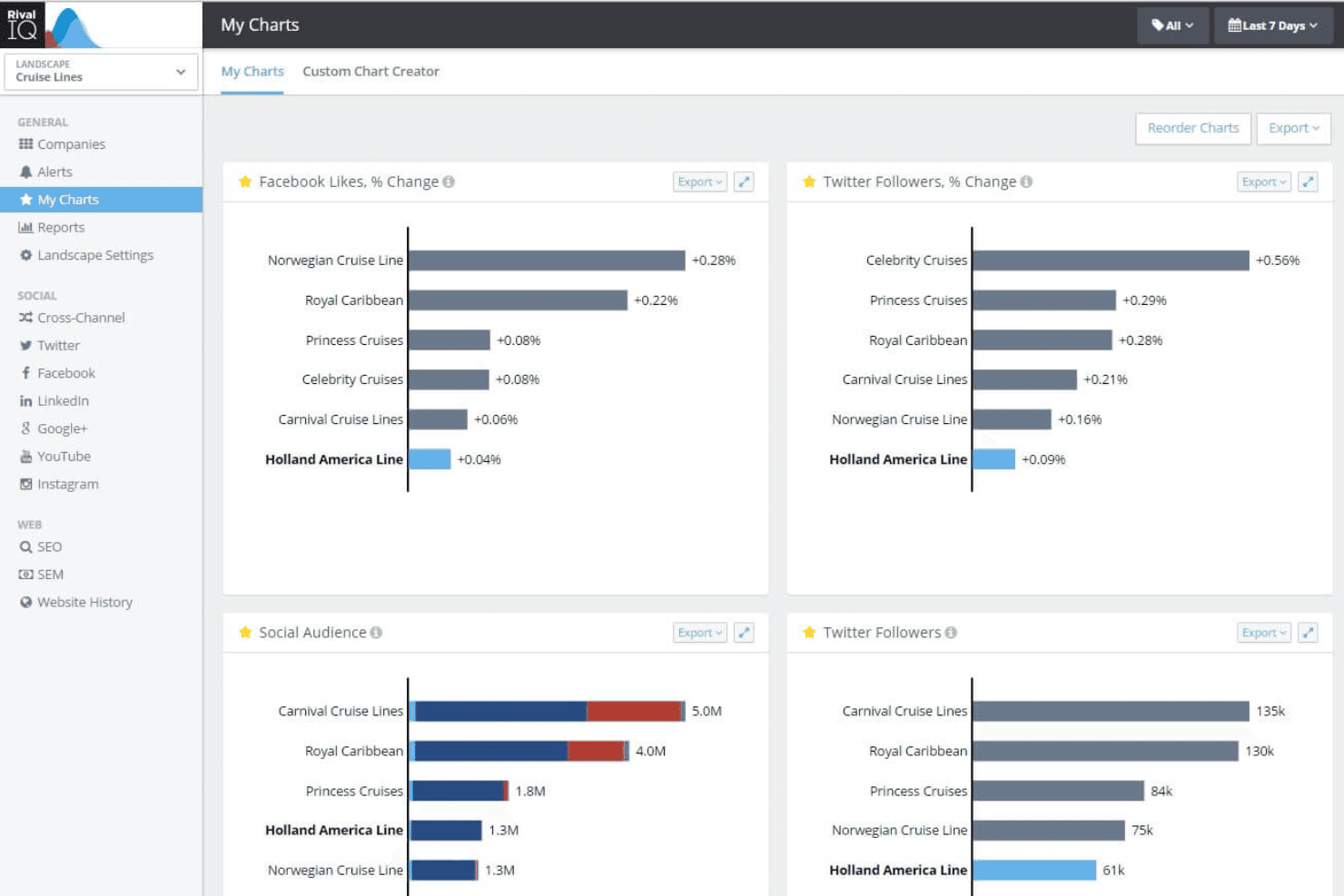
Rival IQ offers a competitive benchmarking dashboard comparing cruise line brands across Facebook likes, Twitter followers, and social audience metrics. Rival IQ is a competitive social media analytics platform that tracks YouTube channel performance, benchmarks it against competitors, and monitors content trends across engagement, views, and posting behavior.
Who Is Rival IQ Best For?
It's a strong fit for social media managers and marketing agencies that need to track competitor YouTube activity alongside other social channels.
Why I Picked Rival IQ
Rival IQ earns its spot on my shortlist because of how it handles automated competitor alerting. I get email and in-app notifications whenever a competitor's YouTube video spikes in engagement, letting me analyze what worked before it's old news. I also use Post Tagging to segment competitor content by theme or campaign type, which makes it easy to identify patterns across a full channel history rather than just one-off posts.
Rival IQ Key Features
- Landscape builder: Compare multiple YouTube channels side by side using customizable competitive sets for benchmarking.
- Custom post tagging: Organize and segment video content with personalized tags for easier filtering and analysis.
- Shareable dashboards: Create dashboards tailored to your reporting needs and export them in multiple formats for stakeholders.
- Cross-channel analytics: View unified analytics for YouTube alongside other social channels like Instagram, Facebook, and Twitter.
Rival IQ Integrations
Rival IQ offers native integrations with Google Data Studio and provides a Social Insights API for building custom integrations.
Pros and Cons
Pros:
- Multi-channel social analytics in one tool
- Customizable channel benchmarking landscapes
- Automated alerts for competitor video spikes
Cons:
- Lacks keyword rank tracking for YouTube
- No audience demographics or watch time data
Learn more about Rival IQ: Best for agency-ready client reporting features
- Free trial + free demo available
- Pricing upon request
Visit WebsiteCustomer Rating:4.4/5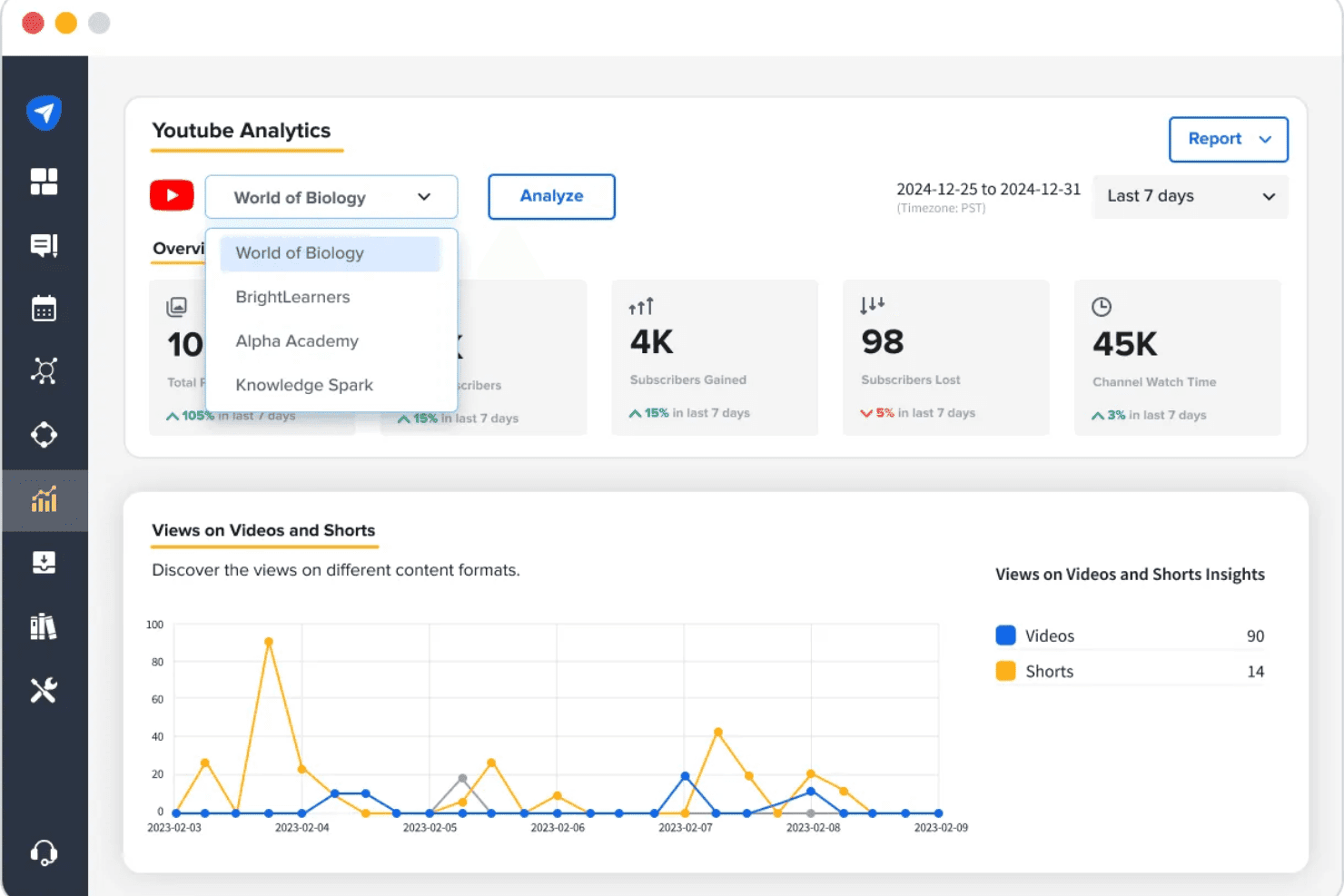
SocialPilot offers a YouTube Analytics dashboard that displays channel performance metrics including subscribers gained, lost, watch time, and views broken down by videos and shorts. SocialPilot is a multi-platform social media analytics and scheduling tool that tracks YouTube channel performance, audience demographics, competitor activity, and keyword data across multiple connected accounts.
Who Is SocialPilot Best For?
SocialPilot is a strong fit for marketing agencies managing YouTube analytics across multiple client accounts alongside other social channels.
Why I Picked SocialPilot
I've included SocialPilot in my top picks because its client reporting features are genuinely built for agency workflows. I can build white-labeled PDF reports pulling YouTube channel data across multiple client accounts, schedule automated delivery, and reuse templates so I'm not rebuilding the same report every month. The competitor reporting feature lets me show clients exactly how their channel stacks up against rivals on growth trends and posting cadence.
SocialPilot Key Features
- YouTube channel analytics: Tracks subscribers, watch time, audience breakdowns, and views by device and referral source.
- Cross-platform account management: Supports analytics for YouTube alongside TikTok, Instagram, Facebook, and more in one dashboard.
- Bulk post scheduling: Lets you schedule up to 500 YouTube and social posts at once via CSV upload.
- Competitor benchmarking: Provides competitor channel comparison with growth and post trend metrics.
SocialPilot Integrations
SocialPilot offers native integrations with YouTube, Facebook, Instagram, LinkedIn, X, TikTok, Pinterest, Google Business Profile, Canva, Slack, Dropbox, Google Drive, Box.com, and Zapier.
Pros and Cons
Pros:
- Cross-platform posting and analytics in one tool
- Competitor benchmarking across multiple channels
- White-label YouTube analytics reports for clients
Cons:
- Lacks in-depth keyword and SEO tracking
- No audience retention or drop-off heatmaps
Learn more about SocialPilot: Best for unified social reporting across channels
- 30-day free trial + free demo available
- From $99/user/month
Visit WebsiteCustomer Rating:4.3/5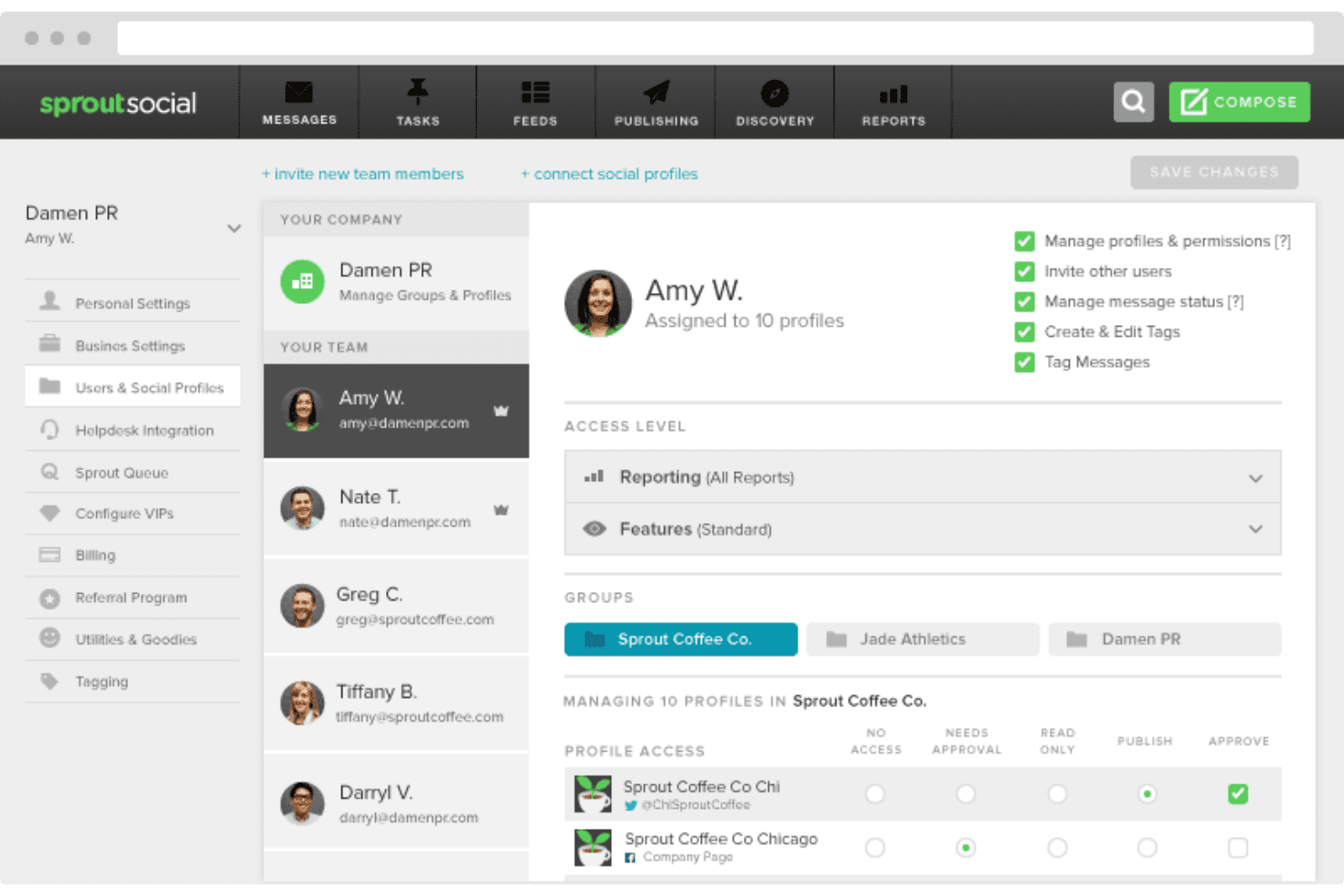
Sprout Social offers granular user permission controls, allowing admins to assign profile access levels and publishing rights across multiple social groups. Sprout Social is a multi-channel social media analytics platform that includes YouTube video performance reporting, engagement tracking, and cross-channel dashboards alongside other major social networks.
Who Is Sprout Social Best For?
Sprout Social fits marketing teams at mid-size to enterprise companies that manage YouTube as part of a broader, multi-channel social media strategy.
Why I Picked Sprout Social
I've included Sprout Social in my top picks because its Network Reports pull YouTube performance data alongside Instagram, TikTok, and LinkedIn into a single dashboard. When my team needs to show stakeholders how YouTube stacks up against other channels, the Premium Analytics add-on delivers interactive, shareable reports with custom benchmarking built in. I particularly like the YouTube Videos report for surfacing Average View Duration and top-performing videos across the whole channel.
Sprout Social Key Features
- YouTube API integration: Connects your YouTube account for direct data access and channel performance tracking.
- Cross-channel competitor reports: Lets you compare multiple social channel profiles, including YouTube, for activity and engagement analysis.
- Social listening add-on: Monitors YouTube mentions and comments to identify topic trends and sentiment across videos.
- Custom tag and campaign tracking: Allows you to organize and filter posts and campaigns for granular video and channel reporting.
Sprout Social Integrations
Sprout Social offers native integrations with YouTube, Facebook, Instagram, X, LinkedIn, TikTok, Pinterest, Google Analytics, HubSpot, Zendesk, and more. An API is available for custom integrations.
Pros and Cons
Pros:
- Includes YouTube engagement and audience metrics
- Offers custom report builder for channels
- Combines YouTube with other social analytics
Cons:
- No YouTube thumbnail or A/B testing
- Lacks YouTube SEO keyword tracking
Learn more about Sprout Social: Best for cross-platform video analytics
- Not available
- Pricing upon request
Visit WebsiteCustomer Rating:4.3/5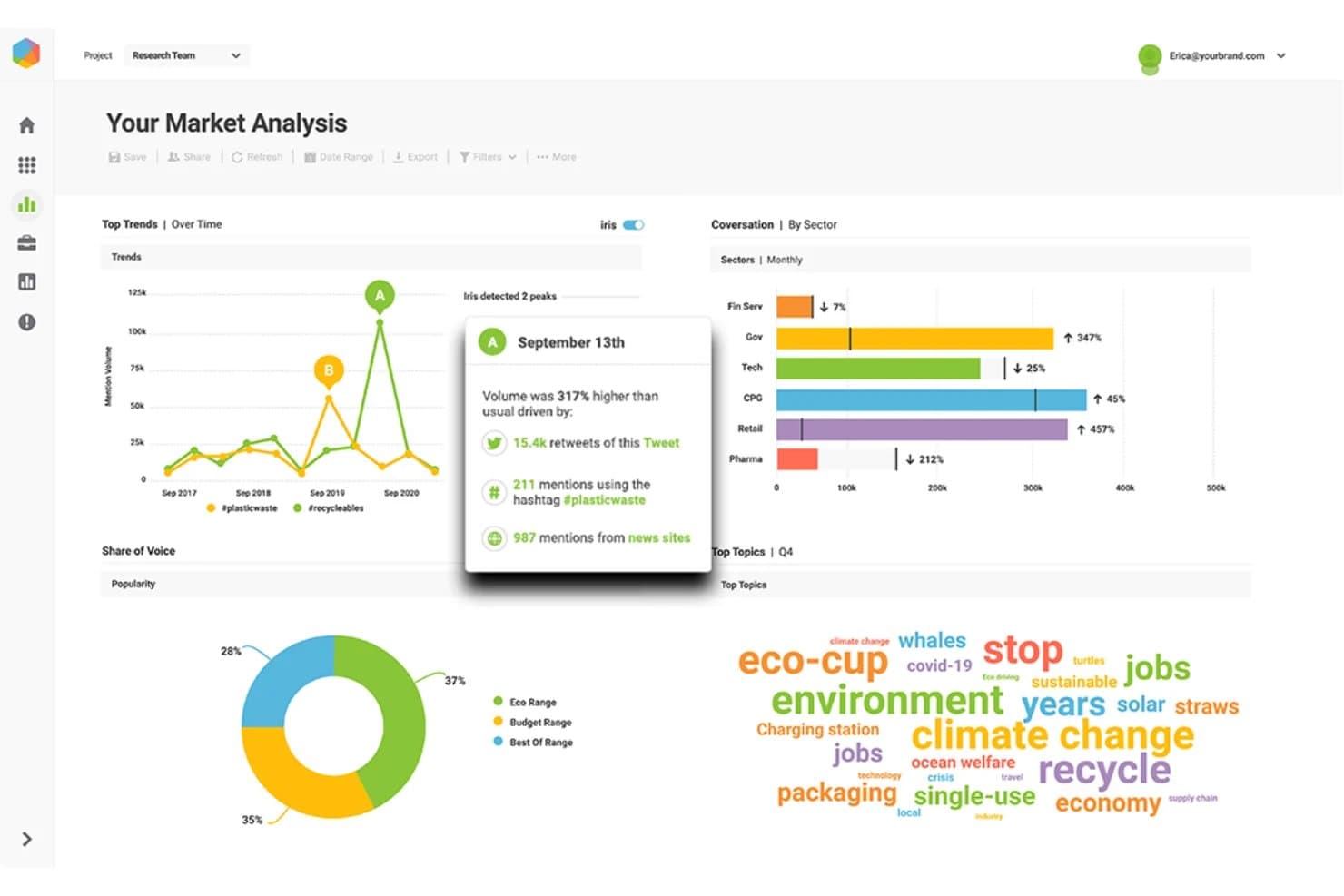
Brandwatch’s dashboard visualizes market trends and audience insights. Brandwatch is an enterprise social intelligence platform that combines social listening, video performance tracking, competitor benchmarking, and influencer discovery across YouTube and other major social channels.
Who Is Brandwatch Best For?
Brandwatch is a strong fit for enterprise marketing teams and agencies managing YouTube alongside multiple social channels at scale.
Why I Picked Brandwatch
I picked Brandwatch as one of the best because no other tool on this list pulls YouTube video metrics into the same dashboard as Instagram, TikTok, X, and Reddit. The Measure module tracks views, watch time, and audience demographics, while the Benchmark module lets me compare YouTube channel performance directly against competitors. I also use the Listen module to track YouTube comments alongside brand mentions from news sites, blogs, and forums in a single feed.
Brandwatch Key Features
- AI-enriched sentiment analysis: Analyze comments and conversations from YouTube and other platforms with automated sentiment detection.
- Social listening across platforms: Monitor mentions, keywords, and trends from over 100 million online sources, including YouTube videos and comments.
- Creator discovery tool: Identify and research YouTube creators using audience filtering and growth insights.
- Custom dashboard builder: Build and share visual dashboards for YouTube and other social video data using drag-and-drop widgets.
Brandwatch Integrations
Brandwatch offers native integrations with YouTube, Instagram, Facebook, X, Reddit, and LinkedIn, and provides an API for custom integrations.
Pros and Cons
Pros:
- Supports custom dashboards and reports
- Advanced competitor channel benchmark features
- Tracks YouTube and social channels together
Cons:
- No thumbnail or A/B testing functionality
- No video SEO or tag optimization tools
Learn more about Brandwatch: Best for centralized analytics and scheduling
- 14-day free trial
- From $99/month (billed annually)
Visit WebsiteCustomer Rating:4.1/5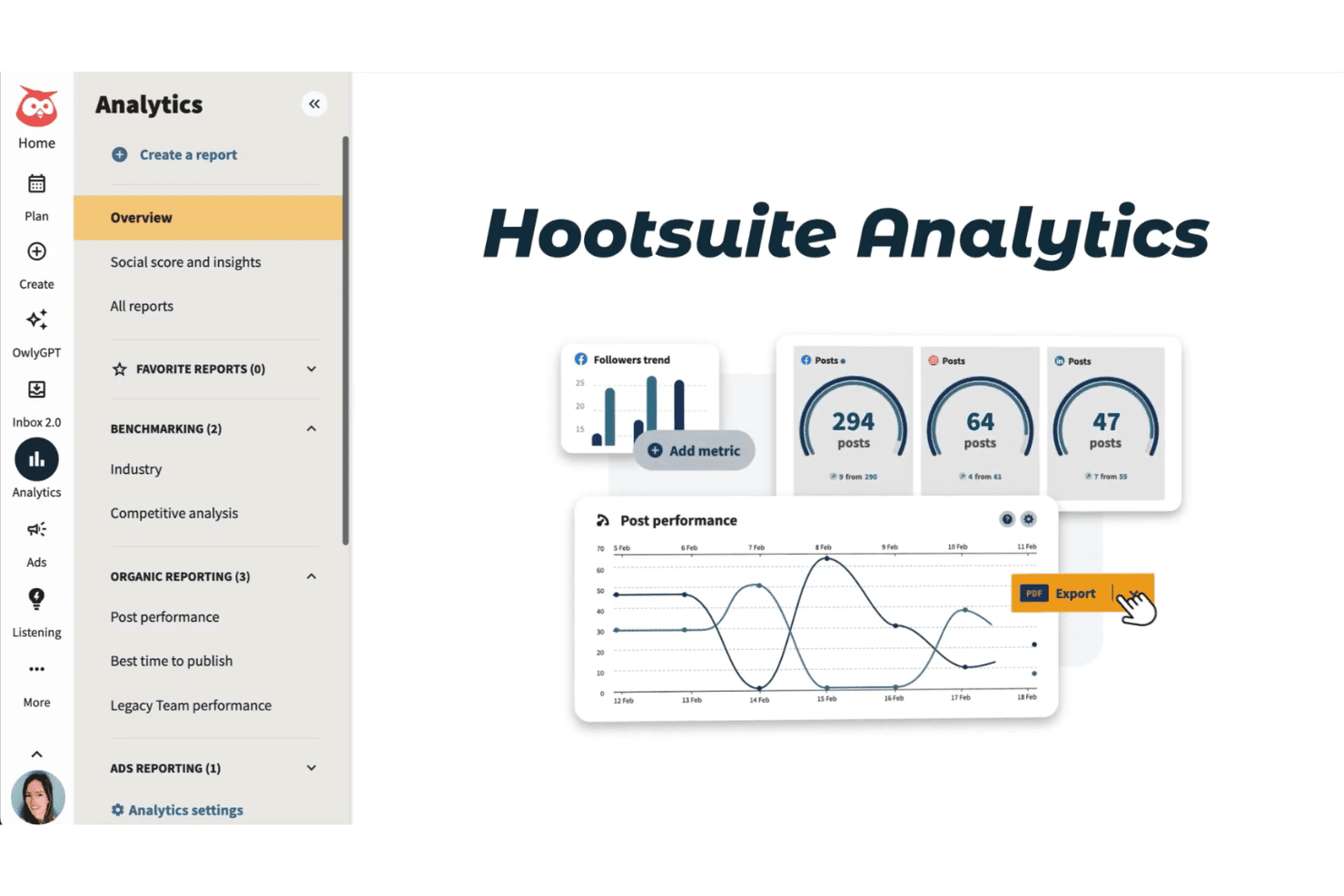
Hootsuite's Analytics dashboard offers post performance tracking, followers trend charts, and PDF export across multiple social platforms. Hootsuite is a social media management platform that tracks YouTube performance alongside other social networks, with cross-channel analytics, competitive benchmarking, custom reporting, and post scheduling built into one dashboard.
Who Is Hootsuite Best For?
Hootsuite suits social media managers who run YouTube as part of a broader multi-channel strategy and need one place to report across all networks.
Why I Picked Hootsuite
I've included Hootsuite in my top picks because it handles YouTube scheduling and analytics in the same dashboard as Instagram, TikTok, and LinkedIn, so my team isn't jumping between platforms to pull numbers. I like the competitive benchmarking feature, which lets me monitor up to 20 competitor channels for posting frequency, engagement, and follower growth. Custom reports, exportable in PDF, Excel, or PowerPoint, make it easy to present YouTube data alongside the rest of our social channels.
Hootsuite Key Features
- Social listening dashboard: Monitor YouTube mentions, hashtags, and keywords across thousands of sources in real time.
- Multi-network analytics view: Track YouTube performance alongside metrics from Instagram, TikTok, Facebook, LinkedIn, and more.
- Industry benchmarking tools: Compare your YouTube channel's audience and engagement growth against other brands in your vertical.
- Automated performance reporting: Schedule and export YouTube analytics reports in PDF, Excel, CSV, or PowerPoint formats.
Hootsuite Integrations
Hootsuite offers native integrations with YouTube, Facebook, Instagram, TikTok, LinkedIn, X, Salesforce, HubSpot, Canva, and more. An API is available for custom integrations.
Pros and Cons
Pros:
- Automated reporting across multiple networks
- Tracks YouTube competitor channel performance
- Centralized view of all social analytics
Cons:
- Missing native YouTube SEO keyword analysis
- No audience retention or heatmap data
 Best for in-depth audience authenticity analysis
- Free trial + free demo available
- From $299/month (billed annually)
Visit WebsiteCustomer Rating:4.7/5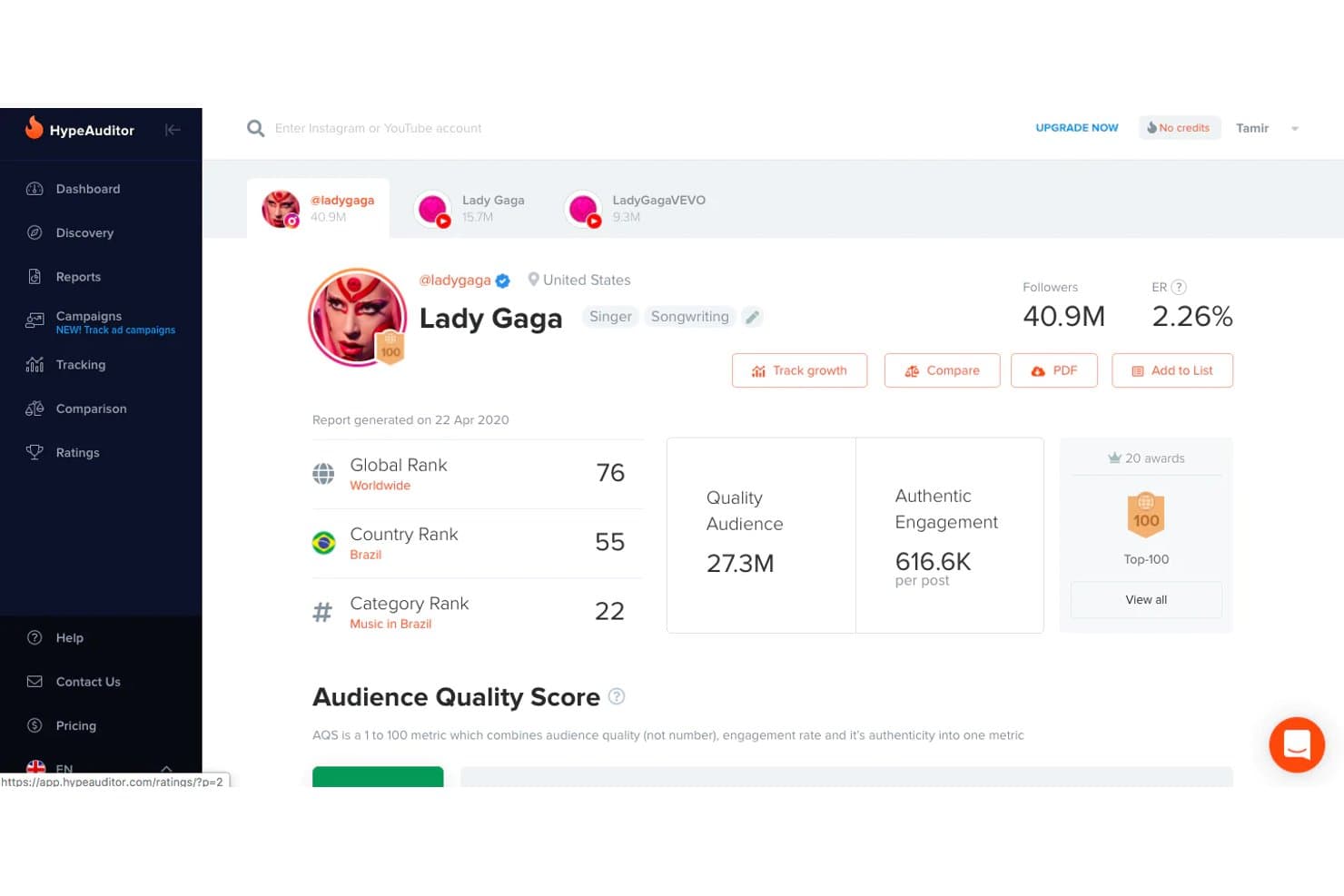
HypeAuditor’s dashboard provides influencer audience and engagement insights. HypeAuditor is an AI-powered influencer analytics platform that covers YouTube channel analysis, audience quality scoring, fraud detection, and campaign performance tracking across a database of 16.5M+ creator profiles.
Who Is HypeAuditor Best For?
HypeAuditor suits mid-sized to enterprise brands and agencies that run YouTube influencer campaigns and need to vet creator audiences before committing budget.
Why I Picked HypeAuditor
HypeAuditor earns its spot on my shortlist because its audience authenticity analysis is genuinely unlike anything else I've used. The Channel Quality Score (CQS) pulls together creator influence, audience credibility, engagement, and channel authenticity into a single 1-100 score, which I use to disqualify low-quality channels fast. I also lean on the 35+ vetting metrics to verify subscriber authenticity before my team signs off on any YouTube creator deal.
HypeAuditor Key Features
- Competitor benchmarking: Track multiple YouTube channels and compare performance metrics across categories.
- Custom dashboard creator: Build tailored reporting dashboards with filters for audience, engagement, and channel metrics.
- Campaign analytics suite: Monitor campaign results, track delivered impressions, and analyze influencer effectiveness for each collaboration.
- Bulk YouTube channel analysis: Analyze thousands of channels at once using batch reporting tools for scalable vetting and oversight.
HypeAuditor Integrations
HypeAuditor offers native integrations with Shopify and provides an API for custom integrations. Native integrations are not widely documented.
Pros and Cons
Pros:
- Advanced channel quality scoring metrics
- Bulk analysis for multiple YouTube channels
- Deep audience credibility and fraud detection
Cons:
- Lacks watch time and audience retention data
- No keyword or video SEO analytics
Learn more about HypeAuditor: Best for multi-channel performance benchmarking
- Free plan available
- From $5.99/month
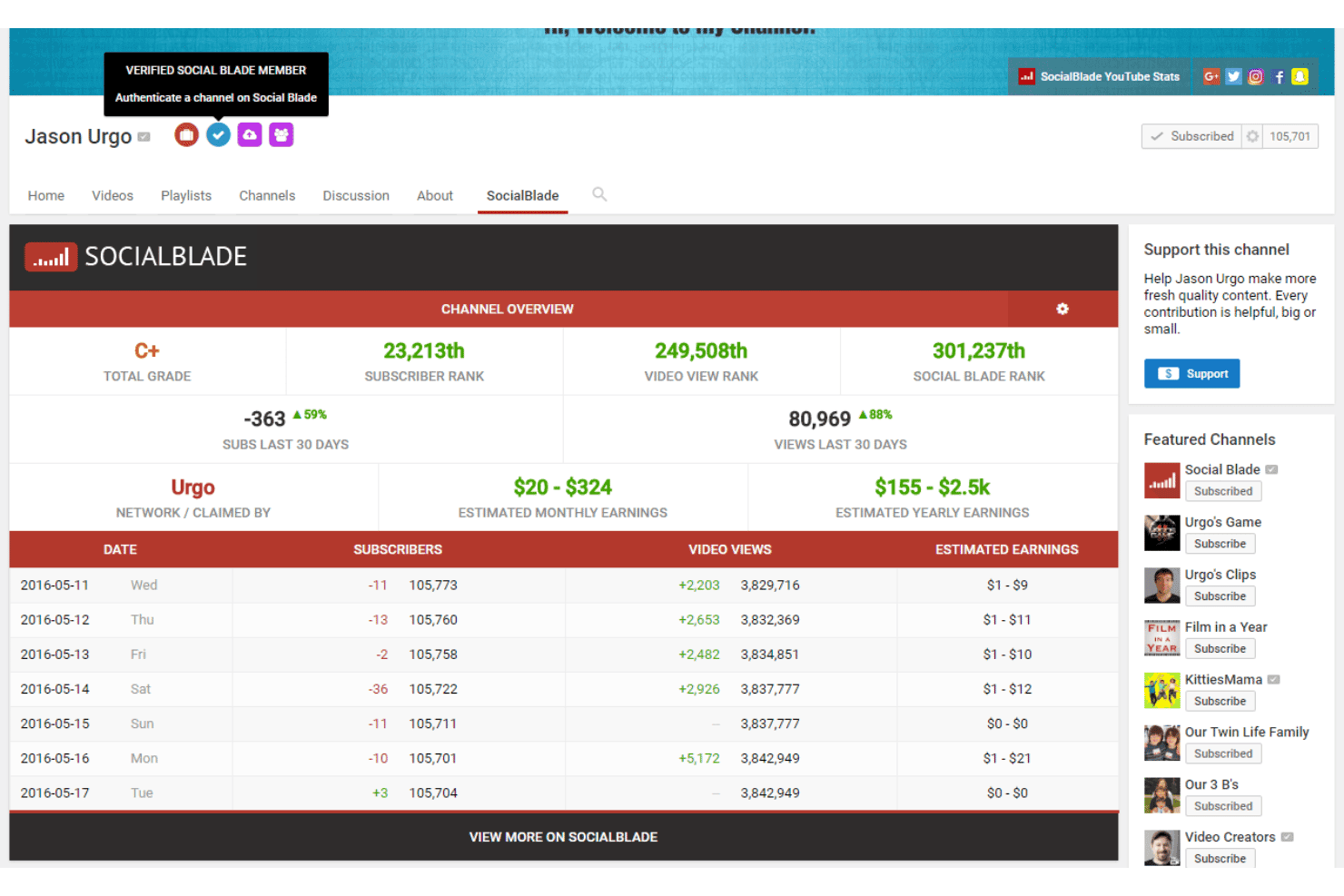
Social Blade’s dashboard summarizes channel performance and growth metrics. Social Blade is a public analytics tracking platform that monitors subscriber counts, video views, estimated earnings, and channel growth trends across YouTube and several other social media platforms.
Who Is Social Blade Best For?
Social Blade suits content creators and influencer marketing agencies that need quick, no-login access to public channel performance data across multiple platforms.
Why I Picked Social Blade
Social Blade earns its spot on my shortlist because no other tool gives you immediate, no-login access to ranked channel data across YouTube, Twitch, TikTok, and Instagram simultaneously. I use the Top Lists feature to identify top-performing channels by country or category in seconds. The Favorites Dashboard lets me track up to 500 channels side by side, so comparing subscriber growth trends across a full competitor set is genuinely fast.
Social Blade Key Features
- Live subscriber counts: Track real-time changes in subscriber numbers for any public YouTube channel.
- Historical data export: Download up to three years of YouTube channel performance data in tabular format.
- YouTube Report Cards: Generate PDF reports that summarize recent YouTube channel stats for brand pitches and outreach.
- Custom channel lists: Build, organize, and export targeted lists of channels filtered by category, country, or size.
Social Blade Integrations
Native integrations are not clearly documented. Social Blade offers a Business API for custom integrations.
Pros and Cons
Pros:
- Includes multi-platform analytics beyond YouTube
- Offers public data with no login needed
- Tracks channel and video growth trends
Cons:
- Lacks audience demographic breakdowns
- No keyword or SEO analytics tools
Learn more about Social Blade: Best for optimizing video SEO with A/B testing
- Free trial + free demo available
- From $12/month (billed annually)
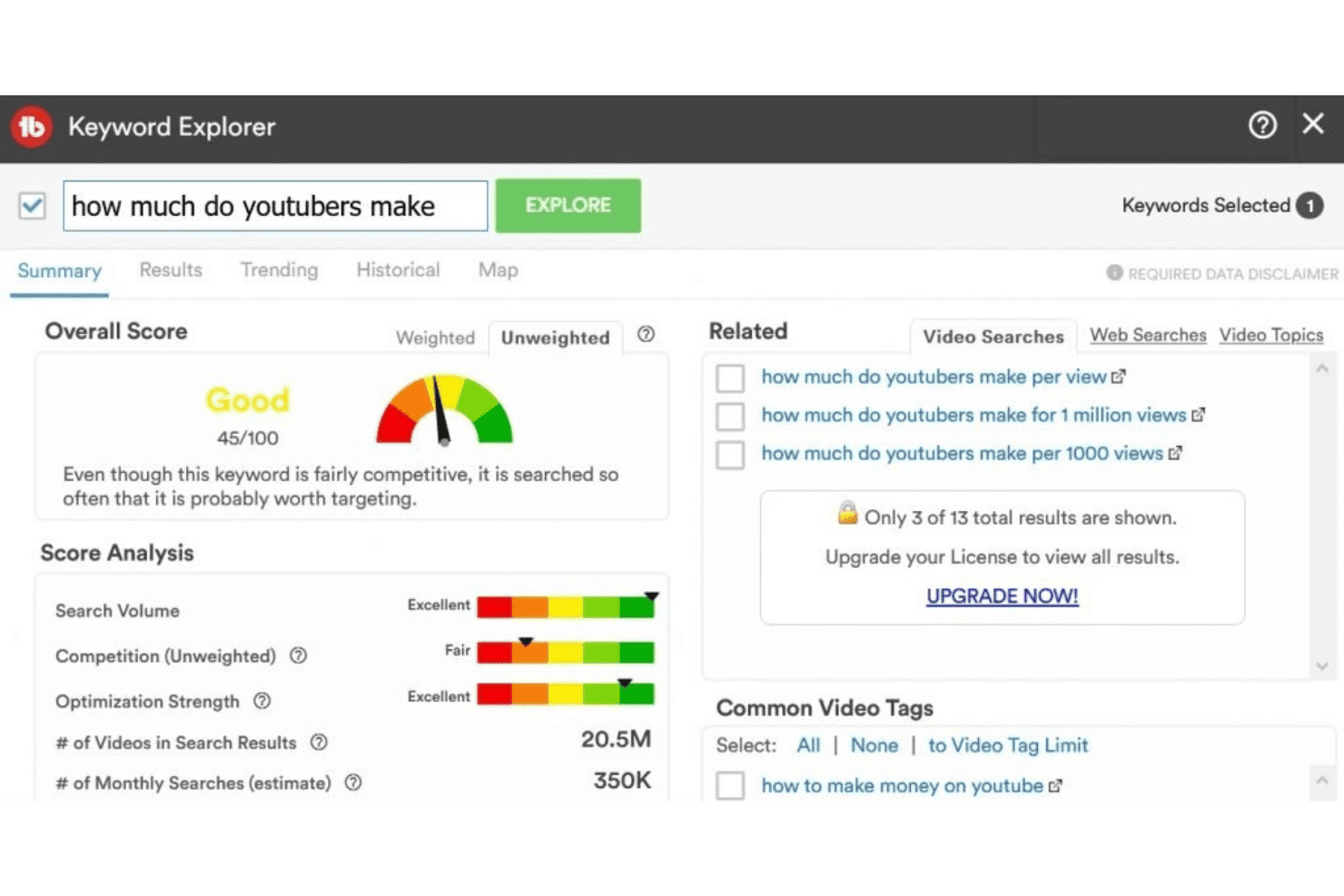
TubeBuddy's Keyword Explorer tool displays an overall score, search volume, competition, and related keyword suggestions for 'how much do youtubers make'. TubeBuddy is a YouTube-certified browser extension that layers video analytics, keyword research, competitor tracking, and A/B testing tools directly into YouTube Studio.
Who Is TubeBuddy Best For?
TubeBuddy is a strong fit for independent YouTube creators and small video marketing teams who manage content directly within YouTube Studio.
Why I Picked TubeBuddy
TubeBuddy earns its spot on my shortlist because no other YouTube analytics tool runs thumbnail and title A/B tests natively inside YouTube Studio. I use the A/B Testing feature to serve different thumbnails to real viewers and let click-through rate data decide the winner. The Keyword Explorer tells me exactly which search terms are worth targeting before I publish. I also rely on the Retention Analyzer to pinpoint the exact timestamp where viewers start dropping off on any given video.
TubeBuddy Key Features
- Channelytics: Lets you compare your performance against competitor YouTube channels, tracking uploads, growth, and engagement metrics in one dashboard.
- Retention analyzer: Visualizes precisely where on your videos viewers drop off, helping you spot retention issues by timestamp.
- AI-powered next video ideas: Surfaces high-potential content ideas and topics based on YouTube niche trends and keyword data.
- Bulk processing tools: Allows you to update cards, end screens, titles, and descriptions across multiple videos at once.
TubeBuddy Integrations
TubeBuddy integrates natively with YouTube Studio through its browser extension and offers mobile apps for iOS and Android.
Pros and Cons
Pros:
- Advanced retention and drop-off analysis
- Offers in-depth competitor channel analytics
- A/B tests thumbnails and titles natively
Cons:
- Limited to YouTube Studio environment
- No exportable or custom dashboards
Learn more about TubeBuddy: Best for AI-powered keyword and topic discovery
- Free plan available
- From $16.58/month (billed annually)
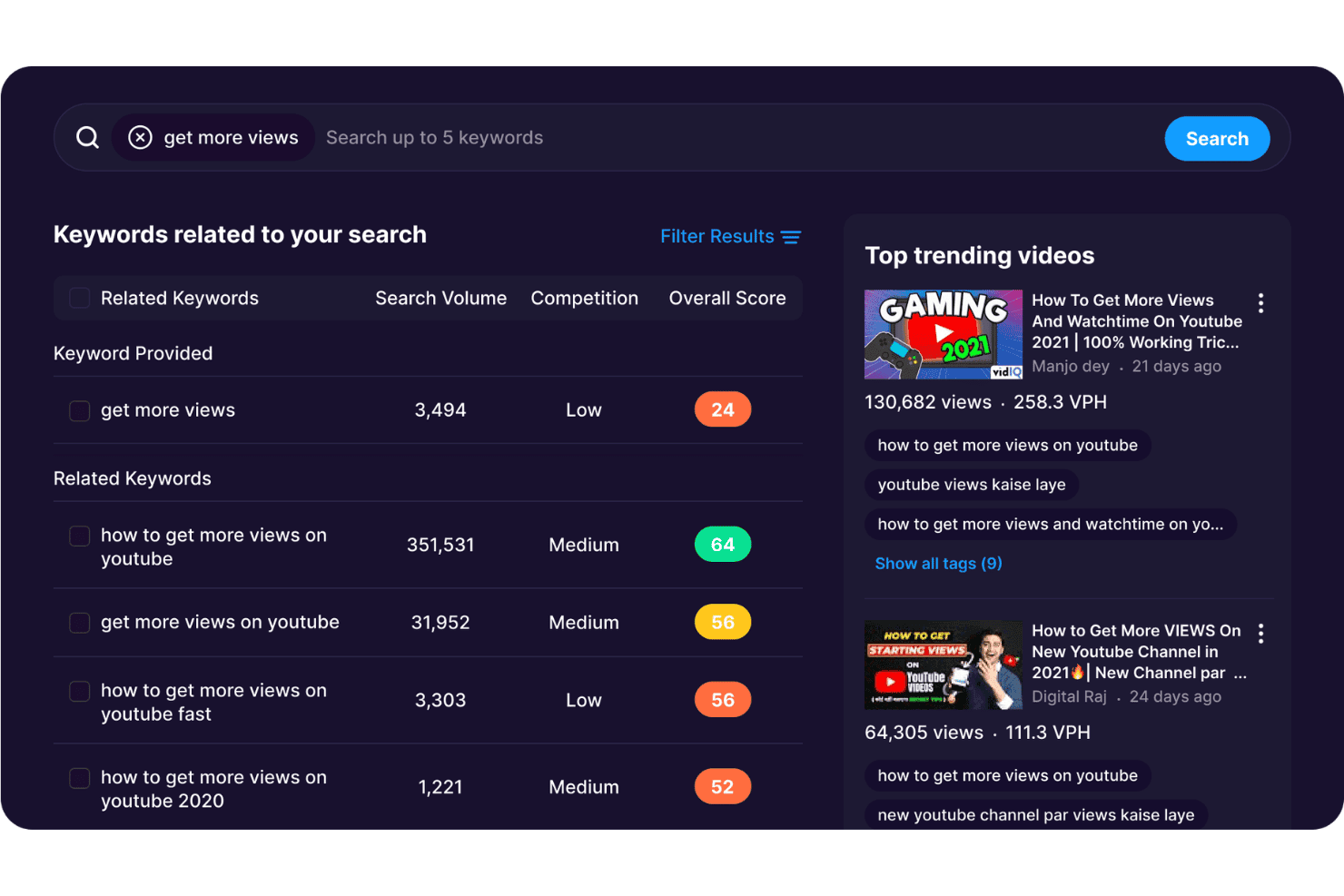
vidIQ offers a keyword research tool that displays search volume, competition level, and overall scores for related YouTube keywords alongside top trending videos. vidIQ is a YouTube analytics and SEO platform that combines keyword research, competitor channel tracking, AI-driven content ideation, and video optimization tools for creators and marketing teams.
Who Is vidIQ Best For?
vidIQ is a strong fit for independent YouTube creators and brand-side content teams who prioritize search-driven growth and consistent content output.
Why I Picked vidIQ
vidIQ earns its spot as one of the best on my shortlist because the keyword research tool goes well beyond basic tag suggestions. Each keyword comes with search volume, trend direction, competition level, and a ranked performance score, so I can actually prioritize which terms are worth targeting. I also rely on the Outliers feature to surface videos in my niche that overperformed their channel average, which consistently uncovers topic angles I wouldn't have found on my own.
vidIQ Key Features
- Competitor tracking dashboard: Monitor multiple competing channels and view their growth, video cadence, and trending uploads.
- Real-time YouTube data integration: Overlay channel and video stats directly in YouTube with a Chrome browser extension.
- AI-powered script and description generator: Automatically generate video scripts and descriptions based on target keywords.
- Channel audit tool: Review your channel’s performance across engagement, publishing schedule, and best time to post analytics.
vidIQ Integrations
vidIQ offers native integrations with YouTube and Instagram, supports AI assistants like ChatGPT and Claude, and provides a Chrome browser extension for real-time data overlays.
Pros and Cons
Pros:
- Outlier video detection for trending ideas
- Competitor channel tracking and alerts
- AI-powered topic and keyword suggestions
Cons:
- Channel audit limited for large enterprises
- No bulk export for keyword research
Learn more about vidIQ: Best for influencer campaign ROI tracking
- Free trial + free demo available
- From $1499/3 months
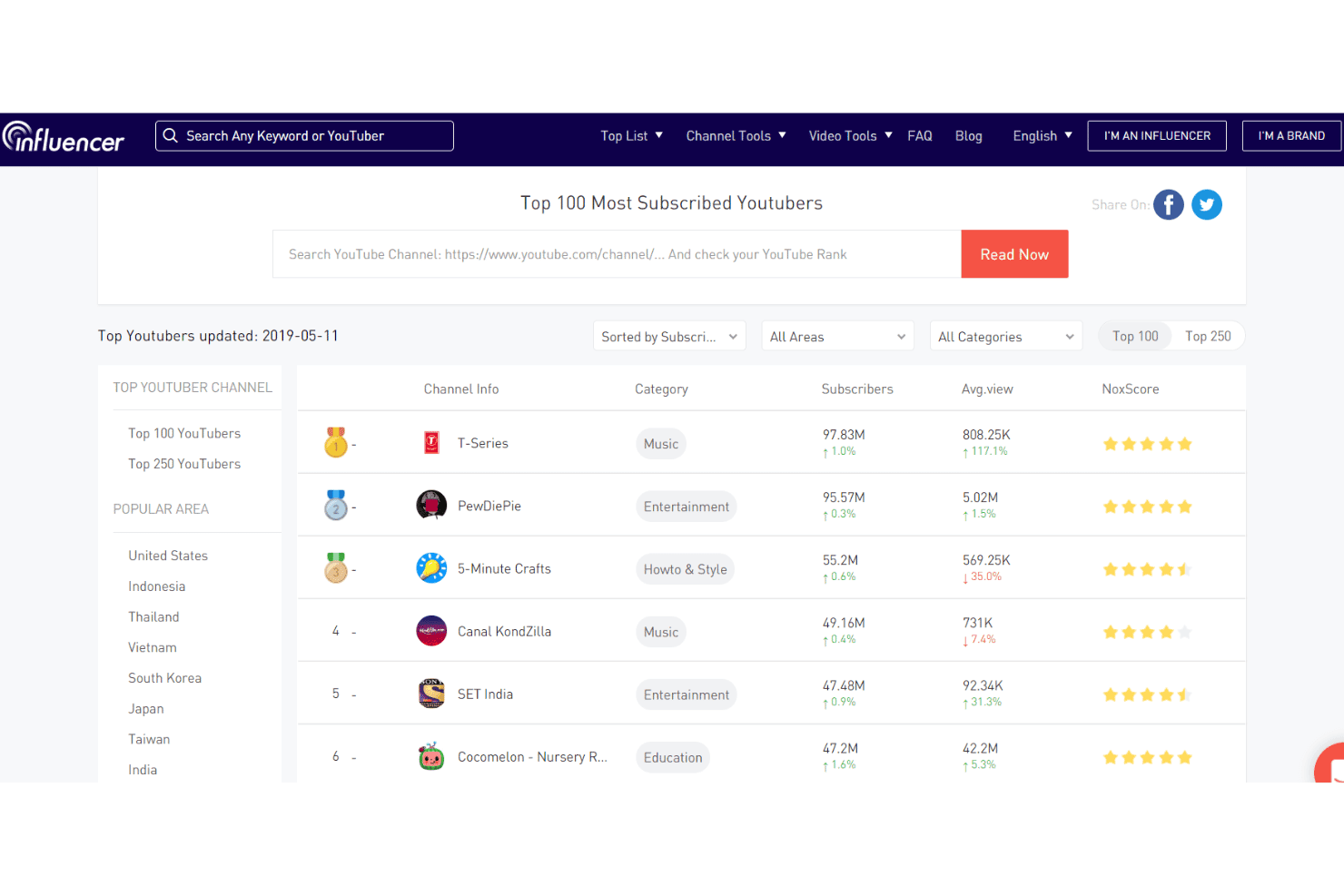
NoxInfluencer offers a ranked list of the Top 100 Most Subscribed YouTubers with subscriber counts, average views, and NoxScores. NoxInfluencer is an influencer marketing analytics platform that combines creator discovery, YouTube channel performance tracking, competitor benchmarking, keyword research, and campaign monitoring across YouTube, TikTok, and Instagram.
Who Is NoxInfluencer Best For?
It's a strong fit for influencer marketing agencies and e-commerce brands in fashion, beauty, and lifestyle that run multi-creator YouTube campaigns and need to track sponsored content performance.
Why I Picked NoxInfluencer
I've included NoxInfluencer in my top picks because it's one of the few YouTube analytics tools that ties influencer content directly to campaign outcomes. The Video Monitoring module tracks sponsored post performance per campaign, and the Short Link Service attributes conversions back to specific creator videos. I also like the Sentiment Analysis feature, which surfaces how audiences respond to sponsored content across active campaigns.
NoxInfluencer Key Features
- YouTube channel compare tool: Compare analytics for up to three channels side by side to benchmark performance.
- Global influencer ranking database: Search 100M+ creators across YouTube, TikTok, and Instagram with detailed filters by country and niche.
- Advanced keyword and tag tools: Analyze channel tags, video keywords, and trending topics to support YouTube SEO research.
- API data service: Access channel, video, and creator data programmatically for integration into custom reports or dashboards.
NoxInfluencer Integrations
Native integrations are not clearly documented. NoxInfluencer provides an API for custom integrations and offers a Chrome extension for YouTube channel analysis.
Pros and Cons
Pros:
- Supports detailed YouTube keyword and tag research
- Provides channel compare and global ranking tools
- Tracks ROI across multiple influencer campaigns
Cons:
- Custom reporting options are limited
- Channel analytics lack watch time and retention data
Learn more about NoxInfluencer:
Outras ferramentas de análise do YouTube
Eis algumas opções adicionais de ferramentas de análise do YouTube que não entraram na minha seleção, mas que vale a pena conhecer:
- 11Tubular LabsBest for advanced competitor content insights
- 12SocialinsiderBest for exporting customizable metric dashboards
- 13KeyholeBest for real-time trend and hashtag analysis
- 14PlanableBest for collaborative social content reporting
- 15EmplifiBest for unified brand analytics and insights
- 16Outlier KitBest for YouTube competition tracking alerts
- 17Facelift Data StudioBest for comparing video performance
- 18ChannelMeterBest for partner and influencer program management
- 19StoryclashBest for discovering top-performing content
How I Evaluate YouTube Analytics Tools
I split my evaluation into baseline requirements—like API-connected video metrics and audience data—and differentiators like competitor benchmarking, A/B testing, and reporting depth.
Core Functionality (Table Stakes For This List)
When I'm selecting tools for my list, I rank each one on a scale from 0 (does not offer the functionality) to 5 (excels in this area) for each core functionality listed below. Then, I calculate the tool's total score into a percentage. Each tool needs to achieve a minimum total score of 65% to be considered for inclusion.
- Video Performance Metrics: I check whether a tool tracks views, watch time, CTR, and retention at the individual video level—not just channel-wide totals.
- Audience Demographics & Behavior: Knowing where viewers come from, what devices they use, and how they found your video matters for targeting decisions.
- Competitor Channel Tracking: I look for the ability to monitor rival channels' growth, upload frequency, and top-performing content side by side with your own.
- Keyword & SEO Analytics: I evaluate whether a tool surfaces keyword opportunities and tag suggestions you can act on before publishing your next video.
- Custom Reporting & Dashboards: Agencies and marketing teams need exportable, branded reports—so I check for white-label options and scheduled delivery.
- YouTube API Integration: Real-time or near-real-time data pulls from YouTube's API are what I look for, along with historical backfill for trend analysis.
Once I have a list of tools that meet the criteria, I consider what sets each platform apart.
Differentiating Factors (What Sets Vendors Apart)
Here's how I compare and contrast different vendors:
Standout Features
Thumbnail and title A/B testing is a big differentiator. Running split tests on live videos shows you which combination actually lifts CTR, backed by statistical data you can trust. I also look for retention heatmaps that pinpoint exactly where viewers drop off mid-video. That kind of insight directly informs how you structure hooks and pacing in future content. AI-powered content ideation matters too—the strongest implementations surface trending topics and keyword gaps specific to your niche rather than generic suggestions.
Beyond Features
Primary use case fit is the first thing I consider. A solo creator optimizing upload strategy has very different needs than an agency managing ten client channels from one dashboard. Data accuracy matters just as much—I check whether a platform pulls from the official YouTube Data API or relies on scraped estimates, since that gap can skew your reporting. Pricing structure is worth evaluating too, especially whether a tool charges per channel or per seat, which changes the math fast when you're scaling.
Como escolher ferramentas de análise do YouTube
É fácil perder-se em listas extensas de funcionalidades e estruturas de preços complexas. Para o ajudar a manter o foco enquanto analisa o seu processo específico de seleção de software, apresentamos uma lista de verificação dos fatores a ter em conta:
| Fator | O que considerar |
| Escalabilidade | Como irá esta ferramenta suportar vários canais, marcas ou clientes se as suas necessidades crescerem? Evite soluções que cobrem valores elevados por cada canal ou utilizador adicional. |
| Integrações | Com que outras plataformas ou ferramentas de elaboração de relatórios precisa de se ligar (Google Analytics, ferramentas de BI, Slack)? Verifique o suporte para a sua infraestrutura atual e futura. |
| Personalização | Pode adaptar painéis, relatórios ou exportações ao fluxo de trabalho da sua equipa e às necessidades das partes interessadas, ou os resultados estão limitados a modelos rígidos? |
| Facilidade de utilização | Com que rapidez pode a sua equipa encontrar respostas ou gerar relatórios com um mínimo de formação? Antes de escolher, faça uma demonstração da interface para avaliar a navegação e a clareza. |
| Implementação e integração inicial | O que é necessário para configurar a ferramenta e ligá-la aos seus canais? Tenha em conta o tempo necessário para permissões, sincronização de dados e adaptação da equipa. |
| Custo | O modelo de preços é adequado ao número de canais, dimensão da equipa e funcionalidades de que necessita? Esteja atento a preços que aumentam acentuadamente à medida que a utilização cresce. |
| Medidas de segurança | Que controlos existem para o acesso dos utilizadores, o armazenamento de dados e a privacidade? Procure opções com permissões para vários utilizadores e conformidade com as suas políticas de dados. |
| Disponibilidade do suporte | Está disponível ajuda rápida durante o seu horário de funcionamento? Verifique se terá acesso a uma base de conhecimentos, chat ou suporte em direto caso algo avarie ou sofra alterações. |
O que são ferramentas de análise do YouTube?
As ferramentas de análise do YouTube são plataformas especializadas que ajudam a monitorizar, analisar e visualizar as principais métricas de desempenho do seu canal e dos seus vídeos do YouTube. Estas ferramentas proporcionam aos gestores de redes sociais, criadores e agências informações mais aprofundadas sobre o comportamento do público, as tendências de conteúdo e os padrões de interação, permitindo-lhe tomar decisões mais informadas sobre conteúdo, otimização e marketing.
Funcionalidades das ferramentas de análise do YouTube
Ao selecionar ferramentas de análise do YouTube, procure as seguintes funcionalidades principais:
- Monitorização do desempenho dos vídeos: Mede métricas essenciais, como visualizações, tempo de visualização, gostos, comentários e partilhas, para ajudar a avaliar quais os vídeos que têm maior impacto nos espectadores.
- Dados demográficos do público: Divide os dados dos espectadores por idade, género, localização e dispositivo, fornecendo informações sobre quem está a assistir e como aperfeiçoar a estratégia de conteúdo.
- Análise das fontes de tráfego: Revela como os espectadores encontram os seus vídeos — através da pesquisa, de vídeos sugeridos, de sites externos ou de partilhas nas redes sociais.
- Monitorização da concorrência: Permite comparar o crescimento e a interação do seu canal com os de outros canais do seu nicho, obtendo informações estratégicas.
- Análise de palavras-chave e SEO: Identifica palavras-chave com melhor desempenho, classificações e oportunidades relacionadas com etiquetas, para aumentar a visibilidade e otimizar os metadados dos vídeos.
- Relatórios e painéis personalizados: Permite criar relatórios e painéis adaptados às métricas mais importantes para as partes interessadas ou clientes.
- Análise da retenção do público: Identifica os momentos dos vídeos em que os espectadores perdem o interesse, permitindo ajustar o ritmo e o conteúdo para melhorar a interação.
- Ferramentas de exportação e partilha: Simplifica a criação e distribuição de relatórios, suportando exportações para PDF, CSV ou integrações com plataformas como o Google Sheets.
- Testes de miniaturas e títulos: Facilita os testes A/B de miniaturas e títulos para melhorar as taxas de cliques e otimizar a primeira impressão do vídeo.
- Acesso a dados em tempo real e históricos: Disponibiliza análises imediatas e tendências a longo prazo, ajudando a identificar alterações no comportamento do público e a medir os resultados das campanhas.
Vantagens das ferramentas de análise do YouTube
A implementação de ferramentas de análise do YouTube proporciona várias vantagens à sua equipa e à sua empresa. Eis algumas das que pode esperar:
- Compreensão mais aprofundada do público: Obtenha informações demográficas e comportamentais precisas, para poder aperfeiçoar a estratégia de conteúdo com base em quem está realmente a assistir.
- Otimização de conteúdo orientada por dados: Tire partido das métricas de desempenho, dos relatórios de retenção e dos testes A/B para melhorar a qualidade, o ritmo e a visibilidade dos vídeos.
- Comparação com a concorrência: Acompanhe a sua posição face a canais semelhantes, identificando novas oportunidades e ajustando a sua abordagem em tempo real.
- Eficiência do fluxo de trabalho: Crie painéis personalizados e automatize os relatórios, poupando tempo na recolha manual de dados e garantindo que as partes interessadas se mantêm informadas.
- Melhoria do acompanhamento do ROI: Relacione diretamente as métricas dos canais e dos vídeos com os esforços de marketing, patrocínios ou campanhas, ajudando a esclarecer o que realmente faz a diferença.
- Colaboração escalável: Permita que as equipas ou agências gerem vários canais a partir de uma única plataforma, com permissões e exportações personalizadas para clientes ou para a gestão.
- Identificação proativa de tendências: Identifique tópicos e palavras-chave em tendência através de sugestões baseadas em IA, para poder agir rapidamente perante oportunidades emergentes.
Custos & preços das ferramentas de análise do YouTube
A seleção de ferramentas de análise do YouTube exige uma compreensão dos vários modelos de preços e planos disponíveis. Os custos variam consoante as funcionalidades, o tamanho da equipa, os complementos e outros fatores. A tabela abaixo resume os planos comuns, os respetivos preços médios e as funcionalidades normalmente incluídas nas soluções de ferramentas de análise do YouTube:
Tabela de comparação de planos para ferramentas de análise do YouTube
| Tipo de plano | Preço médio | Funcionalidades comuns |
|---|---|---|
| Tipo de planoPlano gratuito | Preço médio$0 | Funcionalidades comunsAnálise básica de vídeo, acompanhamento limitado de canais, pesquisa básica de palavras-chave e dados padrão sobre a audiência. |
| Tipo de planoPlano pessoal | Preço médio$10-$25/utilizador/mês | Funcionalidades comunsMétricas de desempenho avançadas, painéis personalizáveis, atualizações de dados mais frequentes e avaliação comparativa limitada da concorrência. |
| Tipo de planoPlano empresarial | Preço médio$30-$90/utilizador/mês | Funcionalidades comunsGestão de vários canais, relatórios com marca branca, análise SEO avançada, colaboração em equipa e suporte prioritário. |
| Tipo de planoPlano empresarial de grande dimensão | Preço médio$100+/utilizador/mês | Funcionalidades comunsCanais ilimitados, gestão de conta dedicada, acesso à API, integrações personalizadas, permissões avançadas e SLAs. |