

Programvare for leadshåndtering hjelper deg med å samle inn, organisere og følge opp leads, slik at du aldri går glipp av en salgsmulighet eller lar verdifulle potensielle kunder forsvinne mellom sprekkene. Hvis du leter etter de beste verktøyene for å styrke teamets fokus, forbedre oppfølgingen og gjøre flere leads til avtaler, er du ikke alene – stramme budsjetter og et tett marked gjør god leadshåndtering til en viktig prioritet med mye på spill.
I denne veiledningen får du en tydelig sammenligning av de mest effektive systemene for leadshåndtering i 2026, med fokus på funksjonene og de praktiske fordelene som betyr mest for velfungerende markedsførings- og salgsteam.
Hvorfor du kan stole på våre programvareanbefalinger
6,700+
Reviews
20
Industry experts
16+
Evaluation factors
14
Years
Teamet vårt har testet og anmeldt programvare siden 2012. Vi er selv markedsføringsledere, så vi vet hvor vanskelig og hvor viktig det er å velge riktig programvare.
I denne guiden har vi vurdert verktøyene gjennom praktisk testing og uavhengig research og gitt dem poeng ut fra våre utvelgelseskriterier.
Anmeldelsene våre bygger på vår egen redaksjonelle vurdering. De er ikke et salgsargument.
Ekspertanmeldere:
 Gui DrusinaCreative Director
- Shriya GhateSenior Marketing Lead
 Amanda JacquesMarketing Ops Leader

Sammenligningstabell for programvare for leadshåndtering
Denne sammenligningstabellen oppsummerer prisdetaljene for mine utvalgte favoritter blant programvare for leadshåndtering:
| Tool | Best For | Trial Info | Price | ||
|---|---|---|---|---|---|
| 1 | Best for B2B intent data and lead enrichment | Free plan + 14-day free trial + free demo available | From $49/user/month (billed annually) | Website | |
| 2 | Best for drag-and-drop interface configuration | 14-day free trial | From $40/user/month (platform only; CRM products extra) | Website | |
| 3 | Best for shared marketing and sales timelines | Free plan available | From $20/user/month | Website | |
| 4 | Best for journey-based audience segmentation | 14-day free trial | From $199/month | Website | |
| 5 | Best for automated lead routing and matching | Free demo available | Pricing upon request | Website | |
| 6 | Best for high-velocity lead capture workflows | Free demo available | Pricing upon request | Website | |
| 7 | Best for predictive analytics and account insights | Free plan available | Pricing upon request | Website | |
| 8 | Best for automated customer milestone tracking | 14-day free trial + free demo available | From $15/month (billed annually) | Website | |
| 9 | Best for native sales intelligence dashboards | Free demo available | Pricing upon request | Website | |
| 10 | Best for enterprise-grade campaign orchestration | Free demo available | Pricing upon request | Website |


Anmeldelser av de beste programmene for leadshåndtering
Nedenfor finner du mine detaljerte sammendrag av de beste programmene for leadshåndtering på kortlisten min. Anmeldelsene mine gir et detaljert innblikk i funksjonene, de beste bruksområdene og integrasjonene til hver plattform, slik at du kan finne den som passer best for deg.
 Best for B2B intent data and lead enrichment
- Free plan + 14-day free trial + free demo available
- From $49/user/month (billed annually)
Visit WebsiteCustomer Rating:4.5/5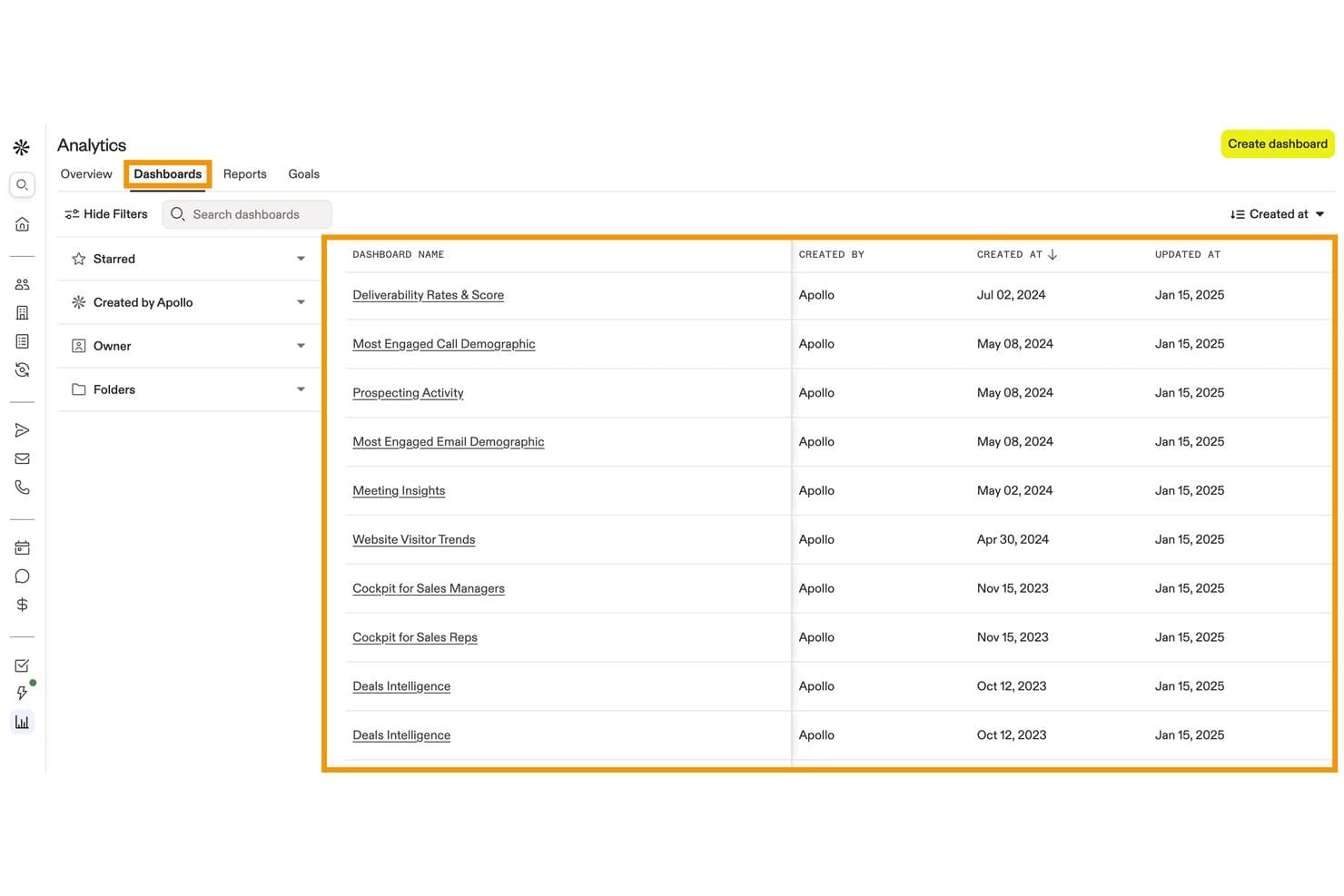
Apollo.io centralizes pre-built analytics dashboards for tracking sales activity. Apollo.io (Apollo) is a B2B sales and lead management platform that combines a 240M+ contact database, form enrichment, website visitor identification, lead scoring, inbound routing, and workflow automation.
Who Is Apollo.io Best For?
Apollo.io is a strong fit for B2B sales and marketing teams that need to enrich, score, and route inbound leads using a large contact database without stitching together multiple data tools.
Why I Picked Apollo.io
Apollo.io earns its spot on my shortlist because its B2B intent data, powered by Bombora, surfaces accounts actively researching your category across 15,000+ topics before they ever hit a form. I love how form enrichment pairs with that signal: a prospect submits just their email, and Apollo auto-fills company size, industry, and phone number from its 240M-contact database, so your routing rules fire on complete data from the start. That combination of intent scoring and enriched inbound capture is where Apollo pulls ahead for B2B lead qualification.
Apollo.io Key Features
- Inbound router: Routes incoming leads to the right rep or meeting type based on intake form answers, ICP fit, or existing account ownership, including round-robin distribution.
- Waterfall enrichment: Pulls missing contact data from multiple providers in sequence, filling gaps in email, phone, and firmographic fields across your saved records.
- Website visitor identification: Surfaces the companies and contacts browsing your site—including the specific pages they viewed—before they ever submit a form.
- Custom scoring models: Lets you build separate scoring models for people and companies using 65+ filters, with tiered outputs and a score breakdown view for each prospect.
Apollo.io Integrations
Apollo.io offers native integrations with Salesforce, HubSpot, Zoho, Microsoft Dynamics, Pipedrive, Marketo, Klaviyo, Mailchimp, Snowflake, and Slack. It also supports a public API for custom integrations and Zapier.
Pros and Cons
Pros:
- Granular inbound routing improves sales handoff
- Form enrichment reduces form friction
- B2B intent signals identify active research
Cons:
- Attribution lacks multi-touch revenue reporting
- Marketing nurture remains incomplete
Learn more about Apollo.io: Best for drag-and-drop interface configuration
- 14-day free trial
- From $40/user/month (platform only; CRM products extra)
Visit WebsiteCustomer Rating:4.7/5
Creatio offers a management dashboard with campaign analytics and AI insights. Creatio is a no-code marketing automation and CRM platform that covers lead capture, scoring, nurturing, and pipeline management across the full lead lifecycle.
Who Is Creatio Best For?
Creatio is a strong fit for mid-market and enterprise marketing teams that want to configure their own workflows without relying on developers.
Why I Picked Creatio
I've included Creatio in my top picks because its drag-and-drop interface configuration goes well beyond email templates. The visual Campaign Designer lets you build multi-step, multi-channel lead nurturing flows with branching logic, all without writing a line of code. The drag-and-drop Landing Page Designer is another standout, letting you build and connect lead capture pages directly in the platform so new leads flow straight into your pipeline.
Creatio Key Features
- Lead predictive scoring: An AI model that rates each lead from 1 to 100 based on customer needs, engagement data, and service history.
- Campaign Designer: A visual, no-code tool for building multi-channel campaign flows with branching logic based on customer behaviour.
- Landing Page Designer: A drag-and-drop builder that creates landing pages integrated directly with Creatio, automatically registering new leads when a form is submitted.
- Web analytics tracking: Imports Google Analytics or Matomo data into contact profiles, showing lead source, channel, and full session-level website activity.
Creatio Integrations
Creatio offers native integrations with Microsoft Exchange, Microsoft 365, Google Calendar, Google Ads, and Facebook Ads, along with a marketplace that includes connectors for SharePoint, DocuSign, Salesforce, Jotform, and Microsoft Teams Phone. It also connects with Zapier and supports OData 3/4 protocols plus a REST API for custom integrations.
Pros and Cons
Pros:
- Built-in lead scoring and sales forecasting
- Supports no-code layout configuration
- Captures leads from multiple channel sources
Cons:
- Modular pricing structure is hard to estimate
- Steep learning for advanced builds
Learn more about Creatio: Best for shared marketing and sales timelines
- Free plan available
- From $20/user/month
Visit WebsiteCustomer Rating:4.4/5
HubSpot offers a dashboard with contact activity and prospect tracking. HubSpot is a CRM platform with built-in lead management tools that combine contact tracking, lead capture, pipeline management, and marketing-to-sales handoff workflows in one system.
Who Is HubSpot Best For?
I'd recommend HubSpot for small to mid-size marketing and sales teams that manage leads across both functions and need a single shared system.
Why I Picked HubSpot
I've included HubSpot in my top picks because of how well its contact timeline unifies marketing and sales activity in one view. When a lead opens an email, visits a pricing page, or fills out a form, that activity sits right alongside call notes and meeting logs from sales. That shared context means sales reps know exactly what marketing content a lead engaged with before the first outreach, which cuts down on redundant follow-up.
HubSpot Key Features
- Lead scoring: Assigns point values to leads based on demographic data and engagement activity to help prioritize outreach.
- Pipeline management: Organizes leads into deal stages with drag-and-drop controls so reps can track progress at a glance.
- Meeting scheduling: Let leads book time directly on a rep's calendar through a shareable link.
- Smart lists: Automatically segments leads based on criteria like lifecycle stage, industry, or behaviour.
HubSpot Integrations
HubSpot has 1,500+ apps in its App Marketplace, including Salesforce, Slack, Google Workspace, Mailchimp, Shopify, LinkedIn Sales Navigator, Microsoft Teams, Zoom, Stripe, and WordPress. It's available on Zapier and has an API for custom integrations.
Pros and Cons
Pros:
- Automated lead nurturing email sequences included
- Shared contact timeline across all teams
- Built-in forms capture leads automatically
Cons:
- Custom lead routing rules can be complex
- Advanced reporting is restricted to enterprise
 Best for journey-based audience segmentation
- 14-day free trial
- From $199/month
Visit WebsiteCustomer Rating:4.5/5
Ortto offers a dashboard with customer insights and audience segmentation. Ortto is a marketing automation platform that combines a built-in customer data platform with journey-based campaign tools, lead scoring, multi-channel messaging, and audience segmentation.
Who Is Ortto Best For?
Ortto works well for marketing teams that own both campaign execution and audience data, without depending on a separate data or engineering team.
Why I Picked Ortto
Ortto earns its spot on my shortlist because of how its journey builder connects audience segmentation directly to campaign triggers. I use Ortto's built-in CDP to build segments based on behavioural data, like page visits or product actions, and those segments feed directly into automated journeys. What I like is the ability to split journeys by audience attributes mid-flow, so leads receive different messaging based on where they are in the funnel.
Ortto Key Features
- Custom lead scoring: Build scores from demographic, firmographic, and behavioural data, with automatic score degradation over time for accuracy
- Funnel analysis reports: Monitor multi-step conversion rates across the full lead lifecycle using built-in funnel report templates
- Popup and form builder: Capture leads directly with embeddable forms, popups, and surveys tied to your CDP contact data
- Round-robin lead assignment: Automatically assign leads to sales reps via journey-triggered round-robin rules when score thresholds are met
Ortto Integrations
Ortto offers 25+ native integrations, including Salesforce, HubSpot, Pipedrive, Shopify, Stripe, Chargebee, Recurly, Zendesk, Intercom, and Google Ads. It also connects with Zapier and provides an API for custom integrations.
Pros and Cons
Pros:
- Multi-channel lead nurturing across email and SMS
- Visual journey builder supports team collaboration
- Built-in CDP unifies lead data automatically
Cons:
- Contact-based pricing scales up quickly
- No built-in CRM for pipeline management
Learn more about Ortto: Best for automated lead routing and matching
- Free demo available
- Pricing upon request
Visit WebsiteCustomer Rating:4.6/5
LeanData offers a lead routing builder with matching, assignment, and workflows. LeanData is a Salesforce-native lead management platform built around automated lead-to-account matching, territory-based routing, and buying group orchestration for B2B revenue teams.
Who Is LeanData Best For?
LeanData is a strong fit for enterprise B2B revenue operations teams managing high lead volumes across complex, multi-territory Salesforce environments.
Why I Picked LeanData
I picked LeanData as one of the best because its lead-to-account matching goes well beyond email matching. It uses six fields plus custom tiebreakers, so leads actually land on the right account record in Salesforce. I also like how its visual routing flowchart lets my team build territory-based assignment rules without writing code. On top of that, BookIt scheduling lets reps book meetings directly inside Salesforce the moment a lead qualifies.
LeanData Key Features
- Audit trails: Logs every routing decision so your team can trace exactly why a lead was assigned a certain way and fix errors fast.
- Buying group orchestration: Groups related contacts from the same account into a coordinated opportunity, so sales aren't working the same deal in silos.
- Round-robin lead distribution: Automatically cycles lead assignments across reps to balance workload and prevent leads from piling up with one person.
- SLA tracking: Monitors lead response time against set thresholds so ops teams can flag and escalate leads that go too long without a follow-up.
LeanData Integrations
LeanData is a Salesforce-native platform with 17+ integrations, including Salesforce Sales Engagement, 6sense, Clearbit, Cognism, Cloudingo, Crossbeam, Outreach, Salesloft, Gong, and Slack. It also connects with Microsoft Teams, Kronologic, Sendoso, UserGems, Qualified, G2, and Groove. An API is available for custom integrations.
Pros and Cons
Pros:
- Duplicate detection prevents CRM data decay
- Manages complex global territory assignments
- Visual drag-and-drop routing flow builder
Cons:
- No standalone mobile app
- Contact routing sold separately from leads
Learn more about LeanData: Best for high-velocity lead capture workflows
- Free demo available
- Pricing upon request
Visit WebsiteCustomer Rating:4.4/5
LeadSquared offers a lead management dashboard with scoring and assignments. LeadSquared is a sales execution and lead management platform built for high-volume sales teams, combining lead capture, automated distribution, pipeline tracking, and field sales management in one system.
Who Is LeadSquared Best For?
LeadSquared is a strong fit for inside sales and field sales teams in industries like education, financial services, and healthcare that manage large volumes of inbound leads daily.
Why I Picked LeadSquared
I picked LeadSquared as one of the best because its lead capture engine pulls in leads from more entry points than almost any other platform I've seen. It captures across Google Ads, Facebook, Instagram, IVR phone calls, chat tools, and third-party marketplaces simultaneously, all without manual imports. What I really like is the lead distribution automation: rules fire the moment a lead enters the system and route it to the right rep by territory, product, or load-balanced quota. For teams processing thousands of inbound leads daily, that instant routing prevents the drop-off that kills conversion rates.
LeadSquared Key Features
- AI-powered conversion predictor: Uses machine learning to assign each lead a conversion probability score based on historical data and lead attributes.
- Field force automation: Let field sales reps plan beat routes, log calls, upload documents, and update lead records directly from the mobile app.
- Lead scoring and engagement scoring: Scores leads automatically based on activity, profile data, and behaviour to help reps prioritize follow-up.
- Sales performance management: Tracks rep-level and team-level quota attainment, territory assignments, and pipeline progress in one dashboard.
LeadSquared Integrations
LeadSquared offers native connectors for lead capture and communication tools, including Google Ads, Google Forms, Facebook Lead Ads, WhatsApp, Zoom, Zendesk Chat, and Salesforce. The LeadSquared Zapier integration allows you to connect with 500+ third-party web services, and a REST API is available for custom integrations.
Pros and Cons
Pros:
- Mobile app supports full field sales tracking
- Aggregates multi-source inbound lead data
- Automated lead distribution by territory and quota
Cons:
- Limited native reporting dashboard customization
- Portal slows down under heavy workflow loads
Learn more about LeadSquared: Best for predictive analytics and account insights
- Free plan available
- Pricing upon request
Visit WebsiteCustomer Rating:4.3/5
6sense offers a lead dashboard with analytics, lead scoring, and insights. 6sense is an AI-driven account engagement platform that surfaces anonymous buyer intent data, predicts which accounts are in-market, and helps sales and marketing teams prioritize outreach based on buying signals.
Who Is 6sense Best For?
6sense suits enterprise B2B revenue operations teams that run account-based marketing programs and need data to align sales and marketing around the same target accounts.
Why I Picked 6sense
I picked 6sense as one of the best because of how it handles the dark funnel. Most lead management tools wait for a prospect to fill out a form. 6sense goes further by combining anonymous behavioural signals, technographic data, and firmographic intelligence to deliver a complete view of the buyer journey, even before a lead self-identifies. I particularly like the predictive scoring model: it uses machine learning to weigh dozens of signals, including firmographic fit, technographic profile, behavioural patterns, and intent data, based on what has actually correlated with conversion in historical data. All of that data is then analyzed against historic conversion patterns by 6sense's AI predictive model to predict each account's buying stage, and the platform provides a 360-degree profile view of each account.
6sense Key Features
- Dynamic audience segments: Build and update account segments automatically based on intent signals, firmographics, and technographics without manual list management.
- Sales intelligence alerts: Notify sales reps in real time when a target account spikes in research activity or changes buying stage.
- Conversational email: Send AI-generated, personalized email sequences to prospects based on their account profile and buying stage.
- Contact data enrichment: Surface-verified contact details, including direct dials and emails, for key decision-makers within target accounts.
6sense Integrations
6sense offers native integrations across CRM, marketing automation, sales engagement, advertising, and intent data categories, including Salesforce, Microsoft Dynamics, HubSpot, Marketo, Eloqua, Outreach, Salesloft, Gong, LinkedIn Advertising, and Google Ads. It also integrates with Slack for messaging and supports data warehouse and AWS S3 connections. An API is available for custom integrations, and Zapier support is not clearly documented.
Pros and Cons
Pros:
- Tracks keyword-level intent across the web
- AI predicts the account buying stage timing
- Detects anonymous buyer intent signals
Cons:
- Requires a dedicated admin to maintain properly
- Limited long-term reporting
Learn more about 6sense: Best for automated customer milestone tracking
- 14-day free trial + free demo available
- From $15/month (billed annually)
Visit WebsiteCustomer Rating:4.4/5
ActiveCampaign offers a dashboard with lead details and activity tracking. ActiveCampaign is a marketing automation and CRM platform that combines email marketing, contact scoring, pipeline management, and behaviour-based automation across the full customer lifecycle.
Who Is ActiveCampaign Best For?
ActiveCampaign is a strong fit for small to mid-sized B2C and B2B businesses that run high-volume email and automation campaigns across long or multi-touch customer journeys.
Why I Picked ActiveCampaign
I picked ActiveCampaign as one of the best because its goal-based automation is genuinely built around tracking where a contact is in their lifecycle. I like that you can set milestone goals directly inside automation workflows, and contacts automatically skip ahead or branch when they hit that goal. Pair that with date-based triggers and contact scoring thresholds, and your team can react to real lead behaviour, not just scheduled follow-ups.
ActiveCampaign Key Features
- Deal pipeline management: Track leads through a visual CRM pipeline with drag-and-drop stage updates and automated task creation.
- Site and event tracking: Logs contact activity on your website and fires automation triggers based on pages visited or actions taken.
- Dynamic segmentation: Builds contact lists automatically using tags, custom fields, and behavioural data that update in real time.
- Lead capture forms: Embeddable forms that push submissions directly into contact records and trigger automation workflows instantly.
ActiveCampaign Integrations
ActiveCampaign offers 1,000+ apps and integrations, including native integrations with Salesforce, Shopify, WooCommerce, WordPress, Facebook, Google Ads, Calendly, Slack, Zendesk, and Microsoft Dynamics 365. It also connects with Zapier and provides an API for custom integrations.
Pros and Cons
Pros:
- Dynamic content tailors email delivery
- Built-in lead scoring updates automatically
- Granular automation branching for lead workflows
Cons:
- Lacks advanced pipeline visualization tools
- CRM features locked behind higher tiers
Learn more about ActiveCampaign: Best for native sales intelligence dashboards
- Free demo available
- Pricing upon request
Visit WebsiteCustomer Rating:4.1/5
Adobe Marketo Engage offers a dashboard with event workflows and automation. Adobe Marketo Engage is a B2B marketing automation platform with lead scoring, audience segmentation, multi-channel nurturing, and native sales intelligence tools built for enterprise marketing and sales teams.
Who Is Adobe Marketo Engage Best For?
Adobe Marketo Engage is a strong fit for enterprise B2B marketing teams that run complex, multi-touch campaigns and need deep alignment with sales.
Why I Picked Adobe Marketo Engage
Adobe Marketo Engage earns its spot on my shortlist because of Sales Insight, a native dashboard that surfaces lead score, engagement history, and "interesting moments" directly inside Salesforce or Microsoft Dynamics. My team uses it to see exactly which leads are spiking in activity so reps can prioritize outreach without switching tools. I also like the Revenue Attribution dashboard, which maps which campaigns influenced closed deals at each pipeline stage.
Adobe Marketo Engage Key Features
- Engagement programs: Builds multi-step nurture tracks that automatically advance leads based on their responses and engagement cadence.
- Progressive profiling: Replaces already-known form fields with new questions each time a lead converts, building richer profiles over time.
- Smart campaigns: Triggers automated actions like emails or lead score changes based on specific lead behaviours or data changes.
- Anonymous lead tracking: Tracks web activity from unknown visitors and retroactively links it to a lead record once they fill out a form.
Adobe Marketo Engage Integrations
Integrations include Salesforce, Microsoft Dynamics, Veeva, Clearbit, ZoomInfo, Google, Facebook, LinkedIn, Zoom, and ON24.
Pros and Cons
Pros:
- Deep Salesforce sync for lead lifecycle tracking
- Tracks multi-touch revenue attribution
- Custom behaviour-based lead scoring
Cons:
- Requires dedicated ops resource to manage
- Lacks modern drag-and-drop design tools
Learn more about Adobe Marketo Engage: Best for enterprise-grade campaign orchestration
- Free demo available
- Pricing upon request

Oracle Eloqua offers a workflow builder with drag-and-drop lead nurturing. Oracle Eloqua is an enterprise B2B marketing automation platform built for managing multi-channel lead nurturing, advanced lead scoring, and campaign orchestration across complex buyer journeys.
Who Is Oracle Eloqua Best For?
Oracle Eloqua is a natural fit for large B2B enterprises with dedicated marketing operations teams running complex, multi-touch demand generation programs.
Why I Picked Oracle Eloqua
Oracle Eloqua earns its spot on my shortlist because its Campaign Canvas gives marketing operations teams precise control over multi-step, multi-channel campaigns at a scale that most tools can't match. I particularly like the Program Canvas for automating lead management workflows, where event listeners fire in real time based on lead score changes or new contact creation. Pair that with concurrent lead scoring models across multiple business units, and Eloqua handles the complexity that smaller platforms simply weren't built for.
Oracle Eloqua Key Features
- Dynamic content blocks: Swap email or landing page content automatically based on a contact's profile data or segment membership.
- Website visitor tracking: Identifies known contacts visiting your site and logs page-level activity directly to their contact record.
- Insight reporting: Pre-built and custom reports that surface campaign performance, email engagement, and lead funnel metrics.
- Contact washing machine: Automates data normalization and field standardization as contacts enter or move through your database.
Oracle Eloqua Integrations
Oracle Eloqua offers 500+ prebuilt integrations through its Marketing AppCloud marketplace, including CRM integrations with Salesforce, Oracle CX Sales, and Microsoft Dynamics, along with apps for tools like LinkedIn, 6sense, Webex, and Cvent. Eloqua is also natively integrated with the broader Oracle CX suite, and an API is available for custom integrations.
Pros and Cons
Pros:
- Unifies online and offline data
- Behavioural lead scoring across business units
- Visual canvas simplifies campaign orchestration
Cons:
- No native SMS or WhatsApp channels
- Built-in analytics require manual report building
Learn more about Oracle Eloqua:
Annen programvare for leadshåndtering
Her er noen flere alternativer for leadshåndtering som ikke kom med på kortlisten min, men som likevel er verdt å se nærmere på:
- 11Salesforce Sales CloudBest for forecasting revenue trends
- 12Mailchimp Best for built-in email campaign launches
- 13SalesflareBest for automated meeting logging
- 14Zoho CRMBest for customizable workflow automations
- 15Capsule Best for small business client management
- 16FreshsalesBest for integrated email and calling tools
- 17CognismBest for AI-powered B2B prospecting and lead enrichment
- 18Pipedrive Best for visual sales pipeline tracking
- 19Sugar MarketBest for campaign ROI tracking
- 20monday CRMBest for team collaboration on deals
How I Evaluate Lead Management Software
I evaluate tools in two layers: the baseline—lead capture, scoring, and sales routing—and the differentiators, like ABM support or attribution depth, that actually set platforms apart.
Core Functionality (Table Stakes For This List)
When I'm selecting tools for my list, I rank each one on a scale from 0 (does not offer the functionality) to 5 (excels in this area) for each core functionality listed below. Then, I calculate the tool's total score into a percentage. Each tool needs to achieve a minimum total score of 65% to be considered for inclusion.
- Lead Capture Across Channels: I check whether the platform pulls in leads from forms, landing pages, chat widgets, and ad platforms rather than relying on manual entry or a single source.
- Lead Scoring & Qualification: Each tool should let you build scoring models that weigh both profile fit and behavioral signals, like page visits or email engagement, to surface sales-ready leads.
- Segmentation & Database Management: I look for dynamic list-building, custom fields, and deduplication—things that matter when you're running campaigns across multiple audiences simultaneously.
- Lead Nurturing Automation: The platform should support multi-step, trigger-based workflows that go beyond basic email drips, such as branching paths based on a lead's content engagement or form submissions.
- Lead Routing & Distribution: I evaluate whether the tool offers rules-based assignment by criteria like territory, lead source, or deal size so reps get the right leads without manual intervention.
- Tracking & Attribution Reporting: Dashboards should connect lead sources and touchpoints to pipeline outcomes, giving marketing teams a clear view of which channels and campaigns drive conversions.
Once I have a list of tools that meet this criteria, I consider what sets each platform apart.
Differentiating Factors (What Sets Vendors Apart)
Here's how I compare and contrast different vendors:
Standout Features
AI-powered lead insights are a major differentiator—I look for platforms that surface buying signals and recommend next-best actions rather than just assign a static score. Intent data and enrichment capabilities also matter, especially when your team needs firmographic or technographic context to prioritize outreach. I evaluate how well a platform bridges marketing and sales through shared workflows, lead handoff notifications, and SLA tracking that keep both teams aligned on pipeline goals.
Beyond Features
CRM integration depth is one of the first things I check—a lead management tool that doesn't sync bi-directionally with your CRM creates data gaps that erode trust between marketing and sales. Pricing structure also matters here, particularly how vendors scale costs as your contact database grows. I look for transparent tier breakdowns tied to volume or seats. Compliance is another area I evaluate closely, especially consent management and audit trail features that help teams stay aligned with GDPR and CCPA requirements across regions.
Slik velger du programvare for leadshåndtering
Det er lett å gå seg vill i lange funksjonslister og kompliserte prismodeller. For å hjelpe deg med å holde fokus mens du går gjennom den unike prosessen med å velge programvare, får du her en sjekkliste over faktorer du bør ha i tankene:
| Faktor | Hva bør du vurdere? |
|---|---|
| FaktorSkalerbarhet | Hva bør du vurdere?Vil systemet håndtere vekst i antall leads, brukere og datamengde etter hvert som virksomheten utvider seg? Se etter fleksible abonnementer og en arkitektur som støtter flere salgspipelines eller brukere. |
| FaktorIntegrasjoner | Hva bør du vurdere?Kobles systemet direkte til CRM-systemet, e-postverktøyene, verktøyene for markedsføringsautomatisering eller analyseverktøyene du allerede bruker? Kontroller at viktige integrasjoner er bekreftet og ikke bare tilbys via tredjeparter. |
| FaktorTilpasningsmuligheter | Hva bør du vurdere?Kan du justere salgspipelines, felt og arbeidsflyter slik at de passer til salgsprosessen eller de unike forretningsreglene dine? Unngå rigide løsninger som skal passe for alle, og som begrenser fleksibiliteten. |
| FaktorBrukervennlighet | Hva bør du vurdere?Er grensesnittet og oppsettet intuitivt for ansatte uten teknisk bakgrunn? Test med noen brukere som har et ferdighetsnivå som tilsvarer teamets, før du tar en beslutning. |
| FaktorImplementering og innføring | Hva bør du vurdere?Hva kreves for å migrere data, sette opp salgspipelines og lære opp teamet? Vurder hvor mye tid teamet realistisk kan investere, og om leverandøren tilbyr migreringsstøtte eller innføringstjenester. |
| FaktorKostnad | Hva bør du vurdere?Hvordan passer den totale månedsprisen inn i budsjettet, inkludert nødvendige brukere, kontakter og tillegg? Vær oppmerksom på skjulte kostnader for ekstra skjemaer, integrasjoner eller avansert rapportering. |
| FaktorSikkerhetstiltak | Hva bør du vurdere?Er kryptering, tilgangskontroller og overholdelse av regelverk som GDPR på plass? Finn ut om du trenger enkel pålogging, revisjonslogger eller alternativer for hvor dataene lagres. |
| FaktorTilgjengelig kundestøtte | Hva bør du vurdere?Er direkte kundestøtte tilgjengelig i arbeidstiden din eller på språket ditt? Se etter alternativer som chat, telefon eller regionale kundestøtteteam for å unngå forsinkelser hvis det oppstår problemer. |
Hva er programvare for leadshåndtering?
Programvare for håndtering av potensielle kunder er et digitalt verktøy som hjelper bedrifter med å samle inn, følge opp, organisere og kvalifisere potensielle kunder gjennom hele salgsprosessen. Disse plattformene sentraliserer kontaktdata, automatiserer oppfølginger og støtter teamsamarbeid, noe som gjør det enklere å håndtere potensielle kunder fra første interesse til overføring eller konvertering.
Funksjoner i programvare for håndtering av potensielle kunder
Når du velger programvare for håndtering av potensielle kunder, bør du se etter følgende viktige funksjoner:
- Skjemaer for registrering av potensielle kunder: Samle inn nye potensielle kunder direkte fra nettstedet, landingssidene eller kampanjene dine i sosiale medier, og legg dem automatisk til i databasen.
- Styring av salgspipeline: Visualiser, organiser og flytt potensielle kunder gjennom tilpassbare stadier, slik at teamene alltid kjenner gjeldende status og neste steg for hver kontakt.
- Automatiserte oppfølginger: Sett opp tidsstyrte eller utløserbaserte e-poster, tekstmeldinger eller oppgaver for å følge opp potensielle kunder og sørge for at ingen faller mellom stolene.
- Kontaktdatabase: Lagre og administrer detaljerte kontaktprofiler og historikk over interaksjoner, slik at teamet ditt får en 360-graders oversikt over hver potensiell kunde.
- Poengsetting av potensielle kunder: Tildel verdier basert på demografi, atferd eller engasjement for å prioritere de potensielle kundene som er mest klare for salg.
- Oppgavetildeling: Deleger oppfølginger, samtaler eller neste handlinger til teammedlemmer direkte i plattformen for bedre ansvarsforankring.
- Rapportering og analyse: Følg med på kilder til potensielle kunder, resultater i salgspipelinen og konverteringsfrekvenser med tilpassbare dashbord og rapporter som kan eksporteres.
- Registrering av salgsaktiviteter: Registrer automatisk samtaler, e-poster og møtenotater for å opprettholde en pålitelig tidslinje over teamets interaksjoner med hver potensiell kunde.
- Tilgangskontroll basert på roller: Angi tillatelser for å kontrollere hvem som kan se eller redigere sensitiv informasjon om potensielle kunder og salgspipelinen, basert på jobbroller.
- Kalenderintegrasjon: Synkroniser møter og oppfølgingspåminnelser med brukernes kalendere for å holde alle i rute og forhindre at forbindelser går tapt.
Vanlige AI-funksjoner i programvare for håndtering av potensielle kunder
I tillegg til standardfunksjonene i programvare for håndtering av potensielle kunder som er nevnt ovenfor, innfører mange av disse løsningene AI med funksjoner som:
- Prediktiv poengsetting av potensielle kunder: Bruker AI-algoritmer til å analysere historiske data og forutsi hvilke potensielle kunder som har størst sannsynlighet for å konvertere, slik at teamene kan fokusere på prospekter med høy verdi og større presisjon.
- Automatisk datautvidelse: AI fyller automatisk ut manglende informasjon om potensielle kunder ved å kryssreferere offentlige kilder og databaser, slik at kontaktopplysningene holdes oppdatert med minimalt manuelt arbeid.
- Smart ruting av potensielle kunder: Analyserer egenskapene til potensielle kunder og salgsgruppens styrker for å rute nye potensielle kunder til den best egnede salgsrepresentanten, noe som forbedrer konverteringsfrekvensene og gjør responstidene kortere.
- AI-drevet sentimentanalyse: Evaluerer samtaler, e-poster og notater for å avdekke kundens intensjon og holdning, slik at potensielle kunder med høy hastegrad eller stort potensial som trenger umiddelbar handling, fremheves.
- Intelligente forslag til oppfølging: Gir salgsrepresentanter automatiserte og tilpassede anbefalinger om de beste neste handlingene, basert på hver potensielle kundes tidligere atferd og engasjementsmønstre.
Fordeler med programvare for håndtering av potensielle kunder
Implementering av programvare for håndtering av potensielle kunder gir flere fordeler for teamet og virksomheten din. Her er noen av fordelene du kan se frem til:
- Sentralisert organisering av potensielle kunder: Oppbevar all informasjon om potensielle kunder, interaksjoner og statusoppdateringer på ett sted, slik at manuelt arbeid med oppfølging og tapte muligheter reduseres.
- Raskere responstid: Automatisert tildeling av potensielle kunder, varsler og oppfølginger sørger for at teamet ditt reagerer raskt på nye henvendelser.
- Bedre oversikt over salgspipelinen: Tilpassbare dashbord, stadier og aktivitetslogger hjelper ledere med å overvåke salgsflyten nøyaktig og lage salgsprognoser.
- Høyere konvertering av potensielle kunder: Funksjoner for poengsetting, oppfølging og smart ruting hjelper teamene med å fokusere på og vinne de mest lovende avtalene.
- Datadrevet beslutningstaking: Funksjoner for rapportering og analyse gir deg innsikt i salgsrepresentantenes aktivitet, kildene til potensielle kunder og kampanjeresultater.
- Bedre teamsamarbeid: Oppgavetildelinger og kommunikasjonsverktøy holder alle samkjørte om neste steg og roller gjennom hele salgsprosessen.
- Forbedret opplæring: Innebygde opplæringsverktøy, veiledet konfigurering og intuitiv utforming hjelper nyansatte med å komme effektivt i gang.
Kostnader og priser for programvare for håndtering av potensielle kunder
Å velge programvare for leadhåndtering krever en forståelse av de ulike prismodellene og planene som er tilgjengelige. Kostnadene varierer basert på funksjoner, teamstørrelse, tillegg og mer. Tabellen nedenfor oppsummerer vanlige planer, gjennomsnittsprisene deres og typiske funksjoner som er inkludert i løsninger for programvare for leadhåndtering:
Sammenligningstabell for programvare for leadhåndtering
| Plantype | Gjennomsnittspris | Vanlige funksjoner |
|---|---|---|
| PlantypeGratisplan | Gjennomsnittspris$0-$20/bruker/måned | Vanlige funksjonerGrunnleggende registrering og lagring av leads, én salgspipeline, begrenset antall brukere og viktige rapporteringsfunksjoner. |
| PlantypePersonlig plan | Gjennomsnittspris$15-$35/bruker/måned | Vanlige funksjonerUtvidet kontaktadministrasjon, begrenset automatisering, e-postintegrasjoner og standard kundestøtte. |
| PlantypeBedriftsplan | Gjennomsnittspris$40-$80/bruker/måned | Vanlige funksjonerStøtte for flere salgspipelines, automatisering av arbeidsflyter, avansert rapportering, verktøy for teamsamarbeid og API-integrasjoner. |
| PlantypePlan for store virksomheter | Gjennomsnittspris$90-$150/bruker/måned | Vanlige funksjonerTilpassede roller og tillatelser, ubegrenset antall salgspipelines, avansert sikkerhet, hjelp med innføring og prioritert kundestøtte. |
Vanlige spørsmål om programvare for leadhåndtering
Her er noen svar på vanlige spørsmål om programvare for leadhåndtering:
Hvordan vet jeg om bedriften min trenger programvare for leadhåndtering?
Hvis teamet ditt har problemer med å spore leads, går glipp av oppfølginger eller må håndtere regneark, er det et godt tegn på at dedikert programvare for leadhåndtering kan være til hjelp. Slike verktøy er spesielt nyttige når antallet salgsleads og potensielle kunder øker, eller når salgstrakten blir mer kompleks, fordi de hjelper team med å optimalisere prosessen for leadhåndtering.
Kan programvare for leadhåndtering integreres med mitt eksisterende CRM?
Ja, det meste av programvaren for leadhåndtering kan integreres med større CRM-programvare, e-post- og markedsføringsverktøy. Mange kobles også til plattformer for kunderelasjonshåndtering for å støtte markedsføringskampanjer og holde kontaktinformasjonen oppdatert. Sjekk alltid integrasjonslistene og test kompatibiliteten med den eksisterende teknologistakken din før du kjøper.
Hvordan skiller programvare for leadhåndtering seg fra et fullstendig CRM-system?
Programvare for leadhåndtering fokuserer på å samle inn, kvalifisere og spore leads gjennom den tidlige salgsprosessen, mens et CRM-system dekker all kundeinteraksjon etter salget og den løpende kundeoppfølgingen. Et salgs-CRM er ofte utformet for å hjelpe selgere med å administrere potensielle kunder og støtte aktiviteter for leadsgenerering gjennom hele kundelivssyklusen.
Hva bør jeg se etter når det gjelder støtte ved innføring?
Se etter plattformer med veiledet oppsett, hjelp med migrering, opplæringsressurser og rask kundestøtte. Brukervennlige grensesnitt, tydelig dokumentasjon og innføring som er tilpasset oppstartsbedrifter og team i vekst, kan gjøre det raskere for teamet å ta løsningen i bruk og hjelpe dere med å få verdi raskere.
Finnes det sikkerhetsrisikoer ved skybasert programvare for leadhåndtering?
Skybaserte verktøy bør ha kryptering, brukertillatelser, samsvarssertifiseringer og varslingsinnstillinger for kontoaktivitet. Kontroller alltid sikkerhetstiltakene, særlig hvis du håndterer sensitive kundedata eller opererer i regulerte bransjer.
Kan jeg tilpasse arbeidsflyter og salgspipelines i programvare for leadhåndtering?
Ja, nesten alle plattformer for leadhåndtering tilbyr tilpasningsmuligheter for salgspipelines, felt og stadier, slik at du kan tilpasse prosessen til bedriftens behov. Noen er mer fleksible enn andre, så vurder disse alternativene nøye.