

Programvare for e-postsignaturer er et viktig verktøy for alle team. Med den rette løsningen kan du sikre konsekvent og profesjonell merkevarebygging i all kommunikasjon, samtidig som du sparer tid på oppdateringer og administrasjon. Det kan imidlertid være utfordrende å velge riktig programvare for e-postsignaturer, særlig når det finnes så mange alternativer å vurdere.
Med utgangspunkt i min erfaring med markedsføringsverktøy har jeg testet og sammenlignet flere ledende løsninger for e-postsignaturer. Basert på funnene mine har jeg utarbeidet detaljerte anmeldelser som hjelper deg med å finne den beste programvaren for teamets unike behov.
Hvorfor du kan stole på våre programvareanbefalinger
6,700+
Reviews
20
Industry experts
16+
Evaluation factors
14
Years
Teamet vårt har testet og anmeldt programvare siden 2012. Vi er selv markedsføringsledere, så vi vet hvor vanskelig og hvor viktig det er å velge riktig programvare.
I denne guiden har vi vurdert verktøyene gjennom praktisk testing og uavhengig research og gitt dem poeng ut fra våre utvelgelseskriterier.
Anmeldelsene våre bygger på vår egen redaksjonelle vurdering. De er ikke et salgsargument.
Ekspertanmeldere:
 Gui DrusinaCreative Director
- Shriya GhateSenior Marketing Lead
 Amanda JacquesMarketing Ops Leader

Sammenligningstabell for programvare for e-postsignaturer
Denne sammenligningstabellen oppsummerer prisopplysningene for mine beste utvalgte programmer for e-postsignaturer:
| Tool | Best For | Trial Info | Price | ||
|---|---|---|---|---|---|
| 1 | Best for template-based signatures | Free plan available | From $10.70/month (billed annually) | Website | |
| 2 | Best for automated team-wide updates | Free trial available | From $0.88/user/month (billed annually) | Website | |
| 3 | Best for sending email through AI agents & automations | Free plan available | From $9/month | Website | |
| 4 | Best for quick setup | 14-day free trial | From $8/month | Website | |
| 5 | Best for custom design options | Free demo available | From $54/month (billed annually) | Website | |
| 6 | Best for real-time analytics | 14-day free trial | Pricing upon request | Website | |
| 7 | Best for marketing teams | Free demo available | From $75/month | Website | |
| 8 | Best for freelancers and small teams | Free demo available | From $6/user/month (billed annually) | Website | |
| 9 | Best for large-scale deployments | 14-day free trial | From $0.82/user/month (billed annually) | Website | |
| 10 | Best for enterprise-level compliance | 14-day free trial | From $123/user/month | Website |


Anmeldelser av den beste programvaren for e-postsignaturer
Nedenfor finner du mine detaljerte sammendrag av den beste programvaren for e-postsignaturer som kom med på kortlisten min. Anmeldelsene mine gir et detaljert innblikk i de viktigste funksjonene, fordelene og ulempene, integrasjonene og de ideelle bruksområdene for hvert verktøy, slik at du kan finne det som passer best for deg.
 Best for template-based signatures
- Free plan available
- From $10.70/month (billed annually)
Visit WebsiteCustomer Rating:4.5/5
You can customize padding and layout settings while building an email template with a signature block. Mailchimp is an email marketing platform that lets you design, customize, and manage branded email templates and campaigns using a drag-and-drop editor and built-in content tools.
Who Is Mailchimp Best For?
Mailchimp is a good fit for small to mid-sized marketing teams that already use it for email campaigns and want consistent, on-brand signatures without adopting a separate tool.
Why I Picked Mailchimp
I picked Mailchimp as one of the best because its template library gives marketing teams a real head start on building branded email signatures without starting from scratch. With over 130 pre-built templates and a drag-and-drop email builder, I can customize layouts, swap in brand colors, add a logo block, and set a consistent footer across campaigns. The Content Studio also lets my team store and reuse brand assets directly within the platform, so signature elements stay consistent across every send. I like that the legacy builder even supports custom HTML, which means I can fine-tune a signature's code when the visual editor isn't enough.
Mailchimp Key Features
- Dynamic content blocks: Swap out email content automatically based on audience segments, so different subscriber groups see tailored signature or footer variations in the same send.
- Generative AI copy tools: Use Mailchimp's built-in AI to draft and refine text within email layouts, including taglines or contact details in signature areas.
- A/B testing: Test different signature layouts, CTAs, or footer designs across audience splits to see which version drives better engagement.
- Send time optimization: Automatically schedule emails to go out when individual contacts are most likely to open them, based on past engagement data.
Mailchimp Integrations
Mailchimp offers 300+ native integrations, including Shopify, WooCommerce, Canva, Square, Wix, Squarespace, Stripe, Salesforce, LinkedIn, Wordpress, Facebook, and connects with Zapier. An API is available for custom integrations.
Pros and Cons
Pros:
- Automation features help standardize recurring emails.
- Segmentation lets you tailor messages to different audiences.
- Supports branded email signatures within campaign templates.
Cons:
- Signature design relies on template footer blocks.
- Advanced automation features require higher-tier paid plans.
Learn more about Mailchimp : Best for automated team-wide updates
- Free trial available
- From $0.88/user/month (billed annually)
Visit WebsiteCustomer Rating:4.7/5
BulkSignature offers centralized email signature management. BulkSignature is an email signature management platform designed for teams that need centralized control, automated updates, and bulk deployment of branded signatures across major email providers.
Who Is BulkSignature Best For?
BulkSignature is a good fit for IT administrators and marketing teams at small to mid-sized businesses managing email signatures across large groups of users.
Why I Picked BulkSignature
BulkSignature earns its spot on my shortlist because of how well it handles automated, team-wide signature updates through direct directory sync with Google Workspace and Microsoft 365. When someone joins the company or changes roles, BulkSignature pulls their updated details automatically—no manual edits, no chasing down individual users. I also like the department-level deployment, which lets you push different signature templates to different teams in a single click. On top of that, the scheduled banner feature means my team can plan marketing campaigns in advance and have the right banner rotate into signatures automatically on the right date.
Here are the key features:
BulkSignature Key Features
- Role-based permissions: Assign different access levels so marketing manages campaign banners while IT controls signature deployment and configuration.
- CTR tracking: Monitor click-through rates on signature banners to measure the performance of email signature marketing campaigns in real time.
- Drag-and-drop signature builder: Design branded email footers using customizable templates, colors, fonts, logos, and social media icons without writing any code.
- GDPR and SOC 2 Type II compliance: Manage signatures within a security framework that meets data protection and access control standards.
BulkSignature Integrations
BulkSignature offers native integrations with Google Workspace and Microsoft 365 for automated signature management. An API is available for custom integrations.
Pros and Cons
Pros:
- Compliance support
- Marketing banners built-in
- Fully automated signature personalization
Cons:
- May require initial setup support
- Limited to Google Workspace and Microsoft 365
Learn more about BulkSignature: Best for sending email through AI agents & automations
- Free plan available
- From $9/month
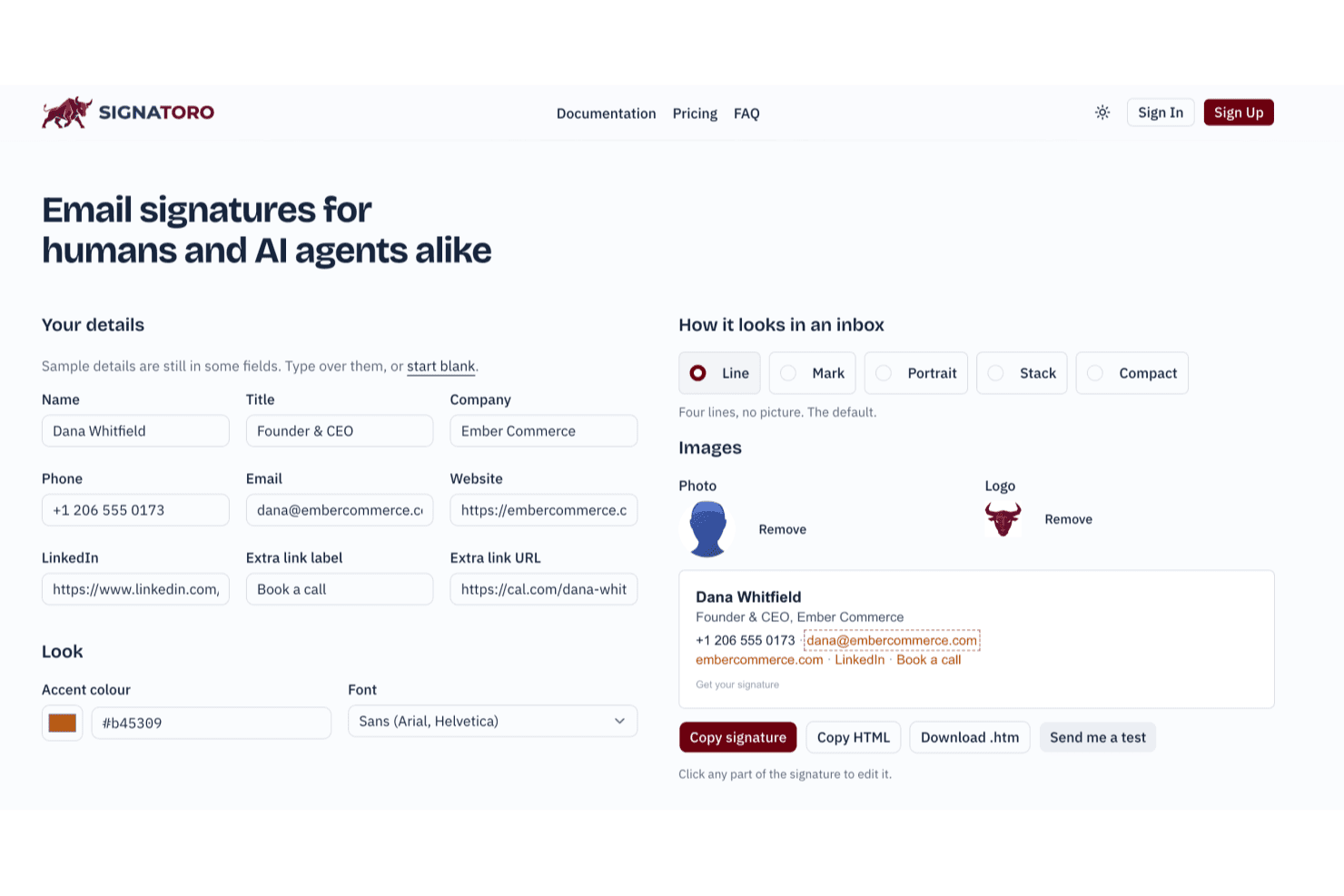
Signatoro lets users build and preview email signatures in real time. Signatoro is an email signature platform that lets individuals and small teams build, save, and deploy branded signatures across major mail apps, with native support for AI agents and automations fetching signatures via MCP and API.
Who Is Signatoro Best For?
Signatoro is a strong fit for small teams of 2–50 people who need branded signatures that AI agents and automations can fetch and use at send time.
Why I Picked Signatoro
I picked Signatoro as one of the best because it's the only tool in this category built with AI agents as a first-class use case. Via its MCP server, tools like Claude or ChatGPT can fetch a saved signature at send time as HTML or plain text, so every outbound message your agent sends carries the right branded signature automatically. Company owners also get dedicated AI agent slots (up to 25 on the largest plan), each with a configurable AI disclosure line baked in.
Signatoro Key Features
- Five signature layouts: Choose from Line, Mark, Portrait, Stack, and Compact layouts, each with font and accent color options.
- Review badge and booking button: Add a static Trustpilot, Google Reviews, or G2 badge alongside a Calendly or Cal.com booking button directly in your signature.
- Shared company branding controls: Company owners set the logo, layout, color, font, and review badge once, while each member keeps their own name, title, and photo.
- Compliance footnote with history: Add a legal or confidentiality footnote to all member signatures, with footnote-change history available on the largest team plan.
Signatoro Integrations
Signatoro offers a native Zoho Mail integration and supports MCP and API connections for AI assistants, including Claude and ChatGPT. Zapier is also listed among supported automation tools.
Pros and Cons
Pros:
- AI agents fetch signatures for outbound messages
- Consistent branding across teammates and devices
- Clean, polished signature layouts
Cons:
- Team updates require members to repaste signatures
- Limited layouts and styling choices
Learn more about Signatoro:

Bybrand offers quick, easy email signature management for small to medium businesses. Bybrand is an email signature management platform that lets you create, edit, and deploy professional signatures across your organization with centralized controls, template options, and integrations for popular email services.
Who Is Bybrand Best For?
Bybrand is a good fit for marketing and IT teams at small to mid-sized businesses that need to roll out consistent, branded email signatures across their organization.
Why I Picked Bybrand
Bybrand earns its spot on my shortlist because getting signatures deployed across a team genuinely takes minutes, not days. I like that you can start from one of 40+ pre-tested templates, fill in your details, and push the signature out to your whole team in a single session. The placeholder automation is what makes this fast at scale—you build one signature, add placeholders for names, titles, and contact details, then upload your employee list via CSV or a connected integration, and Bybrand populates everything at once. The bulk-send feature means I'm not manually updating each person's signature when something changes.
Bybrand Key Features
- Disclaimer editor: Add legally compliant disclaimer text to email signatures directly within the editor, keeping every outgoing message on the right side of compliance.
- Version history: Preview and restore any previous version of a signature within a 30-day window, so accidental edits can be undone.
- HTML editing mode: Edit signature code directly in HTML for precise customization beyond what the visual editor offers.
- Image hosting and asset storage: Store logos, icons, and images within Bybrand so linked assets stay live and consistent across all deployed signatures.
Bybrand Integrations
Bybrand offers native integrations with Google Workspace, Microsoft Outlook, Asana, Freshdesk, Zoho CRM, Google Sheets, Bitly, and Zoho Desk. An API is available for custom integrations.
Pros and Cons
Pros:
- Analytics for tracking effectiveness
- Efficient management tools
- Variety of templates
Cons:
- Basic customization options
- Limited advanced features
Learn more about Bybrand: Best for custom design options
- Free demo available
- From $54/month (billed annually)
Visit WebsiteCustomer Rating:4.6/5
Newoldstamp offers customizable email signature designs for branding-focused businesses. Newoldstamp is an email signature management platform that lets you create, customize, and centrally manage branded signatures with design tools, analytics, and marketing campaign features.
Who Is Newoldstamp Best For?
Newoldstamp is a good fit for marketing and IT teams at small to mid-sized businesses that need centralized control over company-wide email signatures.
Why I Picked Newoldstamp
I included Newoldstamp for the design control it offers without requiring coding or design skills. I particularly like the advanced template customization options—you can adjust fonts, colors, social icons, field order, and even fine-tune uploaded images by cropping, reshaping, or resizing them directly in the editor. The live preview lets you see every change in real time before deploying anything. For teams that need department-level signature layouts, Newoldstamp lets you build and manage distinct designs for each division.
Newoldstamp Key Features
- Master signature template: Design one master template and automatically apply it company-wide.
- Signature auto-update: Push changes to signature design, logos, and banners across the entire organization without requiring employees to reinstall anything.
- Banner campaign scheduling: Add promotional banners to employee signatures and schedule them for different segments to run targeted marketing campaigns.
- Campaign analytics: Track banner impressions, link clicks, and CTA performance in real time across departments.
Newoldstamp Integrations
Newoldstamp offers native integrations with Google Workspace (Gmail), Microsoft 365 (Outlook), and Apple Mail. An API is available for custom integrations.
Pros and Cons
Pros:
- Enhances brand identity
- Drag-and-drop editor
- Wide range of templates
Cons:
- May require frequent updates
- Limited advanced analytics
Learn more about Newoldstamp: Best for real-time analytics
- 14-day free trial
- Pricing upon request
Visit WebsiteCustomer Rating:4.8/5
Signitic enhances email signatures with analytics for marketing teams. Signitic is an email signature management platform that lets you centrally create, deploy, and manage branded signatures, run banner campaigns, and access analytics across Google Workspace and Microsoft 365.
Who Is Signitic Best For?
Signitic is a good fit for marketing and IT teams at small to mid-sized companies that need centralized control over employee email signatures across Google Workspace or Microsoft 365.
Why I Picked Signitic
Signitic earns its spot on my shortlist because of how well its real-time analytics tie directly into campaign management. I can track impressions, clicks, and interactions on each signature banner as they happen, which means I'm not waiting until a campaign ends to know whether a webinar promotion or product launch is landing. I also like that Signitic's A/B testing lets me run multiple banner versions simultaneously, so I can act on live performance data rather than guessing after the fact. The combination of real-time stats and campaign scheduling in one dashboard makes it genuinely useful for marketing teams running time-sensitive campaigns through email.
Signitic Key Features
- Drag-and-drop signature editor: Build and customize signatures by adding logos, banners, social network links, and CTAs without any coding.
- Management by team or entity: Assign different signature templates to specific departments, subsidiaries, or employee groups and apply rules per entity.
- Personalized targeting: Distribute banner campaigns by team, job function, or domain name to control which employees carry which message.
- Digital business cards (vCards): Create dynamic, always-up-to-date digital business cards that employees can share via QR code.
Signitic Integrations
Signitic offers native integrations with Google Workspace and Microsoft 365. An API is available for custom integrations.
Pros and Cons
Pros:
- Customizable promotional banners
- Detailed analytics reports
- Real-time engagement tracking
Cons:
- Data-heavy analytics dashboard
- Integration setup can be tricky
Learn more about Signitic:

Rocketseed streamlines email signature management for marketing teams. Rocketseed is an email signature management platform that lets you centrally control branded signatures, add marketing banners, and track engagement across Microsoft 365 and Google Workspace.
Who Is Rocketseed Best For?
Rocketseed is a strong fit for mid-size to enterprise businesses that need IT or marketing teams to manage email signatures centrally across large employee groups.
Why I Picked Rocketseed
Rocketseed earns a spot on my shortlist because it offers marketing teams far more than a standard signature. I love that you can run multiple live banner campaigns in rotation directly within employee email signatures—so if my team is promoting a product launch and a webinar, both can run at the same time. The advanced segmentation and recipient targeting rules let me assign specific banners based on sender role or recipient domain, so a sales rep's emails can carry a different campaign message than those from customer support. Additionally, campaign retargeting re-serves banners to recipients based on their previous click behavior, which helps nurture warm leads without extra effort.
Rocketseed Key Features
- Tamper-proof signature templates: Employees can't edit or override centrally managed signature designs, keeping every email on-brand.
- Active Directory sender data sync: Rocketseed pulls employee details directly from Active Directory to auto-populate signature fields across your organization.
- Real-time click alerts: Set click-throughs on signature banners to trigger instant email notifications to senders or campaign managers for immediate follow-up.
- Personalized email disclaimers: Add dynamically personalized, auto-date-stamped legal disclaimers to every signature for compliance and audit purposes.
Rocketseed Integrations
Rocketseed offers native integrations with Microsoft 365 and Google Workspace. An API is available for custom integrations.
Pros and Cons
Pros:
- Centralized management
- Real-time analytics
- Dynamic banner campaigns
Cons:
- Dependent on email platforms
- Limited to marketing use
Learn more about Rocketseed: Best for freelancers and small teams
- Free demo available
- From $6/user/month (billed annually)
Visit WebsiteCustomer Rating:4.4/5
MySignature simplifies email signature management for freelancers and small teams. MySignature is an email signature software platform that lets you create, customize, and manage professional signatures with templates, branding tools, and analytics for use across major email clients.
Who Is MySignature Best For?
MySignature is a good fit for freelancers and small teams who need a straightforward way to create and manage professional email signatures without a steep learning curve.
Why I Picked MySignature
I picked MySignature as one of the best because it's genuinely built with freelancers and small teams in mind. For freelancers specifically, I like that you can add a portfolio link, appointment scheduler URL, and social profile links directly into your signature—so every email you send doubles as a lightweight personal brand touchpoint. The email tracking feature is also a practical touch: I've used it to confirm whether a client actually opened an invoice before following up. For small teams, the one-click signature deployment lets you push a unified design to everyone at once, so you're not chasing teammates to manually update their signatures.
MySignature Key Features
- AI-powered signature enhancement: Open the signature editor and click "Enhance with AI" to get optimized layout and color suggestions for your signature design.
- Clickable CTA buttons and banners: Add interactive call-to-action buttons and promotional banners directly to your signature to link to landing pages, events, or offers.
- Digital business card with QR code: Create a digital business card, store it on iOS or Android, and share your contact details via QR code for in-person or virtual networking.
- Signature analytics dashboard: Track daily and monthly click performance across all links, banners, images, and buttons in your signature from a central dashboard.
MySignature Integrations
MySignature integrates with Gmail, Outlook, Apple Mail, Office 365, and Thunderbird.
Pros and Cons
Pros:
- Customizable templates
- Centralized signature management
- Simple drag-and-drop designer
Cons:
- Basic design features
Learn more about MySignature: Best for large-scale deployments
- 14-day free trial
- From $0.82/user/month (billed annually)

Exclaimer centralizes email signature management for large organizations. Exclaimer is an email signature management platform that lets you centrally design, control, and deploy branded signatures across Microsoft 365 and Google Workspace environments.
Who Is Exclaimer Best For?
Exclaimer is a strong fit for IT and marketing teams at mid-size to enterprise organizations that need centralized control over email signatures across large user bases.
Why I Picked Exclaimer
I picked Exclaimer as one of the best because it's genuinely built to handle signature management at scale in a way most tools aren't. The feature I keep coming back to is directory synchronization—Exclaimer pulls user data directly from Azure Active Directory or Google Directory and populates it into signatures in real time. That means when someone changes their title or department, every future email reflects it automatically, with no manual updates. I also like the advanced signature rules, which let my team assign different templates by department, region, seniority level, or business unit. For a global org managing multiple sub-brands or going through a merger, that kind of precision targeting is hard to replicate.
Exclaimer Key Features
- Drag-and-drop designer: Build and customize signature templates visually without writing any HTML code.
- Campaign scheduling: Schedule targeted banner campaigns within signatures, with personalized messaging timed to specific audiences.
- Role-based access controls (RBAC): Assign granular admin permissions so marketing or HR teams can manage their own signature designs without IT involvement.
- Analytics dashboard: Track email signature performance, including click-through data, directly within the platform.
Exclaimer Integrations
Exclaimer offers native integrations with Microsoft 365, Google Workspace, and Azure Active Directory. An API is available for custom integrations.
Pros and Cons
Pros:
- Advanced policy rules
- Centralized deployment system
- Extensive customization options
Cons:
- Limited offline functionality
- Can be complex to set up
Learn more about Exclaimer:

CodeTwo ensures compliant email signature management for large organizations. CodeTwo is an email signature management platform for Microsoft 365 and Exchange that lets you centrally design, deploy, and automate signatures with advanced compliance and rule-based controls.
Who Is CodeTwo Best For?
CodeTwo is a strong fit for IT administrators and compliance teams at mid-size to enterprise organizations running Microsoft 365 or Exchange environments.
Why I Picked CodeTwo
CodeTwo earns its spot on my shortlist because it's the only email signature solution that's been certified directly by Microsoft—meaning its cloud infrastructure is periodically pen-tested by Microsoft's own security specialists. That's a level of third-party validation I haven't seen from any other signature vendor. CodeTwo is also certified to ISO/IEC 27001 and ISO/IEC 27018, which means it meets internationally recognized standards for information security and personal data protection in the cloud. I also like that it automates legally required disclaimers across every outgoing email, helping organizations stay compliant with regulations like GDPR, HIPAA, and CASL without relying on individual users to do it themselves.
CodeTwo Key Features
- Rule-based signature assignment: Automatically apply different signatures based on sender, recipient, department, job title, or keywords in the email subject or body.
- Microsoft Entra ID sync: Pull user contact details and photos directly from Entra ID (Azure Active Directory), with attributes refreshed every 20 minutes to keep signatures current.
- Sent Items update: Display cloud-added signatures in users' Sent Items folders across all devices, supporting data retention and audit requirements.
- Email marketing scheduler: Plan and automate time-based email signature campaigns, with URL tagging to track results in web analytics platforms like Google Analytics.
CodeTwo Integrations
CodeTwo has native integrations across the Microsoft ecosystem, including Microsoft 365, Exchange, and Azure. An API is available for custom integrations.
Pros and Cons
Pros:
- Advanced rule settings
- Versatile signature templates
- Compliance-focused features
Cons:
- Requires IT expertise
- Complex setup process
Learn more about CodeTwo:
Annen programvare for e-postsignaturer
Her er noen flere alternativer for programvare for e-postsignaturer som ikke kom med på kortlisten min, men som likevel er verdt å se nærmere på:
- 11TemplafyBest for brand consistency
- 12LetsignitBest for easy user management
- 13XinkBest for small to medium businesses
- 14CrosswareBest for Exchange Server users
- 15SigsyncBest for Office 365 integration
- 16OpensenseBest for targeted email marketing
- 17HoneyBookBest for creative professionals and agencies
- 18WiseStampBest for enterprise organizations
How I Evaluate Email Signature Software
I split my evaluation into two layers: the baseline any tool must clear—like server-side deployment and email client support—and differentiators like campaign analytics and CRM sync.
Core Functionality (Table Stakes For This List)
When I'm selecting tools for my list, I rank each one on a scale from 0 (does not offer the functionality) to 5 (excels in this area) for each core functionality listed below. Then, I calculate the tool's total score into a percentage. Each tool needs to achieve a minimum total score of 65% to be considered for inclusion.
- Centralized Signature Management: I check whether admins can push signature updates to every user from a single console, so teams aren't chasing people to paste in new HTML.
- Email Client Integration: The tool should work across Microsoft 365, Google Workspace, and Exchange, since most organizations run at least two of these.
- Brand & Template Control: I look for locked templates with field mapping to directory attributes like name, title, and department to keep every signature on-brand.
- Marketing Banner Campaigns: Scheduling and rotating promotional banners within signatures matters here, whether you're promoting a webinar, a product launch, or a seasonal offer.
- Analytics & Click Tracking: Reporting on banner impressions and click-through rates tells you whether your signature campaigns actually drive engagement or just take up space.
- User Segmentation & Targeting: I evaluate how each tool assigns different signatures or campaigns to specific groups, such as giving your sales team one banner and your support team another.
Once I have a list of tools that meet the criteria, I consider what sets each platform apart.
Differentiating Factors (What Sets Vendors Apart)
Here's how I compare and contrast different vendors:
Standout Features
CRM and MAP sync is a big differentiator for me. I want to see signature-driven clicks flow into platforms like Salesforce or HubSpot so marketing can attribute pipeline to a specific banner campaign. ABM capabilities also matter—tools that let you serve tailored banners to target accounts rather than blasting the same promo to every recipient give demand gen teams a real edge. I also check for embedded scheduling links, which turn every outbound email into a booking opportunity with click data tied back to campaign reporting.
Beyond Features
Deployment model matters more than most buyers expect. Server-side injection ensures signatures render consistently across desktop, webmail, and mobile—client-side tools often break on phones. I also evaluate compliance posture, especially GDPR readiness and SOC 2 certification, since signature data touches every outbound email your organization sends. Implementation speed is another factor I weigh. Marketing teams rolling out a campaign for a product launch can't wait weeks for directory sync setup, so I look at how quickly Azure AD or Google Directory integrations go live.
Slik velger du programvare for e-postsignaturer
Det er lett å gå seg vill i lange funksjonslister og komplekse prisstrukturer. For å hjelpe deg med å holde fokus mens du går gjennom den unike prosessen med å velge programvare, får du her en sjekkliste over faktorer du bør ha i mente:
| Faktor | Hva du bør vurdere |
| Skalerbarhet | Velg programvare som skalerer sømløst med teamet ditt og støtter flere brukere uten at det går ut over ytelsen. |
| Integrasjoner | Kontroller om programvaren kan integreres med den nåværende e-postplattformen din og andre verktøy du bruker daglig. |
| Brukervennlighet | Se etter et intuitivt grensesnitt som muliggjør rask implementering uten at teamet ditt trenger omfattende opplæring. |
| Budsjett | Sammenlign prisplanene for å finne en som er tilpasset de økonomiske rammene dine. Dette omfatter totalkostnad, skjulte gebyrer osv. |
| Sikkerhetstiltak | Prioriter programvare som beskytter sensitiv bedriftsinformasjon og overholder personvernregler. |
| Brukerstøtte | Vurder nøye hvilke alternativer for kundestøtte programvaren tilbyr. Har de tjenester døgnet rundt, eller er de vanskelige å få kontakt med? |
| Analyse | Vurder verktøy som gir innsikt i hvordan signaturen fungerer, for eksempel klikkfrekvenser, slik at du kan måle effektiviteten. |
Trender innen programvare for e-postsignaturer
I forbindelse med undersøkelsene mine har jeg hentet inn utallige produktoppdateringer, pressemeldinger og utgivelseslogger fra ulike leverandører av programvare for e-postsignaturer. Her er noen av de fremvoksende trendene jeg følger med på:
- Personalisering av dynamisk innhold: Flere leverandører tilbyr dynamisk innhold som endres basert på mottakerens profil. Denne trenden hjelper bedrifter med å gi kommunikasjonen et mer personlig preg. Signaturer kan for eksempel nå inneholde målrettede markedsføringsbudskap, handlingsoppfordringer eller spesialtilbud.
- Forbedret analyse og rapportering: Verktøy for e-postsignaturer tilbyr i stadig større grad detaljert analyse av engasjement og resultater. Denne trenden gjør det mulig for bedrifter å spore hvilke elementer i signaturen som skaper mest interaksjon.
- Integrasjon med CRM-systemer: Noen leverandører fokuserer på sømløs integrasjon med CRM-systemer. Denne trenden er nyttig for å samordne markedsføringsinnsatsen med salgsdata, slik at team får et helhetlig bilde av kundeinteraksjonene.
- Avanserte sikkerhetsfunksjoner: Etter hvert som personvern blir stadig viktigere for organisasjoner, tar verktøy for e-postsignaturer i bruk avanserte sikkerhetstiltak. Disse funksjonene sørger for at signaturene overholder regelverk som GDPR og beskytter sensitiv informasjon.
- AI-drevet signaturdesign: AI brukes til å foreslå signaturdesign basert på merkevareretningslinjer og brukerpreferanser. Denne trenden hjelper brukerne med å lage profesjonelle signaturer raskt.
Hva er programvare for e-postsignaturer?
Programvare for e-postsignaturer er et verktøy som hjelper bedrifter med å opprette og administrere profesjonelle e-postsignaturer i hele organisasjonen. Markedsføringsteam, IT-administratorer og salgsmedarbeidere bruker vanligvis disse verktøyene for å sikre en konsekvent merkevareprofil og kommunikasjon.
Viktige funksjoner som personalisering av dynamisk innhold, forbedret analyse og integrasjon med CRM-systemer bidrar til personalisering, resultatsporing og samordning av markedsføringsinnsatsen. Samlet sett gir disse verktøyene bedrifter en måte å opprettholde et konsekvent og profesjonelt merkevareuttrykk i hver e-post de sender.
Funksjoner i programvare for e-postsignaturer
Når du velger programvare for e-postsignaturer, bør du se etter følgende viktige funksjoner:
- Personalisering av dynamisk innhold: Gjør det mulig å endre signaturer basert på mottakerprofiler, slik at e-postene får et personlig preg.
- Sentralisert administrasjon: Tilbyr én plattform for oppdatering og administrasjon av alle e-postsignaturer i en organisasjon.
- Tilpasning av maler: Tilbyr en rekke e-postsignaturmaler som kan tilpasses for å gjenspeile merkevarens unike stil.
- Analyse og rapportering: Sporer engasjementsmålinger som klikkfrekvenser for å bidra til å måle effektiviteten til e-postsignaturene.
- Integrasjon med CRM-systemer: Synkroniserer med CRM-plattformer for å samordne e-postkommunikasjon med salgs- og markedsføringsinnsatsen.
- Avanserte sikkerhetsfunksjoner: Sikrer overholdelse av personvernregelverk og beskytter sensitiv informasjon i e-postsignaturer.
- AI-drevne designforslag: Bruker AI til å anbefale signaturdesign som samsvarer med merkevareretningslinjer og brukerpreferanser.
- Oppdateringer i sanntid: Bruker endringer på alle signaturer umiddelbart, slik at kommunikasjonen forblir konsekvent.
- Regelbaserte signaturer: Gjør det mulig å bruke ulike signaturer for forskjellige avdelinger eller roller i organisasjonen.
- Verktøy for onboarding og brukerstøtte: Inkluderer opplæringsvideoer, produktintroduksjoner og støttealternativer for å gjøre overgangen til og bruken av programvaren enklere.
Fordeler med programvare for e-postsignaturer
Implementering av programvare for e-postsignaturer gir flere fordeler for teamet og bedriften din. Her er noen av fordelene du kan se frem til:
- Konsekvent merkevareprofil: Sikrer at hver e-post gjenspeiler merkevareidentiteten din med ensartede e-postsignaturer i hele virksomheten.
- Bedre markedsføringsrekkevidde: Bruker dynamisk innhold og personaliserte signaturer for å øke engasjementet og nå ut mer effektivt.
- Forbedret overholdelse av sikkerhetskrav: Integrerer avanserte sikkerhetsfunksjoner for å beskytte sensitive data og overholde regelverk.
- Tidsbesparende administrasjon: Sentraliserer kontrollen, slik at signaturer raskt kan oppdateres og distribueres uten manuell inngripen.
- Økt effektivitet: Tilbyr AI-drevne designforslag og tilpassbare maler for å gjøre prosessen med å opprette signaturer raskere.
- Handlingsrettet innsikt: Tilbyr analyse og rapportering for å spore resultatene til e-postsignaturgeneratoren og ta velinformerte markedsføringsbeslutninger.
- Bedre samordning med salg: Integreres med CRM-systemer for å sikre at e-postkommunikasjonen er i tråd med salgs- og markedsføringsstrategiene.
Kostnader og priser for programvare for e-postsignaturer
Å velge programvare for e-postsignatur krever en forståelse av de ulike prismodellene og tilgjengelige abonnementene. Kostnadene varierer basert på funksjoner, teamstørrelse, tillegg og mer. Tabellen nedenfor oppsummerer vanlige abonnementer, gjennomsnittsprisene deres og typiske funksjoner som er inkludert i programvareløsninger for e-postsignaturer:
Sammenligningstabell for abonnementer for programvare til e-postsignaturer
| Abonnementstype | Gjennomsnittspris | Vanlige funksjoner |
| Gratisabonnement | $0 | Grunnleggende maler, begrensede tilpasningsmuligheter og grunnleggende kundestøtte. |
| Personlig abonnement | $5-$15/bruker/måned | Tilpassbare maler, analyse og integrasjon med e-postplattformer. |
| Bedriftsabonnement | $15-$30/bruker/måned | Sentralisert administrasjon, dynamisk innhold og forbedrede sikkerhetsfunksjoner. |
| Abonnement for store virksomheter | $30-$50/bruker/måned | Avansert analyse, CRM-integrasjon, regelbaserte signaturer og prioritert kundestøtte. |
Vanlige spørsmål om programvare for e-postsignaturer
Her er svar på noen vanlige spørsmål om programvare for e-postsignaturer:
Hvilke begrensninger gjelder for e-postsignaturer?
Begrensninger for e-postsignaturer gjelder ofte størrelses- og innholdsbegrensninger som håndheves av e-postklienter. Gmail tillater for eksempel maksimalt 10 000 tegn og anbefaler at bilder er rundt 80 piksler høye. Når du forstår disse begrensningene, kan du lage signaturer som vises riktig på tvers av ulike plattformer.
Hva er lovpålagt i en e-postsignatur?
Lovkravene for tilpassede e-postsignaturer kan variere avhengig av jurisdiksjon, men omfatter vanligvis selskapsnavn, organisasjonsnummer og registrert forretningsadresse. Ved å inkludere disse elementene sikrer du samsvar med virksomhetsregelverket og gir mottakerne et profesjonelt inntrykk.
Hva kan ikke inkluderes i en e-postsignatur?
Det er best å unngå logoer, ikoner for sosiale medier, markedsføringsbannere eller grafikk som kanskje ikke vises riktig i alle e-postklienter. Mange e-postklienter lagrer disse bildene som vedlegg, noe som kan gjøre kommunikasjonen uoversiktlig. Fokuser heller på tekst og hyperkoblinger for å holde den profesjonelle signaturen ryddig og funksjonell. Bruk \u003ca href=\u0022https://thecmo.com/tools/best-email-testing-software/\u0022\u003eprogramvare for testing av e-post\u003c/a\u003e for å sikre at e-postene dine leveres til innboksen slik du har sett for deg.
Hva bør unngås i en e-postsignatur?
Unngå å inkludere unødvendig kontaktinformasjon, egendefinerte skrifttyper eller flere farger som kan få signaturen til å se uoversiktlig ut. Hvis du fyller signaturen med for mye informasjon, kan det ta oppmerksomheten bort fra hovedbudskapet. Hold deg til viktige kontaktopplysninger og sørg for et enkelt og profesjonelt uttrykk.
Hvordan kan programvare for e-postsignaturer forbedre merkevarebyggingen?
Programvare for e-postsignaturer bidrar til å opprettholde en konsekvent merkevareprofil i all e-postkommunikasjon ved å standardisere signaturformatet. Når den kombineres med \u003ca href=\u0022https://thecmo.com/tools/best-white-label-email-marketing-software/\u0022\u003eprogramvare for e-postmarkedsføring med hvit etikett\u003c/a\u003e, kan du inkludere merkevarespesifikke farger, skrifttyper og logoer – slik at hver forretningsrelaterte e-post er i tråd med selskapets profil og budskap.
Hvordan sikrer jeg at e-postsignaturer fungerer godt på mobil?
For å sikre at e-postsignaturer fungerer godt på mobil, bør du holde designet enkelt og responsivt. Bruk skalerbare bilder og unngå brede oppsett som kanskje ikke vises godt på mindre skjermer. Ved å teste signaturen på ulike enheter kan du sikre at den ser bra ut overalt.