

Programvare for masseutsending av e-post hjelper markedsføringsteam med å nå store målgrupper effektivt, enten du sender nyhetsbrev, produktoppdateringer eller kunngjøringer til kunder. Som markedssjef har jeg testet og vurdert de beste plattformene for å hjelpe deg med å finne verktøy som sparer tid, støtter god leveringsgrad og passer sømløst inn i den eksisterende arbeidsflyten din.
I denne veiledningen deler jeg mine beste anbefalinger, basert på funksjoner, brukervennlighet og samlet verdi, slik at du kan velge den riktige løsningen for teamet og målene dine.
Hvorfor du kan stole på våre programvareanbefalinger
6,700+
Reviews
20
Industry experts
16+
Evaluation factors
14
Years
Teamet vårt har testet og anmeldt programvare siden 2012. Vi er selv markedsføringsledere, så vi vet hvor vanskelig og hvor viktig det er å velge riktig programvare.
I denne guiden har vi vurdert verktøyene gjennom praktisk testing og uavhengig research og gitt dem poeng ut fra våre utvelgelseskriterier.
Anmeldelsene våre bygger på vår egen redaksjonelle vurdering. De er ikke et salgsargument.
Ekspertanmeldere:
 Gui DrusinaCreative Director
- Shriya GhateSenior Marketing Lead
 Amanda JacquesMarketing Ops Leader

Sammenligningstabell for programvare for masseutsending av e-post
Bruk tabellen nedenfor til å sammenligne prisdetaljer for mine beste utvalgte programmer for masseutsending av e-post.
| Tool | Best For | Trial Info | Price | ||
|---|---|---|---|---|---|
| 1 | Best for creative layout options | Free plan available | From $10.70/month (billed annually) | Website | |
| 2 | Best for B2B cold outreach at scale | Free plan + 14-day free trial + free demo available | From $49/user/month (billed annually) | Website | |
| 3 | Best for ecommerce email and SMS campaigns | Free plan available | From $11.20/mo | Website | |
| 4 | Best for visual storytelling in emails | Free plan + free trial available | From $19/user/month (billed annually) | Website | |
| 5 | Best for personalized email campaigns | Free plan available | From $20/month | Website | |
| 6 | Best feature-rich free plan | Free plan available | From $9/month | Website | |
| 7 | Best for automation and personalization | 14-day free trial + free demo available | From $100/month | Website | |
| 8 | Best for drag-and-drop editing | 14-day free trial + free demo available | From $10.80/month | Website | |
| 9 | Best for user privacy | 14-day free trial + free plan + free demo available | From $4/month (billed annually) | Website | |
| 10 | Best for multilingual campaigns | Free plan available | From $37/month | Website |


Anmeldelse av den beste programvaren for masseutsending av e-post
Nedenfor finner du mine detaljerte sammendrag av den beste programvaren for masseutsending av e-post som kom med på kortlisten min. Anmeldelsene mine gir et detaljert innblikk i de viktigste funksjonene, fordelene & ulempene, integrasjonene og ideelle bruksområdene for hvert verktøy, slik at du kan finne det beste alternativet for deg.
 Best for creative layout options
- Free plan available
- From $10.70/month (billed annually)
Visit WebsiteCustomer Rating:4.5/5
Mailchimp helps teams automate, send, and track large email campaigns. Mailchimp is a mass email sender software designed to help businesses create, send, and optimize large-scale email campaigns. It enables teams to manage subscriber lists, automate email flows, and track campaign performance from one unified platform.
Why I picked Mailchimp: You get a flexible layout editor that gives your team control over the look and feel of each message. The drag-and-drop builder includes content blocks, layout presets, and style tools. It also supports dynamic content and product recommendations. You can customize designs for different customer groups without needing design skills.
Standout features & integrations:
Features include basic automation for sending welcome emails or re-engagement messages. You can also run A/B tests to compare email content. The platform tracks open rates, clicks, and other metrics so your team can improve each campaign.
Integrations include Shopify, Canva, Squarespace, Salesforce, Eventbrite, Stripe, QuickBooks, WooCommerce, WordPress, and Zendesk
Pros and Cons
Pros:
- Can preview emails across device types
- Can build landing pages in the editor
- Clean layout tools with custom blocks
Cons:
- Design features vary by plan level
- Takes time to learn email logic rules
Learn more about Mailchimp : Best for B2B cold outreach at scale
- Free plan + 14-day free trial + free demo available
- From $49/user/month (billed annually)
Visit WebsiteCustomer Rating:4.5/5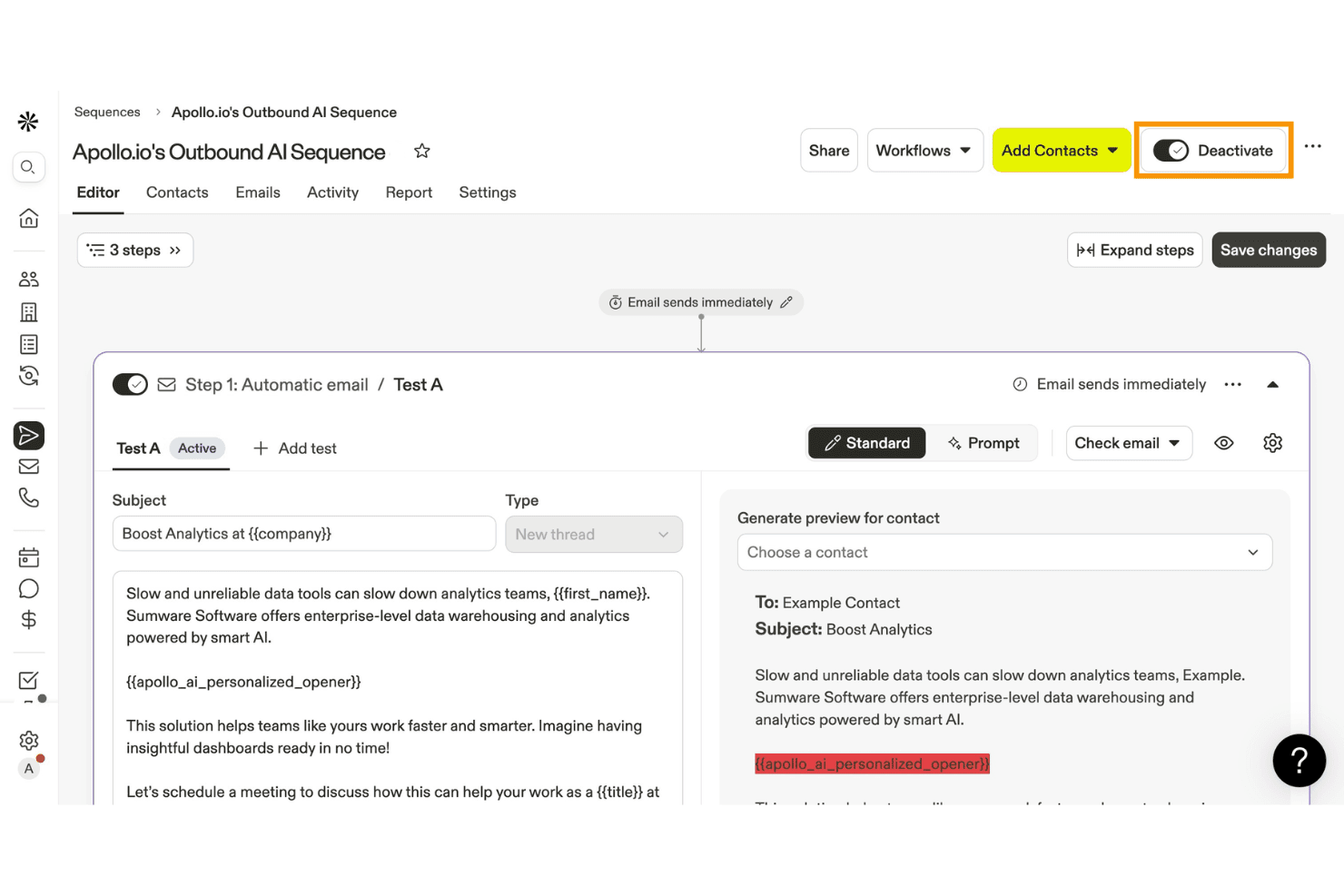
Apollo.io lets users build and automate outbound email sequences with AI. Apollo.io is a B2B sales engagement and intelligence platform that combines a 275M+ contact database with cold email sequencing, AI-powered personalization, and deliverability tooling.
Who Is Apollo.io Best For?
Apollo.io is built for B2B sales and demand generation teams that need to run cold outreach at scale, combining prospecting and sequencing in one platform.
Why I Picked Apollo.io
I picked Apollo.io as one of the best because it's purpose-built for B2B cold outreach at scale, combining a 275M+ contact database with AI Research that injects prospect-specific insights, like recent company news or LinkedIn activity, directly into email copy. I also love the conditional sequence logic, which lets me branch outreach paths based on whether a prospect opened, clicked, or ignored a previous step.
Apollo.io Key Features
- Contact database search: Access a 275M+ contact database with 65+ filter attributes to build and export targeted prospect lists directly within the platform.
- Bounce guard: A configurable monitoring feature that tracks bounce rates per sequence and automatically pauses sending when thresholds hit warning or critical levels.
- A/B testing on email steps: Test multiple email variants within a sequence step to identify which copy drives higher open and reply rates.
- CRM bi-directional sync: Native two-way sync with HubSpot, Salesforce, and Pipedrive keeps contact and sequence data aligned across your sales stack in real time.
Apollo.io Integrations
Apollo.io offers 50+ integrations, including HubSpot, Salesforce, Pipedrive, Gmail, Microsoft Outlook, SendGrid, and Mailgun. Organization plans include API access for custom integrations, and Apollo.io also supports Zapier.
Pros and Cons
Pros:
- Strong deliverability and sequence diagnostics tools
- AI-powered personalization for each recipient
- Huge B2B database for targeted outreach
Cons:
- No visual email builder or newsletter tools
- No true bulk send capability
Learn more about Apollo.io: Best for ecommerce email and SMS campaigns
- Free plan available
- From $11.20/mo
Visit WebsiteCustomer Rating:4.6/5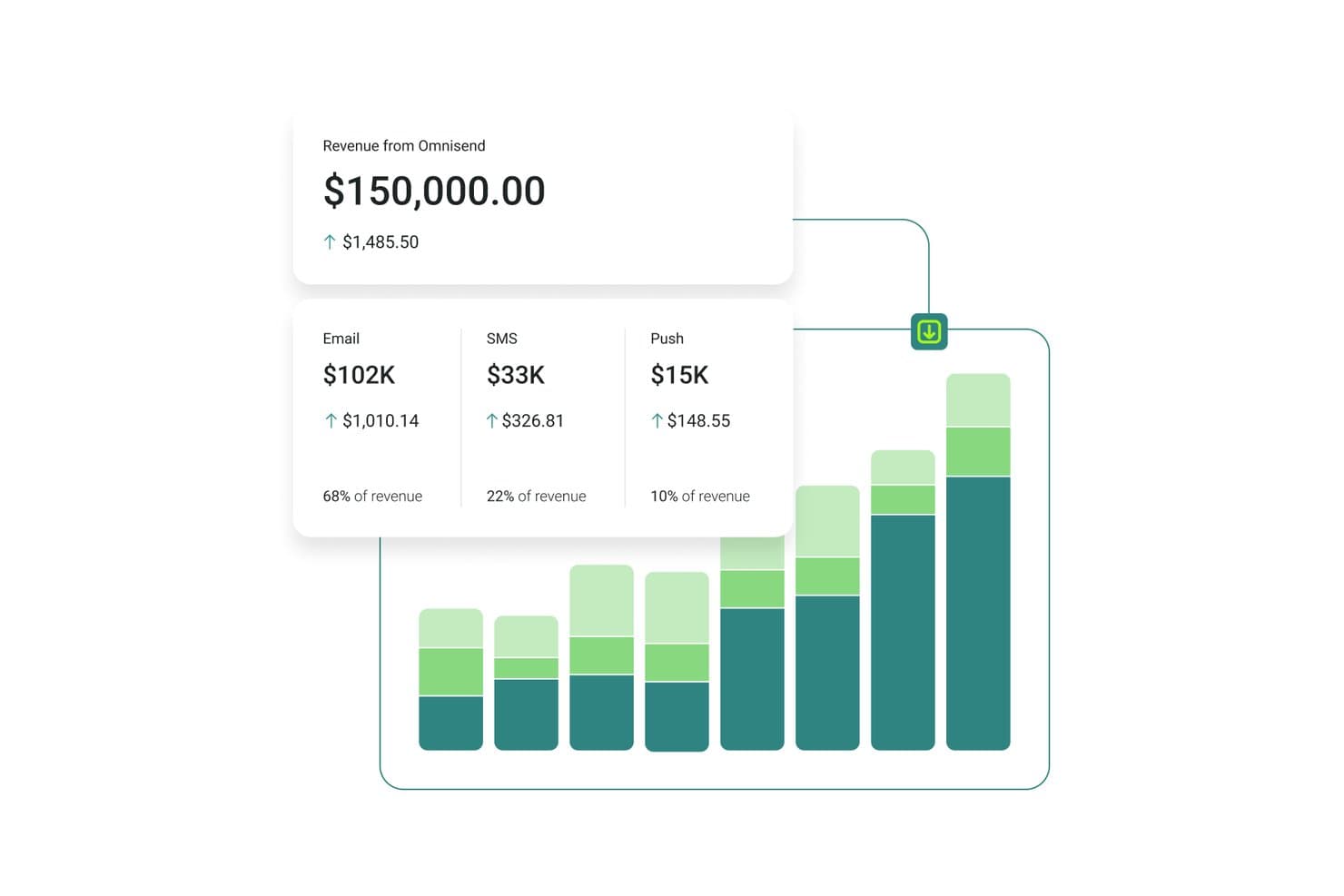
Omnisend tracks email, SMS, and push revenue in one dashboard. Omnisend is an email and SMS marketing platform built for ecommerce brands, combining bulk campaign sending, automation workflows, audience segmentation, and multichannel messaging across email, SMS, and web push.
Who Is Omnisend Best For?
Omnisend is a strong fit for ecommerce brands—especially Shopify, WooCommerce, and BigCommerce merchants—that want email, SMS, and push notifications managed in one place.
Why I Picked Omnisend
Omnisend earns its spot on my shortlist because it's the only platform here that syncs live product catalog data directly into emails, so I can drop real prices, images, and links into a campaign without ever leaving the builder. I also rely on its Customer Lifecycle Map to segment sends by stage, from first-time buyers to lapsed customers, without manually building filters every time. The Campaign Booster auto-resend to non-openers is a feature I use regularly to recover reach on big promotional sends.
Omnisend Key Features
- AI Segment Builder: Lets you describe a target audience in plain language and automatically generates the filters and segment for you.
- Campaign Booster: Automatically resends a campaign to contacts who didn't open the first send, with a new subject line.
- Conditional content blocks: Shows or hides specific email sections for individual recipients based on tags, purchase history, or signup source.
- A/B testing for automations: Tests subject lines, content, and send times within live automation workflows, not just one-off campaigns.
Omnisend Integrations
Omnisend offers 280+ tested integrations, including Shopify, WooCommerce, BigCommerce, Wix, Facebook Lead Ads, Google Ads, Canva, and Gorgias. It also supports API, webhooks, and Zapier connections for custom integrations.
Pros and Cons
Pros:
- Customer lifecycle mapping for dynamic segmentation
- Syncs live product data directly into emails
- Automates cart, browse, and post-purchase sequences
Cons:
- No native enterprise CRM integrations available
- Built primarily for ecommerce-focused businesses
Learn more about Omnisend: Best for visual storytelling in emails
- Free plan + free trial available
- From $19/user/month (billed annually)
Visit WebsiteCustomer Rating:4.7/5
Flodesk enables visual storytelling with drag-and-drop email designs. Flodesk is a mass email sender software built for visual storytelling in emails. It caters to small businesses and creative entrepreneurs who value both aesthetics and functionality in their email marketing efforts. With its user-friendly design interface and unlimited email sending capabilities, Flodesk addresses the need for visually appealing communication without the complexity typically associated with email marketing tools.
Why I Picked Flodesk
I picked Flodesk for its unique ability to blend design flexibility with marketing functionality, particularly for those who prioritize visual storytelling in their email campaigns. The platform's drag-and-drop email builder allows users to create beautiful, responsive emails without any coding knowledge. Additionally, Flodesk's automation features enable users to set up workflows that nurture leads and engage subscribers based on their interactions, providing a seamless way to maintain customer relationships. With these features and unlimited emails, Flodesk helps businesses improve their email marketing.
Flodesk Key Features
In addition to its design and automation capabilities, Flodesk offers:
- Customizable Templates: Users can choose from a variety of templates and customize them to fit their brand's aesthetics.
- Form Building: Create and integrate forms directly into your website to capture leads seamlessly.
- Subscriber Management: Easily manage and segment your email list to target specific audiences effectively.
- Email Analytics: Gain insights into email performance with detailed analytics, helping you refine your strategy over time.
Flodesk Integrations
Integrations include HoneyBook, BookFunnel, Canva, Shopify, Squarespace, ThriveCart, Wix, and Manychat. These integrations enhance productivity and streamline marketing efforts, allowing users to connect Flodesk with various platforms for a comprehensive marketing approach.
Pros and Cons
Pros:
- Intuitive drag-and-drop editor simplifies email creation
- Customizable branding options with no coding required
- Strong support for small and creative business needs
Cons:
- Occasional slow loading times reported by users
- Few integration options beyond major platforms
Learn more about Flodesk: Best for personalized email campaigns
- Free plan available
- From $20/month
Visit WebsiteCustomer Rating:4.6/5
Klaviyo sends mass campaigns with personalized product content. Klaviyo supports businesses that want to send more relevant email campaigns using customer data. Built for companies of different sizes, it combines customer information with email marketing tools so you can create targeted campaigns based on real behavior. Whether your goal is to improve engagement or increase sales, Klaviyo helps unify and activate customer data in real time to guide your messaging decisions.
Why I Picked Klaviyo
I chose Klaviyo for its ability to use customer data to create personalized mass email campaigns. Its segmentation tools let you define specific customer groups based on behavior, purchase history, and engagement, so messages feel more relevant. The platform also supports automated flows and scheduled campaigns, making it easier to send timely emails without manual effort. Together, these features make Klaviyo a practical option for businesses that want more control over their mass email strategy.
Klaviyo Key Features
In addition to personalized email campaigns, Klaviyo offers:
- Omnichannel Marketing: Engage your audience across email, SMS, and social media for a cohesive customer experience.
- AI-Driven Insights: Utilize artificial intelligence to gain insights into customer behavior and optimize your email marketing strategies.
- Customizable Templates: Quickly create visually appealing emails with over 160 customizable templates and a drag-and-drop editor.
- Real-Time Data Integration: Seamlessly integrate with over 350 applications to unify and activate customer data across your marketing efforts.
Klaviyo Integrations
Integrations include Shopify, BigCommerce, WooCommerce, Magento, Salesforce Commerce Cloud, Stripe, Facebook, Instagram, Google Ads, and Zendesk.
Pros and Cons
Pros:
- Omnichannel marketing including SMS and social media
- Comprehensive automation features for personalized marketing
- Advanced segmentation for targeted email campaigns
Cons:
- Higher pricing structure may deter small businesses
- Higher pricing structure may deter small businesses
Learn more about Klaviyo:

Sender lets you build email templates to help with mass email sending. Sender helps your team send and automate large-scale email campaigns with tools for building newsletters, segmenting audiences, and managing SMS follow-ups that fit your outreach goals. You’ll find it useful if you’re running email efforts for a small business, ecommerce store, or growing audience and want control over automation and tracking without jumping between tools. engaging content while ensuring your messages reach their intended audience.
Why I Picked Sender
I picked Sender because its feature-rich free plan gives you real mass email sending tools for up to 2,500 subscribers and 15,000 emails/month. This includes automation, segmentation, and a drag-and-drop builder. You’ll find the automation workflows let you trigger sequences based on subscriber behavior and schedule follow-ups, helping you keep your audience engaged without juggling multiple tools. I also like that you can segment lists to tailor messages to different groups and mix in transactional emails as part of your campaigns. These capabilities make it a solid fit for teams focused on growing email outreach on a budget.
Sender Key Features
In addition to its main features, other notable features include:
- A/B Testing: This feature allows you to test different versions of your emails to see which performs better, helping you optimize your campaigns for better results.
- Analytics Dashboard: Track opens, clicks, and delivery metrics to measure engagement.
- Transactional Emails: Sender enables you to automate the sending of transactional emails, ensuring timely communication with your subscribers.
- Lead Capture Tools: The platform provides tools to capture leads directly from your website, helping you grow your email list effectively.
Sender Integrations
Integrations include WordPress, WooCommerce, and Zapier. An API is available for custom integrations.
Pros and Cons
Pros:
- Generous free plan supports up to 2,500 subscribers.
- User-friendly interface simplifies email campaign creation.
- Offers responsive templates for mobile-friendly emails.
Cons:
- Free plan includes Sender branding which may affect professionalism.
- Limited advanced features in comparison to competitors.
Learn more about Sender: Best for automation and personalization
- 14-day free trial + free demo available
- From $100/month
Visit WebsiteCustomer Rating:4.2/5
Customer.io automates mass email workflows using event-based triggers and user data. When you want more control over your email marketing, Customer.io provides a platform built for sending targeted, automated messages based on customer behavior. It works well for teams that need to manage campaigns across growing user bases without relying on manual workflows. Using first-party data helps you send relevant messages to the right users at the right time.
Why I Picked Customer.io
I picked Customer.io because it makes it easier to run large email campaigns using automation and user-based targeting. The Visual Workflow Builder lets you set up email flows with drag-and-drop steps, so you can build multi-step campaigns without heavy technical setup. Event triggers enable teams to send messages based on real customer actions, helping them deliver timely, relevant emails that support ongoing customer communication.
Customer.io Key Features
In addition to its automation and personalization strengths, Customer.io offers:
- Omnichannel Support: Deliver a consistent customer experience across email, SMS, and in-app messaging.
- Design Studio: Collaboratively craft high-quality messages with a user-friendly editor.
- A/B Testing: Experiment with different content and messaging strategies to optimize engagement.
- Ad Audience Sync: Automatically update audience segments across major ad networks for cohesive marketing strategies.
Customer.io Integrations
Integrations include Salesforce, Google Analytics, Segment, Slack, Twilio, Stripe, Shopify, WordPress, Zendesk, and HubSpot.
Pros and Cons
Pros:
- Flexible visual workflow builder aids non-technical users
- Behavioral tracking provides insights into customer preferences
- Multichannel messaging supports email, SMS, and push notifications
Cons:
- Some users may find the platform's complexity overwhelming initially
- Reporting features are less comprehensive than competitors
Learn more about Customer.io: Best for drag-and-drop editing
- 14-day free trial + free demo available
- From $10.80/month
Visit WebsiteCustomer Rating:4.7/5
MailerLite lets businesses design, automate, and track email campaigns. MailerLite is an email marketing tool built for businesses that want to create, send, and manage campaigns in one place. It supports teams by offering design tools, automation features, and performance tracking to help manage email communication and engagement.
Why I picked MailerLite: MailerLite gives your team a clean drag-and-drop editor that makes email creation simple, even if no one’s a designer. You can build campaigns from scratch or start with ready-made templates and tweak them to fit your brand. The editor includes blocks for images, buttons, videos, and countdowns, so your team can get creative without touching code. You can also reuse layouts across campaigns to keep things consistent.
Standout features & integrations:
Features include an automation builder that lets you set up custom workflows. You can run interest-based segmentation using click and open data. Surveys and quizzes can be added right inside your emails to collect feedback or qualify leads.
Integrations include Shopify, WordPress, Zapier, Stripe, WooCommerce, PayPal, Squarespace, Typeform, Facebook, and Google Sheets.
Pros and Cons
Pros:
- No-code email elements work well
- Allows reusable block layouts
- Fast setup for first-time users
Cons:
- Mobile previews lack full accuracy
- Automation editor can feel slow
 Best for user privacy
- 14-day free trial + free plan + free demo available
- From $4/month (billed annually)
Visit WebsiteCustomer Rating:4.3/5
Zoho Campaigns helps businesses run privacy-focused email campaigns. Zoho Campaigns is an email marketing tool designed for businesses looking to enhance their email outreach while prioritizing privacy. It's particularly useful for marketing teams aiming to manage campaigns effectively without relying on third-party tracking.
Why I picked Zoho Campaigns: Zoho Campaigns sets itself apart by focusing on user privacy, using its own tracking tools. Features include customizable email templates and automation workflows that help you create and manage campaigns efficiently. You can conduct A/B testing to optimize your emails and gain insights with detailed analytics. Its integration with e-commerce platforms like Shopify supports targeted marketing efforts.
Standout features & integrations:
Features include email send-time optimization, which ensures your messages are delivered at the best times, and domain authentication to improve deliverability. You can manage both email and SMS campaigns from a single interface, and use customizable templates to create engaging content.
Integrations include Zoho CRM, Shopify, WooCommerce, Eventbrite, SurveyMonkey, LinkedIn, Facebook, Twitter, Google Analytics, and Slack.
Pros and Cons
Pros:
- Effective A/B testing
- Comprehensive analytics
- Easy automation workflows
Cons:
- Occasional integration issues
- Basic design templates
Learn more about Zoho Campaigns:

Benchmark Email helps teams design, automate, and track branded emails. Benchmark Email is a marketing platform built to help teams create and send branded emails at scale. It supports businesses of all sizes looking to manage their email content and audience communications from one place. It offers tools for designing emails, automating follow-ups, and tracking engagement.
Why I picked Benchmark Email: Benchmark Email helps your team run campaigns in multiple languages without extra hassle. You can create emails in different languages using its editor, and choose templates that support special characters and right-to-left text. Language settings are easy to adjust in the account dashboard, and you can segment contacts by language. It also lets you preview emails in different languages before sending.
Standout features & integrations:
Features include email templates that you can drag and drop, making it fast to create branded campaigns. Your team can run A/B tests to compare subject lines or layouts. You also get real-time reports that show opens, clicks, and bounces.
Integrations include Shopify, Google Sheets, Zapier, WordPress, Facebook, Slack, Typeform, Eventbrite, PayPal, and Stripe.
Pros and Cons
Pros:
- Great for regional marketing teams
- Easy to toggle between language versions
- Translates templates with little setup
Cons:
- Fewer native CRM features
- Not ideal for transactional emails
Learn more about Benchmark Email:
Annen programvare for masseutsending av e-post
Her er noen flere alternativer for programvare for masseutsending av e-post som ikke kom med på kortlisten min, men som likevel er verdt å sjekke ut:
- 11SendGridBest for API-based email sending
- 12Elastic EmailBest for AI-powered email design
- 13Constant ContactBest for email and SMS combos
- 14CampaignerBest for advanced automation
- 15SMTP.comBest for high-volume enterprise deliverability
- 16BrevoBest for comprehensive engagement
- 17Vertical ResponseBest for small businesses
- 18Click DimensionsBest for Microsoft Dynamics integration
- 19GMassBest for Gmail integration
- 20EmailOctopusBest for email list growth
How I Evaluate Mass Email Sender Software
I look at two layers: the baseline table stakes—sending 100k contacts reliably, landing in inboxes, segmenting a list—and the differentiators that separate platforms worth recommending.
Core Functionality (Table Stakes For This List)
When I'm selecting tools for my list, I rank each one on a scale from 0 (does not offer the functionality) to 5 (excels in this area) for each core functionality listed below. Then, I calculate the tool's total score into a percentage. Each tool needs to achieve a minimum total score of 75% to be considered for inclusion.
- Bulk Email Sending: I check whether a platform can handle high-volume campaigns with send scheduling, time-zone delivery, and throttling to avoid provider blocks.
- Contact List Management: Importing a CSV of 50k subscribers should be painless. I look for custom fields, tagging, suppression lists, and dynamic list updates.
- Email Builder & Templates: I evaluate drag-and-drop editors for responsive design output, reusable content blocks, and template variety across industries.
- Deliverability Infrastructure: SPF, DKIM, and DMARC setup should be straightforward. Dedicated IP options and warm-up tools matter for teams sending at scale.
- Personalization & Segmentation: Merge tags are baseline. I look for conditional content blocks and behavioral segments like "opened last 3 campaigns."
- Campaign Analytics & Reporting: Every tool tracks opens and clicks. I evaluate whether dashboards surface bounce rates, deliverability trends, and A/B test results.
Once I have a list of tools that meet this criteria, I consider what sets each platform apart.
Differentiating Factors (What Sets Vendors Apart)
Here's how I compare and contrast different vendors:
Standout Features
Visual automation workflows separate basic senders from platforms that can run a full lifecycle program—welcome series, re-engagement flows, and post-purchase sequences triggered by real behavior. A/B testing is another factor I weigh. I look for tools that let you split-test subject lines, content, and send times within a single campaign. For e-commerce teams, revenue attribution tied to specific sends makes it much easier to prove ROI on every campaign.
Beyond Features
Pricing structure matters a lot here. Some platforms charge per subscriber while others bill by emails sent—a team with a large but low-frequency list pays very differently under each model. I also evaluate how well a tool connects to your existing stack, especially CRMs and e-commerce platforms where contact data lives. Compliance tooling is another differentiator I check. Built-in consent management, double opt-in flows, and unsubscribe handling should cover GDPR, CAN-SPAM, and CASL requirements without manual workarounds.
Slik velger du programvare for masseutsending av e-post
Det er lett å gå seg vill i lange funksjonslister og komplekse prisstrukturer. For å hjelpe deg med å holde fokus mens du går gjennom den unike prosessen med å velge programvare, har jeg laget en sjekkliste over faktorer du bør ha i bakhodet:
| Faktor | Hva du bør vurdere |
| Skalerbarhet | Kan programvaren vokse sammen med virksomheten din? Vurder fremtidige behov og om verktøyet kan håndtere økte e-postvolumer uten ekstra kostnader. |
| Integrasjoner | Fungerer den med de eksisterende verktøyene dine? Sjekk kompatibilitet med CRM-systemer, analyseplattformer og andre markedsføringsverktøy du bruker. |
| Tilpasningsmuligheter | Hvor fleksibel er programvaren? Se etter verktøy som lar deg tilpasse arbeidsflyter og maler slik at de passer til merkevaren og markedsføringsstrategien din. |
| Brukervennlighet | Er grensesnittet intuitivt? Sørg for at teamet ditt enkelt kan navigere i det uten omfattende opplæring eller en bratt læringskurve. |
| Implementering og innføring | Hvor raskt kan du komme i gang? Vurder tilgjengeligheten av veiledninger, brukerstøtte og ressurser som hjelper teamet ditt med å begynne å bruke programvaren effektivt. |
| Kostnad | Er prisen i tråd med budsjettet ditt? Se forbi den opprinnelige kostnaden og vurder langsiktige utgifter, inkludert oppgraderinger og tilleggsfunksjoner. |
| Sikkerhetstiltak | Hvor sikre er dataene dine? Sørg for at programvaren overholder regelverket og tilbyr kryptering og andre sikkerhetstiltak for å beskytte kundeinformasjon. |
| Etterlevelseskrav | Oppfyller programvaren bransjestandardene? Vurder eventuelle spesifikke krav til etterlevelse, for eksempel GDPR, og om verktøyet kan støtte dem. |
Hva er programvare for masseutsending av e-post?
Programvare for masseutsending av e-post er et verktøy som gjør det mulig for bedrifter å sende store mengder e-post til kunder og potensielle kunder. Markedsførere og eiere av små bedrifter bruker vanligvis disse verktøyene til å engasjere målgrupper og markedsføre produkter eller tjenester. Funksjoner for automatisering, segmentering og analyse bidrar til målretting, kampanjehåndtering og måling av resultater. Disse verktøyene skaper verdi ved å effektivisere kommunikasjonen og forbedre kundeengasjementet.
Funksjoner i programvare for masseutsending av e-post
Når du velger programvare for masseutsending av e-post, bør du se etter følgende viktige funksjoner:
- E-postautomatisering: Automatiserer utsending av meldinger på angitte tidspunkter, noe som bidrar til jevn kommunikasjon med målgruppen.
- Segmentering: Gjør det mulig å dele e-postlisten inn i målrettede grupper, slik at engasjementet øker ved at relevant innhold sendes til mottakerne.
- Analyse og rapportering: Gir innsikt i e-postytelsen, slik at du kan følge med på åpningsfrekvenser, klikk og konverteringer.
- Tilpassbare maler: Tilbyr forhåndsutformede e-postoppsett som du kan tilpasse til merkevaren din, slik at du sparer tid på designarbeid.
- A/B-testing: Gjør det mulig å teste ulike versjoner av e-poster for å se hvilken som gir best resultater, og dermed optimalisere kampanjene dine.
- Listehåndtering: Hjelper deg med å organisere og vedlikeholde abonnentlister, slik at dataene er korrekte og i samsvar med regelverket.
- Integrasjonsmuligheter: Kobler til andre verktøy, som CRM-systemer og sosiale medieplattformer, og styrker markedsføringsarbeidet ditt.
- Mobiltilpasning: Sørger for at e-postene vises korrekt på alle enheter, noe som forbedrer brukeropplevelsen og engasjementet.
- Sikkerhetsfunksjoner: Beskytter sensitive data med kryptering og samsvar med bransjestandarder, slik at kundeinformasjonen er trygg.
- Oppdateringer i sanntid: Gir umiddelbar tilgang til kampanjedata, slik at du raskt kan ta velbegrunnede beslutninger.
Fordeler med programvare for masseutsending av e-post
Implementering av programvare for masseutsending av e-post gir flere fordeler for teamet og virksomheten din. Her er noen av fordelene du kan se frem til:
- Økt engasjement: Ved å bruke segmentering og personalisering sender du mer relevant innhold, noe som fører til høyere åpnings- og klikkfrekvenser.
- Effektiv tidsbruk: Automatiseringsfunksjoner lar deg planlegge e-poster og administrere kampanjer uten manuell innblanding, slik at teamet ditt sparer tid.
- Datadrevne beslutninger: Analyse- og rapporteringsverktøy gir innsikt i kampanjeresultatene, slik at du kan ta velinformerte markedsføringsvalg.
- Konsekvent merkevareprofil: Tilpassbare maler sikrer at e-postene dine samsvarer med merkevarens utseende og uttrykk, slik at kommunikasjonen blir helhetlig.
- Større rekkevidde: Integrasjon med CRM- og sosiale medieplattformer utvider markedsføringsarbeidet ditt og når ut til en bredere målgruppe.
- Kostnadsbesparelser: Ved å rette effektive e-poster mot riktig målgruppe maksimerer du avkastningen på markedsføringsbudsjettet.
- Samsvar med regelverket: Funksjoner for listehåndtering og sikkerhet hjelper deg med å opprettholde korrekte data og overholde bransjeregelverket.
Kostnader og priser for programvare for masseutsending av e-post
Når du velger programvare for masseutsending av e-post, må du forstå de ulike prismodellene og tilgjengelige abonnementene. Kostnadene varierer basert på funksjoner, teamstørrelse, tillegg og mer. Tabellen nedenfor oppsummerer vanlige abonnementer, gjennomsnittsprisene deres og typiske funksjoner som er inkludert i løsninger for programvare for masseutsending av e-post:
Sammenligningstabell for abonnementer for programvare for masseutsending av e-post
| Abonnementstype | Gjennomsnittspris | Vanlige funksjoner |
| Gratisabonnement | $0 | Grunnleggende e-postmaler, begrenset automatisering og grunnleggende analyse. |
| Personlig abonnement | $10-$30 /bruker /måned | Tilpassbare maler, grunnleggende segmentering og planlegging av e-postutsending. |
| Bedriftsabonnement | $50-$100 /bruker /måned | Avansert automatisering, detaljert analyse og funksjoner for A/B-testing. |
| Virksomhetsabonnement | $150-$300 /bruker /måned | Dedikert kundestøtte, avanserte integrasjoner og forbedrede sikkerhetsfunksjoner. |
Vanlige spørsmål om programvare for utsending av masse-e-post
Her er noen svar på vanlige spørsmål om programvare for utsending av masse-e-post:
Hva er forskjellen mellom masseutsending av e-post og masse-e-post?
Masseutsending av e-post og masse-e-post brukes ofte om hverandre, og begge viser til å sende én enkelt melding til mange mottakere. Det viktigste er å sørge for at e-postene dine er relevante og personlig tilpasset, slik at de ikke blir merket som søppelpost. Verktøy med funksjoner for segmentering og personlig tilpasning kan bidra til å forbedre strategien din.
Hva er de nye reglene for avsendere av masseutsendt e-post fra Google og Yahoo?
Fra og med februar 2024 håndhever Google og Yahoo strengere retningslinjer for avsendere av masseutsendt e-post, med fokus på autentisering, andel søppelpost og enkle alternativer for å avslutte abonnementet. Sørg for at e-postene dine overholder kravene ved å implementere riktig autentisering og tilby en tydelig prosess for å avslutte abonnementet. Dette bidrar til å opprettholde leveringsevne og engasjement.
Er det lovlig å sende masse-e-post?
Ja, det er lovlig å sende masse-e-post, men du må overholde regelverk som CAN-SPAM i USA eller GDPR i Europa. Disse lovene krever tydelig samtykke fra mottakerne, korrekt informasjon om avsenderen og enkle alternativer for å reservere seg. Ved å sikre samsvar beskytter du merkevarens omdømme og unngår bøter.
Hvordan kan jeg sende masse-e-post uten at den havner i søppelpostmappen?
For å unngå søppelpostmapper bør du fokusere på god listehygiene, bruke prosesser med dobbelt samtykke og jevnlig rydde i e-postlisten. Tilpass innholdet og unngå språk som forbindes med søppelpost. Autentiseringsprotokoller som SPF, DKIM og DMARC bidrar også til å forbedre leveringsevnen og bygge tillit hos e-postleverandørene.
Hvor ofte bør jeg sende masse-e-post?
Den ideelle frekvensen avhenger av målgruppen og innholdet ditt. Regelmessig engasjement er avgjørende, men for mange e-poster kan føre til at mottakere avslutter abonnementet. Test ulike frekvenser for å finne ut hva som fungerer best for målgruppen din, og sørg for at hver e-post gir verdi og samsvarer med markedsføringsmålene dine.