

Nel mercato odierno, caratterizzato da ritmi frenetici, i responsabili del marketing come te devono affrontare sfide costanti. Gestire più campagne, tenersi al passo con le tendenze e coinvolgere il pubblico può essere complicato. È qui che entra in gioco il software di marketing per piccole imprese.
Ho dedicato del tempo a testare e recensire questi strumenti in modo indipendente. Conosco a fondo il settore del marketing e sono qui per condividere informazioni imparziali. In base alla mia esperienza, il software giusto può fare una grande differenza per il tuo team.
In questo articolo ti presenterò le mie migliori scelte di software di marketing per piccole imprese. Troverai soluzioni in grado di rispondere alle tue esigenze specifiche, aiutandoti ad affrontare con sicurezza le sfide del marketing.
Perché fidarsi dei nostri consigli sui software
6,700+
Reviews
20
Industry experts
16+
Evaluation factors
14
Years
Il nostro team testa e recensisce software dal 2012. In quanto leader del marketing noi stessi, sappiamo quanto sia difficile — e importante — scegliere il software giusto.
Per questa guida, abbiamo valutato gli strumenti attraverso test pratici e ricerche indipendenti, assegnando un punteggio agli strumenti in base ai nostri criteri di selezione.
Le nostre recensioni riflettono il nostro giudizio editoriale umano, non un discorso di vendita.
Revisori esperti:
 Gui DrusinaDirettore creativo
- Shriya GhateSenior Marketing Lead
 Amanda JacquesResponsabile Marketing Ops

Tabella comparativa dei software di marketing per piccole imprese
| Tool | Best For | Trial Info | Price | ||
|---|---|---|---|---|---|
| 1 | Il miglior strumento di automazione del marketing via email | Piano gratuito per sempre fino a 1.000 invii email mensili. | A partire da $13/mese per un massimo di 5.000 invii email mensili | Website | |
| 2 | Ideale per l'arricchimento dettagliato dei dati dei contatti B2B | Piano gratuito + prova gratuita di 14 giorni + demo gratuita disponibile | A partire da $49/utente/mese (con fatturazione annuale) | Website | |
| 3 | Ideale per esperienze webinar completamente personalizzate con il proprio marchio | Prova gratuita di 14 giorni + demo gratuita disponibile | Da $85/presentatore/mese (fatturato annualmente) | Website | |
| 4 | Ideale per l'esecuzione del marketing dall'inizio alla fine | Prova gratuita di 14 giorni | A partire da $29/mese | Website | |
| 5 | Ideale per la gestione delle recensioni delle attività locali | Demo gratuita disponibile | Prezzi su richiesta | Website | |
| 6 | Ideale per campagne email ad alta recapitabilità | Piano gratuito + demo gratuita disponibile | A partire da $7/mese (fatturazione annuale) | Website | |
| 7 | Ideale per segmentazione e personalizzazione | Demo gratuita + piano gratuito disponibile | Da $45/mese | Website | |
| 8 | Ideale per attività di marketing cross-canale | Prova gratuita di 15 giorni disponibile | A partire da $25/mese (fatturato annualmente) | Website | |
| 9 | Ideale per creare grafiche | Piano gratuito disponibile per sempre | A partire da $12.99/mese con pagamento mensile | Website | |
| 10 | Ideale per supporto clienti potenziato dall'intelligenza artificiale | Prova gratuita di 7 giorni + piano gratuito disponibile | A partire da $24.17/mese (fatturato annualmente) | Website |


Panoramica dei 10 migliori software di marketing per piccole imprese
Puoi usare le semplici panoramiche di ogni strumento riportate di seguito per capire in che modo ciascuno si distingue dagli altri software di marketing per piccole imprese.
 Il miglior strumento di automazione del marketing via email
- Piano gratuito per sempre fino a 1.000 invii email mensili.
- A partire da $13/mese per un massimo di 5.000 invii email mensili
Visit WebsiteCustomer Rating:4.5/5This rating combines scores from multiple user review sites to reflect overall customer sentiment about the product.
Crea nuovi moduli di iscrizione per iniziare a raccogliere indirizzi email. Mailchimp aiuta le aziende a creare campagne email automatizzate per aumentare la notorietà del marchio.
Perché ho scelto Mailchimp: La piattaforma è uno degli strumenti di email marketing più popolari per le piccole imprese. Utilizzando Mailchimp, puoi creare modelli di email efficaci e inviare messaggi in base al comportamento dei tuoi iscritti. Puoi inviare newsletter settimanali automatiche, aggiornamenti su prodotti o servizi, oppure email per abbandono del carrello per assicurare che il tuo marchio rimanga sempre nella mente dei clienti mentre ti concentri su altre funzioni cruciali che richiedono la tua attenzione.
Mailchimp è un sistema basato sul cloud che funziona per piccole imprese di qualsiasi settore. Puoi utilizzare il software per promuovere la tua attività con diversi metodi, come email, landing page, social media, cartoline postali e altri modi efficaci. Mailchimp fornisce anche un CRM che ti aiuta a raccogliere dati sui clienti e utilizzare queste informazioni per la tua prossima campagna.
Funzionalità principali di Mailchimp e integrazioni
Le funzionalità includono modelli di email, editor drag-and-drop, segmentazione delle email, automazioni delle email, analisi e intelligenza artificiale, test A/B, gestione delle campagne, percorsi clienti automatizzati e raccomandazioni di ottimizzazione.
Le integrazioni includono Shopify, Stripe, Quickbooks, Zendesk, WordPress, Typeform, SurveyMonkey, Salesforce, Copper CRM, Pipedrive, monday.com, Zoho CRM, Canva e Zapier.
Pros and Cons
Pros:
- Facile da configurare
- Gestisce efficacemente le campagne email
- Funziona bene con piccole liste di email
Cons:
- Alcune restrizioni di personalizzazione
- I dati necessitano di maggiori dettagli
Learn more about Mailchimp : Ideale per l'arricchimento dettagliato dei dati dei contatti B2B
- Piano gratuito + prova gratuita di 14 giorni + demo gratuita disponibile
- A partire da $49/utente/mese (con fatturazione annuale)
Visit WebsiteCustomer Rating:4.5/5This rating combines scores from multiple user review sites to reflect overall customer sentiment about the product.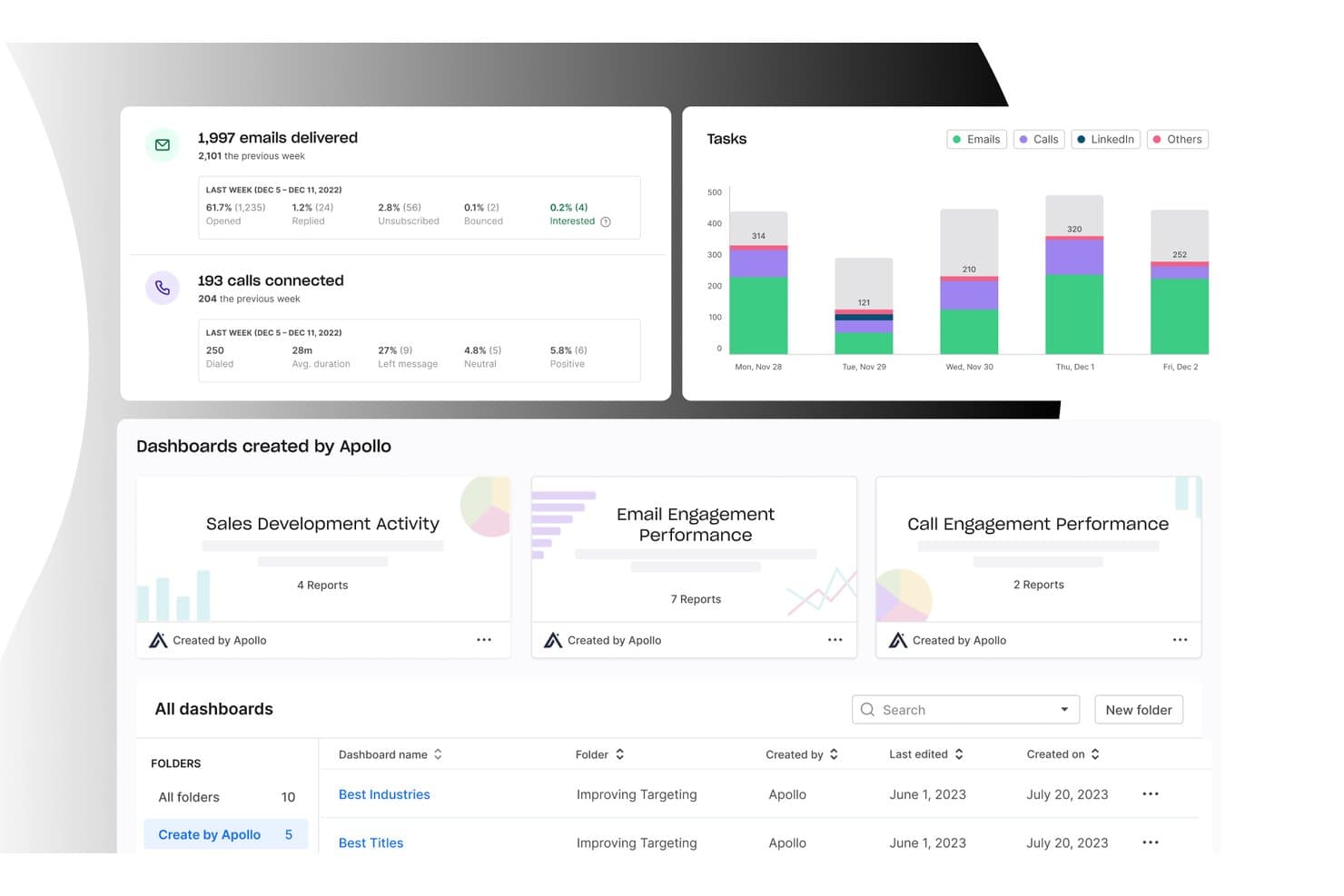
Apollo.io offre una dashboard di analisi completa che mostra le statistiche di recapito delle email, i tassi di connessione delle chiamate, la suddivisione delle attività per canale e dashboard commerciali preconfigurate per monitorare le prestazioni del coinvolgimento. Apollo.io è una piattaforma di intelligence commerciale B2B e coinvolgimento outbound che combina un database di oltre 240 milioni di contatti con sequenze di email, attività di contatto multicanale e strumenti di prospezione basati sull'IA.
Per chi è più adatto Apollo.io?
Apollo.io è una soluzione ideale per i team commerciali e i fondatori che devono trovare, arricchire e contattare lead B2B senza dover gestire diversi strumenti di prospezione.
Perché ho scelto Apollo.io
Apollo.io è tra le mie opzioni preferite perché il suo database di oltre 240 milioni di contatti, con più di 65 filtri, rende più veloce che con qualsiasi altro strumento abbia utilizzato la ricerca dei prospect B2B giusti. Apprezzo soprattutto la funzionalità Profilo Apollo, che riunisce segnali di intenzione, avvisi sui cambi di lavoro e notizie aziendali in un'unica visualizzazione, così posso dare priorità alle attività di contatto senza dover consultare diversi strumenti. L'assistente IA trasforma poi questi dati in sequenze di email mirate in una frazione del tempo.
Funzionalità principali di Apollo.io
- Sistema di chiamata parallela: Chiama più prospect in modo efficiente da un'unica area di lavoro.
- Strumenti per il recapito delle email: Riscalda i domini, alterna le caselle di posta e monitora la reputazione del mittente.
- Generatore di moduli intelligenti: Acquisisci e arricchisci i lead inbound tramite moduli personalizzabili.
- Instradamento dei lead: Assegna automaticamente i nuovi lead al rappresentante commerciale più adatto.
Integrazioni di Apollo.io
Apollo.io offre oltre 200 integrazioni tramite Apollo Anywhere, comprese integrazioni native con Salesforce, HubSpot, Outreach, Salesloft, SendGrid, LinkedIn, Gmail, ChatGPT e Claude. Fornisce inoltre un'API REST e il supporto MCP per flussi di lavoro personalizzati e connessioni con strumenti di IA.
Pros and Cons
Pros:
- Ampio database integrato di contatti B2B verificati
- L'IA scrive automaticamente sequenze di contatto mirate
- Unifica i segnali di intenzione dei contatti in un unico profilo
Cons:
- Nessuno strumento per la pubblicazione sui social media o per gli SMS
- Le campagne di nurturing marketing non sono ancora disponibili
Learn more about Apollo.io: Ideale per esperienze webinar completamente personalizzate con il proprio marchio
- Prova gratuita di 14 giorni + demo gratuita disponibile
- Da $85/presentatore/mese (fatturato annualmente)
Visit WebsiteCustomer Rating:4.5/5This rating combines scores from multiple user review sites to reflect overall customer sentiment about the product.
Interfaccia WebinarGeek che mostra una sessione webinar dal vivo con più presentatori e controlli dei partecipanti disponibili su diversi dispositivi WebinarGeek offre alle piccole imprese un modo per ospitare webinar interattivi senza barriere tecniche o configurazioni complicate. La piattaforma è progettata per marketer e titolari d'azienda che desiderano coinvolgere il pubblico, raccogliere lead e analizzare il comportamento dei partecipanti. Se hai bisogno di uno strumento di marketing che unisca video dal vivo, interazione con il pubblico e analisi guidate dai dati, WebinarGeek è pensato per te.
Per chi è più indicato WebinarGeek?
WebinarGeek è una scelta valida per piccole imprese e team di marketing che cercano una piattaforma accessibile, utilizzabile via browser, per svolgere webinar interattivi e raccogliere informazioni sul pubblico.
Perché ho scelto WebinarGeek
Ho scelto WebinarGeek per la sua capacità di offrire esperienze webinar completamente personalizzate con il proprio marchio, una priorità per le piccole imprese che vogliono distinguersi e rafforzare la propria identità. La piattaforma permette di personalizzare ogni aspetto dell'ambiente webinar, dalle pagine di registrazione e le email fino alla sala webinar dal vivo. Apprezzo il fatto che sia possibile aggiungere il proprio logo, i colori del brand e immagini personalizzate, garantendo coerenza visiva durante tutto il percorso del partecipante. Questo livello di controllo sul branding aiuta le piccole imprese a trasmettere un'impressione professionale e a costruire fiducia con il proprio pubblico.
Funzionalità principali di WebinarGeek
Altre funzionalità che rendono WebinarGeek utile per i team di marketing delle piccole imprese includono:
- Webinar automatizzati: Pianifica e gestisci webinar preregistrati che simulano eventi dal vivo, permettendo di raggiungere il pubblico senza essere presenti in tempo reale.
- Sondaggi e quiz interattivi: Coinvolgi i partecipanti durante i webinar con sondaggi dal vivo e quiz per raccogliere feedback e mantenere le sessioni dinamiche.
- Automazione dell'email marketing: Imposta promemoria email automatici, conferme e follow-up per coltivare i lead prima e dopo i webinar.
- Analisi dettagliata dei partecipanti: Accedi ad analisi in tempo reale e post-evento sul comportamento dei partecipanti, sull'engagement e sulla durata della visualizzazione per migliorare la tua strategia di marketing.
Integrazioni WebinarGeek
Le integrazioni includono HubSpot, Salesforce, Pipedrive, Mailchimp, ActiveCampaign, ConvertKit, MailBlue, Enormail, Stripe e Mollie. WebinarGeek offre anche una REST API per integrazioni personalizzate.
Pros and Cons
Pros:
- Supporta webinar dal vivo, automatizzati e on demand
- Sondaggi, quiz e funzionalità interattive integrati
- Integrazioni native con i principali strumenti CRM ed email
Cons:
- Le funzionalità avanzate di analisi richiedono piani di livello superiore
- Nessuna funzionalità integrata per le breakout room
Learn more about WebinarGeek: 4Ideale per l'esecuzione del marketing dall'inizio alla fine
Enji
- Prova gratuita di 14 giorni
- A partire da $29/mese
Visit WebsiteCustomer Rating:4.9/5This rating combines scores from multiple user review sites to reflect overall customer sentiment about the product.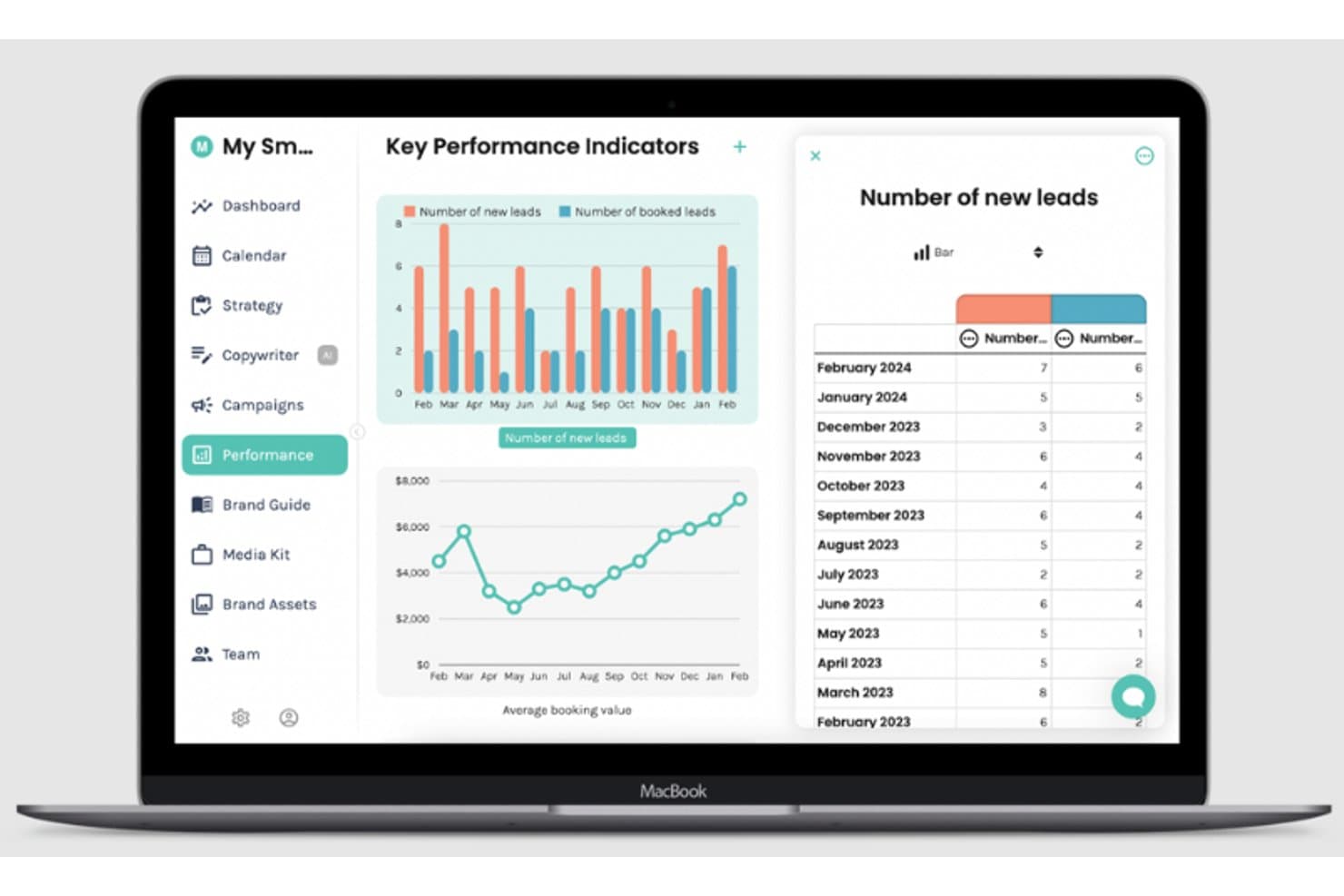
Cruscotto KPI Enji è una piattaforma per la pianificazione e l'esecuzione del marketing, pensata per professionisti indipendenti e piccole imprese, che combina la creazione di strategie basata sull'intelligenza artificiale, un calendario di marketing, la programmazione dei social media, uno strumento di scrittura basato sull'intelligenza artificiale e un cruscotto KPI in un unico strumento.
Per chi è più adatto Enji?
Enji è pensato per professionisti indipendenti e titolari di piccole imprese che gestiscono autonomamente tutte le proprie attività di marketing e desiderano un unico strumento per pianificarle, programmarle e monitorarle.
Perché ho scelto Enji
Ho scelto Enji come uno dei migliori perché è l'unico strumento che abbia visto in grado di accompagnarti da una strategia grezza alla programmazione dei contenuti social e al monitoraggio dei KPI senza dover mai uscire dalla piattaforma. Mi piace il fatto che l'intelligenza artificiale crei il tuo piano di marketing a partire da un breve questionario, per poi distribuire direttamente le attività su un calendario attraverso canali come email, social e annunci pubblicitari. Lo strumento di scrittura basato sull'intelligenza artificiale integrato prepara didascalie e articoli del blog con la voce del tuo marchio, mentre il cruscotto KPI importa automaticamente dati in tempo reale da Google Analytics 4, Meta, LinkedIn e altro ancora.
Funzionalità principali di Enji
- Generatore della voce del marchio: Analizza il tuo sito web per creare un profilo della voce del marchio salvato, che lo strumento di scrittura basato sull'intelligenza artificiale utilizza quando prepara didascalie, articoli del blog e newsletter.
- Modelli di campagna: Include oltre 16 modelli di campagne di due settimane pronti all'uso per obiettivi comuni come promozioni, lanci e creazione di liste, con attività e metriche già mappate.
- Programmatore social multipiattaforma: Pubblica automaticamente su Facebook, Instagram, LinkedIn, Pinterest, TikTok, YouTube Shorts e Threads, con supporto per gruppi di hashtag, tag di posizione e anteprima della griglia.
- Sessioni formative di gruppo con il fondatore: Ogni piano a pagamento include sessioni formative di gruppo dal vivo con il fondatore di Enji, un consulente di marketing, per aiutarti ad applicare lo strumento alla tua attività.
Integrazioni di Enji
Enji dispone di oltre 10 integrazioni native documentate, tra cui Facebook, Instagram, LinkedIn, Pinterest, TikTok, YouTube Shorts, Threads, Google Analytics 4, Canva e Google Calendar. Si collega inoltre a iCal per la sincronizzazione del calendario.
Pros and Cons
Pros:
- Trasforma la strategia in attività programmate
- La voce del marchio guida la creazione di contenuti utili
- Il supporto formativo del fondatore facilita l'esecuzione pratica
Cons:
- Nessun CRM o segmentazione dei contatti
- Le campagne email restano solo a livello di pianificazione
Learn more about Enji: Ideale per la gestione delle recensioni delle attività locali
- Demo gratuita disponibile
- Prezzi su richiesta
Visit WebsiteCustomer Rating:4.8/5This rating combines scores from multiple user review sites to reflect overall customer sentiment about the product.
Le piccole imprese possono monitorare le recensioni dei clienti su oltre 150 siti di recensioni e confrontare le valutazioni con i concorrenti locali Birdeye è una piattaforma di gestione della reputazione adatta ad aziende di varie dimensioni, settori e contesti. È particolarmente utile per le attività locali che desiderano gestire la propria presenza online e monitorare le recensioni dei clienti.
Perché ho scelto Birdeye: Ho deciso di includere questa piattaforma nella mia lista per il suo focus sulla gestione della reputazione delle attività locali. La tua piccola impresa può tenere traccia delle recensioni online dei clienti su oltre 150 diversi siti di recensioni, utilizzando queste informazioni per migliorare marketing, servizio clienti e la gamma di prodotti e servizi offerti.
Puoi anche raccogliere feedback dai clienti tramite la piattaforma e confrontare le tue recensioni e valutazioni con quelle dei concorrenti locali. Fattori come l'NPS e aree specifiche della soddisfazione dei clienti possono essere messi a confronto. Per le aziende locali che si affidano al passaparola, questi strumenti sono preziosi.
Caratteristiche principali & Integrazioni di Birdeye
Una caratteristica distintiva di questa piattaforma è il suo strumento di monitoraggio degli argomenti. Si possono monitorare argomenti rilevanti per i propri prodotti o servizi e individuare opportunità per intervenire nelle conversazioni o rispondere a domande di clienti o potenziali clienti. Questo aiuta a creare una presenza del marchio attiva e coinvolgente online. Ritengo che sia estremamente utile per le piccole imprese che non dispongono di un grande team marketing per svolgere attività di ascolto o interazione sui social.
Le integrazioni includono QuickBooks, Square, Zoho CRM, Zoho Books, Zoho Invoice, Pipedrive, Thryv, Keap, HubSpot, Lightspeed e centinaia di altri strumenti SaaS.
Pros and Cons
Pros:
- Strumenti per la gestione del feedback dei clienti inclusi
- Numerose integrazioni disponibili
- Automatizza sondaggi e recensioni dei clienti
Cons:
- Nessun piano o prova gratuita
- Supporto clienti limitato
Learn more about Birdeye: Ideale per campagne email ad alta recapitabilità
- Piano gratuito + demo gratuita disponibile
- A partire da $7/mese (fatturazione annuale)
Visit WebsiteCustomer Rating:4.6/5This rating combines scores from multiple user review sites to reflect overall customer sentiment about the product.
L'automazione dei workflow e l'A/B testing di Sender supportano campagne email ad alta recapitabilità. Sender è un software di marketing per piccole imprese progettato per supportare campagne email ad alta recapitabilità. Aiuta le aziende a creare e gestire attività di email outreach con strumenti per l'automazione, la gestione delle liste e il monitoraggio delle performance. Pensata per team in crescita, la piattaforma semplifica l'impostazione delle campagne aiutando a garantire che i messaggi raggiungano costantemente le caselle di posta degli iscritti.
Perché ho scelto Sender
Ho scelto Sender per la sua efficacia nelle campagne email ad alta recapitabilità. È progettato per aiutare le piccole imprese a inviare email che raggiungono costantemente le caselle di posta dei destinatari. La piattaforma include flussi di automazione per email di benvenuto e promemoria di carrelli abbandonati, oltre a segmentazione del pubblico basata su comportamento e dati demografici. Questi strumenti aiutano i titolari d'azienda a gestire le campagne in modo efficiente mantenendo prestazioni email affidabili.
Funzionalità principali di Sender
Oltre a campagne email ad alta recapitabilità, Sender offre:
- Email Builder drag-and-drop: Questa funzione consente di creare email accattivanti senza bisogno di codice, rendendola accessibile a tutti i membri del team.
- SMS Marketing: Puoi ampliare la tua portata marketing inviando campagne SMS insieme alle promozioni via email.
- Moduli di iscrizione e popup: Personalizza moduli e popup per far crescere la tua lista email e coinvolgere efficacemente gli utenti.
- Analisi in tempo reale: Monitora le performance delle campagne con metriche come tassi di apertura e click, e utilizza la heatmap della newsletter per visualizzare il coinvolgimento.
Integrazioni di Sender
Le integrazioni includono WordPress, WooCommerce, Shopify, PrestaShop, Magento, Zapier e un'API per integrazioni personalizzate.
Pros and Cons
Pros:
- Interfaccia facile da usare con avvio rapido delle campagne
- Workflow di automazione affidabili per sequenze email ricorrenti
- Generatore di campagne semplice, adatto a piccoli team
Cons:
- La flessibilità per il branding nei template può richiedere soluzioni alternative
- Libreria di template limitata rispetto a piattaforme più grandi
Learn more about Sender: Ideale per segmentazione e personalizzazione
- Demo gratuita + piano gratuito disponibile
- Da $45/mese
Visit WebsiteCustomer Rating:4.6/5This rating combines scores from multiple user review sites to reflect overall customer sentiment about the product.
Klaviyo ti permette di utilizzare i dati dei clienti per sviluppare strategie di segmentazione e automazioni personalizzate. Klaviyo offre una combinazione unica di strumenti di automazione del marketing pensati specificamente per le piccole imprese che vogliono migliorare le proprie strategie di coinvolgimento dei clienti. Grazie alla sua capacità di unificare i dati da diverse fonti, si rivolge ad aziende di vari settori che hanno la necessità di ottimizzare le attività di marketing. Che tu operi nel retail, nell'e-commerce o in un settore di servizi, Klaviyo aiuta a superare la sfida di creare campagne personalizzate, basate sui dati, che risuonano con il tuo pubblico.
Perché ho scelto Klaviyo
Ho scelto Klaviyo perché si distingue nell'offrire alle piccole imprese potenti strumenti di segmentazione e personalizzazione. Le analisi avanzate della piattaforma ti permettono di sfruttare i dati dei clienti per un targeting preciso, assicurando che i tuoi messaggi di marketing raggiungano davvero l'obiettivo. Inoltre, l'integrazione di Klaviyo con più canali, tra cui social media, email e SMS, consente al tuo team di raggiungere i clienti dove sono più attivi. Queste funzionalità lo rendono uno strumento prezioso per le aziende che vogliono rafforzare le relazioni con i clienti e favorire la crescita.
Caratteristiche principali di Klaviyo
Oltre a segmentazione e personalizzazione avanzate, ho trovato particolarmente utili queste funzioni per il marketing delle piccole imprese:
- Intuizioni guidate dall’IA: Questa funzione utilizza il machine learning per fornire analisi predittive, aiutandoti ad anticipare il comportamento dei clienti e ottimizzare le tue campagne.
- Flussi basati su comportamenti: Usa azioni come la visualizzazione di prodotti o gli acquisti per inviare automaticamente messaggi personalizzati.
- Profili cliente completi: Ottieni una visione completa dei tuoi clienti con profili dettagliati che consolidano i dati da tutti i punti di contatto.
- Sicurezza dei dati e conformità: Puoi contare sulla certificazione ISO 27001 e l’audit SOC 2 Type 2 di Klaviyo, che garantiscono protezione dei dati e conformità alla privacy.
Integrazioni di Klaviyo
Le integrazioni includono Shopify, WooCommerce, BigCommerce, Magento, Salesforce, Stripe, Facebook, Instagram, Google Analytics e Zendesk.
Pros and Cons
Pros:
- Offre integrazione dati completa per profili clienti unificati.
- Fornisce informazioni basate sull’intelligenza artificiale per strategie di marketing personalizzate.
- Supporta il marketing omnicanale, inclusi email, SMS e social media.
Cons:
- Alcuni utenti vorrebbero maggiori opzioni di personalizzazione.
- Il prezzo può aumentare rapidamente all'aumentare delle liste di contatti.
Learn more about Klaviyo: Ideale per attività di marketing cross-canale
- Prova gratuita di 15 giorni disponibile
- A partire da $25/mese (fatturato annualmente)
Visit WebsiteCustomer Rating:4.2/5This rating combines scores from multiple user review sites to reflect overall customer sentiment about the product.
Zoho Marketing Plus consente una gestione dettagliata delle campagne per potenziare le attività di marketing. Zoho Marketing Plus offre alle piccole imprese un unico luogo dove pianificare e gestire campagne su diversi canali, mantenendo tutto allineato. Progettato specificamente per i team di marketing che necessitano di un hub centralizzato, fornisce strumenti per l'engagement omnicanale, l'automazione del marketing e la gestione degli asset di brand, assicurando al contempo la privacy dei dati. Questa piattaforma è ideale per le aziende che desiderano migliorare la collaborazione del team, gestire efficacemente i budget e monitorare le prestazioni di marketing.
Perché ho scelto Zoho Marketing Plus
Ho scelto Zoho Marketing Plus per la sua capacità unica di unificare gli sforzi di marketing su molteplici canali, un aspetto cruciale per le piccole imprese che vogliono mantenere una presenza di brand coerente. La funzione di automazione del marketing consente di personalizzare i contenuti in base al comportamento dei clienti, riducendo gli sforzi manuali. Inoltre, lo strumento di gestione degli asset di brand aiuta a mantenere tutte le risorse di marketing organizzate, facilitando la coerenza del brand nelle campagne. Insieme, queste caratteristiche offrono alle piccole imprese un modo semplice per affrontare le principali sfide di marketing.
Funzionalità principali di Zoho Marketing Plus
Oltre al lavoro di marketing cross-canale, Zoho Marketing Plus offre:
- Analisi di marketing unificate: Ottieni informazioni sulle prestazioni delle tue campagne con analisi che aiutano a misurare l'efficacia e il ROI.
- Strumenti di gestione del budget: Tieni traccia delle spese di marketing e assicurati che le campagne siano efficaci in termini di costi e rientrino nel budget.
- Collaborazione del team: Migliora la collaborazione all'interno del tuo team di marketing fornendo accesso immediato ad asset e dati delle campagne.
Integrazioni di Zoho Marketing Plus
Le integrazioni includono Zoho CRM, Zoho Campaigns, Zoho Social, Zoho Desk, Google Analytics, Google Ads, Facebook Ads, X, LinkedIn e SurveyMonkey.
Pros and Cons
Pros:
- Attenzione alla privacy, garantendo la riservatezza dei dati degli utenti
- Suite integrata che funziona senza problemi con altri prodotti Zoho
- Funzionalità complete per marketing omnicanale e automatizzato
Cons:
- Gli utenti segnalano problemi nel collegamento con strumenti di terze parti
- Limitazioni nella personalizzazione riducono la flessibilità per alcuni utenti
Learn more about Zoho Marketing Plus: Ideale per creare grafiche
- Piano gratuito disponibile per sempre
- A partire da $12.99/mese con pagamento mensile
Visit WebsiteCustomer Rating:4.7/5This rating combines scores from multiple user review sites to reflect overall customer sentiment about the product.
Crea risorse grafiche personalizzate, come presentazioni, dalla dashboard di Canva. Canva aiuta le aziende a creare grafiche sorprendenti per farsi notare.
Perché ho scelto Canva: Questo strumento ti aiuta a distinguerti e ad attirare l'attenzione con grafiche straordinarie che puoi disegnare anche se sei un principiante. Anche senza alcuna competenza di editing grafico, puoi comunque utilizzare il software per creare velocemente un design dall'aspetto sorprendente in pochi minuti. Canva offre molte funzioni di progettazione grafica per aiutarti a creare la risorsa perfetta per i tuoi contenuti, le email o il sito web.
Canva aiuta le piccole imprese a progettare tutto ciò di cui hanno bisogno per i loro contenuti, offrendo uno strumento semplice di drag-and-drop e modelli professionali. La piattaforma mette a disposizione oltre 100 milioni di foto d'archivio, video e tracce audio per i tuoi design unici. Canva offre anche uno strumento per la creazione di loghi se sei ancora in fase di avvio e non hai ancora un logo.
Funzionalità e integrazioni principali di Canva
Funzionalità includono animazioni di testo, modelli di design, editor di immagini, gestione dei contenuti, ricerca visiva, visualizzazioni filtrate, archiviazione cloud, formati file multipli, modifica e monitoraggio delle modifiche, e tag degli utenti.
Integrazioni includono WordPress, Asana, Microsoft OneDrive, Sendible, HubSpot CMS Hub, Brandfolder, Oktopost, Pexels, PageProof, OptiSigns e Desktop.com.
Pros and Cons
Pros:
- Facile da iniziare.
- Disponibile un'applicazione mobile.
- Un'enorme collezione di template e grafiche.
Cons:
- Molte funzionalità utili sono disponibili nei piani a pagamento.
- Alcuni problemi di prestazioni.
Learn more about Canva: 10Ideale per supporto clienti potenziato dall'intelligenza artificiale
Tidio
- Prova gratuita di 7 giorni + piano gratuito disponibile
- A partire da $24.17/mese (fatturato annualmente)
Visit WebsiteCustomer Rating:4.7/5This rating combines scores from multiple user review sites to reflect overall customer sentiment about the product.
La dashboard di Tidio centralizza chat dal vivo, gestione dei chatbot e metriche di assistenza clienti. Tidio è un software di marketing per piccole imprese progettato per migliorare il coinvolgimento e l'assistenza al cliente. Combina chat dal vivo, chatbot IA, email marketing e strumenti di help desk in un'unica piattaforma facile da usare. Grazie alle sue capacità di automazione e comunicazione multicanale, Tidio aiuta le piccole imprese a fornire assistenza clienti 24/7 e a mantenere il contatto con il proprio pubblico su tutti i principali canali.
Perché ho scelto Tidio: Ho scelto Tidio perché offre alle piccole imprese un modo conveniente per garantire assistenza clienti continua senza necessità di un team a tempo pieno. Il suo Lyro AI Agent può gestire automaticamente le richieste più comuni, mentre la chat dal vivo assicura un tocco personale anche nelle situazioni più complesse. Apprezzo inoltre il sistema di analisi delle prestazioni, che aiuta a monitorare i tempi di risposta e la soddisfazione dei clienti, consentendo di migliorare costantemente il servizio. Se cerchi un modo per tenere i tuoi clienti coinvolti e supportati, Tidio è la soluzione ideale.
Funzionalità e integrazioni distintive di Tidio
Funzionalità includono Lyro AI Agent per risposte automatiche in chat, comunicazione multicanale sulle piattaforme social, un sistema di help desk per gestire i ticket in modo efficiente e analisi delle prestazioni per monitorare l'efficacia del team e dei chatbot.
Integrazioni comprendono Google, HubSpot, Typeform, YouTube, Twitter, TikTok, Shopify, WordPress, WhatsApp, Instagram, Messenger e Mailchimp.
Pros and Cons
Pros:
- Strumenti di chat dal vivo facili da usare
- Conveniente per le piccole imprese
- Solida comunicazione multicanale
Cons:
- Le funzionalità avanzate hanno un costo aggiuntivo
- Alcune integrazioni richiedono assistenza per la configurazione
Learn more about Tidio:
Altri software di marketing per piccole imprese
Ecco alcune altre opzioni che non sono entrate nell’elenco dei migliori software di marketing per piccole imprese:
- 11Google AnalyticsIdeale per approfondimenti sul sito web
- 12SemrushIdeale per la ricerca di parole chiave
- 13BufferIdeale per la programmazione di contenuti sui social media
- 14DripIdeale per l'automazione del marketing ecommerce
- 15ActiveCampaignIdeale per l'automazione dell'esperienza cliente
- 16Elastic EmailIdeale per il controllo granulare dell'accesso ai team
- 17Yoast SEOIdeale per l'ottimizzazione sui motori di ricerca
- 18BDOW!Ideale per far crescere una lista di email marketing
- 19monday AI WorkspaceIdeale per la gestione delle campagne di marketing
Come Valuto il Software di Marketing per Piccole Imprese
Quando un marketer singolo ha bisogno di email, landing page e automazioni senza un budget da agenzia, valuto prima i requisiti di base, poi i fattori differenzianti che distinguono i migliori strumenti.
Funzionalità Principali (Requisiti Fondamentali per Questa Lista)
Quando seleziono gli strumenti per la mia lista, valuto ciascuno su una scala da 0 (non offre la funzionalità) a 5 (eccelle in questo aspetto) per ogni funzionalità principale elencata di seguito. Poi, calcolo il punteggio totale dello strumento in percentuale. Ogni strumento deve raggiungere un punteggio minimo del 65% per poter essere preso in considerazione.
- Gestione delle Campagne Multi-Canale: Cerco piattaforme dove puoi creare e inviare campagne su email, SMS, social e web da un unico spazio di lavoro invece di dover gestire strumenti separati.
- Workflow di Automazione del Marketing: Ogni strumento dovrebbe offrire creatori di workflow visivi dove puoi impostare trigger come "carrello abbandonato" o "guida scaricata" e costruire sequenze di follow-up ramificate.
- Gestione Contatti & Pubblico: Valuto come ogni piattaforma gestisce la segmentazione, i tag e la pulizia delle liste così che un piccolo team possa indirizzare gli acquirenti ricorrenti in modo diverso dai nuovi contatti.
- Landing Page & Moduli: Verifico che sia possibile creare pagine di acquisizione lead e incorporare moduli senza bisogno di uno sviluppatore o di uno strumento di terze parti come Unbounce o Instapage.
- Analisi & Report sulle Campagne: Le dashboard dovrebbero mostrare tassi di apertura, clic e conversioni per canale così da poter vedere rapidamente cosa genera risultati e spostare il budget di conseguenza.
- Prezzi e Scalabilità Adatti alle PMI: Valuto se il fornitore offre un piano gratuito o una fascia d'ingresso accessibile, e se i prezzi crescono in modo prevedibile man mano che la tua lista di contatti aumenta.
Una volta che ho una lista di strumenti che soddisfano questi criteri, considero cosa distingue ciascuna piattaforma.
Fattori di Differenziazione (Cosa Distingue i Fornitori)
Ecco come confronto i diversi fornitori:
Funzionalità Distintive
La generazione di contenuti tramite IA è un vero fattore differenziante. Strumenti come Mailchimp e HubSpot offrono suggerimenti per oggetto e testo del messaggio che aiutano i marketer singoli a creare campagne più rapidamente. Valuto anche se una piattaforma include un CRM integrato, perché i piccoli team traggono beneficio dal fatto che i dati di contatto e la cronologia delle campagne siano in un unico posto invece di doverli sincronizzare tra sistemi separati. La pianificazione dei post sui social media completa il tutto: pianificare i post e gestire le risposte senza un altro strumento separato consente di mantenere efficienti i flussi di lavoro quotidiani.
Oltre le Funzionalità
La trasparenza dei prezzi è importante per le piccole imprese. Verifico se i costi aumentano in modo prevedibile con la crescita della lista contatti, dato che alcune piattaforme segmentano per numero di iscritti mentre altre fanno pagare in base al volume di invii. La profondità d'integrazione è un altro fattore chiave: uno strumento che si collega nativamente con Shopify, WordPress e Zapier fa risparmiare ore di inserimento manuale dei dati ogni settimana. Valuto anche la deliverability delle email, incluso se la piattaforma supporta l'autenticazione SPF, DKIM e DMARC per mantenere le campagne nella posta in arrivo invece che nella cartella spam.
Come scegliere un software di marketing per piccole imprese
È facile perdersi in lunghi elenchi di funzionalità e strutture tariffarie complesse. Per aiutarti a rimanere concentrato mentre affronti il tuo processo di selezione del software, ecco un elenco dei fattori da tenere a mente:
| Fattore | Considerazioni |
|---|---|
| FattoreScalabilità | ConsiderazioniIl software crescerà insieme alla tua attività? Considera le esigenze future e i limiti relativi agli utenti. Cerca strumenti in grado di gestire un aumento dei dati e degli utenti senza costi aggiuntivi. |
| FattoreIntegrazioni | ConsiderazioniSi collega agli strumenti che già utilizzi? Assicurati che supporti piattaforme fondamentali come CRM, social media e sistemi di posta elettronica, per evitare interruzioni del flusso di lavoro. |
| FattorePersonalizzazione | ConsiderazioniPuoi adattarlo ai tuoi processi? Cerca strumenti che ti permettano di modificare dashboard, report e ruoli degli utenti in base alle esigenze del tuo team. |
| FattoreFacilità d'uso | ConsiderazioniÈ intuitivo per il tuo team? Un'interfaccia semplice riduce i tempi di formazione. Prendi in considerazione strumenti che offrono dimostrazioni o prove gratuite per verificarne l'usabilità. |
| FattoreImplementazione e avvio | ConsiderazioniQuanto tempo occorrerà per iniziare? Verifica la disponibilità di un'assistenza completa, come tutorial, guide e servizio clienti, per garantire una transizione senza problemi. |
| FattoreCosto | ConsiderazioniRientra nel tuo budget? Confronta i piani tariffari, i costi nascosti e i termini contrattuali. Cerca prove gratuite o tariffe a più livelli per trovare un'opzione conveniente. |
| FattoreMisure di sicurezza | ConsiderazioniI tuoi dati e le informazioni dei clienti sono protetti? Assicurati che il software sia conforme agli standard di protezione dei dati e offra funzionalità come la crittografia e l'autenticazione a più fattori. |
Che cos'è un software di marketing per piccole imprese?
Il software di marketing per piccole imprese è un insieme di strumenti progettati per aiutare le piccole imprese a gestire ed eseguire le attività di marketing. I responsabili del marketing, i titolari di piccole imprese e i professionisti del marketing utilizzano generalmente questi strumenti per migliorare il coinvolgimento dei clienti e incrementare le vendite. Le funzionalità di marketing via e-mail, gestione dei social media e analisi aiutano a organizzare le campagne, monitorare le prestazioni e comprendere il comportamento dei clienti. Nel complesso, questi strumenti offrono un valido supporto per gestire in modo efficiente le attività di marketing.
Funzionalità
Quando selezioni un software di marketing per piccole imprese, presta attenzione alle seguenti funzionalità chiave:
- Marketing via e-mail: automatizza l'invio di campagne e-mail mirate per coinvolgere i clienti e coltivare i contatti.
- Gestione dei social media: gestisce e programma i post su più piattaforme per mantenere una presenza del marchio coerente.
- Analisi e report: fornisce informazioni sulle prestazioni delle campagne, aiutandoti a prendere decisioni basate sui dati.
- Automazione delle campagne: semplifica le attività ripetitive, permettendoti di concentrarti sulla strategia e sul lavoro creativo.
- Integrazione CRM: si collega agli strumenti di gestione delle relazioni con i clienti per centralizzare le interazioni e i dati dei clienti.
- Modelli personalizzabili: offre design pronti all'uso che possono essere adattati al tuo marchio e ai tuoi messaggi.
- Informazioni basate sull'intelligenza artificiale: analizza i dati per fornire raccomandazioni pratiche per migliorare le strategie di marketing.
- Marketing multicanale: supporta la comunicazione attraverso vari canali, garantendo un approccio di marketing coerente.
- Accessibilità da dispositivi mobili: consente di gestire le attività di marketing ovunque ti trovi tramite dispositivi mobili.
- Misure di sicurezza: protegge i dati dei clienti con funzionalità come la crittografia e l'autenticazione a più fattori.
Vantaggi
L'implementazione di un software di marketing per piccole imprese offre diversi vantaggi al tuo team e alla tua azienda. Ecco alcuni dei vantaggi che puoi aspettarti:
- Maggiore efficienza: l'automazione di attività come le campagne e-mail e la gestione dei social media fa risparmiare tempo e consente al tuo team di concentrarsi sulla strategia.
- Migliori informazioni sui clienti: le funzionalità di analisi e report ti aiutano a comprendere il comportamento e le preferenze dei clienti, consentendo di prendere decisioni informate.
- Maggiore coinvolgimento: il marketing multicanale garantisce una comunicazione coerente tra le piattaforme, mantenendo il tuo pubblico coinvolto e informato.
- Collaborazione migliorata: l'integrazione CRM e i modelli personalizzabili facilitano il lavoro di squadra centralizzando i dati e fornendo risorse condivise.
- Risparmio sui costi: consolidando più funzioni di marketing in un unico strumento, riduci la necessità di abbonamenti e servizi multipli.
- Scalabilità: con la crescita della tua azienda, il software può adattarsi all'aumento dei dati e alle maggiori esigenze degli utenti senza costi aggiuntivi significativi.
- Sicurezza dei dati: le misure di sicurezza proteggono le informazioni sensibili dei clienti, aiutandoti a mantenere la fiducia e a rispettare gli standard di protezione dei dati.
Costi e prezzi
La selezione di un software di marketing per piccole imprese richiede la comprensione dei vari modelli di prezzo e dei piani disponibili. I costi variano in base alle funzionalità, alle dimensioni del team, agli extra e ad altri fattori. La tabella seguente riassume i piani più comuni, i relativi prezzi medi e le funzionalità tipicamente incluse nelle soluzioni di software di marketing per piccole imprese:
Tabella comparativa dei piani per il software di marketing per piccole imprese
| Tipo di piano | Prezzo medio | Funzionalità comuni |
|---|---|---|
| Tipo di pianoPiano gratuito | Prezzo medio$0 | Funzionalità comuniMarketing via e-mail di base, gestione limitata dei social media e analisi di base. |
| Tipo di pianoPiano personale | Prezzo medio$5-$25/user/month | Funzionalità comuniMarketing via e-mail, programmazione dei social media, integrazione CRM di base e strumenti di reportistica. |
| Tipo di pianoPiano aziendale | Prezzo medio$30-$75/user/month | Funzionalità comuniCampagne e-mail avanzate, marketing multicanale, analisi dettagliate e modelli personalizzati. |
| Tipo di pianoPiano per grandi aziende | Prezzo medio$100+/user/month | Funzionalità comuniIntegrazione CRM completa, informazioni basate sull'intelligenza artificiale, assistenza dedicata e funzionalità di sicurezza avanzate. |
Domande frequenti
Ecco alcune domande frequenti con risposta, per tua comodità!
Il software di marketing per piccole imprese può integrarsi con gli strumenti che già utilizzo?
Sì, la maggior parte dei software di marketing per piccole imprese può integrarsi con strumenti diffusi come i CRM, le piattaforme di social media e i servizi di posta elettronica. Verifica le funzionalità di integrazione del software sul relativo sito web oppure contatta l’assistenza per avere conferma. Un’integrazione fluida aiuta a mantenere la continuità del flusso di lavoro ed evita i silos di dati.
È necessaria una competenza tecnica per utilizzare un software di marketing?
No, la maggior parte dei software di marketing per piccole imprese è progettata per utenti con diversi livelli di competenza tecnica. Cerca strumenti con interfacce intuitive, tutorial e risorse di assistenza. Molte piattaforme offrono supporto per la configurazione iniziale e assistenza clienti per guidarti nella configurazione e nell’utilizzo, rendendole accessibili anche agli utenti senza competenze tecniche.
Come posso garantire la sicurezza dei dati con un software di marketing?
Scegli un software conforme agli standard di protezione dei dati e dotato di funzionalità di sicurezza come la crittografia e l’autenticazione a più fattori. Consulta l’informativa sulla privacy e le modalità di gestione dei dati. Aggiorna regolarmente le password e forma il tuo team sulle migliori pratiche di sicurezza per proteggere le informazioni sensibili.