

Il software per la maturazione dei lead aiuta il tuo team a costruire relazioni con i potenziali clienti attraverso comunicazioni automatizzate e personalizzate via email, social, telefono e altro ancora. Se stai cercando il miglior software per la maturazione dei lead, probabilmente stai affrontando ricontatti incoerenti, messaggi frammentati o potenziali clienti che si bloccano prima della chiusura. La piattaforma giusta può offrirti un unico luogo in cui monitorare, coinvolgere e far avanzare i lead, così puoi concentrarti sugli account più promettenti. In questa guida troverai opzioni eccellenti per diverse esigenze aziendali, che ti aiuteranno a scegliere lo strumento più adatto al modo in cui lavora realmente il tuo team.
Perché fidarsi dei nostri consigli sui software
6,700+
Reviews
20
Industry experts
16+
Evaluation factors
14
Years
Il nostro team testa e recensisce software dal 2012. In quanto leader del marketing noi stessi, sappiamo quanto sia difficile — e importante — scegliere il software giusto.
Per questa guida, abbiamo valutato gli strumenti attraverso test pratici e ricerche indipendenti, assegnando un punteggio agli strumenti in base ai nostri criteri di selezione.
Le nostre recensioni riflettono il nostro giudizio editoriale umano, non un discorso di vendita.
Revisori esperti:
 Gui DrusinaDirettore creativo
- Shriya GhateSenior Marketing Lead
 Amanda JacquesResponsabile Marketing Ops

Tabella comparativa dei software per la maturazione dei lead
Questa tabella comparativa evidenzia i dettagli sui prezzi delle mie migliori selezioni di software per la maturazione dei lead.
| Tool | Best For | Trial Info | Price | ||
|---|---|---|---|---|---|
| 1 | Ideale con dati B2B verificati sui potenziali clienti in tempo reale | Prova gratuita di 14 giorni + piano gratuito + demo gratuita disponibili | A partire da 49/posto/mese (fatturato annualmente) | Website | |
| 2 | Ideale per strumenti di marketing e CRM unificati | Piano gratuito + demo gratuita disponibile | Da $7/utente/mese (fatturato annualmente) | Website | |
| 3 | Ideale per sequenze di vendita automatizzate | Demo gratuita disponibile | Prezzo su richiesta | Website | |
| 4 | Ideale per customer journey e-commerce | Prova gratuita di 14 giorni + demo gratuita disponibile | Da $39/mese | Website | |
| 5 | Ideale per segmenti di pubblico suggeriti dall'IA | Prova gratuita di 14 giorni + demo gratuita disponibile | A partire da $15/mese (fatturazione annuale) | Website | |
| 6 | Ideale per il prospecting multicanale guidato dall'IA | Demo gratuita disponibile | Prezzo su richiesta | Website | |
| 7 | Ideale per automazioni basate sul comportamento | Prova gratuita di 14 giorni + demo gratuita disponibile | Da $15.58/mese (fatturato annualmente) | Website | |
| 8 | Ideale per workflow omnicanale aziendali | Demo gratuita disponibile | Prezzi su richiesta | Website | |
| 9 | Ideale per follow-up video personalizzati | Prova gratuita di 7 giorni + demo gratuita disponibile | Da $39/mese (fatturato annualmente) | Website | |
| 10 | Ideale per il tracciamento dei contatti di piccole imprese | Demo gratuita disponibile | Da $255/mese | Website |


Recensioni dei migliori software per la maturazione dei lead
Di seguito trovi i miei riepiloghi dettagliati dei migliori software automatizzati per la maturazione dei lead inclusi nella mia selezione. Le mie recensioni offrono una panoramica dettagliata delle funzionalità, dei migliori casi d’uso e delle integrazioni di ogni piattaforma, per aiutarti a trovare quella più adatta a te.
 Ideale con dati B2B verificati sui potenziali clienti in tempo reale
- Prova gratuita di 14 giorni + piano gratuito + demo gratuita disponibili
- A partire da 49/posto/mese (fatturato annualmente)
Visit WebsiteCustomer Rating:4.5/5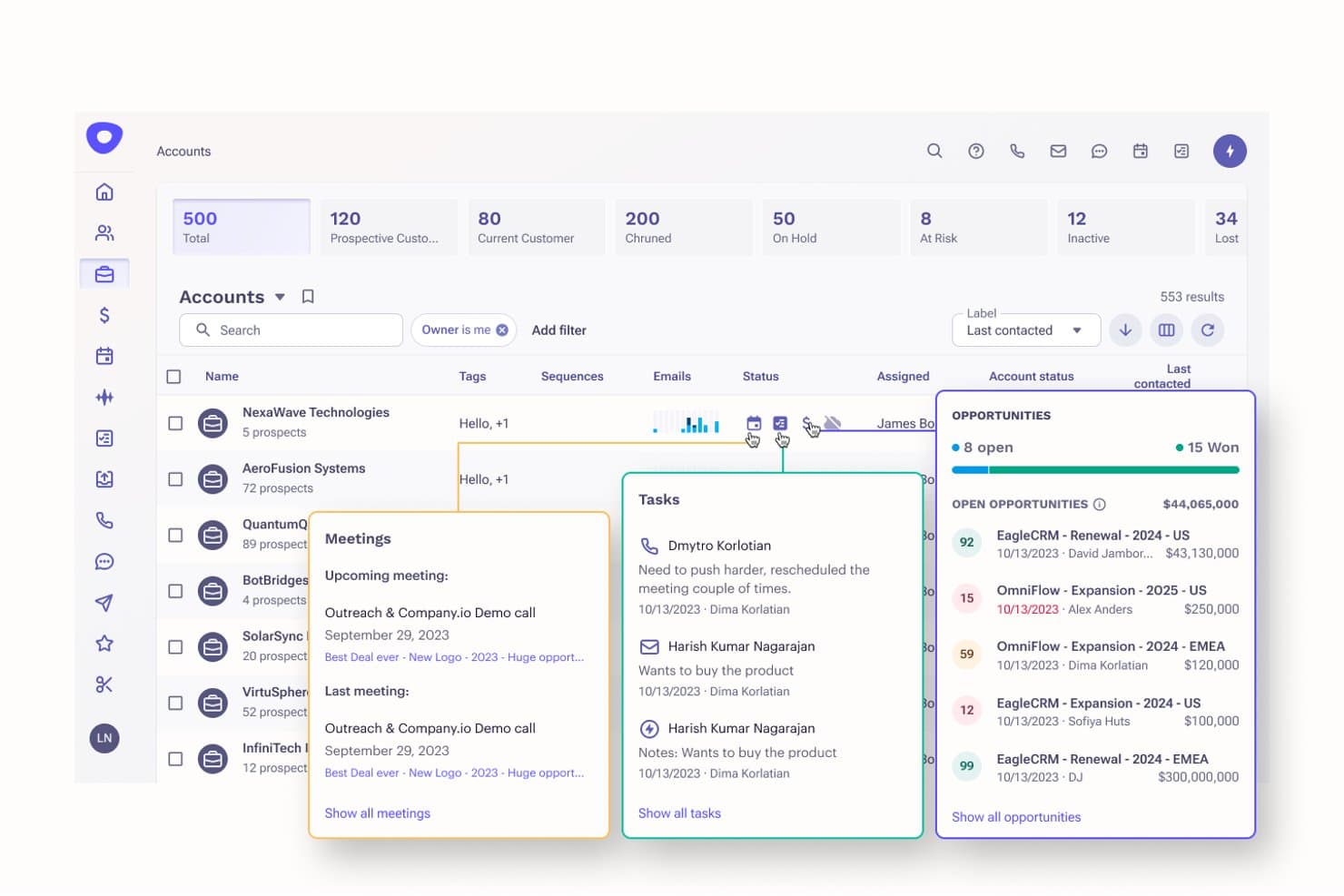
Apollo.io offre un cruscotto degli account basato sull'intelligenza artificiale con monitoraggio dei potenziali clienti, gestione delle opportunità, programmazione delle riunioni e assegnazione delle attività per semplificare la generazione di potenziali clienti. Apollo.io è una piattaforma di intelligence commerciale e coinvolgimento che abbina un database verificato di contatti B2B a sequenze di contatto in uscita, assegnazione di punteggi ai potenziali clienti, automazione dei flussi di lavoro e attività di contatto multicanale.
Per chi è più adatto Apollo.io?
Apollo.io è particolarmente adatto ai team di vendita B2B focalizzati sulle attività in uscita, in particolare agli SDR e ai professionisti delle operazioni commerciali di startup e aziende del mercato intermedio che svolgono attività di ricerca di potenziali clienti su larga scala.
Perché ho scelto Apollo.io
Apollo.io è entrato nella mia lista ristretta perché la qualità dei dati sui potenziali clienti alla base di ogni sequenza di coltivazione è davvero diversa. La verifica dei contatti in tempo reale su 270 milioni di profili B2B della piattaforma significa che non invio email di coltivazione a indirizzi obsoleti, mentre l'arricchimento automatico programmato mantiene aggiornati i record senza interventi manuali di pulizia. Mi affido inoltre al monitoraggio dei visitatori del sito per attivare le sequenze nel momento stesso in cui un potenziale cliente mostra intenzioni di acquisto.
Funzionalità principali di Apollo.io
- Sequenze di coinvolgimento commerciale: Crea campagne automatizzate di contatto multicanale con email, chiamate e interazioni su LinkedIn per coltivare i potenziali clienti.
- Segmentazione dinamica dei potenziali clienti: Filtra e raggruppa i potenziali clienti utilizzando criteri demografici, aziendali e comportamentali che si aggiornano in tempo reale.
- Integrazioni con CRM e strumenti: Sincronizza Salesforce, HubSpot CRM, Pipedrive e altri strumenti per semplificare la gestione dei potenziali clienti e il monitoraggio delle attività.
- Automazioni dei flussi di lavoro: Attiva avvisi, assegna attività o inserisci potenziali clienti nelle campagne in base ad azioni specifiche o modifiche dei campi.
Integrazioni di Apollo.io
Apollo.io offre integrazioni native con Salesforce, HubSpot, Outreach, Airtable, Amplitude, Asana e Gmail, oltre a un'API per integrazioni personalizzate.
Pros and Cons
Pros:
- La verifica dei contatti in tempo reale riduce i tassi di mancata consegna delle email di coltivazione
- I segnali di intenzione attivano le attività di contatto al momento giusto
- Il generatore di sequenze supporta attività di coltivazione multicanale in uscita
Cons:
- La profondità dei report è inferiore a quella delle piattaforme specializzate nella coltivazione
- I flussi di lavoro di coltivazione non offrono diramazioni condizionali avanzate
Learn more about Apollo.io: Ideale per strumenti di marketing e CRM unificati
- Piano gratuito + demo gratuita disponibile
- Da $7/utente/mese (fatturato annualmente)
Visit WebsiteCustomer Rating:4.4/5
HubSpot offre note sull’attività aziendale per tracciare il coinvolgimento dei lead e i follow-up. HubSpot è una piattaforma di marketing e CRM che combina email marketing, tracciamento dei lead, automazione del marketing e gestione dei contatti per una generazione di lead moderna in un unico sistema connesso.
Per chi è più adatto HubSpot?
HubSpot è una soluzione ideale per team marketing di piccole e medie dimensioni che desiderano avere strumenti CRM e di marketing in un unico posto senza dover gestire più piattaforme.
Perché ho scelto HubSpot
HubSpot merita un posto nella mia lista perché gli strumenti CRM e di marketing non sono collegati alla buona, ma sviluppati come un'unica soluzione. Mi piace poter attivare workflow di nurturing basati su proprietà attive del CRM, come la fase dell'affare o il ciclo di vita del contatto, senza necessità di sincronizzazione. Anche il lead scoring prende direttamente i dati dalla stessa scheda contatto, così posso dare priorità ai contatti non appena raggiungono una soglia specificata.
Funzionalità principali di HubSpot
- Automazione email: Crea e invia email personalizzate e sequenze di email automatizzate attivate dal comportamento del contatto, dall'invio di moduli o dall'appartenenza a una lista.
- Segmentazione delle liste: Organizza i contatti in liste dinamiche o statiche basate su qualsiasi combinazione di proprietà del CRM.
- Report delle campagne: Monitora le prestazioni delle campagne multicanale tra email, annunci e contenuti da un'unica dashboard.
Integrazioni di HubSpot
HubSpot offre oltre 1.700 integrazioni disponibili nel marketplace, tra cui Salesforce, Google Ads, LinkedIn Ads, Slack, Mailchimp, WordPress, Zoom, Microsoft 365, Shopify e SurveyMonkey. Fornisce anche una sincronizzazione bidirezionale con Salesforce e un'API per integrazioni personalizzate.
Pros and Cons
Pros:
- Strumenti CRM e di marketing nativamente integrati
- Automazione dei workflow con modifica e iterazione in tempo reale
- Tracciamento delle campagne multicanale in un unico posto
Cons:
- Le opzioni di design dei template email risultano poco flessibili
- Funzionalità avanzate di nurturing disponibili solo nei piani superiori
 Ideale per sequenze di vendita automatizzate
- Demo gratuita disponibile
- Prezzo su richiesta
Visit WebsiteCustomer Rating:4.5/5
Salesloft offre automazione delle sequenze con attività, chiamate, email e follow-up. Salesloft è una piattaforma di workflow per le entrate che riunisce automazione delle sequenze, gestione della pipeline, previsione delle vendite e intelligenza conversazionale in un unico sistema per i team di vendita.
Per chi è più adatto Salesloft?
Salesloft è particolarmente adatto ai team di vendita B2B in aziende di fascia media e enterprise che necessitano di attività di contatto strutturate e ripetibili su cicli di vendita lunghi o complessi.
Perché ho scelto Salesloft
Ho inserito Salesloft tra le mie migliori scelte per il modo in cui la sua automazione delle sequenze gestisce l'intero ciclo. Mi piace poter impostare logiche ramificate: i potenziali clienti che non aprono un'email ricevono automaticamente una chiamata di follow-up, mentre chi interagisce segue un percorso di comunicazione diverso. Il Cadence Player organizza anche le attività quotidiane del mio team in ordine di priorità, così i commerciali sanno sempre su cosa intervenire per primo.
Funzionalità principali di Salesloft
- Intelligenza conversazionale: Registra e trascrive le chiamate di vendita, individuando i momenti chiave tramite tag di parole chiave utili per coaching e revisione delle trattative.
- Avvisi di coinvolgimento del cliente: Ricevi notifiche in tempo reale quando un potenziale cliente apre un'email, clicca su un link o torna a visualizzare i tuoi contenuti.
- Intelligenza sulle trattative: Monitora i punteggi di salute delle trattative, il coinvolgimento degli stakeholder e le lacune nel pipeline per ogni opportunità attiva.
Integrazioni di Salesloft
Salesloft offre oltre 180 partner tramite il suo marketplace, con integrazioni CRM native per Salesforce, Microsoft Dynamics 365, HubSpot e Zoho, oltre a collegamenti con LinkedIn Sales Navigator, Slack, Gong, Drift e Cognism. Si integra anche con Zapier e offre un'API per integrazioni personalizzate.
Pros and Cons
Pros:
- Sequenze multicanale tra email, chiamate e attività
- L'automazione dello scoring dei lead fa emergere nuove opportunità
- Gestisce l'invio ad alto volume per team di rappresentanti numerosi
Cons:
- Nessuna funzionalità di auto-dialer o rotazione dei domini
- La reportistica è poco approfondita per analisi di vendita avanzate
Learn more about Salesloft: 4Ideale per customer journey e-commerce
Drip
- Prova gratuita di 14 giorni + demo gratuita disponibile
- Da $39/mese
Visit WebsiteCustomer Rating:4.4/5
Drip offre un workflow di recupero carrello abbandonato con trigger sugli ordini e passaggi di attesa. Drip è una piattaforma di automazione marketing tramite email e SMS orientata all’e-commerce che combina segmentazione comportamentale, automazione del customer journey e reportistica con attribuzione delle entrate basata sui dati degli store online.
Per Chi È Ideale Drip?
Drip è particolarmente adatta per brand e-commerce direct-to-consumer che gestiscono i loro store su Shopify, WooCommerce o BigCommerce.
Perché Ho Scelto Drip
Ho incluso Drip tra le mie scelte migliori perché è uno dei pochi strumenti di lead nurturing progettati specificamente intorno ai customer journey dell’e-commerce e non semplicemente adattati. Il suo builder visuale di workflow utilizza trigger comportamentali, come l’abbandono della navigazione e le azioni post-acquisto, prelevati direttamente dai dati di gestione degli ordini dello store. Apprezzo anche il fatto che i template di workflow preconfigurati per sequenze di benvenuto, riconquista e recupero carrelli abbandonati siano subito pronti per la personalizzazione, così non si parte da zero.
Funzionalità Chiave di Drip
- Segmentazione RFM: Segmenta i contatti in base a recenza, frequenza e valore degli acquisti per raggiungere gli utenti con alta propensione all’acquisto.
- Test A/B email: Testa oggetto, contenuto e orario di invio delle email all’interno di workflow automatizzati.
- Automazione SMS: Invia messaggi SMS come parte di sequenze di nurturing a più step insieme a campagne email.
Integrazioni di Drip
Drip offre oltre 100 integrazioni tramite la sua directory, tra cui Shopify, BigCommerce, WooCommerce, Stripe, Facebook Custom Audiences, Facebook Lead Ads, Typeform, Gravity Forms, Segment e LoyaltyLion. Si collega anche a Zapier e mette a disposizione un’API per integrazioni personalizzate.
Pros and Cons
Pros:
- Attribuzione delle entrate legata alle singole campagne email
- Lead scoring integrato per classificare i prospect ad alto potenziale
- Oltre 50 workflow di automazione e-commerce già pronti all’uso
Cons:
- Creatore di landing page basilare ottimizzato soprattutto per la semplice acquisizione di lead
- La reportistica non offre opzioni di visualizzazione personalizzabili
Learn more about Drip: Ideale per segmenti di pubblico suggeriti dall'IA
- Prova gratuita di 14 giorni + demo gratuita disponibile
- A partire da $15/mese (fatturazione annuale)
Visit WebsiteCustomer Rating:4.4/5
ActiveCampaign offre segmenti suggeriti dall’IA per accogliere, recuperare e fidelizzare i clienti. ActiveCampaign è una piattaforma di automazione del marketing che combina email marketing, flussi di lavoro automatizzati, valutazione dei contatti e strumenti CRM per gestire l'intero ciclo di vita dei potenziali clienti.
A chi è più adatto ActiveCampaign?
ActiveCampaign è particolarmente indicato per piccole e medie imprese B2C e B2B che gestiscono campagne email ad alto volume e necessitano di segmentazione automatica per rimanere rilevanti con grandi liste di contatti.
Perché ho scelto ActiveCampaign
Ho scelto ActiveCampaign tra i migliori perché la sua funzione Segmenti suggeriti dall'IA monitora attivamente il comportamento dei contatti e fa emergere pubblici di alto valore che difficilmente si potrebbero individuare manualmente. La trovo particolarmente utile nella gestione di grandi elenchi, poiché il livello di Intelligenza Attiva di ActiveCampaign analizza continuamente i segnali di coinvolgimento e suggerisce segmenti senza richiedere ricerche manuali. Inoltre, l'ottimizzazione predittiva dell'invio regola i tempi di consegna delle email per ciascun contatto, così il lavoro di segmentazione si traduce effettivamente in tassi di apertura migliori.
Funzionalità principali di ActiveCampaign
- Azioni divise e condizionali: Instrada i contatti su percorsi diversi in base al loro comportamento, preferenze o cronologia di interazione.
- Monitoraggio sito ed eventi: Controlla come i contatti interagiscono con il tuo sito web e attiva automazioni in base alla loro attività.
- Trigger comportamentali: Avvia automazioni in risposta ad azioni specifiche dei contatti, come clic su link, visite a pagine o acquisti.
Integrazioni di ActiveCampaign
ActiveCampaign offre oltre 1.000 integrazioni, incluse connessioni native con Salesforce, Shopify, WooCommerce, WordPress, Facebook, Google Ads, LinkedIn Ads, Slack, Calendly e Zendesk Sell. Si integra anche con Zapier e mette a disposizione un'API per integrazioni personalizzate.
Pros and Cons
Pros:
- Test A/B su interi percorsi di automazione
- Il punteggio lead assegna gli stadi MQL e SQL
- L’invio predittivo si adatta a ogni contatto
Cons:
- Il costo aumenta rapidamente con la crescita della lista contatti
- L’ampiezza delle funzionalità può disorientare i principianti
Learn more about ActiveCampaign: Ideale per il prospecting multicanale guidato dall'IA
- Demo gratuita disponibile
- Prezzo su richiesta
Visit WebsiteCustomer Rating:4.3/5
Outreach offre una dashboard AI dedicata agli account per approfondimenti su pipeline e opportunità. Progettato per i team di vendita, Outreach è una piattaforma di engagement commerciale che combina sequenze alimentate dall'IA, outreach multicanale, gestione del pipeline e intelligenza conversazionale per gestire i prospect dal primo contatto fino alla chiusura.
Per chi è ideale Outreach?
Outreach è particolarmente adatto per team di vendita di medie e grandi aziende che gestiscono grandi volumi di prospecting multicanale tramite email, telefono e LinkedIn.
Perché ho scelto Outreach
Outreach si guadagna un posto nella mia shortlist grazie a come la sua IA guida il prospecting multicanale su larga scala. Mi piacciono in particolare le sequenze basate su IA che si mettono automaticamente in pausa quando un potenziale cliente è fuori ufficio e lo ricontattano al suo ritorno. I test A/B alimentati dal machine learning su email, LinkedIn, SMS e chiamate comunicano inoltre al mio team, con fiducia statistica, quali messaggi e azioni hanno realmente successo nella conversione dei lead, e poi diffondono queste strategie vincenti a tutto il team.
Funzionalità principali di Outreach
- Intelligenza conversazionale: Registra, trascrivi e analizza le chiamate di vendita per identificare rischi per le trattative e momenti di coaching.
- Pianificazione riunioni: Prenota riunioni direttamente dalle sequenze tramite link al calendario collegati alla disponibilità di ogni commerciale.
- Monitoraggio sentiment degli acquirenti: Evidenzia cambiamenti nei segnali di coinvolgimento dei prospect per aiutare i commerciali a dare priorità ai giusti follow-up.
Integrazioni Outreach
Outreach offre oltre 100 integrazioni native tramite il suo marketplace, tra cui Salesforce, HubSpot, LinkedIn Sales Navigator, 6sense, ZoomInfo, Vidyard, Sendoso, Intercom e Drift. Si connette anche con Zapier e offre un’API per integrazioni personalizzate.
Pros and Cons
Pros:
- Analisi del sentiment dei prospect tramite IA
- Test A/B dettagliati su oggetto e fasi
- Progettato per scalare su centinaia di campagne simultanee
Cons:
- Le attività su LinkedIn sono solo promemoria manuali
- Nessun strumento integrato per trovare nuovi contatti
Learn more about Outreach: Ideale per automazioni basate sul comportamento
- Prova gratuita di 14 giorni + demo gratuita disponibile
- Da $15.58/mese (fatturato annualmente)
Visit WebsiteCustomer Rating:4.2/5
GetResponse offre flussi di lavoro automatizzati con trigger, condizioni e azioni. GetResponse è una piattaforma di marketing multicanale che combina email marketing, flussi di lavoro automatizzati, SMS, notifiche push web e chat live in un unico sistema per la coltivazione dei lead e il coinvolgimento dei clienti.
Per chi è GetResponse?
GetResponse è ideale per piccole e medie imprese e per i marketer digitali che gestiscono campagne guidate da email e desiderano integrare l'automazione senza un team operativo dedicato.
Perché ho scelto GetResponse
GetResponse si guadagna il suo posto nella mia shortlist grazie a come il suo costruttore di automazioni gestisce i trigger basati sul comportamento. Posso creare flussi di lavoro che reagiscono ad azioni specifiche come visite al sito, clic su link o cronologia degli acquisti, quindi indirizzare i contatti su percorsi diversi in base a ciò che fanno realmente. Il sistema di lead scoring integrato aggiorna anche i punteggi in tempo reale quando i contatti attivano questi trigger, quindi i lead più caldi salgono sempre in cima.
Funzionalità principali di GetResponse
- Segmentazione email: Filtra e raggruppa i contatti per tag, campi personalizzati, cronologia di coinvolgimento o comportamento di acquisto per raggiungere target mirati.
- Notifiche push web: Invia avvisi push tramite browser per riattivare i contatti dopo che hanno lasciato il tuo sito.
- A/B testing: Testa oggetti delle email, contenuti e orari di invio su diverse campagne per individuare ciò che genera più aperture e clic.
Integrazioni GetResponse
GetResponse offre oltre 170 integrazioni tramite la sua directory di integrazioni, inclusi strumenti come Shopify, WooCommerce, WordPress, Salesforce, PayPal, Google Analytics, Facebook e Teachable. Si collega anche con Zapier e offre un'API per integrazioni personalizzate.
Pros and Cons
Pros:
- Funnel di conversione integrati per la generazione di lead
- Costruttore di flussi di lavoro visuali con oltre 50 modelli
- Hosting webinar incluso nei piani superiori
Cons:
- Automazioni avanzate disponibili solo nei piani più costosi
- Nessun CRM integrato con il tracciamento delle trattative
Learn more about GetResponse: Ideale per workflow omnicanale aziendali
- Demo gratuita disponibile
- Prezzi su richiesta
Visit WebsiteCustomer Rating:4.1/5
Adobe Marketo offre un editor di email per personalizzare i contenuti delle campagne di nurturing. Adobe Marketo Engage è una piattaforma di automazione del marketing B2B che combina la gestione dei lead, l'email marketing, l'esecuzione di campagne multicanale, l'account-based marketing e l'attribuzione dei ricavi in tutto il funnel di generazione della domanda.
A chi è più indicato Adobe Marketo Engage?
Adobe Marketo Engage è stato progettato per i team di marketing aziendali che gestiscono programmi ad alto volume e multicanale su ampi database di potenziali clienti e clienti.
Perché ho scelto Adobe Marketo Engage
Adobe Marketo Engage è tra le mie migliori scelte perché nessun altro strumento gestisce l'orchestrazione omnicanale su vera scala aziendale come fa lui. Le Smart Campaigns mi permettono di attivare azioni coordinate su email, web, notifiche push su mobile e annunci a pagamento da un unico flusso di lavoro, il tutto basato su segnali comportamentali in tempo reale. Uso anche le Engagement Maps per visualizzare e gestire programmi di nurturing complessi e multi-stream che sarebbero quasi impossibili da controllare con uno strumento più semplice.
Funzionalità principali di Adobe Marketo Engage
- Lead scoring: Assegna e aggiorna i punteggi in base al comportamento del potenziale cliente e ai dati demografici su ogni canale monitorato.
- Sales Insight: Un pannello nativo all'interno di Salesforce CRM che mostra direttamente ai commerciali la recente attività di un potenziale cliente.
- Contenuti predittivi: Blocchi di contenuto suggeriti dall'IA che vengono inseriti automaticamente nelle email in base al comportamento e ai dati di profilo del singolo potenziale cliente.
Integrazioni Adobe Marketo Engage
Adobe Marketo Engage offre integrazioni CRM native e bidirezionali con Salesforce, Microsoft Dynamics e Veeva. Si integra inoltre con l'ecosistema Adobe Experience Cloud, inclusi Adobe Analytics, Adobe Target, Adobe Real-Time CDP, Adobe Experience Manager e Adobe Workfront. Sono disponibili REST API e webhook per integrazioni personalizzate.
Pros and Cons
Pros:
- Segmentazione avanzata del pubblico tramite filtri firmografici
- Dynamic Chat utilizza IA generativa per l'engagement
- Attribuzione multitouch collegata ai ricavi della pipeline
Cons:
- Richiede una persona dedicata alle operazioni per la gestione
- L'interfaccia sembra datata e i menu sono complessi
Learn more about Adobe Marketo Engage: Ideale per follow-up video personalizzati
- Prova gratuita di 7 giorni + demo gratuita disponibile
- Da $39/mese (fatturato annualmente)

Sendspark offre follow-up video personalizzati con testo e CTA su misura. Sendspark è una piattaforma di video messaggistica pensata per i team di vendita, che consente di registrare, personalizzare e inviare follow-up video generati dall’IA tramite email, LinkedIn e piattaforme CRM in ogni fase del ciclo di vendita.
Per chi è meglio Sendspark?
Sendspark è la soluzione ideale per i rappresentanti di vendita B2B e gli account executive che si affidano a un contatto diretto e personalizzato per far avanzare le trattative.
Perché ho scelto Sendspark
Ho incluso Sendspark nelle mie scelte principali per via della sua capacità di gestire follow-up video personalizzati su larga scala, senza aumentare il carico di lavoro per i venditori. Utilizzo la funzione video dinamico IA per generare video individuali per ogni potenziale cliente a partire da un unico modello registrato, in modo che ogni follow-up risulti personale anche negli invii di massa. Inoltre, le analisi per spettatore mi mostrano esattamente chi ha guardato il video, per quanto tempo e quando ricontattare, eliminando il dubbio su quando effettuare il prossimo contatto.
Funzionalità chiave di Sendspark
- Registratore schermo e videocamera: Registra schermo e webcam, o entrambi simultaneamente, per creare video di risposta personalizzati 1:1 direttamente all’interno di Sendspark.
- Video di follow-up post riunione: Registra video riepilogativi dopo le riunioni che consentono ai potenziali clienti di rivedere i punti chiave senza dover riguardare l’intera registrazione dell’incontro.
- Sincronizzazione con CRM: Collegati a Salesforce, HubSpot e Zoho per registrare i dati di coinvolgimento video e generare report di pipeline insieme ai dati delle trattative già presenti.
Integrazioni di Sendspark
Sendspark offre integrazioni nei settori sales engagement, CRM, email e automazione, inclusi HubSpot, Salesforce, Outreach, SalesLoft, Apollo, Clay, Expandi, Instantly, Close e Lemlist. Si collega anche con Zapier e fornisce un'API per integrazioni personalizzate.
Pros and Cons
Pros:
- L'IA genera video personalizzati da una sola registrazione
- Analisi del tempo di visione per singolo spettatore
- Si integra direttamente nelle sequenze email
Cons:
- L'editor video consente solo il taglio delle clip
- I template per landing page hanno opzioni di personalizzazione limitate
Learn more about Sendspark: 10Ideale per il tracciamento dei contatti di piccole imprese
Thryv
- Demo gratuita disponibile
- Da $255/mese
Visit WebsiteCustomer Rating:5/5
Thryv offre profili clienti con nomi, email e numeri di telefono. Thryv è una piattaforma di gestione dei lead pensata per le piccole imprese che combina il tracciamento dei contatti CRM, il punteggio dei lead, la gestione delle opportunità di vendita, la pianificazione degli appuntamenti e i follow-up automatizzati in un unico luogo.
Per chi è più indicato Thryv?
Thryv è particolarmente adatto a piccole imprese di servizi come aziende edili, saloni e agenzie che hanno bisogno di monitorare i lead senza la complessità degli strumenti CRM aziendali.
Perché ho scelto Thryv
Ho incluso Thryv tra le mie prime scelte perché gestisce tutto il ciclo di tracciamento dei contatti di cui le piccole imprese hanno effettivamente bisogno, senza le sovrastrutture pensate per le grandi aziende. In particolare, apprezzo il modo in cui il CRM tiene aggiornata in tempo reale ogni scheda di contatto, mostrando immediatamente la posizione di ciascun lead nelle varie pipeline di vendita. La combinazione di tag, scoring dei lead e follow-up automatici permette al mio team di dare priorità ai lead più caldi senza dover esaminare manualmente l’elenco dei contatti ogni mattina.
Funzionalità principali di Thryv
- Landing page e moduli di acquisizione lead: Crea landing page e moduli integrati per raccogliere lead direttamente nel tuo database di contatti.
- Modelli di email marketing: Invia campagne di nurturing a elenchi di contatti utilizzando modelli email predefiniti e personalizzabili.
- Automazione del marketing: Imposta sequenze automatiche di follow-up, promemoria e attivatori di campagne senza intervento manuale.
Integrazioni di Thryv
Thryv offre integrazioni tramite il suo marketplace, tra cui QuickBooks Online, Mailchimp, Constant Contact, HubSpot, Google Sheets, Shopify, Stripe, PayPal, Typeform e Jotform. Si connette anche con Zapier e fornisce un’API per integrazioni personalizzate.
Pros and Cons
Pros:
- Comunicazione con i clienti e follow-up in un unico posto
- Promemoria SMS automatizzati e messaggi di follow-up
- Include fatture e preventivi oltre al CRM
Cons:
- L’automazione di marketing è piuttosto basica rispetto a strumenti dedicati
- I livelli di prezzo limitano il totale dei contatti e dei messaggi mensili
Learn more about Thryv:
Altri software per la maturazione dei lead
Ecco alcune opzioni aggiuntive di software per la maturazione dei lead che non sono entrate nella mia selezione, ma che vale comunque la pena valutare:
- 11Salesforce Marketing Cloud Account Engagement (Pardot) Ideale per percorsi di acquisto B2B complessi
- 12monday CRMIdeale per flussi di lavoro personalizzati basati sull'IA
- 13KlaviyoIdeale per modelli predefiniti multicanale
- 14Pipedrive Ideale per la gestione visiva delle pipeline
Come Valuto i Software di Lead Nurturing
Divido la mia valutazione in due livelli: le funzionalità di base imprescindibili—sequenze drip automatizzate, scoring comportamentale, segmentazione dinamica—e i fattori differenzianti che rendono una piattaforma più adatta rispetto a un'altra.
Funzionalità di Base (Requisiti Minimi per Questa Lista)
Quando seleziono gli strumenti per la mia lista, valuto ciascuno su una scala da 0 (la funzionalità non è presente) a 5 (eccelle in quest'area) per ogni funzionalità di base elencata sotto. Successivamente, calcolo il punteggio totale dello strumento in percentuale. Ogni strumento deve raggiungere un punteggio minimo totale del 65% per essere preso in considerazione.
- Workflow di Nurturing Automatizzati: Valuto se la piattaforma offre un builder visivo di workflow con trigger comportamentali, logica ramificata e ritardi temporali—non solo un semplice autoresponder lineare.
- Segmentazione e Targetizzazione dei Lead: Sono importanti i segmenti dinamici che si aggiornano in tempo reale, ad esempio filtrando i lead che hanno visitato due volte la pagina prezzi ma non hanno ancora prenotato una demo.
- Lead Scoring: Controllo la presenza di modelli di scoring basati su regole o predittivi che combinano segnali di engagement (click su email, visite alle pagine) con la corrispondenza del profilo per individuare i lead pronti per le vendite.
- Messaggistica Multicanale: Oltre all'email, cerco almeno un canale aggiuntivo—SMS, push, o in-app—coordinato all'interno dello stesso percorso di nurturing e non isolato.
- Personalizzazione e Contenuti Dinamici: Le piattaforme dovrebbero supportare blocchi di contenuti condizionali e campi di unione affinché una singola email di nurturing possa mostrare diverse CTA in base al settore o alla fase del funnel.
- Analisi e Reportistica delle Campagne: Ricerco report che vadano oltre tassi di apertura per tracciare eventi di conversione, progressione nel funnel e quali passaggi del workflow guidano il maggior coinvolgimento.
Una volta che dispongo di una lista di strumenti che rispettano questi criteri, considero ciò che distingue ciascuna piattaforma dalle altre.
Fattori Differenzianti (Cosa Distingue i Vendor)
Ecco come confronto e metto in contrasto i diversi fornitori:
Funzionalità Distintive
Le capacità di passaggio tra marketing e vendite sono un grande elemento distintivo—cerco piattaforme che instradano automaticamente i lead ai commerciali con avvisi in tempo reale quando viene raggiunta una soglia di punteggio. Un’altra funzionalità che valuto con attenzione è il nurturing basato sull’account, soprattutto per i team B2B che gestiscono campagne rivolte a comitati d’acquisto piuttosto che a singoli contatti. Controllo anche se una piattaforma offre generazione di contenuti guidata dall’AI, che aiuta i team demand gen a scrivere e iterare più rapidamente le email di nurturing.
Oltre le Funzionalità
La profondità di integrazione con il CRM conta molto qui: verifico se la piattaforma offre una sincronizzazione bidirezionale affinché i punteggi e le fasi del ciclo di vita dei lead siano sempre aggiornati su entrambe le parti. La struttura dei prezzi è un altro elemento che considero, poiché i modelli basati sui contatti possono diventare rapidamente costosi man mano che il database cresce. Valuto anche strumenti a supporto della consegnabilità come opzioni IP dedicate, supporto SPF/DKIM e monitoraggio del posizionamento in inbox, perché anche la migliore sequenza di nurturing fallisce se finisce nello spam.
Come scegliere un software per la maturazione dei lead
È facile perdersi in lunghi elenchi di funzionalità e strutture tariffarie complesse. Per aiutarti a rimanere concentrato mentre affronti il tuo specifico processo di selezione del software, ecco una lista di fattori da tenere a mente:
| Fattore | Cosa considerare |
|---|---|
| FattoreScalabilità | Cosa considerareLo strumento è in grado di gestire il volume crescente di lead e campagne? Verifica i limiti per utenti o contatti, i limiti dei flussi di lavoro e le opzioni per passare a piani superiori. |
| FattoreIntegrazioni | Cosa considerareIl software si collegherà direttamente al tuo CRM, alle email e alle fonti di dati? Valuta la disponibilità e la profondità delle integrazioni native per evitare soluzioni manuali. |
| FattorePersonalizzazione | Cosa considerarePuoi adattare i percorsi dei lead, i campi dati e la logica al tuo processo di vendita specifico? Fai attenzione ai modelli di campagna rigidi o alle regole codificate. |
| FattoreFacilità d'uso | Cosa considerareI flussi di lavoro quotidiani sono intuitivi per il tuo team? Prova le interfacce per valutare la chiarezza della navigazione e ridurre al minimo le esigenze di formazione continua. |
| FattoreImplementazione e avviamento | Cosa considerareCon quale rapidità il tuo team può implementare lo strumento, renderlo operativo e migrare i lead esistenti? Cerca risorse strutturate per l'avviamento e tempistiche realistiche. |
| FattoreCosto | Cosa considerareI costi continuativi sono prevedibili quando aggiungi utenti e contatti? Esamina attentamente i livelli dei piani, i componenti aggiuntivi necessari e la frequenza di fatturazione per evitare sorprese. |
| FattoreMisure di sicurezza | Cosa considerareLo strumento offre la crittografia dei dati, controlli degli accessi degli utenti e registri di controllo? Assicurati che sia in linea con i tuoi standard di sicurezza e le esigenze normative. |
| FattoreDisponibilità dell'assistenza | Cosa considerareQuando si verificano problemi, con quale rapidità puoi ricevere assistenza? Verifica gli orari documentati dell'assistenza e i canali disponibili, in modo che corrispondano alle esigenze del tuo team. |
Che cos'è un software per la maturazione dei lead?
Il software per la maturazione dei lead è una categoria di strumenti tutto-in-uno progettati per automatizzare, personalizzare e monitorare le comunicazioni continuative con i potenziali clienti lungo tutto il percorso di vendita. Queste piattaforme aiutano i team di marketing e vendita a coinvolgere i lead con contenuti tempestivi e mirati attraverso canali come email, social media e video, monitorando al contempo le interazioni e accompagnando i potenziali clienti verso le decisioni di acquisto.
Funzionalità del software di coltivazione dei lead
Quando selezioni un software di coltivazione dei lead, presta attenzione alle seguenti funzionalità chiave:
- Flussi di lavoro automatizzati: Crea e pianifica campagne in più fasi che inviano automaticamente messaggi ai lead in base al tempo, al comportamento o alla fase del funnel.
- Segmentazione dei lead: Raggruppa i lead in base a dati demografici, comportamenti o livello di coinvolgimento, così da poter personalizzare i messaggi per ciascun segmento di pubblico.
- Comunicazione multicanale: Comunica con i lead tramite canali come email, SMS e social media da un'unica piattaforma centralizzata.
- Messaggi personalizzati: Personalizza contenuti, saluti e orari di invio per ciascun lead, aumentando la rilevanza e il coinvolgimento.
- Monitoraggio del coinvolgimento: Monitora aperture, clic, risposte e altre interazioni per valutare l'interesse e identificare i potenziali clienti più interessati.
- Valutazione dei lead: Assegna valori numerici ai lead in base alle loro azioni e alla corrispondenza con il profilo ideale, dando priorità alle attività di ricontatto.
- Integrazione con il CRM: Sincronizza automaticamente i dati dei lead con il CRM commerciale o di marketing per mantenere registri accurati e ottimizzare i passaggi di consegne.
- Report e analisi: Accedi a pannelli di controllo e report che mostrano le prestazioni delle campagne, i tassi di risposta e l'avanzamento della pipeline.
- Creazione di campagne con trascinamento: Crea e modifica visivamente le sequenze di coltivazione dei lead, senza competenze tecniche, utilizzando un'interfaccia intuitiva.
Funzionalità comuni dell'intelligenza artificiale nei software di coltivazione dei lead
Oltre alle funzionalità standard dei software di coltivazione dei lead elencate sopra, molte di queste soluzioni stanno integrando l'intelligenza artificiale con funzionalità come:
- Valutazione predittiva dei lead: Utilizza algoritmi di intelligenza artificiale per analizzare interazioni e comportamenti passati, assegnando punteggi più elevati ai lead con maggiori probabilità di conversione sulla base degli schemi appresi dai tuoi dati.
- Raccomandazioni automatizzate dei contenuti: Suggerisce i contenuti o i messaggi di contatto successivi più adatti per ciascun lead, basandosi sui dati di coinvolgimento e sull'analisi dell'intelligenza artificiale di ciò che ha funzionato per segmenti simili.
- Ottimizzazione dell'orario di invio: Utilizza l'intelligenza artificiale per determinare e pianificare le comunicazioni nei momenti in cui ciascun lead ha maggiori probabilità di aprire e interagire con i messaggi.
- Analisi delle risposte in linguaggio naturale: Utilizza l'intelligenza artificiale per analizzare risposte e messaggi dei lead, classificando i livelli di interesse e portando all'attenzione del team commerciale le conversazioni più promettenti.
- Rilevamento dell'intenzione: Applica l'intelligenza artificiale per esaminare i segnali di coinvolgimento e il comportamento digitale, identificando i lead che mostrano una forte intenzione di acquisto per un ricontatto tempestivo e mirato.
Vantaggi del software di coltivazione dei lead
L'implementazione di un software di coltivazione dei lead offre diversi vantaggi al tuo team e alla tua azienda. Ecco alcuni dei vantaggi che puoi aspettarti:
- Comunicazioni costanti: I flussi di lavoro automatizzati garantiscono che ogni lead riceva comunicazioni tempestive, permettendo di concludere le trattative senza attività manuali o ricontatti mancati.
- Personalizzazione su larga scala: I contenuti dinamici, le campagne a cadenza programmata e gli strumenti di segmentazione consentono di personalizzare i messaggi per migliaia di contatti in modo altamente pertinente.
- Visibilità sulla pipeline: Il monitoraggio del coinvolgimento e le analisi offrono informazioni chiare sulla posizione dei lead nel funnel di vendita e sulle campagne che li fanno avanzare.
- Ricontatti prioritari: La valutazione dei lead e l'analisi dell'intelligenza artificiale aiutano il tuo team a concentrare le risorse sui potenziali clienti con maggiori probabilità di conversione.
- Integrazione migliorata: Le integrazioni con il CRM e con la piattaforma mantengono i dati sincronizzati, riducendo gli aggiornamenti manuali e migliorando i passaggi di consegne tra marketing e vendite.
- Decisioni basate sui dati: Gli strumenti di reportistica e i pannelli delle prestazioni ti consentono di ottimizzare le campagne di coltivazione dei lead sulla base di dati reali di coinvolgimento e conversione.
- Esperienza del cliente migliorata: Comunicazioni multicanale, tempestive e pertinenti creano un percorso più coinvolgente e meno invadente per i tuoi potenziali clienti.
Costi e prezzi dei software di coltivazione dei lead
La scelta di un software di coltivazione dei lead richiede la comprensione dei vari modelli di prezzo e dei piani disponibili. I costi variano in base alle funzionalità, alle dimensioni del team, agli extra e ad altri fattori. La tabella seguente riassume i piani più comuni, i relativi prezzi medi e le funzionalità tipicamente incluse nelle soluzioni software di coltivazione dei lead:
Tabella comparativa dei piani per i software di coltivazione dei lead
| Tipo di piano | Prezzo medio | Caratteristiche comuni |
|---|---|---|
| Tipo di pianoPiano gratuito | Prezzo medio$0 | Caratteristiche comuniAutomazione di base dei flussi di lavoro, archiviazione limitata dei contatti, attività di contatto via e-mail e reportistica semplice. |
| Tipo di pianoPiano personale | Prezzo medio$10-$30/user/month | Caratteristiche comuniSegmentazione dei lead, attività di contatto multicanale, limiti di contatti ampliati e integrazioni di base. |
| Tipo di pianoPiano aziendale | Prezzo medio$25-$75/user/month | Caratteristiche comuniAutomazione avanzata, integrazione con il CRM, assegnazione di punteggi ai lead, analisi dettagliate e supporto multiutente. |
| Tipo di pianoPiano aziendale | Prezzo medio$75-$200+/user/month | Caratteristiche comuniFlussi di lavoro personalizzati per l'automazione delle vendite, sicurezza avanzata, supporto premium, onboarding dedicato e gestione della conformità. |
Domande frequenti sul software di gestione dei lead
Ecco alcune risposte alle domande comuni sul software di gestione dei lead:
Come faccio a sapere se il mio team è pronto per utilizzare un software di gestione dei lead?
Probabilmente siete pronti quando avete più lead di quanti possiate monitorare manualmente, una pipeline di vendita in crescita o il desiderio di automatizzare le attività ripetitive di follow-up. Se l’acquisizione dei dati sul coinvolgimento e la gestione di campagne in più fasi vi sembrano interessanti, queste soluzioni possono aggiungere molta struttura ed efficienza.
Con quali strumenti dovrei integrare il software di gestione dei lead?
Dovreste integrarlo con il vostro CRM, la piattaforma di automazione del marketing e gli strumenti di posta elettronica, in modo che i dati dei lead, le attività di coinvolgimento e gli insight delle campagne rimangano sincronizzati. Aggiungere connessioni con le piattaforme di analisi e di vendita aiuta a delineare un quadro completo dei progressi dei lead.
È difficile migrare i lead esistenti su una nuova piattaforma?
No, la maggior parte dei software di gestione dei lead offre importazioni CSV o integrazioni API dirette dai CRM più diffusi. Tuttavia, dovrete verificare con attenzione come verranno trasferiti i campi personalizzati, i tag o le note e prevedere tempo aggiuntivo per esaminare i record dopo la migrazione.
In che modo gli strumenti di gestione dei lead supportano la conformità e la privacy dei dati?
Molti offrono la gestione dei ruoli degli utenti, il monitoraggio del consenso, l’archiviazione crittografata e la registrazione degli audit. Cercate un supporto chiaro per il GDPR, il CCPA o le normative locali, così da garantire che la piattaforma sia in linea con i vostri requisiti di gestione dei dati.
Queste piattaforme funzionano solo per i lead inbound?
No, potete utilizzare il software di gestione dei lead sia per i lead inbound sia per quelli outbound. Segmentare e personalizzare i messaggi è altrettanto utile per i potenziali clienti interessati che avete raccolto quanto per i contatti outbound che state cercando attivamente di acquisire.
Quali sono alcuni errori comuni da evitare durante la configurazione?
Evitate di affrettare le regole di segmentazione o di saltare le guide introduttive. Dedicate tempo a definire i vostri flussi di lavoro, impostare fasi chiare e testare i modelli prima di lanciare le campagne. In questo modo potrete individuare tempestivamente gli errori logici e le imprecisioni nei messaggi.