

Una valida alternativa a monday CRM combina funzionalità di gestione progetti flessibili con flussi di lavoro personalizzabili e affidabili strumenti di collaborazione, oltre all'abilità di tracciare le attività. Se stai cercando opzioni diverse da monday CRM, probabilmente vuoi un software che si adatti ai processi del tuo team, sia riconosciuto per la facilità d'uso, supporti integrazioni senza interruzioni con i tuoi strumenti attuali e offra sia gestione clienti sia gestione dei progetti nello stesso luogo. Con così tante piattaforme disponibili, può essere difficile capire quali soddisfino realmente queste esigenze. Questa lista ti aiuterà a confrontare rapidamente le migliori alternative a monday CRM per il 2026, così troverai la soluzione adatta alla tua azienda e manterrai i tuoi progetti sempre in movimento.
Cos'è monday CRM?
monday CRM è un software di gestione progetti tutto-in-uno creato da monday.com che aiuta i piccoli team ad organizzare attività, tracciare le interazioni con i clienti e gestire i flussi di lavoro in un'unica piattaforma. Offre bacheche personalizzabili, strumenti di automazione e integrazioni con le app aziendali più popolari, fungendo anche da solido strumento di gestione progetti con funzionalità CRM. I team utilizzano monday CRM per centralizzare i dettagli di progetto, assegnare responsabilità e monitorare i progressi in tempo reale. La sua interfaccia visiva, le funzionalità avanzate e la struttura flessibile lo rendono adatto a una vasta gamma di settori e tipologie di progetto.
Riepilogo delle Migliori Alternative a monday CRM
u003cspan style=u0022font-weight: 400u0022u003eQuesta tabella di confronto riassume i dettagli sui prezzi delle mie migliori alternative a monday CRM per aiutarti a trovare quella più adatta al tuo budget e alle tue esigenze di business.u003c/spanu003e
| Tool | Best For | Trial Info | Price | ||
|---|---|---|---|---|---|
| 1 | Ideale per l'automazione dei flussi di lavoro di marketing senza codice | Prova gratuita di 14 giorni | A partire da $40/utente/mese (con fatturazione annuale) | Website | |
| 2 | Ideale per punteggio dei lead alimentato dall'IA | Piano gratuito disponibile | Da $9/utente/mese (fatturazione annuale) | Website | |
| 3 | Ideale per strumenti di automazione del marketing integrati | Piano gratuito + demo gratuita disponibile | Da $7/utente/mese (fatturazione annuale) | Website | |
| 4 | Ideale per le funzionalità di collaborazione di squadra | Piano gratuito + demo gratuita disponibile | Da $10.99/utente/mese (fatturato annualmente) | Website | |
| 5 | Ideale per la gestione automatizzata di campagne email | Prova gratuita di 14 giorni + demo gratuita disponibile | Da $15/mese (fatturazione annuale) | Website | |
| 6 | Ideale per il supporto ai flussi di lavoro agile | Piano gratuito disponibile | Da $7.91/utente/mese | Website | |
| 7 | Ideale per l'integrazione con Outlook | Prova gratuita + piano gratuito disponibile | Da $18/utente/mese (fatturazione annuale) | Website | |
| 8 | Ideale per la gestione visiva della pipeline di vendita | Prova gratuita di 14 giorni disponibile | Da $14/utente/mese (fatturazione annuale) | Website | |
| 9 | Ideale per l'integrazione dei dati a livello enterprise | Prova gratuita di 30 giorni disponibile | Da $50/utente/mese (fatturazione annuale) | Website | |
| 10 | Ideale per gerarchie di attività personalizzabili | Piano gratuito + demo gratuita disponibili | Da $4/utente/mese (fatturato annualmente) | Website |


Perché fidarsi dei nostri consigli sui software
6,700+
Reviews
20
Industry experts
16+
Evaluation factors
14
Years
Il nostro team testa e recensisce software dal 2012. In quanto leader del marketing noi stessi, sappiamo quanto sia difficile — e importante — scegliere il software giusto.
Per questa guida, abbiamo valutato gli strumenti attraverso test pratici e ricerche indipendenti, assegnando un punteggio agli strumenti in base ai nostri criteri di selezione.
Le nostre recensioni riflettono il nostro giudizio editoriale umano, non un discorso di vendita.
Revisori esperti:
 Gui DrusinaDirettore creativo
- Shriya GhateSenior Marketing Lead
 Amanda JacquesResponsabile Marketing Ops

Recensioni delle Alternative a monday CRM
u003cspan style=u0022font-weight: 400u0022u003eDi seguito le mie sintesi dettagliate delle migliori alternative a monday CRM che hanno raggiunto la mia selezione rapida. Le mie recensioni offrono una panoramica approfondita delle funzionalità, dei migliori casi d’uso e delle integrazioni di ciascuna piattaforma per aiutarti a trovare quella più adatta alle tue esigenze.u003c/spanu003e
 Ideale per l'automazione dei flussi di lavoro di marketing senza codice
- Prova gratuita di 14 giorni
- A partire da $40/utente/mese (con fatturazione annuale)
Visit WebsiteCustomer Rating:4.7/5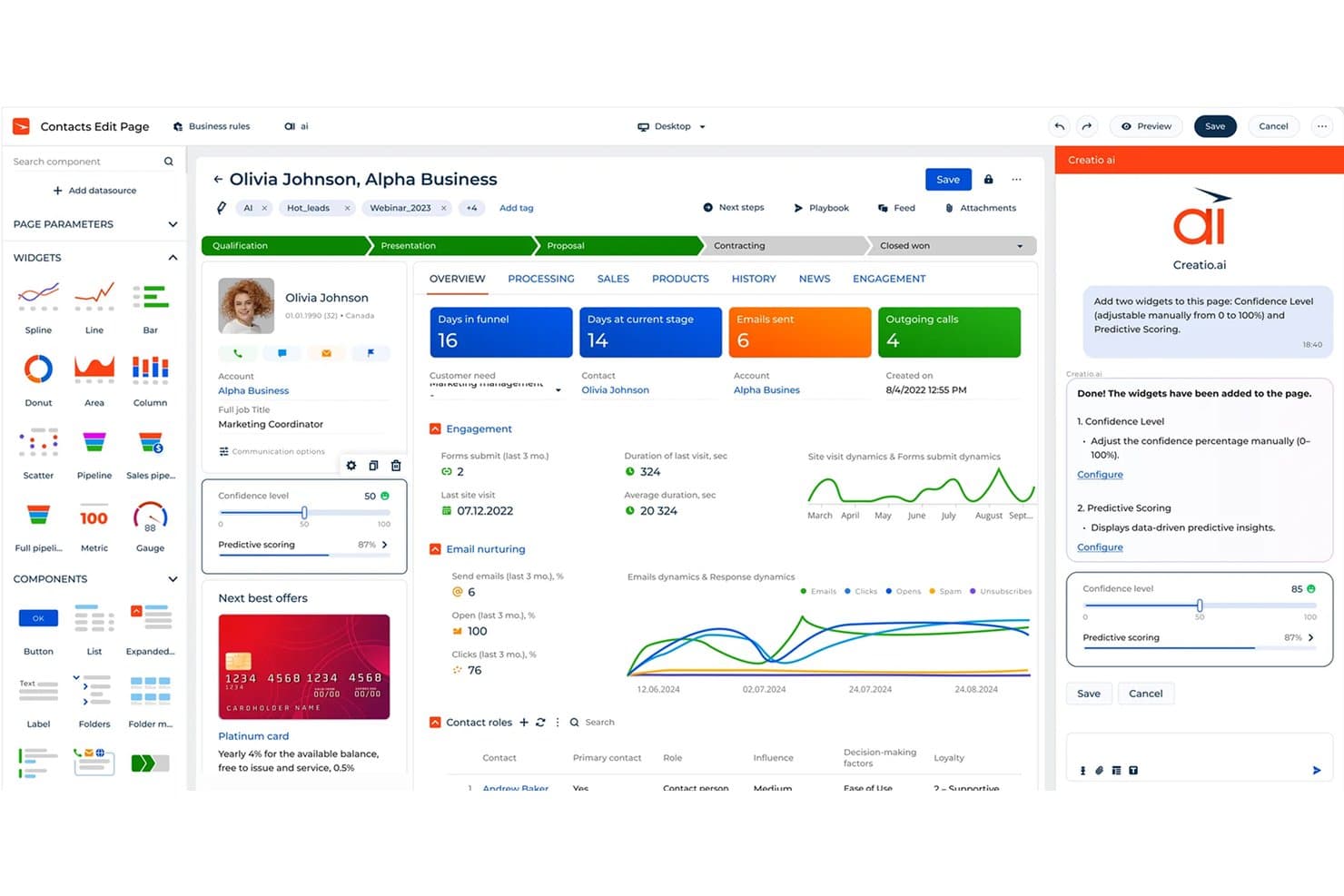
Creatio CRM utilizza l'intelligenza artificiale per aggiungere elementi grafici e assegnare automaticamente un punteggio ai potenziali clienti. Creatio CRM è una piattaforma di gestione delle relazioni con i clienti senza codice per i team di marketing che devono unificare i dati dei clienti, coordinare le campagne e adattare i flussi di lavoro di vendita e assistenza senza uno sviluppo esteso.
Per chi è più adatto Creatio CRM?
Creatio CRM è adatto ai team operativi di marketing che devono creare e modificare i flussi di lavoro delle campagne senza dipendere dagli sviluppatori.
Perché Creatio CRM è una buona alternativa a monday CRM
Ho scelto Creatio CRM perché l'automazione dei flussi di lavoro di marketing senza codice supporta i percorsi delle campagne senza l'intervento degli sviluppatori. Utilizzo strumenti visivi per i flussi di lavoro per instradare i potenziali clienti, attivare sequenze di e-mail e aggiornare i record dei clienti in base al coinvolgimento. Le sue funzionalità di gestione e segmentazione delle campagne aiutano il mio team a coordinare programmi di coltivazione mirati da un unico spazio di lavoro.
Funzionalità principali di Creatio CRM
- Gestione dei contatti e degli account: Organizza persone, aziende, interazioni e dettagli delle relazioni.
- Gestione delle opportunità: Monitora le fasi delle trattative, i ricavi previsti e le attività di vendita.
- Gestione dei casi: Assegna, stabilisce la priorità e monitora le richieste di assistenza dei clienti.
- Cruscotti analitici: Crea report per il flusso delle opportunità, le attività e le metriche delle prestazioni.
Integrazioni di Creatio CRM
Il marketplace di Creatio offre Cyclr, che lo collega a Mailchimp, Marketo, Salesforce, HubSpot, Shopify, WooCommerce, QuickBooks, Xero, Slack e Microsoft Teams, oltre a Zapier. Fornisce inoltre API OData, DataService e API personalizzate per i servizi web per le integrazioni personalizzate.
Pros and Cons
Pros:
- Flussi di lavoro visivi delle campagne senza sviluppatori
- Dati unificati di marketing, vendita e assistenza
- Punteggio e segmentazione dettagliati dei potenziali clienti
Cons:
- La configurazione richiede un'attenta progettazione dei processi
- L'interfaccia può risultare affollata per i nuovi utenti
Learn more about Creatio CRM: Ideale per punteggio dei lead alimentato dall'IA
- Piano gratuito disponibile
- Da $9/utente/mese (fatturazione annuale)
Visit WebsiteCustomer Rating:4.6/5
Freshsales dà priorità ai lead per migliorare i tassi di conversione. I team di vendita alla ricerca di un software di gestione progetti con funzionalità avanzate di qualificazione dei lead potrebbero voler considerare Freshsales. Questa piattaforma utilizza il punteggio dei lead alimentato dall'IA per aiutare a dare priorità alle trattative e concentrare gli sforzi del team dove sono più importanti. A differenza di monday CRM, Freshsales analizza automaticamente i segnali di coinvolgimento e le attività di vendita per mettere in evidenza i lead ad alto potenziale direttamente all'interno dei flussi di lavoro dei tuoi progetti.
Perché Freshsales è una valida alternativa a monday CRM
Per i team che vogliono dare la priorità ai lead e gestire i progetti in un unico posto, Freshsales offre un vantaggio unico. Ho scelto Freshsales perché il suo punteggio dei lead alimentato dall'IA classifica automaticamente i potenziali clienti in base al coinvolgimento, alla fase della trattativa e ai dati storici, così puoi concentrarti sulle opportunità più promettenti. La piattaforma consente anche di impostare flussi di lavoro che assegnano attività e promemoria in base ai punteggi dei lead, mantenendo organizzata la pipeline dei progetti. Se hai bisogno di una gestione progetti strettamente integrata con l'intelligenza sulle vendite, Freshsales unisce queste capacità in modo che monday CRM non offre.
Funzionalità principali di Freshsales
Altre funzionalità di Freshsales che i team orientati ai progetti potrebbero voler esplorare includono:
- Pipeline delle trattative Kanban: Visualizza e gestisci le trattative attraverso fasi della pipeline personalizzabili.
- Telefono ed email integrati: Effettua chiamate e invia email direttamente dalla piattaforma.
- Pianificazione appuntamenti: Prenota incontri con lead e clienti utilizzando strumenti calendario integrati.
- Campi e moduli personalizzati: Personalizza registri e flussi di lavoro per soddisfare le esigenze di progetto uniche del tuo team.
Integrazioni di Freshsales
Le integrazioni includono Freshdesk, Freshchat, Freshmarketer, Google Workspace, Microsoft 365, Mailchimp, Zapier, QuickBooks, Xero e altro.
Pros and Cons
Pros:
- Punteggio lead con IA aggiornato in tempo reale
- Telefono ed email integrati per contatti diretti
- Assegnazione automatica delle attività tramite regole di flusso di lavoro
Cons:
- Nessuna funzione di monitoraggio del tempo integrata per i progetti
- Automazione dei flussi di lavoro limitata nei piani base
Learn more about Freshsales: Ideale per strumenti di automazione del marketing integrati
- Piano gratuito + demo gratuita disponibile
- Da $7/utente/mese (fatturazione annuale)
Visit WebsiteCustomer Rating:4.4/5
HubSpot automatizza le attività per far risparmiare tempo ai team in crescita. Per i team che desiderano la gestione dei progetti e l'automazione del marketing in un'unica piattaforma, HubSpot offre un approccio unico. Questa piattaforma è particolarmente utile per i team di marketing e vendite che hanno bisogno di gestire i contatti, automatizzare le campagne e monitorare l'avanzamento dei progetti senza dover cambiare strumenti. A differenza di monday CRM, le funzionalità di automazione del marketing integrate di HubSpot permettono di collegare direttamente le attività di progetto ai flussi di lavoro email, al nurturing dei lead e al monitoraggio delle campagne.
Perché HubSpot è una valida alternativa a monday CRM
Se desideri una gestione dei progetti strettamente connessa all'automazione del marketing, HubSpot è un'ottima scelta. Ho selezionato HubSpot perché i suoi strumenti di automazione dei flussi di lavoro permettono di avviare email, assegnare compiti e aggiornare i record in base alle tappe del progetto o alle fasi delle trattative. Le funzionalità di gestione delle campagne della piattaforma ti aiutano inoltre a coordinare i progetti di marketing, monitorare le performance e conservare tutte le risorse correlate in un unico posto. Per i team che necessitano di integrare il monitoraggio dei progetti con comunicazioni automatizzate, HubSpot offre un livello di integrazione che monday CRM non raggiunge.
Funzionalità principali di HubSpot
Altre funzionalità di HubSpot che i team focalizzati sui progetti potrebbero voler esplorare includono:
- Code di attività: Organizza e dai priorità alle attività di progetto per te stesso o per il tuo team.
- Dashboard personalizzabili: Crea dashboard per visualizzare le metriche di progetto e le prestazioni del team.
- Gestione dei documenti: Conserva, condividi e traccia i documenti direttamente all'interno della piattaforma.
- Permessi di team: Imposta controlli d'accesso granulari per differenti utenti e team.
Integrazioni di HubSpot
Le integrazioni includono Asana, Gmail, Intercom, Mailchimp, Google Ads, Shopify, Slack, Microsoft Dynamics 365, Zoom, Salesforce e altri.
Pros and Cons
Pros:
- Automazione del marketing integrata per le attività di progetto
- I record di contatti e trattative sono collegati ai progetti
- Gli strumenti per le campagne email sono collegati ai flussi di lavoro di progetto
Cons:
- Nessun diagramma di Gantt nativo per le tempistiche di progetto
- Le dipendenze tra attività non sono supportate nelle bacheche di progetto
 Ideale per le funzionalità di collaborazione di squadra
- Piano gratuito + demo gratuita disponibile
- Da $10.99/utente/mese (fatturato annualmente)
Visit WebsiteCustomer Rating:4.4/5
Asana migliora la produttività con strumenti per la gestione delle attività. Per i team che danno la priorità alla comunicazione e al coordinamento, Asana offre una piattaforma di gestione progetti progettata attorno alla collaborazione. I dipartimenti marketing, le agenzie creative e i team interfunzionali spesso scelgono Asana per i suoi aggiornamenti in tempo reale sulle attività e le viste condivise dei progetti. Diversamente da monday CRM, Asana enfatizza le funzionalità che mantengono tutti allineati e le conversazioni collegate al lavoro, con opzioni di personalizzazione flessibili ed elenchi di attività organizzati.
Perché Asana è una buona alternativa a monday CRM
Quando il successo del tuo team dipende da una collaborazione fluida, Asana si distingue per il suo focus nel mantenere tutti connessi. Ho scelto Asana perché le sue bacheche condivise dei progetti e i thread dei commenti permettono ai team di discutere il lavoro direttamente dove risiedono le attività. Gli aggiornamenti in tempo reale e le funzioni di calendario di squadra aiutano tutti a restare sulla stessa pagina, anche quando le priorità cambiano. Per i gruppi che devono coordinarsi tra reparti o sedi diverse, gli strumenti collaborativi di Asana rappresentano un chiaro vantaggio rispetto a monday CRM.
Funzionalità principali di Asana
Altre funzionalità in Asana che i project manager potrebbero voler esplorare includono:
- Campi personalizzati: aggiungi informazioni specifiche alle attività per monitorare dettagli unici del progetto.
- Generatore di workflow: Progetta e automatizza processi multi-step con uno strumento visuale per i flussi di lavoro.
- Monitoraggio delle milestone: Segna e controlla i traguardi chiave del progetto per seguirne i progressi.
- Gestione del carico di lavoro: Visualizza la capacità del team e bilancia le assegnazioni tra i diversi progetti.
Integrazioni di Asana
Le integrazioni includono Slack, Google Drive, Microsoft Teams, Zoom, Jira Cloud, Salesforce, Dropbox, Outlook, Figma, e altro ancora.
Pros and Cons
Pros:
- Il generatore di workflow automatizza i passaggi ripetitivi dei progetti
- La gestione del carico di lavoro visualizza la capacità del team
- Il monitoraggio delle milestone evidenzia i principali traguardi di progetto
Cons:
- I controlli di accesso per gli ospiti possono risultare restrittivi
- Le sottoattività non dispongono di opzioni avanzate di filtro
 Ideale per la gestione automatizzata di campagne email
- Prova gratuita di 14 giorni + demo gratuita disponibile
- Da $15/mese (fatturazione annuale)
Visit WebsiteCustomer Rating:4.4/5
ActiveCampaign genera report sulle tendenze per migliorare i risultati di coinvolgimento. Se il tuo team ha bisogno di automazione avanzata per le campagne email, ActiveCampaign offre una piattaforma focalizzata sui flussi di lavoro di marketing e vendite. I team di marketing e le piccole imprese lo scelgono spesso per il suo costruttore visivo di automazioni e i potenti strumenti di segmentazione. A differenza di monday CRM, ActiveCampaign è specializzato nell'automatizzare percorsi email personalizzati e nella gestione di trigger di campagne complesse.
Perché ActiveCampaign è una buona alternativa a monday CRM
Per i team che vogliono automatizzare e personalizzare le comunicazioni, ActiveCampaign offre una gestione avanzata delle campagne email che va oltre quanto offerto da monday CRM. Ho scelto ActiveCampaign perché il suo costruttore visivo di automazioni ti permette di progettare flussi di lavoro complessi e multi-step per nutrire i lead e gestire i percorsi dei clienti. Gli strumenti di segmentazione della piattaforma consentono di mirare a pubblici specifici in base a comportamento, coinvolgimento o campi di dati personalizzati. Se le tue esigenze di project management includono l'orchestrazione di comunicazioni automatizzate e il monitoraggio della performance delle campagne, ActiveCampaign offre funzionalità specialistiche che colmano questa lacuna.
Funzionalità principali di ActiveCampaign
Altre funzionalità di ActiveCampaign che i project manager potrebbero voler considerare includono:
- Lead Scoring: Assegna punteggi ai contatti in base a coinvolgimento e attività.
- Gestione pipeline opportunità: Monitora le opportunità di vendita attraverso fasi pipeline personalizzabili.
- Assegnazione dei compiti: Crea e assegna compiti ai membri del team all'interno delle trattative.
- Monitoraggio del sito: Tieni traccia dell'attività dei visitatori del sito web e collegala ai record dei contatti.
Integrazioni ActiveCampaign
Le integrazioni includono Shopify, Salesforce, WordPress, Facebook, WooCommerce, Zapier, Google Analytics, Slack, Calendly e altre ancora.
Pros and Cons
Pros:
- Lead scoring integrato per la prioritizzazione dei contatti
- Email e SMS marketing in un'unica piattaforma
- Vista pipeline di vendita per il monitoraggio delle trattative
Cons:
- I report si concentrano sul marketing, non sui progetti
- Nessun sistema integrato di monitoraggio del tempo per i compiti
Learn more about ActiveCampaign: 6Ideale per il supporto ai flussi di lavoro agile
Jira
- Piano gratuito disponibile
- Da $7.91/utente/mese
Visit WebsiteCustomer Rating:4.4/5
Jira visualizza l’avanzamento dei compiti per una pianificazione degli sprint più semplice. Le squadre che cercano una gestione avanzata dei progetti agile spesso si affidano a Jira per il suo ampio supporto a Scrum, Kanban e flussi di lavoro personalizzati. La piattaforma è particolarmente apprezzata dai team di sviluppo software che devono gestire sprint, monitorare i problemi e automatizzare i compiti ripetitivi. A differenza di monday CRM, Jira è progettato per gestire processi agile complessi e una gestione dettagliata del backlog su larga scala, anche se ciò può comportare una curva di apprendimento più ripida. Supporta inoltre funzionalità come visualizzazioni calendario, gestione dei dati in stile foglio di calcolo e piani che possono scalare a utenti illimitati.
Perché Jira è una valida alternativa a monday CRM
Se il tuo team ha bisogno di supporto per flussi di lavoro agile, Jira è progettato specificamente per quell'ambiente. Ho scelto Jira perché offre bacheche Scrum e Kanban avanzate che permettono di gestire sprint, backlog ed epic con un livello di dettaglio granulare. La piattaforma include anche potenti strumenti di automazione per attività ricorrenti e regole di workflow personalizzate, che aiutano i team a snellire i processi complessi. Per le organizzazioni che privilegiano le metodologie agile rispetto al tracciamento tradizionale dei progetti, Jira offre capacità che vanno ben oltre ciò che monday CRM può offrire.
Funzionalità principali di Jira
Altre funzionalità di Jira che i project manager possono considerare includono:
- Tipologie di issue avanzate: Crea e personalizza le tipologie di issue per adattarle alle esigenze del flusso di lavoro del tuo team.
- Pianificazione roadmap: Visualizza le tempistiche del progetto e le dipendenze con roadmap integrate.
- Permessi dettagliati: Imposta ruoli utente e permessi specifici per progetti e bacheche.
- Log di controllo: Tieni traccia di tutte le modifiche e le attività per conformità e trasparenza.
Integrazioni Jira
Le integrazioni includono Microsoft Teams, Google Drive, Google Docs, Figma, Miro, GitHub, Zoom, Confluence, Bitbucket e altre.
Pros and Cons
Pros:
- Strumenti di pianificazione degli sprint pensati per team agile
- Tipologie di issue personalizzate per diversi flussi di lavoro
- Vista roadmap per la visualizzazione delle tempistiche di progetto
Cons:
- Supporto limitato ai modelli di progetto non tecnici
- La configurazione dei permessi utente può essere complessa
Learn more about Jira: Ideale per l'integrazione con Outlook
- Prova gratuita + piano gratuito disponibile
- Da $18/utente/mese (fatturazione annuale)
Visit WebsiteCustomer Rating:4/5
eWay-CRM consolida i contatti per una comunicazione più veloce. I team che si affidano a Microsoft Outlook per la comunicazione quotidiana spesso scelgono eWay-CRM per la gestione di progetti e clienti. Questo strumento integra funzioni CRM e di monitoraggio progetti direttamente all'interno di Outlook, rendendolo ideale per le aziende che vogliono gestire trattative, attività e contatti senza uscire dalla propria casella di posta. A differenza di monday CRM, eWay-CRM si distingue per la perfetta integrazione con Outlook e l'interfaccia familiare per gli utenti Microsoft, offrendo supporto per Excel, fatturazione, notifiche in tempo reale e accesso API per personalizzazioni.
Perché eWay-CRM è una valida alternativa a monday CRM
Se il tuo team lavora già in Outlook, eWay-CRM offre un approccio unico integrando strumenti di gestione progetti e CRM direttamente nel flusso di lavoro email esistente. Ho scelto eWay-CRM perché consente di gestire trattative, progetti e contatti senza dover passare da una piattaforma all'altra. Lo strumento supporta il monitoraggio delle attività, la gestione documentale e la registrazione automatica delle email—tutto dall'interno di Outlook. Per le aziende che vogliono mantenere tutto in un unico ambiente familiare, eWay-CRM offre un'esperienza fortemente integrata che monday CRM non può eguagliare.
Funzionalità principali di eWay-CRM
Altre funzioni di eWay-CRM che i team orientati ai progetti possono trovare interessanti includono:
- Campi personalizzati: Aggiungi e configura campi di dati personalizzati per adattarli ai tuoi processi aziendali.
- Automazione dei workflow: Imposta flussi di lavoro automatizzati per vendite, progetti o assistenza clienti.
- Monitoraggio del tempo: Registra e monitora il tempo impiegato su attività e progetti.
- App mobile: Accedi a contatti, trattative e informazioni sui progetti da dispositivi iOS e Android.
Integrazioni eWay-CRM
Le integrazioni includono Microsoft Teams, Power BI, SharePoint, Power Automate, QuickBooks, Zapier, 3CX e altre ancora.
Pros and Cons
Pros:
- La registrazione delle email collega automaticamente i messaggi alle trattative
- Campi personalizzati per la raccolta dati su misura
- Automazione dei workflow per vendite e progetti
Cons:
- Nessuna visualizzazione Kanban o a schede per i progetti
- L'interfaccia dipende dall'ambiente Microsoft Outlook
Learn more about eWay-CRM: Ideale per la gestione visiva della pipeline di vendita
- Prova gratuita di 14 giorni disponibile
- Da $14/utente/mese (fatturazione annuale)

Pipedrive tiene traccia delle interazioni per mantenere informati i team di vendita. Se il tuo team ha bisogno di un modo chiaro e visivo per monitorare trattative e attività di vendita, Pipedrive merita attenzione. Questo strumento è pensato per i team orientati alle vendite che vogliono gestire pipeline, automatizzare i follow-up e far avanzare le opportunità. Diversamente da monday CRM, Pipedrive concentra tutto attorno a una vista della pipeline drag-and-drop che rende facile individuare i colli di bottiglia e dare priorità al lavoro.
Perché Pipedrive è una valida alternativa a monday CRM
Quando è necessario gestire progetti di vendita con una forte componente visiva, Pipedrive si distingue per il suo approccio centrato sulla pipeline. Ho scelto Pipedrive perché la vista pipeline drag-and-drop permette di organizzare le trattative, monitorare i progressi e identificare rapidamente le opportunità in stallo. Le fasi personalizzabili e le schede delle trattative colorate rendono semplice adattare il flusso di lavoro ai processi di vendita del team. Per i project manager che vogliono mantenere le attività di vendita al centro, Pipedrive offre un modo chiaro e operativo per gestire ogni fase.
Funzionalità principali di Pipedrive
Altre funzionalità di Pipedrive che i team orientati ai progetti potrebbero voler esplorare includono:
- Pianificatore di attività: Pianifica chiamate, riunioni e scadenze direttamente da ciascuna trattativa o contatto.
- Integrazione email: Collega il tuo account email per inviare, ricevere e tenere traccia dei messaggi all'interno di Pipedrive.
- Automazione dei workflow: Imposta azioni automatiche per attività ripetitive come l'assegnazione di lead o l'invio di promemoria.
- Campi personalizzati: Aggiungi campi dati personalizzati a trattative, contatti o organizzazioni per adattarle ai processi specifici del tuo team.
Integrazioni Pipedrive
Le integrazioni includono PandaDoc, Leadfeeder, JustCall, LinkPort, Outfunnel, Slack, QuickBooks, Trello, Zoom e molte altre.
Pros and Cons
Pros:
- Vista pipeline visiva che supporta flussi di lavoro orientati alle vendite
- Pianificatore attività integrato che collega le azioni alle trattative
- Monitoraggio e template email per le attività di outreach
Cons:
- Nessun modulo di project management integrato
- Reportistica limitata per le attività non commerciali
Learn more about Pipedrive : Ideale per l'integrazione dei dati a livello enterprise
- Prova gratuita di 30 giorni disponibile
- Da $50/utente/mese (fatturazione annuale)

Microsoft Dynamics 365 semplifica i flussi di lavoro di vendita e assistenza clienti. Le grandi organizzazioni che devono collegare la gestione dei progetti con finanza, vendite e operazioni spesso scelgono Microsoft Dynamics 365. Questa piattaforma è pensata per le aziende che vogliono unificare dati e flussi di lavoro tra diversi reparti e sistemi aziendali. A differenza di monday CRM, Dynamics 365 offre un'integrazione profonda con l'ecosistema Microsoft e una gestione avanzata dei dati per progetti complessi e trasversali.
Perché Microsoft Dynamics 365 è una valida alternativa a monday CRM
Per i team che devono gestire progetti insieme a grandi volumi di dati aziendali, Microsoft Dynamics 365 offre un livello di integrazione che monday CRM non è in grado di offrire. Ho scelto Dynamics 365 perché connette la gestione dei progetti con i dati di finanza, vendite, risorse umane e supply chain in tempo reale. Il suo modello dati unificato ti permette di automatizzare flussi di lavoro e reportistica tra reparti, così puoi coordinare progetti complessi senza passare da sistemi scollegati tra loro. Per questo è una scelta solida per le aziende che devono allineare il lavoro sui progetti con le attività operative più ampie.
Funzionalità principali di Microsoft Dynamics 365
Altre funzionalità di Microsoft Dynamics 365 che i team orientati ai progetti potrebbero valutare sono:
- Pianificazione delle risorse: Assegna e gestisci membri del team, attrezzature e altre risorse su più progetti.
- Dashboard personalizzabili: Crea dashboard visive per monitorare in tempo reale KPI e andamento dei progetti.
- Gestione dei documenti: Archivia, condividi e collabora sui file di progetto direttamente nella piattaforma.
- Previsioni supportate dall'IA: Usa strumenti di intelligenza artificiale integrati per prevedere gli esiti dei progetti e individuare potenziali rischi.
Integrazioni di Microsoft Dynamics 365
Le integrazioni includono Microsoft 365, Microsoft Teams, Outlook, Azure, Power BI, SharePoint, OneDrive, LinkedIn, Copilot e altro ancora.
Pros and Cons
Pros:
- Connette i dati di progetto con finanza e risorse umane
- Avanzata pianificazione delle risorse per grandi team
- Previsioni guidate dall'intelligenza artificiale per gli esiti dei progetti
Cons:
- Alcune funzionalità richiedono licenze Microsoft separate
- Opzioni limitate di visualizzazione con bacheca Kanban
Learn more about Microsoft Dynamics 365: 10Ideale per gerarchie di attività personalizzabili
GoodDay
- Piano gratuito + demo gratuita disponibili
- Da $4/utente/mese (fatturato annualmente)

GoodDay centralizza le informazioni di progetto per un facile accesso del team. Se il tuo team ha bisogno di modalità flessibili per organizzare progetti complessi, GoodDay offre un approccio unico alla gestione delle attività. La piattaforma ti permette di costruire gerarchie personalizzate di attività, rendendo più semplice suddividere il lavoro e visualizzare le dipendenze su più livelli. A differenza di monday CRM, GoodDay è progettato per i team che desiderano un controllo dettagliato sulla struttura del progetto e sulla progettazione del flusso di lavoro, pur offrendo un'interfaccia intuitiva che funziona bene per team più piccoli, startup e anche per progetti semplici. È anche una soluzione conveniente per i team che necessitano di flessibilità senza spendere troppo.
Perché GoodDay è una valida alternativa a monday CRM
Ciò che distingue GoodDay nella gestione dei progetti è il suo sistema di gerarchie delle attività altamente personalizzabile. Ho scelto GoodDay perché ti consente di annidare attività all'interno dei progetti su più livelli, così puoi rispecchiare anche i flussi di lavoro più complessi. Inoltre puoi definire campi e stati personalizzati per ogni attività, offrendo al tuo team maggiore controllo su come viene monitorato e riportato il lavoro. Per i team che devono gestire progetti stratificati o desiderano adattare la struttura del proprio spazio di lavoro, GoodDay offre una flessibilità che monday CRM non eguaglia.
Funzionalità principali di GoodDay
Altre funzionalità di GoodDay che i project manager potrebbero voler esplorare includono:
- Vista Gantt: Pianifica e monitora le tempistiche dei progetti con diagrammi di Gantt interattivi.
- Gestione del carico di lavoro: Monitora la capacità del team e bilancia gli incarichi tra gli utenti.
- Rilevamento del tempo integrato: Registra le ore direttamente all'interno delle attività per report accurati.
- Gestione dei documenti: Archivia, condividi e collabora sui file all'interno di ogni spazio di lavoro progetto.
Integrazioni GoodDay
Le integrazioni includono G Suite, Gmail, Slack, Google Docs, Google Drive, Google Calendar, Dropbox, GitHub, GitLab e altro ancora.
Pros and Cons
Pros:
- Le gerarchie delle attività supportano livelli illimitati di sotto-attività
- Rilevamento del tempo integrato per le singole attività
- Dashboard per la gestione del carico di lavoro per l'allocazione delle risorse
Cons:
- Nessun CRM integrato o pipeline di vendita
- Personalizzazione limitata dei report per analisi avanzate
Learn more about GoodDay:
Altre alternative a monday CRM
u003cspan style=u0022font-weight: 400u0022u003eEcco altre alternative a monday CRM che non sono entrate nella mia selezione rapida, ma che vale comunque la pena valutare:u003c/spanu003e
- 11Agentforce SalesIdeale per l'automazione personalizzabile dei flussi di lavoro
- 12Zoho CRMIdeale per il monitoraggio della comunicazione multicanale
- 13Teamwork.comIdeale per la collaborazione su progetti con i clienti
- 14ProductiveIdeale per la pianificazione delle risorse in agenzia
Come Valuto le Alternative a monday CRM
Valuto le alternative a monday CRM su due livelli: le capacità di base—pipeline visive, tracciamento delle email, workflow—e i fattori differenzianti che rivelano se uno strumento è davvero adatto a un team marketing.
Funzionalità Principali (Requisiti Fondamentali per Questa Lista)
Quando seleziono gli strumenti per la mia lista, valuto ciascuno su una scala da 0 (non offre la funzionalità) a 5 (eccelle in quest'area) per ogni funzionalità principale elencata di seguito. Poi calcolo il punteggio totale dello strumento come percentuale. Ogni strumento deve raggiungere un punteggio totale minimo del 65% per essere incluso.
- Gestione di Contatti & Lead: Controllo se posso segmentare i contatti per fonte della campagna, taggare in base al livello di coinvolgimento e creare liste mirate senza esportare in un altro strumento.
- Pipeline di Vendita Visiva: La pipeline dovrebbe permettermi di personalizzare le fasi per rispecchiare un funnel di marketing—da MQL a SQL, ad esempio—e trascinare facilmente i lead tra le fasi.
- Automazione Marketing & Workflow: Valuto se posso costruire sequenze di nurturing multi-step attivate da azioni come compilazione di form, clic su email o visite di pagina.
- Integrazione Email & Outreach: Sincronizzazione email bidirezionale, modelli riutilizzabili e tracciamento apertura/click sono fondamentali per consentire ai marketer di vedere l’engagement senza uscire dal CRM.
- Reportistica & Analisi Campagne: I dashboard devono andare oltre le metriche dei deal—cerco il tracciamento delle fonti che collega un’iscrizione a un webinar o click su annunci ai ricavi della pipeline.
- Integrazioni Terze Parti: I team marketing lavorano con stack composti da più strumenti, quindi verifico la presenza di connessioni native con piattaforme email, network pubblicitari, form builder e supporto iPaaS.
Dopo aver selezionato gli strumenti che soddisfano questi requisiti, considero ciò che distingue ciascuna piattaforma.
Fattori Differenzianti (Cosa Distingue i Vendor)
Ecco come confronto i diversi vendor:
Funzionalità Distintive
Il modello di attribuzione delle entrate è un importante elemento distintivo. Cerco strumenti in grado di risalire a una trattativa chiusa attraverso ciascun touchpoint—il click su un annuncio, l’email di nurturing, il webinar—così i team marketing possono dimostrare il ROI con dati reali. La gestione di campagne multicanale è altrettanto importante, soprattutto per i team che coordinano email, SMS e annunci a pagamento da un’unica piattaforma invece di passare tra strumenti separati. I builder nativi di landing page e form spiccano inoltre perché permettono ai marketer di acquisire lead direttamente nel CRM senza dipendere da strumenti di form di terze parti o da importazioni manuali di CSV.
Oltre le Funzionalità
Qui il modello di pricing conta parecchio. Alcuni CRM fanno pagare per utente mentre altri si basano sul volume dei contatti, e questa differenza può impattare molto i team marketing man mano che il database cresce. Valuto anche la rapidità di onboarding. Template di pipeline preimpostate e ricette di automazione riducono significativamente i tempi d’implementazione, soprattutto per le agenzie che devono accogliere nuovi clienti. La privacy dei dati è un altro fattore che controllo attentamente, perché i team marketing gestiscono dati relativi al consenso, iscrizioni email e dati personali nelle campagne—gli strumenti devono offrire gestione del consenso integrata e controlli di accesso basati sui ruoli.
Perché Cercare un'Altra Soluzione Rispetto a monday CRM?
Sebbene monday CRM sia una buona scelta come software di gestione progetti, ci sono diversi motivi per cui alcuni utenti cercano soluzioni alternative. Potresti essere alla ricerca di un'alternativa a monday CRM perché…
- Hai bisogno di un'integrazione più profonda con Microsoft Outlook
- Il tuo team richiede reportistica o analisi avanzate
- Desideri un'automazione dei flussi di lavoro più flessibile
- Hai bisogno di uno strumento con una gestione delle risorse più solida
- La tua azienda opera in regioni dove il supporto di monday CRM è limitato
- Preferisci una piattaforma con più integrazioni native
Se ti ritrovi in una di queste situazioni, sei nel posto giusto. La mia lista include diverse soluzioni di gestione progetti che rispondono meglio alle sfide che i team incontrano con monday CRM e offrano alternative valide.
Funzionalità principali di monday CRM
Ecco alcune delle funzionalità chiave di monday CRM, per aiutarti a confrontare e valutare le soluzioni alternative disponibili:
- Visualizzazione della pipeline e delle board per tracciare le trattative
- Automazioni personalizzabili per attività ripetitive
- Gestione centralizzata di contatti e account
- Tracciamento delle email integrato e registrazione delle comunicazioni
- Gestione di attività e compiti con promemoria
- Campi e modelli personalizzati per la raccolta dati
- Dashboard di reportistica per analisi di vendite e progetti
- Archiviazione file e gestione documenti
- Strumenti di collaborazione per aggiornamenti del team e menzioni
- Accesso tramite app mobile per la gestione dei progetti ovunque tu sia