

monday.com è un popolare software di gestione del marketing noto per la sua capacità di organizzare e monitorare in modo efficiente i progetti di lavoro. Tuttavia, alcuni utenti potrebbero cercare un'alternativa a monday.com se necessitano di maggiori opzioni di personalizzazione o devono fare i conti con limiti di budget.
Basandomi sulla mia esperienza con i software di marketing, ho testato e confrontato diverse tra le migliori alternative a monday.com disponibili. In seguito, ho raccolto i risultati in recensioni dettagliate per aiutarti a trovare il software più adatto alle tue esigenze specifiche.
Che cos'è monday.com?
monday.com è un software di gestione del marketing che aiuta i team a organizzare e monitorare i propri progetti di lavoro. Viene generalmente utilizzato da professionisti del marketing, della gestione dei progetti e delle operazioni che devono gestire le attività e collaborare con i propri team.
Le schede personalizzabili, le automazioni e le funzionalità di integrazione aiutano a organizzare le attività, migliorare la collaborazione del team e mantenere tutti aggiornati. Nel complesso, monday.com offre un modo semplice per ottimizzare il flusso di lavoro del tuo team.
Perché fidarsi dei nostri consigli sui software
6,700+
Reviews
20
Industry experts
16+
Evaluation factors
14
Years
Il nostro team testa e recensisce software dal 2012. In quanto leader del marketing noi stessi, sappiamo quanto sia difficile — e importante — scegliere il software giusto.
Per questa guida, abbiamo valutato gli strumenti attraverso test pratici e ricerche indipendenti, assegnando un punteggio agli strumenti in base ai nostri criteri di selezione.
Le nostre recensioni riflettono il nostro giudizio editoriale umano, non un discorso di vendita.
Revisori esperti:
 Gui DrusinaDirettore creativo
- Shriya GhateSenior Marketing Lead
 Amanda JacquesResponsabile Marketing Ops

Tabella di confronto: alternative a monday.com
Questa tabella di confronto riassume i dettagli dei prezzi delle mie migliori alternative a monday.com.
| Tool | Best For | Trial Info | Price | ||
|---|---|---|---|---|---|
| 1 | Ideale per le operazioni creative di marketing aziendale | Demo gratuita disponibile | Prezzi su richiesta | Website | |
| 2 | Ideale per le funzionalità di automazione delle attività | Prova gratuita di 15 giorni + piano gratuito + demo gratuita disponibile | Da $4/utente/mese (fatturato annualmente) | Website | |
| 3 | Ideale per flussi di lavoro personalizzabili | Prova gratuita di 14 giorni + piano gratuito disponibile | Da $10/utente/mese (fatturato annualmente) | Website | |
| 4 | Ideale per la gestione visiva delle attività | Piano gratuito + prova gratuita di 14 giorni + demo gratuita disponibile | Da $5/utente/mese (fatturazione annuale) | Website | |
| 5 | Ideale per la gestione dei lavori per clienti | Prova gratuita + demo gratuita disponibili | Da $9.99/utente/mese (fatturato annualmente) | Website | |
| 6 | Ideale per spazi di lavoro all-in-one per team | Piano gratuito disponibile | Da $10/utente/mese (fatturato annualmente) | Website | |
| 7 | Ideale per workflow basati su fogli di calcolo | Prova gratuita di 30 giorni + demo gratuita disponibile | A partire da $9/utente/mese (fatturazione annuale) | Website | |
| 8 | Ideale per il coordinamento dei progetti di team | Piano gratuito + demo gratuita disponibile | Da $10.99/utente/mese (fatturazione annuale) | Website | |
| 9 | Ideale per agenzie | Prova gratuita di 7 giorni disponibile | Da $9/utente/mese (fatturazione annuale) | Website | |
| 10 | Ideale per la collaborazione a distanza | Piano gratuito disponibile | Da $6.70/utente/mese | Website |


Recensioni delle migliori alternative a monday.com
Di seguito trovi le mie sintesi dettagliate delle migliori alternative a monday.com incluse nel mio elenco. Le mie recensioni offrono un’analisi approfondita delle funzionalità principali, dei pro e dei contro, delle integrazioni e dei casi d’uso ideali di ogni strumento, per aiutarti a trovare quello più adatto.
 Ideale per le operazioni creative di marketing aziendale
- Demo gratuita disponibile
- Prezzi su richiesta
Visit WebsiteCustomer Rating:4.6/5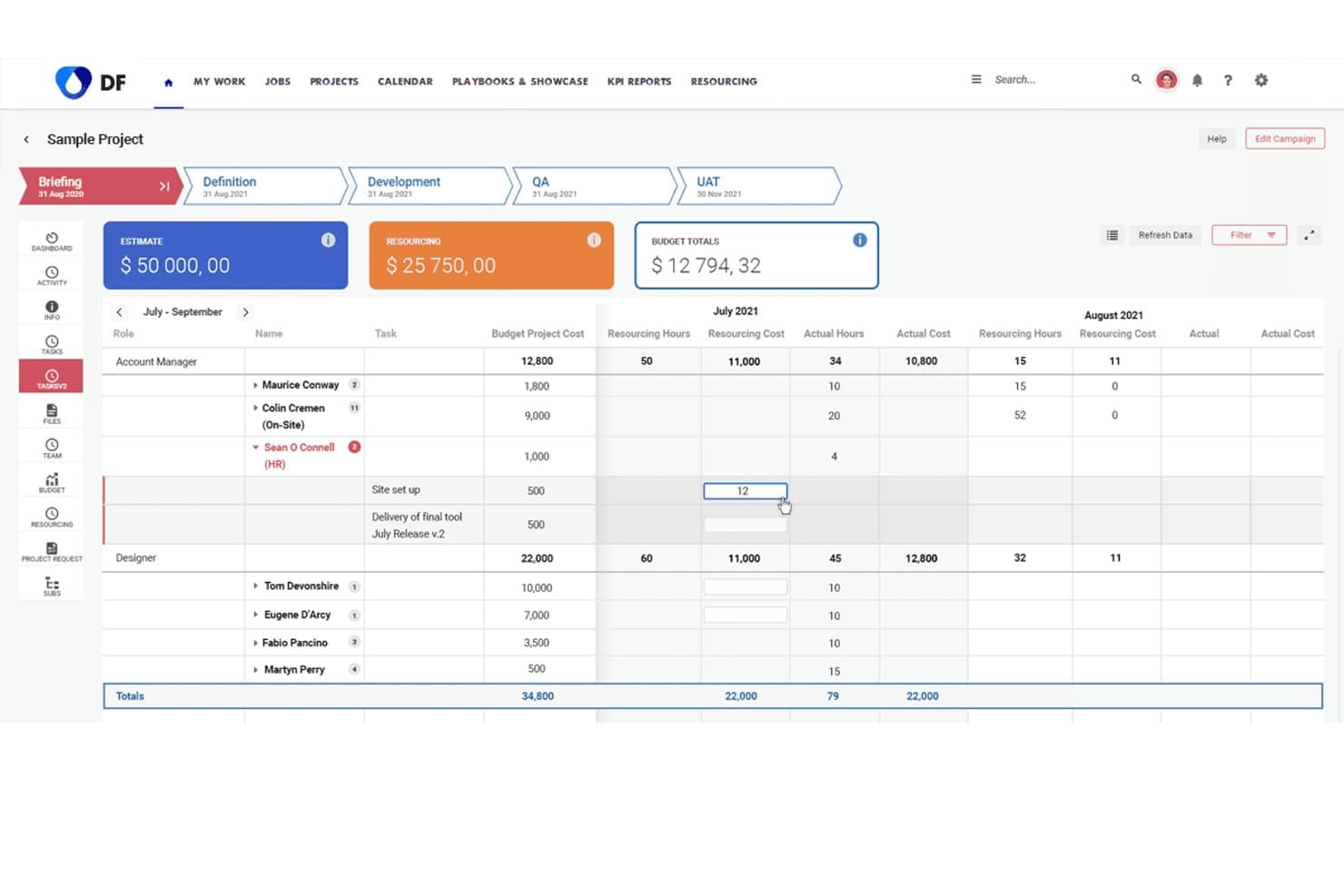
Screendragon consente agli utenti di monitorare i costi e le ore delle risorse nelle diverse fasi del progetto. Screendragon offre l'automazione dei flussi di lavoro e la gestione delle risorse, progettate per grandi organizzazioni di marketing e team creativi che necessitano di controllo a livello aziendale, processi personalizzabili e visibilità su campagne e progetti complessi.
Per chi è più indicato Screendragon?
Screendragon è una scelta valida per grandi team di marketing che gestiscono progetti creativi complessi tra più reparti o regioni.
Perché Screendragon è una delle migliori alternative a monday.com
Ho scelto Screendragon come una delle opzioni migliori perché gestisce le operazioni creative di marketing aziendale con automazione avanzata dei flussi di lavoro e gestione delle risorse. Il mio team ottiene un controllo preciso sui processi complessi e sulla visibilità delle campagne. Utilizzo i suoi flussi di lavoro personalizzabili per coordinare i progetti tra più reparti e regioni.
Funzionalità principali di Screendragon
- Gestione delle risorse digitali: Organizza, archivia e condividi i file creativi da una libreria centralizzata.
- Monitoraggio del budget: Monitora la spesa delle campagne e assegna i budget per progetto, cliente o regione in tempo reale.
- Monitoraggio del tempo: Registra le ore direttamente sulla piattaforma e genera fogli presenze automatizzati per l'analisi delle risorse.
- Flussi di lavoro per le approvazioni: Invia progetti e risorse per revisioni e approvazioni in più fasi, con regole di instradamento personalizzate.
Integrazioni di Screendragon
Le integrazioni native non sono documentate chiaramente. Screendragon supporta le integrazioni tramite API per connessioni personalizzate.
Pros and Cons
Pros:
- Gestisce flussi di lavoro creativi complessi tra più reparti
- Offre processi personalizzabili di approvazione e instradamento
- Monitoraggio integrato del budget e del tempo delle campagne
Cons:
- L'interfaccia può risultare complessa per i nuovi utenti
- La documentazione sulle integrazioni è limitata
Learn more about Screendragon: Ideale per le funzionalità di automazione delle attività
- Prova gratuita di 15 giorni + piano gratuito + demo gratuita disponibile
- Da $4/utente/mese (fatturato annualmente)
Visit WebsiteCustomer Rating:4.3/5
Zoho Projects mostra le attività in una bacheca in stile Kanban, aiutandoti a monitorare i progressi e gestire i flussi di lavoro nei progetti complessi. Per i team che cercano un'alternativa a monday.com che bilanci funzionalità e privacy degli utenti, Zoho Projects rappresenta un'opzione interessante. È pensato per attrarre un'ampia gamma di settori, dall'informatica all'edilizia, offrendo strumenti di gestione delle attività e collaborazione senza monetizzare i dati degli utenti. Zoho Projects affronta sfide come l'automazione delle attività e l'integrazione con altri strumenti, assicurando che il tuo team possa concentrarsi su ciò che conta davvero: portare a termine i progetti in modo efficiente.
Perché ho scelto Zoho Projects
Ho scelto Zoho Projects come valida alternativa a monday.com per la sua interfaccia intuitiva e i modelli personalizzabili adatti a diverse esigenze di gestione dei progetti. Puoi sfruttare la funzione di automazione dei compiti, che consente di creare flussi di lavoro semplificati grazie a una semplice interfaccia drag-and-drop, risparmiando tempo sulle attività ripetitive. Inoltre, Zoho Projects offre Zia intelligence, uno strumento guidato dall'intelligenza artificiale che fornisce approfondimenti per migliorare i processi decisionali. Queste caratteristiche lo rendono ideale per i team che desiderano ottimizzare i propri processi di project management.
Caratteristiche principali di Zoho Projects
Oltre alle capacità di automazione e intelligenza artificiale, Zoho Projects offre numerose altre funzionalità che ne aumentano l'attrattiva.
- Gestione delle attività: Fornisce strumenti come diagrammi di Gantt, dipendenze tra attività e attività ricorrenti per mantenere i progetti sotto controllo.
- Monitoraggio del tempo: Ti permette di controllare il tempo dedicato alle attività e ai progetti, garantendo fatturazione accurata e valutazione della produttività.
- Gestione delle segnalazioni: Aiuta il team a individuare, segnalare e risolvere in modo efficiente le problematiche legate al progetto.
- Collaborazione del team: Include chat integrata, forum e gestione documentale per comunicazione e collaborazione senza interruzioni.
Integrazioni di Zoho Projects
Le integrazioni includono Google Calendar, Microsoft Office 365, Slack, Dropbox, GitHub, Zapier, Zoho CRM, Zoho Books, Zoho Invoice e Zoho Analytics.
Pros and Cons
Pros:
- Robusta gestione di attività e dipendenze
- Ottimi strumenti di automazione e gestione dei flussi di lavoro
- Prezzi competitivi con tante funzionalità
Cons:
- L'interfaccia può sembrare complessa inizialmente
- Opzioni limitate di personalizzazione della dashboard
Learn more about Zoho Projects: Ideale per flussi di lavoro personalizzabili
- Prova gratuita di 14 giorni + piano gratuito disponibile
- Da $10/utente/mese (fatturato annualmente)
Visit WebsiteCustomer Rating:4.3/5
Wrike fornisce una panoramica delle attività, delle tempistiche e delle dipendenze, essenziale per una pianificazione efficace dei progetti. Wrike è uno strumento di gestione dei progetti progettato per team e aziende che desiderano migliorare la collaborazione e la produttività. Offre funzionalità per la gestione delle attività, il monitoraggio del tempo e la gestione del carico di lavoro, facilitando flussi di lavoro di progetto efficienti.
Perché Wrike è una valida alternativa a monday.com: I flussi di lavoro personalizzabili di Wrike consentono di adattare le fasi del progetto ai processi specifici del proprio team. Questa flessibilità garantisce che i progetti siano allineati con le esigenze operative uniche, migliorando l'efficienza. Inoltre, le funzionalità di collaborazione in tempo reale di Wrike, come la modifica e i commenti dal vivo, mantengono il team connesso e informato, riducendo la necessità di lunghe conversazioni via email.
Funzionalità e integrazioni di spicco:
Funzionalità includono la priorità delle attività, dashboard personalizzate, moduli di richiesta, approvazioni, condivisione file, versionamento dei documenti, vista calendario, bacheche Kanban, gestione del carico di lavoro e report avanzati sulle prestazioni dei progetti, allocazione delle risorse e scadenze.
Integrazioni includono Adobe Creative Suite, Photoshop, Illustrator, InDesign, Facebook, Twitter, LinkedIn, Marketo, HubSpot, Salesforce, Microsoft Teams e Slack.
Pros and Cons
Pros:
- Flussi di lavoro personalizzabili per processi su misura
- Monitoraggio del tempo per controllare l'allocazione delle risorse
- Funzionalità avanzate di reportistica
Cons:
- Curva di apprendimento per i nuovi utenti
- Problemi di prestazioni occasionali con progetti di grandi dimensioni
 Ideale per la gestione visiva delle attività
- Piano gratuito + prova gratuita di 14 giorni + demo gratuita disponibile
- Da $5/utente/mese (fatturazione annuale)
Visit WebsiteCustomer Rating:4.5/5
Trello offre bacheche visive per monitorare le attività all'interno dei flussi di lavoro. Trello offre ai team un approccio visivo alla gestione dei progetti utilizzando bacheche, elenchi e schede personalizzabili. Secondo me, marketer, team operativi e creativi che desiderano un sistema flessibile con trascinamento per monitorare il lavoro attraverso le varie fasi troveranno Trello particolarmente utile.
Per chi è più indicato Trello?
Coordinatori di progetto e piccoli team che hanno bisogno di un sistema visivo e flessibile per organizzare i flussi di lavoro e mantenere attive le attività.
Perché Trello è una valida alternativa a monday.com
Ho scelto Trello perché la sua esperienza con le board Kanban è davvero la più chiara sul mercato: spostare una scheda da 'In corso' a 'Completato' risulta immediato e appagante in un modo che gli strumenti più complessi non riescono a replicare. Mi piace il fatto che i Power-Up consentano al mio team di aggiungere funzionalità come viste calendario, monitoraggio del tempo o voti direttamente sulla board senza dover passare a un altro strumento. L'automazione integrata senza codice di Trello consente anche di impostare regole basate su trigger, come assegnare automaticamente una data di scadenza o notificare un membro del team quando una scheda viene spostata in un elenco specifico—tutto senza scrivere una riga di codice. Per i team che non hanno bisogno di report complessi e vogliono solo che le attività avanzino in un flusso visivo chiaro, Trello è davvero imbattibile.
Funzionalità chiave di Trello
- Modelli di bacheca: Avvia nuovi progetti utilizzando modelli predefiniti per sprint, calendari editoriali e pianificazione di eventi.
- Viste multiple di progetto: Passa da vista bacheca a timeline, tabella, calendario e mappa in base a come il tuo team preferisce monitorare i lavori.
- Checklist e allegati nelle schede: Suddividi le attività in sotto-attività e allega file, link o immagini direttamente su qualsiasi scheda.
- Spazi di lavoro per team: Organizza più bacheche in uno spazio di lavoro condiviso per tenere insieme e sempre accessibili progetti correlati.
Integrazioni di Trello
Trello offre integrazioni native con Google Drive, Slack, Jira, Dropbox, GitHub, Microsoft Teams, Evernote, Salesforce e altro. Si collega anche con Zapier e offre un'API per integrazioni personalizzate.
Pros and Cons
Pros:
- Le board Kanban permettono una gestione visiva e semplice dei progetti
- Spostare le attività tra le fasi è veloce e intuitivo
- I Power-Up ampliano la funzionalità principale in base alle necessità
Cons:
- Nessun monitoraggio del tempo nativo nelle board
- Reportistica e analisi delle performance di progetto limitate
Learn more about Trello: Ideale per la gestione dei lavori per clienti
- Prova gratuita + demo gratuita disponibili
- Da $9.99/utente/mese (fatturato annualmente)
Visit WebsiteCustomer Rating:4.4/5
Teamwork.com offre monitoraggio del tempo e fatturazione per la gestione di progetti focalizzati sui clienti. Teamwork.com è un software di gestione progetti pensato per i team che gestiscono lavori per clienti e collaborazioni. Viene utilizzato principalmente da agenzie e aziende che devono tenere traccia dei progetti per i clienti e migliorare la comunicazione del team.
Perché Teamwork.com è una valida alternativa a monday.com: Teamwork.com offre funzionalità pensate per la gestione di progetti su base cliente, distinguendosi dall'approccio più generale di monday.com. Le sue funzioni di monitoraggio del tempo e di fatturazione ti aiutano a registrare con precisione le ore fatturabili. I modelli di progetto semplificano la standardizzazione dei processi tra progetti per diversi clienti. Gli strumenti di gestione delle attività ti permettono inoltre di organizzare e dare priorità al lavoro in modo efficace, aumentando la produttività dei team focalizzati sui clienti.
Funzionalità e integrazioni principali:
Funzionalità includono monitoraggio del tempo, fatturazione e modelli di progetto. Il monitoraggio del tempo garantisce la corretta registrazione delle ore fatturabili, elemento essenziale nel lavoro per i clienti. Le funzioni di fatturazione semplificano la creazione delle fatture, rendendo la gestione finanziaria più agevole per il tuo team. I modelli di progetto aiutano a standardizzare i processi, risparmiando tempo nella gestione di progetti simili.
Integrazioni includono Slack, HubSpot, Google Drive, Dropbox, QuickBooks, Zapier, Microsoft Teams, Xero, Harvest e OneDrive.
Pros and Cons
Pros:
- Gestione clienti efficace
- Monitoraggio dettagliato del tempo
- Modelli di progetto personalizzabili
Cons:
- Può risultare impegnativo
- Processo di configurazione complesso
Learn more about Teamwork.com: Ideale per spazi di lavoro all-in-one per team
- Piano gratuito disponibile
- Da $10/utente/mese (fatturato annualmente)
Visit WebsiteCustomer Rating:4.6/5
Notion offre spazi di lavoro condivisi per documenti, policy e conoscenza del team. Notion offre ai team uno spazio di lavoro flessibile dove è possibile gestire progetti, documenti e wiki tutto in un unico posto. Penso che le startup dinamiche e i team creativi apprezzeranno la sua capacità di adattarsi a processi in evoluzione e flussi di lavoro poco convenzionali.
Per chi è ideale Notion?
Responsabili di progetto e team interfunzionali che hanno bisogno di uno spazio di lavoro flessibile e personalizzabile per organizzare progetti, documentazione e conoscenze in un unico hub.
Perché Notion è una buona alternativa a monday.com
Ciò che mi ha attirato verso Notion è il modo in cui sfuma il confine tra gestione progetti e documentazione: il brief di progetto, la bacheca delle attività e le note sulle riunioni convivono tutti nello stesso spazio connesso. Mi piace la possibilità di creare viste di database completamente personalizzate, passando da tabella, bacheca, calendario e galleria a seconda delle esigenze del team. In pratica, questo significa che posso configurare un calendario dei contenuti collegato direttamente a brief, bozze e note di approvazione per ogni elemento senza uscire dallo strumento. Per i team stanchi di dover passare continuamente da uno strumento di project management a una wiki separata, Notion gestisce entrambi senza compromessi.
Caratteristiche principali di Notion
- Assistente di scrittura con AI: Genera, riassume e modifica contenuti direttamente nelle tue pagine e nei documenti.
- Modelli: Avvia rapidamente i progetti usando modelli predefiniti per roadmap, pianificazione degli sprint e note delle riunioni.
- Assegnazione di compiti e date di scadenza: Assegna compiti ai membri del team e imposta scadenze direttamente da qualsiasi database.
- Permessi e condivisione delle pagine: Controlla l’accesso a livello di pagina o di spazio di lavoro per condividere contenuti specifici con ospiti o collaboratori esterni.
Integrazioni Notion
Notion offre integrazioni native con Slack, GitHub, Google Drive, Figma, Asana, Trello, Jira, Zoom, Dropbox e Box. È inoltre compatibile con Zapier e dispone di un’API per integrazioni personalizzate.
Pros and Cons
Pros:
- Database di contenuti flessibili con viste collegate
- AI integrata per appunti e creazione documenti
- Galleria di modelli personalizzabili per flussi di lavoro dei progetti
Cons:
- I database possono rallentare su larga scala
- Nessuna automazione avanzata per compiti ricorrenti
Learn more about Notion: Ideale per workflow basati su fogli di calcolo
- Prova gratuita di 30 giorni + demo gratuita disponibile
- A partire da $9/utente/mese (fatturazione annuale)
Visit WebsiteCustomer Rating:4.5/5
Smartsheet consente ai team di gestire i flussi di lavoro in un formato a foglio di calcolo. Smartsheet offre un'interfaccia intuitiva ispirata ai fogli di calcolo per la gestione di progetti e attività, facilitando il passaggio per team abituati a Excel o Google Sheets. Le medie e grandi aziende si affidano a questo strumento per organizzare progetti complessi, automatizzare flussi di lavoro collaborativi e soddisfare esigenze di conformità su larga scala.
A chi è più adatto Smartsheet?
I responsabili di progetto e i manager operativi di aziende di medie e grandi dimensioni che operano in settori regolamentati trovano particolarmente vantaggiosi i controlli sui flussi di lavoro e la gestione della conformità offerti da Smartsheet.
Perché Smartsheet è una valida alternativa a monday.com
Ho scelto Smartsheet perché la sua interfaccia basata su griglie riproduce la logica dei fogli di calcolo, rendendo l'adozione molto più semplice per i team già abituati a Excel o Google Sheets. Apprezzo il fatto che si possa partire da righe e colonne familiari, aggiungendo poi dipendenze tra le attività, avvisi automatici e flussi di approvazione senza dover rivedere totalmente il modo in cui il team gestisce i dati. Il mio team utilizza i collegamenti tra celle e le formule incrociate di Smartsheet per connettere dati tra diversi fogli di progetto in tempo reale—cosa che monday.com non consente con la stessa naturalezza. In pratica, questo significa che i report sui progetti restano precisi e aggiornati senza inserimenti manuali di dati.
Funzionalità principali di Smartsheet
- Gestione del portafoglio: Monitora e crea report su più progetti in un'unica vista, con strumenti per controllare budget, risorse e rischi dell'intero portafoglio.
- Gestione delle risorse: Assegna e bilancia i carichi di lavoro del team tra più progetti, con visibilità su disponibilità e capacità per evitare sovraccarichi.
- Dynamic View: Condividi viste filtrate e controllate da permessi dei fogli con stakeholder esterni senza esporre l'intero set di dati.
- Generazione di documenti: Genera automaticamente PDF personalizzati direttamente dai dati del foglio per ridurre la preparazione manuale dei documenti.
Integrazioni Smartsheet
Smartsheet offre integrazioni native con Google Workspace, Microsoft Teams, Slack, Salesforce, Jira, DocuSign, Box, Dropbox e altri. È disponibile anche un'API per integrazioni personalizzate.
Pros and Cons
Pros:
- Interfaccia tipo foglio di calcolo per un facile setup dei progetti
- Automazione dei flussi di lavoro e approvazioni avanzate
- Tracciamento audit per la gestione della conformità normativa
Cons:
- Le impostazioni di permesso complesse richiedono configurazione attenta
- Le dashboard personalizzate hanno una flessibilità di visualizzazione limitata
 Ideale per il coordinamento dei progetti di team
- Piano gratuito + demo gratuita disponibile
- Da $10.99/utente/mese (fatturazione annuale)
Visit WebsiteCustomer Rating:4.4/5
Asana aiuta i team a organizzare progetti, monitorare attività e collaborare in modo efficiente in un unico spazio di lavoro. Asana è una piattaforma di gestione di progetti e attività particolarmente adatta a team interfunzionali che necessitano di automazione dettagliata dei flussi di lavoro, monitoraggio degli obiettivi e delle scadenze dei progetti, tutto in un unico spazio di lavoro.
Per chi è ideale Asana?
Asana è particolarmente adatto a team di medie e grandi dimensioni che gestiscono più progetti tra diversi reparti e necessitano di chiari livelli di responsabilità e attribuzione dei compiti.
Perché Asana è una valida alternativa a Monday.com
Asana è una delle mie principali scelte perché adoro come consente di gestire lavoro, progetti e attività in un unico posto senza costringere tutti a usare una sola visualizzazione. Posso passare dalla vista elenco, bacheca, cronologia e calendario per ogni progetto, offrendo così ai diversi membri del team la flessibilità che monday.com spesso limita ai piani superiori. Apprezzo anche la funzione Obiettivi, che permette di collegare le singole attività direttamente agli obiettivi aziendali e monitorare i progressi in tempo reale.
Funzionalità principali di Asana
- Automazione dei flussi di lavoro: Crea automazioni basate su regole che attivano azioni come assegnazione di compiti, aggiornamenti di stato e modifiche delle scadenze senza intervento manuale.
- Gestione dei portafogli: Raggruppa progetti correlati in portafogli per monitorare stato, priorità e progressi di più flussi di lavoro da un'unica visualizzazione.
- Gestione del carico di lavoro: Visualizza in tempo reale i compiti assegnati e la capacità di ciascun membro del team per individuare colli di bottiglia e riequilibrare i carichi.
- Campi personalizzati: Aggiungi campi dati specifici del progetto alle attività, come priorità, budget o area geografica, per raccogliere dettagli realmente utili al tuo team.
Integrazioni di Asana
Asana offre oltre 300 integrazioni tramite il suo app directory, inclusi collegamenti nativi con Slack, Google Drive, Microsoft Teams, Salesforce, Jira, HubSpot, GitHub, Zoom, Figma e Tableau. Si collega anche con Zapier e mette a disposizione un'API per integrazioni personalizzate.
Pros and Cons
Pros:
- Più visualizzazioni di progetto in tutti i piani
- Monitoraggio integrato di obiettivi e traguardi
- Dipendenze tra attività con visualizzazione della cronologia
Cons:
- Nessuna funzione di rilevamento orario nativa
- Reportistica limitata ai piani premium
 Ideale per agenzie
- Prova gratuita di 7 giorni disponibile
- Da $9/utente/mese (fatturazione annuale)
Visit WebsiteCustomer Rating:4.4/5
Bonsai offre contratti, fatturazione e strumenti per la gestione dei progetti ideali per i flussi di lavoro delle agenzie. Bonsai Agency Software è una piattaforma di gestione aziendale progettata per agenzie e liberi professionisti per gestire contratti, fatture e la gestione dei progetti. È pensata per i professionisti che hanno bisogno di semplificare le attività amministrative e il monitoraggio dei progetti.
Perché Bonsai Agency Software è una valida alternativa a monday.com: Bonsai Agency Software è pensato per le agenzie, offrendo strumenti specifici diversi dalle funzioni generali di gestione dei progetti di monday.com. I suoi modelli di contratti e proposte ti fanno risparmiare tempo nelle comunicazioni con i clienti. La funzione di fatturazione semplifica la gestione delle fatture, assicurando pagamenti rapidi. Gli strumenti per la gestione dei progetti ti aiutano anche a tenere traccia dell'avanzamento dei lavori e delle scadenze, rendendolo una scelta solida per le agenzie che gestiscono più progetti.
Funzionalità principali e integrazioni:
Funzionalità includono modelli di contratto, fatturazione e strumenti di gestione dei progetti. I modelli di contratto ti permettono di redigere rapidamente accordi professionali. Le funzioni di fatturazione rendono la gestione delle fatture facile e assicurano pagamenti puntuali. Gli strumenti di gestione dei progetti consentono di monitorare i progressi e le scadenze, mantenendo i progetti in linea con il programma.
Integrazioni includono QuickBooks, Zapier, Stripe, Google Calendar, Slack, Trello, Asana, Xero e Dropbox.
Pros and Cons
Pros:
- Strumenti per la gestione dei contratti
- Capacità di monitoraggio dei progetti
- Modelli che fanno risparmiare tempo
Cons:
- Funzionalità avanzate limitate
- Opzioni di personalizzazione di base
Learn more about Bonsai Agency Software: Ideale per la collaborazione a distanza
- Piano gratuito disponibile
- Da $6.70/utente/mese
Visit WebsiteCustomer Rating:4.1/5
La modifica in tempo reale e il versionamento di Confluence eccellono nella collaborazione a distanza sui contenuti. Confluence è uno strumento di collaborazione e gestione della conoscenza progettato per i team che desiderano creare, condividere e collaborare su progetti e documenti. È principalmente utilizzato dai team che organizzano informazioni e facilitano la comunicazione tra diversi dipartimenti.
Perché Confluence è una valida alternativa a monday.com: Confluence si distingue nella collaborazione a distanza, offrendo funzionalità diverse dagli strumenti di project management di monday.com. I suoi spazi di lavoro collaborativi consentono a più utenti di modificare e aggiornare i documenti in tempo reale. La funzione di versionamento delle pagine aiuta a tenere traccia delle modifiche ai documenti e garantisce che tutti abbiano accesso alle informazioni più aggiornate. Inoltre, i modelli personalizzabili velocizzano la creazione dei documenti, rendendo la piattaforma ideale per i team che danno priorità alla creazione collaborativa di contenuti.
Funzionalità e integrazioni distintive:
Funzionalità includono spazi di lavoro collaborativi che permettono al tuo team di lavorare insieme in tempo reale su progetti e documenti. Il versionamento delle pagine garantisce che tu possa monitorare le modifiche e accedere sempre alle informazioni più recenti. I modelli personalizzabili aiutano a creare rapidamente documenti su misura per le esigenze del team.
Integrazioni includono Jira, Trello, Slack, Microsoft Teams, Google Drive, Dropbox, Salesforce, Box, GitHub e Zoom.
Pros and Cons
Pros:
- Collaborazione efficace a distanza
- Modifica dei documenti in tempo reale
- Monitora le modifiche ai documenti
Cons:
- Funzionalità di reportistica di base
- Potrebbe necessitare di personalizzazione
Learn more about Confluence:
Altre alternative a monday.com
Ecco alcune alternative aggiuntive a monday.com che non sono state incluse nel mio elenco, ma che vale comunque la pena prendere in considerazione.
- 11JiraIdeale per team software agili
- 12Resource GuruIdeale per la pianificazione delle risorse
- 13ProductiveIdeale per la pianificazione delle risorse delle agenzie
- 14ScoroIdeale per servizi professionali
- 15Hub Planner by MilientIdeale per la gestione delle risorse
- 16Salesforce CRMIdeale per la gestione delle relazioni con i clienti
- 17Pneumatic WorkflowIdeale per l'automazione dei flussi di lavoro
Come valuto le alternative a monday.com
Valuto le alternative a monday.com su due livelli: il requisito di base per gestire campagne e revisioni creative, e i fattori distintivi che rendono una piattaforma realmente adatta ai team di marketing.
Funzionalità di base (requisiti minimi per questa lista)
Quando seleziono gli strumenti per la mia lista, assegno a ciascuno un punteggio da 0 (non offre la funzionalità) a 5 (eccelle in questo ambito) per ogni funzionalità di base elencata di seguito. Successivamente, calcolo il punteggio totale dello strumento in percentuale. Ogni strumento deve raggiungere un punteggio totale minimo del 65% per essere preso in considerazione.
- Visualizzazione dei progetti: Controllo che uno strumento offra viste Kanban, Gantt, calendario e tabella così che i team di marketing possano passare dalla timeline di una campagna a una bacheca attività giornaliera senza lasciare la piattaforma.
- Workflow personalizzabili: Qui conta la capacità di creare stati personalizzati, campi e automazioni senza codice—come assegnare automaticamente un designer quando un brief passa a "Pronto per la Creatività."
- Collaborazione creativa & revisione: Valuto come i team possono annotare asset, lasciare feedback contestualizzati e gestire approvazioni—soprattutto per i cicli di revisione di creatività pubblicitarie o design di landing page.
- Gestione di task & campagne: Ogni strumento dovrebbe supportare dipendenze tra attività, sotto-attività e milestone così una checklist di lancio prodotto possa mappare le consegne dalla bozza del testo fino al rilascio finale.
- Integrazioni con il marketing stack: Cerco connessioni native con strumenti già utilizzati quotidianamente dai team di marketing, come HubSpot, Slack, Google Workspace, Figma e piattaforme social o pubblicitarie.
- Reportistica & dashboard: Dashboard personalizzate che monitorano l'avanzamento delle campagne, il carico di lavoro del team e le scadenze su più progetti offrono ai responsabili marketing la visibilità necessaria senza dover estrarre dati manualmente.
Una volta che ho una lista di strumenti che soddisfano questi criteri, considero cosa distingue ogni piattaforma.
Fattori distintivi (cosa rende diversi i fornitori)
Ecco come confronto i diversi fornitori:
Funzionalità di spicco
Le funzionalità basate sull'intelligenza artificiale sono un differenziatore in crescita—cerco strumenti che aiutano a redigere brief di campagna o a riassumere aggiornamenti di progetto invece di offrire solo la classica chat AI. Anche la pianificazione delle risorse e delle capacità è importante quando un team gestisce più lanci contemporaneamente, poiché le viste del carico di lavoro aiutano i manager a individuare membri sovraccarichi prima che si accumulino i ritardi. Valuto anche l'accesso per ospiti e clienti, fondamentale per agenzie o team che coinvolgono freelance e stakeholder nelle revisioni creative senza dover pagare posti completi.
Oltre le funzionalità
La struttura dei prezzi è una delle prime cose che valuto, in particolare come vengono gestiti gli accessi di ospiti e visualizzatori—i team di marketing che collaborano con agenzie o dirigenti possono vedere i costi aumentare rapidamente. Considero anche la scalabilità, poiché un team di contenuti da tre persone e un'organizzazione marketing da 50 persone con più brand necessitano di modelli di permessi e gerarchie di workspace molto diversi. Anche il time-to-value è importante. Cerco piattaforme con template specifici per il marketing e risorse di onboarding che aiutino i team a migrare da monday.com e iniziare a gestire campagne in pochi giorni, non mesi.
Perché cercare un'alternativa a monday.com?
Sebbene monday.com sia una buona scelta come software di gestione del marketing, ci sono diversi motivi per cui alcuni utenti cercano soluzioni alternative. Potresti cercare un'alternativa a monday.com per i seguenti motivi.
- Hai bisogno di maggiori opzioni di personalizzazione
- Il tuo budget per gli strumenti software è limitato
- Preferisci un'interfaccia utente più semplice
- Il tuo team necessita di più integrazioni
- Cerchi un'assistenza clienti migliore
Se ti riconosci in una di queste situazioni, sei nel posto giusto. Il mio elenco include diverse opzioni di software di gestione del marketing più adatte ai team che affrontano queste difficoltà con monday.com e cercano soluzioni alternative.
Funzionalità principali delle alternative a monday.com
Quando esplori le alternative a monday.com, è essenziale concentrarsi sulle funzionalità principali che soddisfano le esigenze specifiche del tuo progetto, eliminando al contempo duplicati ed elementi superflui. Ecco le funzionalità selezionate da cercare:
- Interfaccia intuitiva e facilità d'uso: una piattaforma intuitiva e facile da navigare che riduce al minimo la curva di apprendimento, consentendo al tuo team di adottare rapidamente lo strumento.
- Elenchi di attività e sottoattività: organizza il lavoro in modo efficiente creando elenchi di attività e suddividendo le attività in sottoattività gestibili.
- Assegnazione delle attività e dipendenze: assegna le attività ai membri del team e imposta le dipendenze tra attività per ottimizzare i flussi di lavoro e rispettare efficacemente le scadenze dei progetti.
- Campi personalizzati: personalizza i tuoi progetti con campi personalizzati per acquisire tutte le informazioni specifiche di cui il tuo team ha bisogno.
- Scadenze e traguardi: imposta le scadenze per le attività e monitora i traguardi per mantenere il progetto nei tempi previsti.
- Notifiche: ricevi notifiche in tempo reale sugli aggiornamenti delle attività, sulle scadenze e sulle comunicazioni del team.
- Approvazioni del flusso di lavoro: implementa un processo di approvazione per mantenere il controllo della qualità e garantire la responsabilità all'interno dei tuoi progetti.
- Condivisione di file: condividi file senza problemi all'interno della piattaforma per facilitare la collaborazione e mantenere tutte le risorse del progetto in un unico posto.
- Monitoraggio dei progetti e delle attività: monitora l'avanzamento dei progetti e delle singole attività per identificare i colli di bottiglia e assicurarti che tutto proceda secondo i piani.
- App mobile (iOS e Android): accedi ai tuoi progetti ovunque ti trovi con un'app mobile disponibile per dispositivi iOS e Android.
- Supporto per utenti illimitati : supporto per un numero illimitato di utenti, consentendo al tuo team di crescere senza costi aggiuntivi per utente.
- Pannelli di controllo: ottieni una panoramica in tempo reale dei tuoi progetti con pannelli di controllo personalizzabili che visualizzano i principali dati e ti aiutano a prendere decisioni consapevoli.
- Automazioni: risparmia tempo sulle attività ripetitive con automazioni senza codice che mantengono efficienti i flussi di lavoro automatizzando i processi di routine.
- Documenti collaborativi: scrivi e condividi documenti con il tuo team utilizzando documenti collaborativi con funzionalità di chat per una comunicazione accessibile.
- Monitoraggio del tempo: le funzionalità di monitoraggio del tempo facilitano il rilevamento delle ore lavorate, aiutandoti a gestire la produttività e ad allocare le risorse in modo efficace.
- Gestione delle risorse e visualizzazione del carico di lavoro: gestisci le risorse del team assegnando attività e monitorando i carichi di lavoro per garantire una distribuzione equilibrata del lavoro; visualizza l'allocazione delle risorse con le visualizzazioni del carico di lavoro.
- Integrazioni: connettiti ad altri strumenti e piattaforme per creare uno spazio di lavoro centralizzato, riducendo il passaggio da un contesto all'altro e aumentando la produttività.
- Moduli: raccogli facilmente i feedback con moduli personalizzabili che compilano automaticamente le tue tabelle, semplificando la raccolta delle informazioni e l'inserimento dei dati.
Concentrandoti su queste funzionalità essenziali ed eliminando i duplicati, puoi confrontare efficacemente le alternative a Monday.com e selezionare uno strumento di gestione dei progetti in linea con il flusso di lavoro del tuo team e in grado di migliorarne la produttività.