

Gestionar la reputación online de tu empresa puede resultar abrumador. Como responsable de marketing, sabes lo cruciales que son las reseñas de los clientes para la imagen de tu marca. Las reseñas negativas pueden perjudicarte, mientras que las positivas pueden aumentar tu credibilidad y generar confianza.
Las herramientas de gestión de reseñas de Google pueden ayudarte a supervisar, responder y analizar los comentarios de los clientes de forma eficiente. Según mi experiencia, contar con las herramientas adecuadas puede hacer que esta tarea sea menos complicada y más eficaz.
He probado y revisado de forma independiente varias opciones para ofrecerte una visión imparcial de las mejores soluciones de software disponibles. Puedes esperar una guía bien documentada que ayude a tu equipo a elegir la herramienta adecuada para tus necesidades.
Por qué confiar en nuestras recomendaciones de software
6,700+
Reviews
20
Industry experts
16+
Evaluation factors
14
Years
Nuestro equipo lleva probando y evaluando software desde 2012. Como líderes de marketing, sabemos lo difícil —y lo importante— que es elegir el software adecuado.
Para esta guía, evaluamos las herramientas mediante pruebas prácticas e investigación independiente, puntuando las herramientas según nuestros criterios de selección.
Nuestras reseñas reflejan nuestro criterio editorial humano, no un discurso de ventas.
Revisores expertos:
 Gui DrusinaDirector creativo
- Shriya GhateSenior Marketing Lead
 Amanda JacquesLíder de Marketing Ops

Resumen de las mejores herramientas de gestión de reseñas de Google
Esta tabla comparativa resume los detalles de precios de mi selección de las mejores herramientas de gestión de reseñas de Google para ayudarte a encontrar la más adecuada para tu presupuesto y las necesidades de tu empresa.
| Tool | Best For | Trial Info | Price | ||
|---|---|---|---|---|---|
| 1 | La mejor opción para analizar el sentimiento de las reseñas de Google | Prueba gratuita disponible | Desde $10/ubicación/mes | Website | |
| 2 | La mejor opción para supervisar múltiples ubicaciones exclusivamente en Google | Prueba gratuita de 24 horas + plan gratuito + demostración gratuita disponible | Desde $6.99/mes | Website | |
| 3 | Ideal para respuestas de reseñas impulsadas por IA | Demo gratuita disponible | Precios bajo solicitud | Website | |
| 4 | Lo mejor para la automatización de la gestión de reseñas | Prueba gratuita de 14 días disponible | Desde $45/ubicación/mes | Website | |
| 5 | Mejor para equipos de redes sociales | Prueba gratuita de 14 días disponible | Desde $64/mes (facturado anualmente) | Website | |
| 6 | Mejor para soporte multicanal | Demostración gratuita disponible | Precio a consultar | Website | |
| 7 | Ideal para integrar widgets fácilmente | Prueba gratuita de 7 días | Desde $29/mes | Website | |
| 8 | Mejor para pequeñas empresas | Prueba gratuita de 14 días | Desde $25/mes (facturado anualmente) | Website | |
| 9 | Ideal para usuarios de Zoho | Plan gratuito disponible | Desde $8.33/mes (facturado anualmente) | Website | |
| 10 | Ideal para la programación de redes sociales | Prueba gratuita de 14 días + demo gratis disponible | Desde $25.50/mes (facturado anualmente) | Website |


Reseña de las mejores herramientas de gestión de reseñas de Google
A continuación encontrarás mis resúmenes detallados de las mejores herramientas de gestión de reseñas de Google de mi lista. En mis reseñas analizo las principales funciones, ventajas & desventajas, integraciones y casos de uso ideales de cada herramienta para ayudarte a encontrar la más adecuada.
 La mejor opción para analizar el sentimiento de las reseñas de Google
- Prueba gratuita disponible
- Desde $10/ubicación/mes

RightResponse AI ofrece un panel integral para gestionar las reseñas de clientes. RightResponse AI te ayuda a desglosar las reseñas de Google en los temas y frases que realmente importan a tu negocio, no solo palabras clave o calificaciones con estrellas. Obtienes una visión más clara de lo que dicen los clientes, cómo varía el sentimiento entre ubicaciones y dónde los competidores pueden estar ganando terreno, todo utilizando respuestas generadas por IA que reflejan los hechos y el tono de tu negocio.
Por qué elegí RightResponse AI: Elegí RightResponse AI por la forma en que analiza el sentimiento del cliente en las reseñas de Google a un nivel específico del negocio. En vez de solo etiquetar las reseñas como 'positivas' o 'negativas', clasifica las frases en categorías que te interesan, dándote una mejor idea de por qué los clientes dejan ciertas valoraciones. Esto facilita identificar brechas en el servicio, oportunidades de capacitación y problemas recurrentes en múltiples ubicaciones.
Características y funciones destacadas:
Características incluyen seguimiento de competidores que compara tus valoraciones promedio y tendencias en volumen de reseñas frente a otros, seguimiento de posición en Google Maps con información sobre la competencia a nivel de categoría, respuestas generadas por IA que consideran detalles del autor de la reseña y filtros configurables que excluyen ciertas reseñas de la automatización de respuestas. También obtienes análisis detallado del sentimiento a nivel de frase que te permite comparar opiniones entre ubicaciones o períodos de tiempo. Además, está disponible (en implementación) un solicitante de reseñas impulsado por IA para una comunicación personalizada.
Integraciones incluyen WhatsApp, Gmail, Outlook, Google Maps y aplicaciones adicionales vía Zapier.
Pros and Cons
Pros:
- Herramientas de referencia con competidores
- Desglose del sentimiento por ubicación
- Respuestas personalizadas y basadas en hechos por IA
Cons:
- Tiene cierta curva de aprendizaje en la configuración
- No hay integraciones públicas listadas
Learn more about RightResponse AI: La mejor opción para supervisar múltiples ubicaciones exclusivamente en Google
- Prueba gratuita de 24 horas + plan gratuito + demostración gratuita disponible
- Desde $6.99/mes
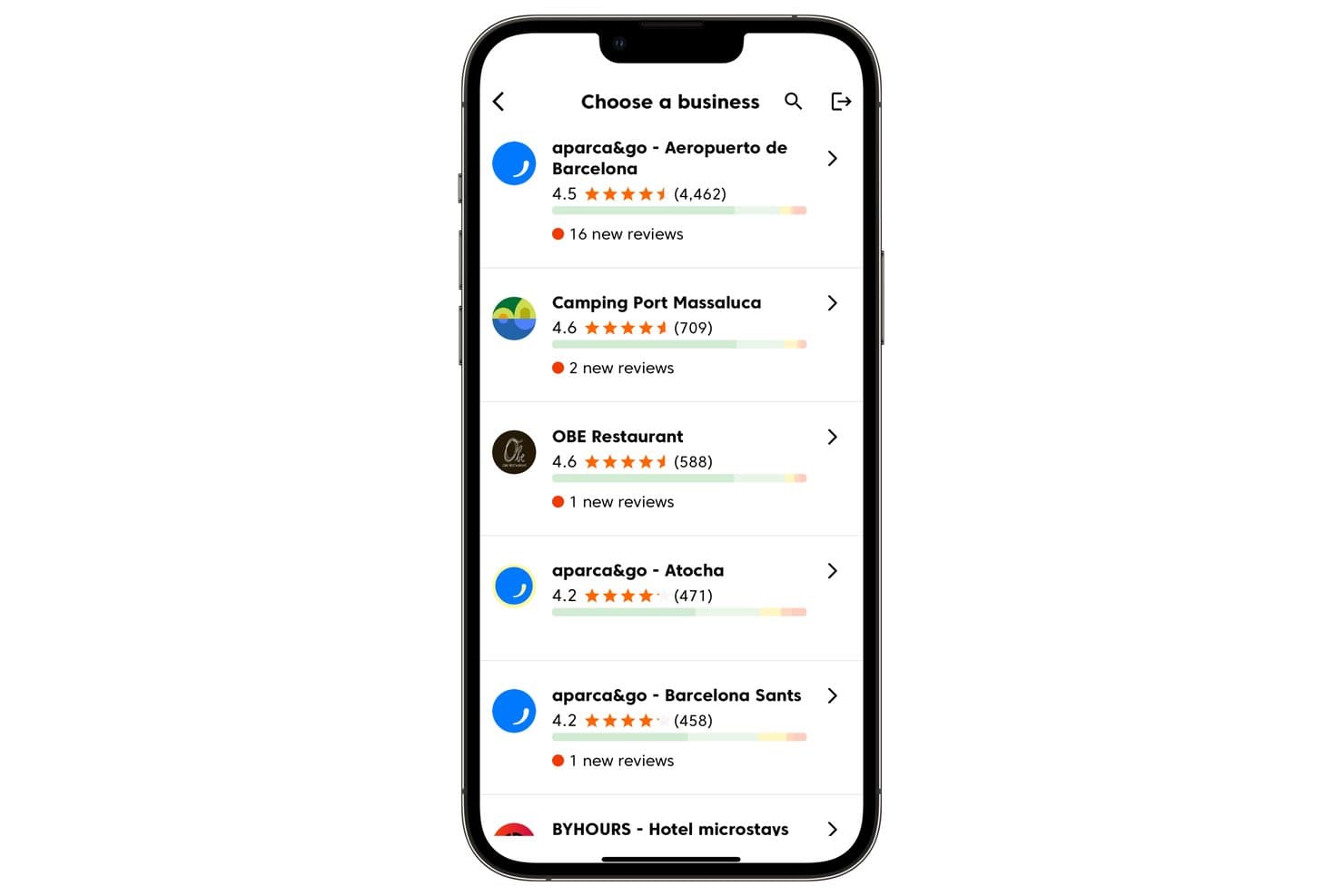
Cinquo permite a los usuarios gestionar varias ubicaciones comerciales y hacer un seguimiento de las nuevas reseñas. Cinquo es una herramienta de gestión de reseñas exclusiva para Google que centraliza la supervisión de múltiples ubicaciones, la automatización de respuestas mediante IA a través de su agente CINTIA, las solicitudes de reseñas basadas en códigos QR rastreables y los análisis operativos de valoraciones en un panel unificado para móviles y ordenadores.
¿Para quién es más adecuado Cinquo?
Cinquo es una opción muy adecuada para empresas con múltiples ubicaciones y especialistas en SEO local que desean obtener información detallada sobre las reseñas específicas de Google sin pagar tarifas por ubicación.
Por qué elegí Cinquo
Cinquo ocupa un lugar en mi lista de favoritos porque ofrece datos específicos de Google más detallados que cualquier herramienta multiplataforma que haya visto. Me encanta que calcule tu valoración real sin redondear las estrellas (piensa en 4,41 frente a 4,49) y que te indique exactamente cuántas reseñas de 5 estrellas necesitas para alcanzar el siguiente hito. Si añadimos la automatización de respuestas mediante IA de CINTIA para cada ubicación y las alertas push en tiempo real, obtenemos una configuración de supervisión diseñada específicamente para este propósito que los equipos con múltiples ubicaciones encontrarán difícil de replicar en otro lugar a este precio.
Características principales de Cinquo
- Acceso de usuarios delegado basado en Gmail: Los miembros del equipo inician sesión con sus propias cuentas de Gmail para acceder a Cinquo sin tener que añadirse como administradores del Perfil de Empresa de Google.
- Detector de reseñas eliminables: Marca las reseñas que podrían infringir las políticas de Google y las muestra para que se pueda solicitar su posible eliminación.
- Controles de automatización de respuestas por valoración de estrellas: CINTIA se puede configurar para publicar automáticamente respuestas a valoraciones de estrellas específicas, mientras reserva otras para su revisión manual.
- Códigos QR atribuidos a empleados: Cada miembro del personal recibe un código QR único y rastreable que atribuye las reseñas resultantes a esa persona en el panel.
Integraciones de Cinquo
Cinquo cuenta con una integración nativa con el Perfil de Empresa de Google para sincronizar en tiempo real las reseñas, las valoraciones y las ubicaciones.
Pros and Cons
Pros:
- Calcula las valoraciones de estrellas de Google sin redondear
- El acceso delegado mediante Gmail mantiene seguros los roles del Perfil de Empresa de Google
- Códigos QR rastreables para empleados y ubicaciones
Cons:
- No ofrece análisis de sentimiento ni métricas de la competencia
- No supervisa reseñas en múltiples plataformas
Learn more about Cinquo: Ideal para respuestas de reseñas impulsadas por IA
- Demo gratuita disponible
- Precios bajo solicitud
Visit WebsiteCustomer Rating:4.8/5This rating combines scores from multiple user review sites to reflect overall customer sentiment about the product.
Birdeye ofrece una variedad de alertas, incluso para reseñas que no han recibido respuesta, para un mejor monitoreo y gestión de la reputación. Birdeye es una plataforma de reputación y experiencia del cliente impulsada por IA, diseñada para empresas con múltiples ubicaciones y grandes empresas, ayudándoles a gestionar reseñas, listados, redes sociales, encuestas e interacciones con clientes desde un sistema centralizado. Atiende a más de 200,000 clientes a nivel global en sectores como dental, salud, automotriz, minorista, legal y servicios para el hogar, donde la visibilidad local y la reputación en línea influyen directamente en el crecimiento.
Por qué elegí Birdeye
Elegí Birdeye por sus agentes BirdAI, que automatizan la generación, monitoreo y respuesta de reseñas en más de 200 plataformas manteniendo la coherencia con la voz de tu marca y el contexto de tu industria. Estos agentes de IA operativos las 24 horas reducen el trabajo manual y ayudan a las empresas a gestionar la reputación de manera consistente a gran escala. Birdeye también destaca por su Search AI y Listings AI, que optimizan activamente la visibilidad local y mejoran los rankings en Google y en resultados de búsqueda impulsados por IA. Combinado con Insights AI, la plataforma facilita el seguimiento del sentimiento del cliente en distintas ubicaciones, identifica tendencias y resuelve problemas antes de que afecten la percepción de la marca.
Funcionalidades clave de Birdeye
Además de las funciones esenciales de Birdeye basadas en IA para reseñas y búsqueda, la plataforma ofrece:
- Social AI: Gestiona y programa contenido para redes sociales en varias ubicaciones desde un solo panel, con publicaciones asistidas por IA para mantener la coherencia de marca.
- Surveys AI: Recoge opiniones de clientes y pacientes, mide la satisfacción e identifica riesgos de pérdida a través de encuestas automatizadas y personalizables.
- Messaging AI & Buzón Unificado: Centraliza SMS, chat web y mensajes sociales en una sola bandeja de entrada, ayudando a los equipos a responder de manera eficiente en todos los canales.
- Reports AI y Análisis por Ubicación: Ofrece reportes de nivel empresarial para rastrear el rendimiento por ubicación, región o marca.
Integraciones de Birdeye
Birdeye soporta más de 3,000 integraciones, incluyendo Salesforce, HubSpot, QuickBooks, Facebook, Google My Business, Slack, Microsoft Teams, Zendesk, Shopify y Mailchimp.
Pros and Cons
Pros:
- El panel unificado simplifica la supervisión de múltiples clientes.
- Analíticas sólidas e informes a nivel de ubicación para monitorizar el rendimiento a gran escala.
- Los agentes BirdAI automatizan la gestión de la reputación en más de 200 plataformas de reseñas.
Cons:
- La puesta en marcha puede tomar tiempo para organizaciones que gestionan muchas ubicaciones.
- El conjunto de funciones orientado a empresas puede resultar excesivo para negocios de una sola ubicación o muy pequeños.
Learn more about Birdeye: Lo mejor para la automatización de la gestión de reseñas
- Prueba gratuita de 14 días disponible
- Desde $45/ubicación/mes
Visit WebsiteCustomer Rating:4.9/5This rating combines scores from multiple user review sites to reflect overall customer sentiment about the product.
Reviewflowz alerta a los equipos instantáneamente sobre reseñas para respuestas ágiles e inteligentes. Reviewflowz envía alertas de reseñas en tiempo real a herramientas como Slack, Teams y correo electrónico, ayudando a los equipos a responder rápidamente a los comentarios de los clientes. Esta automatización mantiene a las empresas informadas de las nuevas reseñas, apoya respuestas rápidas y puede mejorar la satisfacción del cliente.
Por qué elegí Reviewflowz: Elegí Reviewflowz porque su sistema de respuesta impulsado por IA te ayuda a mantenerte al tanto de las reseñas sin agregar trabajo manual extra. Puedes ajustar los agentes de respuesta de IA para que coincidan con el tono de tu marca, incluir una firma y añadir datos de contacto. Estos agentes pueden responder automáticamente a las reseñas según reglas que establezcas, como la calificación por estrellas, palabras clave, plataforma o tiempos. Además, envía alertas personalizables para que te notifiquen de inmediato y puedas responder al instante.
Características destacadas e integraciones:
Características incluyen un panel centralizado que recopila reseñas de múltiples plataformas, notificaciones personalizables para alertar a tu equipo ante nuevas actividades, y análisis de sentimiento que te ayuda a evaluar el tono de los comentarios de los clientes.
Integraciones incluyen Google My Business, Yelp, TripAdvisor, Trustpilot, Zendesk, Intercom, Slack, Google Sheets, ChatGPT, Claude y Microsoft Teams.
Pros and Cons
Pros:
- Seguimiento de reseñas de la competencia
- Widgets de reseñas dinámicos
- Solicitudes de reseñas por enlace mágico
Cons:
- No admite la gestión de listados
- El asistente de chat con IA (Lenny) está limitado a planes superiores
Learn more about ReviewFlowz: Mejor para equipos de redes sociales
- Prueba gratuita de 14 días disponible
- Desde $64/mes (facturado anualmente)
Visit WebsiteCustomer Rating:4.9/5This rating combines scores from multiple user review sites to reflect overall customer sentiment about the product.
Vista Social unifica reseñas y redes sociales para optimizar los flujos de trabajo del equipo. Vista Social centraliza la gestión y el monitoreo de reseñas de las principales plataformas, incluyendo Google My Business, Facebook y TrustPilot. Su integración con varios canales de redes sociales optimiza los flujos de trabajo para mantener relaciones positivas con los clientes. Puedes hacer fácilmente seguimiento a cualquier reseña negativa, ayudando a convertir detractores en clientes satisfechos.
Por qué elegí Vista Social: Vista Social reúne reseñas de plataformas como Google, Yelp y Facebook en un solo lugar, facilitando a las empresas el seguimiento y respuestas rápidas. Además de la gestión de reseñas, incluye herramientas para publicación, analítica, interacción y social listening, ofreciéndote un conjunto completo para gestionar la presencia online. Su interfaz intuitiva permite a los usuarios ordenar, filtrar y personalizar la visualización de reseñas, ayudando a crear estrategias más enfocadas y efectivas.
Funciones destacadas e integraciones:
Funciones incluyen análisis de sentimiento para identificar el tono de las reseñas, un historial de reseñas para rastrear interacciones pasadas, y una herramienta de monitoreo de la competencia para comparar tu marca. También puedes configurar alertas para nuevas reseñas y mantenerte al día.
Integraciones incluye Facebook, Twitter, Instagram, LinkedIn, Google My Business, YouTube, Pinterest, TikTok, Reddit y Slack.
Pros and Cons
Pros:
- Respuestas a reseñas generadas por IA
- Monitoreo de reseñas multi-plataforma
- Comparación de reseñas de la competencia
Cons:
- Integraciones limitadas fuera de Google
- Notificaciones de reseñas con retraso
Learn more about Vista Social: Mejor para soporte multicanal
- Demostración gratuita disponible
- Precio a consultar
Visit WebsiteCustomer Rating:4.3/5This rating combines scores from multiple user review sites to reflect overall customer sentiment about the product.
Simplify360 unifica los chats de clientes en redes sociales, mensajería y reseñas. Simplify360 ofrece soporte multicanal, permitiendo a las empresas conectar con los clientes en redes sociales, aplicaciones de mensajería y sitios de reseñas en un solo lugar. Consolida las interacciones, optimiza los flujos de trabajo, mejora los tiempos de respuesta y garantiza una comunicación coherente.
Por qué elegí Simplify360: Simplify360 se integra con más de 20 canales de comunicación, permitiéndote optimizar el compromiso del cliente y los procesos de soporte en una sola plataforma. Sus herramientas impulsadas por IA automatizan hasta el 90% de las respuestas a reseñas, y ofrece respuestas automáticas y escalado de correos electrónicos para reseñas de alta prioridad, ayudando a mantener una reputación de marca positiva. Sus funciones avanzadas de analítica e informes proporcionan información sobre el sentimiento del cliente y el rendimiento del soporte.
Funciones destacadas e integraciones:
Funciones incluyen un panel personalizable que te permite priorizar las reseñas importantes. La plataforma también ofrece alertas automáticas para nuevas reseñas, asegurando respuestas oportunas. Las herramientas detalladas de reporte ayudan a rastrear el desempeño e identificar tendencias en los comentarios de los clientes.
Integraciones incluyen Facebook, Twitter, Instagram, LinkedIn, YouTube, Google My Business, WhatsApp, Pinterest, TripAdvisor y Trustpilot.
Pros and Cons
Pros:
- Respuestas a reseñas impulsadas por IA
- Categorización automática de reseñas
- Notificaciones de reseñas en tiempo real
Cons:
- Herramientas básicas de análisis de sentimiento
- No marca automáticamente las reseñas negativas
Learn more about Simplify360: Ideal para integrar widgets fácilmente
- Prueba gratuita de 7 días
- Desde $29/mes

EmbedSocial ofrece más de 80 widgets personalizables que son fáciles de insertar en cualquier sitio. EmbedSocial ofrece más de 80 widgets de reseñas preconstruidos, personalizables y adaptables a móviles, que se pueden insertar en cualquier sitio web mediante un sencillo código JavaScript. Es compatible con varios creadores de páginas web y plataformas CMS, lo que permite a las empresas mostrar comentarios de clientes y mejorar su credibilidad utilizando prueba social real.
Por qué elegí EmbedSocial: Las herramientas de IA de EmbedSocial, como el resumidor de reseñas y el Asistente de Respuesta con IA, ayudan a las empresas a comprender rápidamente los comentarios y responder con mensajes personalizados. Sus widgets son totalmente adaptables, admiten CSS personalizado y funcionan en cualquier plataforma que soporte JavaScript. Esto facilita que coincidan con el diseño y la sensación de cualquier sitio web. Además, sus widgets combinados pueden recopilar reseñas de múltiples fuentes, proporcionando una visión completa del sentir de los clientes.
Características y integraciones destacadas:
Características incluyen resúmenes de reseñas con IA que ayudan a los posibles clientes a captar rápidamente los comentarios, un programador de publicaciones de Google para automatizar actualizaciones y la capacidad de generar informes de reseñas en varios perfiles. Su equipo también apreciará la amplia compatibilidad con la mayoría de los creadores de páginas web y plataformas de comercio electrónico.
Integraciones incluyen Google, Facebook, Instagram, Twitter, LinkedIn, Shopify, WooCommerce, Wix, Squarespace y WordPress.
Pros and Cons
Pros:
- Resúmenes de reseñas impulsados por IA
- Plantillas de respuesta automatizadas
- Widgets de reseñas personalizables
Cons:
- La personalización requiere conocimientos de CSS
- Análisis de sentimiento de reseñas limitado
Learn more about EmbedSocial: Mejor para pequeñas empresas
- Prueba gratuita de 14 días
- Desde $25/mes (facturado anualmente)
Visit WebsiteCustomer Rating:4.9/5This rating combines scores from multiple user review sites to reflect overall customer sentiment about the product.
Freshreview ayuda a las pequeñas empresas a recopilar y exhibir reseñas fácilmente. Freshreview es un sistema de gestión de reputación en línea que simplifica la recopilación, el monitoreo y la exhibición de opiniones de clientes en 16 sitios de reseñas. Con una configuración mínima y sin una curva de aprendizaje compleja, permite a las pequeñas empresas fortalecer su credibilidad y hacer crecer su reputación.
Por qué elegí Freshreview: La interfaz fácil de usar de Freshreview y sus planes de precios asequibles te permiten automatizar solicitudes de reseñas multicanal a través de WhatsApp, SMS y correo electrónico para obtener un flujo constante de opiniones de clientes. La plataforma también ofrece códigos QR personalizables para que los clientes en tienda puedan dejar comentarios de inmediato. Su análisis de sentimientos impulsado por IA brinda a las empresas información práctica al monitorear y responder reseñas desde un panel centralizado.
Funciones y conexiones destacadas:
Funciones incluyen la capacidad de monitorear opiniones en múltiples plataformas, solicitudes automáticas de reseñas para involucrar a los clientes y análisis para rastrear el desempeño a lo largo del tiempo. Tu equipo también puede personalizar la presentación de reseñas para fortalecer tu imagen de marca.
Integraciones incluyen Google, Facebook, Yelp, HubSpot, Salesforce, Mailchimp, Shopify, WooCommerce, Squarespace y WordPress.
Pros and Cons
Pros:
- Respuestas a reseñas optimizadas por IA
- Campañas de reseñas multicanal
- Plantillas de respuesta optimizadas para SEO
Cons:
- Sin soporte para testimonios en video
- Sin herramientas de análisis de sentimiento
Learn more about Freshreview: Ideal para usuarios de Zoho
- Plan gratuito disponible
- Desde $8.33/mes (facturado anualmente)

Zoho Publish impulsa los flujos de trabajo con integración fluida a las aplicaciones Zoho. Zoho Publish se integra de forma nativa con otras aplicaciones de Zoho, creando un flujo de datos sólido que mejora la interacción con los clientes, el seguimiento de oportunidades y los flujos de trabajo de soporte. Esto reduce el cambio entre plataformas y aumenta la productividad del equipo.
Por qué elegí Zoho Publish: Zoho Publish sincroniza los listados comerciales en directorios como Google Maps, asegurando que la información precisa esté disponible para los clientes, así como monitoreando y respondiendo a reseñas en tiempo real. Este sistema de retroalimentación de ciclo cerrado te permite reaccionar ante las experiencias de los clientes y optimizar proactivamente tu presencia en los directorios. Su integración con otras herramientas de Zoho permite vincular reseñas con oportunidades o tickets en Zoho CRM o revisar valoraciones y sentimientos en Zoho Analytics.
Funciones destacadas e integraciones:
Funciones incluyen el monitoreo de reseñas para rastrear comentarios de clientes en diferentes plataformas, capacidades de respuesta automatizada para ahorrar tiempo y análisis de sentimiento para priorizar las reseñas. La plataforma también ofrece análisis detallados para ayudar a mejorar tus estrategias de negocio.
Integraciones incluyen Zoho CRM, Zoho Desk, Google My Business, Facebook, Yelp, TripAdvisor, Twitter, LinkedIn, Instagram y Slack.
Pros and Cons
Pros:
- Integración de reseñas de múltiples plataformas
- Notificaciones de reseñas en tiempo real
- Flujos de trabajo de respuesta automatizada
Cons:
- Sin filtrado por palabras clave
- Sin seguimiento de reseñas de la competencia
Learn more about Zoho Publish: Ideal para la programación de redes sociales
- Prueba gratuita de 14 días + demo gratis disponible
- Desde $25.50/mes (facturado anualmente)

SocialPilot unifica reseñas y publicaciones para una imagen de marca sólida y coherente. SocialPilot combina la gestión de reseñas de Google con potentes capacidades de programación en redes sociales. Supervisa, responde y recopila reseñas mientras gestiona la publicación de contenidos, ayudando a las marcas a mantener la coherencia y conectar mejor en todos los canales.
Por qué elegí SocialPilot: SocialPilot facilita la gestión de tus reseñas en Google al combinar el monitoreo de reseñas con la gestión general de tus redes sociales. Puedes ver, responder y estar al tanto de las reseñas junto con tus conversaciones en redes sociales. Automatiza tareas comunes de gestión de reputación, como programar respuestas a preguntas frecuentes y ofrece plantillas personalizables que se ajustan a la voz y tono de tu marca. También te notifica al instante cada vez que recibes una nueva reseña en Google, para que nunca pierdas la oportunidad de interactuar rápidamente con tus clientes.
Características e integraciones destacadas:
Características incluye una herramienta de curación de contenidos para ayudarte a encontrar temas y tendencias populares. La plataforma ofrece una función de gestión de clientes, permitiéndote manejar múltiples cuentas de clientes sin esfuerzo. También puedes personalizar informes para compartir datos con tu equipo o clientes.
Integraciones incluyen Facebook, Twitter, Instagram, LinkedIn, Pinterest, TikTok, Google My Business, Tumblr, VK y Xing.
Pros and Cons
Pros:
- Automatización de solicitudes de reseñas en masa
- Seguimiento de reseñas en múltiples ubicaciones
- Alertas automáticas de comentarios negativos
Cons:
- Sin soporte para reseñas en video
- Plantillas de informes poco flexibles
Learn more about Social Pilot:
Otras herramientas de gestión de reseñas de Google
Estas son algunas herramientas adicionales de gestión de reseñas de Google que no llegaron a mi lista, pero que aún merece la pena conocer:
- 11SynupLa mejor para la gestión de SEO local
- 12LocaloMejor para potenciar el SEO local
- 13Local VikingIdeal para el seguimiento de geo-mallas
- 14MerchyntLa mejor opción para hacer crecer las reseñas locales
- 15GomingaMejor para grandes empresas
- 16ReputationStackerLa mejor opción para generar reseñas de forma compatible con HIPAA
Wie ich Software für das Google-Bewertungsmanagement bewerte
Ich achte auf zwei Dinge: Beherrscht das Tool die Grundlagen – also die Live-Synchronisierung mit Google Unternehmensprofilen, zentrales Antwortmanagement und automatisierte Bewertungsanfragen – und bietet es Funktionen, die gute von großartigen Tools unterscheiden.
Kernfunktionen (Grundvoraussetzungen für diese Liste)
Bei der Auswahl der Tools bewerte ich jede Software auf einer Skala von 0 (bietet die Funktion nicht) bis 5 (überzeugt in diesem Bereich) für jede unten aufgeführte Kernfunktionalität. Anschließend rechne ich die Gesamtpunktzahl des Tools in einen Prozentsatz um. Jedes Tool muss mindestens 65 % der Gesamtpunktzahl erreichen, um in Betracht gezogen zu werden.
- Google-Unternehmensprofil-Anbindung: Ich prüfe, ob jedes Tool mithilfe der API in Echtzeit Bewertungen und Wertungen synchronisiert oder sich auf langsamere Scraping-Methoden und manuelle Importe stützt.
- Überwachung & Benachrichtigungen zu Bewertungen: Echtzeit-Benachrichtigungen zählen, wenn eine Ein-Stern-Bewertung am umsatzstärksten Standort an einem Freitagabend abgegeben wird. Deshalb bewerte ich die Geschwindigkeit, die verfügbaren Kanäle und die Filteroptionen der Alerts.
- Antwortwerkzeuge für Bewertungen: Ich achte darauf, ob direkt aus dem Dashboard geantwortet werden kann – mit Vorlagen, von KI generierten Entwürfen oder Sammelaktionen, insbesondere für Teams, die Dutzende Standorte managen.
- Automatisierung von Bewertungsanfragen: Ob Post-Purchase-SMS-Drip oder QR-Code auf der Quittung – die Plattform sollte automatisierte Ansprache per E-Mail und SMS ermöglichen, um die Anzahl der Bewertungen zu erhöhen.
- Unterstützung für mehrere Standorte: Franchise-Gruppen und Agenturen benötigen Standort-Hierarchien, rollenbasierte Berechtigungen und gruppierte Dashboards – ich bewerte, wie sauber ein Tool die Skalierung über wenige Standorte hinaus abbildet.
- Analyse & Reporting von Bewertungen: Ich prüfe, ob die Plattform Sentiment-Analysen, Verfolgung von Bewertungstrends und Keyword-Auswertungen bietet, um Bewertungsdaten mit Kampagnen oder operativen Entscheidungen zu verknüpfen.
Sobald ich eine Liste von Tools habe, die die Kriterien erfüllen, schaue ich mir an, wodurch sich die einzelnen Plattformen abheben.
Abgrenzungsmerkmale (Was Anbieter unterscheidet)
So vergleiche und unterscheide ich verschiedene Anbieter:
Hervorstechende Funktionen
Benchmarking mit Wettbewerbern ist ein wichtiger Unterscheidungsfaktor – ich möchte sehen, wie die Bewertungen und die Geschwindigkeit der Neueinträge meines Kunden im Vergleich zu Mitbewerbern in der Nähe abschneiden. Bewertungs-Widgets, die Google-Bewertungen inklusive Schema-Markup auf Landingpages einbinden, können sowohl die Conversion Rate als auch das lokale SEO verbessern. Außerdem werte ich, ob eine Plattform lokale Ranking-Überwachung und Google-Beitragsplanung integriert anbietet – diese Funktionen sparen Teams, mehrere Tools jonglieren zu müssen. Auch eine KI-basierte Zusammenfassung von Bewertungen ist besonders erwähnenswert, gerade für Marken mit Hunderten Standorten, bei denen das Lesen jeder einzelnen Bewertung nicht realistisch ist.
Mehr als nur Funktionen
Die Preisstruktur spielt eine große Rolle. Abrechnung pro Standort kann für Franchise-Gruppen schnell teuer werden; ich prüfe daher, ob das Preismodell mit mehr Standorten noch fair bleibt. Auch auf die Einhaltung von Vorschriften lege ich Wert – Tools, die SMS-Anfragen versenden, müssen Opt-in-Regeln respektieren, und Plattformen sollten Googles Richtlinien gegen Bewertungsgating einhalten. Zudem schaue ich, wie gut jedes Tool mit CRM- und Kassensystemen verbunden werden kann, denn das automatische Auslösen einer Bewertungsanfrage unmittelbar nach einem Geschäftsabschluss ist erfahrungsgemäß einer der wirkungsvollsten Workflows.
Cómo elegir una herramienta de gestión de reseñas de Google
Es fácil perderse entre largas listas de funciones y complejas estructuras de precios. Para ayudarte a mantener la atención mientras avanzas en tu proceso específico de selección de software, aquí tienes una lista de factores que debes tener en cuenta:
| Factor | Qué debes considerar |
| Escalabilidad | Asegúrate de que el software pueda crecer junto con tu empresa. Busca herramientas capaces de gestionar un número cada vez mayor de reseñas y ampliar sus funcionalidades según sea necesario. |
| Integraciones | Comprueba si se integra con las plataformas que utilizas, como sistemas CRM o canales de redes sociales, para agilizar tu flujo de trabajo. |
| Personalización | Elige una herramienta que te permita adaptar los paneles y los informes a tus necesidades, dándote el control sobre cómo ves y gestionas las reseñas. |
| Facilidad de uso | Opta por un software con una interfaz intuitiva para minimizar el tiempo de formación de tu equipo y evitar frustraciones. |
| Presupuesto | Ten en cuenta tu presupuesto y busca una solución que ofrezca una buena relación calidad-precio, equilibrando las funciones con la rentabilidad. |
| Medidas de seguridad | Verifica que la herramienta cumpla la normativa de protección de datos y ofrezca medidas de seguridad sólidas para proteger los datos de los clientes. |
| Asistencia | Busca proveedores que ofrezcan un servicio de atención al cliente sólido a través de varios canales, para garantizar que recibirás ayuda cuando la necesites. |
| Análisis | Asegúrate de que el software proporcione análisis útiles que te ayuden a tomar decisiones basadas en datos y a mejorar tus estrategias de gestión de reseñas. |
Tendencias en las herramientas de gestión de reseñas de Google
En mi investigación, recopilé innumerables actualizaciones de productos, comunicados de prensa y registros de lanzamientos de diferentes proveedores de software de gestión de reseñas de Google. Estas son algunas de las tendencias emergentes que estoy siguiendo de cerca:
- Información basada en IA: La IA se utiliza para analizar el sentimiento de los clientes y predecir tendencias. Esto ayuda a las empresas a comprender los comentarios con mayor profundidad. Algunos proveedores ofrecen paneles basados en IA que destacan información clave y sugieren acciones.
- Reseñas en vídeo: El contenido en vídeo es cada vez más popular, y algunas plataformas ahora permiten a los clientes subir reseñas en vídeo. Esto añade un toque personal y puede aumentar la confianza. Las empresas pueden aprovecharlas para crear contenido de marketing más atractivo.
- Comentarios en tiempo real: La recopilación instantánea de comentarios está ganando popularidad, lo que permite a las empresas abordar los problemas a medida que surgen. Esta función ayuda a mejorar la satisfacción y la retención de los clientes. Los proveedores están desarrollando herramientas que notifican inmediatamente a las empresas cuando se publica una reseña.
- Widgets de reseñas personalizados: Cada vez más herramientas ofrecen widgets de reseñas personalizables que coinciden con la estética de una marca. Esto facilita que las empresas muestren reseñas en sus sitios web de una manera coherente con su identidad de marca.
- Seguimiento del sentimiento a lo largo del tiempo: Los proveedores se están centrando en herramientas que rastrean los cambios en el sentimiento a lo largo del tiempo, ayudando a las empresas a ver cómo evoluciona su reputación. Esta tendencia permite una planificación estratégica a largo plazo basada en los patrones de comentarios de los clientes.
¿Qué es el software de gestión de reseñas de Google?
El software de gestión de reseñas de Google ayuda a las empresas a supervisar, responder y analizar las reseñas de los clientes en Google. Lo utilizan profesionales del marketing, equipos de atención al cliente y propietarios de empresas para mejorar la reputación en línea y la satisfacción de los clientes.
Sus funciones incluyen el análisis del sentimiento, la recopilación de comentarios en tiempo real y los widgets de reseñas personalizables para ayudar a comprender el sentimiento de los clientes, abordar los problemas rápidamente y mantener la coherencia de la marca. En general, estas herramientas proporcionan a las empresas información valiosa para mejorar el servicio y generar confianza en los clientes.
Funciones del software de gestión de reseñas de Google
Al seleccionar un software de gestión de reseñas de Google, presta atención a las siguientes funciones clave:
- Análisis del sentimiento: Esta función te ayuda a comprender el tono de los comentarios de los clientes para tomar decisiones fundamentadas basadas en el sentimiento de los clientes.
- Recopilación de comentarios en tiempo real: Te permite recibir y responder a las reseñas a medida que llegan, mejorando la satisfacción y la interacción de los clientes.
- Widgets de reseñas personalizables: Te permiten mostrar reseñas en tu sitio web de una manera coherente con la apariencia de tu marca para aumentar la confianza y la credibilidad.
- Alertas automatizadas de reseñas: Notifican inmediatamente a tu equipo cuando se publican nuevas reseñas, garantizando respuestas oportunas y una gestión proactiva de la reputación.
- Panel centralizado: Proporciona una visión completa de las reseñas de todas las plataformas para gestionar y realizar un seguimiento de los comentarios de los clientes.
- Seguimiento del posicionamiento local: Supervisa la posición de tu empresa en los resultados de búsqueda locales para ayudarte a optimizar tu estrategia de SEO local.
- Información basada en IA: Utiliza inteligencia artificial para destacar tendencias e información clave de las reseñas de los clientes, orientando las decisiones estratégicas.
- Compatibilidad con reseñas en vídeo: Permite a los clientes enviar reseñas en vídeo, añadiendo un toque personal a los comentarios y mejorando las iniciativas de marketing.
- Configuración personalizada de notificaciones: Te permite adaptar las alertas y notificaciones a tu flujo de trabajo para que tu equipo esté informado sin sentirse abrumado.
Beneficios del software de gestión de reseñas de Google
Implementar un software de gestión de reseñas de Google proporciona varios beneficios para tu equipo y tu empresa. Estos son algunos de los que puedes esperar:
- Mayor satisfacción del cliente: La recopilación de comentarios en tiempo real y las alertas automatizadas te ayudan a abordar los problemas rápidamente y a mejorar la satisfacción de los clientes.
- Mejor reputación de marca: El análisis del sentimiento y los paneles centralizados te permiten supervisar y mejorar eficazmente tu reputación en línea.
- Mayor visibilidad local: El seguimiento del posicionamiento local ayuda a optimizar tus esfuerzos de SEO local y aumenta la visibilidad de tu empresa en las búsquedas locales.
- Gestión eficiente de reseñas: Los widgets personalizables y los paneles centralizados hacen que gestionar y mostrar reseñas sea más eficiente.
- Decisiones basadas en datos: La información basada en IA proporciona tendencias y análisis valiosos que orientan tus decisiones empresariales estratégicas.
- Contenido de marketing atractivo: La compatibilidad con reseñas en vídeo permite a los clientes compartir experiencias personales, enriquece tu contenido de marketing y genera confianza.
- Experiencia de usuario personalizada: La configuración personalizada de notificaciones garantiza que tu equipo reciba alertas relevantes, manteniéndolo informado y centrado en lo importante.
Costos y precios del software de gestión de reseñas de Google
Seleccionar un software de gestión de reseñas de Google requiere comprender los diversos modelos de precios y planes disponibles. Los costos varían según las funciones, el tamaño del equipo, los complementos y otros factores. La tabla siguiente resume los planes habituales, sus precios promedio y las funciones que suelen incluir las soluciones de software de gestión de reseñas de Google:
Tabla comparativa de planes de software de gestión de reseñas de Google
| Tipo de plan | Precio promedio | Funciones habituales |
| Plan gratuito | $0/usuario/ mes | Supervisión básica de reseñas, respuesta limitada a los comentarios e informes esenciales. |
| Plan personal | $5-$25/ usuario/mes | Supervisión de reseñas, alertas automatizadas, análisis de sentimientos e informes y análisis básicos. |
| Plan empresarial | $30-$75/ usuario/mes | Compatibilidad con varias ubicaciones, paneles personalizables, análisis avanzados y solicitudes automatizadas de reseñas. |
| Plan corporativo | $100-$200/usuario/mes | Informes completos, análisis basados en IA, asistencia especializada y capacidades completas de integración. |
Preguntas frecuentes sobre el software de gestión de reseñas de Google
Estas son algunas respuestas a preguntas frecuentes sobre el software de gestión de reseñas de Google:
¿Cómo funciona el sistema de reseñas de Google?
Las reseñas de Google permiten a los clientes calificar a las empresas mediante un sistema de estrellas y proporcionar comentarios escritos sobre su experiencia. Estas reseñas aparecen en la Búsqueda de Google y Google Maps, y son visibles para cualquier persona que busque la empresa. Ayudan a informar a los clientes potenciales e influyen en la reputación de la empresa.
¿Qué infringe la política de reseñas de Google?
Google no permite reseñas engañosas o inexactas. Los usuarios no pueden inducir a otros a error ni atribuir falsamente reseñas a personas u organizaciones no autorizadas. Infringir estas directrices puede provocar la eliminación de reseñas, lo que afecta a la credibilidad y la presencia en línea de tu empresa.
¿Cómo puedo responder eficazmente a las reseñas negativas?
Responde de manera oportuna y profesional a las reseñas negativas. Reconoce la experiencia del cliente y ofrece resolver el problema de forma privada. Esto demuestra a los clientes potenciales que te importan sus comentarios y que te comprometes a mejorar su experiencia, lo que puede mejorar tu reputación.
¿Puedo automatizar las respuestas a las reseñas?
Sí, muchas herramientas de gestión de reseñas ofrecen funciones de respuesta automatizada. Estas herramientas permiten configurar plantillas para situaciones habituales relacionadas con los comentarios, lo que ahorra tiempo y garantiza una comunicación coherente. Sin embargo, es posible que sigan siendo necesarias respuestas personalizadas para problemas más complejos.
¿Cómo integro el software de gestión de reseñas con los sistemas existentes?
La mayoría de las soluciones de software de gestión de reseñas ofrecen integraciones con plataformas de CRM y canales de redes sociales. Esto permite optimizar los flujos de trabajo, mantener organizados los datos de los clientes y gestionar las reseñas desde una única interfaz, mejorando la eficiencia y la colaboración.
¿Puedo automatizar las respuestas a las reseñas de Google?
Sí, muchas herramientas de gestión de reseñas de Google ofrecen funciones de automatización para responder a las reseñas. Puedes configurar plantillas para respuestas habituales, ahorrando tiempo y manteniendo un trato personal. Sin embargo, es importante personalizar las respuestas al abordar inquietudes específicas para demostrar una interacción genuina con los clientes.
¿Qué sigue?
¿Listo para crecer? Suscríbete al boletín de The CMO para estar al tanto de las tendencias y recibir directamente en tu bandeja de entrada los últimos consejos, recursos y guías de nuestra comunidad de experimentados líderes de marketing.