

El software para enviar correos electrónicos masivos ayuda a los equipos de marketing a llegar a grandes audiencias de forma eficiente, ya sea que envíen boletines, actualizaciones de productos o anuncios para clientes. Como responsable de marketing, he probado y evaluado las principales plataformas para ayudarte a encontrar herramientas que ahorren tiempo, favorezcan la entregabilidad y se integren fácilmente en tu flujo de trabajo actual.
En esta guía, compartiré mis principales recomendaciones, basadas en sus características, facilidad de uso y valor general, para que puedas elegir la solución adecuada para tu equipo y tus objetivos.
Por qué confiar en nuestras recomendaciones de software
6,700+
Reviews
20
Industry experts
16+
Evaluation factors
14
Years
Nuestro equipo lleva probando y evaluando software desde 2012. Como líderes de marketing, sabemos lo difícil —y lo importante— que es elegir el software adecuado.
Para esta guía, evaluamos las herramientas mediante pruebas prácticas e investigación independiente, puntuando las herramientas según nuestros criterios de selección.
Nuestras reseñas reflejan nuestro criterio editorial humano, no un discurso de ventas.
Revisores expertos:
 Gui DrusinaDirector creativo
- Shriya GhateSenior Marketing Lead
 Amanda JacquesLíder de Marketing Ops

Tabla comparativa de programas para enviar correos electrónicos masivos
Utiliza la tabla siguiente para comparar los detalles de precios de mis principales selecciones de programas para enviar correos electrónicos masivos.
| Tool | Best For | Trial Info | Price | ||
|---|---|---|---|---|---|
| 1 | Mejor para opciones creativas de diseño | Prueba gratuita de 30 días + plan gratuito + demo gratis disponible | Desde $13/mes | Website | |
| 2 | Ideal para la prospección en frío B2B a gran escala | Plan gratuito disponible y prueba gratuita de 14 días | Desde $49/usuario/mes (facturado anualmente) | Website | |
| 3 | Ideal para campañas de correo electrónico y SMS de comercio electrónico | Plan gratuito + demostración gratuita disponible | Desde $11.20/mes | Website | |
| 4 | Ideal para contar historias visuales en correos electrónicos | Plan gratuito + prueba gratuita disponible | Desde $19/usuario/mes (facturado anualmente) | Website | |
| 5 | Ideal para campañas de email personalizadas | Demo gratuita + plan gratis disponible | Desde $45/mes | Website | |
| 6 | El mejor plan gratuito con muchas funciones | Plan gratuito + demo gratis disponible | Desde $7/mes (facturado anualmente) | Website | |
| 7 | Ideal para automatización y personalización | Prueba gratuita de 14 días + demo gratuita disponible | Desde $100/mes | Website | |
| 8 | Mejor para edición por arrastrar y soltar | Plan gratuito disponible | Desde $12/mes | Website | |
| 9 | Ideal para la privacidad del usuario | Prueba gratuita de 14 días + plan gratuito + demo gratuita disponible | Desde $4/mes (facturado anualmente) | Website | |
| 10 | Ideal para campañas multilingües | Plan gratuito disponible | Desde $37/mes | Website |


Análisis de los mejores programas para enviar correos electrónicos masivos
A continuación encontrarás mis resúmenes detallados de los mejores programas para enviar correos electrónicos masivos que llegaron a mi lista de preseleccionados. Mis análisis ofrecen una visión detallada de las características principales, ventajas & desventajas, integraciones y casos de uso ideales de cada herramienta para ayudarte a encontrar la más adecuada para ti.
 Mejor para opciones creativas de diseño
- Prueba gratuita de 30 días + plan gratuito + demo gratis disponible
- Desde $13/mes
Visit WebsiteCustomer Rating:4.5/5
Mailchimp ayuda a los equipos a automatizar, enviar y rastrear campañas de correo electrónico a gran escala. Mailchimp es un software de envío masivo de correos electrónicos diseñado para ayudar a las empresas a crear, enviar y optimizar campañas de correo electrónico a gran escala. Permite a los equipos gestionar listas de suscriptores, automatizar flujos de correos y rastrear el rendimiento de las campañas desde una única plataforma unificada.
Por qué elegí Mailchimp: Obtienes un editor de diseño flexible que da a tu equipo control total sobre el aspecto de cada mensaje. El constructor de arrastrar y soltar incluye bloques de contenido, preajustes de diseño y herramientas de estilo. También admite contenido dinámico y recomendaciones de productos. Puedes personalizar los diseños para distintos grupos de clientes sin necesidad de habilidades de diseño.
Funciones e integraciones destacadas:
Funciones incluyen automatización básica para enviar correos de bienvenida o mensajes de reenganche. También puedes realizar pruebas A/B para comparar el contenido de los correos. La plataforma rastrea las tasas de apertura, clics y otros indicadores para que tu equipo pueda mejorar cada campaña.
Integraciones incluyen Shopify, Canva, Squarespace, Salesforce, Eventbrite, Stripe, QuickBooks, WooCommerce, WordPress y Zendesk.
Pros and Cons
Pros:
- Herramientas de diseño limpias con bloques personalizados
- Se pueden crear páginas de destino en el editor
- Puede previsualizar los correos en diferentes tipos de dispositivos
Cons:
- Lleva tiempo aprender las reglas de lógica de correo electrónico
- Las funciones de diseño varían según el nivel del plan
Learn more about Mailchimp : Ideal para la prospección en frío B2B a gran escala
- Plan gratuito disponible y prueba gratuita de 14 días
- Desde $49/usuario/mes (facturado anualmente)
Visit WebsiteCustomer Rating:4.5/5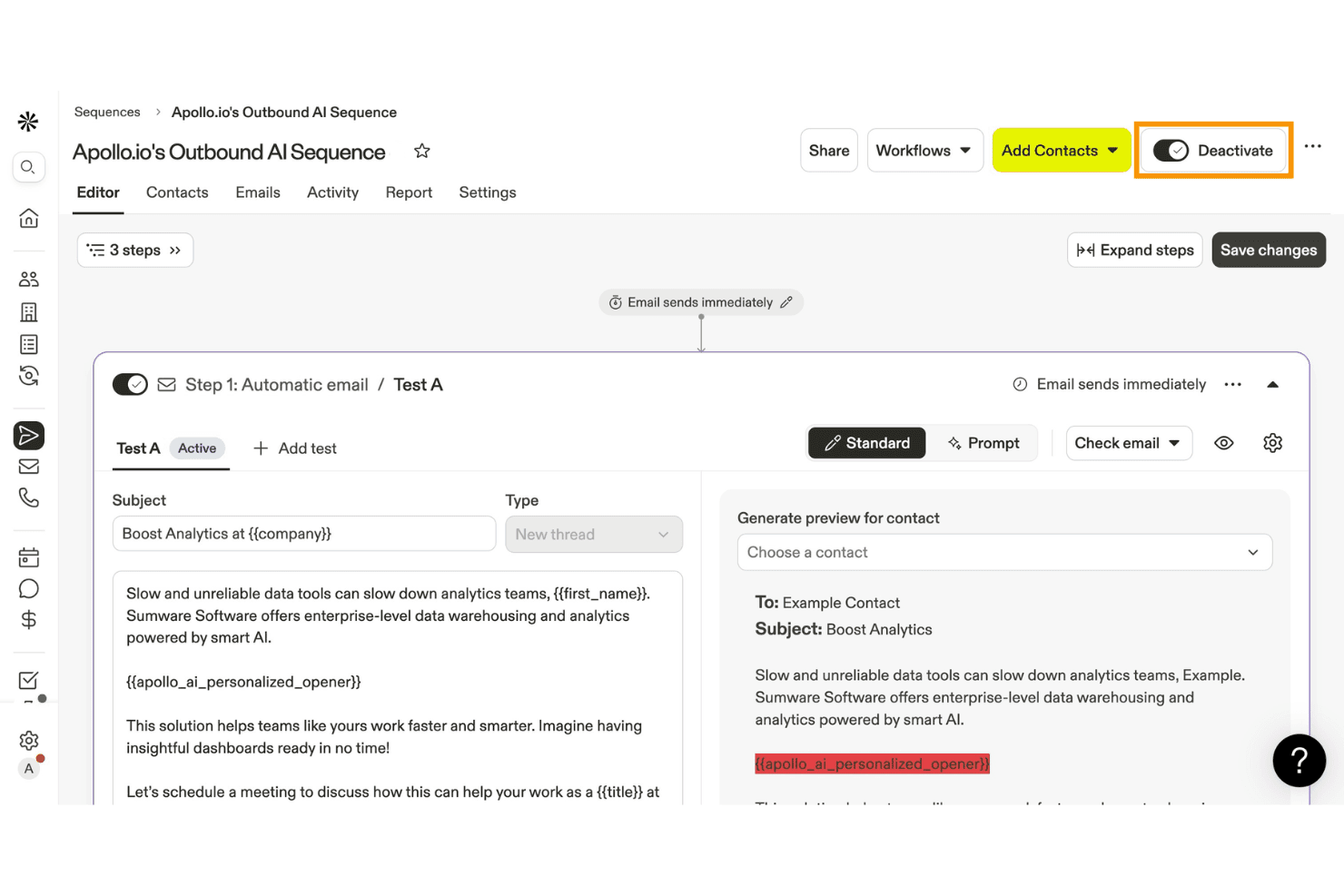
Apollo.io permite a los usuarios crear y automatizar secuencias de correo electrónico saliente con IA. Apollo.io es una plataforma de interacción e inteligencia de ventas B2B que combina una base de datos de más de 275 millones de contactos con secuencias de correo electrónico en frío, personalización impulsada por IA y herramientas de entregabilidad.
¿Para quién es más adecuado Apollo.io?
Apollo.io está diseñado para equipos de ventas B2B y generación de demanda que necesitan realizar campañas de prospección en frío a gran escala, combinando la búsqueda de prospectos y las secuencias en una sola plataforma.
Por qué elegí Apollo.io
Elegí Apollo.io como una de las mejores opciones porque está diseñado específicamente para la prospección en frío B2B a gran escala, combinando una base de datos de más de 275 millones de contactos con Investigación mediante IA, que incorpora información específica de cada prospecto, como noticias recientes de la empresa o actividad en LinkedIn, directamente en el contenido del correo electrónico. También me encanta la lógica condicional de las secuencias, que permite ramificar las rutas de contacto según si un prospecto abrió, hizo clic o ignoró un paso anterior.
Características principales de Apollo.io
- Búsqueda en la base de datos de contactos: Accede a una base de datos de más de 275 millones de contactos con más de 65 atributos de filtrado para crear y exportar listas de prospectos segmentadas directamente desde la plataforma.
- Protección contra rebotes: Una función de monitoreo configurable que controla las tasas de rebote por secuencia y pausa automáticamente los envíos cuando los umbrales alcanzan niveles de advertencia o críticos.
- Pruebas A/B en pasos de correo electrónico: Prueba varias versiones de correo electrónico dentro de un paso de la secuencia para identificar qué contenido genera mayores tasas de apertura y respuesta.
- Sincronización bidireccional del CRM: La sincronización bidireccional nativa con HubSpot, Salesforce y Pipedrive mantiene alineados en tiempo real los datos de contactos y secuencias en todo tu conjunto de herramientas de ventas.
Integraciones de Apollo.io
Apollo.io ofrece más de 50 integraciones, incluidas HubSpot, Salesforce, Pipedrive, Gmail, Microsoft Outlook, SendGrid y Mailgun. Los planes empresariales incluyen acceso a la API para integraciones personalizadas, y Apollo.io también es compatible con Zapier.
Pros and Cons
Pros:
- Amplia base de datos B2B para prospección segmentada
- Personalización impulsada por IA para cada destinatario
- Potentes herramientas de entregabilidad y diagnóstico de secuencias
Cons:
- No ofrece una verdadera capacidad de envío masivo
- No incluye creador visual de correos electrónicos ni herramientas para boletines
Learn more about Apollo.io: Ideal para campañas de correo electrónico y SMS de comercio electrónico
- Plan gratuito + demostración gratuita disponible
- Desde $11.20/mes
Visit WebsiteCustomer Rating:4.6/5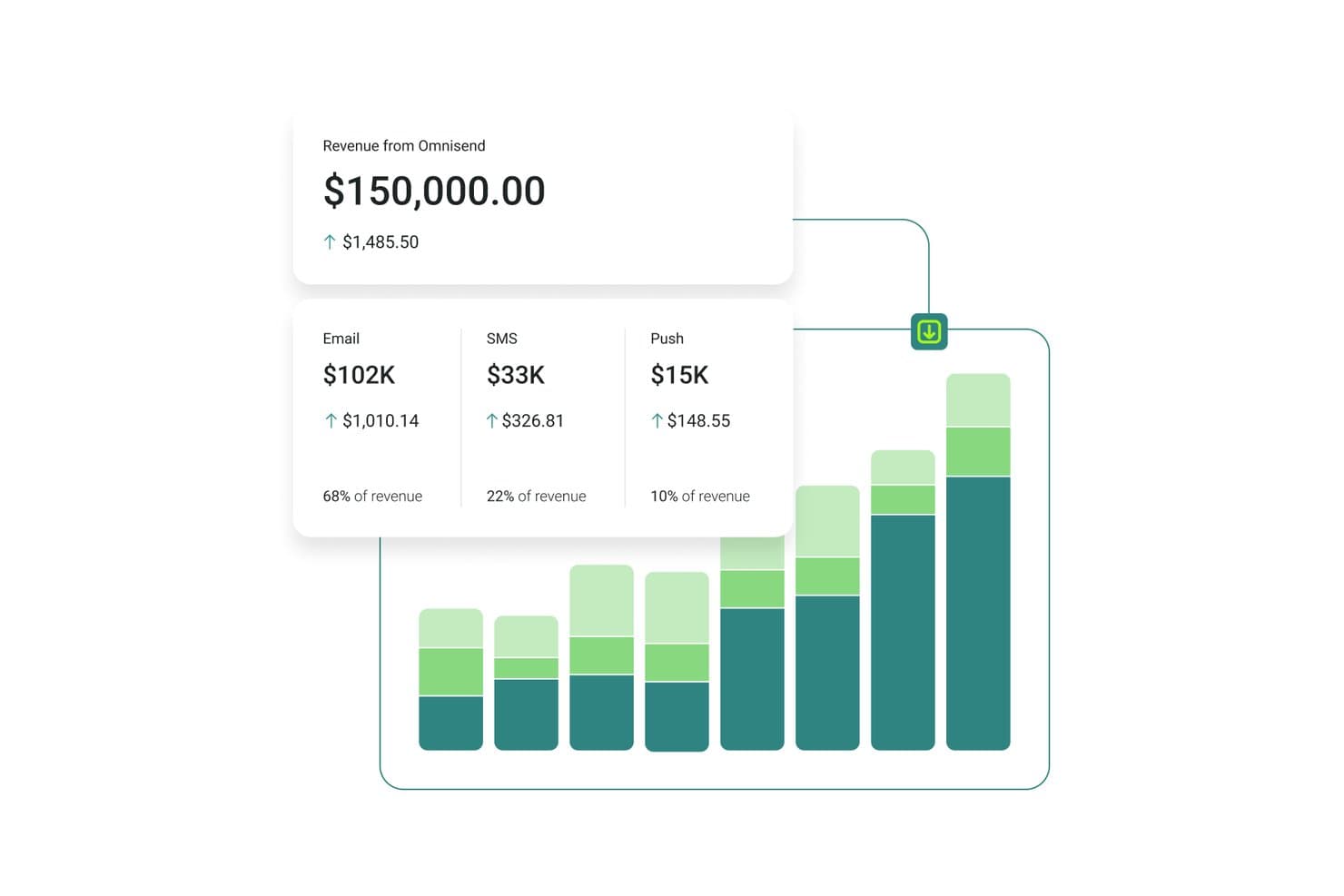
Omnisend registra los ingresos del correo electrónico, los SMS y las notificaciones push en un solo panel. Omnisend es una plataforma de marketing por correo electrónico y SMS creada para marcas de comercio electrónico, que combina el envío de campañas masivas, flujos de trabajo automatizados, segmentación de audiencias y mensajería multicanal mediante correo electrónico, SMS y notificaciones push web.
¿Para quién es más adecuado Omnisend?
Omnisend es una excelente opción para las marcas de comercio electrónico, especialmente los comercios de Shopify, WooCommerce y BigCommerce, que desean gestionar el correo electrónico, los SMS y las notificaciones push desde un solo lugar.
Por qué elegí Omnisend
Omnisend ocupa un lugar en mi lista de favoritos porque es la única plataforma de esta selección que sincroniza directamente los datos actualizados del catálogo de productos con los correos electrónicos, por lo que puedo insertar precios, imágenes y enlaces reales en una campaña sin salir del creador. También recurro a su Mapa del ciclo de vida del cliente para segmentar los envíos según la etapa, desde compradores primerizos hasta clientes inactivos, sin tener que crear filtros manualmente cada vez. Utilizo con frecuencia el reenvío automático del Impulsor de campañas a quienes no abrieron el mensaje para recuperar alcance en los envíos promocionales importantes.
Funciones principales de Omnisend
- Generador de segmentos con IA: Permite describir una audiencia objetivo en lenguaje sencillo y genera automáticamente los filtros y el segmento.
- Impulsor de campañas: Reenvía automáticamente una campaña a los contactos que no abrieron el primer envío, con una nueva línea de asunto.
- Bloques de contenido condicional: Muestra u oculta secciones específicas del correo electrónico para destinatarios individuales según las etiquetas, el historial de compras o la fuente de registro.
- Pruebas A/B para automatizaciones: Prueba líneas de asunto, contenido y horarios de envío dentro de flujos de trabajo de automatización activos, no solo en campañas individuales.
Integraciones de Omnisend
Omnisend ofrece más de 280 integraciones probadas, incluidas Shopify, WooCommerce, BigCommerce, Wix, Facebook Lead Ads, Google Ads, Canva y Gorgias. También admite conexiones mediante API, webhooks y Zapier para integraciones personalizadas.
Pros and Cons
Pros:
- Automatiza las secuencias de carritos abandonados, navegación y posteriores a la compra
- Sincroniza los datos actualizados de los productos directamente con los correos electrónicos
- Mapeo del ciclo de vida del cliente para una segmentación dinámica
Cons:
- Creado principalmente para empresas centradas en el comercio electrónico
- No hay integraciones nativas disponibles con CRM empresariales
Learn more about Omnisend: Ideal para contar historias visuales en correos electrónicos
- Plan gratuito + prueba gratuita disponible
- Desde $19/usuario/mes (facturado anualmente)
Visit WebsiteCustomer Rating:4.7/5
Flodesk permite contar historias visuales con diseños de correo electrónico mediante arrastrar y soltar. Flodesk es un software de envío masivo de correos electrónicos diseñado para contar historias visuales en los emails. Está dirigido a pequeñas empresas y emprendedores creativos que valoran tanto la estética como la funcionalidad en sus esfuerzos de marketing por correo electrónico. Con su interfaz de diseño fácil de usar y la capacidad de enviar correos ilimitados, Flodesk responde a la necesidad de una comunicación visualmente atractiva sin la complejidad que normalmente se asocia a las herramientas de email marketing.
Por Qué Elegí Flodesk
Elegí Flodesk por su capacidad única para combinar flexibilidad de diseño con funcionalidad de marketing, especialmente para quienes priorizan el relato visual en sus campañas de correo electrónico. El creador de emails con función de arrastrar y soltar de la plataforma permite a los usuarios crear correos electrónicos hermosos y adaptables sin ningún conocimiento de programación. Además, las funciones de automatización de Flodesk permiten establecer flujos de trabajo que nutren clientes potenciales e involucran suscriptores según sus interacciones, brindando una manera sencilla de mantener las relaciones con los clientes. Con estas funciones y correos ilimitados, Flodesk ayuda a las empresas a mejorar su marketing por correo electrónico.
Características Clave de Flodesk
Además de sus capacidades de diseño y automatización, Flodesk ofrece:
- Plantillas personalizables: Los usuarios pueden elegir entre una variedad de plantillas y personalizarlas para que encajen con la estética de su marca.
- Creación de formularios: Crea e integra formularios directamente en tu sitio web para captar clientes potenciales sin complicaciones.
- Gestión de suscriptores: Gestiona y segmenta fácilmente tu lista de correos para dirigirte de manera efectiva a públicos específicos.
- Analíticas de correo electrónico: Obtén información sobre el rendimiento de los correos con analíticas detalladas, lo que te ayuda a perfeccionar tu estrategia con el tiempo.
Integraciones de Flodesk
Las integraciones incluyen HoneyBook, BookFunnel, Canva, Shopify, Squarespace, ThriveCart, Wix y Manychat. Estas integraciones mejoran la productividad y agilizan los esfuerzos de marketing, permitiendo a los usuarios conectar Flodesk con varias plataformas para un enfoque de marketing integral.
Pros and Cons
Pros:
- Fuerte soporte para pequeñas empresas y negocios creativos
- Opciones de personalización de marca sin necesidad de código
- El editor intuitivo de arrastrar y soltar simplifica la creación de correos
Cons:
- Pocas opciones de integración fuera de las principales plataformas
- Usuarios reportan tiempos de carga lentos ocasionalmente
Learn more about Flodesk: Ideal para campañas de email personalizadas
- Demo gratuita + plan gratis disponible
- Desde $45/mes
Visit WebsiteCustomer Rating:4.6/5
Klaviyo envía campañas masivas con contenido de productos personalizado. Klaviyo apoya a las empresas que desean enviar campañas de correo electrónico más relevantes utilizando datos de clientes. Diseñado para compañías de diferentes tamaños, combina información del cliente con herramientas de marketing por correo electrónico para que puedas crear campañas dirigidas basadas en el comportamiento real. Ya sea que tu objetivo sea mejorar la participación o aumentar las ventas, Klaviyo ayuda a unificar y activar datos de los clientes en tiempo real para guiar tus decisiones de comunicación.
Por qué elegí Klaviyo
Elegí Klaviyo por su capacidad de utilizar datos de los clientes para crear campañas de correo masivas personalizadas. Sus herramientas de segmentación te permiten definir grupos específicos de clientes según el comportamiento, el historial de compras y la interacción, por lo que los mensajes resultan más relevantes. La plataforma también permite flujos automáticos y campañas programadas, facilitando el envío de correos electrónicos oportunos sin esfuerzo manual. En conjunto, estas funciones hacen de Klaviyo una opción práctica para empresas que buscan mayor control sobre su estrategia de emails masivos.
Características clave de Klaviyo
Además de campañas personalizadas por correo, Klaviyo ofrece:
- Marketing omnicanal: Interactúa con tu audiencia a través de correo electrónico, SMS y redes sociales para una experiencia del cliente coherente.
- Información impulsada por IA: Utiliza inteligencia artificial para obtener conocimientos sobre el comportamiento del cliente y optimizar tus estrategias de marketing por correo electrónico.
- Plantillas personalizables: Crea rápidamente correos visualmente atractivos con más de 160 plantillas personalizables y un editor de arrastrar y soltar.
- Integración de datos en tiempo real: Integra perfectamente con más de 350 aplicaciones para unificar y activar datos de clientes en todos tus esfuerzos de marketing.
Integraciones de Klaviyo
Las integraciones incluyen Shopify, BigCommerce, WooCommerce, Magento, Salesforce Commerce Cloud, Stripe, Facebook, Instagram, Google Ads y Zendesk.
Pros and Cons
Pros:
- Segmentación avanzada para campañas de correo electrónico dirigidas
- Funciones de automatización completas para marketing personalizado
- Marketing omnicanal que incluye SMS y redes sociales
Cons:
- La estructura de precios más alta puede disuadir a las pequeñas empresas
- La estructura de precios más alta puede disuadir a las pequeñas empresas
Learn more about Klaviyo: El mejor plan gratuito con muchas funciones
- Plan gratuito + demo gratis disponible
- Desde $7/mes (facturado anualmente)
Visit WebsiteCustomer Rating:4.6/5
Sender te permite crear plantillas de correo electrónico para ayudar en el envío masivo de correos. Sender ayuda a tu equipo a enviar y automatizar campañas de correo electrónico a gran escala con herramientas para crear boletines, segmentar audiencias y gestionar seguimientos por SMS que se ajustan a tus objetivos de alcance. Te será útil si gestionas campañas de correo para una pequeña empresa, tienda online o una audiencia en crecimiento y buscas controlar la automatización y el seguimiento sin cambiar de herramienta constantemente. Crea contenido atractivo asegurando que tus mensajes lleguen a la audiencia adecuada.
Por qué elegí Sender
Elegí Sender porque su plan gratuito con muchas funciones te da verdaderas herramientas de envío masivo de correos electrónicos para hasta 2,500 suscriptores y 15,000 correos/mes. Esto incluye automatización, segmentación y un editor de arrastrar y soltar. Los flujos de trabajo de automatización permiten activar secuencias basadas en el comportamiento del suscriptor y programar seguimientos, ayudándote a mantener la atención de tu audiencia sin tener que usar varias herramientas. También me gusta que puedas segmentar listas para personalizar mensajes a diferentes grupos e incluir correos transaccionales en tus campañas. Estas capacidades hacen que sea una opción sólida para equipos enfocados en hacer crecer su alcance por email con poco presupuesto.
Funciones clave de Sender
Además de sus funciones principales, otras características destacadas incluyen:
- Pruebas A/B: Esta función te permite probar diferentes versiones de tus correos electrónicos para ver cuál tiene mejor desempeño, ayudando a optimizar tus campañas para mejores resultados.
- Panel de análisis: Haz seguimiento de aperturas, clics y métricas de entrega para medir el nivel de interacción.
- Correos electrónicos transaccionales: Sender te permite automatizar el envío de correos transaccionales, garantizando una comunicación oportuna con tus suscriptores.
- Herramientas de captura de leads: La plataforma ofrece herramientas para captar leads directamente desde tu sitio web, ayudando a crecer tu lista de emails de forma efectiva.
Integraciones de Sender
Las integraciones incluyen WordPress, WooCommerce y Zapier. Hay disponible una API para integraciones personalizadas.
Pros and Cons
Pros:
- Ofrece plantillas responsivas para correos adaptados a móviles.
- La interfaz fácil de usar simplifica la creación de campañas de email.
- El generoso plan gratuito admite hasta 2,500 suscriptores.
Cons:
- Funciones avanzadas limitadas en comparación con la competencia.
- El plan gratuito incluye la marca Sender, lo que puede afectar la profesionalidad.
Learn more about Sender: Ideal para automatización y personalización
- Prueba gratuita de 14 días + demo gratuita disponible
- Desde $100/mes
Visit WebsiteCustomer Rating:4.2/5
Customer.io automatiza flujos de correo electrónico masivos utilizando disparadores basados en eventos y datos de usuarios. Cuando deseas tener más control sobre tu marketing por correo electrónico, Customer.io ofrece una plataforma diseñada para enviar mensajes automatizados y dirigidos basados en el comportamiento del cliente. Funciona bien para equipos que necesitan gestionar campañas para bases de usuarios en crecimiento sin depender de flujos de trabajo manuales. Utilizar datos de primera mano te ayuda a enviar mensajes relevantes a los usuarios correctos en el momento oportuno.
Por qué elegí Customer.io
Elegí Customer.io porque facilita la ejecución de grandes campañas de correo electrónico usando automatización y segmentación basada en usuarios. El Visual Workflow Builder te permite configurar flujos de correo electrónico con pasos de arrastrar y soltar, para que puedas construir campañas de varios pasos sin necesidad de una configuración técnica compleja. Los disparadores de eventos permiten a los equipos enviar mensajes basados en acciones reales de los clientes, ayudando a entregar correos electrónicos oportunos y relevantes que fomentan la comunicación continua con el cliente.
Características clave de Customer.io
Además de sus puntos fuertes en automatización y personalización, Customer.io ofrece:
- Soporte omnicanal: Brinda una experiencia de cliente coherente a través de correo electrónico, SMS y mensajes dentro de la aplicación.
- Design Studio: Crea mensajes de alta calidad de forma colaborativa con un editor fácil de usar.
- Pruebas A/B: Experimenta con diferentes contenidos y estrategias de mensajes para optimizar la participación.
- Sincronización de audiencia para anuncios: Actualiza automáticamente los segmentos de audiencia en las principales redes de anuncios para estrategias de marketing coherentes.
Integraciones de Customer.io
Las integraciones incluyen Salesforce, Google Analytics, Segment, Slack, Twilio, Stripe, Shopify, WordPress, Zendesk y HubSpot.
Pros and Cons
Pros:
- La mensajería multicanal admite correo electrónico, SMS y notificaciones push
- El seguimiento del comportamiento proporciona información sobre las preferencias de los clientes
- El constructor de flujos visual y flexible ayuda a usuarios sin conocimientos técnicos
Cons:
- Las funciones de informes son menos completas que las de la competencia
- Algunos usuarios pueden encontrar la complejidad de la plataforma abrumadora al principio
Learn more about Customer.io: Mejor para edición por arrastrar y soltar
- Plan gratuito disponible
- Desde $12/mes
Visit WebsiteCustomer Rating:4.7/5
MailerLite permite a las empresas diseñar, automatizar y seguir campañas de correo electrónico. MailerLite es una herramienta de marketing por correo electrónico diseñada para empresas que desean crear, enviar y gestionar campañas en un solo lugar. Ofrece soporte a los equipos proporcionando herramientas de diseño, funciones de automatización y seguimiento del rendimiento para ayudar a gestionar la comunicación y el compromiso por correo electrónico.
Por qué elegí MailerLite: MailerLite ofrece a tu equipo un editor limpio de arrastrar y soltar que facilita la creación de correos electrónicos, incluso si nadie es diseñador. Puedes crear campañas desde cero o empezar con plantillas prediseñadas y adaptarlas a tu marca. El editor incluye bloques para imágenes, botones, videos y cuentas regresivas, para que tu equipo pueda ser creativo sin tocar el código. Además, puedes reutilizar diseños en distintas campañas para mantener la coherencia.
Funciones e integraciones destacadas:
Las funciones incluyen un constructor de automatizaciones que te permite configurar flujos de trabajo personalizados. Puedes llevar a cabo segmentación basada en intereses utilizando los datos de clics y aperturas. Encuestas y cuestionarios pueden añadirse directamente en tus correos electrónicos para recopilar opiniones o calificar prospectos.
Las integraciones incluyen Shopify, WordPress, Zapier, Stripe, WooCommerce, PayPal, Squarespace, Typeform, Facebook y Google Sheets.
Pros and Cons
Pros:
- Configuración rápida para nuevos usuarios
- Permite reutilizar diseños de bloques
- Los elementos de correo electrónico sin código funcionan bien
Cons:
- El editor de automatizaciones puede sentirse lento
- Las vistas previas móviles no son del todo precisas
 Ideal para la privacidad del usuario
- Prueba gratuita de 14 días + plan gratuito + demo gratuita disponible
- Desde $4/mes (facturado anualmente)
Visit WebsiteCustomer Rating:4.3/5
Zoho Campaigns ayuda a las empresas a ejecutar campañas de correo electrónico centradas en la privacidad. Zoho Campaigns es una herramienta de marketing por correo electrónico diseñada para empresas que buscan mejorar su alcance por email mientras priorizan la privacidad. Es especialmente útil para equipos de marketing que desean gestionar campañas de manera eficaz sin depender de rastreadores de terceros.
Por qué elegí Zoho Campaigns: Zoho Campaigns se distingue por centrarse en la privacidad del usuario, utilizando sus propias herramientas de seguimiento. Incluye plantillas de correo electrónico personalizables y flujos de trabajo automatizados que te ayudan a crear y gestionar campañas de forma eficiente. Puedes realizar pruebas A/B para optimizar tus correos y obtener información con análisis detallados. Su integración con plataformas de comercio electrónico como Shopify facilita esfuerzos de marketing dirigidos.
Características destacadas e integraciones:
Las características incluyen optimización del horario de envío de correos electrónicos, que asegura que tus mensajes se entreguen en los mejores momentos, y autenticación de dominio para mejorar la entregabilidad. Puedes gestionar campañas tanto de email como de SMS desde una sola interfaz y utilizar plantillas personalizables para crear contenido atractivo.
Las integraciones incluyen Zoho CRM, Shopify, WooCommerce, Eventbrite, SurveyMonkey, LinkedIn, Facebook, Twitter, Google Analytics y Slack.
Pros and Cons
Pros:
- Flujos de trabajo de automatización sencillos
- Analíticas completas
- Pruebas A/B efectivas
Cons:
- Plantillas de diseño básicas
- Problemas ocasionales de integración
Learn more about Zoho Campaigns: Ideal para campañas multilingües
- Plan gratuito disponible
- Desde $37/mes
Visit WebsiteCustomer Rating:4.3/5
Benchmark Email ayuda a los equipos a diseñar, automatizar y rastrear correos electrónicos de marca. Benchmark Email es una plataforma de marketing diseñada para ayudar a los equipos a crear y enviar correos electrónicos de marca a gran escala. Está orientada a empresas de todos los tamaños que buscan gestionar su contenido de correo electrónico y las comunicaciones con su audiencia desde un solo lugar. Ofrece herramientas para diseñar correos, automatizar seguimientos y rastrear la interacción.
Por qué elegí Benchmark Email: Benchmark Email ayuda a tu equipo a ejecutar campañas en múltiples idiomas sin esfuerzo adicional. Puedes crear correos en diferentes idiomas usando su editor y elegir plantillas que soportan caracteres especiales y texto de derecha a izquierda. La configuración de idioma es fácil de ajustar en el panel de control de la cuenta y puedes segmentar contactos por idioma. También te permite previsualizar los correos en distintos idiomas antes de enviarlos.
Características e integraciones destacadas:
Características incluyen plantillas de correo electrónico que puedes arrastrar y soltar, lo que agiliza la creación de campañas de marca. Tu equipo puede hacer pruebas A/B para comparar asuntos o diseños. También obtienes informes en tiempo real que muestran aperturas, clics y rebotes.
Integraciones incluyen Shopify, Google Sheets, Zapier, WordPress, Facebook, Slack, Typeform, Eventbrite, PayPal y Stripe.
Pros and Cons
Pros:
- Traduce plantillas con poca configuración
- Fácil cambiar entre versiones de idioma
- Ideal para equipos de marketing regional
Cons:
- No es ideal para emails transaccionales
- Pocas funciones CRM nativas
Learn more about Benchmark Email:
Otros programas para enviar correos electrónicos masivos
Estas son algunas opciones adicionales de programas para enviar correos electrónicos masivos que no llegaron a mi lista de preseleccionados, pero que vale la pena conocer:
- 11SendGridIdeal para el envío de correos electrónicos basados en API
- 12Elastic EmailIdeal para diseño de correos impulsado por IA
- 13Constant ContactMejor para combinar correo electrónico y SMS
- 14CampaignerIdeal para automatización avanzada
- 15SMTP.comMejor para entregabilidad empresarial de alto volumen
- 16BrevoIdeal para un compromiso integral
- 17Vertical ResponseMejor para pequeñas empresas
- 18Click DimensionsMejor para integración con Microsoft Dynamics
- 19GMassLa mejor integración con Gmail
- 20EmailOctopusIdeal para el crecimiento de listas de correo electrónico
Cómo Evalúo el Software para Envío Masivo de Correos
Examino dos niveles: las funcionalidades básicas imprescindibles—enviar a 100,000 contactos de forma fiable, llegar a las bandejas de entrada, segmentar listas—y los diferenciadores que separan a las plataformas que realmente valen la pena recomendar.
Funcionalidad Básica (Imprescindibles para esta Lista)
Cuando selecciono las herramientas para mi lista, califico cada una en una escala de 0 (no ofrece la funcionalidad) a 5 (destaca en esta área) para cada funcionalidad básica listada a continuación. Luego, calculo la puntuación total de la herramienta como un porcentaje. Cada herramienta debe alcanzar una puntuación mínima total del 75% para ser considerada.
- Envío Masivo de Emails: Verifico si la plataforma puede gestionar campañas de alto volumen con programación de envíos, entrega por zona horaria y limitación de velocidad para evitar bloqueos de proveedores.
- Gestión de Listas de Contactos: Importar un CSV de 50,000 suscriptores debe ser sencillo. Busco campos personalizados, etiquetado, listas de supresión y actualizaciones dinámicas de listas.
- Constructor de Emails y Plantillas: Evalúo editores de "arrastrar y soltar" por salida de diseño responsiva, bloques de contenido reutilizables y variedad de plantillas para diferentes sectores.
- Infraestructura de Entregabilidad: La configuración de SPF, DKIM y DMARC debe ser simple. Opciones de IP dedicada y herramientas de calentamiento son relevantes para equipos que envían a gran escala.
- Personalización y Segmentación: Las etiquetas de fusión son lo básico. Busco bloques de contenido condicional y segmentos de comportamiento como “abrió las últimas 3 campañas”.
- Analítica y Reportes de Campañas: Todas las herramientas rastrean aperturas y clics. Evalúo si los paneles muestran tasas de rebote, tendencias de entregabilidad y resultados de pruebas A/B.
Una vez tengo una lista de herramientas que cumplen con estos criterios, considero qué hace única a cada plataforma.
Factores Diferenciadores (Qué Distingue a los Proveedores)
Así es como comparo y pongo en contraste diferentes proveedores:
Características Destacadas
Los flujos de trabajo de automatización visual separan a los remitentes básicos de las plataformas que pueden ejecutar un programa completo de ciclo de vida: series de bienvenida, flujos de reenganche y secuencias post-compra activadas por comportamientos reales. Las pruebas A/B son otro factor que valoro. Busco herramientas que permitan probar asuntos, contenido y horarios de envío dentro de una misma campaña. Para los equipos de comercio electrónico, la atribución de ingresos vinculada a envíos específicos facilita mucho demostrar el ROI de cada campaña.
Más Allá de las Características
La estructura de precios es muy relevante aquí. Algunas plataformas cobran por suscriptor, mientras que otras facturan por emails enviados—un equipo con una lista grande pero de baja frecuencia pagará muy diferente según el modelo. También evalúo qué tan bien se conecta la herramienta con tu stack existente, especialmente CRMs y plataformas de comercio electrónico donde residen los datos de contacto. Las herramientas de cumplimiento normativo son otro diferenciador que reviso. La gestión de consentimientos incorporada, los flujos de doble confirmación y la gestión de bajas deberían cubrir los requisitos de GDPR, CAN-SPAM y CASL sin soluciones manuales.
Cómo elegir un programa para enviar correos electrónicos masivos
Es fácil perderse entre largas listas de funciones y estructuras de precios complejas. Para ayudarte a mantener la atención mientras avanzas en tu proceso específico de selección de software, aquí tienes una lista de factores que debes tener en cuenta:
| Factor | Qué debes tener en cuenta |
| Escalabilidad | ¿Puede el software crecer junto con tu empresa? Considera las necesidades futuras y si la herramienta puede gestionar un mayor volumen de correos electrónicos sin costes adicionales. |
| Integraciones | ¿Funciona con tus herramientas actuales? Comprueba la compatibilidad con sistemas CRM, plataformas de análisis y otras herramientas de marketing que utilices. |
| Personalización | ¿Qué flexibilidad ofrece el software? Busca herramientas que te permitan adaptar los flujos de trabajo y las plantillas para ajustarlos a tu marca y estrategia de marketing. |
| Facilidad de uso | ¿La interfaz es intuitiva? Asegúrate de que tu equipo pueda navegar por ella fácilmente sin necesidad de una formación extensa ni de superar una curva de aprendizaje pronunciada. |
| Implementación e incorporación | ¿Con qué rapidez puedes empezar? Evalúa la disponibilidad de tutoriales, asistencia y recursos que ayuden a tu equipo a comenzar a utilizar el software de forma eficaz. |
| Coste | ¿Los precios se ajustan a tu presupuesto? No te limites a considerar el coste inicial y ten en cuenta los gastos a largo plazo, incluidas las actualizaciones y las funciones adicionales. |
| Medidas de seguridad | ¿Qué nivel de seguridad ofrecen tus datos? Asegúrate de que el software cumpla la normativa y ofrezca cifrado y otras medidas de seguridad para proteger la información de los clientes. |
| Requisitos de cumplimiento | ¿Cumple el software las normas del sector? Considera cualquier necesidad específica de cumplimiento, como el RGPD, y si la herramienta puede satisfacerla. |
¿Qué es un programa para enviar correos electrónicos masivos?
El software de envío masivo de correos electrónicos es una herramienta que permite a las empresas enviar grandes volúmenes de correos electrónicos a clientes y clientes potenciales. Los profesionales del marketing y los propietarios de pequeñas empresas suelen utilizar estas herramientas para interactuar con las audiencias y promocionar productos o servicios. Las funciones de automatización, segmentación y análisis ayudan a definir el público objetivo, gestionar campañas y medir el éxito. Estas herramientas aportan valor al mejorar la eficiencia de la comunicación y aumentar la interacción con los clientes.
Funciones del software de envío masivo de correos electrónicos
Al seleccionar un software de envío masivo de correos electrónicos, presta atención a las siguientes funciones clave:
- Automatización del correo electrónico: Automatiza el envío de mensajes en los momentos especificados, lo que ayuda a mantener una comunicación constante con tu audiencia.
- Segmentación: Permite dividir tu lista de correo electrónico en grupos específicos, mejorando la interacción al enviar contenido relevante.
- Análisis e informes: Proporciona información sobre el rendimiento de los correos electrónicos y te ayuda a realizar un seguimiento de las tasas de apertura, los clics y las conversiones.
- Plantillas personalizables: Ofrece diseños de correo electrónico prediseñados que puedes adaptar para ajustarlos a tu marca, ahorrando tiempo en el trabajo de diseño.
- Pruebas A/B: Te permite probar distintas versiones de un correo electrónico para comprobar cuál funciona mejor y optimizar tus campañas.
- Gestión de listas: Te ayuda a organizar y mantener las listas de suscriptores, garantizando la exactitud de los datos y el cumplimiento de la normativa.
- Capacidades de integración: Se conecta con otras herramientas, como sistemas CRM y plataformas de redes sociales, para mejorar tus iniciativas de marketing.
- Adaptabilidad a dispositivos móviles: Garantiza que los correos electrónicos se muestren correctamente en todos los dispositivos, mejorando la experiencia y la interacción de los usuarios.
- Funciones de seguridad: Protege los datos confidenciales mediante el cifrado y el cumplimiento de los estándares del sector, salvaguardando la información de los clientes.
- Actualizaciones en tiempo real: Proporciona acceso inmediato a los datos de las campañas, lo que te permite tomar decisiones fundamentadas rápidamente.
Ventajas del software de envío masivo de correos electrónicos
La implementación de un software de envío masivo de correos electrónicos ofrece varias ventajas para tu equipo y tu empresa. Estas son algunas de las que puedes esperar:
- Mayor interacción: Al utilizar la segmentación y la personalización, envías contenido más relevante, lo que se traduce en mayores tasas de apertura y de clics.
- Eficiencia de tiempo: Las funciones de automatización te permiten programar correos electrónicos y gestionar campañas sin intervención manual, ahorrando tiempo a tu equipo.
- Decisiones basadas en datos: Las herramientas de análisis e informes ofrecen información sobre el rendimiento de las campañas y te ayudan a tomar decisiones de marketing fundamentadas.
- Imagen de marca coherente: Las plantillas personalizables garantizan que tus correos electrónicos coincidan con la imagen y el estilo de tu marca, manteniendo la coherencia en todas las comunicaciones.
- Mayor alcance: La integración con plataformas CRM y de redes sociales amplía tus iniciativas de marketing y te permite llegar a una audiencia más extensa.
- Ahorro de costes: Al dirigirte a la audiencia adecuada con correos electrónicos eficaces, maximizas el retorno de la inversión de tu presupuesto de marketing.
- Cumplimiento normativo: Las funciones de gestión de listas y seguridad te ayudan a mantener la exactitud de los datos y a cumplir la normativa del sector.
Costes y precios del software de envío masivo de correos electrónicos
Seleccionar un software de envío masivo de correos electrónicos requiere comprender los distintos modelos de precios y planes disponibles. Los costes varían en función de las funciones, el tamaño del equipo, los complementos y otros factores. La tabla siguiente resume los planes habituales, sus precios medios y las funciones que suelen incluir las soluciones de software de envío masivo de correos electrónicos:
Tabla comparativa de planes de software de envío masivo de correos electrónicos
| Tipo de plan | Precio medio | Funciones habituales |
| Plan gratuito | $0 | Plantillas de correo electrónico básicas, automatización limitada y análisis básicos. |
| Plan personal | $10-$30 /usuario /mes | Plantillas personalizables, segmentación básica y programación de correos electrónicos. |
| Plan empresarial | $50-$100 /usuario /mes | Automatización avanzada, análisis detallados y funciones de pruebas A/B. |
| Plan para empresas | $150-$300 /usuario /mes | Asistencia exclusiva, integraciones avanzadas y funciones de seguridad mejoradas. |
Preguntas frecuentes sobre el software de envío masivo de correos electrónicos
Estas son algunas respuestas a preguntas frecuentes sobre el software de envío masivo de correos electrónicos:
¿Cuál es la diferencia entre el correo electrónico masivo y el correo electrónico para grandes volúmenes?
El correo electrónico masivo y el correo electrónico para grandes volúmenes suelen utilizarse indistintamente, ya que ambos hacen referencia al envío de un mismo mensaje a muchos destinatarios. La clave está en garantizar que tus correos electrónicos sean relevantes y personalizados para evitar que se marquen como spam. Las herramientas que ofrecen funciones de segmentación y personalización pueden ayudar a mejorar tu estrategia.
¿Cuáles son las nuevas normas de Google y Yahoo para los remitentes de correos electrónicos masivos?
Desde febrero de 2024, Google y Yahoo aplican directrices más estrictas para los remitentes de correos electrónicos masivos, centradas en la autenticación, las tasas de spam y las opciones sencillas para darse de baja. Asegúrate de que tus correos cumplan estas normas implementando una autenticación adecuada y ofreciendo un proceso claro para darse de baja. Esto ayuda a mantener la capacidad de entrega y la interacción.
¿Es legal enviar correos electrónicos masivos?
Sí, enviar correos electrónicos masivos es legal, pero debes cumplir normativas como CAN-SPAM en EE. UU. o el RGPD en Europa. Estas leyes exigen el consentimiento claro de los destinatarios, información precisa del remitente y opciones sencillas para darse de baja. Garantizar el cumplimiento ayuda a proteger la reputación de tu marca y a evitar sanciones.
¿Cómo puedo enviar correos electrónicos masivos sin que lleguen a la carpeta de spam?
Para evitar las carpetas de spam, céntrate en mantener la higiene de la lista, utiliza procesos de doble confirmación y limpia periódicamente tu lista de correo electrónico. Personaliza el contenido y evita el lenguaje propio del spam. Los protocolos de autenticación como SPF, DKIM y DMARC también ayudan a mejorar la capacidad de entrega y a generar confianza con los proveedores de correo electrónico.
¿Con qué frecuencia debo enviar correos electrónicos masivos?
La frecuencia ideal depende de tu audiencia y del contenido. La interacción periódica es fundamental, pero demasiados correos electrónicos pueden provocar que los destinatarios se den de baja. Prueba distintas frecuencias para encontrar la que mejor funcione con tu audiencia y asegúrate de que cada correo aporte valor y esté alineado con tus objetivos de marketing.