

Las herramientas de marketing por correo electrónico con IA pueden ayudarte a avanzar más rápido al automatizar tareas repetitivas, perfeccionar la segmentación de la audiencia y mejorar la personalización sin aumentar tu carga de trabajo. Si estás intentando aumentar la producción sin agotar a tu equipo, sé lo que se siente. Como responsable de marketing, he probado diversas plataformas basadas en IA y he utilizado nuestra metodología interna de evaluación para identificar las que realmente facilitan la ejecución de campañas de correo electrónico. En esta guía analizaré las mejores herramientas para que puedas elegir la que mejor se adapte a tu equipo, tus objetivos y tu forma de trabajar.
Por qué confiar en nuestras recomendaciones de software
6,700+
Reviews
20
Industry experts
16+
Evaluation factors
14
Years
Nuestro equipo lleva probando y evaluando software desde 2012. Como líderes de marketing, sabemos lo difícil —y lo importante— que es elegir el software adecuado.
Para esta guía, evaluamos las herramientas mediante pruebas prácticas e investigación independiente, puntuando las herramientas según nuestros criterios de selección.
Nuestras reseñas reflejan nuestro criterio editorial humano, no un discurso de ventas.
Revisores expertos:
 Gui DrusinaDirector creativo
- Shriya GhateSenior Marketing Lead
 Amanda JacquesLíder de Marketing Ops

Tabla comparativa de herramientas de marketing por correo electrónico con IA
Esta tabla comparativa resume los detalles de precios de mi selección de las mejores herramientas de marketing por correo electrónico con IA.
| Tool | Best For | Trial Info | Price | ||
|---|---|---|---|---|---|
| 1 | La mejor opción para el contacto por correo electrónico B2B basado en la prospección | Plan gratuito disponible | Desde $49/asiento/mes (facturado anualmente) | Website | |
| 2 | Mejor para pequeñas empresas | Prueba gratuita de 30 días + plan gratuito + demostración gratuita disponible | Desde $13/mes | Website | |
| 3 | Mejor para marketing de comercio electrónico | Plan gratuito + demo gratuita disponible | Desde $16/mes (facturado anualmente) | Website | |
| 4 | Ideal para edición sencilla de arrastrar y soltar | No hay prueba gratuita disponible | Desde $2.99/mes | Website | |
| 5 | Ideal para marketing y atención al cliente impulsados por IA | Demo gratis + plan gratuito disponible | Desde $45/mes | Website | |
| 6 | La mejor opción para automatizar la clasificación de la bandeja de entrada con reglas de IA | Prueba gratuita de 30 días disponible | Desde $14/usuario/mes (facturado anualmente) | Website | |
| 7 | Mejor para mensajería basada en el comportamiento | Prueba gratuita de 14 días + demo gratis disponible | Desde $100/mes | Website | |
| 8 | Ideal para prospección de correos electrónicos en frío | Prueba gratuita disponible | Desde $37.6/mes | Website | |
| 9 | Ideal para interacciones con clientes impulsadas por IA | Prueba gratuita de 7 días + plan gratuito disponible | Desde $24.17/mes (facturado anualmente) | Website | |
| 10 | Ideal para compatibilidad con correos AMP | Prueba gratuita de 21 días + demo gratuita disponible | Desde $39/mes (facturado anualmente) | Website |


Análisis de las mejores herramientas de marketing por correo electrónico con IA
A continuación encontrarás mis resúmenes detallados de las mejores herramientas de marketing por correo electrónico con IA que llegaron a mi selección. Mis análisis ofrecen una visión detallada de las funciones principales, ventajas y desventajas, integraciones y casos de uso ideales de cada herramienta para ayudarte a encontrar la más adecuada para ti.
 La mejor opción para el contacto por correo electrónico B2B basado en la prospección
- Plan gratuito disponible
- Desde $49/asiento/mes (facturado anualmente)
Visit WebsiteCustomer Rating:4.5/5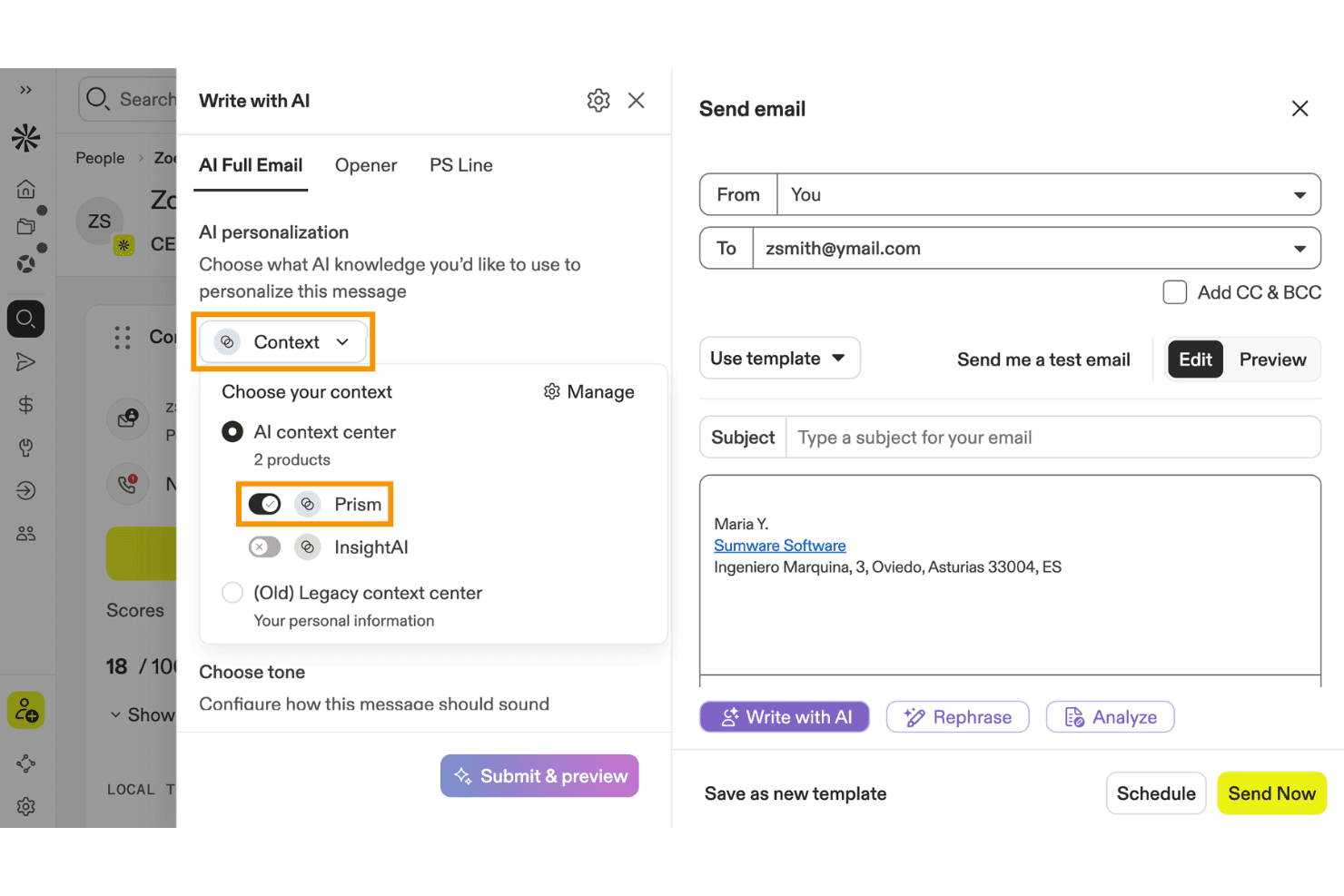
Apollo.io permite a los usuarios personalizar correos electrónicos redactados por IA utilizando el contexto del producto. Apollo.io es una plataforma de interacción de ventas B2B que combina una base de datos de más de 275 millones de contactos con secuencias de correo electrónico impulsadas por IA, prospección y automatización del contacto.
¿Para quién es más adecuado Apollo.io?
Apollo.io es una excelente opción para los equipos de generación de demanda B2B que realizan prospección saliente y campañas de correo electrónico en frío para llenar el embudo de ventas.
Por qué elegí Apollo.io
He incluido Apollo.io entre mis principales opciones porque es la herramienta más sólida de esta lista para los equipos B2B que realizan actividades de contacto a gran escala basadas en la prospección. El Centro de contexto de IA te permite entrenar la plataforma con tu ICP, tus pilares de mensajería y la voz de tu marca, de modo que los correos electrónicos generados reflejen tu posicionamiento en lugar de usar textos genéricos. Combina esto con la personalización basada en señales que utiliza datos sobre cambios de puesto, rondas de financiación y tecnologías utilizadas, y enviarás correos electrónicos específicos para la situación de cada prospecto.
Características principales de Apollo.io
- Asistente de redacción con IA: Genera textos completos para correos electrónicos, líneas de asunto y aperturas personalizadas a partir de indicaciones en lenguaje natural directamente dentro de la plataforma.
- Conjunto de herramientas de entregabilidad del correo electrónico: Incluye configuración de autenticación SPF/DKIM/DMARC, calentamiento del correo electrónico, subdominios de seguimiento personalizados y supervisión de la colocación en la bandeja de entrada.
- Pruebas A/B integradas: Permite probar varias versiones de un correo electrónico dentro de un paso de una secuencia y comparar las tasas de apertura, respuesta y clics de cada variante.
- Rotación de envíos entre varios buzones: Distribuye el volumen de correos electrónicos salientes entre varios buzones conectados para proteger la reputación del remitente a gran escala.
Integraciones de Apollo.io
Apollo.io ofrece integraciones nativas con Salesforce, HubSpot, Zoho CRM, Pipedrive, Adobe Marketo Engage y SendGrid. También admite integraciones personalizadas mediante su API y Zapier.
Pros and Cons
Pros:
- Asistente de redacción con IA adaptado a la voz de la marca
- Personalización a nivel de prospecto mediante señales B2B en tiempo real
- Pruebas A/B integradas para correos electrónicos salientes
Cons:
- No ofrece segmentación basada en el comportamiento ni en el ciclo de vida
- Carece de optimización del momento de envío basada en IA
Learn more about Apollo.io: Mejor para pequeñas empresas
- Prueba gratuita de 30 días + plan gratuito + demostración gratuita disponible
- Desde $13/mes
Visit WebsiteCustomer Rating:4.5/5
Mailchimp utiliza IA para simplificar y personalizar el marketing para pequeñas empresas. Mailchimp es una plataforma de marketing por correo electrónico impulsada por IA que combina la creación automática de campañas, la segmentación de la audiencia, el análisis predictivo y herramientas de optimización de contenido para equipos de marketing.
¿Para quién es mejor Mailchimp?
Mailchimp es una opción natural para pequeñas empresas que necesitan una plataforma de email marketing accesible y todo en uno, sin una curva de aprendizaje empinada.
Por qué elegí Mailchimp
Mailchimp se gana su lugar en mi lista porque integra herramientas de marketing impulsadas por IA en una interfaz que no requiere un equipo dedicado de operaciones de marketing para usarla. Me gusta especialmente su optimizador de contenido con IA, que sugiere líneas de asunto y ajustes en el cuerpo del mensaje según los datos de interacción de tu audiencia. Para pequeñas empresas con recursos limitados, los viajes de automatización predefinidos—como correos de carrito abandonado y secuencias de bienvenida—permiten crear una estrategia de campañas funcional sin necesidad de construir flujos de trabajo desde cero. También encuentro realmente útil la función de segmentación predictiva, ya que identifica qué contactos tienen más probabilidades de convertirse en clientes para que puedas priorizar tus envíos.
Características clave de Mailchimp
- Editor de correos electrónicos de arrastrar y soltar: Diseña correos visualmente usando una biblioteca de plantillas personalizables sin tener que escribir código.
- Pruebas A/B: Prueba diferentes líneas de asunto, horarios de envío o variaciones de contenido para ver qué versión genera mayor interacción.
- Panel de audiencia: Visualiza un resumen consolidado de tu lista de suscriptores, incluyendo tendencias de crecimiento y métricas de compromiso.
- Informes de campañas multivariantes: Haz seguimiento de tasas de apertura, mapas de clics y datos de ingresos en campañas desde una sola vista de reportes.
Integraciones de Mailchimp
Mailchimp ofrece más de 300 integraciones nativas, incluyendo Shopify, WooCommerce, Salesforce, QuickBooks Online, Eventbrite, Canva, Squarespace, Stripe, Google Analytics, Facebook y Zapier. Hay una API disponible para integraciones personalizadas.
Pros and Cons
Pros:
- Permite segmentación de audiencia
- Ofrece análisis integrados
- Editor fácil de arrastrar y soltar
Cons:
- Algunas limitaciones en la personalización de diseños
- Soporte limitado para grandes empresas
Learn more about Mailchimp : Mejor para marketing de comercio electrónico
- Plan gratuito + demo gratuita disponible
- Desde $16/mes (facturado anualmente)
Visit WebsiteCustomer Rating:4.6/5
Omnisend automatiza el marketing por correo electrónico para negocios minoristas en línea. Omnisend es una plataforma de marketing por correo electrónico impulsada por IA diseñada para equipos de comercio electrónico, que ofrece automatización, segmentación, recomendaciones de productos y plantillas prediseñadas adaptadas a tiendas en línea.
¿Para Quién es Mejor Omnisend?
Omnisend es una excelente opción para empresas de comercio electrónico de todos los tamaños que necesitan herramientas de email marketing concebidas para los flujos de trabajo minoristas en línea y el comportamiento de compra de los clientes.
Por Qué Elegí Omnisend
Omnisend se gana su lugar en mi lista porque es una de las pocas plataformas de marketing por correo electrónico creadas específicamente pensando en los flujos de trabajo del comercio electrónico en lugar de adaptarlas posteriormente. Me gusta especialmente la segmentación impulsada por IA, donde describes la audiencia que deseas alcanzar y Omnisend crea el segmento utilizando datos de comportamiento y compra en tiempo real. También utilizo los flujos de automatización prediseñados para carritos abandonados, recuperación de navegación y seguimientos post-compra, que están listos para lanzarse sin necesidad de construirlos desde cero. Los bloques de listado de productos y las recomendaciones de productos basadas en IA dentro del editor de emails facilitan incorporar el inventario en tiempo real de la tienda directamente en las campañas.
Funciones Clave de Omnisend
- Pruebas A/B: Prueba líneas de asunto, contenido y horarios de envío en campañas de correo para identificar qué impulsa las mejores tasas de apertura y clics.
- Notificaciones push web: Envía mensajes push en el navegador para ofertas relámpago, reposición de stock o carritos abandonados sin necesidad de correo electrónico o número de teléfono.
- Bloques de código de descuento: Inserta códigos de descuento únicos y autogenerados directamente en las plantillas de correo electrónico para incrementar las conversiones sin necesidad de gestionar códigos manualmente.
- Informes de entregabilidad: Haz seguimiento de rebotes, cancelaciones de suscripción y fallos para monitorear la entrega en bandeja de entrada y mantener la reputación del remitente a lo largo del tiempo.
Integraciones de Omnisend
Omnisend ofrece integraciones nativas con Shopify, WooCommerce, BigCommerce, Wix, Magento y PrestaShop, y se conecta con Zapier. También dispone de una API para integraciones personalizadas.
Pros and Cons
Pros:
- Soporta comunicación multicanal
- Segmentación efectiva de clientes
- Herramientas de informes completas
Cons:
- Personalización de diseño limitada
- Soporte limitado para negocios que no son de comercio electrónico
Learn more about Omnisend: Ideal para edición sencilla de arrastrar y soltar
- No hay prueba gratuita disponible
- Desde $2.99/mes
Visit WebsiteCustomer Rating:4.4/5
Hostinger Reach ofrece una interfaz de chat por correo electrónico potenciada por IA con plantillas de indicaciones preestablecidas como Boletín de bienvenida, Contenido educativo y Promociones y ventas para generar campañas de correo electrónico. Hostinger Reach es una plataforma de marketing por correo electrónico con IA que genera campañas a partir de indicaciones de texto, crea correos electrónicos con un editor visual, gestiona y segmenta listas de contactos, y automatiza el envío con horarios optimizados mediante IA.
¿Para quién es mejor Hostinger Reach?
Hostinger Reach es ideal para propietarios de pequeñas empresas y profesionales de marketing solitarios que desean gestionar campañas de correo electrónico sin contar con un equipo de marketing dedicado.
Por qué elegí Hostinger Reach
Hostinger Reach es una de mis principales elecciones porque me encanta cómo su editor de contenido de arrastrar y soltar facilita personalizar plantillas de correo generadas por IA sin tocar ni una sola línea de código. Después de que la IA escribe el contenido y construye el diseño a partir de una indicación de texto, puedo entrar al editor para intercambiar imágenes, ajustar bloques de texto y reorganizar secciones. Reach también guarda automáticamente los colores, el logotipo y los ajustes de estilo de mi marca, así que cada correo que personalizo ya está alineado con la identidad desde el principio.
Características clave de Hostinger Reach
- Generador de asuntos con IA: Escribe y prueba automáticamente opciones de líneas de asunto basadas en el contenido de tu correo para mejorar las tasas de apertura.
- Optimización del horario de envío: La IA analiza los datos de tu audiencia para programar cada campaña en el momento con mayor probabilidad de obtener interacción.
- Segmentación de contactos: Describe tu público objetivo en lenguaje natural y Reach crea al instante un segmento filtrado de tu lista de contactos.
- Secuencias de correos automatizadas: Elige entre plantillas de automatización predefinidas, como series de bienvenida y campañas promocionales, para activar correos según las acciones del suscriptor.
Integraciones de Hostinger Reach
Hostinger Reach no es compatible con integraciones de terceros. Sincroniza contactos con WordPress y Hostinger Website Builder mediante conexiones integradas de un solo clic, y dispone de una API para importar contactos desde herramientas externas a Reach.
Pros and Cons
Pros:
- La IA genera borradores completos de correos electrónicos a partir de indicaciones
- Configura automáticamente los registros SPF, DKIM y DMARC
- Sin límite en el tamaño de la lista de contactos almacenados
Cons:
- No se puede duplicar una campaña de correo existente
- Muy pocas opciones de integración con terceros disponibles
Learn more about Hostinger Reach: Ideal para marketing y atención al cliente impulsados por IA
- Demo gratis + plan gratuito disponible
- Desde $45/mes
Visit WebsiteCustomer Rating:4.6/5
Los agentes de IA de Klaviyo respaldan los flujos de trabajo de email y atención al cliente utilizando datos del cliente. Klaviyo es una plataforma de marketing por correo electrónico y SMS impulsada por IA que combina automatización de campañas, análisis predictivos, segmentación y mapeo del recorrido del cliente para marcas de comercio electrónico y digitales.
¿Para quién es Klaviyo más adecuado?
Klaviyo es una excelente opción para marcas de comercio electrónico y profesionales de marketing directo al consumidor que necesitan una plataforma dedicada al marketing por email y SMS.
Por qué elegí Klaviyo
Klaviyo se gana su lugar en mi lista gracias a K:AI, su sistema de agentes de IA integrado que va mucho más allá de la automatización estándar. Me impresiona especialmente el Agente de Marketing, que analiza los datos de tu sitio web y genera campañas de email totalmente diseñadas y alineadas con tu marca en solo unos pocos clics, sin necesidad de instrucciones adicionales. En el área de servicio, el Agente de Atención al Cliente gestiona consultas sobre estado de pedidos, recomendaciones de productos y devoluciones a través de chat web, SMS y correo electrónico las 24 horas. También me gusta que la IA de Klaviyo abarque más de 40 funciones, desde Segments AI, que construye segmentos para la audiencia a partir de toda tu base de clientes, hasta la optimización personalizada del horario de envío, entregando los mensajes cuando cada suscriptor es más propenso a interactuar.
Características clave de Klaviyo
- Flujos automatizados: Crea secuencias de correos electrónicos, SMS y notificaciones push mediante un editor de arrastrar y soltar, plantillas preconfiguradas y Flows AI.
- Campañas omnicanal: Ejecuta campañas coordinadas por email, SMS y notificaciones push móviles con segmentación de audiencia y horarios de envío optimizados mediante IA.
- Análisis predictivo: Pronostica la próxima fecha de pedido, el valor de vida del cliente, el riesgo de deserción y el potencial de gasto directamente desde los datos del perfil de cada cliente.
- Benchmarks: Compara tus métricas de rendimiento de email y SMS con las de 100 marcas similares para identificar oportunidades de mejora en conversiones y recuperación de carritos.
Integraciones de Klaviyo
Klaviyo ofrece integraciones nativas con Shopify, WooCommerce, BigCommerce, Salesforce Commerce Cloud, Google Ads, Stripe, Zendesk y Recharge. Está disponible una API para integraciones personalizadas.
Pros and Cons
Pros:
- Automatización poderosa para flujos de email y SMS basados en el comportamiento
- El constructor de campañas admite disparadores avanzados y lógica condicional
- Datos centralizados para segmentación y retargeting en múltiples canales
Cons:
- El precio aumenta rápidamente a medida que crece la lista de contactos
- La organización y el etiquetado avanzado son menos robustos que en algunos competidores
Learn more about Klaviyo: La mejor opción para automatizar la clasificación de la bandeja de entrada con reglas de IA
- Prueba gratuita de 30 días disponible
- Desde $14/usuario/mes (facturado anualmente)
Visit WebsiteCustomer Rating:4.8/5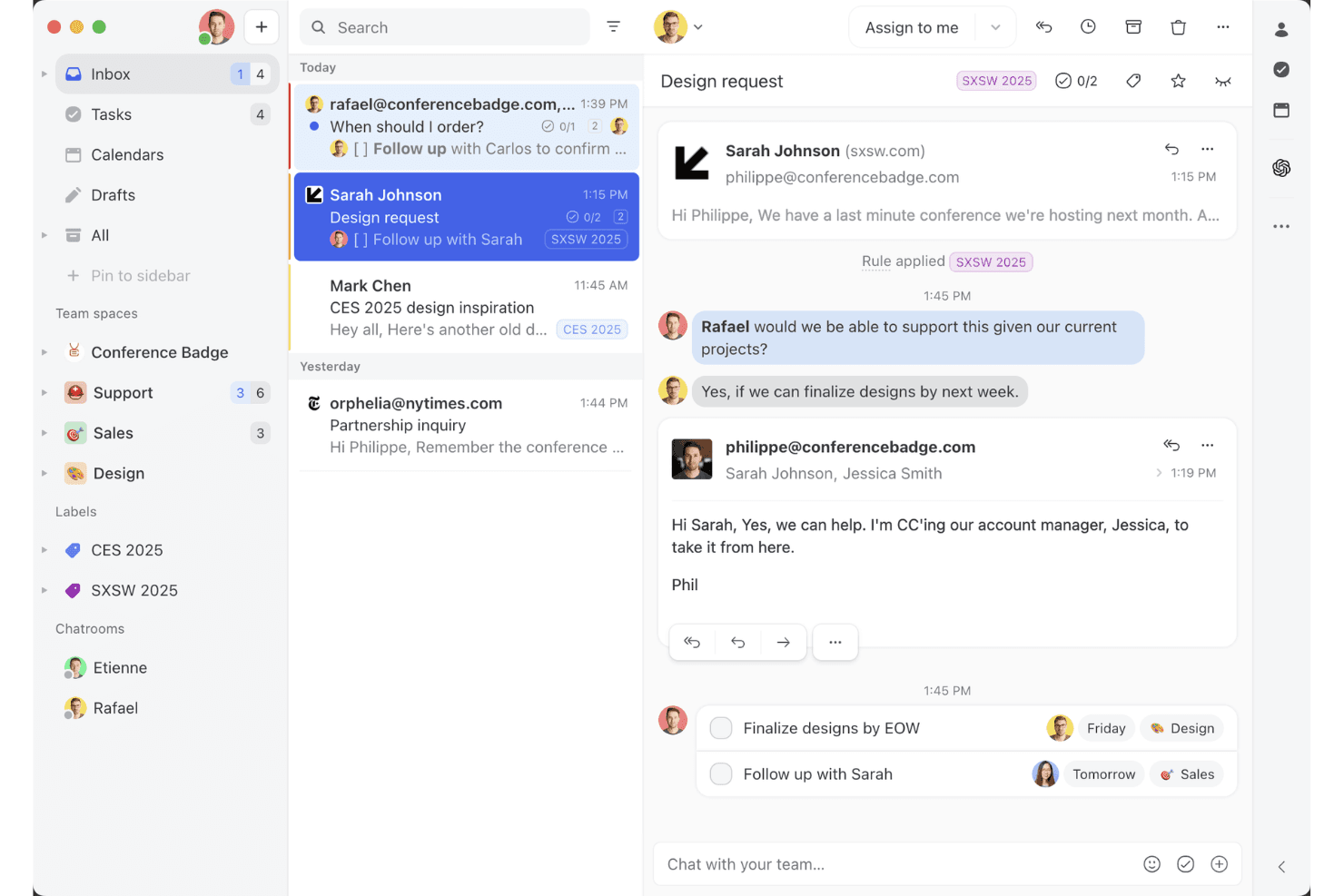
La vista de bandeja de entrada compartida de Missive muestra cómo los equipos pueden colaborar en conversaciones de correo electrónico, asignar tareas y gestionar las conversaciones con clientes en un único espacio de trabajo. Missive es una plataforma colaborativa de bandeja de entrada para equipos que combina la gestión compartida del correo electrónico, la redacción de respuestas con IA, la clasificación automatizada de la bandeja de entrada y la mensajería multicanal por correo electrónico, SMS y canales sociales.
¿Para quién es más adecuada Missive?
Missive es una opción excelente para equipos que trabajan de cara al cliente —soporte, ventas y éxito del cliente— y necesitan clasificar y responder grandes volúmenes de correos electrónicos entrantes sin que nada se pierda.
Por qué elegí Missive
Elegí Missive como una de las mejores opciones porque su función Reglas de IA hace algo que sinceramente no he visto hacer tan bien en ningún otro sitio: permite escribir instrucciones en lenguaje natural que clasifican automáticamente los correos electrónicos entrantes mediante el análisis del sentimiento, la clasificación del tipo de mensaje y la activación de acciones como la asignación o la escalación. En la práctica, esto significa que mi equipo puede establecer una regla que detecte la urgencia en el asunto y la dirija instantáneamente a la persona adecuada, sin necesidad de clasificarla manualmente. El asistente de IA también lee todo el contexto de la conversación antes de redactar respuestas, por lo que estas mantienen la identidad de la marca sin necesidad de instrucciones adicionales.
Características principales de Missive
- Resúmenes de conversaciones: Condensa al instante las conversaciones largas de correo electrónico en un breve resumen para que tu equipo pueda ponerse al día sin leer cada mensaje.
- Respuestas prediseñadas con campos variables: Permite crear plantillas de respuesta reutilizables con campos dinámicos para responder más rápido y de forma coherente en todo el equipo.
- Bandeja de entrada unificada multicanal: Agrupa el correo electrónico, los SMS, WhatsApp y los mensajes directos de redes sociales en un único espacio de trabajo compartido para gestionar todas las conversaciones con los clientes.
- Reglas de automatización de flujos de trabajo: Activa acciones como la asignación automática, el enrutamiento rotativo y las respuestas automáticas según las condiciones que definas, sin necesidad de escribir código.
- Servidor MCP de Missive: Conecta herramientas externas de IA (como Claude o ChatGPT) para consultar conversaciones de correo electrónico, comprobar calendarios y redactar respuestas, manteniendo la revisión del agente como requisito antes del envío.
Integraciones de Missive
Missive ofrece más de 25 integraciones nativas, entre ellas HubSpot, Salesforce, Pipedrive, Shopify, Google Workspace, Microsoft 365, OpenAI, Anthropic y Google Gemini. También admite integraciones personalizadas mediante su API REST, webhooks, Zapier y su nuevo servidor MCP en los planes Productive y Business (requiere activación por parte del administrador), pero carece de conectores nativos para Mailchimp, Klaviyo y otras plataformas de marketing por correo electrónico.
Pros and Cons
Pros:
- Las reglas de IA automatizan la clasificación de la bandeja de entrada a gran escala
- El asistente de IA del equipo lee todo el contexto de la conversación
- Resúmenes rápidos de conversaciones largas de correo electrónico
Cons:
- No incluye funciones de campañas ni de envío masivo de correos electrónicos
- Carece de pruebas A/B y análisis de marketing
Learn more about Missive: Mejor para mensajería basada en el comportamiento
- Prueba gratuita de 14 días + demo gratis disponible
- Desde $100/mes
Visit WebsiteCustomer Rating:4.2/5
Customer.io envía mensajes basados en el comportamiento para aumentar la interacción. Customer.io es una plataforma de marketing por correo electrónico impulsada por IA que te permite automatizar campañas, segmentar audiencias y activar mensajes basados en el comportamiento del usuario a través de múltiples canales.
¿Para quién es mejor Customer.io?
Customer.io es una opción sólida para empresas SaaS lideradas por productos y negocios digitales que necesitan enviar mensajes dirigidos y basados en eventos a los usuarios según su comportamiento en tiempo real.
Por qué elegí Customer.io
Customer.io se gana su lugar en mi lista corta por la precisión con la que gestiona la mensajería basada en el comportamiento. Me encanta que puedas activar campañas basadas en cualquier combinación de eventos del usuario, atributos de perfil o acciones en tiempo real—esto significa que si un usuario completa un paso específico en tu flujo de incorporación pero omite otro, puedes derivarlo automáticamente a una ruta de mensajes completamente distinta. El seguimiento de eventos anónimos es una función que considero especialmente útil, ya que captura el comportamiento incluso antes de que el usuario se registre, permitiéndote personalizar la incorporación desde la primera interacción. Además, la función de recomendación de horario de envío impulsada por IA entrega cada mensaje en el momento en que es más probable que un cliente específico interactúe, en lugar de aplicar un horario de envío generalizado.
Funciones clave de Customer.io
- Constructor visual de flujos de trabajo: Diseña flujos de campañas multietapa y multicanal usando un lienzo de arrastrar y soltar con lógica condicional de ramificación.
- Segmentación impulsada por IA: Construye segmentos de audiencia dinámicos que se actualizan automáticamente basados en datos de usuario y actividad de eventos en tiempo real.
- Mensajería transaccional: Envía correos electrónicos activados únicos como restablecimiento de contraseñas o recibos directamente desde la misma plataforma que tus campañas de marketing.
- Mensajería dentro de la app: Entrega mensajes dirigidos dentro de tu producto para involucrar a los usuarios en momentos clave sin cambiar a una herramienta diferente.
Integraciones de Customer.io
Customer.io ofrece integraciones nativas con Segment, Amplitude, Mixpanel, Snowflake y Twilio, y se conecta a través de Zapier. Hay una API disponible para integraciones personalizadas.
Pros and Cons
Pros:
- Soporta mensajería basada en el comportamiento
- Automatización de flujos sencilla
- Seguimiento de datos en tiempo real
Cons:
- Personalización de diseño limitada
- Complejidad en la gestión de flujos de trabajo
Learn more about Customer.io: Ideal para prospección de correos electrónicos en frío
- Prueba gratuita disponible
- Desde $37.6/mes
Visit WebsiteCustomer Rating:4.8/5
Instantly utiliza IA para escalar y personalizar la prospección por correo electrónico en frío. Instantly es una plataforma de email marketing impulsada por IA para enviar, gestionar y analizar campañas de correo electrónico en frío a gran escala.
¿Para quién es mejor Instantly?
Instantly es ideal para equipos de ventas, especialistas en marketing de crecimiento y agencias que realizan campañas de prospección por correo electrónico en frío de alto volumen.
Por qué elegí Instantly
Instantly es una de mis opciones principales porque me encanta cómo gestiona el envío de correos electrónicos en frío a escala sin sacrificar la entregabilidad. La rotación ilimitada de cuentas de correo es una mecánica sobresaliente: mi equipo puede conectar docenas de direcciones de envío e Instantly distribuye los envíos entre ellas, manteniendo así la reputación del remitente. También utilizo el Spintax con IA y el Comprobador de Palabras Spam para optimizar el texto antes de lanzar una campaña, detectando problemas de entregabilidad antes de que afecten a las respuestas. El testeo A/Z nos permite probar ilimitadas variaciones de correos, y la IA de Instantly escala la versión con mejor rendimiento.
Características clave de Instantly
- Personalización impulsada por IA: Genera contenido personalizado de correo electrónico para cada prospecto usando variables impulsadas por IA y campos personalizados.
- Calentamiento de bandejas de entrada: Aumenta de forma gradual el volumen de envíos en las cuentas conectadas para fortalecer la reputación del remitente antes de desplegar campañas completas.
- Panel de analíticas de campañas: Supervisa las tasas de apertura, respuestas, rebotes y métricas de conversión de todas las campañas activas desde una sola vista.
- Buscador de leads: Busca y filtra una base de datos B2B integrada para encontrar y añadir prospectos verificados directamente a tus campañas de prospección.
Integraciones de Instantly
Las integraciones incluyen Salesforce, Pipedrive, HubSpot y Calendly. Instantly ofrece una API para integraciones personalizadas.
Pros and Cons
Pros:
- Conexión ilimitada de cuentas de correo electrónico
- Filtros de segmentación avanzada
- Personalización impulsada por IA
Cons:
- Puede requerir configuración técnica
- Soporte limitado sin conexión
Learn more about Instantly: Ideal para interacciones con clientes impulsadas por IA
- Prueba gratuita de 7 días + plan gratuito disponible
- Desde $24.17/mes (facturado anualmente)
Visit WebsiteCustomer Rating:4.7/5
El panel de Tidio combina chat en vivo, automatización e inteligencia basada en IA para mejorar la interacción con los clientes. Tidio es una plataforma de marketing por correo electrónico y comunicación con clientes impulsada por IA que combina automatización de chatbots, chat en vivo y herramientas de gestión de campañas para empresas que buscan automatizar y personalizar su alcance.
¿Para quién es mejor Tidio?
Tidio es especialmente adecuado para pequeñas y medianas empresas de comercio electrónico que desean combinar el marketing por correo electrónico con chat y soporte al cliente impulsados por IA en una sola plataforma.
Por qué elegí Tidio
Tidio merece su lugar en mi lista de los mejores por la forma en que su agente de IA Lyro gestiona las interacciones con los clientes. Lyro se entrena exclusivamente con tu propio contenido de soporte y utiliza Claude (Anthropic AI) para generar respuestas, lo que significa que se mantiene fiel a la marca y no inventa respuestas. Me gusta especialmente la función Lyro Smart Actions, que permite que la IA realice tareas como actualizaciones de pedidos y calificación de clientes potenciales sin intervención humana. Si lo combinas con Flows, un generador de automatizaciones sin código que activa mensajes personalizados en momentos clave del recorrido del cliente, obtienes una plataforma que cubre interacciones impulsadas por IA en todo el ciclo de vida del cliente.
Funciones clave de Tidio
- Asistente de Respuestas con IA: Utiliza GPT-4 para reescribir al instante las respuestas básicas de los agentes en mensajes pulidos y profesionales durante conversaciones de chat en vivo.
- Encuesta previa al chat: Recopila los datos de contacto del cliente antes de que comience una sesión de chat, integrando la información automáticamente en los perfiles de clientes.
- Flujos de tickets: Automatiza acciones repetitivas de soporte, como el envío de respuestas automáticas y el cierre de tickets sin respuesta, sin intervención manual.
- Lista de visitantes en vivo: Muestra todos los visitantes activos del sitio web y las páginas que están navegando en tiempo real, para que los agentes puedan iniciar conversaciones proactivamente.
Integraciones de Tidio
Tidio ofrece integraciones nativas con Shopify, WordPress, Wix, BigCommerce, Mailchimp, HubSpot, Google Analytics, Messenger, Instagram y Zapier. Hay una API disponible para integraciones personalizadas.
Pros and Cons
Pros:
- Automatiza las interacciones repetitivas con clientes
- Brinda soporte por chat en tiempo real
- Ofrece información de flujos de trabajo basada en IA
Cons:
- Flexibilidad limitada en el diseño de correos electrónicos
- Puede requerir ayuda para la configuración
Learn more about Tidio: 10Ideal para compatibilidad con correos AMP
Mailmodo
- Prueba gratuita de 21 días + demo gratuita disponible
- Desde $39/mes (facturado anualmente)
Visit WebsiteCustomer Rating:4.6/5
Mailmodo utiliza IA para crear correos interactivos que impulsan conversiones. Mailmodo es una plataforma de email marketing con IA que te permite crear, enviar y automatizar campañas interactivas usando correos AMP, contenido dinámico y avanzadas herramientas de personalización.
¿Para quién es mejor Mailmodo?
Mailmodo es ideal para equipos de marketing de empresas B2B y B2C que desean ir más allá del correo electrónico estático y ejecutar campañas interactivas enfocadas en la conversión.
Por qué elegí Mailmodo
Mailmodo se gana su lugar como uno de los mejores en mi lista gracias a la manera en que trabaja con correos AMP, de una forma que ninguna otra plataforma logra. Con Mailmodo, puedo insertar formularios, encuestas, cuestionarios e incluso juegos de 'gira la rueda' directamente dentro del correo, de modo que los destinatarios completan acciones sin salir de su bandeja de entrada. Es una experiencia realmente diferente a una campaña tradicional de redirección. También me gusta que Mailmodo utilice tanto AMP for Email como interactividad mediante CSS para abarcar clientes más allá de Gmail, y entregue automáticamente una versión sencilla en HTML cuando el cliente del destinatario no sea compatible con ninguno de los dos formatos.
Características clave de Mailmodo
- Generador de segmentos con IA: Crea segmentos de audiencia usando indicaciones en lenguaje natural en vez de lógica de filtro manual.
- Constructor de secuencias de emails: Configura secuencias automáticas y multietapa de correos electrónicos que se disparan según el comportamiento del contacto o etapa del ciclo de vida.
- Analizador de campañas con IA: Revisa los datos de desempeño de campañas y recibe recomendaciones generadas por IA para mejorar los próximos envíos.
- Segmentación de listas y contactos: Organiza contactos en grupos objetivo según atributos, eventos o historial de interacción.
Integraciones de Mailmodo
Mailmodo ofrece integraciones nativas con HubSpot, Salesforce, Zoho CRM, Pabbly, Webhooks y Google Sheets. También se conecta con Zapier y proporciona una API para integraciones personalizadas.
Pros and Cons
Pros:
- Soporta correos interactivos AMP
- Analíticas integradas para seguimiento
- Fácil de insertar formularios y widgets
Cons:
- Requiere conocimientos de AMP HTML
- Integraciones limitadas con terceros
Learn more about Mailmodo:
Otras herramientas de marketing por correo electrónico con IA
Estas son algunas opciones adicionales de herramientas de marketing por correo electrónico con IA que no llegaron a mi selección, pero que aun así merece la pena consultar:
- 11ActiveCampaignIdeal para flujos de trabajo de automatización
- 12Iterable Mejor para marketing multicanal
- 13BeehiivIdeal para creadores de boletines
- 14Elastic EmailIdeal para plantillas creadas con IA
- 15Braze Mejor para la interacción móvil
- 16Click DimensionsIdeal para usuarios de Microsoft Dynamics
- 17Movable InkIdeal para contenido dinámico
- 18Seventh SenseIdeal para horarios de envío personalizados
- 19VitaMailIdeal para la generación de emails con IA
- 20SmartpingIdeal para personalización de emails con IA
Cómo evalúo las herramientas de marketing por correo electrónico con IA
Cada herramienta en esta lista debe aportar un verdadero valor de IA, no solo ser un chatbot añadido a un antiguo editor de correos electrónicos. Divido mi evaluación en dos niveles: la funcionalidad básica que toda herramienta debe tener para poder considerarse y los factores diferenciadores que distinguen una buena opción de la mejor para tu equipo.
Funcionalidad básica (Condiciones mínimas para esta lista)
Cuando selecciono herramientas para mi lista, clasifico cada una en una escala del 0 (no ofrece la funcionalidad) al 5 (sobresale en esta área) según cada funcionalidad principal enumerada a continuación. Luego, calculo la puntuación total de la herramienta en porcentaje. Cada herramienta debe lograr una puntuación total mínima del 65% para ser considerada para su inclusión.
- Generación de contenido por IA: Evalúo si la herramienta puede redactar el texto completo del email, líneas de asunto y CTAs a partir de un prompt, y no solo ofrecer corrector ortográfico o sugerencias básicas de texto.
- Personalización predictiva: Cada herramienta debe ir más allá de las etiquetas de combinación estáticas y utilizar IA para adaptar bloques de contenido, recomendaciones de productos u ofertas por destinatario.
- Segmentación inteligente: Busco agrupación de audiencias impulsada por ML basada en patrones de participación o señales del ciclo de vida, como la identificación automática de suscriptores en riesgo antes de una campaña de reenganche.
- Optimización del horario de envío: La herramienta debe usar IA para determinar la mejor ventana de entrega para cada destinatario, no solo permitirte elegir un envío por lotes según la zona horaria.
- Pruebas A/B y optimización con IA: Verifico si la plataforma puede seleccionar automáticamente y ampliar la variante ganadora entre líneas de asunto o contenido en lugar de requerir una selección manual del ganador.
- Analítica de rendimiento e insights: Los informes deben mostrar conclusiones generadas por IA y recomendar próximos pasos, no solo los cuadros de apertura y clics habituales.
Una vez que tengo una lista de herramientas que cumplen con los criterios, considero lo que distingue a cada plataforma.
Factores diferenciadores (Lo que distingue a los proveedores)
Así es como comparo y contrasto diferentes proveedores:
Funciones destacadas
La IA para la orquestación de recorridos es un gran diferenciador: busco herramientas que construyan y adapten flujos de ciclo de vida con varios pasos de forma automática en lugar de requerir una configuración manual de los desencadenantes. El entrenamiento de la voz de marca también es importante, especialmente para equipos que envían campañas de alto volumen y donde es difícil mantener la coherencia en el tono. También evalúo si una plataforma ofrece atribución predictiva de ingresos, vinculando el rendimiento de los emails a los ingresos y LTV posteriores en vez de detenerse en aperturas y clics.
Más allá de las funciones
La profundidad de integración es una de las primeras cosas que reviso: una herramienta que se sincronice de forma nativa con tu CRM y plataforma de ecommerce mantiene los datos de la audiencia frescos y dispara acciones con precisión. Las políticas de privacidad de datos también merecen atención detallada, especialmente si un proveedor usa los datos de tus clientes para entrenar modelos de IA compartidos. También evalúo el soporte de entregabilidad, incluyendo opciones de IP dedicada, automatización de calentamiento y configuración de autenticaciones como DKIM y DMARC, ya que incluso el contenido más inteligente creado por IA no sirve de nada si termina en la carpeta de spam.
Cómo elegir una herramienta de marketing por correo electrónico con IA
Es fácil perderse entre largas listas de funciones y estructuras de precios complejas. Para ayudarte a mantener la atención mientras avanzas en tu proceso particular de selección de software, aquí tienes una lista de factores que debes tener en cuenta:
| Factor | Qué debes tener en cuenta |
| Escalabilidad | ¿Puede la herramienta crecer junto con tu empresa? Considera si admite un aumento del volumen de correos electrónicos y usuarios adicionales sin que disminuya el rendimiento. Busca planes flexibles que se adapten a equipos en crecimiento y a bases de clientes cada vez mayores. |
| Integraciones | ¿Se integra con tus herramientas actuales? Comprueba la compatibilidad con sistemas CRM, plataformas de análisis y otras herramientas de marketing de las que dependas. La falta de integración puede crear silos de datos e interrumpir los flujos de trabajo. |
| Personalización | ¿Puedes adaptar la herramienta a tus necesidades? Evalúa si puedes personalizar plantillas, flujos de trabajo e informes. Una herramienta que se adapte a tus procesos puede ahorrar tiempo y aumentar la eficiencia. |
| Facilidad de uso | ¿Es la herramienta intuitiva y fácil de usar? Comprueba si tu equipo puede aprender rápidamente a utilizarla sin una formación exhaustiva. Las herramientas complicadas pueden causar frustración y bajos índices de adopción. |
| Implementación e incorporación | ¿Qué tan sencillo es el proceso de configuración? Considera el tiempo y los recursos necesarios para poner en marcha la herramienta. Busca proveedores que ofrezcan incorporación guiada, recursos de formación y asistencia durante la transición. |
| Coste | ¿Se ajusta el precio a tu presupuesto? Evalúa el coste total, incluidas las posibles tarifas ocultas. Compara los niveles de precios y las funciones que ofrece cada uno. Asegúrate de que el valor justifique el gasto. |
| Medidas de seguridad | ¿Cómo protege la herramienta tus datos? Comprueba si utiliza cifrado, controles de acceso y cumple la normativa de protección de datos. Los fallos de seguridad pueden provocar filtraciones y pérdida de confianza. |
| Disponibilidad de asistencia | ¿Qué opciones de asistencia se ofrecen? Considera si tienes acceso a asistencia las 24 horas, responsables de cuenta dedicados o foros de la comunidad. Una asistencia oportuna puede resolver los problemas rápidamente y minimizar el tiempo de inactividad. |
¿Qué son las herramientas de marketing por correo electrónico con IA?
Las herramientas de marketing por correo electrónico con IA utilizan la inteligencia artificial para mejorar y automatizar las campañas de marketing por correo electrónico mediante el procesamiento del lenguaje natural, el aprendizaje automático y el análisis de datos. Los profesionales del marketing, los propietarios de empresas y los equipos de ventas suelen utilizar estas herramientas para mejorar la interacción, la personalización del contenido y la eficiencia. Las funciones de automatización, segmentación, personalización y creación de contenido ayudan a dirigirse al público adecuado, elaborar mensajes personalizados y medir el éxito de las campañas. Estas herramientas aportan un valor considerable al ahorrar tiempo y aumentar la eficacia de las iniciativas de marketing por correo electrónico.
Funciones de las herramientas de marketing por correo electrónico con IA
Al seleccionar herramientas de marketing por correo electrónico con IA, presta atención a las siguientes funciones clave:
- Automatización del correo electrónico: Automatiza todo el proceso de tu campaña, desde la programación y el envío hasta la gestión de los seguimientos. Esto te ahorra muchísimo tiempo y ayuda a mantener tus comunicaciones al día, incluso si el café aún no ha hecho efecto.
- Segmentación de contactos: Agrupa tus contactos según su comportamiento, intereses o datos demográficos para poder enviar el mensaje adecuado a la persona adecuada. No tendrás que adivinar quién quiere qué: realmente recibirán contenido que les resulte relevante.
- Opciones de personalización: Crea correos electrónicos que parezcan una nota atenta en lugar de un envío genérico. Inserta dinámicamente nombres, preferencias o historial de compras de cada suscriptor para que tus correos destaquen en una bandeja de entrada saturada.
- Pruebas A/B: Pon a prueba tus líneas de asunto, contenido y diseños. Comprueba rápidamente qué funciona (y qué no) para poder ajustar tus mensajes y obtener mejores resultados cada vez.
- Panel de análisis: Supervisa las aperturas, los clics, las conversiones y los abandonos desde una ubicación central. Los datos te permiten ver fácilmente qué está funcionando y dónde hay margen para realizar ajustes que mejoren los resultados.
- Editor de arrastrar y soltar: Diseña correos electrónicos atractivos sin complicarte con el código. Utiliza bloques de construcción sencillos para crear plantillas personalizadas con un acabado profesional y listas para las últimas incorporaciones de contenido antes de pulsar el botón de envío.
- Gestión del cumplimiento normativo: Puedes estar tranquilo sabiendo que tus campañas están configuradas para cumplir el RGPD, la ley CAN-SPAM y otras normativas de privacidad. Puedes centrarte en el marketing en lugar de preocuparte por problemas legales.
- Compatibilidad con integraciones: Conecta tu herramienta de correo electrónico con otras plataformas que ya utilizas (como sitios de comercio electrónico o CRM) para conseguir flujos de trabajo más fluidos y un mejor rendimiento.
Funciones habituales de IA en las herramientas de marketing por correo electrónico
Más allá de las funciones estándar de las herramientas de marketing por correo electrónico con IA mencionadas anteriormente, muchas de estas soluciones están incorporando funciones de IA como:
- Cómo evitar los filtros de spam: La IA analiza tus correos electrónicos para señalar cualquier elemento que pueda activar los filtros de spam, de modo que puedas perfeccionar tu contenido y maximizar la entregabilidad.
- Generación automatizada de contenido: Utiliza la IA para crear textos de correo electrónico atractivos y adaptados a cada destinatario, ahorrando tiempo en la elaboración de mensajes y aumentando las tasas de respuesta mediante una comunicación personalizada a gran escala.
- Optimización del momento de envío: La IA analiza el comportamiento anterior de los usuarios para programar los correos electrónicos exactamente en el momento en que cada destinatario tiene más probabilidades de interactuar. Así, evitas el agujero negro digital y consigues que vean tus correos.
- Análisis predictivo: La IA procesa los datos para pronosticar las tasas de apertura, los clics o el riesgo de abandono, de modo que puedas ajustar tu estrategia en tiempo real y adelantarte a las tendencias.
- Sugerencias inteligentes para líneas de asunto: Recibe ideas basadas en IA para crear líneas de asunto atractivas según lo que ha funcionado en el pasado, lo que te ayudará a conseguir esas aperturas tan importantes.
- Mapeo del recorrido del cliente: La IA realiza un seguimiento de las acciones de cada usuario y se adapta a ellas, haciéndolo avanzar automáticamente por una serie personalizada de puntos de contacto para lograr una interacción óptima sin necesidad de supervisarlo todo.
Beneficios de las herramientas de marketing por correo electrónico con IA
La implementación de herramientas de marketing por correo electrónico con IA aporta varias ventajas a tu equipo y a tu empresa. Estas son algunas de las que puedes esperar:
- Ahorro de tiempo: La automatización gestiona tareas repetitivas, como enviar correos electrónicos y administrar listas, liberando tiempo de tu equipo para actividades más estratégicas.
- Mayor interacción: La personalización adapta el contenido a las preferencias individuales, aumentando las tasas de apertura y de clics.
- Decisiones basadas en datos: Los análisis proporcionan información sobre el rendimiento de las campañas, lo que te ayuda a perfeccionar las estrategias y mejorar los resultados.
- Marketing dirigido: La segmentación permite dirigirse con precisión a diferentes grupos de audiencia, lo que da lugar a campañas más eficaces.
- Mayor alcance: La interacción multicanal te permite conectar con los clientes por correo electrónico, SMS y notificaciones push, ampliando tu alcance.
- Mayor relevancia: El contenido dinámico que utiliza IA generativa y datos en tiempo real garantiza que tus mensajes sean oportunos y pertinentes para cada destinatario.
- Seguridad y cumplimiento normativo: Las medidas de seguridad protegen tus datos y garantizan el cumplimiento de la normativa, manteniendo la confianza de los clientes.
Costes y precios de las herramientas de marketing por correo electrónico con IA
La selección de herramientas de marketing por correo electrónico con IA requiere comprender los distintos modelos de precios y planes disponibles. Los costes varían según las funciones, el tamaño del equipo, los complementos y otros factores. La siguiente tabla resume los planes habituales, sus precios medios y las funciones que suelen incluir las soluciones de herramientas de marketing por correo electrónico con IA:
Tabla comparativa de planes de herramientas de marketing por correo electrónico con IA
| Tipo de plan | Precio medio | Funciones habituales |
| Plan gratuito | $0 | Automatización básica del correo electrónico, análisis limitados y plantillas estándar. |
| Plan personal | $10-$30 /user /month | Segmentación avanzada, asistencia prioritaria y opciones mejoradas de personalización. |
| Plan para empresas | $50-$100 /user /month | Pruebas A/B, marketing multicanal y flujos de trabajo de automatización avanzados. |
| Plan empresarial | $150-$300 /user /month | Integraciones personalizadas, gestión de cuentas exclusiva y funciones de seguridad integrales. |
Preguntas frecuentes sobre las herramientas de marketing por correo electrónico con IA
Estas son algunas respuestas a preguntas frecuentes sobre las herramientas de marketing por correo electrónico con IA:
¿Cómo afecta la IA al marketing por correo electrónico?
La IA mejora el marketing por correo electrónico al determinar el momento óptimo para enviar los mensajes y personalizar las líneas de asunto. Alinea los horarios de envío con las distintas zonas horarias y los hábitos de los usuarios, aumentando la probabilidad de interacción de los clientes y mejorando la respuesta de la audiencia.
¿Cuál es la regla 80/20 en el marketing por correo electrónico?
La regla 80/20 sugiere que aproximadamente el 80 % de los efectos procede del 20 % de las causas. En el marketing por correo electrónico, esto significa que un pequeño número de tus esfuerzos suele generar la mayoría de tus resultados. Céntrate en las tareas de mayor impacto que generen los mejores rendimientos.
¿Cómo funciona el marketing automatizado por correo electrónico?
El marketing automatizado por correo electrónico consiste en establecer reglas y activadores para las campañas de correo electrónico. Creas la campaña, programas los mensajes y estableces las condiciones de envío. Los destinatarios reciben los correos electrónicos según esas condiciones, lo que proporciona una experiencia personalizada.
¿Cómo puede la IA personalizar el marketing por correo electrónico?
La IA personaliza el marketing por correo electrónico mediante el análisis de los datos de los clientes para adaptar el contenido. Utiliza el aprendizaje automático para comprender las preferencias y los comportamientos de los usuarios, garantizando que los mensajes sean relevantes y atractivos. Esto se traduce en tasas de apertura más elevadas y mejores relaciones con los clientes.
¿Qué desafíos plantea la IA en el marketing por correo electrónico?
Entre los desafíos de la IA en el marketing por correo electrónico se incluyen las preocupaciones sobre la privacidad de los datos, la integración con los sistemas existentes y la necesidad de conocimientos técnicos. Garantizar el cumplimiento de la normativa y mantener la seguridad de los datos son aspectos cruciales para una implementación satisfactoria.