

Las herramientas de automatización del marketing de contenidos son plataformas de software que ayudan a tu equipo a planificar, crear, distribuir y analizar contenidos con menos trabajo manual. Si buscas formas de gestionar una demanda creciente de contenidos, coordinar campañas en distintos canales o mantenerte al día con las cambiantes expectativas de la audiencia, estas herramientas pueden marcar una diferencia medible.
En esta lista encontrarás opciones fiables para automatizar tareas repetitivas, mejorar la colaboración y obtener información más clara, para que puedas centrarte en la estrategia y los resultados, no solo en la ejecución. Utiliza esta guía para comparar funciones y encontrar la opción adecuada para tus objetivos de marketing en 2026.
Por qué confiar en nuestras recomendaciones de software
6,700+
Reviews
20
Industry experts
16+
Evaluation factors
14
Years
Nuestro equipo lleva probando y evaluando software desde 2012. Como líderes de marketing, sabemos lo difícil —y lo importante— que es elegir el software adecuado.
Para esta guía, evaluamos las herramientas mediante pruebas prácticas e investigación independiente, puntuando las herramientas según nuestros criterios de selección.
Nuestras reseñas reflejan nuestro criterio editorial humano, no un discurso de ventas.
Revisores expertos:
 Gui DrusinaDirector creativo
- Shriya GhateSenior Marketing Lead
 Amanda JacquesLíder de Marketing Ops

Tabla comparativa de herramientas de automatización del marketing de contenidos
Esta tabla comparativa resume los detalles de precios de mi selección de las mejores herramientas de automatización del marketing de contenidos.
| Tool | Best For | Trial Info | Price | ||
|---|---|---|---|---|---|
| 1 | Ideal para la defensa de los empleados en LinkedIn a gran escala | Demo gratuita disponible | Desde £5/usuario/mes (facturado anualmente) | Website | |
| 2 | Ideal para asistencia rápida en redacción de textos | Plan gratuito de 7 días disponible | Desde $79/mes (facturado anualmente) | Website | |
| 3 | Mejor para la creación de contenido potenciada por IA | Prueba gratuita de 7 días + demo gratis disponible | Desde $59/asiento/mes (facturado anualmente) | Website | |
| 4 | Ideal para campañas integradas impulsadas por SEO | Plan gratuito + prueba gratuita de 7 días + demo gratis | Desde $117.33/mes (facturado anualmente) | Website | |
| 5 | Ideal para la planificación editorial colaborativa | Plan gratuito + demo gratuita disponible | Desde $19/usuario/mes (facturado anualmente) | Website | |
| 6 | Ideal para programar publicaciones en redes sociales | Plan gratuito + prueba gratis disponible | Desde $5/mes (facturación anual) | Website | |
| 7 | Ideal para la participación multicanal de audiencias | Prueba gratuita de 30 días + demo gratis disponible | Desde $75/mes | Website | |
| 8 | La mejor opción para automatizar flujos de trabajo multiplataforma | Plan gratuito disponible | Desde $19.99/mes (facturado anualmente) | Website | |
| 9 | Ideal para la generación automática de entradas de blog | No disponible | Desde $9/mes | Website | |
| 10 | Ideal para automatización de marketing de código abierto | Prueba gratuita de 14 días + demo gratis disponible | Desde €247.50/mes (facturado anualmente) | Website |


Reseñas de herramientas de automatización del marketing de contenidos
A continuación se muestran mis resúmenes detallados de las herramientas de automatización del marketing de contenidos que han entrado en mi lista. Mis reseñas ofrecen un análisis detallado de las funciones, los mejores casos de uso y las integraciones de cada plataforma para ayudarte a encontrar la mejor opción para ti.
 Ideal para la defensa de los empleados en LinkedIn a gran escala
- Demo gratuita disponible
- Desde £5/usuario/mes (facturado anualmente)
Visit WebsiteCustomer Rating:5/5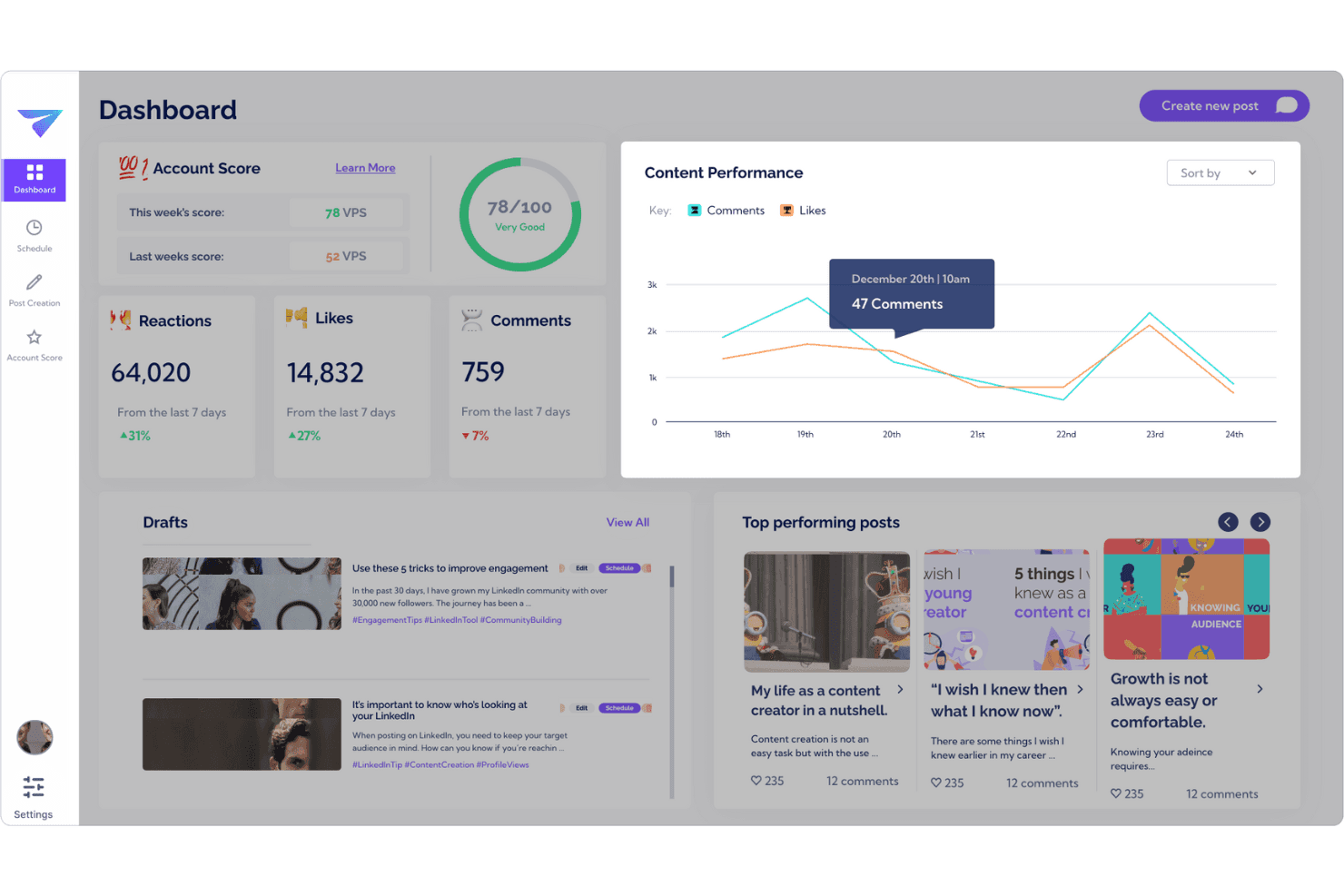
Supervisa la interacción en LinkedIn y el rendimiento de la defensa de los empleados en un único panel. Vulse es una plataforma de defensa de los empleados exclusiva de LinkedIn que combina generación de contenido con IA, adaptación al tono de voz, programación de publicaciones, análisis de equipos y gestión de comunidades en perfiles personales y páginas de empresas.
¿Para quién es más adecuado Vulse?
Vulse es una opción excelente para equipos de marketing B2B que gestionan programas de defensa de los empleados centrados en LinkedIn y necesitan ampliar el contenido auténtico en varios perfiles personales sin perder la coherencia de la marca.
Por qué elegí Vulse
Elegí Vulse como una de las mejores opciones porque su adaptación al tono de voz es realmente diferente de todo lo que he visto para la defensa de los empleados en LinkedIn a gran escala. La IA aprende el ritmo de publicación y el vocabulario de cada empleado, de modo que, cuando mi equipo difunde un único mensaje de marca, cada borrador llega a la cola de cada persona ya redactado con su propio estilo. Si a esto se le suman los análisis nativos de la API de LinkedIn y una puntuación de cuenta que supervisa la salud del programa de todo el equipo, se obtiene una visibilidad real de lo que funciona.
Características principales de Vulse
- Calendario de programación de contenido: Un calendario de arrastrar y soltar permite crear en lote y programar publicaciones de LinkedIn para su publicación automática en todo el equipo.
- Clasificaciones del equipo: Clasifica a los miembros del equipo según las publicaciones publicadas, las impresiones y la interacción para que puedas identificar quién está activo y quién necesita un pequeño empujón.
- Feed de gestión de comunidades: Agrega las menciones, etiquetas y comentarios de LinkedIn en un único feed para que tu equipo pueda interactuar desde cualquier perfil conectado sin compartir credenciales.
- Resumidor de artículos: Convierte contenido extenso en publicaciones listas para LinkedIn directamente dentro de la plataforma.
Integraciones de Vulse
Las integraciones nativas no están documentadas con claridad. Sin embargo, Vulse se conecta mediante la API oficial de gestión de comunidades de LinkedIn.
Pros and Cons
Pros:
- Adaptación del tono de voz mediante IA para cada usuario
- API nativa de LinkedIn para análisis en tiempo real
- Flujos de trabajo de aprobación y calendario de contenido del equipo
Cons:
- Solo LinkedIn, sin publicación multicanal
- Carece de funciones de atribución de marketing de embudo completo
Learn more about Vulse: Ideal para asistencia rápida en redacción de textos
- Plan gratuito de 7 días disponible
- Desde $79/mes (facturado anualmente)
Visit WebsiteCustomer Rating:4.8/5
Writesonic produce rápidamente textos de marketing para anuncios, blogs y páginas de destino. Writesonic ofrece herramientas de redacción asistida por IA diseñadas para equipos de marketing y contenido que necesitan generar grandes volúmenes de texto rápidamente. Es especialmente útil para agencias, marcas de comercio electrónico y gestores de redes sociales que buscan automatizar publicaciones de blog, textos publicitarios y descripciones de productos. Con Writesonic, puedes crear borradores, titulares e incluso artículos extensos en minutos, ayudándote a mantenerte al día con calendarios de contenido exigentes.
Por qué elegí Writesonic
Cuando necesitas generar textos de marketing a gran escala, Writesonic destaca por su rápida asistencia en redacción. Elegí Writesonic porque sus plantillas impulsadas por IA te permiten producir publicaciones de blog, textos para páginas de destino y titulares publicitarios con solo unos clics. Las funciones de reformulación y expansión del contenido ayudan a adaptar el mensaje rápidamente para diferentes canales o audiencias. Para los profesionales del marketing de contenidos que necesitan estar a la par de campañas dinámicas, las capacidades de automatización de Writesonic facilitan llenar el pipeline de contenido sin perder velocidad.
Características clave de Writesonic
Además de sus capacidades rápidas de redacción, también encontré útiles estas funciones para la automatización de marketing de contenido:
- Generación masiva de contenido: Crea varias piezas de contenido a la vez subiendo una lista de temas o palabras clave.
- Personalización de la voz de marca: Ajusta el estilo de escritura de la IA para que coincida con las directrices y el tono de tu marca.
- Verificador de plagio: Analiza el contenido generado para asegurar su originalidad antes de publicarlo.
- Generador de imágenes con IA: Produce imágenes relevantes para acompañar tu contenido escrito directamente en la plataforma.
Integraciones de Writesonic
Las integraciones incluyen WordPress, Zapier, Webflow, Google Docs, Google Sheets, Surfer, Shopify, Wix, Notion y una API está disponible para integraciones personalizadas.
Pros and Cons
Pros:
- Generación masiva de artículos para múltiples temas
- Generador de imágenes con IA para necesidades de contenido visual
- Soporte multilingüe para campañas de contenido globales
Cons:
- Sin gestión de flujo de trabajo para colaboración en equipo
- Sin integración nativa con herramientas de análisis
Learn more about Writesonic: Mejor para la creación de contenido potenciada por IA
- Prueba gratuita de 7 días + demo gratis disponible
- Desde $59/asiento/mes (facturado anualmente)
Visit WebsiteCustomer Rating:4.7/5
Jasper crea textos de marketing asistidos por IA para blogs, anuncios y publicaciones en redes sociales. Jasper utiliza IA para ayudar a los equipos de marketing a crear contenido a gran escala, lo que lo convierte en una excelente opción para empresas que necesitan textos de alto volumen y alineados con la marca. La plataforma atrae a creadores de contenido y agencias que buscan automatizar publicaciones de blogs, copys publicitarios y contenido para redes sociales, con controles personalizables de tono de marca. Jasper se destaca por su capacidad para generar borradores, reutilizar recursos y apoyar campañas multicanal con sugerencias impulsadas por IA.
Por qué elegí Jasper
Jasper sobresale en la automatización del marketing de contenidos porque incorpora generación de contenido avanzada mediante IA directamente en tu flujo de trabajo. Elegí Jasper por su capacidad para producir artículos extensos, copys publicitarios y publicaciones para redes sociales que se ajustan al tono y estilo de tu marca. Los controles de voz de marca y las plantillas de campañas de la plataforma te ayudan a mantener la coherencia entre canales mientras agilizas la producción de contenido. Para equipos que necesitan escalar la creación de contenido de calidad, el enfoque potenciado con IA de Jasper es una excelente opción.
Características clave de Jasper
Otras funciones hacen de Jasper una opción flexible para la automatización de marketing de contenidos:
- Generador de arte con IA: Crea imágenes y gráficos originales para acompañar tu contenido escrito.
- Gestión de flujo de trabajo de contenido: Asigna tareas, establece plazos y haz seguimiento del progreso dentro de proyectos colaborativos de contenido.
- Detector de plagio: Escanea el contenido generado para asegurar originalidad y evitar problemas de texto duplicado.
- Soporte multilingüe: Genera y traduce contenido en más de 30 idiomas para campañas globales.
Integraciones de Jasper
Las integraciones incluyen Slack, Google BigQuery, Webflow, Microsoft Word, Google Sheets, Google Docs, Google Chrome, Zapier, Make y Pabbly Connect.
Pros and Cons
Pros:
- Genera contenido en más de 30 idiomas
- Ofrece detección de plagio incorporada
- Permite personalizar el tono de marca a escala
Cons:
- Ocasionales errores de hecho en el contenido generado
- Se requiere revisión manual para cumplimiento
Learn more about Jasper: Ideal para campañas integradas impulsadas por SEO
- Plan gratuito + prueba gratuita de 7 días + demo gratis
- Desde $117.33/mes (facturado anualmente)
Visit WebsiteCustomer Rating:4.5/5
Semrush impulsa el SEO con investigación de palabras clave, información de la competencia y seguimiento del rendimiento. Si buscas unificar tus esfuerzos de marketing de contenidos y SEO, Semrush reúne ambos bajo un mismo techo. La plataforma es especialmente útil para equipos de marketing que desean planificar, optimizar y medir el rendimiento del contenido con datos SEO en tiempo real. Semrush te ayuda a identificar palabras clave de alto impacto, rastrear posiciones y gestionar campañas que conectan la búsqueda orgánica directamente con tu estrategia de contenidos.
Por qué elegí Semrush
Lo que diferencia a Semrush para la automatización del marketing de contenidos es su capacidad para conectar los conocimientos de SEO directamente con la planificación y ejecución de campañas. Elegí Semrush porque te permite investigar palabras clave, auditar tu contenido y monitorear posiciones todo en un solo lugar, facilitando la alineación de tu contenido con la demanda de búsqueda. El kit de herramientas para marketing de contenidos de la plataforma te ayuda a generar ideas de temas, optimizar artículos y rastrear cómo tu contenido se desempeña en la búsqueda orgánica. Este enfoque integrado es especialmente valioso para equipos que desean asegurar que cada pieza de contenido apoye objetivos más amplios impulsados por SEO.
Características clave de Semrush
Otras características hacen de Semrush una opción versátil para equipos de marketing de contenidos:
- Asistente de redacción SEO: Obtén recomendaciones en tiempo real sobre legibilidad, tono y uso de palabras clave mientras redactas contenido.
- Herramienta de auditoría de contenido: Analiza el contenido existente de tu sitio para identificar brechas, páginas desactualizadas u oportunidades de optimización.
- Monitorización de marca: Rastrea menciones de tu marca o de competidores en la web y redes sociales.
- Seguimiento de publicaciones: Controla el rendimiento de artículos individuales publicados en sitios externos, incluyendo tráfico de referencia y posiciones de palabras clave.
Integraciones de Semrush
Las integraciones incluyen WordPress, Google Analytics, Google Search Console, Trello, HubSpot, Google Looker Studio y más.
Pros and Cons
Pros:
- Rastrea posiciones de palabras clave junto con analítica de contenido
- Sugiere temas de contenido basados en tendencias de búsqueda
- Audita el contenido existente para mejoras SEO
Cons:
- Límites de palabras clave rastreadas por plan
- Sin publicación directa en la mayoría de plataformas CMS
 Ideal para la planificación editorial colaborativa
- Plan gratuito + demo gratuita disponible
- Desde $19/usuario/mes (facturado anualmente)
Visit WebsiteCustomer Rating:4.5/5
CoSchedule organiza el trabajo de marketing con un calendario de contenido compartido y flujos de trabajo. Si tu equipo necesita un solo lugar para planificar, organizar y ejecutar contenido, CoSchedule está diseñado para ustedes. Equipos de marketing, agencias y gestores de contenido lo utilizan para coordinar calendarios editoriales, asignar tareas y asegurar que todos estén alineados con los plazos. Su enfoque colaborativo ayuda a reducir los plazos incumplidos y mantiene la producción de contenido en movimiento sin problemas.
Por qué elegí CoSchedule
CoSchedule destaca para los equipos que necesitan gestionar la producción de contenido de manera colaborativa desde el inicio hasta el final. Elegí CoSchedule porque su calendario editorial compartido permite que todos vean lo que está por venir y quién es responsable de cada tarea. Las funciones de asignación de tareas y de flujo de trabajo de la plataforma ayudan a que redactores, editores y diseñadores estén coordinados durante todo el proceso de contenido. Para los equipos de marketing de contenidos que manejan múltiples proyectos y colaboradores, CoSchedule aporta estructura y visibilidad en cada etapa de la planificación y publicación.
Características clave de CoSchedule
También encontré varias otras características que apoyan a los equipos de marketing de contenidos:
- Integración con Headline Studio: Analiza y optimiza titulares directamente dentro de tu flujo de trabajo.
- Publicación en redes sociales: Programa y publica publicaciones en varios canales sociales desde la misma plataforma.
- Organizador de activos: Almacena, etiqueta y gestiona activos digitales para un fácil acceso durante la creación de contenido.
- Panel de análisis: Haz seguimiento al desempeño del contenido y la productividad del equipo con herramientas de informes integradas.
Integraciones de CoSchedule
Las integraciones incluyen WordPress, Google Drive, Dropbox, Canva, HubSpot, Mailchimp, Slack, Trello, Asana y Google Analytics.
Pros and Cons
Pros:
- Calendario compartido para visibilidad de contenido entre equipos
- Analizador de titulares integrado para optimización de contenido
- Programación de redes sociales junto con la planificación editorial
Cons:
- Sin automatización de marketing por correo electrónico incorporada
- La biblioteca de activos carece de búsqueda avanzada
Learn more about CoSchedule: Ideal para programar publicaciones en redes sociales
- Plan gratuito + prueba gratis disponible
- Desde $5/mes (facturación anual)
Visit WebsiteCustomer Rating:4.4/5
Buffer programa y publica publicaciones sociales en múltiples plataformas. Buffer ofrece a los equipos de marketing y a los creadores individuales una forma de planificar y programar publicaciones en redes sociales en múltiples plataformas desde un solo panel. Es especialmente útil para quienes desean mantener un calendario de publicaciones constante sin esfuerzo manual. Con Buffer, puedes poner el contenido en cola, previsualizar publicaciones y analizar la interacción para mantener tus canales sociales activos y organizados.
Por qué elegí Buffer
Buffer está diseñado específicamente para equipos e individuos que necesitan programar publicaciones en redes sociales de forma eficiente a través de múltiples canales. Elegí Buffer porque su programación basada en cola te permite planificar el contenido con antelación y mantener una cadencia constante de publicaciones sin necesidad de hacerlo manualmente. La función de vista previa de publicaciones de la plataforma te ayuda a ver exactamente cómo aparecerá tu contenido en cada red antes de publicarse. Para los especialistas en marketing de contenidos enfocados en la automatización y la consistencia, las herramientas de programación de Buffer mantienen las campañas organizadas y bajo control.
Funciones clave de Buffer
Otras funciones que hacen útil a Buffer para la automatización del marketing de contenidos son:
- Integración con acortadores de enlaces: Acorta automáticamente las URLs de tus publicaciones para enlaces más limpios y un seguimiento más sencillo.
- Herramientas de colaboración en equipo: Invita a miembros del equipo para que contribuyan, revisen y aprueben publicaciones antes de publicarlas.
- Gestor de hashtags: Guarda y reutiliza grupos de hashtags para acelerar la creación de publicaciones.
- Panel de análisis: Supervisa el rendimiento de las publicaciones y las métricas de interacción en todas las cuentas sociales conectadas.
Integraciones de Buffer
Las integraciones incluyen Dropbox, Google Drive, OneDrive, Instagram, X (Twitter), Facebook, LinkedIn, Pinterest, Shopify y Google Fotos.
Pros and Cons
Pros:
- Gestor de hashtags integrado para plantillas de publicaciones
- Panel de análisis para seguimiento de la interacción en publicaciones
- Flujo de aprobación en equipo para revisión de contenido
Cons:
- No cuenta con función de reciclaje automático de contenido
- No dispone de herramientas integradas para ideación de contenido
 Ideal para la participación multicanal de audiencias
- Prueba gratuita de 30 días + demo gratis disponible
- Desde $75/mes
Visit WebsiteCustomer Rating:4.5/5
Panel de CleverTap mostrando KPIs de compras, alcance de usuarios y tendencias. CleverTap ofrece una segmentación avanzada de audiencias y participación multicanal a los especialistas en marketing que necesitan orquestar campañas en dispositivos móviles, web, correo electrónico y más. Es una excelente opción para marcas de consumo, negocios centrados en apps y equipos de crecimiento que buscan personalizar mensajes a escala. Con CleverTap, puedes automatizar la entrega de contenido dirigido basado en el comportamiento del usuario en tiempo real, ayudándote a impulsar la retención y la conversión en cada punto de contacto.
Por qué elegí CleverTap
Lo que distingue a CleverTap para la automatización del marketing de contenidos es su capacidad para unificar la participación de la audiencia a través de varios canales desde una sola plataforma. Elegí CleverTap porque te permite automatizar mensajes personalizados mediante notificaciones push, mensajes dentro de la app, SMS, correo electrónico y web, todo activado por el comportamiento del usuario en tiempo real. Sus herramientas avanzadas de segmentación te ayudan a dirigir usuarios según la etapa de su ciclo de vida, acciones o preferencias, por lo que tus campañas se mantienen relevantes y oportunas. Para los especialistas enfocados en orquestar experiencias multicanal consistentes, las funciones de automatización de CleverTap hacen posible llegar a la audiencia donde sea que esté.
Características clave de CleverTap
Otras características que hacen valioso a CleverTap para la automatización del marketing de contenidos incluyen:
- Motor de pruebas A/B: Realiza experimentos en mensajes y campañas para identificar lo que mejor conecta con tu audiencia.
- Constructor de recorridos: Diseña y automatiza viajes del cliente de varios pasos con flujos de trabajo drag-and-drop.
- Panel de análisis en tiempo real: Supervisa el rendimiento de las campañas y las métricas de participación en el momento en que suceden.
- Mensajería con contenido enriquecido: Envía imágenes, videos y contenido interactivo a través de los canales compatibles para aumentar la participación.
Integraciones de CleverTap
Las integraciones incluyen Adjust, Branch, Amplitude, mParticle, Tealium, Twilio Segment, Airbridge, RevenueCat, Exotel y Vonage.
Pros and Cons
Pros:
- Segmentación en tiempo real para focalizar audiencias
- Constructor de recorridos automatiza flujos de campañas complejas
- Pruebas A/B integradas para optimizar campañas
Cons:
- Soporte limitado para la personalización de contenido
- Requiere configuración técnica para el seguimiento de eventos
Learn more about CleverTap: La mejor opción para automatizar flujos de trabajo multiplataforma
- Plan gratuito disponible
- Desde $19.99/mes (facturado anualmente)

Zapier automatiza flujos de trabajo sin código en más de 8,000 aplicaciones. Zapier conecta tu stack de marketing de contenidos automatizando flujos de trabajo entre aplicaciones que no se integran de forma nativa. Es ideal para equipos de marketing que utilizan múltiples plataformas y buscan reducir la introducción manual de datos o tareas repetitivas de publicación. Si necesitas activar acciones entre herramientas como tu CMS, plataforma de correo y analíticas, Zapier te ayuda a mantener todo sincronizado sin necesidad de desarrollo personalizado.
Por qué elegí Zapier
Para equipos de marketing de contenidos que requieren conectar herramientas en diferentes plataformas, Zapier destaca por sus capacidades de automatización de flujos de trabajo. Elegí Zapier porque permite crear disparadores automáticos—como publicar una entrada de blog que se comparte instantáneamente en redes sociales o actualiza una hoja de cálculo—sin escribir código. Sus flujos de trabajo multi-pasos ayudan a coordinar la distribución de contenido, captación de leads e informes en todo el stack. Esto lo hace especialmente útil para quienes quieren eliminar tareas repetitivas y mantener las campañas funcionando sin problemas en todos los canales.
Funciones clave de Zapier
Otras características hacen que Zapier sea especialmente útil para equipos de marketing de contenidos:
- Lógica condicional (Paths): Crea flujos de trabajo que se ramifican en función de disparadores o datos específicos, para que puedas automatizar procesos más complejos.
- Schedule by Zapier: Automatiza tareas para que se ejecuten en horarios o intervalos programados, como el envío de informes semanales de contenido o la publicación de entradas en una agenda.
- Soporte de Webhooks: Conecta con aplicaciones que no están soportadas nativamente en Zapier usando webhooks personalizados para automatización avanzada.
- Historial de tareas y seguimiento de errores: Revisa registros detallados de cada tarea automatizada e identifica o resuelve rápidamente cualquier problema en tus flujos de trabajo.
Integraciones de Zapier
Las integraciones incluyen Google Sheets, Gmail, Slack, Google Calendar, Google Drive, Notion, HubSpot, Mailchimp y más.
Pros and Cons
Pros:
- Automatiza tareas repetitivas de publicación de contenido
- Conecta cientos de herramientas de marketing y contenido
- No se requiere programación para configurar flujos de trabajo
Cons:
- Opciones de formato limitadas para transferencias de contenido
- Retrasos ocasionales en la ejecución de disparadores
Learn more about Zapier: Ideal para la generación automática de entradas de blog
- No disponible
- Desde $9/mes

ContentBot genera ideas de contenido con IA, borradores de blogs y textos de marketing rápidamente. ContentBot se centra en automatizar la creación de entradas de blog extensas para profesionales de marketing y equipos de contenido que necesitan publicar con frecuencia. La plataforma atrae a agencias, startups y especialistas en SEO que buscan generar ideas de temas, esquemas y borradores completos con una intervención manual mínima. La fortaleza única de ContentBot radica en su capacidad para producir artículos completos a partir de una sola instrucción, ayudando a los equipos a mantenerse al día con exigentes calendarios editoriales.
Por qué elegí ContentBot
Cuando necesito automatizar la generación de entradas de blog, ContentBot destaca por su capacidad para convertir una sola instrucción en un artículo de longitud completa. Los flujos de trabajo automatizados de ContentBot permiten generar esquemas, introducciones y borradores completos sin cambiar entre varias herramientas. Valoro cómo ContentBot apoya la ideación de temas y la programación de contenidos, lo que ayuda a los equipos a mantener lleno su flujo de publicaciones. Para los profesionales de marketing enfocados en escalar el contenido del blog, estas funciones hacen que ContentBot sea una opción muy adecuada.
Funciones clave de ContentBot
Otras características hacen de ContentBot una opción versátil como plataforma de automatización de marketing de contenidos:
- Reescritor de contenido impulsado por IA: Reescribe contenido existente para mejorar la claridad o adaptarlo a diferentes tonos.
- Generador automático de correos electrónicos: Crea campañas de emails de marketing y boletines a partir de instrucciones o plantillas.
- Herramientas de optimización SEO: Sugiere palabras clave y optimiza borradores para mejorar la visibilidad en motores de búsqueda.
- Flujos de trabajo automatizados de contenido: Configura tareas recurrentes de contenido y automatiza los calendarios de publicación.
Integraciones de ContentBot
Las integraciones incluyen WordPress y una extensión para Chrome.
Pros and Cons
Pros:
- Genera entradas de blog completas a partir de indicaciones
- Ofrece herramientas de reescritura de contenido impulsadas por IA
- Soporta la creación automática de emails y boletines
Cons:
- Ocasionalmente repite frases en artículos largos
- Requiere verificación manual de hechos para asegurar la precisión
Learn more about ContentBot: 10Ideal para automatización de marketing de código abierto
Mautic
- Prueba gratuita de 14 días + demo gratis disponible
- Desde €247.50/mes (facturado anualmente)

Mautic impulsa marketing por correo electrónico de código abierto, nutrición de leads y análisis de campañas. Si buscas un enfoque flexible y de código abierto para la automatización del marketing, Mautic te da control total sobre tus campañas y datos de clientes. Esta plataforma es una excelente opción para equipos de marketing con recursos técnicos, agencias u organizaciones con requisitos estrictos de privacidad de datos. Mautic destaca por permitirte personalizar y alojar tú mismo los flujos de trabajo de automatización, lo que facilita adaptar las campañas a las necesidades específicas de cada negocio.
Por qué elegí Mautic
La flexibilidad del código abierto es lo que diferencia a Mautic en el ámbito de la automatización del marketing de contenidos. Elegí Mautic porque permite personalizar totalmente los flujos de trabajo de automatización y la lógica de las campañas para adaptarse a los requisitos únicos de cada organización. La plataforma admite segmentación avanzada y contenido dinámico, por lo que puedes ofrecer experiencias altamente personalizadas al cliente a través de distintos canales. Para los equipos que desean alojar por sí mismos y controlar sus datos de marketing, Mautic ofrece un nivel de transparencia y adaptabilidad difícil de igualar.
Características clave de Mautic
Otras funcionalidades hacen de Mautic una opción versátil para la automatización del marketing de contenidos:
- Constructor visual de campañas: Diseña campañas de varios pasos utilizando una interfaz de arrastrar y soltar.
- Creador de páginas de aterrizaje: Crea y personaliza páginas de destino directamente en la plataforma.
- Herramientas de pruebas A/B: Realiza pruebas divididas de correos electrónicos y páginas de destino para optimizar el rendimiento.
- Mensajería multicanal: Envía mensajes por correo electrónico, SMS, redes sociales y canales web.
Integraciones de Mautic
Las integraciones incluyen Salesforce, HubSpot, SugarCRM, Zoho CRM, Outlook, Gmail, Twilio, Mailjet, Amazon SES y Slack. Hay una API disponible para integraciones personalizadas.
Pros and Cons
Pros:
- Totalmente de código abierto con opciones de autoalojamiento
- Segmentación flexible para entregar contenido dirigido
- Comunidad global activa para soporte y complementos
Cons:
- Requiere configuración técnica y gestión del servidor
- Análisis integrados limitados para informar sobre campañas
Learn more about Mautic:
Otras herramientas de automatización del marketing de contenidos
Estas son algunas opciones adicionales de herramientas de automatización del marketing de contenidos que no han entrado en mi lista, pero que aun así merece la pena revisar:
- 11Customer.ioIdeal para la automatización de mensajes personalizados
- 12BuzzSumoIdeal para la distribución de contenido en múltiples plataformas
- 13SocialBeeIdeal para obtener información sobre el rendimiento del contenido
- 14CelumMejor para la gestión de flujos de trabajo de activos digitales
Wie ich Content-Marketing-Automatisierungstools bewerte
Ich bewerte Tools in zwei Ebenen: Grundlegende Funktionen – wie automatisierte Veröffentlichungen und Freigabeworkflows – und die Differenzierungsmerkmale, wie KI-Content-Generierung oder Digital-Asset-Management (DAM), die ein Tool besonders geeignet machen.
Kernfunktionen (Grundvoraussetzungen für diese Liste)
Wenn ich Tools für meine Liste auswähle, bewerte ich jedes einzelne auf einer Skala von 0 (Funktion nicht vorhanden) bis 5 (hervorragend in diesem Bereich) in Bezug auf jede der unten aufgeführten Kernfunktionen. Danach berechne ich die Gesamtpunktzahl des Tools in Prozent. Jedes Tool muss eine Mindestgesamtpunktzahl von 75 % erreichen, um in die engere Auswahl aufgenommen zu werden.
- Automatisierung von Content-Workflows: Ich achte auf Tools, die mehrstufige Produktionsabläufe automatisieren, etwa indem ein Blogentwurf nahtlos und ohne manuelle Übergaben durch Redaktion, Rechtsprüfung und finale Freigabe geleitet wird.
- Multi-Channel-Publishing: Jedes Tool sollte die automatisierte Planung und Ausspielung über Blogs, E-Mail, Social Media und Websites mit kanalbezogenem Format unterstützen.
- Content-Kalender & -Planung: Ich bewerte, wie gut der Kalender die Kampagnenplanung, Drag-and-drop-Terminierung und Verknüpfung von Assets unterstützt, sodass Teams den Output eines ganzen Quartals in einer Ansicht abbilden können.
- Personalisierung & Zielgruppenansprache: Das Tool sollte die Ausspielung individueller Content-Erlebnisse über verhaltensbasierte oder regelbasierte Segmentierung ermöglichen, beispielsweise um unterschiedlichen Besuchern jeweils passende CTAs anzuzeigen.
- Performance-Analyse: Ich überprüfe, ob die Plattform inhaltsbezogene Kennzahlen über den gesamten Funnel hinweg, von der ersten Interaktion bis zur Conversion-Attribution, nicht nur oberflächliche Seitenaufrufe, erfasst.
- Integrationen & CMS-Anbindung: Hier zählen native Verbindungen zu CMS, CRM und Marketing-Automation-Systemen, die das Team bereits nutzt, ebenso wie offene API-Zugänge für individuelle Integrationen.
Sobald ich eine Liste von Tools habe, die die Kriterien erfüllen, betrachte ich die Alleinstellungsmerkmale jeder Plattform.
Differenzierende Faktoren (Was Anbieter unterscheidet)
So vergleiche ich unterschiedliche Anbieter:
Herausragende Funktionen
KI-Content-Generierung ist ein wichtiger Differenzierungsfaktor. Ich suche nach Tools, die beim Erstellen von Briefings helfen, Überschriften vorschlagen oder Textvarianten erzeugen, sodass das Team weniger Zeit für erste Entwürfe benötigt. Integrierte SEO-Tools sind ebenfalls relevant, denn Plattformen mit Keyword-Recherche und Content-Bewertung ermöglichen die Optimierung vor der Veröffentlichung. Ich bewerte außerdem Automatisierungen zur Content-Weiterverwendung, zum Beispiel wenn aus einem ausführlichen Leitfaden Social-Media-Snippets oder Newsletter-Abschnitte generiert werden, ohne jedes Asset neu erstellen zu müssen.
Über die Funktionen hinaus
Ich prüfe, ob eine Plattform mit dem Team mitwächst – ein Solo-Content-Marketer hat andere Anforderungen als ein 30-köpfiges Team, das mehrere Marken in verschiedenen Regionen betreut. Auch Compliance- und Governance-Funktionen fließen in meine Bewertung ein. Zugriffsrechte und Freigabeschleifen sind besonders bedeutsam, wenn Content in regulierten Branchen wie Finanzen oder Gesundheitswesen eingesetzt wird. Ein weiterer Faktor ist Preistransparenz, einschließlich der Frage, ob der Anbieter kostenlose Testphasen oder eine übersichtliche Staffelung der Preismodelle bietet, sodass sich die Kosten bei steigendem Content-Volumen besser planen lassen.
Cómo elegir herramientas de automatización del marketing de contenidos
Es fácil perderse entre largas listas de funciones y complejas estructuras de precios. Para ayudarte a mantener la concentración mientras realizas tu proceso específico de selección de software, aquí tienes una lista de factores que debes tener en cuenta:
| Factor | Qué debes tener en cuenta |
|---|---|
| FactorEscalabilidad | Qué debes tener en cuenta¿Admitirá la herramienta el volumen de contenidos y el crecimiento de la audiencia con el tiempo? Comprueba si existen límites de usuarios, canales o campañas. |
| FactorIntegraciones | Qué debes tener en cuenta¿Se conecta la herramienta de forma nativa con tu CRM, tus plataformas de análisis y publicación? Las carencias en este ámbito pueden generar trabajo manual. |
| FactorPersonalización | Qué debes tener en cuenta¿Puedes adaptar los flujos de trabajo, las plantillas y los informes a las necesidades de tu equipo? Los sistemas rígidos pueden ralentizarte. |
| FactorFacilidad de uso | Qué debes tener en cuenta¿Con qué rapidez puede tu equipo aprender a utilizar y adoptar la herramienta? Busca una navegación clara y unos requisitos mínimos de formación. |
| FactorImplementación e incorporación | Qué debes tener en cuenta¿Qué recursos y cuánto tiempo se necesitan para ponerla en funcionamiento? Pregunta por la asistencia para la migración, la formación y los servicios de configuración. |
| FactorCoste | Qué debes tener en cuenta¿Son transparentes y previsibles los niveles de precios a medida que creces? Presta atención a las tarifas ocultas, los complementos o las actualizaciones obligatorias. |
| FactorMedidas de seguridad | Qué debes tener en cuenta¿Ofrece la herramienta cifrado de datos, permisos de usuario y cumplimiento de normas como el RGPD? Proteger los datos es fundamental. |
| FactorDisponibilidad del soporte | Qué debes tener en cuenta¿Qué canales de soporte se ofrecen y en qué horario? Valora si necesitarás chat en directo, asistencia telefónica o representantes especializados. |
¿Qué son las herramientas de automatización del marketing de contenidos?
Las herramientas de automatización del marketing de contenidos son plataformas de software que ayudan a los equipos de marketing a planificar, crear, programar, distribuir y analizar contenidos en varios canales de forma automática. Estas herramientas centralizan la gestión de campañas, gestionan tareas repetitivas y permiten enviar mensajes segmentados según el comportamiento de la audiencia. Al automatizar los flujos de trabajo y los informes, liberan tiempo para la estrategia y el trabajo creativo, al tiempo que garantizan una distribución de contenidos coherente y basada en datos.
Características de las herramientas de automatización del marketing de contenidos
Al seleccionar un software de automatización del marketing de contenidos, presta atención a las siguientes características clave:
- Calendario de contenidos: Una herramienta visual de programación que permite planificar, organizar y realizar un seguimiento de los contenidos en varios canales, ayudando a los equipos a coordinar las campañas y los plazos.
- Publicación multicanal: La posibilidad de distribuir contenidos en varias plataformas, como el correo electrónico, los blogs y las redes sociales, desde un único panel de control, reduciendo las publicaciones manuales.
- Segmentación de la audiencia: Herramientas para agrupar contactos según sus datos demográficos, comportamiento o interacción, de modo que puedas dirigir el contenido a las personas adecuadas en el momento adecuado.
- Automatización de flujos de trabajo: Reglas y activadores personalizables que automatizan tareas repetitivas como aprobaciones, notificaciones y distribución de contenidos, mejorando la eficiencia y la coherencia.
- Análisis del rendimiento: Paneles e informes que realizan un seguimiento de métricas como el alcance, la interacción y las conversiones, proporcionándote información sobre qué contenidos funcionan.
- Motor de personalización: Funciones que permiten adaptar los contenidos y los mensajes a diferentes segmentos de audiencia, aumentando la relevancia y la interacción.
- Herramientas de colaboración: Espacios de trabajo compartidos, comentarios y asignación de tareas que ayudan a los equipos a trabajar juntos en la creación y revisión de contenidos.
- Gestión de recursos: Almacenamiento y organización centralizados para imágenes, documentos y otros medios, lo que facilita encontrar y reutilizar recursos aprobados.
- Seguimiento de campañas: Herramientas para supervisar el progreso y los resultados de las campañas de contenidos, ayudándote a medir el retorno de la inversión y optimizar futuras iniciativas.
Ventajas de las herramientas de automatización del marketing de contenidos
La implementación de herramientas de automatización del marketing de contenidos ofrece varias ventajas para tu equipo y tu empresa. Estas son algunas de las que puedes esperar:
- Distribución coherente de contenidos: La programación y publicación automatizadas garantizan que tus contenidos lleguen a las audiencias a tiempo en todos los canales. El uso de una plataforma de marketing centralizada permite tanto a las pequeñas empresas como a las grandes compañías llegar a sus suscriptores de forma más eficaz y sin agotamiento.
- Mejor segmentación: Las funciones de segmentación de la audiencia y personalización te ayudan a enviar mensajes relevantes a las personas adecuadas.
- Mayor eficiencia del equipo: La automatización de flujos de trabajo y las herramientas de colaboración reducen las tareas manuales y gestionan la producción de contenidos.
- Mejor información sobre el rendimiento: Las funciones de análisis integradas y el seguimiento de campañas proporcionan datos claros sobre lo que funciona y dónde mejorar.
- Gestión centralizada de recursos: Almacenar y organizar los recursos de contenido en un solo lugar facilita encontrarlos, reutilizarlos y mantener la coherencia de la marca.
- Gestión de campañas escalable: La publicación multicanal y las funciones de automatización permiten gestionar más campañas sin aumentar la carga de trabajo.
- Incorporación y adopción más rápidas: Las interfaces intuitivas y los recursos de incorporación ayudan a los equipos a empezar a trabajar rápidamente con nuevos procesos.
Costes y precios de las herramientas de automatización del marketing de contenidos
La selección de herramientas de automatización del marketing de contenidos requiere comprender los distintos modelos de precios y planes disponibles. Los costes varían según las funciones, el tamaño del equipo, los complementos y otros factores. La siguiente tabla resume los planes habituales, sus precios medios y las funciones típicas incluidas en las soluciones de herramientas de automatización del marketing de contenidos:
Tabla comparativa de planes de herramientas de automatización del marketing de contenidos
| Tipo de plan | Precio medio | Funciones habituales |
|---|---|---|
| Tipo de planPlan gratuito | Precio medio$0 | Funciones habitualesCalendario de contenidos básico, canales de publicación limitados, análisis sencillos y almacenamiento básico de recursos. |
| Tipo de planPlan personal | Precio medio$10-$30/usuario/mes | Funciones habitualesProgramación de contenidos, publicación multicanal, segmentación de la audiencia y herramientas estándar de informes. |
| Tipo de planPlan empresarial | Precio medio$40-$100/usuario/mes | Funciones habitualesAutomatización avanzada de flujos de trabajo, herramientas de colaboración, análisis mejorados, gestión de recursos e integraciones. |
| Tipo de planPlan corporativo | Precio medio$150-$500+/usuario/mes | Funciones habitualesFlujos de trabajo personalizados, asistencia especializada, seguridad avanzada, acceso a API y servicios de cumplimiento normativo e incorporación. |
Preguntas frecuentes sobre herramientas de automatización del marketing de contenidos
Aquí tienes respuestas a preguntas frecuentes sobre herramientas de automatización del marketing de contenidos:
¿Cómo contribuyen las herramientas de automatización del marketing de contenidos a las campañas multicanal?
Las herramientas de automatización del marketing de contenidos respaldan tus iniciativas de marketing digital al permitirte programar, publicar y realizar un seguimiento de los contenidos en varios canales desde un único panel. Esto ayuda a tu equipo a mantener una comunicación y una programación coherentes, al tiempo que reduce el trabajo manual y el riesgo de errores.
¿Pueden estas herramientas integrarse con mi CRM o mis plataformas de análisis actuales?
Sí, la mayoría de las herramientas de automatización del marketing de contenidos ofrecen integraciones con plataformas populares de CRM y análisis, como Adobe Experience Cloud. Comprueba siempre si existen integraciones nativas o API disponibles para garantizar un flujo de datos fluido y evitar transferencias manuales de datos. Fortalecer la relación con los clientes resulta mucho más fácil cuando tus datos no están aislados, ya que puedes nutrir a los clientes potenciales con puntos de contacto personalizados basados en su comportamiento.
¿Qué debo tener en cuenta al migrar a una nueva herramienta de automatización del marketing de contenidos?
Planifica la migración de datos, la formación del equipo y los ajustes de los flujos de trabajo. Busca herramientas que ofrezcan asistencia durante la incorporación, opciones para importar recursos existentes y recursos como tutoriales o ayuda en directo para facilitar la transición. Si eres una agencia de marketing que gestiona varios clientes, busca herramientas de IA que puedan ayudar a generar ideas u optimizar las líneas de asunto para llevar tus tasas de apertura al siguiente nivel.
¿Existen problemas de seguridad o cumplimiento normativo relacionados con estas herramientas?
Sí, debes revisar las medidas de seguridad de cada herramienta, como el cifrado de datos y los permisos de usuario. Si gestionas datos confidenciales o trabajas en sectores regulados, confirma el cumplimiento de normas como el RGPD o SOC 2. Además, si trabajas con un influencer externo, asegúrate de que la herramienta permita una colaboración segura y con acceso limitado.
¿Cómo mido el ROI de las herramientas de automatización del marketing de contenidos?
Realiza un seguimiento de métricas como las tasas de conversión, la interacción y el rendimiento de las campañas mediante las funciones de análisis de la herramienta. Compara estos resultados con tus procesos manuales anteriores para evaluar las mejoras en la eficiencia y los resultados.