

YouTube analiz araçları, görüntülemeleri, etkileşimi, kitle büyümesini, rakip trendlerini ve içerik performansını izleyerek kanalınızın verileri hakkında net bilgiler sunar. Kitle büyütmeye, izlenme süresini artırmaya veya yalnızca kanalınızın etkisini kanıtlamaya çalışıyorsanız doğru analiz platformu büyük fark yaratabilir.
Bu kadar çok seçenek varken, yalnızca yüzeysel istatistikler değil, gerçekten uygulanabilir içgörüler sunan çözümü belirlemek bunaltıcı olabilir. Bu kılavuz, 2026 yılında mevcut olan en iyi YouTube analiz araçlarını hızlıca karşılaştırmanıza yardımcı olacak; böylece iş akışınıza ve büyüme hedeflerinize en uygun seçimi güvenle yapabilirsiniz.
Why Trust Our Software Recommendations
6,700+
Reviews
20
Industry experts
16+
Evaluation factors
14
Years
Our team has been testing and reviewing software since 2012. As marketing leaders ourselves, we know how difficult—and important—it is to choose the right software.
For this guide, we evaluated tools using hands-on testing and independent research, scoring tools using our selection criteria.
Our reviews reflect our human editorial judgment, not a sales pitch.
Expert reviewers:
 Gui DrusinaCreative Director
- Shriya GhateSenior Marketing Lead
 Amanda JacquesMarketing Ops Leader

YouTube Analiz Araçları Karşılaştırma Tablosu
En iyi YouTube analiz araçları seçimlerim için fiyatlandırma ayrıntılarını bu karşılaştırma tablosunda özetliyorum:
Sorted by: Default
| Tool | Starting Price | Website | |
|---|---|---|---|
Best for automated competitor alerting | 4.6 out of 5 | $199/month 14-day free trial + free demo available | Website |
Best for agency-ready client reporting features | 4.4 out of 5 | Pricing upon request Free trial + free demo available | Website |
Best for unified social reporting across channels | 4.3 out of 5 | $79/user/month 30-day free trial | Website |
Best for cross-platform video analytics | 4.3 out of 5 | Pricing upon request Not available | Website |
Best for centralized analytics and scheduling | 4.1 out of 5 | $99/month 14-day free trial | Website |
Best for in-depth audience authenticity analysis | 4.7 out of 5 | $299/month Free trial + free demo available | Website |
Best for multi-channel performance benchmarking | Not rated | $5.99/month Free plan available | Website |
Best for optimizing video SEO with A/B testing | Not rated | $12/month Free trial + free demo available | Website |
Best for AI-powered keyword and topic discovery | Not rated | $16.58/month Free plan available | Website |
Best for influencer campaign ROI tracking | Not rated | $1499/3 months Free trial + free demo available | Website |


En İyi YouTube Analiz Araçları İncelemeleri
Aşağıda kısa listeme giren en iyi YouTube analiz araçlarının ayrıntılı özetlerini bulabilirsiniz. İncelemelerim, size en uygun olanı bulmanıza yardımcı olmak için her platformun özelliklerine, kullanım alanlarına ve entegrasyonlarına ayrıntılı bir bakış sunar.
 Best for automated competitor alerting
- 14-day free trial + free demo available
- From $199/month (billed annually)
Visit WebsiteCustomer Rating:4.6/5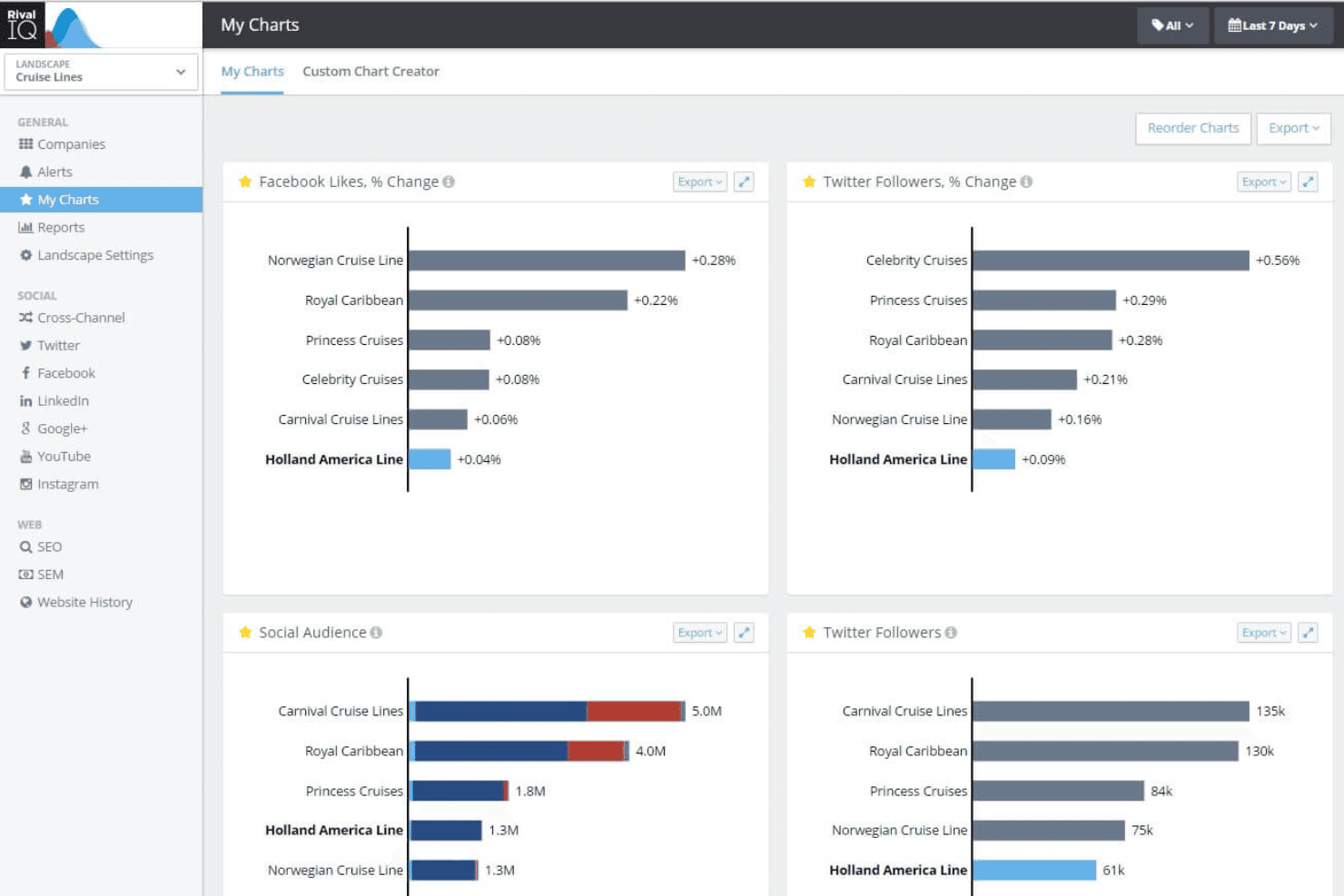
Rival IQ offers a competitive benchmarking dashboard comparing cruise line brands across Facebook likes, Twitter followers, and social audience metrics. Rival IQ is a competitive social media analytics platform that tracks YouTube channel performance, benchmarks it against competitors, and monitors content trends across engagement, views, and posting behavior.
Who Is Rival IQ Best For?
It's a strong fit for social media managers and marketing agencies that need to track competitor YouTube activity alongside other social channels.
Why I Picked Rival IQ
Rival IQ earns its spot on my shortlist because of how it handles automated competitor alerting. I get email and in-app notifications whenever a competitor's YouTube video spikes in engagement, letting me analyze what worked before it's old news. I also use Post Tagging to segment competitor content by theme or campaign type, which makes it easy to identify patterns across a full channel history rather than just one-off posts.
Rival IQ Key Features
- Landscape builder: Compare multiple YouTube channels side by side using customizable competitive sets for benchmarking.
- Custom post tagging: Organize and segment video content with personalized tags for easier filtering and analysis.
- Shareable dashboards: Create dashboards tailored to your reporting needs and export them in multiple formats for stakeholders.
- Cross-channel analytics: View unified analytics for YouTube alongside other social channels like Instagram, Facebook, and Twitter.
Rival IQ Integrations
Rival IQ offers native integrations with Google Data Studio and provides a Social Insights API for building custom integrations.
Pros and Cons
Pros:
- Multi-channel social analytics in one tool
- Customizable channel benchmarking landscapes
- Automated alerts for competitor video spikes
Cons:
- Lacks keyword rank tracking for YouTube
- No audience demographics or watch time data
Learn more about Rival IQ: Best for agency-ready client reporting features
- Free trial + free demo available
- Pricing upon request
Visit WebsiteCustomer Rating:4.4/5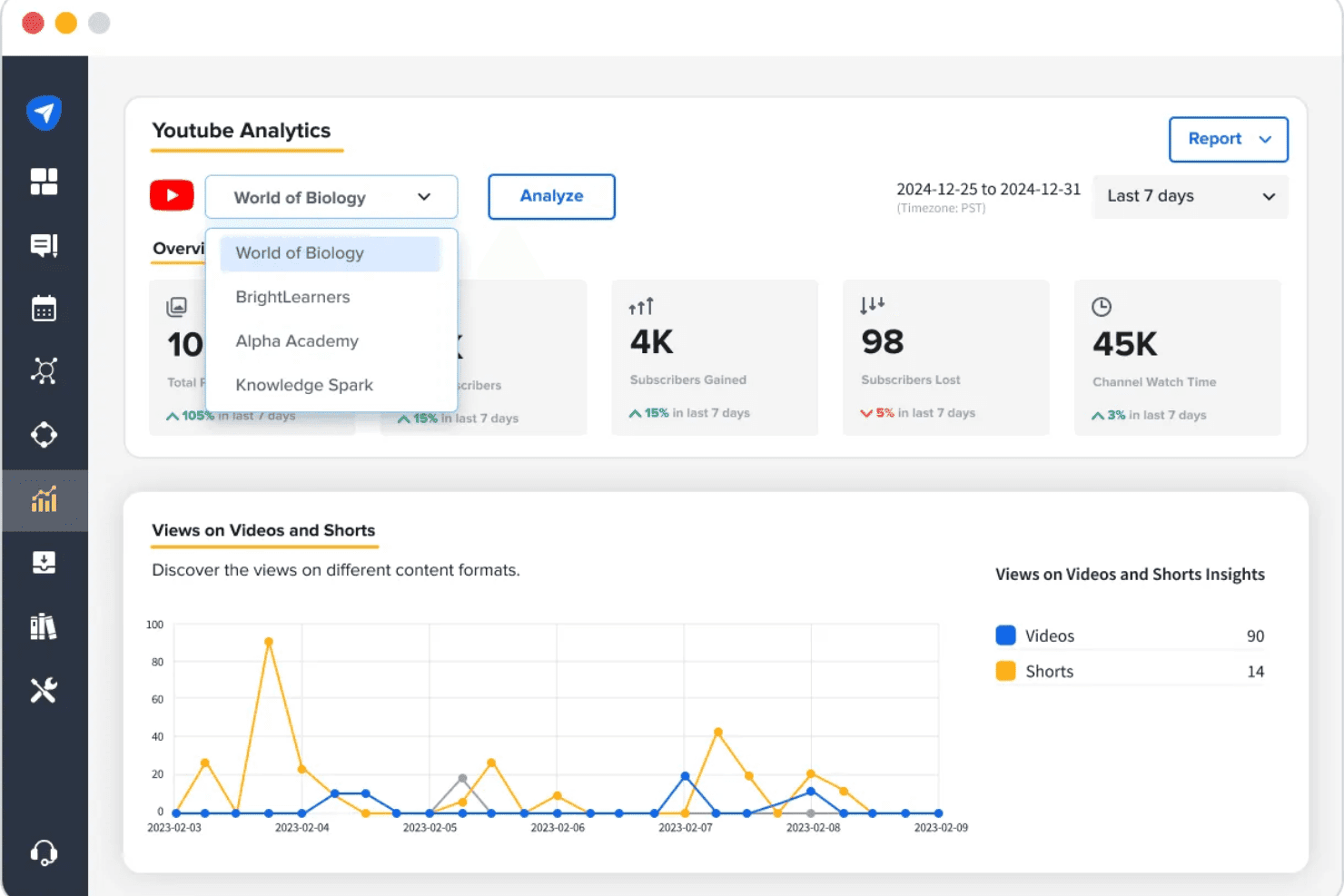
SocialPilot offers a YouTube Analytics dashboard that displays channel performance metrics including subscribers gained, lost, watch time, and views broken down by videos and shorts. SocialPilot is a multi-platform social media analytics and scheduling tool that tracks YouTube channel performance, audience demographics, competitor activity, and keyword data across multiple connected accounts.
Who Is SocialPilot Best For?
SocialPilot is a strong fit for marketing agencies managing YouTube analytics across multiple client accounts alongside other social channels.
Why I Picked SocialPilot
I've included SocialPilot in my top picks because its client reporting features are genuinely built for agency workflows. I can build white-labeled PDF reports pulling YouTube channel data across multiple client accounts, schedule automated delivery, and reuse templates so I'm not rebuilding the same report every month. The competitor reporting feature lets me show clients exactly how their channel stacks up against rivals on growth trends and posting cadence.
SocialPilot Key Features
- YouTube channel analytics: Tracks subscribers, watch time, audience breakdowns, and views by device and referral source.
- Cross-platform account management: Supports analytics for YouTube alongside TikTok, Instagram, Facebook, and more in one dashboard.
- Bulk post scheduling: Lets you schedule up to 500 YouTube and social posts at once via CSV upload.
- Competitor benchmarking: Provides competitor channel comparison with growth and post trend metrics.
SocialPilot Integrations
SocialPilot offers native integrations with YouTube, Facebook, Instagram, LinkedIn, X, TikTok, Pinterest, Google Business Profile, Canva, Slack, Dropbox, Google Drive, Box.com, and Zapier.
Pros and Cons
Pros:
- Cross-platform posting and analytics in one tool
- Competitor benchmarking across multiple channels
- White-label YouTube analytics reports for clients
Cons:
- Lacks in-depth keyword and SEO tracking
- No audience retention or drop-off heatmaps
Learn more about SocialPilot: Best for unified social reporting across channels
- 30-day free trial
- From $79/user/month (billed annually)
Visit WebsiteCustomer Rating:4.3/5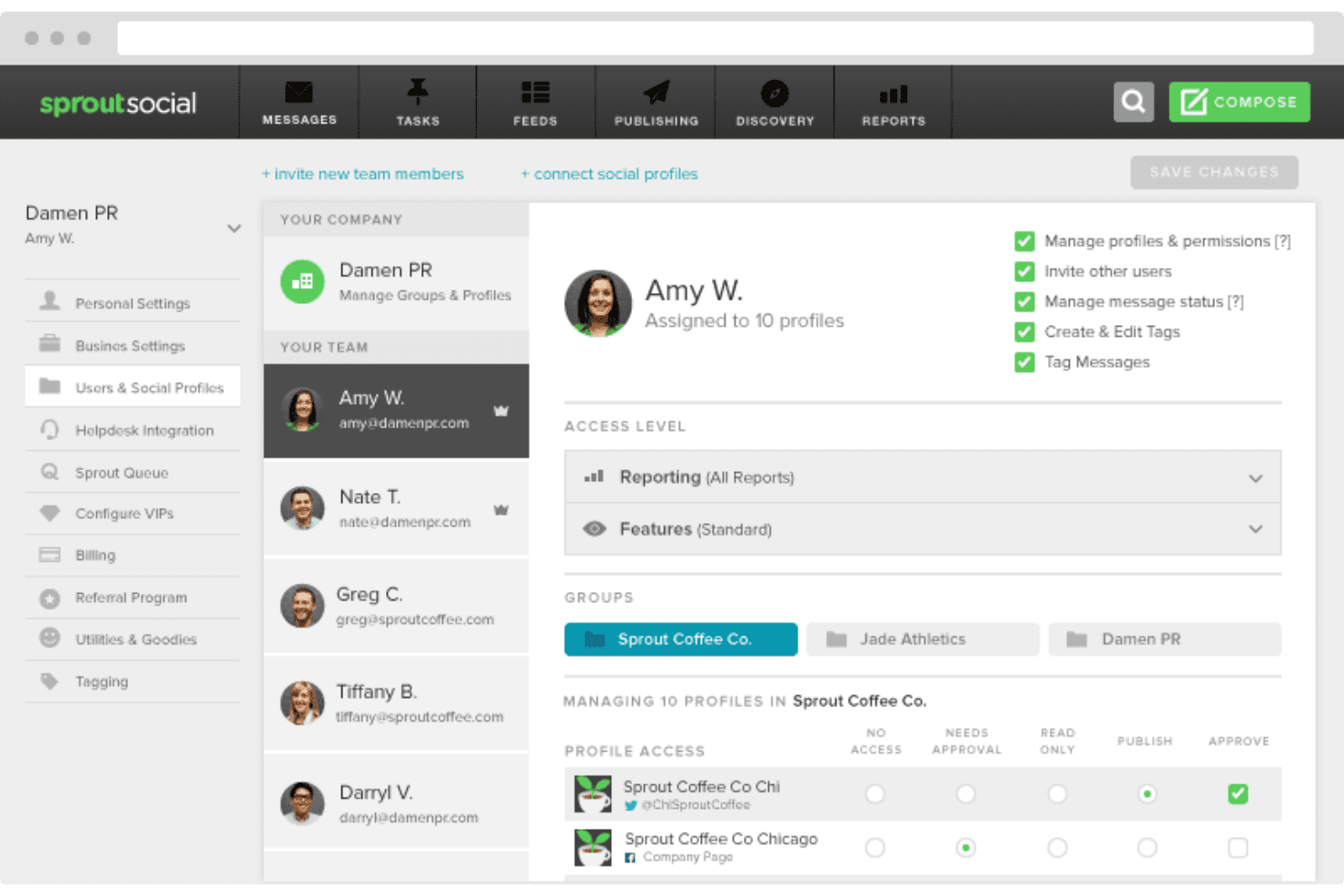
Sprout Social offers granular user permission controls, allowing admins to assign profile access levels and publishing rights across multiple social groups. Sprout Social is a multi-channel social media analytics platform that includes YouTube video performance reporting, engagement tracking, and cross-channel dashboards alongside other major social networks.
Who Is Sprout Social Best For?
Sprout Social fits marketing teams at mid-size to enterprise companies that manage YouTube as part of a broader, multi-channel social media strategy.
Why I Picked Sprout Social
I've included Sprout Social in my top picks because its Network Reports pull YouTube performance data alongside Instagram, TikTok, and LinkedIn into a single dashboard. When my team needs to show stakeholders how YouTube stacks up against other channels, the Premium Analytics add-on delivers interactive, shareable reports with custom benchmarking built in. I particularly like the YouTube Videos report for surfacing Average View Duration and top-performing videos across the whole channel.
Sprout Social Key Features
- YouTube API integration: Connects your YouTube account for direct data access and channel performance tracking.
- Cross-channel competitor reports: Lets you compare multiple social channel profiles, including YouTube, for activity and engagement analysis.
- Social listening add-on: Monitors YouTube mentions and comments to identify topic trends and sentiment across videos.
- Custom tag and campaign tracking: Allows you to organize and filter posts and campaigns for granular video and channel reporting.
Sprout Social Integrations
Sprout Social offers native integrations with YouTube, Facebook, Instagram, X, LinkedIn, TikTok, Pinterest, Google Analytics, HubSpot, Zendesk, and more. An API is available for custom integrations.
Pros and Cons
Pros:
- Includes YouTube engagement and audience metrics
- Offers custom report builder for channels
- Combines YouTube with other social analytics
Cons:
- No YouTube thumbnail or A/B testing
- Lacks YouTube SEO keyword tracking
Learn more about Sprout Social: Best for cross-platform video analytics
- Not available
- Pricing upon request
Visit WebsiteCustomer Rating:4.3/5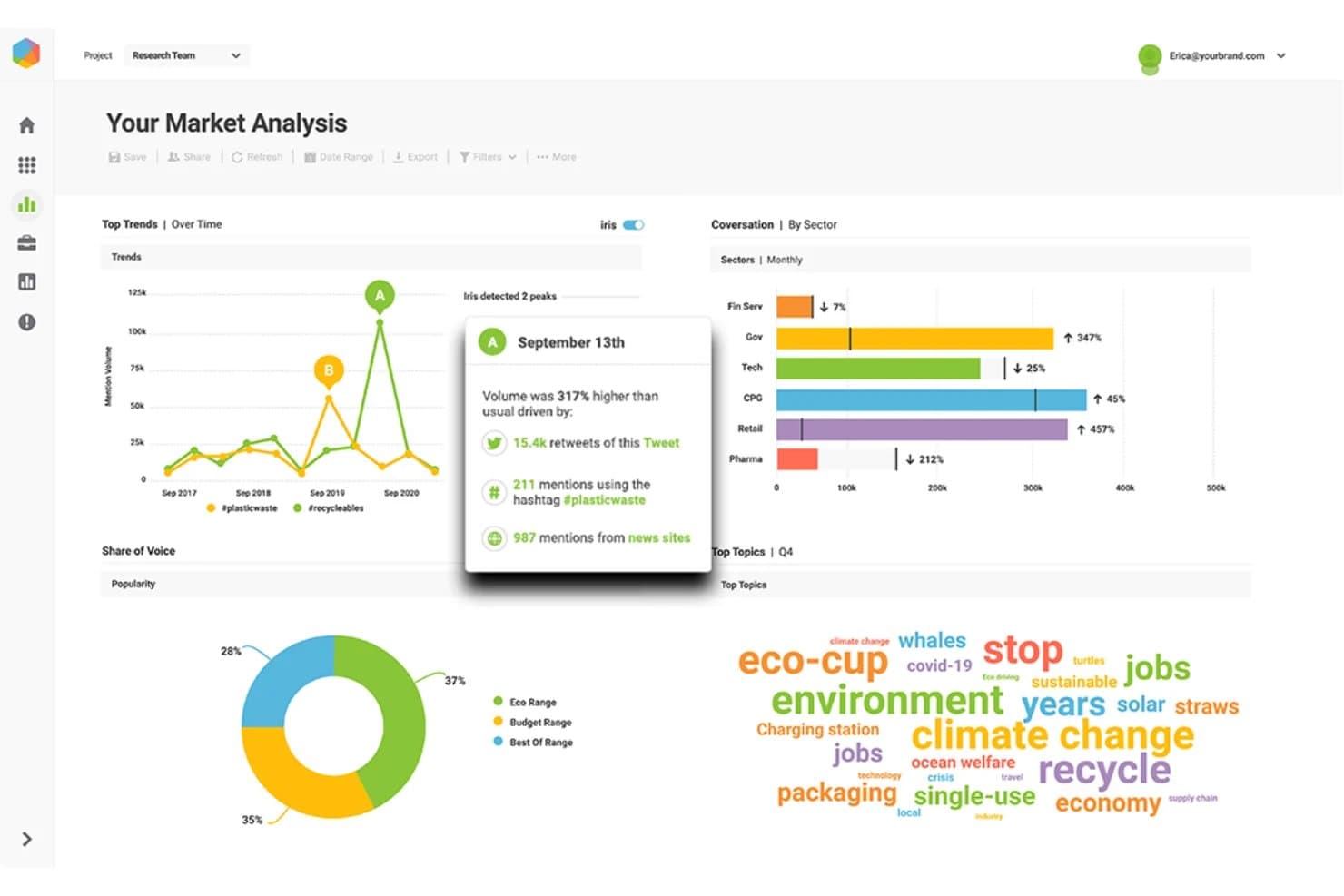
Brandwatch’s dashboard visualizes market trends and audience insights. Brandwatch is an enterprise social intelligence platform that combines social listening, video performance tracking, competitor benchmarking, and influencer discovery across YouTube and other major social channels.
Who Is Brandwatch Best For?
Brandwatch is a strong fit for enterprise marketing teams and agencies managing YouTube alongside multiple social channels at scale.
Why I Picked Brandwatch
I picked Brandwatch as one of the best because no other tool on this list pulls YouTube video metrics into the same dashboard as Instagram, TikTok, X, and Reddit. The Measure module tracks views, watch time, and audience demographics, while the Benchmark module lets me compare YouTube channel performance directly against competitors. I also use the Listen module to track YouTube comments alongside brand mentions from news sites, blogs, and forums in a single feed.
Brandwatch Key Features
- AI-enriched sentiment analysis: Analyze comments and conversations from YouTube and other platforms with automated sentiment detection.
- Social listening across platforms: Monitor mentions, keywords, and trends from over 100 million online sources, including YouTube videos and comments.
- Creator discovery tool: Identify and research YouTube creators using audience filtering and growth insights.
- Custom dashboard builder: Build and share visual dashboards for YouTube and other social video data using drag-and-drop widgets.
Brandwatch Integrations
Brandwatch offers native integrations with YouTube, Instagram, Facebook, X, Reddit, and LinkedIn, and provides an API for custom integrations.
Pros and Cons
Pros:
- Supports custom dashboards and reports
- Advanced competitor channel benchmark features
- Tracks YouTube and social channels together
Cons:
- No thumbnail or A/B testing functionality
- No video SEO or tag optimization tools
Learn more about Brandwatch: Best for centralized analytics and scheduling
- 14-day free trial
- From $99/month (billed annually)
Visit WebsiteCustomer Rating:4.1/5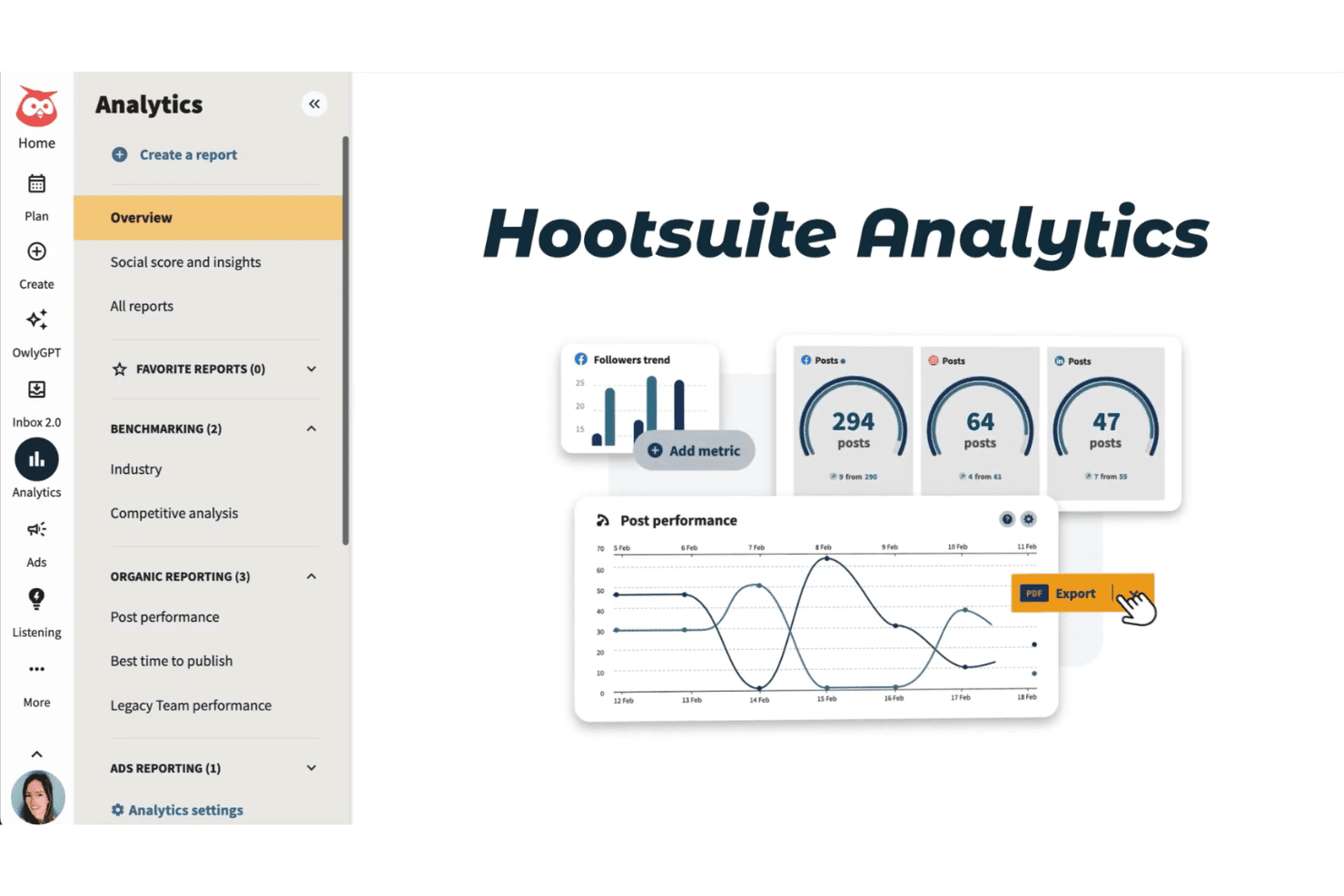
Hootsuite's Analytics dashboard offers post performance tracking, followers trend charts, and PDF export across multiple social platforms. Hootsuite is a social media management platform that tracks YouTube performance alongside other social networks, with cross-channel analytics, competitive benchmarking, custom reporting, and post scheduling built into one dashboard.
Who Is Hootsuite Best For?
Hootsuite suits social media managers who run YouTube as part of a broader multi-channel strategy and need one place to report across all networks.
Why I Picked Hootsuite
I've included Hootsuite in my top picks because it handles YouTube scheduling and analytics in the same dashboard as Instagram, TikTok, and LinkedIn, so my team isn't jumping between platforms to pull numbers. I like the competitive benchmarking feature, which lets me monitor up to 20 competitor channels for posting frequency, engagement, and follower growth. Custom reports, exportable in PDF, Excel, or PowerPoint, make it easy to present YouTube data alongside the rest of our social channels.
Hootsuite Key Features
- Social listening dashboard: Monitor YouTube mentions, hashtags, and keywords across thousands of sources in real time.
- Multi-network analytics view: Track YouTube performance alongside metrics from Instagram, TikTok, Facebook, LinkedIn, and more.
- Industry benchmarking tools: Compare your YouTube channel's audience and engagement growth against other brands in your vertical.
- Automated performance reporting: Schedule and export YouTube analytics reports in PDF, Excel, CSV, or PowerPoint formats.
Hootsuite Integrations
Hootsuite offers native integrations with YouTube, Facebook, Instagram, TikTok, LinkedIn, X, Salesforce, HubSpot, Canva, and more. An API is available for custom integrations.
Pros and Cons
Pros:
- Automated reporting across multiple networks
- Tracks YouTube competitor channel performance
- Centralized view of all social analytics
Cons:
- Missing native YouTube SEO keyword analysis
- No audience retention or heatmap data
 Best for in-depth audience authenticity analysis
- Free trial + free demo available
- From $299/month (billed annually)
Visit WebsiteCustomer Rating:4.7/5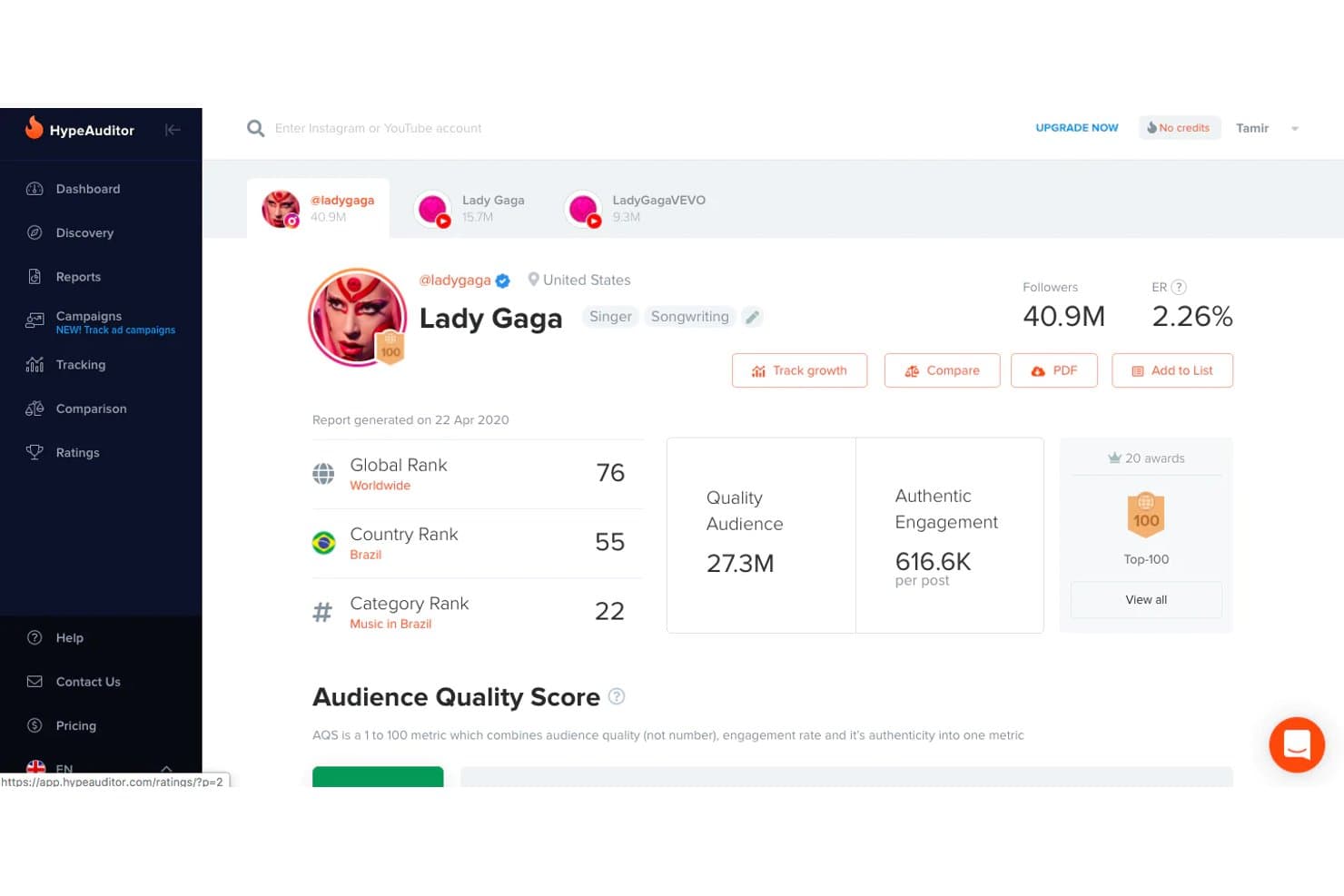
HypeAuditor’s dashboard provides influencer audience and engagement insights. HypeAuditor is an AI-powered influencer analytics platform that covers YouTube channel analysis, audience quality scoring, fraud detection, and campaign performance tracking across a database of 16.5M+ creator profiles.
Who Is HypeAuditor Best For?
HypeAuditor suits mid-sized to enterprise brands and agencies that run YouTube influencer campaigns and need to vet creator audiences before committing budget.
Why I Picked HypeAuditor
HypeAuditor earns its spot on my shortlist because its audience authenticity analysis is genuinely unlike anything else I've used. The Channel Quality Score (CQS) pulls together creator influence, audience credibility, engagement, and channel authenticity into a single 1-100 score, which I use to disqualify low-quality channels fast. I also lean on the 35+ vetting metrics to verify subscriber authenticity before my team signs off on any YouTube creator deal.
HypeAuditor Key Features
- Competitor benchmarking: Track multiple YouTube channels and compare performance metrics across categories.
- Custom dashboard creator: Build tailored reporting dashboards with filters for audience, engagement, and channel metrics.
- Campaign analytics suite: Monitor campaign results, track delivered impressions, and analyze influencer effectiveness for each collaboration.
- Bulk YouTube channel analysis: Analyze thousands of channels at once using batch reporting tools for scalable vetting and oversight.
HypeAuditor Integrations
HypeAuditor offers native integrations with Shopify and provides an API for custom integrations. Native integrations are not widely documented.
Pros and Cons
Pros:
- Advanced channel quality scoring metrics
- Bulk analysis for multiple YouTube channels
- Deep audience credibility and fraud detection
Cons:
- Lacks watch time and audience retention data
- No keyword or video SEO analytics
Learn more about HypeAuditor: Best for multi-channel performance benchmarking
- Free plan available
- From $5.99/month
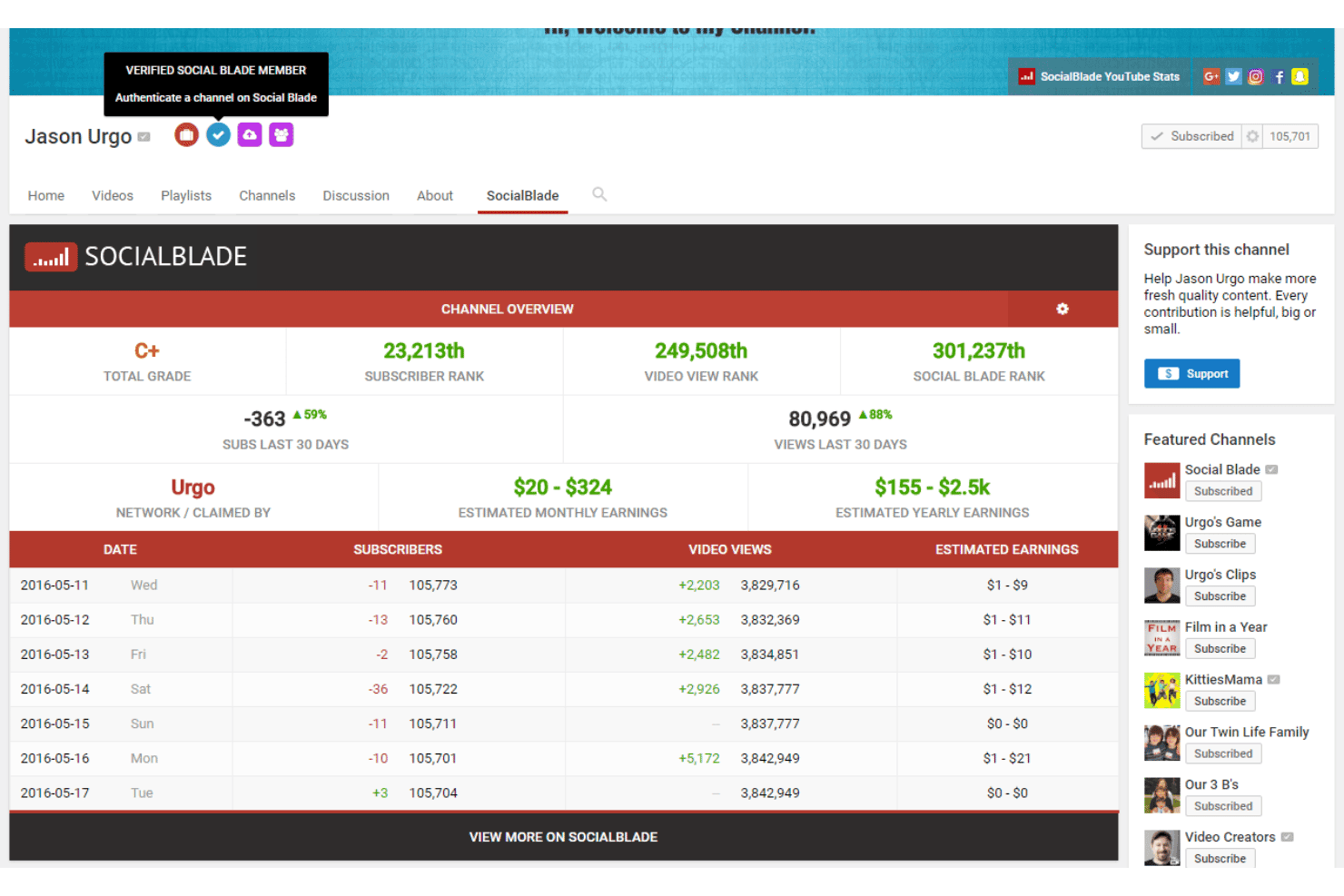
Social Blade’s dashboard summarizes channel performance and growth metrics. Social Blade is a public analytics tracking platform that monitors subscriber counts, video views, estimated earnings, and channel growth trends across YouTube and several other social media platforms.
Who Is Social Blade Best For?
Social Blade suits content creators and influencer marketing agencies that need quick, no-login access to public channel performance data across multiple platforms.
Why I Picked Social Blade
Social Blade earns its spot on my shortlist because no other tool gives you immediate, no-login access to ranked channel data across YouTube, Twitch, TikTok, and Instagram simultaneously. I use the Top Lists feature to identify top-performing channels by country or category in seconds. The Favorites Dashboard lets me track up to 500 channels side by side, so comparing subscriber growth trends across a full competitor set is genuinely fast.
Social Blade Key Features
- Live subscriber counts: Track real-time changes in subscriber numbers for any public YouTube channel.
- Historical data export: Download up to three years of YouTube channel performance data in tabular format.
- YouTube Report Cards: Generate PDF reports that summarize recent YouTube channel stats for brand pitches and outreach.
- Custom channel lists: Build, organize, and export targeted lists of channels filtered by category, country, or size.
Social Blade Integrations
Native integrations are not clearly documented. Social Blade offers a Business API for custom integrations.
Pros and Cons
Pros:
- Includes multi-platform analytics beyond YouTube
- Offers public data with no login needed
- Tracks channel and video growth trends
Cons:
- Lacks audience demographic breakdowns
- No keyword or SEO analytics tools
Learn more about Social Blade: Best for optimizing video SEO with A/B testing
- Free trial + free demo available
- From $12/month (billed annually)
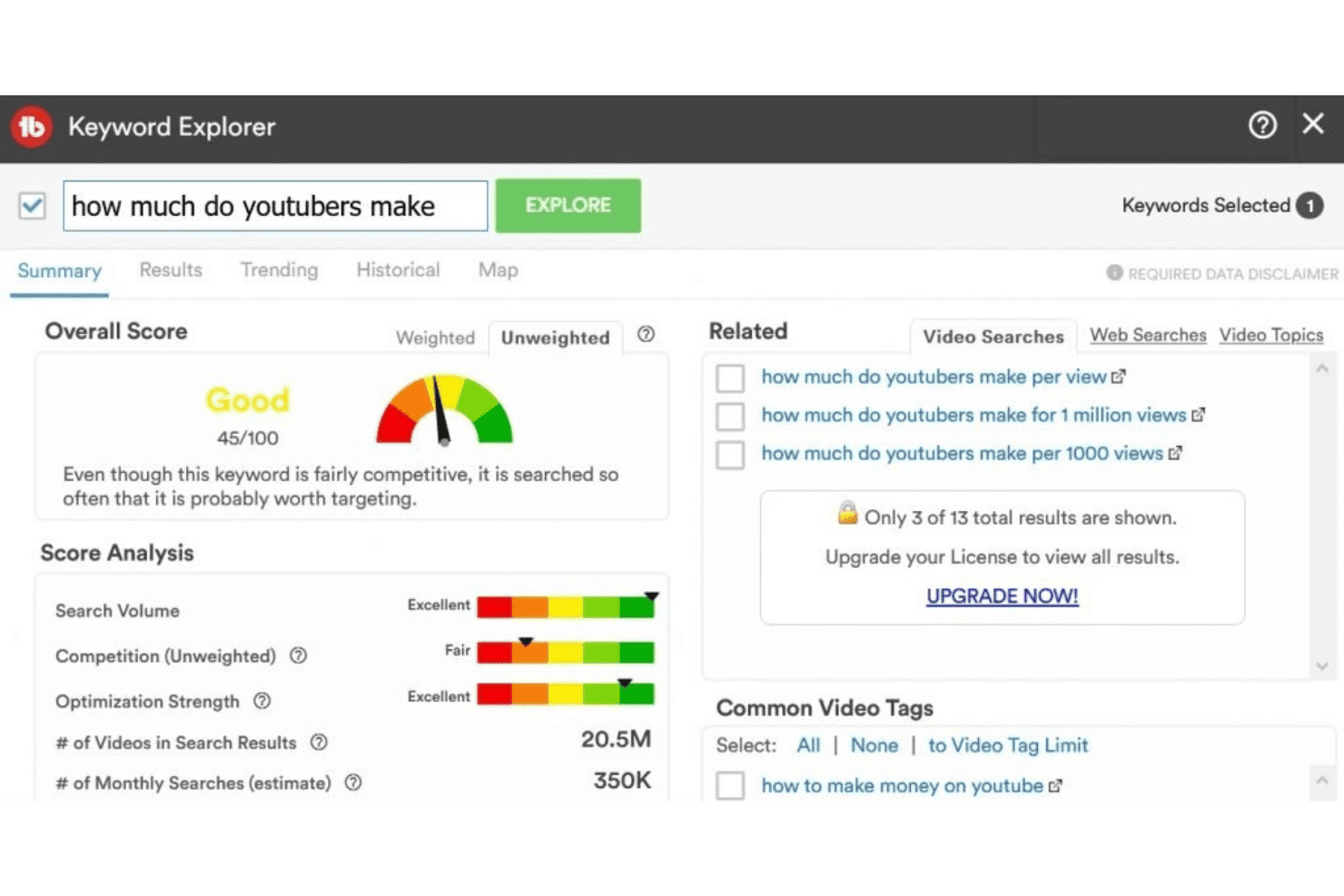
TubeBuddy's Keyword Explorer tool displays an overall score, search volume, competition, and related keyword suggestions for 'how much do youtubers make'. TubeBuddy is a YouTube-certified browser extension that layers video analytics, keyword research, competitor tracking, and A/B testing tools directly into YouTube Studio.
Who Is TubeBuddy Best For?
TubeBuddy is a strong fit for independent YouTube creators and small video marketing teams who manage content directly within YouTube Studio.
Why I Picked TubeBuddy
TubeBuddy earns its spot on my shortlist because no other YouTube analytics tool runs thumbnail and title A/B tests natively inside YouTube Studio. I use the A/B Testing feature to serve different thumbnails to real viewers and let click-through rate data decide the winner. The Keyword Explorer tells me exactly which search terms are worth targeting before I publish. I also rely on the Retention Analyzer to pinpoint the exact timestamp where viewers start dropping off on any given video.
TubeBuddy Key Features
- Channelytics: Lets you compare your performance against competitor YouTube channels, tracking uploads, growth, and engagement metrics in one dashboard.
- Retention analyzer: Visualizes precisely where on your videos viewers drop off, helping you spot retention issues by timestamp.
- AI-powered next video ideas: Surfaces high-potential content ideas and topics based on YouTube niche trends and keyword data.
- Bulk processing tools: Allows you to update cards, end screens, titles, and descriptions across multiple videos at once.
TubeBuddy Integrations
TubeBuddy integrates natively with YouTube Studio through its browser extension and offers mobile apps for iOS and Android.
Pros and Cons
Pros:
- Advanced retention and drop-off analysis
- Offers in-depth competitor channel analytics
- A/B tests thumbnails and titles natively
Cons:
- Limited to YouTube Studio environment
- No exportable or custom dashboards
Learn more about TubeBuddy: Best for AI-powered keyword and topic discovery
- Free plan available
- From $16.58/month (billed annually)
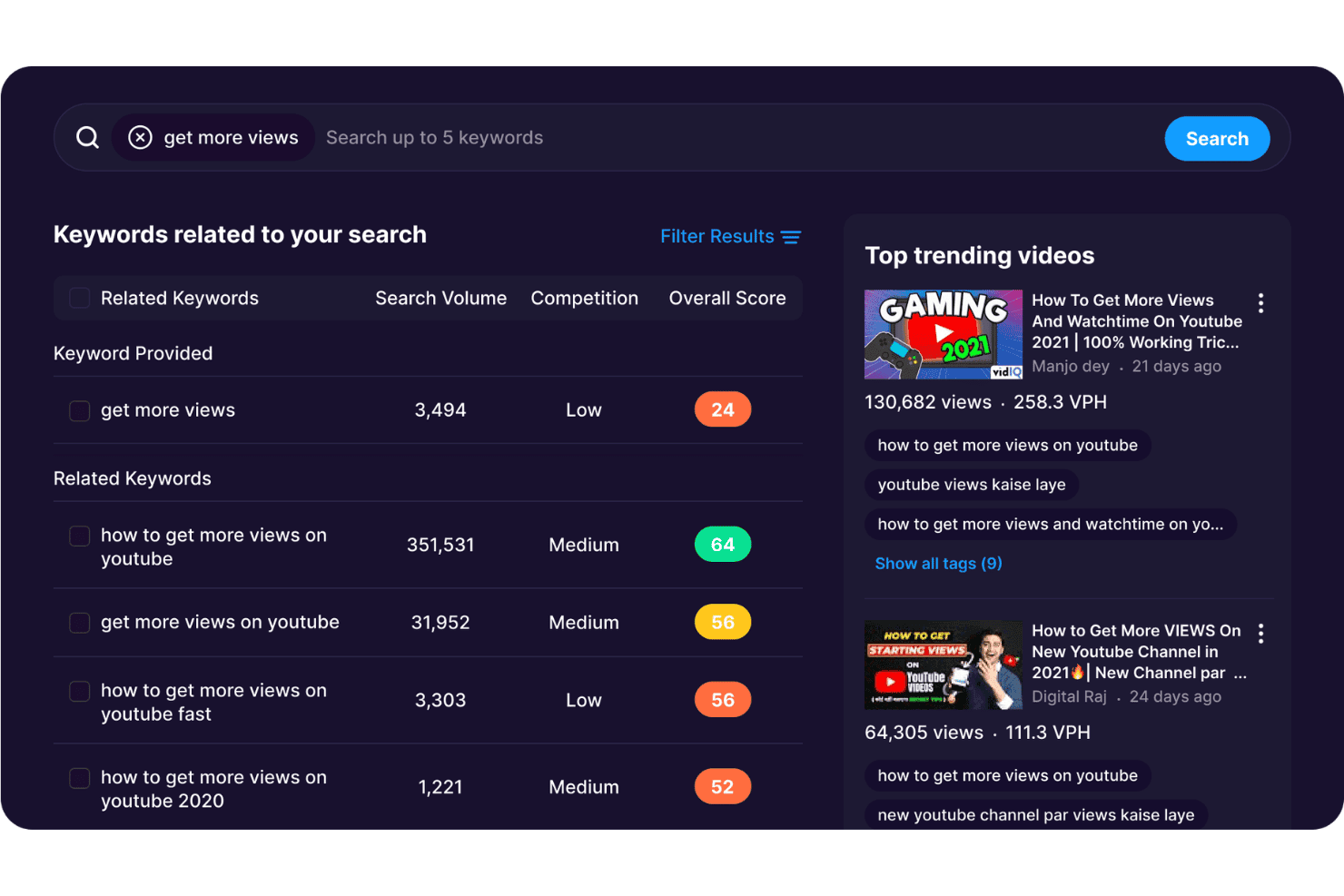
vidIQ offers a keyword research tool that displays search volume, competition level, and overall scores for related YouTube keywords alongside top trending videos. vidIQ is a YouTube analytics and SEO platform that combines keyword research, competitor channel tracking, AI-driven content ideation, and video optimization tools for creators and marketing teams.
Who Is vidIQ Best For?
vidIQ is a strong fit for independent YouTube creators and brand-side content teams who prioritize search-driven growth and consistent content output.
Why I Picked vidIQ
vidIQ earns its spot as one of the best on my shortlist because the keyword research tool goes well beyond basic tag suggestions. Each keyword comes with search volume, trend direction, competition level, and a ranked performance score, so I can actually prioritize which terms are worth targeting. I also rely on the Outliers feature to surface videos in my niche that overperformed their channel average, which consistently uncovers topic angles I wouldn't have found on my own.
vidIQ Key Features
- Competitor tracking dashboard: Monitor multiple competing channels and view their growth, video cadence, and trending uploads.
- Real-time YouTube data integration: Overlay channel and video stats directly in YouTube with a Chrome browser extension.
- AI-powered script and description generator: Automatically generate video scripts and descriptions based on target keywords.
- Channel audit tool: Review your channel’s performance across engagement, publishing schedule, and best time to post analytics.
vidIQ Integrations
vidIQ offers native integrations with YouTube and Instagram, supports AI assistants like ChatGPT and Claude, and provides a Chrome browser extension for real-time data overlays.
Pros and Cons
Pros:
- Outlier video detection for trending ideas
- Competitor channel tracking and alerts
- AI-powered topic and keyword suggestions
Cons:
- Channel audit limited for large enterprises
- No bulk export for keyword research
Learn more about vidIQ: Best for influencer campaign ROI tracking
- Free trial + free demo available
- From $1499/3 months
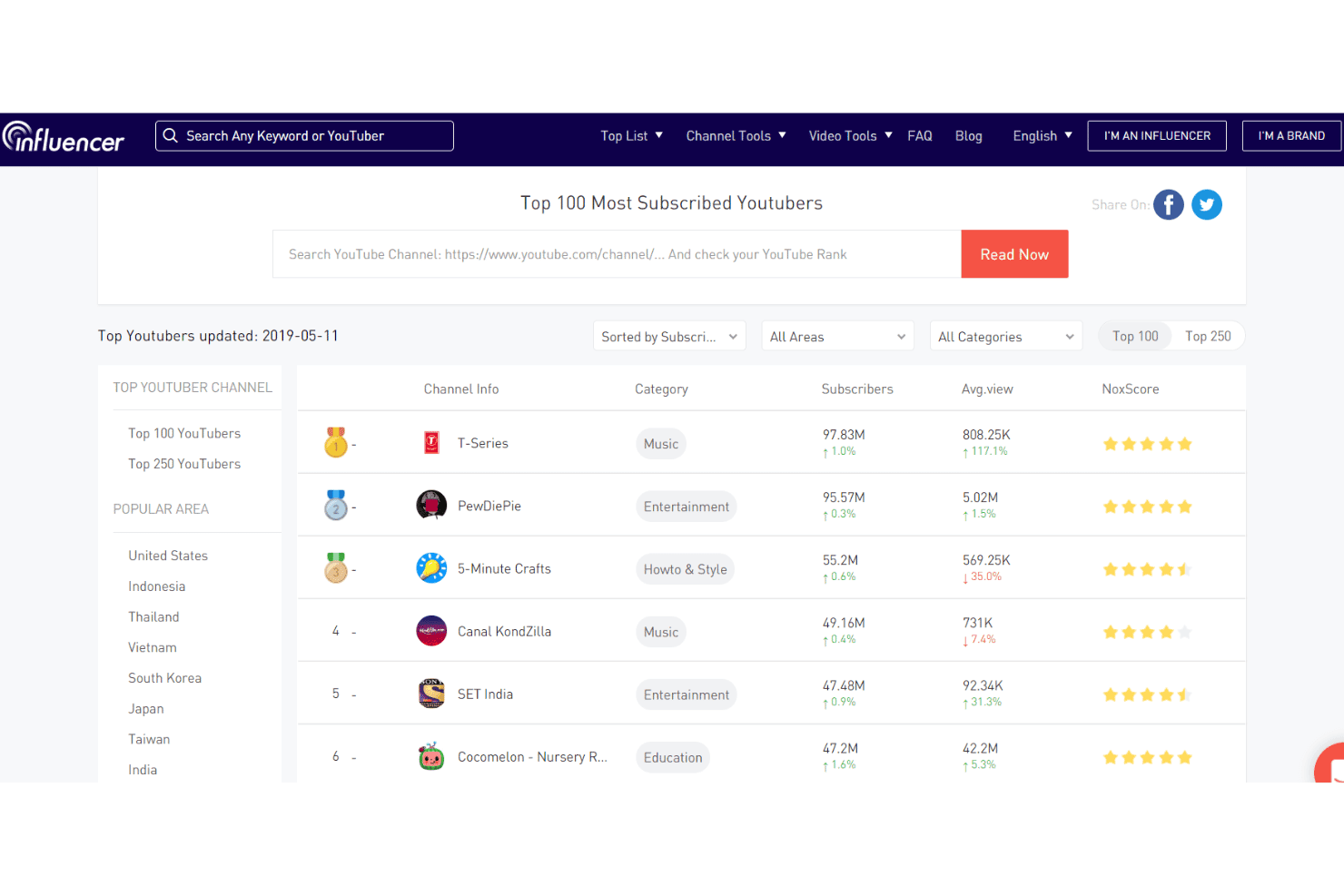
NoxInfluencer offers a ranked list of the Top 100 Most Subscribed YouTubers with subscriber counts, average views, and NoxScores. NoxInfluencer is an influencer marketing analytics platform that combines creator discovery, YouTube channel performance tracking, competitor benchmarking, keyword research, and campaign monitoring across YouTube, TikTok, and Instagram.
Who Is NoxInfluencer Best For?
It's a strong fit for influencer marketing agencies and e-commerce brands in fashion, beauty, and lifestyle that run multi-creator YouTube campaigns and need to track sponsored content performance.
Why I Picked NoxInfluencer
I've included NoxInfluencer in my top picks because it's one of the few YouTube analytics tools that ties influencer content directly to campaign outcomes. The Video Monitoring module tracks sponsored post performance per campaign, and the Short Link Service attributes conversions back to specific creator videos. I also like the Sentiment Analysis feature, which surfaces how audiences respond to sponsored content across active campaigns.
NoxInfluencer Key Features
- YouTube channel compare tool: Compare analytics for up to three channels side by side to benchmark performance.
- Global influencer ranking database: Search 100M+ creators across YouTube, TikTok, and Instagram with detailed filters by country and niche.
- Advanced keyword and tag tools: Analyze channel tags, video keywords, and trending topics to support YouTube SEO research.
- API data service: Access channel, video, and creator data programmatically for integration into custom reports or dashboards.
NoxInfluencer Integrations
Native integrations are not clearly documented. NoxInfluencer provides an API for custom integrations and offers a Chrome extension for YouTube channel analysis.
Pros and Cons
Pros:
- Supports detailed YouTube keyword and tag research
- Provides channel compare and global ranking tools
- Tracks ROI across multiple influencer campaigns
Cons:
- Custom reporting options are limited
- Channel analytics lack watch time and retention data
Learn more about NoxInfluencer:
Diğer YouTube Analiz Araçları
Kısa listeme girmeyen, ancak yine de göz atmaya değer bazı ek YouTube analiz aracı seçenekleri şunlardır:
- 11Tubular LabsBest for advanced competitor content insights
- 12SocialinsiderBest for exporting customizable metric dashboards
- 13KeyholeBest for real-time trend and hashtag analysis
- 14PlanableBest for collaborative social content reporting
- 15EmplifiBest for unified brand analytics and insights
- 16Outlier KitBest for YouTube competition tracking alerts
- 17Facelift Data StudioBest for comparing video performance
- 18ChannelMeterBest for partner and influencer program management
- 19StoryclashBest for discovering top-performing content
How I Evaluate YouTube Analytics Tools
I split my evaluation into baseline requirements—like API-connected video metrics and audience data—and differentiators like competitor benchmarking, A/B testing, and reporting depth.
Core Functionality (Table Stakes For This List)
When I'm selecting tools for my list, I rank each one on a scale from 0 (does not offer the functionality) to 5 (excels in this area) for each core functionality listed below. Then, I calculate the tool's total score into a percentage. Each tool needs to achieve a minimum total score of 65% to be considered for inclusion.
- Video Performance Metrics: I check whether a tool tracks views, watch time, CTR, and retention at the individual video level—not just channel-wide totals.
- Audience Demographics & Behavior: Knowing where viewers come from, what devices they use, and how they found your video matters for targeting decisions.
- Competitor Channel Tracking: I look for the ability to monitor rival channels' growth, upload frequency, and top-performing content side by side with your own.
- Keyword & SEO Analytics: I evaluate whether a tool surfaces keyword opportunities and tag suggestions you can act on before publishing your next video.
- Custom Reporting & Dashboards: Agencies and marketing teams need exportable, branded reports—so I check for white-label options and scheduled delivery.
- YouTube API Integration: Real-time or near-real-time data pulls from YouTube's API are what I look for, along with historical backfill for trend analysis.
Once I have a list of tools that meet the criteria, I consider what sets each platform apart.
Differentiating Factors (What Sets Vendors Apart)
Here's how I compare and contrast different vendors:
Standout Features
Thumbnail and title A/B testing is a big differentiator. Running split tests on live videos shows you which combination actually lifts CTR, backed by statistical data you can trust. I also look for retention heatmaps that pinpoint exactly where viewers drop off mid-video. That kind of insight directly informs how you structure hooks and pacing in future content. AI-powered content ideation matters too—the strongest implementations surface trending topics and keyword gaps specific to your niche rather than generic suggestions.
Beyond Features
Primary use case fit is the first thing I consider. A solo creator optimizing upload strategy has very different needs than an agency managing ten client channels from one dashboard. Data accuracy matters just as much—I check whether a platform pulls from the official YouTube Data API or relies on scraped estimates, since that gap can skew your reporting. Pricing structure is worth evaluating too, especially whether a tool charges per channel or per seat, which changes the math fast when you're scaling.
YouTube Analiz Araçları Nasıl Seçilir?
Uzun özellik listeleri ve karmaşık fiyatlandırma yapılarına kendinizi kaptırmanız kolaydır. Benzersiz yazılım seçim sürecinizde ilerlerken odağınızı korumanıza yardımcı olmak için göz önünde bulundurmanız gereken faktörleri içeren bir kontrol listesi hazırladık:
| Faktör | Dikkat Edilmesi Gerekenler |
| Ölçeklenebilirlik | İhtiyaçlarınız büyüdüğünde bu araç birden fazla kanalı, markayı veya müşteriyi nasıl destekleyecek? Eklenen her kanal veya kullanıcı için yüksek ücret talep eden çözümlerden kaçının. |
| Entegrasyonlar | Hangi diğer platformlara veya raporlama araçlarına bağlanması gerekiyor (Google Analytics, BI araçları, Slack)? Mevcut ve gelecekteki teknoloji yığınınız için desteği kontrol edin. |
| Özelleştirilebilirlik | Gösterge tablolarını, raporları veya dışa aktarımları ekibinizin iş akışına ve paydaşların ihtiyaçlarına uyacak şekilde düzenleyebilir misiniz, yoksa çıktılar katı şablonlarla mı sınırlı? |
| Kullanım kolaylığı | Ekibiniz minimum eğitimle ne kadar hızlı yanıt bulabilir veya rapor oluşturabilir? Seçim yapmadan önce arayüzü gezinme kolaylığı ve anlaşılırlık açısından değerlendirin. |
| Uygulama ve işe alıştırma | Kurulumun tamamlanması ve kanallarınıza bağlanması için neler gerekiyor? İzinler, veri senkronizasyonu ve personelin sürece alışması için gereken süreyi hesaba katın. |
| Maliyet | Fiyatlandırma modeli kanal sayınıza, ekip büyüklüğünüze ve özellik ihtiyaçlarınıza uygun mu? Kullanımınız arttıkça keskin biçimde yükselen fiyatlandırmalara dikkat edin. |
| Güvenlik önlemleri | Kullanıcı erişimi, veri depolama ve gizlilik için hangi kontroller mevcut? Birden fazla kullanıcı için izinler ve veri politikalarınıza uyumluluk seçenekleri arayın. |
| Destek erişilebilirliği | Çalışma saatleriniz içinde hızlı yardım alabiliyor musunuz? Bir sorun çıktığında veya değişiklik olduğunda bilgi bankasına, sohbete ya da canlı desteğe erişip erişemeyeceğinizi kontrol edin. |
YouTube Analiz Araçları Nedir?
YouTube analiz araçları, YouTube kanalınız ve videolarınız için temel performans metriklerini izlemenize, analiz etmenize ve görselleştirmenize yardımcı olan özel platformlardır. Bu araçlar; sosyal medya yöneticilerine, içerik üreticilerine ve ajanslara, daha akıllı içerik, optimizasyon ve pazarlama kararları alabilmeniz için kitle davranışı, içerik trendleri ve etkileşim kalıpları hakkında daha derin içgörüler sunar.
YouTube Analiz Araçlarının Özellikleri
YouTube analiz araçlarını seçerken aşağıdaki temel özelliklere dikkat edin:
- Video performansı takibi: Hangi videoların izleyicilerde karşılık bulduğunu değerlendirmenize yardımcı olmak için görüntülemeler, izlenme süresi, beğeniler, yorumlar ve paylaşımlar gibi temel metrikleri ölçer.
- Kitle demografisi: İzleyicilerin kim olduğunu ve içerik stratejisini nasıl geliştirebileceğinizi anlamanızı sağlayarak izleyici verilerini yaş, cinsiyet, konum ve cihaza göre ayrıştırır.
- Trafik kaynağı analizi: İzleyicilerin videolarınızı nasıl bulduğunu, arama, önerilen videolar, harici siteler veya sosyal paylaşımlar aracılığıyla mı geldiklerini gösterir.
- Rakip takibi: Stratejik içgörü elde etmek için kanalınızın büyümesini ve etkileşimini nişinizdeki diğer kanallarla karşılaştırmanızı sağlar.
- Anahtar kelime ve SEO analizleri: Keşfedilebilirliği artırabilmeniz ve video meta verilerini optimize edebilmeniz için en iyi performans gösteren anahtar kelimeleri, sıralamaları ve etiket fırsatlarını belirler.
- Özel raporlama ve gösterge tabloları: Paydaşlarınız veya müşterileriniz için en önemli metriklerle özelleştirilmiş raporlar ve gösterge tabloları oluşturmanızı sağlar.
- Kitleyi elde tutma analizi: İzleyicilerin ilgisini kaybettiği video anlarını belirleyerek daha iyi etkileşim için tempoyu ve içeriği ayarlamanıza olanak tanır.
- Dışa aktarma ve paylaşım araçları: Rapor oluşturmayı ve dağıtmayı kolaylaştırır; PDF, CSV dışa aktarımlarını veya Google Sheets gibi platformlarla entegrasyonları destekler.
- Küçük resim ve başlık testi: Tıklama oranlarını iyileştirmek ve videonuzun ilk izlenimini optimize etmek için küçük resimler ve başlıklar üzerinde A/B testleri yapmayı kolaylaştırır.
- Gerçek zamanlı ve geçmiş verilere erişim: Hem anlık analizler hem de uzun vadeli trendler sunarak kitle davranışındaki değişimleri fark etmenize ve kampanya sonuçlarını ölçmenize yardımcı olur.
YouTube Analiz Araçlarının Faydaları
YouTube analiz araçlarını uygulamak ekibiniz ve işletmeniz için çeşitli faydalar sağlar. Yararlanabileceğiniz faydalardan bazıları şunlardır:
- Daha derin kitle anlayışı: Kesin demografik ve davranışsal içgörüler elde ederek içerik stratejinizi videoları gerçekten kimlerin izlediğine göre geliştirin.
- Veriye dayalı içerik optimizasyonu: Video kalitesini, tempoyu ve keşfedilebilirliği iyileştirmek için performans metriklerinden, izleyici tutma raporlarından ve A/B testlerinden yararlanın.
- Rekabetçi kıyaslama: Benzer kanallara kıyasla konumunuzu takip edin, yeni fırsatları fark edin ve yaklaşımınızı gerçek zamanlı olarak ayarlayın.
- İş akışı verimliliği: Özel panolar oluşturun ve raporlamayı otomatikleştirin; manuel veri çekme işlemlerinde zaman kazanın ve paydaşların güncel kalmasını sağlayın.
- Geliştirilmiş ROI takibi: Kanal ve video metriklerini pazarlama çalışmalarına, sponsorluklara veya kampanyalara doğrudan bağlayarak gerçekten neyin fark yarattığını netleştirmeye yardımcı olun.
- Ölçeklenebilir iş birliği: Ekiplerin veya ajansların birden fazla kanalı tek bir platformdan yönetmesini sağlayın; müşteriler veya yönetim için izinler ve amaca özel dışa aktarımlar sunun.
- Proaktif trend belirleme: Yapay zekâ destekli önerileri kullanarak trend olan konuları ve anahtar kelimeleri ortaya çıkarın; böylece yükselen fırsatlara hızlıca karşılık verebilirsiniz.
YouTube Analiz Araçlarının Maliyetleri ve Fiyatlandırması
YouTube analiz araçlarını seçmek, mevcut çeşitli fiyatlandırma modellerini ve planları anlamayı gerektirir. Maliyetler özelliklere, ekip büyüklüğüne, eklentilere ve daha fazlasına göre değişir. Aşağıdaki tabloda YouTube analiz aracı çözümlerinde yaygın olarak sunulan planlar, bunların ortalama fiyatları ve tipik özellikleri özetlenmektedir:
YouTube Analiz Araçları için Plan Karşılaştırma Tablosu
| Plan Türü | Ortalama Fiyat | Yaygın Özellikler |
|---|---|---|
| Plan TürüÜcretsiz Plan | Ortalama Fiyat$0 | Yaygın ÖzelliklerTemel video analizleri, sınırlı kanal takibi, temel anahtar kelime araştırması ve standart kitle verileri. |
| Plan TürüKişisel Plan | Ortalama Fiyat$10-$25/kullanıcı/ay | Yaygın ÖzelliklerGelişmiş performans metrikleri, özelleştirilebilir panolar, daha sık veri güncellemeleri ve sınırlı rakip karşılaştırması. |
| Plan Türüİşletme Planı | Ortalama Fiyat$30-$90/kullanıcı/ay | Yaygın ÖzelliklerÇok kanallı yönetim, beyaz etiketli raporlama, gelişmiş SEO analizleri, ekip iş birliği ve öncelikli destek. |
| Plan TürüKurumsal Plan | Ortalama Fiyat$100+/kullanıcı/ay | Yaygın ÖzelliklerSınırsız kanal, özel hesap yönetimi, API erişimi, özel entegrasyonlar, gelişmiş izinler ve SLA'lar. |
YouTube Analiz Araçları SSS
YouTube analiz araçlarıyla ilgili yaygın soruların bazı yanıtları şunlardır:
YouTube analiz araçları rakip kanalları nasıl izler?
Çoğu araç, diğer kanallardaki video yüklemeleri, abone artışı ve etkileşim ölçümleri gibi herkese açık verileri izleyerek sonuçlarınızı karşılaştırmanıza ve yeni içerik fırsatlarını belirlemenize olanak tanır.
Tek bir araçla birden fazla YouTube kanalını yönetebilir miyim?
Evet, birçok YouTube analiz aracı, tek bir kontrol panelinden birden fazla kanalı izlemenize ve raporlamanıza olanak tanır. Bu özellik, çeşitli hesapları yöneten ajanslar veya markalar için kullanışlıdır.
YouTube analiz araçlarını hesabıma bağlamak güvenli mi?
Evet, güvenilir araçlar resmi YouTube Data API bağlantılarını kullanır ve kurulum sırasında izninizi ister. Böylece hesabınız ve kanal verileriniz güvende kalır.
Bu araçlar gerçek zamanlı analiz sunuyor mu?
Bazı YouTube analiz araçları görüntülemeler, etkileşim ve trafik kaynakları hakkında gerçek zamanlı veya gerçeğe yakın zamanlı veriler sunar; ancak geçmiş veriler ve yenileme sıklıkları sağlayıcıya göre değişebilir.
Bu araçlardan hangi tür raporları dışa aktarabilirim?
Raporları genellikle PDF, CSV veya Google E-Tablolar gibi biçimlerde dışa aktarabilirsiniz. Bazı çözümler, müşteriler veya paydaşlar için otomatik ve planlanmış rapor gönderimleri ayarlamanıza da olanak tanır.