

An AI website builder is a tool that uses artificial intelligence to create websites based on your input, typically through prompts, questions, or by analyzing your existing content. If you’re searching for ways to build a professional website faster through vibe coding without hiring designers or learning traditional code, these platforms are designed for you.
In this guide, you’ll find the best AI website builder options for 2026, with clear details on how each one tackles design, customization, and go-live—all with your speed and needs in mind. Whether you want to launch a branded site, a slick landing page, or manage several projects at once, you’ll walk away knowing exactly which builder fits your workflow and goals.
Why Trust Our Software Recommendations
6,700+
Reviews
20
Industry experts
16+
Evaluation factors
14
Years
Our team has been testing and reviewing software since 2012. As marketing leaders ourselves, we know how difficult—and important—it is to choose the right software.
For this guide, we evaluated tools using hands-on testing and independent research, scoring tools using our selection criteria.
Our reviews reflect our human editorial judgment, not a sales pitch.
Expert reviewers:
 Gui DrusinaCreative Director
- Shriya GhateSenior Marketing Lead
 Amanda JacquesMarketing Ops Leader

AI Website Builders Comparison Table
This comparison table summarizes pricing details for my top AI website builder selections:
| Tool | Best For | Trial Info | Price | ||
|---|---|---|---|---|---|
| 1 | Best for marketers managing multiple pages | 14-day free trial | From $24/month (billed annually) | Website | |
| 2 | Best for conversion-focused landing pages | 14-day free trial | From $22/month (billed annually) | Website | |
| 3 | Best for enterprise-level landing experiences | 14-day free trial | From $79/month (billed annually) | Website | |
| 4 | Best for building scalable WordPress-based sites | 7-day free trial | From $10/month (billed annually) | Website | |
| 5 | Best for sites tailored to professional services | Free plan available | From $42/month (billed annually) | Website | |
| 6 | Best for design-focused marketing microsites | 14-day free trial | From $19/month (billed annually) | Website | |
| 7 | Best for launching branded sites using AI prompts | Not available | Pricing upon request | Website | |
| 8 | Best for beginner-friendly multi-page creation | 14-day free trial | From $10.99/month (billed annually) | Website | |
| 9 | Best for granular design customization | Free plan available | From $15/month (billed annually) | Website | |
| 10 | Best for quick publishing with built-in hosting | 7-day free trial | From $9.99/month (billed annually) | Website |


Best AI Website Builders Reviews
Below are my detailed summaries of the best AI website builders that made it onto my shortlist. My reviews offer a detailed look at the features, best use cases, and pricing of each platform to help you find the best one for you.
 Best for marketers managing multiple pages
- 14-day free trial
- From $24/month (billed annually)
Visit WebsiteCustomer Rating:4.6/5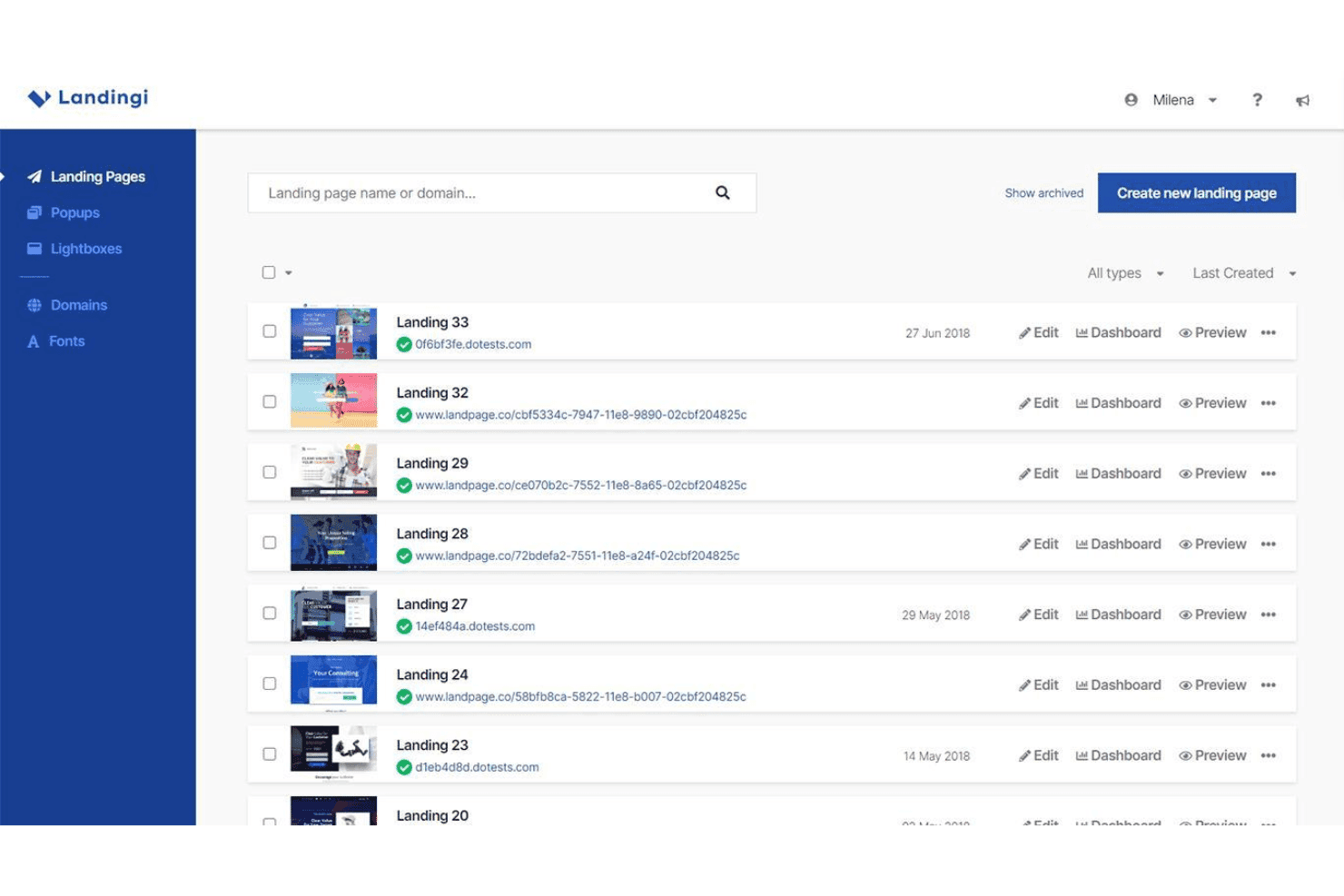
Landingi organizes multiple website landing pages with options to edit, view the Dashboard, and preview each page. Landingi is an AI landing page builder that combines a pixel-perfect drag-and-drop editor with AI page generation, programmatic page creation, A/B testing, and built-in SEO tools.
Who Is Landingi Best For?
Landingi is a strong fit for performance marketers, freelancers, and agencies running high-volume paid campaigns who need to build, manage, and optimize many landing pages at once.
Why I Picked Landingi
Landingi earns its spot on my shortlist because of how well it handles page volume at scale. Smart Sections let me update a repeated element (like a pricing block or CTA banner) in one place and push that change across every page it appears on instantly. Programmatic Landing Pages take it further, letting me build one master template and auto-generate hundreds of campaign-specific variations from it.
Landingi Key Features
- Lunar AI page generator: Quickly creates editable landing pages from a text prompt.
- Solis AI insights: Analyzes landing page performance and recommends optimizations using behavioral data.
- Smart A/B testing: Offers built-in server-side split testing with reliable data and no page performance loss.
- Multi-language translation: Automatically translates pages into 35 languages for global campaign support.
Landingi Integrations
Landingi offers over 170 native integrations, including HubSpot, Mailchimp, Salesforce, ActiveCampaign, Zapier, and provides an API for custom integrations.
Pros and Cons
Pros:
- Server-side A/B testing avoids page slowdowns
- Generates hundreds of page variants from templates
- Smart Sections push bulk edits sitewide instantly
Cons:
- Pop-up and form builder feel underdeveloped
- AI generates landing pages, not full sites
Learn more about Landingi: Best for conversion-focused landing pages
- 14-day free trial
- From $22/month (billed annually)
Visit WebsiteCustomer Rating:4.4/5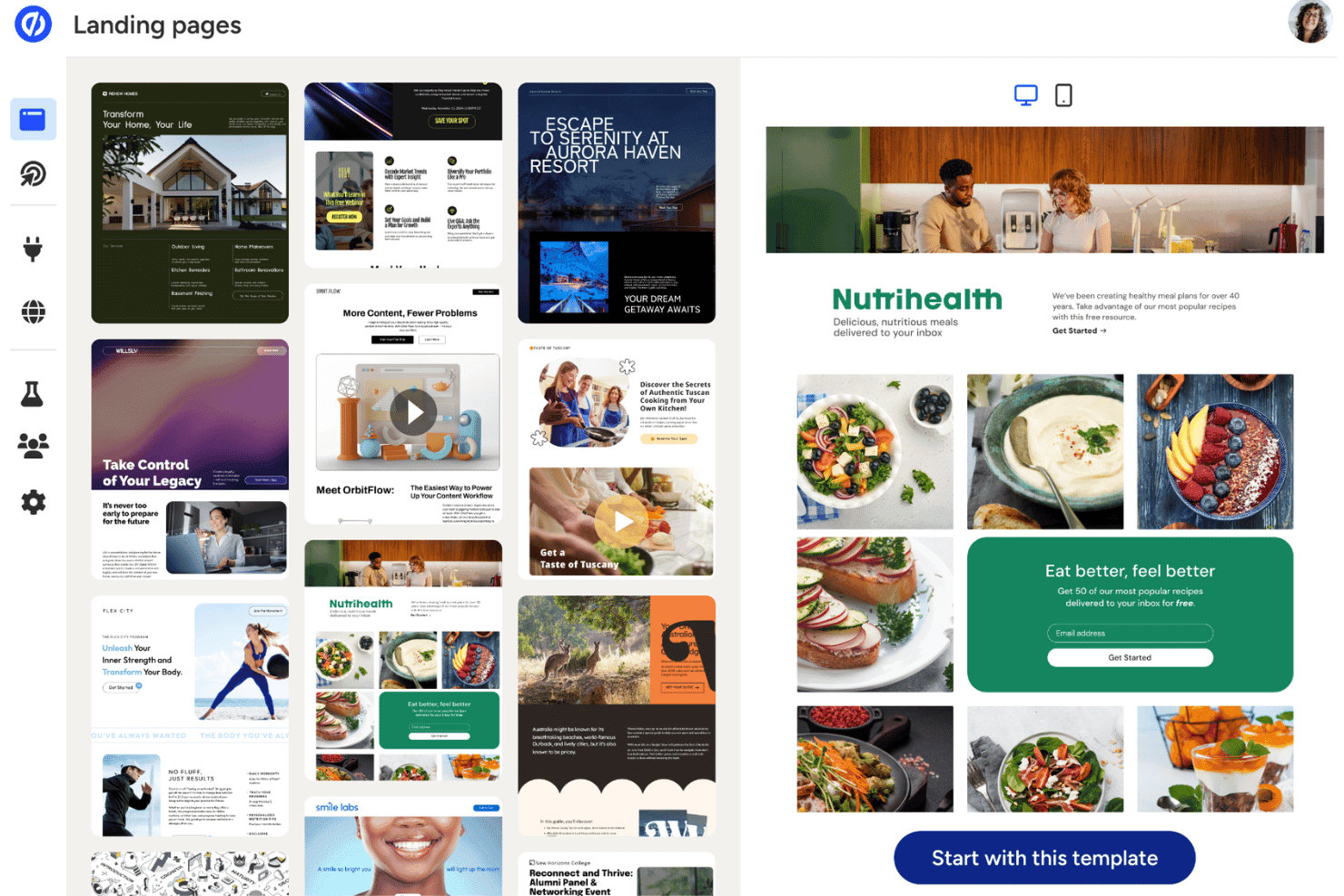
Unbounce offers a website template library with a preview panel, including an email signup form. Unbounce is an AI-powered landing page builder that lets marketers create, test, and optimize conversion-focused campaign pages using a drag-and-drop editor, AI copy generation, and automated traffic routing.
Who Is Unbounce Best For?
Unbounce is a strong fit for small to mid-sized marketing teams running paid ad campaigns who need to build and optimize landing pages without relying on a developer.
Why I Picked Unbounce
Unbounce earns its spot on my shortlist because of Smart Traffic, which routes each visitor to the page variant most likely to convert them based on device, location, and behavior data. I don't have to wait for A/B test results. Smart Traffic makes that call in real time. I also use the Smart Builder to generate a full landing page draft from a short questionnaire, with AI-written headlines and CTAs drawn from over 1.5 billion conversion data points.
Unbounce Key Features
- Dynamic text replacement: Automatically updates landing page text based on each visitor’s search keywords or ad copy.
- Smart Copy AI content generator: Produces headlines, CTAs, and body content from business inputs using AI templates.
- Multi-step forms: Lets you build forms that collect information over several steps for higher conversion rates.
- 1000+ native and Zapier integrations: Connects with major CRMs, email platforms, analytics, and workflow tools for marketing automation.
Unbounce Integrations
Unbounce offers native integrations with HubSpot, Mailchimp, Salesforce, ActiveCampaign, Marketo, Google Analytics, Facebook Ads, Zoho CRM, Shopify, WordPress, and connects with Zapier. An API is available for custom integrations.
Pros and Cons
Pros:
- Built-in A/B testing across page variants
- AI copy trained on 1.5 billion data points
- Smart Traffic routes visitors to best variants
Cons:
- No AI-generated imagery or design assets
- Limited to landing pages, not full websites
Learn more about Unbounce: Best for enterprise-level landing experiences
- 14-day free trial
- From $79/month (billed annually)
Visit WebsiteCustomer Rating:4.4/5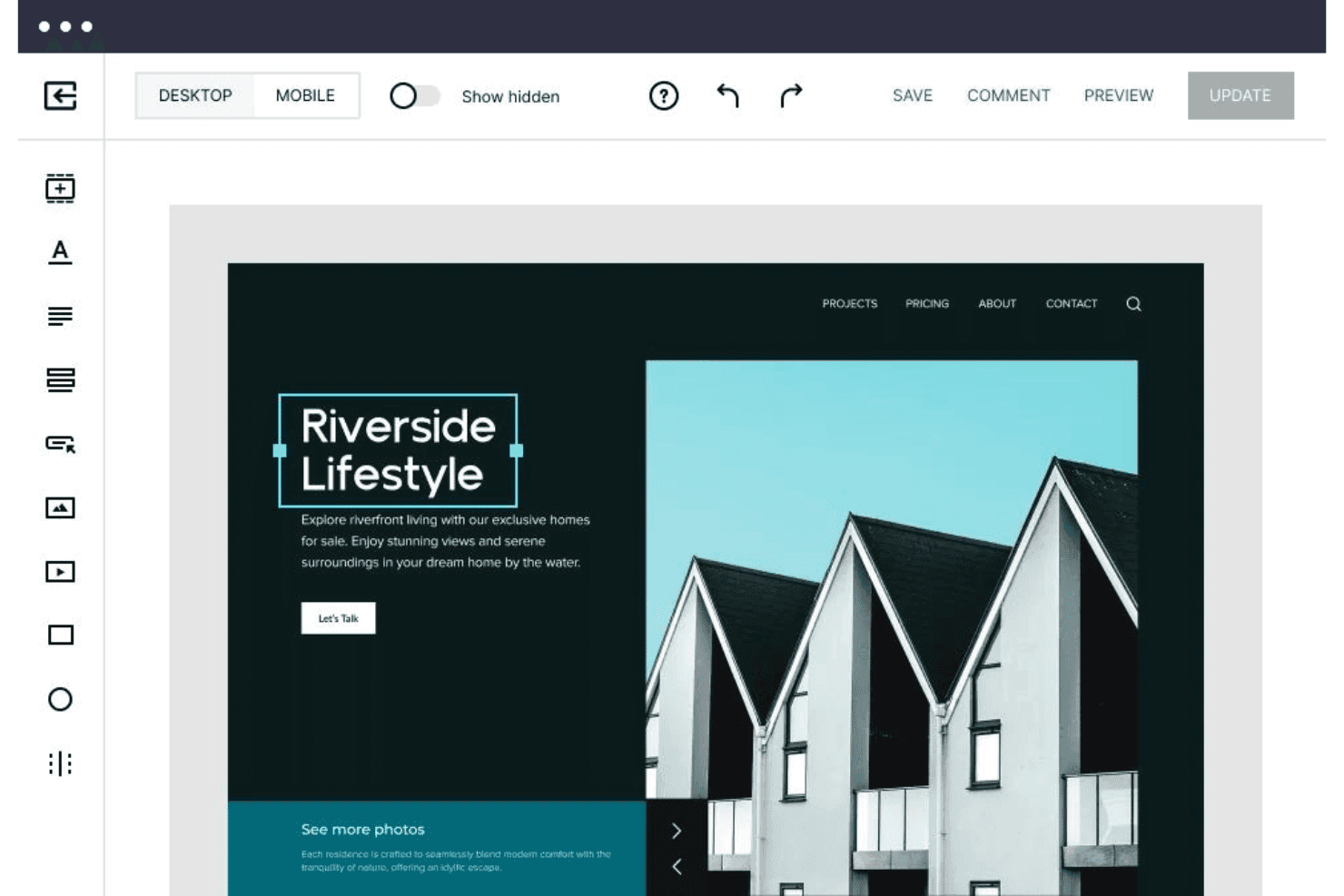
Instapage offers a drag-and-drop website editor with desktop/mobile preview, element tools, and real-time save and update options. Instapage is a landing page platform with AI content generation, server-side A/B testing, ad-to-page personalization, and conversion analytics built for marketing teams running paid campaigns at scale.
Who Is Instapage Best For?
Instapage is a strong fit for growth marketing teams at mid-market and enterprise companies managing high-volume paid search and social campaigns.
Why I Picked Instapage
I've included Instapage in my top picks because AdMap genuinely changes how enterprise teams manage paid campaigns at scale. I can visually connect every ad variant to a dedicated landing page and spot coverage gaps across an entire campaign structure instantly. Pair that with server-side A/B testing and ad-to-page personalization, and my team can run true 1:1 ad-to-page experiences across hundreds of active campaigns simultaneously.
Instapage Key Features
- AI content generation: Automatically generates headlines, body copy, and calls-to-action using OpenAI for every page.
- Drag-and-drop builder: Lets you create and arrange landing page elements without writing any code.
- Real-time visual collaboration: Allows team members and clients to leave direct on-page comments and feedback for faster review cycles.
- Form builder and library: Provides customizable form templates and editing tools for collecting leads and information.
Instapage Integrations
Instapage offers a wide range of native integrations including HubSpot, Salesforce, Marketo, Google Analytics, Google Ads, Facebook Ads, Mailchimp, Zapier, and provides an API for custom integrations.
Pros and Cons
Pros:
- AdMap visually links ads to landing pages
- AI copy generation for all page sections
- Server-side A/B testing at enterprise scale
Cons:
- No built-in AI image generation tools
- Not suited for full multi-page websites
Learn more about Instapage: Best for building scalable WordPress-based sites
- 7-day free trial
- From $10/month (billed annually)
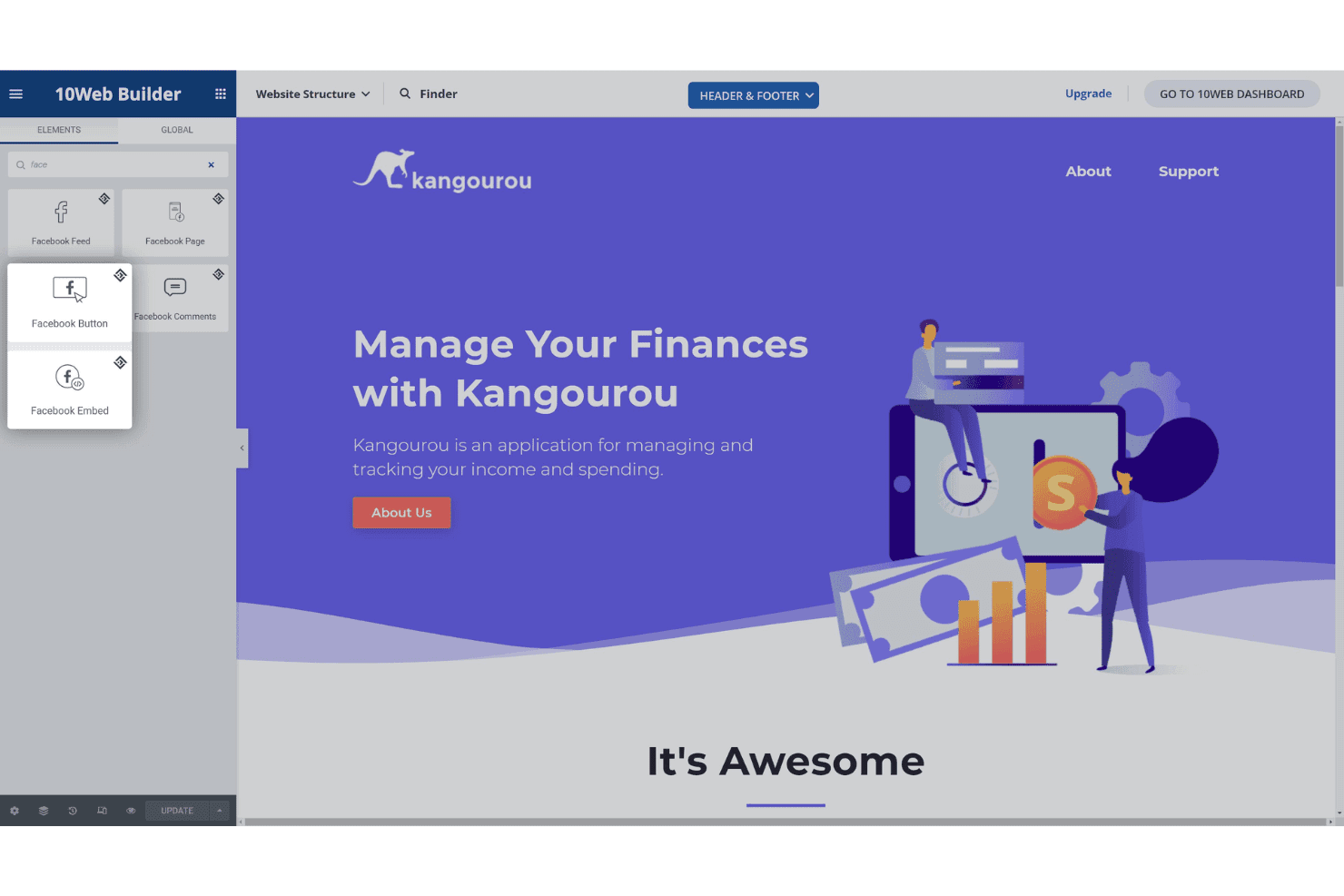
10Web Builder provides a drag-and-drop website editor with a Facebook widget elements panel and a live preview of a finance app landing page. 10Web is an AI website builder that generates full WordPress sites from text prompts, URL cloning, or Figma imports, paired with managed Google Cloud hosting and a visual editor built on Elementor.
Who Is 10Web Best For?
10Web is a strong fit for freelancers, small agencies, and small business marketers who need to launch WordPress sites quickly without relying on a developer.
Why I Picked 10Web
10Web earns its spot as one of the best on my shortlist because it's the only AI website builder that outputs genuine WordPress sites on Google Cloud hosting, with a guaranteed 90+ PageSpeed score built in from launch. I particularly like the URL cloning feature, which lets me recreate and redesign any existing site as a fully editable WordPress install in minutes. The white-label dashboard and multisite controls mean I can scale from one site to dozens of client projects without switching platforms or tools.
10Web Key Features
- Unified smart editor: Combine natural language prompts, visual editing, and custom code in one workspace.
- Figma to WordPress import: Convert Figma design files directly into responsive WordPress websites.
- Dynamic content engine: Add forms, bookings, and calendars as built-in dynamic site elements.
- White-label dashboard: Manage multiple client sites under your agency’s brand with team access controls.
10Web Integrations
10Web offers native integrations with WordPress plugins like Yoast SEO, WooCommerce, and Elementor, and provides an API for custom integrations.
Pros and Cons
Pros:
- Includes managed Google Cloud hosting
- Clones any live website via URL
- Guaranteed 90+ PageSpeed score from launch
Cons:
- AI copy less advanced than competitors
- Locked into WordPress, no alternative CMS
Learn more about 10Web: 5Best for sites tailored to professional services
B12
- Free plan available
- From $42/month (billed annually)
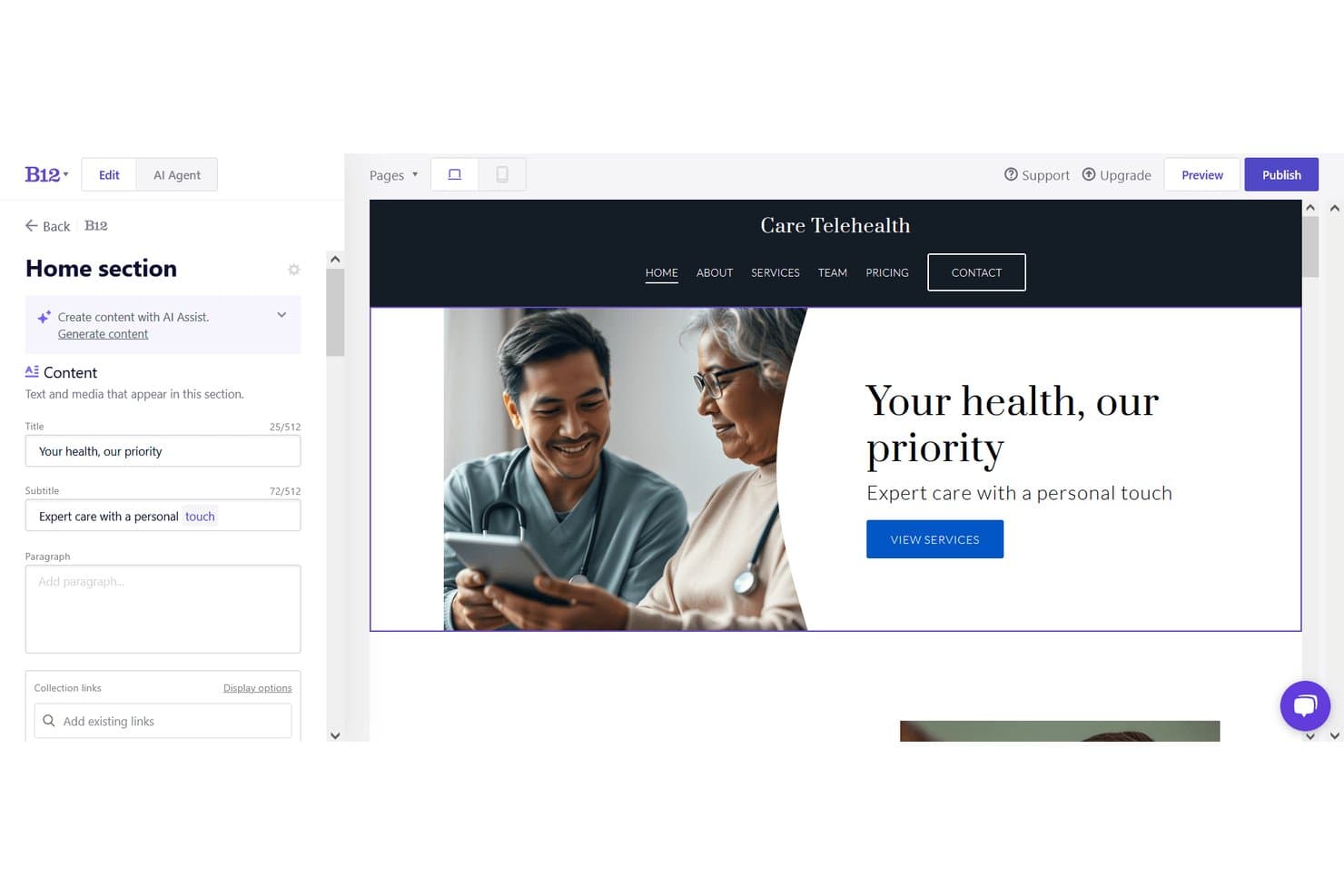
B12 offers an AI-powered website editor with live preview, content fields, and a telehealth site example showing hero text and navigation. B12 is an AI website creator that generates complete, multi-page sites from a text prompt and pairs that generation engine with a visual editor, AI copy tools, built-in scheduling, client intake forms, payments, and email marketing.
Who Is B12 Best For?
B12 is a strong fit for solo practitioners and small professional services firms that need a client-ready web presence without hiring a designer or developer.
Why I Picked B12
I've included B12 in my top picks because its AI generation is trained around professional services verticals, so a generated site for a law firm or financial consultant actually reads and structures like one. What I find genuinely distinctive is that the AI doesn't just build the site: it bundles client intake forms, eSignature contracts, and appointment scheduling directly into the published site. That means a consultant can go from prompt to a live, client-ready workflow in one platform.
B12 Key Features
- Screenshot upload for design reference: Let the AI match layouts by uploading a screenshot of a desired website.
- In-editor AI image generation: Instantly generate new custom images while editing your site content.
- Traffic analytics and reporting: Track website visitors and engagement with built-in analytics dashboards.
- Over 30 native integrations: Connect to tools like Calendly, Shopify, and Google Tag Manager for extended functionality.
B12 Integrations
B12 offers native integrations with Calendly, Shopify, Typeform, Google Tag Manager, Facebook Pixel, Drift, Google Analytics, Mailchimp, Square, and Stripe. An API is available for custom integrations.
Pros and Cons
Pros:
- Built-in eSignature, scheduling, and invoicing on all plans
- AI agent edits site via conversational text prompts
- Industry-specific AI copy generated from business inputs
Cons:
- Less layout flexibility post-generation than competitors
- No native eCommerce without connecting Shopify or Ecwid
Learn more about B12: Best for design-focused marketing microsites
- 14-day free trial
- From $19/month (billed annually)
Visit WebsiteCustomer Rating:4.6/5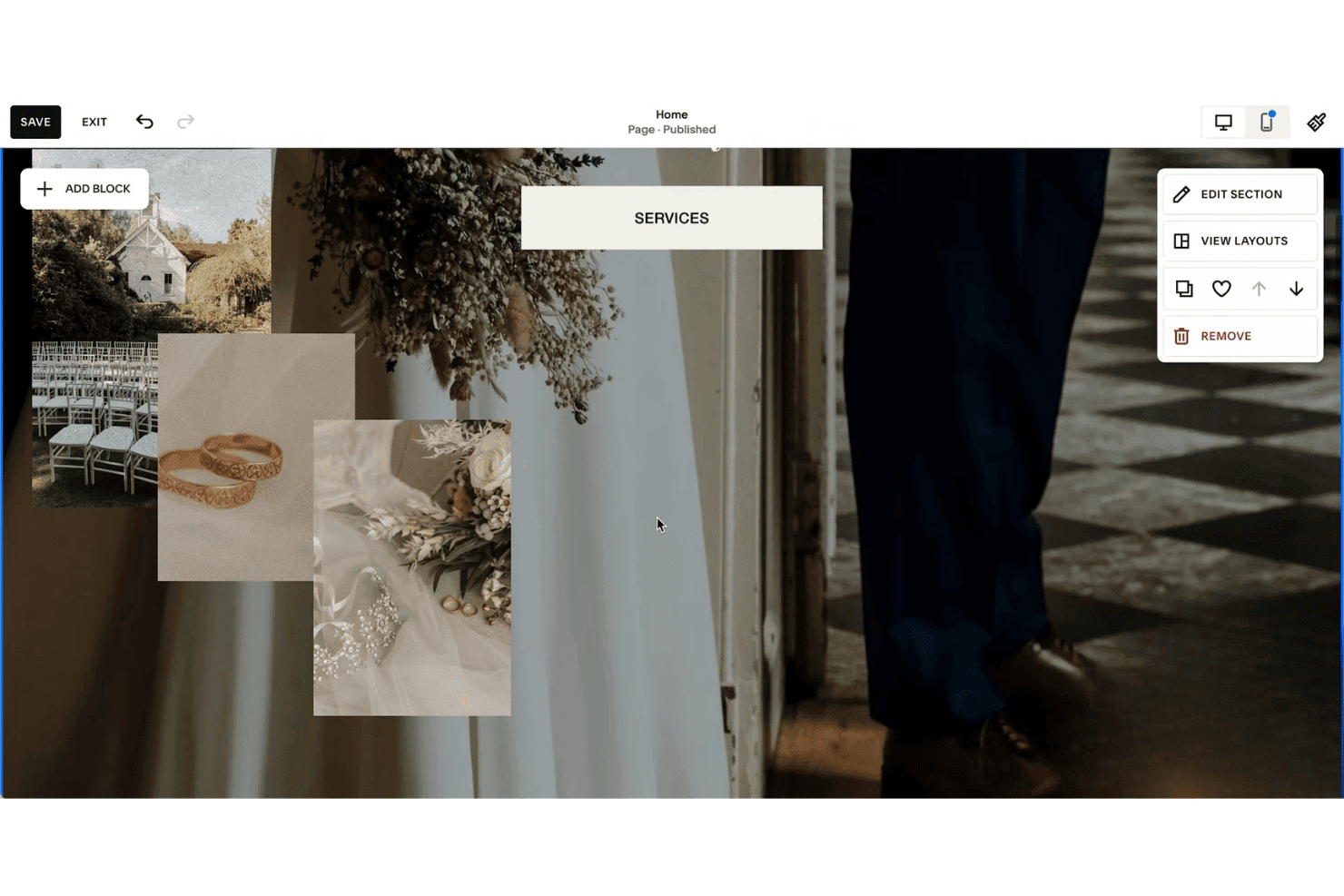
Squarespace's website editor includes a Services section with wedding photography images and a contextual editing menu on the right. Squarespace is an AI website builder that uses its Blueprint AI engine to generate complete, design-forward websites from brand inputs like personality, color palette, and business type, paired with an AI Writer for copy and built-in marketing and SEO tools.
Who Is Squarespace Best For?
Squarespace suits small business owners, freelancers, and independent marketers who need a polished, design-quality web presence without relying on a developer or designer.
Why I Picked Squarespace
I picked Squarespace as one of the best because its Blueprint AI inputs your brand personality (options like Bold, Sophisticated, or Playful), color palette, and business type to generate a fully styled microsite with curated imagery and copy in under four minutes. When I need to iterate on a design direction, the Layout Switcher swaps page compositions with my existing content automatically embedded. Site Themes then let me apply a completely different website design, including font pairings, color palettes, and button styles, in a single click.
Squarespace Key Features
- Mailchimp and Zapier integrations: Connect your site directly to email marketing and automation tools for campaigns.
- Full WYSIWYG editor: Customize AI-generated content and layouts with drag-and-drop and section controls.
- Beacon AI optimization: Scan and optimize your site’s SEO elements like meta data and alt text with AI assistance.
- Video hosting and embeddable blocks: Upload, host, and showcase high-quality video as part of your site content.
Squarespace Integrations
Squarespace offers native integrations with prominent social platforms, GoDaddy, Google Workspace, Dropbox, Unsplash, MailChimp, NameCheap, and more. It also connects with Zapier, and an API is available for custom integrations.
Pros and Cons
Pros:
- Design output quality surpasses most AI competitors
- AI Writer generates on-brand copy automatically
- Blueprint AI builds complete sites in minutes
Cons:
- No AI-driven visitor content personalization
- Follow-up AI prompt editing is limited
Learn more about Squarespace: 7Best for launching branded sites using AI prompts
Wix
- Not available
- Pricing upon request
Visit WebsiteCustomer Rating:4.2/5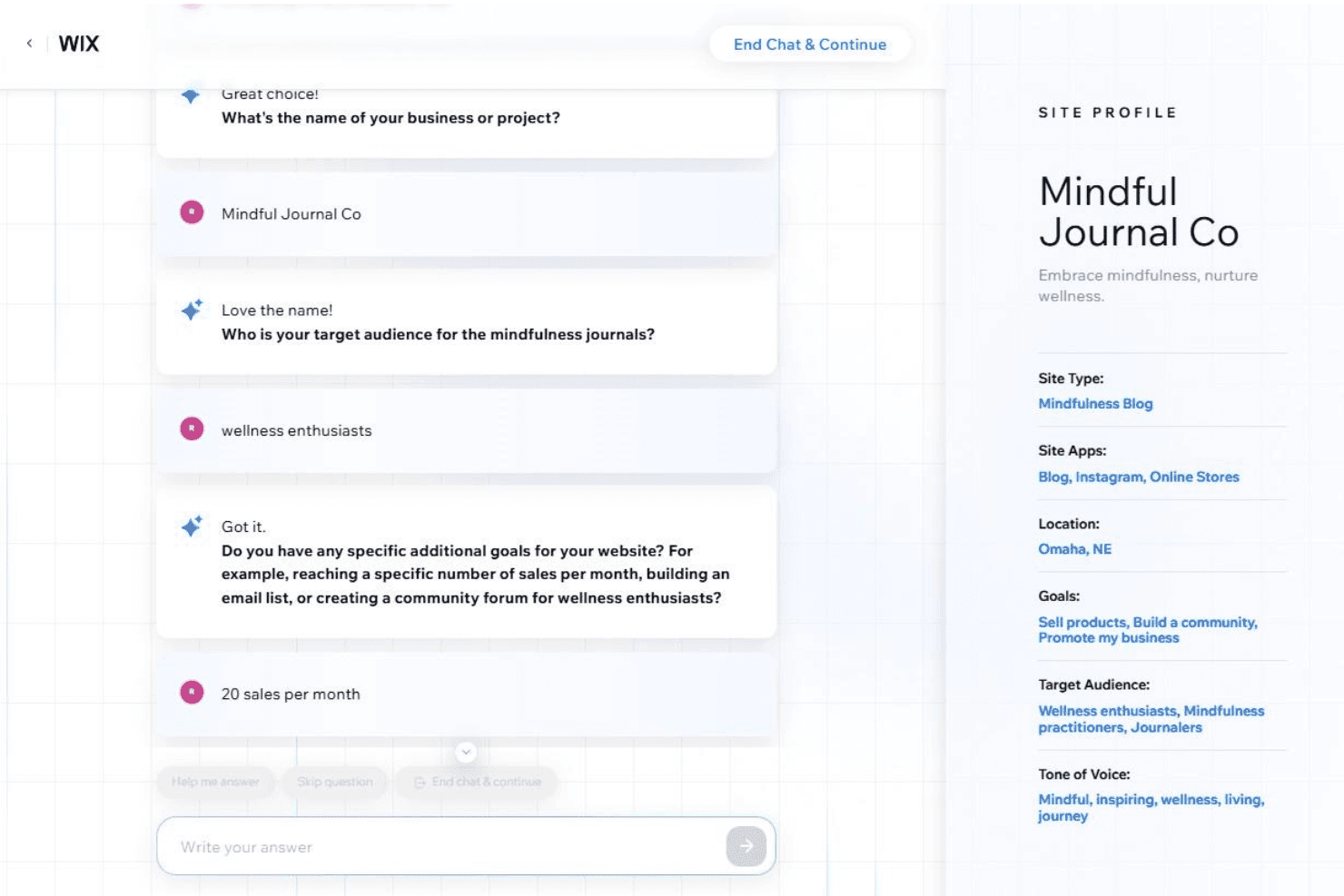
Wix's AI website builder uses a conversational chat interface to gather business details and automatically builds a site profile with goals, audience, and tone of voice. Wix is an AI website generator that creates complete, multi-page sites from conversational prompts, combining a pixel-level drag-and-drop editor with built-in eCommerce, SEO, bookings, and marketing tools.
Who Is Wix Best For?
Wix is a strong fit for small business owners and freelance marketers who need to launch a professional, branded website without relying on a developer.
Why I Picked Wix
Wix earns its spot on my shortlist because of how well its AI handles brand-specific site generation from the very first prompt. Aria, Wix's AI assistant, lets me describe a business and instantly get a complete multi-page site, with tailored sections, navigation, and copy already in place. The AI Text Creator goes further, letting me dial in tone (professional, enthusiastic, informative) and regenerate individual sections until the copy feels on-brand.
Wix Key Features
- AI section and element generator: Instantly create new site sections and components from short prompts to expand or update pages.
- Multi-cloud hosting infrastructure: Hosts all sites with built-in CDN, SSL security, and 99.99% uptime.
- App Market integrations: Offers hundreds of add-ons for e-commerce, marketing, analytics, and visitor interaction.
- SEO and analytics suite: Provides built-in metadata controls, Google Search Console integration, and visitor tracking tools.
Wix Integrations
Wix connects with hundreds of tools via its App Market, including Google Analytics, Mailchimp, PayPal, Facebook, Instagram, QuickBooks, Vimeo, and Hotjar. An API is available for custom integrations.
Pros and Cons
Pros:
- Tone controls adjust AI copy per brand
- Aria refines sites via follow-up prompts
- AI generates complete multi-page sites instantly
Cons:
- AI output varies without detailed prompts
- Sites can't be migrated off Wix
Learn more about Wix: Best for beginner-friendly multi-page creation
- 14-day free trial
- From $10.99/month (billed annually)
Visit WebsiteCustomer Rating:4.4/5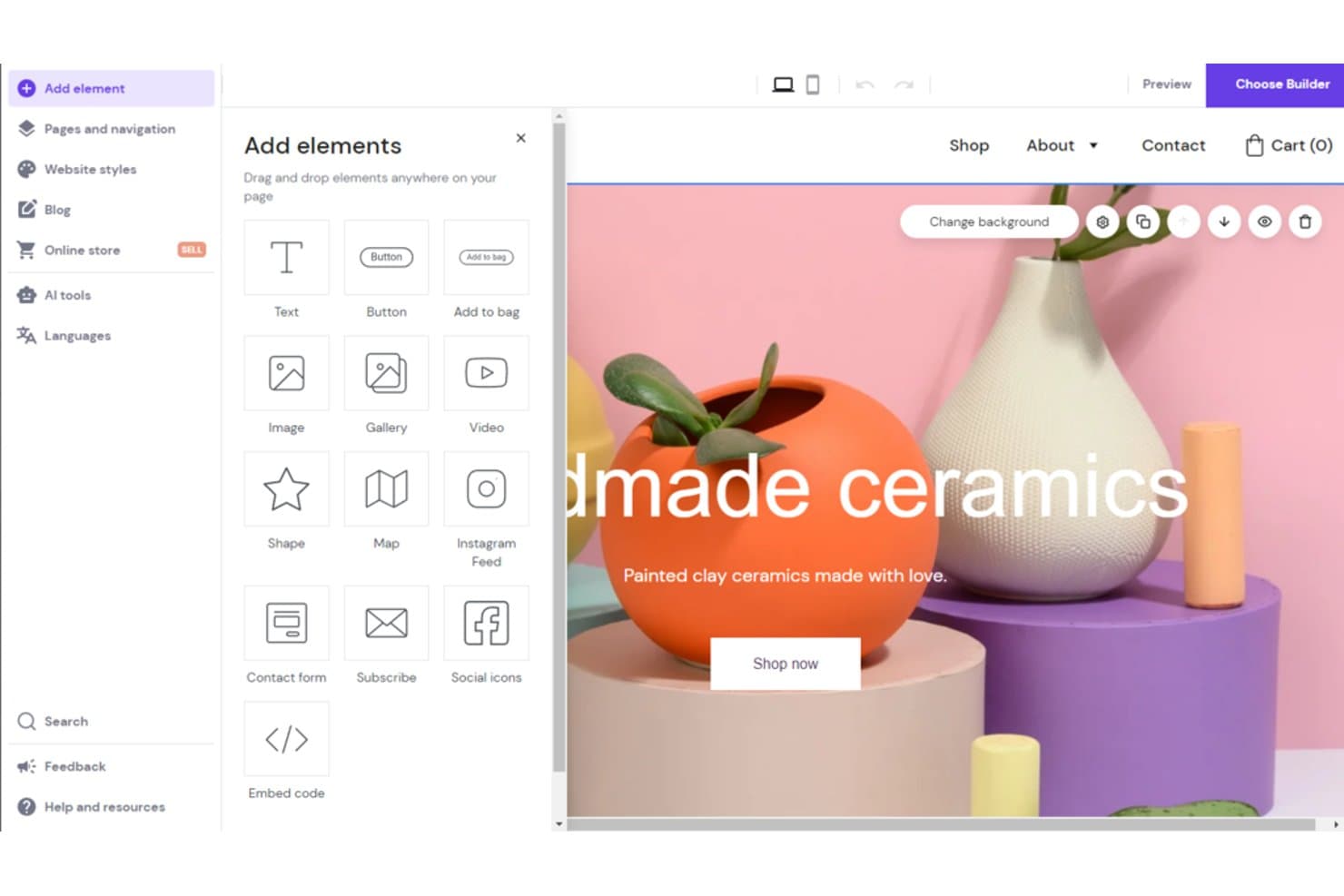
Hostinger Website Builder offers a drag-and-drop editor with AI tools and a variety of elements like text, buttons, images, and forms to customize your website. Hostinger Website Builder is an AI-powered site builder that generates complete multi-page websites from a text prompt, with a drag-and-drop editor, built-in hosting, AI copy and image generation, and ecommerce tools.
Who Is Hostinger Website Builder Best For?
It's a strong fit for small business owners and freelance marketers who need to launch multi-page websites quickly without design or development experience.
Why I Picked Hostinger Website Builder
I picked Hostinger Website Builder as one of the best because its AI site generator builds a complete multi-page site, including navigation, copy, and imagery, from a single prompt in under 60 seconds. The Smart Grid drag-and-drop editor then lets you rearrange sections across unlimited pages without writing any code. I especially like that every plan includes unlimited web pages, so there's no ceiling on how much you can expand from that initial AI-generated draft.
Hostinger Website Builder Key Features
- AI image generator: Instantly creates original visuals for headers, sections, and blog posts based on your prompts.
- AI blog post generator: Produces complete, SEO-ready articles with titles, body copy, and meta information from keywords or prompts.
- Printful integration: Lets you connect print-on-demand products directly to your online store for easy merch and branding.
- Automatic mobile-friendly design: Ensures every page and layout adapts to different devices without manual adjustments.
Hostinger Website Builder Integrations
Hostinger Website Builder offers native integrations with Google Analytics, Google Tag Manager, Meta Pixel, and Printful. An API is available for custom integrations.
Pros and Cons
Pros:
- Built-in AI copy covers every site section
- Unlimited pages included on all paid plans
- AI generates complete multi-page sites instantly
Cons:
- Limited AI design refinement after initial generation
- No A/B testing for landing pages
Learn more about Hostinger Website Builder: Best for granular design customization
- Free plan available
- From $15/month (billed annually)
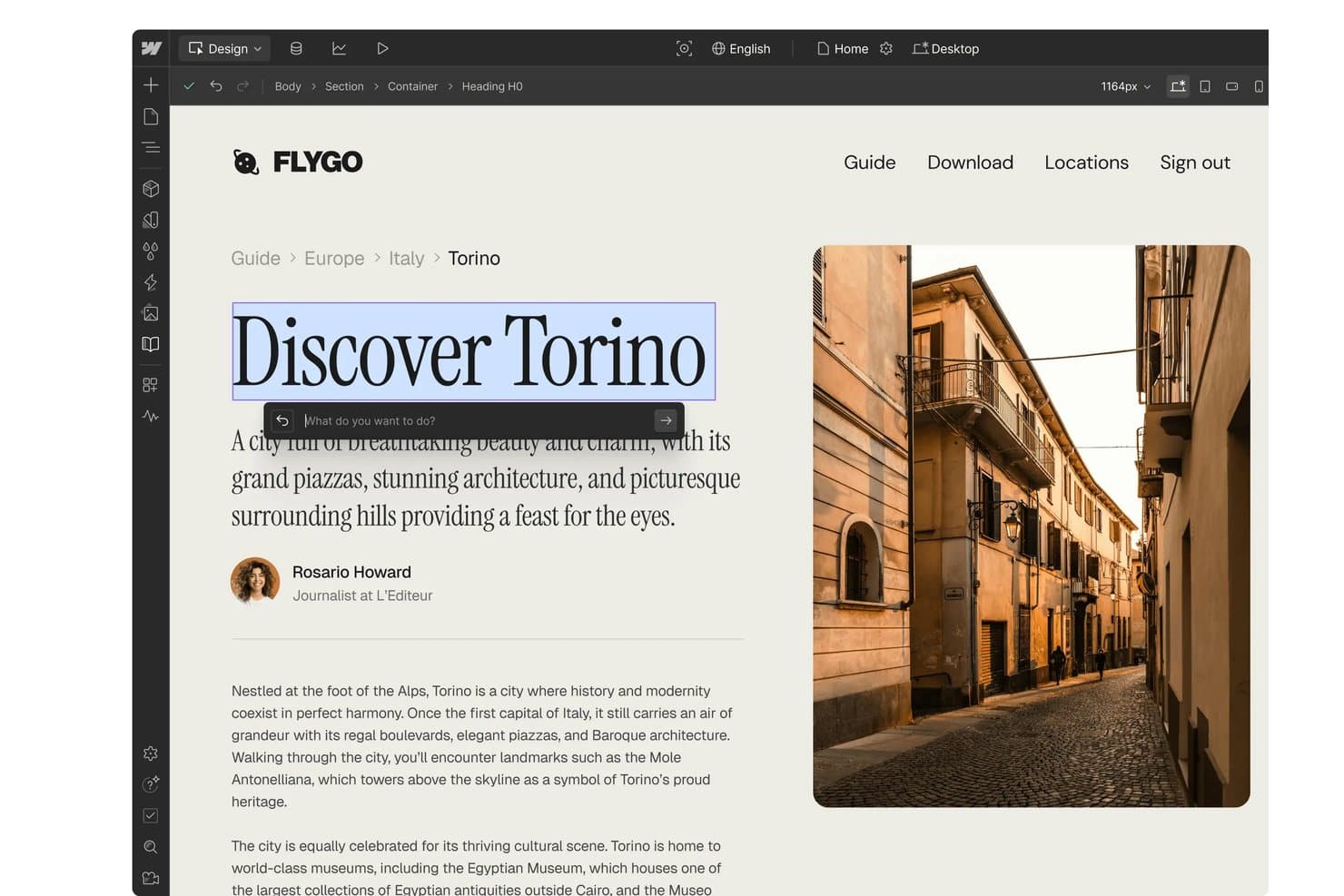
Webflow offers an AI design assistant that allows users to edit and rewrite heading text directly within the visual website builder. Webflow is a visual AI website builder that lets you generate multi-page sites from text prompts, edit layouts with CSS-level design control, and publish with integrated hosting — all without writing code.
Who Is Webflow Best For?
Webflow is a strong fit for marketing teams at SaaS companies and digital agencies that need full design control over campaign sites and landing pages without relying on a developer.
Why I Picked Webflow
Webflow earns its spot as one of the best on my shortlist because the AI output is a fully editable Webflow project, not a locked template. Once the AI generates a site, I can open the Designer and adjust flexbox layouts, CSS grid structures, and custom properties without touching code. What really sets it apart is the Page Building feature: designers define structural templates with page slot elements that control exactly where marketers can add components, keeping the brand intact across every edit.
Webflow Key Features
- AI site generation from prompts: Create entire multi-page sites with navigation and sections by describing your business in simple language.
- Integrated CMS for dynamic content: Manage and publish large volumes of content with dynamic collections and automated landing page creation.
- Native SEO and AEO controls: Directly edit metadata, sitemaps, page titles, and access AI-powered structured data optimization tools.
- App marketplace and API integrations: Extend functionality with marketplace apps for CRM, ecommerce, analytics, or connect custom tools using API access.
Webflow Integrations
Webflow offers native integrations with HubSpot, Google Analytics, Marketo, Salesforce, Mailchimp, Slack, Figma, Jasper, and many more. It also connects with Zapier and Make, and an API is provided for custom integrations.
Pros and Cons
Pros:
- Built-in CMS supports dynamic page generation
- AI-generated sites stay fully editable afterward
- CSS-level control without writing any code
Cons:
- AI generation less mature than dedicated builders
- Complex visual editor for non-designer users
Learn more about Webflow: Best for quick publishing with built-in hosting
- 7-day free trial
- From $9.99/month (billed annually)
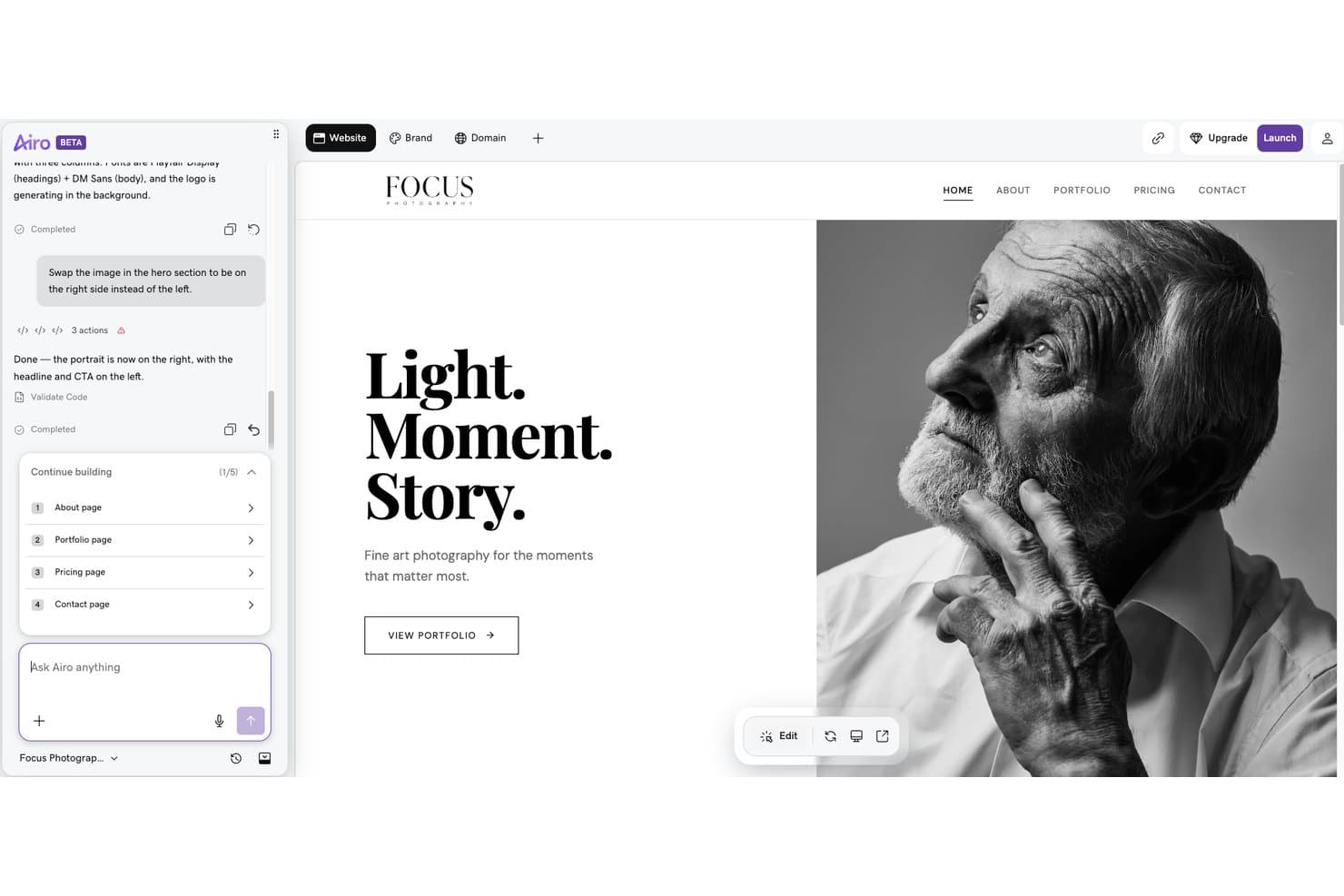
GoDaddy Website Builder offers an AI-powered chat interface that lets users make real-time layout changes, such as repositioning hero images, through simple text commands. GoDaddy Website Builder is an AI-powered site creation tool that generates multi-page websites from conversational prompts, with built-in hosting, an SEO wizard, email marketing, and ecommerce built into a single platform.
Who Is GoDaddy Website Builder Best For?
It's a natural fit for small business owners and non-technical marketers who need to get a site live fast without writing code or managing hosting separately.
Why I Picked GoDaddy Website Builder
I picked GoDaddy Website Builder because the distance between "I have a prompt" and "I have a live site" is genuinely short. Airo AI Builder generates a complete multi-page site from a conversational input, and one-click deploy pushes it live on GoDaddy's hosting with SSL already configured. There's no separate hosting account to provision or DNS records to manage manually.
GoDaddy Website Builder Key Features
- Drag-and-drop editor: Modify layouts, sections, and content visually with point-and-click editing tools.
- SEO Wizard: Set meta titles, descriptions, and basic structured data for every page.
- Integrated email marketing: Send branded marketing emails directly from the platform, with send limits based on your plan.
- Social media integrations: Connect Facebook, Instagram, Pinterest, LinkedIn, and YouTube to manage links and social posting.
GoDaddy Website Builder Integrations
GoDaddy offers integrations with Google Analytics, Facebook, Instagram, Yelp, PayPal, and OpenTable. An API is available for custom integrations.
Pros and Cons
Pros:
- Built-in SEO Wizard covers all pages
- Hosting included with every published site
- Generates full sites from conversational prompts
Cons:
- Template designs feel constrained after AI generation
- Follow-up AI editing prompts aren't available
Learn more about GoDaddy Website Builder:
Other AI Website Builders
Here are some additional AI website builders that didn’t make it onto my shortlist, but are still worth checking out:
- 11FramerBest for responsive layout control
- 12DurableBest for auto-generating small business websites
- 13LeadpagesBest for campaign-driven landing site creation
- 14DudaBest for client site management at scale
- 15MixoBest for instant multi-language site generation
- 16Hocoos AI Website BuilderBest for AI-guided site personalization features
- 17ElementorBest for flexible design controls in WordPress
- 18JimdoBest for effortless small business site setup
- 19BluehostBest for easy WordPress hosting integration
- 20CodeDesign.aiBest for editing with natural language prompts
How I Evaluate AI Website Builders
To earn a spot here, a tool's AI needs to produce real output—usable copy, structured layouts, and brand-matched designs from a short prompt. I break my evaluation into core functionality every platform must deliver and the differentiating factors that set the best options apart.
Core Functionality (Table Stakes For This List)
When I'm selecting tools for my list, I rank each one on a scale from 0 (does not offer the functionality) to 5 (excels in this area) for each core functionality listed below. Then, I calculate the tool's total score into a percentage. Each tool needs to achieve a minimum total score of 65% to be considered for inclusion.
- AI site generation: I evaluate whether a prompt like "build a SaaS product launch site with pricing and features pages" produces a usable multi-page structure with logical navigation.
- AI copy generation: The generated headlines, CTAs, and body text should reflect actual business context, not generic filler that you'd need to rewrite from scratch.
- AI design and layout: I look for layout choices, color palettes, and imagery that feel cohesive and brand-appropriate rather than a random template swap.
- Visual editor: After AI does its work, you need a drag-and-drop or WYSIWYG editor to rearrange sections, tweak styles, and add components without touching code.
- Publishing and hosting: I check that the platform includes integrated hosting with custom domain support and SSL so you can go live without a separate hosting provider.
- Marketing features: Built-in SEO controls, form builders, analytics, or landing page tools matter here, especially for teams running campaign-specific pages.
Once I have a list of tools that meet the criteria, I consider what sets each platform apart.
Differentiating Factors (What Sets Vendors Apart)
Here's how I compare and contrast different vendors:
Standout Features
Auto brand kit application is a big one for me. Tools that can ingest a logo or existing URL and apply matching colors, fonts, and imagery across every page save hours of manual styling. I also look for natural language editing, where you can type something like "swap the hero image and make the headline punchier" instead of dragging elements around. Smart SEO optimization matters too—I evaluate whether the platform auto-generates meta tags, alt text, and schema markup as you build, so pages are search-ready from the start.
Beyond Features
Integration options carry a lot of weight. If your AI-built site can't connect to your CRM or email platform, you're adding manual steps to every campaign. I also evaluate pricing transparency, especially how costs scale as you add pages, team seats, or traffic. Design control matters just as much. Some platforms lock you into basic AI output, while others like Webflow and Framer let you inject custom CSS or edit at the component level as your needs grow.
How to Choose an AI Website Builder
It’s easy to get bogged down in long feature lists and complex pricing structures. To help you stay focused as you work through your unique software selection process, here’s a checklist of factors to keep in mind:
| Factor | What to Consider |
|---|---|
| FactorScalability | What to ConsiderWill the platform handle your growth—new pages, multi-site management, or traffic surges—or will you face extra costs or complexity as you expand? |
| FactorIntegrations | What to ConsiderDoes it support direct connections to your CRM, email marketing, or analytics tools? Consider where automation is crucial for campaign workflows. |
| FactorCustomizability | What to ConsiderHow much flexibility do you need beyond the default AI output? Check if you can adjust layouts, styling, or add custom code for advanced use cases. |
| FactorEase of use | What to ConsiderCan marketing team members launch or edit pages without heavy training, or will you need ongoing help from designers or IT as priorities shift? |
| FactorImplementation and onboarding | What to ConsiderHow quickly can your team get a branded, live site up and running? Look for guided setup tools, templates, or demo content that reduce setup friction. |
| FactorCost | What to ConsiderAre pricing tiers, page limits, and add-on fees clear? Make sure the investment fits both your launch and future growth plans, not just your first site. |
| FactorSecurity safeguards | What to ConsiderDoes the vendor provide SSL, privacy controls, and data protection you feel comfortable putting your audience data behind? Review their documentation. |
| FactorSupport availability | What to ConsiderIf you run into urgent issues—like a site not publishing or a domain problem—can you reach helpful support fast, or will delays hurt key campaigns? |
What are AI Website Builders?
An AI website builder is a digital platform that uses artificial intelligence to design, write, and assemble entire websites based on your prompts or business details. These tools automate site structure, copywriting, imagery, and styling so you can launch a professional, branded website quickly—no coding or design background required. AI website builders are built for marketers, entrepreneurs, and teams who want results without complexity.
Features
When selecting an AI website builder, keep an eye out for the following key features:
- AI site generation: Quickly create full multi-page websites or landing pages by entering a short prompt describing your business, product, or goals.
- AI copywriting: Instantly generate headlines, CTAs, and body content tailored to your company, saving time on writing and editing.
- AI design and layout: Automatically produce visually pleasing designs with professional layouts, color schemes, fonts, and imagery that reflect your brand’s identity.
- Drag-and-drop editor: Easily tweak site sections, change layouts, or add elements without any need for coding or technical skills.
- Integrated web hosting and publishing: Launch your live site with just a few clicks, including options for custom domains and SSL security.
- SEO optimization tools: Access features like automated meta tags, alt text, and site maps to help your website rank better in search engines.
- Personalization capabilities: Show different content or offers based on user behavior, geographic location, or device to improve engagement.
- Form and lead capture: Add contact forms, interactive chatbot widgets, or lead magnets directly into your site to grow your marketing list.
- Analytics and reporting: Track site performance, visitor behavior, conversions, and more to help your team iterate and improve.
- Brand kit ingestion: Upload your logo, run a business name generator, or enter your brand details to have the site’s colors, fonts, and style automatically apply throughout every page.
Benefits
Implementing an AI website builder provides several benefits for your team and your business. Here are a few you can look forward to:
- Faster launch times: AI-powered workflows generate sites, content, and design elements in minutes, so you can launch campaigns without developer bottlenecks.
- On-brand consistency: Brand kit ingestion and automated styling ensure every page matches your visual identity with zero manual tweaking.
- Less manual work: Automated copywriting, layout, and image selection reduce the need for constant editing or hiring outside freelancers.
- Greater accessibility: No-code editors let anyone on the team build pages or update content, removing barriers for non-technical users.
- Improved SEO readiness: Built-in SEO tools and auto-tagging help your site show up higher in search results right from the start.
- Personalized experiences: AI-driven personalization shows visitors content tailored to their location or behavior, increasing engagement.
- Scalable for growth: Easily expand your site, add new pages, or support higher traffic as your needs change—with built-in hosting and flexible platform infrastructure.
Costs and Pricing
Selecting an AI website builder requires an understanding of the various pricing models and plans available. Costs vary based on features, team size, add-ons, and more. The table below summarizes common plans, their average prices, and typical features included in AI website builder solutions:
Plan Comparison Table for AI Website Builder
| Plan Type | Average Price | Common Features |
|---|---|---|
| Plan TypeFree Plan | Average Price$0 | Common FeaturesBasic site generation, limited pages, platform branding, and shared hosting. |
| Plan TypePersonal Plan | Average Price$10-$25/month | Common FeaturesCustom domain support, more AI content edits, email support, and template variety. |
| Plan TypeBusiness Plan | Average Price$30-$80/month | Common FeaturesAdvanced design controls, SEO tools, analytics integration, form builders, and priority support. |
| Plan TypeEnterprise Plan | Average Price$100-$500+/month | Common FeaturesUnlimited pages, team collaboration, custom SLAs, white labeling, API access, and dedicated account management. |
AI Website Builders FAQs
Here are some answers to common questions about AI website builders:
Can I migrate my existing website to an AI website builder?
Yes, some AI website builders offer migration tools or services to import existing content and pages. However, it’s important to check if the layout and functionality will transfer cleanly, as some advanced customizations may need manual adjustment after import.
How much technical expertise do I need to use an AI website builder?
No, you typically don’t need technical expertise. These platforms are designed for marketers and non-developers, offering visual editors and AI prompts so you can build and update sites without coding or design experience.
How secure are AI website builders for business use?
Most AI website builders offer SSL, regular backups, and maintain privacy standards suitable for business use. It’s always a good idea to review the vendor’s documentation for data handling practices and ensure compliance with your own security needs.
Are AI website builders good for multi-page or complex sites?
Yes, many AI website builders support building multi-page websites and adding advanced features through integrations or custom code. Be sure to confirm that the tool fits your site’s scale and complexity before committing.
Can I connect my AI website builder to my CRM and marketing tools?
Yes, leading platforms usually support integrations with popular CRMs, analytics tools, and email marketing platforms. This lets your team automate lead capture, email signups, and track visitor journeys easily.