

Software-ul pentru cercetarea pieței este un instrument valoros pentru orice companie. Cu software-ul potrivit, echipele pot obține informații aprofundate despre comportamentul clienților și pot lua decizii bazate pe date. Totuși, găsirea software-ului potrivit pentru cercetarea pieței poate fi dificilă, mai ales având în vedere numărul mare de opțiuni disponibile.
Folosindu-mi vasta experiență în domeniul software-ului de marketing, am testat și comparat mai multe dintre cele mai bune soluții software pentru cercetarea pieței disponibile. Apoi, mi-am compilat rezultatele în recenzii detaliate pentru a vă ajuta să găsiți cel mai bun software pentru nevoile dumneavoastră specifice. Sunt convins că veți descoperi următoarea soluție software pentru cercetarea pieței în lista de mai jos.
Why Trust Our Software Recommendations
6,700+
Reviews
20
Industry experts
16+
Evaluation factors
14
Years
Our team has been testing and reviewing software since 2012. As marketing leaders ourselves, we know how difficult—and important—it is to choose the right software.
For this guide, we evaluated tools using hands-on testing and independent research, scoring tools using our selection criteria.
Our reviews reflect our human editorial judgment, not a sales pitch.
Expert reviewers:
 Gui DrusinaCreative Director
- Shriya GhateSenior Marketing Lead
 Amanda JacquesMarketing Ops Leader

Tabel comparativ al soluțiilor software pentru cercetarea pieței
Am analizat prețurile și disponibilitatea perioadelor de testare gratuită și a versiunilor demonstrative.
Sorted by: Default
| Tool | Starting Price | Website | |
|---|---|---|---|
Best for multilingual social listening coverage | 4.7 out of 5 | $199/month Free trial available | Book Demo |
Best for competitive digital audience analysis | 4.5 out of 5 | $60/month 7-day free trial + free demo available | Website |
Best for effortless team collaboration on surveys | Not rated | Pricing upon request Not available | Website |
Best for extensive templates | Not rated | $7.42/month Free plan available | Website |
Best for qualitative data analysis | Not rated | $30/month Free trial available | Website |
Best for rapid audience targeting at scale | 4.6 out of 5 | $39/user/month Free plan + free demo available | Website |
Best for engaging surveys | 4.7 out of 5 | $39/month Free plan + 14-day free trial available | Website |
Best for content insights | 4.5 out of 5 | $199/month Free trial available | Website |
Best for multi-channel experience data integration | 3.9 out of 5 | Pricing upon request Free plan + 30-day free trial + free demo available | Website |
Best for quick-turn consumer insight validation | Not rated | $150/month Free demo available | Website |


Recenzii ale celor mai bune soluții software pentru cercetarea pieței
Am analizat prețurile și disponibilitatea perioadelor de testare gratuită și a versiunilor demonstrative, astfel încât să puteți face o comparație alăturată mult mai simplă.
 Best for multilingual social listening coverage
- Free trial available
- From $199/month (billed annually)
Visit WebsiteCustomer Rating:4.7/5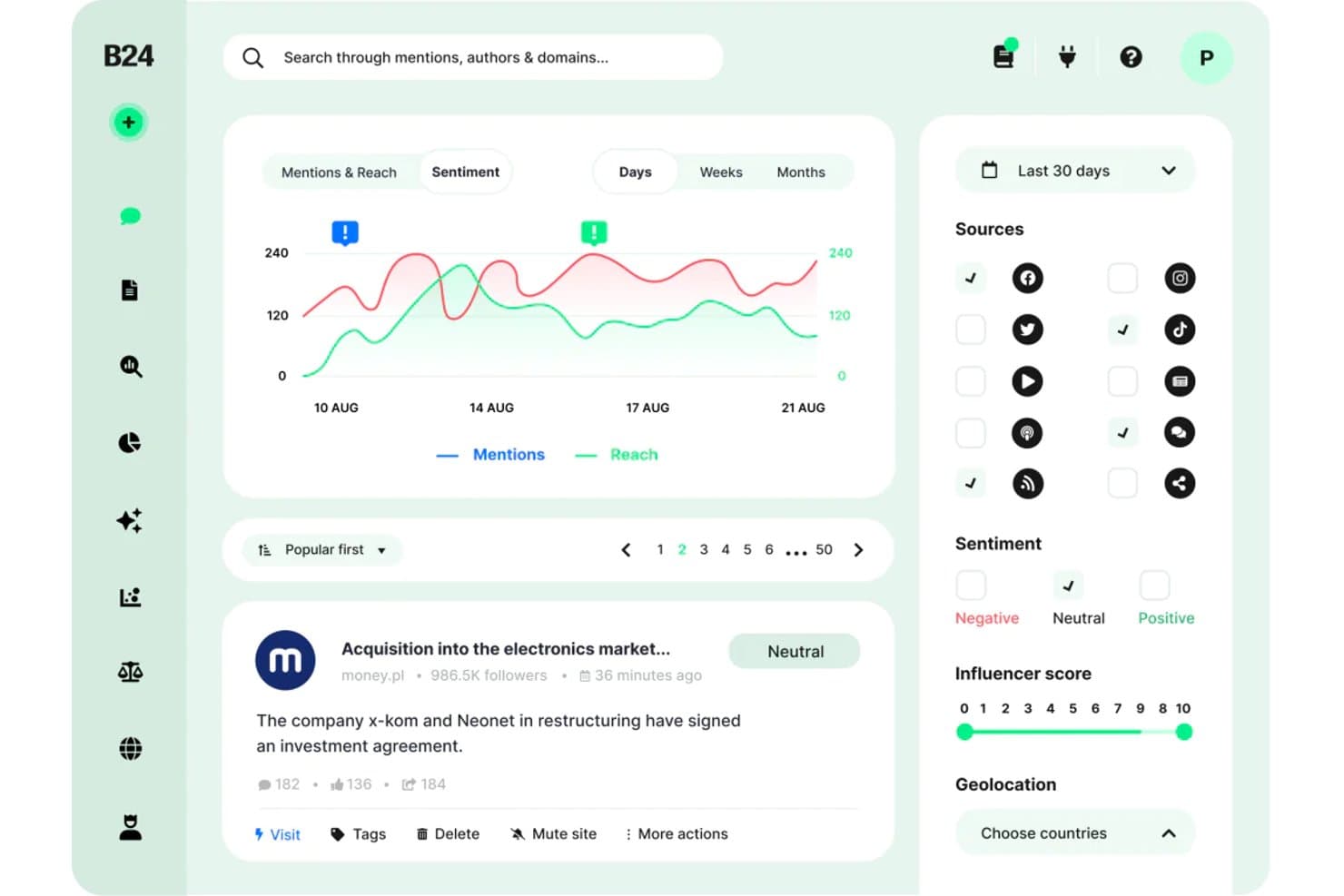
Brand24 offers a sentiment analysis dashboard with mention tracking, reach charts, source filtering, and influencer scoring for market research. Brand24 is an AI-powered social listening and media monitoring platform that tracks brand mentions, consumer sentiment, and online conversations across social media, news sites, blogs, forums, podcasts, and review platforms in real time.
Who Is Brand24 Best For?
Brand and insights managers at companies operating across international or multilingual markets will get the most from Brand24's cross-language monitoring capabilities.
Why I Picked Brand24
Brand24 earns its spot on my shortlist because its multilingual social listening coverage is genuinely unmatched. I particularly like that sentiment analysis runs across 108 languages at a 95% accuracy rate, so tracking consumer perception in Arabic, Spanish, or Polish produces reliable data rather than noise. The AI Brand Assistant 2.0 lets me ask natural-language questions directly against that multilingual dataset, surfacing themes I'd otherwise have to dig for manually.
Brand24 Key Features
- Presence score: Aggregates brand visibility into a single metric updated in real time for easy monitoring.
- Influencer identification: Surfaces top authors and channels driving key conversations about your brand or competitors.
- Storm alerts: Instantly notifies you of unusual spikes in brand discussion volume to aid crisis detection.
- White-labeled reports: Lets you export data in branded PDF, Excel, or PowerPoint formats for custom sharing and presentations.
Brand24 Integrations
Brand24 offers native integrations with Slack and Microsoft Teams. An API is available for custom integrations.
Pros and Cons
Pros:
- AI Brand Assistant answers research queries
- Covers social, news, podcasts, and reviews
- Tracks mentions across 108 languages simultaneously
Cons:
- Stories and Reels metrics not fully supported
- No survey or primary research capabilities
Learn more about Brand24: Best for competitive digital audience analysis
- 7-day free trial + free demo available
- From $60/month (billed annually)
Visit WebsiteCustomer Rating:4.5/5
Semrush Traffic Analytics shows competitor and audience insight reporting. Semrush is a digital intelligence platform that combines keyword research, competitor traffic analysis, backlink auditing, and audience behavior data across search, social, and paid channels.
Who Is Semrush Best For?
Semrush is a strong fit for digital marketers and SEO strategists at mid-size to enterprise companies who need deep visibility into competitor online presence.
Why I Picked Semrush
I picked Semrush as one of the best because its Traffic Analytics tool gives me a detailed breakdown of any competitor's audience, including traffic sources, engagement metrics, and geographic reach, all without needing access to their internal data. The Keyword Gap tool lets me line up to five competitors side by side to spot exactly which search terms they're capturing that I'm not. I also lean on the Backlink Gap tool to find link-building opportunities my competitors have already validated.
Semrush Key Features
- Market explorer: Maps the competitive landscape of any industry, showing market share, audience demographics, and top players in one view.
- Topic research: Surfaces trending subtopics, headlines, and questions tied to any seed keyword to guide content and research planning.
- Brand monitoring: Tracks online mentions of any brand across news, blogs, and social platforms in near real time.
- Advertising research: Reveals competitors' paid search ad copy, landing pages, and keyword spend history.
Semrush Integrations
Semrush supports a variety of integrations with popular tools and services. Native integrations include Google Analytics, Google Search Console, Google Ads, Google Sheets, Google Docs, Looker Studio, Trello, WordPress, Facebook, LinkedIn, Instagram, Pinterest, YouTube, monday.com, Wix, and Zoho Analytics. It connects with Zapier, and an API is available for custom integrations.
Pros and Cons
Pros:
- Side-by-side competitor gap analysis for keywords
- Tracks brand visibility in AI search results
- Extensive keyword database across numerous countries
Cons:
- Key competitive intelligence tools require paid add-ons
- Thin data on niche or localized competitors
 Best for effortless team collaboration on surveys
- Not available
- Pricing upon request

Google Forms sharing settings show collaborative quiz access management. Google Forms is a free survey builder from Google that lets teams create, distribute, and analyze questionnaires with automatic response collection and live data summaries in Google Sheets.
Who Is Google Forms Best For?
Google Forms is a natural fit for small teams and individual marketers already working inside Google Workspace who need a no-cost way to collect survey responses quickly.
Why I Picked Google Forms
Google Forms earns its spot on my shortlist because multi-editor access is baked in by default. My whole team can open the same form simultaneously, edit questions, and leave comments without any version conflicts. I also like that conditional logic lets us branch respondents into different question paths based on earlier answers, which makes a single form do the work of several. Response data flows automatically into Google Sheets in real time, so my team can slice and filter results together the moment submissions come in.
Google Forms Key Features
- Multiple question types: Choose from multiple choice, checkboxes, dropdown menus, linear scales, and open-text fields to match each question to the right response format.
- Response validation: Set rules that require respondents to enter specific formats, number ranges, or text patterns before submitting.
- Pre-built survey templates: Start from a library of ready-made survey formats rather than building every form from a blank page.
- Automatic summary charts: View auto-generated bar charts, pie charts, and response tallies directly inside Google Forms without exporting your data.
Google Forms Integrations
Google Forms connects natively with other Google Workspace apps, including Google Sheets, Google Drive, Google Docs, and Google Calendar. Thousands of additional apps are available through the Google Workspace Marketplace, and it connects with Zapier. A RESTful API is also available for custom integrations.
Pros and Cons
Pros:
- Gemini AI generates draft forms from prompts
- Easy to use form designs
- Unlimited responses on every survey
Cons:
- Built-in analytics are basic without Sheets export
- Templates lack depth in layout customization
Learn more about Google Forms: Best for extensive templates
- Free plan available
- From $7.42/month (billed annually)

Zoho Survey helps users create, distribute, and analyze surveys easily. Zoho Survey is an online survey and questionnaire tool for individuals and businesses to collect feedback and insights from their target audience. It primarily serves marketers, researchers, and HR teams by facilitating survey creation, distribution, and analysis.
Why I picked Zoho Survey: It offers an intuitive drag-and-drop interface that makes survey creation easy for your team. With real-time reporting, you can quickly analyze responses and gain insights. Customizable templates help you build surveys that fit your specific needs. Additionally, advanced features like skip logic and piping ensure that your surveys are dynamic and engaging.
Standout features & integrations:
Features include customizable templates, real-time reporting, and advanced survey logic like skip logic and piping. You can easily create and distribute surveys with its drag-and-drop interface. The platform also supports multiple languages, making it versatile for global teams.
Integrations include Asana, Dropbox, Google Drive, Google Sheets, Mailchimp, Microsoft Teams, Salesforce, Slack, Trello, and Zoho Projects.
Pros and Cons
Pros:
- Easy drag-and-drop interface
- Multiple language support
- Advanced survey logic
Cons:
- Requires internet connection
- Limited customer support
Learn more about Zoho Survey:

Dovetail centralizes and analyzes customer insights for data-driven decisions. Dovetail is a customer insights platform to help product managers, designers, researchers, sales teams, and customer success professionals centralize and analyze customer knowledge. It quickly transforms user feedback, calls, and documents into actionable insights, enabling data-driven decision-making.
Why I picked Dovetail: The platform offers features that help you organize and analyze customer insights efficiently. Its AI-powered insights can convert vast amounts of feedback into meaningful data. Dovetail also provides data privacy protection and integration with other tools, ensuring your insights are secure. Its ability to standardize research processes across teams makes it a valuable asset for fostering a customer-centric culture in your organization.
Standout features & integrations:
Features include AI-driven insights, fast analysis of customer data, and data privacy protection. Your team can also benefit from tools for organizing insights and integrating with other platforms. These features help centralize the process of transforming feedback into actionable insights.
Integrations include Workday, SAP SuccessFactors, ADP, Oracle HCM, BambooHR, Microsoft Dynamics 365, Salesforce, ServiceNow, Google Workspace, and Slack.
Pros and Cons
Pros:
- Standardizes research processes
- AI-powered insights
- Fast data analysis
Cons:
- Initial setup complexity
- Limited offline access
Learn more about Dovetail: Best for rapid audience targeting at scale
- Free plan + free demo available
- From $39/user/month (billed annually)
Visit WebsiteCustomer Rating:4.6/5
SurveyMonkey shows audience targeting options for survey response collection. SurveyMonkey is a survey and market research platform that combines customizable survey building, a built-in audience panel, and response analytics tools in one place.
Who Is SurveyMonkey Best For?
SurveyMonkey is a strong fit for marketing and insights teams at mid-size to enterprise companies who need fast access to targeted survey respondents.
Why I Picked SurveyMonkey
I've included SurveyMonkey in my top picks because its built-in Audience panel gives you direct access to 335M+ respondents across 130+ countries without ever leaving the platform. I like that you can layer over 200 targeting options with custom screening questions to zero in on niche segments, like reaching only female CPG buyers aged 25-34 in the Midwest. In practice, my team can go from survey launch to real-time results in as little as an hour, which makes it genuinely useful when you need fast data to support a campaign decision or product pitch.
SurveyMonkey Key Features
- Sentiment analysis: Automatically categorizes open-ended responses as positive, neutral, or negative so you can gauge emotion across large response sets.
- Thematic analysis: Uses AI to group open-ended responses into key themes, so you don't have to manually sort through hundreds of written answers.
- Message and claims testing: Measures the effectiveness of marketing slogans, taglines, and value propositions with your target audience before launch.
- Crosstabs: Lets you compare answers across multiple survey questions to surface segment-level insights, like product interest broken down by gender and income.
SurveyMonkey Integrations
SurveyMonkey offers 200+ integrations through its App Directory and built-in Connect hub, including Salesforce, Microsoft Power BI, Tableau, Marketo, and Zoom, as well as Microsoft Teams, Google Drive, Microsoft OneDrive, HubSpot, and Mailchimp. It also connects with Zapier and has an API for custom integrations.
Pros and Cons
Pros:
- Multilingual surveys consolidated into one dataset
- Templates for building surveys quickly
- Access to respondents across multiple countries
Cons:
- Reporting and visualization gated to higher tiers
- Limited support for complex survey logic
Learn more about SurveyMonkey: Best for engaging surveys
- Free plan + 14-day free trial available
- From $39/month
Visit WebsiteCustomer Rating:4.7/5
Typeform helps create engaging forms for lead generation and feedback. Typeform is a platform for creating forms, surveys, and quizzes that enhance customer engagement and data collection. Its primary users include marketers, HR professionals, and customer success teams, who use it for lead generation, feedback collection, and research.
Why I picked Typeform: Typeform offers customizable form designs and multimedia embedding, making your surveys more interactive. Follow-up questions help you gather deeper insights from your respondents. Additionally, it supports over 300 integrations, ensuring it fits smoothly into your existing workflows. Your team can create unlimited forms with access to thousands of templates, even on the free plan.
Standout features & integrations:
Features include customizable designs, embedded multimedia content, and follow-up questions for deeper insights. You can gather more data easily, with 96% of users reporting a better brand experience. The free plan allows unlimited form creation and access to over 3,000 templates.
Integrations include Slack, Mailchimp, Google Calendar, Zapier, HubSpot, Salesforce, Airtable, Trello, Asana, and WordPress.
Pros and Cons
Pros:
- Follow-up questions available
- Multimedia embedding
- Customizable designs
Cons:
- Template limitations
- Limited analytics
Learn more about Typeform: Best for content insights
- Free trial available
- From $199/month (billed annually)
Visit WebsiteCustomer Rating:4.5/5
BuzzSumo helps users find trending content, influencers, and track mentions. BuzzSumo is a content research and media monitoring tool for marketers, PR professionals, and content creators. It helps users discover trending content, identify key influencers, and monitor online mentions.
Why I picked BuzzSumo: It offers content discovery tools that scan billions of articles and social posts, helping you find relevant and high-performing content ideas. You can track real-time trends and set up alerts for your brand mentions. Its influencer identification feature allows your team to connect with industry leaders. Additionally, the comprehensive media monitoring tools ensure you stay informed about competitor activities and industry updates.
Standout features & integrations:
Features include content analysis, trending feeds, question analysis, and custom alerts. You can also leverage its Chrome extension for on-the-go research and the API for automation.
Integrations include Slack, Zapier, Twitter, YouTube, Facebook, and TikTok.
Pros and Cons
Pros:
- Influencer identification
- Real-time trend analysis
- Extensive content database
Cons:
- No direct customer support for basic plans
- Steep learning curve
 Best for multi-channel experience data integration
- Free plan + 30-day free trial + free demo available
- Pricing upon request
Visit WebsiteCustomer Rating:3.9/5
Qualtrics dashboard tracks customer experience metrics across channels. Qualtrics is an experience management platform that unifies survey data, contact center signals, digital feedback, and behavioral data into a single research and analytics system.
Who Is Qualtrics Best For?
Qualtrics is a strong fit for enterprise research and CX teams that need to pull insights from multiple listening channels into one place.
Why I Picked Qualtrics
Qualtrics earns its spot on my shortlist because it's one of the few tools that genuinely connects survey responses with contact center transcripts, digital behavior, and social signals in one system. I find the Experience ID feature particularly useful—it builds a unified profile for each respondent across every touchpoint. That means my team can analyze how a customer's survey sentiment compares to their support call history without any manual data stitching.
Qualtrics Key Features
- Conjoint analysis: Lets you run discrete choice and MaxDiff studies to measure how respondents prioritize product features or price points.
- Text iQ: Applies AI-driven text analysis to open-ended responses, automatically tagging sentiment and topics across large datasets.
- Stats iQ: A built-in statistical analysis tool that runs regression, correlation, and significance testing directly on your survey data.
- Survey flow logic: Supports advanced branching, embedded data, and randomization blocks to build complex, adaptive survey experiences.
Qualtrics Integrations
Qualtrics offers native integrations through its extensions framework, including Salesforce, HubSpot, Slack, Microsoft Teams, Tableau, Jira, Zendesk, Adobe Analytics, Marketo, and ServiceNow. It also connects with Zapier and provides an API for custom integrations.
Pros and Cons
Pros:
- Unifies survey, digital, and call data
- AI-powered open-ended response analysis
- Built-in conjoint and MaxDiff study types
Cons:
- Support quality varies by contract tier
- Weak offline and mobile data collection
Learn more about Qualtrics:

Suzy survey workflow shows rapid consumer insight project launch tools. Suzy is a consumer intelligence platform that combines market trend monitoring, survey-based research, and AI-powered insight synthesis to help brand, marketing, and product teams validate decisions quickly.
Who Is Suzy Best For?
Suzy is a strong fit for brand, marketing, and insights teams at consumer-focused companies that need to validate ideas, concepts, or creative quickly without waiting on a traditional research agency.
Why I Picked Suzy
I've included Suzy in my top picks because it's one of the few research tools where I can spot a trend signal in the morning and have consumer validation data by the afternoon. Suzy's Signals feed monitors 10,000+ media sources and social platforms, then scores each trend for intensity and brand relevance. From there, I can launch a survey, MaxDiff, or monadic test against Suzy's verified consumer panels without ever leaving the platform.
Suzy Key Features
- Signal Intelligence Score: Evaluates every trend across intensity, industry relevance, role relevance, and potency, so your team knows which signals to prioritize before acting
- AI-moderated interviews: Runs qualitative in-depth interviews and focus groups with live or AI moderation, without coordinating a separate research agency
- TURF analysis: Identifies the combination of product features or messages that reaches the widest distinct audience across your target consumer segments
- On-brand report generation: Pulls your research data, strategy docs, and competitive intel into stakeholder-ready decks formatted in your brand's colors and fonts automatically
Suzy Integrations
Native integrations are not clearly documented on Suzy's website. The platform is designed as a self-contained research ecosystem, so you upload external data like CRM lists, strategy documents, and third-party reports directly into the platform rather than connecting through named integrations. Zapier and API support are not clearly available.
Pros and Cons
Pros:
- Proprietary panel with AI bot detection
- Quant and qual methods in one workflow
- Survey results return in hours, not weeks
Cons:
- Focus group theme labeling tools lag competitors
- Limited panel coverage outside English-speaking markets
Learn more about Suzy:
Alte soluții software pentru cercetarea pieței
Iată câteva opțiuni suplimentare de software pentru cercetarea pieței care nu au ajuns pe lista mea scurtă, dar care merită totuși analizate.
- 11AttestBest for continuous insights
- 12BrandMentionsBest for real-time brand monitoring
- 13SurveySparrowBest for conversational feedback collection
- 14MeltwaterBest AI-driven media intelligence
- 15NVivoBest for AI-assisted qualitative data analysis
- 16AlchemerBest for omnichannel feedback automation
- 17KlueBest for automated competitive deal insights
- 18Loop11Best data-driven UX testing
- 19BrandwatchBest for global social data analytics
- 20Google TrendsBest real-time search data insights
How I Evaluate Market Research Software
I split my evaluation into two layers: the baseline every qualifying tool must offer—like panel access, survey logic, and analysis—and the differentiators that separate the best from the rest.
Core Functionality (Table Stakes For This List)
When I'm selecting tools for my list, I rank each one on a scale from 0 (does not offer the functionality) to 5 (excels in this area) for each core functionality listed below. Then, I calculate the tool's total score into a percentage. Each tool needs to achieve a minimum total score of 75% to be considered for inclusion.
- Survey & Questionnaire Design: I evaluate the range of question types, skip logic, and advanced methodologies available—things like Conjoint or MaxDiff studies that research teams actually need to run pricing and feature-preference projects.
- Panel & Audience Access: Whether the platform provides native respondent panels or strong third-party integrations matters, especially for teams fielding studies against niche B2B segments or low-incidence consumer audiences.
- Quantitative Data Analysis: I look for built-in cross-tabulation, weighting, and significance testing so analysts can move from raw survey data to segmented insights without exporting everything into a separate stats tool.
- Qualitative Research Capabilities: Open-end coding, sentiment tagging, and video response analysis are what I check here—features that let you pull structured themes from interviews, focus groups, or free-text answers at scale.
- Reporting & Data Visualization: Stakeholders need polished outputs, so I evaluate whether a platform offers interactive dashboards, exportable charts, and presentation-ready reports that a brand manager can share directly with leadership.
- Market & Competitive Intelligence: Secondary research features like competitor benchmarking, trend tracking, or access to syndicated category data round out a platform's usefulness beyond primary survey research.
Once I have a list of tools that meet this criteria, I consider what sets each platform apart.
Differentiating Factors (What Sets Vendors Apart)
Here's how I compare and contrast different vendors:
Standout Features
Concept and ad testing templates with normative benchmarks save teams weeks of study design—I check whether a platform offers pre-built frameworks for messaging, packaging, or creative evaluation. AI-powered insight detection also matters, especially for teams processing thousands of open-ended responses where manual coding isn't practical. For brand teams running quarterly awareness or perception studies, longitudinal tracking with automated wave management keeps data consistent without rebuilding projects from scratch.
Beyond Features
Panel quality is one of the first things I evaluate—fraud detection, attention checks, and respondent verification directly affect whether your data is trustworthy. I also look at how well a platform fits into your existing stack, particularly CRM and BI tool integrations that let insights teams push findings into Salesforce or Tableau without manual exports. Pricing structure matters too, since per-response models suit ad-hoc projects while subscription plans make more sense for teams running continuous research programs.
Cum să alegeți software-ul pentru cercetarea pieței
Este ușor să vă pierdeți în liste lungi de funcții și structuri complexe de prețuri. Pentru a vă ajuta să rămâneți concentrat în timp ce parcurgeți procesul personalizat de selectare a software-ului, iată o listă de verificare cu factorii de care trebuie să țineți cont.
| Factor | Aspecte de luat în considerare |
| Scalabilitate | Poate software-ul să se dezvolte odată cu afacerea dumneavoastră? |
| Integrări | Se integrează cu instrumentele utilizate de echipa dumneavoastră? |
| Posibilitate de personalizare | Puteți adapta software-ul pentru a răspunde nevoilor dumneavoastră? |
| Ușurință în utilizare | Este ușor de utilizat pentru echipa dumneavoastră? |
| Buget | Se încadrează în limitele dumneavoastră financiare? |
| Măsuri de securitate | Oferă funcții de securitate avansate? |
| Asistență | Asistența pentru clienți este disponibilă rapid atunci când este necesară? |
| Analiza datelor | Oferă instrumente extinse pentru analiza datelor? |
Folosiți această listă de verificare pentru a menține procesul de selectare a software-ului organizat și concentrat.
Tendințe în software-ul pentru cercetarea pieței
În cercetarea mea, am colectat nenumărate actualizări de produse, comunicate de presă și jurnale de lansare de la diferiți furnizori de software pentru cercetarea pieței. Iată câteva dintre tendințele emergente pe care le urmăresc.
- Inteligența artificială: Inteligența artificială devine esențială în instrumentele pentru cercetarea pieței, oferind analiză avansată a datelor, analiză predictivă și automatizarea sarcinilor de rutină. Companiile integrează inteligența artificială pentru a furniza informații mai aprofundate și prognoze mai precise.
- Monitorizarea conversațiilor din rețelele sociale: Platformele integrează tot mai mult funcții de monitorizare a conversațiilor din rețelele sociale pentru a surprinde în timp real opiniile consumatorilor de pe rețelele sociale. Acest lucru ajută companiile să anticipeze tendințele și să răspundă rapid la schimbările pieței.
- Feedback video: Colectarea răspunsurilor video câștigă popularitate, deoarece oferă date mai bogate și mai nuanțate decât sondajele tradiționale. Furnizorii folosesc această metodă pentru a oferi informații mai aprofundate despre consumatori.
- Personalizare: Experiențele personalizate ale utilizatorilor devin norma, software-ul oferind sondaje și rapoarte mai ușor de personalizat. Această tendință este determinată de nevoia unor informații mai relevante și mai ușor de pus în practică.
- Calitate îmbunătățită a datelor: Se pune tot mai mult accent pe îmbunătățirea validității și fiabilității datelor prin tehnici sofisticate de validare și procese mai eficiente de verificare a respondenților.
Ce este software-ul pentru cercetarea pieței?
Software-ul pentru cercetarea pieței este un instrument utilizat pentru a colecta, analiza și interpreta date despre piețe, concurenți și consumatori. Profesioniștii în marketing, analiștii de afaceri și managerii de produs folosesc aceste instrumente pentru a obține informații și a lua decizii informate.
Funcții precum colectarea datelor, crearea sondajelor și raportarea analitică ajută la obținerea unor informații valoroase despre piață, la înțelegerea comportamentului consumatorilor și la identificarea tendințelor pieței. Aceste instrumente îi ajută pe utilizatori să ia decizii bazate pe date, care pot îmbunătăți strategiile de afaceri.
Funcțiile software-ului pentru cercetarea pieței
Atunci când selectați software pentru cercetare de piață, urmăriți următoarele caracteristici esențiale.
- Colectarea datelor și agregarea: Colectează și consolidează date din diverse surse, permițând o analiză cuprinzătoare.
- Crearea și distribuirea sondajelor: Facilitează conceperea și implementarea sondajelor pentru a colecta eficient informații și feedback de la clienți.
- Instrumente de analiză a datelor: Oferă instrumente analitice pentru interpretarea și vizualizarea datelor, precum și pentru identificarea tendințelor și tiparelor.
- Rapoarte și tablouri de bord: Generează rapoarte detaliate și tablouri de bord interactive pentru a prezenta rezultatele într-un format ușor de înțeles.
- Capacități de integrare: Se conectează cu alte instrumente software pentru a îmbunătăți funcționalitatea și a eficientiza fluxurile de lucru.
- Accesibilitate mobilă: Se asigură că utilizatorii pot accesa software-ul și funcțiile sale de pe dispozitive mobile, oferind flexibilitate și comoditate.
- Segmentarea clienților: Permite clasificarea clienților în grupuri distincte pe baza diferitelor criterii, sprijinind eforturile de marketing direcționat.
- Actualizări în timp real ale datelor: Oferă actualizări în timp real pentru a asigura că datele analizate sunt actuale și relevante.
- Funcții de colaborare: Permite membrilor echipei să lucreze împreună în cadrul platformei, îmbunătățind productivitatea și comunicarea.
- Șabloane personalizabile: Oferă șabloane predefinite care pot fi adaptate la nevoi specifice de cercetare, economisind timp și efort la configurare.
Beneficiile software-ului pentru cercetare de piață
Implementarea software-ului pentru cercetare de piață, inclusiv a instrumentelor de analiză a concurenței, oferă mai multe avantaje echipei și companiei dumneavoastră. Iată câteva beneficii la care vă puteți aștepta.
- Precizie îmbunătățită a datelor: Colectarea automatizată a datelor asigură date mai precise și mai fiabile, reducând erorile umane și subiectivitatea.
- Informații obținute mai rapid: Instrumentele avansate de analiză permit procesarea mai rapidă a datelor, oferindu-vă informații la timp pentru a lua decizii bine fundamentate.
- Înțelegere îmbunătățită a clienților: Obțineți informații mai aprofundate despre preferințele și comportamentele clienților, contribuind la adaptarea produselor și strategiilor de marketing.
- Eficiență din punctul de vedere al costurilor: Eficientizați procesele de cercetare și reduceți nevoia de agenții externe de cercetare, diminuând costurile totale.
- Planificare strategică mai bună: Accesul la date cuprinzătoare permite o planificare strategică și prognoze mai eficiente.
- Reducerea riscurilor: Identificați din timp potențialele riscuri și oportunități de pe piață, permițând luarea unor măsuri proactive.
- Avantaj competitiv: Mențineți-vă înaintea concurenților cu tendințe actualizate ale pieței și informații despre consumatori.
Costurile și prețurile software-ului pentru cercetare de piață
Selectarea software-ului pentru cercetare de piață necesită înțelegerea diverselor modele de preț și planuri disponibile. Costurile variază în funcție de caracteristici, dimensiunea echipei, extensii și alți factori. Tabelul de mai jos rezumă planurile comune, prețurile medii ale acestora și caracteristicile tipice incluse în soluțiile software pentru cercetare de piață.
Tabel comparativ al planurilor pentru software-ul de cercetare de piață
| Tipul planului | Prețul mediu | Caracteristici comune |
| Plan gratuit | $0 | Sondaje de bază, număr limitat de răspunsuri, export de bază al datelor și asistență din partea comunității. |
| Plan personal | $10-$30/utilizator/lună | Sondaje avansate, mai multe răspunsuri, instrumente de analiză a datelor, asistență prin e-mail și șabloane. |
| Plan pentru companii | $50-$150/utilizator/lună | Sondaje personalizabile, analize avansate ale datelor, integrări, asistență prioritară și instrumente de colaborare în echipă. |
| Plan pentru întreprinderi | $200-$500+/utilizator/lună | Personalizare completă, raportare avansată, manager de cont dedicat, acces API și funcții avansate de securitate. |
O prezentare a tipurilor de planuri pentru software-ul de cercetare de piață, precum și a costurilor și caracteristicilor acestora.
Întrebări frecvente despre software-ul de cercetare de piață
Iată câteva răspunsuri la întrebările frecvente despre software-ul de cercetare de piață:
Cum efectuați cercetări SaaS cu software de cercetare de piață?
Pentru a efectua cercetări de piață pentru SaaS, începeți prin stabilirea obiectivelor cercetării. Identificați un punct problematic care necesită o soluție mai bună și determinați-vă potențialii clienți. Analizați nișa, dimensiunea pieței și concurenții. În cele din urmă, discutați direct cu potențialii clienți pentru a colecta informații.
Care sunt trei greșeli frecvente comise atunci când utilizați software de cercetare de piață?
Greșelile frecvente în cercetarea de piață includ lipsa clarității cu privire la ceea ce căutați, utilizarea unor materiale de referință necorespunzătoare și cercetarea grupului greșit. De asemenea, este o greșeală să vă bazați pe un singur set de date și să alegeți un grup de discuții subiectiv. Evitați aceste greșeli clarificându-vă obiectivele și utilizând surse de date diverse și fiabile.
Cum asigurați acuratețea datelor din software-ul de cercetare de piață?
Pentru a asigura acuratețea, utilizați mai multe surse de date și verificați informațiile prin comparație. Folosiți atât metode de cercetare calitative, cât și cantitative. Actualizați-vă periodic datele și utilizați instrumente de încredere pentru colectarea și analiza datelor. Astfel se reduce riscul de prejudecăți și erori.
Se poate integra software-ul de cercetare de piață cu alte instrumente de afaceri?
Da, multe soluții software pentru cercetare de piață oferă integrări cu alte instrumente de afaceri. Acestea pot include sisteme CRM, instrumente de vizualizare a datelor, software de gestionare a proiectelor și chiar software pentru inteligența mărcii, pentru o perspectivă mai cuprinzătoare asupra percepției pieței. Integrarea ajută la fluidizarea fluxului de date și sporește eficiența proceselor dumneavoastră de cercetare. Verificați întotdeauna compatibilitatea cu instrumentele pe care le utilizați deja înainte de a alege software-ul.