

O software gratuito de marketing por email pode ser uma forma inteligente de lançar campanhas, aumentar a sua lista e manter-se ligado aos clientes sem ultrapassar o seu orçamento. Quer esteja a criar o seu programa de raiz, quer queira testar novas ferramentas antes de se comprometer, existem planos gratuitos sólidos que continuam a oferecer as funcionalidades essenciais.
Testei e analisei várias opções para o ajudar a encontrar plataformas que conciliem facilidade de utilização, funcionalidades e valor a longo prazo. Neste guia, encontrará as minhas principais escolhas e aquilo que cada uma faz melhor, para que possa escolher a opção mais adequada para a sua equipa.
Why Trust Our Software Recommendations
6,700+
Reviews
20
Industry experts
16+
Evaluation factors
14
Years
Our team has been testing and reviewing software since 2012. As marketing leaders ourselves, we know how difficult—and important—it is to choose the right software.
For this guide, we evaluated tools using hands-on testing and independent research, scoring tools using our selection criteria.
Our reviews reflect our human editorial judgment, not a sales pitch.
Expert reviewers:
 Gui DrusinaCreative Director
- Shriya GhateSenior Marketing Lead
 Amanda JacquesMarketing Ops Leader

Tabela comparativa de software gratuito de marketing por email
Esta tabela comparativa resume os detalhes dos preços das minhas principais escolhas de software gratuito de marketing por email:
| Tool | Best For | Trial Info | Price | ||
|---|---|---|---|---|---|
| 1 | Best for beginners | Free plan available | From $10.70/month (billed annually) | Website | |
| 2 | Best for B2B cold outreach prospecting | Free plan + 14-day free trial + free demo available | From $49/user/month (billed annually) | Website | |
| 3 | Best for robust integrations options | Free plan + 14-day trial + demo available | From $9/month | Website | |
| 4 | Best for time-based urgency emails | Free plan + free trial available | From $19/user/month (billed annually) | Website | |
| 5 | Best for testing emails | A free version specifically for a single inbox and up to 500 email tests per month. | From $14.99/ month for 1 user and up to 5 inboxes | Website | |
| 6 | Best for user-friendly interface | Free plan + 14-day free trial available | From $12/month | Website | |
| 7 | Best for ecommerce users | Free plan + free demo available | From $25/month | Website | |
| 8 | Best for small teams | 14-day free trial available | From $33/month (billed annually) | Website | |
| 9 | Best for simple email templates | Free plan + free demo available | From $12/month | Website | |
| 10 | Best for Canadian businesses | Free plan available | From CAD $22.04/month | Website |


Análise do melhor software gratuito de marketing por email
Apresentamos abaixo os meus resumos detalhados dos melhores softwares gratuitos de marketing por email que entraram na minha lista. As minhas análises oferecem uma visão detalhada das principais funcionalidades, vantagens e desvantagens, integrações e casos de utilização ideais de cada ferramenta, para o ajudar a encontrar a melhor opção para si. Embora algumas destas ferramentas disponibilizem uma versão totalmente gratuita, outras oferecem um período de teste gratuito. Adicionei uma nota sobre o que é gratuito em cada uma das minhas análises.
 Best for beginners
- Free plan available
- From $10.70/month (billed annually)
Visit WebsiteCustomer Rating:4.5/5
Mailchimp helps small teams send and analyze email campaigns. Mailchimp is a versatile email marketing platform aimed at small businesses and startups. It provides tools for creating, sending, and analyzing email campaigns, helping teams engage with their audience effectively.
Why I picked Mailchimp: Mailchimp's free plan includes access to basic email marketing tools, making it an excellent choice for beginners. You can create and send emails with an easy-to-use drag-and-drop editor. The platform offers audience segmentation and basic reporting features, which are ideal for those new to email marketing. Its intuitive interface helps teams get started without needing extensive training.
Standout features & integrations:
Features include a drag-and-drop email editor that simplifies the creation process. Audience segmentation tools help you target specific groups effectively. Mailchimp also provides basic reporting to track the success of your campaigns and make informed decisions.
Integrations include Shopify, WooCommerce, WordPress, Zapier, Salesforce, Eventbrite, Slack, Stripe, QuickBooks, and Facebook.
What's free? Mailchimp offers a free-forever plan with limitations on the number of contacts and emails you can send monthly.
Pros and Cons
Pros:
- No credit card required
- Basic reporting included
- Suitable for small businesses
Cons:
- Limited customer support in free plan
- Basic features only in free version
Learn more about Mailchimp : Best for B2B cold outreach prospecting
- Free plan + 14-day free trial + free demo available
- From $49/user/month (billed annually)
Visit WebsiteCustomer Rating:4.5/5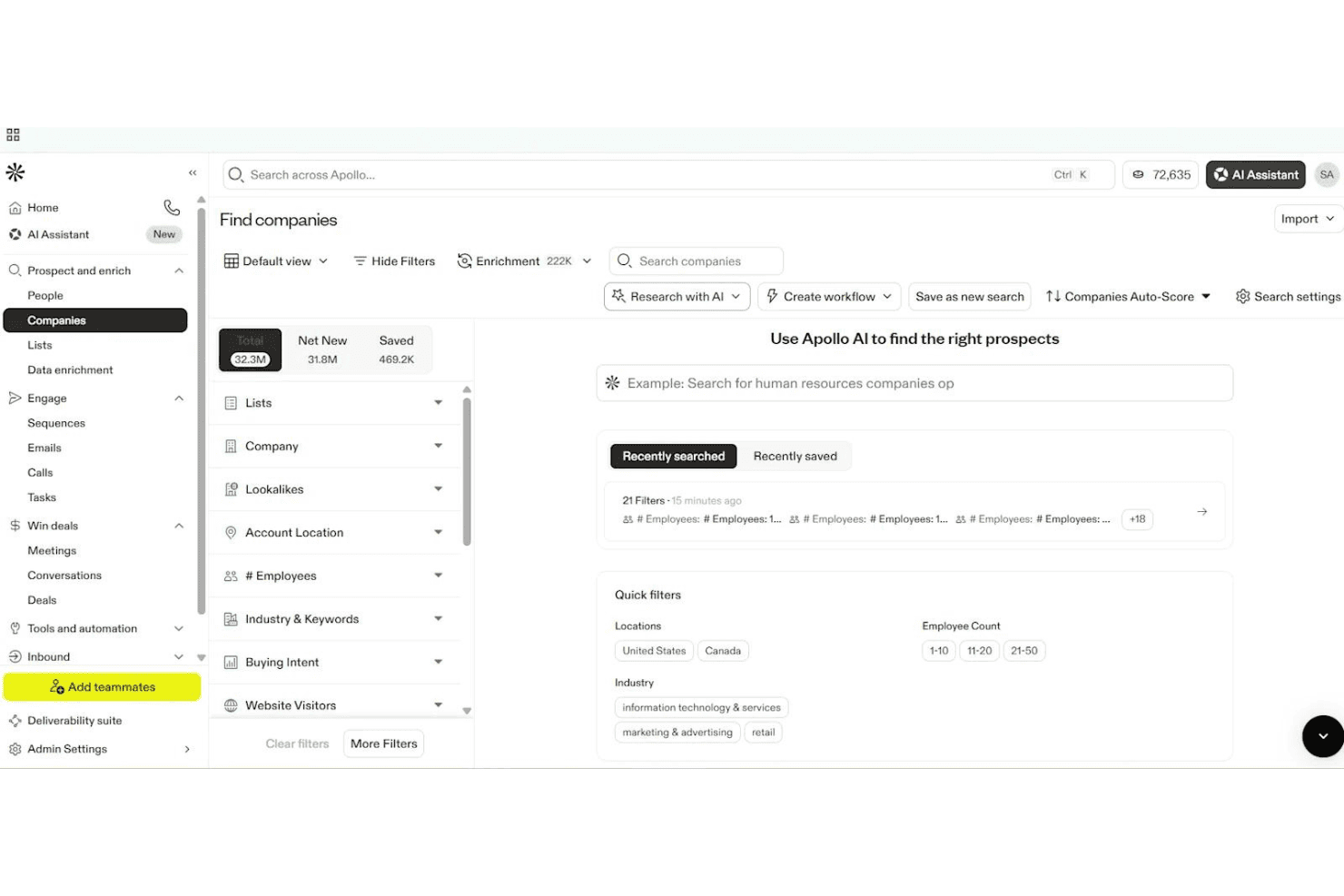
Apollo.io lets users filter and find companies using AI-powered search. Apollo.io is an AI-powered sales engagement platform offering multi-step email sequences, contact management, form capture, and analytics, built primarily for outbound B2B prospecting rather than traditional email marketing.
Who Is Apollo.io Best For?
Apollo.io is a smart pick for B2B sales teams and outbound prospecting specialists looking to automate multi-step cold outreach campaigns.
Why I Picked Apollo.io
I picked Apollo.io as one of the best because it's built for automating high-volume cold outreach to massive B2B contact databases. I like how my team can launch multi-step sequences targeting new leads and personalize emails with AI-driven variables. Its form builder lets us route inbound leads straight into outreach workflows.
Apollo.io Key Features
- Form builder: Create embeddable web forms to capture inbound leads and route them directly into outreach workflows.
- AI email writer: Auto-generate personalized outreach emails using AI based on contact data and engagement signals.
- Sequence A/B testing: Test multiple email variations within outbound sequences to optimize response rates and messaging.
- Deliverability tools: Access mailbox warm-up, deliverability scoring, and built-in guidance for SPF, DKIM, and DMARC setup.
Apollo.io Integrations
Apollo.io offers over 50 integrations, including native connections with Salesforce, HubSpot, Zoho CRM, Gmail, Microsoft 365, LinkedIn via Chrome Extension, Outreach, SalesLoft, Marketo, Pipedrive, Asana, ClickUp, and Zapier. API access is available on enterprise plans.
What's Free?
Apollo.io offers a free-forever plan that gives you basic access to its B2B contact database and core outreach features. The free plan has significant limits—you get 60 email credits per month, basic search filters, and restricted access to some integrations and automation tools.
Pros and Cons
Pros:
- Multi-step sales sequences with A/B testing
- AI writes and personalizes outreach emails
- Massive built-in B2B contact database
Cons:
- Free plan limited to cold outreach use
- No drag-and-drop newsletter builder
Learn more about Apollo.io: Best for robust integrations options
- Free plan + 14-day trial + demo available
- From $9/month
Visit WebsiteCustomer Rating:4.6/5
Sender’s automation dashboard lets users build and launch email workflows using ready-made templates and a visual editor. Designed for businesses seeking cost-effective email marketing solutions, Sender offers a robust platform to create, automate, and manage email campaigns without the complexity or expense often associated with such tools. It is particularly appealing to small businesses and startups looking to enhance their marketing efforts through a user-friendly interface and a generous free plan. By addressing the need for efficient communication with up to 2,500 subscribers and providing up to 15,000 emails per month at no cost, Sender effectively alleviates the challenge of managing customer engagement on a budget.
Why I Picked Sender
I picked Sender for its unique approach to offering a "Free Forever" plan that caters to small businesses and startups needing to manage up to 2,500 subscribers. This plan allows for sending 15,000 emails monthly, providing an excellent opportunity to engage with your audience without financial constraints. Additionally, Sender’s focus on high deliverability through monitored IP reputation ensures that your emails reach the intended recipients, which is crucial for maintaining customer engagement. The inclusion of dynamic content and A/B testing further allows you to personalize and optimize your campaigns, enhancing the effectiveness of your marketing efforts.
Sender Key Features
In addition to its standout free plan, I also found several features that enhance its appeal:
- Email Automation: Create and manage automated email sequences to streamline your marketing efforts.
- Template Library: Access over 1,600 customizable templates to design professional emails tailored to your brand.
- Analytics Dashboard: Monitor campaign performance with detailed insights and reports to make informed decisions.
- Integration Options: Seamlessly integrate with platforms like WordPress and WooCommerce to expand your marketing reach.
Sender Integrations
Integrations include WordPress, WooCommerce, Magento, PrestaShop, OpenCart, Joomla, Zapier, API for custom integrations, and Shopify.
Pros and Cons
Pros:
- User-friendly drag-and-drop builder
- Built-in SMS marketing support
- Unlimited automation workflows included
Cons:
- No built-in landing page builder
- Subscriber limits on lower tiers
Learn more about Sender: Best for time-based urgency emails
- Free plan + free trial available
- From $19/user/month (billed annually)
Visit WebsiteCustomer Rating:4.7/5
Flodesk helps create urgency with clean, time-based countdown email designs. Flodesk is a free email marketing platform designed for users who want simple, visually appealing email creation without the technical hassle. Known for its clean design tools, it’s especially useful for small businesses and creatives looking to send polished campaigns effortlessly. With time-based urgency email features, Flodesk makes it easy to create engaging messages and automate workflows, helping you maintain consistent communication with your audience.
Why I Picked Flodesk
I picked Flodesk for its strength in creating time-based urgency emails that drive action through countdown timers and deadline-focused campaigns. This makes it easy to prompt subscribers to act quickly without overcomplicating setup. Combined with customizable templates and simple automations, Flodesk supports engaging campaigns while keeping email creation straightforward.
Flodesk Key Features
In addition to time-based urgency emails, Flodesk offers:
- Customizable Templates: Allows you to craft emails that reflect your brand's unique style with ease.
- Subscriber Management: Provides tools to manage your email list effectively, including segmentation and personalization.
- Performance Analytics: Offers insights into email performance, helping you make data-driven decisions.
Flodesk Integrations
Integrations include Shopify, Instagram, Canva, Zapier, and WordPress.
What's Free?
Flodesk offers a free plan that lets you use forms, landing pages, and list-building tools — but it doesn’t allow email sending under the “free” tier. However, it offers a 14-day free trial that gives full access to its email marketing features.
Pros and Cons
Pros:
- Segmentation tools enhance targeted email marketing campaigns
- Automation features for subscriber journeys (welcome series, triggers, etc.)
- Unified interface simplifies campaign creation and management
Cons:
- Limited integrations compared to larger email-marketing platforms
- Not ideal for very large or complex mailing needs
Learn more about Flodesk: Best for testing emails
- A free version specifically for a single inbox and up to 500 email tests per month.
- From $14.99/ month for 1 user and up to 5 inboxes
Visit WebsiteCustomer Rating:4.8/5
Mailtrap lets devs safely test and debug email deliverability. Mailtrap is a tool designed for developers and QA teams to test email sending and deliverability. It allows users to capture, inspect, and debug emails in a safe environment, preventing real recipients from receiving test emails.
Why I picked Mailtrap: Mailtrap's free plan provides a safe sandbox environment for testing emails, which is perfect for developers needing to ensure their emails are correctly formatted and delivered. You can inspect and debug emails without them reaching real inboxes. The platform supports email testing with HTML support and spam score checks. These features make it an ideal choice for teams focused on email testing.
Standout features & integrations:
Features include email inspection tools that let you debug and analyze emails in detail. The spam score checker helps you improve deliverability by identifying potential issues. Mailtrap also provides a user-friendly interface for managing your email testing environment.
Integrations include GitHub, GitLab, Bitbucket, Heroku, Jenkins, Travis CI, CircleCI, Zapier, Slack, and PagerDuty.
What's free? Mailtrap offers a free-forever plan with limitations on the number of emails you can test monthly and the number of inboxes available.
Pros and Cons
Pros:
- Ideal for developers and QA teams
- HTML support for emails
- Spam score checker included
Cons:
- Advanced features require upgrade
- Limited inboxes in free plan
Learn more about Mailtrap: Best for user-friendly interface
- Free plan + 14-day free trial available
- From $12/month
Visit WebsiteCustomer Rating:4.7/5
MailerLite makes email marketing simple for small teams and freelancers. MailerLite is an email marketing platform catering to small businesses and freelancers. It offers tools for creating, managing, and analyzing email campaigns, focusing on simplicity and ease of use to enhance user experience.
Why I picked MailerLite: MailerLite's free plan provides a straightforward interface, making it perfect for users who prioritize ease of navigation. You can send up to 12,000 emails per month to a maximum of 1,000 subscribers. The platform includes simple drag-and-drop editors and basic automation features. This makes it a great choice for teams looking to manage email marketing without hassle.
Standout features & integrations:
Features include a drag-and-drop editor that allows you to design emails effortlessly. MailerLite offers automation tools to streamline sending emails based on user actions. You can also access landing page creation tools to support your marketing campaigns.
Integrations include Shopify, WooCommerce, WordPress, Zapier, Stripe, Facebook, Squarespace, Mailchimp, Google Sheets, and PayPal.
What's free? MailerLite offers a free-forever plan with limitations on the number of subscribers and emails you can send each month.
Pros and Cons
Pros:
- No credit card required
- Supports up to 1,000 subscribers
- Landing page creation tools
Cons:
- No phone support in free plan
- Basic reporting tools only
 Best for ecommerce users
- Free plan + free demo available
- From $25/month
Visit WebsiteCustomer Rating:4.6/5
Klaviyo powers ecommerce email and SMS campaigns with automation. Klaviyo is a marketing platform designed for ecommerce businesses, offering email and SMS marketing solutions combined with B2C CRM features. It helps businesses automate marketing tasks, segment their audience, and build engaging campaigns to drive customer engagement.
Why I picked Klaviyo: Klaviyo's free plan offers automation and segmentation features, making it ideal for ecommerce users who need to tailor their marketing efforts. You can create and send targeted campaigns without upfront costs. The platform supports robust analytics to help you understand customer behavior. Its integration capabilities align with the needs of ecommerce businesses.
Standout features & integrations:
Features include detailed customer segmentation to target specific audiences. The campaign building tools are intuitive, allowing you to design effective email and SMS campaigns. Klaviyo also provides in-depth analytics to track the success of your marketing efforts.
Integrations include Shopify, Salesforce, WooCommerce, Magento, BigCommerce, Stripe, Facebook, Google Ads, Instagram, and Zendesk.
What's free? Klaviyo offers a free plan that includes automation, segmentation, and campaign building capabilities with some limitations on the number of contacts and emails sent per month.
Pros and Cons
Pros:
- Supports email and SMS marketing
- Detailed customer segmentation
- Strong ecommerce focus
Cons:
- Restricted email sends monthly
- Limited contacts in free plan
 8Best for small teams
Kit
- 14-day free trial available
- From $33/month (billed annually)
Visit WebsiteCustomer Rating:4.5/5
Kit helps creators grow audiences with email, automation, and insights. Kit is a creator-focused email platform that helps users grow and engage their audiences through newsletters, landing pages, and automated messaging. It’s built for individuals and small teams to manage email, automation, monetization, and audience insights—all in one place.
Why I picked Kit: Kit lets you send unlimited emails, create landing pages, and build opt-in forms on its free plan. It includes basic visual automation, tagging, A/B split testing, and in-email polls. These features help small teams launch campaigns, segment audiences, and test content without upgrading.
Standout features & integrations:
Features include customizable email templates, conditional content, and resend‑unopened campaigns so you can refine your messaging. You also get access to visual automation workflows beyond simple sequences. Plus, there’s a creator network recommendation engine to help you grow.
Integrations include Canva, GIPHY, Circle, Broadcast Boost, TeachKit, Sponsy, SavvyCal, and Senja.
What's free? It's a free‑forever plan that supports up to 10,000 subscribers, 1 user, 1 visual automation, and 1 email sequence.
Pros and Cons
Pros:
- Lets you A/B test emails
- Allows subscriber tagging and segmentation
- Up to 10 k subscribers free
Cons:
- Free plan shows Kit branding
- Limits to 1 user on free plan
Learn more about Kit: Best for simple email templates
- Free plan + free demo available
- From $12/month
Visit WebsiteCustomer Rating:4.3/5
Benchmark Email helps SMBs create and automate email campaigns easily. Benchmark Email is an email marketing platform aimed at small to medium-sized businesses. It provides tools for creating and managing email campaigns, with a focus on user-friendly design and automation.
Why I picked Benchmark Email: Benchmark Email's free plan includes an email builder and customizable templates, which are perfect for creating simple and effective email campaigns. You can access automation features and reporting tools without needing a credit card. It's ideal for teams that want straightforward email templates without complexity. The free version also supports list building and campaign optimization, aligning with its simple email template USP.
Standout features & integrations:
Features include an easy-to-use email builder, customizable templates, and automation tools. You can also access landing pages and reporting features to track your campaigns. These elements make it easier for your team to manage and optimize email marketing efforts.
Integrations include Shopify, Zapier, WordPress, Google Analytics, PayPal, Salesforce, HubSpot, Facebook, Twitter, and LinkedIn.
What's free? Benchmark Email offers a free-forever plan with limitations on the number of emails you can send per month and access to certain features.
Pros and Cons
Pros:
- Suitable for small businesses
- Customizable email templates
- No credit card required for free plan
Cons:
- Basic reporting features
- Limited monthly email sends
Learn more about Benchmark Email: Best for Canadian businesses
- Free plan available
- From CAD $22.04/month
Visit WebsiteCustomer Rating:4.5/5
Cyberimpact helps Canadian SMBs automate and analyze email campaigns. Cyberimpact is an email marketing platform tailored for small to medium-sized enterprises and non-profit organizations in Canada. It focuses on marketing automation, landing page creation, and performance analysis to enhance customer engagement.
Why I picked Cyberimpact: Cyberimpact's free plan offers access to customizable email templates and automated email scenarios. This makes it ideal for businesses looking for simple solutions to manage their email marketing. The platform provides high-conversion landing pages and real-time performance tracking, aligning with its USP of being best for Canadian businesses. Its bilingual support and compliance with Canada's Anti-Spam Law are key differentiators.
Standout features & integrations:
Features include marketing automation that helps you schedule and send emails automatically. The email editor is intuitive, allowing you to design emails without hassle. Performance analysis tools let you track and improve your campaign results effortlessly.
Integrations include Shopify, Google Analytics, Facebook, PayPal, WordPress, Salesforce, LinkedIn, Twitter, Zapier, and HubSpot.
What's free? Cyberimpact offers a free-forever plan with limitations on the number of emails you can send monthly and access to certain advanced features.
Pros and Cons
Pros:
- Real-time performance tracking
- Compliance with CASL regulations
- Bilingual support available
Cons:
- Restricted integration options in free plan
- No 24/7 customer support
Learn more about Cyberimpact:
Outro software gratuito de marketing por email
Eis algumas opções adicionais de software de marketing por email que também oferecem planos ou períodos de teste gratuitos. Embora estas ferramentas não tenham entrado na minha lista, vale a pena conhecê-las:
- 11BrevoBest for transactional emails
- 12VidyardBest for video emails
- 13VitaMailBest for paired content and deliverability tools
- 14EmailOctopusBest for high deliverability
- 15OmnisendBest for automation features
- 16SendPulseBest for AI-driven email personalization
- 17MailjetBest for multilingual email campaigns
How I Evaluate Free Email Marketing Software
First, I define what counts as free. For email marketing software, vendors must offer a free-forever plan—not a trial—because sending newsletters, automating welcome flows, and managing growing lists are ongoing functions. From there, I split my evaluation into two layers: the core functionality a tool must clear to qualify, and the differentiators that separate the strongest options.
Core Functionality (Table Stakes For This List)
In addition to my free offer requirements, I also use a scoring system to select tools for my list. Here's how it works:
I rank each one on a scale from 0 (does not offer the functionality) to 5 (excels in this area) for each core functionality listed below. Then, I calculate the tool's total score into a percentage. Each tool needs to achieve a minimum total score of 75% to be considered for inclusion.
- Email Campaign Builder: I look for a visual drag-and-drop editor with a solid template library, so a solo marketer can design a branded product launch email without touching code.
- Contact List Management: Organizing subscribers matters, so I evaluate whether the free plan supports segmentation by tags or attributes—like separating purchasers from newsletter-only subscribers.
- Signup Forms: I check whether the platform includes embeddable forms or hosted landing pages that feed new contacts straight into the list, similar to what Mailchimp and MailerLite offer.
- Marketing Automation: Even basic workflows make a difference. I look for free-tier automations like welcome sequences or post-signup drip series triggered by subscriber actions.
- Campaign Analytics: Open rates, click-throughs, bounces, and unsubscribes should all be visible on the free plan. I evaluate how easy it is to pull insights after sending a weekly newsletter.
- Free Send Volume: The monthly email cap and subscriber limit need to support real use. I consider whether a startup with a few hundred contacts can run regular campaigns without hitting a wall.
Once I have a list of tools that meet the criteria, I consider what sets each platform apart.
Differentiating Factors (What Sets Vendors Apart)
Here's how I compare and contrast different vendors:
Standout Features
A/B testing on the free tier is a big differentiator—it lets you compare subject lines or send times and improve performance based on real data instead of guessing. I also evaluate ecommerce integrations, since store owners on Shopify or WooCommerce need abandoned cart and product recommendation emails built in. Deliverability tools matter just as much. Spam score checkers and domain authentication support (SPF, DKIM) help free users actually land in the inbox rather than the junk folder.
Beyond Features
I check how well a free plan connects to the rest of your stack—Zapier or Make compatibility is a baseline, but native CRM and CMS integrations save time when syncing contacts between tools like HubSpot or WordPress. Compliance also weighs heavily. Built-in GDPR consent capture, double opt-in, and CAN-SPAM-compliant unsubscribe handling protect you from legal exposure. I also look at scalability—when your list outgrows the free tier, the upgrade path should be predictable, not a cliff where costs spike or key features suddenly get locked behind premium plans.
Como escolher software gratuito de marketing por email
As listas complexas de funcionalidades e as estruturas de preços podem dificultar a compreensão do que está realmente a obter com um software gratuito de marketing por email. Para o ajudar a manter-se concentrado enquanto avalia as opções de software, eis alguns fatores a ter em conta:
| Fator | O que considerar |
| Âmbito da oferta gratuita | Verifique o que está incluído no plano gratuito. Procure limitações relativamente aos emails enviados, aos contactos e às funcionalidades disponíveis sem fazer um upgrade. |
| Escalabilidade | Considere se o software consegue acompanhar o crescimento das suas necessidades. Procure opções de upgrade à medida que a sua lista de emails e a complexidade das campanhas aumentam. |
| Integrações | Certifique-se de que o software se liga às ferramentas que a sua equipa já utiliza, como sistemas de CRM, plataformas de comércio eletrónico e ferramentas de análise. |
| Facilidade de utilização | Avalie a interface e o processo de configuração. Escolha um software que a sua equipa consiga utilizar facilmente, sem necessitar de formação extensa ou de ultrapassar uma curva de aprendizagem acentuada. |
| Assistência ao cliente | Procure canais de assistência disponíveis, como chat em direto ou um centro de ajuda, para o auxiliar quando surgirem problemas. |
| Análise | Examine o nível de detalhe das funcionalidades de elaboração de relatórios. Será importante obter informações sobre as taxas de abertura, as taxas de cliques e outras métricas para medir o seu sucesso. |
| Automatização | Determine a complexidade das funcionalidades de automatização. Certifique-se de que consegue configurar fluxos de trabalho para emails automatizados, de modo a poupar tempo e melhorar o envolvimento. |
| Personalização | Verifique até que ponto os modelos de email e as campanhas podem ser personalizados. Será importante manter a consistência da marca sem necessitar de conhecimentos avançados de design. |
Se quiser aprofundar o tema, consulte o nosso guia completo sobre como escolher a plataforma de marketing por email certa.
O que é um software gratuito de marketing por email?
O software de marketing por email é uma ferramenta que ajuda as empresas a enviar emails de marketing, gerir listas de contactos e analisar o desempenho das campanhas. Estas ferramentas disponibilizam normalmente planos gratuitos com funcionalidades ou utilização limitadas, como um limite ao número de emails enviados ou de contactos geridos.
Os profissionais de marketing, os proprietários de pequenas empresas e as empresas em fase de arranque utilizam geralmente estas ferramentas para interagir com o seu público sem incorrerem em custos elevados. Funcionalidades como a automatização, a análise e os modelos personalizáveis ajudam os utilizadores a gerir campanhas de forma eficiente, compreender o envolvimento do público e manter a consistência da marca.
Funcionalidades do software gratuito de marketing por email
Vamos analisar as funcionalidades habitualmente encontradas no software de marketing por email e quais estão normalmente incluídas nos planos gratuitos e nos planos pagos.
Funcionalidades normalmente gratuitas do software de marketing por email
- Modelos de email: Os esquemas pré-concebidos permitem criar rapidamente emails com um aspeto profissional, poupando tempo e esforço.
- Análise básica: Fornece informações sobre as taxas de abertura e as taxas de cliques, ajudando a medir o sucesso das campanhas.
- Gestão de contactos: Permite organizar e segmentar as listas de emails para enviar mensagens direcionadas.
- Automatização: Permite configurar fluxos de trabalho simples para enviar emails automaticamente com base em acionadores.
- Editor de arrastar e largar: Simplifica o processo de criação de emails, facilitando a conceção de emails sem conhecimentos de programação.
- Limites diários de envio: Impõe um limite ao número de emails que pode enviar por dia, ajudando a gerir os recursos dos planos gratuitos.
- Formulários de inscrição: Permite recolher informações dos subscritores diretamente a partir do seu site, aumentando a sua lista de emails.
- Segmentação básica: Permite dividir o público em grupos para uma comunicação mais personalizada.
Funcionalidades normalmente pagas do software de marketing por email
- Segmentação avançada: Permite direcionar detalhadamente o público, possibilitando campanhas mais personalizadas e eficazes.
- Testes A/B: Permitem testar diferentes versões de emails para otimizar o conteúdo e melhorar as taxas de envolvimento.
- Análise avançada: Fornece informações mais aprofundadas sobre o comportamento dos clientes e o desempenho das campanhas para tomar decisões mais informadas.
- Páginas de destino personalizáveis: Permite criar páginas únicas alinhadas com as campanhas de email e concebidas para gerar conversões.
- Marketing multicanal: Integra o email com SMS, redes sociais e outros canais para uma estratégia de marketing coerente.
- Envios ilimitados: Remove as restrições ao número de emails que pode enviar, permitindo realizar campanhas de maior dimensão.
- Assistência prioritária: Oferece tempos de resposta mais rápidos e assistência dedicada, garantindo uma resolução eficiente dos problemas.
- Automatização avançada: As ferramentas de marketing por email baseadas em IA suportam fluxos de trabalho e acionadores complexos, aumentando a eficiência dos seus esforços de marketing.
Benefícios do software gratuito de marketing por e-mail
Implementar software gratuito de marketing por e-mail proporciona vários benefícios para a sua equipa e para a sua empresa. Eis alguns dos benefícios que pode esperar:
- Solução económica: Os planos gratuitos permitem-lhe gerir o marketing por e-mail sem afetar o seu orçamento, sendo ideais para empresas em fase de arranque e pequenas empresas.
- Facilidade de utilização: As interfaces intuitivas e os editores de arrastar e largar facilitam a qualquer pessoa da sua equipa a criação e o envio de e-mails.
- Automação básica: Automatizar tarefas simples poupa tempo e garante uma comunicação consistente com o seu público.
- Crescimento do público: Os formulários de inscrição e a gestão de contactos ajudam-no a criar e organizar a sua lista de e-mails de forma eficiente.
- Informações sobre o desempenho: As análises básicas fornecem dados valiosos sobre o envolvimento com os e-mails, ajudando-o a compreender o que funciona.
- Personalização: Os modelos de e-mail permitem-lhe manter a consistência da marca sem precisar de conhecimentos de design.
- Escalabilidade: Os planos gratuitos oferecem uma base para começar, permitindo-lhe atualizar o plano à medida que a sua empresa e as suas necessidades de e-mail crescem.
Custos e preços do software gratuito de marketing por e-mail
Compreendo que chegou a este artigo à procura das melhores opções de software de marketing por e-mail disponíveis gratuitamente. No entanto, como os planos gratuitos oferecem apenas funcionalidades limitadas, é muito provável que precise de aumentar o seu plano no futuro.
A tabela abaixo resume os planos mais comuns, os respetivos preços médios e as funcionalidades normalmente incluídas nas soluções de software de marketing por e-mail:
Tabela de comparação de planos de software de marketing por e-mail
| Tipo de plano | Preço médio | Funcionalidades comuns |
| Plano gratuito | $0 | Modelos de e-mail básicos, gestão de contactos, análises básicas, limites diários de envio e automação simples. |
| Plano pessoal | $5-$25/ utilizador/mês | Modelos avançados, limites de envio superiores, testes A/B e apoio ao cliente. |
| Plano empresarial | $30-$100/ utilizador/mês | Automação avançada, análises detalhadas, criação de páginas de destino e marketing multicanal. |
| Plano empresarial de grande escala | $100+/ utilizador/mês | Integrações personalizadas, apoio prioritário, envios ilimitados e segmentação avançada. |
Perguntas frequentes sobre software gratuito de marketing por e-mail
Eis algumas respostas a perguntas comuns sobre software gratuito de marketing por e-mail:
É possível fazer marketing por e-mail gratuitamente?
Sim, muitas ferramentas oferecem planos gratuitos que abrangem funcionalidades essenciais, como o envio de e-mails, a gestão de contactos e análises básicas. Estas versões gratuitas são ideais para pequenas empresas ou empresas em fase de arranque que pretendam interagir com o seu público sem incorrer em custos.
Quais são as limitações do software gratuito de marketing por e-mail?
O software gratuito de marketing por e-mail costuma ter limites relativos ao número de e-mails enviados por mês e ao número de contactos que pode gerir. As funcionalidades avançadas, como os testes A/B ou as análises detalhadas, também podem estar limitadas aos planos pagos, por isso analise cuidadosamente as suas necessidades.
Existem custos ocultos no software gratuito de marketing por e-mail?
Embora o software em si possa ser gratuito, esteja atento aos custos relacionados com a ultrapassagem dos limites de e-mails ou contactos. Alguns fornecedores podem cobrar por funcionalidades adicionais ou apoio premium. Consulte sempre os termos do plano gratuito para evitar despesas inesperadas. Se quiser uma análise mais aprofundada, consulte o nosso guia completo sobre como escolher a plataforma de marketing por e-mail certa.