

No mercado acelerado dos dias de hoje, é difícil manter-se à frente. Enfrenta uma pressão constante para tomar decisões informadas e superar os concorrentes. É aqui que entra o software de inteligência de mercado. Ajuda-o a recolher, analisar e utilizar dados, transformando desafios em oportunidades.
Dediquei algum tempo a testar e avaliar estas ferramentas para lhe apresentar informações imparciais. O meu objetivo é orientá-lo pelas melhores opções disponíveis, adaptadas às suas necessidades.
Neste artigo, encontrará as minhas principais escolhas de software de inteligência de mercado. Partilharei o que torna cada uma delas única e de que forma pode beneficiar a sua equipa. Juntos, exploraremos soluções que podem melhorar a sua estratégia de marketing e impulsionar o sucesso.
Why Trust Our Software Recommendations
6,700+
Reviews
20
Industry experts
16+
Evaluation factors
14
Years
Our team has been testing and reviewing software since 2012. As marketing leaders ourselves, we know how difficult—and important—it is to choose the right software.
For this guide, we evaluated tools using hands-on testing and independent research, scoring tools using our selection criteria.
Our reviews reflect our human editorial judgment, not a sales pitch.
Expert reviewers:
 Gui DrusinaCreative Director
- Shriya GhateSenior Marketing Lead
 Amanda JacquesMarketing Ops Leader

Tabela comparativa de software de inteligência de mercado
| Tool | Best For | Trial Info | Price | ||
|---|---|---|---|---|---|
| 1 | Best for fresh company data | Free plan available | From $49/month | Website | |
| 2 | Best for retail competitor price positioning | Free plan + free demo | From €349/month | Website | |
| 3 | Best for automated website change alerts across teams | Free plan available | From $10/month | Website | |
| 4 | Best for website analytics | Free trial available | From $125/month | Website | |
| 5 | Best for market research | 14-day free trial | From $139/month | Website | |
| 6 | Best for social listening | 30-day free trial | From $79/user/month (billed annually) | Website | |
| 7 | Best for social data intelligence | Free demo available | Pricing upon request | Website | |
| 8 | Best for AI-powered social trend tracking | 14-day free trial | From $99/month (billed annually) | Website | |
| 9 | Best for consumer intelligence | Free demo available | Pricing upon request | Website | |
| 10 | Best for monitoring competitors’ activities | Free demo available | Pricing upon request | Website |


Resumo do melhor software de inteligência de mercado
Este quadro comparativo resume os detalhes de preços das minhas principais escolhas de software de inteligência de mercado, para o ajudar a encontrar a melhor opção para o seu orçamento e as necessidades da sua empresa.


Coresignal lets you find and enrich data through filters, CSV uploads, and APIs. Coresignal provides fresh, structured public web data on companies, professionals, and job postings. With millions of continuously updated records, it offers valuable insights for businesses seeking to enhance their marketing strategies.
Why I picked Coresignal: I picked Coresignal because it gives you access to fresh public data that reveals what’s happening in the market right now. Its company dataset helps you segment markets by industry, location, size, and more—making it easier to identify emerging players, analyze competition, and tailor messaging. The job postings dataset lets you track hiring activity across industries so you can spot market shifts, understand where demand is growing, and align your strategy accordingly.
Coresignal Standout Features and Integrations
Features include the employee API, which provides access to millions of employee profiles, allowing you to analyze workforce trends and identify key decision-makers within target companies. The company enrichment API also enhances your existing company data by adding valuable information, improving the accuracy and depth of your market intelligence.
Integrations aren't available natively, but Coresignal delivers data through flat files and APIs so you can connect it to your own systems as needed.
Pros and Cons
Pros:
- Historical data access supports trend analysis and forecasting
- Regular updates ensure data freshness and relevance
- Comprehensive datasets covering companies, employees, and job postings
Cons:
- Technical setup required
- The extensive data volume might be overwhelming for users
Learn more about Coresignal: Best for retail competitor price positioning
- Free plan + free demo
- From €349/month
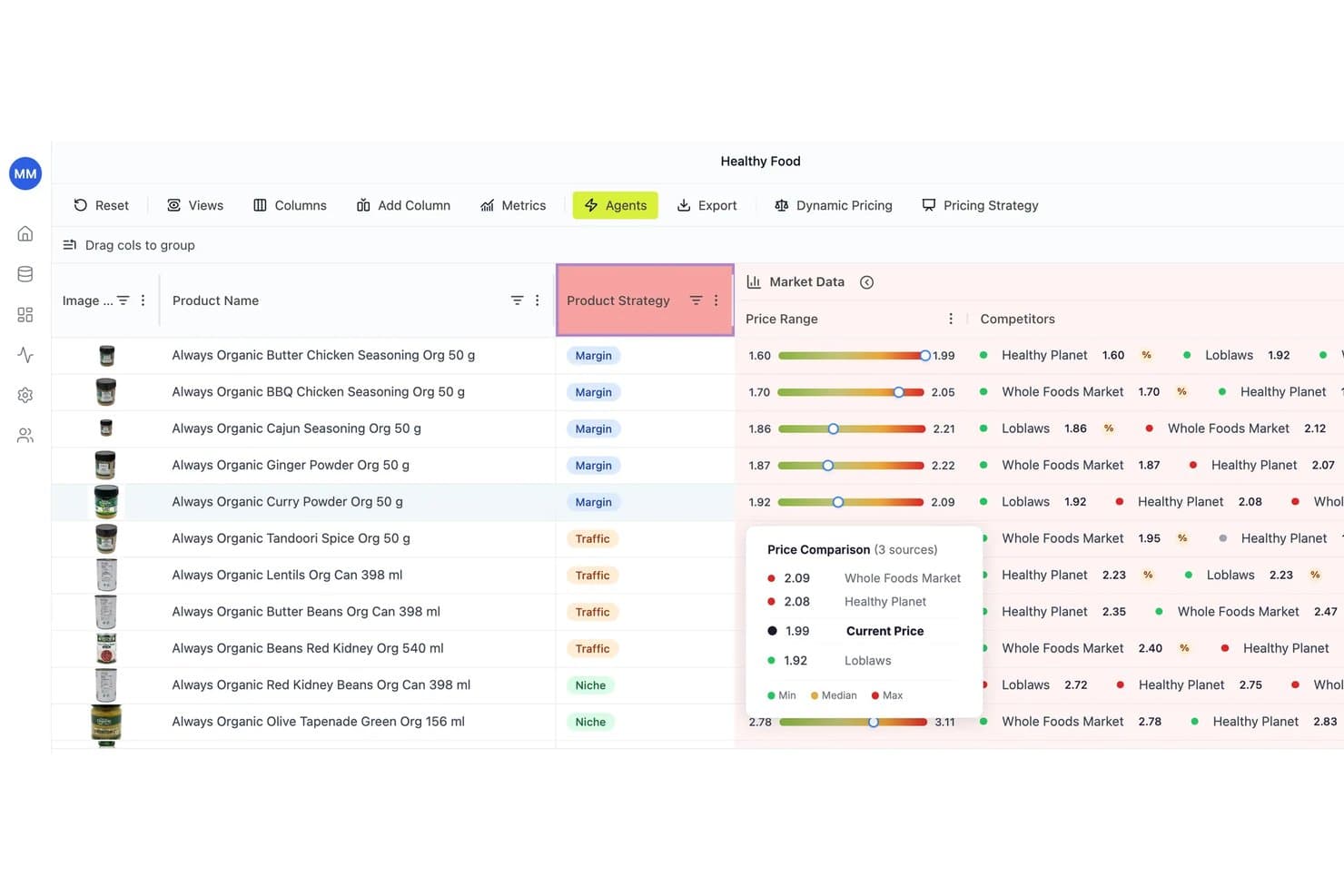
RetailGrid lets users compare competitor prices across multiple retailers in real time. RetailGrid is a retail pricing platform that monitors competitor prices, tracks price positioning, and uses AI-driven agents to surface pricing recommendations across your catalog.
Who Is RetailGrid Best For?
RetailGrid is a good fit for pricing managers and category managers at mid-market ecommerce or omnichannel retailers who need to track and act on competitor price positioning across large catalogs.
Why I Picked RetailGrid
I picked RetailGrid as one of the best because its Competitive Position dashboard gives retail pricing teams a live view of exactly where they stand against every tracked competitor, down to price gaps, assortment position, and weekly win/loss by SKU coverage. I also like how the at-risk SKU ranking surfaces overpriced products by revenue at risk, so you're not hunting through a catalog to find where a competitor promotion is hurting you.
RetailGrid Key Features
- Price monitoring alerts: Flags MAP violations, price gaps, and out-of-position prices, routing notifications to Slack, email, or the agent approval queue.
- AI Workspace: A spreadsheet-style grid where you can query competitor prices, sales, costs, and inventory using natural-language questions or formulas.
- Price history tracking: Stores timestamped competitor price snapshots per SKU, with export options to BigQuery or Snowflake for deeper analysis.
- Agentic pricing controls: Lets you set per-SKU or per-category autonomy levels—automatic, approval-based, or manual—with a full audit trail for every price change.
RetailGrid Integrations
RetailGrid offers native integrations with Shopify and Magento, plus integrations with BigQuery, Snowflake, Slack, Google Shopping, and Amazon SP-API. It also supports CSV uploads and an API for custom data connections.
Pros and Cons
Pros:
- Publishes category reports with charts and datasets
- Tracks competitor price gaps and positioning over time
- Shows reasoning behind recommendations and margin impact
Cons:
- No market-share or share-of-voice analysis
- Doesn’t cover news, filings, or social data
Learn more about RetailGrid: Best for automated website change alerts across teams
- Free plan available
- From $10/month
Visit WebsiteCustomer Rating:4.7/5
Visualping monitors visual and content changes on competitor, pricing, and key web pages in real time. Visualping is a website change monitoring tool that tracks visual and content changes across competitor pages, pricing pages, and any other URLs your team needs to watch.
Who Is Visualping Best For?
Visualping is a practical pick for marketing, CI, and sales teams at small to mid-size companies that need lightweight, automated competitor page monitoring without a full intelligence platform.
Why I Picked Visualping
I've included Visualping in my top picks because it's the only tool on this list purpose-built around real-time page-level change detection, rather than aggregated news feeds. I particularly like the project-based team workspace, where you can group monitored URLs by competitor or campaign and route alerts to specific colleagues. The before-and-after screenshot comparisons with highlighted text diffs make it easy to see exactly what changed on a pricing or product page without clicking through.
Visualping Key Features
- Configurable monitoring frequency: Set check intervals from every five minutes to once a week, so high-priority competitor pages get near-real-time coverage while lower-priority URLs run on slower cycles.
- Selective page area monitoring: Highlight a specific section of a webpage to monitor only that region, filtering out irrelevant page noise like ads or navigation menus.
- AI-powered change summaries: Visualping's AI evaluates detected changes and flags whether they're significant, reducing alert fatigue from minor or irrelevant page updates.
- Change history log: Review a full timestamped archive of every change detected on a monitored URL, so you can reconstruct how a competitor's messaging or pricing evolved over time.
Visualping Integrations
Visualping offers native integrations with Slack, Microsoft Teams, Google Chat, Google Sheets, Discord, Wide Narrow, Lindy.ai, and n8n. It also connects with Zapier and provides an API and webhooks for custom integrations.
Pros and Cons
Pros:
- Bulk URL upload speeds onboarding for teams
- Custom AI prompts filter relevant changes only
- Tracks any public URL with visual diffs
Cons:
- No social or news monitoring beyond webpages
- Excessive alerts can create noise from minor changes
Learn more about Visualping:

Discover top-performing marketing channels and traffic trends within an industry. SimilarWeb is a trusted market intelligence tool that helps businesses get information regarding the top websites in their industry. The software helps analyze websites to view their ranking, traffic, demographic targeting, and other vital details.
Why I picked SimilarWeb: With SimilarWeb, your business can analyze competitors’ websites and understand how they acquire customers. The information from SimilarWeb will help you know who your competitors are, what their customers look for, and how you compare to them. You can also get a lot of customer insight you can use to enhance marketing strategies and find out what niche your competitors are attracting.
SimilarWeb Standout Features and Integrations
Standout features include behavioral analysis and audience insights tools that help you uncover where your target audience is spending their time online. The platform’s consumer journey analysis tools help you understand complete customer journeys and provide information about competitors’ strategies.
Integrations include connections with popular organizational tools, such as Adverity, Biscience, Data Virtuality, Desktop.com, EXADS, Google Analytics, Netpeak Checker, Salesforce, Shift, Syfter, and other software options. SimilarWeb provides an API that allows you to make custom integrations if necessary.
Pros and Cons
Pros:
- Comprehensive market intelligence
- Assesses consumers' usage pattern information
- Provides significant website intelligence
Cons:
- Steep learning curve
- Pricing isn’t suitable for small businesses
Learn more about Similarweb:

Semrush is a digital marketing platform for SEO, competitive research, paid ads, content, and social media analytics. Semrush is a digital marketing intelligence platform that covers SEO research, competitive analysis, paid search tracking, content analytics, and social media monitoring across both organic and paid channels.
Who Is Semrush Best For?
Semrush is a strong fit for digital marketing teams at growth-stage and enterprise companies who need a single platform to monitor SEO, paid search, and content performance.
Why I Picked Semrush
I've included Semrush in my top picks because it gives my team a real cross-channel view of how any domain performs across organic search, paid ads, and display. I particularly like the Traffic Analytics tool, which estimates a competitor's traffic sources, top landing pages, and audience behavior without needing access to their analytics account. The Market Explorer feature maps competitor share-of-voice across your entire category, so I can see who's gaining or losing ground over time.
Semrush Key Features
- Keyword gap analysis: Compares your keyword profile against up to four competitor domains to surface terms they rank for that you don't.
- Advertising research: Reveals competitors' active paid search ads, estimated budgets, and top-performing ad copy across Google.
- Position tracking: Monitors daily ranking changes for a defined set of keywords across specific locations and devices.
- Brand monitoring: Tracks online mentions of any brand or keyword across news, blogs, and social platforms in near real time.
Semrush Integrations
Semrush offers native integrations with Google Analytics, Google Search Console, Google Ads, Google Sheets, Looker Studio, Trello, WordPress, Zoho Analytics, and monday.com, along with partner integrations for platforms like Wix, AIOSEO, and Yoast. It also connects with Zapier and provides an API for custom integrations.
Pros and Cons
Pros:
- AI visibility tracking across generative search engines
- Database of keywords updated regularly
- Top-tier cross-channel competitive analysis tools
Cons:
- Competitive intelligence add-on costs $289/month extra
- Only provides keyword data for Google search
 Best for social listening
- 30-day free trial
- From $79/user/month (billed annually)
Visit WebsiteCustomer Rating:4.3/5
Sprout Social's listening dashboard provides key insights, including total engagement, sentiment analysis, and audience demographics. Sprout Social is a social media management platform designed to help businesses effectively engage with their audience, publish content, and gain actionable insights from social interactions.
Why I picked Sprout Social: Sprout Social's social listening capabilities allow you to monitor conversations and trends relevant to your industry, providing valuable insights into customer sentiment and preferences. This feature helps you stay informed about what your audience is discussing, enabling you to tailor your strategies accordingly. Additionally, Sprout Social's analytics dashboard offers comprehensive reports that help you measure the effectiveness of your social media campaigns. You can track engagement metrics, assess content performance, and identify opportunities for improvement.
Sprout Social Standout Features and Integrations
Features include automated rules that tag and route incoming messages based on specific criteria, keeping your inbox organized. The platform's AI Assist generates options for replies and tone in the Smart Inbox, helping you respond to messages more efficiently. Sprout Social also offers chatbots to automate customer conversations, resolving common inquiries quickly and freeing up your team for more complex tasks.
Integrations include Facebook, Instagram, LinkedIn, Pinterest, Threads, TikTok, X (formerly Twitter), YouTube, Facebook Messenger, WhatsApp, Salesforce Marketing Cloud, and Tableau.
Pros and Cons
Pros:
- Advanced scheduling features
- Smart Inbox consolidates messages from multiple platforms
- Robust analytics and social listening
Cons:
- May be pricey for smaller businesses
- Some integrations limited to higher-tier plans
Learn more about Sprout Social: Best for social data intelligence
- Free demo available
- Pricing upon request
Visit WebsiteCustomer Rating:4.3/5
Search through billions of online social data sources via advanced algorithms to search any topic. Talkwalker helps businesses collect social data intelligence across all social media channels and measure their impact against the competition. The information derived from the platform allows companies to monitor their online presence, analyze data, and make smarter decisions.
Why I picked Talkwalker: One of the key strengths that makes Talkwalker a relevant option for this list is its real-time social data intelligence. Tracking conversations across multiple platforms through Talkwalker enable you to identify trends measure consumer sentiment, and get an overview of your campaigns’ effectiveness. The platform can also help you identify your industry's critical players, influencers, followers, and fans for a specific brand or topic.
Talkwalker Standout Features and Integrations
Standout features include AI-powered analytics that provides in-depth details about your data, helping you identify insights by analyzing components such as text, images, and videos from various sources. Talkwalker also provides customer feedback analytics tools that help you get actionable insights to improve customer retention, loyalty, and satisfaction.
Integrations include connections with a wide range of business applications, such as Adverity, Audiense, Domo, Google Data Studio, Hootsuite, Khoros, Medalia, Onclusive, Salesforce, Zendesk, and other software options. You can also use Talkwalker’s API or a paid Zapier account to make custom integrations.
Pros and Cons
Pros:
- High-quality data visualizations
- Excellent brand presence monitoring
- In-depth social media data
- High-quality data visualizations
- Excellent brand presence monitoring
- In-depth social media data
Cons:
- Customer support needs work
- Updating tags is slow
- Customer support needs work
- Updating tags is slow
Learn more about Lumen by Talkwalker: Best for AI-powered social trend tracking
- 14-day free trial
- From $99/month (billed annually)
Visit WebsiteCustomer Rating:4.1/5
Hootsuite is a social media and market intelligence platform with listening, trend tracking, and AI research. Hootsuite is a social media management and market intelligence platform that combines social listening, trend tracking, competitive analysis, and AI-powered market research across 30+ social networks and 150+ million websites.
Who Is Hootsuite Best For?
Hootsuite is a strong fit for social media and marketing teams at mid-size to enterprise companies that need to monitor brand presence and track trends at scale.
Why I Picked Hootsuite
Hootsuite earns its spot on my shortlist because of how its Blue Silk™ AI handles trend detection at scale. The platform tracks spikes in mentions, keywords, hashtags, and sentiment in real time, then uses influencer mapping and conversation clustering to show who and what is driving each trend. What I find especially useful is the predictive side: you can forecast 90-day trends in conversation volume and engagement for any brand or topic. AI image and video recognition also finds visual brand mentions across logos, products, scenes, and objects using 30,000+ predefined models—so trend tracking isn't limited to text.
Hootsuite Key Features
- Competitive benchmarking: Compare your brand's social performance metrics directly against competitors across key channels.
- Custom analytics dashboards: Build and share branded reports using pre-built or custom metric combinations.
- Audience demographics: View detailed audience data including age, gender, location, and language across connected profiles.
- Social listening streams: Set up real-time monitoring streams for specific keywords, hashtags, or brand mentions.
Hootsuite Integrations
Hootsuite offers over 100 apps and integrations through its App Directory, including Salesforce, HubSpot, Slack, Canva, Adobe Express, Shopify, Google Analytics, monday.com, Asana, and Dropbox. It also connects with Zapier and has an API for custom integrations.
Pros and Cons
Pros:
- 90-day trend forecasting for any topic
- AI sentiment analysis in multiple languages
- Tracks mentions across online sources
Cons:
- Dashboard can feel cluttered at scale
- Full listening locked to enterprise plans


Customize analytics dashboards to present data in the best and fastest way possible. Brandwatch is a consumer intelligence tool many global brands use to gain powerful consumer information.
Why I picked Brandwatch: The platform is a digital consumer intelligence software that provides you with access to social media data and insights about various business organizations. Brandwatch uses advanced artificial intelligence and machine learning algorithms to analyze data, find patterns, and create insights on aspects such as competitor activity, market trends, and consumer behavior. By utilizing the information from Brandwatch, you can make more intelligent, data-driven decisions that help you adapt to changes faster and easier in your consumer market.
Brandwatch Standout Features and Integrations
Standout features include social listening and analytics tools that allow you to monitor social media networks and analyze conversations about your industry, competitors, or brand, tracking keywords in real time and providing valuable insights into consumer sentiment, trends, and possible growth opportunities. Brandwatch also provides in-depth data visualization capabilities that enable businesses to see their data in various formats, like graphs, charts, and word clouds, empowering organizations to discover patterns and trends within their data while allowing simple sharing capabilities with colleagues or stakeholders.
Integrations include connections with various business systems such as BuzzSumo, Converseon, Conversocial, Hootsuite, Khoros, Neurons, Percolate, QBank, Sociuu, StoryStream, and other software options. You can also use the platform’s API to connect Brandwatch with your current systems.
Pros and Cons
Pros:
- Regular platform updates
- Powerful, flexible dashboards
- Extensive platform data coverage
- Regular platform updates
- Powerful, flexible dashboards
- Extensive platform data coverage
Cons:
- Leaves out some social networks
- Steep learning curve
- Leaves out some social networks
- Steep learning curve
Learn more about Brandwatch:

Learn what works to increase the number of closed competitive deals. Crayon is a comprehensive market intelligence tool that enables businesses to track their competitors’ activities. The platform allows companies to analyze activities surrounding their performance and their launched marketing campaigns.
Why I picked Crayon: The platform allows you to keep tabs on your competitors’ every move and monitor more than 100 data types associated with them. Crayon combines human and artificial intelligence to give you insights to help your teams create winning strategies. Crayon enables you to monitor and assess everything from pricing changes to marketing campaigns.
Crayon Standout Features and Integrations
Standout features include a collaborative workspace that allows your team members to discuss findings, share details, and work together. Crayon also offers customizable alerts, reports, and digests to help activate competitive intelligence throughout your company.
Integrations include connections with popular third-party systems that help your teams get more information without changing their work, such as ClickUp, Freshsales, Gong, Highspot, HubSpot, Microsoft Teams, Notion, Salesforce, Showpad, Slack, and other software options.
Pros and Cons
Pros:
- Dedicated customer success reps
- Easy to gather information on competitors’ activities
- Digestible automated insights
- Dedicated customer success reps
- Easy to gather information on competitors’ activities
- Digestible automated insights
Cons:
- Bit of a learning curve
- Doesn’t track LinkedIn
- Bit of a learning curve
- Doesn’t track LinkedIn
Learn more about Crayon:
Outro software de inteligência de mercado
Eis algumas opções adicionais de software de inteligência de mercado que não entraram na minha lista restrita, mas que ainda vale a pena conhecer:
- 116senseBest for B2B companies
- 12MeltwaterBest for media monitoring and analysis
- 13ContifyBest for 360° competitive intelligence with analyst support
- 14OwlerBest company profile database
- 15AlphaSenseBest for AI-based market intelligence
- 16KlueBest for delivering real-time competitive deal insights
- 17Viral LaunchBest for Amazon sellers
- 18NetBase QuidBest for monitoring consumer perspective
- 19ZoomInfo SalesOSBest up-to-date corporate information database
- 20Brand24Best for social listening
- 21AhrefsBest for competitor website analytics
- 22ImprovadoBest for agent-powered campaign optimization
- 23MozBest for SEO keyword intelligence
- 24Funnel.ioBest for advanced AI-driven attribution
- 25Critical Mention by OnclusiveBest for monitoring broadcast media
How I Evaluate Market Intelligence Software
I split my evaluation into two layers: the core capabilities every tool must have—like real-time competitor tracking and trend signal detection—and the differentiators that tell you if one platform fits your use case better than another.
Core Functionality (Table Stakes For This List)
When I'm selecting tools for my list, I rank each one on a scale from 0 (does not offer the functionality) to 5 (excels in this area) for each core functionality listed below. Then, I calculate the tool's total score into a percentage. Each tool needs to achieve a minimum total score of 75% to be considered for inclusion.
- Competitor Tracking: I evaluate whether a tool can monitor competitor moves across pricing, ad campaigns, product launches, and digital channels without manual legwork.
- Market Trend Analysis: Each platform should surface emerging trends from aggregated sources—think search demand shifts, news cycles, and category-level movement.
- Consumer & Sentiment Insights: I look for multi-channel sentiment analysis that goes beyond star ratings to capture audience themes from reviews, social, and forums.
- Data Aggregation & Sources: The breadth and diversity of data sources matters—whether a tool pulls from web scraping, syndicated panels, or third-party feeds shapes how much you can trust its outputs.
- Reporting & Visualization: I check for dashboards and reports that let you build a competitive brief or trend snapshot you can actually hand to a stakeholder or executive.
- Alerts & Real-Time Monitoring: Configurable alerts for events like a competitor launching a new campaign or a sudden sentiment spike tell me a tool is built for proactive teams.
Once I have a list of tools that meet this criteria, I consider what sets each platform apart.
Differentiating Factors (What Sets Vendors Apart)
Here's how I compare and contrast different vendors:
Standout Features
Ad and creative intelligence is a major differentiator—I want to see which competitors are running paid campaigns, what messaging they're using, and how their channel mix is shifting. Predictive forecasting takes this further by projecting where demand and category growth are headed, which helps product marketing managers time launches and budget decisions. I also evaluate AI-powered insights, where some platforms can summarize thousands of data points into a brief your team can act on in minutes instead of days.
Beyond Features
Data quality and coverage is one of the first things I check—a platform's insights are only as good as the freshness and breadth of its underlying datasets. Integrations matter just as much, because intelligence that stays siloed from your CRM or BI tools rarely gets acted on. I also evaluate whether vendors offer analyst support or advisory services, since teams without dedicated research staff often need help turning raw data into a board-ready competitive narrative.
Como escolher software de inteligência de mercado
É fácil perder-se em listas extensas de funcionalidades e estruturas de preços complexas. Para o ajudar a manter-se focado enquanto percorre o seu processo específico de seleção de software, eis uma lista de verificação dos fatores a ter em conta:
| Fator | O que considerar |
|---|---|
| FatorEscalabilidade | O que considerarO software pode acompanhar o crescimento da sua empresa? Considere as necessidades futuras e se a ferramenta consegue suportar volumes de dados maiores ou utilizadores adicionais sem problemas. |
| FatorIntegrações | O que considerarConsegue ligar-se aos seus sistemas atuais? Verifique a compatibilidade com o seu CRM, as ferramentas de análise e outro software para evitar interrupções nos fluxos de trabalho. |
| FatorPersonalização | O que considerarPode adaptar o software às suas necessidades específicas? Procure opções para ajustar painéis, relatórios e vistas de dados de acordo com o seu fluxo de trabalho. |
| FatorFacilidade de utilização | O que considerarO software é intuitivo para a sua equipa? Avalie a curva de aprendizagem e se a sua equipa consegue adotar rapidamente a ferramenta sem formação extensa. |
| FatorImplementação e integração inicial | O que considerarQuanto tempo demora a configurar? Considere os prazos de implementação e a disponibilidade de recursos de apoio, como vídeos de formação e visitas guiadas ao produto. |
| FatorCusto | O que considerarO preço está dentro do seu orçamento? Compare o custo total de utilização, incluindo taxas de subscrição, complementos e quaisquer custos ocultos potenciais. |
| FatorMedidas de segurança | O que considerarComo protege o software os seus dados? Procure normas de encriptação, conformidade com os regulamentos e certificações de segurança para proteger informações sensíveis. |
| FatorDisponibilidade do apoio | O que considerarConsegue obter ajuda quando precisa? Avalie as opções de apoio do fornecedor, incluindo o horário de disponibilidade, os tempos de resposta e o acesso a pessoal de apoio dedicado. |
O que é o software de inteligência de mercado?
O software de inteligência de mercado é uma ferramenta que recolhe e analisa dados para ajudar as empresas a tomar decisões informadas. Os profissionais de marketing, analistas e estrategas utilizam normalmente estas ferramentas para obter informações sobre as tendências do mercado e as atividades dos concorrentes. As funcionalidades de visualização de dados, acompanhamento de tendências e análise da concorrência ajudam a compreender a dinâmica do mercado e a adaptar as estratégias. De um modo geral, estas ferramentas fornecem informações valiosas que conduzem a melhores decisões e estratégias empresariais.
Funcionalidades
Ao selecionar um software de inteligência de mercado, esteja atento às seguintes funcionalidades principais:
- Visualização de dados: Apresenta os dados em gráficos e diagramas fáceis de compreender, ajudando os utilizadores a apreender rapidamente informações e tendências.
- Análise da concorrência: Fornece informações sobre as atividades e estratégias dos concorrentes, permitindo às empresas manterem-se à frente no mercado.
- Acompanhamento de tendências: Monitoriza as tendências do mercado ao longo do tempo, permitindo aos utilizadores adaptar as estratégias com base nas condições atuais e futuras do mercado.
- Atualizações de dados em tempo real: Disponibiliza informações atualizadas, garantindo que as decisões se baseiam nos dados mais recentes disponíveis.
- Painéis personalizáveis: Permite aos utilizadores adaptar a interface para apresentar as informações mais relevantes para as suas necessidades específicas.
- Análise de sentimentos: Avalia a opinião pública sobre marcas ou produtos, ajudando as empresas a compreender as perceções dos consumidores.
- Análise preditiva: Utiliza dados históricos para prever tendências futuras, apoiando a tomada de decisões proativa.
- Capacidades de integração: Garante uma conectividade perfeita com as ferramentas e os sistemas existentes, melhorando a eficiência dos fluxos de trabalho.
- Alertas automatizados: Notifica os utilizadores sobre alterações ou atualizações significativas, mantendo-os informados sobre desenvolvimentos críticos.
- Segmentação do público: Divide o mercado em grupos distintos, permitindo estratégias de marketing direcionadas e uma melhor compreensão dos clientes.
Benefícios
A implementação de um software de inteligência de mercado proporciona vários benefícios à sua equipa e à sua empresa. Eis alguns dos que pode esperar:
- Melhoria da tomada de decisões: O acesso a dados em tempo real e a análise de tendências ajudam a sua equipa a tomar rapidamente decisões empresariais informadas.
- Vantagem competitiva: Ao compreender os pontos fortes e fracos dos concorrentes, a sua empresa pode desenvolver estratégias que a mantenham à frente no mercado.
- Melhor compreensão dos clientes: A segmentação do público e a análise de sentimentos fornecem informações sobre o comportamento dos consumidores, permitindo ações de marketing mais direcionadas.
- Maior eficiência: As capacidades de integração garantem que os dados circulam sem problemas entre sistemas, reduzindo o trabalho manual e poupando tempo.
- Desenvolvimento proativo de estratégias: A análise preditiva permite à sua equipa antecipar as alterações do mercado e adaptar as estratégias em conformidade.
- Melhor afetação de recursos: A visualização de dados e os painéis personalizáveis ajudam a identificar áreas essenciais para investimento, otimizando a utilização dos recursos.
- Informações atempadas: Os alertas automatizados mantêm a sua equipa informada sobre alterações importantes, garantindo respostas rápidas aos desenvolvimentos do mercado.
Custos & preços
A seleção de um software de inteligência de mercado exige uma compreensão dos vários modelos e planos de preços disponíveis. Os custos variam consoante as funcionalidades, o tamanho da equipa, os complementos e outros fatores. A tabela abaixo resume os planos comuns, os respetivos preços médios e as funcionalidades normalmente incluídas nas soluções de software de inteligência de mercado:
Tabela de comparação de planos para software de inteligência de mercado
| Tipo de plano | Preço médio | Funcionalidades comuns |
|---|---|---|
| Tipo de planoPlano gratuito | Preço médio$0 | Funcionalidades comunsAnálise básica, acesso limitado aos dados e relatórios básicos. |
| Tipo de planoPlano pessoal | Preço médio$5-$25/utilizador/mês | Funcionalidades comunsAcompanhamento de tendências, visualização de dados, integrações básicas e suporte por e-mail. |
| Tipo de planoPlano empresarial | Preço médio$50-$100/utilizador/mês | Funcionalidades comunsAnálise da concorrência, painéis personalizáveis, integrações avançadas e suporte prioritário. |
| Tipo de planoPlano empresarial de grande dimensão | Preço médio$150-$300/utilizador/mês | Funcionalidades comunsAnálise preditiva, atualizações em tempo real, gestor de conta dedicado e segurança abrangente. |
Perguntas frequentes sobre software de inteligência de mercado
Eis algumas respostas a perguntas comuns sobre software de inteligência de mercado:
Que fontes de dados utiliza o software de inteligência de mercado?
O software de inteligência de mercado obtém normalmente dados de várias fontes, incluindo redes sociais, meios de comunicação, sites de empresas e relatórios do setor. Estas ferramentas agregam dados para fornecer uma visão abrangente das tendências do mercado e das atividades dos concorrentes. Ao avaliar o software, verifique se abrange as fontes relevantes para o seu setor. Algumas soluções podem também disponibilizar integrações com outras plataformas de dados, aumentando a abrangência dos conhecimentos que pode obter.
O software de inteligência de mercado é adequado para pequenas empresas?
Sim, o software de inteligência de mercado pode beneficiar as pequenas empresas ao fornecer informações sobre as tendências do mercado e as ações dos concorrentes. Muitos fornecedores oferecem soluções escaláveis que se adaptam a orçamentos e equipas mais pequenas. Procure software com planos de preços flexíveis e funcionalidades alinhadas com as necessidades da sua empresa. Até mesmo a análise básica de dados pode ajudar as equipas pequenas a tomar decisões fundamentadas e a identificar oportunidades de crescimento.
Quão seguros estão os dados no software de inteligência de mercado?
A segurança dos dados varia consoante o fornecedor, mas a maioria dos softwares de inteligência de mercado de confiança inclui encriptação e cumpre regulamentos de proteção de dados como o RGPD. Ao escolher uma ferramenta, reveja as respetivas funcionalidades de segurança e certificações de conformidade. Certifique-se de que oferece armazenamento seguro de dados e controlos de acesso para proteger as suas informações sensíveis. É aconselhável discutir diretamente as questões de segurança com o fornecedor para compreender como protege os seus dados.
O software de inteligência de mercado pode integrar-se com as ferramentas existentes?
Sim, a maioria dos softwares de inteligência de mercado oferece integrações com ferramentas como sistemas de gestão de relações com clientes (CRMs), plataformas de análise e aplicações de comunicação. Estas integrações ajudam a simplificar os fluxos de trabalho e garantem a consistência dos dados em todos os seus sistemas. Antes de efetuar a compra, confirme se o software se integra com as suas ferramentas atuais. Isto permitirá à sua equipa incorporar facilmente os conhecimentos da inteligência de mercado nos processos existentes, melhorando a produtividade e a tomada de decisões.