

Plattformer for innholdsdistribusjon hjelper deg med å få riktig innhold frem til riktig målgruppe på tvers av kanaler som sosiale medier, e-post, native-annonser og presse. Hvis du trenger større rekkevidde, bedre engasjement eller en raskere måte å håndtere distribusjon på tvers av flere kanaler, har du kommet til rett sted. Jeg går gjennom de beste verktøyene som kan hjelpe deg med å utvide effekten av innholdet ditt, inkludert de beste valgene for ulike teamstørrelser og kampanjestiler.
Hvorfor du kan stole på våre programvareanbefalinger
6,700+
Reviews
20
Industry experts
16+
Evaluation factors
14
Years
Teamet vårt har testet og anmeldt programvare siden 2012. Vi er selv markedsføringsledere, så vi vet hvor vanskelig og hvor viktig det er å velge riktig programvare.
I denne guiden har vi vurdert verktøyene gjennom praktisk testing og uavhengig research og gitt dem poeng ut fra våre utvelgelseskriterier.
Anmeldelsene våre bygger på vår egen redaksjonelle vurdering. De er ikke et salgsargument.
Ekspertanmeldere:
 Gui DrusinaCreative Director
- Shriya GhateSenior Marketing Lead
 Amanda JacquesMarketing Ops Leader

Sammenligningstabell: Plattformer for innholdsdistribusjon
Denne sammenligningstabellen oppsummerer prisopplysningene for mine beste plattformer for innholdsdistribusjon.
| Tool | Best For | Trial Info | Price | ||
|---|---|---|---|---|---|
| 1 | Best for analytics-rich social media workflows | 30-day free trial | From $79/user/month (billed annually) | Website | |
| 2 | Best for reaching regional ad audiences | Not available | Pricing upon request | Website | |
| 3 | Best for CRM-driven distribution | 14-day free trial | From $20/month | Website | |
| 4 | Best for broad media network distribution | Free demo available | Pricing upon request | Website | |
| 5 | Best for cost-effective press releases | Not available | From $920/month | Website | |
| 6 | Best for multi-channel publishing | Free plan available | From $22/month (billed annually) | Website | |
| 7 | Best for scheduling simple social posts | Free plan available | From $5/month per channel (billed annually) | Website | |
| 8 | Best for enterprise social teams | 14-day free trial | From $99/month (billed annually) | Website | |
| 9 | Best for placements on premium publisher sites | Not available | Pricing upon request | Website | |
| 10 | Best for native ad reach for global audiences | Free demo available | Pricing upon request | Website |


Anmeldelser av plattformer for innholdsdistribusjon
Nedenfor finner du mine detaljerte sammendrag av de beste plattformene for innholdsdistribusjon som kom med på kortlisten min. Anmeldelsene mine gir en detaljert gjennomgang av funksjonene, de beste bruksområdene og integrasjonene til hver plattform, slik at du kan finne den beste for deg.
 Best for analytics-rich social media workflows
- 30-day free trial
- From $79/user/month (billed annually)
Visit WebsiteCustomer Rating:4.3/5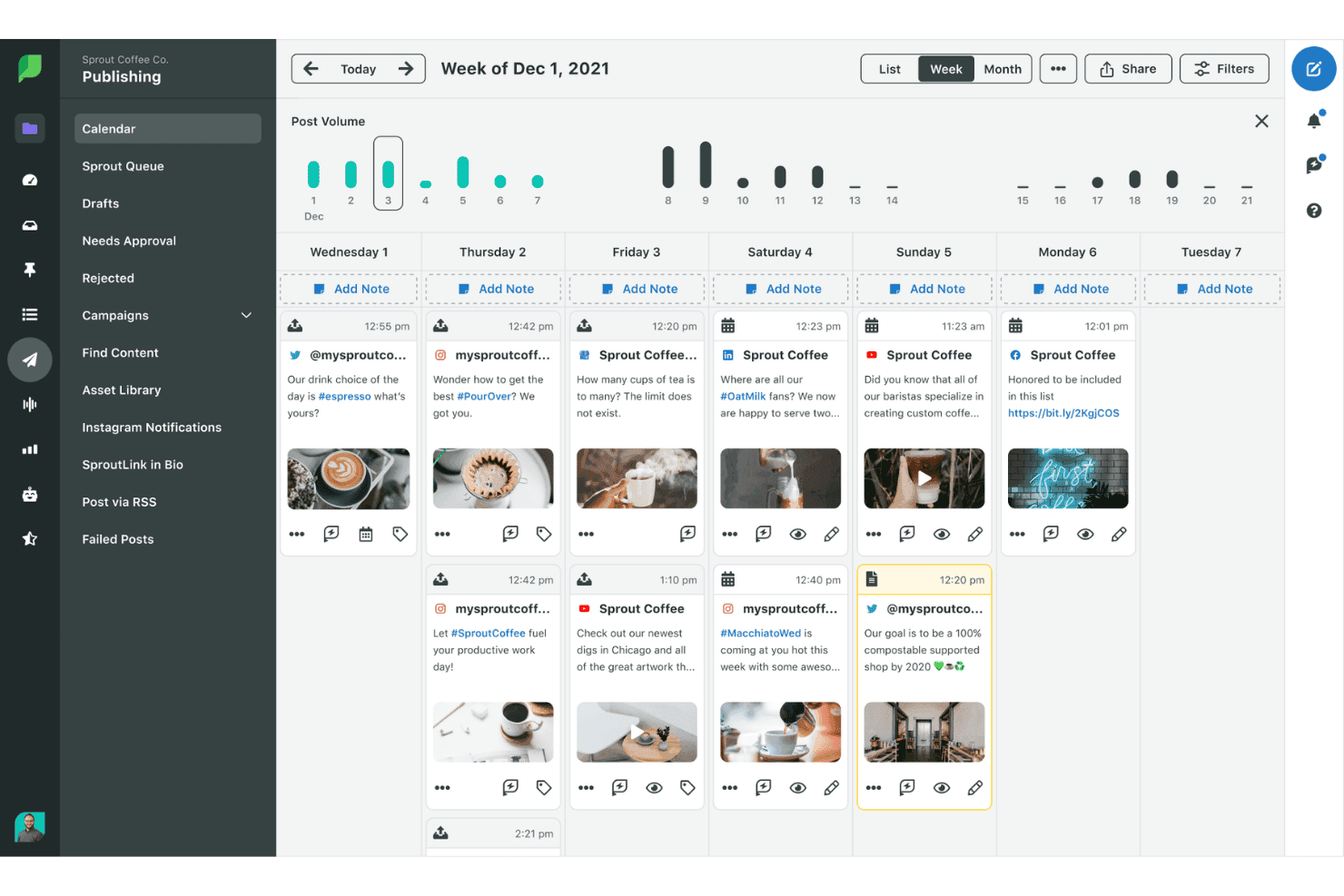
Sprout Social lets users schedule and view posts on a weekly publishing calendar. Sprout Social is a social media management platform that centralizes content scheduling, multi-profile publishing, audience engagement, and performance analytics across major social networks.
Who Is Sprout Social Best For?
Sprout Social is a strong fit for mid-sized to enterprise marketing teams managing social content and engagement across multiple brand profiles and networks.
Why I Picked Sprout Social
Sprout Social earns its spot on my shortlist because of the depth of its cross-network analytics. I particularly like the Premium Analytics add-on, which gives my team competitor benchmarking, custom dashboards, and scheduled report delivery, all tied to actual social performance data across every connected profile. The ViralPost® send time optimization also means my team isn't guessing when to publish; it pulls from real engagement patterns specific to each account.
Sprout Social Key Features
- Smart Inbox: Consolidates messages, comments, and mentions across all connected social profiles into one unified feed.
- Bulk publishing tool: Allows scheduling and uploading up to 350 messages across different channels with a single CSV file.
- Digital asset and content library: Centralizes storage and organization of multimedia files for use in social posts and campaigns.
- Approval workflow management: Enables team-based content review and publishing permissions to manage collaboration securely.
Sprout Social Integrations
Sprout Social offers native integrations with Facebook, Instagram, X (Twitter), LinkedIn, Pinterest, TikTok, YouTube, Google Drive, Canva, Dropbox, Adobe Experience Manager, and Bynder. An API is available for custom integrations.
Pros and Cons
Pros:
- Bulk scheduling across multiple social profiles
- Competitor benchmarking included in analytics dashboards
- ViralPost optimizes content timing automatically
Cons:
- No native paid amplification network
- Limited reach beyond owned social channels
Learn more about Sprout Social:
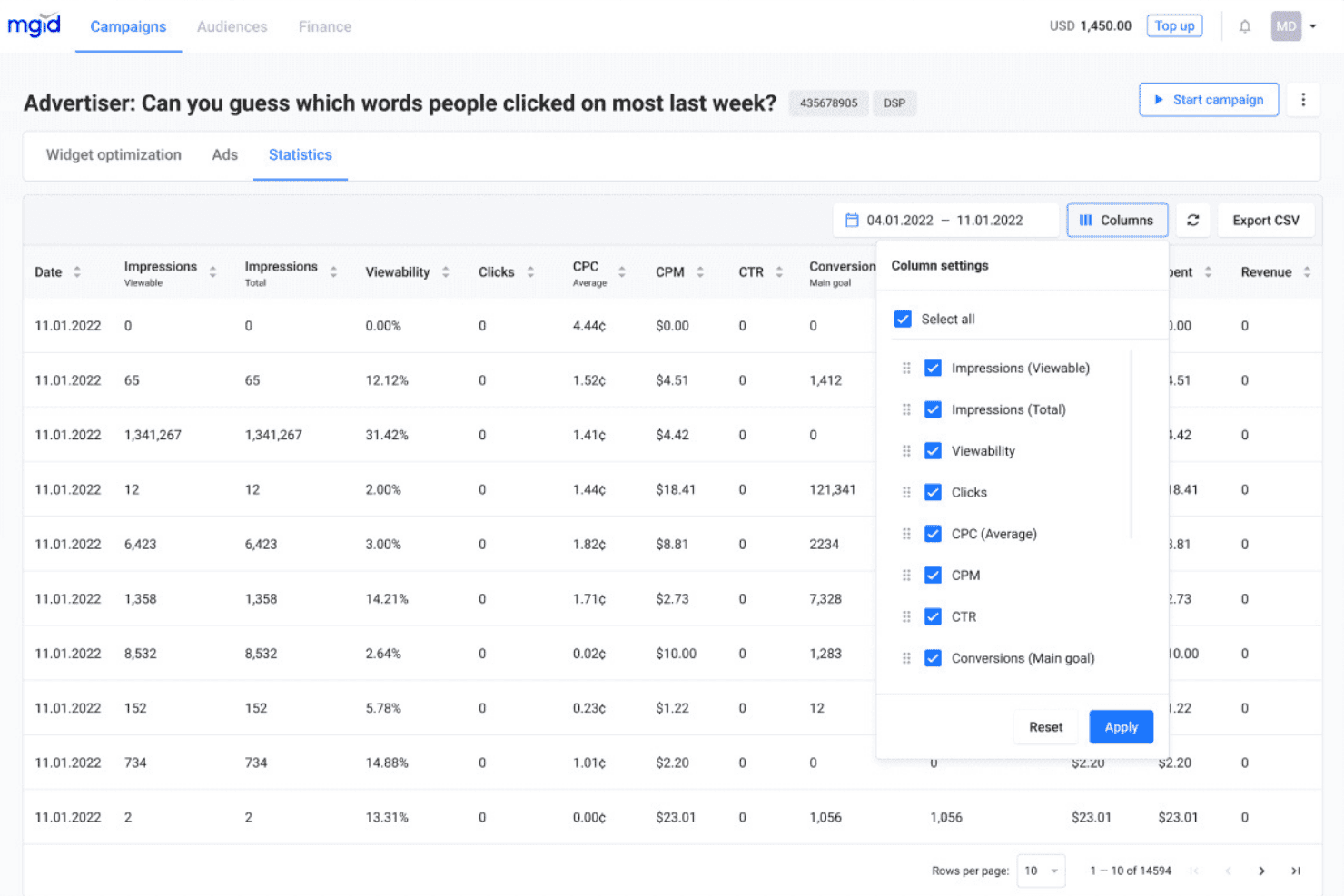
MGID lets users customize campaign statistics columns and metrics. MGID is a native advertising network that distributes branded content across a publisher network of 32,000+ sites through native widgets, in-content placements, and video ad formats with AI-driven audience targeting and performance analytics.
Who Is MGID Best For?
MGID is a strong fit for digital marketers and performance teams targeting non-English or regional audiences across multiple countries through paid native content.
Why I Picked MGID
I picked MGID as one of the best because its geographic targeting goes well beyond basic GEO selection, letting you layer in OS, browser, and sub-ID parameters to zero in on specific regional audience segments. Its AI-based matching algorithm then connects your content to users across 70+ supported languages on 32,000+ publisher sites. I particularly like its retargeting arsenal for re-engaging regional audiences who've already shown interest in your content.
MGID Key Features
- Native widget formats: Choose from in-content, under-article, sidebar, and mobile ad placements for distributing branded content.
- Publisher network access: Launch campaigns on a network of 32,000+ approved publisher sites for broad external distribution.
- Performance analytics dashboard: Monitor impressions, clicks, and conversions in real time from a centralized advertiser interface.
- Brand safety controls: Set placement and quality filters, plus use in-house fraud prevention and global blocklist management.
MGID Integrations
Native integrations are not clearly documented. An API is available for custom integrations.
Pros and Cons
Pros:
- Built-in fraud prevention and brand safety controls
- Granular sub-ID and OS-level targeting available
- Strong reach across non-English regional publisher networks
Cons:
- Minimal organic or non-paid distribution options
- Reporting dashboard lacks deep attribution modeling
Learn more about MGID :
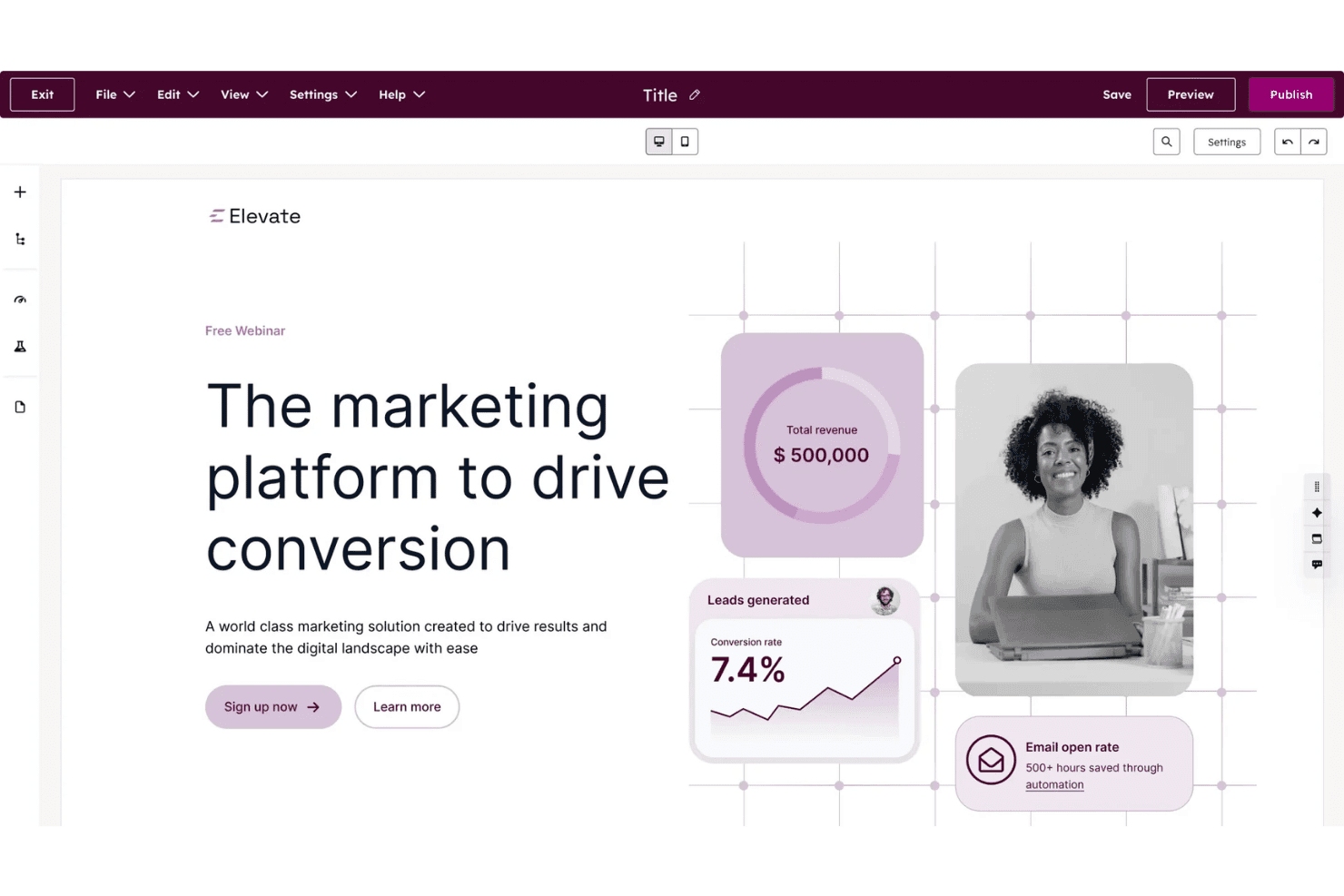
HubSpot Content Hub lets users build and publish landing pages visually. HubSpot Content Hub is a CRM-native content marketing platform that combines website and blog publishing, AI-powered content creation, content scheduling, asset management, and built-in performance analytics across owned channels.
Who Is HubSpot Content Hub Best For?
It's a strong fit for mid-market marketing teams already invested in the HubSpot ecosystem who manage content, contacts, and campaign analytics from a single platform.
Why I Picked HubSpot Content Hub
HubSpot Content Hub earns its spot on my shortlist because it's the only CMS I've used that serves content directly from CRM data. Smart Content rules let my team swap out CTAs, text, and entire page sections based on a contact's lifecycle stage or list membership, without building separate pages. On top of that, contact-create attribution ties every piece of distributed content back to pipeline, which I can see in a reporting dashboard alongside the CRM record.
HubSpot Content Hub Key Features
- Content remix with AI: Instantly repurpose a single piece of content into multiple formats like blog posts, social media updates, or landing pages.
- Memberships and gated content: Enable private content delivery by assigning access groups and member-only blog sections.
- Multisite management: Publish and manage up to 10 root domains from a unified interface.
- Adaptive content testing: Run A/B and adaptive tests with up to five variations to identify top-performing page versions.
HubSpot Content Hub Integrations
HubSpot Content Hub offers native integrations with Salesforce, Google Analytics, Facebook, LinkedIn, Google Ads, Shopify, and WordPress. It connects with Zapier and provides an API for custom integrations.
Pros and Cons
Pros:
- Attribution reporting ties content directly to pipeline
- Smart content adapts to visitor lifecycle stage
- CRM-native contact segmentation for content targeting
Cons:
- Full feature access requires higher-tier plan subscriptions
- Limited native syndication to external publisher networks
Learn more about HubSpot Content Hub: Best for broad media network distribution
- Free demo available
- Pricing upon request
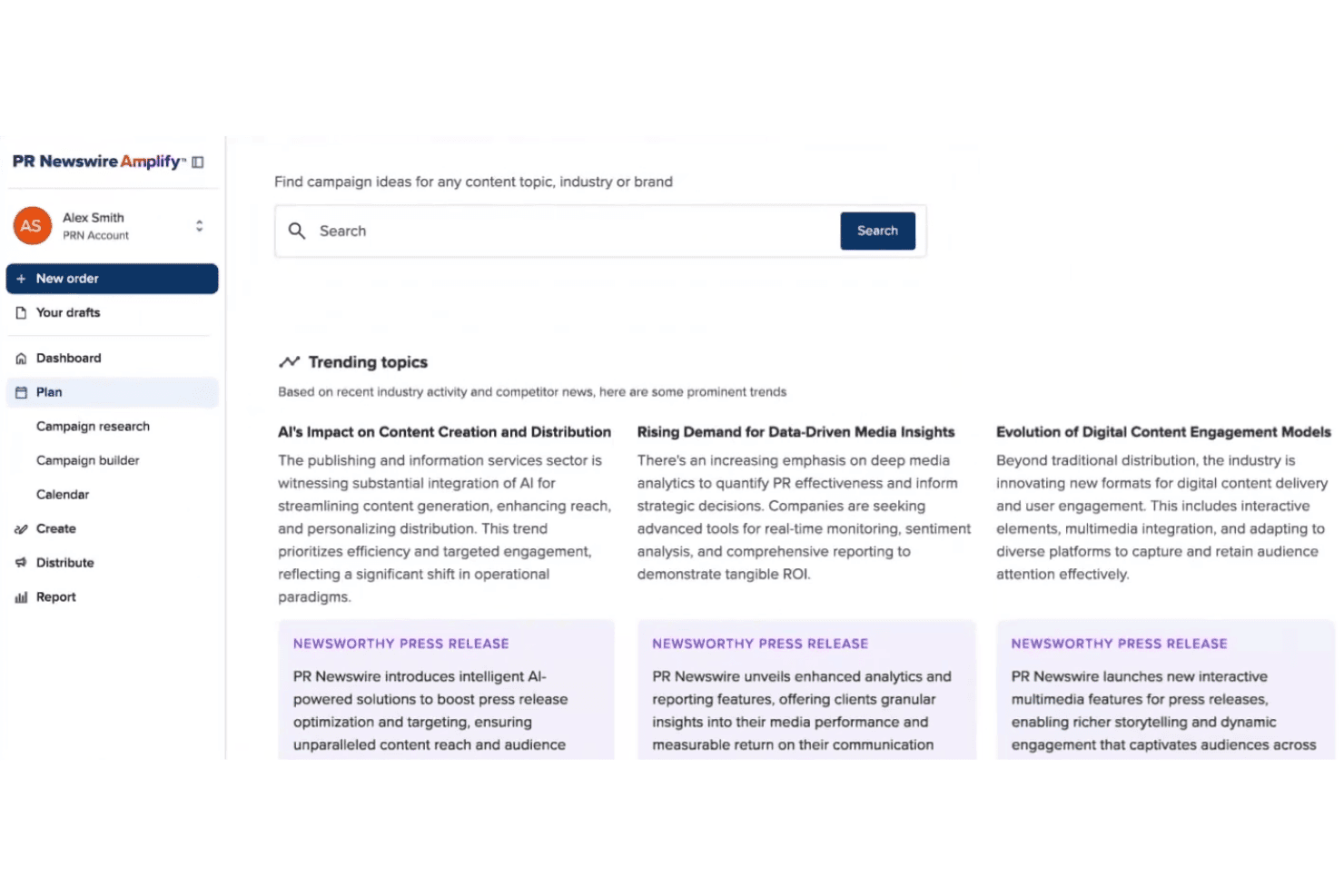
PR Newswire Amplify surfaces trending topics and press release ideas. PR Newswire is a press release distribution and multichannel content amplification platform that pushes branded content across a global network of newsrooms, media outlets, journalist databases, news portals, and financial platforms.
Who Is PR Newswire Best For?
PR and communications teams at mid-size to enterprise organizations that need broad, credible press release distribution across global media networks will get the most out of it.
Why I Picked PR Newswire
PR Newswire earns its spot on my shortlist because no other platform comes close to matching the sheer scale of its distribution network. I'm talking about simultaneous pickup across 4,500 U.S. websites, nearly 3,000 newsrooms including The New York Times and ABC News, and 550+ news portals like LexisNexis and Moody's in a single release. The Multichannel Amplification feature then repurposes that one release into blog posts, social content, and media pitches automatically.
PR Newswire Key Features
- Amplify AI content generation: Create blog posts, media pitches, video snippets, and social content from a single press release using AI-powered tools.
- Campaign performance analytics: Track content reach and engagement across distribution channels with built-in, multi-channel reporting dashboards.
- Industry and geography targeting: Distribute releases to segmented audiences based on industry verticals or specific geographic locations worldwide.
- Editorial review and support: Access 24/7 editorial assistance from experienced editors to ensure message clarity and compliance.
PR Newswire Integrations
Native integrations are not clearly documented. An API is available for custom integrations.
Pros and Cons
Pros:
- Syndication includes major financial and legal databases
- Repurposes one release into multiple content formats
- Unmatched reach across global newsroom networks
Cons:
- Analytics lack deep engagement and conversion data
- Limited audience targeting controls for paid distribution
Learn more about PR Newswire:
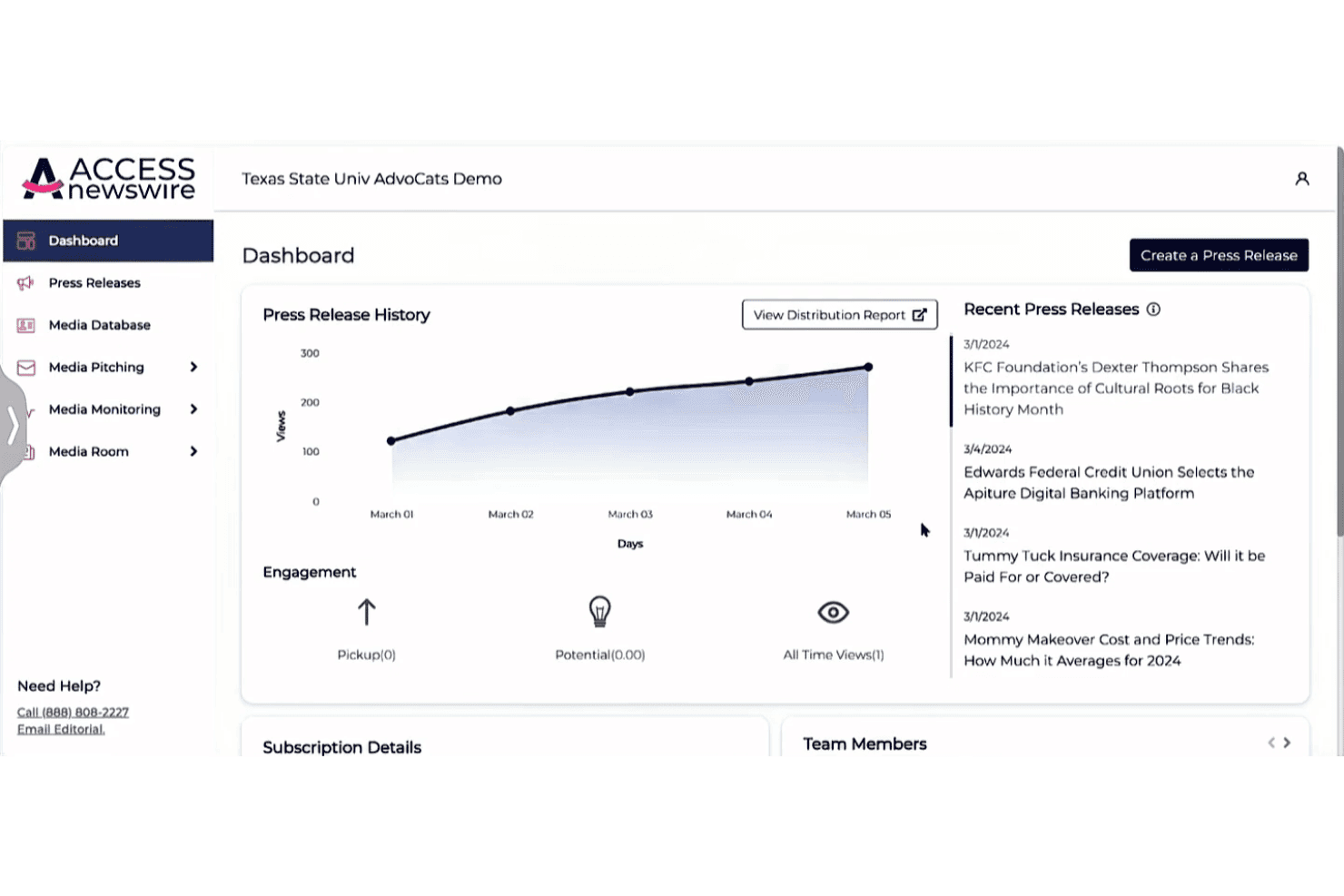
ACCESS Newswire lets users track press release views and engagement over time. ACCESS Newswire is a PR platform that combines press release distribution across 500+ media outlets, media database access, journalist pitching, and AI-powered performance analytics in a single interface.
Who Is ACCESS Newswire Best For?
ACCESS Newswire suits PR and communications teams at small to mid-sized businesses that need reliable press release distribution without enterprise-level pricing.
Why I Picked ACCESS Newswire
I picked ACCESS Newswire as one of the best because it publishes flat, transparent pricing that competitors typically hide behind a sales call. Pay-per-release starts at $475 and includes distribution to AP News, Yahoo Finance, and Bloomberg Terminal with no word-count or multimedia add-on fees. I also like ACCESS Verified, which flags formatting and clarity issues before submission, and the LLM Citation Score, which tracks how retrievable a release is across ChatGPT and Perplexity.
ACCESS Newswire Key Features
- Media database access: Search and segment a regularly updated database of journalists and outlets by beat, location, or industry.
- Media pitching tools: Send personalized pitches to curated journalist lists using AI-guided templates.
- Social monitoring dashboard: Track brand mentions and trending topics across platforms like X, Threads, Facebook, Instagram, and Bluesky.
- Brand sentiment monitoring: Analyze and organize media and social coverage by sentiment to visualize trends and reputational shifts.
ACCESS Newswire Integrations
Native integrations are not clearly documented. An API is available for custom integrations.
Pros and Cons
Pros:
- LLM Citation Score tracks AI search visibility
- ACCESS Verified flags release errors pre-submission
- Wide reach across premium financial news outlets
Cons:
- Limited audience targeting beyond press release syndication
- No native advertising or sponsored content placements
Learn more about ACCESS Newswire: Best for multi-channel publishing
- Free plan available
- From $22/month (billed annually)
Visit WebsiteCustomer Rating:4.7/5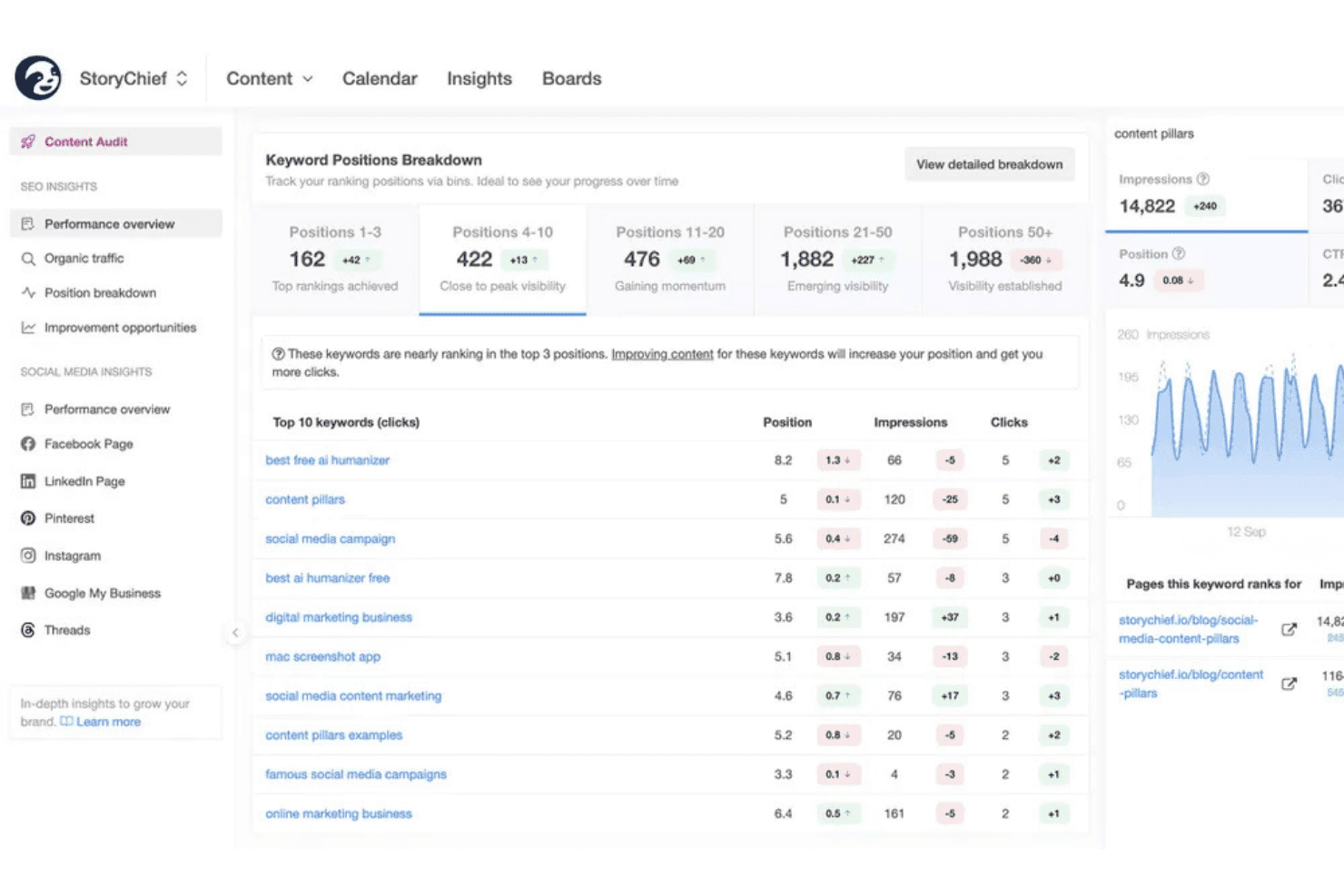
StoryChief tracks keyword rankings and SEO performance in one dashboard. StoryChief is a multi-channel content publishing platform that lets you create, schedule, and distribute content to websites, social networks, syndication hubs, and email channels from a single interface.
Who Is StoryChief Best For?
StoryChief is a strong fit for marketing agencies and in-house content teams managing publishing workflows across multiple channels or clients.
Why I Picked StoryChief
StoryChief earns its spot on my shortlist because of how it handles the "one piece, many destinations" workflow. Once a piece is approved, I can push it as a blog post, LinkedIn thread, newsletter, and carousel without rebuilding it from scratch. Per-channel tailoring lets me override copy, UTMs, and scheduling per destination, so every channel gets the right version. The two-way channel connection means I can update or unpublish across all channels without ever leaving StoryChief.
StoryChief Key Features
- Closed-loop analytics: Track engagement and performance across all distribution channels in one dashboard.
- Employee advocacy broadcasts: Package content into shareable posts for employees to distribute via email, Slack, or Teams.
- Two-way channel connections: Update or unpublish content on any integrated network directly from StoryChief.
- Content calendar: View, plan, and organize scheduled posts and campaigns for all channels in a single timeline.
StoryChief Integrations
StoryChief offers 450+ native integrations, including WordPress, Webflow, Shopify, HubSpot, LinkedIn, Facebook, Instagram, X, Pinterest, Medium, Mailchimp, and Zapier. An API is available for custom integrations.
Pros and Cons
Pros:
- Built-in employee advocacy broadcasting included
- Per-channel copy overrides on every publish
- Pushes content to 450+ channels natively
Cons:
- No paid native ad network support
- Analytics depth trails dedicated distribution platforms
Learn more about StoryChief: Best for scheduling simple social posts
- Free plan available
- From $5/month per channel (billed annually)
Visit WebsiteCustomer Rating:4.4/5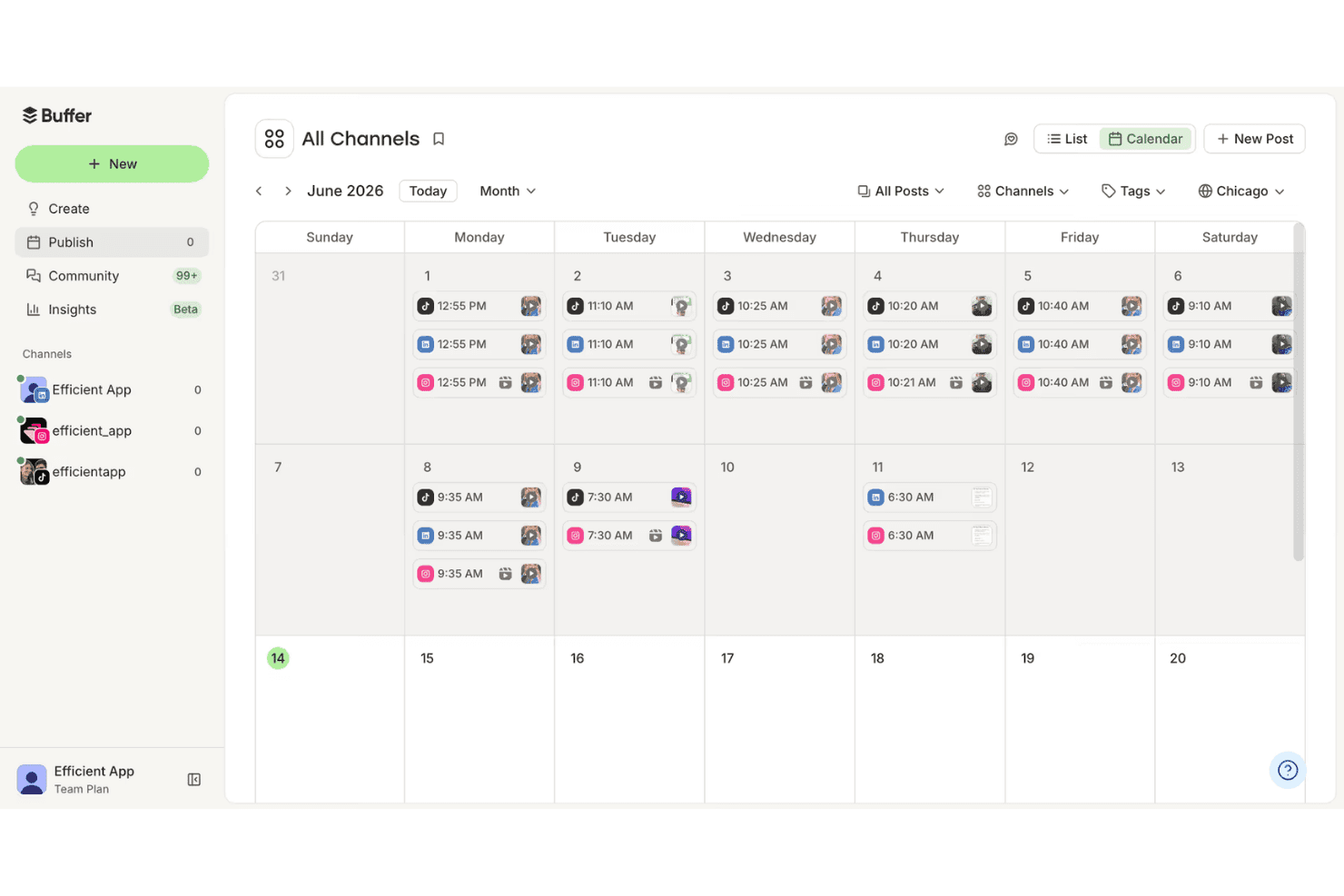
Buffer's calendar view lets users schedule posts across all channels. Buffer is a social media scheduling and publishing platform that lets you plan, queue, and publish organic content across multiple social channels from one centralized dashboard.
Who Is Buffer Best For?
Buffer is a natural fit for small marketing teams and solo creators who manage a handful of social accounts without needing enterprise-level complexity.
Why I Picked Buffer
I picked Buffer as one of the best because its queue-based scheduling system is one of the cleanest I've used across any scheduling tool. My team uses it to line up posts across up to 11 social channels at once, including newer platforms like Bluesky and Threads, without rebuilding content from scratch for each one. Channel groups let me publish to multiple accounts in a single action, and first-comment scheduling keeps captions clean while automatically dropping hashtags into the first comment.
Buffer Key Features
- Engagement inbox: Manage and reply to comments and messages from multiple social channels within a unified dashboard.
- AI Assistant: Generate post ideas, rewrite content, and tailor posts for different platforms directly within the scheduling workflow.
- Link shortening and tracking: Automatically shorten URLs and track link performance within posts across social networks.
- Content calendar: Visualize all scheduled posts for every connected channel in a drag-and-drop calendar view.
Buffer Integrations
Buffer offers native integrations with Canva, Google Drive, Dropbox, OneDrive, and Unsplash. An API is available for custom integrations.
Pros and Cons
Pros:
- First comment scheduling keeps caption formatting clean
- Supports newer platforms like Threads and Bluesky
- Queue-based scheduling across 11+ social channels
Cons:
- Analytics don't track conversions or content attribution
- No native advertising or paid amplification tools
 Best for enterprise social teams
- 14-day free trial
- From $99/month (billed annually)
Visit WebsiteCustomer Rating:4.1/5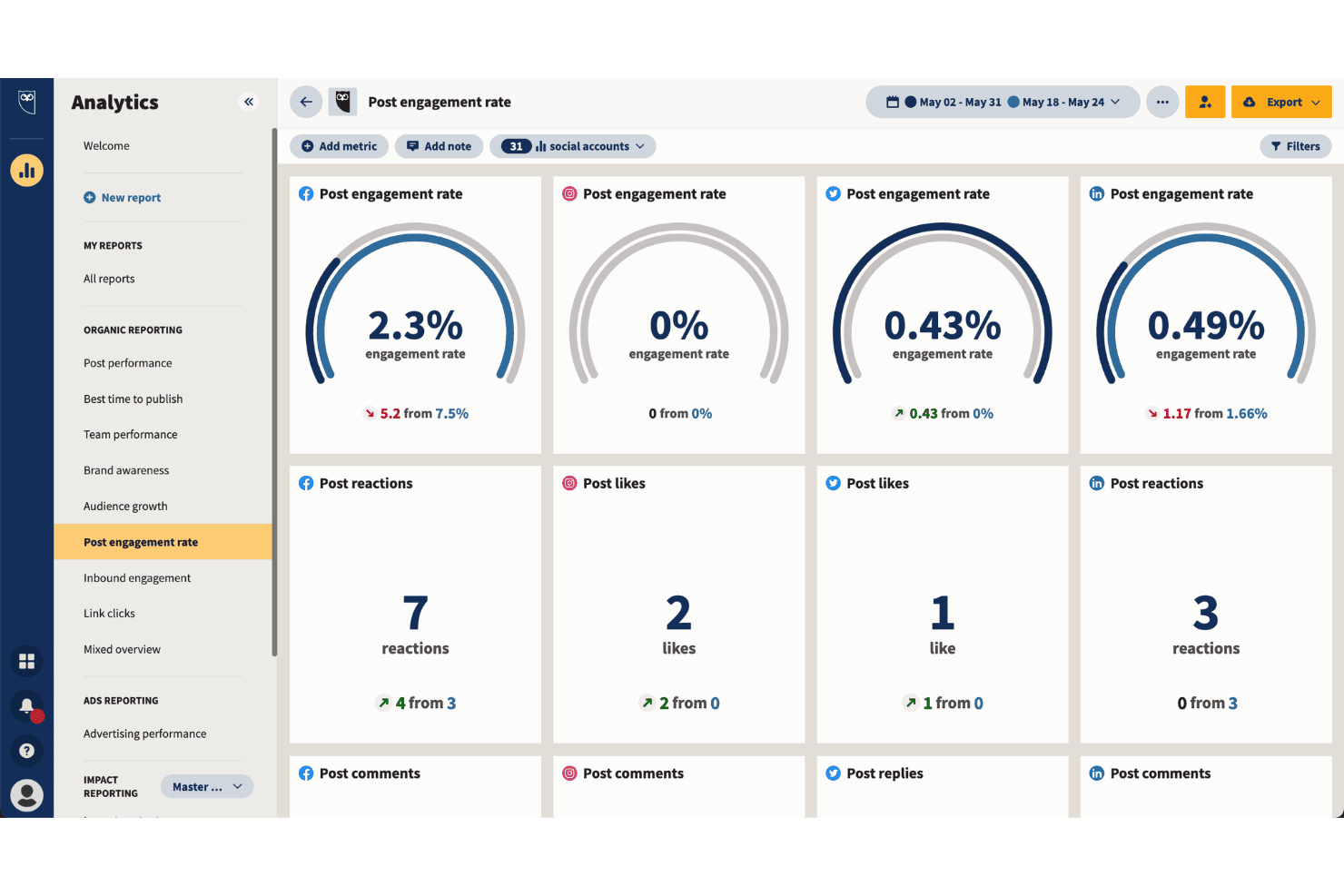
Hootsuite tracks post engagement rates across all social platforms. Hootsuite is a social media management platform that centralizes content scheduling, cross-channel publishing, employee advocacy, paid social advertising, and performance analytics across 10+ social networks from a single dashboard.
Who Is Hootsuite Best For?
Hootsuite is a strong fit for mid-market and enterprise marketing teams that need governance, multi-brand publishing controls, and approval workflows at scale.
Why I Picked Hootsuite
Hootsuite earns its spot on my shortlist because of how well it handles content distribution at enterprise scale. I particularly like Parliament, Hootsuite's employee advocacy module, which lets my team push pre-approved branded content through employees' personal social networks to expand organic reach without additional ad spend. The approval workflow layer on the Advanced plan also means I can enforce brand governance across multiple teams and markets before anything goes live.
Hootsuite Key Features
- Unified content calendar: Plan, schedule, and view posts across multiple social channels in a single drag-and-drop calendar interface.
- AI-powered content assistant: Generate captions, hashtags, and image suggestions with built-in AI tools to optimize social posts.
- Advanced analytics dashboard: Track performance metrics for each channel, including engagement, clicks, impressions, and conversions.
- Social listening integration: Monitor brand mentions, competitor activity, and industry trends across 30+ social networks and over 150 million online sources.
Hootsuite Integrations
Hootsuite offers over 150 native integrations, including Google Drive, Dropbox, Trello, Canva, Bynder, Acquia DAM, Salesforce, Adobe Express, HubSpot, Slack, and Mailchimp, and provides an API for custom integrations.
Pros and Cons
Pros:
- Granular per-post analytics and channel benchmarking
- Built-in Amplify module for employee advocacy
- Bulk scheduling across 10+ social networks
Cons:
- Limited content syndication beyond social channels
- No publisher network or native ad placements
 Best for placements on premium publisher sites
- Not available
- Pricing upon request
Visit WebsiteCustomer Rating:4.1/5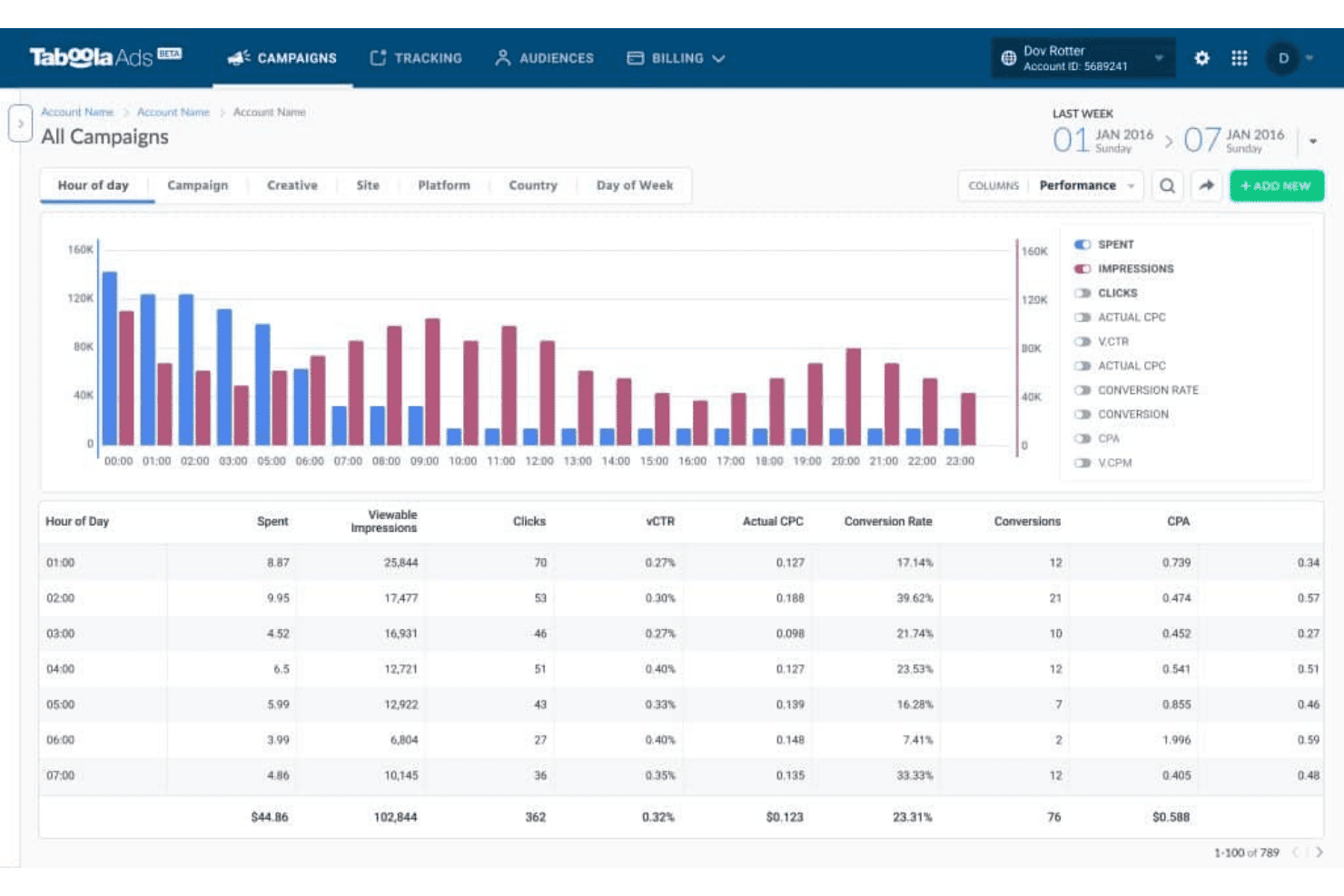
Taboola lets users analyze ad performance by hour of day. Taboola is a paid content distribution and native advertising platform that places sponsored content across a network of premium open-web publishers using AI-driven audience targeting and performance optimization.
Who Is Taboola Best For?
Taboola is a strong fit for performance-focused digital marketing teams at brands and agencies running paid content amplification campaigns across the open web.
Why I Picked Taboola
Taboola earns its spot as one of the best on my shortlist because no other platform gives you native placements across the caliber of publishers it does. Taboola Select puts your sponsored content on sites like Yahoo, Apple News, NBC, and Disney, which represent the top 15% of its publisher network. I also like how Matchmaking AI, trained on 17+ years of reader behavior data, determines which audiences are most likely to engage based on what they're actively reading.
Taboola Key Features
- Real-time analytics dashboard: View impressions, clicks, engagement, and conversions for every campaign across all publisher placements.
- GenAI AdMaker suite: Generate and adapt creative assets using AI-driven tools for headlines and image variations.
- Multi-format ad support: Run native, social display, vertical video, and CTV ad formats from a single advertising interface.
- Brand safety controls: Apply pre-bid site blocking and publisher filtering to control where your content is shown.
Taboola Integrations
Native integrations are not clearly documented. An API is available for custom integrations.
Pros and Cons
Pros:
- Supports native, video, and CTV formats in one campaign
- Matchmaking AI targets readers by active content consumption
- Massive premium publisher network for content placements
Cons:
- Traffic quality varies across lower-tier publisher placements
- Minimum spend commitments limit access for smaller budgets
Learn more about Taboola: 10Best for native ad reach for global audiences
Outbrain
- Free demo available
- Pricing upon request
Visit WebsiteCustomer Rating:3.5/5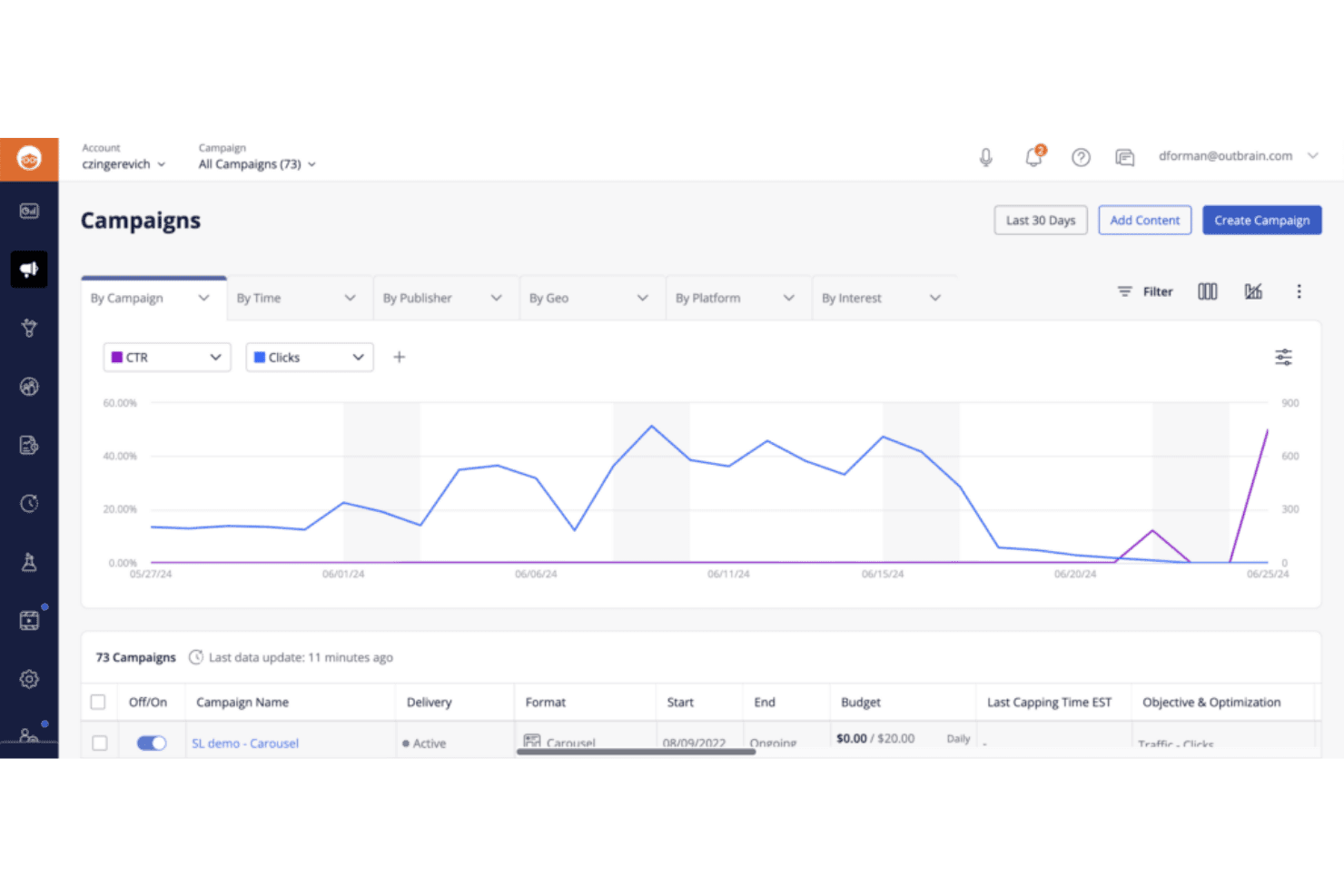
Outbrain lets users monitor campaign CTR and clicks over time. Outbrain is a native advertising and content discovery platform that distributes paid content across a network of premium publishers using interest-based targeting, CPC bidding, and performance optimization tools.
Who Is Outbrain Best For?
Performance-focused digital marketing teams at mid-size to enterprise brands in finance, insurance, and health verticals who need scaled paid content distribution across premium publishers.
Why I Picked Outbrain
Outbrain earns its spot as one of the best on my shortlist because of the sheer scale of its publisher network, spanning sites like CNN, MSN, and The Washington Post across global markets. I particularly like its Interest Graph targeting, which pairs content recommendations with behavioral and contextual signals to reach readers mid-scroll on relevant articles. The lookalike and retargeting tools inside Amplify let my team refine who sees our content without leaving the platform.
Outbrain Key Features
- Publisher allowlists and blocklists: Control where your content appears using detailed publisher inclusion or exclusion lists.
- Campaign pacing controls: Set daily or monthly spend caps with options for accelerated or standard pacing.
- Programmatic buying: Activate Outbrain placements directly through integrated DSPs like The Trade Desk and DV360.
- Advanced conversion tracking: Monitor post-click activity with customizable conversion events for reporting and optimization.
Outbrain Integrations
Outbrain offers native integrations with The Trade Desk, DV360, Google Analytics, Adobe Analytics, and LiveRamp. An API is available for custom integrations.
Pros and Cons
Pros:
- Strong conversion tracking for performance campaigns
- Granular interest-based targeting across global markets
- Massive premium publisher network for content reach
Cons:
- Minimum spend requirements restrict smaller budgets
- Limited organic or non-paid distribution options
Learn more about Outbrain:
Andre plattformer for innholdsdistribusjon
Her er noen flere alternativer for plattformer for innholdsdistribusjon som ikke kom med på kortlisten min, men som likevel er verdt å sjekke ut:
- 11Mailchimp Best for email-based content distribution
- 12KlaviyoBest for unified SMS and email distribution
- 13CoScheduleBest for centralizing content publishing schedules
- 14StackAdaptBest for programmatic native advertising
- 15RevContentBest for high-engagement web native ads
- 16TeadsBest for video-based brand storytelling
- 17PrezlyBest for newsroom-driven story distribution
How I Evaluate Content Distribution Platforms
I split my evaluation into baseline requirements—like multi-channel reach and targeting—and differentiators like publisher network quality and analytics depth.
Core Functionality (Table Stakes For This List)
When I'm selecting tools for my list, I rank each one on a scale from 0 (does not offer the functionality) to 5 (excels in this area) for each core functionality listed below. I then calculate the tool's total score into a percentage, using 65% as a benchmark to help assess its overall fit for the list.
- Multi-Channel Distribution: I check whether a platform can push content to social networks, native ad networks, publisher sites, and syndication partners from one hub.
- Content Scheduling & Publishing: Queuing posts across channels with calendar views and bulk scheduling matters, especially when coordinating a campaign launch across time zones.
- Audience Targeting: I evaluate whether the platform supports demographic, geographic, interest-based, and contextual targeting to reach the right readers per campaign.
- Performance Analytics: Dashboards that track impressions, clicks, engagement, and conversions per channel help me assess whether a tool supports real ROI reporting.
- Native Ad or Sponsored Content Support: I look for paid amplification formats like recommendation widgets or sponsored placements across major publisher networks.
- Content Asset Management: A centralized library for organizing, tagging, and reusing assets saves time when your team repurposes one piece across multiple formats and channels.
Once I have a list of tools that meet the criteria, I consider what sets each platform apart.
Differentiating Factors (What Sets Vendors Apart)
Here's how I compare and contrast different vendors:
Standout Features
AI-powered audience targeting is a big differentiator. I look for platforms that use machine learning to surface the best-fit segments based on past content performance, not just static demographics. Real-time analytics matter just as much, especially when you need to shift budget mid-campaign based on which channels are actually converting. I also evaluate content personalization engines that serve dynamic variants by visitor behavior or lifecycle stage, which can meaningfully lift engagement across distributed content.
Beyond Features
Integration ecosystem matters a lot here. I check whether a platform connects to your CMS, CRM, and analytics stack so distributed content feeds back into your existing reporting. Pricing models vary widely too—some platforms charge a flat subscription while others run on a CPC or minimum-spend basis, so I evaluate how transparent each vendor is about platform fees versus media costs. Use case alignment is another key factor. A tool built for paid amplification on publisher networks serves a very different need than one designed for organic multi-channel publishing.
Hvordan velge en plattform for innholdsdistribusjon
Hvordan snevrer du inn alternativene til en plattform for innholdsdistribusjon som passer kanalene, målrettingen og rapporteringsbehovene dine, uten unødvendig kompleksitet eller kostnader?
| Hvis prioriteten din er … | Se etter … |
| Gjennomføring av kampanjer på tvers av flere kanaler | Ferdigbygde integrasjoner med alle aktuelle destinasjoner |
| Detaljert målgruppemålretting | Tilpassbare innstillinger for demografi og interesser |
| Betalt innholdspromotering | Direkte tilgang til premium-nettverk av utgivere |
| Syndikering og gjenbruk av innhold | Verktøy for massehåndtering og planlegging av innhold |
| Samlet kampanjeanalyse | Instrumentpanel på tvers av kanaler med data om engasjement og konverteringer |
Slik vurderer du kortlisten din
- Be om en oversikt over integrasjoner: Be om en oppdatert liste over integrasjoner på kanalnivå – sørg for at alle planlagte destinasjoner støttes offisielt.
- Gjennomfør en segmenttest: Sett opp en eksempelkampanje under prøveperioden eller demonstrasjonen ved hjelp av avanserte målrettingsfiltre, og kontroller om den gjenspeiler markedsparameterne dine.
- Bekreft kompatibilitet med analyseverktøy: Be om en nylig eksport av et instrumentpanel eller en gjennomgang som viser rapportering av engasjement og konverteringer på tvers av flere kanaler.
- Be om tydelig prisinformasjon: Få en skriftlig oversikt som viser hva som er inkludert i plattformavgiftene, sammenlignet med mediekostnader og minimumsforpliktelser.
- Avveining – automatisering kontra utgiverrekkevidde: Avgjør om dypere arbeidsflytautomatisering eller bredere tilgang til utgivernettverk er viktigst for kampanjene dine.
Hva er plattformer for innholdsdistribusjon?
Plattformer for innholdsdistribusjon er spesialiserte systemer som lar deg publisere, administrere og promotere merkevareinnhold på tvers av flere eksterne kanaler fra ett samlet grensesnitt. Disse plattformene støtter publisering i flere kanaler, målgruppestyring, planlegging og resultatmåling, noe som gjør dem til et sentralt knutepunkt for å forsterke blogginnlegg, artikler, pressemeldinger og sponset innhold for å nå bredere målgrupper og øke målbare interaksjoner.
Funksjoner i plattformer for innholdsdistribusjon
Når du velger plattformer for innholdsdistribusjon, bør du se etter følgende nøkkelfunksjoner:
- Publisering i flere kanaler: Publiser innhold i flere eksterne kanaler – som sosiale medier, utgivernettverk og syndikeringspartnere – fra ett enkelt kontrollpanel.
- Innholdsplanlegging: Angi bestemte datoer og tidspunkter for innholdslanseringer, slik at du kan samordne kampanjer og opprettholde en konsekvent tilstedeværelse på tvers av kanalene.
- Målgruppestyring: Nå relevante målgrupper basert på demografi, geografi eller interesser ved å konfigurere målrettede distribusjonsparametere for hver kampanje.
- Resultatanalyse: Følg med på visninger, klikk, interaksjoner og konverteringer med detaljerte kontrollpaneler for å måle effekten av hvert distribuerte innholdselement.
- Administrasjon av innholdselementer: Organiser, merk og lagre innholdselementer i et sentralisert bibliotek, slik at teamet enkelt kan gjenbruke materiell i nye kampanjer.
- Masseopplasting og distribusjon: Last opp flere innholdselementer samtidig og tilordne dem til ulike kanaler eller kampanjer for å effektivisere innholdsarbeidet.
- Samarbeidsverktøy: Legg til rette for teamkommunikasjon, godkjenning av innhold og oppfølging av oppgaver, slik at flere bidragsytere kan administrere kampanjer effektivt sammen.
- Alternativer for eksport av rapporter: Eksporter resultatdata i flere formater for deling eller videre analyse i analyseverktøyene du foretrekker.
- Kontroll av brukertilgang: Angi tillatelser etter rolle, slik at de riktige teammedlemmene kan publisere, redigere eller gjennomgå distribuert innhold etter behov.
Vanlige AI-funksjoner i plattformer for innholdsdistribusjon
I tillegg til standardfunksjonene i plattformer for innholdsdistribusjon som er nevnt ovenfor, tar mange av disse løsningene i bruk AI med funksjoner som:
- AI-drevet målgruppesegmentering: Analyserer automatisk historiske interaksjonsdata for å identifisere og gruppere målgruppesegmentene som mest sannsynlig vil interagere med innholdet ditt.
- Prediktiv innholdsytelse: Bruker maskinlæring til å forutsi hvilke innholdselementer som vil gi best resultater i bestemte kanaler eller overfor bestemte målgrupper, før du publiserer.
- Automatiserte innholdsanbefalinger: Foreslår optimale distribusjonskanaler, tidspunkter og formater for hvert innholdselement basert på sanntidsdata og resultater fra tidligere kampanjer.
- Dynamisk personalisering: Leverer tilpassede innholdsvarianter til individuelle brukere ved å analysere atferd, preferanser og stadiet i kundelivssyklusen i sanntid.
- Smarte budsjettildelinger: Omfordeler kontinuerlig betalte promoteringsmidler på tvers av kanaler og kampanjer for å maksimere rekkevidde og konverteringer basert på løpende resultatsignaler.
Fordeler med plattformer for innholdsdistribusjon
Implementering av plattformer for innholdsdistribusjon gir flere fordeler for teamet og virksomheten din. Her er noen av fordelene du kan se frem til:
- Større målgrupperekkevidde: Publiser og forsterk innhold på tvers av flere eksterne kanaler for å engasjere bredere målgrupper enn det egne kanaler kan nå alene.
- Forbedret målrettingseffektivitet: Bruk funksjoner for målretting og segmentering til å levere innhold til bestemte demografiske grupper, geografiske områder eller interessegrupper som mest sannsynlig vil engasjere seg.
- Sentralisert kampanjehåndtering: Administrer ressurser, planlegging og ytelsesanalyse fra ett dashbord, slik at du sparer tid og reduserer manuelt arbeid.
- Datadrevet beslutningstaking: Få tilgang til samlet ytelsesrapportering som lar deg optimalisere kampanjer basert på reelle data om engasjement, konverteringer og avkastning på investeringen.
- Samarbeid på tvers av team: Gjør det mulig for team å samarbeide om publisering, godkjenne innhold og dele ressurser i det samme sikre miljøet.
- Effektivisert betalt promotering: Få tilgang til utgiver- og native-annonsenettverk via én enkelt plattform, noe som gjør det enklere å gjennomføre og måle sponsede kampanjer.
- Enhetlig merkevarefortelling: Oppretthold en konsekvent kommunikasjon og visuell profil på tvers av kanaler ved å organisere og gjenbruke godkjente ressurser og maler.
Kostnader og priser
Ved valg av plattformer for innholdsdistribusjon er det nødvendig å forstå de ulike prismodellene og abonnementene som er tilgjengelige. Kostnadene varierer basert på funksjoner, teamstørrelse, tilleggstjenester og mer. Tabellen nedenfor oppsummerer vanlige abonnementer, gjennomsnittsprisene deres og typiske funksjoner som er inkludert i løsninger for innholdsdistribusjonsplattformer:
Sammenligningstabell for abonnementer på plattformer for innholdsdistribusjon
| Abonnementstype | Gjennomsnittspris | Vanlige funksjoner |
|---|---|---|
| AbonnementstypeGratisabonnement | Gjennomsnittspris$0 | Vanlige funksjonerGrunnleggende publisering i flere kanaler, begrenset ressursbibliotek, standardanalyse og tilgang for én bruker. |
| AbonnementstypePersonlig abonnement | Gjennomsnittspris$25–$75/bruker/måned | Vanlige funksjonerPublisering i flere kanaler, planlegging av innhold, utvidet analyse, begrenset målretting og samarbeid for små team. |
| AbonnementstypeBedriftsabonnement | Gjennomsnittspris$100–$350/bruker/måned | Vanlige funksjonerAvansert målretting, masseopplasting, omfattende ytelsesdashbord, arbeidsflytgodkjenninger og integrasjoner med tredjepartsverktøy. |
| AbonnementstypeForetaksabonnement | Gjennomsnittspris$400–$2,000+/måned | Vanlige funksjonerTilpassede integrasjoner, tilgang til premiumutgivere, avansert sikkerhet, teamadministrasjon og prioritert brukerstøtte. |
Vanlige spørsmål om plattformer for innholdsdistribusjon
Her er noen svar på vanlige spørsmål om plattformer for innholdsdistribusjon:
Hvordan skiller plattformer for innholdsdistribusjon seg fra verktøy for administrasjon av sosiale medier?
<span data-slate-fragment="JTVCJTdCJTIyY2hpbGRyZW4lMjIlM0ElNUIlN0IlMjJ0ZXh0JTIyJTNBJTIyQ29udGVudCUyMGRpc3RyaWJ1dGlvbiUyMHBsYXRmb3JzJTIwZm9jdXMlMjBvbiUyMHB1Ymxpc2hpbmclMjBhbmQlMjBwcm9tb3RpbmclMjBjb250ZW50JTJDJTIwYWNy b3NzJTIwYm90aCUyMHNvY2lhbCUyMGNoYW5uZWxzJTIwYW5kJTIwZXh0ZXJuYWwlMjBwdWJsaXNoZXIlMjBuZXR3b3JrcyUyQyUyMHdoaWxlJTIwc29jaWFsJTIwbWVkaWElMjB0b29scyUyMGNlbnRlciUyMG9uJTIwc2NoZWR1bGluZyUyMGFuZCUyMGNvbW11bml0eSUyMGVuZ2FnZW1lbnQlMjB3aXRoaW4lMjBzb2NpYWwlMjBuZXR3b3JrcyUyMG9ubHkuJTIyJTdEJTVEJTJDJTIydHlwZSUyMiUzQSUyMnAlMjIlMkMlMjJpZCUyMiUzQSUyMmFkeUdhaG5IM19cIiwlN0QlNURcIjtcdTAwMjJcdTAwM2VQbGF0dGZvcm1lciBmb3IgaW5uaG9sZHNkaXN0cmlidXNqb24gZm9rdXNlcmVyIHBcdTAwMjAxIHB1Ymxpc2VyaW5nIG9nIG1hcmtlZHNmXHUwMDIwXHUwMDIwaW5uaG9sZCBwXHUwMDI1IHR2ZXJzIGF2IGJcdTAwMjUgc29zaWFsZSB kanaler og eksterne utgivernettverk, mens verktøy for sosiale medier fokuserer på planlegging og interaksjon med fellesskapet, kun i sosiale nettverk.
Kan jeg bruke plattformer for innholdsdistribusjon til både betalt og organisk innhold?
Ja, de fleste plattformer støtter organiske innlegg og betalt innholdsforsterkning, inkludert sponsede plasseringer på førsteklasses utgivernettverk og alternativer for innebygd annonsering.
Hvilke integrasjoner bør jeg forvente fra en plattform for innholdsdistribusjon?
Se etter integrasjoner med CMS-et, CRM-systemet og analyseverktøyene dine, slik at du kan synkronisere innhold, måle konverteringer lenger ned i kundereisen og segmentere målgrupper ved hjelp av data fra flere kilder.
Tilbyr plattformer for innholdsdistribusjon resultat- og ytelsesanalyse?
Ja, enhetlige oversikter sporer vanligvis visninger, klikk, konverteringer og engasjementsmålinger på tvers av alle støttede kanaler, slik at du kan sammenligne kanalenes effektivitet.
Hvordan håndterer disse plattformene innholdsgodkjenning og samsvar?
Mange plattformer inkluderer rollebaserte tilgangskontroller, tilpassbare godkjenningsflyter og verktøy for innholdsmoderering, slik at du kan håndheve retningslinjer for merkevare, juss eller bransje før innholdet publiseres.