

Gratis programvare for e-postmarkedsføring kan være en smart måte å lansere kampanjer på, utvide kontaktlisten din og holde kontakten med kundene uten å sprenge budsjettet. Enten du bygger opp programmet ditt fra grunnen av eller ønsker å teste nye verktøy før du bestemmer deg, finnes det gode gratisabonnementer som fortsatt dekker det viktigste.
Jeg har testet og gjennomgått flere alternativer for å hjelpe deg med å finne plattformer som balanserer brukervennlighet, funksjoner og langsiktig verdi. I denne veiledningen finner du mine beste anbefalinger og hva hver av dem egner seg best til, slik at du kan velge det som passer best for teamet ditt.
Why Trust Our Software Recommendations
6,700+
Reviews
20
Industry experts
16+
Evaluation factors
14
Years
Our team has been testing and reviewing software since 2012. As marketing leaders ourselves, we know how difficult—and important—it is to choose the right software.
For this guide, we evaluated tools using hands-on testing and independent research, scoring tools using our selection criteria.
Our reviews reflect our human editorial judgment, not a sales pitch.
Expert reviewers:
 Gui DrusinaCreative Director
- Shriya GhateSenior Marketing Lead
 Amanda JacquesMarketing Ops Leader

Sammenligningstabell for gratis programvare for e-postmarkedsføring
Denne sammenligningstabellen oppsummerer prisopplysningene for mine beste utvalgte gratisprogrammer for e-postmarkedsføring:
| Tool | Best For | Trial Info | Price | ||
|---|---|---|---|---|---|
| 1 | Best for B2B cold outreach prospecting | Free plan + 14-day free trial + free demo available | From $49/user/month (billed annually) | Website | |
| 2 | Best for beginners | Free plan available | From $13/month | Website | |
| 3 | Best for robust integrations options | Free plan available | From $9/month | Website | |
| 4 | Best for time-based urgency emails | Free plan + free trial available | From $19/user/month (billed annually) | Website | |
| 5 | Best for testing emails | A free version specifically for a single inbox and up to 500 email tests per month. | From $14.99/ month for 1 user and up to 5 inboxes | Website | |
| 6 | Best for user-friendly interface | 14-day free trial + free demo available | From $10.80/month | Website | |
| 7 | Best for ecommerce users | Free plan available | From $20/month | Website | |
| 8 | Best for small teams | 14-day free trial available | From $33/month (billed annually) | Website | |
| 9 | Best for simple email templates | Free plan available | From $37/month | Website | |
| 10 | Best for Canadian businesses | Free plan available | From CAD $22.04/month | Website |


Anmeldelse av den beste gratis programvaren for e-postmarkedsføring
Nedenfor finner du mine detaljerte sammendrag av den beste gratis programvaren for e-postmarkedsføring som kom med på kortlisten min. Anmeldelsene mine gir en detaljert gjennomgang av de viktigste funksjonene, fordeler & ulemper, integrasjoner og ideelle bruksområder for hvert verktøy, slik at du kan finne det som passer best for deg. Noen av disse verktøyene tilbyr en helt gratis versjon, mens andre tilbyr en gratis prøveperiode. Jeg har lagt til en merknad om hva som er gratis i hver av anmeldelsene mine.
 Best for B2B cold outreach prospecting
- Free plan + 14-day free trial + free demo available
- From $49/user/month (billed annually)
Visit WebsiteCustomer Rating:4.5/5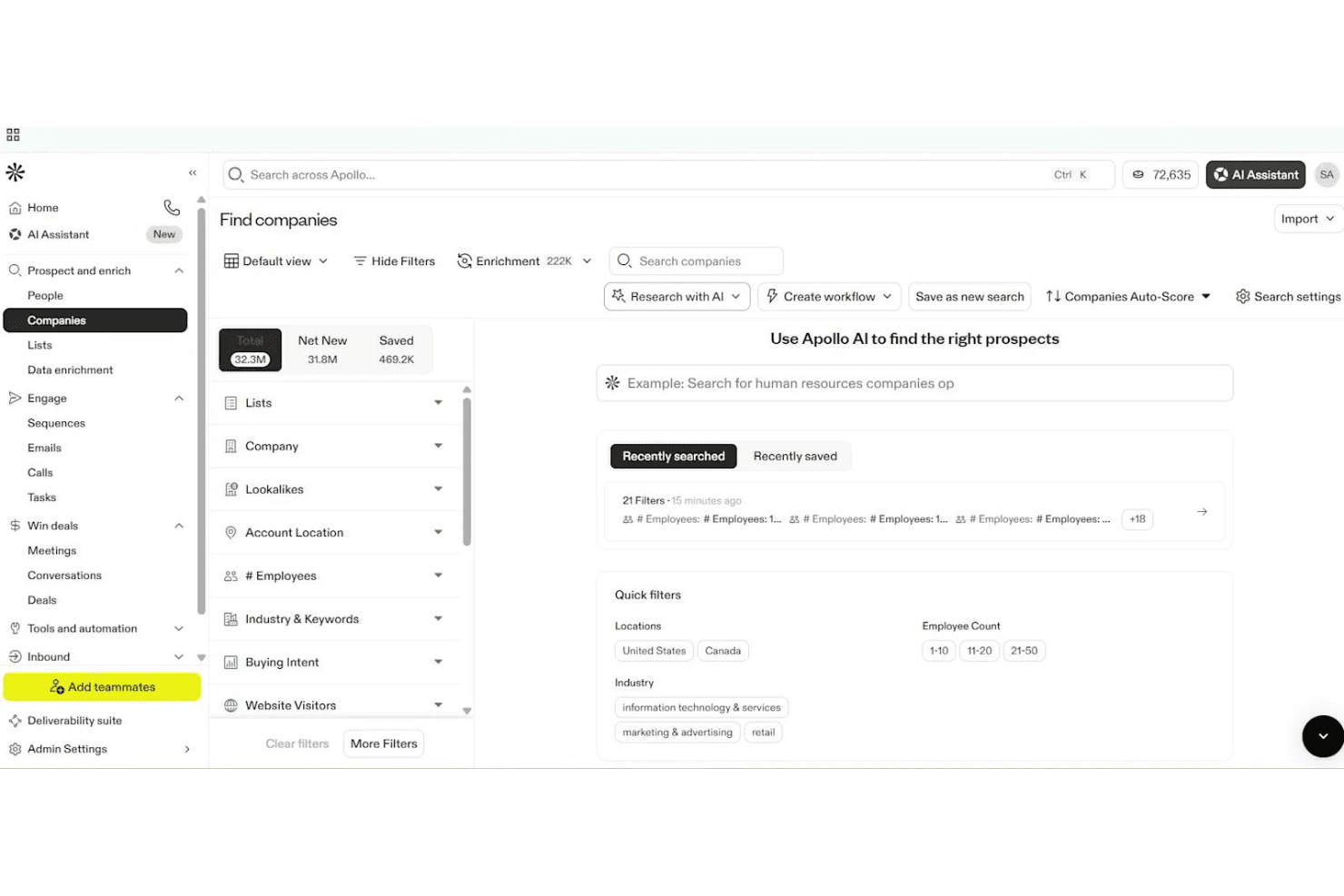
Apollo.io lets users filter and find companies using AI-powered search. Apollo.io is an AI-powered sales engagement platform offering multi-step email sequences, contact management, form capture, and analytics, built primarily for outbound B2B prospecting rather than traditional email marketing.
Who Is Apollo.io Best For?
Apollo.io is a smart pick for B2B sales teams and outbound prospecting specialists looking to automate multi-step cold outreach campaigns.
Why I Picked Apollo.io
I picked Apollo.io as one of the best because it's built for automating high-volume cold outreach to massive B2B contact databases. I like how my team can launch multi-step sequences targeting new leads and personalize emails with AI-driven variables. Its form builder lets us route inbound leads straight into outreach workflows.
Apollo.io Key Features
- Form builder: Create embeddable web forms to capture inbound leads and route them directly into outreach workflows.
- AI email writer: Auto-generate personalized outreach emails using AI based on contact data and engagement signals.
- Sequence A/B testing: Test multiple email variations within outbound sequences to optimize response rates and messaging.
- Deliverability tools: Access mailbox warm-up, deliverability scoring, and built-in guidance for SPF, DKIM, and DMARC setup.
Apollo.io Integrations
Apollo.io offers over 50 integrations, including native connections with Salesforce, HubSpot, Zoho CRM, Gmail, Microsoft 365, LinkedIn via Chrome Extension, Outreach, SalesLoft, Marketo, Pipedrive, Asana, ClickUp, and Zapier. API access is available on enterprise plans.
What's Free?
Apollo.io offers a free-forever plan that gives you basic access to its B2B contact database and core outreach features. The free plan has significant limits—you get 60 email credits per month, basic search filters, and restricted access to some integrations and automation tools.
Pros and Cons
Pros:
- Multi-step sales sequences with A/B testing
- AI writes and personalizes outreach emails
- Massive built-in B2B contact database
Cons:
- Free plan limited to cold outreach use
- No drag-and-drop newsletter builder
Learn more about Apollo.io:

Mailchimp helps small teams send and analyze email campaigns. Mailchimp is a versatile email marketing platform aimed at small businesses and startups. It provides tools for creating, sending, and analyzing email campaigns, helping teams engage with their audience effectively.
Why I picked Mailchimp: Mailchimp's free plan includes access to basic email marketing tools, making it an excellent choice for beginners. You can create and send emails with an easy-to-use drag-and-drop editor. The platform offers audience segmentation and basic reporting features, which are ideal for those new to email marketing. Its intuitive interface helps teams get started without needing extensive training.
Standout features & integrations:
Features include a drag-and-drop email editor that simplifies the creation process. Audience segmentation tools help you target specific groups effectively. Mailchimp also provides basic reporting to track the success of your campaigns and make informed decisions.
Integrations include Shopify, WooCommerce, WordPress, Zapier, Salesforce, Eventbrite, Slack, Stripe, QuickBooks, and Facebook.
What's free? Mailchimp offers a free-forever plan with limitations on the number of contacts and emails you can send monthly.
Pros and Cons
Pros:
- No credit card required
- Basic reporting included
- Suitable for small businesses
Cons:
- Limited customer support in free plan
- Basic features only in free version
Learn more about Mailchimp : Best for robust integrations options
- Free plan available
- From $9/month
Visit WebsiteCustomer Rating:4.6/5
Sender’s automation dashboard lets users build and launch email workflows using ready-made templates and a visual editor. Designed for businesses seeking cost-effective email marketing solutions, Sender offers a robust platform to create, automate, and manage email campaigns without the complexity or expense often associated with such tools. It is particularly appealing to small businesses and startups looking to enhance their marketing efforts through a user-friendly interface and a generous free plan. By addressing the need for efficient communication with up to 2,500 subscribers and providing up to 15,000 emails per month at no cost, Sender effectively alleviates the challenge of managing customer engagement on a budget.
Why I Picked Sender
I picked Sender for its unique approach to offering a "Free Forever" plan that caters to small businesses and startups needing to manage up to 2,500 subscribers. This plan allows for sending 15,000 emails monthly, providing an excellent opportunity to engage with your audience without financial constraints. Additionally, Sender’s focus on high deliverability through monitored IP reputation ensures that your emails reach the intended recipients, which is crucial for maintaining customer engagement. The inclusion of dynamic content and A/B testing further allows you to personalize and optimize your campaigns, enhancing the effectiveness of your marketing efforts.
Sender Key Features
In addition to its standout free plan, I also found several features that enhance its appeal:
- Email Automation: Create and manage automated email sequences to streamline your marketing efforts.
- Template Library: Access over 1,600 customizable templates to design professional emails tailored to your brand.
- Analytics Dashboard: Monitor campaign performance with detailed insights and reports to make informed decisions.
- Integration Options: Seamlessly integrate with platforms like WordPress and WooCommerce to expand your marketing reach.
Sender Integrations
Integrations include WordPress, WooCommerce, Magento, PrestaShop, OpenCart, Joomla, Zapier, API for custom integrations, and Shopify.
Pros and Cons
Pros:
- User-friendly drag-and-drop builder
- Built-in SMS marketing support
- Unlimited automation workflows included
Cons:
- No built-in landing page builder
- Subscriber limits on lower tiers
Learn more about Sender: Best for time-based urgency emails
- Free plan + free trial available
- From $19/user/month (billed annually)
Visit WebsiteCustomer Rating:4.7/5
Flodesk helps create urgency with clean, time-based countdown email designs. Flodesk is a free email marketing platform designed for users who want simple, visually appealing email creation without the technical hassle. Known for its clean design tools, it’s especially useful for small businesses and creatives looking to send polished campaigns effortlessly. With time-based urgency email features, Flodesk makes it easy to create engaging messages and automate workflows, helping you maintain consistent communication with your audience.
Why I Picked Flodesk
I picked Flodesk for its strength in creating time-based urgency emails that drive action through countdown timers and deadline-focused campaigns. This makes it easy to prompt subscribers to act quickly without overcomplicating setup. Combined with customizable templates and simple automations, Flodesk supports engaging campaigns while keeping email creation straightforward.
Flodesk Key Features
In addition to time-based urgency emails, Flodesk offers:
- Customizable Templates: Allows you to craft emails that reflect your brand's unique style with ease.
- Subscriber Management: Provides tools to manage your email list effectively, including segmentation and personalization.
- Performance Analytics: Offers insights into email performance, helping you make data-driven decisions.
Flodesk Integrations
Integrations include Shopify, Instagram, Canva, Zapier, and WordPress.
What's Free?
Flodesk offers a free plan that lets you use forms, landing pages, and list-building tools — but it doesn’t allow email sending under the “free” tier. However, it offers a 14-day free trial that gives full access to its email marketing features.
Pros and Cons
Pros:
- Segmentation tools enhance targeted email marketing campaigns
- Automation features for subscriber journeys (welcome series, triggers, etc.)
- Unified interface simplifies campaign creation and management
Cons:
- Limited integrations compared to larger email-marketing platforms
- Not ideal for very large or complex mailing needs
Learn more about Flodesk: Best for testing emails
- A free version specifically for a single inbox and up to 500 email tests per month.
- From $14.99/ month for 1 user and up to 5 inboxes
Visit WebsiteCustomer Rating:4.8/5
Mailtrap lets devs safely test and debug email deliverability. Mailtrap is a tool designed for developers and QA teams to test email sending and deliverability. It allows users to capture, inspect, and debug emails in a safe environment, preventing real recipients from receiving test emails.
Why I picked Mailtrap: Mailtrap's free plan provides a safe sandbox environment for testing emails, which is perfect for developers needing to ensure their emails are correctly formatted and delivered. You can inspect and debug emails without them reaching real inboxes. The platform supports email testing with HTML support and spam score checks. These features make it an ideal choice for teams focused on email testing.
Standout features & integrations:
Features include email inspection tools that let you debug and analyze emails in detail. The spam score checker helps you improve deliverability by identifying potential issues. Mailtrap also provides a user-friendly interface for managing your email testing environment.
Integrations include GitHub, GitLab, Bitbucket, Heroku, Jenkins, Travis CI, CircleCI, Zapier, Slack, and PagerDuty.
What's free? Mailtrap offers a free-forever plan with limitations on the number of emails you can test monthly and the number of inboxes available.
Pros and Cons
Pros:
- Ideal for developers and QA teams
- HTML support for emails
- Spam score checker included
Cons:
- Advanced features require upgrade
- Limited inboxes in free plan
Learn more about Mailtrap: Best for user-friendly interface
- 14-day free trial + free demo available
- From $10.80/month
Visit WebsiteCustomer Rating:4.7/5
MailerLite makes email marketing simple for small teams and freelancers. MailerLite is an email marketing platform catering to small businesses and freelancers. It offers tools for creating, managing, and analyzing email campaigns, focusing on simplicity and ease of use to enhance user experience.
Why I picked MailerLite: MailerLite's free plan provides a straightforward interface, making it perfect for users who prioritize ease of navigation. You can send up to 12,000 emails per month to a maximum of 1,000 subscribers. The platform includes simple drag-and-drop editors and basic automation features. This makes it a great choice for teams looking to manage email marketing without hassle.
Standout features & integrations:
Features include a drag-and-drop editor that allows you to design emails effortlessly. MailerLite offers automation tools to streamline sending emails based on user actions. You can also access landing page creation tools to support your marketing campaigns.
Integrations include Shopify, WooCommerce, WordPress, Zapier, Stripe, Facebook, Squarespace, Mailchimp, Google Sheets, and PayPal.
What's free? MailerLite offers a free-forever plan with limitations on the number of subscribers and emails you can send each month.
Pros and Cons
Pros:
- No credit card required
- Supports up to 1,000 subscribers
- Landing page creation tools
Cons:
- No phone support in free plan
- Basic reporting tools only


Klaviyo powers ecommerce email and SMS campaigns with automation. Klaviyo is a marketing platform designed for ecommerce businesses, offering email and SMS marketing solutions combined with B2C CRM features. It helps businesses automate marketing tasks, segment their audience, and build engaging campaigns to drive customer engagement.
Why I picked Klaviyo: Klaviyo's free plan offers automation and segmentation features, making it ideal for ecommerce users who need to tailor their marketing efforts. You can create and send targeted campaigns without upfront costs. The platform supports robust analytics to help you understand customer behavior. Its integration capabilities align with the needs of ecommerce businesses.
Standout features & integrations:
Features include detailed customer segmentation to target specific audiences. The campaign building tools are intuitive, allowing you to design effective email and SMS campaigns. Klaviyo also provides in-depth analytics to track the success of your marketing efforts.
Integrations include Shopify, Salesforce, WooCommerce, Magento, BigCommerce, Stripe, Facebook, Google Ads, Instagram, and Zendesk.
What's free? Klaviyo offers a free plan that includes automation, segmentation, and campaign building capabilities with some limitations on the number of contacts and emails sent per month.
Pros and Cons
Pros:
- Supports email and SMS marketing
- Detailed customer segmentation
- Strong ecommerce focus
Cons:
- Restricted email sends monthly
- Limited contacts in free plan
 8Best for small teams
Kit
- 14-day free trial available
- From $33/month (billed annually)
Visit WebsiteCustomer Rating:4.5/5
Kit helps creators grow audiences with email, automation, and insights. Kit is a creator-focused email platform that helps users grow and engage their audiences through newsletters, landing pages, and automated messaging. It’s built for individuals and small teams to manage email, automation, monetization, and audience insights—all in one place.
Why I picked Kit: Kit lets you send unlimited emails, create landing pages, and build opt-in forms on its free plan. It includes basic visual automation, tagging, A/B split testing, and in-email polls. These features help small teams launch campaigns, segment audiences, and test content without upgrading.
Standout features & integrations:
Features include customizable email templates, conditional content, and resend‑unopened campaigns so you can refine your messaging. You also get access to visual automation workflows beyond simple sequences. Plus, there’s a creator network recommendation engine to help you grow.
Integrations include Canva, GIPHY, Circle, Broadcast Boost, TeachKit, Sponsy, SavvyCal, and Senja.
What's free? It's a free‑forever plan that supports up to 10,000 subscribers, 1 user, 1 visual automation, and 1 email sequence.
Pros and Cons
Pros:
- Lets you A/B test emails
- Allows subscriber tagging and segmentation
- Up to 10 k subscribers free
Cons:
- Free plan shows Kit branding
- Limits to 1 user on free plan
Learn more about Kit:

Benchmark Email helps SMBs create and automate email campaigns easily. Benchmark Email is an email marketing platform aimed at small to medium-sized businesses. It provides tools for creating and managing email campaigns, with a focus on user-friendly design and automation.
Why I picked Benchmark Email: Benchmark Email's free plan includes an email builder and customizable templates, which are perfect for creating simple and effective email campaigns. You can access automation features and reporting tools without needing a credit card. It's ideal for teams that want straightforward email templates without complexity. The free version also supports list building and campaign optimization, aligning with its simple email template USP.
Standout features & integrations:
Features include an easy-to-use email builder, customizable templates, and automation tools. You can also access landing pages and reporting features to track your campaigns. These elements make it easier for your team to manage and optimize email marketing efforts.
Integrations include Shopify, Zapier, WordPress, Google Analytics, PayPal, Salesforce, HubSpot, Facebook, Twitter, and LinkedIn.
What's free? Benchmark Email offers a free-forever plan with limitations on the number of emails you can send per month and access to certain features.
Pros and Cons
Pros:
- Suitable for small businesses
- Customizable email templates
- No credit card required for free plan
Cons:
- Basic reporting features
- Limited monthly email sends
Learn more about Benchmark Email: Best for Canadian businesses
- Free plan available
- From CAD $22.04/month
Visit WebsiteCustomer Rating:4.5/5
Cyberimpact helps Canadian SMBs automate and analyze email campaigns. Cyberimpact is an email marketing platform tailored for small to medium-sized enterprises and non-profit organizations in Canada. It focuses on marketing automation, landing page creation, and performance analysis to enhance customer engagement.
Why I picked Cyberimpact: Cyberimpact's free plan offers access to customizable email templates and automated email scenarios. This makes it ideal for businesses looking for simple solutions to manage their email marketing. The platform provides high-conversion landing pages and real-time performance tracking, aligning with its USP of being best for Canadian businesses. Its bilingual support and compliance with Canada's Anti-Spam Law are key differentiators.
Standout features & integrations:
Features include marketing automation that helps you schedule and send emails automatically. The email editor is intuitive, allowing you to design emails without hassle. Performance analysis tools let you track and improve your campaign results effortlessly.
Integrations include Shopify, Google Analytics, Facebook, PayPal, WordPress, Salesforce, LinkedIn, Twitter, Zapier, and HubSpot.
What's free? Cyberimpact offers a free-forever plan with limitations on the number of emails you can send monthly and access to certain advanced features.
Pros and Cons
Pros:
- Real-time performance tracking
- Compliance with CASL regulations
- Bilingual support available
Cons:
- Restricted integration options in free plan
- No 24/7 customer support
Learn more about Cyberimpact:
Annen gratis programvare for e-postmarkedsføring
Her er noen flere alternativer for programvare for e-postmarkedsføring som også tilbyr gratisabonnementer eller prøveperioder. Selv om disse verktøyene ikke kom med på kortlisten min, er de likevel verdt å undersøke:
- 11BrevoBest for transactional emails
- 12VidyardBest for video emails
- 13VitaMailBest for paired content and deliverability tools
- 14EmailOctopusBest for high deliverability
- 15OmnisendBest for automation features
- 16SendPulseBest for AI-driven email personalization
- 17MailjetBest for multilingual email campaigns
How I Evaluate Free Email Marketing Software
First, I define what counts as free. For email marketing software, vendors must offer a free-forever plan—not a trial—because sending newsletters, automating welcome flows, and managing growing lists are ongoing functions. From there, I split my evaluation into two layers: the core functionality a tool must clear to qualify, and the differentiators that separate the strongest options.
Core Functionality (Table Stakes For This List)
In addition to my free offer requirements, I also use a scoring system to select tools for my list. Here's how it works:
I rank each one on a scale from 0 (does not offer the functionality) to 5 (excels in this area) for each core functionality listed below. Then, I calculate the tool's total score into a percentage. Each tool needs to achieve a minimum total score of 75% to be considered for inclusion.
- Email Campaign Builder: I look for a visual drag-and-drop editor with a solid template library, so a solo marketer can design a branded product launch email without touching code.
- Contact List Management: Organizing subscribers matters, so I evaluate whether the free plan supports segmentation by tags or attributes—like separating purchasers from newsletter-only subscribers.
- Signup Forms: I check whether the platform includes embeddable forms or hosted landing pages that feed new contacts straight into the list, similar to what Mailchimp and MailerLite offer.
- Marketing Automation: Even basic workflows make a difference. I look for free-tier automations like welcome sequences or post-signup drip series triggered by subscriber actions.
- Campaign Analytics: Open rates, click-throughs, bounces, and unsubscribes should all be visible on the free plan. I evaluate how easy it is to pull insights after sending a weekly newsletter.
- Free Send Volume: The monthly email cap and subscriber limit need to support real use. I consider whether a startup with a few hundred contacts can run regular campaigns without hitting a wall.
Once I have a list of tools that meet the criteria, I consider what sets each platform apart.
Differentiating Factors (What Sets Vendors Apart)
Here's how I compare and contrast different vendors:
Standout Features
A/B testing on the free tier is a big differentiator—it lets you compare subject lines or send times and improve performance based on real data instead of guessing. I also evaluate ecommerce integrations, since store owners on Shopify or WooCommerce need abandoned cart and product recommendation emails built in. Deliverability tools matter just as much. Spam score checkers and domain authentication support (SPF, DKIM) help free users actually land in the inbox rather than the junk folder.
Beyond Features
I check how well a free plan connects to the rest of your stack—Zapier or Make compatibility is a baseline, but native CRM and CMS integrations save time when syncing contacts between tools like HubSpot or WordPress. Compliance also weighs heavily. Built-in GDPR consent capture, double opt-in, and CAN-SPAM-compliant unsubscribe handling protect you from legal exposure. I also look at scalability—when your list outgrows the free tier, the upgrade path should be predictable, not a cliff where costs spike or key features suddenly get locked behind premium plans.
Slik velger du gratis programvare for e-postmarkedsføring
Komplekse funksjonslister og prisstrukturer kan gjøre det vanskelig å finne ut hva du egentlig får med gratis programvare for e-postmarkedsføring. For å hjelpe deg med å holde fokus mens du går gjennom prosessen med å velge programvare, er det noen faktorer du bør ha i tankene:
| Faktor | Hva du bør vurdere |
| Omfanget av gratistilbudet | Sjekk hva som er inkludert i gratisabonnementet. Se etter begrensninger på antall e-poster som kan sendes, kontakter og funksjoner som er tilgjengelige uten oppgradering. |
| Skalerbarhet | Vurder om programvaren kan vokse i takt med behovene dine. Se etter alternativer for oppgradering etter hvert som e-postlisten og kampanjenes kompleksitet øker. |
| Integrasjoner | Forsikre deg om at programvaren kan kobles til verktøyene teamet ditt allerede bruker, for eksempel CRM-systemer, e-handelsplattformer og analyseverktøy. |
| Brukervennlighet | Vurder grensesnittet og oppsettprosessen. Velg programvare som teamet ditt enkelt kan navigere i uten omfattende opplæring eller en bratt læringskurve. |
| Kundestøtte | Se etter tilgjengelige støttekanaler, for eksempel livechat eller et hjelpesenter, som kan hjelpe deg når problemer oppstår. |
| Analyse | Undersøk detaljnivået i rapporteringsfunksjonene. Du vil ha innsikt i åpningsrater, klikkfrekvenser og andre måleverdier for å måle resultatene dine. |
| Automatisering | Vurder hvor avanserte automatiseringsfunksjonene er. Forsikre deg om at du kan sette opp arbeidsflyter for automatiserte e-poster for å spare tid og øke engasjementet. |
| Tilpasning | Sjekk hvor tilpassbare e-postmalene og kampanjene er. Du vil kunne opprettholde en konsekvent merkevareprofil uten å trenge omfattende designferdigheter. |
Hvis du ønsker en grundigere gjennomgang, kan du lese vår komplette veiledning om hvordan du velger riktig plattform for e-postmarkedsføring.
Hva er gratis programvare for e-postmarkedsføring?
Programvare for e-postmarkedsføring er et verktøy som hjelper bedrifter med å sende markedsførings-e-poster, administrere kontaktlister og analysere kampanjeresultater. Disse verktøyene tilbyr vanligvis gratisabonnementer med begrensede funksjoner eller begrenset bruk, for eksempel en grense for hvor mange e-poster som kan sendes eller kontakter som kan administreres.
Markedsførere, eiere av små bedrifter og oppstartsbedrifter bruker vanligvis disse verktøyene for å engasjere målgruppen sin uten høye kostnader. Funksjoner som automatisering, analyse og tilpassbare maler hjelper brukerne med å administrere kampanjer effektivt, forstå målgruppens engasjement og opprettholde en konsekvent merkevareprofil.
Funksjoner i gratis programvare for e-postmarkedsføring
La oss se nærmere på funksjonene som vanligvis finnes i programvare for e-postmarkedsføring, og hvilke som vanligvis er inkludert i gratis- og betalingsabonnementer.
Funksjoner som vanligvis finnes i gratis programvare for e-postmarkedsføring
- E-postmaler: Forhåndsdesignede oppsett gjør det mulig å lage profesjonelle e-poster raskt, slik at du sparer tid og krefter.
- Grunnleggende analyse: Gir innsikt i åpningsrater og klikkfrekvenser, slik at du kan måle hvor vellykket kampanjen er.
- Kontaktadministrasjon: Gjør det mulig å organisere og segmentere e-postlistene dine for målrettede meldinger.
- Automatisering: Gjør det mulig å sette opp enkle arbeidsflyter for automatisk utsending av e-poster basert på utløsere.
- Redigeringsverktøy med dra-og-slipp: Forenkler prosessen med å lage e-poster og gjør det enkelt å utforme dem uten kodeferdigheter.
- Daglige utsendingsgrenser: Setter en grense for hvor mange e-poster du kan sende per dag, slik at ressursene i gratisabonnementer kan administreres.
- Påmeldingsskjemaer: Lar deg samle inn abonnentinformasjon direkte fra nettstedet ditt, slik at e-postlisten din vokser.
- Grunnleggende segmentering: Gjør det mulig å dele målgruppen inn i grupper for mer personlig kommunikasjon.
Funksjoner som vanligvis finnes i betalingsbasert programvare for e-postmarkedsføring
- Avansert segmentering: Tilbyr detaljert målgruppestyring, noe som muliggjør mer personlig og effektiv kommunikasjon.
- A/B-testing: Lar deg teste ulike versjoner av e-poster for å optimalisere innholdet og forbedre engasjementsratene.
- Avansert analyse: Gir dypere innsikt i kundeatferd og kampanjeresultater, slik at du kan ta bedre beslutninger.
- Tilpassbare landingssider: Gjør det mulig å lage unike sider som samsvarer med e-postkampanjene dine og øker konverteringene.
- Markedsføring i flere kanaler: Integrerer e-post med SMS, sosiale medier og andre kanaler for en helhetlig markedsføringsstrategi.
- Ubegrensede utsendinger: Fjerner begrensninger på hvor mange e-poster du kan sende, og støtter større kampanjer.
- Prioritert kundestøtte: Tilbyr raskere svartider og dedikert hjelp, slik at problemer kan løses effektivt.
- Avansert automatisering: AI-drevne verktøy for e-postmarkedsføring støtter komplekse arbeidsflyter og utløsere, noe som gjør markedsføringen mer effektiv.
Fordeler med gratis programvare for e-postmarkedsføring
Implementering av gratis programvare for e-postmarkedsføring gir flere fordeler for teamet og virksomheten din. Her er noen av fordelene du kan se frem til:
- Kostnadseffektiv løsning: Gratisabonnementer lar deg administrere e-postmarkedsføring uten å påvirke budsjettet, noe som gjør dem ideelle for oppstartsbedrifter og små virksomheter.
- Enkel å bruke: Brukervennlige grensesnitt og dra-og-slipp-redigeringsverktøy gjør det enkelt for alle på teamet å opprette og sende e-poster.
- Grunnleggende automatisering: Automatisering av enkle oppgaver sparer tid og sikrer konsekvent kommunikasjon med målgruppen din.
- Publikumsvekst: Påmeldingsskjemaer og kontaktadministrasjon hjelper deg med å bygge opp og organisere e-postlisten din effektivt.
- Innsikt i resultater: Grunnleggende analyser gir verdifulle data om engasjementet rundt e-postene, slik at du forstår hva som fungerer.
- Tilpasning: E-postmaler lar deg opprettholde en konsekvent merkevare uten at du trenger designferdigheter.
- Skalerbarhet: Gratisabonnementer gir deg et godt utgangspunkt og lar deg oppgradere etter hvert som virksomheten og behovene for e-postmarkedsføring vokser.
Kostnader og priser for gratis programvare for e-postmarkedsføring
Jeg forstår at du kom til denne artikkelen på jakt etter de beste alternativene for programvare for e-postmarkedsføring som er tilgjengelige gratis. Siden gratisabonnementer imidlertid bare tilbyr begrensede funksjoner, er det en god sjanse for at du må oppgradere abonnementet ditt i fremtiden.
Tabellen nedenfor oppsummerer vanlige abonnementer, gjennomsnittsprisene deres og typiske funksjoner som er inkludert i løsninger for e-postmarkedsføring:
Sammenligningstabell for abonnementer på programvare for e-postmarkedsføring
| Abonnementstype | Gjennomsnittspris | Vanlige funksjoner |
| Gratisabonnement | $0 | Grunnleggende e-postmaler, kontaktadministrasjon, grunnleggende analyser, daglige sendegrenser og enkel automatisering. |
| Personlig abonnement | $5-$25/ bruker/måned | Avanserte maler, høyere sendegrenser, A/B-testing og kundestøtte. |
| Bedriftsabonnement | $30-$100/ bruker/måned | Avansert automatisering, detaljerte analyser, oppretting av landingssider og markedsføring i flere kanaler. |
| Storbedriftsabonnement | $100+/ bruker/måned | Tilpassede integrasjoner, prioritert kundestøtte, ubegrenset antall utsendelser og avansert segmentering. |
Vanlige spørsmål om gratis programvare for e-postmarkedsføring
Her er noen svar på vanlige spørsmål om gratis programvare for e-postmarkedsføring:
Kan e-postmarkedsføring gjøres gratis?
Ja, mange verktøy tilbyr gratisabonnementer som dekker viktige funksjoner som sending av e-poster, administrasjon av kontakter og grunnleggende analyser. Disse gratisversjonene er ideelle for små virksomheter eller oppstartsbedrifter som ønsker å engasjere målgruppen sin uten å pådra seg kostnader.
Hvilke begrensninger har gratis programvare for e-postmarkedsføring?
Gratis programvare for e-postmarkedsføring har vanligvis begrensninger på antall e-poster som kan sendes per måned, og antall kontakter du kan administrere. Avanserte funksjoner som A/B-testing eller detaljerte analyser kan også være begrenset til betalte abonnementer, så vurder behovene dine nøye.
Finnes det skjulte kostnader i gratis programvare for e-postmarkedsføring?
Selv om selve programvaren kan være gratis, bør du være oppmerksom på kostnader knyttet til overskridelse av grenser for e-poster eller kontakter. Noen leverandører kan ta betalt for ekstra funksjoner eller premium kundestøtte. Les alltid vilkårene for gratisabonnementet nøye for å unngå uventede utgifter. Hvis du ønsker en grundigere gjennomgang, kan du se hele veiledningen vår om hvordan du velger riktig plattform for e-postmarkedsføring.