

De beste gratis AI-verktøyene for markedsføring hjelper deg med å fremskynde oppgaver som å lage briefer, gjenbruke innhold og hente ut kampanjeinnsikt uten å gjøre arbeidsflyten mer komplisert.
Hvis du bruker timevis på å kopiere data inn i presentasjoner, skrive om den samme teksten i fem formater eller undersøke konkurrenter manuelt, er det lett å bli hengende etter. Disse verktøyene er utviklet for å ta denne typen arbeid av hendene dine.
Jeg har jobbet med markedsføring i over 10 år og brukt mer enn 500 timer på å teste gratis AI-verktøy i virkelige kampanjer. I denne veiledningen deler jeg verktøyene som faktisk er verdt å bruke, og hva du bør være oppmerksom på før du integrerer dem i verktøystakken din.
Why Trust Our Software Recommendations
6,700+
Reviews
20
Industry experts
16+
Evaluation factors
14
Years
Our team has been testing and reviewing software since 2012. As marketing leaders ourselves, we know how difficult—and important—it is to choose the right software.
For this guide, we evaluated tools using hands-on testing and independent research, scoring tools using our selection criteria.
Our reviews reflect our human editorial judgment, not a sales pitch.
Expert reviewers:
 Gui DrusinaCreative Director
- Shriya GhateSenior Marketing Lead
 Amanda JacquesMarketing Ops Leader

Sammenligningstabell: Gratis AI-verktøy for markedsføring
Denne sammenligningstabellen oppsummerer prisopplysningene for mine utvalgte gratis AI-verktøy for markedsføring.
| Tool | Best For | Trial Info | Price | ||
|---|---|---|---|---|---|
| 1 | Best with advanced B2B contact data filters | Free plan + 14-day free trial + free demo available | From $49/user/month (billed annually) | Website | |
| 2 | Best for graphic design templates | Free trial + free plan available | From $144/user/year (billed annually) | Website | |
| 3 | Best for e-commerce analytics | Free plan available | From $59/month | Website | |
| 4 | Best for social media scheduling | Free plan available | From $5/month per channel (billed annually) | Website | |
| 5 | Best for Canadian email compliance | Free plan available | From CAD $22.04/month | Website | |
| 6 | Best for email campaign management | 14-day free trial + free demo available | From $20/month | Website | |
| 7 | Best for AI-driven content creation | Free plan + 7-day free trial available | From €25/month (billed annually) | Website | |
| 8 | Best for email marketing automation | Free plan available | From $34/month (billed annually) | Website | |
| 9 | Best for team collaboration tools | Free plan + 15-day free trial + free demo available | From $49/month (billed annually) | Website | |
| 10 | Best for writing enhancements | Free trial + free demo available | From $12/user/month (billed annually) | Website |


Anmeldelser av de beste gratis AI-verktøyene for markedsføring
Nedenfor finner du mine detaljerte sammendrag av de beste gratis AI-verktøyene for markedsføring som kom med på kortlisten. Anmeldelsene mine gir en detaljert gjennomgang av de viktigste funksjonene, fordelene & ulempene, integrasjonene og ideelle bruksområdene for hvert verktøy, slik at du kan finne det som passer best for deg.
 Best with advanced B2B contact data filters
- Free plan + 14-day free trial + free demo available
- From $49/user/month (billed annually)
Visit WebsiteCustomer Rating:4.5/5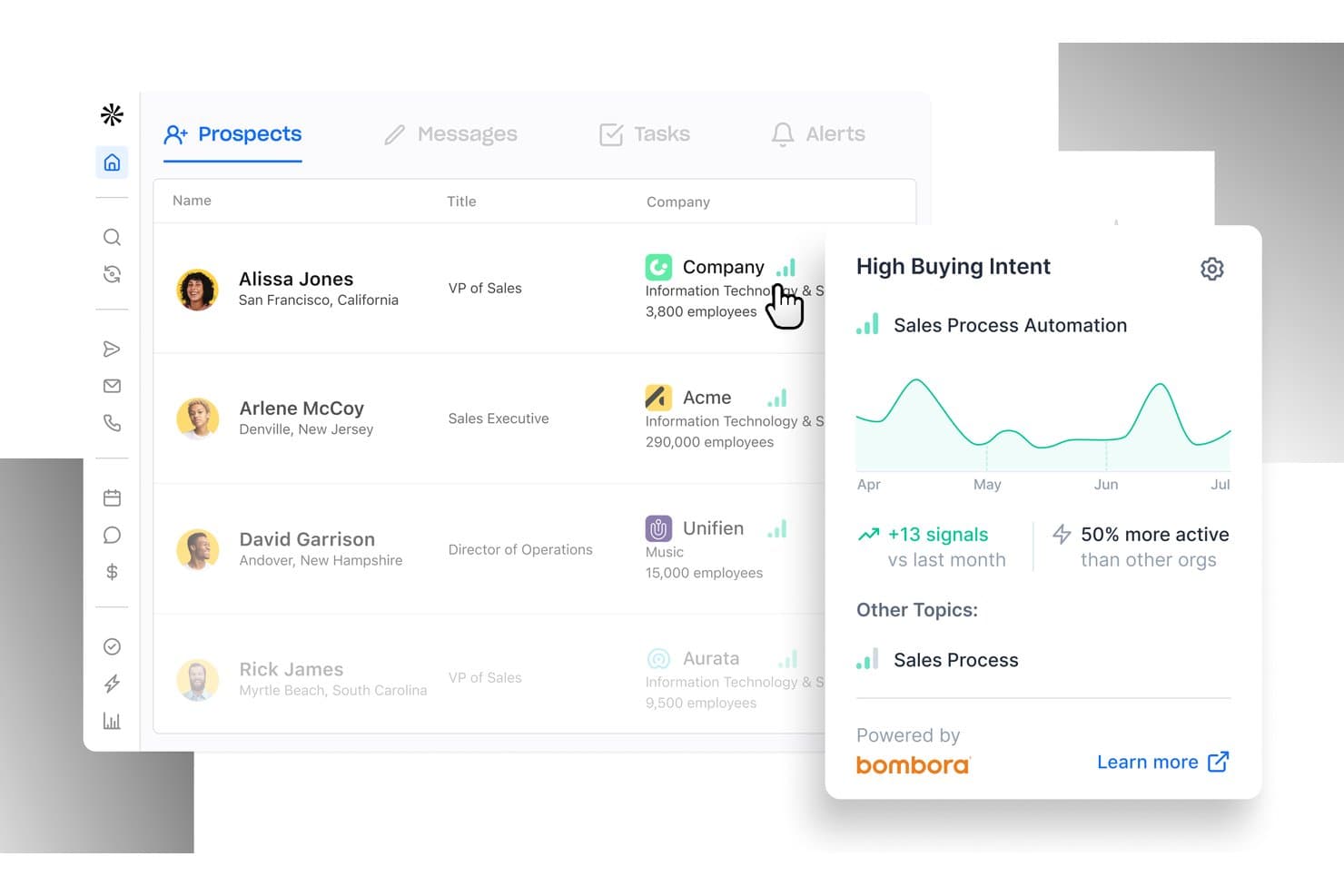
Apollo.io offers a Prospects dashboard with AI-powered High Buying Intent signals, showing sales activity trends and intent data. Apollo.io is a B2B sales intelligence platform that pairs a 240M+ contact database with AI-powered email outreach, advanced prospecting filters, and tools for lead enrichment and website visitor identification.
Who Is Apollo.io Best For?
Apollo.io suits B2B marketers and growth teams at startups and SMBs who need to build targeted prospect lists and run outbound email campaigns from a single platform.
Why I Picked Apollo.io
I've included Apollo.io in my top picks because its 65+ contact filters let me build hyper-targeted prospect lists fast, filtering by job title, seniority, funding stage, and technographics across a 240M+ contact database. I rely on saved personas to lock in an ICP once and pull a refreshed list on demand. The AI email writer then turns that list into personalized outbound sequences, all accessible within the free plan.
Apollo.io Key Features
- AI email writer: Automatically generates personalized outreach emails tailored to prospect data and campaign templates.
- Inbound form enrichment: Instantly fills missing lead data in form submissions using Apollo's contact and company database.
- Website visitor identification: Reveals anonymous companies browsing your site and matches them to real contacts.
- Buying intent signals: Surfaces companies showing purchase intent across 15,000 topics using aggregated behavioral and firmographic data.
Apollo.io Integrations
Apollo.io offers native integrations with Salesforce, HubSpot, Outreach, Airtable, Amplitude, Asana, and Gmail, and provides an API for custom integrations.
What's Free?
Apollo.io offers a free-forever Starter plan with unlimited email credits, though you can only connect Gmail accounts on the free tier. Mobile credits and export credits are capped, and access to advanced filters and sequences is limited compared to paid plans.
Pros and Cons
Pros:
- Intent signals surface ready-to-buy accounts
- AI writes personalized outbound emails free
- Massive B2B contact database on free plan
Cons:
- AI copy outputs lack brand voice controls
- Contact data accuracy inconsistent across regions
Learn more about Apollo.io: Best for graphic design templates
- Free trial + free plan available
- From $144/user/year (billed annually)
Visit WebsiteCustomer Rating:4.7/5
Canva enables quick creation of graphics, presentations, and marketing materials Canva is a graphic design platform tailored for individuals and teams who need to create visual content quickly and easily. It's widely used for designing social media graphics, presentations, and marketing materials without the need for advanced design skills.
Why I picked Canva: Canva offers a vast library of graphic design templates, making it simple for your team to create professional visuals. Its drag-and-drop interface allows even beginners to design with ease. With customizable templates, you can maintain brand consistency across all your marketing materials. Canva's collaborative features enable your team to work together on designs in real-time.
Standout Features & Integrations:
Features include an extensive library of stock photos and illustrations, a wide range of fonts and text effects, and tools for creating animations. Canva also provides options for printing designs directly from the platform, ensuring high-quality physical materials.
Integrations include Dropbox, Google Drive, Instagram, Facebook, Pinterest, Slack, HubSpot, Mailchimp, LinkedIn, and YouTube.
What’s Free? Canva offers drag-and-drop design tools, thousands of free templates, collaboration features, cloud storage, and access across devices.
Pros and Cons
Pros:
- Wide range of stock images
- Easy-to-use interface
- Extensive template library
Cons:
- Limited advanced editing tools
- Limited free features
Learn more about Canva:

Lebesgue provides AI insights, CLV analysis, and inventory tools for e-commerce Lebesgue is an AI-driven marketing platform designed especially for e-commerce businesses, focusing on Shopify brands. It provides tools for data insights, customer lifetime value analysis, and inventory management, helping online retailers optimize their marketing strategies.
Why I picked Lebesgue: Lebesgue excels in e-commerce analytics by offering competitor tracking and creative strategy development. Its dashboard provides intuitive data presentation, making it easy for your team to understand and act on insights. The inclusion of AI agents for automated marketing tasks ensures your marketing efforts are efficient. With first-party attribution, you can accurately measure the impact of your campaigns.
Standout Features & Integrations:
Features include a comprehensive dashboard for data insights, tools for analyzing customer lifetime value, and inventory management. Competitor tracking helps you stay ahead in the market, while creative strategy development enables the crafting of effective marketing campaigns.
Integrations include Shopify, WooCommerce, Google Analytics, Facebook Ads, Google Ads, Klaviyo, Mailchimp, TikTok, Instagram, and Pinterest.
What's free? Lebesgue offers full order history, order and revenue tracking, COGS and profit tracking, advertising channel integrations, and weekly and daily reports.
Pros and Cons
Pros:
- Effective competitor tracking
- Comprehensive analytics tools
- Intuitive data presentation
Cons:
- Learning curve for new users
- Limited to e-commerce focus
Learn more about Lebesgue: Best for social media scheduling
- Free plan available
- From $5/month per channel (billed annually)
Visit WebsiteCustomer Rating:4.4/5
Buffer schedules posts, tracks analytics, and manages engagement for small teams Buffer is a social media management tool designed for individuals and small teams to schedule and publish content across multiple platforms. It supports key functions like content scheduling, analytics, and audience engagement, making it ideal for creators and small businesses.
Why I picked Buffer: Buffer excels in social media scheduling, offering features like a calendar view for planning posts and auto-publishing to multiple platforms. The platform allows you to customize posts for different social media channels, ensuring your content is tailored to each audience. Buffer's simplicity and ease of use make it accessible for users who need efficient scheduling without unnecessary complexity. Its focus on scheduling helps your team maintain a consistent social media presence effortlessly.
Standout Features & Integrations:
Features include an intuitive drag-and-drop calendar for planning posts, customizable posting schedules for different platforms, and detailed analytics to track engagement and performance. You can also use Buffer's tools to collaborate with team members and manage content approval workflows seamlessly.
Integrations include Twitter, Facebook, Instagram, LinkedIn, Pinterest, Google Analytics, Canva, Unsplash, Pocket, and Zapier.
What's free? Buffer offers 10 scheduled posts per channel (refill anytime), 100 ideas, 1 user account, AI Assistant, basic analytics, world-class customer support, and the ability to connect up to 3 channels.
Pros and Cons
Pros:
- Collaboration tools for teams
- Supports multiple social platforms
- Detailed engagement analytics
Cons:
- Requires upgrade for advanced analytics
- Limited features in free plan
 Best for Canadian email compliance
- Free plan available
- From CAD $22.04/month
Visit WebsiteCustomer Rating:4.5/5
Cyberimpact runs CASL-compliant email campaigns for Canadian small and mid-sized firms Cyberimpact is an email marketing platform specifically designed for Canadian businesses to ensure compliance with Canadian Anti-Spam Legislation (CASL). It caters mainly to small to medium-sized enterprises, offering tools for creating and managing email campaigns.
Why I picked Cyberimpact: Cyberimpact focuses on email compliance, providing features that help your business adhere to Canadian regulations. It includes built-in consent management tools to track and manage subscriber consent effectively. The platform also offers customizable email templates to create professional-looking campaigns quickly. Its emphasis on compliance ensures your team avoids legal pitfalls while engaging with customers.
Standout Features & Integrations:
Features include advanced segmentation tools to target specific audiences, automated workflows for consistent communication, and detailed analytics to track campaign performance. These features empower your team to create targeted and effective email marketing strategies.
Integrations include Shopify, WooCommerce, Facebook, WordPress, Google Analytics, Salesforce, Zapier, Pipedrive, HubSpot, and Mailchimp.
What's free? Cyberimpact offers unlimited mailings, unlimited users, 30 days of customer support via chat, email, and phone, micro surveys for 30 days, and standard delivery speed.
Pros and Cons
Pros:
- Automated workflows
- Easy-to-use templates
- Strong focus on compliance
Cons:
- Not ideal for large enterprises
- Limited to Canadian market
Learn more about Cyberimpact: Best for email campaign management
- 14-day free trial + free demo available
- From $20/month
Visit WebsiteCustomer Rating:4.3/5
Mailchimp manages email campaigns, audiences, and performance tracking for teams Mailchimp is an all-in-one marketing platform primarily used by small businesses and marketing teams for managing email campaigns and customer engagement. It offers tools for email marketing, audience management, and performance tracking.
Why I picked Mailchimp: Mailchimp is known for its email campaign management, providing easy-to-use templates and automation features. The platform allows you to design custom email templates that fit your brand and automate campaigns to save time. Its audience segmentation features help you target specific customer groups effectively. Mailchimp's analytics give you insights into campaign performance, helping your team make data-driven decisions.
Standout Features & Integrations:
Features include a drag-and-drop email builder for creating custom templates, an audience dashboard to manage your contacts, and A/B testing tools to optimize email performance. You can also use its mobile app to manage campaigns on the go.
Integrations include Shopify, WooCommerce, WordPress, Salesforce, Zapier, Facebook, Instagram, QuickBooks, Slack, and Eventbrite.
What's free? Mailchimp offers a free plan with up to 500 contacts and email support for first 30 days, including basic features for email marketing and audience management.
Pros and Cons
Pros:
- Mobile app for campaign management
- Effective audience segmentation
- Easy campaign automation
Cons:
- Can be overwhelming for beginners
- Limited customization options
Learn more about Mailchimp: Best for AI-driven content creation
- Free plan + 7-day free trial available
- From €25/month (billed annually)

neuroflash generates AI text and images for brand-consistent content creation neuroflash is an AI content creation platform aimed at businesses in marketing, sales, and customer service. It provides tools for text and image generation, helping users produce brand-consistent content efficiently.
Why I picked neuroflash: neuroflash offers a comprehensive AI content generator and editor, which are central to its function. The platform includes a Brand Hub for storing brand knowledge, ensuring your content aligns with your brand's voice. Audience profiling tools help you target your content effectively, enhancing engagement. Its performance prediction feature allows you to assess the potential impact of your content before publishing.
Standout Features & Integrations:
Features include a chatbot (ChatFlash) for interactive content, a performance prediction tool to evaluate content effectiveness, and tools for SEO optimization. The platform also offers real-time plagiarism checking to ensure content originality.
Integrations include Shopify, WooCommerce, Google Analytics, Facebook Ads, Google Ads, Klaviyo, Mailchimp, TikTok, Instagram, and Pinterest.
What's free? Neuroflash offers a 7-day free trial with unlimited access to its features.
Pros and Cons
Pros:
- GDPR compliant
- Brand Hub for guidelines
- Comprehensive content generator
Cons:
- Advanced features behind paywall
- Limited to content creation focus
Learn more about neuroflash: Best for email marketing automation
- Free plan available
- From $34/month (billed annually)

Andsend manages customer relationships with messaging and timely follow-ups Andsend is a customer relationship management tool aimed at small businesses to enhance their sales conversations. It focuses on helping users manage relationships, send personalized messages, and ensure timely follow-ups.
Why I picked Andsend: Andsend excels in email marketing automation by drafting personalized message templates that mimic your writing style. It prioritizes your conversations, highlighting the most relevant contacts for action. The tool's ability to remind you about follow-ups ensures you never miss an opportunity. Its intuitive design makes it easy for your team to maintain meaningful relationships.
Standout Features & Integrations:
Features include personalized message drafting that adapts to your style, prioritization of contacts to focus on the most relevant ones, and automated follow-up reminders. These features help in efficiently managing sales conversations without missing important interactions.
Integrations include Gmail, Outlook, LinkedIn, Slack, HubSpot, Salesforce, Mailchimp, Zapier, Google Calendar, and Microsoft Teams.
What's free? Andsend offers a free plan with no credit card required, LinkedIn and email messenger, AI-generated messages, unlimited contact search, and 50 contacts.
Pros and Cons
Pros:
- Prioritization of contacts
- Automated follow-up reminders
- Personalized message drafting
Cons:
- Some learning curve for new users
- May not suit large enterprises
Learn more about Andsend: Best for team collaboration tools
- Free plan + 15-day free trial + free demo available
- From $49/month (billed annually)

Bitrix24 combines CRM, project management, and communication for team collaboration Bitrix24 is a comprehensive business management platform designed for teams and small businesses to facilitate communication and collaboration. It offers tools for CRM, project management, and internal communication, making it a versatile choice for organizations looking to enhance teamwork.
Why I picked Bitrix24: Bitrix24 offers extensive team collaboration tools, including task management and group chat features. Your team can benefit from its project management capabilities that keep projects on track. The platform also provides a social intranet to foster internal communication and collaboration. With its document management features, you can ensure everyone has access to the latest files and information.
Standout Features & Integrations:
Features include a built-in telephony system for making calls directly from the platform, time tracking tools to monitor productivity, and a customizable CRM to manage customer relationships. These features support efficient team management and enhance overall productivity.
Integrations include Google Drive, Microsoft Office 365, Slack, Mailchimp, Dropbox, Salesforce, Xero, QuickBooks, Zoom, and Trello.
What's free? Bitrix24’s free plan offers 5GB storage, unlimited team size, and access to collaboration, tasks and projects, CRM, Bitrix24 Sign, Drive, Contact Center, and a website builder.
Pros and Cons
Pros:
- Customizable CRM options
- Built-in telephony system
- Comprehensive task management
Cons:
- Some features require technical setup
- Can be overwhelming for new users
Learn more about Bitrix24: Best for writing enhancements
- Free trial + free demo available
- From $12/user/month (billed annually)
Visit WebsiteCustomer Rating:4.6/5
Grammarly improves writing with real-time grammar, punctuation, and style suggestions Grammarly is a writing assistant tool used by writers, students, and professionals to improve grammar, punctuation, and style in their written content. It offers real-time editing and suggestions to enhance the clarity and effectiveness of your writing.
Why I picked Grammarly: Grammarly excels in writing enhancements by providing advanced grammar and style suggestions. Its real-time feedback helps you catch errors as you type, ensuring your documents are polished. The tool also offers vocabulary enhancement suggestions to improve the richness of your text. With its plagiarism checker, you can ensure your content is original and free from unintentional copying.
Standout Features & Integrations:
Features include a tone detector that helps you maintain the desired tone in your writing, a readability score to ensure your text is easy to understand, and a personal dictionary to add custom words. These tools help you refine your writing to suit different audiences and purposes.
Integrations include Microsoft Word, Google Docs, Gmail, Outlook, Slack, LinkedIn, Facebook, Twitter, Medium, and WordPress.
What's free? Grammarly offers essential writing assistance features such as grammar and plagiarism checks.
Pros and Cons
Pros:
- Customizable personal dictionary
- Plagiarism detection
- Real-time feedback on writing
Cons:
- Sometimes over-corrects style
- Limited offline capabilities
Andre gratis AI-verktøy for markedsføring
Her er noen flere gratis AI-verktøy for markedsføring som ikke kom med på kortlisten, men som likevel er verdt å se nærmere på:
- 11KlaviyoBest for unified AI-powered email marketing
- 12AttioBest for CRM with customization
- 13EnjiBest for tailored marketing strategies
- 14MarketMuseBest for content optimization
- 15Hemingway EditorBest for simplifying writing
- 16Browse AIBest for web data scraping
- 17PhotoroomBest for background removal
How I Evaluate Free AI Tools for Marketing
I split my evaluation into two layers: the baseline every tool must hit—real free access, AI-generated marketing outputs—and the differentiators that push the best tools to the top.
Core Functionality (Table Stakes For This List)
When I'm selecting tools for my list, I rank each one on a scale from 0 (does not offer the functionality) to 5 (excels in this area) for each core functionality listed below. Then, I calculate the tool's total score into a percentage. Each tool needs to achieve a minimum total score of 65% to be considered for inclusion.
- Free Access Tier: I check whether the free plan delivers enough output to actually run a campaign—not just poke around a dashboard for a few days.
- Generative AI Engine: The tool should use real generative models (LLMs, diffusion models, etc.), not just rule-based fill-in-the-blank templates.
- Marketing-Specific Outputs: I look for purpose-built outputs like Google Ads headlines, email subject lines, or product descriptions—not generic text completion.
- Multi-Channel Content Support: A tool that only generates blog posts but can't help with social captions or ad copy limits how much value you'll get from it.
- Brand & Audience Customization: I evaluate whether you can save a brand voice profile or at least set tone, audience, and goal inputs per generation.
- Export & Integration Options: Useful tools let you push content to platforms like WordPress or HubSpot, or at least export in ready-to-use formats.
Once I have a list of tools that meet this criteria, I consider what sets each platform apart.
Differentiating Factors (What Sets Vendors Apart)
Here's how I compare and contrast different vendors:
Standout Features
Built-in SEO optimization is a major differentiator—I look for tools that score your draft's on-page SEO or surface keyword gaps as you write, removing the need to switch to a separate research tool. AI image and video generation also matters, especially for social media managers who need scroll-stopping visuals alongside their captions in one workspace. Real-time data access rounds this out. Tools that pull live search trends or competitor activity produce far more relevant outputs than those limited to static training data.
Beyond Features
Free plan sustainability is the first thing I evaluate—some tools advertise a free tier but gate core marketing features behind usage caps that run out mid-campaign. Output quality and brand safety also matter. I check whether generated copy passes plagiarism scans and follows ad platform guidelines, since a rejected Google Ads headline wastes more time than writing it manually. Data privacy is worth reviewing too, especially when you're feeding customer segments or campaign briefs into a tool. I look at whether free-tier inputs are used to train the model.
Slik velger du gratis AI-verktøy for markedsføring
Det er lett å gå seg vill i lange funksjonslister og kompliserte prisstrukturer. For å hjelpe deg med å holde fokus når du går gjennom den unike prosessen din for valg av programvare, er her en sjekkliste over faktorer du bør ha i tankene:
| Faktor | Hva du bør vurdere |
|---|---|
| FaktorSkalerbarhet | Hva du bør vurdereKan verktøyet vokse sammen med virksomheten din? Vurder om det støtter flere brukere, større datamengder og flere funksjoner etter hvert som behovene dine øker. |
| FaktorIntegrasjoner | Hva du bør vurdereKan det kobles til de eksisterende systemene dine? Se etter kompatibilitet med CRM-systemet ditt, e-postplattformer og andre markedsføringsverktøy for å sikre en smidig arbeidsflyt. |
| FaktorTilpasningsmuligheter | Hva du bør vurdereKan du tilpasse verktøyet til de spesifikke behovene dine? Sjekk om du kan justere oversikter, rapporter og arbeidsflyter slik at de passer til prosessene dine. |
| FaktorBrukervennlighet | Hva du bør vurdereEr verktøyet intuitivt for teamet ditt? Test grensesnittet for tydelighet og enkelhet for å minimere opplæringstiden og frustrasjon blant brukerne. |
| FaktorImplementering og oppstart | Hva du bør vurdereHvor raskt kan du komme i gang? Vurder hvor tilgjengelige veiledninger, brukerstøtte og ressurser er for å hjelpe teamet ditt med å komme effektivt i gang. |
| FaktorKostnad | Hva du bør vurdereEr prisene transparente og innenfor budsjettet ditt? Sammenlign funksjonene som er inkludert i hvert prisnivå, for å unngå uventede kostnader. |
| FaktorSikkerhetstiltak | Hva du bør vurdereBeskytter verktøyet dataene dine? Sørg for at det har kryptering, brukerautentisering og samsvar med relevante forskrifter for å beskytte sensitiv informasjon. |
| FaktorTilgjengelig brukerstøtte | Hva du bør vurdereKan du få hjelp når du trenger det? Sjekk om leverandøren tilbyr brukerstøtte døgnet rundt, flere kontaktkanaler og et responsivt supportteam. |
Hva er gratis AI-verktøy for markedsføring?
Gratis AI-verktøy for markedsføring er programvareløsninger som bruker kunstig intelligens til å automatisere og optimalisere ulike markedsføringsoppgaver. Markedsførere og team bruker disse verktøyene til å øke effektiviteten og forbedre kundeengasjementet.
Funksjoner for automatisering, dataanalyse og innholdsproduksjon bidrar til å administrere kampanjer, analysere resultater og lage personlig tilpasset innhold. Alt i alt gir disse verktøyene verdifull støtte ved å forenkle komplekse markedsføringsprosesser og skape bedre resultater.
Funksjoner i gratis AI-verktøy for markedsføring
La oss se nærmere på funksjonene som ofte finnes i AI-verktøy for markedsføring, og hvilke som vanligvis er inkludert i gratis kontra betalte abonnementer.
Funksjoner i gratis AI-verktøy for markedsføring
- Automatisering: Forenkler repetitive oppgaver som e-postplanlegging, slik at du får mer tid til strategisk planlegging.
- Grunnleggende analyse: Gir innsikt i kampanjeresultater for å hjelpe deg med å ta informerte beslutninger.
- Innholdsproduksjon: Hjelper med å generere tekst- eller bildeinnhold for å forbedre markedsføringsmateriell.
- Kontaktadministrasjon: Organiserer og sporer kundeinteraksjoner for å forbedre relasjonsstyringen.
- E-postmarkedsføring: Gjør det mulig å sende og administrere e-postkampanjer for å kommunisere effektivt med målgrupper.
- Administrasjon av sosiale medier: Planlegger og publiserer innhold på ulike plattformer for å opprettholde en aktiv tilstedeværelse på nettet.
- Dataeksport: Gir mulighet til å laste ned rapporter og data for analyse uten nettforbindelse og deling.
Funksjoner i betalte AI-verktøy for markedsføring
- Avansert analyse: Gir dyptgående innsikt og trendanalyse for å optimalisere markedsføringsstrategier.
- Prediktiv analyse: Bruker historiske data til å forutsi fremtidige trender og kundeatferd, noe som forbedrer beslutningstakingen.
- AI-drevne anbefalinger: Foreslår tiltak eller innhold basert på dataanalyse for å forbedre kampanjeresultatene.
- Tilpassbare oversikter: Gjør det mulig for brukere å tilpasse visninger og rapporter etter bestemte behov, noe som bidrar til bedre datavisualisering.
- Avansert segmentering: Gjør det mulig å målrette målgrupper mer detaljert for å oppnå mer personlig tilpasset markedsføring.
- Markedsføring i flere kanaler: Integrerer ulike markedsføringskanaler for helhetlige og samordnede kampanjer.
- Forbedret sikkerhet: Tilbyr ekstra funksjoner for databeskyttelse for å sikre personvern og overholdelse av regelverk.
Fordeler med gratis AI-verktøy for markedsføring
Implementering av gratis AI-verktøy for markedsføring gir flere fordeler for teamet og virksomheten din. Her er noen av fordelene du kan se frem til:
- Økt effektivitet: Automatiserer rutineoppgaver, slik at teamet ditt kan konsentrere seg om mer strategiske aktiviteter.
- Bedre beslutningstaking: Gir datadrevet innsikt som hjelper deg med å ta informerte markedsføringsbeslutninger.
- Forbedret personalisering: Skaper skreddersydd innhold som treffer målgruppen din og forbedrer engasjementet.
- Bedre målretting: Bruker målgruppesegmentering for å nå de riktige kundene, noe som øker kampanjenes effektivitet.
- Kostnadsbesparelser: Tilbyr verdifulle funksjoner uten kostnad, slik at du kan administrere markedsføringsbudsjettet effektivt.
- Justeringer i sanntid: Gjør det mulig å endre kampanjer basert på sanntidsanalyse for å optimalisere resultatene.
- Skalerbarhet: Støtter veksten din ved å tilpasse seg økte behov uten ekstra investeringer.
Kostnader og priser for gratis AI-verktøy for markedsføring
Valg av gratis AI-verktøy for markedsføring krever en forståelse av de ulike prismodellene og abonnementene som er tilgjengelige. Kostnadene varierer ut fra funksjoner, teamstørrelse, tillegg og mer.
Tabellen nedenfor oppsummerer vanlige abonnementer, gjennomsnittsprisene deres og typiske funksjoner som er inkludert i løsninger med gratis AI-verktøy for markedsføring:
Sammenligningstabell for abonnementer for gratis AI-verktøy for markedsføring
| Plantype | Gjennomsnittspris | Vanlige funksjoner |
|---|---|---|
| PlantypeGratisplan | Gjennomsnittspris$0 | Vanlige funksjonerGrunnleggende automatisering, begrenset dataanalyse og standardmaler. |
| PlantypePersonlig plan | Gjennomsnittspris$5-$25/bruker/måned | Vanlige funksjonerForbedret automatisering, grunnleggende analyse og tilpassbare maler. |
| PlantypeForretningsplan | Gjennomsnittspris$30-$75/bruker/måned | Vanlige funksjonerAvansert analyse, prioritert brukerstøtte og integrasjon på tvers av flere kanaler. |
| PlantypeBedriftsplan | Gjennomsnittspris$100-$200/bruker/måned | Vanlige funksjonerTilpassede løsninger, dedikert brukerstøtte og omfattende sikkerhetsfunksjoner. |
Vanlige spørsmål om gratis AI-verktøy for markedsføring
Her er noen svar på vanlige spørsmål om gratis AI-verktøy for markedsføring:
Hvordan håndterer gratis AI-verktøy for markedsføring personvern?
Gratis AI-verktøy for markedsføring har vanligvis tiltak på plass for å beskytte dataene dine, men det er avgjørende å gjennomgå personvernerklæringen deres. Kontroller om verktøyet overholder regelverk som GDPR eller CCPA. Vurder hvordan de lagrer og behandler data, og sørg for at de tilbyr kryptering og sikre tilgangskontroller.
Kan gratis AI-verktøy for markedsføring integreres med systemene jeg bruker nå?
De fleste gratis AI-verktøy tilbyr integrasjoner med populære plattformer som CRM-systemer og e-posttjenester. Før du velger et verktøy, bør du kontrollere om det støtter de spesifikke systemene du bruker. Dette sikrer en smidig arbeidsflyt og bidrar til å unngå kompatibilitetsproblemer som kan forstyrre prosessene dine.
Hva slags brukerstøtte er tilgjengelig for gratis AI-verktøy for markedsføring?
Alternativene for brukerstøtte for gratis AI-verktøy kan variere. Noen tilbyr brukerfora og omfattende dokumentasjon, mens andre kanskje tilbyr begrenset direkte brukerstøtte. Vurder om verktøyet tilbyr støtte via chat eller e-post, og undersøk om det finnes veiledninger eller vanlige spørsmål som kan hjelpe deg med å feilsøke problemer på egen hånd.
Hvor skalerbare er gratis AI-verktøy for markedsføring?
Skalerbarheten avhenger av verktøyet og dine spesifikke behov. Noen gratis verktøy tilbyr begrenset skalerbarhet, noe som kan være tilstrekkelig for små team. Hvis du forventer vekst, bør du se etter verktøy som tilbyr betalingsplaner med flere funksjoner og økt kapasitet til å håndtere større datamengder og flere brukere.
Finnes det skjulte kostnader ved gratis AI-verktøy for markedsføring?
Selv om verktøyene markedsføres som gratis, kan noen ha skjulte kostnader. Dette kan omfatte kostnader for premiumfunksjoner, økt datalagring eller flere brukere. Gå nøye gjennom prisstrukturen for å forstå hva som er inkludert i gratisplanen, og hva som kan medføre ekstra kostnader.
Hvordan vurderer jeg hvor effektive gratis AI-verktøy for markedsføring er?
For å vurdere effektiviteten bør du begynne med å sette tydelige mål og måleparametere. Bruk analysefunksjoner til å følge med på resultatene og se om verktøyet oppfyller målene dine. Se etter brukeranmeldelser og casestudier for å forstå hvordan andre har lykkes med verktøyet, og vurder å gjennomføre en prøveperiode for å teste funksjonene.