

Å administrere et markedsføringsteam effektivt innebærer å holde oversikt over flere prosjekter, tidsfrister og ressurser. Du trenger et programvareverktøy som kan håndtere disse utfordringene, men Asana ser ikke ut til å passe. Enten det skyldes prisen, overveldende funksjoner eller den høye læringskurven for nye teammedlemmer, kan det hende du ser etter alternativer.
I denne artikkelen utforsker jeg de beste Asana-alternativene som kan passe bedre til arbeidsflyten i teamet ditt. Jeg har testet og vurdert hvert alternativ uavhengig for å gi et objektivt perspektiv på hva hvert av dem har å tilby. Her finner du alt fra samarbeidsverktøy til oppgavehåndtering – alternativer som kan forbedre prosjektstyringen din.
Hva er Asana?
Asana er en programvare for prosjektstyring som er utviklet for å hjelpe team med å organisere, spore og administrere arbeidet sitt. Den brukes mye av fagfolk innen markedsføring, design og produktutvikling som trenger å holde oppgaver og prosjekter i rute. Oppgavetildelinger, tidsfrister og prosjekttidslinjer gjør det enklere å håndtere arbeidsmengder og forbedre samarbeidet i teamet. Alt i alt gir Asana en effektiv måte å holde teamet organisert og fokusert på målene deres.
Sammenligningstabell over Asana-alternativer
Denne sammenligningstabellen oppsummerer prisopplysningene for mine beste utvalgte Asana-alternativer:
| Tool | Best For | Trial Info | Price | ||
|---|---|---|---|---|---|
| 1 | Best for managing complex project workflows | Free plan + 14-day free trial available | From $10/user/month (billed annually) | Website | |
| 2 | Best for enterprise creative and campaign ops | Free demo available | Pricing upon request | Website | |
| 3 | Best for detailed project tracking and timelines | 30-day free trial available | From $30/user/month (billed annually) | Website | |
| 4 | Best for building custom apps without code | Free plan available; 14-day free trial | From $20/user/month (billed annually) | Website | |
| 5 | Best for visual task management | Free plan + free trial available | From $5/user/month (billed annually) | Website | |
| 6 | Best for pre-built reports | 2-week free trial; free demo available | From $8/user/month (billed annually) | Website | |
| 7 | Best for real-time collaboration | 14-day free trial + free demo available | From $45/month (billed annually) | Website | |
| 8 | Best for client-focused project management | 14-day free trial | From $9.99/user/month (billed annually) | Website | |
| 9 | Best for knowledge sharing and collaboration | Free plan + 7-day trial available | From $5.78/user/month | Website | |
| 10 | Best for centralized team communication | 30-day free trial + free demo available | From $25/month (billed annually) | Website |


Hvorfor du kan stole på våre programvareanbefalinger
6,700+
Reviews
20
Industry experts
16+
Evaluation factors
14
Years
Teamet vårt har testet og anmeldt programvare siden 2012. Vi er selv markedsføringsledere, så vi vet hvor vanskelig og hvor viktig det er å velge riktig programvare.
I denne guiden har vi vurdert verktøyene gjennom praktisk testing og uavhengig research og gitt dem poeng ut fra våre utvelgelseskriterier.
Anmeldelsene våre bygger på vår egen redaksjonelle vurdering. De er ikke et salgsargument.
Ekspertanmeldere:
 Gui DrusinaCreative Director
- Shriya GhateSenior Marketing Lead
 Amanda JacquesMarketing Ops Leader

Anmeldelser av de beste Asana-alternativene
Nedenfor finner du mine detaljerte sammendrag av de beste Asana-alternativene som kom med på kortlisten. Anmeldelsene mine gir en detaljert gjennomgang av de viktigste funksjonene, fordelene & ulempene, integrasjonene og ideelle bruksområdene for hvert verktøy, slik at du kan finne det beste alternativet for deg.
 Best for managing complex project workflows
- Free plan + 14-day free trial available
- From $10/user/month (billed annually)
Visit WebsiteCustomer Rating:4.3/5
Visual workload breakdown of the project team in Wrike, showing individual task allocations and capacity percentages across the week. Wrike is a project management tool built for teams managing complex projects across multiple departments. It’s ideal for organizations that need advanced work views, task automation, and robust reporting to stay on top of large-scale initiatives.
Why Wrike is a Good Asana Alternative:
I picked Wrike because it offers more flexibility for teams working on complex, cross-functional projects. While Asana is well-known for its simplicity, Wrike stands out with advanced tools like built-in Gantt charts, customizable request forms, and real-time dashboards. These help you visualize timelines, manage workloads, and automate task handoffs more effectively. Wrike also gives you more control over data and reporting, making it a stronger choice if your team requires visibility across multiple projects or departments.
Standout Features & Integrations:
Features include AI-powered task automation to minimize manual work, centralized request forms to standardize project intake, and real-time dashboards that provide actionable insights across your portfolio. Wrike’s work views—such as Kanban boards and Gantt charts—make it easy to track timelines, dependencies, and workloads.
Integrations include 400+ pre-built native connections, including Microsoft, Google, Dropbox, Salesforce, and Marketo.
Pros and Cons
Pros:
- Individuals and teams can track workloads
- Easily visualize workflow performance
- In-app chat to reduce switch cost for collaboration
Cons:
- Limited to 10 workflows per space
- Not suitable for small organizations
 Best for enterprise creative and campaign ops
- Free demo available
- Pricing upon request
Visit WebsiteCustomer Rating:4.6/5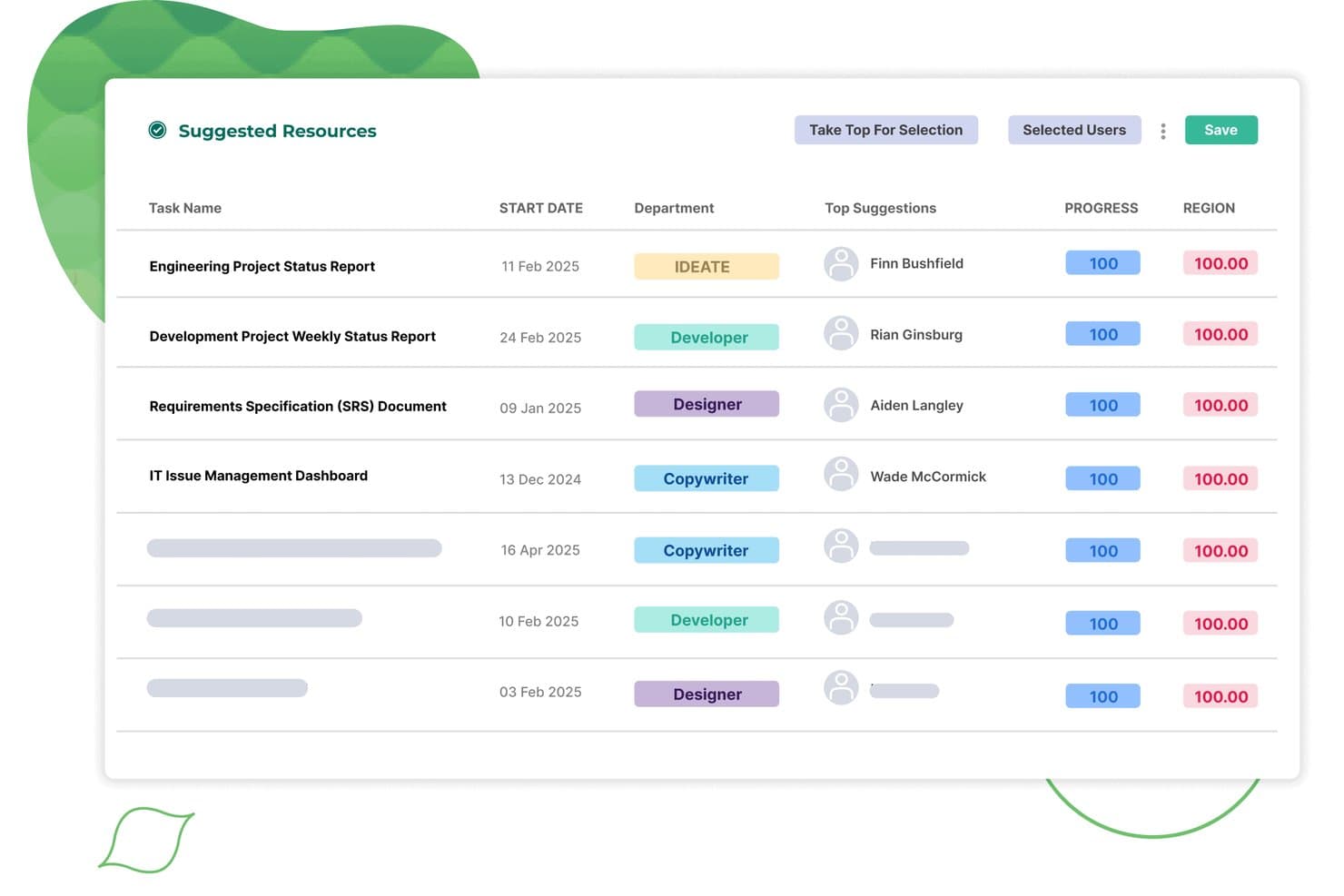
Screendragon auto-assigns suggested resources to tasks by department and match score. Screendragon is a workflow management platform built for marketing, agency, and enterprise teams that need to handle complex creative campaigns, approvals, and compliance across departments and geographies.
Who Is Screendragon Best For?
Screendragon suits enterprise marketing and agency teams managing complex creative campaigns across multiple departments or locations.
Why Screendragon Is a Good Asana Alternative
I picked Screendragon because it gives my team a central hub for campaign management, approvals, and compliance across departments. I rely on its customizable workflows to coordinate creative assets at scale, and the role-based permissions help keep sensitive marketing materials secure and audit-ready.
Screendragon Key Features
- Digital asset management: Store, organize, and access creative files and assets directly within project workflows.
- Resource planning tools: Allocate team members and track workload to avoid conflicts and bottlenecks.
- Budget tracking: Monitor project budgets in real time and manage cost approvals.
- Integrated time tracking: Log hours against specific tasks and projects for more accurate reporting.
Screendragon Integrations
Native integrations are not clearly documented. Screendragon supports integrations via its API for custom setups.
Pros and Cons
Pros:
- Built-in resource planning for cross-team scheduling
- Role-based permissions support marketing compliance needs
- Handles multi-department campaign approvals at scale
Cons:
- Custom workflows often require dedicated admin training
- Interface can feel overwhelming for new users
Learn more about Screendragon: Best for detailed project tracking and timelines
- 30-day free trial available
- From $30/user/month (billed annually)
Visit WebsiteCustomer Rating:4.7/5
Microsoft Project manages detailed timelines and dependencies effectively. Microsoft Project is a project management tool designed for businesses that need to plan, track, and execute complex projects. It’s ideal for teams looking for structured workflows and detailed task organization.
Why Microsoft Project is a Good Asana Alternative:
Microsoft Project provides advanced tools for tracking progress, managing dependencies, and visualizing timelines through Gantt charts. Your team can assign tasks, allocate resources, and track workloads all within one platform. It includes detailed scheduling options to help you manage deadlines effectively. With its focus on timelines and tracking, Microsoft Project is well-suited for handling intricate project requirements.
Standout Features & Integrations:
Features include resource management tools that help you assign and balance workloads across your team. Built-in reporting functions provide insights into project progress and performance. Time tracking capabilities allow your team to log hours directly within the project plan.
Integrations include Microsoft Teams, Power BI, SharePoint, Dynamics 365, Excel, Outlook, OneDrive, Planner, Azure DevOps, and Skype.
Pros and Cons
Pros:
- Integration with Microsoft 365 suite
- Advanced scheduling with task dependencies
- Extensive resource management capabilities
Cons:
- Less intuitive for small, simple projects
- Limited Agile project management support
Learn more about Microsoft Project: Best for building custom apps without code
- Free plan available; 14-day free trial
- From $20/user/month (billed annually)
Visit WebsiteCustomer Rating:4.6/5
Airtable enables you to create custom workflows with no-code tools and visuals. Airtable is a versatile platform that combines the simplicity of spreadsheets with the functionality of a database. It’s ideal for teams who need to organize data, manage projects, or create tailored workflows.
Why Airtable is a Good Asana Alternative:
Airtable lets you create custom apps tailored to your team’s specific needs without requiring coding expertise. Its drag-and-drop interface makes it easy to design workflows, automate repetitive tasks, and visualize data in various formats like grids, calendars, and Kanban boards. You can adapt the platform to fit your unique projects and processes. With Airtable, you’re not limited by rigid structures, giving your team the flexibility to work in ways that suit them best.
Standout Features & Integrations:
Features include workflow automations that handle repetitive tasks to save you time, interface designer to create custom interfaces for your workflows, and various views like calendar and gallery to visualize your data in ways that make sense for your team.
Integrations include Slack, Google Drive, Salesforce, Jira, Zendesk, Box, Gmail, Miro, Typeform, and Dropbox.
Pros and Cons
Pros:
- Regular updates with new features
- Strong community support and resources
- Low-code environment accessible to non-developers
Cons:
- Advanced features may require technical knowledge
- Can be overwhelming for new users
Learn more about Airtable: Best for visual task management
- Free plan + free trial available
- From $5/user/month (billed annually)
Visit WebsiteCustomer Rating:4.5/5
Trello provides a simple, visual Kanban-style approach to managing tasks. Trello is a task and project management tool designed for teams and individuals who prefer a visually organized workflow. It helps users manage tasks, track progress, and collaborate using a board-based interface.
Why Trello is a Good Asana Alternative:
Trello uses customizable boards, lists, and cards to make task management visually intuitive and easy to navigate. Your team can create workflows, assign tasks, and set deadlines all within the same interface. Its drag-and-drop functionality lets you adjust plans quickly as priorities change.
Standout Features & Integrations:
Features include a user-friendly interface that makes it easy to create and manage tasks, customizable boards and cards to fit your team's workflow, and real-time collaboration to keep everyone on the same page.
Integrations include Slack, Jira, Miro, Evernote, Salesforce, Google Drive, Dropbox, Microsoft Teams, Confluence, and GitHub.
Pros and Cons
Pros:
- Supports real-time collaboration
- Highly customizable to fit workflows
- Easy to set up and use
Cons:
- Can become cluttered with large projects
- Limited reporting and analytics features
Learn more about Trello: Best for pre-built reports
- 2-week free trial; free demo available
- From $8/user/month (billed annually)
Visit WebsiteCustomer Rating:4.7/5
Workzone’s project timeline view shows how multiple client projects and tasks are scheduled over time, giving teams clear visibility into workloads, deadlines, and progress across accounts. For teams seeking a project management solution that caters to diverse industry needs while addressing the challenges of disorganized communication and missed deadlines, Workzone offers a compelling alternative to Asana. Its features are tailored to enhance collaboration and provide clarity across multiple projects, making it particularly appealing to marketing, IT, and operations teams. With tools for project visibility, collaboration, and document proofing, Workzone helps streamline workflows and improve efficiency, providing a structured environment for teams to thrive.
Why I Picked Workzone
I picked Workzone as a strong Asana alternative because of its tailored solutions for diverse industries and robust project tracking capabilities. Workzone's customizable templates and pre-built reports provide structure and clarity for teams handling multiple time-sensitive projects. The platform's document proofing feature enhances collaboration by allowing teams to review and approve files seamlessly. These functionalities address the common challenges of disorganized communication and inconsistent processes, making Workzone a reliable choice for teams striving for efficiency.
Workzone Key Features
In addition to its project tracking and document proofing capabilities, Workzone offers several other features that enhance its appeal as an Asana alternative:
- Task Dependencies: Allows your team to set task relationships, ensuring that projects progress in a logical order.
- Time Tracking: Enables you to monitor the time spent on tasks, helping manage resources and project timelines effectively.
- Project Templates: Provides over 1,000 templates to quickly launch new projects and maintain consistency across tasks.
- Custom Branding: Lets your team customize the interface with your company's logo and colours, fostering a cohesive brand experience.
Workzone Integrations
Integrations include Slack, Microsoft Teams, Google Drive, Salesforce, Box, Dropbox, Everhour, Freshbooks, GitHub, Harvest, Hubspot, JIRA, Microsoft Office 365, OneDrive, Quickbooks Online, Toggl, Yammer, and Zoho Books. Users can also create custom integrations using Workzone's REST API or connect to over 1,000 apps through Zapier.
Pros and Cons
Pros:
- Unlimited training and live support
- Built-in document proofing approvals
- Strong real-time project visibility
Cons:
- Pricing less suitable small teams
- Limited advanced budgeting features
Learn more about Workzone: Best for real-time collaboration
- 14-day free trial + free demo available
- From $45/month (billed annually)
Visit WebsiteCustomer Rating:4.5/5
ProofHub blends project management and collaboration for smoother workflows. ProofHub is a project management and team collaboration tool designed for businesses that need a central platform to plan, manage, and execute projects. It caters to teams looking for effective ways to collaborate, track progress, and stay organized.
Why ProofHub is a Good Asana Alternative:
ProofHub combines project management with real-time collaboration tools like discussions, chat, and file sharing. Your team can create tasks, set deadlines, and track progress without needing multiple tools. It also includes proofing features, so your team can review and approve files directly in the platform. With ProofHub, you’ll keep everyone on the same page and minimize delays caused by miscommunication.
Standout Features & Integrations:
Features include project templates that help your team set up workflows quickly and consistently. Time tracking tools let you measure productivity and ensure tasks stay on schedule. You can also use custom roles to control access and manage permissions effectively.
Integrations include Google Drive, Dropbox, Box, OneDrive, QuickBooks, FreshBooks, Google Calendar, iCal, Slack, and Microsoft Teams.
Pros and Cons
Pros:
- Offers built-in time tracking tools
- Great for team communication and feedback
- Easy to customize workflows for projects
Cons:
- Onboarding may require additional training
- Lacks advanced analytics and reporting
Learn more about ProofHub: Best for client-focused project management
- 14-day free trial
- From $9.99/user/month (billed annually)
Visit WebsiteCustomer Rating:4.5/5
Teamwork is perfect for client work with billing, planning, and permissions tools. Teamwork is a project management platform designed to help businesses manage client projects, communicate effectively, and deliver results on time. It’s built for teams that need to handle multiple projects while keeping client relationships at the forefront.
Why Teamwork is a Good Asana Alternative:
Teamwork combines project management tools with features tailored for client collaboration, like client access to specific projects and billing tools. You can track billable hours, set project budgets, and manage invoices directly in the platform. The platform also offers resource management features to allocate team members efficiently based on workloads. With Teamwork, you’ll keep projects organized and ensure transparency with clients.
Standout Features & Integrations:
Features include task templates that help you set up recurring projects quickly. The workload planner gives you a clear view of your team's capacity, helping prevent burnout. Also, the project portfolio feature allows you to oversee multiple projects and their statuses at a glance.
Integrations include Google Drive, Dropbox, OneDrive, Box.com, Harvest, HubSpot, Xero, QuickBooks Online, Microsoft Teams, and Slack.
Pros and Cons
Pros:
- Customizable project templates
- Advanced resource management
- Detailed time tracking and billing
Cons:
- Occasional performance issues with large projects
- May have a learning curve for new users
Learn more about Teamwork: Best for knowledge sharing and collaboration
- Free plan + 7-day trial available
- From $5.78/user/month
Visit WebsiteCustomer Rating:4.3/5
Confluence centralizes team knowledge with real-time collaboration features. Confluence is a team workspace designed to help organizations create, share, and manage knowledge. It’s ideal for teams that need to collaborate on projects, document processes, and store information in one place.
Why Confluence is a Good Asana Alternative:
Confluence provides a centralized platform for documenting team knowledge, making it easier to track and share information. Your team can create pages for projects, meeting notes, or processes and organize them into customizable spaces. It supports collaborative editing, so multiple users can contribute to and update content in real time.
Standout features & integrations:
Features include customizable templates that let you set up project pages quickly and consistently. You can create dynamic whiteboards to brainstorm ideas and share the most current versions of visuals with your team. Collaborative editing allows your team to update documents together, ensuring everyone has the most accurate information.
Integrations include Jira, Trello, Slack, Microsoft Teams, Google Drive, Dropbox, Salesforce, Zoom, GitHub, and Microsoft OneDrive.
Pros and Cons
Pros:
- Offers whiteboard and brainstorming features
- Easy to link related pages and content
- Allows real-time collaboration across teams
Cons:
- Limited advanced project management features
- Can feel overwhelming for large-scale projects
Learn more about Confluence: 10Best for centralized team communication
Basecamp
- 30-day free trial + free demo available
- From $25/month (billed annually)
Visit WebsiteCustomer Rating:4.2/5
Basecamp simplifies team communication with tools like message boards and schedules. Basecamp is a project management and team collaboration tool designed for businesses that need a straightforward way to organize work and communicate efficiently. It helps teams manage tasks, share files, and stay aligned through a centralized workspace.
Why Basecamp is a Good Asana Alternative:
Basecamp simplifies team communication with features like message boards for discussions and real-time group chat for quick updates. You can use to-do lists to assign and track tasks and a schedule to plan deadlines and milestones. The platform organizes all your projects, tasks, and conversations in one place, reducing scattered communication. Your team can quickly find what they need without hunting through emails or other tools.
Standout Features & Integrations:
Features include automatic check-ins that prompt your team to share updates regularly, a centralized schedule to keep track of important dates, and docs & files storage to organize all your project materials in one place.
Integrations include Slack, Trello, Asana, GitHub, Jira, Microsoft Outlook, Google Calendar, Dropbox, Zapier, and Evernote.
Pros and Cons
Pros:
- Accessible across multiple devices
- Reliable performance with minimal downtime
- Simple setup and onboarding process
Cons:
- Not ideal for complex project requirements
- Lacks native time-tracking features
Andre Asana-alternativer
Her er noen flere Asana-alternativer som ikke kom med på kortlisten min, men som likevel er verdt å ta en titt på:
- 11Aha!Best for linking strategy with execution
- 12Bitrix24Best for CRM and project management integration
- 13ClickUpBest for AI-enhanced productivity
- 14SmartsheetBest for complex project visualization
- 15CeloxisBest for tracking project financials
- 16Zoho ProjectsBest for automation-heavy project workflows
- 17Salesforce CRMBest for salesforce integration
- 18HiveBest for team collaboration
- 19JiraBest for software development teams
- 20monday.comBest for visual project layouts
How I Evaluate Asana Alternatives
For marketing teams managing campaign deadlines, creative approvals, and intake queues, I split my evaluation into core requirements every tool must meet and the differentiators that separate them.
Core Functionality (Table Stakes For This List)
When I'm selecting tools for my list, I rank each one on a scale from 0 (does not offer the functionality) to 5 (excels in this area) for each core functionality listed below. Then, I calculate the tool's total score into a percentage. Each tool needs to achieve a minimum total score of 65% to be considered for inclusion.
- Campaign Project Management: I check whether a tool supports task dependencies, milestones, and multi-project tracking so marketing teams can map out a full product launch from brief to delivery.
- Multiple Project Views: The ability to toggle between list, board, calendar, and Gantt views matters because content teams and campaign managers tend to work in very different visual modes.
- Creative Collaboration & Proofing: I evaluate how each tool handles file annotation, version history, and approval workflows for reviewing assets like ad creatives or landing page designs.
- Workflow Automation: Marketing teams run repetitive processes like routing briefs or updating campaign statuses, so I look for rule-based automation that handles triggers, conditions, and actions.
- Intake & Request Forms: A good alternative should let teams build customizable request forms that convert submissions into routed tasks, replacing messy email and Slack-based intake.
- Reporting & Dashboards: I look for cross-project dashboards that let marketing ops managers track campaign progress, team workload, and deadlines in one place without manual updates.
Once I have a list of tools that meet this criteria, I consider what sets each platform apart.
Differentiating Factors (What Sets Vendors Apart)
Here's how I compare and contrast different vendors:
Standout Features
Resource and capacity planning is a big differentiator when your team juggles multiple campaigns at once. I look for workload views that show who's overloaded before deadlines slip. AI features are also worth evaluating, especially tools that can draft project summaries or flag at-risk tasks automatically. Guest access matters for marketing teams that regularly loop in freelancers and agency partners who need to review creative work without requiring a full paid seat.
Beyond Features
Marketing tech stack integrations are one of the first things I check. A tool that syncs with HubSpot, Salesforce, or Adobe Creative Cloud keeps campaign data connected without manual exports. Pricing structure also matters, particularly how vendors handle guest and reviewer seats for agencies or freelancers. I evaluate onboarding speed, too. Teams migrating from Asana need marketing-specific templates and import tools to get running fast rather than rebuilding every workflow from scratch.
Hvorfor se etter et Asana-alternativ?
Selv om Asana er et godt valg av programvare for prosjektstyring, finnes det flere grunner til at noen brukere ser etter alternative løsninger. Her er noen eksempler:
- Du ser etter rimeligere prisalternativer
- Teamets behov er enklere, og Asana føles overveldende
- Du ønsker programvare med bedre funksjonalitet uten nett
- Teamet ditt trenger flere tilpasningsmuligheter
- Du trenger et verktøy med bedre funksjoner for tidsregistrering
- Bedriften din opererer i en region med begrenset Asana-støtte
Hvis noe av dette høres kjent ut, har du kommet til rett sted. Listen min inneholder flere alternativer for prosjektstyringsprogramvare som passer bedre for team som møter disse utfordringene med Asana og ser etter alternative løsninger.
Viktige funksjoner i Asana
Her er noen av de viktigste funksjonene i Asana, slik at du kan sammenligne hva alternative løsninger tilbyr:
- Oppgavehåndtering: Opprett, tildel og prioriter oppgaver for å holde teamet ditt strømlinjeformet, fokusert og på rett spor.
- Prosjektvisninger: Enten teamet ditt bruker tidslinjer i Gantt-lignende stil for å visualisere prosjektplaner og avhengigheter, eller kalendervisninger med egendefinerte farger, har Asana ulike visuelle prosjektoppsett.
- Arbeidsflytautomatisering: Automatiser godkjenninger, legg automatisk til merking av tildelte personer, og opprett egendefinerte regler og automatiseringsfunksjoner for å spare tid og redusere feil.
- Teamsamarbeid: Del filer, kommenter på oppgaver og hold deg oppdatert med kommunikasjon i sanntid.
- Porteføljestyring: Overvåk flere prosjekter på ett sted for å sikre at alt er i tråd med målene dine.
- Egendefinerte felt: Legg til spesifikke datapunkter i oppgaver for å holde bedre oversikt over unike krav.
- Rapportering og innsikt: Generer rapporter for å se fremdrift og identifisere potensielle flaskehalser.
- Målsetting: Sett mål for teamet eller selskapet, og knytt dem til prosjekter for bedre samordning.
- Integrasjoner: Koble til andre verktøy og tillegg som Slack eller Google Drive for å forbedre arbeidsflytene dine.
- Mobilapp: Administrer oppgaver og prosjekter mens du er på farten med Asanas brukervennlige mobilapp.