

Gli strumenti di misurazione del marketing sono i gestori di fondi non riconosciuti del mondo del marketing. Questi cruscotti contengono tutte le informazioni necessarie per giustificare il budget di marketing del prossimo anno.
Inoltre, aiutano a individuare e risolvere i problemi relativi alle prestazioni del marketing. Tuttavia, in una situazione in cui le opzioni abbondano, può essere difficile trovare il software di misurazione del marketing giusto, in linea con i propri obiettivi di marketing.
Beh, non devi più preoccuparti. Grazie alla mia esperienza nel marketing e al nostro sistema dettagliato di valutazione dei software, abbiamo selezionato i migliori software di misurazione del marketing per aiutarti a capire cosa ha funzionato e cosa no.
Perché fidarsi dei nostri consigli sui software
6,700+
Reviews
20
Industry experts
16+
Evaluation factors
14
Years
Il nostro team testa e recensisce software dal 2012. In quanto leader del marketing noi stessi, sappiamo quanto sia difficile — e importante — scegliere il software giusto.
Per questa guida, abbiamo valutato gli strumenti attraverso test pratici e ricerche indipendenti, assegnando un punteggio agli strumenti in base ai nostri criteri di selezione.
Le nostre recensioni riflettono il nostro giudizio editoriale umano, non un discorso di vendita.
Revisori esperti:
 Gui DrusinaDirettore creativo
- Shriya GhateSenior Marketing Lead
 Amanda JacquesResponsabile Marketing Ops

Riepilogo dei migliori strumenti di misurazione del marketing
Questo grafico comparativo riassume i dettagli dei prezzi delle mie selezioni dei migliori strumenti di misurazione del marketing, per aiutarti a trovare quello più adatto al tuo budget e alle esigenze della tua azienda.
| Tool | Best For | Trial Info | Price | ||
|---|---|---|---|---|---|
| 1 | Ideale per report di marketing semplici e automatizzati | Prova gratuita di 14 giorni + demo gratuita disponibile | A partire da $44/mese (fatturazione annuale) | Website | |
| 2 | Ideale per il monitoraggio dei social media in tempo reale | Prova gratuita di 14 giorni | A partire da $199/mese (fatturazione annuale) | Website | |
| 3 | Ideale per l’ottimizzazione in tempo reale delle campagne pubblicitarie | Prova gratuita di 7 giorni | Da $49/mese/brand | Website | |
| 4 | Ideale per richieste di dati basate su chat | Piano gratuito disponibile | Da $16/mese (fatturato annualmente) | Website | |
| 5 | Ideale per misurare le campagne di marketing dei concorrenti | Demo gratuita | Da $83/mese | Website | |
| 6 | Ideale per misurare le prestazioni del sito web | Disponibile un piano gratuito | Gratuito | Website | |
| 7 | Ideale per gestire enormi quantità di dati di marketing | Prova gratuita di 14 giorni | Da $15/utente/mese | Website | |
| 8 | Ideale per comprendere come i visitatori vivono i siti web | Prova gratuita di 15 giorni + piano gratuito | Da $32/mese | Website | |
| 9 | Ideale per misurare i risultati del content marketing | Prova gratuita + piano gratuito disponibili | Da $99.95/mese | Website | |
| 10 | Ideale per l'audit SEO | Prova gratuita di 30 giorni | A partire da $79/mese per un massimo di tre campagne | Website |


Recensioni dei migliori strumenti di misurazione del marketing
Di seguito trovi i miei riepiloghi dettagliati dei migliori strumenti di misurazione del marketing entrati nel mio elenco ristretto. Le mie recensioni offrono un’analisi dettagliata delle funzionalità principali, dei pro e contro, delle integrazioni e dei casi d’uso ideali di ogni strumento, per aiutarti a trovare quello più adatto a te.
 Ideale per report di marketing semplici e automatizzati
- Prova gratuita di 14 giorni + demo gratuita disponibile
- A partire da $44/mese (fatturazione annuale)
Visit WebsiteCustomer Rating:4.8/5
DashThis consente agli utenti di personalizzare i propri dashboard per misurare le metriche più rilevanti per loro. DashThis è una piattaforma automatizzata di reportistica di marketing che offre un design accattivante e dashboard personalizzabili per adattarsi alle tue esigenze.
Perché ho scelto DashThis: Mi piace che DashThis semplifichi la misurazione delle metriche di marketing grazie a oltre 34 integrazioni con piattaforme di marketing digitale, consentendo di consolidare i dati in un unico posto. Le sue funzionalità di automazione includono modelli predefiniti e personalizzati e opzioni di clonazione, così non devi perdere tempo a creare report da zero, widget e dashboard preimpostati e importazione dati giornaliera.
Funzionalità e integrazioni distintive di DashThis
Le funzionalità includono account illimitati per i clienti, fonti di dati e utenti illimitati, opzioni di condivisione dei report, white label e personalizzazione dei report, inclusi domini e temi personalizzati, un'interfaccia per widget drag-and-drop e supporto per più valute e lingue.
Le integrazioni includono Google Analytics, TikTok Ads, HubSpot, Klaviyo, Facebook Insights, Google Ads, Facebook Ads, Instagram, LinkedIn, YouTube, Google Search Console, Google My Business, SEMrush, Moz, Ahrefs, Mailchimp, Campaign Monitor e altro ancora.
Pros and Cons
Pros:
- Piattaforma intuitiva e facile da navigare
- Molte opzioni di integrazione disponibili
- Visualizzazione dati accattivante
Cons:
- Tipologie di grafici limitate
- Ritardi occasionali nella sincronizzazione dei dati, che richiedono aggiornamenti manuali
Learn more about DashThis: Ideale per il monitoraggio dei social media in tempo reale
- Prova gratuita di 14 giorni
- A partire da $199/mese (fatturazione annuale)
Visit WebsiteCustomer Rating:4.7/5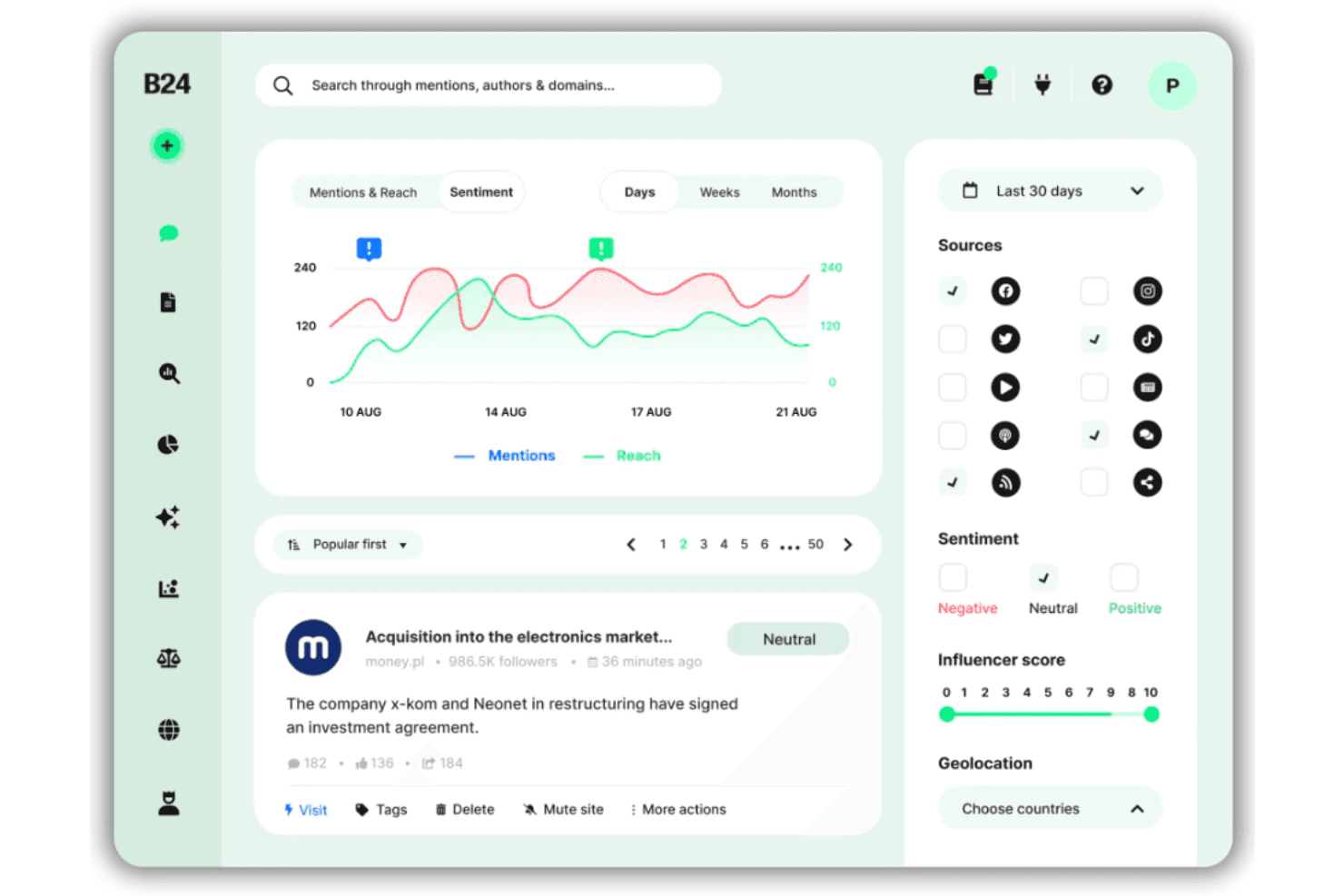
Brand24 offre una dashboard per l'analisi del sentiment con tracciamento delle menzioni, metriche di portata, filtri per fonte e punteggio degli influencer su varie piattaforme social. Brand24 è una piattaforma di social listening e monitoraggio dei media che traccia in tempo reale le menzioni del marchio, il sentiment, la portata e la quota di voce su social media, notizie, blog, podcast e forum.
Per chi è Brand24?
Brand24 è particolarmente indicato per i team PR, i social media manager e le agenzie di marketing che necessitano di monitorare la reputazione del marchio e le conversazioni online su larga scala.
Perché ho scelto Brand24
Ho inserito Brand24 nella mia lista dei preferiti per la rapidità con cui individua le conversazioni online. Apprezzo che Storm Alerts segnali immediatamente anomalie nei picchi di volume delle menzioni, una qualità essenziale per prevenire una crisi PR o cogliere subito una campagna virale. Anche l’Assistente AI del Marchio offre un valore concreto: posso porgli domande dirette come 'cosa sta generando sentiment negativo questa settimana?' e ottenere risposte basate sui dati reali delle menzioni, non su sintesi generiche.
Caratteristiche principali di Brand24
- Punteggio di presenza: Calcola la visibilità online del tuo marchio utilizzando metriche personalizzate su diversi canali digitali.
- Valore equivalente pubblicitario (AVE): Stima il valore dei media guadagnati delle menzioni monitorate per il benchmarking delle performance PR.
- Analisi di fonti e influencer: Identifica gli autori, editori e domini più influenti che guidano le conversazioni online sul tuo marchio.
- Esportazione di report personalizzati: Genera report etichettati col tuo marchio in formato PDF, Excel e PowerPoint, per condividere approfondimenti sulle misurazioni con gli stakeholder.
Integrazioni Brand24
Brand24 offre integrazioni native con Slack e Microsoft Teams, e mette a disposizione accesso API per integrazioni personalizzate.
Pros and Cons
Pros:
- L’AI rileva automaticamente picchi improvvisi nelle menzioni
- L’analisi del sentiment monitora la percezione del marchio
- Benchmark della quota di voce rispetto ai concorrenti
Cons:
- Non monitora dati su media a pagamento o sulle conversioni
- Limitazioni sulle menzioni ostacolano i flussi di lavoro delle grandi agenzie
Learn more about Brand24: Ideale per l’ottimizzazione in tempo reale delle campagne pubblicitarie
- Prova gratuita di 7 giorni
- Da $49/mese/brand
Visit WebsiteCustomer Rating:5/5
Dashboard Command Center di Meerkads che mostra metriche di performance unificate su più canali, inclusi spesa, fatturato, ROAS, conversioni, benchmark di piattaforma e una panoramica visiva del funnel delle conversioni. Meerkads è una piattaforma di performance marketing alimentata dall’IA che collega i dati di Google Ads, Meta Ads e dell’ecommerce per un’analisi delle campagne cross-channel, raccomandazioni di ottimizzazione basate su intelligenza artificiale, intelligenza creativa e reportistica automatizzata.
Per chi è più adatto Meerkads?
Meerkads è ideale per brand DTC di ecommerce e team di performance marketing che gestiscono spese pubblicitarie a pagamento su Google, Meta e TikTok.
Perché ho scelto Meerkads
Ho scelto Meerkads tra i migliori per l’ottimizzazione delle campagne pubblicitarie in tempo reale grazie all’efficacia del suo monitoraggio costante e delle raccomandazioni basate sull’IA. Meerkads monitora continuamente le tue campagne su Google Ads e Meta Ads, individuando e segnalando i problemi di performance prima che peggiorino, così non ti accorgi di uno spreco di budget giorni dopo che è iniziato. Apprezzo anche il sistema di valutazione della performance con IA che ti permette di individuare rapidamente quali campagne, gruppi di annunci e singoli annunci stanno sotto-performando, così il team può agire sulle segnalazioni invece di doverle cercare nei dati grezzi.
Caratteristiche principali di Meerkads
- Rilevamento della fatica creativa: Identifica quando le singole creatività pubblicitarie stanno perdendo coinvolgimento del pubblico, permettendoti di rinnovare le risorse prima del calo delle prestazioni.
- Riconciliazione reale del ROAS: Sincronizza i dati di fatturato Shopify con la spesa pubblicitaria per calcolare il vero ritorno sulla spesa pubblicitaria, andando oltre le cifre riportate dalle piattaforme.
- Reportistica a livello di prodotto: Segmenta le performance pubblicitarie per singolo prodotto, così puoi vedere quali SKU stanno trainando o frenando i risultati della campagna.
- Analisi di sovrapposizione del pubblico: Evidenzia la sovrapposizione del pubblico tra i tuoi set di annunci per aiutarti a identificare la cannibalizzazione tra le campagne.
Integrazioni di Meerkads
Meerkads offre un set ridotto di integrazioni native focalizzate su piattaforme pubblicitarie ed ecommerce, tra cui Google Ads, Meta Ads, TikTok Ads, Google Analytics 4, Google Search Console e Shopify. Integrazioni aggiuntive con Amazon, Pinterest Ads, Klaviyo, Omnisend, WooCommerce, Magento, Microsoft Ads e altre sono pianificate ma non ancora disponibili. Non è chiaramente documentato il supporto Zapier né una API pubblica.
Pros and Cons
Pros:
- Riconcilia la spesa pubblicitaria con il fatturato effettivo di Shopify
- L’IA segnala la fatica creativa prima del calo di performance
- Vista integrata per il confronto cross-channel del ROAS
Cons:
- Limitato ai canali pubblicitari Google e Meta
- Molte funzionalità pianificate non sono ancora disponibili
Learn more about Meerkads: Ideale per richieste di dati basate su chat
- Piano gratuito disponibile
- Da $16/mese (fatturato annualmente)

Querri risponde alle domande sui dati in linguaggio naturale e genera insight sulle performance di marketing. Querri è progettato per aiutare i team di marketing ad analizzare e comprendere i propri dati su diversi canali. La piattaforma collega le fonti di dati di marketing e presenta le metriche di performance in un unico posto, rendendo più semplice monitorare le campagne e misurare i risultati. Supporta inoltre richieste di dati basate su chat, consentendo agli utenti di porre domande sui dati di marketing e ricevere risposte direttamente dalla piattaforma.
Perché ho scelto Querri
Ho scelto Querri per le sue richieste di dati basate su chat, che permettono agli utenti di porre domande sui dati di marketing e ricevere risposte direttamente dalla piattaforma. Lo strumento collega i dati da fonti come HubSpot e Salesforce, così i team possono analizzare le performance delle campagne in un unico luogo. Pulisce e organizza anche i dati in entrata per mantenere i report accurati. Gli utenti possono interrogare le metriche di marketing e generare report usando un linguaggio semplice invece di query tecniche.
Funzionalità principali di Querri
Oltre alle richieste di dati basate su chat, Querri offre:
- Generazione automatica di report: Facilita la creazione di report sulle performance e presentazioni brandizzate, risparmiando tempo e migliorando il processo decisionale.
- Analisi del funnel di lead: Fornisce approfondimenti sul percorso del cliente, aiutando i marketer a ottimizzare le strategie per migliori tassi di conversione.
- Attribuzione cross-canale: Permette l'analisi delle attività di marketing su diversi canali, offrendo una visione olistica delle performance delle campagne.
Integrazioni di Querri
Le integrazioni includono HubSpot, Salesforce, Google Drive, Slack, Marketo, Mailchimp, LinkedIn Ads, Facebook Ads, Google Ads e Twitter Ads per supportare l'analisi dei dati di marketing su più canali.
Pros and Cons
Pros:
- Fai domande in linguaggio naturale invece di scrivere query SQL
- Le richieste basate su chat rendono l'esplorazione dei dati accessibile ai marketer non tecnici
- Recupera rapidamente insight dalle fonti di dati di marketing e CRM collegate
Cons:
- Le risposte alle richieste possono talvolta fallire o arrivare in ritardo durante l'analisi
- Numero limitato di connettori nativi per le piattaforme di marketing
Learn more about Querri: Ideale per misurare le campagne di marketing dei concorrenti
- Demo gratuita
- Da $83/mese
Visit WebsiteCustomer Rating:4.6/5
Comprendi il ranking complessivo di un dominio rispetto a tutti gli altri domini presenti su internet. Ahrefs offre strumenti che aiutano le aziende a misurare gli sforzi di marketing digitale della concorrenza e a capire come superarli.
Perché ho scelto Ahrefs: Ignorare le attività di marketing dei concorrenti quando si crea una strategia di marketing è un grave errore. Con Ahrefs puoi avere una panoramica delle strategie di posizionamento della concorrenza, inclusi il traffico organico, i backlink e le campagne di traffico a pagamento. Puoi anche analizzare i contenuti dei concorrenti e replicarne i lavori migliori per le tue campagne.
Funzionalità e integrazioni principali di Ahrefs
Le funzionalità includono strumenti di audit che ti aiutano a individuare opportunità di ottimizzazione tecnica SEO e dei contenuti. La funzione di ricerca delle parole chiave di Ahrefs ti aiuta a identificare le keyword cercate dai tuoi clienti e a monitorare la tua posizione nei risultati dei motori di ricerca per quei termini.
Le integrazioni comprendono oltre 30 connessioni native con alcune tra le applicazioni business più popolari. Tra queste ci sono piattaforme come AgencyAnalytics, DashThis, Databox, Desktop.com, Google Search Console, Klipfolio, Marketing Miner, Rambox, Rank Ranger, Reportz e altre soluzioni software. Ahrefs offre anche un'API che consente di creare integrazioni personalizzate.
Pros and Cons
Pros:
- Eccellente per la ricerca di parole chiave
- Essenziale per la presenza sui motori di ricerca
- Fondamentale per il monitoraggio del posizionamento
Cons:
- Nessun piano o prova gratuita
- Non controlla il posizionamento sui motori di ricerca per grandi volumi
 Ideale per misurare le prestazioni del sito web
- Disponibile un piano gratuito
- Gratuito
Visit WebsiteCustomer Rating:4.6/5
Scopri le informazioni demografiche del pubblico per capire come personalizzare le campagne future. Google Analytics è lo strumento di misurazione ideale che consente ai team di marketing di monitorare le prestazioni del sito web da un'unica dashboard. Permette di vedere cosa attira i visitatori sul sito, da dove provengono le vendite, quanto tempo le persone trascorrono su determinate parti del sito e molte altre metriche utili.
Perché ho scelto Google Analytics: Ho selezionato questo strumento di misurazione di marketing perché è ampiamente considerato la piattaforma standard per il monitoraggio delle prestazioni dei siti web. Google Analytics è ideale per tracciare metriche come i visitatori, i referral da altri canali e i tassi di conversione. Grazie a queste informazioni puoi individuare le aree del sito che funzionano bene e quelle che necessitano miglioramenti.
Caratteristiche e integrazioni distintive di Google Analytics
Le funzionalità includono la possibilità di raccogliere dati demografici completi sul tuo pubblico. Durante l'implementazione di strategie di content marketing, Google Analytics può misurare il coinvolgimento per aiutarti a determinare quali argomenti sono più popolari. Puoi anche affidarti alla piattaforma per misurare l'efficacia delle tue attività di marketing sui social media e di altre campagne personalizzate.
Le integrazioni includono oltre 1.000 connessioni native con strumenti che aiutano ad aumentare la produttività del team. Tra queste integrazioni ci sono piattaforme come Freshservice, GetResponse, HoneyBook, Jotform, Mailchimp, Orange Logic, Outgrow, Salesforce, SEMrush, Zendesk e altre soluzioni software.
Pros and Cons
Pros:
- Dati personalizzabili
- Traccia efficacemente le campagne
- Facile da implementare
Cons:
- Non acquisisce dati a livello utente
- La quantità di dati può risultare eccessiva
Learn more about Google Analytics: Ideale per gestire enormi quantità di dati di marketing
- Prova gratuita di 14 giorni
- Da $15/utente/mese
Visit WebsiteCustomer Rating:4.5/5
Ottieni analisi visive in tempo reale e una dashboard dati interattiva per approfondire le campagne di marketing. Tableau può aiutare le aziende con enormi quantità di dati sulle campagne di marketing e processarli per un'analisi a livello aziendale. Il software può mostrare informazioni rilevanti in report e grafici accattivanti.
Perché ho scelto Tableau: Ho inserito Tableau in questo elenco come opzione per le grandi organizzazioni che dispongono di ingenti dati di misurazione del marketing. Tableau può elaborare l'intero set di dati in pochi minuti invece di dover attendere giorni o settimane. Questo è importante man mano che il dipartimento marketing raccoglie più dati, poiché Tableau è in grado di gestire grandi volumi senza impattare sulle prestazioni.
Funzionalità e integrazioni di spicco di Tableau
Le funzionalità includono la capacità di raccogliere dati da diversi dipartimenti aziendali e sviluppare visualizzazioni efficienti. La funzione 'data highlighter' consente di individuare rapidamente le informazioni che stai cercando senza difficoltà.
Le integrazioni includono ottime opzioni di connessione nativa che permettono di inserire facilmente i dati desiderati. Queste integrazioni native comprendono Anaplan, Box, Databricks, Dropbox, Google Analytics, Kognitio, OData, Oracle Eloqua, QuickBooks, Salesforce e altre soluzioni software.
Pros and Cons
Pros:
- Interfaccia utente semplice
- Numerose possibilità di visualizzazione
- Si collega a molteplici fonti di dati
Cons:
- Modificare le viste della dashboard è complesso
- La formazione è a pagamento
Learn more about Tableau: Ideale per comprendere come i visitatori vivono i siti web
- Prova gratuita di 15 giorni + piano gratuito
- Da $32/mese
Visit WebsiteCustomer Rating:4.5/5
Scopri fino a dove scorrono i visitatori su un sito web. Hotjar offre strumenti che aiutano i team di marketing a vedere cosa fanno gli utenti su un sito web. Le aziende possono utilizzare queste informazioni per migliorare l'esperienza dei visitatori sui propri siti.
Perché ho scelto Hotjar: Molti degli strumenti che ho inserito in questa lista misurano i risultati delle tue strategie di marketing, ma ciò che rende Hotjar diverso è la sua capacità di mostrarti esattamente come le persone vivono il tuo sito dopo aver trovato la tua campagna. Gli strumenti di Hotjar ti permettono di vedere come il tuo pubblico naviga su tutto il sito. Mappando il percorso dei visitatori sul sito, puoi identificare le aree che necessitano di essere migliorate.
Funzionalità e integrazioni principali di Hotjar
Funzionalità come la raccolta di insight olistici e azionabili tramite strumenti come heatmap, sondaggi e funnel di conversione. Hotjar può anche registrare le sessioni reali degli utenti sul tuo sito, così puoi vedere in prima persona la loro esperienza.
Integrazioni includono integrazioni native con strumenti di terze parti come Google Analytics, Google Optimize, HubSpot, Microsoft Teams, Mixpanel, Omniconvert, Optimizely, Segment, Slack, Unbounce e altre soluzioni software. Se hai un account Zapier a pagamento, puoi creare integrazioni personalizzate con applicazioni come Airtable, Asana, ConvertKit, Mailchimp, Miro, Pipedrive, Salesforce, Smartsheet, Trello, Zendesk e altre opzioni software.
Pros and Cons
Pros:
- Mostra come migliorare i siti web
- Potente e intuitivo
- Facile da usare
Cons:
- Influenza la velocità del sito
- Navigare nella dashboard è complesso
Learn more about Hotjar (by Contentsquare): Ideale per misurare i risultati del content marketing
- Prova gratuita + piano gratuito disponibili
- Da $99.95/mese
Visit WebsiteCustomer Rating:4.5/5
Svolgi ricerche organiche per identificare tendenze su parole chiave specifiche e vedere se vale la pena puntarci. SEMrush offre strumenti che aiutano i team di marketing a misurare i risultati delle loro campagne di content marketing e a monitorare il posizionamento sui motori di ricerca. I dati provenienti da SEMrush possono aiutare i reparti marketing a migliorare la loro strategia complessiva di content marketing.
Perché ho scelto SEMrush: Quello che apprezzo di più di SEMrush è il suo strumento di ottimizzazione dei contenuti che fornisce un punteggio quantitativo e raccomandazioni di ottimizzazione. Gli strumenti offerti da SEMrush aiuteranno a incrementare la visibilità della tua azienda sui principali motori di ricerca. Puoi iniziare inserendo il tuo articolo su SEMrush, aggiungendo la parola chiave per cui desideri posizionarti e ottenere un punteggio quantitativo con utili suggerimenti di ottimizzazione.
Funzionalità e integrazioni distintive di SEMrush
Le funzionalità includono strumenti di ricerca delle parole chiave che ti aiuteranno a trovare le migliori keyword da utilizzare nelle tue strategie di marketing digitale. La funzione di analisi della concorrenza di SEMrush ti permette di confrontare le prestazioni delle tue strategie di marketing con quelle della concorrenza, fornendo ricerche pubblicitarie, analisi del traffico e capacità di monitoraggio dei social media.
Le integrazioni includono collegamenti con le piattaforme che molti team di marketing utilizzano per implementare le loro strategie più recenti. Queste integrazioni includono connessioni native con strumenti come AgencyAnalytics, AIOSEO, Bramework, Databox, monday.com, Respona, Supermetrics, Surfer, Whatagraph, Zoho e altre opzioni software.
Pros and Cons
Pros:
- Analizza grandi quantità di dati
- Utile a tutti i livelli dell’organizzazione
- Interfaccia facile da usare
Cons:
- Prezzo elevato
- Curva di apprendimento ripida
 10Ideale per l'audit SEO
Moz Pro
- Prova gratuita di 30 giorni
- A partire da $79/mese per un massimo di tre campagne
Visit WebsiteCustomer Rating:4.5/5
Ricerca le parole chiave e identifica quanto sia difficile posizionare un sito web sui principali motori di ricerca. Moz Pro offre funzionalità che permettono ai team di marketing di effettuare un audit del loro sito web per determinare quali miglioramenti apportare per aiutare il posizionamento sui motori di ricerca.
Perché ho scelto Moz Pro: Quando si crea una strategia di marketing SEO, è necessario capire quali modifiche apportare al proprio sito web per favorirne il posizionamento sui motori di ricerca. Lo strumento di audit SEO di Moz Pro eseguirà la scansione dell'intero sito e individuerà ciò che bisogna ottimizzare per migliorare il ranking sui motori di ricerca. Lo strumento di scansione del sito suddividerà i problemi riscontrati nelle categorie critici o avvisi, aiutandoti così a individuare e risolvere immediatamente le questioni SEO tecniche più urgenti.
Funzionalità e integrazioni distintive di Moz Pro
Le funzionalità includono uno strumento di esplorazione dei link che permette di ottenere tutte le informazioni necessarie per condurre campagne di link-building più efficaci. La funzione Fresh Web Explorer ti aiuterà a trovare le menzioni recenti del tuo marchio sul web.
Le integrazioni includono Google Analytics e WebCEO per facilitare il collegamento di dati aggiuntivi a Moz Pro e ottenere insight ancora più approfonditi. Moz Pro offre anche un'API che puoi utilizzare per creare integrazioni personalizzate.
Pros and Cons
Pros:
- Fornisce dati SEO dettagliati
- Ottima analisi dei backlink
- Semplifica l'individuazione dei problemi tecnici SEO
Cons:
- L'interfaccia non è intuitiva
- La prova gratuita offre funzionalità limitate
Learn more about Moz Pro:
Altri strumenti di misurazione del marketing
Ecco alcune ulteriori opzioni di strumenti di misurazione del marketing che non sono entrate nel mio elenco ristretto, ma che vale comunque la pena prendere in considerazione:
- 11AdverityIdeale per KPI di marketing personalizzati
- 12HubSpot Marketing HubIdeale per misurare le campagne di inbound marketing
- 13SupermetricsIdeale per integrare oltre 150 fonti di dati
- 14KissmetricsIdeale per ottimizzare campagne di marketing digitale specifiche
- 15Adobe AnalyticsLe migliori tecnologie per la misurazione diversificata del marketing
- 16Google Search ConsoleIdeale per le prestazioni sui motori di ricerca
- 17MixpanelIdeale per analizzare il comportamento dei clienti
- 18Salesforce Marketing Cloud IntelligenceIdeale per l'intelligenza artificiale
- 19GoHighLevelIdeale per le agenzie
- 20CoefficientIdeale per l’analisi basata su fogli di calcolo
- 21monday AI WorkspaceIdeale per l'integrazione automatizzata dei dati tra piattaforme
Come Valuto gli Strumenti di Misurazione del Marketing
Divido la mia valutazione in due livelli: requisiti di base come l’attribuzione cross-channel e il tracciamento delle conversioni, e fattori differenzianti che separano uno strumento utile da uno realmente strategico.
Funzionalità di Base (Requisiti Fondamentali per Questa Lista)
Quando seleziono gli strumenti per la mia lista, valuto ciascuno su una scala da 0 (non offre la funzionalità) a 5 (eccelle in quest’area) per ciascuna delle funzionalità di base elencate di seguito. Poi, calcolo il punteggio totale dello strumento come percentuale. Ogni strumento deve raggiungere un punteggio totale minimo del 65% per essere preso in considerazione.
- Modelli di Attribuzione Multi-Touch: Valuto se lo strumento offre più modelli di attribuzione e quanto va oltre il semplice "ultimo clic"—come opzioni basate sui dati o pesi personalizzati per cicli di vendita più lunghi.
- Integrazione Dati Cross-Channel: Collegare piattaforme pubblicitarie, CRM, email e analytics web sotto un unico tetto è fondamentale, quindi verifico la profondità dei connettori nativi e la flessibilità dell’API.
- Reporting su ROI & Performance: Cerco calcoli di ROAS, CAC e LTV a livello di campagna che vadano oltre le metriche di vanità—specialmente la possibilità di filtrare per segmento di pubblico o creatività.
- Analisi dell’Incrementalità o MMM: Test geo-lift e modelli di marketing mix aiutano a dimostrare l’impatto reale, quindi valuto se lo strumento supporta questi metodi nativamente o tramite partnership.
- Tracciamento di Conversioni & Ricavi: Cerco un tracciamento completo del funnel dalla prima interazione fino al ricavo finale, inclusa la possibilità di supportare conversioni offline e raccolta eventi lato server.
- Dashboard & Report Personalizzati: Gli stakeholder, dai media manager ai CMO, hanno bisogno di visualizzazioni diverse, quindi verifico dashboard basate sui ruoli, pianificazione e opzioni di esportazione.
Una volta che ho una lista di strumenti che soddisfano questi criteri, considero ciò che distingue ogni piattaforma.
Fattori Differenzianti (Cosa Distingue i Fornitori)
Ecco come confronto e distinguo i vari fornitori:
Funzionalità Distintive
Il tracciamento senza cookie è un grande elemento distintivo oggi. Cerco strumenti con raccolta lato server e risoluzione delle identità first-party che mantengano l’attribuzione accurata man mano che i cookie di terze parti scompaiono. Anche gli strumenti per la pianificazione degli scenari sono importanti—simulatori di budget che permettono di modellare diverse allocazioni di spesa prima di trasferire budget tra canali aiutano a evitare stime costose. Gli insight potenziati dall’IA completano il quadro, in particolare rilevamento delle anomalie e raccomandazioni automatiche che segnalano opportunità che una revisione manuale potrebbe perdere.
Oltre le Funzionalità
La profondità dell’ecosistema di integrazione conta molto in questa fase. Controllo se uno strumento si connette nativamente a data warehouse come Snowflake e BigQuery, poiché è lì che la maggior parte dei team di misurazione centralizza i propri dati. L’adeguatezza al pubblico target è altrettanto importante—una piattaforma creata per l’attribuzione pipeline B2B serve un’esigenza molto diversa rispetto a una pensata per l’ecommerce DTC. Esamino inoltre attentamente i modelli di prezzo, in particolare se i costi aumentano in base alla spesa pubblicitaria o al volume dei dati, il che può rendere uno strumento insostenibile con la crescita delle campagne.
Come scegliere gli strumenti di misurazione del marketing
È facile perdersi in lunghi elenchi di funzionalità e strutture tariffarie complesse. Per aiutarti a rimanere concentrato mentre affronti il tuo particolare processo di selezione del software, ecco un elenco di fattori da tenere a mente:
| Fattore | Cosa considerare |
|---|---|
| FattoreScalabilità | Cosa considerareLo strumento crescerà insieme alla tua azienda? Considera le esigenze future e se lo strumento è in grado di gestire una quantità maggiore di dati o utenti senza costi o complessità aggiuntivi. |
| FattoreIntegrazioni | Cosa considerareFunziona con i tuoi sistemi attuali? Verifica la compatibilità con il tuo CRM, l'email marketing e le altre piattaforme essenziali per evitare interruzioni del flusso di lavoro. |
| FattorePersonalizzazione | Cosa considerarePuoi adattarlo alle tue esigenze? Cerca opzioni per modificare dashboard, report e metriche in modo da adattarli agli obiettivi e ai processi specifici del tuo team. |
| FattoreFacilità d'uso | Cosa considerareÈ intuitivo? Valuta se il tuo team può imparare rapidamente a usare lo strumento in modo efficace senza formazione o assistenza approfondite. |
| FattoreImplementazione e avvio | Cosa considerareQuanto tempo occorrerà per iniziare? Valuta i tempi di configurazione, l'assistenza disponibile e le risorse necessarie per integrare lo strumento nel flusso di lavoro esistente. |
| FattoreCosto | Cosa considerareRientra nel tuo budget? Confronta i prezzi con il tuo budget, considerando sia le spese a breve termine sia il valore a lungo termine. Cerca eventuali costi nascosti o costi per gli aggiornamenti. |
| FattoreMisure di sicurezza | Cosa considerareI tuoi dati sono protetti? Assicurati che lo strumento soddisfi gli standard di sicurezza della tua azienda, inclusa la crittografia dei dati e la conformità alle normative pertinenti come il GDPR. |
Cosa sono gli strumenti di misurazione del marketing?
Gli strumenti di misurazione del marketing sono software e applicazioni progettati per monitorare e analizzare le prestazioni delle campagne di marketing. Forniscono metriche chiave come i tassi di coinvolgimento, i tassi di conversione, il ROI e i modelli di comportamento dei clienti.
Lo scopo è consentire alle aziende di quantificare l'efficacia delle proprie strategie di marketing, individuare le aree di miglioramento e comprendere le risposte dei clienti, per valutare se si otterrà un valore proporzionato al denaro che si investirà.
Funzionalità
Quando selezioni gli strumenti di misurazione del marketing, presta attenzione alle seguenti funzionalità chiave:
- Integrazione dei dati: Si connette a diverse piattaforme per raccogliere informazioni complete da varie fonti, garantendo una visione olistica delle attività di marketing.
- Analisi in tempo reale: Fornisce dati aggiornati al minuto per aiutare a prendere decisioni tempestive e modificare le campagne secondo necessità.
- Dashboard personalizzabili: Consente agli utenti di personalizzare la propria visualizzazione per concentrarsi sulle metriche e sui report più rilevanti per le proprie esigenze.
- Monitoraggio del ROI: Misura il ritorno sull'investimento delle attività di marketing per determinare l'efficacia e la redditività delle campagne.
- Analisi predittiva: Utilizza i dati storici per prevedere tendenze e risultati futuri, contribuendo alla pianificazione strategica.
- Attribuzione multicanale: Identifica il contributo di ciascun canale di marketing al successo complessivo, aiutando ad allocare le risorse in modo efficace.
- Interfaccia intuitiva: Garantisce facilità d'uso, consentendo ai membri del team di utilizzare lo strumento senza una formazione approfondita.
- Informazioni basate sull'IA: Sfrutta l'intelligenza artificiale per individuare modelli e suggerimenti utili a ottimizzare le strategie di marketing.
- Misure di sicurezza: Protegge i dati sensibili tramite la crittografia e la conformità a normative come il GDPR.
- Report e visualizzazione: Genera report visivi e chiari che rendono i dati facili da comprendere e condividere con i portatori di interesse.
Vantaggi
L'implementazione di strumenti di misurazione del marketing offre diversi vantaggi al tuo team e alla tua azienda. Eccone alcuni di cui potrai beneficiare:
- Migliore processo decisionale: Grazie all'analisi in tempo reale e alle informazioni basate sull'IA, puoi prendere rapidamente decisioni informate e modificare le strategie secondo necessità.
- Maggiore comprensione del ROI: Il monitoraggio del ROI ti aiuta a capire quali campagne stanno generando valore, consentendoti di concentrare le risorse sulle iniziative più redditizie.
- Migliore allocazione delle risorse: L'attribuzione multicanale mostra come ogni canale contribuisce al successo, aiutandoti ad allocare budget e impegno in modo più efficace.
- Maggiore efficienza: I dashboard personalizzabili e le interfacce intuitive fanno risparmiare tempo fornendo accesso ai dati più rilevanti senza una navigazione complessa.
- Pianificazione futura: L'analisi predittiva offre una visione anticipata delle tendenze, supportando la pianificazione strategica e modifiche proattive alle attività di marketing.
- Sicurezza dei dati: Le misure di sicurezza garantiscono la protezione dei dati, il rispetto degli standard di conformità e il mantenimento della fiducia dei clienti.
- Comunicazione chiara: Le funzionalità di report e visualizzazione facilitano la condivisione delle informazioni con i portatori di interesse, favorendo una comunicazione e una collaborazione trasparenti.
Costi e prezzi
La selezione degli strumenti di misurazione del marketing richiede la comprensione dei vari modelli di prezzo e dei piani disponibili. I costi variano in base alle funzionalità, alle dimensioni del team, agli extra e ad altri fattori. La tabella seguente riassume i piani più comuni, i relativi prezzi medi e le funzionalità tipicamente incluse nelle soluzioni di strumenti di misurazione del marketing:
Tabella di confronto dei piani per gli strumenti di misurazione del marketing
| Tipo di piano | Prezzo medio | Funzionalità comuni |
|---|---|---|
| Tipo di pianoPiano gratuito | Prezzo medio$0 | Funzionalità comuniAnalisi di base, integrazioni limitate e report standard. |
| Tipo di pianoPiano personale | Prezzo medio$10-$30/utente/mese | Funzionalità comuniAnalisi avanzata, più integrazioni e dashboard personalizzabili. |
| Tipo di pianoPiano aziendale | Prezzo medio$50-$100/utente/mese | Funzionalità comuniAnalisi avanzata, attribuzione multicanale e strumenti per la collaborazione del team. |
| Tipo di pianoPiano per grandi aziende | Prezzo medio$150+/utente/mese | Funzionalità comuniSet completo di funzionalità, assistenza dedicata e opzioni di sicurezza personalizzate. |
Domande frequenti sugli strumenti di misurazione del marketing
Ecco alcune risposte alle domande più comuni sugli strumenti di misurazione del marketing:
Quali sono i diversi tipi di strumenti di misurazione del marketing?
Esistono due tipi principali di strumenti di misurazione del marketing, a seconda di come vengono raccolti i dati. Gli strumenti di misurazione in loco o ospitati utilizzano un frammento di codice installato sul sito per generare analisi specifiche relative al sito. Gli strumenti di misurazione di terze parti o esterni raccolgono informazioni da fonti di terze parti, come i motori di ricerca, per generare dati analitici su più siti web. All’interno di questi due gruppi, gli strumenti di misurazione del marketing rientrano nelle cinque categorie seguenti:
- Analisi tradizionale: fornisce dati quantitativi sul traffico del sito web, come le visualizzazioni di pagina e la frequenza di rimbalzo.
- Analisi comportamentale: questa categoria riguarda i dati qualitativi sul comportamento dei visitatori del sito web, individuali o aggregati.
- Analisi del percorso del cliente: puoi utilizzare gli strumenti di misurazione del marketing di questa categoria per monitorare i dati relativi ai punti di contatto con i clienti su più canali.
- Analisi dei contenuti: si tratta di analisi editoriali che misurano le prestazioni dei contenuti del sito web.
- Analisi SEO: questa categoria fornisce dati sulle prestazioni delle parole chiave, sul traffico di ricerca, sui backlink e sui concorrenti.
Gli strumenti di misurazione del marketing supportano il monitoraggio multicanale?
Scegli uno strumento che unifichi i dati provenienti dai punti di contatto digitali, social e offline. Questo ti aiuta a evitare il doppio conteggio o la mancata attribuzione dell’influenza.
In che modo gli strumenti di misurazione del marketing gestiscono la scalabilità?
Chiedi come gestiscono grandi set di dati e l’accesso degli utenti. Dovrebbero mantenere velocità e coerenza man mano che i tuoi dati aumentano.
Come verifico la qualità dei dati negli strumenti di misurazione del marketing?
Verifica se si collegano alle fonti di dati grezzi, automatizzano le importazioni e mantengono coerente la denominazione. Una scarsa qualità dei dati rende inaffidabili i tuoi report.
Qual è il prossimo passo:
Se stai cercando strumenti di misurazione del marketing, contatta gratuitamente un consulente SoftwareSelect per ricevere consigli.
Compili un modulo e fai una breve conversazione durante la quale vengono analizzate in dettaglio le tue esigenze. Poi riceverai una lista ristretta di software da valutare. Ti assisteranno anche durante l'intero processo di acquisto, comprese le negoziazioni sul prezzo.