

Il software gratuito per l’email marketing può essere un modo intelligente per lanciare campagne, ampliare la propria lista e restare in contatto con i clienti senza superare il budget. Se stai creando il tuo programma da zero o vuoi testare nuovi strumenti prima di impegnarti, esistono piani gratuiti validi che offrono comunque tutte le funzionalità essenziali.
Ho testato e recensito diverse opzioni per aiutarti a trovare piattaforme che bilanciano facilità d’uso, funzionalità e valore nel lungo periodo. In questa guida troverai le mie migliori scelte e ciò che ciascuna offre al meglio, così potrai scegliere la soluzione più adatta al tuo team.
Perché fidarsi dei nostri consigli sui software
6,700+
Reviews
20
Industry experts
16+
Evaluation factors
14
Years
Il nostro team testa e recensisce software dal 2012. In quanto leader del marketing noi stessi, sappiamo quanto sia difficile — e importante — scegliere il software giusto.
Per questa guida, abbiamo valutato gli strumenti attraverso test pratici e ricerche indipendenti, assegnando un punteggio agli strumenti in base ai nostri criteri di selezione.
Le nostre recensioni riflettono il nostro giudizio editoriale umano, non un discorso di vendita.
Revisori esperti:
 Gui DrusinaDirettore creativo
- Shriya GhateSenior Marketing Lead
 Amanda JacquesResponsabile Marketing Ops

Tabella comparativa dei software gratuiti per l’email marketing
Questa tabella comparativa riassume i dettagli dei prezzi delle mie migliori scelte di software gratuiti per l’email marketing:
| Tool | Best For | Trial Info | Price | ||
|---|---|---|---|---|---|
| 1 | Ideale per principianti | Prova gratuita di 30 giorni + piano gratuito + demo gratuita disponibile | Da $13/mese | Website | |
| 2 | Ideale per la ricerca di potenziali clienti tramite contatto a freddo B2B | Prova gratuita di 14 giorni e piano gratuito disponibili | A partire da $49/utente/mese (con fatturazione annuale) | Website | |
| 3 | Ideale per le numerose opzioni di integrazione avanzate | Piano gratuito + demo gratuita disponibile | Da $7/mese (fatturazione annuale) | Website | |
| 4 | Ideale per email ad urgenza temporale | Piano gratuito + prova gratuita disponibile | Da $19/utente/mese (fatturazione annuale) | Website | |
| 5 | Ideale per testare le email | Una versione gratuita specifica per una singola casella di posta e fino a 500 test email al mese. | Da $14.99/mese per 1 utente e fino a 5 caselle di posta | Website | |
| 6 | Ideale per un’interfaccia facile da usare | Piano gratuito disponibile | A partire da $12/mese | Website | |
| 7 | Ideale per utenti ecommerce | Piano gratuito + demo gratuita disponibile | Da $20/mese | Website | |
| 8 | Ideale per piccoli team | Prova gratuita di 14 giorni disponibile | A partire da $33/mese (fatturazione annuale) | Website | |
| 9 | Ideale per modelli di email semplici | Piano gratuito disponibile | A partire da $37/mese | Website | |
| 10 | La soluzione migliore per le aziende canadesi | Piano gratuito disponibile | A partire da CAD $22.04/mese | Website |


Recensione dei migliori software gratuiti per l’email marketing
Di seguito trovi i miei riepiloghi dettagliati dei migliori software gratuiti per l’email marketing inclusi nella mia selezione. Le mie recensioni offrono uno sguardo approfondito alle funzionalità principali, ai pro e contro, alle integrazioni e ai casi d’uso ideali di ogni strumento, per aiutarti a trovare quello più adatto a te. Sebbene alcuni di questi strumenti offrano una versione completamente gratuita, altri propongono un periodo di prova gratuito. In ciascuna recensione ho aggiunto una nota su ciò che è gratuito.
 Ideale per principianti
- Prova gratuita di 30 giorni + piano gratuito + demo gratuita disponibile
- Da $13/mese
Visit WebsiteCustomer Rating:4.5/5
Mailchimp aiuta i piccoli team a inviare e analizzare campagne email. Mailchimp è una piattaforma versatile di email marketing rivolta a piccole imprese e startup. Fornisce strumenti per creare, inviare e analizzare campagne email, aiutando i team a coinvolgere il proprio pubblico in modo efficace.
Perché ho scelto Mailchimp: Il piano gratuito di Mailchimp include l’accesso agli strumenti base di email marketing, rendendolo un’ottima scelta per i principianti. Puoi creare e inviare email con un editor drag-and-drop facile da usare. La piattaforma offre segmentazione del pubblico e funzionalità di reportistica di base, ideali per chi è alle prime armi con l’email marketing. La sua interfaccia intuitiva aiuta i team a iniziare senza bisogno di una formazione approfondita.
Funzionalità e integrazioni principali:
Le funzionalità includono un editor di email drag-and-drop che semplifica il processo di creazione. Gli strumenti di segmentazione del pubblico ti aiutano a indirizzare in modo efficace gruppi specifici. Mailchimp fornisce anche report di base per monitorare il successo delle tue campagne e prendere decisioni informate.
Le integrazioni includono Shopify, WooCommerce, WordPress, Zapier, Salesforce, Eventbrite, Slack, Stripe, QuickBooks e Facebook.
Cosa è gratis? Mailchimp offre un piano gratuito per sempre con limiti sul numero di contatti e sulle email che puoi inviare mensilmente.
Pros and Cons
Pros:
- Adatto a piccole imprese
- Report di base inclusi
- Non serve la carta di credito
Cons:
- Solo funzionalità base nella versione gratuita
- Supporto clienti limitato nel piano gratuito
Learn more about Mailchimp : Ideale per la ricerca di potenziali clienti tramite contatto a freddo B2B
- Prova gratuita di 14 giorni e piano gratuito disponibili
- A partire da $49/utente/mese (con fatturazione annuale)
Visit WebsiteCustomer Rating:4.5/5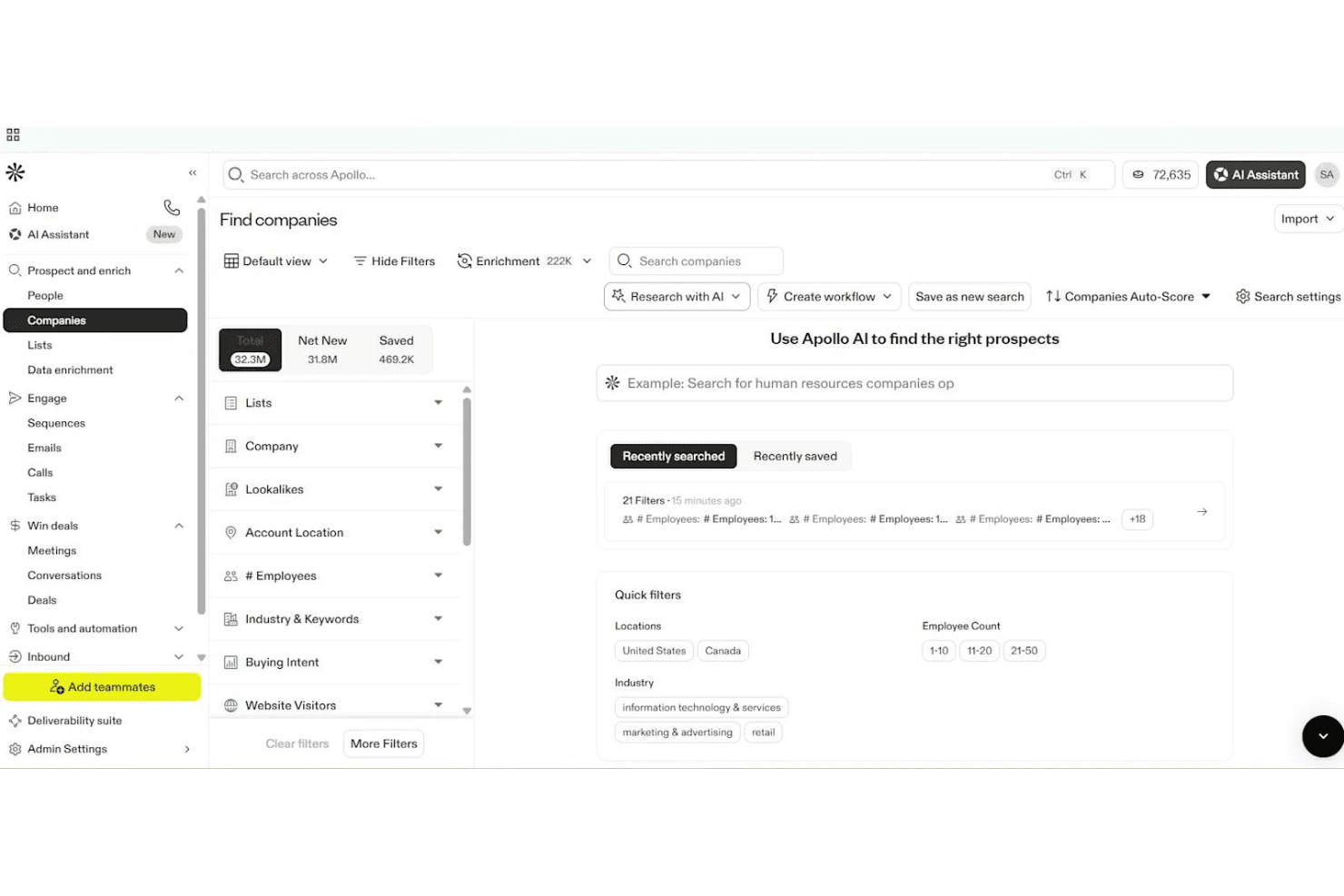
Apollo.io consente agli utenti di filtrare e trovare aziende utilizzando la ricerca basata sull'intelligenza artificiale. Apollo.io è una piattaforma di coinvolgimento delle vendite basata sull'intelligenza artificiale che offre sequenze e-mail in più passaggi, gestione dei contatti, acquisizione tramite moduli e analisi, progettata principalmente per la ricerca di potenziali clienti B2B in uscita anziché per il marketing via e-mail tradizionale.
Per chi è più adatto Apollo.io?
Apollo.io è una scelta intelligente per i team di vendita B2B e gli specialisti della ricerca di potenziali clienti in uscita che desiderano automatizzare campagne di contatto a freddo in più passaggi.
Perché ho scelto Apollo.io
Ho scelto Apollo.io come una delle soluzioni migliori perché è progettato per automatizzare il contatto a freddo ad alto volume verso enormi database di contatti B2B. Mi piace il fatto che il mio team possa avviare sequenze in più passaggi rivolte a nuovi lead e personalizzare le e-mail con variabili basate sull'intelligenza artificiale. Il suo generatore di moduli ci consente di indirizzare i lead in entrata direttamente nei flussi di lavoro di contatto.
Funzionalità principali di Apollo.io
- Generatore di moduli: Crea moduli web incorporabili per acquisire lead in entrata e indirizzarli direttamente nei flussi di lavoro di contatto.
- Redattore di e-mail basato sull'intelligenza artificiale: Genera automaticamente e-mail di contatto personalizzate utilizzando l'intelligenza artificiale sulla base dei dati dei contatti e dei segnali di coinvolgimento.
- Test A/B delle sequenze: Testa diverse varianti di e-mail all'interno delle sequenze in uscita per ottimizzare i tassi di risposta e i messaggi.
- Strumenti per la distribuzione: Accedi al riscaldamento delle caselle di posta, al punteggio di distribuibilità e alla guida integrata per la configurazione di SPF, DKIM e DMARC.
Integrazioni di Apollo.io
Apollo.io offre oltre 50 integrazioni, tra cui connessioni native con Salesforce, HubSpot, Zoho CRM, Gmail, Microsoft 365, LinkedIn tramite estensione di Chrome, Outreach, SalesLoft, Marketo, Pipedrive, Asana, ClickUp e Zapier. L'accesso API è disponibile nei piani aziendali.
Cosa è gratuito?
Apollo.io offre un piano gratuito senza scadenza che garantisce l'accesso di base al database di contatti B2B e alle funzionalità principali di contatto. Il piano gratuito presenta limiti significativi: include 60 crediti e-mail al mese, filtri di ricerca di base e accesso limitato ad alcune integrazioni e agli strumenti di automazione.
Pros and Cons
Pros:
- Enorme database di contatti B2B integrato
- L'intelligenza artificiale scrive e personalizza le e-mail di contatto
- Sequenze di vendita in più passaggi con test A/B
Cons:
- Nessun generatore di newsletter drag-and-drop
- Il piano gratuito è limitato all'uso per i contatti a freddo
Learn more about Apollo.io: Ideale per le numerose opzioni di integrazione avanzate
- Piano gratuito + demo gratuita disponibile
- Da $7/mese (fatturazione annuale)
Visit WebsiteCustomer Rating:4.6/5
La dashboard di automazione di Sender consente agli utenti di costruire e lanciare flussi di lavoro per email utilizzando template pronti all'uso e un editor visuale. Progettato per le aziende che cercano soluzioni di email marketing convenienti, Sender offre una piattaforma completa per creare, automatizzare e gestire campagne email senza la complessità o i costi spesso associati a questi strumenti. È particolarmente interessante per piccole imprese e startup che desiderano potenziare le proprie attività di marketing tramite un'interfaccia intuitiva e un piano gratuito generoso. Rispondendo all'esigenza di comunicazioni efficienti con fino a 2.500 iscritti e offrendo fino a 15.000 email al mese senza costi, Sender allevia efficacemente la sfida di gestire il coinvolgimento dei clienti con un budget limitato.
Perché ho scelto Sender
Ho scelto Sender per il suo approccio unico nel proporre un piano 'Free Forever' rivolto a piccole imprese e startup che necessitano di gestire fino a 2.500 iscritti. Questo piano consente l'invio di 15.000 email al mese, offrendo un'ottima opportunità di coinvolgere il proprio pubblico senza vincoli finanziari. Inoltre, l'attenzione di Sender sull'elevata deliverability grazie al monitoraggio della reputazione IP assicura che le tue email raggiungano i destinatari previsti, fondamentale per mantenere alto il coinvolgimento dei clienti. L'inclusione di contenuti dinamici e il test A/B permettono inoltre di personalizzare e ottimizzare le campagne, aumentando l'efficacia delle iniziative di marketing.
Funzionalità principali di Sender
Oltre al piano gratuito particolarmente vantaggioso, ho trovato diverse funzioni che ne aumentano l'attrattiva:
- Automazione delle email: Crea e gestisci sequenze di email automatiche per semplificare le tue attività di marketing.
- Libreria di template: Accedi a oltre 1.600 modelli personalizzabili per creare email professionali in linea con il tuo brand.
- Dashboard di analisi: Monitora le performance delle campagne con approfondimenti dettagliati e report per prendere decisioni informate.
- Opzioni di integrazione: Integrati facilmente con piattaforme come WordPress e WooCommerce per ampliare la tua portata di marketing.
Integrazioni Sender
Le integrazioni includono WordPress, WooCommerce, Magento, PrestaShop, OpenCart, Joomla, Zapier, API per integrazioni personalizzate e Shopify.
Pros and Cons
Pros:
- Flussi di automazione illimitati inclusi
- Supporto integrato per SMS marketing
- Editor drag-and-drop intuitivo
Cons:
- Limiti sugli iscritti nei piani base
- Nessun builder per landing page integrato
Learn more about Sender: Ideale per email ad urgenza temporale
- Piano gratuito + prova gratuita disponibile
- Da $19/utente/mese (fatturazione annuale)
Visit WebsiteCustomer Rating:4.7/5
Flodesk aiuta a creare urgenza con design puliti per email e countdown temporali. Flodesk è una piattaforma gratuita di email marketing progettata per chi desidera creare email semplici e dall’aspetto visivamente accattivante, senza complicazioni tecniche. Rinomata per i suoi strumenti di design puliti, è particolarmente utile per piccole imprese e creativi che vogliono inviare campagne eleganti senza sforzo. Grazie alle funzionalità di email ad urgenza temporale, Flodesk facilita la creazione di messaggi coinvolgenti e l’automazione dei flussi di lavoro, aiutandoti a mantenere una comunicazione costante con il tuo pubblico.
Perché ho scelto Flodesk
Ho scelto Flodesk per la sua efficacia nella creazione di email ad urgenza temporale che stimolano l’azione grazie a timer per il conto alla rovescia e campagne con scadenze precise. Questo rende facile incoraggiare i destinatari ad agire rapidamente senza complicare l’impostazione. Insieme ai modelli personalizzabili e alle automazioni semplici, Flodesk supporta campagne coinvolgenti mantenendo la creazione delle email intuitiva.
Caratteristiche principali di Flodesk
Oltre alle email ad urgenza temporale, Flodesk offre:
- Modelli personalizzabili: Consente di creare email che riflettano lo stile unico del tuo brand con facilità.
- Gestione degli iscritti: Fornisce strumenti per gestire efficacemente la tua lista, inclusi segmentazione e personalizzazione.
- Analisi delle performance: Offre informazioni approfondite sulle prestazioni delle email, aiutandoti a prendere decisioni basate sui dati.
Integrazioni Flodesk
Le integrazioni includono Shopify, Instagram, Canva, Zapier e WordPress.
Cosa è gratuito?
Flodesk offre un piano gratuito che permette di utilizzare moduli, landing page e strumenti per l’acquisizione di contatti — ma non consente l’invio di email nella versione “gratuita”. Tuttavia, viene offerta una prova gratuita di 14 giorni che permette l’accesso completo alle sue funzionalità di email marketing.
Pros and Cons
Pros:
- Interfaccia unificata che semplifica la creazione e gestione delle campagne
- Le funzionalità di automazione accompagnano gli iscritti in percorsi dedicati (benvenuto, trigger, ecc.)
- Gli strumenti di segmentazione migliorano le campagne di email marketing mirate
Cons:
- Non ideale per esigenze di invio molto ampie o complesse
- Integrazioni limitate rispetto alle piattaforme di email marketing più grandi
Learn more about Flodesk: Ideale per testare le email
- Una versione gratuita specifica per una singola casella di posta e fino a 500 test email al mese.
- Da $14.99/mese per 1 utente e fino a 5 caselle di posta
Visit WebsiteCustomer Rating:4.8/5
Mailtrap permette agli sviluppatori di testare e fare debug sulla consegna delle email in sicurezza. Mailtrap è uno strumento progettato per sviluppatori e team QA per testare l'invio e la consegna delle email. Consente agli utenti di catturare, ispezionare e fare debug delle email in un ambiente sicuro, impedendo che i destinatari reali ricevano email di prova.
Perché ho scelto Mailtrap: Il piano gratuito di Mailtrap offre un ambiente sandbox sicuro per testare le email, ideale per gli sviluppatori che devono assicurarsi che le loro email siano correttamente formattate e consegnate. Puoi ispezionare e fare debug delle email senza che vengano recapitate a caselle di posta reali. La piattaforma supporta il test delle email con supporto HTML e controlli del punteggio spam. Queste caratteristiche lo rendono una scelta ideale per team focalizzati sul testing delle email.
Funzionalità distintive & integrazioni:
Funzionalità includono strumenti di ispezione delle email che permettono di fare debug e analizzare in dettaglio le email. Il controllo del punteggio spam aiuta a migliorare la consegna identificando possibili problemi. Mailtrap offre anche un'interfaccia utente intuitiva per gestire l'ambiente di test delle email.
Integrazioni includono GitHub, GitLab, Bitbucket, Heroku, Jenkins, Travis CI, CircleCI, Zapier, Slack e PagerDuty.
Cosa è gratuito? Mailtrap offre un piano gratuito per sempre con limitazioni sul numero di email che puoi testare mensilmente e sul numero di caselle di posta disponibili.
Pros and Cons
Pros:
- Incluso controllo punteggio spam
- Supporto HTML per le email
- Ideale per sviluppatori e team QA
Cons:
- Poche caselle di posta nel piano gratuito
- Le funzionalità avanzate richiedono l'upgrade
Learn more about Mailtrap: Ideale per un’interfaccia facile da usare
- Piano gratuito disponibile
- A partire da $12/mese
Visit WebsiteCustomer Rating:4.7/5
MailerLite rende l’email marketing semplice per piccoli team e freelance. MailerLite è una piattaforma di email marketing pensata per piccole imprese e freelance. Offre strumenti per creare, gestire e analizzare campagne email, con particolare attenzione alla semplicità e facilità d’uso per migliorare l’esperienza utente.
Perché ho scelto MailerLite: Il piano gratuito di MailerLite offre un’interfaccia intuitiva, rendendolo perfetto per chi dà priorità alla facilità di navigazione. Puoi inviare fino a 12.000 email al mese a un massimo di 1.000 iscritti. La piattaforma include semplici editor drag-and-drop e funzionalità base di automazione. Questo lo rende un’ottima scelta per i team che vogliono gestire campagne di email marketing senza complicazioni.
Caratteristiche principali & integrazioni:
Le funzionalità includono un editor drag-and-drop che consente di progettare le email con facilità. MailerLite offre strumenti di automazione per semplificare l’invio di email in base alle azioni degli utenti. Puoi anche creare landing page a supporto delle tue campagne di marketing.
Le integrazioni includono Shopify, WooCommerce, WordPress, Zapier, Stripe, Facebook, Squarespace, Mailchimp, Google Sheets e PayPal.
Cosa offre gratis? MailerLite mette a disposizione un piano gratuito per sempre con limiti sul numero di iscritti e sulle email che puoi inviare ogni mese.
Pros and Cons
Pros:
- Strumenti per la creazione di landing page
- Supporta fino a 1.000 iscritti
- Non è richiesta la carta di credito
Cons:
- Solo strumenti di reportistica base
- Nessun supporto telefonico nel piano gratuito
 Ideale per utenti ecommerce
- Piano gratuito + demo gratuita disponibile
- Da $20/mese
Visit WebsiteCustomer Rating:4.6/5
Klaviyo gestisce campagne ecommerce di email e SMS con automazione. Klaviyo è una piattaforma di marketing progettata per le aziende ecommerce, che offre soluzioni di email e SMS marketing combinate con funzionalità CRM B2C. Aiuta le aziende ad automatizzare le attività di marketing, segmentare il loro pubblico e creare campagne coinvolgenti per aumentare il coinvolgimento dei clienti.
Perché ho scelto Klaviyo: Il piano gratuito di Klaviyo offre funzioni di automazione e segmentazione, rendendolo ideale per chi lavora nell'ecommerce e deve personalizzare le proprie strategie di marketing. È possibile creare e inviare campagne mirate senza costi iniziali. La piattaforma supporta solide analisi per aiutarti a comprendere il comportamento dei clienti. Le sue capacità di integrazione rispondono alle esigenze delle aziende ecommerce.
Caratteristiche principali & integrazioni:
Funzionalità includono una segmentazione dettagliata dei clienti per indirizzare pubblici specifici. Gli strumenti per costruire campagne sono intuitivi e consentono di progettare campagne email e SMS efficaci. Klaviyo offre anche analisi approfondite per monitorare il successo delle attività di marketing.
Integrazioni includono Shopify, Salesforce, WooCommerce, Magento, BigCommerce, Stripe, Facebook, Google Ads, Instagram e Zendesk.
Cosa è gratuito? Klaviyo offre un piano gratuito che include automazione, segmentazione e strumenti per la creazione di campagne, con alcune limitazioni sul numero di contatti e di email inviate ogni mese.
Pros and Cons
Pros:
- Forte attenzione all'ecommerce
- Segmentazione dettagliata dei clienti
- Supporta email e SMS marketing
Cons:
- Numero limitato di contatti nel piano gratuito
- Invii email mensili limitati
 8Ideale per piccoli team
Kit
- Prova gratuita di 14 giorni disponibile
- A partire da $33/mese (fatturazione annuale)
Visit WebsiteCustomer Rating:4.5/5
Kit aiuta i creator a far crescere il pubblico con email, automazione e insight. Kit è una piattaforma email rivolta ai creator che aiuta gli utenti a far crescere e coinvolgere il proprio pubblico tramite newsletter, landing page e messaggi automatici. È pensata per individui e piccoli team per gestire email, automazioni, monetizzazione e analisi del pubblico—tutto in un unico posto.
Perché ho scelto Kit: Kit permette di inviare email illimitate, creare landing page e realizzare moduli di iscrizione già nel piano gratuito. Include automazioni visuali di base, tagging, A/B split testing e sondaggi direttamente nelle email. Queste funzionalità aiutano i piccoli team a lanciare campagne, segmentare il pubblico e testare i contenuti senza dover passare a un piano superiore.
Funzionalità principali e integrazioni:
Funzionalità includono template email personalizzabili, contenuti condizionali e campagne con invio ai non‑aperti per perfezionare la comunicazione. Hai anche accesso a workflow di automazione visuale più avanzati delle semplici sequenze. Inoltre, c’è un motore di raccomandazione di network per creator per aiutarti a crescere.
Integrazioni includono Canva, GIPHY, Circle, Broadcast Boost, TeachKit, Sponsy, SavvyCal e Senja.
Cosa c’è di gratuito? Un piano gratuito per sempre che supporta fino a 10.000 iscritti, 1 utente, 1 automazione visuale e 1 sequenza email.
Pros and Cons
Pros:
- Fino a 10 k iscritti gratis
- Consente tagging e segmentazione degli iscritti
- Permette di effettuare A/B test sulle email
Cons:
- Limite di 1 utente nel piano gratuito
- Il piano gratuito mostra il branding Kit
Learn more about Kit: Ideale per modelli di email semplici
- Piano gratuito disponibile
- A partire da $37/mese
Visit WebsiteCustomer Rating:4.3/5
Benchmark Email aiuta le PMI a creare e automatizzare campagne email con facilità. Benchmark Email è una piattaforma di email marketing rivolta a piccole e medie imprese. Offre strumenti per la creazione e la gestione di campagne email, con particolare attenzione al design user-friendly e all'automazione.
Perché ho scelto Benchmark Email: Il piano gratuito di Benchmark Email include un editor di email e modelli personalizzabili, ideali per creare campagne email semplici ed efficaci. Puoi accedere a funzioni di automazione e strumenti di reportistica senza bisogno di una carta di credito. È perfetto per i team che desiderano modelli di email semplici, senza complessità. La versione gratuita supporta anche la costruzione di liste e l'ottimizzazione delle campagne, in linea con la sua USP di modelli di email semplici.
Funzionalità e integrazioni principali:
Le funzionalità includono un editor email facile da usare, modelli personalizzabili e strumenti di automazione. Puoi anche accedere a landing page e funzioni di reportistica per monitorare le tue campagne. Questi elementi rendono più semplice per il tuo team la gestione e l'ottimizzazione degli sforzi di email marketing.
Le integrazioni includono Shopify, Zapier, WordPress, Google Analytics, PayPal, Salesforce, HubSpot, Facebook, Twitter e LinkedIn.
Cosa è gratuito? Benchmark Email offre un piano gratuito per sempre con limitazioni sul numero di email che puoi inviare al mese e sull'accesso a determinate funzionalità.
Pros and Cons
Pros:
- Nessuna carta di credito richiesta per il piano gratuito
- Modelli di email personalizzabili
- Adatto a piccole imprese
Cons:
- Limite di email mensili inviate
- Funzioni di reportistica di base
Learn more about Benchmark Email: La soluzione migliore per le aziende canadesi
- Piano gratuito disponibile
- A partire da CAD $22.04/mese
Visit WebsiteCustomer Rating:4.5/5
Cyberimpact aiuta le PMI canadesi ad automatizzare e analizzare le campagne email. Cyberimpact è una piattaforma di email marketing pensata per piccole e medie imprese e organizzazioni non profit in Canada. Si concentra sull'automazione del marketing, la creazione di landing page e l'analisi delle performance per migliorare il coinvolgimento dei clienti.
Perché ho scelto Cyberimpact: Il piano gratuito di Cyberimpact offre accesso a template email personalizzabili e a scenari email automatizzati. Questo lo rende ideale per le aziende che cercano soluzioni semplici per gestire le proprie campagne di email marketing. La piattaforma mette a disposizione landing page ad alta conversione e il monitoraggio delle performance in tempo reale, in linea con il suo USP di essere la soluzione migliore per le aziende canadesi. Il supporto bilingue e la conformità alla Legge Canadese Anti-Spam sono elementi distintivi fondamentali.
Funzionalità straordinarie & integrazioni:
Le funzionalità includono l'automazione del marketing che aiuta a programmare e inviare email automaticamente. L'editor email è intuitivo e ti permette di progettare le email senza difficoltà. Gli strumenti di analisi delle performance consentono di monitorare e migliorare facilmente i risultati delle campagne.
Le integrazioni includono Shopify, Google Analytics, Facebook, PayPal, WordPress, Salesforce, LinkedIn, Twitter, Zapier e HubSpot.
Cosa è gratis? Cyberimpact offre un piano gratuito per sempre con limitazioni sul numero di email che puoi inviare ogni mese e l'accesso a determinate funzionalità avanzate.
Pros and Cons
Pros:
- Supporto bilingue disponibile
- Conformità con le normative CASL
- Monitoraggio delle performance in tempo reale
Cons:
- Assenza di supporto clienti 24/7
- Opzioni di integrazione limitate nel piano gratuito
Learn more about Cyberimpact:
Altri software gratuiti per l’email marketing
Ecco alcune opzioni aggiuntive di software per l’email marketing che offrono anch’esse piani o periodi di prova gratuiti. Sebbene questi strumenti non siano stati inclusi nella mia selezione, vale comunque la pena considerarli:
- 11BrevoIdeale per email transazionali
- 12VidyardIdeale per email con video
- 13VitaMailIdeale per strumenti combinati di contenuti e deliverability
- 14EmailOctopusIdeale per un'elevata consegna delle email
- 15OmnisendIdeale per le funzionalità di automazione
Come Valuto i Software di Email Marketing Gratuiti
Per prima cosa, definisco cosa si intende per gratuito. Per i software di email marketing, i fornitori devono offrire un piano gratuito per sempre—non una prova—perché inviare newsletter, automatizzare i flussi di benvenuto e gestire liste in crescita sono funzioni continuative. Da qui, suddivido la mia valutazione in due livelli: le funzionalità principali che uno strumento deve assicurare per essere valutato e i fattori differenzianti che distinguono le opzioni migliori.
Funzionalità Principali (Requisiti di Base per Questa Lista)
Oltre ai requisiti sull'offerta gratuita, utilizzo anche un sistema di punteggio per selezionare gli strumenti da inserire nella mia lista. Ecco come funziona:
Valuto ciascuno su una scala da 0 (non offre la funzionalità) a 5 (eccelle in questo ambito) per ogni funzionalità principale elencata di seguito. Poi calcolo il punteggio totale dello strumento in percentuale. Ogni strumento deve raggiungere un punteggio minimo totale del 75% per essere considerato per l'inclusione.
- Costruttore di Campagne Email: Cerco un editor visivo drag-and-drop con una buona libreria di modelli, così un marketer singolo può progettare una email di lancio prodotto brandizzata senza toccare codice.
- Gestione della Lista Contatti: Organizzare gli iscritti è importante, quindi valuto se il piano gratuito supporta la segmentazione tramite tag o attributi—come separare gli acquirenti dagli iscritti solo alla newsletter.
- Moduli di Iscrizione: Controllo se la piattaforma include moduli incorporabili o landing page ospitate che aggiungono automaticamente i nuovi contatti alla lista, simile a quanto offrono Mailchimp e MailerLite.
- Automazione di Marketing: Anche i flussi base fanno la differenza. Cerco automazioni nel livello gratuito come sequenze di benvenuto o serie drip post-iscrizione attivate da azioni degli iscritti.
- Analisi delle Campagne: Tassi di apertura, click, bounce e cancellazioni dovrebbero essere tutti visibili nel piano gratuito. Valuto quanto sia facile estrarre informazioni dopo aver inviato una newsletter settimanale.
- Volume di Invio Gratuito: Il limite mensile di email e il limite di iscritti devono permettere un utilizzo reale. Considero se una startup con qualche centinaio di contatti può eseguire campagne regolari senza incontrare restrizioni.
Quando ho una lista di strumenti che soddisfano i criteri, considero cosa distingue ogni piattaforma.
Fattori Differenzianti (Cosa Distingue i Fornitori)
Ecco come confronto e metto a confronto i diversi fornitori:
Funzionalità Distintive
L'A/B testing nel livello gratuito è un grande fattore di differenziazione—permette di confrontare oggetti o orari di invio e migliorare le performance sulla base di dati reali invece che su ipotesi. Valuto anche le integrazioni ecommerce, poiché i gestori di negozi su Shopify o WooCommerce hanno bisogno di email di carrello abbandonato e raccomandazione dei prodotti già integrate. Gli strumenti per la deliverability sono altrettanto importanti. I controlli del punteggio spam e il supporto per l'autenticazione del dominio (SPF, DKIM) aiutano gli utenti gratuiti a far arrivare realmente le email in inbox invece che nella cartella dello spam.
Oltre le Funzionalità
Verifico quanto bene un piano gratuito si collega al resto della tua infrastruttura—la compatibilità con Zapier o Make è il punto di partenza, ma integrazioni native con CRM e CMS fanno risparmiare tempo quando si sincronizzano i contatti tra strumenti come HubSpot o WordPress. Anche la conformità è fondamentale. La raccolta del consenso GDPR integrata, il double opt-in e la gestione delle cancellazioni conforme al CAN-SPAM ti proteggono da responsabilità legali. Infine, valuto la scalabilità—quando la tua lista supera il livello gratuito, il percorso di aggiornamento deve essere prevedibile, non una scogliera dove i costi salgono bruscamente o le funzionalità chiave vengono bloccate dietro piani premium.
Come scegliere un software gratuito per l’email marketing
Gli elenchi complessi di funzionalità e le strutture tariffarie possono rendere difficile capire cosa si ottiene davvero da un software gratuito per l’email marketing. Per aiutarti a rimanere concentrato mentre valuti le diverse opzioni, ecco alcuni fattori da tenere a mente:
| Fattore | Cosa considerare |
| Ambito dell'offerta gratuita | Verifica cosa è incluso nel piano gratuito. Cerca i limiti relativi alle email inviate, ai contatti e alle funzionalità disponibili senza effettuare l'upgrade. |
| Scalabilità | Considera se il software può crescere insieme alle tue esigenze. Cerca opzioni per effettuare l'upgrade man mano che aumentano la tua lista email e la complessità delle campagne. |
| Integrazioni | Assicurati che il software si colleghi agli strumenti che il tuo team utilizza già, come sistemi CRM, piattaforme di e-commerce e strumenti di analisi. |
| Facilità d'uso | Valuta l'interfaccia e il processo di configurazione. Scegli un software che il tuo team possa utilizzare facilmente senza una formazione approfondita o una lunga curva di apprendimento. |
| Assistenza clienti | Cerca i canali di assistenza disponibili, come la chat dal vivo o un centro assistenza, per ricevere supporto quando si verificano problemi. |
| Analisi | Esamina il livello di dettaglio delle funzionalità di reportistica. Avrai bisogno di informazioni sui tassi di apertura, sui tassi di clic e su altre metriche per misurare i tuoi risultati. |
| Automazione | Determina la complessità delle funzionalità di automazione. Assicurati di poter configurare flussi di lavoro per l'invio automatico delle email, così da risparmiare tempo e migliorare il coinvolgimento. |
| Personalizzazione | Verifica quanto siano personalizzabili i modelli di email e le campagne. Dovrai mantenere la coerenza del marchio senza dover possedere competenze avanzate di design. |
Se vuoi approfondire, consulta la nostra guida completa su come scegliere la piattaforma di email marketing giusta.
Che cos'è un software gratuito di email marketing?
Il software di email marketing è uno strumento che aiuta le aziende a inviare email di marketing, gestire gli elenchi di contatti e analizzare le prestazioni delle campagne. Questi strumenti offrono generalmente piani gratuiti con funzionalità o utilizzo limitati, come un limite al numero di email inviate o di contatti gestiti.
I professionisti del marketing, i proprietari di piccole imprese e le startup utilizzano generalmente questi strumenti per coinvolgere il proprio pubblico senza sostenere costi elevati. Funzionalità come l'automazione, l'analisi e i modelli personalizzabili aiutano gli utenti a gestire le campagne in modo efficiente, comprendere il coinvolgimento del pubblico e mantenere la coerenza del marchio.
Funzionalità dei software gratuiti di email marketing
Esaminiamo le funzionalità comunemente presenti nei software di email marketing e vediamo quali sono solitamente incluse nei piani gratuiti rispetto a quelli a pagamento.
Funzionalità solitamente gratuite dei software di email marketing
- Modelli di email: strutture predefinite consentono di creare rapidamente email dall'aspetto professionale, risparmiando tempo e fatica.
- Analisi di base: fornisce informazioni sui tassi di apertura e sui tassi di clic, aiutandoti a misurare il successo della campagna.
- Gestione dei contatti: consente di organizzare e segmentare gli elenchi di email per inviare messaggi mirati.
- Automazione: permette di configurare semplici flussi di lavoro per inviare automaticamente le email in base a determinati attivatori.
- Editor con trascinamento: semplifica il processo di creazione delle email, rendendo facile progettare email senza competenze di programmazione.
- Limiti giornalieri di invio: impone un limite al numero di email che puoi inviare ogni giorno, contribuendo a gestire le risorse nei piani gratuiti.
- Moduli di iscrizione: consentono di raccogliere le informazioni degli iscritti direttamente dal tuo sito web, ampliando la tua lista email.
- Segmentazione di base: consente di suddividere il pubblico in gruppi per comunicazioni più personalizzate.
Funzionalità solitamente a pagamento dei software di email marketing
- Segmentazione avanzata: offre una definizione dettagliata del pubblico, consentendo campagne più personalizzate ed efficaci.
- Test A/B: consente di testare diverse versioni delle email per ottimizzare i contenuti e migliorare i tassi di coinvolgimento.
- Analisi avanzate: fornisce informazioni più approfondite sul comportamento dei clienti e sulle prestazioni delle campagne per prendere decisioni migliori.
- Pagine di destinazione personalizzabili: consentono di creare pagine uniche in linea con le campagne email e di favorire le conversioni.
- Marketing multicanale: integra l'email con SMS, social network e altri canali per una strategia di marketing coerente.
- Invii illimitati: elimina le restrizioni sul numero di email che puoi inviare, supportando campagne più ampie.
- Assistenza prioritaria: offre tempi di risposta più rapidi e supporto dedicato, garantendo una risoluzione efficiente dei problemi.
- Automazione avanzata: strumenti di email marketing basati sull'IA supportano flussi di lavoro e attivatori complessi, migliorando l'efficienza delle attività di marketing.
Vantaggi del software gratuito di email marketing
L'implementazione di un software gratuito di email marketing offre diversi vantaggi al tuo team e alla tua azienda. Eccone alcuni che puoi aspettarti:
- Soluzione conveniente: i piani gratuiti ti consentono di gestire l'email marketing senza incidere sul budget, rendendoli ideali per startup e piccole imprese.
- Facilità d'uso: interfacce intuitive ed editor con funzionalità di trascinamento rendono semplice per chiunque nel tuo team creare e inviare email.
- Automazione di base: automatizzare le attività semplici fa risparmiare tempo e garantisce una comunicazione coerente con il tuo pubblico.
- Crescita del pubblico: i moduli di iscrizione e la gestione dei contatti ti aiutano a creare e organizzare efficacemente la tua lista di email.
- Analisi delle prestazioni: le analisi di base forniscono dati preziosi sul coinvolgimento degli utenti nelle email, aiutandoti a capire cosa funziona.
- Personalizzazione: i modelli di email ti permettono di mantenere la coerenza del marchio senza dover possedere competenze di design.
- Scalabilità: i piani gratuiti offrono una base da cui iniziare, consentendoti di effettuare l'upgrade man mano che crescono la tua attività e le tue esigenze di email marketing.
Costi e prezzi del software gratuito di email marketing
Mi rendo conto che sei arrivato a questo articolo cercando le migliori opzioni di software di email marketing disponibili gratuitamente. Tuttavia, poiché i piani gratuiti offrono solo funzionalità limitate, è molto probabile che in futuro dovrai passare a un piano superiore.
La tabella seguente riepiloga i piani più comuni, i relativi prezzi medi e le funzionalità tipicamente incluse nelle soluzioni di software di email marketing:
Tabella comparativa dei piani per il software di email marketing
| Tipo di piano | Prezzo medio | Funzionalità comuni |
| Piano gratuito | $0 | Modelli di email di base, gestione dei contatti, analisi di base, limiti giornalieri di invio e automazione semplice. |
| Piano personale | $5-$25/ utente/mese | Modelli avanzati, limiti di invio aumentati, test A/B e assistenza clienti. |
| Piano aziendale | $30-$100/ utente/mese | Automazione avanzata, analisi dettagliate, creazione di pagine di destinazione e marketing multicanale. |
| Piano per grandi aziende | $100+/ utente/mese | Integrazioni personalizzate, assistenza prioritaria, invii illimitati e segmentazione avanzata. |
Domande frequenti sul software gratuito di email marketing
Ecco alcune risposte alle domande comuni sul software gratuito di email marketing:
È possibile fare email marketing gratuitamente?
Sì, molti strumenti offrono piani gratuiti che includono funzionalità essenziali come l’invio di email, la gestione dei contatti e le analisi di base. Queste versioni gratuite sono ideali per piccole imprese o startup che desiderano coinvolgere il proprio pubblico senza sostenere costi.
Quali sono i limiti del software gratuito di email marketing?
Il software gratuito di email marketing presenta solitamente dei limiti sul numero di email inviate al mese e sul numero di contatti che è possibile gestire. Anche le funzionalità avanzate, come i test A/B o le analisi dettagliate, possono essere riservate ai piani a pagamento, quindi valuta attentamente le tue esigenze.
Il software gratuito di email marketing prevede costi nascosti?
Sebbene il software possa essere gratuito, presta attenzione ai costi legati al superamento dei limiti di email o contatti. Alcuni fornitori potrebbero addebitare costi per funzionalità aggiuntive o assistenza premium. Esamina sempre i termini del piano gratuito per evitare spese impreviste. Se desideri un’analisi più approfondita, consulta la nostra guida completa su come scegliere la piattaforma di email marketing giusta.