

Il software per la gestione dei lead ti aiuta ad acquisire, organizzare e monitorare i lead, così non perderai mai un’opportunità di vendita né lascerai sfuggire potenziali clienti preziosi. Se stai cercando i migliori strumenti per aumentare la concentrazione del team, migliorare i ricontatti e trasformare più lead in trattative, non sei il solo: budget limitati e mercati affollati rendono una gestione efficace dei lead una priorità fondamentale.
In questa guida troverai un confronto chiaro dei sistemi più efficaci per la gestione dei lead nel 2026, con particolare attenzione alle funzionalità e ai vantaggi concreti più importanti per i team di marketing e vendita ad alte prestazioni.
Perché fidarsi dei nostri consigli sui software
6,700+
Reviews
20
Industry experts
16+
Evaluation factors
14
Years
Il nostro team testa e recensisce software dal 2012. In quanto leader del marketing noi stessi, sappiamo quanto sia difficile — e importante — scegliere il software giusto.
Per questa guida, abbiamo valutato gli strumenti attraverso test pratici e ricerche indipendenti, assegnando un punteggio agli strumenti in base ai nostri criteri di selezione.
Le nostre recensioni riflettono il nostro giudizio editoriale umano, non un discorso di vendita.
Revisori esperti:
 Gui DrusinaDirettore creativo
- Shriya GhateSenior Marketing Lead
 Amanda JacquesResponsabile Marketing Ops

Riepilogo dei migliori software per la gestione dei lead
Questa tabella comparativa riassume i dettagli dei prezzi delle mie migliori selezioni di software per la gestione dei lead, per aiutarti a trovare quello più adatto al tuo budget e alle esigenze della tua azienda.
| Tool | Best For | Trial Info | Price | ||
|---|---|---|---|---|---|
| 1 | Ideale per i dati sull'intenzione B2B e l'arricchimento dei potenziali clienti | Piano gratuito + prova gratuita di 14 giorni + dimostrazione gratuita disponibile | A partire da $49/utente/mese (con fatturazione annuale) | Website | |
| 2 | Ideale per la configurazione dell'interfaccia drag-and-drop | Demo gratuita + prova gratuita disponibili | Da $40/utente/mese (fatturato annualmente) | Website | |
| 3 | Migliore per timeline condivise tra marketing e vendite | Piano gratuito + demo gratuita disponibile | Da $7/utente/mese (fatturazione annuale) | Website | |
| 4 | Ideale per la segmentazione di audience basata su percorsi | Prova gratuita disponibile | Prezzo su richiesta | Website | |
| 5 | Ideale per l’instradamento e l’abbinamento automatico dei lead | Demo gratuita disponibile | Prezzi su richiesta | Website | |
| 6 | Ideale per flussi di lavoro ad alta velocità di acquisizione lead | Demo gratuita disponibile | Da $60/utente/mese | Website | |
| 7 | Ideale per analisi predittiva e insight sugli account | Demo gratuita disponibile | Prezzo su richiesta | Website | |
| 8 | Ideale per il tracciamento automatizzato delle tappe fondamentali del cliente | Prova gratuita di 14 giorni + demo gratuita disponibile | Da $15/mese (fatturato annualmente) | Website | |
| 9 | Ideale per dashboard nativi di sales intelligence | Demo gratuita disponibile | Prezzo su richiesta | Website | |
| 10 | Ideale per l'orchestrazione di campagne a livello enterprise | Demo gratuita disponibile | Prezzo su richiesta | Website |


Recensioni dei migliori software per la gestione dei lead
Di seguito trovi i miei riepiloghi dettagliati dei migliori software per la gestione dei lead presenti nella mia selezione. Le mie recensioni offrono una panoramica approfondita delle funzionalità, dei casi d’uso ideali e delle integrazioni di ogni piattaforma, per aiutarti a trovare quella più adatta a te.
 Ideale per i dati sull'intenzione B2B e l'arricchimento dei potenziali clienti
- Piano gratuito + prova gratuita di 14 giorni + dimostrazione gratuita disponibile
- A partire da $49/utente/mese (con fatturazione annuale)
Visit WebsiteCustomer Rating:4.5/5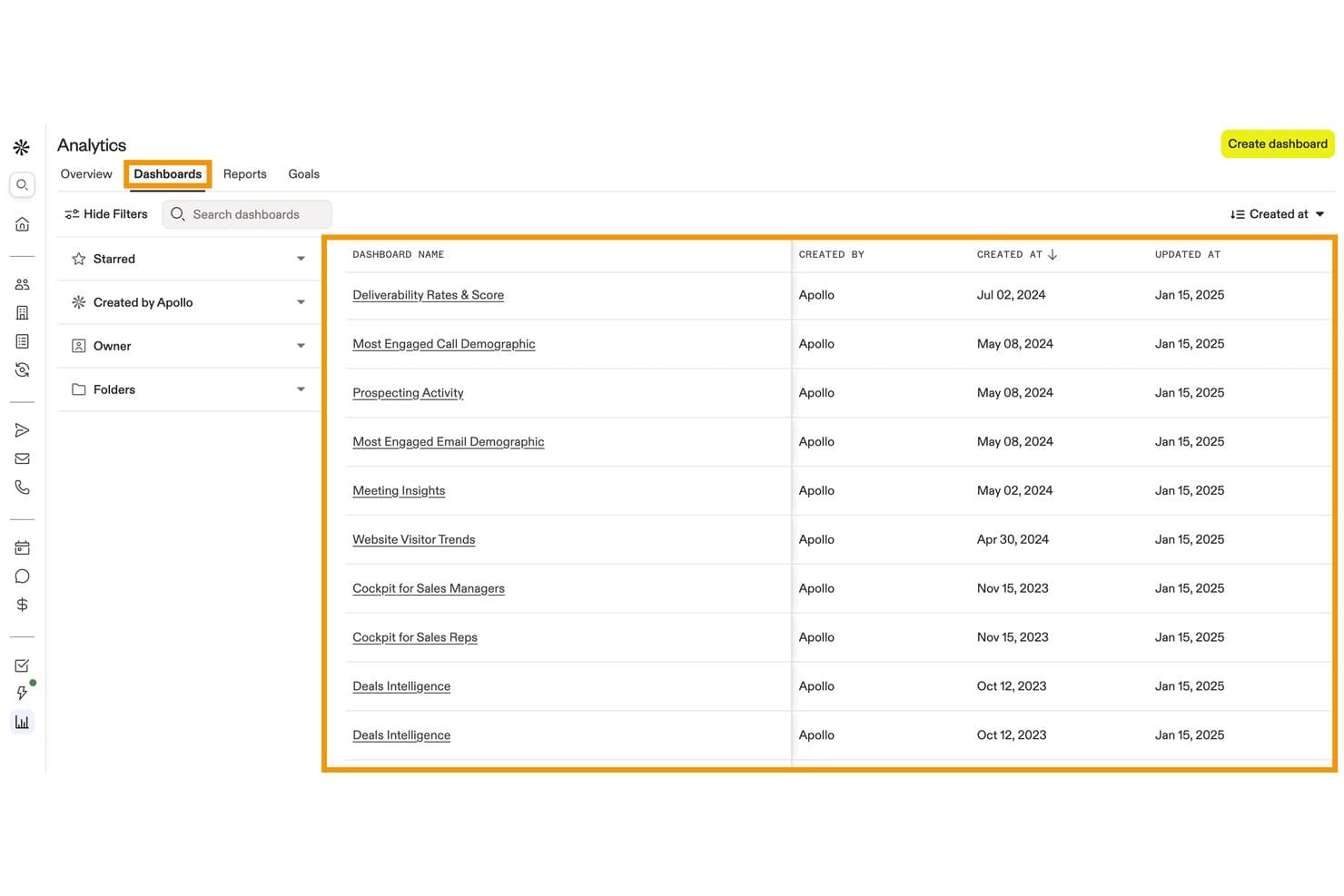
Apollo.io centralizza cruscotti analitici predefiniti per monitorare l'attività di vendita. Apollo.io (Apollo) è una piattaforma B2B per le vendite e la gestione dei potenziali clienti che combina una banca dati di oltre 240 milioni di contatti, l'arricchimento dei moduli, l'identificazione dei visitatori del sito web, la valutazione dei potenziali clienti, l'instradamento dei contatti in entrata e l'automazione dei flussi di lavoro.
Per chi è più indicato Apollo.io?
Apollo.io è particolarmente adatto ai team di vendita e marketing B2B che devono arricchire, valutare e indirizzare i potenziali clienti in entrata utilizzando un'ampia banca dati di contatti, senza dover integrare diversi strumenti per i dati.
Perché ho scelto Apollo.io
Apollo.io è entrato nella mia selezione perché i suoi dati sull'intenzione B2B, forniti da Bombora, individuano gli account che stanno effettuando ricerche attive sulla tua categoria in oltre 15.000 argomenti, prima ancora che compilino un modulo. Mi piace molto il modo in cui l'arricchimento dei moduli si combina con questo segnale: un potenziale cliente invia solo il proprio indirizzo email e Apollo inserisce automaticamente le dimensioni dell'azienda, il settore e il numero di telefono dalla sua banca dati di 240 milioni di contatti, consentendo alle regole di instradamento di attivarsi fin dall'inizio su dati completi. È questa combinazione di valutazione dell'intenzione e acquisizione in entrata arricchita che permette ad Apollo di distinguersi nella qualificazione dei potenziali clienti B2B.
Funzionalità principali di Apollo.io
- Instradatore dei contatti in entrata: Indirizza i potenziali clienti in entrata al rappresentante o al tipo di riunione corretto in base alle risposte del modulo di raccolta dati, alla corrispondenza con il profilo del cliente ideale o alla titolarità di un account esistente, inclusa la distribuzione a rotazione.
- Arricchimento a cascata: Recupera i dati mancanti dei contatti da diversi fornitori in sequenza, colmando le lacune nei campi email, telefono e dati aziendali tra i record salvati.
- Identificazione dei visitatori del sito web: Individua le aziende e i contatti che navigano sul tuo sito, comprese le pagine specifiche visualizzate, prima ancora che inviino un modulo.
- Modelli di valutazione personalizzati: Consente di creare modelli di valutazione separati per persone e aziende utilizzando oltre 65 filtri, con risultati suddivisi per livelli e una visualizzazione della scomposizione del punteggio per ogni potenziale cliente.
Integrazioni di Apollo.io
Apollo.io offre integrazioni native con Salesforce, HubSpot, Zoho, Microsoft Dynamics, Pipedrive, Marketo, Klaviyo, Mailchimp, Snowflake e Slack. Supporta inoltre un'API pubblica per le integrazioni personalizzate e Zapier.
Pros and Cons
Pros:
- I segnali di intenzione B2B individuano le attività di ricerca
- L'arricchimento dei moduli riduce l'attrito nella compilazione
- L'instradamento dettagliato dei contatti in entrata migliora il passaggio dei potenziali clienti alle vendite
Cons:
- La coltivazione dei potenziali clienti rimane incompleta
- L'attribuzione non include la reportistica dei ricavi multi-contatto
Learn more about Apollo.io: Ideale per la configurazione dell'interfaccia drag-and-drop
- Demo gratuita + prova gratuita disponibili
- Da $40/utente/mese (fatturato annualmente)
Visit WebsiteCustomer Rating:4.7/5
Creatio offre una dashboard di gestione con analisi delle campagne e insight tramite IA. Creatio è una piattaforma di automazione del marketing e CRM senza codice che copre l'acquisizione dei lead, la valutazione, il nurturing e la gestione della pipeline durante tutto il ciclo di vita del lead.
Per chi è più indicato Creatio?
Creatio è particolarmente adatto a team marketing di aziende di medie e grandi dimensioni che desiderano configurare autonomamente i propri flussi di lavoro senza dover dipendere dagli sviluppatori.
Perché ho scelto Creatio
Ho inserito Creatio tra le mie scelte migliori perché la configurazione tramite interfaccia drag-and-drop va ben oltre i modelli di email. Il Campaign Designer visivo permette di costruire flussi di nurturing lead multi-step e multi-canale con logica ramificata, tutto senza dover scrivere una sola riga di codice. Anche il Landing Page Designer drag-and-drop si distingue, permettendoti di creare e collegare pagine di acquisizione lead direttamente sulla piattaforma così che i nuovi lead finiscano subito nella pipeline.
Funzionalità principali di Creatio
- Lead predictive scoring: Un modello di intelligenza artificiale che valuta ogni lead da 1 a 100 in base alle esigenze del cliente, ai dati di coinvolgimento e alla cronologia dei servizi.
- Campaign Designer: Uno strumento visivo senza codice per costruire flussi di campagna multi-canale con logiche ramificate basate sul comportamento dei clienti.
- Landing Page Designer: Un costruttore drag-and-drop che crea landing page integrate direttamente in Creatio, registrando automaticamente nuovi lead quando viene inviato un modulo.
- Tracciamento web analytics: Importa i dati di Google Analytics o Matomo nei profili dei contatti, mostrando la fonte del lead, il canale e tutte le attività sul sito a livello di sessione.
Integrazioni Creatio
Creatio offre integrazioni native con Microsoft Exchange, Microsoft 365, Google Calendar, Google Ads e Facebook Ads, oltre a un marketplace con connettori per SharePoint, DocuSign, Salesforce, Jotform e Microsoft Teams Phone. Si collega anche con Zapier e supporta i protocolli OData 3/4 oltre a una REST API per integrazioni personalizzate.
Pros and Cons
Pros:
- Acquisisce lead da più fonti di canale
- Supporta la configurazione dei layout senza codice
- Valutazione dei lead integrata e previsione delle vendite
Cons:
- Curva di apprendimento ripida per le configurazioni avanzate
- La struttura modulare dei prezzi è difficile da stimare
Learn more about Creatio: Migliore per timeline condivise tra marketing e vendite
- Piano gratuito + demo gratuita disponibile
- Da $7/utente/mese (fatturazione annuale)
Visit WebsiteCustomer Rating:4.4/5
HubSpot offre una dashboard con attività dei contatti e monitoraggio dei potenziali clienti. HubSpot è una piattaforma CRM con strumenti integrati per la gestione dei lead che uniscono il monitoraggio dei contatti, l'acquisizione dei lead, la gestione della pipeline e i flussi di lavoro tra marketing e vendite in un unico sistema.
Per chi è ideale HubSpot?
Consiglierei HubSpot a team marketing e vendite di piccole e medie dimensioni che gestiscono lead in entrambe le funzioni e necessitano di un sistema condiviso.
Perché ho scelto HubSpot
Ho incluso HubSpot tra le mie scelte principali per la capacità della sua timeline dei contatti di unificare le attività di marketing e vendita in un'unica vista. Quando un lead apre un'email, visita una pagina prezzi o compila un modulo, quell'attività appare accanto alle note delle chiamate e ai registri degli incontri delle vendite. Questo contesto condiviso permette ai rappresentanti di vendita di sapere esattamente con quale contenuto di marketing il lead ha interagito prima del primo contatto, riducendo i follow-up ridondanti.
Funzionalità principali di HubSpot
- Lead scoring: Assegna valori ai lead in base ai dati demografici e all'attività di coinvolgimento per aiutare a prioritizzare i contatti.
- Gestione pipeline: Organizza i lead in fasi di trattativa con controlli drag-and-drop per permettere ai rappresentanti di monitorare i progressi a colpo d'occhio.
- Pianificazione riunioni: Permette ai lead di prenotare direttamente uno slot in agenda con un rappresentante tramite un link condivisibile.
- Liste smart: Segmentano automaticamente i lead in base a criteri come stadio del ciclo di vita, settore o comportamento.
Integrazioni HubSpot
HubSpot offre oltre 1.500 app nel proprio App Marketplace, tra cui Salesforce, Slack, Google Workspace, Mailchimp, Shopify, LinkedIn Sales Navigator, Microsoft Teams, Zoom, Stripe e WordPress. È disponibile su Zapier e dispone di un'API per integrazioni personalizzate.
Pros and Cons
Pros:
- Moduli integrati per acquisire lead automaticamente
- Timeline dei contatti condivisa tra tutti i team
- Sequenze email di nurturing automatico incluse
Cons:
- I report avanzati sono riservati all'enterprise
- Le regole personalizzate di instradamento dei lead possono essere complesse
 Ideale per la segmentazione di audience basata su percorsi
- Prova gratuita disponibile
- Prezzo su richiesta
Visit WebsiteCustomer Rating:4.5/5
Ortto offre una dashboard con approfondimenti sui clienti e segmentazione dell'audience. Ortto è una piattaforma di automazione marketing che combina una piattaforma dati dei clienti incorporata con strumenti per campagne basate su percorsi, lead scoring, messaggistica multicanale e segmentazione dell'audience.
A chi è più adatto Ortto?
Ortto è ideale per i team di marketing che gestiscono sia l'esecuzione delle campagne che i dati dell'audience, senza bisogno di affidarsi a un team di dati o ingegneria separato.
Perché ho scelto Ortto
Ortto si merita un posto nella mia shortlist per il modo in cui il suo journey builder collega direttamente la segmentazione dell'audience ai trigger delle campagne. Uso il CDP integrato di Ortto per costruire segmenti basati su dati comportamentali, come le visite alle pagine o le azioni sui prodotti, e questi segmenti sono direttamente collegati ai percorsi automatizzati. Ciò che apprezzo è la possibilità di suddividere i percorsi in base agli attributi dell'audience nel mezzo del flusso, in modo che i lead ricevano messaggi diversi a seconda di dove si trovano nel funnel.
Funzionalità principali di Ortto
- Lead scoring personalizzato: Crea punteggi utilizzando dati demografici, firmografici e comportamentali, con degrado automatico del punteggio nel tempo per una maggiore precisione
- Report di analisi del funnel: Monitora i tassi di conversione multi-step in tutto il ciclo di vita del lead utilizzando modelli di report funnel integrati
- Builder di popup e form: Acquisisci lead direttamente con form, popup e sondaggi integrabili collegati ai dati di contatto del tuo CDP
- Assegnazione lead round-robin: Assegna automaticamente i lead ai commerciali tramite regole round-robin attivate da percorsi quando vengono raggiunte determinate soglie di punteggio
Integrazioni con Ortto
Ortto offre oltre 25 integrazioni native, tra cui Salesforce, HubSpot, Pipedrive, Shopify, Stripe, Chargebee, Recurly, Zendesk, Intercom e Google Ads. Si collega inoltre con Zapier e mette a disposizione un'API per integrazioni personalizzate.
Pros and Cons
Pros:
- CDP integrato che unifica automaticamente i dati dei lead
- Journey builder visuale che supporta la collaborazione del team
- Nurturing dei lead multicanale tramite email e SMS
Cons:
- Nessun CRM integrato per la gestione delle pipeline
- Prezzi basati sul numero di contatti aumentano rapidamente
Learn more about Ortto: Ideale per l’instradamento e l’abbinamento automatico dei lead
- Demo gratuita disponibile
- Prezzi su richiesta
Visit WebsiteCustomer Rating:4.6/5
LeanData offre un builder per l’instradamento dei lead con abbinamento, assegnazione e flussi di lavoro. LeanData è una piattaforma di gestione dei lead nativa per Salesforce, costruita intorno all’abbinamento automatico lead-account, all'instradamento basato su territori e all’orchestrazione dei gruppi di acquisto per i team di revenue B2B.
A chi si rivolge LeanData?
LeanData è particolarmente indicato per i team di operations di revenue B2B aziendali che gestiscono grandi volumi di lead in ambienti Salesforce complessi e multi-territoriali.
Perché ho scelto LeanData
Ho scelto LeanData come uno dei migliori strumenti perché il suo abbinamento lead-account va ben oltre il semplice confronto degli indirizzi email. Utilizza sei campi più tiebreaker personalizzati, così i lead arrivano davvero sul giusto record di account in Salesforce. Apprezzo anche il diagramma di flusso visivo per l’instradamento che permette al mio team di costruire regole di assegnazione basate sui territori senza scrivere codice. Inoltre, il sistema di prenotazione BookIt consente ai commerciali di fissare appuntamenti direttamente in Salesforce appena un lead è qualificato.
Funzionalità principali di LeanData
- Tracciamento degli audit: Registra ogni decisione di instradamento così il tuo team può capire esattamente perché un lead è stato assegnato in un certo modo e correggere eventuali errori rapidamente.
- Orchestrazione dei gruppi di acquisto: Raggruppa i contatti collegati dello stesso account in un’unica opportunità coordinata, evitando che i commerciali lavorino in maniera isolata sullo stesso affare.
- Distribuzione dei lead a rotazione: Assegna automaticamente i lead ai vari commerciali per bilanciare il carico di lavoro e prevenire l’accumulo dei lead su una sola persona.
- Monitoraggio degli SLA: Monitora i tempi di risposta ai lead rispetto a soglie impostate, così i team operativi possono segnalare e gestire rapidamente i lead rimasti troppo a lungo senza risposta.
Integrazioni LeanData
LeanData è una piattaforma nativa per Salesforce con oltre 17 integrazioni, tra cui Salesforce Sales Engagement, 6sense, Clearbit, Cognism, Cloudingo, Crossbeam, Outreach, Salesloft, Gong e Slack. Si collega anche con Microsoft Teams, Kronologic, Sendoso, UserGems, Qualified, G2 e Groove. È disponibile un’API per integrazioni personalizzate.
Pros and Cons
Pros:
- Builder visivo con flusso drag and drop per l’instradamento
- Gestisce assegnazioni su territori globali complessi
- Il rilevamento dei duplicati previene la decadenza dei dati CRM
Cons:
- L’instradamento dei contatti viene venduto separatamente rispetto ai lead
- Nessuna app mobile autonoma
Learn more about LeanData: Ideale per flussi di lavoro ad alta velocità di acquisizione lead
- Demo gratuita disponibile
- Da $60/utente/mese
Visit WebsiteCustomer Rating:4.4/5
LeadSquared offre una dashboard di gestione lead con punteggio e assegnazioni. LeadSquared è una piattaforma di esecuzione delle vendite e gestione dei lead progettata per team di vendita ad alto volume, che combina acquisizione dei lead, distribuzione automatica, tracciamento della pipeline e gestione delle vendite sul territorio in un unico sistema.
Per chi è LeadSquared?
LeadSquared è particolarmente indicato per i team di vendita interna e sul campo in settori come istruzione, servizi finanziari e sanità che gestiscono quotidianamente grandi volumi di lead in entrata.
Perché ho scelto LeadSquared
Ho scelto LeadSquared come uno dei migliori perché il suo motore di acquisizione dei lead raccoglie contatti da più punti di ingresso rispetto a quasi qualsiasi altra piattaforma che abbia visto. Cattura lead contemporaneamente da Google Ads, Facebook, Instagram, telefonate IVR, strumenti di chat e marketplace di terze parti, tutto senza importazione manuale. Ciò che mi piace particolarmente è l'automazione nella distribuzione dei lead: le regole si attivano non appena un lead entra nel sistema e lo instradano al giusto commerciale per territorio, prodotto o quota bilanciata. Per i team che gestiscono migliaia di lead in entrata ogni giorno, questo instradamento istantaneo previene il calo che compromette i tassi di conversione.
Caratteristiche principali di LeadSquared
- Predittore di conversione basato su AI: Utilizza il machine learning per assegnare a ciascun lead un punteggio di probabilità di conversione basato su dati storici e attributi del lead.
- Automazione della forza vendita sul campo: Permette agli agenti di vendita sul campo di pianificare i percorsi, registrare chiamate, caricare documenti e aggiornare i record dei lead direttamente dall'app mobile.
- Lead scoring e punteggio di coinvolgimento: Valuta automaticamente i lead in base all'attività, ai dati del profilo e al comportamento per aiutare i commerciali a dare priorità ai follow-up.
- Gestione delle prestazioni di vendita: Monitora il raggiungimento delle quote a livello sia individuale che di team, le assegnazioni territoriali e il progresso nella pipeline in un'unica dashboard.
Integrazioni LeadSquared
LeadSquared offre connettori nativi per strumenti di acquisizione lead e comunicazione, tra cui Google Ads, Google Forms, Facebook Lead Ads, WhatsApp, Zoom, Zendesk Chat e Salesforce. L'integrazione LeadSquared con Zapier permette la connessione con oltre 500 servizi web di terze parti ed è disponibile una REST API per integrazioni personalizzate.
Pros and Cons
Pros:
- Distribuzione automatica dei lead per territorio e quota
- Aggrega dati di lead in entrata da fonti multiple
- L'app mobile supporta il tracciamento completo delle vendite sul campo
Cons:
- Il portale rallenta con flussi di lavoro intensi
- Personalizzazione limitata della dashboard di reportistica nativa
Learn more about LeadSquared: Ideale per analisi predittiva e insight sugli account
- Demo gratuita disponibile
- Prezzo su richiesta
Visit WebsiteCustomer Rating:4.3/5
6sense offre una dashboard lead con strumenti di analisi, lead scoring e insight. 6sense è una piattaforma di engagement degli account guidata dall’IA che individua dati di intenzione di acquisto anonima, predice quali account sono in fase di acquisto e aiuta i team di vendita e marketing a dare priorità alle attività in base ai segnali di acquisto.
Per chi è ideale 6sense?
6sense è adatto ai team aziendali B2B che gestiscono le operazioni di ricavo tramite programmi di account-based marketing e necessitano di dati per allineare vendite e marketing sugli stessi account target.
Perché ho scelto 6sense
Ho scelto 6sense tra i migliori grazie al suo modo di gestire il dark funnel. La maggior parte degli strumenti di lead management attende che un potenziale cliente compili un modulo. 6sense va oltre, unendo segnali comportamentali anonimi, dati tecnologici e informazioni aziendali per offrire una panoramica completa del percorso d’acquisto, anche prima che il lead si identifichi. Apprezzo particolarmente il modello di scoring predittivo: utilizza il machine learning per valutare decine di segnali, tra cui affinità aziendale, profilo tecnologico, schemi comportamentali e dati di intenzioni, sulla base di ciò che storicamente ha davvero correlato con la conversione. Tutti questi dati vengono poi analizzati rispetto ai modelli di conversione storici dall’IA predittiva di 6sense per stimare la fase d’acquisto di ogni account, e la piattaforma fornisce una vista a 360 gradi di ciascun account.
Funzionalità principali di 6sense
- Segmenti dinamici di pubblico: Crea e aggiorna automaticamente i segmenti di account sulla base di segnali d’intenzione, dati aziendali e tecnologici senza dover gestire manualmente le liste.
- Avvisi di intelligence per le vendite: Notifica in tempo reale agli addetti alle vendite quando un account target registra un picco di attività di ricerca o cambia fase d’acquisto.
- Email conversazionale: Invia sequenze email personalizzate e generate dall’IA ai potenziali clienti in base al profilo dell’account e alla fase d’acquisto.
- Arricchimento dati di contatto: Rende disponibili dettagli di contatto verificati, inclusi numeri diretti ed email, dei decisori principali all’interno degli account target.
Integrazioni di 6sense
6sense offre integrazioni native nei settori CRM, automazione marketing, sales engagement, pubblicità e dati d’intenzione, inclusi Salesforce, Microsoft Dynamics, HubSpot, Marketo, Eloqua, Outreach, Salesloft, Gong, LinkedIn Advertising e Google Ads. Integra inoltre Slack per la messaggistica e supporta connessioni con data warehouse e AWS S3. È disponibile un’API per integrazioni personalizzate, mentre il supporto Zapier non è chiaramente documentato.
Pros and Cons
Pros:
- Rileva segnali di intenzione di acquisto anonimi
- L’IA prevede la tempistica della fase d’acquisto dell’account
- Traccia la ricerca di intenzione a livello di parola chiave su tutto il web
Cons:
- Reportistica limitata nel lungo termine
- Richiede un amministratore dedicato per una corretta gestione
Learn more about 6sense: Ideale per il tracciamento automatizzato delle tappe fondamentali del cliente
- Prova gratuita di 14 giorni + demo gratuita disponibile
- Da $15/mese (fatturato annualmente)
Visit WebsiteCustomer Rating:4.4/5
ActiveCampaign offre una dashboard con dettagli sui lead e tracciamento delle attività. ActiveCampaign è una piattaforma di automazione del marketing e CRM che combina email marketing, punteggio dei contatti, gestione delle pipeline e automazioni basate sul comportamento durante tutto il ciclo di vita del cliente.
A chi è più adatto ActiveCampaign?
ActiveCampaign è particolarmente adatto a piccole e medie imprese B2C e B2B che gestiscono campagne email e automazioni ad alto volume su percorsi cliente lunghi o con molte interazioni.
Perché ho scelto ActiveCampaign
Ho scelto ActiveCampaign come uno dei migliori perché la sua automazione basata su obiettivi è realmente costruita intorno al tracciamento della posizione del contatto nel suo ciclo di vita. Mi piace il fatto che sia possibile impostare traguardi direttamente all'interno dei flussi di lavoro di automazione, e che i contatti saltino automaticamente avanti o si ramifichino quando raggiungono quell'obiettivo. Se si combina questo con trigger basati sulle date e soglie di punteggio del contatto, il tuo team può reagire a comportamenti reali dei lead, non solo a follow-up programmati.
Funzionalità principali di ActiveCampaign
- Gestione della pipeline delle trattative: Monitora i lead attraverso una pipeline CRM visiva con aggiornamenti degli stadi tramite drag-and-drop e creazione automatica delle attività.
- Tracciamento di sito ed eventi: Registra l’attività dei contatti sul tuo sito web e attiva le automazioni in base alle pagine visitate o alle azioni svolte.
- Segmentazione dinamica: Crea automaticamente liste di contatti utilizzando tag, campi personalizzati e dati comportamentali aggiornati in tempo reale.
- Moduli di acquisizione lead: Moduli integrabili che inviano le iscrizioni direttamente nei profili dei contatti e attivano flussi di automazione istantaneamente.
Integrazioni di ActiveCampaign
ActiveCampaign offre oltre 1.000 app e integrazioni, tra cui collegamenti nativi con Salesforce, Shopify, WooCommerce, WordPress, Facebook, Google Ads, Calendly, Slack, Zendesk e Microsoft Dynamics 365. Si integra anche con Zapier e mette a disposizione una API per integrazioni personalizzate.
Pros and Cons
Pros:
- Ramificazioni di automazione dettagliate per i flussi dei lead
- Il punteggio dei lead si aggiorna automaticamente
- Contenuti dinamici adattano la consegna delle email
Cons:
- Funzionalità CRM disponibili solo nei piani superiori
- Mancano strumenti avanzati di visualizzazione della pipeline
Learn more about ActiveCampaign: Ideale per dashboard nativi di sales intelligence
- Demo gratuita disponibile
- Prezzo su richiesta
Visit WebsiteCustomer Rating:4.1/5
Adobe Marketo Engage offre una dashboard con flussi di lavoro per eventi e automazione. Adobe Marketo Engage è una piattaforma di automazione del marketing B2B dotata di lead scoring, segmentazione del pubblico, nurturing multicanale e strumenti nativi di sales intelligence, progettata per team aziendali di marketing e vendite.
Per chi è ideale Adobe Marketo Engage?
Adobe Marketo Engage è particolarmente adatta a team di marketing B2B aziendali che eseguono campagne complesse e multicanale e necessitano di un profondo allineamento con le vendite.
Perché ho scelto Adobe Marketo Engage
Adobe Marketo Engage si è guadagnata un posto nella mia shortlist grazie a Sales Insight, una dashboard nativa che mostra il punteggio lead, la cronologia del coinvolgimento e i 'momenti interessanti' direttamente all'interno di Salesforce o Microsoft Dynamics. Il mio team la utilizza per identificare esattamente quali lead registrano picchi di attività, così da permettere agli operatori di dare priorità ai contatti senza cambiare strumento. Mi piace anche la dashboard Revenue Attribution, che mostra quali campagne hanno influenzato le chiusure di trattative in ogni fase del pipeline.
Funzionalità principali di Adobe Marketo Engage
- Programmi di coinvolgimento: Costruisce percorsi di nurturing a più step che avanzano automaticamente i lead in base alle loro risposte e alla frequenza di coinvolgimento.
- Profilazione progressiva: Sostituisce i campi già noti nei form con nuove domande a ogni conversione del lead, costruendo profili sempre più ricchi nel tempo.
- Campagne intelligenti: Attiva azioni automatiche come email o cambiamenti di punteggio lead sulla base di specifici comportamenti dei lead o variazioni nei dati.
- Tracciamento lead anonimi: Traccia l'attività web dei visitatori sconosciuti e la collega retroattivamente al record di un lead una volta che compilano un modulo.
Integrazioni di Adobe Marketo Engage
Le integrazioni includono Salesforce, Microsoft Dynamics, Veeva, Clearbit, ZoomInfo, Google, Facebook, LinkedIn, Zoom e ON24.
Pros and Cons
Pros:
- Lead scoring personalizzato basato su comportamenti
- Attribuzione delle entrate su più touchpoint
- Sincronizzazione avanzata con Salesforce per il tracciamento del ciclo di vita dei lead
Cons:
- Manca di strumenti di design moderni drag-and-drop
- Richiede una risorsa dedicata per la gestione operativa
Learn more about Adobe Marketo Engage: Ideale per l'orchestrazione di campagne a livello enterprise
- Demo gratuita disponibile
- Prezzo su richiesta

Oracle Eloqua offre un builder di workflow con nurturing dei lead drag-and-drop. Oracle Eloqua è una piattaforma di automazione del marketing B2B enterprise progettata per la gestione di lead nurturing multicanale, lead scoring avanzato e orchestrazione di campagne attraverso percorsi d'acquisto complessi.
Per chi è Oracle Eloqua?
Oracle Eloqua è ideale per grandi aziende B2B con team di marketing dedicati a gestire programmi complessi di generazione della domanda a più touchpoint.
Perché ho scelto Oracle Eloqua
Oracle Eloqua si guadagna un posto nella mia shortlist perché la sua Campaign Canvas offre ai team di marketing operativo un controllo preciso sulle campagne multi-step e multicanale a una scala che pochi altri strumenti possono eguagliare. Apprezzo particolarmente il Program Canvas per l'automazione dei workflow di gestione dei lead, dove gli event listener si attivano in tempo reale in base ai cambiamenti del lead score o alla creazione di nuovi contatti. Associando modelli di lead scoring simultanei tra più business unit, Eloqua gestisce una complessità che semplicemente le piattaforme più piccole non sono state progettate per affrontare.
Funzionalità chiave di Oracle Eloqua
- Blocchi di contenuto dinamici: Sostituisci automaticamente il contenuto di email o landing page in base ai dati del profilo di un contatto o alla sua appartenenza a un segmento.
- Tracciamento dei visitatori del sito web: Identifica i contatti noti che visitano il tuo sito e registra l'attività a livello di pagina direttamente nella loro scheda contatto.
- Insight reporting: Report predefiniti e personalizzati che evidenziano le prestazioni delle campagne, il coinvolgimento email e le metriche del funnel dei lead.
- Contact washing machine: Automatizza la normalizzazione dei dati e la standardizzazione dei campi mentre i contatti entrano o si muovono nel database.
Integrazioni di Oracle Eloqua
Oracle Eloqua offre oltre 500 integrazioni predefinite tramite il marketplace Marketing AppCloud, incluse integrazioni CRM con Salesforce, Oracle CX Sales e Microsoft Dynamics, oltre ad app per strumenti come LinkedIn, 6sense, Webex e Cvent. Eloqua è anche integrato nativamente con la suite Oracle CX più ampia, ed è disponibile un'API per integrazioni personalizzate.
Pros and Cons
Pros:
- Canvas visivo semplifica l'orchestrazione delle campagne
- Lead scoring comportamentale tra business unit
- Unifica dati online e offline
Cons:
- Le analisi integrate richiedono la creazione manuale dei report
- Nessun canale SMS o WhatsApp nativo
Learn more about Oracle Eloqua:
Altri software per la gestione dei lead
Ecco alcune ulteriori opzioni di software per la gestione dei lead che non sono entrate nella mia selezione, ma che vale comunque la pena esaminare:
- 11Salesforce Sales CloudIdeale per previsione delle tendenze di ricavi
- 12Pipedrive Ideale per il monitoraggio visivo della pipeline di vendita
- 13monday CRMIdeale per la collaborazione del team sulle trattative
- 14Microsoft Dynamics 365 Customer InsightsIdeale per l'analisi unificata dei dati dei clienti
Come Valuto il Software di Lead Management
Valuto gli strumenti su due livelli: la base—acquisizione lead, scoring e assegnazione ai venditori—e i fattori distintivi, come il supporto ABM o la profondità dell'attribuzione, che realmente differenziano le piattaforme.
Funzionalità di Base (Requisiti Minimi per Questa Lista)
Quando seleziono gli strumenti per la mia lista, valuto ciascuno su una scala da 0 (non offre la funzionalità) a 5 (eccelle in quest’area) per ogni funzionalità chiave elencata di seguito. Successivamente, calcolo il punteggio totale dello strumento in percentuale. Ogni strumento deve raggiungere un punteggio minimo totale del 65% per essere considerato.
- Acquisizione Lead su Più Canali: Controllo se la piattaforma raccoglie lead da moduli, landing page, widget di chat e piattaforme pubblicitarie, invece di affidarsi all'inserimento manuale o a una singola fonte.
- Lead Scoring & Qualificazione: Ogni strumento dovrebbe consentire la creazione di modelli di scoring che considerano sia il profilo del lead sia i segnali comportamentali, come visite alle pagine o interazioni con le email, per identificare i lead pronti per la vendita.
- Segmentazione & Gestione del Database: Cerco funzionalità come la creazione dinamica di liste, campi personalizzati e deduplicazione—elementi fondamentali quando si gestiscono campagne su più target contemporaneamente.
- Automazione della Nurturing dei Lead: La piattaforma deve supportare workflow multi-step e basati su trigger che vadano oltre le semplici email drip, come percorsi ramificati basati sull’interazione del lead con i contenuti o sulle compilazioni di form.
- Assegnazione & Distribuzione dei Lead: Valuto se lo strumento offre assegnazione automatica basata su regole come territorio, fonte del lead o dimensione dell'affare, così che i venditori ricevano i lead giusti senza intervento manuale.
- Reporting su Tracciamento & Attribuzione: I dashboard dovrebbero collegare origini dei lead e touchpoint ai risultati della pipeline, dando ai team marketing una visione chiara di quali canali e campagne generano conversioni.
Una volta definite le soluzioni che rispettano questi criteri, considero cosa distingue ciascuna piattaforma dalle altre.
Fattori Differenzianti (Cosa Distingue i Fornitori)
Ecco come confronto e metto in contrasto i diversi fornitori:
Funzionalità Eccezionali
Le analisi dei lead basate su AI sono un elemento chiave di differenziazione—cerco piattaforme che rilevano segnali di acquisto e raccomandano le "prossime azioni" invece di assegnare soltanto un punteggio statico. Anche i dati di intento e le capacità di arricchimento sono importanti, soprattutto quando il team necessita di contesto firmografico o tecnologico per prioritizzare la propria attività. Valuto quanto bene una piattaforma collega marketing e vendite attraverso workflow condivisi, notifiche di passaggio lead e tracciamento delle SLA che mantengano entrambi i team allineati sugli obiettivi della pipeline.
Oltre le Funzionalità
La profondità dell'integrazione con il CRM è uno dei primi aspetti che verifico—uno strumento di lead management che non si sincronizza bidirezionalmente con il CRM crea lacune di dati che minano la fiducia tra marketing e vendite. Anche la struttura dei prezzi è importante, in particolare come i fornitori adattano i costi con l'aumentare dei contatti nel database. Ricerco breakdown di fasce trasparenti relativi a volumi o utenti. La conformità è un altro aspetto che valuto attentamente, in particolare gestione del consenso e tracciamento degli audit per aiutare i team a restare allineati con i requisiti GDPR e CCPA in diverse regioni.
Come scegliere un software per la gestione dei lead
È facile perdersi in lunghi elenchi di funzionalità e strutture tariffarie complesse. Per aiutarti a rimanere concentrato mentre affronti il tuo specifico processo di selezione del software, ecco una lista di controllo dei fattori da tenere presenti:
| Fattore | Cosa considerare |
|---|---|
| FattoreScalabilità | Cosa considerareIl sistema sarà in grado di gestire la crescita del numero di lead, utenti e dati con l’espansione della tua azienda? Cerca piani e un’architettura flessibili che supportino pipeline o utenti aggiuntivi. |
| FattoreIntegrazioni | Cosa considerareSi collega nativamente al tuo CRM, alla posta elettronica, agli strumenti di automazione del marketing o di analisi esistenti? Verifica che le integrazioni fondamentali siano certificate e non disponibili solo tramite servizi di terze parti. |
| FattorePersonalizzazione | Cosa considerarePuoi modificare pipeline, campi e flussi di lavoro per adattarli al tuo processo di vendita o alle regole specifiche della tua azienda? Evita approcci rigidi e uguali per tutti che limitano la flessibilità. |
| FattoreFacilità d’uso | Cosa considerareL’interfaccia e la configurazione sono intuitive per il personale non tecnico? Prima di decidere, fai una prova con alcuni utenti che abbiano un livello di competenza simile a quello del tuo team. |
| FattoreImplementazione e inserimento iniziale | Cosa considerareCosa è necessario per migrare i dati, configurare le pipeline e formare il team? Valuta quanto tempo il tuo team può realisticamente investire e se il fornitore offre assistenza per la migrazione o servizi di inserimento iniziale. |
| FattoreCosto | Cosa considerareIn che modo il prezzo mensile totale rientra nel tuo budget, considerando gli utenti, i contatti e i componenti aggiuntivi necessari? Fai attenzione ai costi nascosti per moduli aggiuntivi, integrazioni o report avanzati. |
| FattoreMisure di sicurezza | Cosa considerareSono presenti la crittografia, i controlli degli accessi e la conformità a normative come il GDPR? Verifica se ti servono l’accesso singolo, i registri di controllo o opzioni di residenza dei dati. |
| FattoreDisponibilità dell’assistenza | Cosa considerareL’assistenza in tempo reale è disponibile durante il tuo orario di lavoro o nella tua lingua? Verifica la presenza di opzioni come chat, telefono o team di assistenza regionali, per evitare ritardi in caso di problemi. |
Che cos’è il software per la gestione dei lead?
Il software per la gestione dei contatti potenziali è uno strumento digitale che aiuta le aziende ad acquisire, monitorare, organizzare e qualificare i contatti potenziali durante tutto il processo di vendita. Queste piattaforme centralizzano i dati dei contatti, automatizzano i follow-up e favoriscono la collaborazione tra i team, semplificando la gestione dei contatti potenziali dall'interesse iniziale fino al passaggio di consegne o alla conversione.
Funzionalità del software per la gestione dei contatti potenziali
Quando scegli un software per la gestione dei contatti potenziali, presta attenzione alle seguenti funzionalità chiave:
- Moduli di acquisizione dei contatti potenziali: Raccogli nuovi contatti potenziali direttamente dal tuo sito web, dalle pagine di destinazione o dalle campagne sui social media e aggiungili automaticamente al tuo database.
- Gestione della pipeline: Visualizza, organizza e sposta i contatti potenziali tra fasi personalizzabili, così i team conoscono sempre lo stato attuale e i passaggi successivi per ogni contatto.
- Follow-up automatizzati: Configura email, messaggi di testo o attività a tempo o basati su eventi per coltivare i contatti potenziali e assicurarti che nessuno venga trascurato.
- Database dei contatti: Archivia e gestisci profili dettagliati dei contatti e cronologie delle interazioni, così il tuo team ha una visione a 360 gradi di ogni contatto potenziale.
- Valutazione dei contatti potenziali: Assegna valori in base a dati demografici, comportamento o coinvolgimento per aiutare a dare priorità ai contatti potenziali più pronti all'acquisto.
- Assegnazione delle attività: Delega follow-up, chiamate o azioni successive ai membri del team direttamente all'interno della piattaforma, migliorando la responsabilizzazione.
- Report e analisi: Monitora le fonti dei contatti potenziali, le prestazioni della pipeline e i tassi di conversione con pannelli personalizzabili e report esportabili.
- Registrazione delle attività di vendita: Registra automaticamente chiamate, email e note delle riunioni per mantenere una cronologia affidabile delle interazioni del team con ogni contatto potenziale.
- Controllo degli accessi basato sui ruoli: Imposta le autorizzazioni per controllare chi può visualizzare o modificare le informazioni sensibili sui contatti potenziali e sulla pipeline in base ai ruoli lavorativi.
- Integrazione con il calendario: Sincronizza riunioni e promemoria dei follow-up con i calendari degli utenti per mantenere tutti in linea con gli impegni ed evitare contatti mancati.
Funzionalità comuni dell'intelligenza artificiale nei software per la gestione dei contatti potenziali
Oltre alle funzionalità standard dei software per la gestione dei contatti potenziali elencate sopra, molte di queste soluzioni stanno integrando l'intelligenza artificiale con funzionalità come:
- Valutazione predittiva dei contatti potenziali: Utilizza algoritmi di intelligenza artificiale per analizzare i dati storici e prevedere quali contatti potenziali hanno maggiori probabilità di conversione, consentendo ai team di concentrarsi sui potenziali clienti di maggior valore con maggiore precisione.
- Arricchimento automatico dei dati: L'intelligenza artificiale completa automaticamente le informazioni mancanti sui contatti potenziali facendo riferimento incrociato a fonti pubbliche e database, mantenendo aggiornati i record dei contatti con un intervento manuale minimo.
- Instradamento intelligente dei contatti potenziali: Analizza gli attributi dei contatti potenziali e i punti di forza del team di vendita per indirizzare i nuovi contatti potenziali al rappresentante più adatto, migliorando i tassi di conversione e accelerando i tempi di risposta.
- Analisi del sentiment basata sull'intelligenza artificiale: Valuta conversazioni, email e note per individuare l'intento e il sentiment dei clienti, mettendo in evidenza i contatti potenziali urgenti o ad alto potenziale che richiedono un'azione immediata.
- Suggerimenti intelligenti per i follow-up: Fornisce ai rappresentanti raccomandazioni automatiche e personalizzate sulle migliori azioni successive in base ai comportamenti e ai modelli di coinvolgimento precedenti di ciascun contatto potenziale.
Vantaggi del software per la gestione dei contatti potenziali
L'implementazione di un software per la gestione dei contatti potenziali offre diversi vantaggi al tuo team e alla tua azienda. Eccone alcuni:
- Organizzazione centralizzata dei contatti potenziali: Conserva tutte le informazioni, le interazioni e gli aggiornamenti sullo stato dei contatti potenziali in un unico luogo, riducendo il monitoraggio manuale e le opportunità perse.
- Tempi di risposta più rapidi: L'assegnazione automatica dei contatti potenziali, gli avvisi e i follow-up assicurano che il tuo team agisca rapidamente sulle nuove richieste.
- Maggiore visibilità sulla pipeline: Pannelli, fasi e registri delle attività personalizzabili aiutano i responsabili a monitorare con precisione il flusso delle trattative e a prevedere le vendite.
- Maggiore conversione dei contatti potenziali: Le funzionalità di valutazione, coltivazione e instradamento intelligente dei contatti potenziali aiutano i team a concentrarsi sulle trattative più promettenti e a concluderle.
- Processo decisionale basato sui dati: Le funzionalità di report e analisi forniscono informazioni sull'attività dei rappresentanti, sulle fonti dei contatti potenziali e sulle prestazioni delle campagne.
- Collaborazione migliorata del team: Le assegnazioni delle attività e gli strumenti di comunicazione mantengono tutti allineati sui passaggi successivi e sui ruoli durante il processo di vendita.
- Onboarding migliorato: Gli strumenti di formazione integrati, la configurazione guidata e il design intuitivo aiutano i nuovi assunti a diventare operativi in modo efficiente.
Costi e prezzi dei software per la gestione dei contatti potenziali
La scelta di un software per la gestione dei lead richiede la comprensione dei vari modelli e piani tariffari disponibili. I costi variano in base alle funzionalità, alle dimensioni del team, ai componenti aggiuntivi e ad altri fattori. La tabella seguente riassume i piani comuni, i relativi prezzi medi e le funzionalità tipicamente incluse nelle soluzioni software per la gestione dei lead:
Tabella comparativa dei piani per i software di gestione dei lead
| Tipo di piano | Prezzo medio | Funzionalità comuni |
|---|---|---|
| Tipo di pianoPiano gratuito | Prezzo medio$0-$20/user/month | Funzionalità comuniAcquisizione e archiviazione di base dei lead, una singola pipeline, utenti limitati e funzionalità essenziali di reporting. |
| Tipo di pianoPiano personale | Prezzo medio$15-$35/user/month | Funzionalità comuniGestione dei contatti ampliata, automazioni limitate, integrazioni con le e-mail e assistenza standard. |
| Tipo di pianoPiano aziendale | Prezzo medio$40-$80/user/month | Funzionalità comuniSupporto per più pipeline, automazione dei flussi di lavoro, reporting avanzato, strumenti di collaborazione del team e integrazioni API. |
| Tipo di pianoPiano per grandi aziende | Prezzo medio$90-$150/user/month | Funzionalità comuniRuoli e autorizzazioni personalizzati, pipeline illimitate, sicurezza avanzata, assistenza per l'onboarding e supporto prioritario. |
Domande frequenti sui software di gestione dei lead
Ecco alcune risposte alle domande comuni sui software di gestione dei lead:
Come faccio a sapere se la mia azienda ha bisogno di un software per la gestione dei lead?
Se il tuo team ha difficoltà a monitorare i lead, non riesce a effettuare i follow-up o deve gestire numerosi fogli di calcolo, è un buon segnale che un software dedicato alla gestione dei lead potrebbe essere utile. Questi strumenti sono particolarmente utili quando aumentano i lead commerciali e i potenziali clienti o quando il tuo imbuto di vendita diventa più complesso, aiutando i team a ottimizzare il processo di gestione dei lead.
Il software per la gestione dei lead può integrarsi con il mio CRM esistente?
Sì, la maggior parte dei software per la gestione dei lead può integrarsi con i principali software CRM, strumenti di posta elettronica e strumenti di marketing. Molti si collegano anche alle piattaforme di gestione delle relazioni con i clienti per supportare le campagne di marketing e mantenere aggiornate le informazioni sui contatti. Prima di effettuare un acquisto, controlla sempre gli elenchi delle integrazioni e verifica la compatibilità con il tuo stack esistente.
In che modo il software per la gestione dei lead differisce da un CRM completo?
Il software per la gestione dei lead si concentra sull’acquisizione, la qualificazione e il monitoraggio dei lead nelle prime fasi del processo di vendita, mentre un CRM copre tutte le interazioni con i clienti successive alla vendita e la gestione continuativa dei clienti. Un CRM per le vendite è spesso progettato per aiutare gli addetti alle vendite a gestire i potenziali clienti e supportare le attività di generazione dei lead durante tutto il ciclo di vita del cliente.
Cosa devo cercare nell'assistenza per l'onboarding?
Cerca piattaforme che offrano configurazione guidata, assistenza nella migrazione, risorse per la formazione e supporto tempestivo. Interfacce intuitive, documentazione chiara e un onboarding personalizzato per startup e team in crescita possono accelerare l’adozione da parte del team e aiutarti a ottenere risultati più rapidamente.
Esistono rischi per la sicurezza con i software cloud per la gestione dei lead?
Gli strumenti basati sul cloud dovrebbero includere crittografia, autorizzazioni degli utenti, certificazioni di conformità e impostazioni di notifica per l’attività dell’account. Verifica sempre le misure di sicurezza, soprattutto se gestisci dati sensibili dei clienti o operi in settori regolamentati.
Posso personalizzare i flussi di lavoro e le pipeline nel software per la gestione dei lead?
Sì, quasi tutte le piattaforme per la gestione dei lead offrono opzioni di personalizzazione per pipeline, campi e fasi, così puoi adattare il processo alle esigenze della tua azienda. Alcune sono più flessibili di altre, quindi esamina attentamente queste opzioni.