

Il software per l'invio di email di massa aiuta i team di marketing a raggiungere un vasto pubblico in modo efficiente, sia che si inviino newsletter, aggiornamenti sui prodotti o comunicazioni ai clienti. In qualità di responsabile marketing, ho testato e recensito le principali piattaforme per aiutarti a trovare strumenti che facciano risparmiare tempo, favoriscano la recapitabilità e si integrino perfettamente nel tuo flusso di lavoro esistente.
In questa guida condividerò le mie scelte migliori, basate su funzionalità, facilità d'uso e valore complessivo, così potrai scegliere la soluzione giusta per il tuo team e i tuoi obiettivi.
Perché fidarsi dei nostri consigli sui software
6,700+
Reviews
20
Industry experts
16+
Evaluation factors
14
Years
Il nostro team testa e recensisce software dal 2012. In quanto leader del marketing noi stessi, sappiamo quanto sia difficile — e importante — scegliere il software giusto.
Per questa guida, abbiamo valutato gli strumenti attraverso test pratici e ricerche indipendenti, assegnando un punteggio agli strumenti in base ai nostri criteri di selezione.
Le nostre recensioni riflettono il nostro giudizio editoriale umano, non un discorso di vendita.
Revisori esperti:
 Gui DrusinaDirettore creativo
- Shriya GhateSenior Marketing Lead
 Amanda JacquesResponsabile Marketing Ops

Tabella comparativa dei software per l'invio di email di massa
Usa la tabella seguente per confrontare i dettagli dei prezzi delle mie migliori selezioni di software per l’invio di email di massa.
| Tool | Best For | Trial Info | Price | ||
|---|---|---|---|---|---|
| 1 | Ideale per opzioni di layout creativo | Prova gratuita di 30 giorni + piano gratuito + demo gratuita disponibile | Da $13/mese | Website | |
| 2 | Ideale per attività di contatto a freddo B2B su larga scala | Piano gratuito disponibile e prova gratuita di 14 giorni | A partire da $49/postazione/mese (con fatturazione annuale) | Website | |
| 3 | Ideale per campagne email e SMS di e-commerce | Piano gratuito + demo gratuita disponibile | A partire da $11.20/mese | Website | |
| 4 | Ideale per lo storytelling visivo nelle email | Piano gratuito + prova gratuita disponibili | A partire da $19/utente/mese (fatturazione annuale) | Website | |
| 5 | Ideale per campagne email personalizzate | Demo gratuita + piano gratuito disponibile | Da $45/mese | Website | |
| 6 | Miglior piano gratuito ricco di funzionalità | Piano gratuito + demo gratuita disponibile | A partire da $7/mese (fatturato annualmente) | Website | |
| 7 | Ideale per automazione e personalizzazione | Prova gratuita di 14 giorni + demo gratuita disponibile | Da $100/mese | Website | |
| 8 | Ideale per l'editing drag-and-drop | Piano gratuito disponibile | A partire da $12/mese | Website | |
| 9 | Ideale per la privacy degli utenti | Prova gratuita di 14 giorni + piano gratuito + demo gratuita disponibile | A partire da $4/mese (fatturazione annuale) | Website | |
| 10 | Ideale per campagne multilingue | Piano gratuito disponibile | Da $37/mese | Website |


Recensione dei migliori software per l'invio di email di massa
Di seguito trovi i miei riepiloghi dettagliati dei migliori software per l’invio di email di massa inclusi nel mio elenco. Le mie recensioni offrono uno sguardo approfondito alle funzionalità principali, ai pro e contro, alle integrazioni e ai casi d’uso ideali di ogni strumento, per aiutarti a trovare quello più adatto a te.
 Ideale per opzioni di layout creativo
- Prova gratuita di 30 giorni + piano gratuito + demo gratuita disponibile
- Da $13/mese
Visit WebsiteCustomer Rating:4.5/5
Mailchimp aiuta i team ad automatizzare, inviare e monitorare campagne email su larga scala. Mailchimp è un software per l'invio massivo di email progettato per aiutare le aziende a creare, inviare e ottimizzare campagne email su larga scala. Permette ai team di gestire elenchi di iscritti, automatizzare i flussi di email e monitorare le prestazioni delle campagne da un'unica piattaforma unificata.
Perché ho scelto Mailchimp: Hai a disposizione un editor di layout flessibile che offre al tuo team il controllo sull'aspetto e sullo stile di ogni messaggio. Il builder drag-and-drop include blocchi di contenuto, preset di layout e strumenti di stile. Supporta anche contenuti dinamici e raccomandazioni di prodotto. Puoi personalizzare i design per diversi gruppi di clienti senza necessità di competenze di design.
Funzionalità e integrazioni principali:
Le funzionalità includono automatismi di base per l'invio di email di benvenuto o messaggi di riattivazione. Puoi anche effettuare test A/B per confrontare i contenuti delle email. La piattaforma traccia tassi di apertura, clic e altre metriche per consentire al team di migliorare ogni campagna.
Le integrazioni includono Shopify, Canva, Squarespace, Salesforce, Eventbrite, Stripe, QuickBooks, WooCommerce, WordPress e Zendesk
Pros and Cons
Pros:
- Strumenti di layout puliti con blocchi personalizzati
- Si possono creare landing page nell'editor
- Può visualizzare l'anteprima delle email su diversi dispositivi
Cons:
- Serve tempo per imparare le regole logiche delle email
- Le funzionalità di design variano in base al piano
Learn more about Mailchimp : Ideale per attività di contatto a freddo B2B su larga scala
- Piano gratuito disponibile e prova gratuita di 14 giorni
- A partire da $49/postazione/mese (con fatturazione annuale)
Visit WebsiteCustomer Rating:4.5/5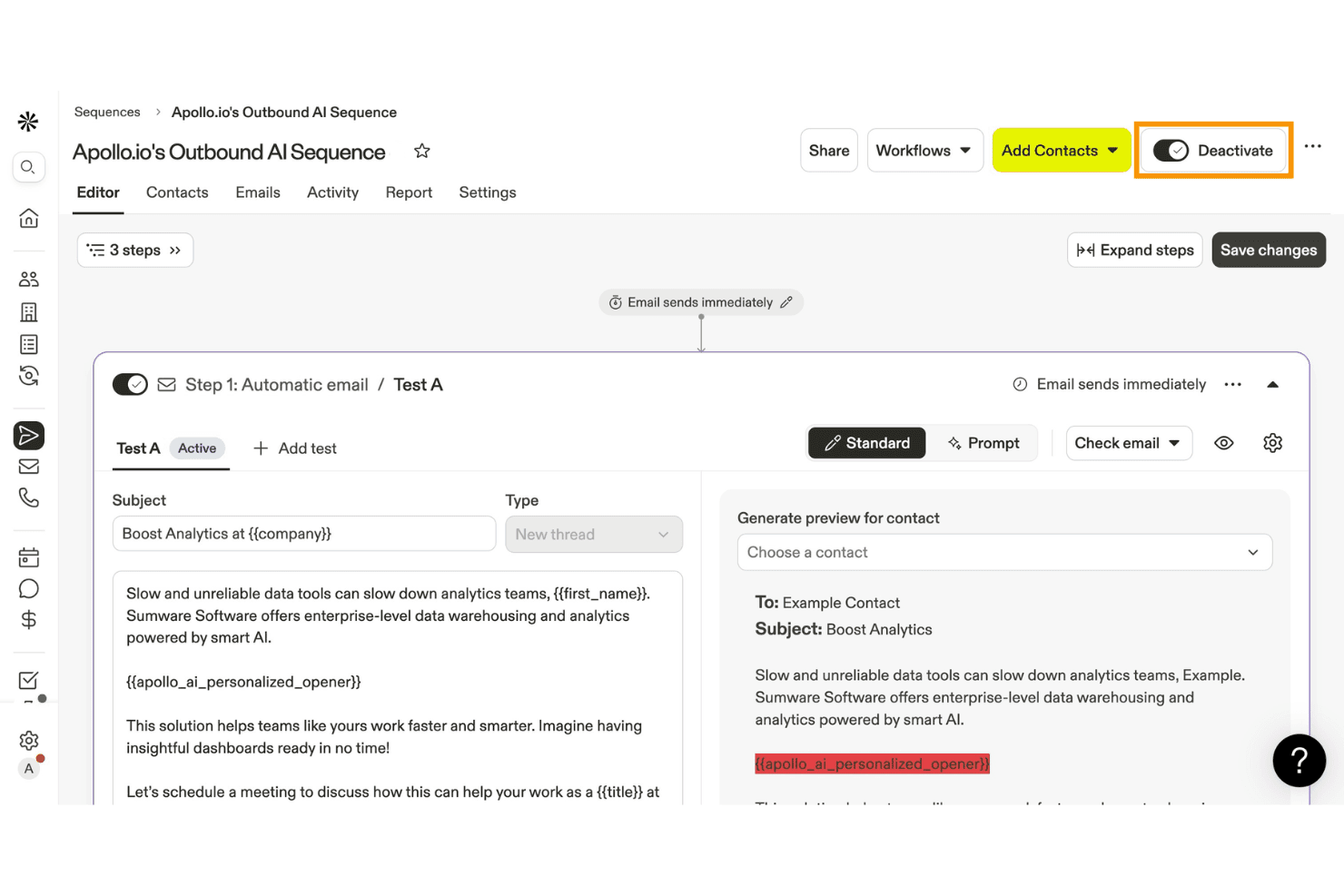
Apollo.io consente agli utenti di creare e automatizzare sequenze di email in uscita con l'IA. Apollo.io è una piattaforma di coinvolgimento e intelligence per le vendite B2B che combina un database di oltre 275 milioni di contatti con sequenze di email a freddo, personalizzazione basata sull'IA e strumenti per la recapitabilità.
Per chi è più indicato Apollo.io?
Apollo.io è progettato per i team di vendita B2B e di generazione della domanda che devono gestire attività di contatto a freddo su larga scala, combinando ricerca di potenziali clienti e sequenze in un'unica piattaforma.
Perché ho scelto Apollo.io
Ho scelto Apollo.io come uno dei migliori perché è progettato specificamente per le attività di contatto a freddo B2B su larga scala e combina un database di oltre 275 milioni di contatti con la Ricerca IA, che inserisce direttamente nel testo delle email informazioni specifiche sui potenziali clienti, come notizie recenti sull'azienda o attività su LinkedIn. Apprezzo anche la logica condizionale delle sequenze, che consente di diramare i percorsi di contatto in base al fatto che un potenziale cliente abbia aperto, fatto clic o ignorato un passaggio precedente.
Funzionalità principali di Apollo.io
- Ricerca nel database dei contatti: Accedi a un database di oltre 275 milioni di contatti con più di 65 attributi di filtro per creare ed esportare elenchi mirati di potenziali clienti direttamente dalla piattaforma.
- Protezione dai rimbalzi: Una funzionalità di monitoraggio configurabile che tiene traccia dei tassi di rimbalzo per ogni sequenza e interrompe automaticamente l'invio quando le soglie raggiungono livelli di avviso o critici.
- Test A/B sui passaggi delle email: Testa diverse varianti di email all'interno di un passaggio della sequenza per individuare il testo che genera tassi di apertura e risposta più elevati.
- Sincronizzazione bidirezionale con il CRM: La sincronizzazione nativa bidirezionale con HubSpot, Salesforce e Pipedrive mantiene allineati in tempo reale i dati dei contatti e delle sequenze nell'intero insieme di strumenti di vendita.
Integrazioni di Apollo.io
Apollo.io offre oltre 50 integrazioni, tra cui HubSpot, Salesforce, Pipedrive, Gmail, Microsoft Outlook, SendGrid e Mailgun. I piani per le organizzazioni includono l'accesso API per le integrazioni personalizzate e Apollo.io supporta anche Zapier.
Pros and Cons
Pros:
- Ampio database B2B per attività di contatto mirate
- Personalizzazione basata sull'IA per ogni destinatario
- Solidi strumenti per la recapitabilità e la diagnostica delle sequenze
Cons:
- Nessuna vera funzionalità di invio in massa
- Nessun editor visuale per email né strumenti per newsletter
Learn more about Apollo.io: Ideale per campagne email e SMS di e-commerce
- Piano gratuito + demo gratuita disponibile
- A partire da $11.20/mese
Visit WebsiteCustomer Rating:4.6/5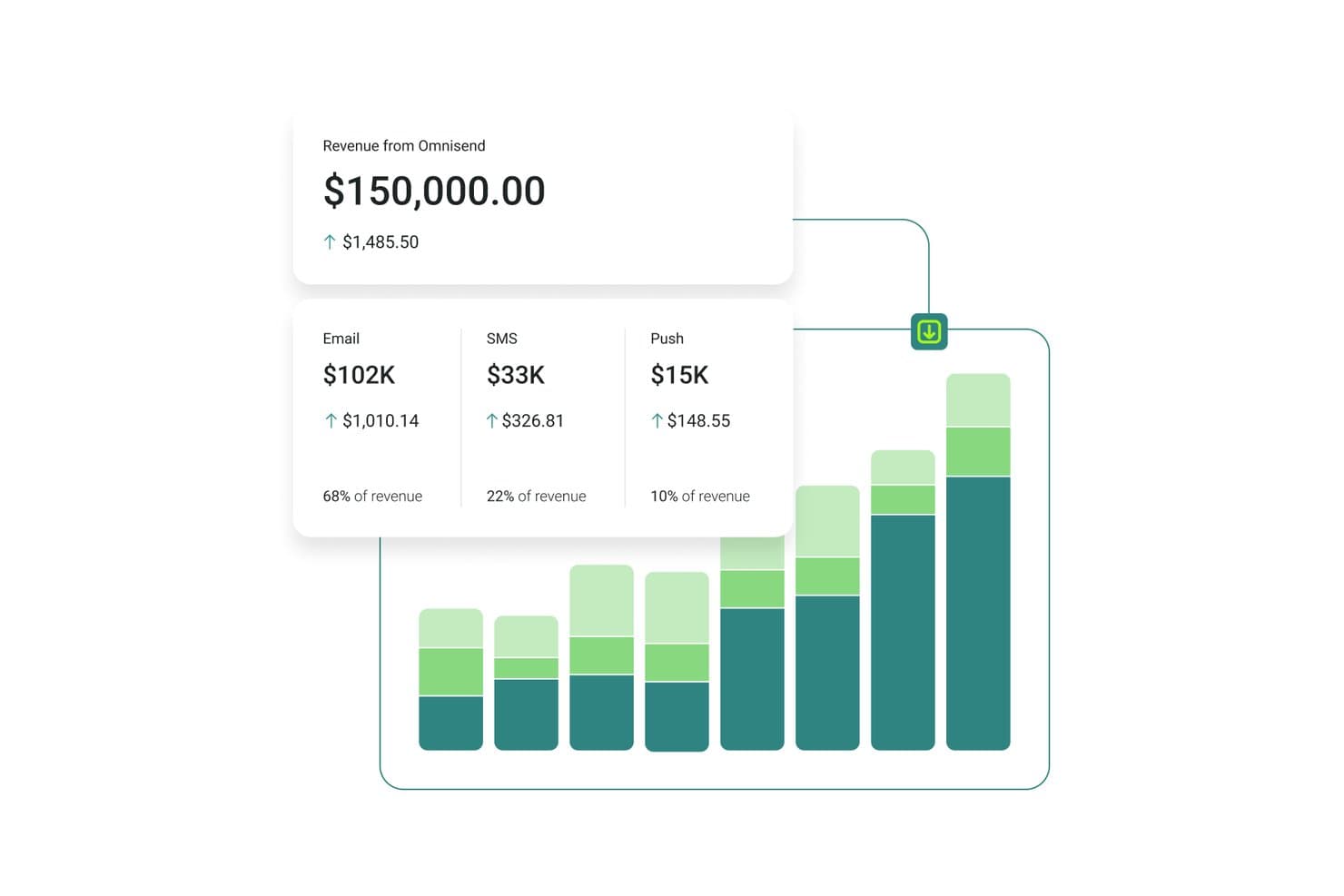
Omnisend monitora i ricavi di email, SMS e notifiche push in un'unica dashboard. Omnisend è una piattaforma di marketing via email e SMS pensata per i brand di e-commerce, che combina l'invio di campagne di massa, i flussi di automazione, la segmentazione del pubblico e la messaggistica multicanale tramite email, SMS e notifiche push web.
Per chi è più adatto Omnisend?
Omnisend è particolarmente adatto ai brand di e-commerce, soprattutto ai commercianti che utilizzano Shopify, WooCommerce e BigCommerce e desiderano gestire email, SMS e notifiche push in un unico posto.
Perché ho scelto Omnisend
Omnisend si è guadagnato un posto nella mia lista ristretta perché è l'unica piattaforma qui presente che sincronizza i dati del catalogo prodotti in tempo reale direttamente nelle email, permettendomi di inserire prezzi, immagini e link reali in una campagna senza mai uscire dall'editor. Mi affido anche alla sua Mappa del ciclo di vita del cliente per segmentare gli invii in base alla fase, dagli acquirenti al primo acquisto ai clienti inattivi, senza dover creare manualmente i filtri ogni volta. Il Reinoltro automatico della campagna ai destinatari che non hanno aperto l'email è una funzione che utilizzo regolarmente per recuperare copertura negli invii promozionali più importanti.
Funzionalità principali di Omnisend
- Generatore di segmenti con IA: Ti permette di descrivere il pubblico di destinazione in linguaggio naturale e genera automaticamente i filtri e il segmento.
- Booster delle campagne: Invia automaticamente di nuovo una campagna ai contatti che non hanno aperto il primo invio, utilizzando un nuovo oggetto.
- Blocchi di contenuti condizionali: Mostra o nasconde specifiche sezioni delle email per singoli destinatari in base a tag, cronologia degli acquisti o fonte di iscrizione.
- Test A/B per le automazioni: Verifica oggetti, contenuti e orari di invio all'interno di flussi di automazione attivi, non solo nelle campagne singole.
Integrazioni di Omnisend
Omnisend offre oltre 280 integrazioni testate, tra cui Shopify, WooCommerce, BigCommerce, Wix, Facebook Lead Ads, Google Ads, Canva e Gorgias. Supporta inoltre API, webhook e connessioni Zapier per integrazioni personalizzate.
Pros and Cons
Pros:
- Automatizza le sequenze per carrelli abbandonati, navigazione e post-acquisto
- Sincronizza i dati dei prodotti in tempo reale direttamente nelle email
- Mappatura del ciclo di vita del cliente per la segmentazione dinamica
Cons:
- Pensato principalmente per aziende orientate all'e-commerce
- Nessuna integrazione CRM aziendale nativa disponibile
Learn more about Omnisend: Ideale per lo storytelling visivo nelle email
- Piano gratuito + prova gratuita disponibili
- A partire da $19/utente/mese (fatturazione annuale)
Visit WebsiteCustomer Rating:4.7/5
Flodesk permette lo storytelling visivo con design email drag-and-drop. Flodesk è un software di invio massivo di email progettato per lo storytelling visivo nelle email. Si rivolge a piccole imprese e imprenditori creativi che danno valore sia all’estetica che alla funzionalità nelle loro campagne di email marketing. Grazie alla sua interfaccia di design intuitiva e alla possibilità di inviare email illimitate, Flodesk soddisfa l’esigenza di una comunicazione visivamente accattivante senza la complessità tipicamente associata agli strumenti di email marketing.
Perché ho scelto Flodesk
Ho scelto Flodesk per la sua capacità unica di unire la flessibilità del design alle funzionalità di marketing, soprattutto per chi dà priorità allo storytelling visivo nelle campagne email. Il builder drag-and-drop della piattaforma permette agli utenti di creare email bellissime e responsive senza alcuna conoscenza di codice. Inoltre, le funzionalità di automazione di Flodesk permettono di impostare flussi di lavoro per coltivare i lead e coinvolgere gli iscritti in base alle loro interazioni, offrendo un modo semplice per mantenere le relazioni con i clienti. Con queste caratteristiche e l’invio illimitato di email, Flodesk aiuta le aziende a migliorare il loro email marketing.
Caratteristiche principali di Flodesk
Oltre alle sue capacità di design e automazione, Flodesk offre:
- Modelli personalizzabili: gli utenti possono scegliere tra diversi modelli e personalizzarli per adattarli all’estetica del proprio brand.
- Creazione di moduli: crea e integra moduli direttamente nel tuo sito web per raccogliere lead senza interruzioni.
- Gestione degli iscritti: gestisci e segmenta facilmente la tua lista di email per raggiungere in modo efficace pubblici specifici.
- Analisi delle email: ottieni informazioni sulle prestazioni delle email con analisi dettagliate che ti aiutano a perfezionare la tua strategia nel tempo.
Integrazioni Flodesk
Le integrazioni includono HoneyBook, BookFunnel, Canva, Shopify, Squarespace, ThriveCart, Wix e Manychat. Queste integrazioni migliorano la produttività e semplificano le attività di marketing, permettendo agli utenti di collegare Flodesk a diverse piattaforme per un approccio di marketing completo.
Pros and Cons
Pros:
- Supporto efficace per le piccole e creative imprese
- Opzioni di branding personalizzabili senza bisogno di codice
- Editor drag-and-drop intuitivo che semplifica la creazione delle email
Cons:
- Poche opzioni di integrazione oltre le piattaforme principali
- Segnalati occasionali tempi di caricamento lenti
Learn more about Flodesk: Ideale per campagne email personalizzate
- Demo gratuita + piano gratuito disponibile
- Da $45/mese
Visit WebsiteCustomer Rating:4.6/5
Klaviyo invia campagne di massa con contenuti di prodotto personalizzati. Klaviyo supporta le aziende che desiderano inviare campagne email più rilevanti utilizzando i dati dei clienti. Progettato per aziende di varie dimensioni, combina le informazioni sui clienti con strumenti di email marketing, permettendo di creare campagne mirate basate su comportamenti reali. Che il tuo obiettivo sia aumentare il coinvolgimento o incrementare le vendite, Klaviyo aiuta a unificare e attivare i dati dei clienti in tempo reale per guidare le tue decisioni di comunicazione.
Perché ho scelto Klaviyo
Ho scelto Klaviyo per la sua capacità di utilizzare i dati dei clienti per creare campagne email di massa personalizzate. I suoi strumenti di segmentazione permettono di definire gruppi di clienti specifici in base a comportamento, storico degli acquisti e coinvolgimento, rendendo i messaggi più rilevanti. La piattaforma supporta inoltre flussi automatizzati e campagne programmate, facilitando l'invio di email tempestive senza sforzo manuale. Insieme, queste funzionalità rendono Klaviyo una scelta pratica per le aziende che vogliono avere maggiore controllo sulla propria strategia di email marketing di massa.
Caratteristiche principali di Klaviyo
Oltre alle campagne email personalizzate, Klaviyo offre:
- Marketing omnicanale: Coinvolgi il tuo pubblico tramite email, SMS e social media per un'esperienza cliente coerente.
- Approfondimenti basati su intelligenza artificiale: Sfrutta l'intelligenza artificiale per ottenere informazioni sul comportamento dei clienti e ottimizzare le tue strategie di email marketing.
- Template personalizzabili: Crea rapidamente email accattivanti con oltre 160 template personalizzabili e un editor drag-and-drop.
- Integrazione dei dati in tempo reale: Integra facilmente oltre 350 applicazioni per unificare e attivare i dati dei clienti in tutte le tue attività di marketing.
Integrazioni di Klaviyo
Le integrazioni includono Shopify, BigCommerce, WooCommerce, Magento, Salesforce Commerce Cloud, Stripe, Facebook, Instagram, Google Ads e Zendesk.
Pros and Cons
Pros:
- Segmentazione avanzata per campagne email mirate
- Funzionalità di automazione complete per il marketing personalizzato
- Marketing omnicanale, incluso SMS e social media
Cons:
- La struttura dei prezzi più elevata può scoraggiare le piccole imprese
- La struttura dei prezzi più elevata può scoraggiare le piccole imprese
Learn more about Klaviyo: Miglior piano gratuito ricco di funzionalità
- Piano gratuito + demo gratuita disponibile
- A partire da $7/mese (fatturato annualmente)
Visit WebsiteCustomer Rating:4.6/5
Sender ti permette di creare modelli di email per facilitare l'invio massivo. Sender aiuta il tuo team a inviare e automatizzare campagne email su larga scala con strumenti per creare newsletter, segmentare il pubblico e gestire i follow-up SMS che si adattano ai tuoi obiettivi di outreach. Lo troverai utile se gestisci attività di email marketing per una piccola impresa, un negozio ecommerce o un pubblico in crescita e desideri controllo sull'automazione e il monitoraggio senza dover passare da uno strumento all'altro. Crea contenuti coinvolgenti garantendo che i tuoi messaggi raggiungano il pubblico previsto.
Perché ho scelto Sender
Ho scelto Sender perché il suo piano gratuito ricco di funzionalità offre veri strumenti per l'invio massivo di email fino a 2.500 iscritti e 15.000 email/mese. Include automazione, segmentazione e un editor drag-and-drop. Noterai che i flussi automatizzati ti permettono di attivare sequenze in base al comportamento degli iscritti e programmare follow-up, aiutandoti a mantenere il pubblico coinvolto senza dover gestire più strumenti. Inoltre, mi piace che puoi segmentare le liste per adattare i messaggi a diversi gruppi e integrare email transazionali come parte delle tue campagne. Queste capacità lo rendono ideale per team focalizzati sulla crescita dell'email marketing con un budget limitato.
Funzionalità principali di Sender
Oltre alle sue funzioni principali, altre caratteristiche degne di nota includono:
- A/B Testing: Questa funzione ti consente di testare versioni diverse delle tue email per vedere quale funziona meglio, ottimizzando così le tue campagne per risultati migliori.
- Dashboard Analitica: Monitora aperture, clic e metriche di consegna per misurare il coinvolgimento.
- Email Transazionali: Sender ti permette di automatizzare l'invio di email transazionali, assicurando comunicazioni tempestive con i tuoi iscritti.
- Strumenti di acquisizione lead: La piattaforma offre strumenti per acquisire lead direttamente dal tuo sito web, aiutandoti a far crescere efficacemente la tua lista email.
Integrazioni di Sender
Le integrazioni includono WordPress, WooCommerce e Zapier. È disponibile una API per integrazioni personalizzate.
Pros and Cons
Pros:
- Offre template reattivi per email ottimizzate su dispositivi mobili.
- Interfaccia intuitiva che semplifica la creazione delle campagne email.
- Piano gratuito generoso che supporta fino a 2.500 iscritti.
Cons:
- Funzionalità avanzate limitate rispetto ai concorrenti.
- Il piano gratuito include il branding di Sender che può influire sulla professionalità.
Learn more about Sender: Ideale per automazione e personalizzazione
- Prova gratuita di 14 giorni + demo gratuita disponibile
- Da $100/mese
Visit WebsiteCustomer Rating:4.2/5
Customer.io automatizza i flussi di lavoro email di massa utilizzando trigger basati su eventi e dati utente. Quando desideri avere un maggiore controllo sul tuo email marketing, Customer.io offre una piattaforma pensata per inviare messaggi mirati e automatizzati basati sul comportamento dei clienti. È ideale per i team che devono gestire campagne su basi utenti in crescita senza affidarsi a flussi di lavoro manuali. Utilizzare dati di prima parte ti aiuta a inviare messaggi pertinenti agli utenti giusti al momento giusto.
Perché ho scelto Customer.io
Ho scelto Customer.io perché semplifica la gestione di grandi campagne email grazie all'automazione e al targeting basato sugli utenti. Il Visual Workflow Builder ti permette di configurare flussi email con passaggi drag-and-drop, così puoi creare campagne multi-step senza una pesante configurazione tecnica. I trigger sugli eventi consentono ai team di inviare messaggi in base alle reali azioni dei clienti, aiutandoli a offrire email tempestive e pertinenti che favoriscono la comunicazione continua con il cliente.
Caratteristiche principali di Customer.io
Oltre alle potenzialità di automazione e personalizzazione, Customer.io offre:
- Supporto omnicanale: Offri un'esperienza cliente coerente su email, SMS e messaggi in-app.
- Design Studio: Crea insieme messaggi di alta qualità con un editor intuitivo.
- Test A/B: Sperimenta diversi contenuti e strategie di messaggistica per ottimizzare il coinvolgimento.
- Sincronizzazione del pubblico per annunci: Aggiorna automaticamente i segmenti di pubblico attraverso i principali network pubblicitari per strategie di marketing coerenti.
Integrazioni di Customer.io
Le integrazioni comprendono Salesforce, Google Analytics, Segment, Slack, Twilio, Stripe, Shopify, WordPress, Zendesk e HubSpot.
Pros and Cons
Pros:
- La messaggistica multicanale supporta email, SMS e notifiche push
- Il tracciamento comportamentale offre approfondimenti sulle preferenze dei clienti
- Il builder visivo dei flussi di lavoro è flessibile e supporta gli utenti non tecnici
Cons:
- Le funzionalità di reportistica sono meno complete rispetto ai concorrenti
- Alcuni utenti potrebbero trovare la complessità iniziale della piattaforma un po' scoraggiante
Learn more about Customer.io: Ideale per l'editing drag-and-drop
- Piano gratuito disponibile
- A partire da $12/mese
Visit WebsiteCustomer Rating:4.7/5
MailerLite consente alle aziende di progettare, automatizzare e monitorare campagne email. MailerLite è uno strumento di email marketing pensato per le aziende che desiderano creare, inviare e gestire campagne in un unico posto. Supporta i team offrendo strumenti di design, funzionalità di automazione e monitoraggio delle prestazioni per aiutare a gestire la comunicazione e il coinvolgimento tramite email.
Perché ho scelto MailerLite: MailerLite offre al tuo team un editor semplice drag-and-drop che rende facile la creazione delle email, anche se nessuno è un designer. Puoi creare campagne da zero oppure partire da modelli preimpostati e adattarli al tuo brand. L'editor include blocchi per immagini, pulsanti, video e countdown, quindi il tuo team può essere creativo senza dover scrivere codice. Puoi anche riutilizzare i layout tra le campagne per mantenere la coerenza.
Caratteristiche principali e integrazioni:
Funzionalità includono un costruttore di automazioni che ti permette di impostare flussi di lavoro personalizzati. Puoi segmentare in base agli interessi utilizzando dati di click e apertura. Sondaggi e quiz possono essere inseriti direttamente nelle email per raccogliere feedback o qualificare i lead.
Integrazioni includono Shopify, WordPress, Zapier, Stripe, WooCommerce, PayPal, Squarespace, Typeform, Facebook e Google Sheets.
Pros and Cons
Pros:
- Configurazione rapida per i nuovi utenti
- Permette layout a blocchi riutilizzabili
- Gli elementi email senza codice funzionano bene
Cons:
- L'editor di automazione può risultare lento
- Le anteprime su mobile non sono completamente accurate
 Ideale per la privacy degli utenti
- Prova gratuita di 14 giorni + piano gratuito + demo gratuita disponibile
- A partire da $4/mese (fatturazione annuale)
Visit WebsiteCustomer Rating:4.3/5
Zoho Campaigns aiuta le aziende a realizzare campagne email focalizzate sulla privacy. Zoho Campaigns è uno strumento di email marketing progettato per le aziende che desiderano migliorare la propria comunicazione via email dando priorità alla privacy. È particolarmente utile per i team di marketing che vogliono gestire campagne in modo efficace senza affidarsi al tracciamento di terze parti.
Perché ho scelto Zoho Campaigns: Zoho Campaigns si distingue per l’attenzione alla privacy dell’utente, utilizzando strumenti di tracciamento proprietari. Include modelli di email personalizzabili e flussi di lavoro automatizzati che aiutano a creare e gestire campagne in modo efficiente. Puoi effettuare test A/B per ottimizzare le tue email e ottenere approfondimenti grazie ad analisi dettagliate. L’integrazione con piattaforme e-commerce come Shopify supporta iniziative di marketing mirate.
Funzionalità principali & integrazioni:
Le funzionalità includono l’ottimizzazione dell’orario di invio delle email, che garantisce la consegna dei messaggi nei momenti migliori, e l’autenticazione del dominio per migliorare la recapitabilità. Puoi gestire campagne sia email sia SMS da un’unica interfaccia, e usare modelli personalizzabili per creare contenuti coinvolgenti.
Le integrazioni includono Zoho CRM, Shopify, WooCommerce, Eventbrite, SurveyMonkey, LinkedIn, Facebook, Twitter, Google Analytics e Slack.
Pros and Cons
Pros:
- Flussi di automazione semplici
- Analisi approfondite
- Test A/B efficaci
Cons:
- Modelli di design basilari
- Problemi di integrazione occasionali
Learn more about Zoho Campaigns: Ideale per campagne multilingue
- Piano gratuito disponibile
- Da $37/mese
Visit WebsiteCustomer Rating:4.3/5
Benchmark Email aiuta i team a progettare, automatizzare e monitorare email brandizzate. Benchmark Email è una piattaforma di marketing progettata per aiutare i team a creare e inviare email brandizzate su larga scala. Supporta aziende di tutte le dimensioni che desiderano gestire i loro contenuti email e le comunicazioni con il pubblico da un unico luogo. Offre strumenti per progettare email, automatizzare i follow-up e monitorare il coinvolgimento.
Perché ho scelto Benchmark Email: Benchmark Email consente al tuo team di gestire campagne in più lingue senza difficoltà aggiuntive. Puoi creare email in lingue diverse utilizzando il suo editor e scegliere modelli che supportano caratteri speciali e testo da destra a sinistra. Le impostazioni della lingua sono semplici da modificare nella dashboard dell'account e puoi segmentare i contatti per lingua. Inoltre, permette di visualizzare un'anteprima delle email in varie lingue prima dell'invio.
Funzionalità principali & integrazioni:
Funzionalità includono modelli di email drag and drop, che rendono veloce la creazione di campagne brandizzate. Il tuo team può eseguire test A/B per confrontare oggetti o layout. Ottieni anche report in tempo reale che mostrano aperture, clic e rimbalzi.
Integrazioni incluse Shopify, Google Sheets, Zapier, WordPress, Facebook, Slack, Typeform, Eventbrite, PayPal e Stripe.
Pros and Cons
Pros:
- Traduce i modelli con poca configurazione
- Facile passare da una versione linguistica all'altra
- Ottimo per team di marketing regionali
Cons:
- Non ideale per email transazionali
- Poche funzionalità CRM native
Learn more about Benchmark Email:
Altri software per l'invio di email di massa
Ecco alcune opzioni aggiuntive di software per l’invio di email di massa che non sono entrate nel mio elenco, ma che vale comunque la pena prendere in considerazione:
- 11SendGridIdeale per l’invio di email tramite API
- 12Elastic EmailIdeale per design di email potenziato dall’IA
- 13Constant ContactIdeale per combinazioni email e SMS
- 14CampaignerIdeale per automazioni avanzate
- 15SMTP.comIdeale per l'alta consegna a livello enterprise
- 16BrevoIdeale per il coinvolgimento a 360°
- 17Vertical ResponseIdeale per piccole imprese
- 18Click DimensionsIdeale per l'integrazione con Microsoft Dynamics
- 19GMassIdeale per l'integrazione con Gmail
- 20EmailOctopusIdeale per la crescita della lista email
Come Valuto i Software per l'Invio di Email di Massa
Valuto su due livelli: i requisiti base indispensabili—invio affidabile a 100.000 contatti, recapito in posta in arrivo, segmentazione delle liste—e i fattori distintivi che separano le piattaforme meritevoli di essere raccomandate.
Funzionalità di Base (Requisiti Indispensabili per Questa Lista)
Quando seleziono gli strumenti per la mia lista, assegno a ciascun tool un punteggio da 0 (non offre la funzionalità) a 5 (eccelle in quest'area) per ciascuna funzionalità di base elencata sotto. Poi, calcolo il punteggio totale del tool come percentuale. Ogni strumento deve raggiungere un punteggio minimo totale del 75% per essere considerato per l'inclusione.
- Invio di Email in Massa: Verifico che la piattaforma possa gestire campagne ad alto volume con pianificazione dell'invio, consegna per fuso orario e limitazione del traffico per evitare blocchi dai provider.
- Gestione delle Liste di Contatti: Importare un file CSV con 50.000 iscritti deve essere semplice. Cerco campi personalizzati, etichettatura, liste di esclusione e aggiornamenti dinamici delle liste.
- Editor Email & Modelli: Valuto gli editor drag-and-drop per output responsive, blocchi di contenuto riutilizzabili e varietà di modelli per diversi settori.
- Infrastruttura di Deliverability: La configurazione di SPF, DKIM e DMARC deve essere intuitiva. Opzioni di IP dedicato e strumenti di riscaldamento sono importanti per i team che inviano grandi volumi.
- Personalizzazione & Segmentazione: I "merge tag" sono il minimo. Cerco blocchi di contenuto condizionale e segmentazioni comportamentali come “ha aperto le ultime 3 campagne”.
- Analisi & Report delle Campagne: Ogni strumento traccia aperture e click. Valuto se le dashboard mostrano tassi di bounce, trend di deliverability e risultati di A/B test.
Una volta che dispongo di una lista di strumenti che rispondono a questi criteri, valuto cosa distingue ciascuna piattaforma.
Fattori Distintivi (Cosa Distingue i Fornitori)
Ecco come confronto e metto a confronto i diversi fornitori:
Funzionalità Distintive
I flussi di automazione visuale distinguono i semplici sender dalle piattaforme in grado di gestire un intero ciclo di vita—serie di benvenuto, flussi di riattivazione e sequenze post-acquisto attivate da comportamenti reali. L’A/B testing è un altro aspetto che valuto. Cerco strumenti che permettano di eseguire split test su oggetto, contenuto e orario di invio all’interno di una singola campagna. Per i team e-commerce, la possibilità di attribuire i ricavi a determinati invii rende molto più semplice dimostrare il ROI di ogni campagna.
Oltre le Funzionalità
La struttura dei prezzi qui ha molta importanza. Alcune piattaforme fanno pagare per ogni iscritto mentre altre in base alle email inviate—un team con una lista ampia ma a bassa frequenza paga in modo molto diverso a seconda del modello. Valuto anche quanto bene uno strumento si integra con il tuo stack esistente, soprattutto CRM e piattaforme e-commerce dove risiedono i dati dei contatti. Un altro fattore distintivo che esamino è la conformità normativa. La gestione integrata dei consensi, i flussi double opt-in e la gestione delle disiscrizioni devono rispettare i requisiti GDPR, CAN-SPAM e CASL senza necessità di soluzioni manuali.
Come scegliere un software per l'invio di email di massa
È facile perdersi in lunghi elenchi di funzionalità e strutture tariffarie complesse. Per aiutarti a rimanere concentrato mentre affronti il tuo specifico processo di selezione del software, ecco un elenco di fattori da tenere a mente:
| Fattore | Cosa considerare |
| Scalabilità | Il software può crescere insieme alla tua azienda? Considera le esigenze future e se lo strumento è in grado di gestire volumi crescenti di email senza costi aggiuntivi. |
| Integrazioni | Funziona con gli strumenti che già utilizzi? Verifica la compatibilità con sistemi CRM, piattaforme di analisi e altri strumenti di marketing che usi. |
| Personalizzazione | Quanto è flessibile il software? Cerca strumenti che ti consentano di adattare flussi di lavoro e modelli al tuo marchio e alla tua strategia di marketing. |
| Facilità d'uso | L'interfaccia è intuitiva? Assicurati che il tuo team possa utilizzarla facilmente senza una formazione approfondita o una curva di apprendimento ripida. |
| Implementazione e avvio | Quanto velocemente puoi iniziare? Valuta la disponibilità di tutorial, assistenza e risorse per aiutare il tuo team a iniziare a utilizzare il software in modo efficace. |
| Costo | Il prezzo rientra nel tuo budget? Guarda oltre il costo iniziale e considera le spese a lungo termine, inclusi gli aggiornamenti e le funzionalità aggiuntive. |
| Misure di sicurezza | Quanto sono sicuri i tuoi dati? Assicurati che il software sia conforme alle normative e offra crittografia e altre misure di sicurezza per proteggere le informazioni dei clienti. |
| Requisiti di conformità | Il software soddisfa gli standard del settore? Considera eventuali esigenze specifiche di conformità, come il GDPR, e se lo strumento è in grado di supportarle. |
Che cos'è un software per l'invio di email di massa?
Il software per l'invio massivo di email è uno strumento che consente alle aziende di inviare grandi volumi di email a clienti e potenziali clienti. I professionisti del marketing e i titolari di piccole imprese utilizzano generalmente questi strumenti per coinvolgere il pubblico e promuovere prodotti o servizi. Le funzionalità di automazione, segmentazione e analisi aiutano a definire il targeting, gestire le campagne e misurare i risultati. Questi strumenti offrono valore migliorando l'efficienza della comunicazione e il coinvolgimento dei clienti.
Funzionalità del software per l'invio massivo di email
Quando scegli un software per l'invio massivo di email, presta attenzione alle seguenti funzionalità principali:
- Automazione delle email: automatizza l'invio dei messaggi agli orari specificati, contribuendo a mantenere una comunicazione costante con il pubblico.
- Segmentazione: consente di suddividere la lista di email in gruppi mirati, migliorando il coinvolgimento grazie all'invio di contenuti pertinenti.
- Analisi e report: fornisce informazioni sulle prestazioni delle email, aiutando a monitorare i tassi di apertura, i clic e le conversioni.
- Modelli personalizzabili: offre layout di email predefiniti che puoi adattare al tuo marchio, risparmiando tempo nel lavoro di progettazione.
- Test A/B: consente di testare diverse versioni delle email per verificare quale offre prestazioni migliori, ottimizzando le campagne.
- Gestione delle liste: aiuta a organizzare e mantenere le liste degli iscritti, garantendo l'accuratezza dei dati e la conformità alle normative.
- Funzionalità di integrazione: si collega ad altri strumenti come i sistemi CRM e le piattaforme di social media, potenziando le attività di marketing.
- Adattabilità ai dispositivi mobili: garantisce che le email vengano visualizzate correttamente su tutti i dispositivi, migliorando l'esperienza e il coinvolgimento degli utenti.
- Funzionalità di sicurezza: protegge i dati sensibili mediante la crittografia e la conformità agli standard del settore, tutelando le informazioni dei clienti.
- Aggiornamenti in tempo reale: fornisce accesso immediato ai dati delle campagne, consentendo di prendere rapidamente decisioni informate.
Vantaggi del software per l'invio massivo di email
L'implementazione di un software per l'invio massivo di email offre diversi vantaggi al tuo team e alla tua azienda. Ecco alcuni dei vantaggi che puoi aspettarti:
- Maggiore coinvolgimento: utilizzando segmentazione e personalizzazione, invii contenuti più pertinenti, ottenendo tassi di apertura e di clic più elevati.
- Efficienza in termini di tempo: le funzionalità di automazione consentono di programmare le email e gestire le campagne senza interventi manuali, facendo risparmiare tempo al team.
- Decisioni basate sui dati: gli strumenti di analisi e report offrono informazioni sulle prestazioni delle campagne, aiutandoti a prendere decisioni di marketing informate.
- Coerenza del marchio: i modelli personalizzabili garantiscono che le email rispecchino l'aspetto e lo stile del marchio, mantenendo la coerenza nelle comunicazioni.
- Maggiore portata: l'integrazione con piattaforme CRM e di social media amplia le attività di marketing, raggiungendo un pubblico più vasto.
- Risparmio sui costi: rivolgendoti al pubblico giusto con email efficaci, massimizzi il ritorno sull'investimento del budget di marketing.
- Conformità normativa: le funzionalità di gestione delle liste e di sicurezza aiutano a mantenere l'accuratezza dei dati e a rispettare le normative del settore.
Costi e prezzi del software per l'invio massivo di email
La scelta di un software per l'invio massivo di email richiede la comprensione dei diversi modelli e piani tariffari disponibili. I costi variano in base alle funzionalità, alle dimensioni del team, ai componenti aggiuntivi e ad altri fattori. La tabella seguente riassume i piani più comuni, i relativi prezzi medi e le funzionalità tipicamente incluse nelle soluzioni software per l'invio massivo di email:
Tabella comparativa dei piani del software per l'invio massivo di email
| Tipo di piano | Prezzo medio | Funzionalità comuni |
| Piano gratuito | $0 | Modelli di email di base, automazione limitata e analisi di base. |
| Piano personale | $10-$30 /utente /mese | Modelli personalizzabili, segmentazione di base e programmazione delle email. |
| Piano aziendale | $50-$100 /utente /mese | Automazione avanzata, analisi dettagliate e funzionalità di test A/B. |
| Piano per grandi aziende | $150-$300 /utente /mese | Assistenza dedicata, integrazioni avanzate e funzionalità di sicurezza avanzate. |
Domande frequenti sul software per l'invio di email di massa
Ecco alcune risposte alle domande comuni sul software per l’invio di email di massa:
Qual è la differenza tra email collettive ed email di massa?
Email collettive ed email di massa sono spesso usate come sinonimi ed entrambe indicano l’invio di un singolo messaggio a molti destinatari. Il punto fondamentale è assicurarsi che le email siano pertinenti e personalizzate, per evitare che vengano contrassegnate come spam. Gli strumenti che offrono funzionalità di segmentazione e personalizzazione possono contribuire a migliorare la strategia.
Quali sono le nuove regole per chi invia email collettive stabilite da Google e Yahoo?
A partire da febbraio 2024, Google e Yahoo applicano linee guida più rigide per chi invia email collettive, con particolare attenzione all’autenticazione, ai tassi di spam e alle opzioni semplici per annullare l’iscrizione. Assicurati che le tue email siano conformi implementando un’autenticazione corretta e offrendo una procedura chiara per annullare l’iscrizione. Questo aiuta a mantenere la recapitabilità e il coinvolgimento.
È legale inviare email di massa?
Sì, l’invio di email di massa è legale, ma devi rispettare normative come il CAN-SPAM negli Stati Uniti o il GDPR in Europa. Queste leggi richiedono il consenso esplicito dei destinatari, informazioni accurate sul mittente e opzioni semplici per rinunciare. Garantire la conformità aiuta a proteggere la reputazione del tuo brand e a evitare sanzioni.
Come posso inviare email di massa senza farle finire nello spam?
Per evitare le cartelle dello spam, concentrati sulla pulizia della lista, utilizzando procedure di doppio opt-in e pulendo regolarmente la tua lista di email. Personalizza i contenuti ed evita il linguaggio associato allo spam. Anche i protocolli di autenticazione come SPF, DKIM e DMARC contribuiscono a migliorare la recapitabilità e a creare fiducia con i provider di email.
Con quale frequenza dovrei inviare email di massa?
La frequenza ideale dipende dal tuo pubblico e dai tuoi contenuti. Un coinvolgimento regolare è fondamentale, ma troppe email possono portare gli utenti a disiscriversi. Prova frequenze diverse per individuare quella più adatta al tuo pubblico, assicurandoti che ogni email offra valore e sia in linea con i tuoi obiettivi di marketing.